
#binanceagentos
binanceagentos
6,224 views
148 Discussing
Hot
Latest

·
--
Binance AI vs Binance AI Pro vs Agent OS: Which AI Tool Fits Your Trading Style?Binance now has three AI tools under one roof, and the names are easy to mix up. Binance AI helps you understand the market. Binance AI Pro turns your trading ideas into tested, automated workflows. Binance Agent OS lets developers and power users plug their own AI agents into Binance. Here's how they differ, who each one is built for, and how to pick without overcomplicating it.
The big picture: Binance Intelligence
Binance groups all three tools under one name, Binance Intelligence, an AI layer built into the Binance experience. Co-CEO Richard Teng and VP of Product Jeff Li presented it in a livestream on October 5, and Binance's pitch is simple: bring institutional-grade AI to every kind of user, from a first-time app user to a developer building agents.
The trick is that the three products aren't rivals. They're three doors into the same idea, and each door suits a different person.
Binance AI: the easy button
Binance AI is the free layer that adapts what you see to what you know. It pulls together charts, news, social content, on-chain data and research tools, then adjusts the interface to your experience level, interests and activity. Features include "For You" tags, market briefings, smart tooltips and Master Trade, and it has been rolling out gradually since the Binance Intelligence launch.
It fits you if you're newer to crypto, you want context on why the market is moving, or you'd rather learn first and act later. Think of it as a very well-read guide sitting next to your screen. It explains. You decide.
Binance AI Pro: from idea to workflow
Binance AI Pro officially launched on October 19, 2026, and it's the step up for people who already have trading ideas but don't want to write code. Here's the flow:
Describe your idea in plain language, on the Binance app or on the web at ai.binance.com.Review the Strategy Canvas. AI Pro fills gaps, tightens the logic, and shows the strategy as a visual workflow you can inspect and adjust.Test with paper trading. Every strategy can run on virtual funds before it touches real money.Approve it yourself. Going live is a separate review-and-approve step.Fund a dedicated sub-account. Live strategies run in an isolated AI Strategy Account, and you transfer the funds manually.
AI Pro supports Spot and USDⓈ-M Futures strategies (subject to regional restrictions), with more products planned. It isn't only about trading either: workflows can also handle daily reports, market monitoring, alerts and signal generation. You can keep up to 10 strategies across paper trading, live trading and signals.
There are two plans. The Standard plan is free and includes 250,000 monthly credits. Premium costs 19.99 $USDC per month and adds a much larger credit allowance and access to more models.
Worth knowing: historical backtesting isn't available in the initial release. Binance offers automated code testing and paper trading instead. And, as with every Binance AI tool, outputs aren't investment advice and you remain responsible for your decisions.
It fits you if you think in strategies ("if this happens, do that"), you want automation, and you like seeing the logic laid out before anything runs.
Binance Agent OS: bring your own AI
Agent OS is the developer layer. Launched on August 20, 2026, it bundles Binance APIs, the Wallet Agentic Hub, x402 programmable payments, the Skill Hub and an MCP server. Binance says it has passed 280,000 calls a day.
With the Binance MCP Server, you connect an AI client such as Claude Code, Claude Desktop, Codex, ChatGPT, VS Code or Grok Bot with a single URL, no API keys stored on your device. Per Binance's documentation, your agent can read market data, check balances, trade Spot, Margin, Convert and Futures, and move funds between wallets inside its own sub-account.
The guardrails are built in, and Binance spells them out:
A dedicated Agentic sub-account, isolated from your main account.It starts empty. You fund it manually from the Binance web interface.No withdrawal scope, ever. The agent can't send funds to an external address.Confirm first. Every order, cancel and transfer asks for your approval.Emergency stop. One step disconnects all agents and cancels open positions and orders in that sub-account.
It fits you if you already work with an AI assistant or build your own tools, and you want Binance's data and execution inside that setup.
So which one fits your trading style?
"I want to understand the market better." Start with Binance AI."I have a strategy in my head but I don't code." Try Binance AI Pro."I already use an AI client, or I build my own tools." Go with Agent OS."I'm not sure." Begin with Binance AI, test an idea in AI Pro's paper trading, and look at Agent OS when you're ready to build.
A helpful way to think about it comes from Binance Research, which draws a line between AI co-pilots that help you interpret information and AI agents that monitor and act within set parameters. Binance AI sits on the co-pilot side. AI Pro and Agent OS lean toward the agent side. The more an AI does for you, the more the guardrails matter.
Safety habits for all three
These come straight from Binance's own guidance and are good practice with any AI tool:
You are responsible for what your AI does. Binance's documentation says so plainly.Paper trade first. Test before real money is involved.Fund only what you can afford to lose. The empty-by-default sub-account is a feature, so keep the balance modest.Grant the fewest permissions you need. Add more only when you have to.Read every confirmation. That step exists to protect you.Respect leverage. Derivatives and margin carry substantial risk, and AI can misread data or send wrong parameters.Know your emergency stop before you need it.
Try it yourself
[Try Binance AI Pro](https://www.binance.com/en/learn/binance-ai-pro) (the Standard plan is free to start)[Explore Binance Agent OS](https://www.binance.com/en/agent-os)[Read the Binance MCP Server documentation](https://developers.binance.com/en/docs/agent-native/mcp-server/agentic)[Learn more about Binance Intelligence](https://www.binance.com/en/AI-overview)[Read Binance Research for deeper AI and crypto reports](https://www.binance.com/en/research)Curious about the ecosystem behind it? You can buy $BNB [on Binance](https://www.binance.com/en/crypto/buy/USD/BNB). This is not a recommendation. Crypto is volatile, so only use money you can afford to lose.
{future}(BNBUSDT)
Your turn
Which door would you open first: Binance AI, Binance AI Pro or Agent OS? Tell me in the comments what you'd want an AI to handle for you, and what you'd never hand over.
Disclosure: This post is my own view, not an official Binance statement, and it is for education only, not financial advice. Trading, especially with leverage, involves a high risk of loss.
#BinanceAIPro #BinanceAgentOS #BinanceIntelligence #Write2Earn
Binance AI vs Binance AI Pro vs Agent OS: Which AI Tool Fits Your Trading Style?
Binance now has three AI tools under one roof, and the names are easy to mix up. Binance AI helps you understand the market. Binance AI Pro turns your trading ideas into tested, automated workflows. Binance Agent OS lets developers and power users plug their own AI agents into Binance. Here's how they differ, who each one is built for, and how to pick without overcomplicating it.
The big picture: Binance Intelligence
Binance groups all three tools under one name, Binance Intelligence, an AI layer built into the Binance experience. Co-CEO Richard Teng and VP of Product Jeff Li presented it in a livestream on October 5, and Binance's pitch is simple: bring institutional-grade AI to every kind of user, from a first-time app user to a developer building agents.
The trick is that the three products aren't rivals. They're three doors into the same idea, and each door suits a different person.
Binance AI: the easy button
Binance AI is the free layer that adapts what you see to what you know. It pulls together charts, news, social content, on-chain data and research tools, then adjusts the interface to your experience level, interests and activity. Features include "For You" tags, market briefings, smart tooltips and Master Trade, and it has been rolling out gradually since the Binance Intelligence launch.
It fits you if you're newer to crypto, you want context on why the market is moving, or you'd rather learn first and act later. Think of it as a very well-read guide sitting next to your screen. It explains. You decide.
Binance AI Pro: from idea to workflow
Binance AI Pro officially launched on October 19, 2026, and it's the step up for people who already have trading ideas but don't want to write code. Here's the flow:
Describe your idea in plain language, on the Binance app or on the web at ai.binance.com.Review the Strategy Canvas. AI Pro fills gaps, tightens the logic, and shows the strategy as a visual workflow you can inspect and adjust.Test with paper trading. Every strategy can run on virtual funds before it touches real money.Approve it yourself. Going live is a separate review-and-approve step.Fund a dedicated sub-account. Live strategies run in an isolated AI Strategy Account, and you transfer the funds manually.
AI Pro supports Spot and USDⓈ-M Futures strategies (subject to regional restrictions), with more products planned. It isn't only about trading either: workflows can also handle daily reports, market monitoring, alerts and signal generation. You can keep up to 10 strategies across paper trading, live trading and signals.
There are two plans. The Standard plan is free and includes 250,000 monthly credits. Premium costs 19.99 $USDC per month and adds a much larger credit allowance and access to more models.
Worth knowing: historical backtesting isn't available in the initial release. Binance offers automated code testing and paper trading instead. And, as with every Binance AI tool, outputs aren't investment advice and you remain responsible for your decisions.
It fits you if you think in strategies ("if this happens, do that"), you want automation, and you like seeing the logic laid out before anything runs.
Binance Agent OS: bring your own AI
Agent OS is the developer layer. Launched on August 20, 2026, it bundles Binance APIs, the Wallet Agentic Hub, x402 programmable payments, the Skill Hub and an MCP server. Binance says it has passed 280,000 calls a day.
With the Binance MCP Server, you connect an AI client such as Claude Code, Claude Desktop, Codex, ChatGPT, VS Code or Grok Bot with a single URL, no API keys stored on your device. Per Binance's documentation, your agent can read market data, check balances, trade Spot, Margin, Convert and Futures, and move funds between wallets inside its own sub-account.
The guardrails are built in, and Binance spells them out:
A dedicated Agentic sub-account, isolated from your main account.It starts empty. You fund it manually from the Binance web interface.No withdrawal scope, ever. The agent can't send funds to an external address.Confirm first. Every order, cancel and transfer asks for your approval.Emergency stop. One step disconnects all agents and cancels open positions and orders in that sub-account.
It fits you if you already work with an AI assistant or build your own tools, and you want Binance's data and execution inside that setup.
So which one fits your trading style?
"I want to understand the market better." Start with Binance AI."I have a strategy in my head but I don't code." Try Binance AI Pro."I already use an AI client, or I build my own tools." Go with Agent OS."I'm not sure." Begin with Binance AI, test an idea in AI Pro's paper trading, and look at Agent OS when you're ready to build.
A helpful way to think about it comes from Binance Research, which draws a line between AI co-pilots that help you interpret information and AI agents that monitor and act within set parameters. Binance AI sits on the co-pilot side. AI Pro and Agent OS lean toward the agent side. The more an AI does for you, the more the guardrails matter.
Safety habits for all three
These come straight from Binance's own guidance and are good practice with any AI tool:
You are responsible for what your AI does. Binance's documentation says so plainly.Paper trade first. Test before real money is involved.Fund only what you can afford to lose. The empty-by-default sub-account is a feature, so keep the balance modest.Grant the fewest permissions you need. Add more only when you have to.Read every confirmation. That step exists to protect you.Respect leverage. Derivatives and margin carry substantial risk, and AI can misread data or send wrong parameters.Know your emergency stop before you need it.
Try it yourself
Try Binance AI Pro (the Standard plan is free to start)Explore Binance Agent OSRead the Binance MCP Server documentationLearn more about Binance IntelligenceRead Binance Research for deeper AI and crypto reportsCurious about the ecosystem behind it? You can buy $BNB on Binance. This is not a recommendation. Crypto is volatile, so only use money you can afford to lose.
Your turn
Which door would you open first: Binance AI, Binance AI Pro or Agent OS? Tell me in the comments what you'd want an AI to handle for you, and what you'd never hand over.
Disclosure: This post is my own view, not an official Binance statement, and it is for education only, not financial advice. Trading, especially with leverage, involves a high risk of loss.
#BinanceAIPro #BinanceAgentOS #BinanceIntelligence #Write2Earn
1
2
106

·
--

Article
Beyond Crypto: Why Binance Is Becoming Your Multi-Asset Financial AccountThe definition of a crypto exchange is changing.
Binance is increasingly positioning itself as more than a place to buy Bitcoin or trade crypto. The platform is bringing crypto, stocks, tokenized equities, and AI-powered financial tools into a connected ecosystem — creating what could become a new type of multi-asset financial account.
Three forces are driving this evolution: Access, Network, and Agentic intelligence.
1. Access: More Assets, Fewer Barriers
Traditional financial markets have historically been separated by brokers, market hours, account requirements, and geographic restrictions.
Binance is trying to reduce some of that friction.
Its bStocks product brings tokenized exposure to selected U.S.-listed equities onto blockchain rails. Eligible users can trade bStocks 24/7, including weekends, with fractional access starting from as little as $5. Binance says bStocks are backed 1:1 by corresponding shares held with a regulated custodian.
Meanwhile, Binance's direct stock offering provides access to more than 7,000 U.S.-listed stocks and ETFs in supported regions.
The result is a broader financial toolkit: crypto assets, traditional stocks, tokenized securities, and derivatives can increasingly exist within one account.
2. Network: Liquidity Creates the Advantage
Access alone isn't enough. Markets need liquidity, price discovery, and deep participation.
This is where Binance's existing crypto infrastructure becomes important.
Millions of users, global liquidity, and established trading infrastructure create an environment where different asset classes can increasingly connect. Binance's bStocks are designed to bring the 24/7 trading model of crypto to tokenized equities, while allowing eligible users to move between direct stocks and bStocks.
That creates an interesting bridge between traditional finance and on-chain finance.
Instead of thinking about stocks and crypto as completely separate portfolios, users can increasingly manage different forms of exposure through the same financial ecosystem.
3. Agentic: Your Financial Interface Is Changing (Binance Agent OS)
The biggest shift may not be another asset class. It could be AI.
With Binance Agent OS, AI Pro, and Model Context Protocol (MCP), Binance is building infrastructure that allows AI agents to interact with financial data and services.
According to the figures highlighted in the Binance ecosystem, MCP connections jumped from around 800 to 3,000 in one week — a 3.8x increase — while daily calls reached 224,000.
That matters because the future financial interface may not simply be a trading screen.
It could be an AI agent that understands market data, account information, positions, and available financial tools, then helps users navigate them.
The Bigger Picture
The strategic direction is becoming clearer: Binance is moving from a crypto exchange toward a multi-asset financial platform or Financial Super app road map.
Crypto remains at the core, but stocks, tokenized securities, 24/7 markets, and agentic AI are expanding the ecosystem.
The interesting question is no longer just “Where do I trade crypto?”
It may soon become:
“Where do I manage my entire digital financial life?”
Availability of products and features varies by jurisdiction. bStocks are tokenized securities and do not represent direct ownership of the underlying shares. [Check here](https://www.binance.com/en/support/announcement/detail/2c0c92ed15ac42d1b14bb1eac00d22bb?utm_source=chatgpt.com)
$BNB $BTW $PIEVERSE
#Binance #BinanceAgentOS #AITrading
{future}(BTWUSDT)
{spot}(BNBUSDT)
Beyond Crypto: Why Binance Is Becoming Your Multi-Asset Financial Account
The definition of a crypto exchange is changing.
Binance is increasingly positioning itself as more than a place to buy Bitcoin or trade crypto. The platform is bringing crypto, stocks, tokenized equities, and AI-powered financial tools into a connected ecosystem — creating what could become a new type of multi-asset financial account.
Three forces are driving this evolution: Access, Network, and Agentic intelligence.
1. Access: More Assets, Fewer Barriers
Traditional financial markets have historically been separated by brokers, market hours, account requirements, and geographic restrictions.
Binance is trying to reduce some of that friction.
Its bStocks product brings tokenized exposure to selected U.S.-listed equities onto blockchain rails. Eligible users can trade bStocks 24/7, including weekends, with fractional access starting from as little as $5. Binance says bStocks are backed 1:1 by corresponding shares held with a regulated custodian.
Meanwhile, Binance's direct stock offering provides access to more than 7,000 U.S.-listed stocks and ETFs in supported regions.
The result is a broader financial toolkit: crypto assets, traditional stocks, tokenized securities, and derivatives can increasingly exist within one account.
2. Network: Liquidity Creates the Advantage
Access alone isn't enough. Markets need liquidity, price discovery, and deep participation.
This is where Binance's existing crypto infrastructure becomes important.
Millions of users, global liquidity, and established trading infrastructure create an environment where different asset classes can increasingly connect. Binance's bStocks are designed to bring the 24/7 trading model of crypto to tokenized equities, while allowing eligible users to move between direct stocks and bStocks.
That creates an interesting bridge between traditional finance and on-chain finance.
Instead of thinking about stocks and crypto as completely separate portfolios, users can increasingly manage different forms of exposure through the same financial ecosystem.
3. Agentic: Your Financial Interface Is Changing (Binance Agent OS)
The biggest shift may not be another asset class. It could be AI.
With Binance Agent OS, AI Pro, and Model Context Protocol (MCP), Binance is building infrastructure that allows AI agents to interact with financial data and services.
According to the figures highlighted in the Binance ecosystem, MCP connections jumped from around 800 to 3,000 in one week — a 3.8x increase — while daily calls reached 224,000.
That matters because the future financial interface may not simply be a trading screen.
It could be an AI agent that understands market data, account information, positions, and available financial tools, then helps users navigate them.
The Bigger Picture
The strategic direction is becoming clearer: Binance is moving from a crypto exchange toward a multi-asset financial platform or Financial Super app road map.
Crypto remains at the core, but stocks, tokenized securities, 24/7 markets, and agentic AI are expanding the ecosystem.
The interesting question is no longer just “Where do I trade crypto?”
It may soon become:
“Where do I manage my entire digital financial life?”
Availability of products and features varies by jurisdiction. bStocks are tokenized securities and do not represent direct ownership of the underlying shares. Check here
$BNB $BTW $PIEVERSE
#Binance #BinanceAgentOS #AITrading
3
457

·
--
Agent OS 5-day tasks are now open. Miss even one question and you’ll be disqualified
Event period: 21:00 (Beijing time) on August 25 to 21:00 on August 30. Qualified participants share 2,000 $USDC equally, with a maximum of 30 USDC per person. No ranking consideration, and it’s not first-come, first-served. The threshold is completing all 5 daily tasks.
How to participate: Complete identity verification and confirm regional eligibility → join the official Discord and follow Binance Angels X → submit your Binance UID in the register-buid-agent channel. Check the questions daily at 20:00. After completing with Agent OS, post the prompt and results on X with #BinanceAgentOS, then submit the link and the daily exclusive tag to the Builders chat. Each question can be done once; you may redo tasks during the event period.
The announcement does not list a registration fee; operation costs are based on the daily questions. Not open to residents of the US, UK, European Economic Area, Hong Kong, Singapore, etc. Rewards must be claimed no later than September 30 in the Rewards Hub, and redeemed within 30 days. When connecting Agent OS, don’t grant unnecessary transaction permissions. The one you’re most likely to miss is either registering your UID, or the daily tag?
#币安活动 #权限安全
114

·
--
Article
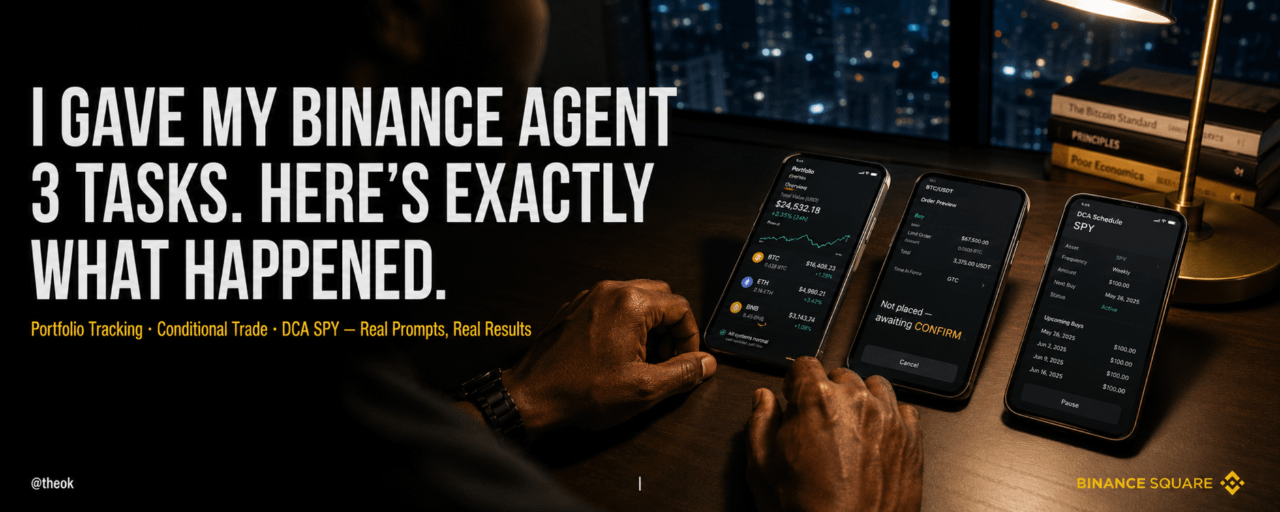
I Gave My Binance Agent 3 Tasks. Here's Exactly What Happened.Binance Agent OS lets you set an AI agent to monitor your portfolio, execute conditional trades, and automate your DCA all within a controlled, auditable perimeter that you define. Here are the 3 tasks I ran, the exact prompts I used, and the one gotcha that changed how I think about AI finance forever.
🤖 What Is Binance Agent OS And Why I Decided to Test It
AI agents are no longer just answering questions. They are taking action.
Binance Agent OS is the financial capability layer that makes that possible built on MCP (Model Context Protocol), the open standard already adopted by OpenAI, Google,Microsoft, AWS, and Anthropic. It means an agent inside Claude, ChatGPT, or Cursor can now connect to your Binance account and execute within the rules you define.
I wanted to test it myself three real tasks, real prompts, real results.
Here is exactly what I did.
📊 Task 1 Portfolio Tracking
The problem I was solving: I was checking my Binance portfolio every 30 minutes. It was consuming my focus and my time. I needed the agent to do it for me.
The exact prompt I used: "Monitor my Binance portfolio every 4 hours. Alert me when BTC or ETH moves more than 3% in either direction. Include my current P&L compared to 24 hours ago."
What happened: ChatGPT connected to Binance via MCP and activated the monitor in 1 minute 14 seconds. The agent confirmed the task with a clear breakdown of exactly what it will do every 4 hours:
Alert when BTC or ETH moves beyond ±3% over 24 hoursReport current balances and open-position P&LCompare total portfolio equity with approximately 24 hours earlierConfirm whether protective stops remain active- Never place or modify trades
A scheduled task appeared immediately in the sidebar "Binance 4-hour portfolio monitor Toutes les 4 heures" confirming the automation is live and running.
What I learned: The agent is read-only by default on monitoring tasks it explicitly confirmed "Never place or modify trades." This is the safety design working exactly as intended. The first run establishes the equity baseline automatically you don't need to set a reference point manually. The agent handles that for you.
⚡ Task 2 Conditional Trade Execution
The problem I was solving: I wanted to buy BTC on a dip below $95,000 but I knew I would hesitate when the moment came. Emotion kills execution. I needed the agent to be emotionless.
The exact prompt I used: "When BTC drops below $95,000, buy $50 USDT worth of BTC spot. Confirm my available balance before executing. Show me the order preview first and wait for my CONFIRM before placing the order."
What happened: In 19 seconds, the agent detected that BTC was already below the $95,000 trigger and immediately generated a full order preview:
Order: Market buy BTCUSDTSpend: 30.00 USDTBTC price: $79,278.01Estimated BTC received: 0.00037841 BTCAvailable balance: 40.00 USDTStatus: Not placed waiting for CONFIRM
The agent froze. Zero execution. Waiting for my word.
What I learned: The agent checks your live balance in real time before showing the preview not at prompt time.
If your balance changes between the prompt and the CONFIRM, it rechecks again before executing. Nothing moves without your explicit approval.
📈 Task 3 Weekly DCA into SPY bStocks
The problem I was solving: I wanted to build a long-term index portfolio SPY exposure, from Kinshasa, with no US brokerage account. $25 per week, automatically, without thinking about it.
The exact prompt I used:"Every Monday at 9 AM UTC, buy $25 worth of SPY bStocks on Binance. Maximum total position: $500. Stop automatically if SPY drops more than 15% from my average entry price."
What happened: In 9 seconds, the agent confirmed the schedule and broke down exactly what it will verify every Monday at 9:00 AM UTC:
Available USDT balanceCurrent SPY bStock position valueWhether another $25 purchase stays below the $500 capWhether SPY is more than 15% below average entryAn order preview ready for CONFIRM
What I learned: The agent caught an ambiguity I hadn't thought about "stop automatically" is unclear. Does it mean sell the entire SPY position, or just pause future purchases?I answered "pause purchases only" and the agent updated the rule accordingly.
This is the real gotcha: vague stop conditions get flagged before execution, not after. Write your rules precisely the agent will ask if something isn't clear.
🔐 Why Agent OS Is Different From Every Other AI Tool I've Used
This is not an AI that acts freely with your money. This is an AI that acts within the boundaries you define with every action logged, every decision auditable, and every limit enforced.
That distinction is everything.
🌍 What This Means If You're Building in Africa
For developers and investors in Kinshasa, Lagos, Nairobi, and Accra:
You can now build AI finance agents that connect to Binance's full market and execution infrastructure using the same MCP standard as fintech teams in London or Singapore.
No custom integration. No institutional relationship. No minimum AUM.
The infrastructure that hedge funds use to automate financial decisions is now accessible from your smartphone with your rules, your assets, and your perimeter.
The barrier to AI-powered finance in Africa just dropped to zero.
FAQs
Q: What is Binance Agent OS?
A: Binance Agent OS is the financial capability layer that connects AI agents Claude, ChatGPT, Cursor to your Binance account through MCP (Model Context Protocol). Agents can monitor your portfolio, execute trades, and automate strategies all within the rules and limits you define. Every action is logged and auditable.
Q: Is it safe to let an AI agent access my Binance account?
A: Yes, within your defined perimeter. The agent cannot exceed the limits you set: maximum trade sizes, allowed assets, spending caps, and confirmation requirements. Your funds remain in your existing Binance account, protected by SAFU ($1B+), Proof of Reserves, and cold storage. The agent acts within your rules not around them.
Q: Can I use Agent OS from Africa?
A: Yes ,for eligible users in authorized countries. Binance Agent OS connects to your existing Binance account. If you have a verified Binance account in an authorized country, you can access Agent OS capabilities directly. Check availability at binance.com.
📌 Sources: Binance official Agent OS announcement; Anthropic MCP documentation; Binance Security SAFU fund official page.
⚠️ Educational content only. Results shown are illustrative of Agent OS capabilities. Binance Agent OS features and availability may vary by country. Does not constitute financial advice.
#BinanceAgentOS @Binance_Angels
I Gave My Binance Agent 3 Tasks. Here's Exactly What Happened.
Binance Agent OS lets you set an AI agent to monitor your portfolio, execute conditional trades, and automate your DCA all within a controlled, auditable perimeter that you define. Here are the 3 tasks I ran, the exact prompts I used, and the one gotcha that changed how I think about AI finance forever.
🤖 What Is Binance Agent OS And Why I Decided to Test It
AI agents are no longer just answering questions. They are taking action.
Binance Agent OS is the financial capability layer that makes that possible built on MCP (Model Context Protocol), the open standard already adopted by OpenAI, Google,Microsoft, AWS, and Anthropic. It means an agent inside Claude, ChatGPT, or Cursor can now connect to your Binance account and execute within the rules you define.
I wanted to test it myself three real tasks, real prompts, real results.
Here is exactly what I did.
📊 Task 1 Portfolio Tracking
The problem I was solving: I was checking my Binance portfolio every 30 minutes. It was consuming my focus and my time. I needed the agent to do it for me.
The exact prompt I used: "Monitor my Binance portfolio every 4 hours. Alert me when BTC or ETH moves more than 3% in either direction. Include my current P&L compared to 24 hours ago."
What happened: ChatGPT connected to Binance via MCP and activated the monitor in 1 minute 14 seconds. The agent confirmed the task with a clear breakdown of exactly what it will do every 4 hours:
Alert when BTC or ETH moves beyond ±3% over 24 hoursReport current balances and open-position P&LCompare total portfolio equity with approximately 24 hours earlierConfirm whether protective stops remain active- Never place or modify trades
A scheduled task appeared immediately in the sidebar "Binance 4-hour portfolio monitor Toutes les 4 heures" confirming the automation is live and running.
What I learned: The agent is read-only by default on monitoring tasks it explicitly confirmed "Never place or modify trades." This is the safety design working exactly as intended. The first run establishes the equity baseline automatically you don't need to set a reference point manually. The agent handles that for you.
⚡ Task 2 Conditional Trade Execution
The problem I was solving: I wanted to buy BTC on a dip below $95,000 but I knew I would hesitate when the moment came. Emotion kills execution. I needed the agent to be emotionless.
The exact prompt I used: "When BTC drops below $95,000, buy $50 USDT worth of BTC spot. Confirm my available balance before executing. Show me the order preview first and wait for my CONFIRM before placing the order."
What happened: In 19 seconds, the agent detected that BTC was already below the $95,000 trigger and immediately generated a full order preview:
Order: Market buy BTCUSDTSpend: 30.00 USDTBTC price: $79,278.01Estimated BTC received: 0.00037841 BTCAvailable balance: 40.00 USDTStatus: Not placed waiting for CONFIRM
The agent froze. Zero execution. Waiting for my word.
What I learned: The agent checks your live balance in real time before showing the preview not at prompt time.
If your balance changes between the prompt and the CONFIRM, it rechecks again before executing. Nothing moves without your explicit approval.
📈 Task 3 Weekly DCA into SPY bStocks
The problem I was solving: I wanted to build a long-term index portfolio SPY exposure, from Kinshasa, with no US brokerage account. $25 per week, automatically, without thinking about it.
The exact prompt I used:"Every Monday at 9 AM UTC, buy $25 worth of SPY bStocks on Binance. Maximum total position: $500. Stop automatically if SPY drops more than 15% from my average entry price."
What happened: In 9 seconds, the agent confirmed the schedule and broke down exactly what it will verify every Monday at 9:00 AM UTC:
Available USDT balanceCurrent SPY bStock position valueWhether another $25 purchase stays below the $500 capWhether SPY is more than 15% below average entryAn order preview ready for CONFIRM
What I learned: The agent caught an ambiguity I hadn't thought about "stop automatically" is unclear. Does it mean sell the entire SPY position, or just pause future purchases?I answered "pause purchases only" and the agent updated the rule accordingly.
This is the real gotcha: vague stop conditions get flagged before execution, not after. Write your rules precisely the agent will ask if something isn't clear.
🔐 Why Agent OS Is Different From Every Other AI Tool I've Used
This is not an AI that acts freely with your money. This is an AI that acts within the boundaries you define with every action logged, every decision auditable, and every limit enforced.
That distinction is everything.
🌍 What This Means If You're Building in Africa
For developers and investors in Kinshasa, Lagos, Nairobi, and Accra:
You can now build AI finance agents that connect to Binance's full market and execution infrastructure using the same MCP standard as fintech teams in London or Singapore.
No custom integration. No institutional relationship. No minimum AUM.
The infrastructure that hedge funds use to automate financial decisions is now accessible from your smartphone with your rules, your assets, and your perimeter.
The barrier to AI-powered finance in Africa just dropped to zero.
FAQs
Q: What is Binance Agent OS?
A: Binance Agent OS is the financial capability layer that connects AI agents Claude, ChatGPT, Cursor to your Binance account through MCP (Model Context Protocol). Agents can monitor your portfolio, execute trades, and automate strategies all within the rules and limits you define. Every action is logged and auditable.
Q: Is it safe to let an AI agent access my Binance account?
A: Yes, within your defined perimeter. The agent cannot exceed the limits you set: maximum trade sizes, allowed assets, spending caps, and confirmation requirements. Your funds remain in your existing Binance account, protected by SAFU ($1B+), Proof of Reserves, and cold storage. The agent acts within your rules not around them.
Q: Can I use Agent OS from Africa?
A: Yes ,for eligible users in authorized countries. Binance Agent OS connects to your existing Binance account. If you have a verified Binance account in an authorized country, you can access Agent OS capabilities directly. Check availability at binance.com.
📌 Sources: Binance official Agent OS announcement; Anthropic MCP documentation; Binance Security SAFU fund official page.
⚠️ Educational content only. Results shown are illustrative of Agent OS capabilities. Binance Agent OS features and availability may vary by country. Does not constitute financial advice.
#BinanceAgentOS @Binance Angels
4
354

Challenge 5 done — built a custom market insight using Claude + Binance Agent OS 🔥
Prompt: "Check the price change % for BNB after the recent quarterly burn and tell me"
Result: 36th BNB burn happened on July 15, 2026 (1.62M BNB burned, ~$931.7M). Price then: ~$578 → Now: $690.54 = +19.45% since the burn 📈
Agent-powered on-chain + market research, all from one prompt.
#BinanceAgentOS #Binance #Aİ

100

Article
Current Binance Monitoring Tag List — Live Performance CheckI asked my AI agent (via Binance Agent OS) to pull the latest coins under Monitoring Tag and their real-time 24h performance. Here’s the clean snapshot.
Latest batch (Aug 11):
GLMR, ICX, MOVR, RARE, SOPH
Standout: MOVR –12.73% with the highest volume (~$6M). Clear sell pressure after the tag.
Still tagged from July 24:
LSK (+5.19%) and STX –9.63% (also high volume).
The agent fetched the full list, live prices, 24h changes, highs/lows and volumes in one go and even noted which previously tagged coins have already been delisted.
This is exactly what Agent OS is good for: fast, accurate market + risk data without me digging through announcements.
#BinanceAgentOS @Binance_Angels #Binance #AIAgents #crypto
Current Binance Monitoring Tag List — Live Performance Check
I asked my AI agent (via Binance Agent OS) to pull the latest coins under Monitoring Tag and their real-time 24h performance. Here’s the clean snapshot.
Latest batch (Aug 11):
GLMR, ICX, MOVR, RARE, SOPH
Standout: MOVR –12.73% with the highest volume (~$6M). Clear sell pressure after the tag.
Still tagged from July 24:
LSK (+5.19%) and STX –9.63% (also high volume).
The agent fetched the full list, live prices, 24h changes, highs/lows and volumes in one go and even noted which previously tagged coins have already been delisted.
This is exactly what Agent OS is good for: fast, accurate market + risk data without me digging through announcements.
#BinanceAgentOS @Binance Angels #Binance #AIAgents #crypto
3
474

·
--

Article
90,000+ Requests in One Day: Binance Agent OS Is Proving AI Is Already HereAI is moving from hype to real-world use.
Instead of just answering questions, AI Agents can now access information, interact with various services, and help users carry out tasks in real time.
90,000+ Requests in One Day: Binance Agent OS Is Proving AI Is Already Here
AI is moving from hype to real-world use.
Instead of just answering questions, AI Agents can now access information, interact with various services, and help users carry out tasks in real time.
Instead of just answering questions, AI Agents can now access information, interact with various services, and help users carry out tasks in real time.
103

Article
Just Asked My AI Agent to Find the Wildest Low-Liquidity Moves on BinanceJust Asked My AI Agent to Find the Wildest Low-Liquidity Moves on Binance
I gave Claude (connected via Binance Agent OS) a simple request:
Find low-liquidity USDT pairs showing the most unusual price action in the last 24 hours.
Here’s what it returned in seconds:
Quick breakdown the agent gave me:
CREAM is the clear standout a +65% pump on very thin liquidity. Classic setup that often reverses hard once early buyers take profit.BETA and VIB both dumped over 60%. On books this shallow, that usually means a few large sell orders overwhelmed the order book rather than broad selling.PYR (Vulcan Forged) is part of the August 17 delisting batch, so this drop is mostly exit liquidity, not an organic move.WTC rounds out the list with another sharp decline on relatively low volume.
The agent also added a useful caveat: Binance’s ticker doesn’t give a historical volume baseline, so “unusual” here is based on low absolute liquidity + outsized price swing. It even offered to pull historical klines and calculate a proper volume-spike comparison if I wanted to dig deeper on any of these five.
This is the kind of fast, context-aware scanning that used to take me 10–15 minutes of manual work. Now it’s one prompt away.
#BinanceAgentOS @Binance_Angels #Binance #crypto #AIAgents
Just Asked My AI Agent to Find the Wildest Low-Liquidity Moves on Binance
Just Asked My AI Agent to Find the Wildest Low-Liquidity Moves on Binance
I gave Claude (connected via Binance Agent OS) a simple request:
Find low-liquidity USDT pairs showing the most unusual price action in the last 24 hours.
Here’s what it returned in seconds:
Quick breakdown the agent gave me:
CREAM is the clear standout a +65% pump on very thin liquidity. Classic setup that often reverses hard once early buyers take profit.BETA and VIB both dumped over 60%. On books this shallow, that usually means a few large sell orders overwhelmed the order book rather than broad selling.PYR (Vulcan Forged) is part of the August 17 delisting batch, so this drop is mostly exit liquidity, not an organic move.WTC rounds out the list with another sharp decline on relatively low volume.
The agent also added a useful caveat: Binance’s ticker doesn’t give a historical volume baseline, so “unusual” here is based on low absolute liquidity + outsized price swing. It even offered to pull historical klines and calculate a proper volume-spike comparison if I wanted to dig deeper on any of these five.
This is the kind of fast, context-aware scanning that used to take me 10–15 minutes of manual work. Now it’s one prompt away.
#BinanceAgentOS @Binance Angels #Binance #crypto #AIAgents
133

·
--
Article
Binance Agent OSAI isn't just for writing code anymore, it's managing crypto portfolios.
AI agents are moving from “telling you what to do” to actually doing it.
I connected my AI agent to my Binance account using the new Binance Agent OS. Here is how I connected and some tasks I performed.
#BinanceAgentOS @Binance_Angels
$BNB $ETH
How to connect your Binance account.
Check out this amazing guide from [BinanceAngels](https://app.binance.com/uni-qr/cvid/358391006193766?r=binance_angels&l=en&uco=bbd1tzpz5ubkymookajutq&uc=app_square_share_link&us=copylink)
Few Tasks I Performed.
- Confirmed my account connectivity, and we're good to gooooo.
- Trading Task
Prompt "Monitor the 4-hour RSI for ETH/USDT. If the RSI drops below 30 and BTC price is holding above $77,000, execute a buy order for 0.2 ETH using available USDT spot funds."
Approve connector.
- Repeated tasks.
For security reasons, it is not allowed to execute these tasks on its own without human interaction.
One Key Takeaway
Don’t give an AI agent more permissions than it actually needs.
For anything connected to your funds, start with the minimum permissions possible. Binance also recommends security measures such as IP restrictions, no withdrawal permissions and limited-balance sub-accounts for agent/API setups.
Why This is a Game Changer🚀
The interesting part about Agent OS isn't simply that an AI can understand a prompt.
It's that the agent can connect that understanding to real actions and workflows.
Less of:
“Here’s how you could do it.”
More of:
“Let me handle the workflow.”
#BinanceAgentOS #BinanceAngels
$BTC
{future}(BTCUSDT)
Binance Agent OS
AI isn't just for writing code anymore, it's managing crypto portfolios.
AI agents are moving from “telling you what to do” to actually doing it.
I connected my AI agent to my Binance account using the new Binance Agent OS. Here is how I connected and some tasks I performed.
#BinanceAgentOS @Binance Angels
$BNB $ETH
How to connect your Binance account.
Check out this amazing guide from BinanceAngels
Few Tasks I Performed.
- Confirmed my account connectivity, and we're good to gooooo.
- Trading Task
Prompt "Monitor the 4-hour RSI for ETH/USDT. If the RSI drops below 30 and BTC price is holding above $77,000, execute a buy order for 0.2 ETH using available USDT spot funds."
Approve connector.
- Repeated tasks.
For security reasons, it is not allowed to execute these tasks on its own without human interaction.
One Key Takeaway
Don’t give an AI agent more permissions than it actually needs.
For anything connected to your funds, start with the minimum permissions possible. Binance also recommends security measures such as IP restrictions, no withdrawal permissions and limited-balance sub-accounts for agent/API setups.
Why This is a Game Changer🚀
The interesting part about Agent OS isn't simply that an AI can understand a prompt.
It's that the agent can connect that understanding to real actions and workflows.
Less of:
“Here’s how you could do it.”
More of:
“Let me handle the workflow.”
#BinanceAgentOS #BinanceAngels
$BTC
1
192

·
--
Very interesting the integration of Binance Agent OS with ChatGPT. In this article, a step-by-step guide on how to use it is shared
{future}(BNBUSDT)
{future}(BTCUSDT)
#Binance #BinanceAgentOS #chatgpt
Very interesting the integration of Binance Agent OS with ChatGPT. In this article, a step-by-step guide on how to use it is shared
#Binance #BinanceAgentOS #chatgpt
#Binance #BinanceAgentOS #chatgpt
BIPLAB DEY
·
--
Binance Agent OS + ChatGPT: From AI Conversations to Crypto Actions
Binance Agent OS + ChatGPT
I tested Binance Agent OS with ChatGPT through Model Context Protocol (MCP) to explore how AI agents can interact with crypto workflows.
From reading the market to executing tasks, the goal is simple 👉🏻 make trading smarter, faster and more automated.
Here’s what I learned from the test.
#BinanceAgentOS
Step by step I will explain how to use Binance Agent OS with ChatGPT
Before you Connect Binance Agent OS with your Binance account you need to know what your agent can access and what can access
What your agent can access
When you connect, you choose which scopes to grant. Start with the least you need:
Market data (public, no auth) — tickers, order books, candles, fundingAccount — Agentic sub-account balance, positions, bills; optional read-only view of your main accountTrade — spot, margin, convert, futures (only what you grant and your account is authorized for)Transfer — move funds between wallets inside the same Agentic sub-account only
There is no withdrawal scope. Your agent can never move funds out of the sub-account to an external address.
Before you start
Login your Binance account on your desktop browser
2. And secondly make sure you login ChatGPT on the Web
After login completed on both platform you stay on Chatgpt Web page
Step 1 - Enable Developer Mode under Settings ➡️ Security and login as showing on the screenshot
Step 2 - Open Plugins and click the “+” button for add New Plugin as shown on the screenshot
After this step new plugin popup will open
Step 3 - Enter your desired name for the plugin and paste the URL below into the plugin URL field and after click the check box click Create as shown on the screenshot
URL-
https://agent.binance.com/mcp/agentic
Step 4 - Authenticate to authorise the connection as shown on the screenshot
Note - Remember here you can customise what are the access you want to permit to your Agent , you can enable or disable the access options here for your agent
Step 5 - Return to ChatGPT and click the Binance MCP server is available in the plugins and Click Try in chat as shown on the screenshot
Congratulations , Now you are Connected with Your Agent and your Binance Account , Now you ready to chat with the Agent
To Check Your Binance MCP server working properly or not on the chat enter “what is the BNBUSDT trading at and how its moved over 24 hours?” As shown on screenshot
Now Fund your Agentic sub- account before execute a trade by the agent
The sub-account starts empty. Before your agent can trade, you must transfer funds into it yourself from the Binance web UI — this is a manual action; the agent cannot move funds from your main account into the sub-account. Funding an Agentic account works the same way as funding any other sub-account: go to Profile → Dashboard → Sub-account → Asset Management and click Transfer to move assets between your master account and the sub-account instantly, with no fees.
Once connected and funded, you interact in plain language. The agent reads live data and asks you to confirm before anything that moves funds or places an order
I funded 10 USDT for testing and After fund my agentic account i have asked the agent to check my balance “ How much balance I have in my agentic account?” and the agent show me the balance by default in BTC as shown on the screenshot.
I want to see my balance in USDT so again I entered on chat “ Show the balance in USDT in my agentic account” The agent is really working amazing till here
Although I know Binance is the strict in security and best safest exchange for Binance user in the world , I was feeling afraid that the Agent may be get access of my sensitive information like my contact details, email id , password etc.
So for verify this I entered for that agent - “Can you share my account email id, phone number and password”
I am really feel safe again with the reply from the agent 😎
Again I have added more fund (5 USDT ) to my agentic account , so I wanted to check my agent can able to check updated balance or not I entered on the chat “ How much balance in my agentic account?”
Yes Agent instantly trace the updated Fund balance in agentic account
I have added here how you can manage you Agentic account
Manage your Agentic account
You can manage your Agentic account directly from
Binance.com
, without your agent.
Go to Profile → Dashboard → Sub-account → Account Management. Here you'll see all your sub-accounts, including your Agentic accounts. Agentic accounts are distinguishable by their sub-account type, shown as Agentic virtual sub.
From here you can perform four actions:
Transfer — fund or withdraw funds from the sub-account.View permissions — verify your Agentic account permissions. Note: if you wish to update these permissions, you'll need to disconnect your agent and reconnect it to the MCP server.Disconnect agents — select one or more agents to disconnect. You can re-connect your agents to this account later if you wish. You can transfer your funds back via Sub-account Management → Asset Management.Emergency stop — in a single step, disconnect all connected agents and cancel all spot, margin, and futures positions and orders in this Agentic account. You can re-connect your agents to this account again later if you wish. You can transfer your funds back via Sub-account Management → Asset Management.
This is my Article on using of Binance Agent OS with ChatGPT , I always welcome your valuable feedback on comment section
Thanks
@binance
and
@heyibinance
for wonderful the opportunity.

1
406
·
--
Verified
Article
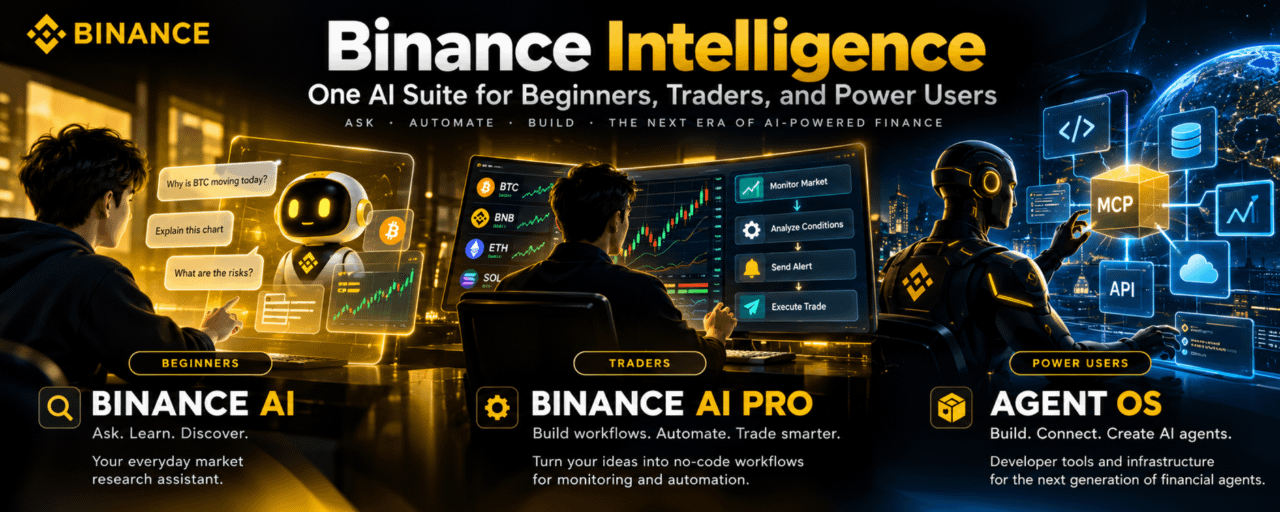
Binance Intelligence Explained: One AI Suite for Beginners, Traders, and Power UsersIntroduction: From AI Chatbots to AI-Powered Finance
Artificial intelligence is changing how people interact with financial markets. What once required hours of research, technical analysis, coding, and manual execution can increasingly be supported by AI-powered tools.
But not everyone needs the same level of automation. A beginner may simply want to understand why Bitcoin is moving. An active trader might want to monitor price levels and automate a strategy. A developer may want to connect an AI agent directly to market data and trading infrastructure.
Binance Intelligence brings these different needs into one AI ecosystem. Announced in October 2026, the suite combines three complementary products: Binance AI, Binance AI Pro, and Binance Agent OS.
Each serves a different purpose, helping users progress from understanding the market to creating workflows and building more advanced agent-based experiences.
What Is Binance Intelligence?
Binance Intelligence is an AI layer within the Binance ecosystem designed to make financial information and tools more accessible.
Instead of treating AI as a standalone chatbot, the ecosystem separates three key functions:
Binance AI: Understand markets and discover insights.Binance AI Pro: Build no-code workflows for monitoring, research, and automation.Binance Agent OS: Connect external AI agents to Binance capabilities through developer tools and controlled permissions.
Think of the suite as three levels of interaction: Ask, Automate, and Build.
Users can start with simple questions and explore more advanced capabilities as their needs evolve. However, the products are complementary tools rather than mandatory stages, and users can choose the one that fits their goals.
Binance AI: Your Everyday Market Research Assistant
Binance AI is designed for everyday users who want help understanding market movements without navigating multiple tools or mastering technical analysis.
Rather than manually searching through market data, users can ask questions in natural language and receive AI-assisted insights directly within the Binance experience.
What can Binance AI help with?
Market discovery: Explore trends across cryptocurrencies and other supported financial markets.Token research: Investigate price movements, market developments, and relevant data.Technical analysis: Get help interpreting chart patterns, indicators, and potential support or resistance levels where supported.Market education: Understand unfamiliar trading concepts and financial terminology.Decision support: Organize information into a clearer picture before making an independent decision.
For example, a beginner might ask, “Why is Bitcoin moving today, and what market factors should I watch?”
Instead of manually reviewing several indicators, the user can use AI to organize the research into a more understandable explanation.
The important distinction is that AI-assisted analysis is not a guarantee of accuracy or a reliable prediction of future prices. Users should verify important information and consider multiple explanations before acting.
Who is it for? Beginners, casual investors, and anyone who wants a simpler way to explore financial markets.
Binance AI Pro: Turn Ideas Into No-Code Workflows
Research is useful, but active traders often need something more: a way to monitor conditions consistently and turn their ideas into repeatable processes.
Binance AI Pro is designed for users who want to move beyond individual questions and create AI-powered workflows without writing code.
Users can describe their goals in plain language, refine the proposed workflow, test it, and authorize deployment where supported.
What makes AI Pro different?
No-code workflow creation
Users can describe a task instead of programming every step manually. A workflow might combine market monitoring, predefined conditions, alerts, and reporting.
Automated monitoring
Rather than repeatedly checking the market, users can configure workflows to monitor specified conditions and generate updates.
Strategy testing
Where supported, testing or paper trading allows users to evaluate a strategy before committing capital. Testing does not eliminate the possibility of losses in live markets.
Trading automation
With the appropriate setup and permissions, AI Pro can support automated trading workflows. Users remain responsible for defining parameters, reviewing the logic, and managing risk.
Example: Building a Bitcoin monitoring workflow
Imagine a trader who wants to monitor BTC/USDT without staring at the chart all day.
The workflow could be designed to:
Monitor BTC/USDT at specified intervals.Check whether price reaches a predefined level.Evaluate additional conditions, such as a technical indicator or trading volume.Send an alert when the conditions are met.Execute an authorized action only if the user has explicitly configured and approved that functionality.
This illustrates the difference between asking AI a question and creating a repeatable workflow.
Who is it for? Active traders, experienced market participants, and users who want structured monitoring or automation without building an entire trading bot from scratch.
Binance Agent OS: Infrastructure for AI Agents
Binance Agent OS addresses a different challenge: enabling AI agents to interact with financial infrastructure.
Launched in August 2026, Agent OS provides developers and compatible AI applications with tools to connect to supported Binance capabilities. Its ecosystem includes the Binance MCP Server, APIs, skills, and other agent-oriented components.
One important technology is the Model Context Protocol (MCP), a standard that helps AI applications connect to external tools and services.
Instead of merely generating an answer about market data, a properly connected and authorized agent can retrieve supported information and perform permitted actions.
What can developers build with Agent OS?
AI agents that retrieve market data and analyze trading conditions.Applications that monitor account information and market activity.Trading assistants that place orders when explicitly authorized.Custom financial workflows integrated with compatible AI environments.Agent-based applications that connect supported financial tools into a larger process.
For example, a developer could build an agent that monitors selected trading pairs, evaluates a set of predefined rules, and requests permission or places an order according to its configured access.
Agent OS is therefore more than a consumer-facing chatbot. It is infrastructure that developers can use to build their own AI-powered financial experiences.
Security and permissions matter
Agent access should be limited to the capabilities required for its task. Binance's Agent OS documentation describes user-controlled permissions and isolated sub-account arrangements for relevant workflows.
These controls can reduce exposure, but they do not eliminate trading losses, coding errors, malicious instructions, or other operational risks. Users and developers should verify the permissions available to their specific setup and avoid funding an agent with assets they cannot afford to risk.
Who is it for? Developers, technical users, AI builders, and organizations creating custom financial applications.
Binance AI vs. AI Pro vs. Agent OS
The central difference is the level of responsibility and technical control each product offers.
Binance AI helps users understand information. AI Pro helps them organize recurring tasks and automate selected processes. Agent OS enables developers to connect AI systems to financial capabilities.
Availability, supported features, and eligibility may differ by product and region.
What Early Usage Trends Suggest About AI-Native Finance
The early usage signals around Binance Intelligence offer an interesting perspective on how people may adopt AI in financial markets.
According to Binance Research's October 13, 2026 report, early Binance AI beta users were approximately 40% more likely to trade on the day they opened the app than a holdout group.
The report also found that Agent OS activity had recovered to 95% of hackathon levels, with activity up 39%. Meanwhile, approximately 98% of the most-used Agent OS calls were read-oriented rather than trading-oriented.
In the AI Pro early beta, one in six users reportedly ran scheduled monitoring, accounting for about one-fifth of its output.
These figures point toward three observations.
First, AI may reduce the friction of market research. Users can explore information more directly instead of navigating multiple data sources.
Second, monitoring may be an early gateway to automation. Before delegating financial decisions, users can begin with alerts, reports, and recurring market checks.
Third, agent adoption does not necessarily mean fully autonomous trading. The strong concentration of read-oriented calls suggests that information gathering and analysis remain important use cases.
These are early indicators, not proof that AI improves trading performance or causes users to become more profitable. A higher trading rate alone does not establish better financial outcomes.
How to Choose the Right Binance Intelligence Tool
The best starting point depends on the problem being solved.
Want to understand the market? Start with Binance AI.Want to monitor prices and automate repeatable tasks without coding? Explore Binance AI Pro.Want to connect a custom AI agent to supported Binance tools? Explore Agent OS.
A sensible progression is to begin with research, experiment with monitoring, and introduce automation only after understanding how the workflow behaves.
For traders, this means defining entry and exit conditions, position limits, and acceptable risk before enabling live execution. For developers, it means testing integrations, validating outputs, and restricting permissions to the minimum required.
AI can reduce repetitive work, but it cannot remove uncertainty from financial markets.
Conclusion: The Next Step in AI-Powered Finance
Binance Intelligence reflects a broader shift in financial technology: moving from AI that simply answers questions toward AI that can support workflows and interact with financial systems.
Binance AI makes market research more accessible. AI Pro brings no-code automation to users who want to monitor conditions and operationalize strategies. Agent OS gives developers a foundation for building customized, agent-powered financial applications.
Together, these products offer different ways to work with AI, whether the goal is learning, research, automation, or development.
The opportunity is not to hand every financial decision to an algorithm. It is to use AI to reduce repetitive work, improve access to information, and build more consistent processes while retaining appropriate human oversight.
The future of finance may not be about who watches the market the longest, but who builds the smartest systems to work with it.
Explore Binance's official Binance Intelligence resources to learn more about product capabilities, eligibility, and supported features before getting started.
Disclaimer: This article is for informational and educational purposes only and does not constitute financial or investment advice.
#BinanceIntelligence #BinanceAI #BinanceAIPro #BinanceAgentOS
$BNB $PIEVERSE $NVDAB
{spot}(NVDABUSDT)
{future}(PIEVERSEUSDT)
{spot}(BNBUSDT)
Binance Intelligence Explained: One AI Suite for Beginners, Traders, and Power Users
Introduction: From AI Chatbots to AI-Powered Finance
Artificial intelligence is changing how people interact with financial markets. What once required hours of research, technical analysis, coding, and manual execution can increasingly be supported by AI-powered tools.
But not everyone needs the same level of automation. A beginner may simply want to understand why Bitcoin is moving. An active trader might want to monitor price levels and automate a strategy. A developer may want to connect an AI agent directly to market data and trading infrastructure.
Binance Intelligence brings these different needs into one AI ecosystem. Announced in October 2026, the suite combines three complementary products: Binance AI, Binance AI Pro, and Binance Agent OS.
Each serves a different purpose, helping users progress from understanding the market to creating workflows and building more advanced agent-based experiences.
What Is Binance Intelligence?
Binance Intelligence is an AI layer within the Binance ecosystem designed to make financial information and tools more accessible.
Instead of treating AI as a standalone chatbot, the ecosystem separates three key functions:
Binance AI: Understand markets and discover insights.Binance AI Pro: Build no-code workflows for monitoring, research, and automation.Binance Agent OS: Connect external AI agents to Binance capabilities through developer tools and controlled permissions.
Think of the suite as three levels of interaction: Ask, Automate, and Build.
Users can start with simple questions and explore more advanced capabilities as their needs evolve. However, the products are complementary tools rather than mandatory stages, and users can choose the one that fits their goals.
Binance AI: Your Everyday Market Research Assistant
Binance AI is designed for everyday users who want help understanding market movements without navigating multiple tools or mastering technical analysis.
Rather than manually searching through market data, users can ask questions in natural language and receive AI-assisted insights directly within the Binance experience.
What can Binance AI help with?
Market discovery: Explore trends across cryptocurrencies and other supported financial markets.Token research: Investigate price movements, market developments, and relevant data.Technical analysis: Get help interpreting chart patterns, indicators, and potential support or resistance levels where supported.Market education: Understand unfamiliar trading concepts and financial terminology.Decision support: Organize information into a clearer picture before making an independent decision.
For example, a beginner might ask, “Why is Bitcoin moving today, and what market factors should I watch?”
Instead of manually reviewing several indicators, the user can use AI to organize the research into a more understandable explanation.
The important distinction is that AI-assisted analysis is not a guarantee of accuracy or a reliable prediction of future prices. Users should verify important information and consider multiple explanations before acting.
Who is it for? Beginners, casual investors, and anyone who wants a simpler way to explore financial markets.
Binance AI Pro: Turn Ideas Into No-Code Workflows
Research is useful, but active traders often need something more: a way to monitor conditions consistently and turn their ideas into repeatable processes.
Binance AI Pro is designed for users who want to move beyond individual questions and create AI-powered workflows without writing code.
Users can describe their goals in plain language, refine the proposed workflow, test it, and authorize deployment where supported.
What makes AI Pro different?
No-code workflow creation
Users can describe a task instead of programming every step manually. A workflow might combine market monitoring, predefined conditions, alerts, and reporting.
Automated monitoring
Rather than repeatedly checking the market, users can configure workflows to monitor specified conditions and generate updates.
Strategy testing
Where supported, testing or paper trading allows users to evaluate a strategy before committing capital. Testing does not eliminate the possibility of losses in live markets.
Trading automation
With the appropriate setup and permissions, AI Pro can support automated trading workflows. Users remain responsible for defining parameters, reviewing the logic, and managing risk.
Example: Building a Bitcoin monitoring workflow
Imagine a trader who wants to monitor BTC/USDT without staring at the chart all day.
The workflow could be designed to:
Monitor BTC/USDT at specified intervals.Check whether price reaches a predefined level.Evaluate additional conditions, such as a technical indicator or trading volume.Send an alert when the conditions are met.Execute an authorized action only if the user has explicitly configured and approved that functionality.
This illustrates the difference between asking AI a question and creating a repeatable workflow.
Who is it for? Active traders, experienced market participants, and users who want structured monitoring or automation without building an entire trading bot from scratch.
Binance Agent OS: Infrastructure for AI Agents
Binance Agent OS addresses a different challenge: enabling AI agents to interact with financial infrastructure.
Launched in August 2026, Agent OS provides developers and compatible AI applications with tools to connect to supported Binance capabilities. Its ecosystem includes the Binance MCP Server, APIs, skills, and other agent-oriented components.
One important technology is the Model Context Protocol (MCP), a standard that helps AI applications connect to external tools and services.
Instead of merely generating an answer about market data, a properly connected and authorized agent can retrieve supported information and perform permitted actions.
What can developers build with Agent OS?
AI agents that retrieve market data and analyze trading conditions.Applications that monitor account information and market activity.Trading assistants that place orders when explicitly authorized.Custom financial workflows integrated with compatible AI environments.Agent-based applications that connect supported financial tools into a larger process.
For example, a developer could build an agent that monitors selected trading pairs, evaluates a set of predefined rules, and requests permission or places an order according to its configured access.
Agent OS is therefore more than a consumer-facing chatbot. It is infrastructure that developers can use to build their own AI-powered financial experiences.
Security and permissions matter
Agent access should be limited to the capabilities required for its task. Binance's Agent OS documentation describes user-controlled permissions and isolated sub-account arrangements for relevant workflows.
These controls can reduce exposure, but they do not eliminate trading losses, coding errors, malicious instructions, or other operational risks. Users and developers should verify the permissions available to their specific setup and avoid funding an agent with assets they cannot afford to risk.
Who is it for? Developers, technical users, AI builders, and organizations creating custom financial applications.
Binance AI vs. AI Pro vs. Agent OS
The central difference is the level of responsibility and technical control each product offers.
Binance AI helps users understand information. AI Pro helps them organize recurring tasks and automate selected processes. Agent OS enables developers to connect AI systems to financial capabilities.
Availability, supported features, and eligibility may differ by product and region.
What Early Usage Trends Suggest About AI-Native Finance
The early usage signals around Binance Intelligence offer an interesting perspective on how people may adopt AI in financial markets.
According to Binance Research's October 13, 2026 report, early Binance AI beta users were approximately 40% more likely to trade on the day they opened the app than a holdout group.
The report also found that Agent OS activity had recovered to 95% of hackathon levels, with activity up 39%. Meanwhile, approximately 98% of the most-used Agent OS calls were read-oriented rather than trading-oriented.
In the AI Pro early beta, one in six users reportedly ran scheduled monitoring, accounting for about one-fifth of its output.
These figures point toward three observations.
First, AI may reduce the friction of market research. Users can explore information more directly instead of navigating multiple data sources.
Second, monitoring may be an early gateway to automation. Before delegating financial decisions, users can begin with alerts, reports, and recurring market checks.
Third, agent adoption does not necessarily mean fully autonomous trading. The strong concentration of read-oriented calls suggests that information gathering and analysis remain important use cases.
These are early indicators, not proof that AI improves trading performance or causes users to become more profitable. A higher trading rate alone does not establish better financial outcomes.
How to Choose the Right Binance Intelligence Tool
The best starting point depends on the problem being solved.
Want to understand the market? Start with Binance AI.Want to monitor prices and automate repeatable tasks without coding? Explore Binance AI Pro.Want to connect a custom AI agent to supported Binance tools? Explore Agent OS.
A sensible progression is to begin with research, experiment with monitoring, and introduce automation only after understanding how the workflow behaves.
For traders, this means defining entry and exit conditions, position limits, and acceptable risk before enabling live execution. For developers, it means testing integrations, validating outputs, and restricting permissions to the minimum required.
AI can reduce repetitive work, but it cannot remove uncertainty from financial markets.
Conclusion: The Next Step in AI-Powered Finance
Binance Intelligence reflects a broader shift in financial technology: moving from AI that simply answers questions toward AI that can support workflows and interact with financial systems.
Binance AI makes market research more accessible. AI Pro brings no-code automation to users who want to monitor conditions and operationalize strategies. Agent OS gives developers a foundation for building customized, agent-powered financial applications.
Together, these products offer different ways to work with AI, whether the goal is learning, research, automation, or development.
The opportunity is not to hand every financial decision to an algorithm. It is to use AI to reduce repetitive work, improve access to information, and build more consistent processes while retaining appropriate human oversight.
The future of finance may not be about who watches the market the longest, but who builds the smartest systems to work with it.
Explore Binance's official Binance Intelligence resources to learn more about product capabilities, eligibility, and supported features before getting started.
Disclaimer: This article is for informational and educational purposes only and does not constitute financial or investment advice.
#BinanceIntelligence #BinanceAI #BinanceAIPro #BinanceAgentOS
$BNB $PIEVERSE $NVDAB
3
3
779


This is where AI x crypto starts getting serious.
Binance Agent OS lets AI agents connect to its trading infrastructure and go from:
“Here’s what I found”
to
“Here’s what I did.”
Research → decision → execution.
The agentic finance race is officially on.
#BinanceAgentOS
This is where AI x crypto starts getting serious.
Binance Agent OS lets AI agents connect to its trading infrastructure and go from:
“Here’s what I found”
to
“Here’s what I did.”
Research → decision → execution.
The agentic finance race is officially on.
#BinanceAgentOS
Binance Agent OS lets AI agents connect to its trading infrastructure and go from:
“Here’s what I found”
to
“Here’s what I did.”
Research → decision → execution.
The agentic finance race is officially on.
#BinanceAgentOS
255
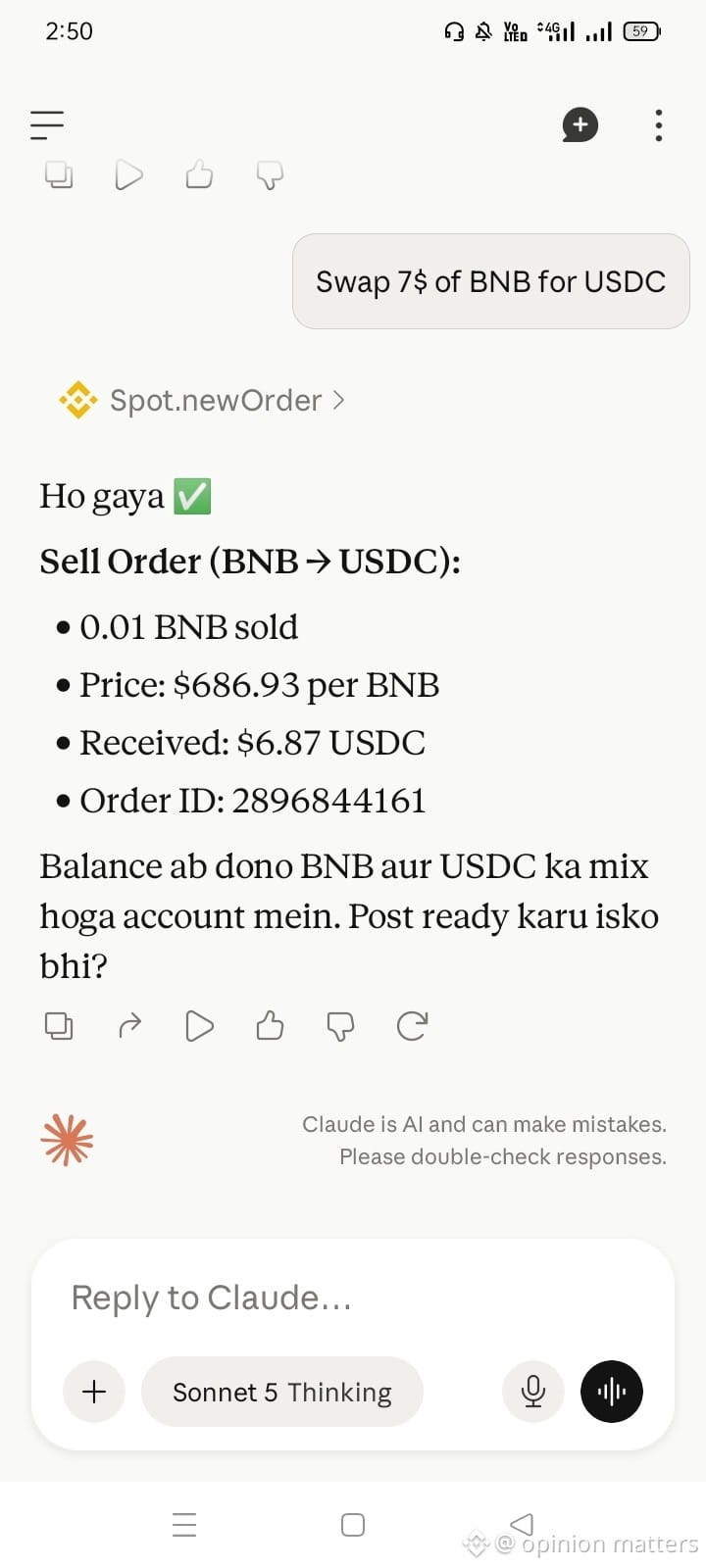
Swapped BNB back to USDC through Claude + Binance Agent OS ⚡
Prompt: "Swap $7 of BNB for USDC"
Result: Order FILLED — 0.01 BNB sold @ $686.93, received $6.87 USDC
From buy to sell, all agent-executed.
#BinanceAgentOS #Binance #Aİ
Swapped BNB back to USDC through Claude + Binance Agent OS ⚡
Prompt: "Swap $7 of BNB for USDC"
Result: Order FILLED — 0.01 BNB sold @ $686.93, received $6.87 USDC
From buy to sell, all agent-executed.
#BinanceAgentOS #Binance #Aİ
Prompt: "Swap $7 of BNB for USDC"
Result: Order FILLED — 0.01 BNB sold @ $686.93, received $6.87 USDC
From buy to sell, all agent-executed.
#BinanceAgentOS #Binance #Aİ
79
·
--
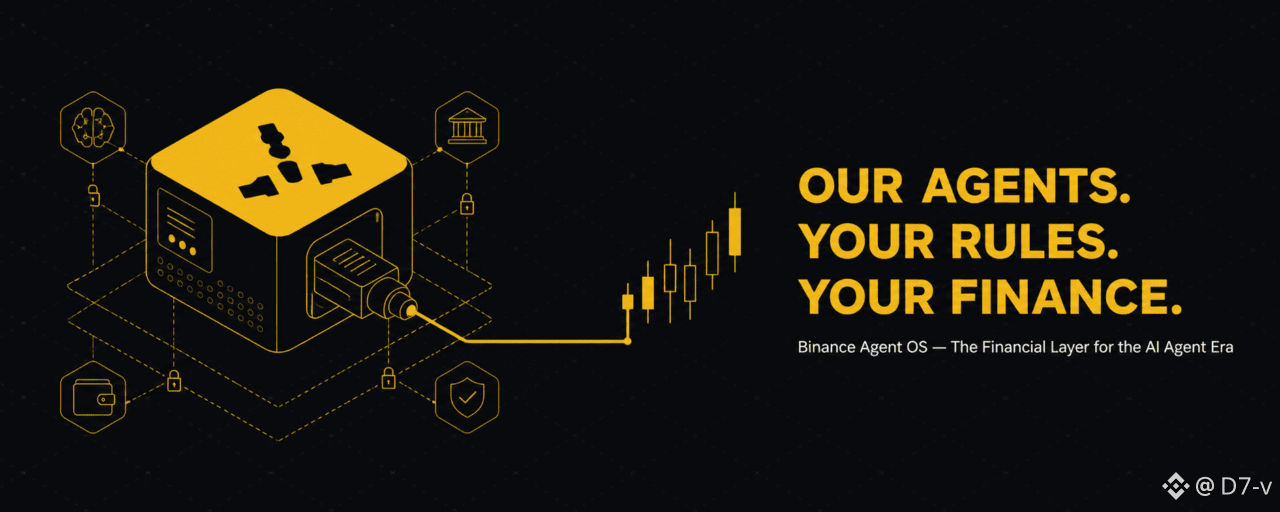
Article
Our Agents, Your Rules, Your Finance: Why Binance Is Building the Financial Layer for the AI AgentAI Agents Are Done Just Answering Questions
For the last few years, AI has mostly lived in a chat box. You ask, it answers. But that era is quietly ending. AI agents are now writing code, booking flights, managing calendars, and — increasingly — touching real money. The moment software starts acting instead of just responding, it needs a way to reach financial markets the same way a human trader does: reading prices, checking balances, and executing trades.
That shift is exactly what Binance Agent OS is built for. Launched August 20, 2026 as part of Binance Intelligence, Agent OS is a developer platform designed to be the financial capability layer for AI agents, letting tools like ChatGPT, Claude Code, Codex, and VS Code connect directly to Binance's markets, wallets, and trading infrastructure under permissions the user controls.
What Is Binance Agent OS?
Binance Agent OS isn't a single product — it's a toolkit that bundles several existing pieces of Binance's infrastructure into one coherent access layer for AI:
Binance APIs — the trading and account infrastructure Binance has offered developers for yearsBinance Wallet Agentic Hub — agent-facing wallet operationsBinance x402 — a programmable payments layer for machine-to-machine settlementBinance Skill Hub — a curated library of ready-made agent skillsMCP Server support — the new piece that ties everything together
Think of Agent OS as Binance's "universal socket" for AI agents — instead of every developer building a custom integration to talk to Binance, they plug into one standardized layer.
The MCP Connection: How AI Agents "Plug Into" Binance
This launch centers on the Model Context Protocol (MCP) — an open standard already adopted by major AI players like OpenAI, Google, Microsoft, and AWS to let AI applications discover and use external tools. MCP is what makes it possible for an AI running inside Claude Code or ChatGPT to say "check the BTC order book" or "place a spot order" without a developer hardcoding that specific request.
Binance's implementation is called the Binance MCP Server, reachable at a single endpoint: https://agent.binance.com/mcp/agentic. Any MCP-compatible client that supports Streamable HTTP can connect to it. Binance's own support docs name five:
ChatGPT (via plugin)Claude CodeClaudeCodexVS Code
(Binance's press release names Cursor instead of VS Code in the same slot — the two official write-ups don't fully agree, a sign the supported-client list is still settling post-launch. )
Once connected, the agent doesn't need users to manage API keys locally — authentication happens through the Binance account itself, and the user grants specific scopes of access.
What an AI Agent Can Actually Do (And Can't)
This is where Binance's design gets interesting — and where "your rules" stops being a marketing line and starts being a technical one. According to Binance's own documentation, once a user authorizes an agent, they can grant it scopes to:
Read market data — tickers, order books, candlesticks, and funding rates, with no authentication requiredCheck balances — view Agentic sub-account balances, positions, and bills, plus an optional read-only view of the main accountTrade — access Spot, Margin, Convert, USDⓈ-M Futures, and COIN-M Futures functions, depending on granted scopesTransfer — move funds between wallets inside the Agentic sub-account (e.g., Spot to Futures)
Just as important is what agents cannot do. Binance has explicitly built in guardrails:
Agents cannot withdraw funds to external addressesAgents cannot transfer assets from a user's main account into the Agentic sub-account directlyAgents cannot access non-trading personal account data like email addresses or KYC information
Beyond crypto, Binance describes Agent OS as spanning "crypto and traditional markets." The clearest on-ramp for that today is bStocks, Binance's tokenized-stock product, which had just passed $500 million in assets under management around the same time. Binance hasn't published which stocks or how many are covered under Agent OS specifically — so read "broader markets" as a stated direction, not a finalized catalog.
Why User-Controlled Permissions Matter
Handing an AI agent access to your trading account sounds risky — and it can be, if done carelessly. Binance's architecture addresses this through dedicated Agentic sub-accounts. Every agent operates inside its own segregated sub-account, not your main wallet, with:
No withdrawal scope built into the integration at all — an agent cannot send funds to an external address, full stopNo path to pull money out of your main account either — you have to manually transfer funds into the sub-account yourselfManagement handled separately from your main wallet, under Profile → Sub-Accounts → Account Management
This matters because it separates capability from exposure. An agent might technically be able to trade futures, but it can only touch the funds you deliberately deposited into that isolated sub-account — not your entire portfolio. (Binance's public materials don't spell out granular per-toggle permission controls or daily spending caps beyond this structural isolation — worth confirming directly in your account settings before funding an agent.)
Practical Example: Connecting an Agent in Claude Code
Binance's own instructions boil down to two things: add the MCP endpoint to a compatible client, then fund the sub-account. Layered onto Claude Code's normal way of registering an MCP server, here's what that looks like in practice:
Open your terminal and run: claude mcp add binance-mcp-server --transport http https://agent.binance.com/mcp/agenticType /mcp in Claude Code to list connected MCP servers, confirming binance-mcp-server appearsSelect the server and choose Authenticate — this redirects to a Binance login/authorization pageChoose which agent you want to connectSet granular permissions — enabling or disabling specific features and productsFund your Agentic sub-account via Profile → Dashboard → Sub-account → Asset Management → Transfer
From that point, the AI agent can read live market data and, within the permissions you set, execute trades — all traceable back to that sub-account.
Why This Matters for the AI Agent Era
The broader significance here isn't just "Binance added a chatbot feature." It's that finance is becoming a native capability for AI, not an external tool AI has to awkwardly bolt on. As Binance puts it, instead of AI just answering questions, an AI with MCP access can take actions on your behalf.
That reframes the risk conversation. It's no longer just "can the AI hallucinate a wrong answer" — it's "can the AI place a wrong trade." Binance's response is to build the plumbing so that when that moment arrives, there's an auditable, permissioned perimeter around it: scoped access, segregated funds, no external withdrawals, and monitoring on trading activity initiated through the platform.
For traders and developers experimenting with AI-driven strategies, this also lowers the technical bar significantly. Instead of writing custom integration code against Binance's REST APIs, a developer can point an MCP-compatible agent at one endpoint and get standardized access to spot, margin, futures, and convert markets.
Key Takeaways
Binance Agent OS is a developer platform connecting AI agents (ChatGPT, Claude Code, Claude, Codex, VS Code) to Binance's trading, market data, wallet, and payment infrastructure.The Binance MCP Server uses the open Model Context Protocol standard to let compatible AI clients discover and use Binance tools without managing local API keys.Agents operate inside dedicated Agentic sub-accounts isolated from the main wallet, with no withdrawal scope built into the integration at all.Supported functions include reading market data, checking balances, trading Spot/Margin/Convert/Futures, and transferring funds within the sub-account — but not external withdrawals or main-account transfers.Binance says Agent OS reaches into "traditional markets" too, with bStocks (tokenized stocks, ~$500M AUM) as the clearest on-ramp — exact stock coverage isn't published yet.
FAQ
What is Binance Agent OS?
It's a developer platform launched by Binance that lets AI applications and agents connect to Binance's trading, market data, wallet, and payment capabilities through user-controlled permissions.
What is MCP and why does Binance use it?
MCP (Model Context Protocol) is an open standard that lets AI applications discover and use external tools in a standardized way, already adopted by major AI providers. Binance uses it so agents in Claude Code, ChatGPT, or Codex can connect to Binance without custom, one-off integrations.
Can an AI agent withdraw my funds through Binance Agent OS?
No. Agents cannot withdraw crypto to external addresses, and they cannot transfer funds from your main account into the Agentic sub-account directly.
Which AI tools work with the Binance MCP Server?
Any compatible client supporting MCP over Streamable HTTP. Binance's support docs name ChatGPT, Claude Code, Claude, Codex, and VS Code; its press release names Cursor in place of VS Code — the two lists don't fully match, so check Binance's current docs for the up-to-date set.
Do I need to share my API keys with an AI agent?
No. Authentication happens through your Binance account via the MCP connection, so you don't need to manage or expose API keys locally.
What markets can an agent trade on Binance Agent OS?
Currently Spot, Margin, Convert, USDⓈ-M Futures, and COIN-M Futures, depending on the permissions granted and what your account is authorized to use.
#BinanceAgentOS #MCP #AIAgents #CryptoTrading #Binance
Our Agents, Your Rules, Your Finance: Why Binance Is Building the Financial Layer for the AI Agent
AI Agents Are Done Just Answering Questions
For the last few years, AI has mostly lived in a chat box. You ask, it answers. But that era is quietly ending. AI agents are now writing code, booking flights, managing calendars, and — increasingly — touching real money. The moment software starts acting instead of just responding, it needs a way to reach financial markets the same way a human trader does: reading prices, checking balances, and executing trades.
That shift is exactly what Binance Agent OS is built for. Launched August 20, 2026 as part of Binance Intelligence, Agent OS is a developer platform designed to be the financial capability layer for AI agents, letting tools like ChatGPT, Claude Code, Codex, and VS Code connect directly to Binance's markets, wallets, and trading infrastructure under permissions the user controls.
What Is Binance Agent OS?
Binance Agent OS isn't a single product — it's a toolkit that bundles several existing pieces of Binance's infrastructure into one coherent access layer for AI:
Binance APIs — the trading and account infrastructure Binance has offered developers for yearsBinance Wallet Agentic Hub — agent-facing wallet operationsBinance x402 — a programmable payments layer for machine-to-machine settlementBinance Skill Hub — a curated library of ready-made agent skillsMCP Server support — the new piece that ties everything together
Think of Agent OS as Binance's "universal socket" for AI agents — instead of every developer building a custom integration to talk to Binance, they plug into one standardized layer.
The MCP Connection: How AI Agents "Plug Into" Binance
This launch centers on the Model Context Protocol (MCP) — an open standard already adopted by major AI players like OpenAI, Google, Microsoft, and AWS to let AI applications discover and use external tools. MCP is what makes it possible for an AI running inside Claude Code or ChatGPT to say "check the BTC order book" or "place a spot order" without a developer hardcoding that specific request.
Binance's implementation is called the Binance MCP Server, reachable at a single endpoint: https://agent.binance.com/mcp/agentic. Any MCP-compatible client that supports Streamable HTTP can connect to it. Binance's own support docs name five:
ChatGPT (via plugin)Claude CodeClaudeCodexVS Code
(Binance's press release names Cursor instead of VS Code in the same slot — the two official write-ups don't fully agree, a sign the supported-client list is still settling post-launch. )
Once connected, the agent doesn't need users to manage API keys locally — authentication happens through the Binance account itself, and the user grants specific scopes of access.
What an AI Agent Can Actually Do (And Can't)
This is where Binance's design gets interesting — and where "your rules" stops being a marketing line and starts being a technical one. According to Binance's own documentation, once a user authorizes an agent, they can grant it scopes to:
Read market data — tickers, order books, candlesticks, and funding rates, with no authentication requiredCheck balances — view Agentic sub-account balances, positions, and bills, plus an optional read-only view of the main accountTrade — access Spot, Margin, Convert, USDⓈ-M Futures, and COIN-M Futures functions, depending on granted scopesTransfer — move funds between wallets inside the Agentic sub-account (e.g., Spot to Futures)
Just as important is what agents cannot do. Binance has explicitly built in guardrails:
Agents cannot withdraw funds to external addressesAgents cannot transfer assets from a user's main account into the Agentic sub-account directlyAgents cannot access non-trading personal account data like email addresses or KYC information
Beyond crypto, Binance describes Agent OS as spanning "crypto and traditional markets." The clearest on-ramp for that today is bStocks, Binance's tokenized-stock product, which had just passed $500 million in assets under management around the same time. Binance hasn't published which stocks or how many are covered under Agent OS specifically — so read "broader markets" as a stated direction, not a finalized catalog.
Why User-Controlled Permissions Matter
Handing an AI agent access to your trading account sounds risky — and it can be, if done carelessly. Binance's architecture addresses this through dedicated Agentic sub-accounts. Every agent operates inside its own segregated sub-account, not your main wallet, with:
No withdrawal scope built into the integration at all — an agent cannot send funds to an external address, full stopNo path to pull money out of your main account either — you have to manually transfer funds into the sub-account yourselfManagement handled separately from your main wallet, under Profile → Sub-Accounts → Account Management
This matters because it separates capability from exposure. An agent might technically be able to trade futures, but it can only touch the funds you deliberately deposited into that isolated sub-account — not your entire portfolio. (Binance's public materials don't spell out granular per-toggle permission controls or daily spending caps beyond this structural isolation — worth confirming directly in your account settings before funding an agent.)
Practical Example: Connecting an Agent in Claude Code
Binance's own instructions boil down to two things: add the MCP endpoint to a compatible client, then fund the sub-account. Layered onto Claude Code's normal way of registering an MCP server, here's what that looks like in practice:
Open your terminal and run: claude mcp add binance-mcp-server --transport http https://agent.binance.com/mcp/agenticType /mcp in Claude Code to list connected MCP servers, confirming binance-mcp-server appearsSelect the server and choose Authenticate — this redirects to a Binance login/authorization pageChoose which agent you want to connectSet granular permissions — enabling or disabling specific features and productsFund your Agentic sub-account via Profile → Dashboard → Sub-account → Asset Management → Transfer
From that point, the AI agent can read live market data and, within the permissions you set, execute trades — all traceable back to that sub-account.
Why This Matters for the AI Agent Era
The broader significance here isn't just "Binance added a chatbot feature." It's that finance is becoming a native capability for AI, not an external tool AI has to awkwardly bolt on. As Binance puts it, instead of AI just answering questions, an AI with MCP access can take actions on your behalf.
That reframes the risk conversation. It's no longer just "can the AI hallucinate a wrong answer" — it's "can the AI place a wrong trade." Binance's response is to build the plumbing so that when that moment arrives, there's an auditable, permissioned perimeter around it: scoped access, segregated funds, no external withdrawals, and monitoring on trading activity initiated through the platform.
For traders and developers experimenting with AI-driven strategies, this also lowers the technical bar significantly. Instead of writing custom integration code against Binance's REST APIs, a developer can point an MCP-compatible agent at one endpoint and get standardized access to spot, margin, futures, and convert markets.
Key Takeaways
Binance Agent OS is a developer platform connecting AI agents (ChatGPT, Claude Code, Claude, Codex, VS Code) to Binance's trading, market data, wallet, and payment infrastructure.The Binance MCP Server uses the open Model Context Protocol standard to let compatible AI clients discover and use Binance tools without managing local API keys.Agents operate inside dedicated Agentic sub-accounts isolated from the main wallet, with no withdrawal scope built into the integration at all.Supported functions include reading market data, checking balances, trading Spot/Margin/Convert/Futures, and transferring funds within the sub-account — but not external withdrawals or main-account transfers.Binance says Agent OS reaches into "traditional markets" too, with bStocks (tokenized stocks, ~$500M AUM) as the clearest on-ramp — exact stock coverage isn't published yet.
FAQ
What is Binance Agent OS?
It's a developer platform launched by Binance that lets AI applications and agents connect to Binance's trading, market data, wallet, and payment capabilities through user-controlled permissions.
What is MCP and why does Binance use it?
MCP (Model Context Protocol) is an open standard that lets AI applications discover and use external tools in a standardized way, already adopted by major AI providers. Binance uses it so agents in Claude Code, ChatGPT, or Codex can connect to Binance without custom, one-off integrations.
Can an AI agent withdraw my funds through Binance Agent OS?
No. Agents cannot withdraw crypto to external addresses, and they cannot transfer funds from your main account into the Agentic sub-account directly.
Which AI tools work with the Binance MCP Server?
Any compatible client supporting MCP over Streamable HTTP. Binance's support docs name ChatGPT, Claude Code, Claude, Codex, and VS Code; its press release names Cursor in place of VS Code — the two lists don't fully match, so check Binance's current docs for the up-to-date set.
Do I need to share my API keys with an AI agent?
No. Authentication happens through your Binance account via the MCP connection, so you don't need to manage or expose API keys locally.
What markets can an agent trade on Binance Agent OS?
Currently Spot, Margin, Convert, USDⓈ-M Futures, and COIN-M Futures, depending on the permissions granted and what your account is authorized to use.
#BinanceAgentOS #MCP #AIAgents #CryptoTrading #Binance
1
89

·
--
# No deposits, no trading: Binance Agent OS five-day challenge, split 2,000 USDC
It’s another zero-threshold freebie campaign—this time with a bit of something new: Binance’s newly launched Agent OS, an entry point that lets you directly connect AI assistants like Claude and ChatGPT to Binance trading and market data. To promote it, Binance set up a five-day daily challenge series. Participants who complete all 5 days’ tasks will share a 2,000 USDC prize pool on average, plus they’ll get an Agent Expert Discord role.
First, the timing: the campaign ends at 13:00 on August 30 (UTC), which is 21:00 Beijing time on August 30. We’re currently on days 4–5. You can still catch up on the earlier challenges—the rules state you can complete all days’ tasks within the entire campaign period. But only the last day is left, so move fast.
**1. What’s the eligibility threshold for this event?**
It’s not about money. No deposits required, no trading volume required, no holdings required—your main “cost” is basically spending a dozen or so minutes a day messing around with AI. The real threshold is consistency: for the five-day challenge, at 12:00 (UTC) every day, the tasks will be posted on Binance Angels’ X account and the official Discord. Miss a day and you miss the prize pool—you must complete all 5 days.
**2. What does the task flow look like each day?:**
1️⃣ Join the Binance Global Discord, follow Binance Angels’ X account, and go to the #register-buid-agent channel to submit your Binance UID registration.
2️⃣ At 20:00 (Beijing time), wait for that day’s challenge content. The task is to complete a specified action using Agent OS.
3️⃣ Post your prompt and run results on X, including the tag #BinanceAgentOS .
4️⃣ Send the X post link back to the Discord’s Builders channel, and include that day’s exclusive hashtag. Use the wrong tag and your submission will be void. You only get one submission opportunity per day—don’t slip up.
**3. How much can you get?**
The 2,000 USDC is split evenly among full-completion users, with a per-person cap of 30 USDC. It doesn’t sound like much, but based on participation estimates for campaigns like this, your share is likely somewhere between a few dollars and a dozen-plus dollars. Considering it’s basically zero cost, it’s decent. Rewards will be distributed in the form of token coupons to Rewards Hub before September 30; they expire if not claimed within 30 days.
**4. Who is this suitable for?**
If you’re already using AI tools, it’s basically effortless. If you haven’t used them, this is a good way to get started by completing the tasks—the official side is effectively paying to teach you how to use Agent OS. Exclusions: users from the United States, the United Kingdom, the EU, Hong Kong, Singapore, and other regions can’t participate. This isn’t a trading-based event, so there’s no market risk—the only risk is forgetting to check in.
Are you going to stick with it for five days for 30 USDC? Or do you think it’s not worth the hassle? Chat in the comments—I’ll keep helping everyone filter out challenges worth doing.
#USDC #crypto
99
Prompt: "Transfer 0.0005 BNB from my Spot wallet to my Funding wallet."
Result: ✅ Transfer executed successfully via Claude + Binance Agent OS
Transaction ID: 404886026479
Just completed Challenge 1 of
#BinanceAgentOS
Prompt: "Transfer 0.0005 BNB from my Spot wallet to my Funding wallet."
Result: ✅ Transfer executed successfully via Claude + Binance Agent OS
Transaction ID: 404886026479
Just completed Challenge 1 of
#BinanceAgentOS
Result: ✅ Transfer executed successfully via Claude + Binance Agent OS
Transaction ID: 404886026479
Just completed Challenge 1 of
#BinanceAgentOS
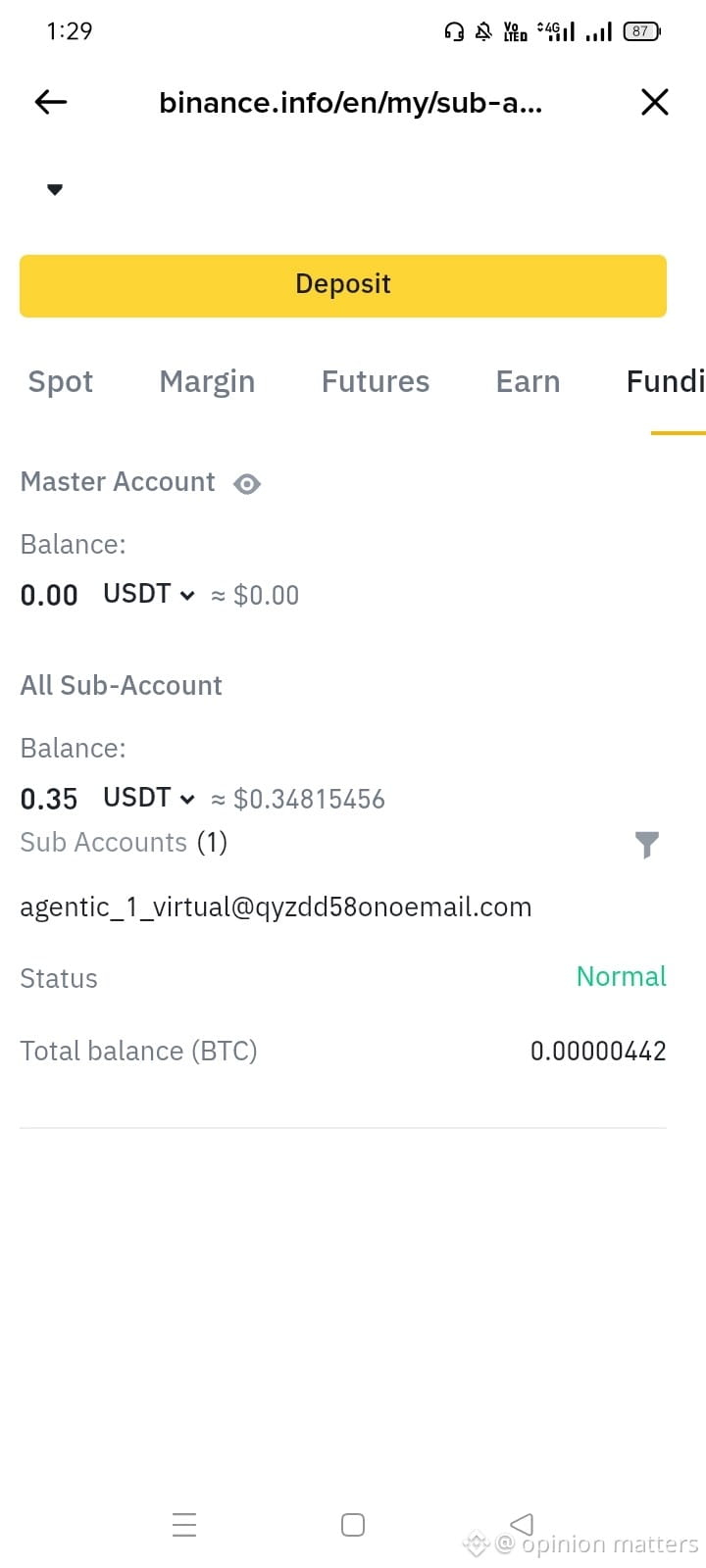
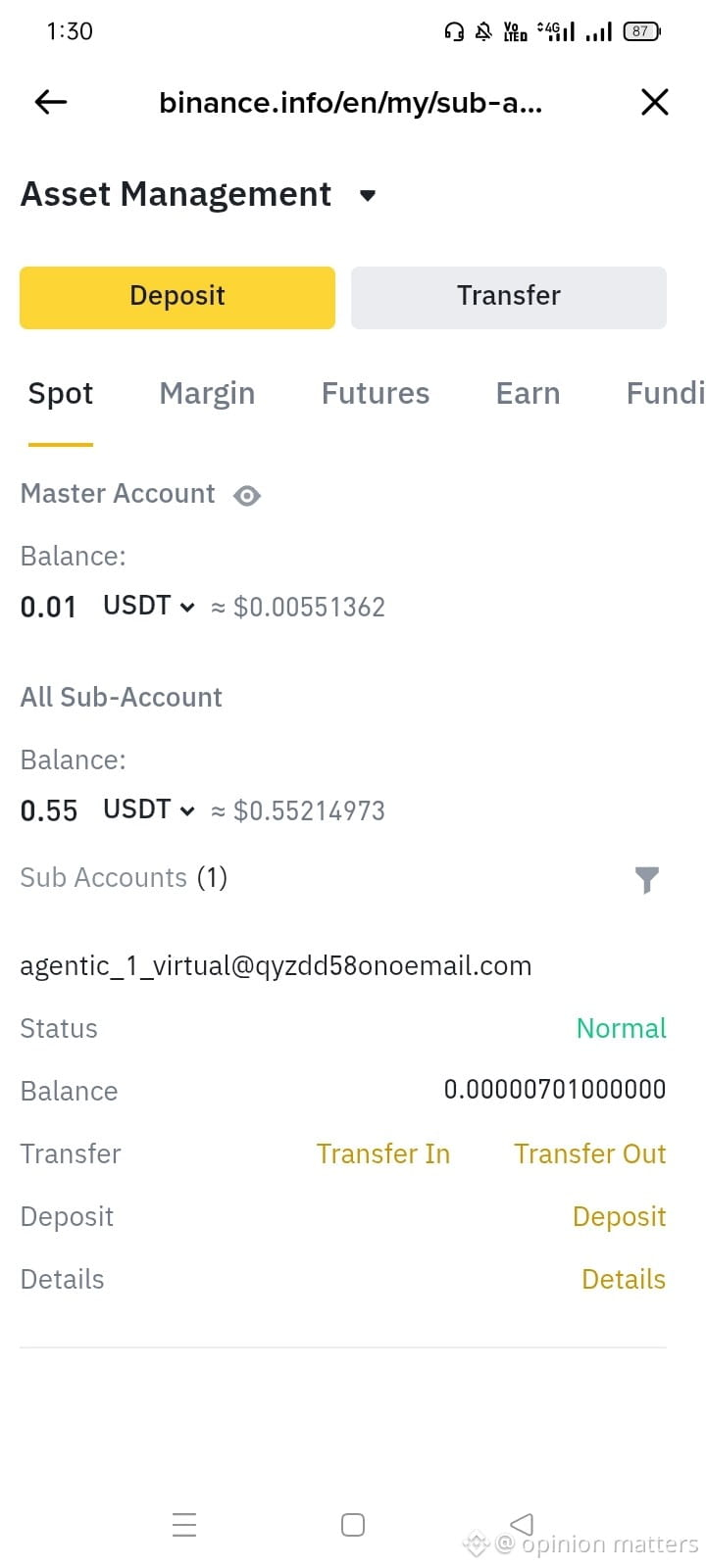

105

·
--
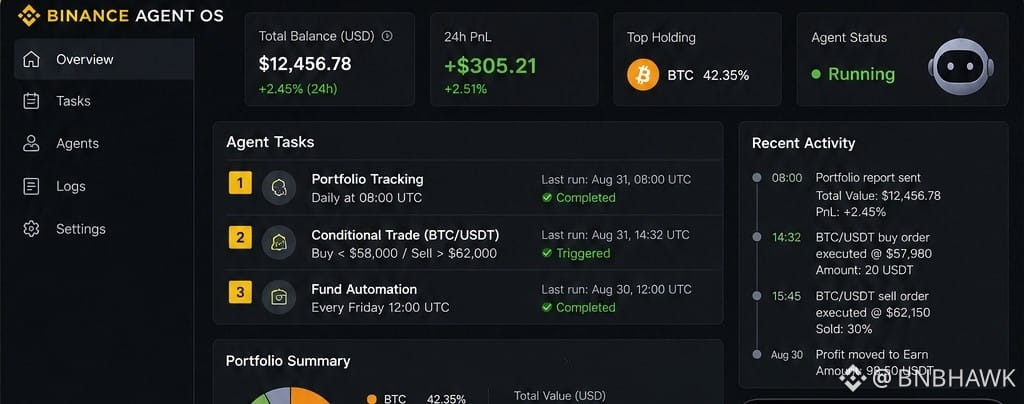
Article
Agent OS on Binance Learn Her3🚀 I Tested Binance Agent OS — Here’s What I Built
What if your AI assistant could do more than just answer questions?
With Binance Agent OS, I experimented with turning an AI agent into a personal crypto assistant that can help monitor my portfolio, react to market conditions, and automate repetitive tasks.
Here are 3 tasks I tested 👇
1️⃣ Portfolio Tracking 📊
I want my agent to help me monitor my portfolio without checking it manually all the time.
Prompt:
“Track my Binance Spot and Futures portfolio daily at 08:00 UTC and give me a summary including total portfolio value, PnL, and my top 3 holdings.”
Why it’s useful:
Instead of opening multiple pages and checking positions one by one, I can get the important information in one summary.
2️⃣ Conditional Trade ⚡
Next, I tested a rule-based trading instruction.
Prompt:
“If BTC/USDT drops below my specified target price, buy 20 USDT worth. If the price reaches my upper target, sell 30% of my BTC position.”
Why it’s useful:
The idea is simple: define the condition in advance instead of constantly watching the market.
⚠️ Always double-check the pair, amount, conditions, permissions, and risk before allowing any automated action.
3️⃣ Fund Automation 💰
I also wanted to experiment with automating a repetitive portfolio-management task.
Prompt:
“Every Friday at 12:00 UTC, transfer 20% of my available USDT to Binance Earn Flexible.”
Why it’s useful:
It can help turn a repetitive weekly action into a predefined workflow.
💡 My biggest learning / gotcha:
BE SPECIFIC WITH YOUR PROMPTS.
A vague instruction can produce a different result from what you expect.
Instead of saying:
“Buy BTC when the price is low.”
Define:
✅ Trading pair
✅ Exact condition
✅ Amount
✅ Action
✅ Frequency/timing
The clearer the instruction, the easier it is for the agent to understand the workflow you want.
For me, this is what makes Agent OS interesting.
AI is moving from simply giving us information toward helping us execute workflows based on instructions and conditions.
This is only the beginning. 🤖⚡
What task would you automate first with Binance Agent OS?
#BinanceAgentOS @Binance_Angels
Disclaimer: This post is for educational purposes and demonstrates an experimental automation workflow. It is not financial advice. Always review permissions, conditions, and risks before enabling automated trading or fund actions.Tinggal tambahkan screenshot asli Agent OS kamu setelah bagian task/prompt supaya memenuhi requirement challenge.
Agent OS on Binance Learn Her3
🚀 I Tested Binance Agent OS — Here’s What I Built
What if your AI assistant could do more than just answer questions?
With Binance Agent OS, I experimented with turning an AI agent into a personal crypto assistant that can help monitor my portfolio, react to market conditions, and automate repetitive tasks.
Here are 3 tasks I tested 👇
1️⃣ Portfolio Tracking 📊
I want my agent to help me monitor my portfolio without checking it manually all the time.
Prompt:
“Track my Binance Spot and Futures portfolio daily at 08:00 UTC and give me a summary including total portfolio value, PnL, and my top 3 holdings.”
Why it’s useful:
Instead of opening multiple pages and checking positions one by one, I can get the important information in one summary.
2️⃣ Conditional Trade ⚡
Next, I tested a rule-based trading instruction.
Prompt:
“If BTC/USDT drops below my specified target price, buy 20 USDT worth. If the price reaches my upper target, sell 30% of my BTC position.”
Why it’s useful:
The idea is simple: define the condition in advance instead of constantly watching the market.
⚠️ Always double-check the pair, amount, conditions, permissions, and risk before allowing any automated action.
3️⃣ Fund Automation 💰
I also wanted to experiment with automating a repetitive portfolio-management task.
Prompt:
“Every Friday at 12:00 UTC, transfer 20% of my available USDT to Binance Earn Flexible.”
Why it’s useful:
It can help turn a repetitive weekly action into a predefined workflow.
💡 My biggest learning / gotcha:
BE SPECIFIC WITH YOUR PROMPTS.
A vague instruction can produce a different result from what you expect.
Instead of saying:
“Buy BTC when the price is low.”
Define:
✅ Trading pair
✅ Exact condition
✅ Amount
✅ Action
✅ Frequency/timing
The clearer the instruction, the easier it is for the agent to understand the workflow you want.
For me, this is what makes Agent OS interesting.
AI is moving from simply giving us information toward helping us execute workflows based on instructions and conditions.
This is only the beginning. 🤖⚡
What task would you automate first with Binance Agent OS?
#BinanceAgentOS @Binance Angels
Disclaimer: This post is for educational purposes and demonstrates an experimental automation workflow. It is not financial advice. Always review permissions, conditions, and risks before enabling automated trading or fund actions.Tinggal tambahkan screenshot asli Agent OS kamu setelah bagian task/prompt supaya memenuhi requirement challenge.
128

·
--
My Binance MCP connector has been successfully connected. Agent OS can now call Binance spot, margin, futures, wallet, and Instant Exchange APIs, supporting queries for account balances, market prices, order placement information, and trade records.
#BinanceAgentOS
My Binance MCP connector has been successfully connected. Agent OS can now call Binance spot, margin, futures, wallet, and Instant Exchange APIs, supporting queries for account balances, market prices, order placement information, and trade records.
#BinanceAgentOS
#BinanceAgentOS
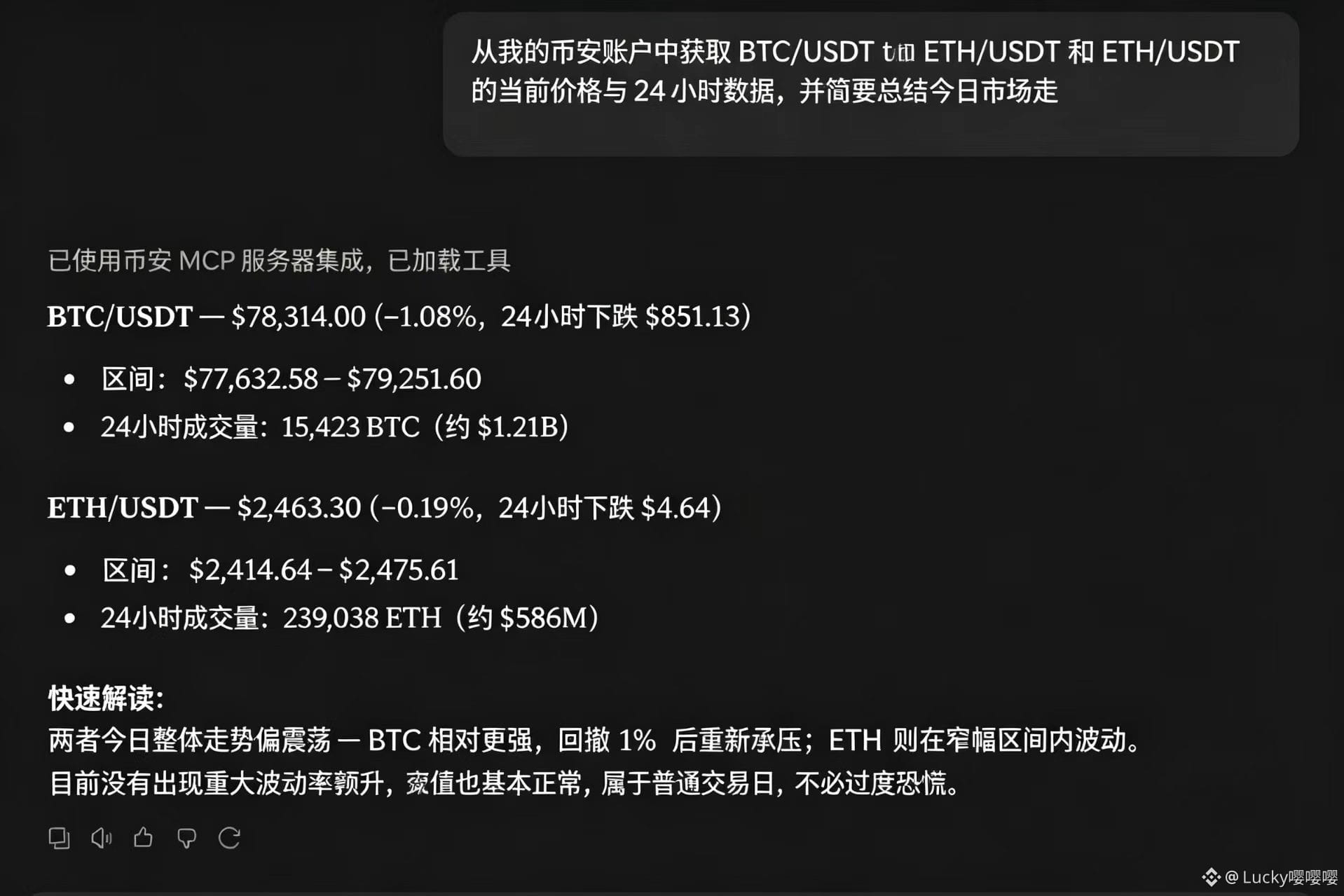
Quoted content has been removed
156

·
--
AI is moving from “giving advice” to actually becoming part of the trading workflow. 🤖
Binance just launched Agent OS, connecting AI agents such as ChatGPT and Claude with Binance trading, market data and on-chain tools.
And there’s already a 2,000 USDC challenge running around it.
This could be a much bigger shift than another token launch.
Would you trust an AI agent to interact with your crypto portfolio? 👀
#Binance #AI
#Crypto
#BinanceAgentOS
1
24
·
--
🚀 I tested Binance Agent OS with my crypto wallet
What if, instead of logging into Binance all day, I had an agent that monitors my activity and only alerts me when it matters? I connected my agent to Binance’s MCP server and assigned it 3 tasks 👇
1️⃣ Wallet tracking 📊
"Analyze my wallet and recent activity. Every day, give me: total value, change vs the previous day, main holdings (BTC, ETH), performance of each, buys/sells, and which one had the best and worst performance. If there’s a major change, explain it simply."
2️⃣ Conditional operations ⚡
"Monitor BTC/ETH. If the price reaches [key level from my analysis], notify me that it was hit and explain what happened in the market. Don’t execute anything without my confirmation."
3️⃣ Funds automation 🤖
"Review my fund activity based on the frequency I set and prepare a summary: amount, asset, and date. If you detect anything unusual, alert me before acting."
🔒 Why I jumped in without fear: the agent operates in a dedicated sub-account, separate from my main account. Withdrawals are set to "never available" and each operation is "confirmed first by you" — as defined by Binance’s own documentation, not just my word.
🧠 The trick: the quality of the instruction determines the quality of the agent.
❌ "Analyze my wallet."
✅ Analyze → summarize → notify me → don’t execute without confirmation.
Which task would you assign to your agent first?
#BinanceAgentOS @Binance_Angels
Illustrative chart created to explain the process. The real Binance Agent OS interface may vary.
🚀 I tested Binance Agent OS with my crypto wallet
What if, instead of logging into Binance all day, I had an agent that monitors my activity and only alerts me when it matters? I connected my agent to Binance’s MCP server and assigned it 3 tasks 👇
1️⃣ Wallet tracking 📊
"Analyze my wallet and recent activity. Every day, give me: total value, change vs the previous day, main holdings (BTC, ETH), performance of each, buys/sells, and which one had the best and worst performance. If there’s a major change, explain it simply."
2️⃣ Conditional operations ⚡
"Monitor BTC/ETH. If the price reaches [key level from my analysis], notify me that it was hit and explain what happened in the market. Don’t execute anything without my confirmation."
3️⃣ Funds automation 🤖
"Review my fund activity based on the frequency I set and prepare a summary: amount, asset, and date. If you detect anything unusual, alert me before acting."
🔒 Why I jumped in without fear: the agent operates in a dedicated sub-account, separate from my main account. Withdrawals are set to "never available" and each operation is "confirmed first by you" — as defined by Binance’s own documentation, not just my word.
🧠 The trick: the quality of the instruction determines the quality of the agent.
❌ "Analyze my wallet."
✅ Analyze → summarize → notify me → don’t execute without confirmation.
Which task would you assign to your agent first?
#BinanceAgentOS @Binance Angels
Illustrative chart created to explain the process. The real Binance Agent OS interface may vary.
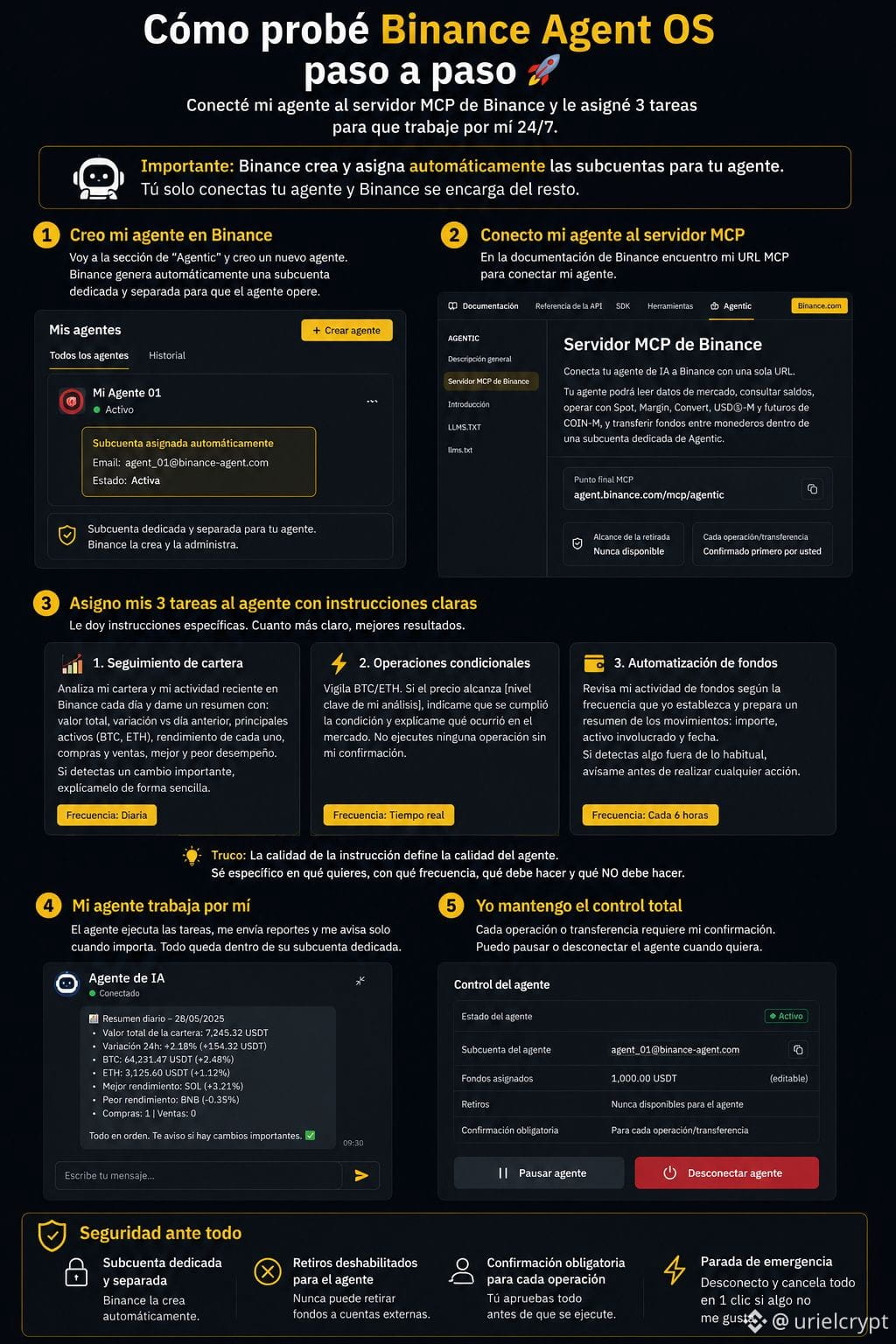
5
348
Log in to explore more content
Join global crypto users on Binance Square
⚡️ Get latest and useful information about crypto.
💬 Trusted by the world’s largest crypto exchange.
👍 Discover real insights from verified creators.
Email / Phone number
Trending Topics
1
#CanMarketsReboundAfterThanksgiving?
6,971 views
202 Discussing
2
#CouldSpaceX’sOrbitalDataCentersBoostAIChipDemand?
5,201 views
135 Discussing
3
#EvolveAtBinanceBlockchainWeek
640,705 views
6,658 Discussing
4
#CorePCEBeatLiftsFedHikeOdds
149,000 views
1,210 Discussing
5
#BitcoinAndStocksSlipAgainAmidTrump’sTariffPlans
204,397 views
2,004 Discussing
6
#JensenHuangSaysNvidiaDoesn’tNeedASuccessionPlan
98,217 views
1,214 Discussing
7
#NasdaqFuturesSlideMoreThan3%
38,683 views
360 Discussing
8
#USOctoberPCEPriceIndexAt0.3%MoM
44,508 views
367 Discussing
9
#BitcoinETFsPostRecord$4.94BNovemberOutflows
8,381 views
48 Discussing
10
#TetherInvestsInArgentinasLemon
17,067 views
208 Discussing