To offer a seamless experience for users, Binance has automatically enabled using Spot Account as a source of funding for Binance Brazil Card transactions.
When your Funding Account balance is insufficient to pay for a transaction, the system will automatically use the funds from your Spot Account to pay for the full transaction amount. However, the transaction will be declined if your Spot Account balance is also insufficient.
1. Log in to your Binance account and navigate to the [Card Dashboard].
2. Tap [Manage Account] - [Source of Funding] to enable or disable this feature.
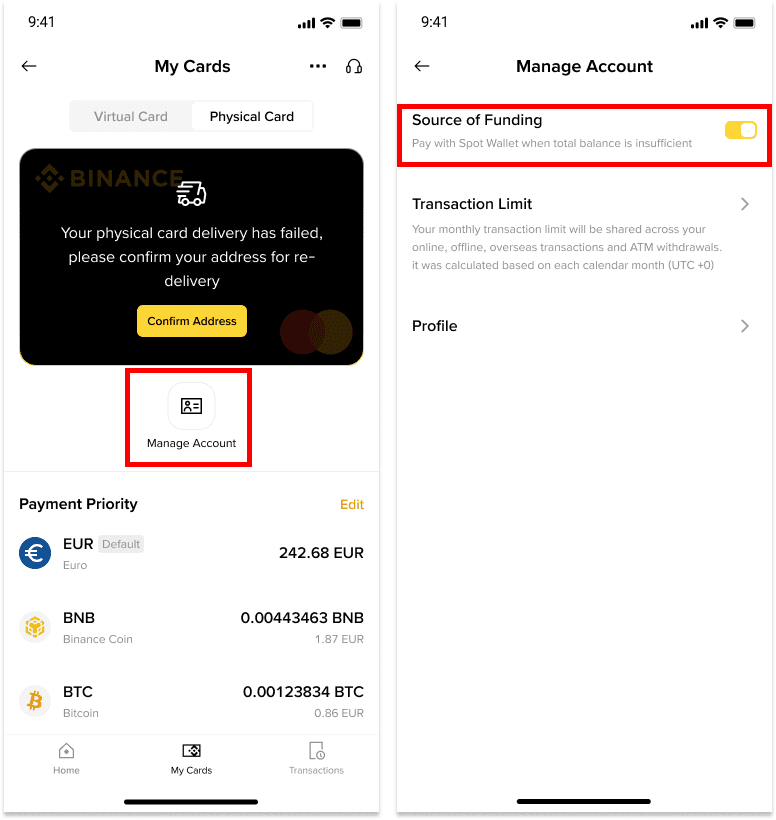
You may add, remove, or rearrange the order of the spending cryptocurrencies from [Card Dashboard] - [Payment Priority] - [Edit]. The system will follow the payment priority when you make a purchase with your Binance Brazil Card.
Please note: You must have a minimum of 3 cryptocurrencies in your Payment Priority list, and a maximum of 12 cryptocurrencies can be selected.
