

Satoshi Bro
167 Публикации

Satoshi Bro
Отправить жалобу
Заблокировать пользователя
Открытая сделка

Владелец AVA
Трейдер с регулярными сделками
3.5 мес.
0 подписок(и/а)
9 подписчиков(а)
5 понравилось
Посты
Портфель
Все
Видео
·
--
Quick poll 📊
$BTC swung from about 81,970 down to 76,500 in the last 24 hours and now sits near 78,350 (-2% on the day).
What are you doing this week?
1️⃣ Buying small pieces on the way down
2️⃣ Sitting in stables until it picks a direction
3️⃣ Holding, not touching anything
4️⃣ Trading the range short term
Drop your number in the comments 👇 and one line on why.
#CryptoMarket #BTC #cryptotrading #Binance
Quick poll 📊
$BTC swung from about 81,970 down to 76,500 in the last 24 hours and now sits near 78,350 (-2% on the day).
What are you doing this week?
1️⃣ Buying small pieces on the way down
2️⃣ Sitting in stables until it picks a direction
3️⃣ Holding, not touching anything
4️⃣ Trading the range short term
Drop your number in the comments 👇 and one line on why.
#CryptoMarket #BTC #cryptotrading #Binance
$BTC swung from about 81,970 down to 76,500 in the last 24 hours and now sits near 78,350 (-2% on the day).
What are you doing this week?
1️⃣ Buying small pieces on the way down
2️⃣ Sitting in stables until it picks a direction
3️⃣ Holding, not touching anything
4️⃣ Trading the range short term
Drop your number in the comments 👇 and one line on why.
#CryptoMarket #BTC #cryptotrading #Binance
32
·
--
Binance Referral Code 2026 for 20% Off Fees
Flat 20% off Spot and Futures fees with a promo code at sign-up.
1. Open Binance sign-up
2. Enter code 20LESSFEES before you finish
3. Fees drop 20%
Sign up: https://www.binance.com/join?ref=20LESSFEES
Bonus up to $19,800 for eligible users: https://www.binance.com/en/events/BESTBONUS
Not financial advice.
#BİNANCE #BinancePromoCode #crypto $BNB
Binance Referral Code 2026 for 20% Off Fees
Flat 20% off Spot and Futures fees with a promo code at sign-up.
1. Open Binance sign-up
2. Enter code 20LESSFEES before you finish
3. Fees drop 20%
Sign up: https://www.binance.com/join?ref=20LESSFEES
Bonus up to $19,800 for eligible users: https://www.binance.com/en/events/BESTBONUS
Not financial advice.
#BİNANCE #BinancePromoCode #crypto $BNB
Flat 20% off Spot and Futures fees with a promo code at sign-up.
1. Open Binance sign-up
2. Enter code 20LESSFEES before you finish
3. Fees drop 20%
Sign up: https://www.binance.com/join?ref=20LESSFEES
Bonus up to $19,800 for eligible users: https://www.binance.com/en/events/BESTBONUS
Not financial advice.
#BİNANCE #BinancePromoCode #crypto $BNB
43
·
--
Статья
Binance Referral Code 2026 Savings Worked Out Trade by TradeHere is what a Binance referral code is worth once you stop quoting percentages and count real trades. Sign up with 20LESSFEES and every Spot and Futures trade on that account costs a flat 20% less in trading fees. On top of that, eligible users can work toward a welcome bonus worth up to $19,800. That part is task-based, and it does not depend on which code sits on the account.
👉 [Sign up on Binance with 20LESSFEES](https://www.binance.com/join?ref=20LESSFEES)
Below, one new account is followed order by order: a $1,000 Bitcoin buy, the sale that closes it, and a small futures position. After that come three monthly totals for different kinds of trader.
Every figure uses the Regular User rates from the fee screenshots further down, so you can redo the sums with your own amounts.
Why put a code on the account at all?
Lower trading fees: A flat 20% off the Spot and Futures fees for your tier, starting with your first order.Nothing to qualify for: No minimum deposit, no volume target and no countdown before the discount applies.Welcome tasks stay open: If you qualify for the welcome campaign, its tasks work the same with or without a code.No cost: Adding it costs nothing, and nobody gets any access to your account through it.
Where does the code go when you register?
Follow the link above to reach registration. Coming in that way puts the code in for you.Enter an email or a mobile number in the top box.Find the code box next. If it is collapsed, tap to expand it and confirm it reads 20LESSFEES exactly, without a stray space after it.Press Register, then type in the one-time verification digits sent by email or SMS.Set your password and complete identity verification so you can deposit and trade.
Using Google, Apple or Telegram to sign up works too. The code field still has to be filled before the account is created, so check the next screen before you confirm.
Code to have ready at that point: 20LESSFEES
Which fee rates are these examples using?
All the sums below use the standard rates for a new account, before any VIP level.
Spot, Regular User: 0.100% maker and 0.100% taker. With the code that becomes 0.080% on both.USDⓈ-M Futures, Regular User: 0.0200% for makers and 0.0500% for takers on USDT-margined contracts. With the code that becomes 0.0160% and 0.0400%.The base for the fee: Spot fees come off the trade value. Futures fees come off the whole position, not the collateral behind it.
Maker means your order waits on the order book, usually a limit order. Taker means it fills straight away against someone else's order, like a market order.
Trade 1, a $1,000 Bitcoin market buy
The account is funded and the first order goes in. A market buy of $1,000 worth of BTC fills immediately, so it pays the taker rate.
Without a code: $1,000 x 0.100% = $1.00 in fees.With the code: $1,000 x 0.080% = $0.80 in fees.Saved on this order: $0.20.
On a buy the fee is normally taken from the coin you receive, so the saving shows up as slightly more BTC in your wallet rather than as dollars.
Twenty cents will not change anybody's month. It is the starting unit for everything else, though, because the saving always works out to 0.02% of the Spot volume you trade.
Trade 2, selling the same Bitcoin with a limit order
A few weeks later the position is closed with a limit sell. Whatever the price has done in the meantime, the fee is worked out on the value of the sale. To keep the sums easy, take a sale worth $1,000 again.
Without a code: $1.00 in fees.With the code: $0.80 in fees.Full round trip: $2.00 against $1.60, so $0.40 saved on buying and selling once.
Notice that the limit order did not cost less than the market order. On the Regular User Spot tier, maker and taker are both 0.100%. The order type begins to count on Futures and on higher tiers, which is where the next trade goes.
The BNB column in that table is a separate option. With BNB covering Spot fees, the Regular User rate drops to 0.07500%. Exactly how that setting combines with the code on your account is something to read from one real order in your trade history, not something to assume from a blog post, so the examples here leave BNB out.
Trade 3, a futures position at 5x
Now the same account opens a USDT-margined position. It puts up $400 of margin at 5x leverage, so the position size is $2,000, and the fee is worked out on that full $2,000.
Market order to open: $2,000 x 0.0500% = $1.00 without a code, or $0.80 with it.Closing with a limit order: $2,000 x 0.0200% = $0.40 without a code, or $0.32 with it.Round trip: $1.40 against $1.12, so $0.28 saved.
If both sides had been market orders, the round trip would cost $2.00, or $1.60 with the code. Choosing a limit order to close saved more here than the code did.
Funding payments are a different matter. They pass between traders holding long and short positions every few hours and are not a trading fee, so the 20% does not touch them.
Spot or Futures, the code is the same: 20LESSFEES
One trade at a time the numbers look small. They add up through repetition, so the next step is a whole month.
What does a month look like for three kinds of trader?
Same rates, same arithmetic, three different habits.
The monthly buyer: Two $250 BTC buys and one $100 sale, so $600 of Spot volume. Fees are $0.60 without a code and $0.48 with it. That is $0.12 a month, about $1.44 over a year.The active Spot trader: Around 60 orders a month averaging $500, so $30,000 of volume. Fees are $30.00 against $24.00. That is $6 a month, about $72 a year if the habit stays the same.The futures trader: 30 round trips a month on $2,000 positions, opened with market orders and closed with limits as in Trade 3. Fees are $42.00 against $33.60. That is $8.40 a month, about $100.80 a year.
Had the futures trader used market orders on both sides, the month would be $120,000 of taker volume: $60 without the code and $48 with it, so $12 a month apart.
The pattern is easy to see. For a light buyer the code is a free default. For someone who trades every day, especially on Futures, it becomes a line worth looking at.
What moves your fee bill more than any code?
The code takes a fixed slice off. Three other choices change the size of the bill itself.
Position size on Futures: 5x on $400 is charged as $2,000. Go to 20x on the same margin and the fee is charged on $8,000.Maker or taker on Futures: 0.0200% against 0.0500% is a bigger gap than the 20% discount.How often you trade: Every extra round trip is another fee. Fewer, better planned trades cut more than any discount.
Fees on withdrawals, Convert and card purchases follow their own rules. This [side-by-side comparison of Binance fees and charges](https://www.binance.com/en/square/post/382471034198840) lays them out in one place.
Edge cases that change the arithmetic
Zero-fee promotions: When Binance runs a promotion that sets a fee to 0%, 20% of zero is still zero. The discount only matters on the pairs and order types where a fee is charged.Reaching a VIP tier: The discount is taken from the rate of your current tier. At VIP levels the starting rate falls, so the cents saved per order shrink while the percentage stays the same.Very small orders: On a $20 trade the fee difference is less than a cent and can disappear in rounding. You will see it on larger orders first.
Which mistakes wipe out the saving?
Signing up now and meaning to attach a code afterwards: The form at registration is the only place it can go.Typing the code with a typo or a trailing space: An unrecognised code means standard fees from the start.Making a duplicate account just for the code: Binance does not allow it, and you risk losing access to both.Trading extra volume just to chase welcome tasks: Each of those trades pays fees and carries market risk, and together they may outweigh the reward.Treating the saving as income: It is a lower cost, not money earned. Prices can still move against you on every trade in these examples.
Futures traders who want the welcome side covered too can read about [what the Binance futures bonus really includes](https://www.binance.com/en/square/post/381852885575249).
I already have an account and other doubts
"My account is already open." Codes attach only to brand-new registrations, so an existing account keeps the fees it has.
"Is it safe to enter a code I found online?" The code is just a few characters typed into one box. Nobody gets your login, your balance or your orders from it. Stick to binance.com or the official app, and keep your password and 2FA to yourself.
"Can I add it after I register?" No. Account settings have no box for it, so step 3 above is the moment to get it right.
Before you open the account
Run your own numbers first. Take what you expect to trade in a month, multiply Spot volume by 0.02% and Futures taker volume by 0.01%, and you have your monthly saving with the code.
Then register with 20LESSFEES, and if you are eligible, check the [welcome bonus tasks on the current event page](https://www.binance.com/en/events/BESTBONUS) before you deposit, and pick a tier only if its deposit and volume match what you meant to do anyway.
👉 Type 20LESSFEES in the code box when you register.
Nothing here is financial advice. It is fee arithmetic and setup help. Crypto can lose value quickly, and Binance may change fee rates, promotions, welcome tasks or eligibility without notice.
FAQ
Does the discount make my order smaller?
No. Only the fee shrinks. A $1,000 Spot buy stays $1,000, and its fee goes from $1.00 to $0.80.
How much do I need to trade to save $10?
About $50,000 of Spot volume, or about $100,000 of Futures volume filled at the taker rate.
Does the code make funding payments cheaper?
No. Funding is exchanged between traders and is not a trading fee.
Can one account have two codes?
No. Each account takes one code, entered when it is created.
Would another code give me a larger welcome bonus?
No. Tiers, rewards and eligibility for the welcome campaign are identical for every code.
Binance Referral Code 2026 Savings Worked Out Trade by Trade
Here is what a Binance referral code is worth once you stop quoting percentages and count real trades. Sign up with 20LESSFEES and every Spot and Futures trade on that account costs a flat 20% less in trading fees. On top of that, eligible users can work toward a welcome bonus worth up to $19,800. That part is task-based, and it does not depend on which code sits on the account.
👉 Sign up on Binance with 20LESSFEES
Below, one new account is followed order by order: a $1,000 Bitcoin buy, the sale that closes it, and a small futures position. After that come three monthly totals for different kinds of trader.
Every figure uses the Regular User rates from the fee screenshots further down, so you can redo the sums with your own amounts.
Why put a code on the account at all?
Lower trading fees: A flat 20% off the Spot and Futures fees for your tier, starting with your first order.Nothing to qualify for: No minimum deposit, no volume target and no countdown before the discount applies.Welcome tasks stay open: If you qualify for the welcome campaign, its tasks work the same with or without a code.No cost: Adding it costs nothing, and nobody gets any access to your account through it.
Where does the code go when you register?
Follow the link above to reach registration. Coming in that way puts the code in for you.Enter an email or a mobile number in the top box.Find the code box next. If it is collapsed, tap to expand it and confirm it reads 20LESSFEES exactly, without a stray space after it.Press Register, then type in the one-time verification digits sent by email or SMS.Set your password and complete identity verification so you can deposit and trade.
Using Google, Apple or Telegram to sign up works too. The code field still has to be filled before the account is created, so check the next screen before you confirm.
Code to have ready at that point: 20LESSFEES
Which fee rates are these examples using?
All the sums below use the standard rates for a new account, before any VIP level.
Spot, Regular User: 0.100% maker and 0.100% taker. With the code that becomes 0.080% on both.USDⓈ-M Futures, Regular User: 0.0200% for makers and 0.0500% for takers on USDT-margined contracts. With the code that becomes 0.0160% and 0.0400%.The base for the fee: Spot fees come off the trade value. Futures fees come off the whole position, not the collateral behind it.
Maker means your order waits on the order book, usually a limit order. Taker means it fills straight away against someone else's order, like a market order.
Trade 1, a $1,000 Bitcoin market buy
The account is funded and the first order goes in. A market buy of $1,000 worth of BTC fills immediately, so it pays the taker rate.
Without a code: $1,000 x 0.100% = $1.00 in fees.With the code: $1,000 x 0.080% = $0.80 in fees.Saved on this order: $0.20.
On a buy the fee is normally taken from the coin you receive, so the saving shows up as slightly more BTC in your wallet rather than as dollars.
Twenty cents will not change anybody's month. It is the starting unit for everything else, though, because the saving always works out to 0.02% of the Spot volume you trade.
Trade 2, selling the same Bitcoin with a limit order
A few weeks later the position is closed with a limit sell. Whatever the price has done in the meantime, the fee is worked out on the value of the sale. To keep the sums easy, take a sale worth $1,000 again.
Without a code: $1.00 in fees.With the code: $0.80 in fees.Full round trip: $2.00 against $1.60, so $0.40 saved on buying and selling once.
Notice that the limit order did not cost less than the market order. On the Regular User Spot tier, maker and taker are both 0.100%. The order type begins to count on Futures and on higher tiers, which is where the next trade goes.
The BNB column in that table is a separate option. With BNB covering Spot fees, the Regular User rate drops to 0.07500%. Exactly how that setting combines with the code on your account is something to read from one real order in your trade history, not something to assume from a blog post, so the examples here leave BNB out.
Trade 3, a futures position at 5x
Now the same account opens a USDT-margined position. It puts up $400 of margin at 5x leverage, so the position size is $2,000, and the fee is worked out on that full $2,000.
Market order to open: $2,000 x 0.0500% = $1.00 without a code, or $0.80 with it.Closing with a limit order: $2,000 x 0.0200% = $0.40 without a code, or $0.32 with it.Round trip: $1.40 against $1.12, so $0.28 saved.
If both sides had been market orders, the round trip would cost $2.00, or $1.60 with the code. Choosing a limit order to close saved more here than the code did.
Funding payments are a different matter. They pass between traders holding long and short positions every few hours and are not a trading fee, so the 20% does not touch them.
Spot or Futures, the code is the same: 20LESSFEES
One trade at a time the numbers look small. They add up through repetition, so the next step is a whole month.
What does a month look like for three kinds of trader?
Same rates, same arithmetic, three different habits.
The monthly buyer: Two $250 BTC buys and one $100 sale, so $600 of Spot volume. Fees are $0.60 without a code and $0.48 with it. That is $0.12 a month, about $1.44 over a year.The active Spot trader: Around 60 orders a month averaging $500, so $30,000 of volume. Fees are $30.00 against $24.00. That is $6 a month, about $72 a year if the habit stays the same.The futures trader: 30 round trips a month on $2,000 positions, opened with market orders and closed with limits as in Trade 3. Fees are $42.00 against $33.60. That is $8.40 a month, about $100.80 a year.
Had the futures trader used market orders on both sides, the month would be $120,000 of taker volume: $60 without the code and $48 with it, so $12 a month apart.
The pattern is easy to see. For a light buyer the code is a free default. For someone who trades every day, especially on Futures, it becomes a line worth looking at.
What moves your fee bill more than any code?
The code takes a fixed slice off. Three other choices change the size of the bill itself.
Position size on Futures: 5x on $400 is charged as $2,000. Go to 20x on the same margin and the fee is charged on $8,000.Maker or taker on Futures: 0.0200% against 0.0500% is a bigger gap than the 20% discount.How often you trade: Every extra round trip is another fee. Fewer, better planned trades cut more than any discount.
Fees on withdrawals, Convert and card purchases follow their own rules. This side-by-side comparison of Binance fees and charges lays them out in one place.
Edge cases that change the arithmetic
Zero-fee promotions: When Binance runs a promotion that sets a fee to 0%, 20% of zero is still zero. The discount only matters on the pairs and order types where a fee is charged.Reaching a VIP tier: The discount is taken from the rate of your current tier. At VIP levels the starting rate falls, so the cents saved per order shrink while the percentage stays the same.Very small orders: On a $20 trade the fee difference is less than a cent and can disappear in rounding. You will see it on larger orders first.
Which mistakes wipe out the saving?
Signing up now and meaning to attach a code afterwards: The form at registration is the only place it can go.Typing the code with a typo or a trailing space: An unrecognised code means standard fees from the start.Making a duplicate account just for the code: Binance does not allow it, and you risk losing access to both.Trading extra volume just to chase welcome tasks: Each of those trades pays fees and carries market risk, and together they may outweigh the reward.Treating the saving as income: It is a lower cost, not money earned. Prices can still move against you on every trade in these examples.
Futures traders who want the welcome side covered too can read about what the Binance futures bonus really includes.
I already have an account and other doubts
"My account is already open." Codes attach only to brand-new registrations, so an existing account keeps the fees it has.
"Is it safe to enter a code I found online?" The code is just a few characters typed into one box. Nobody gets your login, your balance or your orders from it. Stick to binance.com or the official app, and keep your password and 2FA to yourself.
"Can I add it after I register?" No. Account settings have no box for it, so step 3 above is the moment to get it right.
Before you open the account
Run your own numbers first. Take what you expect to trade in a month, multiply Spot volume by 0.02% and Futures taker volume by 0.01%, and you have your monthly saving with the code.
Then register with 20LESSFEES, and if you are eligible, check the welcome bonus tasks on the current event page before you deposit, and pick a tier only if its deposit and volume match what you meant to do anyway.
👉 Type 20LESSFEES in the code box when you register.
Nothing here is financial advice. It is fee arithmetic and setup help. Crypto can lose value quickly, and Binance may change fee rates, promotions, welcome tasks or eligibility without notice.
FAQ
Does the discount make my order smaller?
No. Only the fee shrinks. A $1,000 Spot buy stays $1,000, and its fee goes from $1.00 to $0.80.
How much do I need to trade to save $10?
About $50,000 of Spot volume, or about $100,000 of Futures volume filled at the taker rate.
Does the code make funding payments cheaper?
No. Funding is exchanged between traders and is not a trading fee.
Can one account have two codes?
No. Each account takes one code, entered when it is created.
Would another code give me a larger welcome bonus?
No. Tiers, rewards and eligibility for the welcome campaign are identical for every code.
👉 Sign up on Binance with 20LESSFEES
Below, one new account is followed order by order: a $1,000 Bitcoin buy, the sale that closes it, and a small futures position. After that come three monthly totals for different kinds of trader.
Every figure uses the Regular User rates from the fee screenshots further down, so you can redo the sums with your own amounts.
Why put a code on the account at all?
Lower trading fees: A flat 20% off the Spot and Futures fees for your tier, starting with your first order.Nothing to qualify for: No minimum deposit, no volume target and no countdown before the discount applies.Welcome tasks stay open: If you qualify for the welcome campaign, its tasks work the same with or without a code.No cost: Adding it costs nothing, and nobody gets any access to your account through it.
Where does the code go when you register?
Follow the link above to reach registration. Coming in that way puts the code in for you.Enter an email or a mobile number in the top box.Find the code box next. If it is collapsed, tap to expand it and confirm it reads 20LESSFEES exactly, without a stray space after it.Press Register, then type in the one-time verification digits sent by email or SMS.Set your password and complete identity verification so you can deposit and trade.
Using Google, Apple or Telegram to sign up works too. The code field still has to be filled before the account is created, so check the next screen before you confirm.
Code to have ready at that point: 20LESSFEES
Which fee rates are these examples using?
All the sums below use the standard rates for a new account, before any VIP level.
Spot, Regular User: 0.100% maker and 0.100% taker. With the code that becomes 0.080% on both.USDⓈ-M Futures, Regular User: 0.0200% for makers and 0.0500% for takers on USDT-margined contracts. With the code that becomes 0.0160% and 0.0400%.The base for the fee: Spot fees come off the trade value. Futures fees come off the whole position, not the collateral behind it.
Maker means your order waits on the order book, usually a limit order. Taker means it fills straight away against someone else's order, like a market order.
Trade 1, a $1,000 Bitcoin market buy
The account is funded and the first order goes in. A market buy of $1,000 worth of BTC fills immediately, so it pays the taker rate.
Without a code: $1,000 x 0.100% = $1.00 in fees.With the code: $1,000 x 0.080% = $0.80 in fees.Saved on this order: $0.20.
On a buy the fee is normally taken from the coin you receive, so the saving shows up as slightly more BTC in your wallet rather than as dollars.
Twenty cents will not change anybody's month. It is the starting unit for everything else, though, because the saving always works out to 0.02% of the Spot volume you trade.
Trade 2, selling the same Bitcoin with a limit order
A few weeks later the position is closed with a limit sell. Whatever the price has done in the meantime, the fee is worked out on the value of the sale. To keep the sums easy, take a sale worth $1,000 again.
Without a code: $1.00 in fees.With the code: $0.80 in fees.Full round trip: $2.00 against $1.60, so $0.40 saved on buying and selling once.
Notice that the limit order did not cost less than the market order. On the Regular User Spot tier, maker and taker are both 0.100%. The order type begins to count on Futures and on higher tiers, which is where the next trade goes.
The BNB column in that table is a separate option. With BNB covering Spot fees, the Regular User rate drops to 0.07500%. Exactly how that setting combines with the code on your account is something to read from one real order in your trade history, not something to assume from a blog post, so the examples here leave BNB out.
Trade 3, a futures position at 5x
Now the same account opens a USDT-margined position. It puts up $400 of margin at 5x leverage, so the position size is $2,000, and the fee is worked out on that full $2,000.
Market order to open: $2,000 x 0.0500% = $1.00 without a code, or $0.80 with it.Closing with a limit order: $2,000 x 0.0200% = $0.40 without a code, or $0.32 with it.Round trip: $1.40 against $1.12, so $0.28 saved.
If both sides had been market orders, the round trip would cost $2.00, or $1.60 with the code. Choosing a limit order to close saved more here than the code did.
Funding payments are a different matter. They pass between traders holding long and short positions every few hours and are not a trading fee, so the 20% does not touch them.
Spot or Futures, the code is the same: 20LESSFEES
One trade at a time the numbers look small. They add up through repetition, so the next step is a whole month.
What does a month look like for three kinds of trader?
Same rates, same arithmetic, three different habits.
The monthly buyer: Two $250 BTC buys and one $100 sale, so $600 of Spot volume. Fees are $0.60 without a code and $0.48 with it. That is $0.12 a month, about $1.44 over a year.The active Spot trader: Around 60 orders a month averaging $500, so $30,000 of volume. Fees are $30.00 against $24.00. That is $6 a month, about $72 a year if the habit stays the same.The futures trader: 30 round trips a month on $2,000 positions, opened with market orders and closed with limits as in Trade 3. Fees are $42.00 against $33.60. That is $8.40 a month, about $100.80 a year.
Had the futures trader used market orders on both sides, the month would be $120,000 of taker volume: $60 without the code and $48 with it, so $12 a month apart.
The pattern is easy to see. For a light buyer the code is a free default. For someone who trades every day, especially on Futures, it becomes a line worth looking at.
What moves your fee bill more than any code?
The code takes a fixed slice off. Three other choices change the size of the bill itself.
Position size on Futures: 5x on $400 is charged as $2,000. Go to 20x on the same margin and the fee is charged on $8,000.Maker or taker on Futures: 0.0200% against 0.0500% is a bigger gap than the 20% discount.How often you trade: Every extra round trip is another fee. Fewer, better planned trades cut more than any discount.
Fees on withdrawals, Convert and card purchases follow their own rules. This side-by-side comparison of Binance fees and charges lays them out in one place.
Edge cases that change the arithmetic
Zero-fee promotions: When Binance runs a promotion that sets a fee to 0%, 20% of zero is still zero. The discount only matters on the pairs and order types where a fee is charged.Reaching a VIP tier: The discount is taken from the rate of your current tier. At VIP levels the starting rate falls, so the cents saved per order shrink while the percentage stays the same.Very small orders: On a $20 trade the fee difference is less than a cent and can disappear in rounding. You will see it on larger orders first.
Which mistakes wipe out the saving?
Signing up now and meaning to attach a code afterwards: The form at registration is the only place it can go.Typing the code with a typo or a trailing space: An unrecognised code means standard fees from the start.Making a duplicate account just for the code: Binance does not allow it, and you risk losing access to both.Trading extra volume just to chase welcome tasks: Each of those trades pays fees and carries market risk, and together they may outweigh the reward.Treating the saving as income: It is a lower cost, not money earned. Prices can still move against you on every trade in these examples.
Futures traders who want the welcome side covered too can read about what the Binance futures bonus really includes.
I already have an account and other doubts
"My account is already open." Codes attach only to brand-new registrations, so an existing account keeps the fees it has.
"Is it safe to enter a code I found online?" The code is just a few characters typed into one box. Nobody gets your login, your balance or your orders from it. Stick to binance.com or the official app, and keep your password and 2FA to yourself.
"Can I add it after I register?" No. Account settings have no box for it, so step 3 above is the moment to get it right.
Before you open the account
Run your own numbers first. Take what you expect to trade in a month, multiply Spot volume by 0.02% and Futures taker volume by 0.01%, and you have your monthly saving with the code.
Then register with 20LESSFEES, and if you are eligible, check the welcome bonus tasks on the current event page before you deposit, and pick a tier only if its deposit and volume match what you meant to do anyway.
👉 Type 20LESSFEES in the code box when you register.
Nothing here is financial advice. It is fee arithmetic and setup help. Crypto can lose value quickly, and Binance may change fee rates, promotions, welcome tasks or eligibility without notice.
FAQ
Does the discount make my order smaller?
No. Only the fee shrinks. A $1,000 Spot buy stays $1,000, and its fee goes from $1.00 to $0.80.
How much do I need to trade to save $10?
About $50,000 of Spot volume, or about $100,000 of Futures volume filled at the taker rate.
Does the code make funding payments cheaper?
No. Funding is exchanged between traders and is not a trading fee.
Can one account have two codes?
No. Each account takes one code, entered when it is created.
Would another code give me a larger welcome bonus?
No. Tiers, rewards and eligibility for the welcome campaign are identical for every code.
103
·
--
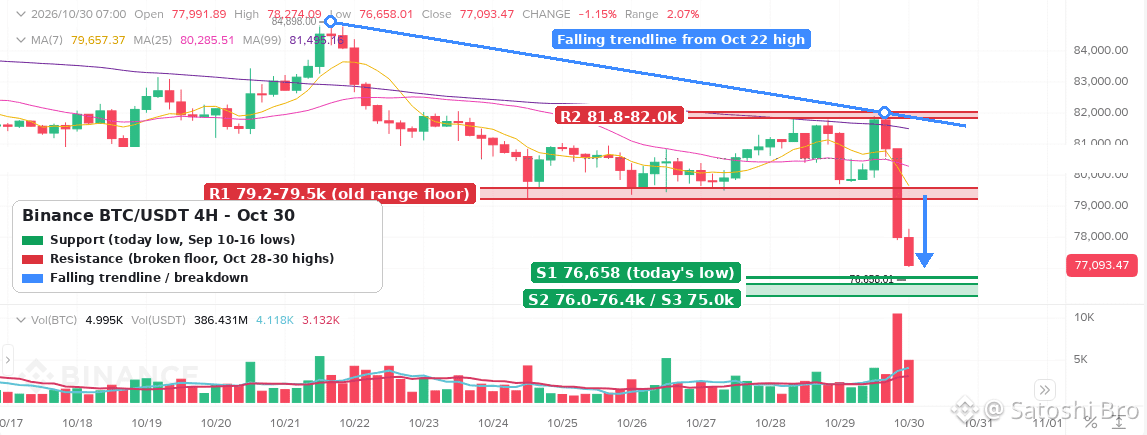
$BTC is trading near 77,050 USDT after a drop of more than 5,000 from 81,971 in two 4H candles. The 79.2-79.5k floor that held all week just gave way.
• Trend: lower highs under a falling trendline from the Oct 22 high (84,898 > 81,971). Price is below the 4H EMA50 (~80,700) and EMA200 (~81,700)
• Key support: 76,658 (today's low), then 76.0-76.4k (Sep 10-14 lows), then 75.0k (Sep 16 low at 74,968)
• Key resistance: 79.2-79.5k (the old range floor from the Oct 24-27 lows), then 81.8-82.0k (Oct 28-30 highs and the trendline)
• RSI(14) ~32, close to oversold after the flush, so a relief bounce wouldn't be a surprise
• Bullish: a 4H close back above 79.5k puts price back inside the old range and opens 80.7k (EMA50). Bearish: a close below 76.0k targets the 75.0k September low
Until 79.5k is reclaimed, any bounce into it is just a retest of broken support.
Not financial advice.
#BTC #Bitcoin #TechnicalAnalysis #CryptoMarket #Binance
$BTC is trading near 77,050 USDT after a drop of more than 5,000 from 81,971 in two 4H candles. The 79.2-79.5k floor that held all week just gave way.
• Trend: lower highs under a falling trendline from the Oct 22 high (84,898 > 81,971). Price is below the 4H EMA50 (~80,700) and EMA200 (~81,700)
• Key support: 76,658 (today's low), then 76.0-76.4k (Sep 10-14 lows), then 75.0k (Sep 16 low at 74,968)
• Key resistance: 79.2-79.5k (the old range floor from the Oct 24-27 lows), then 81.8-82.0k (Oct 28-30 highs and the trendline)
• RSI(14) ~32, close to oversold after the flush, so a relief bounce wouldn't be a surprise
• Bullish: a 4H close back above 79.5k puts price back inside the old range and opens 80.7k (EMA50). Bearish: a close below 76.0k targets the 75.0k September low
Until 79.5k is reclaimed, any bounce into it is just a retest of broken support.
Not financial advice.
#BTC #Bitcoin #TechnicalAnalysis #CryptoMarket #Binance
• Trend: lower highs under a falling trendline from the Oct 22 high (84,898 > 81,971). Price is below the 4H EMA50 (~80,700) and EMA200 (~81,700)
• Key support: 76,658 (today's low), then 76.0-76.4k (Sep 10-14 lows), then 75.0k (Sep 16 low at 74,968)
• Key resistance: 79.2-79.5k (the old range floor from the Oct 24-27 lows), then 81.8-82.0k (Oct 28-30 highs and the trendline)
• RSI(14) ~32, close to oversold after the flush, so a relief bounce wouldn't be a surprise
• Bullish: a 4H close back above 79.5k puts price back inside the old range and opens 80.7k (EMA50). Bearish: a close below 76.0k targets the 75.0k September low
Until 79.5k is reclaimed, any bounce into it is just a retest of broken support.
Not financial advice.
#BTC #Bitcoin #TechnicalAnalysis #CryptoMarket #Binance
98
·
--
Beginner tip 📓 Keep a trading journal, even a messy one.
Before every trade, write 3 lines:
• Why I'm entering
• Where I'm wrong (my stop)
• Where I take profit
When the trade closes, add one more line: what actually happened.
Do this for 20 trades, then read it back. Most people find the same 1-2 mistakes on repeat: chasing green candles, moving the stop, revenge trading after a loss.
You can't fix a pattern you never wrote down.
Do you track your trades, or wing it? 👇
#cryptotrading #tradingtips #cryptoeducation #Binance
Beginner tip 📓 Keep a trading journal, even a messy one.
Before every trade, write 3 lines:
• Why I'm entering
• Where I'm wrong (my stop)
• Where I take profit
When the trade closes, add one more line: what actually happened.
Do this for 20 trades, then read it back. Most people find the same 1-2 mistakes on repeat: chasing green candles, moving the stop, revenge trading after a loss.
You can't fix a pattern you never wrote down.
Do you track your trades, or wing it? 👇
#cryptotrading #tradingtips #cryptoeducation #Binance
Before every trade, write 3 lines:
• Why I'm entering
• Where I'm wrong (my stop)
• Where I take profit
When the trade closes, add one more line: what actually happened.
Do this for 20 trades, then read it back. Most people find the same 1-2 mistakes on repeat: chasing green candles, moving the stop, revenge trading after a loss.
You can't fix a pattern you never wrote down.
Do you track your trades, or wing it? 👇
#cryptotrading #tradingtips #cryptoeducation #Binance
66
·
--
Myth vs Fact 🧐
Myth: "A coin that's already down 80% can't fall much further."
Fact: Another 50% drop from there still cuts what's left in half. Down 80%, then halved again = 90% below the peak. 📉
Price alone tells you very little. Before buying a big dip, check:
🔹 Is the team still shipping anything?
🔹 Is trading volume real or fading?
🔹 Are large token unlocks coming up?
"Cheap" and "undervalued" are not the same thing.
Ever caught a falling knife? What did it teach you? 👇
Not financial advice.
#CryptoEducation #cryptotrading #CryptoMarket #Binance
Myth vs Fact 🧐
Myth: "A coin that's already down 80% can't fall much further."
Fact: Another 50% drop from there still cuts what's left in half. Down 80%, then halved again = 90% below the peak. 📉
Price alone tells you very little. Before buying a big dip, check:
🔹 Is the team still shipping anything?
🔹 Is trading volume real or fading?
🔹 Are large token unlocks coming up?
"Cheap" and "undervalued" are not the same thing.
Ever caught a falling knife? What did it teach you? 👇
Not financial advice.
#CryptoEducation #cryptotrading #CryptoMarket #Binance
Myth: "A coin that's already down 80% can't fall much further."
Fact: Another 50% drop from there still cuts what's left in half. Down 80%, then halved again = 90% below the peak. 📉
Price alone tells you very little. Before buying a big dip, check:
🔹 Is the team still shipping anything?
🔹 Is trading volume real or fading?
🔹 Are large token unlocks coming up?
"Cheap" and "undervalued" are not the same thing.
Ever caught a falling knife? What did it teach you? 👇
Not financial advice.
#CryptoEducation #cryptotrading #CryptoMarket #Binance
1
·
--
🚨 Scam warning: the "support agent" who DMs you first
Real Binance support doesn't slide into your DMs on Telegram, X or WhatsApp asking for your 2FA code, seed phrase or a "verification" transfer.
Red flags 👇
• They message you first, right after you asked a question in public
• They rush you: "your account gets frozen in 30 minutes"
• They ask you to move funds to a "safe wallet"
• They send a link that looks almost like binance.com
What to do: check any contact with Binance Verify, never share codes, and report the account.
Ever had one of these land in your inbox? 👀
#CryptoSecurity #ScamAlert #crypto #Binance
🚨 Scam warning: the "support agent" who DMs you first
Real Binance support doesn't slide into your DMs on Telegram, X or WhatsApp asking for your 2FA code, seed phrase or a "verification" transfer.
Red flags 👇
• They message you first, right after you asked a question in public
• They rush you: "your account gets frozen in 30 minutes"
• They ask you to move funds to a "safe wallet"
• They send a link that looks almost like binance.com
What to do: check any contact with Binance Verify, never share codes, and report the account.
Ever had one of these land in your inbox? 👀
#CryptoSecurity #ScamAlert #crypto #Binance
Real Binance support doesn't slide into your DMs on Telegram, X or WhatsApp asking for your 2FA code, seed phrase or a "verification" transfer.
Red flags 👇
• They message you first, right after you asked a question in public
• They rush you: "your account gets frozen in 30 minutes"
• They ask you to move funds to a "safe wallet"
• They send a link that looks almost like binance.com
What to do: check any contact with Binance Verify, never share codes, and report the account.
Ever had one of these land in your inbox? 👀
#CryptoSecurity #ScamAlert #crypto #Binance
6
·
--
Статья
Binance Welcome Bonus 2026 vs a 20% Spot Fee DiscountWhich is worth more on Binance, the welcome bonus or a lower trading fee? For most new users the honest answer is that you should not have to choose. Sign up with code THEBESTCODE and you get a flat 20% off Spot trading fees on that account, and you can still go after the welcome bonus of up to $19,800 for eligible users.
👉 [Create a Binance account with code THEBESTCODE](https://www.binance.com/join?ref=THEBESTCODE)
The two work in very different ways, though. One is a short, task-based campaign with deadlines. The other is a small saving that never switches off. This piece puts them next to each other with real numbers, so you know what each is worth for the way you actually trade.
What does each one actually give you
Start with how each one works. The two are easy to mix up, because both get called a "bonus" on social media.
Welcome bonus: A set of tasks for new accounts. Each tier asks for a net deposit and a trading volume within a fixed number of days, and pays a listed reward if you finish in time.THEBESTCODE: A sign-up code that lowers your Spot trading fees by a flat 20%. No deposit target, no volume target, no deadline.Who decides the terms: Binance sets the welcome tiers, amounts and eligibility. The code only decides your fee discount, and the welcome bonus is the same whichever code you use.When you get it: Welcome rewards arrive after a task is completed and checked. The fee discount shows up on your very first Spot order.How long it lasts: The welcome campaign ends after its task periods. The discount keeps applying for as long as you trade Spot on that account.
So the comparison is really "a one-off reward with conditions" against "a smaller cut on every trade". Which one matters more depends on how much you trade and how fast.
Why add the code when you register
Lower Spot fees from day one: 20% off the standard rate for your fee tier, on every Spot order.No targets first: There is no minimum deposit or trading amount before the discount starts.Keeps the welcome bonus open: Eligible users can still work through the welcome tasks exactly as they would without a code.Free to use: Entering a code costs nothing and adds no subscription.
How do you sign up so both apply
Open the sign-up page through the link above. The code THEBESTCODE is filled in for you when you arrive that way.Type your email address or phone number into the first box.Before you tap Register, open the code field and check that THEBESTCODE is there. If the field is empty, type it in by hand.Tap Register, then confirm the verification code sent to your email or phone.Finish identity verification. Both the welcome tasks and normal trading need it.Open the welcome bonus page and read the current tiers before you deposit anything.
The order matters. The code has to be attached when the account is created, while the welcome tasks only start counting once you join them. Get step 3 right and you lose nothing on either side.
Round one with a small, occasional trader
Say you buy $200 of BTC twice a month and sell some of it now and then. Call it about $500 of Spot volume a month.
At the Regular User rate of 0.100%, that volume costs you $0.50 in fees. With THEBESTCODE it costs $0.40. Over a full year you save around $1.20.
That is tiny. For this trader the welcome bonus is the bigger number on paper, if they are eligible and can meet a tier's deposit and volume in time. The lowest tier in the table further down asks for $3,000 of volume in 7 days, which is six months of this person's normal trading squeezed into one week.
That is the catch. Chasing volume you would not otherwise trade means paying fees on it and taking market risk on it. If the only reason you are trading is the task, think twice.
Round two with an active Spot trader
Now take someone who trades Spot most days and turns over $40,000 a month.
Standard fees: $40,000 x 0.100% = $40 a month.With the 20% discount: $40,000 x 0.080% = $32 a month.Difference: $8 a month, or about $96 over a year of the same activity.
Here the picture flips. The welcome tasks are a one-time event, while the discount keeps adding up for as long as this person trades. After a couple of years the fee saving can be worth more than a lower welcome tier, and it asked for nothing extra.
The same trader still qualifies for the welcome tasks if eligible, so they do not lose that either. They simply stop treating it as the main reason to pick a code.
If you want the claim side step by step, this [guide to claiming the Binance welcome bonus with lower fees](https://www.binance.com/en/square/post/380926481027859) covers it, including what to check before you join a tier.
One detail people miss: the discount is applied to your tier's rate, whatever that tier is. If your volume ever moves you up a VIP level, the 20% comes off the lower VIP rate too.
Round three with the clock
Time is where the two differ most, and where most new users get caught out.
Every welcome tier comes with a task period, usually counted in days from when you join it. In the version of the table below, the first three tiers give you 7 days, tiers 4 and 5 give you 14 and the top two give you 30.
Tier 1 example: A $100 net deposit plus $3,000 of trading volume within 7 days, for a listed reward of $100.Tier 3 example: A $500 net deposit plus $30,000 of volume within 7 days, for a listed reward of $400.Top tier example: A $20,000 net deposit plus $50 million of volume within 30 days, for a listed reward of $10,000.
"Net deposit" means what you put in minus what you take out during the period. Withdraw part of it halfway and you may drop below the target without noticing.
Now count the fees the task itself costs. Trading $3,000 of Spot volume at 0.100% costs $3.00. With the code the same volume costs $2.40. On tier 3, $30,000 of volume costs $30 at the standard rate and $24 with the code. The code quietly makes the task cheaper to complete.
The fee discount has no clock at all. Trade this week, next spring or two years from now and the 20% is still there.
Where the welcome bonus is the better deal
You already planned a deposit: If you were going to fund the account with $100 or $500 anyway, a matching tier can pay a reward for something you were doing regardless.Your normal trading fits a tier: If the volume target is close to what you would trade in that week, the task costs you nothing extra.You read the event terms first: Reward type, eligibility and claim rules are set by Binance and can change, so the event page is the place to check.
Where the fee discount is the better deal
You trade often: Fees are a cost you pay on every order, so a fixed 20% off adds up faster than people expect.You trade slowly or irregularly: No deadline means you never lose the discount by being busy for a month.You are not eligible for the campaign: Eligibility varies. The code still lowers your Spot fees either way.
Five mistakes that cost new users one or the other
Registering first and planning to add the code later: The code is fixed when the account is created. There is no settings field to add it afterwards.Starting a tier you cannot finish: If the deadline passes, the reward for that tier is gone, but the fees you paid on the volume are not.Withdrawing during the task period: It reduces your net deposit and can knock you under the target.Counting the listed reward as profit: Prices move while you trade for a volume target. A falling market can cost more than the reward.Believing one code has a bigger welcome bonus: The welcome bonus is the same with any code. Compare codes only on what they do to fees.
For a day-by-day way to fit the tasks around normal trading, see this [7-day plan for the Binance new user bonus](https://www.binance.com/en/square/post/381675545807975).
Common questions before you sign up
"I already have a Binance account." The code only applies to new accounts, so it will not change the fees on an existing one. Opening a second account to get around that breaks the platform rules, so don't.
"Is it safe to use a code from a post?" A sign-up code is just a label on the registration form. It does not give anyone access to your account or your funds. Sign up only on binance.com or the official app, and never share your password or 2FA codes.
"Can I add the code after registering?" No. It has to be in the code field when you tap Register, which is why step 3 above tells you to check it.
So which should you go for
Both, in the right order. Register with THEBESTCODE so every Spot trade costs 20% less from the first order. Then, if you are eligible, read the [current Binance welcome bonus event](https://www.binance.com/en/events/BESTBONUS) and only join a tier that matches money and trading you already planned.
👉 Code to enter at sign-up: THEBESTCODE
This article covers fees and account setup and is not financial advice. Crypto prices can fall, and task rewards, tiers and eligibility can change at any time.
FAQ
Does the 20% discount also cover Futures?
THEBESTCODE covers Spot trading fees. If you mainly trade Futures, look for a code that covers both before you register.
Is the welcome bonus paid in cash?
The event terms say how each reward is paid and how to claim it. Read them on the event page before you start a tier.
How can I see the discount working?
Place one small Spot order and open your trade history. A 100 USDT market order on the Regular User tier should show a fee worth about 0.08 USDT instead of 0.10.
What happens if I miss a welcome task deadline?
You lose the reward for that tier. Your account, your funds and your fee discount are not affected.
Binance Welcome Bonus 2026 vs a 20% Spot Fee Discount
Which is worth more on Binance, the welcome bonus or a lower trading fee? For most new users the honest answer is that you should not have to choose. Sign up with code THEBESTCODE and you get a flat 20% off Spot trading fees on that account, and you can still go after the welcome bonus of up to $19,800 for eligible users.
👉 Create a Binance account with code THEBESTCODE
The two work in very different ways, though. One is a short, task-based campaign with deadlines. The other is a small saving that never switches off. This piece puts them next to each other with real numbers, so you know what each is worth for the way you actually trade.
What does each one actually give you
Start with how each one works. The two are easy to mix up, because both get called a "bonus" on social media.
Welcome bonus: A set of tasks for new accounts. Each tier asks for a net deposit and a trading volume within a fixed number of days, and pays a listed reward if you finish in time.THEBESTCODE: A sign-up code that lowers your Spot trading fees by a flat 20%. No deposit target, no volume target, no deadline.Who decides the terms: Binance sets the welcome tiers, amounts and eligibility. The code only decides your fee discount, and the welcome bonus is the same whichever code you use.When you get it: Welcome rewards arrive after a task is completed and checked. The fee discount shows up on your very first Spot order.How long it lasts: The welcome campaign ends after its task periods. The discount keeps applying for as long as you trade Spot on that account.
So the comparison is really "a one-off reward with conditions" against "a smaller cut on every trade". Which one matters more depends on how much you trade and how fast.
Why add the code when you register
Lower Spot fees from day one: 20% off the standard rate for your fee tier, on every Spot order.No targets first: There is no minimum deposit or trading amount before the discount starts.Keeps the welcome bonus open: Eligible users can still work through the welcome tasks exactly as they would without a code.Free to use: Entering a code costs nothing and adds no subscription.
How do you sign up so both apply
Open the sign-up page through the link above. The code THEBESTCODE is filled in for you when you arrive that way.Type your email address or phone number into the first box.Before you tap Register, open the code field and check that THEBESTCODE is there. If the field is empty, type it in by hand.Tap Register, then confirm the verification code sent to your email or phone.Finish identity verification. Both the welcome tasks and normal trading need it.Open the welcome bonus page and read the current tiers before you deposit anything.
The order matters. The code has to be attached when the account is created, while the welcome tasks only start counting once you join them. Get step 3 right and you lose nothing on either side.
Round one with a small, occasional trader
Say you buy $200 of BTC twice a month and sell some of it now and then. Call it about $500 of Spot volume a month.
At the Regular User rate of 0.100%, that volume costs you $0.50 in fees. With THEBESTCODE it costs $0.40. Over a full year you save around $1.20.
That is tiny. For this trader the welcome bonus is the bigger number on paper, if they are eligible and can meet a tier's deposit and volume in time. The lowest tier in the table further down asks for $3,000 of volume in 7 days, which is six months of this person's normal trading squeezed into one week.
That is the catch. Chasing volume you would not otherwise trade means paying fees on it and taking market risk on it. If the only reason you are trading is the task, think twice.
Round two with an active Spot trader
Now take someone who trades Spot most days and turns over $40,000 a month.
Standard fees: $40,000 x 0.100% = $40 a month.With the 20% discount: $40,000 x 0.080% = $32 a month.Difference: $8 a month, or about $96 over a year of the same activity.
Here the picture flips. The welcome tasks are a one-time event, while the discount keeps adding up for as long as this person trades. After a couple of years the fee saving can be worth more than a lower welcome tier, and it asked for nothing extra.
The same trader still qualifies for the welcome tasks if eligible, so they do not lose that either. They simply stop treating it as the main reason to pick a code.
If you want the claim side step by step, this guide to claiming the Binance welcome bonus with lower fees covers it, including what to check before you join a tier.
One detail people miss: the discount is applied to your tier's rate, whatever that tier is. If your volume ever moves you up a VIP level, the 20% comes off the lower VIP rate too.
Round three with the clock
Time is where the two differ most, and where most new users get caught out.
Every welcome tier comes with a task period, usually counted in days from when you join it. In the version of the table below, the first three tiers give you 7 days, tiers 4 and 5 give you 14 and the top two give you 30.
Tier 1 example: A $100 net deposit plus $3,000 of trading volume within 7 days, for a listed reward of $100.Tier 3 example: A $500 net deposit plus $30,000 of volume within 7 days, for a listed reward of $400.Top tier example: A $20,000 net deposit plus $50 million of volume within 30 days, for a listed reward of $10,000.
"Net deposit" means what you put in minus what you take out during the period. Withdraw part of it halfway and you may drop below the target without noticing.
Now count the fees the task itself costs. Trading $3,000 of Spot volume at 0.100% costs $3.00. With the code the same volume costs $2.40. On tier 3, $30,000 of volume costs $30 at the standard rate and $24 with the code. The code quietly makes the task cheaper to complete.
The fee discount has no clock at all. Trade this week, next spring or two years from now and the 20% is still there.
Where the welcome bonus is the better deal
You already planned a deposit: If you were going to fund the account with $100 or $500 anyway, a matching tier can pay a reward for something you were doing regardless.Your normal trading fits a tier: If the volume target is close to what you would trade in that week, the task costs you nothing extra.You read the event terms first: Reward type, eligibility and claim rules are set by Binance and can change, so the event page is the place to check.
Where the fee discount is the better deal
You trade often: Fees are a cost you pay on every order, so a fixed 20% off adds up faster than people expect.You trade slowly or irregularly: No deadline means you never lose the discount by being busy for a month.You are not eligible for the campaign: Eligibility varies. The code still lowers your Spot fees either way.
Five mistakes that cost new users one or the other
Registering first and planning to add the code later: The code is fixed when the account is created. There is no settings field to add it afterwards.Starting a tier you cannot finish: If the deadline passes, the reward for that tier is gone, but the fees you paid on the volume are not.Withdrawing during the task period: It reduces your net deposit and can knock you under the target.Counting the listed reward as profit: Prices move while you trade for a volume target. A falling market can cost more than the reward.Believing one code has a bigger welcome bonus: The welcome bonus is the same with any code. Compare codes only on what they do to fees.
For a day-by-day way to fit the tasks around normal trading, see this 7-day plan for the Binance new user bonus.
Common questions before you sign up
"I already have a Binance account." The code only applies to new accounts, so it will not change the fees on an existing one. Opening a second account to get around that breaks the platform rules, so don't.
"Is it safe to use a code from a post?" A sign-up code is just a label on the registration form. It does not give anyone access to your account or your funds. Sign up only on binance.com or the official app, and never share your password or 2FA codes.
"Can I add the code after registering?" No. It has to be in the code field when you tap Register, which is why step 3 above tells you to check it.
So which should you go for
Both, in the right order. Register with THEBESTCODE so every Spot trade costs 20% less from the first order. Then, if you are eligible, read the current Binance welcome bonus event and only join a tier that matches money and trading you already planned.
👉 Code to enter at sign-up: THEBESTCODE
This article covers fees and account setup and is not financial advice. Crypto prices can fall, and task rewards, tiers and eligibility can change at any time.
FAQ
Does the 20% discount also cover Futures?
THEBESTCODE covers Spot trading fees. If you mainly trade Futures, look for a code that covers both before you register.
Is the welcome bonus paid in cash?
The event terms say how each reward is paid and how to claim it. Read them on the event page before you start a tier.
How can I see the discount working?
Place one small Spot order and open your trade history. A 100 USDT market order on the Regular User tier should show a fee worth about 0.08 USDT instead of 0.10.
What happens if I miss a welcome task deadline?
You lose the reward for that tier. Your account, your funds and your fee discount are not affected.
👉 Create a Binance account with code THEBESTCODE
The two work in very different ways, though. One is a short, task-based campaign with deadlines. The other is a small saving that never switches off. This piece puts them next to each other with real numbers, so you know what each is worth for the way you actually trade.
What does each one actually give you
Start with how each one works. The two are easy to mix up, because both get called a "bonus" on social media.
Welcome bonus: A set of tasks for new accounts. Each tier asks for a net deposit and a trading volume within a fixed number of days, and pays a listed reward if you finish in time.THEBESTCODE: A sign-up code that lowers your Spot trading fees by a flat 20%. No deposit target, no volume target, no deadline.Who decides the terms: Binance sets the welcome tiers, amounts and eligibility. The code only decides your fee discount, and the welcome bonus is the same whichever code you use.When you get it: Welcome rewards arrive after a task is completed and checked. The fee discount shows up on your very first Spot order.How long it lasts: The welcome campaign ends after its task periods. The discount keeps applying for as long as you trade Spot on that account.
So the comparison is really "a one-off reward with conditions" against "a smaller cut on every trade". Which one matters more depends on how much you trade and how fast.
Why add the code when you register
Lower Spot fees from day one: 20% off the standard rate for your fee tier, on every Spot order.No targets first: There is no minimum deposit or trading amount before the discount starts.Keeps the welcome bonus open: Eligible users can still work through the welcome tasks exactly as they would without a code.Free to use: Entering a code costs nothing and adds no subscription.
How do you sign up so both apply
Open the sign-up page through the link above. The code THEBESTCODE is filled in for you when you arrive that way.Type your email address or phone number into the first box.Before you tap Register, open the code field and check that THEBESTCODE is there. If the field is empty, type it in by hand.Tap Register, then confirm the verification code sent to your email or phone.Finish identity verification. Both the welcome tasks and normal trading need it.Open the welcome bonus page and read the current tiers before you deposit anything.
The order matters. The code has to be attached when the account is created, while the welcome tasks only start counting once you join them. Get step 3 right and you lose nothing on either side.
Round one with a small, occasional trader
Say you buy $200 of BTC twice a month and sell some of it now and then. Call it about $500 of Spot volume a month.
At the Regular User rate of 0.100%, that volume costs you $0.50 in fees. With THEBESTCODE it costs $0.40. Over a full year you save around $1.20.
That is tiny. For this trader the welcome bonus is the bigger number on paper, if they are eligible and can meet a tier's deposit and volume in time. The lowest tier in the table further down asks for $3,000 of volume in 7 days, which is six months of this person's normal trading squeezed into one week.
That is the catch. Chasing volume you would not otherwise trade means paying fees on it and taking market risk on it. If the only reason you are trading is the task, think twice.
Round two with an active Spot trader
Now take someone who trades Spot most days and turns over $40,000 a month.
Standard fees: $40,000 x 0.100% = $40 a month.With the 20% discount: $40,000 x 0.080% = $32 a month.Difference: $8 a month, or about $96 over a year of the same activity.
Here the picture flips. The welcome tasks are a one-time event, while the discount keeps adding up for as long as this person trades. After a couple of years the fee saving can be worth more than a lower welcome tier, and it asked for nothing extra.
The same trader still qualifies for the welcome tasks if eligible, so they do not lose that either. They simply stop treating it as the main reason to pick a code.
If you want the claim side step by step, this guide to claiming the Binance welcome bonus with lower fees covers it, including what to check before you join a tier.
One detail people miss: the discount is applied to your tier's rate, whatever that tier is. If your volume ever moves you up a VIP level, the 20% comes off the lower VIP rate too.
Round three with the clock
Time is where the two differ most, and where most new users get caught out.
Every welcome tier comes with a task period, usually counted in days from when you join it. In the version of the table below, the first three tiers give you 7 days, tiers 4 and 5 give you 14 and the top two give you 30.
Tier 1 example: A $100 net deposit plus $3,000 of trading volume within 7 days, for a listed reward of $100.Tier 3 example: A $500 net deposit plus $30,000 of volume within 7 days, for a listed reward of $400.Top tier example: A $20,000 net deposit plus $50 million of volume within 30 days, for a listed reward of $10,000.
"Net deposit" means what you put in minus what you take out during the period. Withdraw part of it halfway and you may drop below the target without noticing.
Now count the fees the task itself costs. Trading $3,000 of Spot volume at 0.100% costs $3.00. With the code the same volume costs $2.40. On tier 3, $30,000 of volume costs $30 at the standard rate and $24 with the code. The code quietly makes the task cheaper to complete.
The fee discount has no clock at all. Trade this week, next spring or two years from now and the 20% is still there.
Where the welcome bonus is the better deal
You already planned a deposit: If you were going to fund the account with $100 or $500 anyway, a matching tier can pay a reward for something you were doing regardless.Your normal trading fits a tier: If the volume target is close to what you would trade in that week, the task costs you nothing extra.You read the event terms first: Reward type, eligibility and claim rules are set by Binance and can change, so the event page is the place to check.
Where the fee discount is the better deal
You trade often: Fees are a cost you pay on every order, so a fixed 20% off adds up faster than people expect.You trade slowly or irregularly: No deadline means you never lose the discount by being busy for a month.You are not eligible for the campaign: Eligibility varies. The code still lowers your Spot fees either way.
Five mistakes that cost new users one or the other
Registering first and planning to add the code later: The code is fixed when the account is created. There is no settings field to add it afterwards.Starting a tier you cannot finish: If the deadline passes, the reward for that tier is gone, but the fees you paid on the volume are not.Withdrawing during the task period: It reduces your net deposit and can knock you under the target.Counting the listed reward as profit: Prices move while you trade for a volume target. A falling market can cost more than the reward.Believing one code has a bigger welcome bonus: The welcome bonus is the same with any code. Compare codes only on what they do to fees.
For a day-by-day way to fit the tasks around normal trading, see this 7-day plan for the Binance new user bonus.
Common questions before you sign up
"I already have a Binance account." The code only applies to new accounts, so it will not change the fees on an existing one. Opening a second account to get around that breaks the platform rules, so don't.
"Is it safe to use a code from a post?" A sign-up code is just a label on the registration form. It does not give anyone access to your account or your funds. Sign up only on binance.com or the official app, and never share your password or 2FA codes.
"Can I add the code after registering?" No. It has to be in the code field when you tap Register, which is why step 3 above tells you to check it.
So which should you go for
Both, in the right order. Register with THEBESTCODE so every Spot trade costs 20% less from the first order. Then, if you are eligible, read the current Binance welcome bonus event and only join a tier that matches money and trading you already planned.
👉 Code to enter at sign-up: THEBESTCODE
This article covers fees and account setup and is not financial advice. Crypto prices can fall, and task rewards, tiers and eligibility can change at any time.
FAQ
Does the 20% discount also cover Futures?
THEBESTCODE covers Spot trading fees. If you mainly trade Futures, look for a code that covers both before you register.
Is the welcome bonus paid in cash?
The event terms say how each reward is paid and how to claim it. Read them on the event page before you start a tier.
How can I see the discount working?
Place one small Spot order and open your trade history. A 100 USDT market order on the Regular User tier should show a fee worth about 0.08 USDT instead of 0.10.
What happens if I miss a welcome task deadline?
You lose the reward for that tier. Your account, your funds and your fee discount are not affected.
8
·
--
📖 Glossary: Slippage
Slippage is the gap between the price you clicked and the price you actually got.
Why it happens 👇
• Market orders take whatever sits in the order book
• Thin books (small caps, quiet hours) mean bigger gaps
• Fast moves on news can jump right past your price
Example: you market-buy at $1.00, the book is thin, and your average fill comes in at $1.03. That 3% is slippage, on top of fees.
How to keep it small:
✅ Use limit orders when you're not in a rush
✅ Check order book depth before a big order
✅ Split large orders into smaller pieces
Ever had a fill way off from what you expected? 👀
#cryptoeducation #cryptotrading #CryptoMarket #Binance
📖 Glossary: Slippage
Slippage is the gap between the price you clicked and the price you actually got.
Why it happens 👇
• Market orders take whatever sits in the order book
• Thin books (small caps, quiet hours) mean bigger gaps
• Fast moves on news can jump right past your price
Example: you market-buy at $1.00, the book is thin, and your average fill comes in at $1.03. That 3% is slippage, on top of fees.
How to keep it small:
✅ Use limit orders when you're not in a rush
✅ Check order book depth before a big order
✅ Split large orders into smaller pieces
Ever had a fill way off from what you expected? 👀
#cryptoeducation #cryptotrading #CryptoMarket #Binance
Slippage is the gap between the price you clicked and the price you actually got.
Why it happens 👇
• Market orders take whatever sits in the order book
• Thin books (small caps, quiet hours) mean bigger gaps
• Fast moves on news can jump right past your price
Example: you market-buy at $1.00, the book is thin, and your average fill comes in at $1.03. That 3% is slippage, on top of fees.
How to keep it small:
✅ Use limit orders when you're not in a rush
✅ Check order book depth before a big order
✅ Split large orders into smaller pieces
Ever had a fill way off from what you expected? 👀
#cryptoeducation #cryptotrading #CryptoMarket #Binance
1
·
--
Статья
Binance Bank Statement Troubleshooting for P2P and DepositsPeople search for "Binance bank statement" for three different reasons. Some see a line on their bank statement after a deposit or a card buy and do not recognise the name. Some are in a P2P order where the other side says the money never arrived, and they need their bank statement as proof. Others have been asked by Binance to upload a bank statement for a source of funds check and keep getting it rejected. Each case has its own fix, so this guide goes problem by problem: what you see, why it happens, and what to do next.
👉 [Open a Binance account with code GETREWARD](https://www.binance.com/join?ref=GETREWARD)
Which bank statement problem do you have?
Unknown name on your bank statement: You moved money to or from Binance and the line shows a company you have never heard of. See problem 1.Money left the bank but Binance shows nothing: A bank transfer deposit that has not been credited. See problem 2.Card buy shows a different amount: The bank charged more or less than the order you placed. See problem 3.P2P order in dispute: You sent the money, the seller says it did not arrive, or the names do not match. See problems 4 and 5.Your bank asks about P2P transfers: Incoming payments from strangers triggered a review. See problem 6.Binance asked you for a bank statement: A source of funds or address check, or a document that keeps bouncing back. See problem 7.Withdrawal to your bank came back: The bank returned a fiat withdrawal. See problem 8.
Menus and partner names differ by country, so check what your own app shows.
1. An unfamiliar company name after a deposit
What you see: You sent 500 EUR to fund your account, and your bank statement shows a transfer to a payment company or a bank you do not know, not to "Binance".
Why it happens: Binance does not hold a bank account in every currency itself. Fiat deposits and withdrawals go through local banking partners, and the account name on the deposit instructions is often the partner's name. Your bank prints whatever name is attached to the receiving account. Card buys can show a card processor's name in the same way.
What to do: Match the line, do not guess. Open the deposit history in your Binance account and look for a credit with the same amount and a date within a business day or two. Then compare three details.
Amount: 500.00 EUR on the bank side should match 500.00 EUR on the Binance side, minus any deposit fee shown in the fee table for your method.Reference: If the deposit page gave you a reference code, it should appear in the bank line or in the transfer details.Date: Bank dates are booking dates in your local time. Binance history is often shown in UTC, so a transfer at 00:30 on 3 March in UTC+8 can show as 16:30 on 2 March.
If all three line up, the unfamiliar name is just the partner. A debit you cannot match to anything is a different matter: call your bank first, then Binance support.
2. The money left your bank but Binance shows nothing
What you see: Your bank statement shows the transfer as completed, but the fiat balance on Binance is still zero after the normal processing time.
Why it happens: Usually one of these, and each can be checked against your statement.
Missing or wrong reference: The partner bank cannot match the money to your account without it, so the transfer sits unassigned.Name mismatch: The money came from an account that is not in your name, for example a partner's or a company account. Third-party deposits are usually returned.SWIFT deductions: An international transfer passes through intermediary banks that can take a fee on the way.Cut-off times: A transfer sent on Friday evening may wait until Monday.
A worked example for the SWIFT case. You send 1,000 EUR by SWIFT. Your bank charges you 12 EUR for sending, which shows as a separate line on your statement. An intermediary bank keeps 15 EUR on the way. Binance receives 985 EUR and credits 985 EUR, because the deposit fee for that method is 0. Your statement shows −1,000 and −12, your Binance history shows +985. Nothing is lost, the 27 EUR went to the two banks.
What to do: Ask your bank for the transfer confirmation (for SWIFT, the MT103 or the bank's payment confirmation with the tracking reference). Open a support case on Binance with the date, the amount, the reference you used and that confirmation. If the money came from someone else's account, expect a return to that account rather than a credit, and send the next deposit from an account in your own name.
3. A card buy shows a different amount on your statement
What you see: You bought crypto with a card for an amount in one currency, and the bank statement shows a different number.
Why it happens: Two separate costs can sit between the order and the bank line. The first is the card fee shown on the order screen before you confirm. The second is your bank's own currency conversion if the card currency differs from the order currency.
A worked example. Your card is in EUR and you place a 200 USD order. Binance quotes the total in USD, fee included. Your bank converts 200 USD at its rate of 0.932, which gives 186.40 EUR, and adds a 1.5% foreign transaction fee of 2.80 EUR. The statement shows 189.20 EUR, sometimes as two lines. Binance never saw the 2.80 EUR; it is your bank's charge.
What to do: Choose the card's own currency where the option exists, or fund the account by bank transfer in your currency, which avoids the bank's conversion step.
4. The P2P seller says your money never arrived
What you see: You paid, marked the order as paid, and the seller does not release the crypto, or claims nothing came in.
Why it happens: The transfer may still be on its way, the seller may not have checked properly, or the seller may be trying to keep both the money and the crypto.
A worked example. You buy 300 USDT from an ad priced at 1.002 USD, so the order total is 300.60 USD. The order opens at 13:58 with a 15 minute window. You send exactly 300.60 USD from your own account to the account name shown in the order, and your bank shows it as completed at 14:05. You mark the order as paid at 14:06. At 14:30 the seller still has not released. That is the point to appeal, not to send a second payment.
What to do: Open an appeal from the order page and upload proof. The proof that works best is your bank statement or the bank's transfer receipt, showing:
Your full name as the sender: It must match the name on your verified Binance account.The recipient's name and account: They must match the payment details shown in the order.The exact amount: 300.60, not a rounded 300 or 301.Date, time and status: Completed or executed, not "scheduled" or "pending".A transaction ID: Most bank receipts have one, and support can ask the seller to search for it.
A PDF receipt from online banking beats a cropped phone screenshot with no names on it.
5. The names on the statement do not match
What you see: As a seller, the money arrived, but from a name that is not the buyer's verified name. As a buyer, the seller asks you to send the money to a different person or to write a note about crypto.
Why it happens: A payment from a third party is a classic setup for a chargeback or for laundering stolen funds through your account. If you release the crypto, the real owner of that bank account can later ask their bank to reverse the transfer, and you lose both sides.
What to do as a seller: Do not release. Open an appeal, explain that the sender name on your statement differs from the buyer's name, and return the money only to the account it came from, following support's instructions. As a buyer, pay only to the account shown in the order and only from your own account. Anyone asking to move the chat or payment outside the order gets cancelled and reported.
6. Your bank questions your P2P transfers
What you see: After a few P2P sales, your bank sends a message about unusual activity, limits your account, or asks where the incoming transfers come from.
Why it happens: Several payments from strangers in a short time can look like a mule account, and the bank sees only the incoming lines, not your orders.
What to do: Answer the bank with records that match its statement line by line. A simple table works well:
Line 1: +150.00 EUR from A. Novak on 4 March, matching P2P order ending 4471, sale of 160.4 USDT.Line 2: +420.00 EUR from M. Rossi on 4 March, matching order ending 5108, sale of 449.2 USDT.Line 3: +75.00 EUR from J. Smit on 6 March, matching order ending 6630, sale of 80.2 USDT.
Add your P2P order history export and the deposit history showing where the sold crypto came from. Writing "USDT" or "crypto" in the reference field of P2P transfers is something many sellers ask buyers not to do, so do not add notes the seller did not request. For the basics of choosing ads and payment methods, see this guide to [buying and selling crypto safely on Binance P2P](https://www.binance.com/en/square/post/381644669847043).
7. Binance keeps rejecting your bank statement
What you see: A request to upload a bank statement for a source of funds check, a higher limit or a proof of address, and the upload comes back as rejected.
Why it happens: The reviewer needs to read your name, the bank's name, a recent date and the relevant transactions in one document. Rejections usually come down to one of these:
Too old: For address checks, documents are often accepted only if issued within the last three months.Cropped or partial: The page cuts off your name, the bank logo or the period.Screenshot instead of a document: Easy to edit, so often refused.Edited file: A PDF re-saved in an editor may fail an integrity check.Name mismatch: A joint account or a married name that differs from your ID without any explanation.
What to do: Download the official PDF statement from online banking for the period asked, usually the last one to three months. Make sure the first page shows your name and address as they appear on your ID. If the request is about source of funds, choose the months that show the salary, sale or savings that funded your deposits. For example, 8,000 EUR deposited in March is explained by a statement showing a 3,200 EUR salary and a 6,000 EUR transfer from savings in February. If your name differs from your ID, add a short note and, where relevant, a marriage certificate or similar document.
Never send a statement or any document to someone who contacts you by private message or email claiming to be Binance support. Uploads go only through the verification or support pages inside your account.
8. A withdrawal to your bank was returned
What you see: You withdrew euros, your Binance history shows the withdrawal, but the money never shows on your bank statement, or it shows and then reverses.
Why it happens: The receiving bank rejected the payment. The main causes are an IBAN typo, an account that is closed or does not accept transfers of that type, and an account holder name that differs from your verified Binance name.
A worked example. You withdraw 1,200 EUR by SEPA Instant with a 1 EUR fee, so your bank should receive 1,199 EUR within minutes. If the account belongs to your partner, their bank can reject the incoming payment because the name check fails. The funds go back to Binance, which can take several business days, and the 1 EUR fee may not be refunded. On your bank statement there is no line at all, because the money never landed.
What to do: Check the IBAN and account name on the withdrawal record. If the funds have not come back after a week, open a support case with the withdrawal ID. Send a small test amount to any new bank account first. For deposits and withdrawals in euros, the steps and fixes are covered in detail in this guide to [sending euros to Binance by SEPA bank transfer](https://www.binance.com/en/square/post/381792711370360).
If you are new and opening an account with code GETREWARD, the [Binance new user bonus page](https://www.binance.com/en/events/BESTBONUS) lists the welcome tasks for eligible users. Fund the account from a bank account in your own name from day one, and most of the problems above never come up.
FAQ
Does Binance show up by name on my bank statement?
Not always. Deposits and withdrawals often run through local banking partners, so the line can carry the partner's name. Match the amount, date and reference with your Binance deposit or withdrawal history.
Can a Binance statement replace a bank statement?
Usually not. A verification check or a bank asks for a document issued by your bank. The Binance export works alongside it, showing what happened to the money after it arrived.
Is a screenshot from my banking app enough for a P2P appeal?
It can be accepted, but a PDF receipt with both names, the amount, the time and a completed status is stronger.
How recent does a bank statement need to be for verification?
For proof of address, the usual limit is three months. For source of funds, upload the months that show the money arriving before your deposits, as asked in the request.
Should I hide crypto transfers from my bank?
No. Banks see the transfers anyway, and hiding them makes a review more likely. Keep tidy records instead.
Disclosure: the sign-up link in this article uses my code GETREWARD. The amounts above are simplified examples, not quotes or forecasts, and fees and partner names vary by country. This is general education, not financial advice.
Binance Bank Statement Troubleshooting for P2P and Deposits
People search for "Binance bank statement" for three different reasons. Some see a line on their bank statement after a deposit or a card buy and do not recognise the name. Some are in a P2P order where the other side says the money never arrived, and they need their bank statement as proof. Others have been asked by Binance to upload a bank statement for a source of funds check and keep getting it rejected. Each case has its own fix, so this guide goes problem by problem: what you see, why it happens, and what to do next.
👉 Open a Binance account with code GETREWARD
Which bank statement problem do you have?
Unknown name on your bank statement: You moved money to or from Binance and the line shows a company you have never heard of. See problem 1.Money left the bank but Binance shows nothing: A bank transfer deposit that has not been credited. See problem 2.Card buy shows a different amount: The bank charged more or less than the order you placed. See problem 3.P2P order in dispute: You sent the money, the seller says it did not arrive, or the names do not match. See problems 4 and 5.Your bank asks about P2P transfers: Incoming payments from strangers triggered a review. See problem 6.Binance asked you for a bank statement: A source of funds or address check, or a document that keeps bouncing back. See problem 7.Withdrawal to your bank came back: The bank returned a fiat withdrawal. See problem 8.
Menus and partner names differ by country, so check what your own app shows.
1. An unfamiliar company name after a deposit
What you see: You sent 500 EUR to fund your account, and your bank statement shows a transfer to a payment company or a bank you do not know, not to "Binance".
Why it happens: Binance does not hold a bank account in every currency itself. Fiat deposits and withdrawals go through local banking partners, and the account name on the deposit instructions is often the partner's name. Your bank prints whatever name is attached to the receiving account. Card buys can show a card processor's name in the same way.
What to do: Match the line, do not guess. Open the deposit history in your Binance account and look for a credit with the same amount and a date within a business day or two. Then compare three details.
Amount: 500.00 EUR on the bank side should match 500.00 EUR on the Binance side, minus any deposit fee shown in the fee table for your method.Reference: If the deposit page gave you a reference code, it should appear in the bank line or in the transfer details.Date: Bank dates are booking dates in your local time. Binance history is often shown in UTC, so a transfer at 00:30 on 3 March in UTC+8 can show as 16:30 on 2 March.
If all three line up, the unfamiliar name is just the partner. A debit you cannot match to anything is a different matter: call your bank first, then Binance support.
2. The money left your bank but Binance shows nothing
What you see: Your bank statement shows the transfer as completed, but the fiat balance on Binance is still zero after the normal processing time.
Why it happens: Usually one of these, and each can be checked against your statement.
Missing or wrong reference: The partner bank cannot match the money to your account without it, so the transfer sits unassigned.Name mismatch: The money came from an account that is not in your name, for example a partner's or a company account. Third-party deposits are usually returned.SWIFT deductions: An international transfer passes through intermediary banks that can take a fee on the way.Cut-off times: A transfer sent on Friday evening may wait until Monday.
A worked example for the SWIFT case. You send 1,000 EUR by SWIFT. Your bank charges you 12 EUR for sending, which shows as a separate line on your statement. An intermediary bank keeps 15 EUR on the way. Binance receives 985 EUR and credits 985 EUR, because the deposit fee for that method is 0. Your statement shows −1,000 and −12, your Binance history shows +985. Nothing is lost, the 27 EUR went to the two banks.
What to do: Ask your bank for the transfer confirmation (for SWIFT, the MT103 or the bank's payment confirmation with the tracking reference). Open a support case on Binance with the date, the amount, the reference you used and that confirmation. If the money came from someone else's account, expect a return to that account rather than a credit, and send the next deposit from an account in your own name.
3. A card buy shows a different amount on your statement
What you see: You bought crypto with a card for an amount in one currency, and the bank statement shows a different number.
Why it happens: Two separate costs can sit between the order and the bank line. The first is the card fee shown on the order screen before you confirm. The second is your bank's own currency conversion if the card currency differs from the order currency.
A worked example. Your card is in EUR and you place a 200 USD order. Binance quotes the total in USD, fee included. Your bank converts 200 USD at its rate of 0.932, which gives 186.40 EUR, and adds a 1.5% foreign transaction fee of 2.80 EUR. The statement shows 189.20 EUR, sometimes as two lines. Binance never saw the 2.80 EUR; it is your bank's charge.
What to do: Choose the card's own currency where the option exists, or fund the account by bank transfer in your currency, which avoids the bank's conversion step.
4. The P2P seller says your money never arrived
What you see: You paid, marked the order as paid, and the seller does not release the crypto, or claims nothing came in.
Why it happens: The transfer may still be on its way, the seller may not have checked properly, or the seller may be trying to keep both the money and the crypto.
A worked example. You buy 300 USDT from an ad priced at 1.002 USD, so the order total is 300.60 USD. The order opens at 13:58 with a 15 minute window. You send exactly 300.60 USD from your own account to the account name shown in the order, and your bank shows it as completed at 14:05. You mark the order as paid at 14:06. At 14:30 the seller still has not released. That is the point to appeal, not to send a second payment.
What to do: Open an appeal from the order page and upload proof. The proof that works best is your bank statement or the bank's transfer receipt, showing:
Your full name as the sender: It must match the name on your verified Binance account.The recipient's name and account: They must match the payment details shown in the order.The exact amount: 300.60, not a rounded 300 or 301.Date, time and status: Completed or executed, not "scheduled" or "pending".A transaction ID: Most bank receipts have one, and support can ask the seller to search for it.
A PDF receipt from online banking beats a cropped phone screenshot with no names on it.
5. The names on the statement do not match
What you see: As a seller, the money arrived, but from a name that is not the buyer's verified name. As a buyer, the seller asks you to send the money to a different person or to write a note about crypto.
Why it happens: A payment from a third party is a classic setup for a chargeback or for laundering stolen funds through your account. If you release the crypto, the real owner of that bank account can later ask their bank to reverse the transfer, and you lose both sides.
What to do as a seller: Do not release. Open an appeal, explain that the sender name on your statement differs from the buyer's name, and return the money only to the account it came from, following support's instructions. As a buyer, pay only to the account shown in the order and only from your own account. Anyone asking to move the chat or payment outside the order gets cancelled and reported.
6. Your bank questions your P2P transfers
What you see: After a few P2P sales, your bank sends a message about unusual activity, limits your account, or asks where the incoming transfers come from.
Why it happens: Several payments from strangers in a short time can look like a mule account, and the bank sees only the incoming lines, not your orders.
What to do: Answer the bank with records that match its statement line by line. A simple table works well:
Line 1: +150.00 EUR from A. Novak on 4 March, matching P2P order ending 4471, sale of 160.4 USDT.Line 2: +420.00 EUR from M. Rossi on 4 March, matching order ending 5108, sale of 449.2 USDT.Line 3: +75.00 EUR from J. Smit on 6 March, matching order ending 6630, sale of 80.2 USDT.
Add your P2P order history export and the deposit history showing where the sold crypto came from. Writing "USDT" or "crypto" in the reference field of P2P transfers is something many sellers ask buyers not to do, so do not add notes the seller did not request. For the basics of choosing ads and payment methods, see this guide to buying and selling crypto safely on Binance P2P.
7. Binance keeps rejecting your bank statement
What you see: A request to upload a bank statement for a source of funds check, a higher limit or a proof of address, and the upload comes back as rejected.
Why it happens: The reviewer needs to read your name, the bank's name, a recent date and the relevant transactions in one document. Rejections usually come down to one of these:
Too old: For address checks, documents are often accepted only if issued within the last three months.Cropped or partial: The page cuts off your name, the bank logo or the period.Screenshot instead of a document: Easy to edit, so often refused.Edited file: A PDF re-saved in an editor may fail an integrity check.Name mismatch: A joint account or a married name that differs from your ID without any explanation.
What to do: Download the official PDF statement from online banking for the period asked, usually the last one to three months. Make sure the first page shows your name and address as they appear on your ID. If the request is about source of funds, choose the months that show the salary, sale or savings that funded your deposits. For example, 8,000 EUR deposited in March is explained by a statement showing a 3,200 EUR salary and a 6,000 EUR transfer from savings in February. If your name differs from your ID, add a short note and, where relevant, a marriage certificate or similar document.
Never send a statement or any document to someone who contacts you by private message or email claiming to be Binance support. Uploads go only through the verification or support pages inside your account.
8. A withdrawal to your bank was returned
What you see: You withdrew euros, your Binance history shows the withdrawal, but the money never shows on your bank statement, or it shows and then reverses.
Why it happens: The receiving bank rejected the payment. The main causes are an IBAN typo, an account that is closed or does not accept transfers of that type, and an account holder name that differs from your verified Binance name.
A worked example. You withdraw 1,200 EUR by SEPA Instant with a 1 EUR fee, so your bank should receive 1,199 EUR within minutes. If the account belongs to your partner, their bank can reject the incoming payment because the name check fails. The funds go back to Binance, which can take several business days, and the 1 EUR fee may not be refunded. On your bank statement there is no line at all, because the money never landed.
What to do: Check the IBAN and account name on the withdrawal record. If the funds have not come back after a week, open a support case with the withdrawal ID. Send a small test amount to any new bank account first. For deposits and withdrawals in euros, the steps and fixes are covered in detail in this guide to sending euros to Binance by SEPA bank transfer.
If you are new and opening an account with code GETREWARD, the Binance new user bonus page lists the welcome tasks for eligible users. Fund the account from a bank account in your own name from day one, and most of the problems above never come up.
FAQ
Does Binance show up by name on my bank statement?
Not always. Deposits and withdrawals often run through local banking partners, so the line can carry the partner's name. Match the amount, date and reference with your Binance deposit or withdrawal history.
Can a Binance statement replace a bank statement?
Usually not. A verification check or a bank asks for a document issued by your bank. The Binance export works alongside it, showing what happened to the money after it arrived.
Is a screenshot from my banking app enough for a P2P appeal?
It can be accepted, but a PDF receipt with both names, the amount, the time and a completed status is stronger.
How recent does a bank statement need to be for verification?
For proof of address, the usual limit is three months. For source of funds, upload the months that show the money arriving before your deposits, as asked in the request.
Should I hide crypto transfers from my bank?
No. Banks see the transfers anyway, and hiding them makes a review more likely. Keep tidy records instead.
Disclosure: the sign-up link in this article uses my code GETREWARD. The amounts above are simplified examples, not quotes or forecasts, and fees and partner names vary by country. This is general education, not financial advice.
👉 Open a Binance account with code GETREWARD
Which bank statement problem do you have?
Unknown name on your bank statement: You moved money to or from Binance and the line shows a company you have never heard of. See problem 1.Money left the bank but Binance shows nothing: A bank transfer deposit that has not been credited. See problem 2.Card buy shows a different amount: The bank charged more or less than the order you placed. See problem 3.P2P order in dispute: You sent the money, the seller says it did not arrive, or the names do not match. See problems 4 and 5.Your bank asks about P2P transfers: Incoming payments from strangers triggered a review. See problem 6.Binance asked you for a bank statement: A source of funds or address check, or a document that keeps bouncing back. See problem 7.Withdrawal to your bank came back: The bank returned a fiat withdrawal. See problem 8.
Menus and partner names differ by country, so check what your own app shows.
1. An unfamiliar company name after a deposit
What you see: You sent 500 EUR to fund your account, and your bank statement shows a transfer to a payment company or a bank you do not know, not to "Binance".
Why it happens: Binance does not hold a bank account in every currency itself. Fiat deposits and withdrawals go through local banking partners, and the account name on the deposit instructions is often the partner's name. Your bank prints whatever name is attached to the receiving account. Card buys can show a card processor's name in the same way.
What to do: Match the line, do not guess. Open the deposit history in your Binance account and look for a credit with the same amount and a date within a business day or two. Then compare three details.
Amount: 500.00 EUR on the bank side should match 500.00 EUR on the Binance side, minus any deposit fee shown in the fee table for your method.Reference: If the deposit page gave you a reference code, it should appear in the bank line or in the transfer details.Date: Bank dates are booking dates in your local time. Binance history is often shown in UTC, so a transfer at 00:30 on 3 March in UTC+8 can show as 16:30 on 2 March.
If all three line up, the unfamiliar name is just the partner. A debit you cannot match to anything is a different matter: call your bank first, then Binance support.
2. The money left your bank but Binance shows nothing
What you see: Your bank statement shows the transfer as completed, but the fiat balance on Binance is still zero after the normal processing time.
Why it happens: Usually one of these, and each can be checked against your statement.
Missing or wrong reference: The partner bank cannot match the money to your account without it, so the transfer sits unassigned.Name mismatch: The money came from an account that is not in your name, for example a partner's or a company account. Third-party deposits are usually returned.SWIFT deductions: An international transfer passes through intermediary banks that can take a fee on the way.Cut-off times: A transfer sent on Friday evening may wait until Monday.
A worked example for the SWIFT case. You send 1,000 EUR by SWIFT. Your bank charges you 12 EUR for sending, which shows as a separate line on your statement. An intermediary bank keeps 15 EUR on the way. Binance receives 985 EUR and credits 985 EUR, because the deposit fee for that method is 0. Your statement shows −1,000 and −12, your Binance history shows +985. Nothing is lost, the 27 EUR went to the two banks.
What to do: Ask your bank for the transfer confirmation (for SWIFT, the MT103 or the bank's payment confirmation with the tracking reference). Open a support case on Binance with the date, the amount, the reference you used and that confirmation. If the money came from someone else's account, expect a return to that account rather than a credit, and send the next deposit from an account in your own name.
3. A card buy shows a different amount on your statement
What you see: You bought crypto with a card for an amount in one currency, and the bank statement shows a different number.
Why it happens: Two separate costs can sit between the order and the bank line. The first is the card fee shown on the order screen before you confirm. The second is your bank's own currency conversion if the card currency differs from the order currency.
A worked example. Your card is in EUR and you place a 200 USD order. Binance quotes the total in USD, fee included. Your bank converts 200 USD at its rate of 0.932, which gives 186.40 EUR, and adds a 1.5% foreign transaction fee of 2.80 EUR. The statement shows 189.20 EUR, sometimes as two lines. Binance never saw the 2.80 EUR; it is your bank's charge.
What to do: Choose the card's own currency where the option exists, or fund the account by bank transfer in your currency, which avoids the bank's conversion step.
4. The P2P seller says your money never arrived
What you see: You paid, marked the order as paid, and the seller does not release the crypto, or claims nothing came in.
Why it happens: The transfer may still be on its way, the seller may not have checked properly, or the seller may be trying to keep both the money and the crypto.
A worked example. You buy 300 USDT from an ad priced at 1.002 USD, so the order total is 300.60 USD. The order opens at 13:58 with a 15 minute window. You send exactly 300.60 USD from your own account to the account name shown in the order, and your bank shows it as completed at 14:05. You mark the order as paid at 14:06. At 14:30 the seller still has not released. That is the point to appeal, not to send a second payment.
What to do: Open an appeal from the order page and upload proof. The proof that works best is your bank statement or the bank's transfer receipt, showing:
Your full name as the sender: It must match the name on your verified Binance account.The recipient's name and account: They must match the payment details shown in the order.The exact amount: 300.60, not a rounded 300 or 301.Date, time and status: Completed or executed, not "scheduled" or "pending".A transaction ID: Most bank receipts have one, and support can ask the seller to search for it.
A PDF receipt from online banking beats a cropped phone screenshot with no names on it.
5. The names on the statement do not match
What you see: As a seller, the money arrived, but from a name that is not the buyer's verified name. As a buyer, the seller asks you to send the money to a different person or to write a note about crypto.
Why it happens: A payment from a third party is a classic setup for a chargeback or for laundering stolen funds through your account. If you release the crypto, the real owner of that bank account can later ask their bank to reverse the transfer, and you lose both sides.
What to do as a seller: Do not release. Open an appeal, explain that the sender name on your statement differs from the buyer's name, and return the money only to the account it came from, following support's instructions. As a buyer, pay only to the account shown in the order and only from your own account. Anyone asking to move the chat or payment outside the order gets cancelled and reported.
6. Your bank questions your P2P transfers
What you see: After a few P2P sales, your bank sends a message about unusual activity, limits your account, or asks where the incoming transfers come from.
Why it happens: Several payments from strangers in a short time can look like a mule account, and the bank sees only the incoming lines, not your orders.
What to do: Answer the bank with records that match its statement line by line. A simple table works well:
Line 1: +150.00 EUR from A. Novak on 4 March, matching P2P order ending 4471, sale of 160.4 USDT.Line 2: +420.00 EUR from M. Rossi on 4 March, matching order ending 5108, sale of 449.2 USDT.Line 3: +75.00 EUR from J. Smit on 6 March, matching order ending 6630, sale of 80.2 USDT.
Add your P2P order history export and the deposit history showing where the sold crypto came from. Writing "USDT" or "crypto" in the reference field of P2P transfers is something many sellers ask buyers not to do, so do not add notes the seller did not request. For the basics of choosing ads and payment methods, see this guide to buying and selling crypto safely on Binance P2P.
7. Binance keeps rejecting your bank statement
What you see: A request to upload a bank statement for a source of funds check, a higher limit or a proof of address, and the upload comes back as rejected.
Why it happens: The reviewer needs to read your name, the bank's name, a recent date and the relevant transactions in one document. Rejections usually come down to one of these:
Too old: For address checks, documents are often accepted only if issued within the last three months.Cropped or partial: The page cuts off your name, the bank logo or the period.Screenshot instead of a document: Easy to edit, so often refused.Edited file: A PDF re-saved in an editor may fail an integrity check.Name mismatch: A joint account or a married name that differs from your ID without any explanation.
What to do: Download the official PDF statement from online banking for the period asked, usually the last one to three months. Make sure the first page shows your name and address as they appear on your ID. If the request is about source of funds, choose the months that show the salary, sale or savings that funded your deposits. For example, 8,000 EUR deposited in March is explained by a statement showing a 3,200 EUR salary and a 6,000 EUR transfer from savings in February. If your name differs from your ID, add a short note and, where relevant, a marriage certificate or similar document.
Never send a statement or any document to someone who contacts you by private message or email claiming to be Binance support. Uploads go only through the verification or support pages inside your account.
8. A withdrawal to your bank was returned
What you see: You withdrew euros, your Binance history shows the withdrawal, but the money never shows on your bank statement, or it shows and then reverses.
Why it happens: The receiving bank rejected the payment. The main causes are an IBAN typo, an account that is closed or does not accept transfers of that type, and an account holder name that differs from your verified Binance name.
A worked example. You withdraw 1,200 EUR by SEPA Instant with a 1 EUR fee, so your bank should receive 1,199 EUR within minutes. If the account belongs to your partner, their bank can reject the incoming payment because the name check fails. The funds go back to Binance, which can take several business days, and the 1 EUR fee may not be refunded. On your bank statement there is no line at all, because the money never landed.
What to do: Check the IBAN and account name on the withdrawal record. If the funds have not come back after a week, open a support case with the withdrawal ID. Send a small test amount to any new bank account first. For deposits and withdrawals in euros, the steps and fixes are covered in detail in this guide to sending euros to Binance by SEPA bank transfer.
If you are new and opening an account with code GETREWARD, the Binance new user bonus page lists the welcome tasks for eligible users. Fund the account from a bank account in your own name from day one, and most of the problems above never come up.
FAQ
Does Binance show up by name on my bank statement?
Not always. Deposits and withdrawals often run through local banking partners, so the line can carry the partner's name. Match the amount, date and reference with your Binance deposit or withdrawal history.
Can a Binance statement replace a bank statement?
Usually not. A verification check or a bank asks for a document issued by your bank. The Binance export works alongside it, showing what happened to the money after it arrived.
Is a screenshot from my banking app enough for a P2P appeal?
It can be accepted, but a PDF receipt with both names, the amount, the time and a completed status is stronger.
How recent does a bank statement need to be for verification?
For proof of address, the usual limit is three months. For source of funds, upload the months that show the money arriving before your deposits, as asked in the request.
Should I hide crypto transfers from my bank?
No. Banks see the transfers anyway, and hiding them makes a review more likely. Keep tidy records instead.
Disclosure: the sign-up link in this article uses my code GETREWARD. The amounts above are simplified examples, not quotes or forecasts, and fees and partner names vary by country. This is general education, not financial advice.
16
·
--
Статья
Binance Statement Checklist From Download to Final CheckA Binance statement is the export of your account activity: deposits, withdrawals, trades, conversions, fees and distributions, listed line by line with the date, the coin and the change in balance. You generate it yourself from the history pages on the website or in the app, pick the date range and the wallet, and download the file when it is ready. Binance does not post or email statements on a schedule, so if you need one for a bank, an accountant or your own records, you have to request it.
👉 [Open a Binance account with code GETREWARD](https://www.binance.com/join?ref=GETREWARD)
Which kind of Binance statement do you need?
Start with the person who will read the file, because each reader wants something different. A tax adviser wants every movement for a full year. A bank or a landlord usually wants proof that a balance existed on a certain date. You, checking your own trading, want trade-level detail with fees.
Transaction history export: The broad one. Every balance change across the wallets you select, one row per change, with columns such as UTC_Time, Account, Operation, Coin and Change. This is the file most tax tools import.Spot trade history: One row per filled trade, with pair, side, price, amount, total and fee. Better than the transaction export when you want to see what each fill cost.Futures history: Realized profit and loss, funding and commission lines for futures positions. It lives under the futures orders, not under Spot.Deposit and withdrawal history: Useful on its own when someone asks where money came from or where it went, with network, address and transaction ID.Convert history: Conversions made on the Convert page, with the quoted rate. These also appear in the transaction export, but the Convert view shows the rate you accepted.Balance snapshot: Some accounts see an "Account Statement" option that summarises holdings on a chosen date. Where you have it, it is closer to what a bank asks for than a raw spreadsheet.
Menu names shift a little between app versions and regions. If a label in this guide reads slightly differently on your screen, look for the export or download icon on the relevant history page.
What should you decide before you press export?
Five quick decisions save most of the rework. Go through them in order and write the answers down, because you will need them again when you check the file.
Purpose: Tax year, proof of funds, a dispute with a counterparty, or your own review. The purpose tells you which export from the list above to use.Date range: Exact start and end dates. For tax, use the official tax year of your country, which is not always January to December.Time zone: The transaction export is stamped in UTC. If you live far from UTC, trades near midnight can land on a different day, or in a different year, than you expect.Wallets: All accounts, or only Spot, Funding, Futures or Earn. When in doubt, export all of them, since moves between wallets explain many gaps.Coins: All coins, unless the reader asked about one asset only.
Here is how the time zone point bites in practice. Say you live in a UTC+8 city and sell 0.05 ETH at 06:30 on 1 January 2026, local time. In UTC that sale happened at 22:30 on 31 December 2025. A UTC export for calendar year 2026 will not contain it, while the 2025 export will. If your country taxes by local dates, move that line to the right year in your own spreadsheet and keep a note of why.
How do you download the transaction history step by step?
The website gives the most control over the range and the wallets, so use it if you can. The app version works the same way with fewer options on one screen.
Open the wallet: Log in, go to "Wallet" and then "Overview". The "History" button sits on the right of the balance card.Find the export: On the transaction history page, choose the export or "Export Transaction Records" option.Set the filters: Pick the time range, the account (or all accounts) and the coins.Generate the file: Submit the request. Large ranges are prepared in the background, and the file appears in a list of exports on the same page when it is ready.Download and store it: Download the file, rename it with the range and wallet (for example "binance-all-2025-q1.csv") and keep a copy off your computer.
Binance limits how many exports you can request in a period and how long a range one request can cover, and download links expire after a while. So plan the ranges before you start instead of experimenting. For a full year, four quarterly files are easy to manage and easy to check, and the request budget lasts.
For trade-level detail, go to "Orders", then "Spot Order", then "Trade History", and use the export there. Futures history is under "Orders" and "Futures Order".
Why does one wallet look empty in the statement?
Because your account is not one balance. Spot, Funding, Futures and Earn are separate wallets, and an export filtered to one of them leaves out everything that happened in the others. A classic case is a deposit that arrived in Funding, was moved to Spot and then traded. A Spot-only export shows the transfer in and the trade, but not the original deposit, so the money looks as if it came from nowhere.
Moves between your own wallets show up as transfer lines in pairs, one negative and one positive. They are neither income nor a sale. If you only ever see one half of the pair, the other wallet was filtered out. For a longer walk through where each part of your money sits, see this guide on [why the Binance account balance total can look wrong](https://www.binance.com/en/square/post/381999199160479).
Three other things often confuse readers of a statement:
Small balance conversions: Tiny leftovers swapped into BNB appear as many small lines on one timestamp. They are real disposals, just very small ones.Fee lines: When trading fees are settled in BNB, the fee is a separate BNB line rather than a cut from the coin you bought.Distributions: Airdrops, promotional rewards and similar credits come in with their own operation name. Keep them, because a tax adviser may treat them differently from purchases.
Conversions are worth a separate look. On the Convert page, the history icon at the top right lists every conversion with the rate you accepted. That rate is what you need if someone asks what a swap was worth at the time.
How do you check that a statement adds up?
Take the opening balance, apply every line, and compare the result with the balance you can see for the end date. If they match, the file is complete. If not, the gap tells you what is missing. Here is a one-month example with round numbers, all in the Spot wallet except where noted.
Opening balance: 1,250.00 USDT on 1 March.Deposit: +500.00 USDT.Buy: 0.01 BTC at 68,000 USDT, so −680.00 USDT and +0.01 BTC. The 0.1% fee taken in BTC is −0.00001 BTC.Withdrawal: −200.00 USDT. The network fee of 1 USDT was taken from that amount, so the receiving wallet got 199.00 USDT.Convert: 100.00 USDT to EUR at 0.892 EUR per USDT, so −100.00 USDT and +89.20 EUR.
Closing USDT should be 1,250 + 500 − 680 − 200 − 100 = 770.00 USDT. Closing BTC should be 0.01 − 0.00001 = 0.00999 BTC, and EUR should be 89.20. If the wallet shows 770.00 USDT and the file adds up to the same number, you are done.
Now suppose your sum comes to 770.00 but the wallet shows 1,020.00 USDT. A difference of exactly 250.00 is rarely random. Most often it is a transfer from Funding that the Spot-only filter left out. Export all wallets for the same range and the missing pair of lines appears. Differences of a few cents usually come from small balance conversions or a distribution line.
The withdrawal is the other line that trips people up. The statement shows −200.00, but the bank or wallet on the other side shows 199.00 arriving. Both are correct. Keep the network fee as its own note, because it is a cost of moving money, not a sale.
Which statement works as proof of funds?
A bank, a landlord or a visa office usually wants three things: your name, a date, and the value held on that date. A raw CSV has none of that in a readable form. What tends to work better:
Balance snapshot: The "Account Statement" balance summary for the date, if your account offers it.Supporting history: The deposit history for the last few months, which shows where the funds came from.A value in money: Holdings priced on the statement date. For example, 0.00999 BTC at a price of 84,000 USD on that day is 839.16 USD. Write the price you used and where it came from.
Ask the reader in advance which format they accept. Some only accept documents downloaded in their presence or sent from the platform, and a spreadsheet you produce yourself will not pass.
What mistakes make a statement useless?
Exporting one wallet only: The file is correct but incomplete, and every transfer looks like money appearing or vanishing.Ignoring UTC: Year-end and month-end trades land in the wrong period. Fix it in your spreadsheet with a note, not by editing the original file.Opening the CSV with default settings: Spreadsheet programs often turn 0.00000012 into 1.2E-07, and in some regional settings 0.892 becomes 892. Import the file with the number columns set as text, or with a full stop as the decimal mark.Editing the original: Keep the downloaded file untouched and work in a copy. If anyone questions a number, the original proves it.Sharing too much: A statement can include your UID, addresses and transaction IDs. Send only what the reader asked for, delete unneeded columns in the copy, and never share login details or 2FA codes with anyone who asks for a "statement check".Waiting until the deadline: Request limits and background generation mean a rushed export can fail on the day you need it.
A short checklist to keep next to your exports
Every quarter: Export all wallets for the quarter, plus Spot trade history and futures history if you used futures.Same day: Run the opening-plus-lines-equals-closing check on your main coins.Label: Name each file with the range and the wallets it covers.Store: Keep a copy outside your computer for several years, since tax offices can ask about old periods.Note the odd lines: Write one sentence next to anything unusual, such as a distribution or a reversed deposit.
If the reason you need a statement is tax, these eight [worked tax scenarios for Binance trades, swaps and rewards](https://www.binance.com/en/square/post/382501158206499) show how the lines in your export usually turn into numbers on a return. If you are opening an account with code GETREWARD and plan to complete the welcome tasks on the [Binance new user bonus page](https://www.binance.com/en/events/BESTBONUS), export those reward lines too, since they appear in the history like any other credit.
FAQ
Can I get a Binance statement as a PDF?
The transaction exports come as spreadsheet files. Where the "Account Statement" balance summary is available, it can be downloaded as a document that is easier to hand to a bank. If you only have the spreadsheet, a clean printout of the relevant rows with your own summary on top is the usual workaround.
How far back can I export?
As far back as the account history goes, as long as the account is open. Long periods have to be split into several requests, so plan quarter by quarter or year by year.
Why does the export show my trades at the wrong time?
Because the times are in UTC. Add or subtract your own offset in a separate column, for example plus eight hours for UTC+8, and keep the original column as it is.
Does a closed account still give me statements?
Do not count on it. Export everything you might need before you close an account, since access to history afterwards is limited.
Is a screenshot of my wallet enough as a statement?
For your own records it can help, but most banks and advisers want a downloaded file or an official balance summary with a date. A screenshot is easy to edit, so it carries little weight on its own.
Disclosure: the sign-up link in this article uses my code GETREWARD. The figures above are simplified examples to show how a statement is checked, not a forecast of anything. This is general education, not tax or financial advice.
Binance Statement Checklist From Download to Final Check
A Binance statement is the export of your account activity: deposits, withdrawals, trades, conversions, fees and distributions, listed line by line with the date, the coin and the change in balance. You generate it yourself from the history pages on the website or in the app, pick the date range and the wallet, and download the file when it is ready. Binance does not post or email statements on a schedule, so if you need one for a bank, an accountant or your own records, you have to request it.
👉 Open a Binance account with code GETREWARD
Which kind of Binance statement do you need?
Start with the person who will read the file, because each reader wants something different. A tax adviser wants every movement for a full year. A bank or a landlord usually wants proof that a balance existed on a certain date. You, checking your own trading, want trade-level detail with fees.
Transaction history export: The broad one. Every balance change across the wallets you select, one row per change, with columns such as UTC_Time, Account, Operation, Coin and Change. This is the file most tax tools import.Spot trade history: One row per filled trade, with pair, side, price, amount, total and fee. Better than the transaction export when you want to see what each fill cost.Futures history: Realized profit and loss, funding and commission lines for futures positions. It lives under the futures orders, not under Spot.Deposit and withdrawal history: Useful on its own when someone asks where money came from or where it went, with network, address and transaction ID.Convert history: Conversions made on the Convert page, with the quoted rate. These also appear in the transaction export, but the Convert view shows the rate you accepted.Balance snapshot: Some accounts see an "Account Statement" option that summarises holdings on a chosen date. Where you have it, it is closer to what a bank asks for than a raw spreadsheet.
Menu names shift a little between app versions and regions. If a label in this guide reads slightly differently on your screen, look for the export or download icon on the relevant history page.
What should you decide before you press export?
Five quick decisions save most of the rework. Go through them in order and write the answers down, because you will need them again when you check the file.
Purpose: Tax year, proof of funds, a dispute with a counterparty, or your own review. The purpose tells you which export from the list above to use.Date range: Exact start and end dates. For tax, use the official tax year of your country, which is not always January to December.Time zone: The transaction export is stamped in UTC. If you live far from UTC, trades near midnight can land on a different day, or in a different year, than you expect.Wallets: All accounts, or only Spot, Funding, Futures or Earn. When in doubt, export all of them, since moves between wallets explain many gaps.Coins: All coins, unless the reader asked about one asset only.
Here is how the time zone point bites in practice. Say you live in a UTC+8 city and sell 0.05 ETH at 06:30 on 1 January 2026, local time. In UTC that sale happened at 22:30 on 31 December 2025. A UTC export for calendar year 2026 will not contain it, while the 2025 export will. If your country taxes by local dates, move that line to the right year in your own spreadsheet and keep a note of why.
How do you download the transaction history step by step?
The website gives the most control over the range and the wallets, so use it if you can. The app version works the same way with fewer options on one screen.
Open the wallet: Log in, go to "Wallet" and then "Overview". The "History" button sits on the right of the balance card.Find the export: On the transaction history page, choose the export or "Export Transaction Records" option.Set the filters: Pick the time range, the account (or all accounts) and the coins.Generate the file: Submit the request. Large ranges are prepared in the background, and the file appears in a list of exports on the same page when it is ready.Download and store it: Download the file, rename it with the range and wallet (for example "binance-all-2025-q1.csv") and keep a copy off your computer.
Binance limits how many exports you can request in a period and how long a range one request can cover, and download links expire after a while. So plan the ranges before you start instead of experimenting. For a full year, four quarterly files are easy to manage and easy to check, and the request budget lasts.
For trade-level detail, go to "Orders", then "Spot Order", then "Trade History", and use the export there. Futures history is under "Orders" and "Futures Order".
Why does one wallet look empty in the statement?
Because your account is not one balance. Spot, Funding, Futures and Earn are separate wallets, and an export filtered to one of them leaves out everything that happened in the others. A classic case is a deposit that arrived in Funding, was moved to Spot and then traded. A Spot-only export shows the transfer in and the trade, but not the original deposit, so the money looks as if it came from nowhere.
Moves between your own wallets show up as transfer lines in pairs, one negative and one positive. They are neither income nor a sale. If you only ever see one half of the pair, the other wallet was filtered out. For a longer walk through where each part of your money sits, see this guide on why the Binance account balance total can look wrong.
Three other things often confuse readers of a statement:
Small balance conversions: Tiny leftovers swapped into BNB appear as many small lines on one timestamp. They are real disposals, just very small ones.Fee lines: When trading fees are settled in BNB, the fee is a separate BNB line rather than a cut from the coin you bought.Distributions: Airdrops, promotional rewards and similar credits come in with their own operation name. Keep them, because a tax adviser may treat them differently from purchases.
Conversions are worth a separate look. On the Convert page, the history icon at the top right lists every conversion with the rate you accepted. That rate is what you need if someone asks what a swap was worth at the time.
How do you check that a statement adds up?
Take the opening balance, apply every line, and compare the result with the balance you can see for the end date. If they match, the file is complete. If not, the gap tells you what is missing. Here is a one-month example with round numbers, all in the Spot wallet except where noted.
Opening balance: 1,250.00 USDT on 1 March.Deposit: +500.00 USDT.Buy: 0.01 BTC at 68,000 USDT, so −680.00 USDT and +0.01 BTC. The 0.1% fee taken in BTC is −0.00001 BTC.Withdrawal: −200.00 USDT. The network fee of 1 USDT was taken from that amount, so the receiving wallet got 199.00 USDT.Convert: 100.00 USDT to EUR at 0.892 EUR per USDT, so −100.00 USDT and +89.20 EUR.
Closing USDT should be 1,250 + 500 − 680 − 200 − 100 = 770.00 USDT. Closing BTC should be 0.01 − 0.00001 = 0.00999 BTC, and EUR should be 89.20. If the wallet shows 770.00 USDT and the file adds up to the same number, you are done.
Now suppose your sum comes to 770.00 but the wallet shows 1,020.00 USDT. A difference of exactly 250.00 is rarely random. Most often it is a transfer from Funding that the Spot-only filter left out. Export all wallets for the same range and the missing pair of lines appears. Differences of a few cents usually come from small balance conversions or a distribution line.
The withdrawal is the other line that trips people up. The statement shows −200.00, but the bank or wallet on the other side shows 199.00 arriving. Both are correct. Keep the network fee as its own note, because it is a cost of moving money, not a sale.
Which statement works as proof of funds?
A bank, a landlord or a visa office usually wants three things: your name, a date, and the value held on that date. A raw CSV has none of that in a readable form. What tends to work better:
Balance snapshot: The "Account Statement" balance summary for the date, if your account offers it.Supporting history: The deposit history for the last few months, which shows where the funds came from.A value in money: Holdings priced on the statement date. For example, 0.00999 BTC at a price of 84,000 USD on that day is 839.16 USD. Write the price you used and where it came from.
Ask the reader in advance which format they accept. Some only accept documents downloaded in their presence or sent from the platform, and a spreadsheet you produce yourself will not pass.
What mistakes make a statement useless?
Exporting one wallet only: The file is correct but incomplete, and every transfer looks like money appearing or vanishing.Ignoring UTC: Year-end and month-end trades land in the wrong period. Fix it in your spreadsheet with a note, not by editing the original file.Opening the CSV with default settings: Spreadsheet programs often turn 0.00000012 into 1.2E-07, and in some regional settings 0.892 becomes 892. Import the file with the number columns set as text, or with a full stop as the decimal mark.Editing the original: Keep the downloaded file untouched and work in a copy. If anyone questions a number, the original proves it.Sharing too much: A statement can include your UID, addresses and transaction IDs. Send only what the reader asked for, delete unneeded columns in the copy, and never share login details or 2FA codes with anyone who asks for a "statement check".Waiting until the deadline: Request limits and background generation mean a rushed export can fail on the day you need it.
A short checklist to keep next to your exports
Every quarter: Export all wallets for the quarter, plus Spot trade history and futures history if you used futures.Same day: Run the opening-plus-lines-equals-closing check on your main coins.Label: Name each file with the range and the wallets it covers.Store: Keep a copy outside your computer for several years, since tax offices can ask about old periods.Note the odd lines: Write one sentence next to anything unusual, such as a distribution or a reversed deposit.
If the reason you need a statement is tax, these eight worked tax scenarios for Binance trades, swaps and rewards show how the lines in your export usually turn into numbers on a return. If you are opening an account with code GETREWARD and plan to complete the welcome tasks on the Binance new user bonus page, export those reward lines too, since they appear in the history like any other credit.
FAQ
Can I get a Binance statement as a PDF?
The transaction exports come as spreadsheet files. Where the "Account Statement" balance summary is available, it can be downloaded as a document that is easier to hand to a bank. If you only have the spreadsheet, a clean printout of the relevant rows with your own summary on top is the usual workaround.
How far back can I export?
As far back as the account history goes, as long as the account is open. Long periods have to be split into several requests, so plan quarter by quarter or year by year.
Why does the export show my trades at the wrong time?
Because the times are in UTC. Add or subtract your own offset in a separate column, for example plus eight hours for UTC+8, and keep the original column as it is.
Does a closed account still give me statements?
Do not count on it. Export everything you might need before you close an account, since access to history afterwards is limited.
Is a screenshot of my wallet enough as a statement?
For your own records it can help, but most banks and advisers want a downloaded file or an official balance summary with a date. A screenshot is easy to edit, so it carries little weight on its own.
Disclosure: the sign-up link in this article uses my code GETREWARD. The figures above are simplified examples to show how a statement is checked, not a forecast of anything. This is general education, not tax or financial advice.
👉 Open a Binance account with code GETREWARD
Which kind of Binance statement do you need?
Start with the person who will read the file, because each reader wants something different. A tax adviser wants every movement for a full year. A bank or a landlord usually wants proof that a balance existed on a certain date. You, checking your own trading, want trade-level detail with fees.
Transaction history export: The broad one. Every balance change across the wallets you select, one row per change, with columns such as UTC_Time, Account, Operation, Coin and Change. This is the file most tax tools import.Spot trade history: One row per filled trade, with pair, side, price, amount, total and fee. Better than the transaction export when you want to see what each fill cost.Futures history: Realized profit and loss, funding and commission lines for futures positions. It lives under the futures orders, not under Spot.Deposit and withdrawal history: Useful on its own when someone asks where money came from or where it went, with network, address and transaction ID.Convert history: Conversions made on the Convert page, with the quoted rate. These also appear in the transaction export, but the Convert view shows the rate you accepted.Balance snapshot: Some accounts see an "Account Statement" option that summarises holdings on a chosen date. Where you have it, it is closer to what a bank asks for than a raw spreadsheet.
Menu names shift a little between app versions and regions. If a label in this guide reads slightly differently on your screen, look for the export or download icon on the relevant history page.
What should you decide before you press export?
Five quick decisions save most of the rework. Go through them in order and write the answers down, because you will need them again when you check the file.
Purpose: Tax year, proof of funds, a dispute with a counterparty, or your own review. The purpose tells you which export from the list above to use.Date range: Exact start and end dates. For tax, use the official tax year of your country, which is not always January to December.Time zone: The transaction export is stamped in UTC. If you live far from UTC, trades near midnight can land on a different day, or in a different year, than you expect.Wallets: All accounts, or only Spot, Funding, Futures or Earn. When in doubt, export all of them, since moves between wallets explain many gaps.Coins: All coins, unless the reader asked about one asset only.
Here is how the time zone point bites in practice. Say you live in a UTC+8 city and sell 0.05 ETH at 06:30 on 1 January 2026, local time. In UTC that sale happened at 22:30 on 31 December 2025. A UTC export for calendar year 2026 will not contain it, while the 2025 export will. If your country taxes by local dates, move that line to the right year in your own spreadsheet and keep a note of why.
How do you download the transaction history step by step?
The website gives the most control over the range and the wallets, so use it if you can. The app version works the same way with fewer options on one screen.
Open the wallet: Log in, go to "Wallet" and then "Overview". The "History" button sits on the right of the balance card.Find the export: On the transaction history page, choose the export or "Export Transaction Records" option.Set the filters: Pick the time range, the account (or all accounts) and the coins.Generate the file: Submit the request. Large ranges are prepared in the background, and the file appears in a list of exports on the same page when it is ready.Download and store it: Download the file, rename it with the range and wallet (for example "binance-all-2025-q1.csv") and keep a copy off your computer.
Binance limits how many exports you can request in a period and how long a range one request can cover, and download links expire after a while. So plan the ranges before you start instead of experimenting. For a full year, four quarterly files are easy to manage and easy to check, and the request budget lasts.
For trade-level detail, go to "Orders", then "Spot Order", then "Trade History", and use the export there. Futures history is under "Orders" and "Futures Order".
Why does one wallet look empty in the statement?
Because your account is not one balance. Spot, Funding, Futures and Earn are separate wallets, and an export filtered to one of them leaves out everything that happened in the others. A classic case is a deposit that arrived in Funding, was moved to Spot and then traded. A Spot-only export shows the transfer in and the trade, but not the original deposit, so the money looks as if it came from nowhere.
Moves between your own wallets show up as transfer lines in pairs, one negative and one positive. They are neither income nor a sale. If you only ever see one half of the pair, the other wallet was filtered out. For a longer walk through where each part of your money sits, see this guide on why the Binance account balance total can look wrong.
Three other things often confuse readers of a statement:
Small balance conversions: Tiny leftovers swapped into BNB appear as many small lines on one timestamp. They are real disposals, just very small ones.Fee lines: When trading fees are settled in BNB, the fee is a separate BNB line rather than a cut from the coin you bought.Distributions: Airdrops, promotional rewards and similar credits come in with their own operation name. Keep them, because a tax adviser may treat them differently from purchases.
Conversions are worth a separate look. On the Convert page, the history icon at the top right lists every conversion with the rate you accepted. That rate is what you need if someone asks what a swap was worth at the time.
How do you check that a statement adds up?
Take the opening balance, apply every line, and compare the result with the balance you can see for the end date. If they match, the file is complete. If not, the gap tells you what is missing. Here is a one-month example with round numbers, all in the Spot wallet except where noted.
Opening balance: 1,250.00 USDT on 1 March.Deposit: +500.00 USDT.Buy: 0.01 BTC at 68,000 USDT, so −680.00 USDT and +0.01 BTC. The 0.1% fee taken in BTC is −0.00001 BTC.Withdrawal: −200.00 USDT. The network fee of 1 USDT was taken from that amount, so the receiving wallet got 199.00 USDT.Convert: 100.00 USDT to EUR at 0.892 EUR per USDT, so −100.00 USDT and +89.20 EUR.
Closing USDT should be 1,250 + 500 − 680 − 200 − 100 = 770.00 USDT. Closing BTC should be 0.01 − 0.00001 = 0.00999 BTC, and EUR should be 89.20. If the wallet shows 770.00 USDT and the file adds up to the same number, you are done.
Now suppose your sum comes to 770.00 but the wallet shows 1,020.00 USDT. A difference of exactly 250.00 is rarely random. Most often it is a transfer from Funding that the Spot-only filter left out. Export all wallets for the same range and the missing pair of lines appears. Differences of a few cents usually come from small balance conversions or a distribution line.
The withdrawal is the other line that trips people up. The statement shows −200.00, but the bank or wallet on the other side shows 199.00 arriving. Both are correct. Keep the network fee as its own note, because it is a cost of moving money, not a sale.
Which statement works as proof of funds?
A bank, a landlord or a visa office usually wants three things: your name, a date, and the value held on that date. A raw CSV has none of that in a readable form. What tends to work better:
Balance snapshot: The "Account Statement" balance summary for the date, if your account offers it.Supporting history: The deposit history for the last few months, which shows where the funds came from.A value in money: Holdings priced on the statement date. For example, 0.00999 BTC at a price of 84,000 USD on that day is 839.16 USD. Write the price you used and where it came from.
Ask the reader in advance which format they accept. Some only accept documents downloaded in their presence or sent from the platform, and a spreadsheet you produce yourself will not pass.
What mistakes make a statement useless?
Exporting one wallet only: The file is correct but incomplete, and every transfer looks like money appearing or vanishing.Ignoring UTC: Year-end and month-end trades land in the wrong period. Fix it in your spreadsheet with a note, not by editing the original file.Opening the CSV with default settings: Spreadsheet programs often turn 0.00000012 into 1.2E-07, and in some regional settings 0.892 becomes 892. Import the file with the number columns set as text, or with a full stop as the decimal mark.Editing the original: Keep the downloaded file untouched and work in a copy. If anyone questions a number, the original proves it.Sharing too much: A statement can include your UID, addresses and transaction IDs. Send only what the reader asked for, delete unneeded columns in the copy, and never share login details or 2FA codes with anyone who asks for a "statement check".Waiting until the deadline: Request limits and background generation mean a rushed export can fail on the day you need it.
A short checklist to keep next to your exports
Every quarter: Export all wallets for the quarter, plus Spot trade history and futures history if you used futures.Same day: Run the opening-plus-lines-equals-closing check on your main coins.Label: Name each file with the range and the wallets it covers.Store: Keep a copy outside your computer for several years, since tax offices can ask about old periods.Note the odd lines: Write one sentence next to anything unusual, such as a distribution or a reversed deposit.
If the reason you need a statement is tax, these eight worked tax scenarios for Binance trades, swaps and rewards show how the lines in your export usually turn into numbers on a return. If you are opening an account with code GETREWARD and plan to complete the welcome tasks on the Binance new user bonus page, export those reward lines too, since they appear in the history like any other credit.
FAQ
Can I get a Binance statement as a PDF?
The transaction exports come as spreadsheet files. Where the "Account Statement" balance summary is available, it can be downloaded as a document that is easier to hand to a bank. If you only have the spreadsheet, a clean printout of the relevant rows with your own summary on top is the usual workaround.
How far back can I export?
As far back as the account history goes, as long as the account is open. Long periods have to be split into several requests, so plan quarter by quarter or year by year.
Why does the export show my trades at the wrong time?
Because the times are in UTC. Add or subtract your own offset in a separate column, for example plus eight hours for UTC+8, and keep the original column as it is.
Does a closed account still give me statements?
Do not count on it. Export everything you might need before you close an account, since access to history afterwards is limited.
Is a screenshot of my wallet enough as a statement?
For your own records it can help, but most banks and advisers want a downloaded file or an official balance summary with a date. A screenshot is easy to edit, so it carries little weight on its own.
Disclosure: the sign-up link in this article uses my code GETREWARD. The figures above are simplified examples to show how a statement is checked, not a forecast of anything. This is general education, not tax or financial advice.
13
·
--
$BNB is trading near 743 USDT after two rejections at 760-762 since yesterday. Price just came back to the rising trendline.
• Trend: higher lows since the Oct 24 wick (718 > 732 > 734 > 738). Price sits right on the 4H EMA50 (~743) and EMA200 (~742), both flat, so the bigger trend is sideways
• Key support: 738-739 (today's low and the trendline), then 731-734 (Oct 26-27 lows), then 718 (Oct 24 low)
• Key resistance: 754-755 (Oct 27 high and today's early high), then 760-762 (Oct 28 high, rejected again today)
• RSI(14) ~49, momentum flat after the drop from 761
• Bullish: a 4H close above 755 opens a third try at 760-762. Bearish: a close under 738 breaks the trendline and puts 731-734 in play
Holding 738 keeps the higher-low structure intact. Losing it turns this into a range between 718 and 762.
Not financial advice.
#BNB #TechnicalAnalysis #CryptoMarket #Binance
$BNB is trading near 743 USDT after two rejections at 760-762 since yesterday. Price just came back to the rising trendline.
• Trend: higher lows since the Oct 24 wick (718 > 732 > 734 > 738). Price sits right on the 4H EMA50 (~743) and EMA200 (~742), both flat, so the bigger trend is sideways
• Key support: 738-739 (today's low and the trendline), then 731-734 (Oct 26-27 lows), then 718 (Oct 24 low)
• Key resistance: 754-755 (Oct 27 high and today's early high), then 760-762 (Oct 28 high, rejected again today)
• RSI(14) ~49, momentum flat after the drop from 761
• Bullish: a 4H close above 755 opens a third try at 760-762. Bearish: a close under 738 breaks the trendline and puts 731-734 in play
Holding 738 keeps the higher-low structure intact. Losing it turns this into a range between 718 and 762.
Not financial advice.
#BNB #TechnicalAnalysis #CryptoMarket #Binance
• Trend: higher lows since the Oct 24 wick (718 > 732 > 734 > 738). Price sits right on the 4H EMA50 (~743) and EMA200 (~742), both flat, so the bigger trend is sideways
• Key support: 738-739 (today's low and the trendline), then 731-734 (Oct 26-27 lows), then 718 (Oct 24 low)
• Key resistance: 754-755 (Oct 27 high and today's early high), then 760-762 (Oct 28 high, rejected again today)
• RSI(14) ~49, momentum flat after the drop from 761
• Bullish: a 4H close above 755 opens a third try at 760-762. Bearish: a close under 738 breaks the trendline and puts 731-734 in play
Holding 738 keeps the higher-low structure intact. Losing it turns this into a range between 718 and 762.
Not financial advice.
#BNB #TechnicalAnalysis #CryptoMarket #Binance
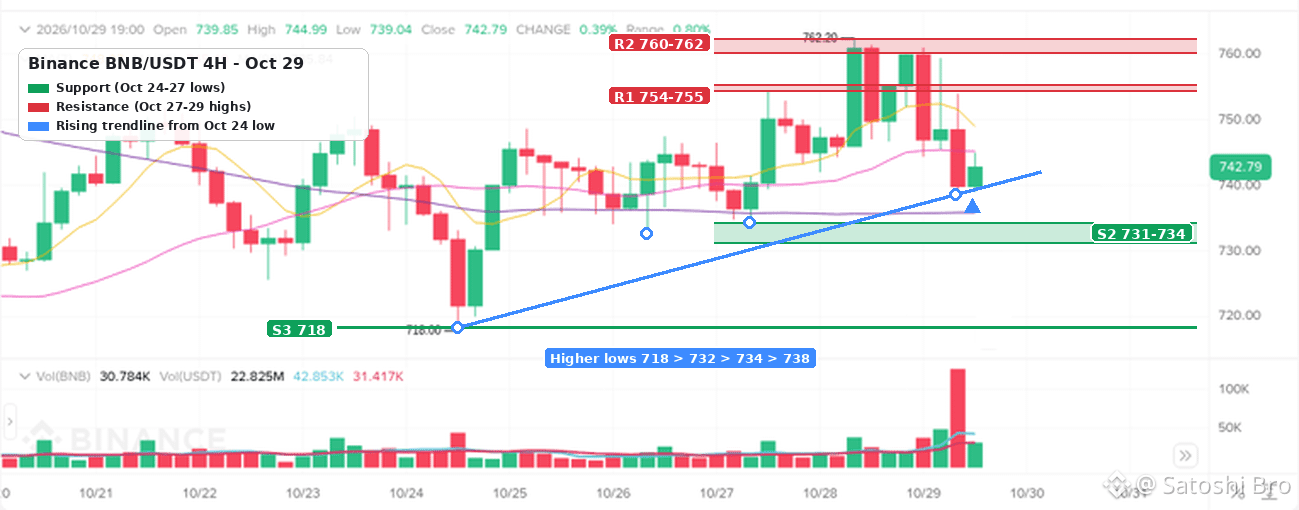
1
18
·
--
3 quick checks before you hit Withdraw 🧵
1️⃣ Same network on both ends. USDT lives on several chains (ERC20, TRC20, BEP20 and more). If the receiving side doesn't support the network you pick, the funds can get stuck or lost.
2️⃣ Memo or tag. Some coins sent to an exchange (XRP, XLM, ATOM for example) need a memo/tag on top of the address. Skip it and you may need a support ticket to get the deposit back, if it can be recovered at all.
3️⃣ Small test first. Moving a big amount? Send a tiny one, wait for it to land, then send the rest. One extra fee is cheap insurance.
On-chain transfers can't be reversed, so 30 seconds of checking is worth it.
What's the worst withdrawal mistake you've seen? 👇
#CryptoSecurity #cryptoeducation #crypto #Binance
3 quick checks before you hit Withdraw 🧵
1️⃣ Same network on both ends. USDT lives on several chains (ERC20, TRC20, BEP20 and more). If the receiving side doesn't support the network you pick, the funds can get stuck or lost.
2️⃣ Memo or tag. Some coins sent to an exchange (XRP, XLM, ATOM for example) need a memo/tag on top of the address. Skip it and you may need a support ticket to get the deposit back, if it can be recovered at all.
3️⃣ Small test first. Moving a big amount? Send a tiny one, wait for it to land, then send the rest. One extra fee is cheap insurance.
On-chain transfers can't be reversed, so 30 seconds of checking is worth it.
What's the worst withdrawal mistake you've seen? 👇
#CryptoSecurity #cryptoeducation #crypto #Binance
1️⃣ Same network on both ends. USDT lives on several chains (ERC20, TRC20, BEP20 and more). If the receiving side doesn't support the network you pick, the funds can get stuck or lost.
2️⃣ Memo or tag. Some coins sent to an exchange (XRP, XLM, ATOM for example) need a memo/tag on top of the address. Skip it and you may need a support ticket to get the deposit back, if it can be recovered at all.
3️⃣ Small test first. Moving a big amount? Send a tiny one, wait for it to land, then send the rest. One extra fee is cheap insurance.
On-chain transfers can't be reversed, so 30 seconds of checking is worth it.
What's the worst withdrawal mistake you've seen? 👇
#CryptoSecurity #cryptoeducation #crypto #Binance
1
·
--
Hot take 🔥
Most traders don't lose because they picked the wrong coin. They lose because they trade too often.
Every extra trade means more fees, more spread and one more chance to act on emotion.
3 planned trades a week will beat 30 trades a week on vibes.
Agree or disagree? Tell me below 👇
Not financial advice.
#cryptotrading #TradingTips #CryptoMarket #Binance
Hot take 🔥
Most traders don't lose because they picked the wrong coin. They lose because they trade too often.
Every extra trade means more fees, more spread and one more chance to act on emotion.
3 planned trades a week will beat 30 trades a week on vibes.
Agree or disagree? Tell me below 👇
Not financial advice.
#cryptotrading #TradingTips #CryptoMarket #Binance
Most traders don't lose because they picked the wrong coin. They lose because they trade too often.
Every extra trade means more fees, more spread and one more chance to act on emotion.
3 planned trades a week will beat 30 trades a week on vibes.
Agree or disagree? Tell me below 👇
Not financial advice.
#cryptotrading #TradingTips #CryptoMarket #Binance
1
·
--
Статья
Binance Fees and Charges Compared Side by SideBinance charges a percentage only when you trade. On Spot a regular user pays 0.100% maker and 0.100% taker, or 0.075% when the fee is paid in BNB. USDⓈ-M Futures cost 0.0200% maker and 0.0500% taker on USDT contracts. Crypto deposits are free, and each crypto withdrawal carries a flat network fee set by the coin and the network. Card purchases and Convert build their cost into the quote instead of listing a separate trading fee. Those are the rates on Binance's fee pages as of October 2026.
Knowing the rates is the easy part. Knowing which charge matters for the way you use your account is harder, so this article skips the giant table and puts the options next to each other, the way you actually choose between them: maker or taker, Spot or Convert, card or bank, one network or another. Every match-up comes with numbers you can check against your own trades.
👉 [Open a Binance account with code 20LESSFEES](https://www.binance.com/join?ref=20LESSFEES)
Which fees and charges does Binance have?
There are five kinds of cost, and only some of them appear as a line called "fee".
Trading fees: A percentage of every Spot, Margin or Futures trade, split into a maker rate and a taker rate.Funding payments: On perpetual futures, a periodic payment between long and short holders. Binance doesn't keep it, but it still changes what a position costs you to hold.Deposit costs: Nothing for crypto deposits. Most bank deposit methods show 0 in the fiat fee table, while card purchases carry a processing fee.Withdrawal fees: A flat amount per crypto withdrawal, fixed by coin and network, and a separate fee per method for fiat.Spread and quote margin: The gap between the best buy and sell price, plus the margin built into Convert and card quotes. It never appears as a line item, which is exactly why people forget it.
Two things cost nothing on any account: sending crypto to another Binance user by email, phone number or Binance ID, and moving funds between your own wallets inside Binance, for example from Funding to Spot.
Match-up 1. Maker vs taker on Spot
A maker order rests in the order book and waits to be filled, such as a limit buy placed below the current price. A taker order fills straight away against orders that are already there, such as a market order or a limit order priced through the book. On the Regular User Spot tier both cost the same 0.100%, so for most small accounts the choice changes nothing on the fee itself.
It starts to matter higher up the table. VIP 3, for example, lists 0.040% maker against 0.060% taker. And even on the regular tier a market order has a cost the fee table doesn't show, because it takes whatever prices are sitting in the book.
Here is a market buy and a limit buy of the same size on a thinner altcoin pair:
Market buy, 2,000 USDT: The fee at 0.100% is 2.00 USDT. If the order eats through thin depth and fills on average 0.15% above the last price, that slippage costs another 3.00 USDT. Total cost about 5.00 USDT.Limit buy at the best bid, 2,000 USDT: The fee is still 2.00 USDT and slippage is zero. The trade-off is that the order may sit there and never fill if the price moves away.
So for a regular user, maker vs taker on Spot is really a question about slippage, not about the fee. On a small-cap coin at 2 a.m. it can be bigger than the fee.
Match-up 2. Paying fees in BNB vs a sign-up code
These are the two discounts a regular user can control without trading millions. They work in different ways, and one of them is only available on day one.
BNB fee payment: You switch it on in your account settings. Spot fees drop by 25%, from 0.100% to 0.075%, and USDⓈ-M Futures fees by 10%, to 0.0180% maker and 0.0450% taker. You need BNB in the account, each fee is taken in BNB, and the value of that BNB moves with its price.Sign-up code: Entered once, when the account is created. Code 20LESSFEES gives a flat 20% off Spot and Futures trading fees, with no BNB to hold. It can't be added to an account that already exists.
On 10,000 USDT of Spot volume in a month the three cases look like this:
No discount: 10.00 USDT in fees.BNB fee payment on: 7.50 USDT in fees, paid in BNB.20% off from the code: 8.00 USDT in fees.
How the two combine when both are active is shown in the fee on your own filled orders. Read the fee on one real trade in your order history before trusting a stacked figure.
Neither discount moves you to a VIP level. VIP 1 on Spot needs 1,000,000 USD of 30-day volume plus 5 BNB, and our [breakdown of Binance VIP levels and their requirements](https://www.binance.com/en/square/post/381380147007586) explains why trading more just to reach a tier rarely pays for itself.
Match-up 3. Spot vs Convert
Convert shows no separate trading fee. You type an amount, get a quote with a short countdown, and either accept it or let it expire. The cost sits inside that quote, which is usually a little worse than the live Spot price.
Take a swap of 1,000 USDT into BTC:
Spot market order: The fee at 0.100% is 1.00 USDT. On BTC/USDT the spread and slippage at this size are normally a few cents.Convert: There is no fee line. If the quote sits 0.2% below the Spot price at that moment, the cost is 2.00 USDT worth of BTC you didn't receive.
The 0.2% is only an illustration, and the real gap changes with the coin, the size and the time of day. Compare the BTC amount each screen gives you for the same 1,000 USDT. On big, liquid pairs Spot tends to come out ahead. On small amounts, or on coins with a thin order book, Convert's single quote can be close in price and a lot simpler.
Match-up 4. Spot vs Futures
The Futures rates look smaller: 0.0500% taker against 0.100% on Spot. What the percentage is applied to changes everything. On Futures the fee is charged on the full position size, called the notional value, not on the margin you put up.
Compare 1,000 USDT used three ways:
Spot, buy and sell 1,000 USDT: 1,000 × 0.100% × 2 = 2.00 USDT.Futures, 1,000 USDT margin at 10x, market in and out: The position is 10,000 USDT, so 10,000 × 0.0500% × 2 = 10.00 USDT.Same futures trade with limit orders that rest on the book: 10,000 × 0.0200% × 2 = 4.00 USDT.
Per dollar of your own money, the market-order futures trade costs five times as much in fees as the Spot round trip, because the leverage multiplies the base the fee is charged on. Hold the position through a funding time and the funding payment is added or subtracted on top. And fees are the smallest risk on Futures: a 10x position can be liquidated by a move of well under 10% against you.
Match-up 5. Card vs bank transfer when you buy
A card purchase is the fastest way in. The processing fee is built into the quote, and it depends on your card, your currency and your region, so it can differ from one purchase to the next. A bank deposit takes longer, but Binance's fiat fee table lists 0 for many bank methods, for example SWIFT and Instant Transfer in EUR or PIX in BRL. After that you buy on Spot at the normal trading fee.
Here is 500 EUR going in each way. The card figure is an illustration, so use the number on your own quote screen:
Card at a 2% all-in cost: About 10 EUR goes on the card fee, so roughly 490 EUR worth of crypto arrives, within minutes.Bank deposit, then a Spot buy: 0 to deposit and 0.50 EUR in Spot fees at 0.100%, so about 499.50 EUR worth of crypto. The deposit can take anything from minutes to a few business days.
Your own bank may add a foreign-currency or cash-advance charge on top, especially on credit cards. P2P is a third route: Binance charges no fee to a buyer who takes an ad, but the seller's price can sit above the market rate, so compare it with the Spot price before you pay.
Match-up 6. BEP20 vs TRC20 vs ERC20 when you withdraw
A crypto withdrawal fee is a flat amount per withdrawal, not a percentage. Sending 50 USDT or 5,000 USDT on the same network costs the same. In the USDT withdrawal list below, BNB Smart Chain (BEP20) shows 0.01 USDT, opBNB 0.015 USDT and Tron (TRC20) 1.5 USDT. Ethereum (ERC20) is normally the most expensive of the common choices.
Because the fee is flat, how often you withdraw matters as much as where:
300 USDT on BEP20: 299.99 USDT arrives.300 USDT on TRC20: 298.50 USDT arrives, so the fee is 0.5% of the amount.50 USDT a week on TRC20: About 6.00 USDT a month in fees, against 1.50 USDT for one 200 USDT withdrawal on the same network.
The cheapest network is only the right one if the wallet or exchange on the other side supports it. Send on a network the receiver doesn't support and the funds can be lost. Our [comparison of TRC20, BEP20 and ERC20 for USDT](https://www.binance.com/en/square/post/382058413294121) walks through how to match the network on both sides.
Match-up 7. On-chain vs internal, SEPA Instant vs SWIFT
Internal transfer vs on-chain withdrawal: If the person you are paying also uses Binance, sending by email, phone or Binance ID stays inside Binance and carries no network fee. The same amount sent to their deposit address goes on-chain and pays the network fee.SEPA Instant vs SWIFT for euros: The fiat fee table lists 1 EUR for a SEPA Instant withdrawal and 35 EUR for SWIFT. Cashing out 2,000 EUR costs 0.05% one way and 1.75% the other.Percentage methods: A few fiat methods charge a percentage instead of a flat amount, such as 0.5% on one COP method in the same table. On those, a bigger withdrawal costs more.
A full round trip with every fee added up
Here is a month for a made-up trader, Tom. Price moves are left out on purpose, because this is about what the account charges, not about how the trades turn out.
Deposit: Tom sends 1,000 USDT from another wallet on BEP20. Binance charges nothing to receive it. The sending side pays its own network fee.Spot: He buys 1,000 USDT of BTC with a market order and later sells the same amount. 2 × 1.00 = 2.00 USDT.Futures: He opens and closes five positions of 500 USDT margin at 5x with market orders. Each position is 2,500 USDT, so each round trip costs 2,500 × 0.0500% × 2 = 2.50 USDT, and five of them cost 12.50 USDT.Withdrawal: He sends 980 USDT back out on BEP20 for 0.01 USDT.
His total is 14.51 USDT, and 12.50 of it comes from the futures taker fees. With 20% off trading fees the Spot part becomes 1.60 and the Futures part 10.00, for 11.61 USDT in total. If he had used resting limit orders on Futures instead, those five round trips would have cost 5.00 USDT, or 4.00 with the discount. Picking TRC20 for the withdrawal would have added 1.49 USDT.
The pattern holds for most active accounts. Futures taker fees on leveraged size dominate. Spot fees come second. The withdrawal fee is close to nothing if the network is right and the withdrawals are few.
Which option fits which kind of user?
Small, occasional buys: Card or Convert keeps it simple. Accept that you pay more per purchase and check the quote each time.Monthly buying: Bank deposit with a 0 fee, then a Spot limit order. Over a year the gap against card buying adds up.Frequent trading: Use maker orders where you can, turn on a fee discount, and always work out Futures fees on the full position size.Cashing out: Local methods such as SEPA Instant over SWIFT, a low-fee network the receiver supports, and fewer, larger withdrawals.
Rates and promotions change, so take one look at the fee page before any large trade. New accounts can also check the [current Binance welcome bonus event](https://www.binance.com/en/events/BESTBONUS), worth up to $19,800 for eligible users and based on tasks. Eligibility and terms are set by Binance.
FAQ
Does Binance charge a fee to deposit crypto?
No. Crypto deposits are free on Binance. The wallet or exchange you send from charges its own network fee.
Why was my futures fee so much bigger than I expected?
Because it is charged on the notional value. 1,000 USDT of margin at 10x is a 10,000 USDT position, so a 0.0500% taker fee comes to 5.00 USDT each way.
Is Convert free?
It has no separate trading fee, but the quote usually sits a little below the Spot price. Compare the amount you receive on both screens.
Do withdrawal fees depend on the amount?
Not for crypto. The fee is flat per coin and network. A few fiat methods charge a percentage, which the fiat fee table shows.
Can I add a fee discount code to an account I already have?
No. A sign-up code can only be entered when the account is created. On an existing account you can still pay fees in BNB or reach a VIP level.
Disclosure: the sign-up link in this article uses my code 20LESSFEES. Fees, discounts and promotions change, so check Binance's fee pages before large trades. Trading crypto, and futures in particular, carries a high risk of loss. This is general education, not financial advice.
Binance Fees and Charges Compared Side by Side
Binance charges a percentage only when you trade. On Spot a regular user pays 0.100% maker and 0.100% taker, or 0.075% when the fee is paid in BNB. USDⓈ-M Futures cost 0.0200% maker and 0.0500% taker on USDT contracts. Crypto deposits are free, and each crypto withdrawal carries a flat network fee set by the coin and the network. Card purchases and Convert build their cost into the quote instead of listing a separate trading fee. Those are the rates on Binance's fee pages as of October 2026.
Knowing the rates is the easy part. Knowing which charge matters for the way you use your account is harder, so this article skips the giant table and puts the options next to each other, the way you actually choose between them: maker or taker, Spot or Convert, card or bank, one network or another. Every match-up comes with numbers you can check against your own trades.
👉 Open a Binance account with code 20LESSFEES
Which fees and charges does Binance have?
There are five kinds of cost, and only some of them appear as a line called "fee".
Trading fees: A percentage of every Spot, Margin or Futures trade, split into a maker rate and a taker rate.Funding payments: On perpetual futures, a periodic payment between long and short holders. Binance doesn't keep it, but it still changes what a position costs you to hold.Deposit costs: Nothing for crypto deposits. Most bank deposit methods show 0 in the fiat fee table, while card purchases carry a processing fee.Withdrawal fees: A flat amount per crypto withdrawal, fixed by coin and network, and a separate fee per method for fiat.Spread and quote margin: The gap between the best buy and sell price, plus the margin built into Convert and card quotes. It never appears as a line item, which is exactly why people forget it.
Two things cost nothing on any account: sending crypto to another Binance user by email, phone number or Binance ID, and moving funds between your own wallets inside Binance, for example from Funding to Spot.
Match-up 1. Maker vs taker on Spot
A maker order rests in the order book and waits to be filled, such as a limit buy placed below the current price. A taker order fills straight away against orders that are already there, such as a market order or a limit order priced through the book. On the Regular User Spot tier both cost the same 0.100%, so for most small accounts the choice changes nothing on the fee itself.
It starts to matter higher up the table. VIP 3, for example, lists 0.040% maker against 0.060% taker. And even on the regular tier a market order has a cost the fee table doesn't show, because it takes whatever prices are sitting in the book.
Here is a market buy and a limit buy of the same size on a thinner altcoin pair:
Market buy, 2,000 USDT: The fee at 0.100% is 2.00 USDT. If the order eats through thin depth and fills on average 0.15% above the last price, that slippage costs another 3.00 USDT. Total cost about 5.00 USDT.Limit buy at the best bid, 2,000 USDT: The fee is still 2.00 USDT and slippage is zero. The trade-off is that the order may sit there and never fill if the price moves away.
So for a regular user, maker vs taker on Spot is really a question about slippage, not about the fee. On a small-cap coin at 2 a.m. it can be bigger than the fee.
Match-up 2. Paying fees in BNB vs a sign-up code
These are the two discounts a regular user can control without trading millions. They work in different ways, and one of them is only available on day one.
BNB fee payment: You switch it on in your account settings. Spot fees drop by 25%, from 0.100% to 0.075%, and USDⓈ-M Futures fees by 10%, to 0.0180% maker and 0.0450% taker. You need BNB in the account, each fee is taken in BNB, and the value of that BNB moves with its price.Sign-up code: Entered once, when the account is created. Code 20LESSFEES gives a flat 20% off Spot and Futures trading fees, with no BNB to hold. It can't be added to an account that already exists.
On 10,000 USDT of Spot volume in a month the three cases look like this:
No discount: 10.00 USDT in fees.BNB fee payment on: 7.50 USDT in fees, paid in BNB.20% off from the code: 8.00 USDT in fees.
How the two combine when both are active is shown in the fee on your own filled orders. Read the fee on one real trade in your order history before trusting a stacked figure.
Neither discount moves you to a VIP level. VIP 1 on Spot needs 1,000,000 USD of 30-day volume plus 5 BNB, and our breakdown of Binance VIP levels and their requirements explains why trading more just to reach a tier rarely pays for itself.
Match-up 3. Spot vs Convert
Convert shows no separate trading fee. You type an amount, get a quote with a short countdown, and either accept it or let it expire. The cost sits inside that quote, which is usually a little worse than the live Spot price.
Take a swap of 1,000 USDT into BTC:
Spot market order: The fee at 0.100% is 1.00 USDT. On BTC/USDT the spread and slippage at this size are normally a few cents.Convert: There is no fee line. If the quote sits 0.2% below the Spot price at that moment, the cost is 2.00 USDT worth of BTC you didn't receive.
The 0.2% is only an illustration, and the real gap changes with the coin, the size and the time of day. Compare the BTC amount each screen gives you for the same 1,000 USDT. On big, liquid pairs Spot tends to come out ahead. On small amounts, or on coins with a thin order book, Convert's single quote can be close in price and a lot simpler.
Match-up 4. Spot vs Futures
The Futures rates look smaller: 0.0500% taker against 0.100% on Spot. What the percentage is applied to changes everything. On Futures the fee is charged on the full position size, called the notional value, not on the margin you put up.
Compare 1,000 USDT used three ways:
Spot, buy and sell 1,000 USDT: 1,000 × 0.100% × 2 = 2.00 USDT.Futures, 1,000 USDT margin at 10x, market in and out: The position is 10,000 USDT, so 10,000 × 0.0500% × 2 = 10.00 USDT.Same futures trade with limit orders that rest on the book: 10,000 × 0.0200% × 2 = 4.00 USDT.
Per dollar of your own money, the market-order futures trade costs five times as much in fees as the Spot round trip, because the leverage multiplies the base the fee is charged on. Hold the position through a funding time and the funding payment is added or subtracted on top. And fees are the smallest risk on Futures: a 10x position can be liquidated by a move of well under 10% against you.
Match-up 5. Card vs bank transfer when you buy
A card purchase is the fastest way in. The processing fee is built into the quote, and it depends on your card, your currency and your region, so it can differ from one purchase to the next. A bank deposit takes longer, but Binance's fiat fee table lists 0 for many bank methods, for example SWIFT and Instant Transfer in EUR or PIX in BRL. After that you buy on Spot at the normal trading fee.
Here is 500 EUR going in each way. The card figure is an illustration, so use the number on your own quote screen:
Card at a 2% all-in cost: About 10 EUR goes on the card fee, so roughly 490 EUR worth of crypto arrives, within minutes.Bank deposit, then a Spot buy: 0 to deposit and 0.50 EUR in Spot fees at 0.100%, so about 499.50 EUR worth of crypto. The deposit can take anything from minutes to a few business days.
Your own bank may add a foreign-currency or cash-advance charge on top, especially on credit cards. P2P is a third route: Binance charges no fee to a buyer who takes an ad, but the seller's price can sit above the market rate, so compare it with the Spot price before you pay.
Match-up 6. BEP20 vs TRC20 vs ERC20 when you withdraw
A crypto withdrawal fee is a flat amount per withdrawal, not a percentage. Sending 50 USDT or 5,000 USDT on the same network costs the same. In the USDT withdrawal list below, BNB Smart Chain (BEP20) shows 0.01 USDT, opBNB 0.015 USDT and Tron (TRC20) 1.5 USDT. Ethereum (ERC20) is normally the most expensive of the common choices.
Because the fee is flat, how often you withdraw matters as much as where:
300 USDT on BEP20: 299.99 USDT arrives.300 USDT on TRC20: 298.50 USDT arrives, so the fee is 0.5% of the amount.50 USDT a week on TRC20: About 6.00 USDT a month in fees, against 1.50 USDT for one 200 USDT withdrawal on the same network.
The cheapest network is only the right one if the wallet or exchange on the other side supports it. Send on a network the receiver doesn't support and the funds can be lost. Our comparison of TRC20, BEP20 and ERC20 for USDT walks through how to match the network on both sides.
Match-up 7. On-chain vs internal, SEPA Instant vs SWIFT
Internal transfer vs on-chain withdrawal: If the person you are paying also uses Binance, sending by email, phone or Binance ID stays inside Binance and carries no network fee. The same amount sent to their deposit address goes on-chain and pays the network fee.SEPA Instant vs SWIFT for euros: The fiat fee table lists 1 EUR for a SEPA Instant withdrawal and 35 EUR for SWIFT. Cashing out 2,000 EUR costs 0.05% one way and 1.75% the other.Percentage methods: A few fiat methods charge a percentage instead of a flat amount, such as 0.5% on one COP method in the same table. On those, a bigger withdrawal costs more.
A full round trip with every fee added up
Here is a month for a made-up trader, Tom. Price moves are left out on purpose, because this is about what the account charges, not about how the trades turn out.
Deposit: Tom sends 1,000 USDT from another wallet on BEP20. Binance charges nothing to receive it. The sending side pays its own network fee.Spot: He buys 1,000 USDT of BTC with a market order and later sells the same amount. 2 × 1.00 = 2.00 USDT.Futures: He opens and closes five positions of 500 USDT margin at 5x with market orders. Each position is 2,500 USDT, so each round trip costs 2,500 × 0.0500% × 2 = 2.50 USDT, and five of them cost 12.50 USDT.Withdrawal: He sends 980 USDT back out on BEP20 for 0.01 USDT.
His total is 14.51 USDT, and 12.50 of it comes from the futures taker fees. With 20% off trading fees the Spot part becomes 1.60 and the Futures part 10.00, for 11.61 USDT in total. If he had used resting limit orders on Futures instead, those five round trips would have cost 5.00 USDT, or 4.00 with the discount. Picking TRC20 for the withdrawal would have added 1.49 USDT.
The pattern holds for most active accounts. Futures taker fees on leveraged size dominate. Spot fees come second. The withdrawal fee is close to nothing if the network is right and the withdrawals are few.
Which option fits which kind of user?
Small, occasional buys: Card or Convert keeps it simple. Accept that you pay more per purchase and check the quote each time.Monthly buying: Bank deposit with a 0 fee, then a Spot limit order. Over a year the gap against card buying adds up.Frequent trading: Use maker orders where you can, turn on a fee discount, and always work out Futures fees on the full position size.Cashing out: Local methods such as SEPA Instant over SWIFT, a low-fee network the receiver supports, and fewer, larger withdrawals.
Rates and promotions change, so take one look at the fee page before any large trade. New accounts can also check the current Binance welcome bonus event, worth up to $19,800 for eligible users and based on tasks. Eligibility and terms are set by Binance.
FAQ
Does Binance charge a fee to deposit crypto?
No. Crypto deposits are free on Binance. The wallet or exchange you send from charges its own network fee.
Why was my futures fee so much bigger than I expected?
Because it is charged on the notional value. 1,000 USDT of margin at 10x is a 10,000 USDT position, so a 0.0500% taker fee comes to 5.00 USDT each way.
Is Convert free?
It has no separate trading fee, but the quote usually sits a little below the Spot price. Compare the amount you receive on both screens.
Do withdrawal fees depend on the amount?
Not for crypto. The fee is flat per coin and network. A few fiat methods charge a percentage, which the fiat fee table shows.
Can I add a fee discount code to an account I already have?
No. A sign-up code can only be entered when the account is created. On an existing account you can still pay fees in BNB or reach a VIP level.
Disclosure: the sign-up link in this article uses my code 20LESSFEES. Fees, discounts and promotions change, so check Binance's fee pages before large trades. Trading crypto, and futures in particular, carries a high risk of loss. This is general education, not financial advice.
Knowing the rates is the easy part. Knowing which charge matters for the way you use your account is harder, so this article skips the giant table and puts the options next to each other, the way you actually choose between them: maker or taker, Spot or Convert, card or bank, one network or another. Every match-up comes with numbers you can check against your own trades.
👉 Open a Binance account with code 20LESSFEES
Which fees and charges does Binance have?
There are five kinds of cost, and only some of them appear as a line called "fee".
Trading fees: A percentage of every Spot, Margin or Futures trade, split into a maker rate and a taker rate.Funding payments: On perpetual futures, a periodic payment between long and short holders. Binance doesn't keep it, but it still changes what a position costs you to hold.Deposit costs: Nothing for crypto deposits. Most bank deposit methods show 0 in the fiat fee table, while card purchases carry a processing fee.Withdrawal fees: A flat amount per crypto withdrawal, fixed by coin and network, and a separate fee per method for fiat.Spread and quote margin: The gap between the best buy and sell price, plus the margin built into Convert and card quotes. It never appears as a line item, which is exactly why people forget it.
Two things cost nothing on any account: sending crypto to another Binance user by email, phone number or Binance ID, and moving funds between your own wallets inside Binance, for example from Funding to Spot.
Match-up 1. Maker vs taker on Spot
A maker order rests in the order book and waits to be filled, such as a limit buy placed below the current price. A taker order fills straight away against orders that are already there, such as a market order or a limit order priced through the book. On the Regular User Spot tier both cost the same 0.100%, so for most small accounts the choice changes nothing on the fee itself.
It starts to matter higher up the table. VIP 3, for example, lists 0.040% maker against 0.060% taker. And even on the regular tier a market order has a cost the fee table doesn't show, because it takes whatever prices are sitting in the book.
Here is a market buy and a limit buy of the same size on a thinner altcoin pair:
Market buy, 2,000 USDT: The fee at 0.100% is 2.00 USDT. If the order eats through thin depth and fills on average 0.15% above the last price, that slippage costs another 3.00 USDT. Total cost about 5.00 USDT.Limit buy at the best bid, 2,000 USDT: The fee is still 2.00 USDT and slippage is zero. The trade-off is that the order may sit there and never fill if the price moves away.
So for a regular user, maker vs taker on Spot is really a question about slippage, not about the fee. On a small-cap coin at 2 a.m. it can be bigger than the fee.
Match-up 2. Paying fees in BNB vs a sign-up code
These are the two discounts a regular user can control without trading millions. They work in different ways, and one of them is only available on day one.
BNB fee payment: You switch it on in your account settings. Spot fees drop by 25%, from 0.100% to 0.075%, and USDⓈ-M Futures fees by 10%, to 0.0180% maker and 0.0450% taker. You need BNB in the account, each fee is taken in BNB, and the value of that BNB moves with its price.Sign-up code: Entered once, when the account is created. Code 20LESSFEES gives a flat 20% off Spot and Futures trading fees, with no BNB to hold. It can't be added to an account that already exists.
On 10,000 USDT of Spot volume in a month the three cases look like this:
No discount: 10.00 USDT in fees.BNB fee payment on: 7.50 USDT in fees, paid in BNB.20% off from the code: 8.00 USDT in fees.
How the two combine when both are active is shown in the fee on your own filled orders. Read the fee on one real trade in your order history before trusting a stacked figure.
Neither discount moves you to a VIP level. VIP 1 on Spot needs 1,000,000 USD of 30-day volume plus 5 BNB, and our breakdown of Binance VIP levels and their requirements explains why trading more just to reach a tier rarely pays for itself.
Match-up 3. Spot vs Convert
Convert shows no separate trading fee. You type an amount, get a quote with a short countdown, and either accept it or let it expire. The cost sits inside that quote, which is usually a little worse than the live Spot price.
Take a swap of 1,000 USDT into BTC:
Spot market order: The fee at 0.100% is 1.00 USDT. On BTC/USDT the spread and slippage at this size are normally a few cents.Convert: There is no fee line. If the quote sits 0.2% below the Spot price at that moment, the cost is 2.00 USDT worth of BTC you didn't receive.
The 0.2% is only an illustration, and the real gap changes with the coin, the size and the time of day. Compare the BTC amount each screen gives you for the same 1,000 USDT. On big, liquid pairs Spot tends to come out ahead. On small amounts, or on coins with a thin order book, Convert's single quote can be close in price and a lot simpler.
Match-up 4. Spot vs Futures
The Futures rates look smaller: 0.0500% taker against 0.100% on Spot. What the percentage is applied to changes everything. On Futures the fee is charged on the full position size, called the notional value, not on the margin you put up.
Compare 1,000 USDT used three ways:
Spot, buy and sell 1,000 USDT: 1,000 × 0.100% × 2 = 2.00 USDT.Futures, 1,000 USDT margin at 10x, market in and out: The position is 10,000 USDT, so 10,000 × 0.0500% × 2 = 10.00 USDT.Same futures trade with limit orders that rest on the book: 10,000 × 0.0200% × 2 = 4.00 USDT.
Per dollar of your own money, the market-order futures trade costs five times as much in fees as the Spot round trip, because the leverage multiplies the base the fee is charged on. Hold the position through a funding time and the funding payment is added or subtracted on top. And fees are the smallest risk on Futures: a 10x position can be liquidated by a move of well under 10% against you.
Match-up 5. Card vs bank transfer when you buy
A card purchase is the fastest way in. The processing fee is built into the quote, and it depends on your card, your currency and your region, so it can differ from one purchase to the next. A bank deposit takes longer, but Binance's fiat fee table lists 0 for many bank methods, for example SWIFT and Instant Transfer in EUR or PIX in BRL. After that you buy on Spot at the normal trading fee.
Here is 500 EUR going in each way. The card figure is an illustration, so use the number on your own quote screen:
Card at a 2% all-in cost: About 10 EUR goes on the card fee, so roughly 490 EUR worth of crypto arrives, within minutes.Bank deposit, then a Spot buy: 0 to deposit and 0.50 EUR in Spot fees at 0.100%, so about 499.50 EUR worth of crypto. The deposit can take anything from minutes to a few business days.
Your own bank may add a foreign-currency or cash-advance charge on top, especially on credit cards. P2P is a third route: Binance charges no fee to a buyer who takes an ad, but the seller's price can sit above the market rate, so compare it with the Spot price before you pay.
Match-up 6. BEP20 vs TRC20 vs ERC20 when you withdraw
A crypto withdrawal fee is a flat amount per withdrawal, not a percentage. Sending 50 USDT or 5,000 USDT on the same network costs the same. In the USDT withdrawal list below, BNB Smart Chain (BEP20) shows 0.01 USDT, opBNB 0.015 USDT and Tron (TRC20) 1.5 USDT. Ethereum (ERC20) is normally the most expensive of the common choices.
Because the fee is flat, how often you withdraw matters as much as where:
300 USDT on BEP20: 299.99 USDT arrives.300 USDT on TRC20: 298.50 USDT arrives, so the fee is 0.5% of the amount.50 USDT a week on TRC20: About 6.00 USDT a month in fees, against 1.50 USDT for one 200 USDT withdrawal on the same network.
The cheapest network is only the right one if the wallet or exchange on the other side supports it. Send on a network the receiver doesn't support and the funds can be lost. Our comparison of TRC20, BEP20 and ERC20 for USDT walks through how to match the network on both sides.
Match-up 7. On-chain vs internal, SEPA Instant vs SWIFT
Internal transfer vs on-chain withdrawal: If the person you are paying also uses Binance, sending by email, phone or Binance ID stays inside Binance and carries no network fee. The same amount sent to their deposit address goes on-chain and pays the network fee.SEPA Instant vs SWIFT for euros: The fiat fee table lists 1 EUR for a SEPA Instant withdrawal and 35 EUR for SWIFT. Cashing out 2,000 EUR costs 0.05% one way and 1.75% the other.Percentage methods: A few fiat methods charge a percentage instead of a flat amount, such as 0.5% on one COP method in the same table. On those, a bigger withdrawal costs more.
A full round trip with every fee added up
Here is a month for a made-up trader, Tom. Price moves are left out on purpose, because this is about what the account charges, not about how the trades turn out.
Deposit: Tom sends 1,000 USDT from another wallet on BEP20. Binance charges nothing to receive it. The sending side pays its own network fee.Spot: He buys 1,000 USDT of BTC with a market order and later sells the same amount. 2 × 1.00 = 2.00 USDT.Futures: He opens and closes five positions of 500 USDT margin at 5x with market orders. Each position is 2,500 USDT, so each round trip costs 2,500 × 0.0500% × 2 = 2.50 USDT, and five of them cost 12.50 USDT.Withdrawal: He sends 980 USDT back out on BEP20 for 0.01 USDT.
His total is 14.51 USDT, and 12.50 of it comes from the futures taker fees. With 20% off trading fees the Spot part becomes 1.60 and the Futures part 10.00, for 11.61 USDT in total. If he had used resting limit orders on Futures instead, those five round trips would have cost 5.00 USDT, or 4.00 with the discount. Picking TRC20 for the withdrawal would have added 1.49 USDT.
The pattern holds for most active accounts. Futures taker fees on leveraged size dominate. Spot fees come second. The withdrawal fee is close to nothing if the network is right and the withdrawals are few.
Which option fits which kind of user?
Small, occasional buys: Card or Convert keeps it simple. Accept that you pay more per purchase and check the quote each time.Monthly buying: Bank deposit with a 0 fee, then a Spot limit order. Over a year the gap against card buying adds up.Frequent trading: Use maker orders where you can, turn on a fee discount, and always work out Futures fees on the full position size.Cashing out: Local methods such as SEPA Instant over SWIFT, a low-fee network the receiver supports, and fewer, larger withdrawals.
Rates and promotions change, so take one look at the fee page before any large trade. New accounts can also check the current Binance welcome bonus event, worth up to $19,800 for eligible users and based on tasks. Eligibility and terms are set by Binance.
FAQ
Does Binance charge a fee to deposit crypto?
No. Crypto deposits are free on Binance. The wallet or exchange you send from charges its own network fee.
Why was my futures fee so much bigger than I expected?
Because it is charged on the notional value. 1,000 USDT of margin at 10x is a 10,000 USDT position, so a 0.0500% taker fee comes to 5.00 USDT each way.
Is Convert free?
It has no separate trading fee, but the quote usually sits a little below the Spot price. Compare the amount you receive on both screens.
Do withdrawal fees depend on the amount?
Not for crypto. The fee is flat per coin and network. A few fiat methods charge a percentage, which the fiat fee table shows.
Can I add a fee discount code to an account I already have?
No. A sign-up code can only be entered when the account is created. On an existing account you can still pay fees in BNB or reach a VIP level.
Disclosure: the sign-up link in this article uses my code 20LESSFEES. Fees, discounts and promotions change, so check Binance's fee pages before large trades. Trading crypto, and futures in particular, carries a high risk of loss. This is general education, not financial advice.
7
·
--
Fun fact for your Thursday ₿
In two days, on October 31, the Bitcoin whitepaper turns 18.
Satoshi Nakamoto posted it to a cryptography mailing list on Halloween 2008. "Bitcoin: A Peer-to-Peer Electronic Cash System". 9 pages. No logo, no hype, no roadmap.
The first block was mined about two months later, on January 3, 2009.
18 years on, the cap is still 21 million.
Have you actually read it? Be honest 👇
$BTC #Bitcoin #CryptoHistory #crypto #Binance
Fun fact for your Thursday ₿
In two days, on October 31, the Bitcoin whitepaper turns 18.
Satoshi Nakamoto posted it to a cryptography mailing list on Halloween 2008. "Bitcoin: A Peer-to-Peer Electronic Cash System". 9 pages. No logo, no hype, no roadmap.
The first block was mined about two months later, on January 3, 2009.
18 years on, the cap is still 21 million.
Have you actually read it? Be honest 👇
$BTC #Bitcoin #CryptoHistory #crypto #Binance
In two days, on October 31, the Bitcoin whitepaper turns 18.
Satoshi Nakamoto posted it to a cryptography mailing list on Halloween 2008. "Bitcoin: A Peer-to-Peer Electronic Cash System". 9 pages. No logo, no hype, no roadmap.
The first block was mined about two months later, on January 3, 2009.
18 years on, the cap is still 21 million.
Have you actually read it? Be honest 👇
$BTC #Bitcoin #CryptoHistory #crypto #Binance
44
·
--
Статья
Binance Bonus Code 2026 Myths and Facts for 20% Lower FeesA Binance bonus code does one concrete thing. Enter 20LESSFEES when you create your account and you pay a flat 20% less on Spot and Futures trading fees, for as long as you trade on that account.
Everything else people say about bonus codes is a mix of half-truths and wishful thinking. Below are the eight claims new users repeat most, each checked against how the account actually works, with real fee numbers.
👉 [Open a Binance account with bonus code 20LESSFEES](https://www.binance.com/join?ref=20LESSFEES)
The welcome bonus of up to $19,800 for eligible users is a separate, task-based extra. You can join it with any code, so the fee discount is the part your choice of code really decides.
Myth 1. A bonus code drops money into your account
Fact: Nothing lands in your wallet when you register. The code changes the price you pay per trade, not your balance.
That sounds less exciting, but it is the more useful of the two. A balance top-up is a one-off. A lower fee keeps working on every order you place, month after month, with no deposit target or trading minimum attached.
What the code changes: Spot and Futures trading fees, 20% lower than your tier's standard rate.What it leaves alone: Deposit methods, withdrawal fees, spreads and the welcome tasks.What it costs you: Nothing. There is no fee for entering a code and no subscription behind it.
Myth 2. Some codes come with a bigger welcome bonus
Fact: The welcome bonus works the same way whichever code you sign up with. Its ceiling, its tasks and its eligibility rules come from Binance, not from the code.
So if you are comparing codes, compare what they do to fees. Some cover Spot only. The one used here covers Spot and Futures, which is the wider of the options and matters a lot if you ever open a futures position.
A page that promises a "bigger" welcome bonus for one particular code is either confused or selling something. Check the event page itself and you will see the same tiers for everyone who qualifies.
Myth 3. You can add the code later from your settings
Fact: The code has to be attached at the moment the account is created. Once you have tapped Register without it, there is normally no field to add it afterwards.
This is the mistake that costs people the discount most often. They sign up in a hurry on their phone, skip the optional field, and only notice a week later when they compare fees with a friend.
If you want a full list of the ways the discount slips through the cracks, read this [checklist for making sure the 20% fee discount applies](https://www.binance.com/en/square/post/382029048985431) before you start.
Here is the order that works every time.
Open the sign-up page through the link above: The code field fills in by itself. If you type the address by hand, copy 20LESSFEES first.Enter your email or phone number: It is the first box on the registration screen.Look at the code field before anything else: On some versions of the page it is folded under a small arrow. Open it and check the spelling, with no space at the end.Tap Register: Confirm the email or SMS code, set a strong password and finish identity verification when the app asks.
👉 Code check before you tap Register: 20LESSFEES, spelled exactly.
Myth 4. A 20% fee discount is too small to bother with
Fact: On one trade it is small. Over a year of normal trading it adds up, and on futures it adds up faster than most beginners expect.
The standard Spot fee for a Regular User is 0.100% for maker and taker orders. With the code that becomes 0.080%. Here is what that gap looks like at different activity levels.
One $1,000 market buy: $1.00 in fees at the standard rate, $0.80 with the code. You save 20 cents.A $200 weekly buy for a year: About $10,400 of volume, so roughly $10.40 in fees against $8.32. A saving of about $2, which is honestly minor.$20,000 of Spot trades a month: $20 a month in fees against $16. That is about $48 a year.$100,000 a month: $100 against $80, or about $240 a year that stays in your account.
The pattern is simple. The discount is a slice of the fee, and the fee is a slice of your volume. Someone who buys once a month will barely notice it. Someone who trades every day will.
Myth 5. The headline figure is what a new user receives
Fact: "Up to $19,800" is the top of a ladder of tasks. Most people who take part complete the first one or two rungs, if any.
The table below is one version of the welcome task ladder. Each tier pairs a net deposit and a trading volume with a reward and a deadline. Tiers, amounts and periods can change, so always read the version shown to your own account.
Take the first tier in that table as a worked example. It asks for a $100 net deposit and $3,000 of trading volume within 7 days.
Fees on $3,000 of Spot volume: $3.00 at the standard 0.100% rate, or $2.40 with the 20% discount.What the volume really means: $3,000 of volume from a $100 deposit is many buys and sells of the same money. Every round trip pays a fee and a spread.What the rule leaves out: The market can move against you while you trade. A 3% drop on a $100 position is $3, the same size as the whole fee bill.
Tier 7 asks for a $20,000 net deposit and $50 million of volume in 30 days. That is professional-desk activity, not something to aim for in your first month.
Myth 6. Chasing the volume target costs nothing
Fact: Volume is never free. You pay fees on it, you cross the spread on it, and your coins can lose value while you hold them.
A cheaper way to think about it: only take a task if the trading it needs is trading you planned to do anyway. If you would have to invent trades just to hit a number, skip that tier. Forcing volume is the classic way new users lose more in fees and price moves than the reward is worth.
This is where the code and the bonus work well together. If you do end up trading toward a task, every one of those trades costs 20% less in fees with 20LESSFEES on the account.
Myth 7. Futures fees are too tiny to care about
Fact: Futures fees look tiny because they are quoted on the full position size, not on the margin you put up. That is exactly why they add up.
A Regular User on USDⓈ-M futures pays 0.0200% maker and 0.0500% taker. Say you open a $5,000 position with $500 of margin at 10x and close it with market orders.
Standard taker fees: $2.50 to open plus $2.50 to close, so $5.00 per round trip.With 20LESSFEES: 0.0400% taker, so $2.00 plus $2.00, or $4.00 per round trip.Twenty round trips a month: $100 in fees against $80, which is 4% of your $500 margin either way. The code trims that cost, it doesn't remove it.
Funding payments come on top of trading fees and the code doesn't touch them. Leverage also means losses can hit your margin fast, so treat the fee saving as a cost cut and nothing more.
👉 Spot and Futures fees, both 20% lower: sign up with 20LESSFEES.
Myth 8. Welcome rewards are cash you can withdraw straight away
Fact: Rewards from the welcome tasks usually arrive as vouchers in the Rewards Hub. Each voucher has its own type, expiry date and rules for how it can be used.
Some vouchers cover trading fees, others need to be claimed and used within a few days. If you let one expire, it is gone. This [guide to tasks and vouchers in the Binance Rewards Hub](https://www.binance.com/en/square/post/382382874336175) shows where to find them and what to check before the deadline passes.
Is entering a bonus code safe?
Yes. A code is a tag on a new account and nothing more. It doesn't ask for card details, it doesn't share your login, and nobody gains any access to your funds through it.
What is not safe is a site or a message that asks for your password, a 2FA code or a "verification payment" in exchange for a bonus. Binance never needs any of those for a sign-up code. Close that page and enter the code only on binance.com or in the official app.
I already have an account, so what now?
An existing account can't take a new code. Binance allows one account per person, so opening a second one to grab a discount breaks the rules and can get both accounts restricted.
What you can still do on an existing account:
Turn on BNB fee payment: Binance's own fee setting lowers the Regular User Spot fee from 0.100% to 0.075%, if you keep some BNB in your Spot wallet. BNB's price moves, so keep that amount small.Use limit orders: Maker orders can be cheaper than taker orders on futures, and they also spare you the spread.Trade less often: Fewer, better-planned trades cut fees more than any code.
The quick version before you register
The code decides: Your fee discount. With 20LESSFEES that is a flat 20% off Spot and Futures fees.The code doesn't decide: The welcome bonus, which is task-based and the same for every eligible user.Timing: The code goes in before you tap Register, never after.Tasks: Take only the tiers that match trading you would do anyway.
If you are about to open a Binance account, attach 20LESSFEES first so every trade costs less from day one. Then, if you are eligible, open the [active Binance welcome bonus event](https://www.binance.com/en/events/BESTBONUS) and read its tiers before you commit to any of them.
This article is about fees and account setup. It is not financial advice, crypto prices can fall, and leveraged trading can lose your margin quickly.
FAQ
What is the difference between a bonus code and the welcome bonus?
The code sets your fee discount for the life of the account. The welcome bonus is a set of time-limited tasks with rewards for eligible users, and it is the same with any code.
How do I check that the discount worked?
Place one small Spot trade and open your trade history. A 100 USDT market order on the Regular User tier should show a fee worth about 0.08 USDT, not 0.10.
Does the discount stop after the welcome tasks end?
No. The task deadlines only apply to the rewards. The fee discount has no deposit or volume target and keeps applying while you trade.
Can I use the code in the Binance app?
Yes. The app's registration screen has the same code field. Open it and check the code is there before you tap Register.
Do I have to complete any task to keep the discount?
No. You can ignore the welcome tasks completely and still pay 20% less on Spot and Futures fees.
Binance Bonus Code 2026 Myths and Facts for 20% Lower Fees
A Binance bonus code does one concrete thing. Enter 20LESSFEES when you create your account and you pay a flat 20% less on Spot and Futures trading fees, for as long as you trade on that account.
Everything else people say about bonus codes is a mix of half-truths and wishful thinking. Below are the eight claims new users repeat most, each checked against how the account actually works, with real fee numbers.
👉 Open a Binance account with bonus code 20LESSFEES
The welcome bonus of up to $19,800 for eligible users is a separate, task-based extra. You can join it with any code, so the fee discount is the part your choice of code really decides.
Myth 1. A bonus code drops money into your account
Fact: Nothing lands in your wallet when you register. The code changes the price you pay per trade, not your balance.
That sounds less exciting, but it is the more useful of the two. A balance top-up is a one-off. A lower fee keeps working on every order you place, month after month, with no deposit target or trading minimum attached.
What the code changes: Spot and Futures trading fees, 20% lower than your tier's standard rate.What it leaves alone: Deposit methods, withdrawal fees, spreads and the welcome tasks.What it costs you: Nothing. There is no fee for entering a code and no subscription behind it.
Myth 2. Some codes come with a bigger welcome bonus
Fact: The welcome bonus works the same way whichever code you sign up with. Its ceiling, its tasks and its eligibility rules come from Binance, not from the code.
So if you are comparing codes, compare what they do to fees. Some cover Spot only. The one used here covers Spot and Futures, which is the wider of the options and matters a lot if you ever open a futures position.
A page that promises a "bigger" welcome bonus for one particular code is either confused or selling something. Check the event page itself and you will see the same tiers for everyone who qualifies.
Myth 3. You can add the code later from your settings
Fact: The code has to be attached at the moment the account is created. Once you have tapped Register without it, there is normally no field to add it afterwards.
This is the mistake that costs people the discount most often. They sign up in a hurry on their phone, skip the optional field, and only notice a week later when they compare fees with a friend.
If you want a full list of the ways the discount slips through the cracks, read this checklist for making sure the 20% fee discount applies before you start.
Here is the order that works every time.
Open the sign-up page through the link above: The code field fills in by itself. If you type the address by hand, copy 20LESSFEES first.Enter your email or phone number: It is the first box on the registration screen.Look at the code field before anything else: On some versions of the page it is folded under a small arrow. Open it and check the spelling, with no space at the end.Tap Register: Confirm the email or SMS code, set a strong password and finish identity verification when the app asks.
👉 Code check before you tap Register: 20LESSFEES, spelled exactly.
Myth 4. A 20% fee discount is too small to bother with
Fact: On one trade it is small. Over a year of normal trading it adds up, and on futures it adds up faster than most beginners expect.
The standard Spot fee for a Regular User is 0.100% for maker and taker orders. With the code that becomes 0.080%. Here is what that gap looks like at different activity levels.
One $1,000 market buy: $1.00 in fees at the standard rate, $0.80 with the code. You save 20 cents.A $200 weekly buy for a year: About $10,400 of volume, so roughly $10.40 in fees against $8.32. A saving of about $2, which is honestly minor.$20,000 of Spot trades a month: $20 a month in fees against $16. That is about $48 a year.$100,000 a month: $100 against $80, or about $240 a year that stays in your account.
The pattern is simple. The discount is a slice of the fee, and the fee is a slice of your volume. Someone who buys once a month will barely notice it. Someone who trades every day will.
Myth 5. The headline figure is what a new user receives
Fact: "Up to $19,800" is the top of a ladder of tasks. Most people who take part complete the first one or two rungs, if any.
The table below is one version of the welcome task ladder. Each tier pairs a net deposit and a trading volume with a reward and a deadline. Tiers, amounts and periods can change, so always read the version shown to your own account.
Take the first tier in that table as a worked example. It asks for a $100 net deposit and $3,000 of trading volume within 7 days.
Fees on $3,000 of Spot volume: $3.00 at the standard 0.100% rate, or $2.40 with the 20% discount.What the volume really means: $3,000 of volume from a $100 deposit is many buys and sells of the same money. Every round trip pays a fee and a spread.What the rule leaves out: The market can move against you while you trade. A 3% drop on a $100 position is $3, the same size as the whole fee bill.
Tier 7 asks for a $20,000 net deposit and $50 million of volume in 30 days. That is professional-desk activity, not something to aim for in your first month.
Myth 6. Chasing the volume target costs nothing
Fact: Volume is never free. You pay fees on it, you cross the spread on it, and your coins can lose value while you hold them.
A cheaper way to think about it: only take a task if the trading it needs is trading you planned to do anyway. If you would have to invent trades just to hit a number, skip that tier. Forcing volume is the classic way new users lose more in fees and price moves than the reward is worth.
This is where the code and the bonus work well together. If you do end up trading toward a task, every one of those trades costs 20% less in fees with 20LESSFEES on the account.
Myth 7. Futures fees are too tiny to care about
Fact: Futures fees look tiny because they are quoted on the full position size, not on the margin you put up. That is exactly why they add up.
A Regular User on USDⓈ-M futures pays 0.0200% maker and 0.0500% taker. Say you open a $5,000 position with $500 of margin at 10x and close it with market orders.
Standard taker fees: $2.50 to open plus $2.50 to close, so $5.00 per round trip.With 20LESSFEES: 0.0400% taker, so $2.00 plus $2.00, or $4.00 per round trip.Twenty round trips a month: $100 in fees against $80, which is 4% of your $500 margin either way. The code trims that cost, it doesn't remove it.
Funding payments come on top of trading fees and the code doesn't touch them. Leverage also means losses can hit your margin fast, so treat the fee saving as a cost cut and nothing more.
👉 Spot and Futures fees, both 20% lower: sign up with 20LESSFEES.
Myth 8. Welcome rewards are cash you can withdraw straight away
Fact: Rewards from the welcome tasks usually arrive as vouchers in the Rewards Hub. Each voucher has its own type, expiry date and rules for how it can be used.
Some vouchers cover trading fees, others need to be claimed and used within a few days. If you let one expire, it is gone. This guide to tasks and vouchers in the Binance Rewards Hub shows where to find them and what to check before the deadline passes.
Is entering a bonus code safe?
Yes. A code is a tag on a new account and nothing more. It doesn't ask for card details, it doesn't share your login, and nobody gains any access to your funds through it.
What is not safe is a site or a message that asks for your password, a 2FA code or a "verification payment" in exchange for a bonus. Binance never needs any of those for a sign-up code. Close that page and enter the code only on binance.com or in the official app.
I already have an account, so what now?
An existing account can't take a new code. Binance allows one account per person, so opening a second one to grab a discount breaks the rules and can get both accounts restricted.
What you can still do on an existing account:
Turn on BNB fee payment: Binance's own fee setting lowers the Regular User Spot fee from 0.100% to 0.075%, if you keep some BNB in your Spot wallet. BNB's price moves, so keep that amount small.Use limit orders: Maker orders can be cheaper than taker orders on futures, and they also spare you the spread.Trade less often: Fewer, better-planned trades cut fees more than any code.
The quick version before you register
The code decides: Your fee discount. With 20LESSFEES that is a flat 20% off Spot and Futures fees.The code doesn't decide: The welcome bonus, which is task-based and the same for every eligible user.Timing: The code goes in before you tap Register, never after.Tasks: Take only the tiers that match trading you would do anyway.
If you are about to open a Binance account, attach 20LESSFEES first so every trade costs less from day one. Then, if you are eligible, open the active Binance welcome bonus event and read its tiers before you commit to any of them.
This article is about fees and account setup. It is not financial advice, crypto prices can fall, and leveraged trading can lose your margin quickly.
FAQ
What is the difference between a bonus code and the welcome bonus?
The code sets your fee discount for the life of the account. The welcome bonus is a set of time-limited tasks with rewards for eligible users, and it is the same with any code.
How do I check that the discount worked?
Place one small Spot trade and open your trade history. A 100 USDT market order on the Regular User tier should show a fee worth about 0.08 USDT, not 0.10.
Does the discount stop after the welcome tasks end?
No. The task deadlines only apply to the rewards. The fee discount has no deposit or volume target and keeps applying while you trade.
Can I use the code in the Binance app?
Yes. The app's registration screen has the same code field. Open it and check the code is there before you tap Register.
Do I have to complete any task to keep the discount?
No. You can ignore the welcome tasks completely and still pay 20% less on Spot and Futures fees.
Everything else people say about bonus codes is a mix of half-truths and wishful thinking. Below are the eight claims new users repeat most, each checked against how the account actually works, with real fee numbers.
👉 Open a Binance account with bonus code 20LESSFEES
The welcome bonus of up to $19,800 for eligible users is a separate, task-based extra. You can join it with any code, so the fee discount is the part your choice of code really decides.
Myth 1. A bonus code drops money into your account
Fact: Nothing lands in your wallet when you register. The code changes the price you pay per trade, not your balance.
That sounds less exciting, but it is the more useful of the two. A balance top-up is a one-off. A lower fee keeps working on every order you place, month after month, with no deposit target or trading minimum attached.
What the code changes: Spot and Futures trading fees, 20% lower than your tier's standard rate.What it leaves alone: Deposit methods, withdrawal fees, spreads and the welcome tasks.What it costs you: Nothing. There is no fee for entering a code and no subscription behind it.
Myth 2. Some codes come with a bigger welcome bonus
Fact: The welcome bonus works the same way whichever code you sign up with. Its ceiling, its tasks and its eligibility rules come from Binance, not from the code.
So if you are comparing codes, compare what they do to fees. Some cover Spot only. The one used here covers Spot and Futures, which is the wider of the options and matters a lot if you ever open a futures position.
A page that promises a "bigger" welcome bonus for one particular code is either confused or selling something. Check the event page itself and you will see the same tiers for everyone who qualifies.
Myth 3. You can add the code later from your settings
Fact: The code has to be attached at the moment the account is created. Once you have tapped Register without it, there is normally no field to add it afterwards.
This is the mistake that costs people the discount most often. They sign up in a hurry on their phone, skip the optional field, and only notice a week later when they compare fees with a friend.
If you want a full list of the ways the discount slips through the cracks, read this checklist for making sure the 20% fee discount applies before you start.
Here is the order that works every time.
Open the sign-up page through the link above: The code field fills in by itself. If you type the address by hand, copy 20LESSFEES first.Enter your email or phone number: It is the first box on the registration screen.Look at the code field before anything else: On some versions of the page it is folded under a small arrow. Open it and check the spelling, with no space at the end.Tap Register: Confirm the email or SMS code, set a strong password and finish identity verification when the app asks.
👉 Code check before you tap Register: 20LESSFEES, spelled exactly.
Myth 4. A 20% fee discount is too small to bother with
Fact: On one trade it is small. Over a year of normal trading it adds up, and on futures it adds up faster than most beginners expect.
The standard Spot fee for a Regular User is 0.100% for maker and taker orders. With the code that becomes 0.080%. Here is what that gap looks like at different activity levels.
One $1,000 market buy: $1.00 in fees at the standard rate, $0.80 with the code. You save 20 cents.A $200 weekly buy for a year: About $10,400 of volume, so roughly $10.40 in fees against $8.32. A saving of about $2, which is honestly minor.$20,000 of Spot trades a month: $20 a month in fees against $16. That is about $48 a year.$100,000 a month: $100 against $80, or about $240 a year that stays in your account.
The pattern is simple. The discount is a slice of the fee, and the fee is a slice of your volume. Someone who buys once a month will barely notice it. Someone who trades every day will.
Myth 5. The headline figure is what a new user receives
Fact: "Up to $19,800" is the top of a ladder of tasks. Most people who take part complete the first one or two rungs, if any.
The table below is one version of the welcome task ladder. Each tier pairs a net deposit and a trading volume with a reward and a deadline. Tiers, amounts and periods can change, so always read the version shown to your own account.
Take the first tier in that table as a worked example. It asks for a $100 net deposit and $3,000 of trading volume within 7 days.
Fees on $3,000 of Spot volume: $3.00 at the standard 0.100% rate, or $2.40 with the 20% discount.What the volume really means: $3,000 of volume from a $100 deposit is many buys and sells of the same money. Every round trip pays a fee and a spread.What the rule leaves out: The market can move against you while you trade. A 3% drop on a $100 position is $3, the same size as the whole fee bill.
Tier 7 asks for a $20,000 net deposit and $50 million of volume in 30 days. That is professional-desk activity, not something to aim for in your first month.
Myth 6. Chasing the volume target costs nothing
Fact: Volume is never free. You pay fees on it, you cross the spread on it, and your coins can lose value while you hold them.
A cheaper way to think about it: only take a task if the trading it needs is trading you planned to do anyway. If you would have to invent trades just to hit a number, skip that tier. Forcing volume is the classic way new users lose more in fees and price moves than the reward is worth.
This is where the code and the bonus work well together. If you do end up trading toward a task, every one of those trades costs 20% less in fees with 20LESSFEES on the account.
Myth 7. Futures fees are too tiny to care about
Fact: Futures fees look tiny because they are quoted on the full position size, not on the margin you put up. That is exactly why they add up.
A Regular User on USDⓈ-M futures pays 0.0200% maker and 0.0500% taker. Say you open a $5,000 position with $500 of margin at 10x and close it with market orders.
Standard taker fees: $2.50 to open plus $2.50 to close, so $5.00 per round trip.With 20LESSFEES: 0.0400% taker, so $2.00 plus $2.00, or $4.00 per round trip.Twenty round trips a month: $100 in fees against $80, which is 4% of your $500 margin either way. The code trims that cost, it doesn't remove it.
Funding payments come on top of trading fees and the code doesn't touch them. Leverage also means losses can hit your margin fast, so treat the fee saving as a cost cut and nothing more.
👉 Spot and Futures fees, both 20% lower: sign up with 20LESSFEES.
Myth 8. Welcome rewards are cash you can withdraw straight away
Fact: Rewards from the welcome tasks usually arrive as vouchers in the Rewards Hub. Each voucher has its own type, expiry date and rules for how it can be used.
Some vouchers cover trading fees, others need to be claimed and used within a few days. If you let one expire, it is gone. This guide to tasks and vouchers in the Binance Rewards Hub shows where to find them and what to check before the deadline passes.
Is entering a bonus code safe?
Yes. A code is a tag on a new account and nothing more. It doesn't ask for card details, it doesn't share your login, and nobody gains any access to your funds through it.
What is not safe is a site or a message that asks for your password, a 2FA code or a "verification payment" in exchange for a bonus. Binance never needs any of those for a sign-up code. Close that page and enter the code only on binance.com or in the official app.
I already have an account, so what now?
An existing account can't take a new code. Binance allows one account per person, so opening a second one to grab a discount breaks the rules and can get both accounts restricted.
What you can still do on an existing account:
Turn on BNB fee payment: Binance's own fee setting lowers the Regular User Spot fee from 0.100% to 0.075%, if you keep some BNB in your Spot wallet. BNB's price moves, so keep that amount small.Use limit orders: Maker orders can be cheaper than taker orders on futures, and they also spare you the spread.Trade less often: Fewer, better-planned trades cut fees more than any code.
The quick version before you register
The code decides: Your fee discount. With 20LESSFEES that is a flat 20% off Spot and Futures fees.The code doesn't decide: The welcome bonus, which is task-based and the same for every eligible user.Timing: The code goes in before you tap Register, never after.Tasks: Take only the tiers that match trading you would do anyway.
If you are about to open a Binance account, attach 20LESSFEES first so every trade costs less from day one. Then, if you are eligible, open the active Binance welcome bonus event and read its tiers before you commit to any of them.
This article is about fees and account setup. It is not financial advice, crypto prices can fall, and leveraged trading can lose your margin quickly.
FAQ
What is the difference between a bonus code and the welcome bonus?
The code sets your fee discount for the life of the account. The welcome bonus is a set of time-limited tasks with rewards for eligible users, and it is the same with any code.
How do I check that the discount worked?
Place one small Spot trade and open your trade history. A 100 USDT market order on the Regular User tier should show a fee worth about 0.08 USDT, not 0.10.
Does the discount stop after the welcome tasks end?
No. The task deadlines only apply to the rewards. The fee discount has no deposit or volume target and keeps applying while you trade.
Can I use the code in the Binance app?
Yes. The app's registration screen has the same code field. Open it and check the code is there before you tap Register.
Do I have to complete any task to keep the discount?
No. You can ignore the welcome tasks completely and still pay 20% less on Spot and Futures fees.
5
·
--
Beginner tip 💡 Set your stop-loss before you enter, not after.
Once a trade is open, your head starts bargaining. "It'll come back." "Just a bit lower." That's how a small loss turns into a big one.
Before you hit Buy:
✅ Pick the price where your idea is wrong
✅ Size the trade so that loss is one you can live with (many traders cap it at 1-2% of the account)
✅ Place the stop-loss order right away, not "later"
A stop isn't a guarantee. In a fast move price can slip past it. Still, having one beats staring at a red screen hoping.
Do you set your stop first, or wait and see? 👇
Not financial advice.
#cryptotrading #cryptoeducation #RiskManagement #Binance
Beginner tip 💡 Set your stop-loss before you enter, not after.
Once a trade is open, your head starts bargaining. "It'll come back." "Just a bit lower." That's how a small loss turns into a big one.
Before you hit Buy:
✅ Pick the price where your idea is wrong
✅ Size the trade so that loss is one you can live with (many traders cap it at 1-2% of the account)
✅ Place the stop-loss order right away, not "later"
A stop isn't a guarantee. In a fast move price can slip past it. Still, having one beats staring at a red screen hoping.
Do you set your stop first, or wait and see? 👇
Not financial advice.
#cryptotrading #cryptoeducation #RiskManagement #Binance
Once a trade is open, your head starts bargaining. "It'll come back." "Just a bit lower." That's how a small loss turns into a big one.
Before you hit Buy:
✅ Pick the price where your idea is wrong
✅ Size the trade so that loss is one you can live with (many traders cap it at 1-2% of the account)
✅ Place the stop-loss order right away, not "later"
A stop isn't a guarantee. In a fast move price can slip past it. Still, having one beats staring at a red screen hoping.
Do you set your stop first, or wait and see? 👇
Not financial advice.
#cryptotrading #cryptoeducation #RiskManagement #Binance
7
·
--
Статья
Binance Promo Code 2026 for 20% Off Spot and Futures FeesThree people sign up to Binance on the same day. One buys a little Bitcoin each month, one trades Spot most days, and one trades futures. They all enter the same promo code, 20LESSFEES, and they all get the same thing from it: a flat 20% off their Spot and Futures trading fees.
What differs is how much that discount is worth to each of them. That is what this article works out, in plain dollars, so you can judge it for your own trading instead of taking a headline at face value.
👉 [Create your Binance account with promo code 20LESSFEES](https://www.binance.com/join?ref=20LESSFEES)
The welcome bonus of up to $19,800 for eligible users sits on top as a separate, task-based extra. It is the same whichever code you register with, so the fee discount is the part the code actually decides.
What does the promo code change on your account?
A Binance promo code is entered once, when the account is created. After that it works quietly in the background on every trade.
Spot fees: 20% lower than the standard rate for your fee tier, on market and limit orders alike.Futures fees: The same flat 20% off on USDⓈ-M and COIN-M futures, which matters more than most beginners expect (more on that below).No volume target: You don't need to deposit a set amount or trade a minimum to keep the discount.No cost: Entering the code is free and gives nobody access to your account or your funds.Welcome tasks unchanged: You can still join the welcome bonus tasks if you are eligible. The code neither adds to them nor blocks them.
Keep one detail in mind. The discount is a percentage of the fee, not of your trade. A 20% saving on a 0.100% fee brings it to 0.080%, so the benefit grows with how much you trade, not with how much you hold.
How do you enter the code during sign-up?
The code only sticks if it is attached before the account exists. The order of steps is simple, but people still miss it.
Open the sign-up page: Use the link above and the code fills in for you. If you type the address yourself, have 20LESSFEES ready to paste.Enter your email or phone number: This is the first field on the registration screen.Check the code field: On some versions of the page it sits below the email box and has to be expanded first. Make sure the code is spelled exactly, with no space at the end.Tap Register and verify: Confirm the email or SMS code, set a password, then finish identity verification when the app asks for it.
If you registered through Google, Apple or Telegram, the same rule applies. Look for the code field on the screen that follows before you confirm.
Scenario one, the monthly Spot buyer
Ana buys $500 of Bitcoin at the start of every month and sells about $500 of something else over the month to rebalance. Her trading volume is roughly $1,000 a month.
On the standard Regular User rate of 0.100%, that volume costs her $1.00 in fees a month. With 20LESSFEES the rate becomes 0.080%, so she pays $0.80.
Monthly saving: $0.20Yearly saving: about $2.40
Honestly, that is small. For Ana the code is a nice default rather than a reason to choose an exchange. It costs nothing, so there is no downside to having it, but she shouldn't expect it to change her results.
Where it helps her more is the habit it encourages. Once she looks at fees, she tends to notice the bigger costs too, like the spread on market orders in quiet hours or a withdrawal fee on the wrong network.
Scenario two, the active Spot trader
Ben trades altcoins against USDT most weekdays. He places around 40 orders a month at about $500 each, so his volume lands near $20,000 a month.
Here is the fee math on that volume:
Standard rate 0.100%: $20.00 a monthWith 20LESSFEES at 0.080%: $16.00 a monthDifference: $4.00 a month, about $48 a year
Now the saving is noticeable. It also scales in a straight line. At $50,000 of monthly volume the gap becomes about $10 a month, and at $100,000 it is about $20.
Ben also asks about paying fees in BNB, which the fee schedule lists as 0.075% for a Regular User. That is a separate lever from the code. How the two combine on your account is shown in your actual trade fees, so check one real order rather than assuming a stacked figure from a blog post.
One practical tip for Ben: limit orders that rest on the book pay the maker rate, while market orders pay the taker rate. On the Regular User Spot tier both are 0.100%, but on higher tiers and on futures the maker rate is lower, so the order type starts to matter as much as the code. Fees are only half of it, though. Our [list of mistakes that can cost you the sign-up code discount](https://www.binance.com/en/square/post/381585409944403) covers the traps people fall into after registering.
Scenario three, the futures trader
This is where beginners are most often surprised. Futures fees are charged on the full position size, called the notional value, not on the margin you put up.
Say Chris uses $1,000 of margin at 10x leverage. His position is worth $10,000, and the USDⓈ-M taker fee for a Regular User is 0.0500%. Opening with a market order costs $5.00 and closing the same way costs another $5.00. That is $10 for one round trip on $1,000 of his own money.
If Chris does that 10 times a month, his volume is $200,000 and his taker fees come to $100. With 20LESSFEES the rate drops to 0.0400%, so he pays $80.
Monthly saving: $20Yearly saving: about $240If he used limit orders instead: The maker rate of 0.0200% would make the same volume cost $40, or $32 with the code.
Notice what moves the number most: leverage multiplies the notional, and the notional is what the fee is charged on. The code trims 20% off that bill, but trading less often or using maker orders trims far more. For the mechanics behind this, read our [guide to Binance perpetual futures, funding and mark price](https://www.binance.com/en/square/post/381971268831170) before you open a first position.
A fair warning that has nothing to do with fees: leverage magnifies losses just as much as gains, and a lower fee never makes a losing trade profitable. Start small.
So who should bother with the code?
Everyone who is opening a new account might as well use one, because it costs nothing. The value just varies a lot.
Occasional buyers: A few dollars a year. Use it, but focus on spreads and withdrawal networks.Active Spot traders: Tens of dollars a year at a few thousand dollars of daily volume, growing with activity.Futures traders: Often the biggest benefit, because notional volume adds up fast with leverage.
Remember this is about cutting a cost you would pay anyway. It is not a source of profit, and it doesn't make trading itself less risky.
Common doubts before you sign up
I already have a Binance account. Can I still use it?
A promo code is linked to an account at the moment it is created, so it generally can't be added to an existing account. Binance also allows one account per person, so don't open a second account just to get a discount.
Is entering a promo code safe?
Yes. It is only a tag on your new account. It doesn't ask for payment, it doesn't share your login, and nobody can move your funds because of it.
I forgot to enter it. Can I add it later?
In most cases, no. That is why it pays to check the code field before tapping Register rather than after.
How can I confirm the discount is working?
Place one small trade and open your trade history. On a 100 USDT market order on the Regular User Spot tier, the fee should be about 0.08 USDT worth instead of 0.10.
Your next step
If you are about to create a Binance account, attach 20LESSFEES first and you get 20% off Spot and Futures fees for as long as you trade. Then, if you are eligible, look at the [current Binance welcome bonus event](https://www.binance.com/en/events/BESTBONUS) and decide whether its tasks suit your plans. You don't need to complete them to keep the fee discount.
This article explains fees and is not financial advice. Crypto prices can fall, and leveraged products can lose more than you expect.
FAQ
Is the promo code a percentage off my trade or off the fee?
Off the fee. A 0.100% Spot fee becomes 0.080%, and a 0.0500% futures taker fee becomes 0.0400%.
Does the discount apply to both Spot and Futures?
Yes. 20LESSFEES gives a flat 20% off Spot and Futures trading fees.
Does the promo code change the welcome bonus?
No. The welcome bonus of up to $19,800 is task-based, applies to eligible users, and is the same with every code.
Does the discount run out after a month?
The code has no volume or deposit target attached. Binance's own terms and fee schedule can change over time, so it is worth glancing at your trade fees now and then.
Binance Promo Code 2026 for 20% Off Spot and Futures Fees
Three people sign up to Binance on the same day. One buys a little Bitcoin each month, one trades Spot most days, and one trades futures. They all enter the same promo code, 20LESSFEES, and they all get the same thing from it: a flat 20% off their Spot and Futures trading fees.
What differs is how much that discount is worth to each of them. That is what this article works out, in plain dollars, so you can judge it for your own trading instead of taking a headline at face value.
👉 Create your Binance account with promo code 20LESSFEES
The welcome bonus of up to $19,800 for eligible users sits on top as a separate, task-based extra. It is the same whichever code you register with, so the fee discount is the part the code actually decides.
What does the promo code change on your account?
A Binance promo code is entered once, when the account is created. After that it works quietly in the background on every trade.
Spot fees: 20% lower than the standard rate for your fee tier, on market and limit orders alike.Futures fees: The same flat 20% off on USDⓈ-M and COIN-M futures, which matters more than most beginners expect (more on that below).No volume target: You don't need to deposit a set amount or trade a minimum to keep the discount.No cost: Entering the code is free and gives nobody access to your account or your funds.Welcome tasks unchanged: You can still join the welcome bonus tasks if you are eligible. The code neither adds to them nor blocks them.
Keep one detail in mind. The discount is a percentage of the fee, not of your trade. A 20% saving on a 0.100% fee brings it to 0.080%, so the benefit grows with how much you trade, not with how much you hold.
How do you enter the code during sign-up?
The code only sticks if it is attached before the account exists. The order of steps is simple, but people still miss it.
Open the sign-up page: Use the link above and the code fills in for you. If you type the address yourself, have 20LESSFEES ready to paste.Enter your email or phone number: This is the first field on the registration screen.Check the code field: On some versions of the page it sits below the email box and has to be expanded first. Make sure the code is spelled exactly, with no space at the end.Tap Register and verify: Confirm the email or SMS code, set a password, then finish identity verification when the app asks for it.
If you registered through Google, Apple or Telegram, the same rule applies. Look for the code field on the screen that follows before you confirm.
Scenario one, the monthly Spot buyer
Ana buys $500 of Bitcoin at the start of every month and sells about $500 of something else over the month to rebalance. Her trading volume is roughly $1,000 a month.
On the standard Regular User rate of 0.100%, that volume costs her $1.00 in fees a month. With 20LESSFEES the rate becomes 0.080%, so she pays $0.80.
Monthly saving: $0.20Yearly saving: about $2.40
Honestly, that is small. For Ana the code is a nice default rather than a reason to choose an exchange. It costs nothing, so there is no downside to having it, but she shouldn't expect it to change her results.
Where it helps her more is the habit it encourages. Once she looks at fees, she tends to notice the bigger costs too, like the spread on market orders in quiet hours or a withdrawal fee on the wrong network.
Scenario two, the active Spot trader
Ben trades altcoins against USDT most weekdays. He places around 40 orders a month at about $500 each, so his volume lands near $20,000 a month.
Here is the fee math on that volume:
Standard rate 0.100%: $20.00 a monthWith 20LESSFEES at 0.080%: $16.00 a monthDifference: $4.00 a month, about $48 a year
Now the saving is noticeable. It also scales in a straight line. At $50,000 of monthly volume the gap becomes about $10 a month, and at $100,000 it is about $20.
Ben also asks about paying fees in BNB, which the fee schedule lists as 0.075% for a Regular User. That is a separate lever from the code. How the two combine on your account is shown in your actual trade fees, so check one real order rather than assuming a stacked figure from a blog post.
One practical tip for Ben: limit orders that rest on the book pay the maker rate, while market orders pay the taker rate. On the Regular User Spot tier both are 0.100%, but on higher tiers and on futures the maker rate is lower, so the order type starts to matter as much as the code. Fees are only half of it, though. Our list of mistakes that can cost you the sign-up code discount covers the traps people fall into after registering.
Scenario three, the futures trader
This is where beginners are most often surprised. Futures fees are charged on the full position size, called the notional value, not on the margin you put up.
Say Chris uses $1,000 of margin at 10x leverage. His position is worth $10,000, and the USDⓈ-M taker fee for a Regular User is 0.0500%. Opening with a market order costs $5.00 and closing the same way costs another $5.00. That is $10 for one round trip on $1,000 of his own money.
If Chris does that 10 times a month, his volume is $200,000 and his taker fees come to $100. With 20LESSFEES the rate drops to 0.0400%, so he pays $80.
Monthly saving: $20Yearly saving: about $240If he used limit orders instead: The maker rate of 0.0200% would make the same volume cost $40, or $32 with the code.
Notice what moves the number most: leverage multiplies the notional, and the notional is what the fee is charged on. The code trims 20% off that bill, but trading less often or using maker orders trims far more. For the mechanics behind this, read our guide to Binance perpetual futures, funding and mark price before you open a first position.
A fair warning that has nothing to do with fees: leverage magnifies losses just as much as gains, and a lower fee never makes a losing trade profitable. Start small.
So who should bother with the code?
Everyone who is opening a new account might as well use one, because it costs nothing. The value just varies a lot.
Occasional buyers: A few dollars a year. Use it, but focus on spreads and withdrawal networks.Active Spot traders: Tens of dollars a year at a few thousand dollars of daily volume, growing with activity.Futures traders: Often the biggest benefit, because notional volume adds up fast with leverage.
Remember this is about cutting a cost you would pay anyway. It is not a source of profit, and it doesn't make trading itself less risky.
Common doubts before you sign up
I already have a Binance account. Can I still use it?
A promo code is linked to an account at the moment it is created, so it generally can't be added to an existing account. Binance also allows one account per person, so don't open a second account just to get a discount.
Is entering a promo code safe?
Yes. It is only a tag on your new account. It doesn't ask for payment, it doesn't share your login, and nobody can move your funds because of it.
I forgot to enter it. Can I add it later?
In most cases, no. That is why it pays to check the code field before tapping Register rather than after.
How can I confirm the discount is working?
Place one small trade and open your trade history. On a 100 USDT market order on the Regular User Spot tier, the fee should be about 0.08 USDT worth instead of 0.10.
Your next step
If you are about to create a Binance account, attach 20LESSFEES first and you get 20% off Spot and Futures fees for as long as you trade. Then, if you are eligible, look at the current Binance welcome bonus event and decide whether its tasks suit your plans. You don't need to complete them to keep the fee discount.
This article explains fees and is not financial advice. Crypto prices can fall, and leveraged products can lose more than you expect.
FAQ
Is the promo code a percentage off my trade or off the fee?
Off the fee. A 0.100% Spot fee becomes 0.080%, and a 0.0500% futures taker fee becomes 0.0400%.
Does the discount apply to both Spot and Futures?
Yes. 20LESSFEES gives a flat 20% off Spot and Futures trading fees.
Does the promo code change the welcome bonus?
No. The welcome bonus of up to $19,800 is task-based, applies to eligible users, and is the same with every code.
Does the discount run out after a month?
The code has no volume or deposit target attached. Binance's own terms and fee schedule can change over time, so it is worth glancing at your trade fees now and then.
What differs is how much that discount is worth to each of them. That is what this article works out, in plain dollars, so you can judge it for your own trading instead of taking a headline at face value.
👉 Create your Binance account with promo code 20LESSFEES
The welcome bonus of up to $19,800 for eligible users sits on top as a separate, task-based extra. It is the same whichever code you register with, so the fee discount is the part the code actually decides.
What does the promo code change on your account?
A Binance promo code is entered once, when the account is created. After that it works quietly in the background on every trade.
Spot fees: 20% lower than the standard rate for your fee tier, on market and limit orders alike.Futures fees: The same flat 20% off on USDⓈ-M and COIN-M futures, which matters more than most beginners expect (more on that below).No volume target: You don't need to deposit a set amount or trade a minimum to keep the discount.No cost: Entering the code is free and gives nobody access to your account or your funds.Welcome tasks unchanged: You can still join the welcome bonus tasks if you are eligible. The code neither adds to them nor blocks them.
Keep one detail in mind. The discount is a percentage of the fee, not of your trade. A 20% saving on a 0.100% fee brings it to 0.080%, so the benefit grows with how much you trade, not with how much you hold.
How do you enter the code during sign-up?
The code only sticks if it is attached before the account exists. The order of steps is simple, but people still miss it.
Open the sign-up page: Use the link above and the code fills in for you. If you type the address yourself, have 20LESSFEES ready to paste.Enter your email or phone number: This is the first field on the registration screen.Check the code field: On some versions of the page it sits below the email box and has to be expanded first. Make sure the code is spelled exactly, with no space at the end.Tap Register and verify: Confirm the email or SMS code, set a password, then finish identity verification when the app asks for it.
If you registered through Google, Apple or Telegram, the same rule applies. Look for the code field on the screen that follows before you confirm.
Scenario one, the monthly Spot buyer
Ana buys $500 of Bitcoin at the start of every month and sells about $500 of something else over the month to rebalance. Her trading volume is roughly $1,000 a month.
On the standard Regular User rate of 0.100%, that volume costs her $1.00 in fees a month. With 20LESSFEES the rate becomes 0.080%, so she pays $0.80.
Monthly saving: $0.20Yearly saving: about $2.40
Honestly, that is small. For Ana the code is a nice default rather than a reason to choose an exchange. It costs nothing, so there is no downside to having it, but she shouldn't expect it to change her results.
Where it helps her more is the habit it encourages. Once she looks at fees, she tends to notice the bigger costs too, like the spread on market orders in quiet hours or a withdrawal fee on the wrong network.
Scenario two, the active Spot trader
Ben trades altcoins against USDT most weekdays. He places around 40 orders a month at about $500 each, so his volume lands near $20,000 a month.
Here is the fee math on that volume:
Standard rate 0.100%: $20.00 a monthWith 20LESSFEES at 0.080%: $16.00 a monthDifference: $4.00 a month, about $48 a year
Now the saving is noticeable. It also scales in a straight line. At $50,000 of monthly volume the gap becomes about $10 a month, and at $100,000 it is about $20.
Ben also asks about paying fees in BNB, which the fee schedule lists as 0.075% for a Regular User. That is a separate lever from the code. How the two combine on your account is shown in your actual trade fees, so check one real order rather than assuming a stacked figure from a blog post.
One practical tip for Ben: limit orders that rest on the book pay the maker rate, while market orders pay the taker rate. On the Regular User Spot tier both are 0.100%, but on higher tiers and on futures the maker rate is lower, so the order type starts to matter as much as the code. Fees are only half of it, though. Our list of mistakes that can cost you the sign-up code discount covers the traps people fall into after registering.
Scenario three, the futures trader
This is where beginners are most often surprised. Futures fees are charged on the full position size, called the notional value, not on the margin you put up.
Say Chris uses $1,000 of margin at 10x leverage. His position is worth $10,000, and the USDⓈ-M taker fee for a Regular User is 0.0500%. Opening with a market order costs $5.00 and closing the same way costs another $5.00. That is $10 for one round trip on $1,000 of his own money.
If Chris does that 10 times a month, his volume is $200,000 and his taker fees come to $100. With 20LESSFEES the rate drops to 0.0400%, so he pays $80.
Monthly saving: $20Yearly saving: about $240If he used limit orders instead: The maker rate of 0.0200% would make the same volume cost $40, or $32 with the code.
Notice what moves the number most: leverage multiplies the notional, and the notional is what the fee is charged on. The code trims 20% off that bill, but trading less often or using maker orders trims far more. For the mechanics behind this, read our guide to Binance perpetual futures, funding and mark price before you open a first position.
A fair warning that has nothing to do with fees: leverage magnifies losses just as much as gains, and a lower fee never makes a losing trade profitable. Start small.
So who should bother with the code?
Everyone who is opening a new account might as well use one, because it costs nothing. The value just varies a lot.
Occasional buyers: A few dollars a year. Use it, but focus on spreads and withdrawal networks.Active Spot traders: Tens of dollars a year at a few thousand dollars of daily volume, growing with activity.Futures traders: Often the biggest benefit, because notional volume adds up fast with leverage.
Remember this is about cutting a cost you would pay anyway. It is not a source of profit, and it doesn't make trading itself less risky.
Common doubts before you sign up
I already have a Binance account. Can I still use it?
A promo code is linked to an account at the moment it is created, so it generally can't be added to an existing account. Binance also allows one account per person, so don't open a second account just to get a discount.
Is entering a promo code safe?
Yes. It is only a tag on your new account. It doesn't ask for payment, it doesn't share your login, and nobody can move your funds because of it.
I forgot to enter it. Can I add it later?
In most cases, no. That is why it pays to check the code field before tapping Register rather than after.
How can I confirm the discount is working?
Place one small trade and open your trade history. On a 100 USDT market order on the Regular User Spot tier, the fee should be about 0.08 USDT worth instead of 0.10.
Your next step
If you are about to create a Binance account, attach 20LESSFEES first and you get 20% off Spot and Futures fees for as long as you trade. Then, if you are eligible, look at the current Binance welcome bonus event and decide whether its tasks suit your plans. You don't need to complete them to keep the fee discount.
This article explains fees and is not financial advice. Crypto prices can fall, and leveraged products can lose more than you expect.
FAQ
Is the promo code a percentage off my trade or off the fee?
Off the fee. A 0.100% Spot fee becomes 0.080%, and a 0.0500% futures taker fee becomes 0.0400%.
Does the discount apply to both Spot and Futures?
Yes. 20LESSFEES gives a flat 20% off Spot and Futures trading fees.
Does the promo code change the welcome bonus?
No. The welcome bonus of up to $19,800 is task-based, applies to eligible users, and is the same with every code.
Does the discount run out after a month?
The code has no volume or deposit target attached. Binance's own terms and fee schedule can change over time, so it is worth glancing at your trade fees now and then.
21
·
--
🧐 Myth vs Fact
❌ Myth: "If a coin is listed on a big exchange, it's a safe bet."
✅ Fact: A listing means a token passed a review. It does NOT mean the price can only go up.
Listed coins can still:
📉 drop 50%+ in a bear market
🔓 face big token unlocks that add new supply
😴 lose attention once the hype fades
Before you buy anything, check:
1️⃣ What the project actually does
2️⃣ Circulating vs max supply (and the unlock schedule)
3️⃣ Real trading volume, not just the price
A listing is the start of your research, not the end of it. DYOR, not financial advice.
What's the first thing you check before buying a new coin? 👇
#CryptoEducation #cryptotrading #Binance #crypto
🧐 Myth vs Fact
❌ Myth: "If a coin is listed on a big exchange, it's a safe bet."
✅ Fact: A listing means a token passed a review. It does NOT mean the price can only go up.
Listed coins can still:
📉 drop 50%+ in a bear market
🔓 face big token unlocks that add new supply
😴 lose attention once the hype fades
Before you buy anything, check:
1️⃣ What the project actually does
2️⃣ Circulating vs max supply (and the unlock schedule)
3️⃣ Real trading volume, not just the price
A listing is the start of your research, not the end of it. DYOR, not financial advice.
What's the first thing you check before buying a new coin? 👇
#CryptoEducation #cryptotrading #Binance #crypto
❌ Myth: "If a coin is listed on a big exchange, it's a safe bet."
✅ Fact: A listing means a token passed a review. It does NOT mean the price can only go up.
Listed coins can still:
📉 drop 50%+ in a bear market
🔓 face big token unlocks that add new supply
😴 lose attention once the hype fades
Before you buy anything, check:
1️⃣ What the project actually does
2️⃣ Circulating vs max supply (and the unlock schedule)
3️⃣ Real trading volume, not just the price
A listing is the start of your research, not the end of it. DYOR, not financial advice.
What's the first thing you check before buying a new coin? 👇
#CryptoEducation #cryptotrading #Binance #crypto
2
Войдите, чтобы посмотреть больше материала
Присоединяйтесь к пользователям криптовалют по всему миру на Binance Square
⚡️ Получайте новейшую и полезную информацию о криптоактивах.
💬 Нам доверяет крупнейшая в мире криптобиржа.
👍 Получите достоверные аналитические данные от верифицированных создателей контента.
Эл. почта/номер телефона
В тренде
EarningsSeason
Просмотров: 6.6M
32,816 обсуждают
Earnings Season Session 3: Will Google & Microsoft Beat Earnings Expectations?
Binance Square Official
·Лайков: 184
·Просмотров: 109.3k
USMidtermElections
Просмотров: 76,688
968 обсуждают
StrategySTRCReaches$99.95ForFirstTimeIn165Days
Просмотров: 229
14 обсуждают