

#binancetutorial
binancetutorial
Просмотров: 27,116
91 обсуждают
Популярные
Новые
Статья
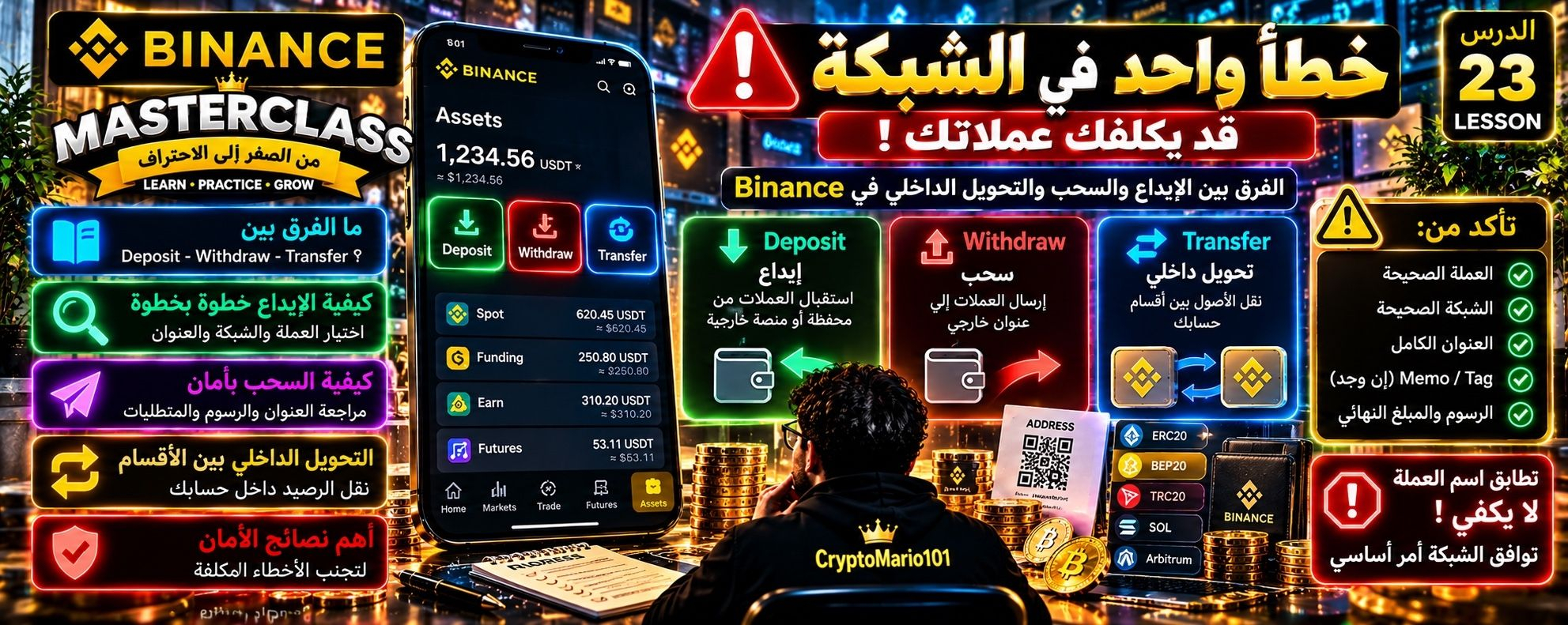
🚨💸 خطأ واحد في عنوان المحفظة أو الشبكة… وقد تفقد عملاتك!هل تعرف الفرق بين Deposit وWithdraw وTransfer داخل Binance؟ 🤔
ثلاثة أزرار تبدو بسيطة، لكن لكل واحد منها وظيفة مختلفة تمامًا!
👑 BINANCE MASTERCLASS — من الصفر إلى الاحتراف
📚 الدرس 23 | الإيداع والسحب والتحويل الداخلي: كيف تتجنب الأخطاء المكلفة؟
━━━━━━━━━━━━━━
💡 ① الفكرة ببساطة
📥 Deposit — إيداع
تستخدمه عندما تريد استقبال عملات رقمية من محفظة أو منصة خارجية إلى حسابك في Binance.
📤 Withdraw — سحب
تستخدمه لإرسال عملاتك من Binance إلى عنوان خارجي.
🔄 Transfer — تحويل داخلي
تستخدمه لنقل الأصول بين أقسام حسابك، مثل Spot وFunding، عندما تكون هذه العملية مدعومة.
⚠️ أهم فرق: التحويل الداخلي بين أقسام الحساب ليس هو نفسه إرسال العملات عبر شبكة بلوكتشين إلى محفظة خارجية.
📱 ② كيف تستقبل عملة عبر Deposit؟
1️⃣ افتح تطبيق Binance.
2️⃣ انتقل إلى Assets / الأصول.
3️⃣ اختر Deposit ثم Deposit Crypto، إذا ظهر هذا الخيار.
4️⃣ حدد العملة التي تريد استقبالها.
5️⃣ اختر الشبكة المدعومة المناسبة.
6️⃣ انسخ عنوان الإيداع، وتحقق مما إذا كانت العملية تتطلب Memo / Tag.
🚨 لا تشارك عنوانًا أو رمزًا قبل التأكد من العملة والشبكة والمتطلبات المعروضة داخل التطبيق.
🎯 ③ مثال عملي
لنفترض أن صديقك يريد إرسال 20 USDT إليك.
إذا كان سيرسل عبر شبكة معينة، فيجب أن تكون شبكة السحب لديه متوافقة مع شبكة الإيداع التي اخترتها في Binance.
❌ لا يكفي أن تكون العملة USDT في الجهتين!
فقد تتوافر USDT على أكثر من شبكة، وإرسالها عبر شبكة غير مدعومة في الوجهة قد يؤدي إلى فقدان الأموال أو صعوبة استردادها.
📤 ④ كيف يعمل Withdraw؟
عند السحب إلى محفظة خارجية:
1️⃣ اختر العملة.
2️⃣ أدخل عنوان المستلم بدقة.
3️⃣ اختر الشبكة الصحيحة.
4️⃣ راجع الرسوم والحد الأدنى للسحب.
5️⃣ تحقق من المبلغ الذي سيصل إلى المستلم.
6️⃣ أكمل خطوات التأكيد الأمني المطلوبة.
🛑 لا تؤكد العملية قبل مراجعة جميع التفاصيل.
👑 ⑤ لمسة احترافية — قائمة الأمان الذهبية
✅ تأكد من العملة.
✅ تأكد من توافق الشبكة.
✅ راجع أول وآخر أحرف العنوان، ويفضل التحقق من العنوان كاملًا عبر وسيلة موثوقة.
✅ تحقق من Memo أو Tag إذا كان مطلوبًا.
✅ راجع الرسوم والمبلغ النهائي.
✅ عند التعامل مع عنوان جديد، قد يكون إرسال مبلغ تجريبي صغير مفيدًا، إذا سمحت الرسوم والحدود بذلك.
🔐 ولا تشارك كلمة المرور أو رموز التحقق أو العبارة السرية لمحفظتك مع أي شخص.
━━━━━━━━━━━━━━
🏆 الخلاصة الذهبية
Deposit يستقبل، Withdraw يرسل إلى الخارج، وTransfer ينقل بين أقسام الحساب.
والقاعدة التي لا تنساها أبدًا:
🚨 تطابق اسم العملة وحده لا يكفي؛ توافق الشبكة ومتطلبات الاستلام أمر أساسي!
🎓 الدرس 24 القادم: سجل المعاملات — كيف تتبع الإيداع والسحب والتحويل وتفهم حالة كل عملية؟
#USDT #BinanceSquare #BinanceTutorial #CryptoMario101
🚨💸 خطأ واحد في عنوان المحفظة أو الشبكة… وقد تفقد عملاتك!
هل تعرف الفرق بين Deposit وWithdraw وTransfer داخل Binance؟ 🤔
ثلاثة أزرار تبدو بسيطة، لكن لكل واحد منها وظيفة مختلفة تمامًا!
👑 BINANCE MASTERCLASS — من الصفر إلى الاحتراف
📚 الدرس 23 | الإيداع والسحب والتحويل الداخلي: كيف تتجنب الأخطاء المكلفة؟
━━━━━━━━━━━━━━
💡 ① الفكرة ببساطة
📥 Deposit — إيداع
تستخدمه عندما تريد استقبال عملات رقمية من محفظة أو منصة خارجية إلى حسابك في Binance.
📤 Withdraw — سحب
تستخدمه لإرسال عملاتك من Binance إلى عنوان خارجي.
🔄 Transfer — تحويل داخلي
تستخدمه لنقل الأصول بين أقسام حسابك، مثل Spot وFunding، عندما تكون هذه العملية مدعومة.
⚠️ أهم فرق: التحويل الداخلي بين أقسام الحساب ليس هو نفسه إرسال العملات عبر شبكة بلوكتشين إلى محفظة خارجية.
📱 ② كيف تستقبل عملة عبر Deposit؟
1️⃣ افتح تطبيق Binance.
2️⃣ انتقل إلى Assets / الأصول.
3️⃣ اختر Deposit ثم Deposit Crypto، إذا ظهر هذا الخيار.
4️⃣ حدد العملة التي تريد استقبالها.
5️⃣ اختر الشبكة المدعومة المناسبة.
6️⃣ انسخ عنوان الإيداع، وتحقق مما إذا كانت العملية تتطلب Memo / Tag.
🚨 لا تشارك عنوانًا أو رمزًا قبل التأكد من العملة والشبكة والمتطلبات المعروضة داخل التطبيق.
🎯 ③ مثال عملي
لنفترض أن صديقك يريد إرسال 20 USDT إليك.
إذا كان سيرسل عبر شبكة معينة، فيجب أن تكون شبكة السحب لديه متوافقة مع شبكة الإيداع التي اخترتها في Binance.
❌ لا يكفي أن تكون العملة USDT في الجهتين!
فقد تتوافر USDT على أكثر من شبكة، وإرسالها عبر شبكة غير مدعومة في الوجهة قد يؤدي إلى فقدان الأموال أو صعوبة استردادها.
📤 ④ كيف يعمل Withdraw؟
عند السحب إلى محفظة خارجية:
1️⃣ اختر العملة.
2️⃣ أدخل عنوان المستلم بدقة.
3️⃣ اختر الشبكة الصحيحة.
4️⃣ راجع الرسوم والحد الأدنى للسحب.
5️⃣ تحقق من المبلغ الذي سيصل إلى المستلم.
6️⃣ أكمل خطوات التأكيد الأمني المطلوبة.
🛑 لا تؤكد العملية قبل مراجعة جميع التفاصيل.
👑 ⑤ لمسة احترافية — قائمة الأمان الذهبية
✅ تأكد من العملة.
✅ تأكد من توافق الشبكة.
✅ راجع أول وآخر أحرف العنوان، ويفضل التحقق من العنوان كاملًا عبر وسيلة موثوقة.
✅ تحقق من Memo أو Tag إذا كان مطلوبًا.
✅ راجع الرسوم والمبلغ النهائي.
✅ عند التعامل مع عنوان جديد، قد يكون إرسال مبلغ تجريبي صغير مفيدًا، إذا سمحت الرسوم والحدود بذلك.
🔐 ولا تشارك كلمة المرور أو رموز التحقق أو العبارة السرية لمحفظتك مع أي شخص.
━━━━━━━━━━━━━━
🏆 الخلاصة الذهبية
Deposit يستقبل، Withdraw يرسل إلى الخارج، وTransfer ينقل بين أقسام الحساب.
والقاعدة التي لا تنساها أبدًا:
🚨 تطابق اسم العملة وحده لا يكفي؛ توافق الشبكة ومتطلبات الاستلام أمر أساسي!
🎓 الدرس 24 القادم: سجل المعاملات — كيف تتبع الإيداع والسحب والتحويل وتفهم حالة كل عملية؟
#USDT #BinanceSquare #BinanceTutorial #CryptoMario101
ثلاثة أزرار تبدو بسيطة، لكن لكل واحد منها وظيفة مختلفة تمامًا!
👑 BINANCE MASTERCLASS — من الصفر إلى الاحتراف
📚 الدرس 23 | الإيداع والسحب والتحويل الداخلي: كيف تتجنب الأخطاء المكلفة؟
━━━━━━━━━━━━━━
💡 ① الفكرة ببساطة
📥 Deposit — إيداع
تستخدمه عندما تريد استقبال عملات رقمية من محفظة أو منصة خارجية إلى حسابك في Binance.
📤 Withdraw — سحب
تستخدمه لإرسال عملاتك من Binance إلى عنوان خارجي.
🔄 Transfer — تحويل داخلي
تستخدمه لنقل الأصول بين أقسام حسابك، مثل Spot وFunding، عندما تكون هذه العملية مدعومة.
⚠️ أهم فرق: التحويل الداخلي بين أقسام الحساب ليس هو نفسه إرسال العملات عبر شبكة بلوكتشين إلى محفظة خارجية.
📱 ② كيف تستقبل عملة عبر Deposit؟
1️⃣ افتح تطبيق Binance.
2️⃣ انتقل إلى Assets / الأصول.
3️⃣ اختر Deposit ثم Deposit Crypto، إذا ظهر هذا الخيار.
4️⃣ حدد العملة التي تريد استقبالها.
5️⃣ اختر الشبكة المدعومة المناسبة.
6️⃣ انسخ عنوان الإيداع، وتحقق مما إذا كانت العملية تتطلب Memo / Tag.
🚨 لا تشارك عنوانًا أو رمزًا قبل التأكد من العملة والشبكة والمتطلبات المعروضة داخل التطبيق.
🎯 ③ مثال عملي
لنفترض أن صديقك يريد إرسال 20 USDT إليك.
إذا كان سيرسل عبر شبكة معينة، فيجب أن تكون شبكة السحب لديه متوافقة مع شبكة الإيداع التي اخترتها في Binance.
❌ لا يكفي أن تكون العملة USDT في الجهتين!
فقد تتوافر USDT على أكثر من شبكة، وإرسالها عبر شبكة غير مدعومة في الوجهة قد يؤدي إلى فقدان الأموال أو صعوبة استردادها.
📤 ④ كيف يعمل Withdraw؟
عند السحب إلى محفظة خارجية:
1️⃣ اختر العملة.
2️⃣ أدخل عنوان المستلم بدقة.
3️⃣ اختر الشبكة الصحيحة.
4️⃣ راجع الرسوم والحد الأدنى للسحب.
5️⃣ تحقق من المبلغ الذي سيصل إلى المستلم.
6️⃣ أكمل خطوات التأكيد الأمني المطلوبة.
🛑 لا تؤكد العملية قبل مراجعة جميع التفاصيل.
👑 ⑤ لمسة احترافية — قائمة الأمان الذهبية
✅ تأكد من العملة.
✅ تأكد من توافق الشبكة.
✅ راجع أول وآخر أحرف العنوان، ويفضل التحقق من العنوان كاملًا عبر وسيلة موثوقة.
✅ تحقق من Memo أو Tag إذا كان مطلوبًا.
✅ راجع الرسوم والمبلغ النهائي.
✅ عند التعامل مع عنوان جديد، قد يكون إرسال مبلغ تجريبي صغير مفيدًا، إذا سمحت الرسوم والحدود بذلك.
🔐 ولا تشارك كلمة المرور أو رموز التحقق أو العبارة السرية لمحفظتك مع أي شخص.
━━━━━━━━━━━━━━
🏆 الخلاصة الذهبية
Deposit يستقبل، Withdraw يرسل إلى الخارج، وTransfer ينقل بين أقسام الحساب.
والقاعدة التي لا تنساها أبدًا:
🚨 تطابق اسم العملة وحده لا يكفي؛ توافق الشبكة ومتطلبات الاستلام أمر أساسي!
🎓 الدرس 24 القادم: سجل المعاملات — كيف تتبع الإيداع والسحب والتحويل وتفهم حالة كل عملية؟
#USDT #BinanceSquare #BinanceTutorial #CryptoMario101
82

🛡️ 5 BINANCE SECURITY HABITS EVERY BEGINNER SHOULD KNOW
Creating an account is only the first step. Protecting it matters just as much.
Here are five things worth reviewing in your account's Security settings:
1️⃣ Use a unique password. Don't reuse the password you use for social media or email.
2️⃣ Enable two-factor authentication (2FA). Use an available authentication method that suits your security needs.
3️⃣ Set an anti-phishing code. This can help you recognize certain genuine Binance communications.
4️⃣ Review withdrawal protections. Understand the available withdrawal address whitelist and confirmation settings before transferring funds.
5️⃣ Check your account activity. Investigate unfamiliar devices, sessions, or security notifications through official channels.
Important: menu names and available security features may vary. Navigate through the official Binance app or website and verify the current instructions before changing settings.
No single setting makes an account invulnerable, but several layers of protection are better than relying on a password alone.
When did you last review your account security?
#BinanceTutorial #CryptoSafety #AccountSecurity
🛡️ 5 BINANCE SECURITY HABITS EVERY BEGINNER SHOULD KNOW
Creating an account is only the first step. Protecting it matters just as much.
Here are five things worth reviewing in your account's Security settings:
1️⃣ Use a unique password. Don't reuse the password you use for social media or email.
2️⃣ Enable two-factor authentication (2FA). Use an available authentication method that suits your security needs.
3️⃣ Set an anti-phishing code. This can help you recognize certain genuine Binance communications.
4️⃣ Review withdrawal protections. Understand the available withdrawal address whitelist and confirmation settings before transferring funds.
5️⃣ Check your account activity. Investigate unfamiliar devices, sessions, or security notifications through official channels.
Important: menu names and available security features may vary. Navigate through the official Binance app or website and verify the current instructions before changing settings.
No single setting makes an account invulnerable, but several layers of protection are better than relying on a password alone.
When did you last review your account security?
#BinanceTutorial #CryptoSafety #AccountSecurity
Creating an account is only the first step. Protecting it matters just as much.
Here are five things worth reviewing in your account's Security settings:
1️⃣ Use a unique password. Don't reuse the password you use for social media or email.
2️⃣ Enable two-factor authentication (2FA). Use an available authentication method that suits your security needs.
3️⃣ Set an anti-phishing code. This can help you recognize certain genuine Binance communications.
4️⃣ Review withdrawal protections. Understand the available withdrawal address whitelist and confirmation settings before transferring funds.
5️⃣ Check your account activity. Investigate unfamiliar devices, sessions, or security notifications through official channels.
Important: menu names and available security features may vary. Navigate through the official Binance app or website and verify the current instructions before changing settings.
No single setting makes an account invulnerable, but several layers of protection are better than relying on a password alone.
When did you last review your account security?
#BinanceTutorial #CryptoSafety #AccountSecurity
1
43
Статья
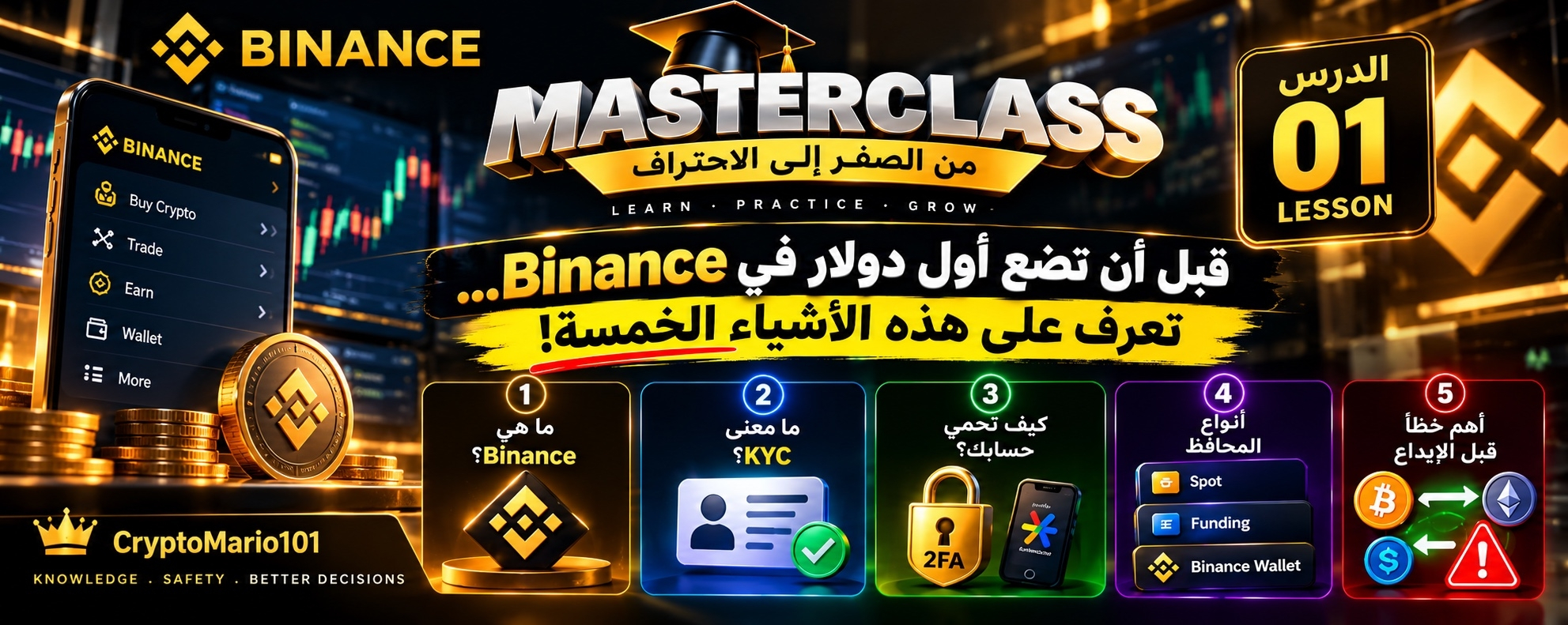
🎓 BINANCE MASTERCLASS | الدرس 01قبل أن تضع أول دولار في Binance… تعرّف على هذه الأشياء الخمسة! 🔐
تخيّل أنك اشتريت عملة رقمية، وارتفع سعرها 20%…
ثم اكتشفت أنك لا تعرف كيف تسحب أموالك، أو فقدت الوصول إلى حسابك!
لهذا السبب، لن نبدأ سلسلتنا بسؤال «كيف أربح؟».
سنبدأ بسؤال أهم: كيف أفهم المنصة وأحمي أموالي؟
① ما هي Binance؟
Binance منصة تتيح شراء وبيع وتبادل العملات الرقمية، إلى جانب خدمات أخرى.
لكن تذكّر: امتلاك حساب في Binance لا يعني أنك تمتلك استثمارًا رابحًا. قيمة العملات قد ترتفع أو تنخفض.
② ما معنى KYC؟
اختصار لعبارة Know Your Customer، أي «اعرف عميلك».
إنها عملية التحقق من الهوية باستخدام مستندات ومعلومات شخصية، وهي مطلوبة للوصول إلى خدمات المنصة الأساسية.
③ كلمة المرور وحدها لا تكفي! 🔐
بعد إنشاء الحساب، فعّل المصادقة الثنائية (2FA) باستخدام تطبيق مصادقة أو مفتاح مرور إن كان متاحًا.
ولا تشارك كلمة المرور أو رموز التحقق مع أي شخص، حتى لو ادّعى أنه من فريق الدعم.
④ ليست كل المحافظ متشابهة!
قد ترى داخل Binance أقسامًا مثل:
💼 Spot: للأصول المستخدمة في التداول الفوري.
💳 Funding: لخدمات وتمويلات معينة داخل المنصة.
🌐 Binance Wallet: محفظة ذاتية الحفظ تختلف عن أرصدة حساب التداول المعتادة.
سنشرح كل واحدة بالتفصيل في دروس مستقلة.
⑤ أهم خطأ قبل أول إيداع! ⚠️
عند تحويل العملات الرقمية، لا يكفي اختيار اسم العملة فقط.
يجب التأكد من شبكة التحويل وعنوان الاستلام، وكذلك أي Memo أو Tag مطلوب.
الاختيار الخاطئ قد يؤدي إلى فقدان الأموال، وأحيانًا لا يمكن استعادتها.
👑 مهمة الدرس الأول:
افتح تطبيق Binance، وتعرّف على قسم Security داخل إعدادات حسابك.
راجع وسائل الحماية المفعّلة لديك، دون مشاركة أي بيانات أو رموز مع أحد.
📚 في الدرس 02: سنفتح خريطة منصة Binance ونتعرف على أقسامها الرئيسية: أين توجد الأموال؟ وما الفرق بين Spot وFunding وEarn؟
💬 سؤال اليوم:
ما أكثر شيء يربكك داخل Binance؟
المحافظ، الإيداع والسحب، أم التداول؟
اكتب إجابتك في التعليقات، فقد تكون موضوع أحد دروسنا القادمة.
👑 CryptoMario101
#Binance
#BinanceTutorial
#CryptoEducation💡🚀
🎓 BINANCE MASTERCLASS | الدرس 01
قبل أن تضع أول دولار في Binance… تعرّف على هذه الأشياء الخمسة! 🔐
تخيّل أنك اشتريت عملة رقمية، وارتفع سعرها 20%…
ثم اكتشفت أنك لا تعرف كيف تسحب أموالك، أو فقدت الوصول إلى حسابك!
لهذا السبب، لن نبدأ سلسلتنا بسؤال «كيف أربح؟».
سنبدأ بسؤال أهم: كيف أفهم المنصة وأحمي أموالي؟
① ما هي Binance؟
Binance منصة تتيح شراء وبيع وتبادل العملات الرقمية، إلى جانب خدمات أخرى.
لكن تذكّر: امتلاك حساب في Binance لا يعني أنك تمتلك استثمارًا رابحًا. قيمة العملات قد ترتفع أو تنخفض.
② ما معنى KYC؟
اختصار لعبارة Know Your Customer، أي «اعرف عميلك».
إنها عملية التحقق من الهوية باستخدام مستندات ومعلومات شخصية، وهي مطلوبة للوصول إلى خدمات المنصة الأساسية.
③ كلمة المرور وحدها لا تكفي! 🔐
بعد إنشاء الحساب، فعّل المصادقة الثنائية (2FA) باستخدام تطبيق مصادقة أو مفتاح مرور إن كان متاحًا.
ولا تشارك كلمة المرور أو رموز التحقق مع أي شخص، حتى لو ادّعى أنه من فريق الدعم.
④ ليست كل المحافظ متشابهة!
قد ترى داخل Binance أقسامًا مثل:
💼 Spot: للأصول المستخدمة في التداول الفوري.
💳 Funding: لخدمات وتمويلات معينة داخل المنصة.
🌐 Binance Wallet: محفظة ذاتية الحفظ تختلف عن أرصدة حساب التداول المعتادة.
سنشرح كل واحدة بالتفصيل في دروس مستقلة.
⑤ أهم خطأ قبل أول إيداع! ⚠️
عند تحويل العملات الرقمية، لا يكفي اختيار اسم العملة فقط.
يجب التأكد من شبكة التحويل وعنوان الاستلام، وكذلك أي Memo أو Tag مطلوب.
الاختيار الخاطئ قد يؤدي إلى فقدان الأموال، وأحيانًا لا يمكن استعادتها.
👑 مهمة الدرس الأول:
افتح تطبيق Binance، وتعرّف على قسم Security داخل إعدادات حسابك.
راجع وسائل الحماية المفعّلة لديك، دون مشاركة أي بيانات أو رموز مع أحد.
📚 في الدرس 02: سنفتح خريطة منصة Binance ونتعرف على أقسامها الرئيسية: أين توجد الأموال؟ وما الفرق بين Spot وFunding وEarn؟
💬 سؤال اليوم:
ما أكثر شيء يربكك داخل Binance؟
المحافظ، الإيداع والسحب، أم التداول؟
اكتب إجابتك في التعليقات، فقد تكون موضوع أحد دروسنا القادمة.
👑 CryptoMario101
#Binance
#BinanceTutorial
#CryptoEducation💡🚀
تخيّل أنك اشتريت عملة رقمية، وارتفع سعرها 20%…
ثم اكتشفت أنك لا تعرف كيف تسحب أموالك، أو فقدت الوصول إلى حسابك!
لهذا السبب، لن نبدأ سلسلتنا بسؤال «كيف أربح؟».
سنبدأ بسؤال أهم: كيف أفهم المنصة وأحمي أموالي؟
① ما هي Binance؟
Binance منصة تتيح شراء وبيع وتبادل العملات الرقمية، إلى جانب خدمات أخرى.
لكن تذكّر: امتلاك حساب في Binance لا يعني أنك تمتلك استثمارًا رابحًا. قيمة العملات قد ترتفع أو تنخفض.
② ما معنى KYC؟
اختصار لعبارة Know Your Customer، أي «اعرف عميلك».
إنها عملية التحقق من الهوية باستخدام مستندات ومعلومات شخصية، وهي مطلوبة للوصول إلى خدمات المنصة الأساسية.
③ كلمة المرور وحدها لا تكفي! 🔐
بعد إنشاء الحساب، فعّل المصادقة الثنائية (2FA) باستخدام تطبيق مصادقة أو مفتاح مرور إن كان متاحًا.
ولا تشارك كلمة المرور أو رموز التحقق مع أي شخص، حتى لو ادّعى أنه من فريق الدعم.
④ ليست كل المحافظ متشابهة!
قد ترى داخل Binance أقسامًا مثل:
💼 Spot: للأصول المستخدمة في التداول الفوري.
💳 Funding: لخدمات وتمويلات معينة داخل المنصة.
🌐 Binance Wallet: محفظة ذاتية الحفظ تختلف عن أرصدة حساب التداول المعتادة.
سنشرح كل واحدة بالتفصيل في دروس مستقلة.
⑤ أهم خطأ قبل أول إيداع! ⚠️
عند تحويل العملات الرقمية، لا يكفي اختيار اسم العملة فقط.
يجب التأكد من شبكة التحويل وعنوان الاستلام، وكذلك أي Memo أو Tag مطلوب.
الاختيار الخاطئ قد يؤدي إلى فقدان الأموال، وأحيانًا لا يمكن استعادتها.
👑 مهمة الدرس الأول:
افتح تطبيق Binance، وتعرّف على قسم Security داخل إعدادات حسابك.
راجع وسائل الحماية المفعّلة لديك، دون مشاركة أي بيانات أو رموز مع أحد.
📚 في الدرس 02: سنفتح خريطة منصة Binance ونتعرف على أقسامها الرئيسية: أين توجد الأموال؟ وما الفرق بين Spot وFunding وEarn؟
💬 سؤال اليوم:
ما أكثر شيء يربكك داخل Binance؟
المحافظ، الإيداع والسحب، أم التداول؟
اكتب إجابتك في التعليقات، فقد تكون موضوع أحد دروسنا القادمة.
👑 CryptoMario101
#Binance
#BinanceTutorial
#CryptoEducation💡🚀
1
4
829

·
--
{spot}(ETHUSDT)
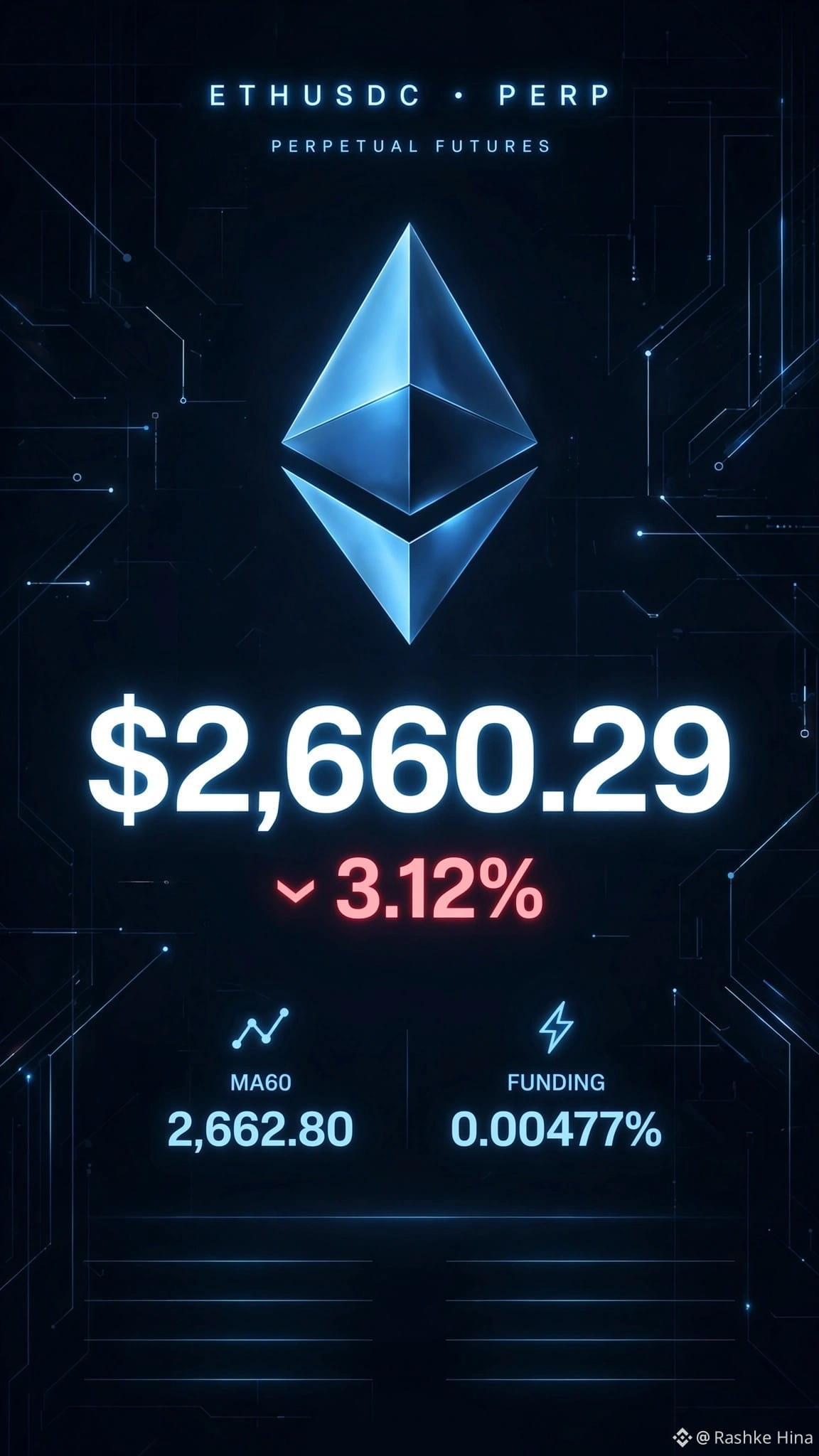
LEARN BINANCE FUTURES IN 30 SECONDS - $ETH USDC Example 📚
Many new traders lose money because they don't know these 5 buttons in your screenshot 👇
1. CROSS 20x =
Your whole wallet is at risk. If trade goes wrong, Binance will take from all your balance. Beginners should use ISOLATED.
2. LIMIT + BBOT =
Limit means you set your own price. BBO = Best Bid Offer. In pic: Price 2660.26 = You want to buy $ETH at that price, not market price.
3. FUNDING 0.00477% =
Every 8 hours you pay or get fee for holding trade. Right now Longs are paying Shorts. Countdown 05:27:45 left.
4. ORDER BOOK (Red & Green numbers) =
Red 2,660.34 = People SELLING
Green 2,660.26 = People BUYING
Where more volume = strong support/resistance.
5. MA60 2,662.80 =
Price (2,660.29) is BELOW MA60 line. Means short-term trend is WEAK / Bearish. That is why $ETH -3.12% today.
BONUS: Never trade with 20x at start. Start with 2x-3x only.
Save this post - You will need it before your next trade 💎
Did you know this? Yes/No?
{stock_us}(BBOT.US)
#BinanceTutorial #ETHUSDC # #FuturesTrading #CryptoForBeginners #ETH
LEARN BINANCE FUTURES IN 30 SECONDS - $ETH USDC Example 📚
Many new traders lose money because they don't know these 5 buttons in your screenshot 👇
1. CROSS 20x =
Your whole wallet is at risk. If trade goes wrong, Binance will take from all your balance. Beginners should use ISOLATED.
2. LIMIT + BBOT =
Limit means you set your own price. BBO = Best Bid Offer. In pic: Price 2660.26 = You want to buy $ETH at that price, not market price.
3. FUNDING 0.00477% =
Every 8 hours you pay or get fee for holding trade. Right now Longs are paying Shorts. Countdown 05:27:45 left.
4. ORDER BOOK (Red & Green numbers) =
Red 2,660.34 = People SELLING
Green 2,660.26 = People BUYING
Where more volume = strong support/resistance.
5. MA60 2,662.80 =
Price (2,660.29) is BELOW MA60 line. Means short-term trend is WEAK / Bearish. That is why $ETH -3.12% today.
BONUS: Never trade with 20x at start. Start with 2x-3x only.
Save this post - You will need it before your next trade 💎
Did you know this? Yes/No?
#BinanceTutorial #ETHUSDC # #FuturesTrading #CryptoForBeginners #ETH
LEARN BINANCE FUTURES IN 30 SECONDS - $ETH USDC Example 📚
Many new traders lose money because they don't know these 5 buttons in your screenshot 👇
1. CROSS 20x =
Your whole wallet is at risk. If trade goes wrong, Binance will take from all your balance. Beginners should use ISOLATED.
2. LIMIT + BBOT =
Limit means you set your own price. BBO = Best Bid Offer. In pic: Price 2660.26 = You want to buy $ETH at that price, not market price.
3. FUNDING 0.00477% =
Every 8 hours you pay or get fee for holding trade. Right now Longs are paying Shorts. Countdown 05:27:45 left.
4. ORDER BOOK (Red & Green numbers) =
Red 2,660.34 = People SELLING
Green 2,660.26 = People BUYING
Where more volume = strong support/resistance.
5. MA60 2,662.80 =
Price (2,660.29) is BELOW MA60 line. Means short-term trend is WEAK / Bearish. That is why $ETH -3.12% today.
BONUS: Never trade with 20x at start. Start with 2x-3x only.
Save this post - You will need it before your next trade 💎
Did you know this? Yes/No?
#BinanceTutorial #ETHUSDC # #FuturesTrading #CryptoForBeginners #ETH
ETH-1,29%
BBOTUS+0,94%
133

*Option 1: Educational / High Earn Potential*
*Title:* 3 Binance Features 90% of Beginners Don’t Use But Should 🔥
*Post:*
Most people only use Binance to buy and sell crypto.
But you’re leaving money on the table if you ignore these 3:
*1. Binance Earn*
Put your USDT to work. Even 5% APR is better than 0% sitting in your wallet.
*2. P2P Trading*
Zero fees + better rates than spot. Perfect if you’re in KE and want M-Pesa.
*3. Binance Square Creator Program*
Yes, Binance pays you to post here 😂 I’m literally earning by sharing tips like this.
Which one are you using already? Drop a 1, 2 or 3 👇
#BinanceTips #CryptoKE #EarnCrypto #BinanceSquare #NotFinancialAdvice
---
*Option 2: Story / Relatable*
*Title:* I made my first $50 just by posting on Binance 😳
Post:
6 months ago I thought “posting about crypto” was a waste of time.
Then I joined Binance Square Creator Program.
Now I get paid monthly in USDT just for sharing what I already learn.
No ads. No sponsors. Just real posts that help people.
If you’re already on Binance, why not get paid to talk about it?
Link to join is in my bio.
Who else is earning from posting? 👀
#BinanceSquare #PostToEarn #CryptoContent #Web3Creator #Binance
---
*Option 3: Tutorial / Value Post*
*Title:* How to Buy USDT with M-Pesa in 2 Minutes [KE Guide] 🇰🇪
*Post:*
Struggling to fund your Binance account from Kenya?
Here’s the fastest way in 2026:
*Step 1:* Open Binance App → P2P → Buy → USDT
*Step 2:* Filter by M-Pesa + 100+ trades + 98% completion rate
*Step 3:* Send M-Pesa, upload proof, USDT drops in 2 mins
Pro tip: Only trade with "Verified Merchants" to stay safe.
Save this for later. And follow for more KE crypto tips 💪
What other guides do you want? Comment 👇
#CryptoKenya #MPesa #BinanceP2P #USDT #BinanceTutorial
*Option 1: Educational / High Earn Potential*
*Title:* 3 Binance Features 90% of Beginners Don’t Use But Should 🔥
*Post:*
Most people only use Binance to buy and sell crypto.
But you’re leaving money on the table if you ignore these 3:
*1. Binance Earn*
Put your USDT to work. Even 5% APR is better than 0% sitting in your wallet.
*2. P2P Trading*
Zero fees + better rates than spot. Perfect if you’re in KE and want M-Pesa.
*3. Binance Square Creator Program*
Yes, Binance pays you to post here 😂 I’m literally earning by sharing tips like this.
Which one are you using already? Drop a 1, 2 or 3 👇
#BinanceTips #CryptoKE #EarnCrypto #BinanceSquare #NotFinancialAdvice
---
*Option 2: Story / Relatable*
*Title:* I made my first $50 just by posting on Binance 😳
Post:
6 months ago I thought “posting about crypto” was a waste of time.
Then I joined Binance Square Creator Program.
Now I get paid monthly in USDT just for sharing what I already learn.
No ads. No sponsors. Just real posts that help people.
If you’re already on Binance, why not get paid to talk about it?
Link to join is in my bio.
Who else is earning from posting? 👀
#BinanceSquare #PostToEarn #CryptoContent #Web3Creator #Binance
---
*Option 3: Tutorial / Value Post*
*Title:* How to Buy USDT with M-Pesa in 2 Minutes [KE Guide] 🇰🇪
*Post:*
Struggling to fund your Binance account from Kenya?
Here’s the fastest way in 2026:
*Step 1:* Open Binance App → P2P → Buy → USDT
*Step 2:* Filter by M-Pesa + 100+ trades + 98% completion rate
*Step 3:* Send M-Pesa, upload proof, USDT drops in 2 mins
Pro tip: Only trade with "Verified Merchants" to stay safe.
Save this for later. And follow for more KE crypto tips 💪
What other guides do you want? Comment 👇
#CryptoKenya #MPesa #BinanceP2P #USDT #BinanceTutorial
*Title:* 3 Binance Features 90% of Beginners Don’t Use But Should 🔥
*Post:*
Most people only use Binance to buy and sell crypto.
But you’re leaving money on the table if you ignore these 3:
*1. Binance Earn*
Put your USDT to work. Even 5% APR is better than 0% sitting in your wallet.
*2. P2P Trading*
Zero fees + better rates than spot. Perfect if you’re in KE and want M-Pesa.
*3. Binance Square Creator Program*
Yes, Binance pays you to post here 😂 I’m literally earning by sharing tips like this.
Which one are you using already? Drop a 1, 2 or 3 👇
#BinanceTips #CryptoKE #EarnCrypto #BinanceSquare #NotFinancialAdvice
---
*Option 2: Story / Relatable*
*Title:* I made my first $50 just by posting on Binance 😳
Post:
6 months ago I thought “posting about crypto” was a waste of time.
Then I joined Binance Square Creator Program.
Now I get paid monthly in USDT just for sharing what I already learn.
No ads. No sponsors. Just real posts that help people.
If you’re already on Binance, why not get paid to talk about it?
Link to join is in my bio.
Who else is earning from posting? 👀
#BinanceSquare #PostToEarn #CryptoContent #Web3Creator #Binance
---
*Option 3: Tutorial / Value Post*
*Title:* How to Buy USDT with M-Pesa in 2 Minutes [KE Guide] 🇰🇪
*Post:*
Struggling to fund your Binance account from Kenya?
Here’s the fastest way in 2026:
*Step 1:* Open Binance App → P2P → Buy → USDT
*Step 2:* Filter by M-Pesa + 100+ trades + 98% completion rate
*Step 3:* Send M-Pesa, upload proof, USDT drops in 2 mins
Pro tip: Only trade with "Verified Merchants" to stay safe.
Save this for later. And follow for more KE crypto tips 💪
What other guides do you want? Comment 👇
#CryptoKenya #MPesa #BinanceP2P #USDT #BinanceTutorial
73

Статья
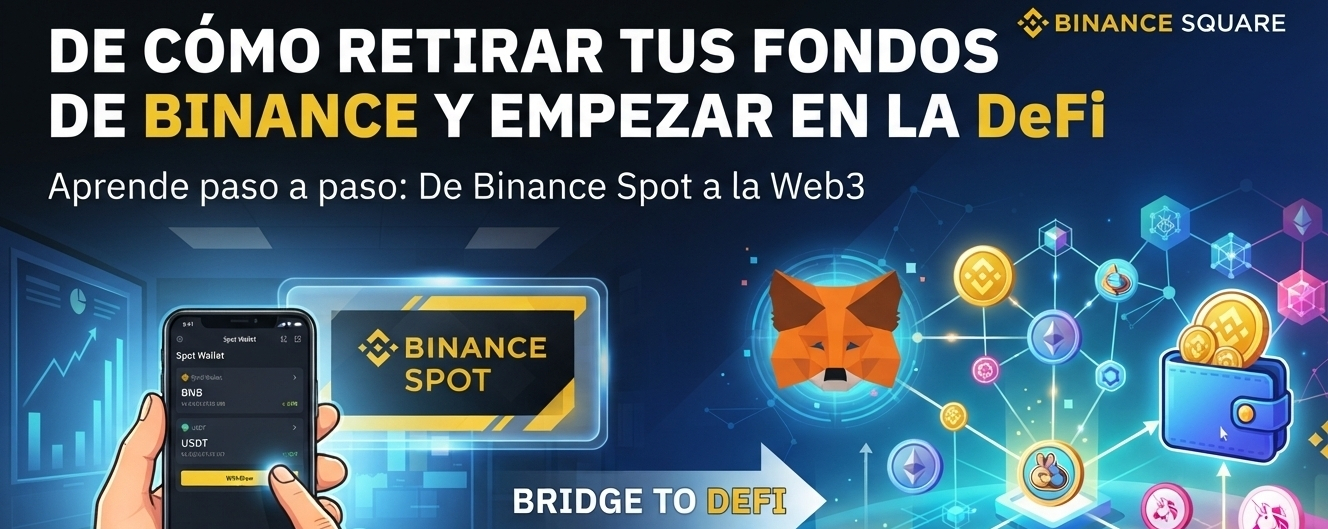
COMO RETIRAR TUS FONDOS DE BINANCE Y EMPEZAR EN LA DEFI🛠️ El proceso en 4 pasos sencillos
1️⃣ Copia tu dirección de destino
Abre tu billetera Web3 (ej. Trust Wallet).Selecciona la criptomoneda que vas a recibir (ej. BNB).Presiona "Recibir" y copia la dirección alfanumérica que aparece.
2️⃣ Inicia el retiro en Binance
Abre la app de Binance y ve a Billetera > Fondos o Spot.Presiona el botón "Retirar" y selecciona la misma criptomoneda.Elige la opción "Enviar a través de red de criptomonedas".
3️⃣ Pega los datos y selecciona la red correcta
Pega la dirección que copiaste en el primer paso.¡Alerta crítica! Selecciona la red correcta (ej. si envías BNB, elige BNB Smart Chain - BSC/BEP20). Usar la red incorrecta resultará en la pérdida total de tus fondos.Digita el monto que deseas transferir.
4️⃣ Confirma la seguridad
Revisa los datos una última vez.Haz clic en "Retirar" y completa las verificaciones de seguridad de tu cuenta (2FA o Passkey).¡Listo! En un par de minutos verás el saldo reflejado en tu billetera Web3.
⚠️ Consejo de seguridad Binance Square: Si es tu primera vez, haz una transacción de prueba con el monto mínimo. Es mejor pagar una pequeña comisión doble que arriesgar todo tu capital por un error de dedo.
💬 ¡Déjame tu duda en los comentarios! ¿Ya tienes configurada tu billetera Web3 o necesitas ayuda para crear una desde cero? Te leo abajo.
👇
#Web3
#DeFi
#BinanceTutorial
#Principiantes
#TrustWallet
COMO RETIRAR TUS FONDOS DE BINANCE Y EMPEZAR EN LA DEFI
🛠️ El proceso en 4 pasos sencillos
1️⃣ Copia tu dirección de destino
Abre tu billetera Web3 (ej. Trust Wallet).Selecciona la criptomoneda que vas a recibir (ej. BNB).Presiona "Recibir" y copia la dirección alfanumérica que aparece.
2️⃣ Inicia el retiro en Binance
Abre la app de Binance y ve a Billetera > Fondos o Spot.Presiona el botón "Retirar" y selecciona la misma criptomoneda.Elige la opción "Enviar a través de red de criptomonedas".
3️⃣ Pega los datos y selecciona la red correcta
Pega la dirección que copiaste en el primer paso.¡Alerta crítica! Selecciona la red correcta (ej. si envías BNB, elige BNB Smart Chain - BSC/BEP20). Usar la red incorrecta resultará en la pérdida total de tus fondos.Digita el monto que deseas transferir.
4️⃣ Confirma la seguridad
Revisa los datos una última vez.Haz clic en "Retirar" y completa las verificaciones de seguridad de tu cuenta (2FA o Passkey).¡Listo! En un par de minutos verás el saldo reflejado en tu billetera Web3.
⚠️ Consejo de seguridad Binance Square: Si es tu primera vez, haz una transacción de prueba con el monto mínimo. Es mejor pagar una pequeña comisión doble que arriesgar todo tu capital por un error de dedo.
💬 ¡Déjame tu duda en los comentarios! ¿Ya tienes configurada tu billetera Web3 o necesitas ayuda para crear una desde cero? Te leo abajo.
👇
#Web3
#DeFi
#BinanceTutorial
#Principiantes
#TrustWallet
1️⃣ Copia tu dirección de destino
Abre tu billetera Web3 (ej. Trust Wallet).Selecciona la criptomoneda que vas a recibir (ej. BNB).Presiona "Recibir" y copia la dirección alfanumérica que aparece.
2️⃣ Inicia el retiro en Binance
Abre la app de Binance y ve a Billetera > Fondos o Spot.Presiona el botón "Retirar" y selecciona la misma criptomoneda.Elige la opción "Enviar a través de red de criptomonedas".
3️⃣ Pega los datos y selecciona la red correcta
Pega la dirección que copiaste en el primer paso.¡Alerta crítica! Selecciona la red correcta (ej. si envías BNB, elige BNB Smart Chain - BSC/BEP20). Usar la red incorrecta resultará en la pérdida total de tus fondos.Digita el monto que deseas transferir.
4️⃣ Confirma la seguridad
Revisa los datos una última vez.Haz clic en "Retirar" y completa las verificaciones de seguridad de tu cuenta (2FA o Passkey).¡Listo! En un par de minutos verás el saldo reflejado en tu billetera Web3.
⚠️ Consejo de seguridad Binance Square: Si es tu primera vez, haz una transacción de prueba con el monto mínimo. Es mejor pagar una pequeña comisión doble que arriesgar todo tu capital por un error de dedo.
💬 ¡Déjame tu duda en los comentarios! ¿Ya tienes configurada tu billetera Web3 o necesitas ayuda para crear una desde cero? Te leo abajo.
👇
#Web3
#DeFi
#BinanceTutorial
#Principiantes
#TrustWallet
1
202

hi guys
*Title:*
*How to Use Binance P2P in Pakistan 🇵🇰 | Buy & Sell USDT with Easypaisa/JazzCash*
*Post:*
*Want to buy or sell crypto in Pakistan without any issue?*
Binance P2P is the safest way. No bank, No problem 😎
Here’s a complete step-by-step guide:
*1. What is Binance P2P?*
P2P = Peer to Peer. You directly buy/sell USDT from other people using PKR. Binance just holds the money safely as "Escrow".
*2. How to BUY USDT via P2P*
1. Open *Binance App > Trade > P2P*
2. Select *"Buy"* and choose *USDT*
3. Select Payment Method: *Easypaisa, JazzCash, Bank Transfer*
4. Select a seller with *High Completion Rate + Good Reviews*
5. Enter amount in PKR > *Tap Buy*
6. *Transfer money* to seller via Easypaisa/JazzCash within 15 minutes
7. Once done, tap *"Transferred, Notify Seller"*
8. Seller will release USDT to your Binance Wallet ✅
*3. How to SELL USDT via P2P*
1. Go to *P2P > Sell > USDT*
2. Select Payment Method you want to receive: *Easypaisa/JazzCash*
3. Choose a buyer > *Tap Sell*
4. *Wait for payment* in your Easypaisa/JazzCash
5. *Confirm you received payment* > Tap "Release Crypto"
_Important: Pehle payment check karo, phir hi USDT release karna_
*4. 3 Safety Tips for Pakistan*
1. *Always check seller rating* - 98%+ and 1000+ trades wale seller best hain
2. *Only use Binance Chat* for communication. Bahar WhatsApp pe mat jana
3. *Payment proof ka screenshot* zaroor lein
*5. Fees?*
*0% Fee* on Binance P2P 🎉 Binance koi charges nahi leta
---
*Have you used Binance P2P before?*
Comment below which payment method you prefer: Easypaisa or JazzCash 👇
`#BinanceP2P #CryptoPakistan #USDT #Easypaisa #JazzCash #BinanceTutorial
hi guys
*Title:*
*How to Use Binance P2P in Pakistan 🇵🇰 | Buy & Sell USDT with Easypaisa/JazzCash*
*Post:*
*Want to buy or sell crypto in Pakistan without any issue?*
Binance P2P is the safest way. No bank, No problem 😎
Here’s a complete step-by-step guide:
*1. What is Binance P2P?*
P2P = Peer to Peer. You directly buy/sell USDT from other people using PKR. Binance just holds the money safely as "Escrow".
*2. How to BUY USDT via P2P*
1. Open *Binance App > Trade > P2P*
2. Select *"Buy"* and choose *USDT*
3. Select Payment Method: *Easypaisa, JazzCash, Bank Transfer*
4. Select a seller with *High Completion Rate + Good Reviews*
5. Enter amount in PKR > *Tap Buy*
6. *Transfer money* to seller via Easypaisa/JazzCash within 15 minutes
7. Once done, tap *"Transferred, Notify Seller"*
8. Seller will release USDT to your Binance Wallet ✅
*3. How to SELL USDT via P2P*
1. Go to *P2P > Sell > USDT*
2. Select Payment Method you want to receive: *Easypaisa/JazzCash*
3. Choose a buyer > *Tap Sell*
4. *Wait for payment* in your Easypaisa/JazzCash
5. *Confirm you received payment* > Tap "Release Crypto"
_Important: Pehle payment check karo, phir hi USDT release karna_
*4. 3 Safety Tips for Pakistan*
1. *Always check seller rating* - 98%+ and 1000+ trades wale seller best hain
2. *Only use Binance Chat* for communication. Bahar WhatsApp pe mat jana
3. *Payment proof ka screenshot* zaroor lein
*5. Fees?*
*0% Fee* on Binance P2P 🎉 Binance koi charges nahi leta
---
*Have you used Binance P2P before?*
Comment below which payment method you prefer: Easypaisa or JazzCash 👇
`#BinanceP2P #CryptoPakistan #USDT #Easypaisa #JazzCash #BinanceTutorial
*Title:*
*How to Use Binance P2P in Pakistan 🇵🇰 | Buy & Sell USDT with Easypaisa/JazzCash*
*Post:*
*Want to buy or sell crypto in Pakistan without any issue?*
Binance P2P is the safest way. No bank, No problem 😎
Here’s a complete step-by-step guide:
*1. What is Binance P2P?*
P2P = Peer to Peer. You directly buy/sell USDT from other people using PKR. Binance just holds the money safely as "Escrow".
*2. How to BUY USDT via P2P*
1. Open *Binance App > Trade > P2P*
2. Select *"Buy"* and choose *USDT*
3. Select Payment Method: *Easypaisa, JazzCash, Bank Transfer*
4. Select a seller with *High Completion Rate + Good Reviews*
5. Enter amount in PKR > *Tap Buy*
6. *Transfer money* to seller via Easypaisa/JazzCash within 15 minutes
7. Once done, tap *"Transferred, Notify Seller"*
8. Seller will release USDT to your Binance Wallet ✅
*3. How to SELL USDT via P2P*
1. Go to *P2P > Sell > USDT*
2. Select Payment Method you want to receive: *Easypaisa/JazzCash*
3. Choose a buyer > *Tap Sell*
4. *Wait for payment* in your Easypaisa/JazzCash
5. *Confirm you received payment* > Tap "Release Crypto"
_Important: Pehle payment check karo, phir hi USDT release karna_
*4. 3 Safety Tips for Pakistan*
1. *Always check seller rating* - 98%+ and 1000+ trades wale seller best hain
2. *Only use Binance Chat* for communication. Bahar WhatsApp pe mat jana
3. *Payment proof ka screenshot* zaroor lein
*5. Fees?*
*0% Fee* on Binance P2P 🎉 Binance koi charges nahi leta
---
*Have you used Binance P2P before?*
Comment below which payment method you prefer: Easypaisa or JazzCash 👇
`#BinanceP2P #CryptoPakistan #USDT #Easypaisa #JazzCash #BinanceTutorial
1
177
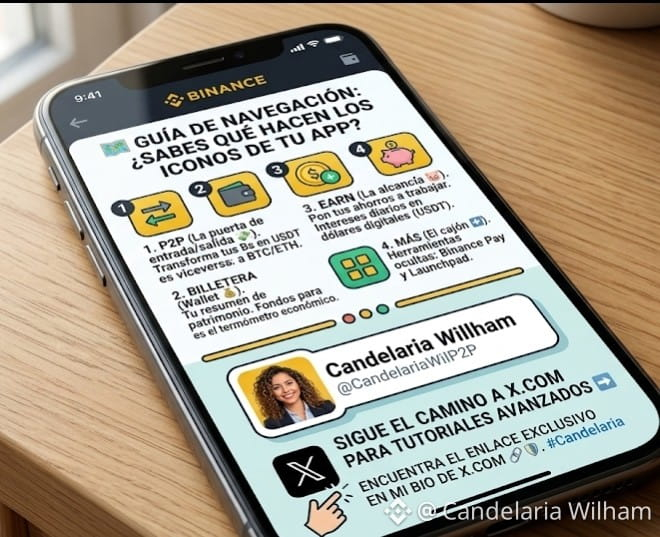
🗺️ Guía de Navegación: ¿Sabes qué hacen los iconos de tu App? 🚀
Si abres Binance y ves un montón de botones sin sentido, este post es para ti. No todos los iconos son para todo el mundo. Aquí te enseño los 4 "botones de poder" que todo usuario en Venezuela debe dominar:
1. El icono de "P2P" (Las dos flechas) 💸
Es tu puerta de entrada y salida. Aquí es donde transformas tus bolívares en dólares digitales (USDT) y viceversa.
Tip de experta: No entres solo a cambiar; entra a estudiar los precios. Es el termómetro de nuestra economía.
2. El icono de "Billetera" (Wallet) 💰
Es el resumen de tu patrimonio. Pero ojo, la clave está en las pestañas de arriba:
Fondos: Es donde debe estar tu dinero si vas a vender en P2P o usar la Binance Card.
Spot: Es para los que ya están haciendo sus primeras compras de BTC o ETH.
3. El icono de "Earn" (La alcancía) 🐷
¡Este es mi favorito para ustedes! Si tienes USDT parados en la billetera sin hacer nada, estás perdiendo dinero.
Con este icono pones tus ahorros a trabajar y generas intereses diarios. Es como tener una cuenta de ahorros, pero en dólares y que sí paga.
4. El icono de "Más" (Los 4 cuadritos) ➕
Es el "Cajón de Herramientas". Aquí es donde están las joyas escondidas: el Binance Pay para enviar dinero a familiares sin pagar comisión y el Launchpad para nuevos proyectos.
¿Cuál de estos iconos te genera más dudas? Si me lo dejas en los comentarios, el próximo post será un tutorial profundo sobre ese botón. 👇
#CandelariaWilham #BinanceTutorial #AprendeCrypto #venezuela #P2P
$BTC $ETH $USDT
🗺️ Guía de Navegación: ¿Sabes qué hacen los iconos de tu App? 🚀
Si abres Binance y ves un montón de botones sin sentido, este post es para ti. No todos los iconos son para todo el mundo. Aquí te enseño los 4 "botones de poder" que todo usuario en Venezuela debe dominar:
1. El icono de "P2P" (Las dos flechas) 💸
Es tu puerta de entrada y salida. Aquí es donde transformas tus bolívares en dólares digitales (USDT) y viceversa.
Tip de experta: No entres solo a cambiar; entra a estudiar los precios. Es el termómetro de nuestra economía.
2. El icono de "Billetera" (Wallet) 💰
Es el resumen de tu patrimonio. Pero ojo, la clave está en las pestañas de arriba:
Fondos: Es donde debe estar tu dinero si vas a vender en P2P o usar la Binance Card.
Spot: Es para los que ya están haciendo sus primeras compras de BTC o ETH.
3. El icono de "Earn" (La alcancía) 🐷
¡Este es mi favorito para ustedes! Si tienes USDT parados en la billetera sin hacer nada, estás perdiendo dinero.
Con este icono pones tus ahorros a trabajar y generas intereses diarios. Es como tener una cuenta de ahorros, pero en dólares y que sí paga.
4. El icono de "Más" (Los 4 cuadritos) ➕
Es el "Cajón de Herramientas". Aquí es donde están las joyas escondidas: el Binance Pay para enviar dinero a familiares sin pagar comisión y el Launchpad para nuevos proyectos.
¿Cuál de estos iconos te genera más dudas? Si me lo dejas en los comentarios, el próximo post será un tutorial profundo sobre ese botón. 👇
#CandelariaWilham #BinanceTutorial #AprendeCrypto #venezuela #P2P
$BTC $ETH $USDT
Si abres Binance y ves un montón de botones sin sentido, este post es para ti. No todos los iconos son para todo el mundo. Aquí te enseño los 4 "botones de poder" que todo usuario en Venezuela debe dominar:
1. El icono de "P2P" (Las dos flechas) 💸
Es tu puerta de entrada y salida. Aquí es donde transformas tus bolívares en dólares digitales (USDT) y viceversa.
Tip de experta: No entres solo a cambiar; entra a estudiar los precios. Es el termómetro de nuestra economía.
2. El icono de "Billetera" (Wallet) 💰
Es el resumen de tu patrimonio. Pero ojo, la clave está en las pestañas de arriba:
Fondos: Es donde debe estar tu dinero si vas a vender en P2P o usar la Binance Card.
Spot: Es para los que ya están haciendo sus primeras compras de BTC o ETH.
3. El icono de "Earn" (La alcancía) 🐷
¡Este es mi favorito para ustedes! Si tienes USDT parados en la billetera sin hacer nada, estás perdiendo dinero.
Con este icono pones tus ahorros a trabajar y generas intereses diarios. Es como tener una cuenta de ahorros, pero en dólares y que sí paga.
4. El icono de "Más" (Los 4 cuadritos) ➕
Es el "Cajón de Herramientas". Aquí es donde están las joyas escondidas: el Binance Pay para enviar dinero a familiares sin pagar comisión y el Launchpad para nuevos proyectos.
¿Cuál de estos iconos te genera más dudas? Si me lo dejas en los comentarios, el próximo post será un tutorial profundo sobre ese botón. 👇
#CandelariaWilham #BinanceTutorial #AprendeCrypto #venezuela #P2P
$BTC $ETH $USDT
8
1
4
1k

·
--
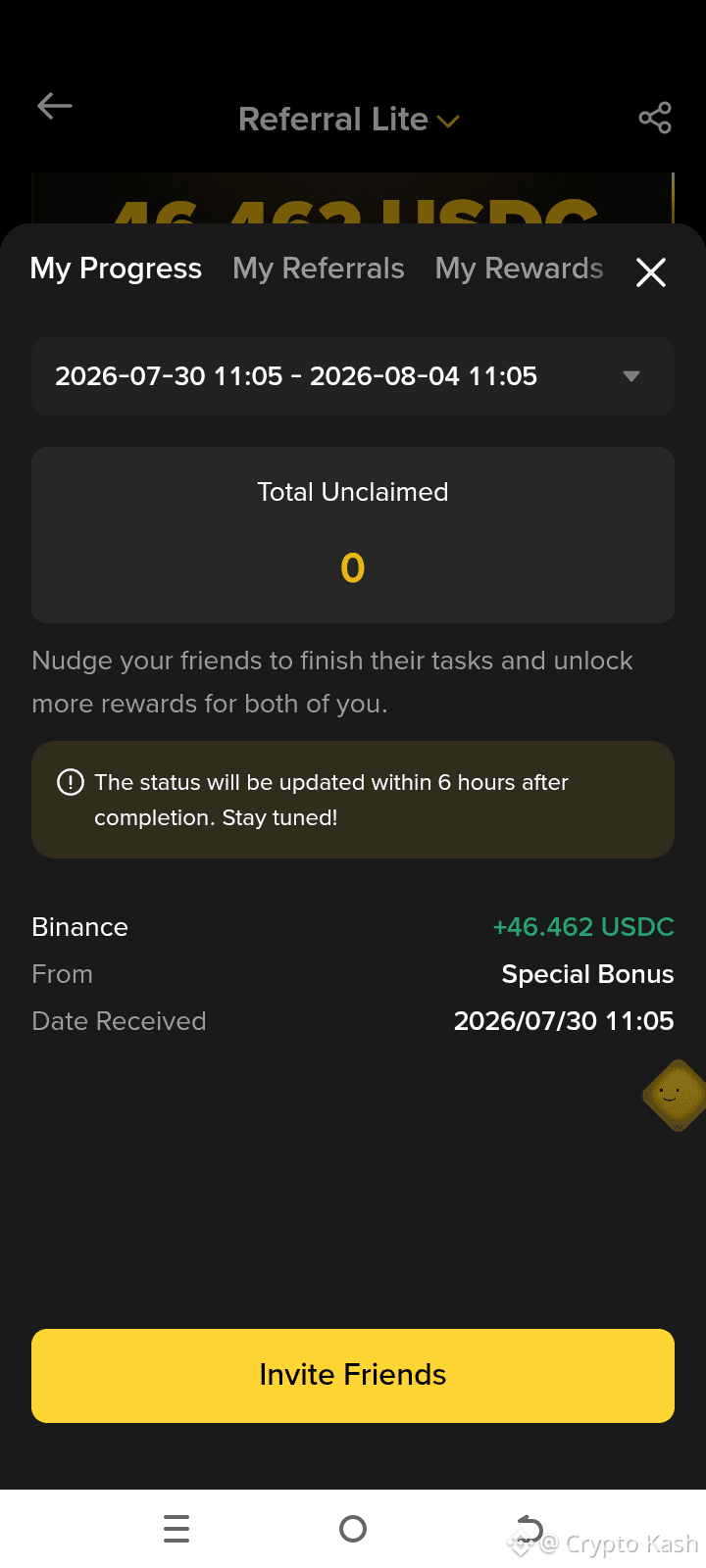
Binance آپ کو فری USDC کیوں دے رہا ہے؟ 🤔
وجہ: نئے یوزرز لانا
آج مجھے 46.46 USDC کا Special Bonus ملا
کیونکہ میرے ریفرل نے ٹاسک پورا کیا
آپ کیسے کما سکتے ہیں:
1. Binance اکاؤنٹ بنائیں
2. KYC کریں
3. پہلی ٹریڈ کریں
4. بونس آٹو مل جائے گا
سوال پوچھنا ہے تو کمنٹ کریں 👇
DM میں بھی بتا دوں گا
#Cryptokash h #BinanceTutorial #FreeCryptoEarnings o #USDC #Pakistan
Binance آپ کو فری USDC کیوں دے رہا ہے؟ 🤔
وجہ: نئے یوزرز لانا
آج مجھے 46.46 USDC کا Special Bonus ملا
کیونکہ میرے ریفرل نے ٹاسک پورا کیا
آپ کیسے کما سکتے ہیں:
1. Binance اکاؤنٹ بنائیں
2. KYC کریں
3. پہلی ٹریڈ کریں
4. بونس آٹو مل جائے گا
سوال پوچھنا ہے تو کمنٹ کریں 👇
DM میں بھی بتا دوں گا
#Cryptokash h #BinanceTutorial #FreeCryptoEarnings o #USDC #Pakistan
وجہ: نئے یوزرز لانا
آج مجھے 46.46 USDC کا Special Bonus ملا
کیونکہ میرے ریفرل نے ٹاسک پورا کیا
آپ کیسے کما سکتے ہیں:
1. Binance اکاؤنٹ بنائیں
2. KYC کریں
3. پہلی ٹریڈ کریں
4. بونس آٹو مل جائے گا
سوال پوچھنا ہے تو کمنٹ کریں 👇
DM میں بھی بتا دوں گا
#Cryptokash h #BinanceTutorial #FreeCryptoEarnings o #USDC #Pakistan
97

Статья
¿Sabías que puedes solicitar préstamos en Binance, poniendo como garantía tus criptos? (tutorial)Si, así como lo leíste🤯🤑
Como decía el gran Robert Kiyosaki en su Best Seller “Padre rico, padre pobre”, existen 2 tipos de deuda:
💥Deuda mala: consiste en contraer deuda para realizar compras inútiles o de impulso.
💥Deuda buena: Consiste en solicitar un préstamo para invertir, sacar un beneficio y de ahí pagar la propia deuda.
Si nos centramos en esta última y utilizamos esta increíble función de Binance, podemos aprovechar las correcciones del mercado para comprar barato y vender cuando el precio este en lo más alto.🚀🚀🚀💰😊
¿Cómo se saca?🤷
Como todo en Binance es muy simple.😎
🔥1ero, vamos a Earn desde la página principal.
🔥2do, vamos a la opción Loan.
🔥3ero, seleccionamos Solicitar préstamos.
🔥4to, deberemos seleccionar la moneda que vamos a poner en garantía y cuanto es el monto que necesitamos para invertir.
Yo utilizo $XRP para el ejemplo, pero puedes utilizar cualquier cripto de la amplia oferta disponible ($BTC , $ETH )🤑
Recomiendo solicitar entre un 30% y 40% del capital que vamos a poner en garantía, y por supuesto leer los términos y condiciones, donde se explica exactamente el proceso y como se devuelve el dinero.
⭐ Utilizar esta opción bajo su propia responsabilidad.⭐
Si te sirve la información, puedes seguirme para más consejos como este.💪
😀Y por supuesto se agradece el like y compartir esta info para que le llegue a mas personas😀
Cualquier consulta, los leo 😉
{spot}(XRPUSDT)
{future}(BTCUSDT)
#BinanceLoans #Xrp🔥🔥 #loans #BinanceTutorial #BtcNewHolder
¿Sabías que puedes solicitar préstamos en Binance, poniendo como garantía tus criptos? (tutorial)
Si, así como lo leíste🤯🤑
Como decía el gran Robert Kiyosaki en su Best Seller “Padre rico, padre pobre”, existen 2 tipos de deuda:
💥Deuda mala: consiste en contraer deuda para realizar compras inútiles o de impulso.
💥Deuda buena: Consiste en solicitar un préstamo para invertir, sacar un beneficio y de ahí pagar la propia deuda.
Si nos centramos en esta última y utilizamos esta increíble función de Binance, podemos aprovechar las correcciones del mercado para comprar barato y vender cuando el precio este en lo más alto.🚀🚀🚀💰😊
¿Cómo se saca?🤷
Como todo en Binance es muy simple.😎
🔥1ero, vamos a Earn desde la página principal.
🔥2do, vamos a la opción Loan.
🔥3ero, seleccionamos Solicitar préstamos.
🔥4to, deberemos seleccionar la moneda que vamos a poner en garantía y cuanto es el monto que necesitamos para invertir.
Yo utilizo $XRP para el ejemplo, pero puedes utilizar cualquier cripto de la amplia oferta disponible ($BTC , $ETH )🤑
Recomiendo solicitar entre un 30% y 40% del capital que vamos a poner en garantía, y por supuesto leer los términos y condiciones, donde se explica exactamente el proceso y como se devuelve el dinero.
⭐ Utilizar esta opción bajo su propia responsabilidad.⭐
Si te sirve la información, puedes seguirme para más consejos como este.💪
😀Y por supuesto se agradece el like y compartir esta info para que le llegue a mas personas😀
Cualquier consulta, los leo 😉
#BinanceLoans #Xrp🔥🔥 #loans #BinanceTutorial #BtcNewHolder
Como decía el gran Robert Kiyosaki en su Best Seller “Padre rico, padre pobre”, existen 2 tipos de deuda:
💥Deuda mala: consiste en contraer deuda para realizar compras inútiles o de impulso.
💥Deuda buena: Consiste en solicitar un préstamo para invertir, sacar un beneficio y de ahí pagar la propia deuda.
Si nos centramos en esta última y utilizamos esta increíble función de Binance, podemos aprovechar las correcciones del mercado para comprar barato y vender cuando el precio este en lo más alto.🚀🚀🚀💰😊
¿Cómo se saca?🤷
Como todo en Binance es muy simple.😎
🔥1ero, vamos a Earn desde la página principal.
🔥2do, vamos a la opción Loan.
🔥3ero, seleccionamos Solicitar préstamos.
🔥4to, deberemos seleccionar la moneda que vamos a poner en garantía y cuanto es el monto que necesitamos para invertir.
Yo utilizo $XRP para el ejemplo, pero puedes utilizar cualquier cripto de la amplia oferta disponible ($BTC , $ETH )🤑
Recomiendo solicitar entre un 30% y 40% del capital que vamos a poner en garantía, y por supuesto leer los términos y condiciones, donde se explica exactamente el proceso y como se devuelve el dinero.
⭐ Utilizar esta opción bajo su propia responsabilidad.⭐
Si te sirve la información, puedes seguirme para más consejos como este.💪
😀Y por supuesto se agradece el like y compartir esta info para que le llegue a mas personas😀
Cualquier consulta, los leo 😉
#BinanceLoans #Xrp🔥🔥 #loans #BinanceTutorial #BtcNewHolder
2
719

·
--
Статья
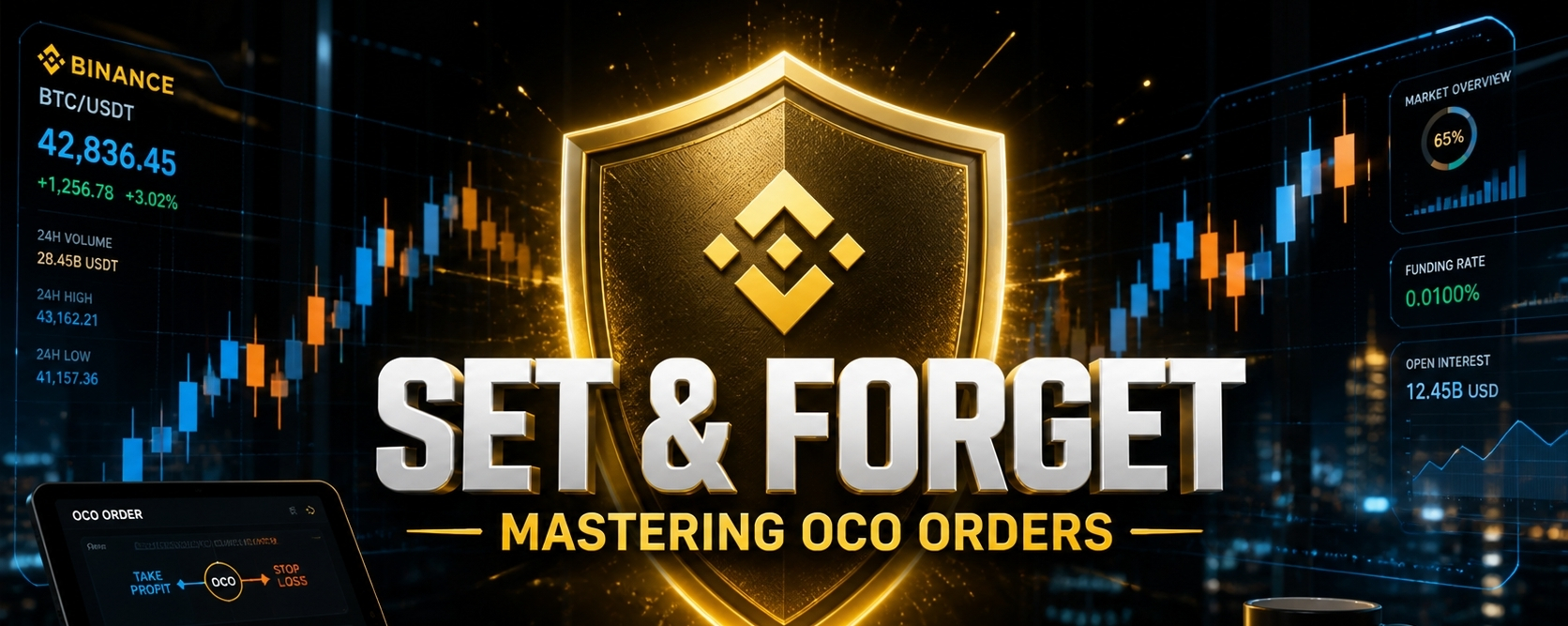
🛡️ STOP NURSING LOSING TRADESThe "Set & Forget" Strategy Every Pro Uses 📈We’ve all been there. ☕️You buy a coin, it pumps while you’re away, you miss the exit, and you wake up to a "Red Sea" of losses. You missed your profit, and you didn't have a safety net.
In a volatile market, hope is not a strategy. This is where the OCO (One-Cancels-the-Other) order becomes your best friend.
The Institutional Secret: What is OCO? An OCO order is a Tactical Double Order. It allows you to place a Take Profit and a Stop-Loss simultaneously.The beauty? If one is triggered, the system automatically kills the other. No more manual stress. No more "what if" scenarios.
5 Steps to Automate Your Success on Binance:
1️⃣ Navigate: Go to your favorite pair (e.g., $BTC or $SOL) and select Sell.
2️⃣ Select OCO: Tap the order type (next to Limit/Market) and choose OCO.
3️⃣ The Price (Take Profit): Set the high price where you want to lock in your gains. (e.g., Selling BTC at $82,000).
4️⃣ The Stop-Limit (The Safety Net):Stop: Your trigger price (e.g., $74,000).Limit: The actual exit price.Pro Tip: Set the Limit slightly lower than the Stop (e.g., $73,950) to ensure your order fills even during a fast "flash crash."
5️⃣ Execute: Slide to 100% and hit Sell.
💎 Why the "Matured" Trader uses OCO:
✅ Emotional Neutrality: You remove the urge to "wait a bit longer" during a pump or "hold until it recovers" during a dump.
✅ 24/7 Protection: Whether the market Moons 🚀 or Nukes ☢️ while you sleep, your plan is already executed.
My Personal Rule: I never enter a swing trade on $BNB or $SOL ithout an OCO. Protecting capital is the only way to stay in this game for the long haul🛡️
🗳️Which trading tool do you struggle with the most?
A) OCO Orders (Still confusing) 🤔
B) Trailing Stops (Moving with the trend) 📈
C) Fibonacci Levels (Finding entries) 🔭
D) Pure Price Action (Reading candles) 🕯️
Drop your choice below, I’ll create a deep dive guide for the most requested topic tomorrow.
#CryptoEducation #BinanceTutorial #TradingTips #OCOOrder #Write2Earn
🛡️ STOP NURSING LOSING TRADES
The "Set & Forget" Strategy Every Pro Uses 📈We’ve all been there. ☕️You buy a coin, it pumps while you’re away, you miss the exit, and you wake up to a "Red Sea" of losses. You missed your profit, and you didn't have a safety net.
In a volatile market, hope is not a strategy. This is where the OCO (One-Cancels-the-Other) order becomes your best friend.
The Institutional Secret: What is OCO? An OCO order is a Tactical Double Order. It allows you to place a Take Profit and a Stop-Loss simultaneously.The beauty? If one is triggered, the system automatically kills the other. No more manual stress. No more "what if" scenarios.
5 Steps to Automate Your Success on Binance:
1️⃣ Navigate: Go to your favorite pair (e.g., $BTC or $SOL ) and select Sell.
2️⃣ Select OCO: Tap the order type (next to Limit/Market) and choose OCO.
3️⃣ The Price (Take Profit): Set the high price where you want to lock in your gains. (e.g., Selling BTC at $82,000).
4️⃣ The Stop-Limit (The Safety Net):Stop: Your trigger price (e.g., $74,000).Limit: The actual exit price.Pro Tip: Set the Limit slightly lower than the Stop (e.g., $73,950) to ensure your order fills even during a fast "flash crash."
5️⃣ Execute: Slide to 100% and hit Sell.
💎 Why the "Matured" Trader uses OCO:
✅ Emotional Neutrality: You remove the urge to "wait a bit longer" during a pump or "hold until it recovers" during a dump.
✅ 24/7 Protection: Whether the market Moons 🚀 or Nukes ☢️ while you sleep, your plan is already executed.
My Personal Rule: I never enter a swing trade on $BNB or $SOL ithout an OCO. Protecting capital is the only way to stay in this game for the long haul🛡️
🗳️Which trading tool do you struggle with the most?
A) OCO Orders (Still confusing) 🤔
B) Trailing Stops (Moving with the trend) 📈
C) Fibonacci Levels (Finding entries) 🔭
D) Pure Price Action (Reading candles) 🕯️
Drop your choice below, I’ll create a deep dive guide for the most requested topic tomorrow.
#CryptoEducation #BinanceTutorial #TradingTips #OCOOrder #Write2Earn
In a volatile market, hope is not a strategy. This is where the OCO (One-Cancels-the-Other) order becomes your best friend.
The Institutional Secret: What is OCO? An OCO order is a Tactical Double Order. It allows you to place a Take Profit and a Stop-Loss simultaneously.The beauty? If one is triggered, the system automatically kills the other. No more manual stress. No more "what if" scenarios.
5 Steps to Automate Your Success on Binance:
1️⃣ Navigate: Go to your favorite pair (e.g., $BTC or $SOL ) and select Sell.
2️⃣ Select OCO: Tap the order type (next to Limit/Market) and choose OCO.
3️⃣ The Price (Take Profit): Set the high price where you want to lock in your gains. (e.g., Selling BTC at $82,000).
4️⃣ The Stop-Limit (The Safety Net):Stop: Your trigger price (e.g., $74,000).Limit: The actual exit price.Pro Tip: Set the Limit slightly lower than the Stop (e.g., $73,950) to ensure your order fills even during a fast "flash crash."
5️⃣ Execute: Slide to 100% and hit Sell.
💎 Why the "Matured" Trader uses OCO:
✅ Emotional Neutrality: You remove the urge to "wait a bit longer" during a pump or "hold until it recovers" during a dump.
✅ 24/7 Protection: Whether the market Moons 🚀 or Nukes ☢️ while you sleep, your plan is already executed.
My Personal Rule: I never enter a swing trade on $BNB or $SOL ithout an OCO. Protecting capital is the only way to stay in this game for the long haul🛡️
🗳️Which trading tool do you struggle with the most?
A) OCO Orders (Still confusing) 🤔
B) Trailing Stops (Moving with the trend) 📈
C) Fibonacci Levels (Finding entries) 🔭
D) Pure Price Action (Reading candles) 🕯️
Drop your choice below, I’ll create a deep dive guide for the most requested topic tomorrow.
#CryptoEducation #BinanceTutorial #TradingTips #OCOOrder #Write2Earn
118
Войдите, чтобы посмотреть больше материала
Присоединяйтесь к пользователям криптовалют по всему миру на Binance Square
⚡️ Получайте новейшую и полезную информацию о криптоактивах.
💬 Нам доверяет крупнейшая в мире криптобиржа.
👍 Получите достоверные аналитические данные от верифицированных создателей контента.
Эл. почта/номер телефона
В тренде
1
#BinancekzWin
Просмотров: 32,371
93 обсуждают
2
#BinancePick
Просмотров: 2.5M
138,146 обсуждают
3
#EarningsSeason
Просмотров: 4.9M
23,930 обсуждают
4
#ElectrumWalletBugLetRogueServersStealFunds
Просмотров: 2,613
141 обсуждают
5
#ArgentineCourtDismissesLIBRACaseAgainstMilei
Просмотров: 10,691
227 обсуждают
6
#SKHynixReportedlyPlansSpecialDividendFromKioxiaStakeSale
Просмотров: 2,277
36 обсуждают
7
#KeystoneWebsiteBreachExposesBuyersShippingAddresses
Просмотров: 1,254
28 обсуждают
8
#USQ3GDPAndSeptemberPCEDueNextWeek
Просмотров: 84,006
1,039 обсуждают
9
#SouthKoreaDelaysCryptoIncomeTax
Просмотров: 154,722
1,083 обсуждают
10
#ElectrumFixesHighRiskExploitInVersionsBefore4.8.3
Просмотров: 67,773
775 обсуждают