

#cryptoforbeginners
cryptoforbeginners
閲覧回数 859,956
2,278人が討論中
注目
最新

·
--
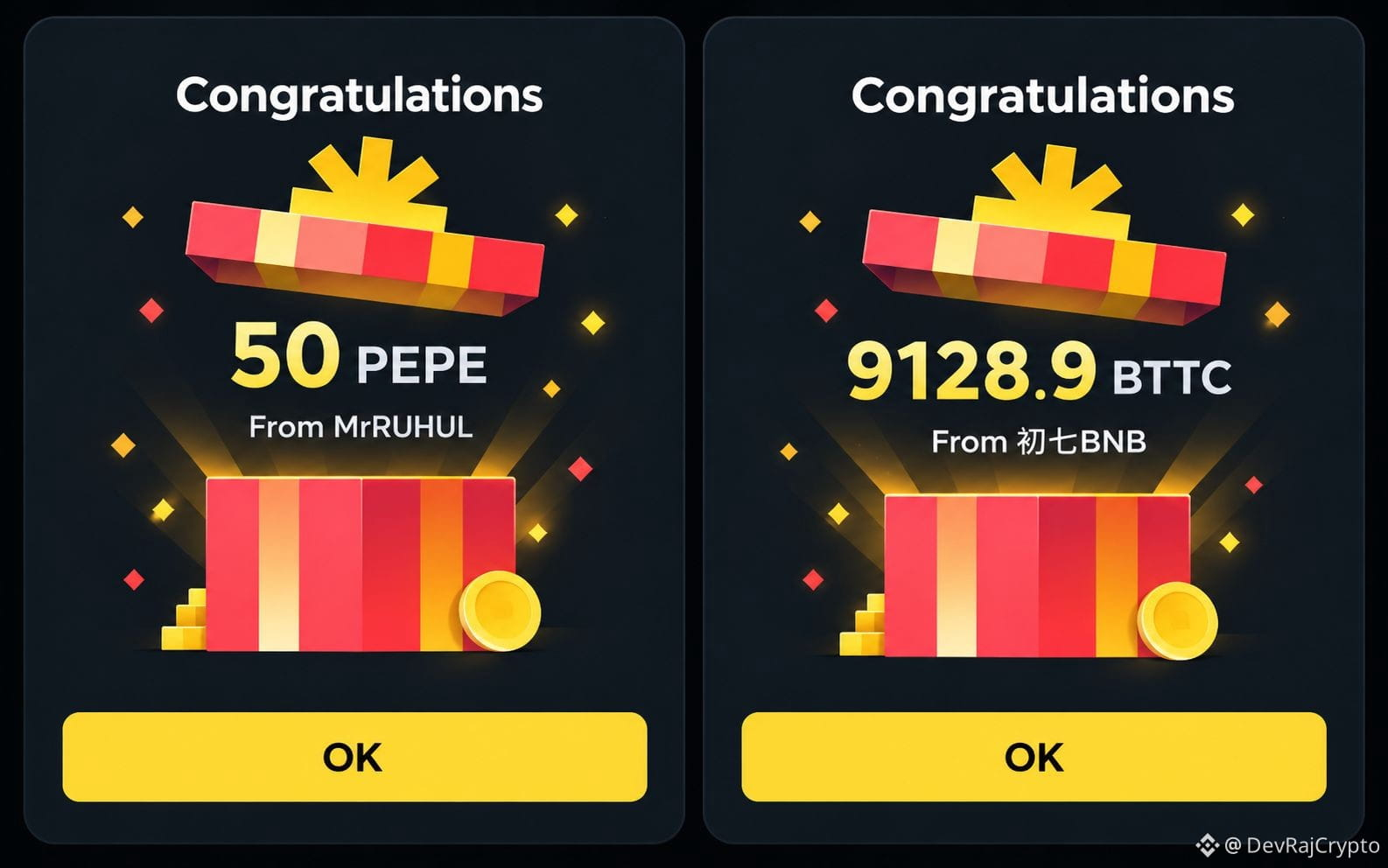
Binanceで友人からレッドパケットを受け取った経験を通じて、あることに気づきました。暗号資産を買うことから始めなくても、暗号資産の報酬を試せるんです。
Binanceで初心者が報酬獲得を体験する方法を4つご紹介します👇
🧧 1. レッドパケット
MrRUHULから50 PEPEを受け取り、初七BNBからも別のレッドパケット報酬を受け取りました。友人にレッドパケットを送ったこともあります。暗号資産の報酬をシェアし、Binanceのギフト機能を体験できるシンプルな方法です。
📚 2. Learn & Earn
暗号資産について学び、対象のクイズを完了すると、キャンペーン開催時に報酬を獲得できます。
✍️ 3. Write to Earn
Binance Squareでコンテンツを作成して報酬を獲得しました。対象となるクリエイターは、プログラムのルールに基づいて取引手数料の還元やエンゲージメントボーナスを獲得できます。
🚀 4. CreatorPad & Rewards Hub
開催中のクリエイターキャンペーンやバウチャー、プロモーション報酬をチェックしましょう。
一番の学びは?暗号資産のさまざまな機会を試すには、まず投資しなければならないと思い込まないことです。対象の報酬から始めて、その仕組みを学び、ボーナスを追いかけるためだけにお金を危険にさらさないようにしましょう。
💬 試したことがあるのはどれですか?レッドパケット、Learn & Earn、それともWrite to Earn?
⚠️ 免責事項:報酬は提供状況、対象資格、キャンペーン規約によって異なります。レッドパケットの金額やトークンの価値は変動する場合があります。この投稿は個人的な体験を共有するものであり、収益を保証するものでも、金融上のアドバイスでもありません。必ずご自身で調査してください。
#Binance #BinanceSquare #CryptoForBeginners #LearnAndEarn
Binanceで友人からレッドパケットを受け取った経験を通じて、あることに気づきました。暗号資産を買うことから始めなくても、暗号資産の報酬を試せるんです。
Binanceで初心者が報酬獲得を体験する方法を4つご紹介します👇
🧧 1. レッドパケット
MrRUHULから50 PEPEを受け取り、初七BNBからも別のレッドパケット報酬を受け取りました。友人にレッドパケットを送ったこともあります。暗号資産の報酬をシェアし、Binanceのギフト機能を体験できるシンプルな方法です。
📚 2. Learn & Earn
暗号資産について学び、対象のクイズを完了すると、キャンペーン開催時に報酬を獲得できます。
✍️ 3. Write to Earn
Binance Squareでコンテンツを作成して報酬を獲得しました。対象となるクリエイターは、プログラムのルールに基づいて取引手数料の還元やエンゲージメントボーナスを獲得できます。
🚀 4. CreatorPad & Rewards Hub
開催中のクリエイターキャンペーンやバウチャー、プロモーション報酬をチェックしましょう。
一番の学びは?暗号資産のさまざまな機会を試すには、まず投資しなければならないと思い込まないことです。対象の報酬から始めて、その仕組みを学び、ボーナスを追いかけるためだけにお金を危険にさらさないようにしましょう。
💬 試したことがあるのはどれですか?レッドパケット、Learn & Earn、それともWrite to Earn?
⚠️ 免責事項:報酬は提供状況、対象資格、キャンペーン規約によって異なります。レッドパケットの金額やトークンの価値は変動する場合があります。この投稿は個人的な体験を共有するものであり、収益を保証するものでも、金融上のアドバイスでもありません。必ずご自身で調査してください。
#Binance #BinanceSquare #CryptoForBeginners #LearnAndEarn
Binanceで初心者が報酬獲得を体験する方法を4つご紹介します👇
🧧 1. レッドパケット
MrRUHULから50 PEPEを受け取り、初七BNBからも別のレッドパケット報酬を受け取りました。友人にレッドパケットを送ったこともあります。暗号資産の報酬をシェアし、Binanceのギフト機能を体験できるシンプルな方法です。
📚 2. Learn & Earn
暗号資産について学び、対象のクイズを完了すると、キャンペーン開催時に報酬を獲得できます。
✍️ 3. Write to Earn
Binance Squareでコンテンツを作成して報酬を獲得しました。対象となるクリエイターは、プログラムのルールに基づいて取引手数料の還元やエンゲージメントボーナスを獲得できます。
🚀 4. CreatorPad & Rewards Hub
開催中のクリエイターキャンペーンやバウチャー、プロモーション報酬をチェックしましょう。
一番の学びは?暗号資産のさまざまな機会を試すには、まず投資しなければならないと思い込まないことです。対象の報酬から始めて、その仕組みを学び、ボーナスを追いかけるためだけにお金を危険にさらさないようにしましょう。
💬 試したことがあるのはどれですか?レッドパケット、Learn & Earn、それともWrite to Earn?
⚠️ 免責事項:報酬は提供状況、対象資格、キャンペーン規約によって異なります。レッドパケットの金額やトークンの価値は変動する場合があります。この投稿は個人的な体験を共有するものであり、収益を保証するものでも、金融上のアドバイスでもありません。必ずご自身で調査してください。
#Binance #BinanceSquare #CryptoForBeginners #LearnAndEarn
Shamim Reza-:
BTTC
7
9
1.8k

·
--
Binance P2PでUPIを使ってUSDTを購入する方法(初心者向け手順)👇
1. まずKYCを完了し、2FAを有効にする
2. 「取引」→「P2P」→「購入」をタップ
3. USDTとINRを選び、支払い方法としてUPIまたはPhonePeを選択
4. 取引完了率が高く(95%以上)、取引件数の多いマーチャントを選ぶ
5. 金額を入力して注文し、マーチャントのルールを確認する
6. Binanceの注文ページに記載された支払い先にのみ、KYC名義の自分のアカウントから支払う
7. 支払い証明をアップロードして「支払い完了」をタップし、USDTが届くまで待つ
ヒント:受け取る金額から手数料が差し引かれるため、少し多めに購入しましょう。
P2Pを試したことはありますか? #Binance #P2P #CryptoForBeginners
Binance P2PでUPIを使ってUSDTを購入する方法(初心者向け手順)👇
1. まずKYCを完了し、2FAを有効にする
2. 「取引」→「P2P」→「購入」をタップ
3. USDTとINRを選び、支払い方法としてUPIまたはPhonePeを選択
4. 取引完了率が高く(95%以上)、取引件数の多いマーチャントを選ぶ
5. 金額を入力して注文し、マーチャントのルールを確認する
6. Binanceの注文ページに記載された支払い先にのみ、KYC名義の自分のアカウントから支払う
7. 支払い証明をアップロードして「支払い完了」をタップし、USDTが届くまで待つ
ヒント:受け取る金額から手数料が差し引かれるため、少し多めに購入しましょう。
P2Pを試したことはありますか? #Binance #P2P #CryptoForBeginners
1. まずKYCを完了し、2FAを有効にする
2. 「取引」→「P2P」→「購入」をタップ
3. USDTとINRを選び、支払い方法としてUPIまたはPhonePeを選択
4. 取引完了率が高く(95%以上)、取引件数の多いマーチャントを選ぶ
5. 金額を入力して注文し、マーチャントのルールを確認する
6. Binanceの注文ページに記載された支払い先にのみ、KYC名義の自分のアカウントから支払う
7. 支払い証明をアップロードして「支払い完了」をタップし、USDTが届くまで待つ
ヒント:受け取る金額から手数料が差し引かれるため、少し多めに購入しましょう。
P2Pを試したことはありますか? #Binance #P2P #CryptoForBeginners
85

暗号資産初心者向けスラング早見表 📖
🔸 HODL – コインを保有し続けること。慌てて売らない
🔸 FOMO – 乗り遅れることへの不安。高値づかみの原因
🔸 FUD – 恐怖・不確実性・疑念。通常、価格を下げるために広められる
🔸 ATH – 史上最高値
🔸 DCA – 時間をかけて少しずつ買うこと
🔸 Rekt – 取引に失敗して大きな損失を出すこと
🔸 WAGMI – 「みんなで成功しよう」
🔸 DYOR – 自分で調べよう
あとで見返せるように保存して、暗号資産初心者の友達にタグ付けしよう 👇
このリストに加えるなら、どんなスラング?
$BTC $BNB
#CryptoGlossary #CryptoForBeginners #BinanceSquare
暗号資産初心者向けスラング早見表 📖
🔸 HODL – コインを保有し続けること。慌てて売らない
🔸 FOMO – 乗り遅れることへの不安。高値づかみの原因
🔸 FUD – 恐怖・不確実性・疑念。通常、価格を下げるために広められる
🔸 ATH – 史上最高値
🔸 DCA – 時間をかけて少しずつ買うこと
🔸 Rekt – 取引に失敗して大きな損失を出すこと
🔸 WAGMI – 「みんなで成功しよう」
🔸 DYOR – 自分で調べよう
あとで見返せるように保存して、暗号資産初心者の友達にタグ付けしよう 👇
このリストに加えるなら、どんなスラング?
$BTC $BNB
#CryptoGlossary #CryptoForBeginners #BinanceSquare
🔸 HODL – コインを保有し続けること。慌てて売らない
🔸 FOMO – 乗り遅れることへの不安。高値づかみの原因
🔸 FUD – 恐怖・不確実性・疑念。通常、価格を下げるために広められる
🔸 ATH – 史上最高値
🔸 DCA – 時間をかけて少しずつ買うこと
🔸 Rekt – 取引に失敗して大きな損失を出すこと
🔸 WAGMI – 「みんなで成功しよう」
🔸 DYOR – 自分で調べよう
あとで見返せるように保存して、暗号資産初心者の友達にタグ付けしよう 👇
このリストに加えるなら、どんなスラング?
$BTC $BNB
#CryptoGlossary #CryptoForBeginners #BinanceSquare
81
·
--
暗号資産を始めたばかりの私が、先週、残高ゼロの状態からBinanceで友人に5 USDTを送りました。
その流れはこんな感じです。
P2P → 購入 → USDT → INR
評価の高い販売者を選び、UPIで支払いました。
USDTを受け取ったあと、友人のBinance IDを使って送金しました。
全体で約20分かかりました。一番の学びは、支払う前に販売者のルールを読むことです。
始めたとき、何が一番わかりにくかったですか? 👇
#Binance #P2P #BinancePick #CryptoForBeginners
暗号資産を始めたばかりの私が、先週、残高ゼロの状態からBinanceで友人に5 USDTを送りました。
その流れはこんな感じです。
P2P → 購入 → USDT → INR
評価の高い販売者を選び、UPIで支払いました。
USDTを受け取ったあと、友人のBinance IDを使って送金しました。
全体で約20分かかりました。一番の学びは、支払う前に販売者のルールを読むことです。
始めたとき、何が一番わかりにくかったですか? 👇
#Binance #P2P #BinancePick #CryptoForBeginners
その流れはこんな感じです。
P2P → 購入 → USDT → INR
評価の高い販売者を選び、UPIで支払いました。
USDTを受け取ったあと、友人のBinance IDを使って送金しました。
全体で約20分かかりました。一番の学びは、支払う前に販売者のルールを読むことです。
始めたとき、何が一番わかりにくかったですか? 👇
#Binance #P2P #BinancePick #CryptoForBeginners
171

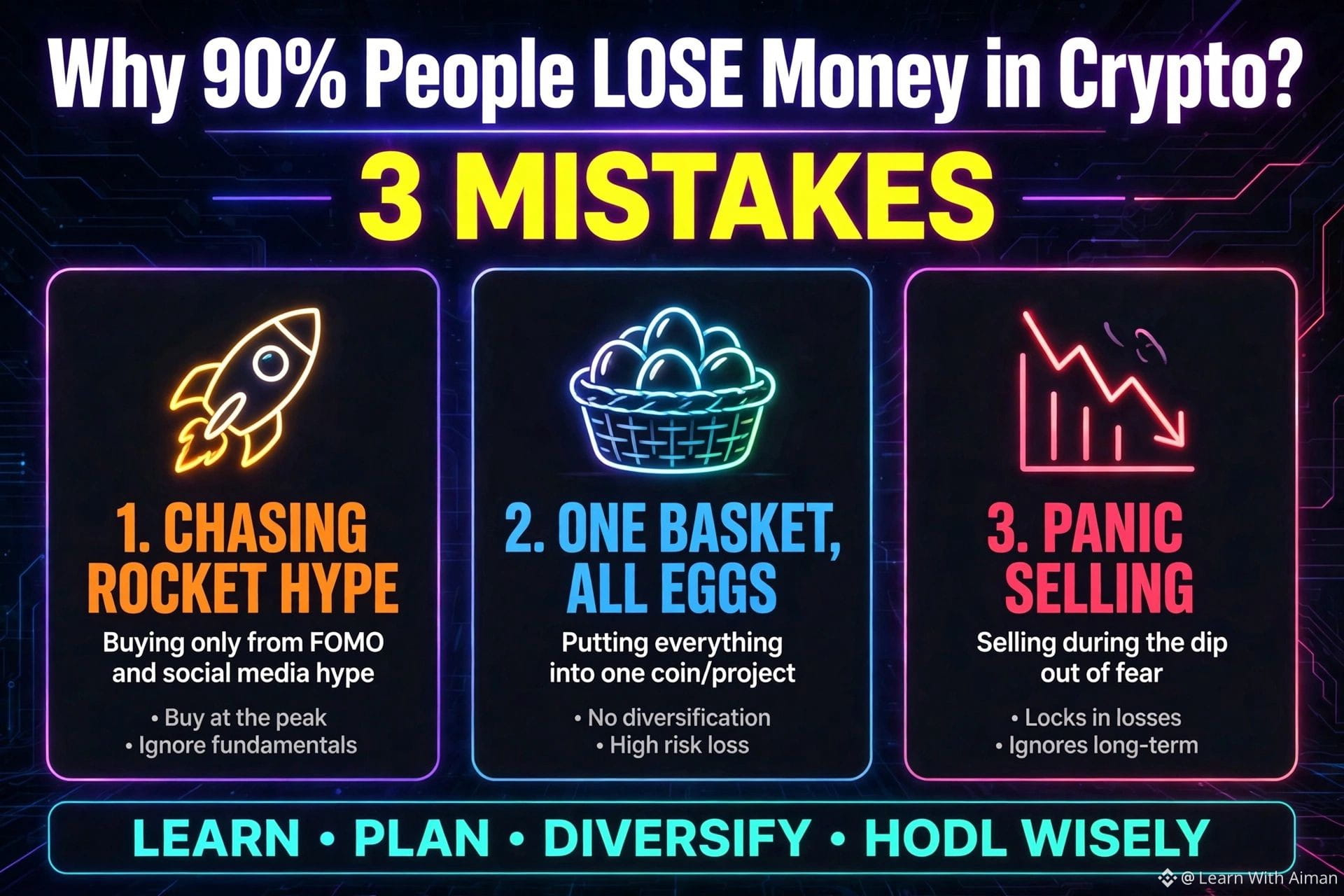
なぜ暗号資産で90%の人が損をするの?私も同じ失敗をしました👇
私も初心者ですが、Binance Squareで8日間学んだことを紹介します。
失敗1:🚀🚀🚀につられて買う
投稿にロケットが10個も並んでいたら、逃げてください。そのコインはすでに急騰しています。
失敗2:全財産を1つのコインにつぎ込む
卵を1つのカゴに全部入れてはいけません。賢い人は分散投資します。
失敗3:パニック売り
市場が赤くなったら、初心者は売ります。プロは買います。
私もまだ勉強中です。あなたも同じ失敗をしていますか?コメント欄で教えてください。一緒に学びましょう❤️
$BTC $BNB $ETH
#CryptoMistakes #LearnWithAiman #BinanceSquare #CryptoForBeginners #Write2Earn
なぜ暗号資産で90%の人が損をするの?私も同じ失敗をしました👇
私も初心者ですが、Binance Squareで8日間学んだことを紹介します。
失敗1:🚀🚀🚀につられて買う
投稿にロケットが10個も並んでいたら、逃げてください。そのコインはすでに急騰しています。
失敗2:全財産を1つのコインにつぎ込む
卵を1つのカゴに全部入れてはいけません。賢い人は分散投資します。
失敗3:パニック売り
市場が赤くなったら、初心者は売ります。プロは買います。
私もまだ勉強中です。あなたも同じ失敗をしていますか?コメント欄で教えてください。一緒に学びましょう❤️
$BTC $BNB $ETH
#CryptoMistakes #LearnWithAiman #BinanceSquare #CryptoForBeginners #Write2Earn
私も初心者ですが、Binance Squareで8日間学んだことを紹介します。
失敗1:🚀🚀🚀につられて買う
投稿にロケットが10個も並んでいたら、逃げてください。そのコインはすでに急騰しています。
失敗2:全財産を1つのコインにつぎ込む
卵を1つのカゴに全部入れてはいけません。賢い人は分散投資します。
失敗3:パニック売り
市場が赤くなったら、初心者は売ります。プロは買います。
私もまだ勉強中です。あなたも同じ失敗をしていますか?コメント欄で教えてください。一緒に学びましょう❤️
$BTC $BNB $ETH
#CryptoMistakes #LearnWithAiman #BinanceSquare #CryptoForBeginners #Write2Earn
94

📱 Binance初心者向け:何から始めればいい?
Binanceに登録したばかりで、どこをタップすればいいかわからない?
まずは、次の基本セクションをチェックしましょう! 👇
🏠 ホーム — プラットフォームの主な機能にアクセスできます。
📊 マーケット — 暗号資産の価格や値動きを確認できます。
💱 取引 — 暗号資産を売買できます。
👛 ウォレット/ポートフォリオ — 残高や保有資産を確認できます。
📰 Binance Square — 暗号資産に関する投稿、ニュース、ディスカッションを楽しめます。
✅ まずは画面の使い方を確認しましょう。
✅ 二段階認証を有効にしましょう。
✅ 学習コンテンツを活用しましょう。
⚠️ すぐに口座へ入金したり、取引を始めたりする必要はありません!
💬 Binanceのどのセクションについて詳しく知りたいですか?
#CryptoStartUA #Binance #BinanceSquare #CryptoForBeginners
📱 Binance初心者向け:何から始めればいい?
Binanceに登録したばかりで、どこをタップすればいいかわからない?
まずは、次の基本セクションをチェックしましょう! 👇
🏠 ホーム — プラットフォームの主な機能にアクセスできます。
📊 マーケット — 暗号資産の価格や値動きを確認できます。
💱 取引 — 暗号資産を売買できます。
👛 ウォレット/ポートフォリオ — 残高や保有資産を確認できます。
📰 Binance Square — 暗号資産に関する投稿、ニュース、ディスカッションを楽しめます。
✅ まずは画面の使い方を確認しましょう。
✅ 二段階認証を有効にしましょう。
✅ 学習コンテンツを活用しましょう。
⚠️ すぐに口座へ入金したり、取引を始めたりする必要はありません!
💬 Binanceのどのセクションについて詳しく知りたいですか?
#CryptoStartUA #Binance #BinanceSquare #CryptoForBeginners
Binanceに登録したばかりで、どこをタップすればいいかわからない?
まずは、次の基本セクションをチェックしましょう! 👇
🏠 ホーム — プラットフォームの主な機能にアクセスできます。
📊 マーケット — 暗号資産の価格や値動きを確認できます。
💱 取引 — 暗号資産を売買できます。
👛 ウォレット/ポートフォリオ — 残高や保有資産を確認できます。
📰 Binance Square — 暗号資産に関する投稿、ニュース、ディスカッションを楽しめます。
✅ まずは画面の使い方を確認しましょう。
✅ 二段階認証を有効にしましょう。
✅ 学習コンテンツを活用しましょう。
⚠️ すぐに口座へ入金したり、取引を始めたりする必要はありません!
💬 Binanceのどのセクションについて詳しく知りたいですか?
#CryptoStartUA #Binance #BinanceSquare #CryptoForBeginners
63

·
--
暗号資産を始めた頃に犯した3つの失敗(同じ失敗を繰り返さないで)
調査せずにコインを買う—まずは必ずプロジェクトを確認する
1つのコインに全資金を投入する—必ず$ETH $SOLに分散する
FOMOで買う—大きな陽線では絶対に買わない
トレードの知識がないなら、これだけやろう:
毎月10ドルを$ETH に投資する(DCA)。1年間保有する。それだけ。
暗号資産で稼ぐのに、プロのトレーダーになる必要はない。
始めた頃の最大の失敗は何だった?コメントで教えて。#CryptoTips #BinanceSquare #CryptoForBeginners
{spot}(ETHUSDT)
{spot}(BTCUSDT)
暗号資産を始めた頃に犯した3つの失敗(同じ失敗を繰り返さないで)
調査せずにコインを買う—まずは必ずプロジェクトを確認する
1つのコインに全資金を投入する—必ず$ETH $SOLに分散する
FOMOで買う—大きな陽線では絶対に買わない
トレードの知識がないなら、これだけやろう:
毎月10ドルを$ETH に投資する(DCA)。1年間保有する。それだけ。
暗号資産で稼ぐのに、プロのトレーダーになる必要はない。
始めた頃の最大の失敗は何だった?コメントで教えて。#CryptoTips #BinanceSquare #CryptoForBeginners
調査せずにコインを買う—まずは必ずプロジェクトを確認する
1つのコインに全資金を投入する—必ず$ETH $SOLに分散する
FOMOで買う—大きな陽線では絶対に買わない
トレードの知識がないなら、これだけやろう:
毎月10ドルを$ETH に投資する(DCA)。1年間保有する。それだけ。
暗号資産で稼ぐのに、プロのトレーダーになる必要はない。
始めた頃の最大の失敗は何だった?コメントで教えて。#CryptoTips #BinanceSquare #CryptoForBeginners
92

·
--
ブリッシュ
🚀 暗号資産初心者の皆さん:賢く稼ぐために、まず学ぼう!💰
暗号資産を始めたばかりですか?それなら覚えておいてください――取引の前に、知識を身につけることが大切です!📚
💡 暗号資産初心者が知っておきたい3つのこと:
🔹 投資する前に学ぶ:現物取引、先物取引、Earn商品を利用する前に、それぞれの仕組みを理解しましょう。
🔹 リスクを管理する:失っても構わない範囲を超えて投資してはいけません。高いリターンには、必ずリスクが伴います。
🔹 Binance Earnを活用する:Simple Earnの仕組みやAPR報酬について学び、登録する前に必ず商品の利用規約を読みましょう。
🎯 私の目標はシンプルです。暗号資産について毎日新しいことを学び、知識を深め、手っ取り早い利益を追い求めるのではなく、情報に基づいて判断することです。
今、何に注目していますか?現物取引、Binance Earn、それとも暗号資産の基礎知識の学習?👇
一緒に学び、成長していきましょう!🚀
#BinanceSquare #CryptoEducationCryptoGuid #BinanceSquareTalks #CryptoForBeginners #blockchain
🚀 暗号資産初心者の皆さん:賢く稼ぐために、まず学ぼう!💰
暗号資産を始めたばかりですか?それなら覚えておいてください――取引の前に、知識を身につけることが大切です!📚
💡 暗号資産初心者が知っておきたい3つのこと:
🔹 投資する前に学ぶ:現物取引、先物取引、Earn商品を利用する前に、それぞれの仕組みを理解しましょう。
🔹 リスクを管理する:失っても構わない範囲を超えて投資してはいけません。高いリターンには、必ずリスクが伴います。
🔹 Binance Earnを活用する:Simple Earnの仕組みやAPR報酬について学び、登録する前に必ず商品の利用規約を読みましょう。
🎯 私の目標はシンプルです。暗号資産について毎日新しいことを学び、知識を深め、手っ取り早い利益を追い求めるのではなく、情報に基づいて判断することです。
今、何に注目していますか?現物取引、Binance Earn、それとも暗号資産の基礎知識の学習?👇
一緒に学び、成長していきましょう!🚀
#BinanceSquare #CryptoEducationCryptoGuid #BinanceSquareTalks #CryptoForBeginners #blockchain
暗号資産を始めたばかりですか?それなら覚えておいてください――取引の前に、知識を身につけることが大切です!📚
💡 暗号資産初心者が知っておきたい3つのこと:
🔹 投資する前に学ぶ:現物取引、先物取引、Earn商品を利用する前に、それぞれの仕組みを理解しましょう。
🔹 リスクを管理する:失っても構わない範囲を超えて投資してはいけません。高いリターンには、必ずリスクが伴います。
🔹 Binance Earnを活用する:Simple Earnの仕組みやAPR報酬について学び、登録する前に必ず商品の利用規約を読みましょう。
🎯 私の目標はシンプルです。暗号資産について毎日新しいことを学び、知識を深め、手っ取り早い利益を追い求めるのではなく、情報に基づいて判断することです。
今、何に注目していますか?現物取引、Binance Earn、それとも暗号資産の基礎知識の学習?👇
一緒に学び、成長していきましょう!🚀
#BinanceSquare #CryptoEducationCryptoGuid #BinanceSquareTalks #CryptoForBeginners #blockchain
68

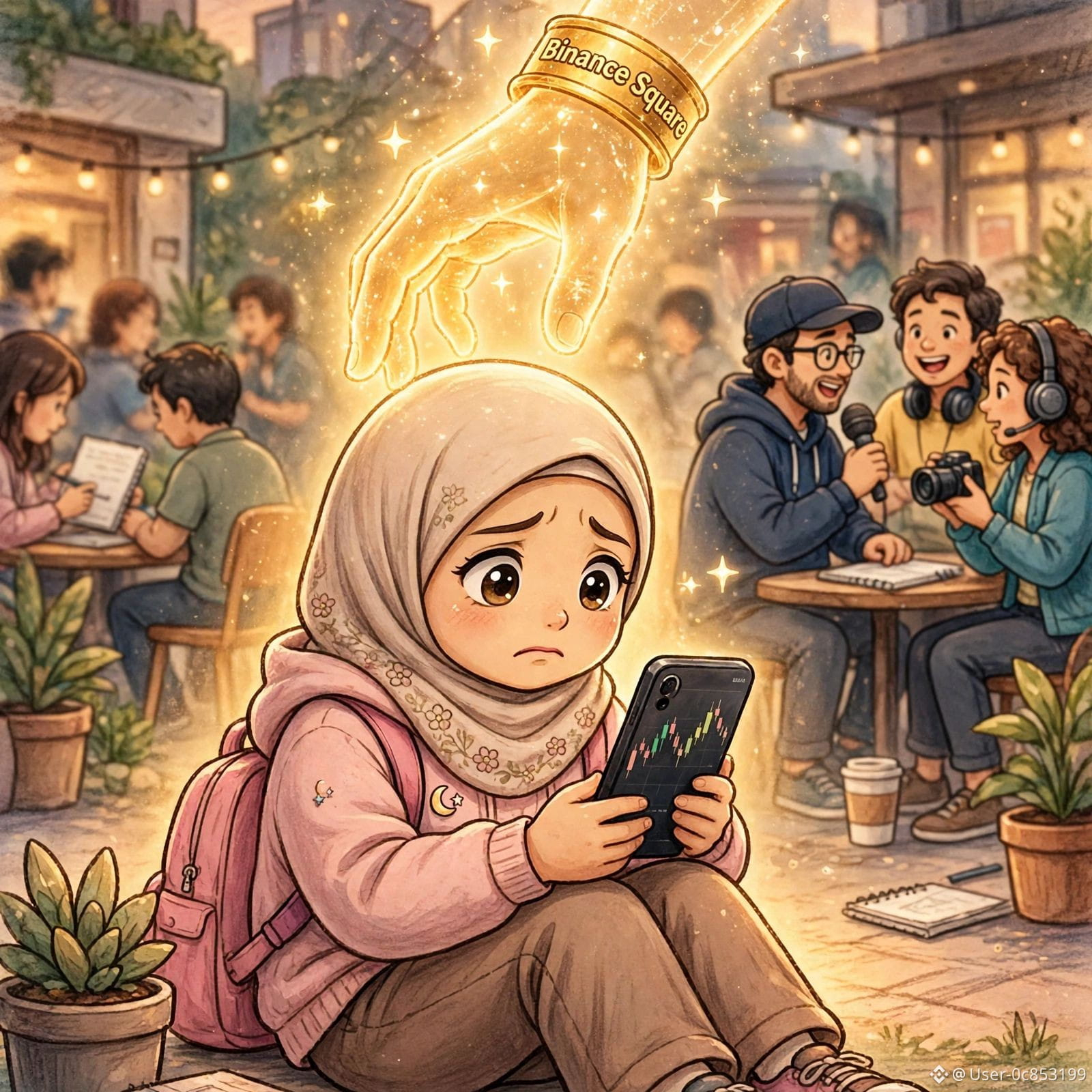
初心者として、ひとつ気づいたことがあります……
新しいユーザーが「先輩、助けてください」と投稿しても、誰も返信しません。
みんな忙しく、閲覧数を追いかけるのに必死です。
でも、いつも助けてくれるアカウントがあります……
@Binance Square Official
初心者を案内し、チュートリアルを投稿し、すべてを順を追って説明してくれます。
新しいユーザーを決して無視しません。
だから、私と同じように初心者なら、先輩を追いかけるのはやめましょう。
Binance Square Officialをフォローして、毎日学びましょう。
先輩には無視されることがあっても、学びがあなたを無視することはありません。❤️
あなたも初心者ですか?「YES」とコメントして、一緒に成長しましょう。お互いに助け合いましょう!
#BinanceSquare #Beginner #CryptoForBeginners #LearnCrypto
初心者として、ひとつ気づいたことがあります……
新しいユーザーが「先輩、助けてください」と投稿しても、誰も返信しません。
みんな忙しく、閲覧数を追いかけるのに必死です。
でも、いつも助けてくれるアカウントがあります……
@Binance Square Official
初心者を案内し、チュートリアルを投稿し、すべてを順を追って説明してくれます。
新しいユーザーを決して無視しません。
だから、私と同じように初心者なら、先輩を追いかけるのはやめましょう。
Binance Square Officialをフォローして、毎日学びましょう。
先輩には無視されることがあっても、学びがあなたを無視することはありません。❤️
あなたも初心者ですか?「YES」とコメントして、一緒に成長しましょう。お互いに助け合いましょう!
#BinanceSquare #Beginner #CryptoForBeginners #LearnCrypto
新しいユーザーが「先輩、助けてください」と投稿しても、誰も返信しません。
みんな忙しく、閲覧数を追いかけるのに必死です。
でも、いつも助けてくれるアカウントがあります……
@Binance Square Official
初心者を案内し、チュートリアルを投稿し、すべてを順を追って説明してくれます。
新しいユーザーを決して無視しません。
だから、私と同じように初心者なら、先輩を追いかけるのはやめましょう。
Binance Square Officialをフォローして、毎日学びましょう。
先輩には無視されることがあっても、学びがあなたを無視することはありません。❤️
あなたも初心者ですか?「YES」とコメントして、一緒に成長しましょう。お互いに助け合いましょう!
#BinanceSquare #Beginner #CryptoForBeginners #LearnCrypto
82
·
--
記事
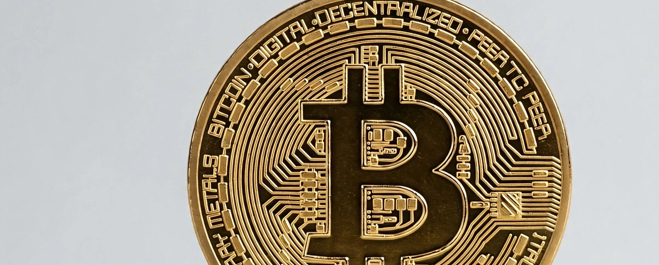
$BTCとは?初心者向けの簡単ガイド$BTCとは何でしょうか?仮想通貨を始めたばかりなら、まず理解しておきたいコインです。
$BTC、つまりビットコインは、世界で最初に誕生した、最大規模の仮想通貨です。2009年にサトシ・ナカモトという人物(またはグループ)によって作られました。PKRやUSDのような一般的なお金とは異なり、$BTCは銀行や政府によって管理されていません。完全に分散化されています。
$BTCはどのように機能するのでしょうか?
$BTCはブロックチェーンと呼ばれる技術で動いています。ブロックチェーンは、すべての取引が記録される公開ノートのようなものだと考えてください。一度取引が記録されると、誰も削除したり変更したりできません。そのため、$BTCは非常に安全で透明性があります。$BTCの総供給量は2,100万枚に限られているため、「デジタルゴールド」と呼ばれています。
$BTCとは?初心者向けの簡単ガイド
$BTCとは何でしょうか?仮想通貨を始めたばかりなら、まず理解しておきたいコインです。
$BTC、つまりビットコインは、世界で最初に誕生した、最大規模の仮想通貨です。2009年にサトシ・ナカモトという人物(またはグループ)によって作られました。PKRやUSDのような一般的なお金とは異なり、$BTCは銀行や政府によって管理されていません。完全に分散化されています。
$BTCはどのように機能するのでしょうか?
$BTCはブロックチェーンと呼ばれる技術で動いています。ブロックチェーンは、すべての取引が記録される公開ノートのようなものだと考えてください。一度取引が記録されると、誰も削除したり変更したりできません。そのため、$BTCは非常に安全で透明性があります。$BTCの総供給量は2,100万枚に限られているため、「デジタルゴールド」と呼ばれています。
$BTC、つまりビットコインは、世界で最初に誕生した、最大規模の仮想通貨です。2009年にサトシ・ナカモトという人物(またはグループ)によって作られました。PKRやUSDのような一般的なお金とは異なり、$BTCは銀行や政府によって管理されていません。完全に分散化されています。
$BTCはどのように機能するのでしょうか?
$BTCはブロックチェーンと呼ばれる技術で動いています。ブロックチェーンは、すべての取引が記録される公開ノートのようなものだと考えてください。一度取引が記録されると、誰も削除したり変更したりできません。そのため、$BTCは非常に安全で透明性があります。$BTCの総供給量は2,100万枚に限られているため、「デジタルゴールド」と呼ばれています。
91

Binanceとは?
Binanceって何? 🤔
世界最大の暗号資産取引所!
🔶 Binanceとは?
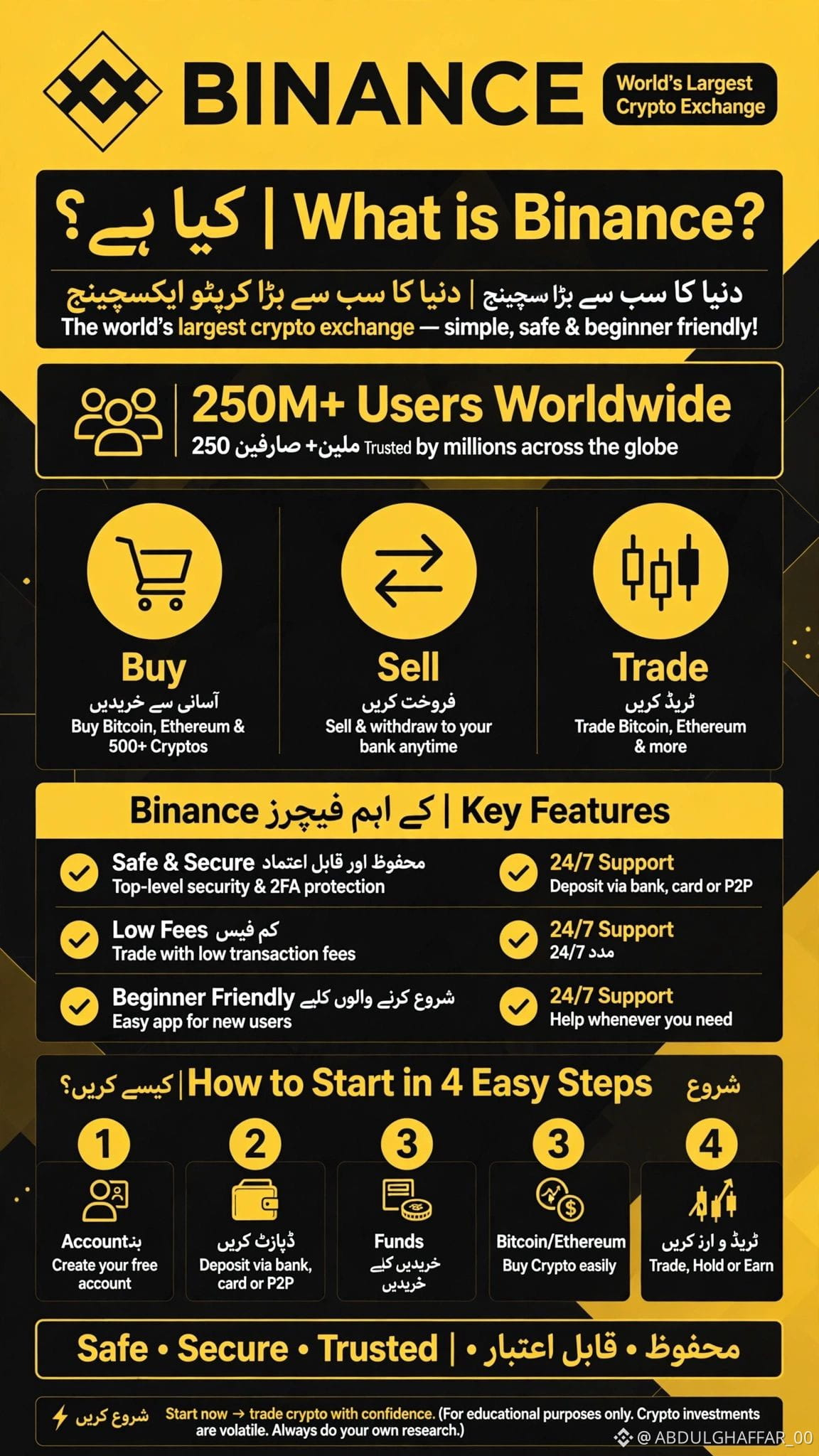
Binanceは世界最大の暗号資産取引所です。Bitcoin、Ethereumをはじめ、500種類以上のコインを売買できます。
📊 世界中に2億5,000万人以上のユーザー — 最も信頼されている取引所!
🔹 Binanceでできること
✅ 購入 — BitcoinやEthereumを簡単に購入
✅ 売却 — いつでも銀行口座に出金
✅ 取引 — トレードで利益を狙う
✅ 運用 — 保有して利息を獲得
🔐 Binanceが選ばれる理由
- 安全・安心 — 高度なセキュリティと2FA
- 低い手数料 — 手数料を抑えて取引
- 初心者にも使いやすい — 初めての方にも簡単なアプリ
- 24時間365日サポート — いつでもサポート
🚀 始め方は?簡単4ステップ:
1. アカウントを作成(無料)
2. 入金(銀行振込、カード、またはP2P)
3. BitcoinやEthereumを購入
4. 取引、保有、または運用
Binanceを使ったことはありますか?コメントで教えてください 👇
#EarningsSeason #CryptoForBeginners #Ethereum #CryptoPakistan #BinanceSquare $BNB $ETH $BTC
{spot}(BTCUSDT)
Binanceとは?
Binanceって何? 🤔
世界最大の暗号資産取引所!
🔶 Binanceとは?
Binanceは世界最大の暗号資産取引所です。Bitcoin、Ethereumをはじめ、500種類以上のコインを売買できます。
📊 世界中に2億5,000万人以上のユーザー — 最も信頼されている取引所!
🔹 Binanceでできること
✅ 購入 — BitcoinやEthereumを簡単に購入
✅ 売却 — いつでも銀行口座に出金
✅ 取引 — トレードで利益を狙う
✅ 運用 — 保有して利息を獲得
🔐 Binanceが選ばれる理由
- 安全・安心 — 高度なセキュリティと2FA
- 低い手数料 — 手数料を抑えて取引
- 初心者にも使いやすい — 初めての方にも簡単なアプリ
- 24時間365日サポート — いつでもサポート
🚀 始め方は?簡単4ステップ:
1. アカウントを作成(無料)
2. 入金(銀行振込、カード、またはP2P)
3. BitcoinやEthereumを購入
4. 取引、保有、または運用
Binanceを使ったことはありますか?コメントで教えてください 👇
#EarningsSeason #CryptoForBeginners #Ethereum #CryptoPakistan #BinanceSquare $BNB $ETH $BTC
Binanceって何? 🤔
世界最大の暗号資産取引所!
🔶 Binanceとは?
Binanceは世界最大の暗号資産取引所です。Bitcoin、Ethereumをはじめ、500種類以上のコインを売買できます。
📊 世界中に2億5,000万人以上のユーザー — 最も信頼されている取引所!
🔹 Binanceでできること
✅ 購入 — BitcoinやEthereumを簡単に購入
✅ 売却 — いつでも銀行口座に出金
✅ 取引 — トレードで利益を狙う
✅ 運用 — 保有して利息を獲得
🔐 Binanceが選ばれる理由
- 安全・安心 — 高度なセキュリティと2FA
- 低い手数料 — 手数料を抑えて取引
- 初心者にも使いやすい — 初めての方にも簡単なアプリ
- 24時間365日サポート — いつでもサポート
🚀 始め方は?簡単4ステップ:
1. アカウントを作成(無料)
2. 入金(銀行振込、カード、またはP2P)
3. BitcoinやEthereumを購入
4. 取引、保有、または運用
Binanceを使ったことはありますか?コメントで教えてください 👇
#EarningsSeason #CryptoForBeginners #Ethereum #CryptoPakistan #BinanceSquare $BNB $ETH $BTC
4
12
翻訳参照
📚 Crypto Education for Beginners 🚀
Starting your crypto journey doesn't have to mean investing money right away!
Here are 3 important tips for beginners:
✅ Learn the basics before investing.
✅ Understand the risks of cryptocurrency.
✅ Never invest money you cannot afford to lose.
Bitcoin ($BTC) is one of the best-known cryptocurrencies, but its price can rise or fall significantly.
💬 What would you like to learn about next: Bitcoin, Ethereum, or Binance Square?
#BinanceSquare #CryptoEducationb #bitcoin.” #CryptoForBeginners
📚 Crypto Education for Beginners 🚀
Starting your crypto journey doesn't have to mean investing money right away!
Here are 3 important tips for beginners:
✅ Learn the basics before investing.
✅ Understand the risks of cryptocurrency.
✅ Never invest money you cannot afford to lose.
Bitcoin ($BTC) is one of the best-known cryptocurrencies, but its price can rise or fall significantly.
💬 What would you like to learn about next: Bitcoin, Ethereum, or Binance Square?
#BinanceSquare #CryptoEducationb #bitcoin.” #CryptoForBeginners
Starting your crypto journey doesn't have to mean investing money right away!
Here are 3 important tips for beginners:
✅ Learn the basics before investing.
✅ Understand the risks of cryptocurrency.
✅ Never invest money you cannot afford to lose.
Bitcoin ($BTC) is one of the best-known cryptocurrencies, but its price can rise or fall significantly.
💬 What would you like to learn about next: Bitcoin, Ethereum, or Binance Square?
#BinanceSquare #CryptoEducationb #bitcoin.” #CryptoForBeginners
97

記事
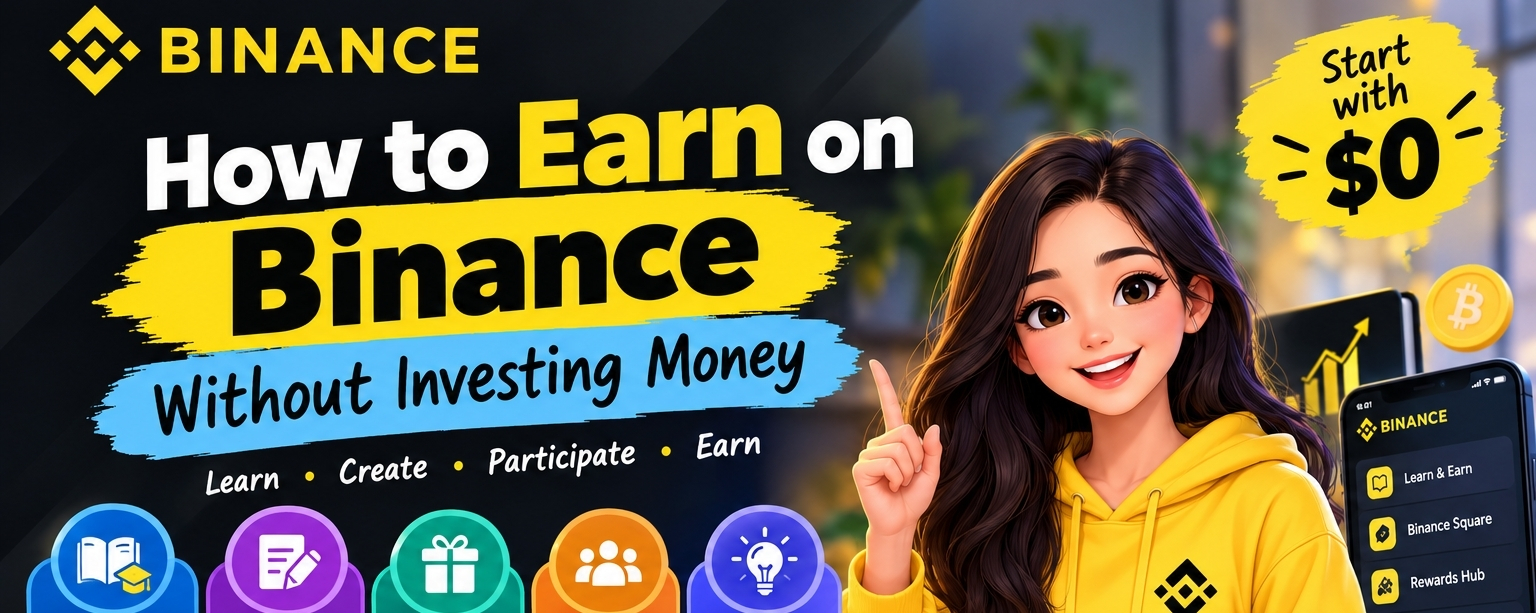
資金を投じずにBinanceで稼ぐ方法 💰🚀
資金ゼロから始める初心者ガイド
暗号資産を購入したり、自分のお金を投資したりせずに、Binanceで収入を得る方法を探してみませんか?🌟
朗報です!学習やコンテンツの作成、条件を満たした報酬プログラムへの参加には、さまざまな方法があります。ただし、すべての機会が誰にでも提供されるわけではなく、報酬が保証されることもありません。
初心者向けの始め方を見ていきましょう!👇
📚 1. 学んで報酬を獲得
Binanceでは、暗号資産について学び、クイズを完了した条件達成ユーザーに報酬を提供する教育キャンペーンが実施されることがあります。
資金を投じずにBinanceで稼ぐ方法 💰
🚀
資金ゼロから始める初心者ガイド
暗号資産を購入したり、自分のお金を投資したりせずに、Binanceで収入を得る方法を探してみませんか?🌟
朗報です!学習やコンテンツの作成、条件を満たした報酬プログラムへの参加には、さまざまな方法があります。ただし、すべての機会が誰にでも提供されるわけではなく、報酬が保証されることもありません。
初心者向けの始め方を見ていきましょう!👇
📚 1. 学んで報酬を獲得
Binanceでは、暗号資産について学び、クイズを完了した条件達成ユーザーに報酬を提供する教育キャンペーンが実施されることがあります。
資金ゼロから始める初心者ガイド
暗号資産を購入したり、自分のお金を投資したりせずに、Binanceで収入を得る方法を探してみませんか?🌟
朗報です!学習やコンテンツの作成、条件を満たした報酬プログラムへの参加には、さまざまな方法があります。ただし、すべての機会が誰にでも提供されるわけではなく、報酬が保証されることもありません。
初心者向けの始め方を見ていきましょう!👇
📚 1. 学んで報酬を獲得
Binanceでは、暗号資産について学び、クイズを完了した条件達成ユーザーに報酬を提供する教育キャンペーンが実施されることがあります。
134

·
--
💰 暗号資産を始める前に知っておきたかった5つのこと 基本を誰も教えてくれないために、初心者の多くが失敗します 👇
📚 1. 毎日取引する必要はありません
焦って決断するより、何もしないほうがいいこともあります。
📉 2. 陽線だからといって、必ず利益が出るわけではありません
相場はいつでも反転する可能性があります。
🛡️ 3. 必要なお金には手をつけない
家賃、食費、教育費、緊急時のための貯蓄を優先しましょう。
⚠️ 4. レバレッジはあっという間に資金を失う原因になります
初心者は、レバレッジを検討する前にリスクを理解しましょう。
🔐 5. アカウントを守る
💰 暗号資産を始める前に知っておきたかった5つのこと
基本を誰も教えてくれないために、初心者の多くが失敗します 👇
📚 1. 毎日取引する必要はありません
焦って決断するより、何もしないほうがいいこともあります。
📉 2. 陽線だからといって、必ず利益が出るわけではありません
相場はいつでも反転する可能性があります。
🛡️ 3. 必要なお金には手をつけない
家賃、食費、教育費、緊急時のための貯蓄を優先しましょう。
⚠️ 4. レバレッジはあっという間に資金を失う原因になります
初心者は、レバレッジを検討する前にリスクを理解しましょう。
🔐 5. アカウントを守る
📚 1. 毎日取引する必要はありません
焦って決断するより、何もしないほうがいいこともあります。
📉 2. 陽線だからといって、必ず利益が出るわけではありません
相場はいつでも反転する可能性があります。
🛡️ 3. 必要なお金には手をつけない
家賃、食費、教育費、緊急時のための貯蓄を優先しましょう。
⚠️ 4. レバレッジはあっという間に資金を失う原因になります
初心者は、レバレッジを検討する前にリスクを理解しましょう。
🔐 5. アカウントを守る
1
81
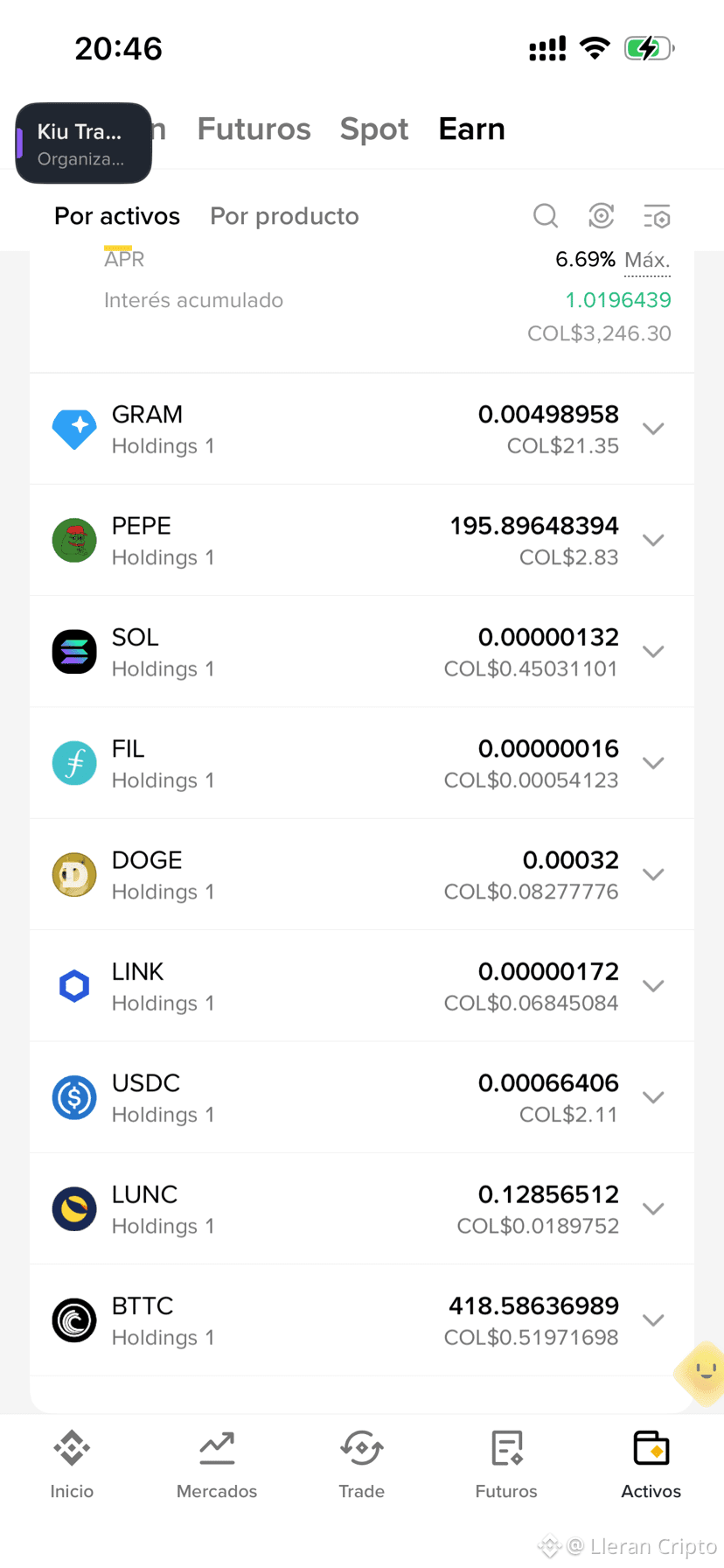
コミュニティの友人から赤い封筒を受け取り、その経験からあることに気づきました。暗号資産を買うことから始めなくても、暗号資産の報酬を試すことはできます。
Binanceを始めたばかりの方に、Binanceで報酬を獲得する方法を4つご紹介します👇
🧧 1. 赤い封筒
MrRUHULから50 PEPEを受け取り、初七BNBからも赤い封筒の報酬をもらいました。友人に赤い封筒を送ったこともあります。暗号資産の報酬をシェアして、Binanceのギフト機能を試す簡単な方法です。
📚 2. 学んで稼ぐ
暗号資産について学び、利用可能なクイズに回答すると、キャンペーン開催中に報酬を獲得できます。
✍️ 3. 書いて稼ぐ
Binance Squareでコンテンツを作成して報酬を獲得しました。条件を満たしたクリエイターは、プログラムのルールに従って、取引手数料の分配や参加ボーナスを獲得できます。
🚀 4. CreatorPadとRewards Hub
クリエイター向けキャンペーンや、利用可能なクーポン、プロモーション報酬をチェックしてみましょう。
私が得た最大の気づきは、暗号資産の世界にあるあらゆる機会を試すには、まず投資しなければならないと思い込まないことです。利用できる報酬から始め、仕組みを学びましょう。そして、ボーナスを追いかけるためだけにお金をリスクにさらすことは絶対に避けてください。
💬 試したことがあるのはどれですか?赤い封筒、学んで稼ぐ、それとも書いて稼ぐ?
⚠️ 注意:報酬は、提供状況、参加条件、キャンペーン規約によって異なります。赤い封筒の金額やトークンの価値は変動する場合があります。この投稿は私個人の体験を共有するものであり、利益を保証するものでも、金融アドバイスでもありません。必ずご自身で調査してください。
#Binance #BinanceSquare #CryptoForBeginners #LearnAndEarn
コミュニティの友人から赤い封筒を受け取り、その経験からあることに気づきました。暗号資産を買うことから始めなくても、暗号資産の報酬を試すことはできます。
Binanceを始めたばかりの方に、Binanceで報酬を獲得する方法を4つご紹介します👇
🧧 1. 赤い封筒
MrRUHULから50 PEPEを受け取り、初七BNBからも赤い封筒の報酬をもらいました。友人に赤い封筒を送ったこともあります。暗号資産の報酬をシェアして、Binanceのギフト機能を試す簡単な方法です。
📚 2. 学んで稼ぐ
暗号資産について学び、利用可能なクイズに回答すると、キャンペーン開催中に報酬を獲得できます。
✍️ 3. 書いて稼ぐ
Binance Squareでコンテンツを作成して報酬を獲得しました。条件を満たしたクリエイターは、プログラムのルールに従って、取引手数料の分配や参加ボーナスを獲得できます。
🚀 4. CreatorPadとRewards Hub
クリエイター向けキャンペーンや、利用可能なクーポン、プロモーション報酬をチェックしてみましょう。
私が得た最大の気づきは、暗号資産の世界にあるあらゆる機会を試すには、まず投資しなければならないと思い込まないことです。利用できる報酬から始め、仕組みを学びましょう。そして、ボーナスを追いかけるためだけにお金をリスクにさらすことは絶対に避けてください。
💬 試したことがあるのはどれですか?赤い封筒、学んで稼ぐ、それとも書いて稼ぐ?
⚠️ 注意:報酬は、提供状況、参加条件、キャンペーン規約によって異なります。赤い封筒の金額やトークンの価値は変動する場合があります。この投稿は私個人の体験を共有するものであり、利益を保証するものでも、金融アドバイスでもありません。必ずご自身で調査してください。
#Binance #BinanceSquare #CryptoForBeginners #LearnAndEarn
Binanceを始めたばかりの方に、Binanceで報酬を獲得する方法を4つご紹介します👇
🧧 1. 赤い封筒
MrRUHULから50 PEPEを受け取り、初七BNBからも赤い封筒の報酬をもらいました。友人に赤い封筒を送ったこともあります。暗号資産の報酬をシェアして、Binanceのギフト機能を試す簡単な方法です。
📚 2. 学んで稼ぐ
暗号資産について学び、利用可能なクイズに回答すると、キャンペーン開催中に報酬を獲得できます。
✍️ 3. 書いて稼ぐ
Binance Squareでコンテンツを作成して報酬を獲得しました。条件を満たしたクリエイターは、プログラムのルールに従って、取引手数料の分配や参加ボーナスを獲得できます。
🚀 4. CreatorPadとRewards Hub
クリエイター向けキャンペーンや、利用可能なクーポン、プロモーション報酬をチェックしてみましょう。
私が得た最大の気づきは、暗号資産の世界にあるあらゆる機会を試すには、まず投資しなければならないと思い込まないことです。利用できる報酬から始め、仕組みを学びましょう。そして、ボーナスを追いかけるためだけにお金をリスクにさらすことは絶対に避けてください。
💬 試したことがあるのはどれですか?赤い封筒、学んで稼ぐ、それとも書いて稼ぐ?
⚠️ 注意:報酬は、提供状況、参加条件、キャンペーン規約によって異なります。赤い封筒の金額やトークンの価値は変動する場合があります。この投稿は私個人の体験を共有するものであり、利益を保証するものでも、金融アドバイスでもありません。必ずご自身で調査してください。
#Binance #BinanceSquare #CryptoForBeginners #LearnAndEarn
1
130
·
--
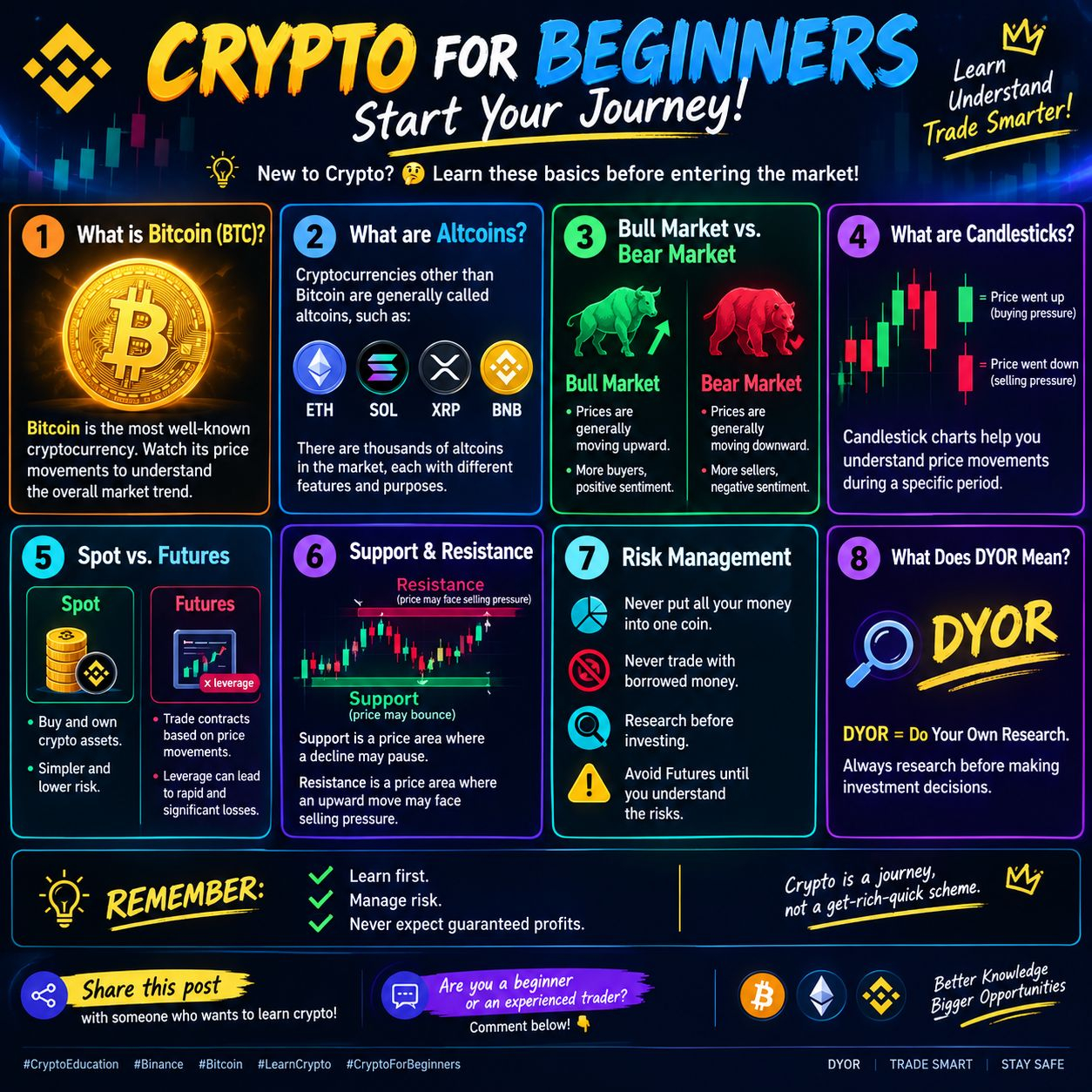
🚀📚 **初心者のための暗号資産 — さあ、始めよう!** 💎
暗号資産は初めてですか?🤔 市場に参加する前に、まずは基本を学びましょう!👇
🟠 **1. ビットコイン(BTC)とは?**
ビットコインは、最もよく知られている暗号資産です。価格の動きを見ることで、市場全体のトレンドを理解できます。
🟢 **2. アルトコインとは?**
ビットコイン以外の暗号資産は一般にアルトコインと呼ばれます。ETH、SOL、XRP、BNBなどがあります。
📊 **3. 強気相場と弱気相場**
🐂 強気相場 = 価格が全般的に上昇している状態。
🐻 弱気相場 = 価格が全般的に下落している状態。
📈 **4. ローソク足とは?**
ローソク足チャートを見ると、特定の期間における価格の動きを把握できます。
💰 **5. 現物取引と先物取引**
✅ 現物取引 = 暗号資産を購入して保有すること。
⚠️ 先物取引 = 価格の動きに基づく契約を取引すること。レバレッジを使うと、短期間で大きな損失が生じる可能性があります。
📉 **6. サポートとレジスタンス**
サポートとは、価格の下落がいったん止まる可能性のある価格帯です。
レジスタンスとは、価格の上昇時に売り圧力に直面する可能性のある価格帯です。
🛡️ **7. リスク管理**
• 資金のすべてを1つのコインに投じない。
• 借りたお金で取引しない。
• 投資する前に調査する。
• リスクを理解するまでは先物取引を避ける。
🔍 **8. DYORとは?**
DYOR = Do Your Own Research(自分自身で調査する)。投資判断をする前に、必ず自分で調べましょう。
💡 **覚えておきましょう:** まず学び、リスクを管理し、利益が保証されていると思わないこと。
❤️ 暗号資産について学びたい人に、この投稿をシェアしましょう!
💬 **初心者ですか?それとも経験豊富なトレーダーですか?コメントで教えてください!** 👇
#CryptoEducation #Binance #Bitcoin #LearnCrypto #CryptoForBeginners
🚀📚 **初心者のための暗号資産 — さあ、始めよう!** 💎
暗号資産は初めてですか?🤔 市場に参加する前に、まずは基本を学びましょう!👇
🟠 **1. ビットコイン(BTC)とは?**
ビットコインは、最もよく知られている暗号資産です。価格の動きを見ることで、市場全体のトレンドを理解できます。
🟢 **2. アルトコインとは?**
ビットコイン以外の暗号資産は一般にアルトコインと呼ばれます。ETH、SOL、XRP、BNBなどがあります。
📊 **3. 強気相場と弱気相場**
🐂 強気相場 = 価格が全般的に上昇している状態。
🐻 弱気相場 = 価格が全般的に下落している状態。
📈 **4. ローソク足とは?**
ローソク足チャートを見ると、特定の期間における価格の動きを把握できます。
💰 **5. 現物取引と先物取引**
✅ 現物取引 = 暗号資産を購入して保有すること。
⚠️ 先物取引 = 価格の動きに基づく契約を取引すること。レバレッジを使うと、短期間で大きな損失が生じる可能性があります。
📉 **6. サポートとレジスタンス**
サポートとは、価格の下落がいったん止まる可能性のある価格帯です。
レジスタンスとは、価格の上昇時に売り圧力に直面する可能性のある価格帯です。
🛡️ **7. リスク管理**
• 資金のすべてを1つのコインに投じない。
• 借りたお金で取引しない。
• 投資する前に調査する。
• リスクを理解するまでは先物取引を避ける。
🔍 **8. DYORとは?**
DYOR = Do Your Own Research(自分自身で調査する)。投資判断をする前に、必ず自分で調べましょう。
💡 **覚えておきましょう:** まず学び、リスクを管理し、利益が保証されていると思わないこと。
❤️ 暗号資産について学びたい人に、この投稿をシェアしましょう!
💬 **初心者ですか?それとも経験豊富なトレーダーですか?コメントで教えてください!** 👇
#CryptoEducation #Binance #Bitcoin #LearnCrypto #CryptoForBeginners
暗号資産は初めてですか?🤔 市場に参加する前に、まずは基本を学びましょう!👇
🟠 **1. ビットコイン(BTC)とは?**
ビットコインは、最もよく知られている暗号資産です。価格の動きを見ることで、市場全体のトレンドを理解できます。
🟢 **2. アルトコインとは?**
ビットコイン以外の暗号資産は一般にアルトコインと呼ばれます。ETH、SOL、XRP、BNBなどがあります。
📊 **3. 強気相場と弱気相場**
🐂 強気相場 = 価格が全般的に上昇している状態。
🐻 弱気相場 = 価格が全般的に下落している状態。
📈 **4. ローソク足とは?**
ローソク足チャートを見ると、特定の期間における価格の動きを把握できます。
💰 **5. 現物取引と先物取引**
✅ 現物取引 = 暗号資産を購入して保有すること。
⚠️ 先物取引 = 価格の動きに基づく契約を取引すること。レバレッジを使うと、短期間で大きな損失が生じる可能性があります。
📉 **6. サポートとレジスタンス**
サポートとは、価格の下落がいったん止まる可能性のある価格帯です。
レジスタンスとは、価格の上昇時に売り圧力に直面する可能性のある価格帯です。
🛡️ **7. リスク管理**
• 資金のすべてを1つのコインに投じない。
• 借りたお金で取引しない。
• 投資する前に調査する。
• リスクを理解するまでは先物取引を避ける。
🔍 **8. DYORとは?**
DYOR = Do Your Own Research(自分自身で調査する)。投資判断をする前に、必ず自分で調べましょう。
💡 **覚えておきましょう:** まず学び、リスクを管理し、利益が保証されていると思わないこと。
❤️ 暗号資産について学びたい人に、この投稿をシェアしましょう!
💬 **初心者ですか?それとも経験豊富なトレーダーですか?コメントで教えてください!** 👇
#CryptoEducation #Binance #Bitcoin #LearnCrypto #CryptoForBeginners
1
155
·
--
Binanceで友人からレッドパケットを受け取ったことで、あることに気づきました。暗号資産の報酬を楽しむのに、まず暗号資産を買う必要はないのです。
Binanceで初心者が報酬獲得を体験する4つの方法をご紹介します👇
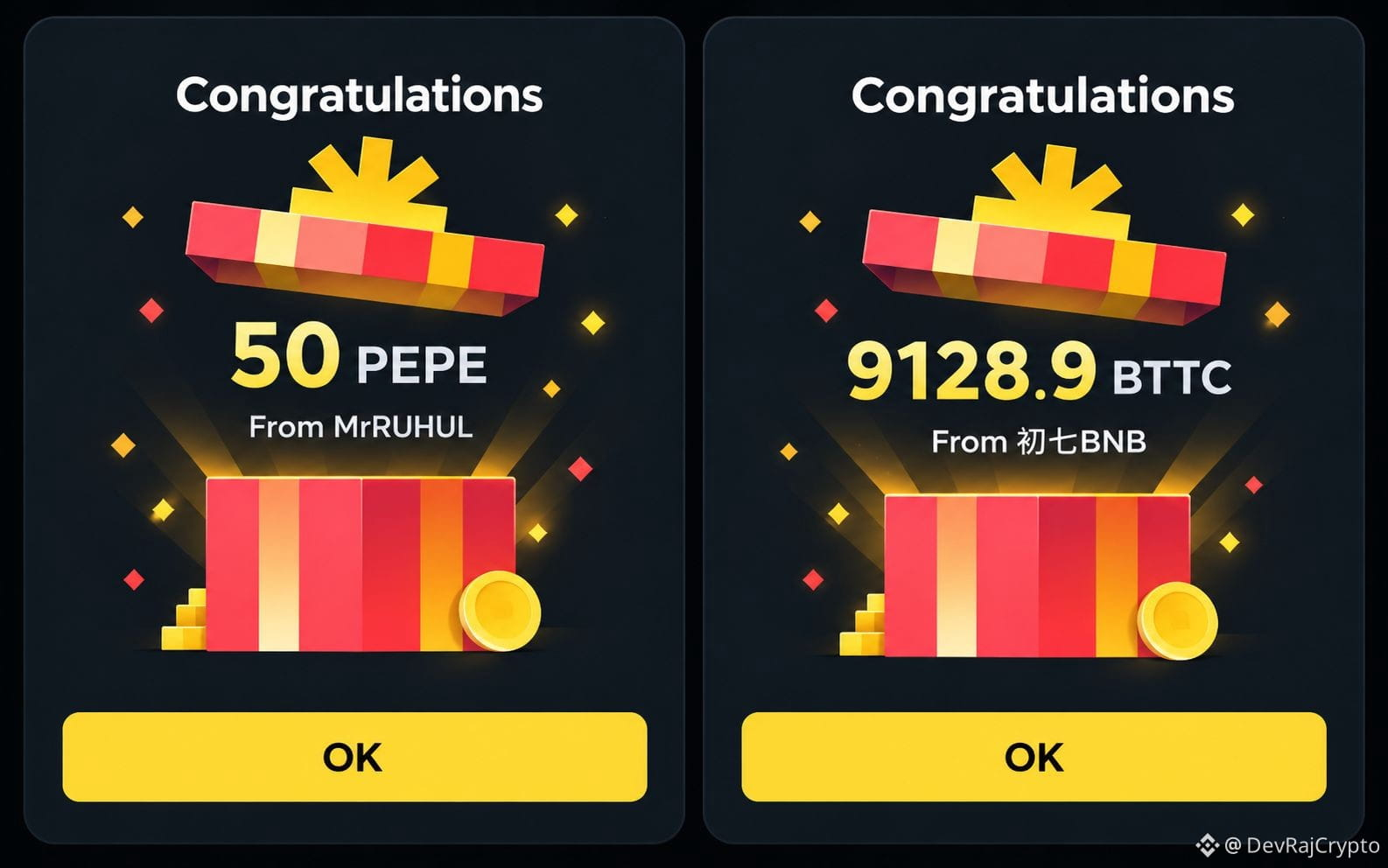
🧧 1. レッドパケット
MrRUHULからPEPEを50枚、初七BNBからも別のレッドパケット報酬を受け取りました。友人にレッドパケットを送ったこともあります。暗号資産の報酬をシェアし、Binanceのギフト機能を体験できるシンプルな方法です。
📚 2. Learn & Earn
暗号資産について学び、対象のクイズを完了すると、キャンペーン開催中に報酬を獲得できます。
✍️ 3. 書いて稼ぐ
Binance Squareでコンテンツを投稿して報酬を獲得しました。対象となるクリエイターは、プログラムのルールに基づいて取引手数料のコミッションやエンゲージメントボーナスを獲得できます。
🚀 4. CreatorPad & Rewards Hub
開催中のクリエイターキャンペーン、バウチャー、プロモーション報酬をチェックしてみましょう。
一番の学びは、暗号資産のあらゆる機会を体験するのに、最初に投資する必要があると思い込まないことです。まずは対象の報酬から始め、その仕組みを学びましょう。そして、ボーナスを追い求めるためにお金を危険にさらすことは決してしないでください。
💬 試したことがあるのはどれですか?レッドパケット、Learn & Earn、それとも書いて稼ぐ?
⚠️ 免責事項:報酬は、提供状況、参加資格、キャンペーン規約によって異なります。レッドパケットの金額やトークンの価値は変動する場合があります。この投稿は個人的な体験を共有するものであり、収益を保証するものでも、金融アドバイスでもありません。必ずDYOR(ご自身で調査)してください。
#Binance #BinanceSquare #CryptoForBeginners #LearnAndEarn
Binanceで友人からレッドパケットを受け取ったことで、あることに気づきました。暗号資産の報酬を楽しむのに、まず暗号資産を買う必要はないのです。
Binanceで初心者が報酬獲得を体験する4つの方法をご紹介します👇
🧧 1. レッドパケット
MrRUHULからPEPEを50枚、初七BNBからも別のレッドパケット報酬を受け取りました。友人にレッドパケットを送ったこともあります。暗号資産の報酬をシェアし、Binanceのギフト機能を体験できるシンプルな方法です。
📚 2. Learn & Earn
暗号資産について学び、対象のクイズを完了すると、キャンペーン開催中に報酬を獲得できます。
✍️ 3. 書いて稼ぐ
Binance Squareでコンテンツを投稿して報酬を獲得しました。対象となるクリエイターは、プログラムのルールに基づいて取引手数料のコミッションやエンゲージメントボーナスを獲得できます。
🚀 4. CreatorPad & Rewards Hub
開催中のクリエイターキャンペーン、バウチャー、プロモーション報酬をチェックしてみましょう。
一番の学びは、暗号資産のあらゆる機会を体験するのに、最初に投資する必要があると思い込まないことです。まずは対象の報酬から始め、その仕組みを学びましょう。そして、ボーナスを追い求めるためにお金を危険にさらすことは決してしないでください。
💬 試したことがあるのはどれですか?レッドパケット、Learn & Earn、それとも書いて稼ぐ?
⚠️ 免責事項:報酬は、提供状況、参加資格、キャンペーン規約によって異なります。レッドパケットの金額やトークンの価値は変動する場合があります。この投稿は個人的な体験を共有するものであり、収益を保証するものでも、金融アドバイスでもありません。必ずDYOR(ご自身で調査)してください。
#Binance #BinanceSquare #CryptoForBeginners #LearnAndEarn
Binanceで初心者が報酬獲得を体験する4つの方法をご紹介します👇
🧧 1. レッドパケット
MrRUHULからPEPEを50枚、初七BNBからも別のレッドパケット報酬を受け取りました。友人にレッドパケットを送ったこともあります。暗号資産の報酬をシェアし、Binanceのギフト機能を体験できるシンプルな方法です。
📚 2. Learn & Earn
暗号資産について学び、対象のクイズを完了すると、キャンペーン開催中に報酬を獲得できます。
✍️ 3. 書いて稼ぐ
Binance Squareでコンテンツを投稿して報酬を獲得しました。対象となるクリエイターは、プログラムのルールに基づいて取引手数料のコミッションやエンゲージメントボーナスを獲得できます。
🚀 4. CreatorPad & Rewards Hub
開催中のクリエイターキャンペーン、バウチャー、プロモーション報酬をチェックしてみましょう。
一番の学びは、暗号資産のあらゆる機会を体験するのに、最初に投資する必要があると思い込まないことです。まずは対象の報酬から始め、その仕組みを学びましょう。そして、ボーナスを追い求めるためにお金を危険にさらすことは決してしないでください。
💬 試したことがあるのはどれですか?レッドパケット、Learn & Earn、それとも書いて稼ぐ?
⚠️ 免責事項:報酬は、提供状況、参加資格、キャンペーン規約によって異なります。レッドパケットの金額やトークンの価値は変動する場合があります。この投稿は個人的な体験を共有するものであり、収益を保証するものでも、金融アドバイスでもありません。必ずDYOR(ご自身で調査)してください。
#Binance #BinanceSquare #CryptoForBeginners #LearnAndEarn
CryptoMalcom BTC Insights:
lucky 🤞
22
1
42
9.1k
·
--
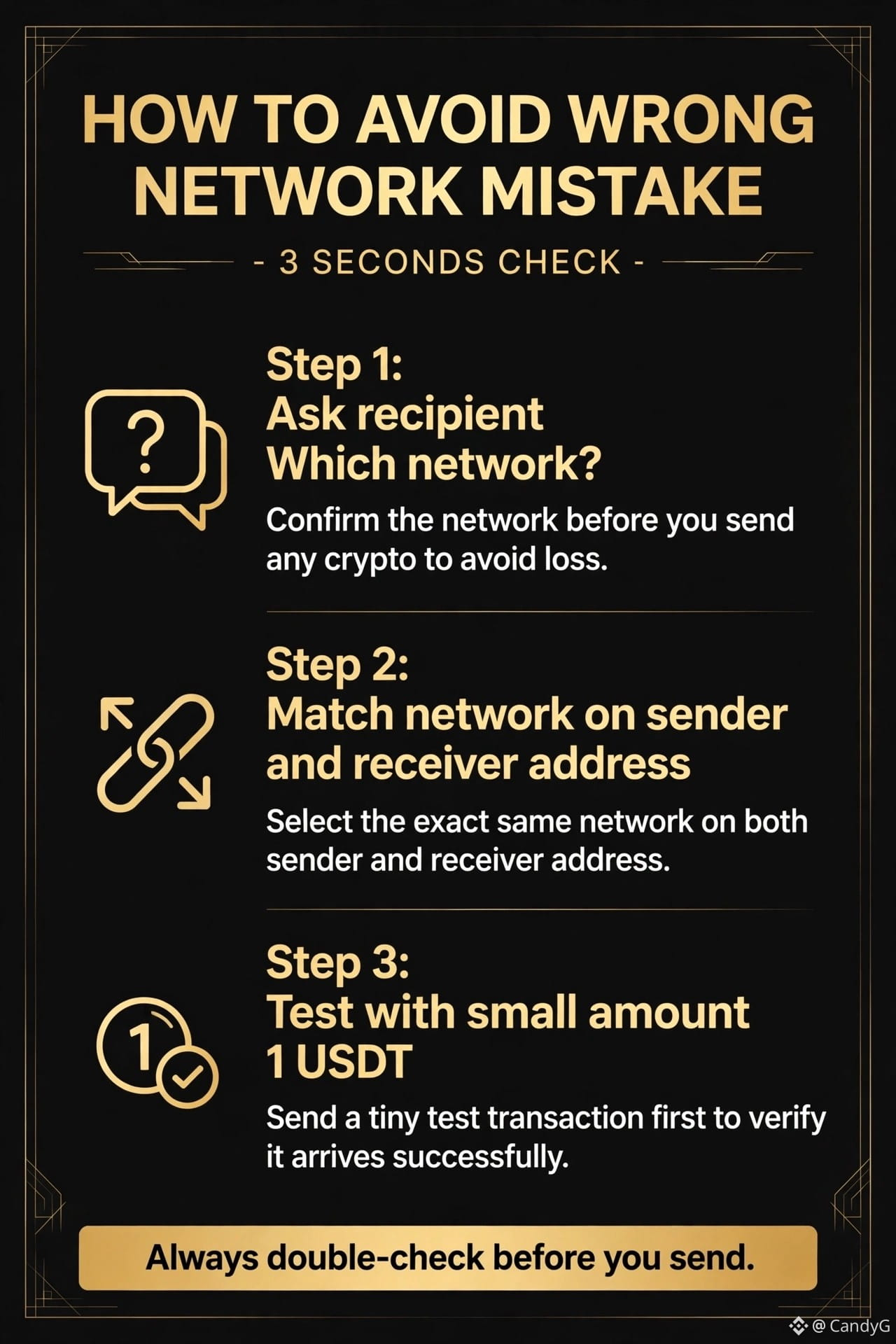
暗号資産を間違ったネットワークに送ると、資産は消えてしまいます。🙉
初心者は、こんな単純なミスでお金を失います。
昨日は何が起こるかを投稿しました。今日は、それを防ぐ方法をご紹介します。
1️⃣ 受取人に確認:どのネットワークですか?
送金する前に必ず確認しましょう。
2️⃣ 送金元と受取先のアドレスでネットワークを一致させる
両方で同じネットワークを使いましょう。近道はありません。
3️⃣ まずは1 USDTでテストする
少額でのテストが、大きな安心につながります。
たった3秒の確認で、何千ドルもの損失を防げます。
間違ったネットワークに送金したことはありますか?どうなりましたか?👇
#CryptoEducation #CryptoNetworks #CryptoForBeginners #CryptoSafety
暗号資産を間違ったネットワークに送ると、資産は消えてしまいます。🙉
初心者は、こんな単純なミスでお金を失います。
昨日は何が起こるかを投稿しました。今日は、それを防ぐ方法をご紹介します。
1️⃣ 受取人に確認:どのネットワークですか?
送金する前に必ず確認しましょう。
2️⃣ 送金元と受取先のアドレスでネットワークを一致させる
両方で同じネットワークを使いましょう。近道はありません。
3️⃣ まずは1 USDTでテストする
少額でのテストが、大きな安心につながります。
たった3秒の確認で、何千ドルもの損失を防げます。
間違ったネットワークに送金したことはありますか?どうなりましたか?👇
#CryptoEducation #CryptoNetworks #CryptoForBeginners #CryptoSafety
初心者は、こんな単純なミスでお金を失います。
昨日は何が起こるかを投稿しました。今日は、それを防ぐ方法をご紹介します。
1️⃣ 受取人に確認:どのネットワークですか?
送金する前に必ず確認しましょう。
2️⃣ 送金元と受取先のアドレスでネットワークを一致させる
両方で同じネットワークを使いましょう。近道はありません。
3️⃣ まずは1 USDTでテストする
少額でのテストが、大きな安心につながります。
たった3秒の確認で、何千ドルもの損失を防げます。
間違ったネットワークに送金したことはありますか?どうなりましたか?👇
#CryptoEducation #CryptoNetworks #CryptoForBeginners #CryptoSafety
1
118
ビットコイン($BTC)のローソク足の見方を30秒で解説 🕯️
チャート上のローソク足はそれぞれ、小さなストーリーを伝えています。
🟢 陽線:始値より高い価格で取引を終えたことを示します。
🔴 陰線:始値より低い価格で取引を終えたことを示します。
📏 細い線(ヒゲ):その時間内に到達した最高値と最安値を示します。
簡単な例:ヒゲが短い長い陽線は、買い手の勢いが強かったことを示します。長い陰線は、売り手が主導権を握ったことを示します。
ローソク足1本だけでは何も予測できません。判断する前に、トレンドと出来高を確認しましょう。
どの時間足を使っていますか?1時間、4時間、それとも1日? 👇
これは教育目的のみの情報であり、金融アドバイスではありません。
#Bitcoin #CryptoForBeginners #Binance
$BTC
ビットコイン($BTC )のローソク足の見方を30秒で解説 🕯️
チャート上のローソク足はそれぞれ、小さなストーリーを伝えています。
🟢 陽線:始値より高い価格で取引を終えたことを示します。
🔴 陰線:始値より低い価格で取引を終えたことを示します。
📏 細い線(ヒゲ):その時間内に到達した最高値と最安値を示します。
簡単な例:ヒゲが短い長い陽線は、買い手の勢いが強かったことを示します。長い陰線は、売り手が主導権を握ったことを示します。
ローソク足1本だけでは何も予測できません。判断する前に、トレンドと出来高を確認しましょう。
どの時間足を使っていますか?1時間、4時間、それとも1日? 👇
これは教育目的のみの情報であり、金融アドバイスではありません。
#Bitcoin #CryptoForBeginners #Binance
$BTC
チャート上のローソク足はそれぞれ、小さなストーリーを伝えています。
🟢 陽線:始値より高い価格で取引を終えたことを示します。
🔴 陰線:始値より低い価格で取引を終えたことを示します。
📏 細い線(ヒゲ):その時間内に到達した最高値と最安値を示します。
簡単な例:ヒゲが短い長い陽線は、買い手の勢いが強かったことを示します。長い陰線は、売り手が主導権を握ったことを示します。
ローソク足1本だけでは何も予測できません。判断する前に、トレンドと出来高を確認しましょう。
どの時間足を使っていますか?1時間、4時間、それとも1日? 👇
これは教育目的のみの情報であり、金融アドバイスではありません。
#Bitcoin #CryptoForBeginners #Binance
$BTC
1
43
·
--
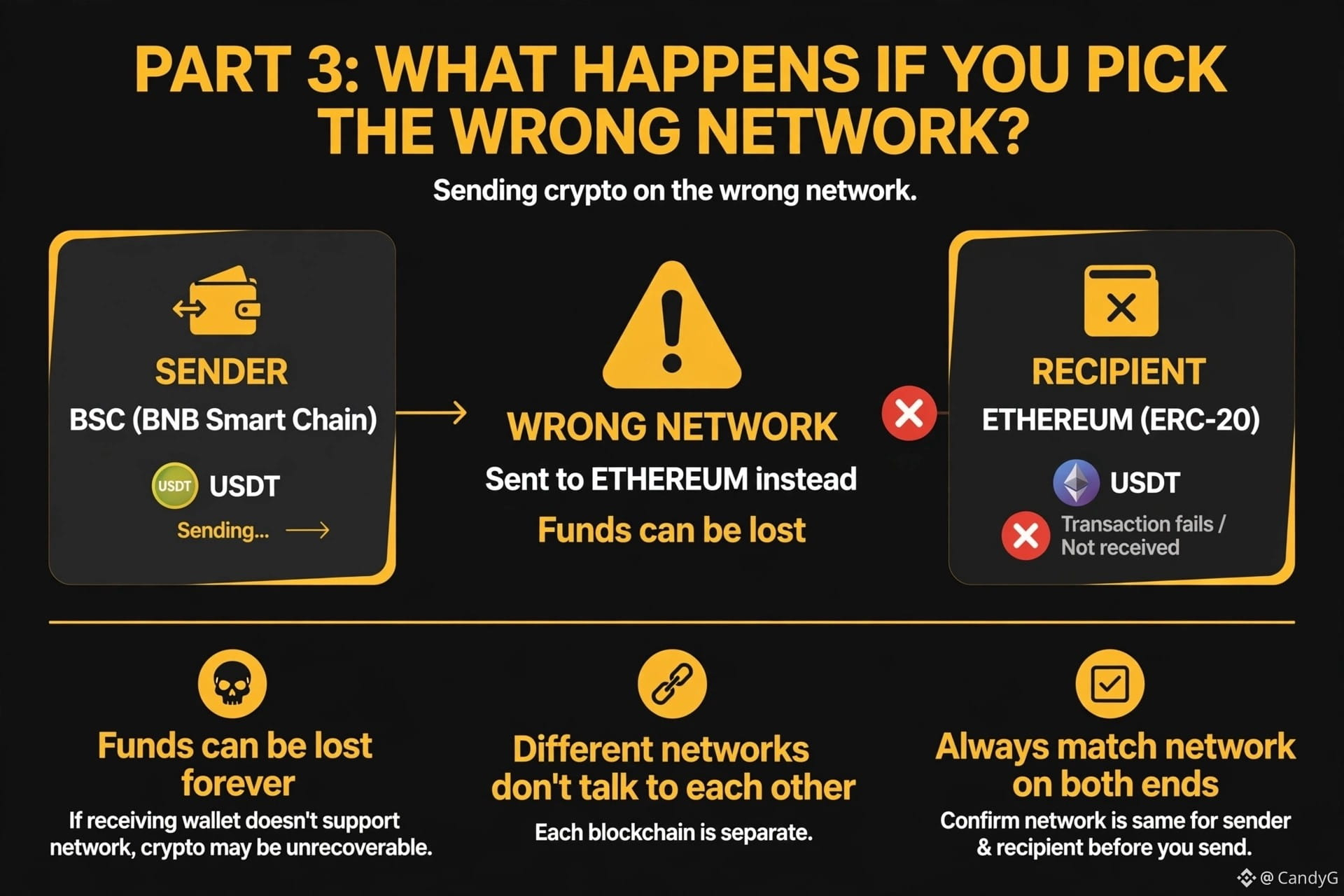
間違ったネットワークを選ぶとどうなる?⚠️
これは初心者がお金を失う原因となるミスです。
BSC(BNBスマートチェーン)でUSDTを送ったのに、受取人はEthereum(ERC-20)を使っています。
結果は?資金を失う可能性があります。
なぜでしょう?
1️⃣ 資金を永久に失う可能性がある
受取人のウォレットや取引所がそのネットワークに対応していない場合、暗号資産を取り戻せない可能性があります。
2️⃣ 異なるネットワーク同士は通信できない
各ブロックチェーンは独立しています。電話番号にメールを送るようなもので、相手には届きません。
3️⃣ 送信側と受信側で必ずネットワークを一致させる
送信ボタンを押す前に確認しましょう。送信者と受取人のネットワークは同じですか?
ワンポイント:Binanceでは、ネットワークの表示を必ず再確認しましょう。トークン名(USDT)が同じに見えても、BSCとEthereumは別のネットワークです。
次回の投稿もお楽しみに――間違ったネットワークで送ってしまった場合の対処法
#CryptoForBeginners #CryptoNetworks #BinanceAcademy
間違ったネットワークを選ぶとどうなる?⚠️
これは初心者がお金を失う原因となるミスです。
BSC(BNBスマートチェーン)でUSDTを送ったのに、受取人はEthereum(ERC-20)を使っています。
結果は?資金を失う可能性があります。
なぜでしょう?
1️⃣ 資金を永久に失う可能性がある
受取人のウォレットや取引所がそのネットワークに対応していない場合、暗号資産を取り戻せない可能性があります。
2️⃣ 異なるネットワーク同士は通信できない
各ブロックチェーンは独立しています。電話番号にメールを送るようなもので、相手には届きません。
3️⃣ 送信側と受信側で必ずネットワークを一致させる
送信ボタンを押す前に確認しましょう。送信者と受取人のネットワークは同じですか?
ワンポイント:Binanceでは、ネットワークの表示を必ず再確認しましょう。トークン名(USDT)が同じに見えても、BSCとEthereumは別のネットワークです。
次回の投稿もお楽しみに――間違ったネットワークで送ってしまった場合の対処法
#CryptoForBeginners #CryptoNetworks #BinanceAcademy
これは初心者がお金を失う原因となるミスです。
BSC(BNBスマートチェーン)でUSDTを送ったのに、受取人はEthereum(ERC-20)を使っています。
結果は?資金を失う可能性があります。
なぜでしょう?
1️⃣ 資金を永久に失う可能性がある
受取人のウォレットや取引所がそのネットワークに対応していない場合、暗号資産を取り戻せない可能性があります。
2️⃣ 異なるネットワーク同士は通信できない
各ブロックチェーンは独立しています。電話番号にメールを送るようなもので、相手には届きません。
3️⃣ 送信側と受信側で必ずネットワークを一致させる
送信ボタンを押す前に確認しましょう。送信者と受取人のネットワークは同じですか?
ワンポイント:Binanceでは、ネットワークの表示を必ず再確認しましょう。トークン名(USDT)が同じに見えても、BSCとEthereumは別のネットワークです。
次回の投稿もお楽しみに――間違ったネットワークで送ってしまった場合の対処法
#CryptoForBeginners #CryptoNetworks #BinanceAcademy
1
97
ログインして、さらにコンテンツを読む
厳選トピックで世界の暗号資産トレーダーの仲間入り
⚡️ 暗号資産に関する最新かつ有益な情報が見つかります。
💬 世界最大の暗号資産取引所から信頼されています。
👍 認証を受けたクリエイターから、有益なインサイトを得られます。
メール / 電話番号
トレンドトピック
1
#EthereumDropsBelow$2300
閲覧回数 1,517
63人が討論中
2
#BitcoinSlipsBelow$80KAgain
閲覧回数 1,997
33人が討論中
3
#ThailandLaunchesWORPTStablecoinToQRPaymentApp
閲覧回数 3,550
109人が討論中
4
#StrategySkipsBitcoinPurchasesSpends$205MOnSTRCBuybacks
閲覧回数 3,307
72人が討論中
5
#BitmineAdds10452ETH
閲覧回数 35,806
580人が討論中
6
#SouthKoreaConsidersEducationTaxOnCryptoExchanges
閲覧回数 20,623
456人が討論中
7
#OCCUrgesCommunityBanksToEnterStablecoinPayments
閲覧回数 15,719
294人が討論中
8
#RippleWinsFullApprovalAsNationalTrustBank
閲覧回数 21,677
292人が討論中
9
#AkashSelectsSolanaAsMigrationTarget
閲覧回数 11,339
149人が討論中
10
#OndoToOpenSubscriptionsForOpenAIPreIPOTokenizedNotes
閲覧回数 633
25人が討論中