

#cryptobeginners
cryptobeginners
702,271 Aufrufe
1,500 Kommentare
Hot
Zuletzt

·
--
Garantierte Gewinne mit Kryptowährungen? Das ist ein großes Warnsignal.
Wenn jemand verspricht, dein Geld in wenigen Tagen zu verdoppeln oder tägliche Renditen garantiert, sei sehr vorsichtig.
Die Kurse von Kryptowährungen steigen und fallen, und niemand kann dir garantierte Gewinne versprechen.
Bevor du einem Angebot vertraust, frag dich:
- Wer steckt dahinter?
- Wie wird damit tatsächlich Geld verdient?
Hast du schon einmal ein solches Angebot gesehen? Was wurde dir versprochen?
Wenn du neu in der Welt der Kryptowährungen bist und dir bei einem Angebot unsicher bist, beschreib es in den Kommentaren (ohne Links oder persönliche Daten zu teilen).
Und wenn du dich auskennst: Auf welches größte Warnsignal achtest du?
#CryptoSafety #CryptoBeginners #CryptoScams
Garantierte Gewinne mit Kryptowährungen? Das ist ein großes Warnsignal.
Wenn jemand verspricht, dein Geld in wenigen Tagen zu verdoppeln oder tägliche Renditen garantiert, sei sehr vorsichtig.
Die Kurse von Kryptowährungen steigen und fallen, und niemand kann dir garantierte Gewinne versprechen.
Bevor du einem Angebot vertraust, frag dich:
- Wer steckt dahinter?
- Wie wird damit tatsächlich Geld verdient?
Hast du schon einmal ein solches Angebot gesehen? Was wurde dir versprochen?
Wenn du neu in der Welt der Kryptowährungen bist und dir bei einem Angebot unsicher bist, beschreib es in den Kommentaren (ohne Links oder persönliche Daten zu teilen).
Und wenn du dich auskennst: Auf welches größte Warnsignal achtest du?
#CryptoSafety #CryptoBeginners #CryptoScams
Wenn jemand verspricht, dein Geld in wenigen Tagen zu verdoppeln oder tägliche Renditen garantiert, sei sehr vorsichtig.
Die Kurse von Kryptowährungen steigen und fallen, und niemand kann dir garantierte Gewinne versprechen.
Bevor du einem Angebot vertraust, frag dich:
- Wer steckt dahinter?
- Wie wird damit tatsächlich Geld verdient?
Hast du schon einmal ein solches Angebot gesehen? Was wurde dir versprochen?
Wenn du neu in der Welt der Kryptowährungen bist und dir bei einem Angebot unsicher bist, beschreib es in den Kommentaren (ohne Links oder persönliche Daten zu teilen).
Und wenn du dich auskennst: Auf welches größte Warnsignal achtest du?
#CryptoSafety #CryptoBeginners #CryptoScams
82
·
--
Artikel
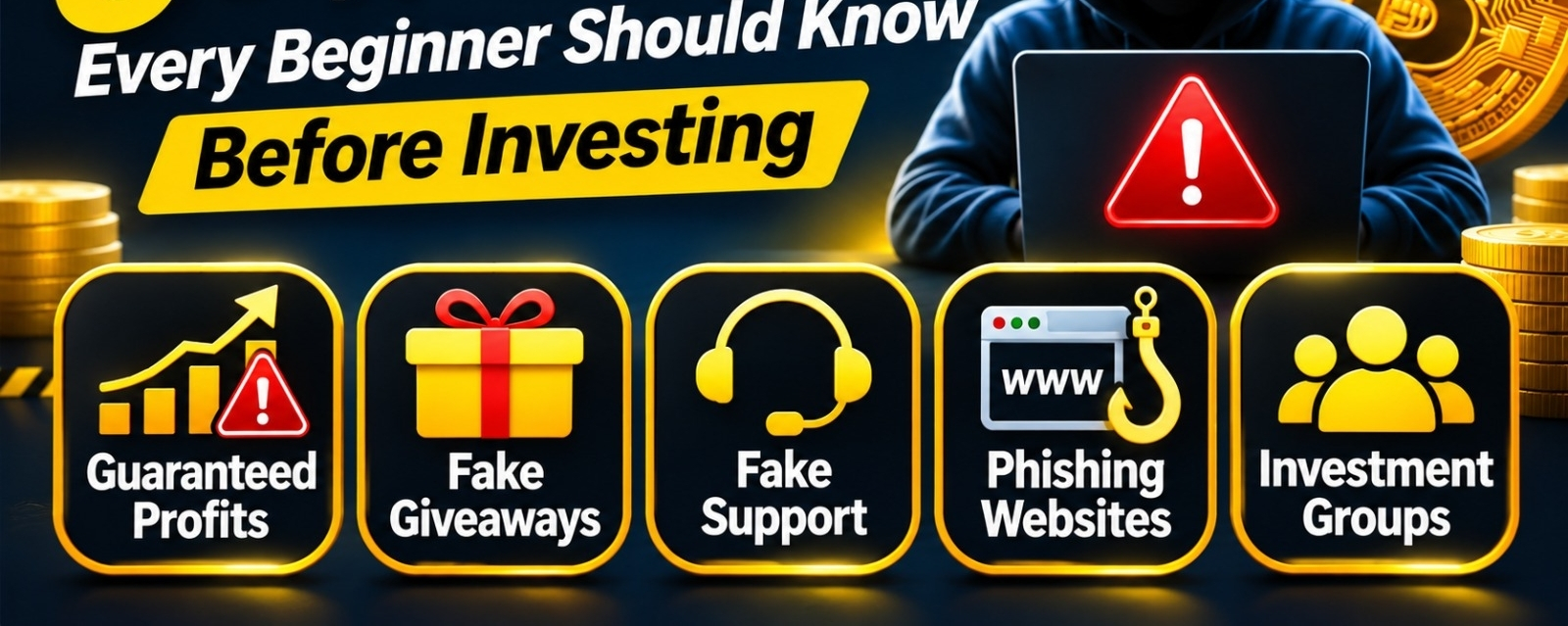
5 Krypto-Betrugsmaschen, die jeder Anfänger vor dem Investieren kennen sollteWenn du neu in der Welt der Kryptowährungen bist, gibt es ohnehin schon viel zu verstehen. Bitcoin, Wallets, Börsen und die Blockchain können anfangs verwirrend sein.
Doch bevor du ans Investieren denkst, solltest du etwas lernen: wie du einen Betrugsversuch erkennst.
Hier sind fünf gängige Tricks, vor denen du dich in Acht nehmen solltest.
1. Versprechen garantierter Gewinne
Stell dir vor, jemand sagt dir, dass er dein Geld in nur wenigen Tagen verdoppeln kann.
Das klingt verlockend, besonders wenn du neu bist und siehst, wie andere Screenshots mit riesigen Gewinnen posten.
Doch die Kurse von Kryptowährungen können unerwartet steigen oder fallen. Niemand kann garantieren, dass eine Investition immer Gewinn abwirft.
5 Krypto-Betrugsmaschen, die jeder Anfänger vor dem Investieren kennen sollte
Wenn du neu in der Welt der Kryptowährungen bist, gibt es ohnehin schon viel zu verstehen. Bitcoin, Wallets, Börsen und die Blockchain können anfangs verwirrend sein.
Doch bevor du ans Investieren denkst, solltest du etwas lernen: wie du einen Betrugsversuch erkennst.
Hier sind fünf gängige Tricks, vor denen du dich in Acht nehmen solltest.
1. Versprechen garantierter Gewinne
Stell dir vor, jemand sagt dir, dass er dein Geld in nur wenigen Tagen verdoppeln kann.
Das klingt verlockend, besonders wenn du neu bist und siehst, wie andere Screenshots mit riesigen Gewinnen posten.
Doch die Kurse von Kryptowährungen können unerwartet steigen oder fallen. Niemand kann garantieren, dass eine Investition immer Gewinn abwirft.
Doch bevor du ans Investieren denkst, solltest du etwas lernen: wie du einen Betrugsversuch erkennst.
Hier sind fünf gängige Tricks, vor denen du dich in Acht nehmen solltest.
1. Versprechen garantierter Gewinne
Stell dir vor, jemand sagt dir, dass er dein Geld in nur wenigen Tagen verdoppeln kann.
Das klingt verlockend, besonders wenn du neu bist und siehst, wie andere Screenshots mit riesigen Gewinnen posten.
Doch die Kurse von Kryptowährungen können unerwartet steigen oder fallen. Niemand kann garantieren, dass eine Investition immer Gewinn abwirft.
98
·
--
3 Krypto-Fehler, die ich vermeiden möchte
Ich bin neu in der Kryptowelt, und je mehr ich lese, desto klarer wird mir, wie leicht es ist, Geld zu verlieren.
- Eine Coin kaufen, nur weil alle darüber reden
- Jemandem vertrauen, der garantierte Gewinne verspricht. Wenn es zu einfach klingt, stimmt es wahrscheinlich nicht
- Die Sicherheit vernachlässigen: starke Passwörter, Zwei-Faktor-Authentifizierung und nicht auf irgendwelche Links klicken
Was mich überrascht hat, ist, wie schnell sich der Bitcoin-Kurs verändert. Ich hätte nicht gedacht, dass er so stark schwankt.
Das ist einer der Gründe, warum ich mir Zeit nehme, zu lernen, statt mich Hals über Kopf ins Trading zu stürzen.
Welchen Fehler würdest du Anfängern raten zu vermeiden?
#CryptoBeginners #cryptosignals #bitcoin
3 Krypto-Fehler, die ich vermeiden möchte
Ich bin neu in der Kryptowelt, und je mehr ich lese, desto klarer wird mir, wie leicht es ist, Geld zu verlieren.
- Eine Coin kaufen, nur weil alle darüber reden
- Jemandem vertrauen, der garantierte Gewinne verspricht. Wenn es zu einfach klingt, stimmt es wahrscheinlich nicht
- Die Sicherheit vernachlässigen: starke Passwörter, Zwei-Faktor-Authentifizierung und nicht auf irgendwelche Links klicken
Was mich überrascht hat, ist, wie schnell sich der Bitcoin-Kurs verändert. Ich hätte nicht gedacht, dass er so stark schwankt.
Das ist einer der Gründe, warum ich mir Zeit nehme, zu lernen, statt mich Hals über Kopf ins Trading zu stürzen.
Welchen Fehler würdest du Anfängern raten zu vermeiden?
#CryptoBeginners #cryptosignals #bitcoin
Ich bin neu in der Kryptowelt, und je mehr ich lese, desto klarer wird mir, wie leicht es ist, Geld zu verlieren.
- Eine Coin kaufen, nur weil alle darüber reden
- Jemandem vertrauen, der garantierte Gewinne verspricht. Wenn es zu einfach klingt, stimmt es wahrscheinlich nicht
- Die Sicherheit vernachlässigen: starke Passwörter, Zwei-Faktor-Authentifizierung und nicht auf irgendwelche Links klicken
Was mich überrascht hat, ist, wie schnell sich der Bitcoin-Kurs verändert. Ich hätte nicht gedacht, dass er so stark schwankt.
Das ist einer der Gründe, warum ich mir Zeit nehme, zu lernen, statt mich Hals über Kopf ins Trading zu stürzen.
Welchen Fehler würdest du Anfängern raten zu vermeiden?
#CryptoBeginners #cryptosignals #bitcoin
91

Artikel
Übersetzung ansehen
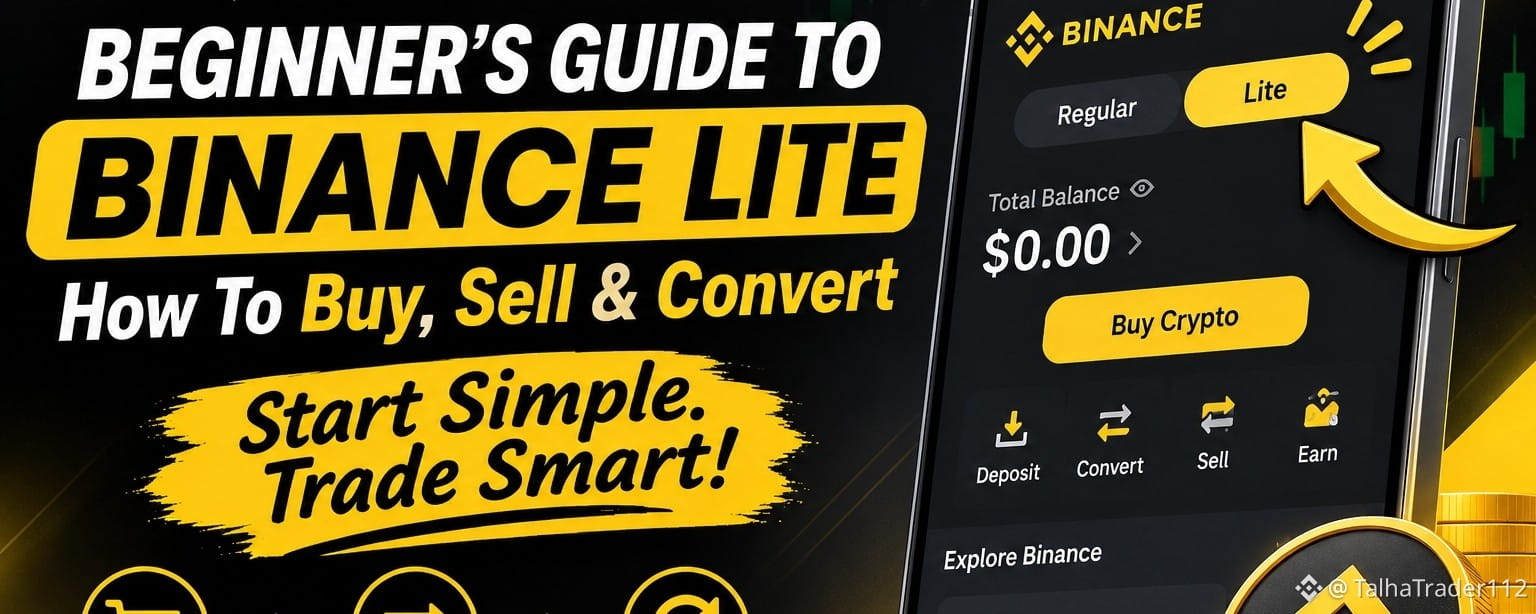
BEGINNER'S GUIDE TO BINANCE LITE | How to Buy, Sell & Convert CryptoBEGINNER'S GUIDE TO BINANCE LITE | How to Buy, Sell & Convert Crypto$M
Are you new to cryptocurrency and looking for an easy way to get started? Binance Lite is designed to make your crypto journey simple, smooth, and beginner-friendly.
In this guide, we'll explore Binance Lite, its main features, and how you can use it to buy, sell, and convert cryptocurrencies with ease.
What Is Binance Lite?
Binance Lite is a simplified version of the Binance app interface. It is designed especially for beginners who want a clean and easy crypto trading experience without complicated tools and advanced features.
How to Access Binance Lite
You don't need to download a separate application to use Binance Lite. This feature is available directly within the Binance mobile app.
Simply follow these steps:
1. Open the Binance app on your smartphone.
2. Look for the profile or app mode option.
3. Find the Lite mode setting, if available.
4. Switch to Lite mode to access the simplified interface.
If you cannot find this option, make sure your Binance app is updated to the latest version.
What Can You Do With Binance Lite?
With Binance Lite, beginners can explore several basic cryptocurrency features:
- Buy Crypto: Purchase supported cryptocurrencies.
- Sell Crypto: Sell supported digital assets.
- Convert Crypto: Exchange one supported cryptocurrency for another.
- View Your Assets: Keep track of your crypto portfolio.
Final Thoughts
Binance Lite offers a simple starting point for people who are new to cryptocurrency. Take your time to understand each feature, learn about market risks, and always make informed decisions.
Start Simple. Learn Smart. Trade Responsibly!
#BinanceLite #CryptoBeginners #CryptoGuide #LearnCrypto
BEGINNER'S GUIDE TO BINANCE LITE | How to Buy, Sell & Convert Crypto
BEGINNER'S GUIDE TO BINANCE LITE | How to Buy, Sell & Convert Crypto$M
Are you new to cryptocurrency and looking for an easy way to get started? Binance Lite is designed to make your crypto journey simple, smooth, and beginner-friendly.
In this guide, we'll explore Binance Lite, its main features, and how you can use it to buy, sell, and convert cryptocurrencies with ease.
What Is Binance Lite?
Binance Lite is a simplified version of the Binance app interface. It is designed especially for beginners who want a clean and easy crypto trading experience without complicated tools and advanced features.
How to Access Binance Lite
You don't need to download a separate application to use Binance Lite. This feature is available directly within the Binance mobile app.
Simply follow these steps:
1. Open the Binance app on your smartphone.
2. Look for the profile or app mode option.
3. Find the Lite mode setting, if available.
4. Switch to Lite mode to access the simplified interface.
If you cannot find this option, make sure your Binance app is updated to the latest version.
What Can You Do With Binance Lite?
With Binance Lite, beginners can explore several basic cryptocurrency features:
- Buy Crypto: Purchase supported cryptocurrencies.
- Sell Crypto: Sell supported digital assets.
- Convert Crypto: Exchange one supported cryptocurrency for another.
- View Your Assets: Keep track of your crypto portfolio.
Final Thoughts
Binance Lite offers a simple starting point for people who are new to cryptocurrency. Take your time to understand each feature, learn about market risks, and always make informed decisions.
Start Simple. Learn Smart. Trade Responsibly!
#BinanceLite #CryptoBeginners #CryptoGuide #LearnCrypto
Are you new to cryptocurrency and looking for an easy way to get started? Binance Lite is designed to make your crypto journey simple, smooth, and beginner-friendly.
In this guide, we'll explore Binance Lite, its main features, and how you can use it to buy, sell, and convert cryptocurrencies with ease.
What Is Binance Lite?
Binance Lite is a simplified version of the Binance app interface. It is designed especially for beginners who want a clean and easy crypto trading experience without complicated tools and advanced features.
How to Access Binance Lite
You don't need to download a separate application to use Binance Lite. This feature is available directly within the Binance mobile app.
Simply follow these steps:
1. Open the Binance app on your smartphone.
2. Look for the profile or app mode option.
3. Find the Lite mode setting, if available.
4. Switch to Lite mode to access the simplified interface.
If you cannot find this option, make sure your Binance app is updated to the latest version.
What Can You Do With Binance Lite?
With Binance Lite, beginners can explore several basic cryptocurrency features:
- Buy Crypto: Purchase supported cryptocurrencies.
- Sell Crypto: Sell supported digital assets.
- Convert Crypto: Exchange one supported cryptocurrency for another.
- View Your Assets: Keep track of your crypto portfolio.
Final Thoughts
Binance Lite offers a simple starting point for people who are new to cryptocurrency. Take your time to understand each feature, learn about market risks, and always make informed decisions.
Start Simple. Learn Smart. Trade Responsibly!
#BinanceLite #CryptoBeginners #CryptoGuide #LearnCrypto
132
·
--
📉 Eine Sache, die mich an Bitcoin überrascht hat!
Als ich angefangen habe, etwas über Kryptowährungen zu lernen, war mir ehrlich gesagt nicht klar, wie schnell sich der Bitcoin-Preis ändern kann.
An einem Tag kann er steigen und plötzlich wieder fallen. Ich wollte wissen, warum das passiert, und habe angefangen, mich näher damit zu beschäftigen.
Jetzt verstehe ich, dass Dinge wie Kauf- und Verkaufsdruck, Marktnachrichten und die Emotionen der Anleger die Kurse von Kryptowährungen beeinflussen können.
Eines habe ich bisher gelernt: Nur weil Bitcoin gerade steigt, heißt das nicht, dass es weiter bergauf geht.
Ich bin noch neu in der Welt der Kryptowährungen, deshalb lasse ich mir Zeit, lerne die Grundlagen und versuche, nicht überstürzt mit dem Trading anzufangen.
💬 An alle, die schon länger mit Kryptowährungen zu tun haben: Welchen Anfängerfehler habt ihr gemacht, den andere vermeiden sollten?
#Bitcoin #CryptoBeginners #cryptoeducation
📉 Eine Sache, die mich an Bitcoin überrascht hat!
Als ich angefangen habe, etwas über Kryptowährungen zu lernen, war mir ehrlich gesagt nicht klar, wie schnell sich der Bitcoin-Preis ändern kann.
An einem Tag kann er steigen und plötzlich wieder fallen. Ich wollte wissen, warum das passiert, und habe angefangen, mich näher damit zu beschäftigen.
Jetzt verstehe ich, dass Dinge wie Kauf- und Verkaufsdruck, Marktnachrichten und die Emotionen der Anleger die Kurse von Kryptowährungen beeinflussen können.
Eines habe ich bisher gelernt: Nur weil Bitcoin gerade steigt, heißt das nicht, dass es weiter bergauf geht.
Ich bin noch neu in der Welt der Kryptowährungen, deshalb lasse ich mir Zeit, lerne die Grundlagen und versuche, nicht überstürzt mit dem Trading anzufangen.
💬 An alle, die schon länger mit Kryptowährungen zu tun haben: Welchen Anfängerfehler habt ihr gemacht, den andere vermeiden sollten?
#Bitcoin #CryptoBeginners #cryptoeducation
Als ich angefangen habe, etwas über Kryptowährungen zu lernen, war mir ehrlich gesagt nicht klar, wie schnell sich der Bitcoin-Preis ändern kann.
An einem Tag kann er steigen und plötzlich wieder fallen. Ich wollte wissen, warum das passiert, und habe angefangen, mich näher damit zu beschäftigen.
Jetzt verstehe ich, dass Dinge wie Kauf- und Verkaufsdruck, Marktnachrichten und die Emotionen der Anleger die Kurse von Kryptowährungen beeinflussen können.
Eines habe ich bisher gelernt: Nur weil Bitcoin gerade steigt, heißt das nicht, dass es weiter bergauf geht.
Ich bin noch neu in der Welt der Kryptowährungen, deshalb lasse ich mir Zeit, lerne die Grundlagen und versuche, nicht überstürzt mit dem Trading anzufangen.
💬 An alle, die schon länger mit Kryptowährungen zu tun haben: Welchen Anfängerfehler habt ihr gemacht, den andere vermeiden sollten?
#Bitcoin #CryptoBeginners #cryptoeducation
134
·
--
🚀 3 wichtige Tipps für Krypto-Anfänger!
Bist du neu in der Kryptowelt? Hier sind 3 Dinge, die jeder Anfänger wissen sollte:
📚 1. Lerne die Grundlagen, bevor du investierst. 🔒 2. Schütze immer dein Konto und gib niemals dein Einmalpasswort weiter. ⚠️ 3. Investiere niemals Geld, dessen Verlust du dir nicht leisten kannst.
💡 Wissen ist wertvoller als schnelle Gewinne!
Was ist dein bester Rat für jemanden, der gerade mit Kryptowährungen anfängt? Teile ihn in den Kommentaren! 👇
#CryptoEducation #BitcoinETFs #CryptoBeginners
🚀 3 wichtige Tipps für Krypto-Anfänger!
Bist du neu in der Kryptowelt? Hier sind 3 Dinge, die jeder Anfänger wissen sollte:
📚 1. Lerne die Grundlagen, bevor du investierst. 🔒 2. Schütze immer dein Konto und gib niemals dein Einmalpasswort weiter. ⚠️ 3. Investiere niemals Geld, dessen Verlust du dir nicht leisten kannst.
💡 Wissen ist wertvoller als schnelle Gewinne!
Was ist dein bester Rat für jemanden, der gerade mit Kryptowährungen anfängt? Teile ihn in den Kommentaren! 👇
#CryptoEducation #BitcoinETFs #CryptoBeginners
Bist du neu in der Kryptowelt? Hier sind 3 Dinge, die jeder Anfänger wissen sollte:
📚 1. Lerne die Grundlagen, bevor du investierst. 🔒 2. Schütze immer dein Konto und gib niemals dein Einmalpasswort weiter. ⚠️ 3. Investiere niemals Geld, dessen Verlust du dir nicht leisten kannst.
💡 Wissen ist wertvoller als schnelle Gewinne!
Was ist dein bester Rat für jemanden, der gerade mit Kryptowährungen anfängt? Teile ihn in den Kommentaren! 👇
#CryptoEducation #BitcoinETFs #CryptoBeginners
79

·
--
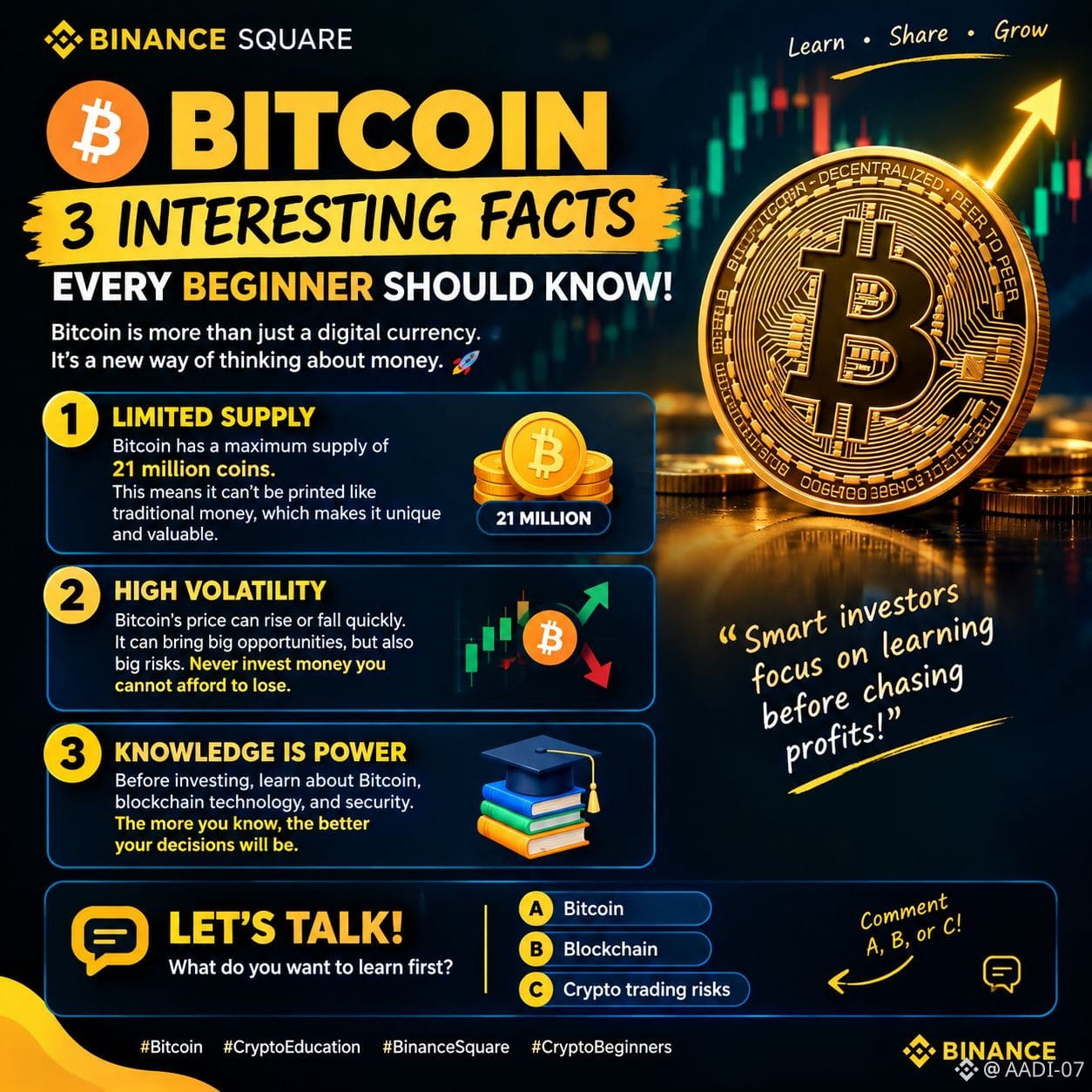
🚀 3 ERSTAUNLICHE #bitcoin FAKTEN, DIE JEDER ANFÄNGER KENNEN SOLLTE! ₿
💰 1. BEGRENZTES ANGEBOT
Die maximale Menge an Bitcoin beträgt 21 Millionen Coins!
📉 2. HOHE VOLATILITÄT
Der Bitcoin-Preis kann schnell steigen oder fallen. Geh niemals davon aus, dass Gewinne garantiert sind.
📚 3. WISSEN IST MACHT
Informiere dich über Bitcoin, Blockchain und die Sicherheit von Kryptowährungen, bevor du finanzielle Entscheidungen triffst.
💡 Denk daran: Lerne zuerst, recherchiere sorgfältig und riskiere niemals Geld, dessen Verlust du dir nicht leisten kannst.
🔥 LASS UNS REDEN!
Was möchtest du als Nächstes lernen?
🅰️ Bitcoin-Grundlagen
🅱️ Blockchain-Technologie
🅲 Sicherheit von Kryptowährungen
👇 Kommentiere A, B oder C!
#Bitcoin #KryptoBildung #BinanceSquare #CryptoBeginners
🚀 3 ERSTAUNLICHE #bitcoin FAKTEN, DIE JEDER ANFÄNGER KENNEN SOLLTE! ₿
💰 1. BEGRENZTES ANGEBOT
Die maximale Menge an Bitcoin beträgt 21 Millionen Coins!
📉 2. HOHE VOLATILITÄT
Der Bitcoin-Preis kann schnell steigen oder fallen. Geh niemals davon aus, dass Gewinne garantiert sind.
📚 3. WISSEN IST MACHT
Informiere dich über Bitcoin, Blockchain und die Sicherheit von Kryptowährungen, bevor du finanzielle Entscheidungen triffst.
💡 Denk daran: Lerne zuerst, recherchiere sorgfältig und riskiere niemals Geld, dessen Verlust du dir nicht leisten kannst.
🔥 LASS UNS REDEN!
Was möchtest du als Nächstes lernen?
🅰️ Bitcoin-Grundlagen
🅱️ Blockchain-Technologie
🅲 Sicherheit von Kryptowährungen
👇 Kommentiere A, B oder C!
#Bitcoin #KryptoBildung #BinanceSquare #CryptoBeginners
💰 1. BEGRENZTES ANGEBOT
Die maximale Menge an Bitcoin beträgt 21 Millionen Coins!
📉 2. HOHE VOLATILITÄT
Der Bitcoin-Preis kann schnell steigen oder fallen. Geh niemals davon aus, dass Gewinne garantiert sind.
📚 3. WISSEN IST MACHT
Informiere dich über Bitcoin, Blockchain und die Sicherheit von Kryptowährungen, bevor du finanzielle Entscheidungen triffst.
💡 Denk daran: Lerne zuerst, recherchiere sorgfältig und riskiere niemals Geld, dessen Verlust du dir nicht leisten kannst.
🔥 LASS UNS REDEN!
Was möchtest du als Nächstes lernen?
🅰️ Bitcoin-Grundlagen
🅱️ Blockchain-Technologie
🅲 Sicherheit von Kryptowährungen
👇 Kommentiere A, B oder C!
#Bitcoin #KryptoBildung #BinanceSquare #CryptoBeginners
1
71

·
--
🚀 Neu in der Kryptowelt? Fang mit Wissen an!
Bevor du in Kryptowährungen investierst, nimm dir Zeit, um zu verstehen, wie der Markt funktioniert.
✅ Lerne zuerst die Grundlagen.
✅ Recherchiere selbst (DYOR).
✅ Investiere niemals Geld, dessen Verlust du dir nicht leisten kannst.
✅ Vermeide FOMO und emotionale Entscheidungen.
Denk daran: Lernen ist wichtiger, als schnellen Gewinnen hinterherzujagen! 📚
#BinanceSquare #KryptoBildung #CryptoBeginners
🚀 Neu in der Kryptowelt? Fang mit Wissen an!
Bevor du in Kryptowährungen investierst, nimm dir Zeit, um zu verstehen, wie der Markt funktioniert.
✅ Lerne zuerst die Grundlagen.
✅ Recherchiere selbst (DYOR).
✅ Investiere niemals Geld, dessen Verlust du dir nicht leisten kannst.
✅ Vermeide FOMO und emotionale Entscheidungen.
Denk daran: Lernen ist wichtiger, als schnellen Gewinnen hinterherzujagen! 📚
#BinanceSquare #KryptoBildung #CryptoBeginners
Bevor du in Kryptowährungen investierst, nimm dir Zeit, um zu verstehen, wie der Markt funktioniert.
✅ Lerne zuerst die Grundlagen.
✅ Recherchiere selbst (DYOR).
✅ Investiere niemals Geld, dessen Verlust du dir nicht leisten kannst.
✅ Vermeide FOMO und emotionale Entscheidungen.
Denk daran: Lernen ist wichtiger, als schnellen Gewinnen hinterherzujagen! 📚
#BinanceSquare #KryptoBildung #CryptoBeginners
46
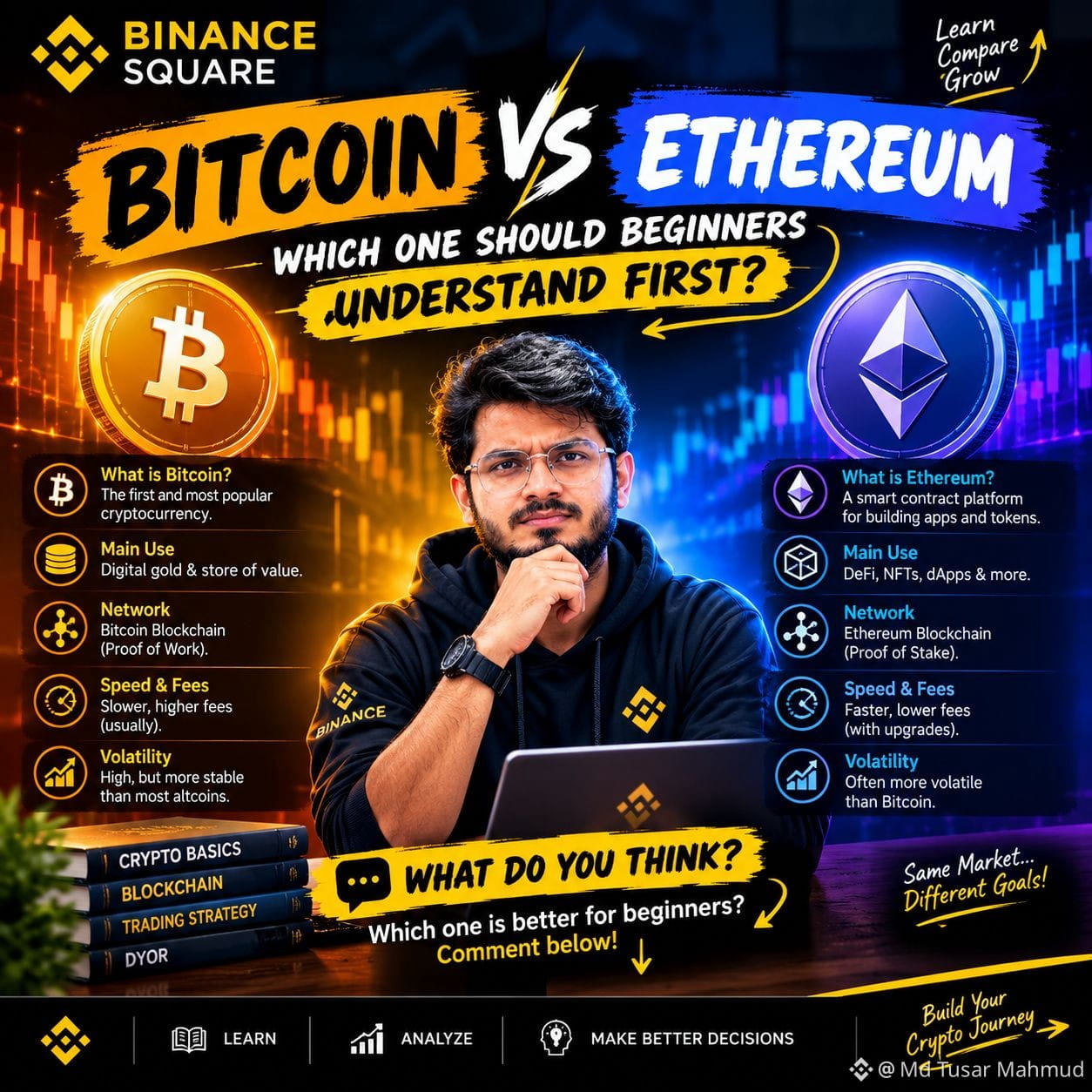
🔥 BITCOIN VS. ETHEREUM — WAS SOLLTEN EINSTEIGER ZUERST VERSTEHEN? 🚀
Bitcoin und Ethereum gehören zu den bekanntesten Namen in der Kryptowelt, erfüllen aber unterschiedliche Zwecke.
🟠 BITCOIN (BTC)
• Wird oft als digitales Gold betrachtet.
• Wurde in erster Linie als dezentrales Peer-to-Peer-Zahlungssystem entwickelt.
• Sichert sein Netzwerk mit Proof of Work.
🔵 ETHEREUM (ETH)
• Eine programmierbare Blockchain-Plattform.
• Unterstützt Smart Contracts und dezentrale Anwendungen.
• Sichert sein Netzwerk mit Proof of Stake.
💡 DER WICHTIGSTE UNTERSCHIED:
Bitcoin konzentriert sich hauptsächlich auf Peer-to-Peer-Geld und die Wertaufbewahrung, während Ethereum programmierbare Anwendungen und digitale Vermögenswerte ermöglicht.
⚠️ Beide sind mit Risiken verbunden, und keines von beiden garantiert Gewinne. Netzwerkgebühren, Transaktionsgeschwindigkeit und Marktvolatilität können variieren.
👇 LASST UNS DARÜBER DISKUTIEREN!
Wenn du neu in der Kryptowelt bist: Was würdest du zuerst lernen?
🟠 A — Bitcoin
🔵 B — Ethereum
📚 C — Beides, bevor ich eine Entscheidung treffe
💬 Kommentiere mit A, B oder C und sag uns WARUM!
⚠️ Nur zu Bildungszwecken, keine Finanzberatung. Recherchiere immer selbst (DYOR).
#BinanceSquare #Bitcoin #Ethereum #KryptoBildung $AMZNB $TSMB $GOOGLB #Blockchain #CryptoBeginners
🔥 BITCOIN VS. ETHEREUM — WAS SOLLTEN EINSTEIGER ZUERST VERSTEHEN? 🚀
Bitcoin und Ethereum gehören zu den bekanntesten Namen in der Kryptowelt, erfüllen aber unterschiedliche Zwecke.
🟠 BITCOIN (BTC)
• Wird oft als digitales Gold betrachtet.
• Wurde in erster Linie als dezentrales Peer-to-Peer-Zahlungssystem entwickelt.
• Sichert sein Netzwerk mit Proof of Work.
🔵 ETHEREUM (ETH)
• Eine programmierbare Blockchain-Plattform.
• Unterstützt Smart Contracts und dezentrale Anwendungen.
• Sichert sein Netzwerk mit Proof of Stake.
💡 DER WICHTIGSTE UNTERSCHIED:
Bitcoin konzentriert sich hauptsächlich auf Peer-to-Peer-Geld und die Wertaufbewahrung, während Ethereum programmierbare Anwendungen und digitale Vermögenswerte ermöglicht.
⚠️ Beide sind mit Risiken verbunden, und keines von beiden garantiert Gewinne. Netzwerkgebühren, Transaktionsgeschwindigkeit und Marktvolatilität können variieren.
👇 LASST UNS DARÜBER DISKUTIEREN!
Wenn du neu in der Kryptowelt bist: Was würdest du zuerst lernen?
🟠 A — Bitcoin
🔵 B — Ethereum
📚 C — Beides, bevor ich eine Entscheidung treffe
💬 Kommentiere mit A, B oder C und sag uns WARUM!
⚠️ Nur zu Bildungszwecken, keine Finanzberatung. Recherchiere immer selbst (DYOR).
#BinanceSquare #Bitcoin #Ethereum #KryptoBildung $AMZNB $TSMB $GOOGLB #Blockchain #CryptoBeginners
Bitcoin und Ethereum gehören zu den bekanntesten Namen in der Kryptowelt, erfüllen aber unterschiedliche Zwecke.
🟠 BITCOIN (BTC)
• Wird oft als digitales Gold betrachtet.
• Wurde in erster Linie als dezentrales Peer-to-Peer-Zahlungssystem entwickelt.
• Sichert sein Netzwerk mit Proof of Work.
🔵 ETHEREUM (ETH)
• Eine programmierbare Blockchain-Plattform.
• Unterstützt Smart Contracts und dezentrale Anwendungen.
• Sichert sein Netzwerk mit Proof of Stake.
💡 DER WICHTIGSTE UNTERSCHIED:
Bitcoin konzentriert sich hauptsächlich auf Peer-to-Peer-Geld und die Wertaufbewahrung, während Ethereum programmierbare Anwendungen und digitale Vermögenswerte ermöglicht.
⚠️ Beide sind mit Risiken verbunden, und keines von beiden garantiert Gewinne. Netzwerkgebühren, Transaktionsgeschwindigkeit und Marktvolatilität können variieren.
👇 LASST UNS DARÜBER DISKUTIEREN!
Wenn du neu in der Kryptowelt bist: Was würdest du zuerst lernen?
🟠 A — Bitcoin
🔵 B — Ethereum
📚 C — Beides, bevor ich eine Entscheidung treffe
💬 Kommentiere mit A, B oder C und sag uns WARUM!
⚠️ Nur zu Bildungszwecken, keine Finanzberatung. Recherchiere immer selbst (DYOR).
#BinanceSquare #Bitcoin #Ethereum #KryptoBildung $AMZNB $TSMB $GOOGLB #Blockchain #CryptoBeginners
1
82

·
--
Artikel
So verdienst du 5 Dollar pro Tag auf Binance, ohne eigenes Geld einzusetzen (vollständiger Leitfaden)Viele Einsteiger möchten auf Binance Geld verdienen, haben aber kein Geld zum Investieren. Die gute Nachricht: Binance bietet gelegentlich Prämienprogramme, Werbekampagnen und Lernmöglichkeiten an, bei denen berechtigte Nutzer Prämien ohne eigene Einzahlung erhalten können.
So verdienst du 5 Dollar pro Tag auf Binance, ohne eigenes Geld einzusetzen (vollständiger Leitfaden)
Viele Einsteiger möchten auf Binance Geld verdienen, haben aber kein Geld zum Investieren. Die gute Nachricht: Binance bietet gelegentlich Prämienprogramme, Werbekampagnen und Lernmöglichkeiten an, bei denen berechtigte Nutzer Prämien ohne eigene Einzahlung erhalten können.
235

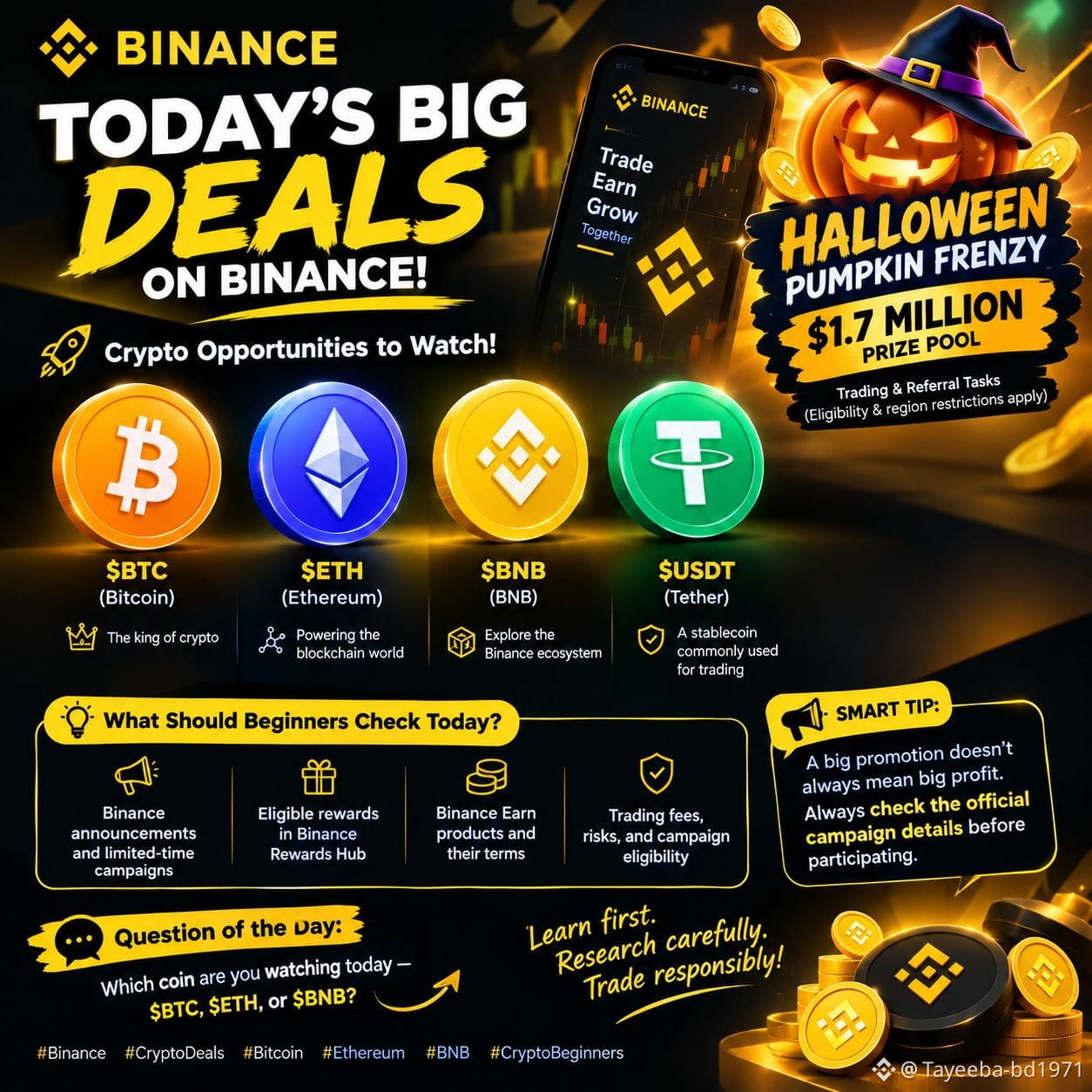
🔥 🚀 DIE GROSSEN ANGEBOTE HEUTE AUF BINANCE! 🚀
💰 Spannende Krypto-Chancen!
👑 $BTC (Bitcoin) — Der König der Kryptowährungen
💎 $ETH (Ethereum) — Treibt die Blockchain-Welt an
⚡ $BNB (BNB) — Entdecke das Binance-Ökosystem
💵 $USDT (Tether) — Ein Stablecoin, der häufig für den Handel verwendet wird
🎯 Worauf sollten Einsteiger heute achten? ✅ Ankündigungen und zeitlich begrenzte Aktionen von Binance
✅ Verfügbare Prämien im Binance Rewards Hub
✅ Binance-Earn-Produkte und ihre Bedingungen
✅ Handelsgebühren, Risiken und Teilnahmebedingungen für Aktionen
📌 Tipp: Eine große Aktion bedeutet nicht automatisch großen Gewinn. Prüfe vor der Teilnahme immer die offiziellen Aktionsdetails.
💬 Frage des Tages: Welche Coin beobachtest du heute — $BTC, $ETH oder $BNB? 👇
🚀 Lerne zuerst. Recherchiere sorgfältig. Handle verantwortungsbewusst!
#Binance #CryptoDeals #Bitcoin #Ethereum #BNB #CryptoBeginners
🔥 🚀 DIE GROSSEN ANGEBOTE HEUTE AUF BINANCE! 🚀
💰 Spannende Krypto-Chancen!
👑 $BTC (Bitcoin) — Der König der Kryptowährungen
💎 $ETH (Ethereum) — Treibt die Blockchain-Welt an
⚡ $BNB (BNB) — Entdecke das Binance-Ökosystem
💵 $USDT (Tether) — Ein Stablecoin, der häufig für den Handel verwendet wird
🎯 Worauf sollten Einsteiger heute achten? ✅ Ankündigungen und zeitlich begrenzte Aktionen von Binance
✅ Verfügbare Prämien im Binance Rewards Hub
✅ Binance-Earn-Produkte und ihre Bedingungen
✅ Handelsgebühren, Risiken und Teilnahmebedingungen für Aktionen
📌 Tipp: Eine große Aktion bedeutet nicht automatisch großen Gewinn. Prüfe vor der Teilnahme immer die offiziellen Aktionsdetails.
💬 Frage des Tages: Welche Coin beobachtest du heute — $BTC , $ETH oder $BNB ? 👇
🚀 Lerne zuerst. Recherchiere sorgfältig. Handle verantwortungsbewusst!
#Binance #CryptoDeals #Bitcoin #Ethereum #BNB #CryptoBeginners
💰 Spannende Krypto-Chancen!
👑 $BTC (Bitcoin) — Der König der Kryptowährungen
💎 $ETH (Ethereum) — Treibt die Blockchain-Welt an
⚡ $BNB (BNB) — Entdecke das Binance-Ökosystem
💵 $USDT (Tether) — Ein Stablecoin, der häufig für den Handel verwendet wird
🎯 Worauf sollten Einsteiger heute achten? ✅ Ankündigungen und zeitlich begrenzte Aktionen von Binance
✅ Verfügbare Prämien im Binance Rewards Hub
✅ Binance-Earn-Produkte und ihre Bedingungen
✅ Handelsgebühren, Risiken und Teilnahmebedingungen für Aktionen
📌 Tipp: Eine große Aktion bedeutet nicht automatisch großen Gewinn. Prüfe vor der Teilnahme immer die offiziellen Aktionsdetails.
💬 Frage des Tages: Welche Coin beobachtest du heute — $BTC , $ETH oder $BNB ? 👇
🚀 Lerne zuerst. Recherchiere sorgfältig. Handle verantwortungsbewusst!
#Binance #CryptoDeals #Bitcoin #Ethereum #BNB #CryptoBeginners
96


·
--
Artikel
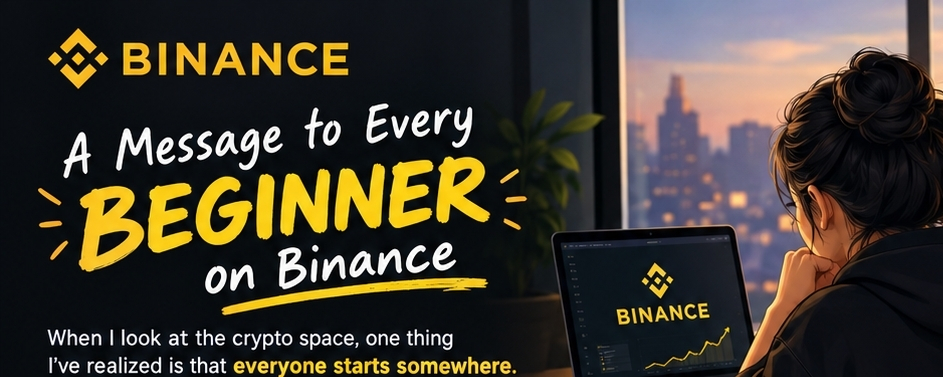
EINE BOTSCHAFT AN ALLE, DIE GERADE ERST BEI BINANCE ANFANGEN 🟡Wenn ich mir die Kryptowelt anschaue, wird mir eines klar: Jeder fängt irgendwo an.
Niemand kommt zu Binance und weiß schon alles über Trading, Charts, Marktbewegungen oder Web3. Wir alle müssen Schritt für Schritt lernen.
Wenn du neu bei Binance bist, möchte ich ein paar Dinge mit dir teilen, die mir persönlich aufgefallen sind.
🔸 Hab es nicht eilig, Geld zu verdienen. Konzentriere dich zuerst darauf, zu lernen, wie der Markt funktioniert.
🔸 Fang klein an. Du brauchst keine große Investition, um mit deiner Lernreise zu beginnen.
🔸 Folge niemals blind jedem Trend. Recherchiere selbst und informiere dich genau, worauf du dich einlässt.
EINE BOTSCHAFT AN ALLE, DIE GERADE ERST BEI BINANCE ANFANGEN 🟡
Wenn ich mir die Kryptowelt anschaue, wird mir eines klar: Jeder fängt irgendwo an.
Niemand kommt zu Binance und weiß schon alles über Trading, Charts, Marktbewegungen oder Web3. Wir alle müssen Schritt für Schritt lernen.
Wenn du neu bei Binance bist, möchte ich ein paar Dinge mit dir teilen, die mir persönlich aufgefallen sind.
🔸 Hab es nicht eilig, Geld zu verdienen. Konzentriere dich zuerst darauf, zu lernen, wie der Markt funktioniert.
🔸 Fang klein an. Du brauchst keine große Investition, um mit deiner Lernreise zu beginnen.
🔸 Folge niemals blind jedem Trend. Recherchiere selbst und informiere dich genau, worauf du dich einlässt.
Niemand kommt zu Binance und weiß schon alles über Trading, Charts, Marktbewegungen oder Web3. Wir alle müssen Schritt für Schritt lernen.
Wenn du neu bei Binance bist, möchte ich ein paar Dinge mit dir teilen, die mir persönlich aufgefallen sind.
🔸 Hab es nicht eilig, Geld zu verdienen. Konzentriere dich zuerst darauf, zu lernen, wie der Markt funktioniert.
🔸 Fang klein an. Du brauchst keine große Investition, um mit deiner Lernreise zu beginnen.
🔸 Folge niemals blind jedem Trend. Recherchiere selbst und informiere dich genau, worauf du dich einlässt.
1
147
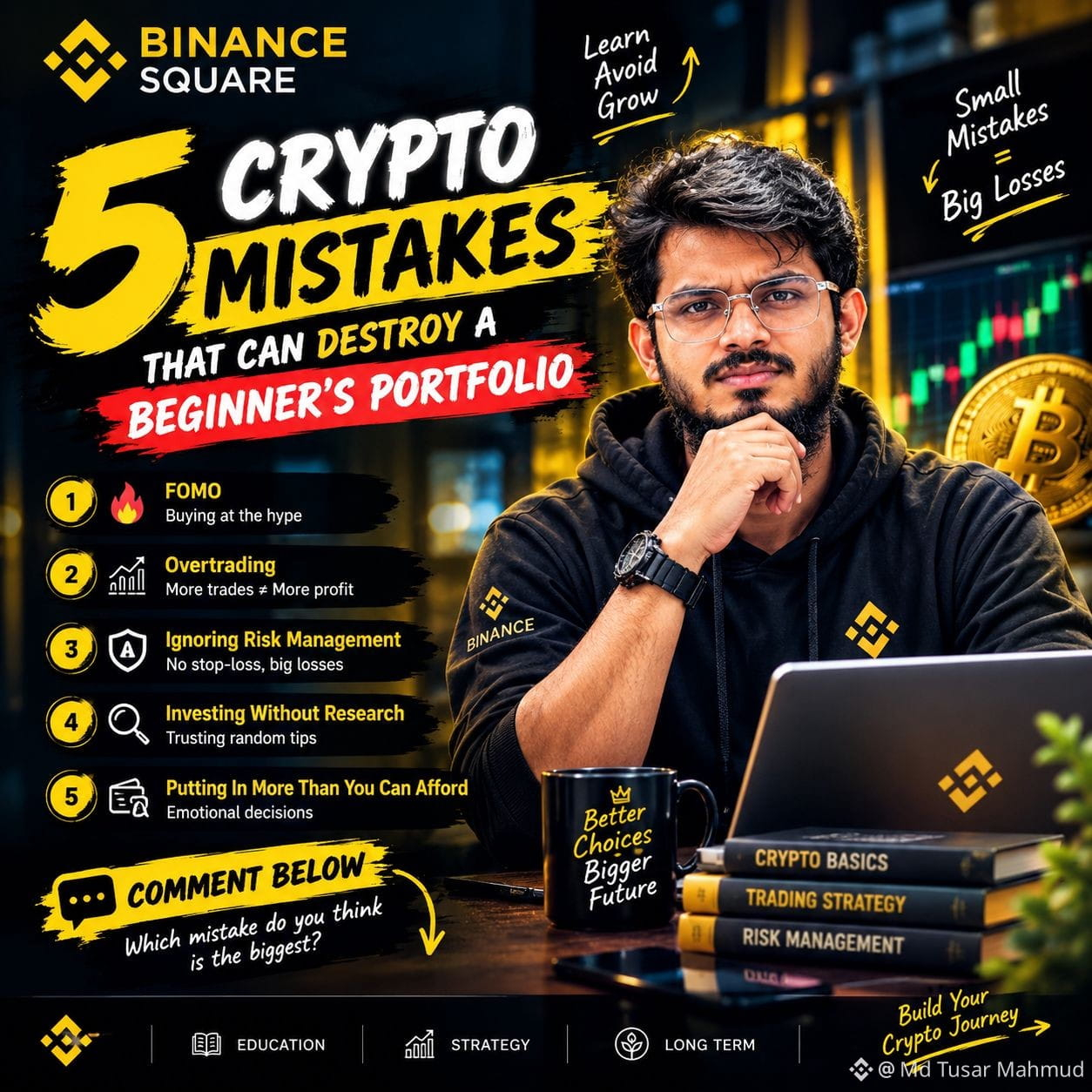
🚨 5 KRYPTO-FEHLER, DIE DAS PORTFOLIO VON ANFÄNGERN ZERSTÖREN KÖNNEN!
Möchtest du dir eine solidere Grundlage für Krypto aufbauen? 🧠
Viele Anfänger konzentrieren sich auf Gewinne, übersehen dabei aber die Risiken. Hier sind 5 häufige Fehler, die du vermeiden solltest:
❌ 1. FOMO-Käufe
Kaufen, nur weil ein Coin gerade durch die Decke geht.
❌ 2. Zu häufiges Handeln
Zu viele Trades ohne klaren Plan abschließen.
❌ 3. Risikomanagement ignorieren
Bei einem einzigen Trade zu viel riskieren.
❌ 4. Ohne Recherche investieren
Zufälligen Tipps folgen, statt selbst zu recherchieren.
❌ 5. Mehr investieren, als man sich leisten kann
Sich von Emotionen dazu verleiten lassen, die eigenen finanziellen Grenzen zu überschreiten.
💡 Denk daran: Dein Kapital zu schützen und kontinuierlich dazuzulernen ist wichtiger, als schnellen Gewinnen hinterherzujagen.
👇 DISKUTIEREN WIR!
Welcher Fehler schadet deiner Meinung nach Anfängern am meisten?
Kommentiere mit 1, 2, 3, 4 oder 5 – und sag uns, warum!
⚠️ Nur zu Bildungszwecken, keine Finanzberatung. Krypto ist riskant, und keine Strategie garantiert Gewinne. Recherchiere immer selbst (DYOR).
#BinanceSquare #cryptouniverseofficial #CryptoBeginners #RiskManagement #bitcoin $MSFTB $TSMB $SPCXB
🚨 5 KRYPTO-FEHLER, DIE DAS PORTFOLIO VON ANFÄNGERN ZERSTÖREN KÖNNEN!
Möchtest du dir eine solidere Grundlage für Krypto aufbauen? 🧠
Viele Anfänger konzentrieren sich auf Gewinne, übersehen dabei aber die Risiken. Hier sind 5 häufige Fehler, die du vermeiden solltest:
❌ 1. FOMO-Käufe
Kaufen, nur weil ein Coin gerade durch die Decke geht.
❌ 2. Zu häufiges Handeln
Zu viele Trades ohne klaren Plan abschließen.
❌ 3. Risikomanagement ignorieren
Bei einem einzigen Trade zu viel riskieren.
❌ 4. Ohne Recherche investieren
Zufälligen Tipps folgen, statt selbst zu recherchieren.
❌ 5. Mehr investieren, als man sich leisten kann
Sich von Emotionen dazu verleiten lassen, die eigenen finanziellen Grenzen zu überschreiten.
💡 Denk daran: Dein Kapital zu schützen und kontinuierlich dazuzulernen ist wichtiger, als schnellen Gewinnen hinterherzujagen.
👇 DISKUTIEREN WIR!
Welcher Fehler schadet deiner Meinung nach Anfängern am meisten?
Kommentiere mit 1, 2, 3, 4 oder 5 – und sag uns, warum!
⚠️ Nur zu Bildungszwecken, keine Finanzberatung. Krypto ist riskant, und keine Strategie garantiert Gewinne. Recherchiere immer selbst (DYOR).
#BinanceSquare #cryptouniverseofficial #CryptoBeginners #RiskManagement #bitcoin $MSFTB $TSMB $SPCXB
Möchtest du dir eine solidere Grundlage für Krypto aufbauen? 🧠
Viele Anfänger konzentrieren sich auf Gewinne, übersehen dabei aber die Risiken. Hier sind 5 häufige Fehler, die du vermeiden solltest:
❌ 1. FOMO-Käufe
Kaufen, nur weil ein Coin gerade durch die Decke geht.
❌ 2. Zu häufiges Handeln
Zu viele Trades ohne klaren Plan abschließen.
❌ 3. Risikomanagement ignorieren
Bei einem einzigen Trade zu viel riskieren.
❌ 4. Ohne Recherche investieren
Zufälligen Tipps folgen, statt selbst zu recherchieren.
❌ 5. Mehr investieren, als man sich leisten kann
Sich von Emotionen dazu verleiten lassen, die eigenen finanziellen Grenzen zu überschreiten.
💡 Denk daran: Dein Kapital zu schützen und kontinuierlich dazuzulernen ist wichtiger, als schnellen Gewinnen hinterherzujagen.
👇 DISKUTIEREN WIR!
Welcher Fehler schadet deiner Meinung nach Anfängern am meisten?
Kommentiere mit 1, 2, 3, 4 oder 5 – und sag uns, warum!
⚠️ Nur zu Bildungszwecken, keine Finanzberatung. Krypto ist riskant, und keine Strategie garantiert Gewinne. Recherchiere immer selbst (DYOR).
#BinanceSquare #cryptouniverseofficial #CryptoBeginners #RiskManagement #bitcoin $MSFTB $TSMB $SPCXB
1
93

·
--
💡 Krypto für Einsteiger: Informiere dich, bevor du investierst
Du startest gerade deine Krypto-Reise? Folge nicht blind dem Hype. Nimm dir Zeit, den Zweck eines Projekts, den Nutzen des Tokens, die Marktrisiken und Sicherheitsmaßnahmen zu verstehen.
✅ Recherchiere, bevor du Entscheidungen triffst
✅ Investiere niemals Geld, dessen Verlust du dir nicht leisten kannst
✅ Schütze dein Konto mit starken Sicherheitsmaßnahmen
✅ Lerne weiter und handle verantwortungsbewusst
Was ist die wichtigste Krypto-Lektion, die du bisher gelernt hast? Teile sie in den Kommentaren! 👇
#CryptoEducation💡🚀 #BinanceSquare sind #CryptoBeginners
💡 Krypto für Einsteiger: Informiere dich, bevor du investierst
Du startest gerade deine Krypto-Reise? Folge nicht blind dem Hype. Nimm dir Zeit, den Zweck eines Projekts, den Nutzen des Tokens, die Marktrisiken und Sicherheitsmaßnahmen zu verstehen.
✅ Recherchiere, bevor du Entscheidungen triffst
✅ Investiere niemals Geld, dessen Verlust du dir nicht leisten kannst
✅ Schütze dein Konto mit starken Sicherheitsmaßnahmen
✅ Lerne weiter und handle verantwortungsbewusst
Was ist die wichtigste Krypto-Lektion, die du bisher gelernt hast? Teile sie in den Kommentaren! 👇
#CryptoEducation💡🚀 #BinanceSquare sind #CryptoBeginners
Du startest gerade deine Krypto-Reise? Folge nicht blind dem Hype. Nimm dir Zeit, den Zweck eines Projekts, den Nutzen des Tokens, die Marktrisiken und Sicherheitsmaßnahmen zu verstehen.
✅ Recherchiere, bevor du Entscheidungen triffst
✅ Investiere niemals Geld, dessen Verlust du dir nicht leisten kannst
✅ Schütze dein Konto mit starken Sicherheitsmaßnahmen
✅ Lerne weiter und handle verantwortungsbewusst
Was ist die wichtigste Krypto-Lektion, die du bisher gelernt hast? Teile sie in den Kommentaren! 👇
#CryptoEducation💡🚀 #BinanceSquare sind #CryptoBeginners
78

🚀 Neu bei Krypto? Hier starten!
Bevor du deinen ersten Trade machst, solltest du diese 4 Grundlagen kennenlernen:
1️⃣ Candlestick-Muster
2️⃣ Unterstützungs- und Widerstandsniveaus
3️⃣ Stop-Loss und Risikomanagement
4️⃣ Markttrends
Versuche nicht, schnell Geld zu verdienen. Lerne zuerst, wie du dein Geld schützen kannst. 📊
Was sollten Anfänger zuerst lernen? 👇
#CryptoBeginners #BinanceSquareBTC
#learncrypto
$NVDAB $AAPLB $MSFTB
🚀 Neu bei Krypto? Hier starten!
Bevor du deinen ersten Trade machst, solltest du diese 4 Grundlagen kennenlernen:
1️⃣ Candlestick-Muster
2️⃣ Unterstützungs- und Widerstandsniveaus
3️⃣ Stop-Loss und Risikomanagement
4️⃣ Markttrends
Versuche nicht, schnell Geld zu verdienen. Lerne zuerst, wie du dein Geld schützen kannst. 📊
Was sollten Anfänger zuerst lernen? 👇
#CryptoBeginners #BinanceSquareBTC
#learncrypto
$NVDAB $AAPLB $MSFTB
Bevor du deinen ersten Trade machst, solltest du diese 4 Grundlagen kennenlernen:
1️⃣ Candlestick-Muster
2️⃣ Unterstützungs- und Widerstandsniveaus
3️⃣ Stop-Loss und Risikomanagement
4️⃣ Markttrends
Versuche nicht, schnell Geld zu verdienen. Lerne zuerst, wie du dein Geld schützen kannst. 📊
Was sollten Anfänger zuerst lernen? 👇
#CryptoBeginners #BinanceSquareBTC
#learncrypto
$NVDAB $AAPLB $MSFTB
49

Spot- und Futures-Handel sind nicht dasselbe. Anfänger sollten den Unterschied kennen, bevor sie handeln.
Auf einem Spotmarkt bedeutet der Kauf von BTC in der Regel, dass du den Vermögenswert in deinem Börsenkonto erwirbst.
Auf einem Futures-Markt handelst du einen Kontrakt, der an den Preis eines Vermögenswerts gekoppelt ist. Du kannst möglicherweise auf steigende oder fallende Kurse setzen, ohne die zugrunde liegende Kryptowährung zu halten.
Darum ist dieser Unterschied wichtig:
🔹 Spot: Du kannst trotzdem Geld verlieren, wenn der Preis des Vermögenswerts fällt.
🔹 Futures: Der Hebel kann sowohl Gewinne als auch Verluste vergrößern.
🔹 Liquidation: Eine gehebelte Position kann geschlossen werden, wenn die Anforderungen an die Margin nicht mehr erfüllt sind.
🔹 Kosten: Handelsgebühren, Finanzierungszahlungen und andere produktspezifische Kosten können sich auf das Ergebnis auswirken.
Keines der beiden Produkte ist risikofrei. Futures bringen lediglich zusätzliche Mechanismen mit sich, die du verstehen musst.
Wenn du noch lernst, solltest du dich zunächst mit Ordertypen, Gebühren, Positionsgröße und Risikolimits vertraut machen, bevor du gehebelte Produkte ausprobierst.
Frage: Was sollte jeder Anfänger zuerst lernen: Ordertypen, Gebühren oder Risikomanagement?
#CryptoBeginners #SpotTrading #FuturesTrading
Spot- und Futures-Handel sind nicht dasselbe. Anfänger sollten den Unterschied kennen, bevor sie handeln.
Auf einem Spotmarkt bedeutet der Kauf von BTC in der Regel, dass du den Vermögenswert in deinem Börsenkonto erwirbst.
Auf einem Futures-Markt handelst du einen Kontrakt, der an den Preis eines Vermögenswerts gekoppelt ist. Du kannst möglicherweise auf steigende oder fallende Kurse setzen, ohne die zugrunde liegende Kryptowährung zu halten.
Darum ist dieser Unterschied wichtig:
🔹 Spot: Du kannst trotzdem Geld verlieren, wenn der Preis des Vermögenswerts fällt.
🔹 Futures: Der Hebel kann sowohl Gewinne als auch Verluste vergrößern.
🔹 Liquidation: Eine gehebelte Position kann geschlossen werden, wenn die Anforderungen an die Margin nicht mehr erfüllt sind.
🔹 Kosten: Handelsgebühren, Finanzierungszahlungen und andere produktspezifische Kosten können sich auf das Ergebnis auswirken.
Keines der beiden Produkte ist risikofrei. Futures bringen lediglich zusätzliche Mechanismen mit sich, die du verstehen musst.
Wenn du noch lernst, solltest du dich zunächst mit Ordertypen, Gebühren, Positionsgröße und Risikolimits vertraut machen, bevor du gehebelte Produkte ausprobierst.
Frage: Was sollte jeder Anfänger zuerst lernen: Ordertypen, Gebühren oder Risikomanagement?
#CryptoBeginners #SpotTrading #FuturesTrading
Auf einem Spotmarkt bedeutet der Kauf von BTC in der Regel, dass du den Vermögenswert in deinem Börsenkonto erwirbst.
Auf einem Futures-Markt handelst du einen Kontrakt, der an den Preis eines Vermögenswerts gekoppelt ist. Du kannst möglicherweise auf steigende oder fallende Kurse setzen, ohne die zugrunde liegende Kryptowährung zu halten.
Darum ist dieser Unterschied wichtig:
🔹 Spot: Du kannst trotzdem Geld verlieren, wenn der Preis des Vermögenswerts fällt.
🔹 Futures: Der Hebel kann sowohl Gewinne als auch Verluste vergrößern.
🔹 Liquidation: Eine gehebelte Position kann geschlossen werden, wenn die Anforderungen an die Margin nicht mehr erfüllt sind.
🔹 Kosten: Handelsgebühren, Finanzierungszahlungen und andere produktspezifische Kosten können sich auf das Ergebnis auswirken.
Keines der beiden Produkte ist risikofrei. Futures bringen lediglich zusätzliche Mechanismen mit sich, die du verstehen musst.
Wenn du noch lernst, solltest du dich zunächst mit Ordertypen, Gebühren, Positionsgröße und Risikolimits vertraut machen, bevor du gehebelte Produkte ausprobierst.
Frage: Was sollte jeder Anfänger zuerst lernen: Ordertypen, Gebühren oder Risikomanagement?
#CryptoBeginners #SpotTrading #FuturesTrading
1
99

·
--
🚨 KRYPTO-ANFÄNGER, STOPPT DAS SCROLLEN! 🛑📈
Wenn du heute nur 10 $ hättest, um deine Krypto-Reise zu beginnen, was würdest du damit machen?
A️⃣ Bitcoin kaufen $BTC
B️⃣ Ethereum kaufen $ETH
C️⃣ Zuerst Trading lernen 📚
D️⃣ Weiterlernen, bis ich bereit bin 🎯
Denk daran: Du musst nicht reich sein, um etwas über Krypto zu lernen. Du brauchst Wissen, Disziplin und Geduld. Investiere niemals Geld, dessen Verlust du dir nicht leisten kannst.
💬 Schreib deine Antwort in die Kommentare und erzähl uns, WARUM!
🤝 Folge mir für tägliche Krypto-Bildung, Binance-Tipps und Lektionen für Anfänger. Lass uns gemeinsam wachsen!
#BinanceSquare #CryptoEducation #bitcoin #CryptoBeginners
🚨 KRYPTO-ANFÄNGER, STOPPT DAS SCROLLEN! 🛑📈
Wenn du heute nur 10 $ hättest, um deine Krypto-Reise zu beginnen, was würdest du damit machen?
A️⃣ Bitcoin kaufen $BTC
B️⃣ Ethereum kaufen $ETH
C️⃣ Zuerst Trading lernen 📚
D️⃣ Weiterlernen, bis ich bereit bin 🎯
Denk daran: Du musst nicht reich sein, um etwas über Krypto zu lernen. Du brauchst Wissen, Disziplin und Geduld. Investiere niemals Geld, dessen Verlust du dir nicht leisten kannst.
💬 Schreib deine Antwort in die Kommentare und erzähl uns, WARUM!
🤝 Folge mir für tägliche Krypto-Bildung, Binance-Tipps und Lektionen für Anfänger. Lass uns gemeinsam wachsen!
#BinanceSquare #CryptoEducation #bitcoin #CryptoBeginners
Wenn du heute nur 10 $ hättest, um deine Krypto-Reise zu beginnen, was würdest du damit machen?
A️⃣ Bitcoin kaufen $BTC
B️⃣ Ethereum kaufen $ETH
C️⃣ Zuerst Trading lernen 📚
D️⃣ Weiterlernen, bis ich bereit bin 🎯
Denk daran: Du musst nicht reich sein, um etwas über Krypto zu lernen. Du brauchst Wissen, Disziplin und Geduld. Investiere niemals Geld, dessen Verlust du dir nicht leisten kannst.
💬 Schreib deine Antwort in die Kommentare und erzähl uns, WARUM!
🤝 Folge mir für tägliche Krypto-Bildung, Binance-Tipps und Lektionen für Anfänger. Lass uns gemeinsam wachsen!
#BinanceSquare #CryptoEducation #bitcoin #CryptoBeginners
1
85

·
--
$🚀 Wie Anfänger ohne Investition auf Binance Square in 1 Woche 5 $ verdienen können! 💰
Möchtest du als Anfänger auf Binance Square anfangen zu verdienen? Hier sind 3 Möglichkeiten, die du erkunden kannst! 👇
✍️ 1. Beiträge erstellen
Teile hochwertige Krypto-Inhalte, Markt-Updates und Bildungsbeiträge. Verwende relevante Hashtags und bleibe konsequent, um dein Publikum zu vergrößern.
💬 2. Engagement-Bonus
Erstelle ansprechende Inhalte und nimm an berechtigten Kampagnen teil, um mögliche Belohnungen zu entdecken.
🎥 3. LIVE-Stream-Bonus
Wenn du berechtigt bist, gehe auf Binance Square LIVE, interagiere mit Zuschauern und prüfe verfügbare Streaming-Belohnungen.
📅 Deine 7-Tage-Challenge:
✅ Erstelle jeden Tag hochwertige Beiträge.
✅ Interagiere aufrichtig mit der Community.
✅ Probiere LIVE-Streaming aus, wenn du berechtigt bist.
✅ Überprüfe deine Belohnungen und die Kampagnenregeln.
🎯 Ziel: 5 $ in 7 Tagen — ohne Investition!
💡 Wichtig: Einnahmen sind nicht garantiert. Boni hängen von der Berechtigung, der Verfügbarkeit von Kampagnen und der Leistung ab. Prüfe immer die offiziellen Belohnungsanforderungen.
🔥 Starte heute und entwickle deine Binance-Square-Reise Schritt für Schritt weiter!
#BinanceSquare #CreatePosts #EngagementBonus #LiveStreamBonus #CryptoBeginners
$ZEC
{future}(ZECUSDT)
$QNT
{future}(QNTUSDT)
$🚀 Wie Anfänger ohne Investition auf Binance Square in 1 Woche 5 $ verdienen können! 💰
Möchtest du als Anfänger auf Binance Square anfangen zu verdienen? Hier sind 3 Möglichkeiten, die du erkunden kannst! 👇
✍️ 1. Beiträge erstellen
Teile hochwertige Krypto-Inhalte, Markt-Updates und Bildungsbeiträge. Verwende relevante Hashtags und bleibe konsequent, um dein Publikum zu vergrößern.
💬 2. Engagement-Bonus
Erstelle ansprechende Inhalte und nimm an berechtigten Kampagnen teil, um mögliche Belohnungen zu entdecken.
🎥 3. LIVE-Stream-Bonus
Wenn du berechtigt bist, gehe auf Binance Square LIVE, interagiere mit Zuschauern und prüfe verfügbare Streaming-Belohnungen.
📅 Deine 7-Tage-Challenge:
✅ Erstelle jeden Tag hochwertige Beiträge.
✅ Interagiere aufrichtig mit der Community.
✅ Probiere LIVE-Streaming aus, wenn du berechtigt bist.
✅ Überprüfe deine Belohnungen und die Kampagnenregeln.
🎯 Ziel: 5 $ in 7 Tagen — ohne Investition!
💡 Wichtig: Einnahmen sind nicht garantiert. Boni hängen von der Berechtigung, der Verfügbarkeit von Kampagnen und der Leistung ab. Prüfe immer die offiziellen Belohnungsanforderungen.
🔥 Starte heute und entwickle deine Binance-Square-Reise Schritt für Schritt weiter!
#BinanceSquare #CreatePosts #EngagementBonus #LiveStreamBonus #CryptoBeginners
$ZEC
$QNT
Möchtest du als Anfänger auf Binance Square anfangen zu verdienen? Hier sind 3 Möglichkeiten, die du erkunden kannst! 👇
✍️ 1. Beiträge erstellen
Teile hochwertige Krypto-Inhalte, Markt-Updates und Bildungsbeiträge. Verwende relevante Hashtags und bleibe konsequent, um dein Publikum zu vergrößern.
💬 2. Engagement-Bonus
Erstelle ansprechende Inhalte und nimm an berechtigten Kampagnen teil, um mögliche Belohnungen zu entdecken.
🎥 3. LIVE-Stream-Bonus
Wenn du berechtigt bist, gehe auf Binance Square LIVE, interagiere mit Zuschauern und prüfe verfügbare Streaming-Belohnungen.
📅 Deine 7-Tage-Challenge:
✅ Erstelle jeden Tag hochwertige Beiträge.
✅ Interagiere aufrichtig mit der Community.
✅ Probiere LIVE-Streaming aus, wenn du berechtigt bist.
✅ Überprüfe deine Belohnungen und die Kampagnenregeln.
🎯 Ziel: 5 $ in 7 Tagen — ohne Investition!
💡 Wichtig: Einnahmen sind nicht garantiert. Boni hängen von der Berechtigung, der Verfügbarkeit von Kampagnen und der Leistung ab. Prüfe immer die offiziellen Belohnungsanforderungen.
🔥 Starte heute und entwickle deine Binance-Square-Reise Schritt für Schritt weiter!
#BinanceSquare #CreatePosts #EngagementBonus #LiveStreamBonus #CryptoBeginners
$ZEC
$QNT
2
1
945

🚀 Krypto für Einsteiger: 5 Dinge, die du wissen solltest!
Du bist neu in der Kryptowelt? Bevor du loslegst, solltest du diese 5 wichtigen Dinge kennen.
🔸 1. DYOR (Recherchiere selbst)
Verlasse dich niemals blind auf den Hype in den sozialen Medien. Informiere dich immer gründlich, bevor du finanzielle Entscheidungen triffst.
🔸 2. Verstehe die Blockchain
Die Blockchain ist die Technologie hinter Kryptowährungen wie Bitcoin und Ethereum.
🔸 3. Sicherheit geht vor
Gib niemals dein Passwort, deine privaten Schlüssel oder deine Wiederherstellungsphrase an andere weiter.
🔸 4. Vermeide FOMO
Nur weil eine Kryptowährung gerade im Trend liegt, heißt das nicht, dass sie eine gute Investition ist.
🔸 5. Wissen ist Macht
Konzentriere dich darauf, dazuzulernen und Risiken zu verstehen, statt schnellen Gewinnen hinterherzujagen.
💡 Denk daran: Der Kryptomarkt ist unberechenbar. Bildung und Sicherheit sollten immer an erster Stelle stehen.
Über welches Krypto-Thema möchtest du als Nächstes mehr erfahren? Teile deine Gedanken unten mit uns! 👇
#BinanceSquare #cryptoeducation #Blockchain #CryptoBeginners
🚀 Krypto für Einsteiger: 5 Dinge, die du wissen solltest!
Du bist neu in der Kryptowelt? Bevor du loslegst, solltest du diese 5 wichtigen Dinge kennen.
🔸 1. DYOR (Recherchiere selbst)
Verlasse dich niemals blind auf den Hype in den sozialen Medien. Informiere dich immer gründlich, bevor du finanzielle Entscheidungen triffst.
🔸 2. Verstehe die Blockchain
Die Blockchain ist die Technologie hinter Kryptowährungen wie Bitcoin und Ethereum.
🔸 3. Sicherheit geht vor
Gib niemals dein Passwort, deine privaten Schlüssel oder deine Wiederherstellungsphrase an andere weiter.
🔸 4. Vermeide FOMO
Nur weil eine Kryptowährung gerade im Trend liegt, heißt das nicht, dass sie eine gute Investition ist.
🔸 5. Wissen ist Macht
Konzentriere dich darauf, dazuzulernen und Risiken zu verstehen, statt schnellen Gewinnen hinterherzujagen.
💡 Denk daran: Der Kryptomarkt ist unberechenbar. Bildung und Sicherheit sollten immer an erster Stelle stehen.
Über welches Krypto-Thema möchtest du als Nächstes mehr erfahren? Teile deine Gedanken unten mit uns! 👇
#BinanceSquare #cryptoeducation #Blockchain #CryptoBeginners
Du bist neu in der Kryptowelt? Bevor du loslegst, solltest du diese 5 wichtigen Dinge kennen.
🔸 1. DYOR (Recherchiere selbst)
Verlasse dich niemals blind auf den Hype in den sozialen Medien. Informiere dich immer gründlich, bevor du finanzielle Entscheidungen triffst.
🔸 2. Verstehe die Blockchain
Die Blockchain ist die Technologie hinter Kryptowährungen wie Bitcoin und Ethereum.
🔸 3. Sicherheit geht vor
Gib niemals dein Passwort, deine privaten Schlüssel oder deine Wiederherstellungsphrase an andere weiter.
🔸 4. Vermeide FOMO
Nur weil eine Kryptowährung gerade im Trend liegt, heißt das nicht, dass sie eine gute Investition ist.
🔸 5. Wissen ist Macht
Konzentriere dich darauf, dazuzulernen und Risiken zu verstehen, statt schnellen Gewinnen hinterherzujagen.
💡 Denk daran: Der Kryptomarkt ist unberechenbar. Bildung und Sicherheit sollten immer an erster Stelle stehen.
Über welches Krypto-Thema möchtest du als Nächstes mehr erfahren? Teile deine Gedanken unten mit uns! 👇
#BinanceSquare #cryptoeducation #Blockchain #CryptoBeginners
76

·
--
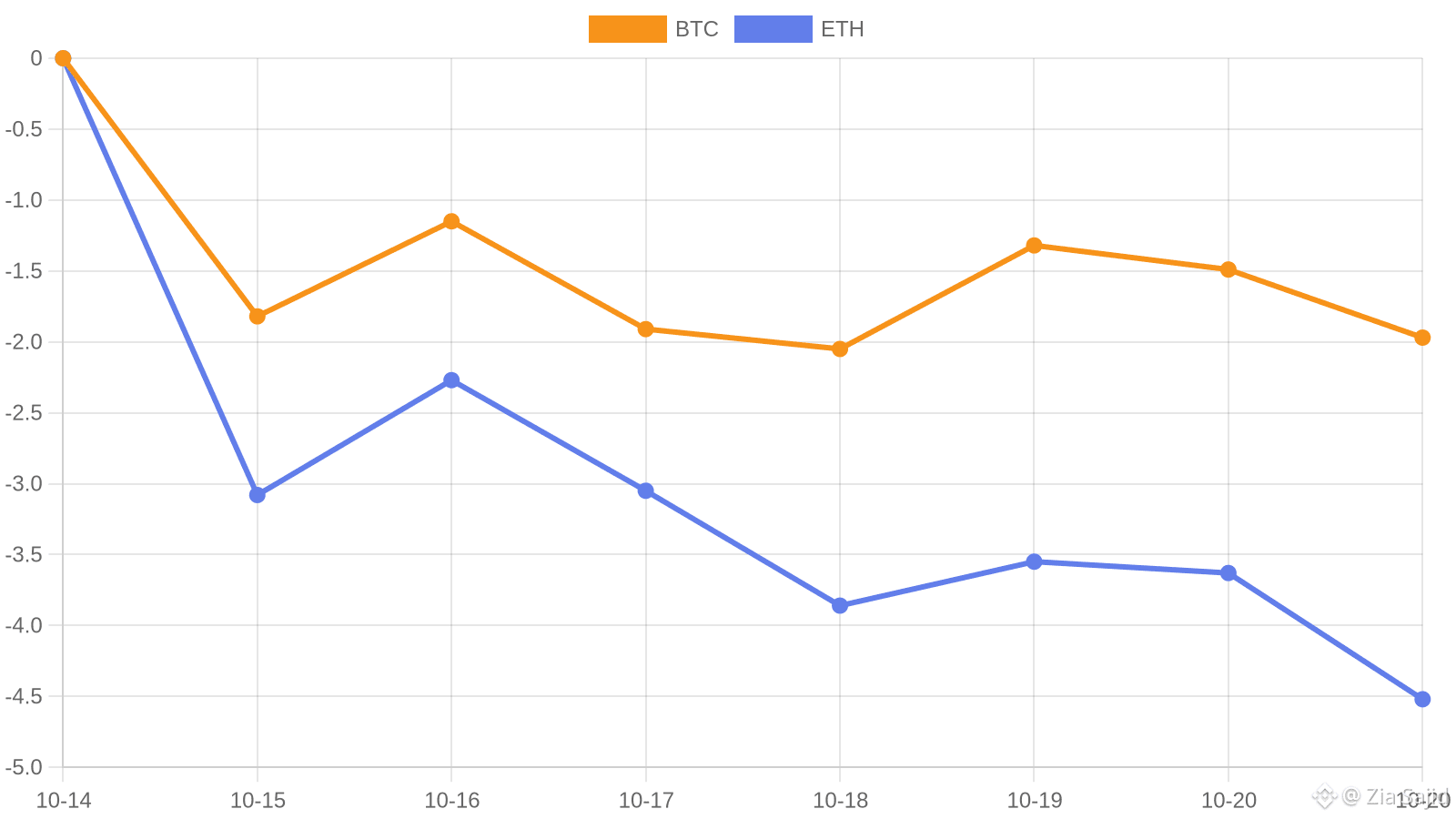
Wie reagierst du, wenn der Markt nachgibt?
Wenn $BTC bei etwa 81.403 $ (-1,60 %) und $ETH bei etwa 2.379,95 $ (-2,19 %) gehandelt wird, können selbst kleine tägliche Rücksetzer emotionale Reaktionen auslösen.
Das Geheimnis, bei normalen Marktschwankungen ruhig zu bleiben, beruht auf einer zentralen Gewohnheit: **der Positionsgröße**.
Bei der Positionsgröße legst du einfach im Voraus fest, wie viel deines Gesamtportfolios du in einen einzelnen Trade oder Vermögenswert investierst. Wenn ein Rückgang von 2 % bei $BTC oder $ETH dich ängstlich an den Bildschirm fesselt, ist deine Positionsgröße möglicherweise zu groß für deine Risikotoleranz.
Clevere Anfänger begrenzen ihr Risiko, indem sie:
• Bei einem einzelnen Trade nie mehr als einen kleinen, gut verkraftbaren Anteil ihres Portfolios riskieren.
• Klare Regeln festlegen, bevor sie in den Markt einsteigen – nicht während heftiger Marktschwankungen.
• Vordefinierte Pläne an die Stelle von Angst und Gier treten lassen.
Emotionale Entscheidungen führen fast immer zu kostspieligen Fehlern. Lege zuerst dein Risiko fest und lass den Markt machen, was er macht.
*Krypto-Assets sind volatil. Begrenze dein Risiko stets sorgfältig und handle verantwortungsbewusst.*
#CryptoEducation #RiskManagement #KryptoAnfänger
Wie reagierst du, wenn der Markt nachgibt?
Wenn $BTC bei etwa 81.403 $ (-1,60 %) und $ETH bei etwa 2.379,95 $ (-2,19 %) gehandelt wird, können selbst kleine tägliche Rücksetzer emotionale Reaktionen auslösen.
Das Geheimnis, bei normalen Marktschwankungen ruhig zu bleiben, beruht auf einer zentralen Gewohnheit: **der Positionsgröße**.
Bei der Positionsgröße legst du einfach im Voraus fest, wie viel deines Gesamtportfolios du in einen einzelnen Trade oder Vermögenswert investierst. Wenn ein Rückgang von 2 % bei $BTC oder $ETH dich ängstlich an den Bildschirm fesselt, ist deine Positionsgröße möglicherweise zu groß für deine Risikotoleranz.
Clevere Anfänger begrenzen ihr Risiko, indem sie:
• Bei einem einzelnen Trade nie mehr als einen kleinen, gut verkraftbaren Anteil ihres Portfolios riskieren.
• Klare Regeln festlegen, bevor sie in den Markt einsteigen – nicht während heftiger Marktschwankungen.
• Vordefinierte Pläne an die Stelle von Angst und Gier treten lassen.
Emotionale Entscheidungen führen fast immer zu kostspieligen Fehlern. Lege zuerst dein Risiko fest und lass den Markt machen, was er macht.
*Krypto-Assets sind volatil. Begrenze dein Risiko stets sorgfältig und handle verantwortungsbewusst.*
#CryptoEducation #RiskManagement #KryptoAnfänger
Wenn $BTC bei etwa 81.403 $ (-1,60 %) und $ETH bei etwa 2.379,95 $ (-2,19 %) gehandelt wird, können selbst kleine tägliche Rücksetzer emotionale Reaktionen auslösen.
Das Geheimnis, bei normalen Marktschwankungen ruhig zu bleiben, beruht auf einer zentralen Gewohnheit: **der Positionsgröße**.
Bei der Positionsgröße legst du einfach im Voraus fest, wie viel deines Gesamtportfolios du in einen einzelnen Trade oder Vermögenswert investierst. Wenn ein Rückgang von 2 % bei $BTC oder $ETH dich ängstlich an den Bildschirm fesselt, ist deine Positionsgröße möglicherweise zu groß für deine Risikotoleranz.
Clevere Anfänger begrenzen ihr Risiko, indem sie:
• Bei einem einzelnen Trade nie mehr als einen kleinen, gut verkraftbaren Anteil ihres Portfolios riskieren.
• Klare Regeln festlegen, bevor sie in den Markt einsteigen – nicht während heftiger Marktschwankungen.
• Vordefinierte Pläne an die Stelle von Angst und Gier treten lassen.
Emotionale Entscheidungen führen fast immer zu kostspieligen Fehlern. Lege zuerst dein Risiko fest und lass den Markt machen, was er macht.
*Krypto-Assets sind volatil. Begrenze dein Risiko stets sorgfältig und handle verantwortungsbewusst.*
#CryptoEducation #RiskManagement #KryptoAnfänger
51
Anmelden und weiter Inhalte entdecken
Krypto-Nutzer weltweit auf Binance Square kennenlernen
⚡️ Bleib in Sachen Krypto stets am Puls.
💬 Die weltgrößte Kryptobörse vertraut darauf.
👍 Erhalte verlässliche Einblicke von verifizierten Creators.
E-Mail-Adresse/Telefonnummer
Trendthemen
1
#BinanceProcesses$4.65BWithdrawals
2,986 Aufrufe
54 Kommentare
2
#WithdrawalsBack: 15 networks live
4,261 Aufrufe
99 Kommentare
3
#BinanceUpdatesProofofReservesAddresses
84,012 Aufrufe
1,291 Kommentare
4
#BinanceToResumePhaseOneOfWithdrawals
123,803 Aufrufe
1,431 Kommentare
5
#BinanceHadAlreadyCovered$6BofHackLoss
8,460 Aufrufe
128 Kommentare
6
#FBIConfirmsNorthKoreaIsResponsibleForBinanceCryptoHack
43,071 Aufrufe
140 Kommentare
7
#CZDismissesClaimsBinanceHackWasPredicted
60,296 Aufrufe
646 Kommentare
8
#B14gReportsUnauthorizedTransferOfAbout97MCORE
18,669 Aufrufe
316 Kommentare
9
#USSpotETHETFsPost23StraightDaysOfNetOutflows
22,101 Aufrufe
286 Kommentare
10
#IntelHasItsWorstDaySince1974
111,639 Aufrufe
894 Kommentare