
바이낸스 가입 사용법
53 Posts

바이낸스 가입 사용법
Report
Block User
바이낸스 가입바이낸스 사용법
1 Following
214 Followers
91 Liked
Posts
·
--
Has Binance BNB’s price formed a bottom and rebounded?
The U.S. CPI has remained consistently high. Due to the impact of the war, the Federal Reserve’s dot plot released earlier showed that the probability of further rate hikes had surged to as high as 90%. This triggered panic in the market, leading to a frenzy of selling crypto assets and precious metals like gold. Among them, the BTC price fell from $82,000 to $57,000, and BNB dropped from $745 to $537—that was truly brutal.
Later, Fed Chair Powell’s remarks helped ease the panic over rate hikes. At the very least, it shouldn’t hike rates before October. The market has calmed down again. Those crypto assets that were sold off too aggressively are really a great opportunity to buy the dip. BTC has shown signs of stabilizing and rebounding. As for how much the rebound will be—let’s wait and see!
Personal opinion only; not financial advice!
Has Binance BNB’s price formed a bottom and rebounded?
The U.S. CPI has remained consistently high. Due to the impact of the war, the Federal Reserve’s dot plot released earlier showed that the probability of further rate hikes had surged to as high as 90%. This triggered panic in the market, leading to a frenzy of selling crypto assets and precious metals like gold. Among them, the BTC price fell from $82,000 to $57,000, and BNB dropped from $745 to $537—that was truly brutal.
Later, Fed Chair Powell’s remarks helped ease the panic over rate hikes. At the very least, it shouldn’t hike rates before October. The market has calmed down again. Those crypto assets that were sold off too aggressively are really a great opportunity to buy the dip. BTC has shown signs of stabilizing and rebounding. As for how much the rebound will be—let’s wait and see!
Personal opinion only; not financial advice!
The U.S. CPI has remained consistently high. Due to the impact of the war, the Federal Reserve’s dot plot released earlier showed that the probability of further rate hikes had surged to as high as 90%. This triggered panic in the market, leading to a frenzy of selling crypto assets and precious metals like gold. Among them, the BTC price fell from $82,000 to $57,000, and BNB dropped from $745 to $537—that was truly brutal.
Later, Fed Chair Powell’s remarks helped ease the panic over rate hikes. At the very least, it shouldn’t hike rates before October. The market has calmed down again. Those crypto assets that were sold off too aggressively are really a great opportunity to buy the dip. BTC has shown signs of stabilizing and rebounding. As for how much the rebound will be—let’s wait and see!
Personal opinion only; not financial advice!
345
·
--
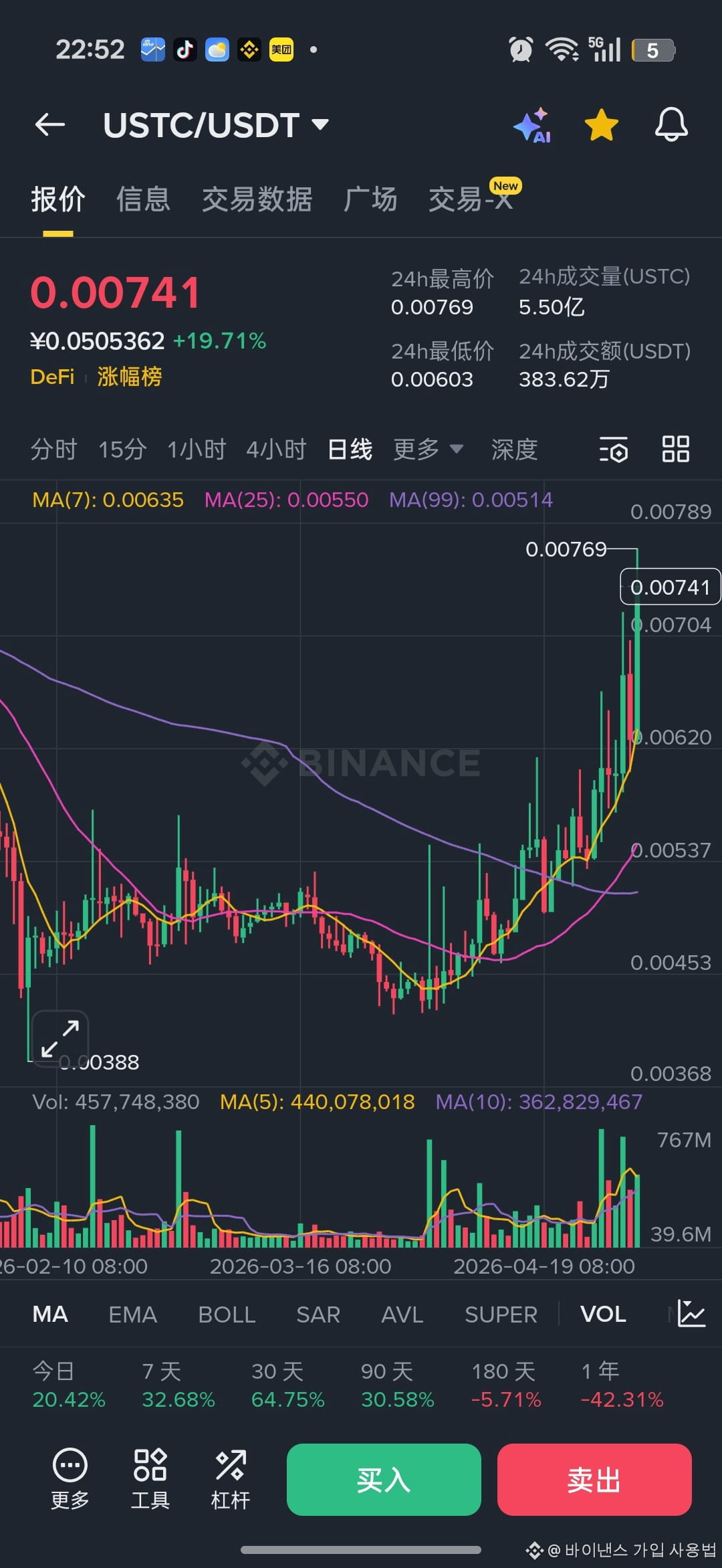
Can $LUNC make a comeback?
LUNC is the infamous LUNA from back in the day, with a market cap that plummeted from $40 billion to less than $500 million overnight. The price crashed from $100 to $0.00000001, and who knows how many zeros are on that now! Its notoriety is on par with the iPhone! Does anyone still remember it? Has anyone been burned by this ruthless lady? Its real name was Luna, but now it's rebranded as Lucy!
Can $LUNC make a comeback?
LUNC is the infamous LUNA from back in the day, with a market cap that plummeted from $40 billion to less than $500 million overnight. The price crashed from $100 to $0.00000001, and who knows how many zeros are on that now! Its notoriety is on par with the iPhone! Does anyone still remember it? Has anyone been burned by this ruthless lady? Its real name was Luna, but now it's rebranded as Lucy!
LUNC is the infamous LUNA from back in the day, with a market cap that plummeted from $40 billion to less than $500 million overnight. The price crashed from $100 to $0.00000001, and who knows how many zeros are on that now! Its notoriety is on par with the iPhone! Does anyone still remember it? Has anyone been burned by this ruthless lady? Its real name was Luna, but now it's rebranded as Lucy!
7
1
4
6.7k
·
--
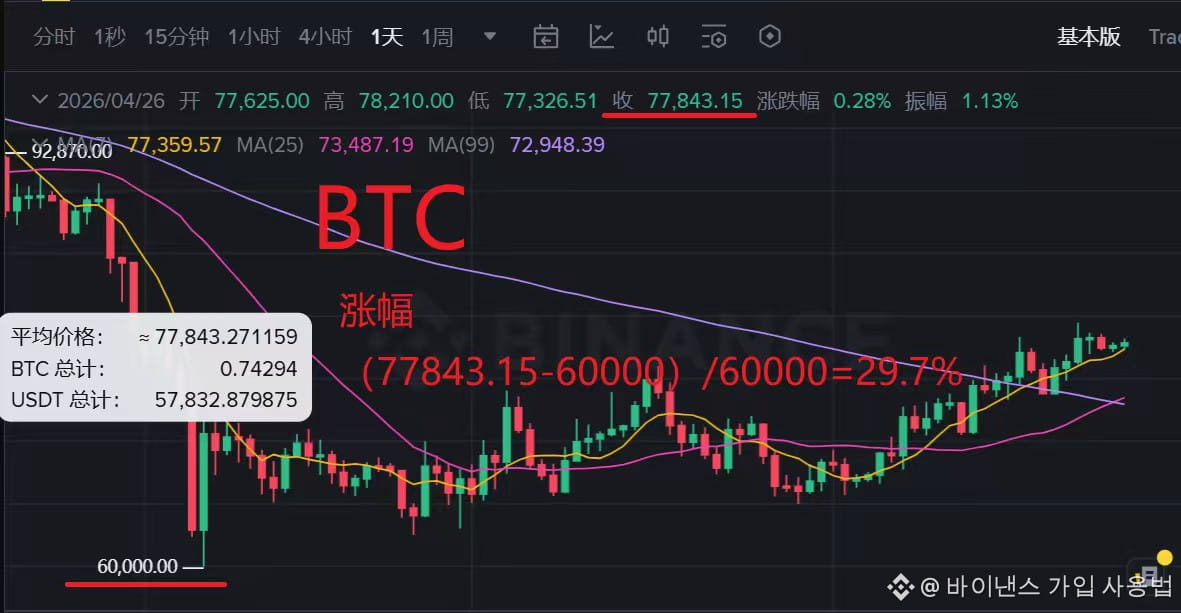
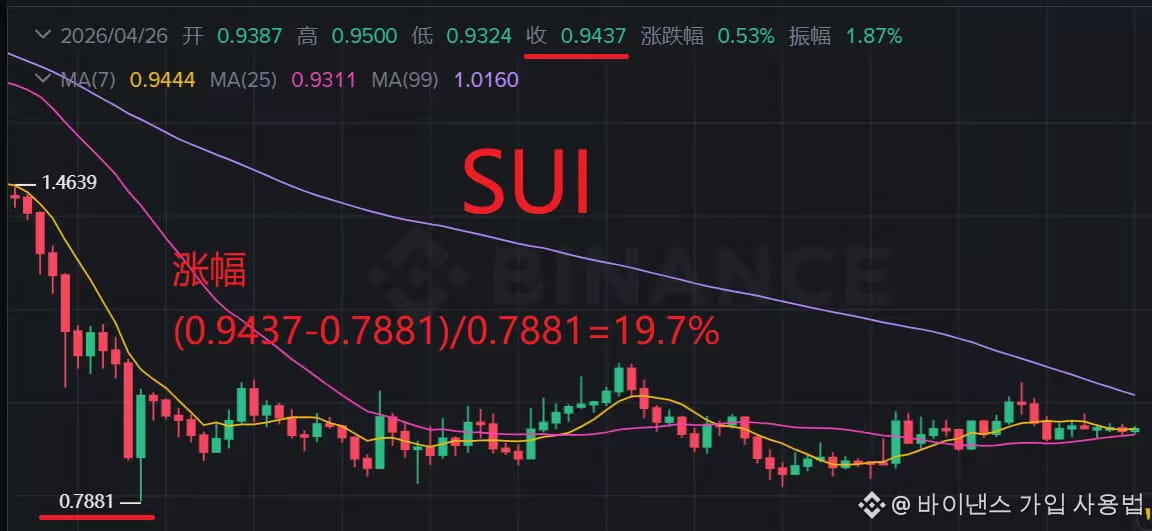
The price of Sui is really trash, it's miles away from BTC.
In this recent market move, $BTC jumped from 60000 to 80000, a nearly 30% increase, while $SUI has been hovering around 0.9, only rising 20%. It's seriously disconnected from the market; is the fundamentals lacking, or are the big players unloading? Such asymmetric behavior suggests there's some heavy shorting going on. I'm quite disappointed with Sui. Does anyone know why Sui can't seem to pump?
The price of Sui is really trash, it's miles away from BTC.
In this recent market move, $BTC jumped from 60000 to 80000, a nearly 30% increase, while $SUI has been hovering around 0.9, only rising 20%. It's seriously disconnected from the market; is the fundamentals lacking, or are the big players unloading? Such asymmetric behavior suggests there's some heavy shorting going on. I'm quite disappointed with Sui. Does anyone know why Sui can't seem to pump?
In this recent market move, $BTC jumped from 60000 to 80000, a nearly 30% increase, while $SUI has been hovering around 0.9, only rising 20%. It's seriously disconnected from the market; is the fundamentals lacking, or are the big players unloading? Such asymmetric behavior suggests there's some heavy shorting going on. I'm quite disappointed with Sui. Does anyone know why Sui can't seem to pump?
3
1
466
·
--
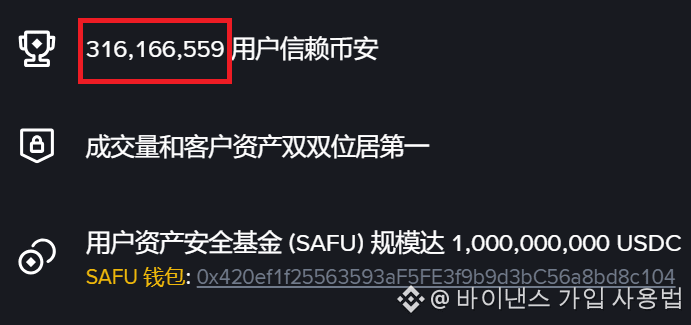
Binance registered users surpassed 316 million
#币安注册后还能填邀请码吗 #币安注册要身份证
#币安注册选哪个国家
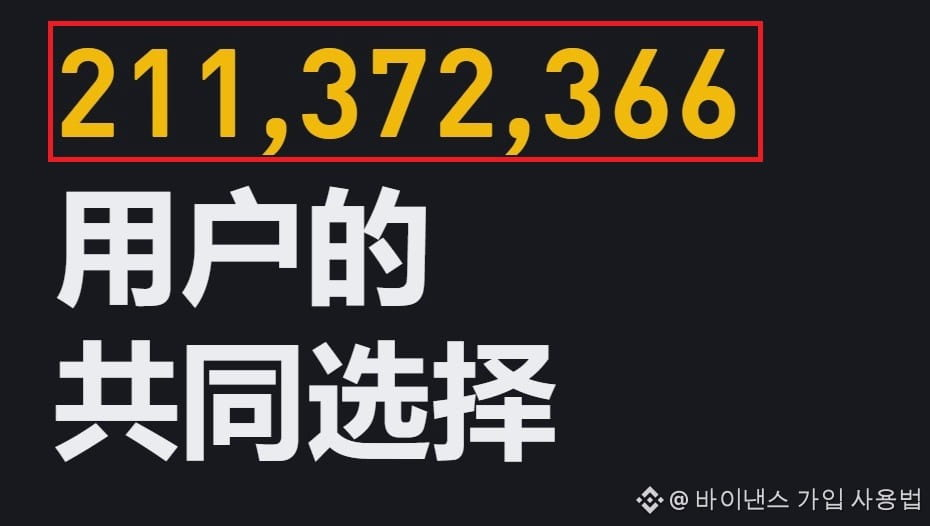
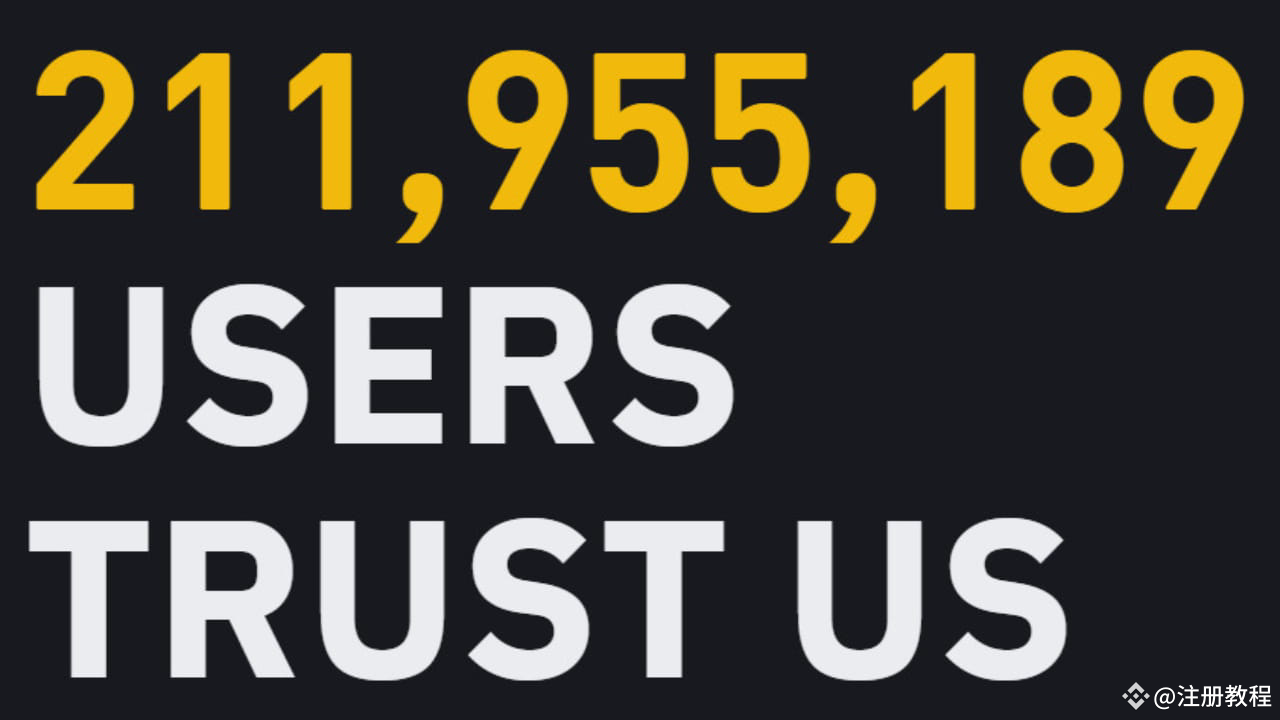
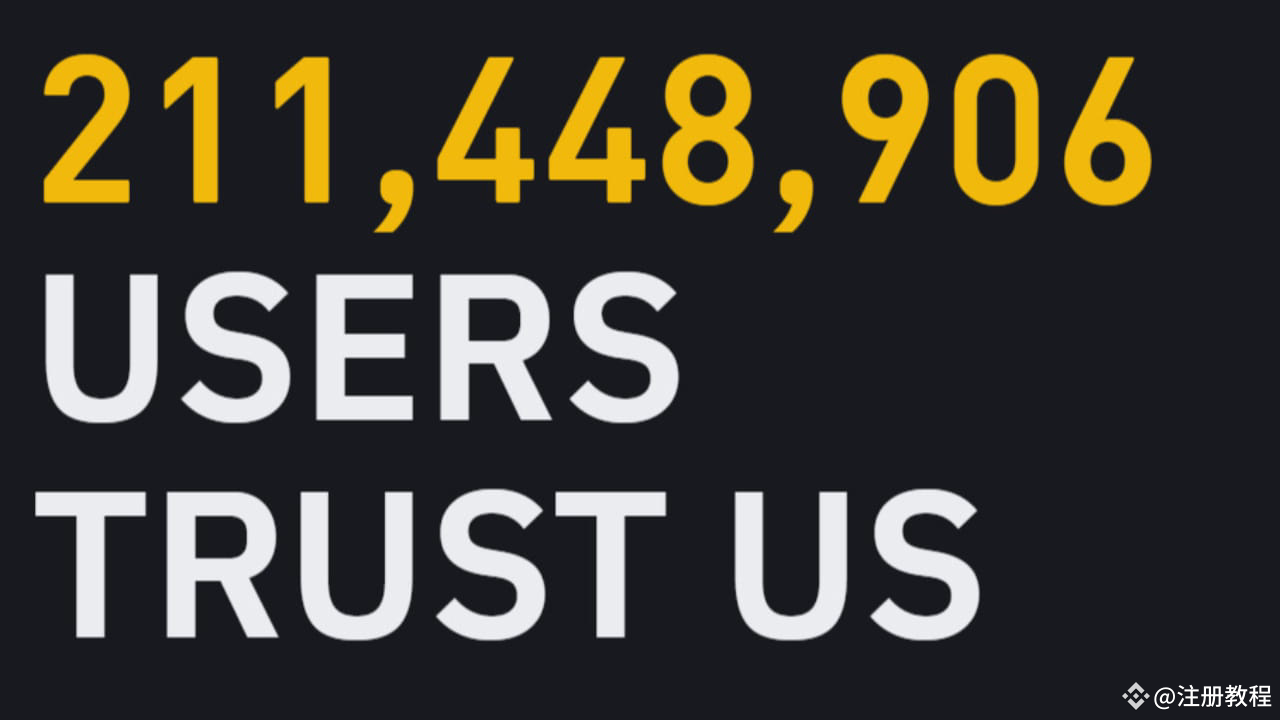
Binance is developing really fast. When I first came across Binance, the number of users was 211 million. Now it has grown to 316 million. Guess when I started using it—guess right and you’ll get a prize. When did you first come across Binance? Share your time and user number
Binance official website [https://www.binance.com](https://www.binance.com)
Binance registered users surpassed 316 million
#币安注册后还能填邀请码吗 #币安注册要身份证
#币安注册选哪个国家
Binance is developing really fast. When I first came across Binance, the number of users was 211 million. Now it has grown to 316 million. Guess when I started using it—guess right and you’ll get a prize. When did you first come across Binance? Share your time and user number
Binance official website https://www.binance.com
#币安注册后还能填邀请码吗 #币安注册要身份证
#币安注册选哪个国家
Binance is developing really fast. When I first came across Binance, the number of users was 211 million. Now it has grown to 316 million. Guess when I started using it—guess right and you’ll get a prize. When did you first come across Binance? Share your time and user number
Binance official website https://www.binance.com
2
1
588
·
--

Article
I made $100,000 by buying Bitcoin based on Binance charts!To view Binance charts, please follow these steps:
Open the trading platform:
Log in to the Binance exchange homepage or related trading app
Select trading pair:
Find the trading pair you are interested in, such as BTC/USDT, in the list of trading pairs.
Browse the charts:
Clicking on a trading pair's details page will take you to a relevant chart, which shows the historical price movement of the trading pair.
Using the chart tools:
I made $100,000 by buying Bitcoin based on Binance charts!
To view Binance charts, please follow these steps:
Open the trading platform:
Log in to the Binance exchange homepage or related trading app
Select trading pair:
Find the trading pair you are interested in, such as BTC/USDT, in the list of trading pairs.
Browse the charts:
Clicking on a trading pair's details page will take you to a relevant chart, which shows the historical price movement of the trading pair.
Using the chart tools:
Open the trading platform:
Log in to the Binance exchange homepage or related trading app
Select trading pair:
Find the trading pair you are interested in, such as BTC/USDT, in the list of trading pairs.
Browse the charts:
Clicking on a trading pair's details page will take you to a relevant chart, which shows the historical price movement of the trading pair.
Using the chart tools:
406
·
--

Article
Binance Chart Binance Exchange, Get 100 USD when you sign up!To view Bitcoin real-time charts using the Binance exchange, you must register on the official Binance website registration link (https://www.binance.com).
- Log in and select a trading pair: Log in to your Binance account and select the trading pair you want to view the chart for, such as BTC/USDT or other common trading pairs, from the top navigation bar or trading page.
- Select chart type: Binance generally provides various chart types, such as K-line charts, line charts, and bar charts. K-line charts display the opening, closing, high, and low prices for each period, line charts mainly display the change trend of the closing price, and bar charts can intuitively check the range and size of price fluctuations. Trading volume.
Binance Chart Binance Exchange, Get 100 USD when you sign up!
To view Bitcoin real-time charts using the Binance exchange, you must register on the official Binance website registration link (https://www.binance.com).
- Log in and select a trading pair: Log in to your Binance account and select the trading pair you want to view the chart for, such as BTC/USDT or other common trading pairs, from the top navigation bar or trading page.
- Select chart type: Binance generally provides various chart types, such as K-line charts, line charts, and bar charts. K-line charts display the opening, closing, high, and low prices for each period, line charts mainly display the change trend of the closing price, and bar charts can intuitively check the range and size of price fluctuations. Trading volume.
- Log in and select a trading pair: Log in to your Binance account and select the trading pair you want to view the chart for, such as BTC/USDT or other common trading pairs, from the top navigation bar or trading page.
- Select chart type: Binance generally provides various chart types, such as K-line charts, line charts, and bar charts. K-line charts display the opening, closing, high, and low prices for each period, line charts mainly display the change trend of the closing price, and bar charts can intuitively check the range and size of price fluctuations. Trading volume.
345
·
--

Article
Binance registration tutorial: New registration will receive $100 in transaction fees!The tutorial for Binance registered users mainly includes the following steps: Visit Binance's official website: First, open the browser and visit Binance's official website [https://www.binance.com/join?ref=VP88BNEY](https://www.binance.com/join?ref=VP88BNEY) Make sure you are visiting Binance's official website to avoid security risks.
Select registration method:
There are many ways to register, including through email address, mobile phone number, and Apple or Google account. For mainland users, due to policy reasons, you may not be able to register directly using a domestic mobile phone number, but you can try using email or Apple ID.
Binance registration tutorial: New registration will receive $100 in transaction fees!
The tutorial for Binance registered users mainly includes the following steps: Visit Binance's official website: First, open the browser and visit Binance's official website https://www.binance.com/join?ref=VP88BNEY Make sure you are visiting Binance's official website to avoid security risks.
Select registration method:
There are many ways to register, including through email address, mobile phone number, and Apple or Google account. For mainland users, due to policy reasons, you may not be able to register directly using a domestic mobile phone number, but you can try using email or Apple ID.
Select registration method:
There are many ways to register, including through email address, mobile phone number, and Apple or Google account. For mainland users, due to policy reasons, you may not be able to register directly using a domestic mobile phone number, but you can try using email or Apple ID.
1.7k
·
--

Article
Binance Exchange Mobile, receive $100 upon registration!Binance mobile is the official mobile app of the Binance exchange. Here are more details about Binance mobile.
You must register a Binance account before you can use the Binance mobile version.
Binance registration:
https://www.binance.com/futures/ref/p1xinkuk
(Trade fee deduction using BNB coins = 45% discount on spot trading, 10%+10% discount on futures trading = network lowest)
Application overview
Binance Exchange Mobile, receive $100 upon registration!
Binance mobile is the official mobile app of the Binance exchange. Here are more details about Binance mobile.
You must register a Binance account before you can use the Binance mobile version.
Binance registration:
https://www.binance.com/futures/ref/p1xinkuk
(Trade fee deduction using BNB coins = 45% discount on spot trading, 10%+10% discount on futures trading = network lowest)
Application overview
You must register a Binance account before you can use the Binance mobile version.
Binance registration:
https://www.binance.com/futures/ref/p1xinkuk
(Trade fee deduction using BNB coins = 45% discount on spot trading, 10%+10% discount on futures trading = network lowest)
Application overview
3
6.8k
·
--

Article
Binance Mainland China Registration Process, 2026 Invitation CodeMainland China Binance registration: Binance can be registered in mainland China. Registration URL [https://www.binance.com](https://www.binance.com) Invitation code: IBM6S79L
1. Preparation Stage
Choose a suitable network environment: Although users in mainland China can directly access Binance registration links, it is recommended to use IP nodes from Taiwan because IP addresses from certain countries (such as the United States) may fail to complete registration.
Choose a suitable browser: It is recommended to use the Chrome (Google) browser for registration to avoid possible interception issues with domestic browsers.
2. Registration Process
Binance Mainland China Registration Process, 2026 Invitation Code
Mainland China Binance registration: Binance can be registered in mainland China. Registration URL https://www.binance.com Invitation code: IBM6S79L
1. Preparation Stage
Choose a suitable network environment: Although users in mainland China can directly access Binance registration links, it is recommended to use IP nodes from Taiwan because IP addresses from certain countries (such as the United States) may fail to complete registration.
Choose a suitable browser: It is recommended to use the Chrome (Google) browser for registration to avoid possible interception issues with domestic browsers.
2. Registration Process
1. Preparation Stage
Choose a suitable network environment: Although users in mainland China can directly access Binance registration links, it is recommended to use IP nodes from Taiwan because IP addresses from certain countries (such as the United States) may fail to complete registration.
Choose a suitable browser: It is recommended to use the Chrome (Google) browser for registration to avoid possible interception issues with domestic browsers.
2. Registration Process
5
3
8.8k
·
--

Article
Binance Usage Process 2024Here are the steps for Korean users to use Binance: First, the Binance website does not support Korean.
1. Registration and Login
Create a Binance account: Binance official website [https://www.binance.com/join?ref=RLEH21JE](https://www.binance.com/join?ref=RLEH21JE)
When you visit and enter relevant information such as email and password and complete the registration process, a $100 transaction fee is provided to new users.
Log in to your account: Log in to your Binance account using the email address and password you entered when registering.
Binance Usage Process 2024
Here are the steps for Korean users to use Binance: First, the Binance website does not support Korean.
1. Registration and Login
Create a Binance account: Binance official website https://www.binance.com/join?ref=RLEH21JE
When you visit and enter relevant information such as email and password and complete the registration process, a $100 transaction fee is provided to new users.
Log in to your account: Log in to your Binance account using the email address and password you entered when registering.
1. Registration and Login
Create a Binance account: Binance official website https://www.binance.com/join?ref=RLEH21JE
When you visit and enter relevant information such as email and password and complete the registration process, a $100 transaction fee is provided to new users.
Log in to your account: Log in to your Binance account using the email address and password you entered when registering.
2
384
·
--

Article
How to join Binance, receive 100 USD when you sign up!How to register on Binance, new users receive 100U in futures! Binance registration tutorial for Korean users, new users will be rewarded with $100 in trading fees.
1. Visit the official Binance website
[https://www.binance.com/futures/ref/dwdpozoe](https://accounts.binance.com/en/register?ref=dwdpozoe)(Using BNB coins for trading fee discounts = 45% discount on spot trading, 10%+10% discount on futures trading = network lowest)
Select the 'Register with mobile number or email' button on the official Binance website
How to join Binance, receive 100 USD when you sign up!
How to register on Binance, new users receive 100U in futures! Binance registration tutorial for Korean users, new users will be rewarded with $100 in trading fees.
1. Visit the official Binance website
https://www.binance.com/futures/ref/dwdpozoe(Using BNB coins for trading fee discounts = 45% discount on spot trading, 10%+10% discount on futures trading = network lowest)
Select the 'Register with mobile number or email' button on the official Binance website
1. Visit the official Binance website
https://www.binance.com/futures/ref/dwdpozoe(Using BNB coins for trading fee discounts = 45% discount on spot trading, 10%+10% discount on futures trading = network lowest)
Select the 'Register with mobile number or email' button on the official Binance website
38
2
8
38.7k
·
--
Article
What are the steps in the Binance registration process?The Binance registration process mainly includes the following steps: Visit the official website: [https://www.binance.com/join?ref=VP88BNEY](https://www.binance.com/join?ref=VP88BNEY)
Choose a registration method: Users can register via email address, mobile phone number or third-party account (such as Apple, Google account).
Fill in personal information: Enter your email address or mobile phone number and create a secure account password. The password must meet certain requirements, such as at least eight digits, containing numbers and capital letters, etc. At the same time, if there is a referral code, you can fill it in at this time to enjoy the discount.
Verify identity: Authentication is performed through the received verification code to ensure the validity of the registered email or mobile phone.
Complete registration: After checking the "Agree to the Service Agreement and Privacy Policy", click the "Register" button to complete the registration process.
Real-name authentication: After registration is completed, users need to perform real-name authentication and submit personal information such as ID card to verify their identity.
Please note that during the registration process, it is necessary to ensure that the provided email address and mobile phone number are valid and can receive the verification code to ensure the smooth registration
What are the steps in the Binance registration process?
The Binance registration process mainly includes the following steps: Visit the official website: https://www.binance.com/join?ref=VP88BNEY
Choose a registration method: Users can register via email address, mobile phone number or third-party account (such as Apple, Google account).
Fill in personal information: Enter your email address or mobile phone number and create a secure account password. The password must meet certain requirements, such as at least eight digits, containing numbers and capital letters, etc. At the same time, if there is a referral code, you can fill it in at this time to enjoy the discount.
Verify identity: Authentication is performed through the received verification code to ensure the validity of the registered email or mobile phone.
Complete registration: After checking the "Agree to the Service Agreement and Privacy Policy", click the "Register" button to complete the registration process.
Real-name authentication: After registration is completed, users need to perform real-name authentication and submit personal information such as ID card to verify their identity.
Please note that during the registration process, it is necessary to ensure that the provided email address and mobile phone number are valid and can receive the verification code to ensure the smooth registration
Choose a registration method: Users can register via email address, mobile phone number or third-party account (such as Apple, Google account).
Fill in personal information: Enter your email address or mobile phone number and create a secure account password. The password must meet certain requirements, such as at least eight digits, containing numbers and capital letters, etc. At the same time, if there is a referral code, you can fill it in at this time to enjoy the discount.
Verify identity: Authentication is performed through the received verification code to ensure the validity of the registered email or mobile phone.
Complete registration: After checking the "Agree to the Service Agreement and Privacy Policy", click the "Register" button to complete the registration process.
Real-name authentication: After registration is completed, users need to perform real-name authentication and submit personal information such as ID card to verify their identity.
Please note that during the registration process, it is necessary to ensure that the provided email address and mobile phone number are valid and can receive the verification code to ensure the smooth registration
170
·
--
Article
How to register a number on Binance?Binance registration process overview, prepare materials: Email: used to receive verification codes and account-related information. Mobile number: used to receive SMS verification codes.
Registration steps:
Visit the official website: [https://www.binance.com/join?ref=VP88BNEY](https://www.binance.com/join?ref=VP88BNEY)
Choose a registration method: You can register via email, mobile number or third-party account (such as Apple, Google account).
Fill in information: Enter the corresponding email address, mobile number or third-party account information according to the selected registration method.
Verify identity: Authentication is performed through the received verification code.
Set password: Create and confirm the account password to ensure the security of the password.
Complete registration: Check the "Agree to the Service Agreement and Privacy Policy" and click the "Register" button to complete the registration process.
Please note that during the registration process, you must ensure that the provided email address and mobile number are valid and can receive verification codes to ensure the smooth registration
How to register a number on Binance?
Binance registration process overview, prepare materials: Email: used to receive verification codes and account-related information. Mobile number: used to receive SMS verification codes.
Registration steps:
Visit the official website: https://www.binance.com/join?ref=VP88BNEY
Choose a registration method: You can register via email, mobile number or third-party account (such as Apple, Google account).
Fill in information: Enter the corresponding email address, mobile number or third-party account information according to the selected registration method.
Verify identity: Authentication is performed through the received verification code.
Set password: Create and confirm the account password to ensure the security of the password.
Complete registration: Check the "Agree to the Service Agreement and Privacy Policy" and click the "Register" button to complete the registration process.
Please note that during the registration process, you must ensure that the provided email address and mobile number are valid and can receive verification codes to ensure the smooth registration
Registration steps:
Visit the official website: https://www.binance.com/join?ref=VP88BNEY
Choose a registration method: You can register via email, mobile number or third-party account (such as Apple, Google account).
Fill in information: Enter the corresponding email address, mobile number or third-party account information according to the selected registration method.
Verify identity: Authentication is performed through the received verification code.
Set password: Create and confirm the account password to ensure the security of the password.
Complete registration: Check the "Agree to the Service Agreement and Privacy Policy" and click the "Register" button to complete the registration process.
Please note that during the registration process, you must ensure that the provided email address and mobile number are valid and can receive verification codes to ensure the smooth registration
192
·
--
Article
Which is the Binance registration link?Binance's registration link may change over time, and users in different regions may need to visit specific links. Here are some suggestions on how to get the Binance registration link:
1. Obtain from official channels
Official websiteRegistration link: [https://www.binance.com/join?ref=VP88BNEY](https://www.binance.com/join?ref=VP88BNEY) (20% discount)
Visit Binance's official website directly. Usually, the official website will provide a registration entrance on the homepage or in an obvious location. Since I cannot directly provide a currently valid URL link, it is recommended that you search for "Binance official website" through a search engine and confirm the security of the URL before visiting it.
Official social media: Binance may post registration tutorials or links on official social media platforms (such as Weibo, Twitter, etc.). You can follow Binance's official account to get the latest registration information and links.
2. Precautions
Verify the security of the URL: Before accessing any registration link, be sure to verify the security of the URL and avoid visiting phishing websites or malicious links.
Follow the official tutorial: During the registration process, please carefully read and follow the official registration tutorials and guidelines to ensure the correctness and security of the registration process.
Pay attention to regional restrictions: Some regions may not be able to directly access Binance's services or require a specific registration process. If you encounter difficulties in registration, please try using tools such as VPN or contact Binance customer service for help.
In short, in order to obtain the most accurate and secure Binance registration link, it is recommended that you visit and register directly through official channels.
Which is the Binance registration link?
Binance's registration link may change over time, and users in different regions may need to visit specific links. Here are some suggestions on how to get the Binance registration link:
1. Obtain from official channels
Official websiteRegistration link: https://www.binance.com/join?ref=VP88BNEY (20% discount)
Visit Binance's official website directly. Usually, the official website will provide a registration entrance on the homepage or in an obvious location. Since I cannot directly provide a currently valid URL link, it is recommended that you search for "Binance official website" through a search engine and confirm the security of the URL before visiting it.
Official social media: Binance may post registration tutorials or links on official social media platforms (such as Weibo, Twitter, etc.). You can follow Binance's official account to get the latest registration information and links.
2. Precautions
Verify the security of the URL: Before accessing any registration link, be sure to verify the security of the URL and avoid visiting phishing websites or malicious links.
Follow the official tutorial: During the registration process, please carefully read and follow the official registration tutorials and guidelines to ensure the correctness and security of the registration process.
Pay attention to regional restrictions: Some regions may not be able to directly access Binance's services or require a specific registration process. If you encounter difficulties in registration, please try using tools such as VPN or contact Binance customer service for help.
In short, in order to obtain the most accurate and secure Binance registration link, it is recommended that you visit and register directly through official channels.
1. Obtain from official channels
Official websiteRegistration link: https://www.binance.com/join?ref=VP88BNEY (20% discount)
Visit Binance's official website directly. Usually, the official website will provide a registration entrance on the homepage or in an obvious location. Since I cannot directly provide a currently valid URL link, it is recommended that you search for "Binance official website" through a search engine and confirm the security of the URL before visiting it.
Official social media: Binance may post registration tutorials or links on official social media platforms (such as Weibo, Twitter, etc.). You can follow Binance's official account to get the latest registration information and links.
2. Precautions
Verify the security of the URL: Before accessing any registration link, be sure to verify the security of the URL and avoid visiting phishing websites or malicious links.
Follow the official tutorial: During the registration process, please carefully read and follow the official registration tutorials and guidelines to ensure the correctness and security of the registration process.
Pay attention to regional restrictions: Some regions may not be able to directly access Binance's services or require a specific registration process. If you encounter difficulties in registration, please try using tools such as VPN or contact Binance customer service for help.
In short, in order to obtain the most accurate and secure Binance registration link, it is recommended that you visit and register directly through official channels.
190
·
--
Article
What is the binance registration code?Binance Registration and Registration Code Guide Prepare materials : Click on the Binance registration link for a 20% discount
[https://www.binance.com/join?ref=VP88BNEY](https://www.binance.com/join?ref=VP88BNEY)
Email : Used to register an account and receive verification codes.
Mobile number : Used to receive SMS verification codes.
Registration steps :
Or download the APP : Download the Binance mobile APP through official channels.
Start registration : Click "Register" in the APP and select the registration method (email, mobile number or third-party account).
Fill in information : Enter your email address or mobile number, create an account password, and confirm the password.
Verification code confirmation : Receive the verification code in the registered email or mobile phone, and enter it in the APP to complete the verification.
Fill in the referral code :VP88BNEY 20% discount during the registration process. If there is a referral code, you can fill it in the corresponding position to enjoy the discount.
Notes :
The password must meet certain requirements, such as at least eight digits, containing numbers and capital letters, etc.
After completing the registration, it is recommended to perform identity verification to enhance account security.
Please follow the above steps to register on Binance and fill in a valid registration code when necessary to enjoy relevant benefits。
What is the binance registration code?
Binance Registration and Registration Code Guide Prepare materials : Click on the Binance registration link for a 20% discount
https://www.binance.com/join?ref=VP88BNEY
Email : Used to register an account and receive verification codes.
Mobile number : Used to receive SMS verification codes.
Registration steps :
Or download the APP : Download the Binance mobile APP through official channels.
Start registration : Click "Register" in the APP and select the registration method (email, mobile number or third-party account).
Fill in information : Enter your email address or mobile number, create an account password, and confirm the password.
Verification code confirmation : Receive the verification code in the registered email or mobile phone, and enter it in the APP to complete the verification.
Fill in the referral code :VP88BNEY 20% discount during the registration process. If there is a referral code, you can fill it in the corresponding position to enjoy the discount.
Notes :
The password must meet certain requirements, such as at least eight digits, containing numbers and capital letters, etc.
After completing the registration, it is recommended to perform identity verification to enhance account security.
Please follow the above steps to register on Binance and fill in a valid registration code when necessary to enjoy relevant benefits。
https://www.binance.com/join?ref=VP88BNEY
Email : Used to register an account and receive verification codes.
Mobile number : Used to receive SMS verification codes.
Registration steps :
Or download the APP : Download the Binance mobile APP through official channels.
Start registration : Click "Register" in the APP and select the registration method (email, mobile number or third-party account).
Fill in information : Enter your email address or mobile number, create an account password, and confirm the password.
Verification code confirmation : Receive the verification code in the registered email or mobile phone, and enter it in the APP to complete the verification.
Fill in the referral code :VP88BNEY 20% discount during the registration process. If there is a referral code, you can fill it in the corresponding position to enjoy the discount.
Notes :
The password must meet certain requirements, such as at least eight digits, containing numbers and capital letters, etc.
After completing the registration, it is recommended to perform identity verification to enhance account security.
Please follow the above steps to register on Binance and fill in a valid registration code when necessary to enjoy relevant benefits。
61
·
--
Article
Which country should you choose for Binance registration?In general, we recommend choosing mainland China. Since the ID card address is in mainland China, you can simply select mainland China directly as the place of registration. For Binance registration (copy the URL [https://www.binance.com/futures/ref/dwdpozoe](https://accounts.binance.com/en/register?ref=dwdpozoe) and open it in your browser), choose the registration method as email rather than a mainland China mobile number. A +86 area-code phone number can’t be used to create a Binance account, but it can be used for verification binding. Verifying a Binance account with a mainland China ID card is absolutely fine. In other words, there’s no problem for users from mainland China to use Binance.
Actually, there are two most important points: first, you need real-name verification (submit photos of both sides of your ID card) and facial recognition verification; second, you should bind a Google or Microsoft Authenticator for an extra layer of protection. As Binance is the world’s largest exchange, fund security is our top priority—please rest assured!
Which country should you choose for Binance registration?
In general, we recommend choosing mainland China. Since the ID card address is in mainland China, you can simply select mainland China directly as the place of registration. For Binance registration (copy the URL https://www.binance.com/futures/ref/dwdpozoe and open it in your browser), choose the registration method as email rather than a mainland China mobile number. A +86 area-code phone number can’t be used to create a Binance account, but it can be used for verification binding. Verifying a Binance account with a mainland China ID card is absolutely fine. In other words, there’s no problem for users from mainland China to use Binance.
Actually, there are two most important points: first, you need real-name verification (submit photos of both sides of your ID card) and facial recognition verification; second, you should bind a Google or Microsoft Authenticator for an extra layer of protection. As Binance is the world’s largest exchange, fund security is our top priority—please rest assured!
Actually, there are two most important points: first, you need real-name verification (submit photos of both sides of your ID card) and facial recognition verification; second, you should bind a Google or Microsoft Authenticator for an extra layer of protection. As Binance is the world’s largest exchange, fund security is our top priority—please rest assured!
1
2
6k
·
--
Article
Binance registration tutorial, successfully open an account in 40 secondsBinance has a branch in Taiwan, but users still need to pay attention to comply with local regulations when using it. Register on the Binance official website (20% cash back) [https://www.binance.com/join?ref=VP88BNEY](https://www.binance.com/join?ref=VP88BNEY)
The steps for Taiwanese users to register on Binance are as follows:
1. Use a computer or mobile browser to open the official website registration URL above
2. Select "Register using mobile phone or email".
In the APP, click Register and select your email address and mobile phone number to register.
3. Fill in the registration information:
Select your country/region of residence as "Taiwan".
Enter your email address or mobile phone number and set a password.
Binance registration tutorial, successfully open an account in 40 seconds
Binance has a branch in Taiwan, but users still need to pay attention to comply with local regulations when using it. Register on the Binance official website (20% cash back) https://www.binance.com/join?ref=VP88BNEY
The steps for Taiwanese users to register on Binance are as follows:
1. Use a computer or mobile browser to open the official website registration URL above
2. Select "Register using mobile phone or email".
In the APP, click Register and select your email address and mobile phone number to register.
3. Fill in the registration information:
Select your country/region of residence as "Taiwan".
Enter your email address or mobile phone number and set a password.
The steps for Taiwanese users to register on Binance are as follows:
1. Use a computer or mobile browser to open the official website registration URL above
2. Select "Register using mobile phone or email".
In the APP, click Register and select your email address and mobile phone number to register.
3. Fill in the registration information:
Select your country/region of residence as "Taiwan".
Enter your email address or mobile phone number and set a password.
3
2
259
·
--
Article
Binance Registration Tutorial (2024 Official Website Guide)Registering a Binance account for Taiwan users is relatively simple, with broader regulations and safer fund deposits and withdrawals! Open the Binance official website to register (20% cashback) [https://www.binance.com/join?ref=VP88BNEY](https://www.binance.com/join?ref=VP88BNEY)
2. Choose registration method:
On the registration page, select 'Register with mobile or email'.
Fill in registration information:
3. Choose residence as 'Taiwan'.
Fill in your email account and set a password.
Click 'Register' to complete account creation.
Complete verification:
4. After successful registration, complete account activation through email verification.
Visit the user center for identity verification and transaction forwarding.
Binance Registration Tutorial (2024 Official Website Guide)
Registering a Binance account for Taiwan users is relatively simple, with broader regulations and safer fund deposits and withdrawals! Open the Binance official website to register (20% cashback) https://www.binance.com/join?ref=VP88BNEY
2. Choose registration method:
On the registration page, select 'Register with mobile or email'.
Fill in registration information:
3. Choose residence as 'Taiwan'.
Fill in your email account and set a password.
Click 'Register' to complete account creation.
Complete verification:
4. After successful registration, complete account activation through email verification.
Visit the user center for identity verification and transaction forwarding.
2. Choose registration method:
On the registration page, select 'Register with mobile or email'.
Fill in registration information:
3. Choose residence as 'Taiwan'.
Fill in your email account and set a password.
Click 'Register' to complete account creation.
Complete verification:
4. After successful registration, complete account activation through email verification.
Visit the user center for identity verification and transaction forwarding.
6
1.8k
·
--
Article
how to register on binance?How to register on binance
Register on binance with phone number or email
1. Open binance official website for self-registration:
https://www.binance.com/fr/join?ref=DWDPOZOE
2. Choose a registration method. Click on register by phone or email.
3. Select [email] or [phone number] and enter your email address/phone number. Then, create a secure password for your account.
Notes:
Your password must contain at least 8 characters, including a number and an uppercase letter.
how to register on binance?
How to register on binance
Register on binance with phone number or email
1. Open binance official website for self-registration:
https://www.binance.com/fr/join?ref=DWDPOZOE
2. Choose a registration method. Click on register by phone or email.
3. Select [email] or [phone number] and enter your email address/phone number. Then, create a secure password for your account.
Notes:
Your password must contain at least 8 characters, including a number and an uppercase letter.
Register on binance with phone number or email
1. Open binance official website for self-registration:
https://www.binance.com/fr/join?ref=DWDPOZOE
2. Choose a registration method. Click on register by phone or email.
3. Select [email] or [phone number] and enter your email address/phone number. Then, create a secure password for your account.
Notes:
Your password must contain at least 8 characters, including a number and an uppercase letter.
22
·
--
Article
How to create a free binance account?The steps to register a binance account number are relatively simple and mainly contain the following key steps:
Visit the official binance website: Enter in your browser [https://www.binance.com/fr/join?ref=DWDPOZOE](https://www.binance.com/fr/join?ref=DWDPOZOE) Visit the official binance website.
Choose your registration method: Binance offers two registration methods: register via email or register with a mobile number. Choose the method that suits you, enter your email address or mobile number and receive a verification code for verification.
How to create a free binance account?
The steps to register a binance account number are relatively simple and mainly contain the following key steps:
Visit the official binance website: Enter in your browser https://www.binance.com/fr/join?ref=DWDPOZOE Visit the official binance website.
Choose your registration method: Binance offers two registration methods: register via email or register with a mobile number. Choose the method that suits you, enter your email address or mobile number and receive a verification code for verification.
Visit the official binance website: Enter in your browser https://www.binance.com/fr/join?ref=DWDPOZOE Visit the official binance website.
Choose your registration method: Binance offers two registration methods: register via email or register with a mobile number. Choose the method that suits you, enter your email address or mobile number and receive a verification code for verification.
13
Log in to explore more content
Join global crypto users on Binance Square
⚡️ Get latest and useful information about crypto.
💬 Trusted by the world’s largest crypto exchange.
👍 Discover real insights from verified creators.
Email / Phone number
Trending Topics
CanBTCReboundAfterFallingBelow60K?
106,207 views
491 Discussing
Bitcoin News | Bitcoin Falls Below $60,000 for the First Time Since July as IBIT Posts Record $541 Million Outflow
Binance News
·40 Likes
·69.1k views
GlobalStocksFaceLongestLosingStreakSince2023
48,293 views
492 Discussing
AnthropicPlungesTowardIPOPriceonDay2
15,582 views
195 Discussing