

Disclosure: This article is part of a partnership with the BiyaPay Content Creator Program. All opinions are my own and this is not financial advice.
In crypto circles in Indonesia, moving USDT between platforms feels routine. Copy, paste, confirm, done. But some of the most expensive mistakes in crypto have nothing to do with price moves. They come from a deposit sent on the wrong network, or a missing memo tag.
This article is not a story about a transfer I made. It is my reading of BiyaPay's Help Center articles on crypto deposits, turned into a checklist I would want in front of me before sending anything.
The one rule BiyaPay repeats
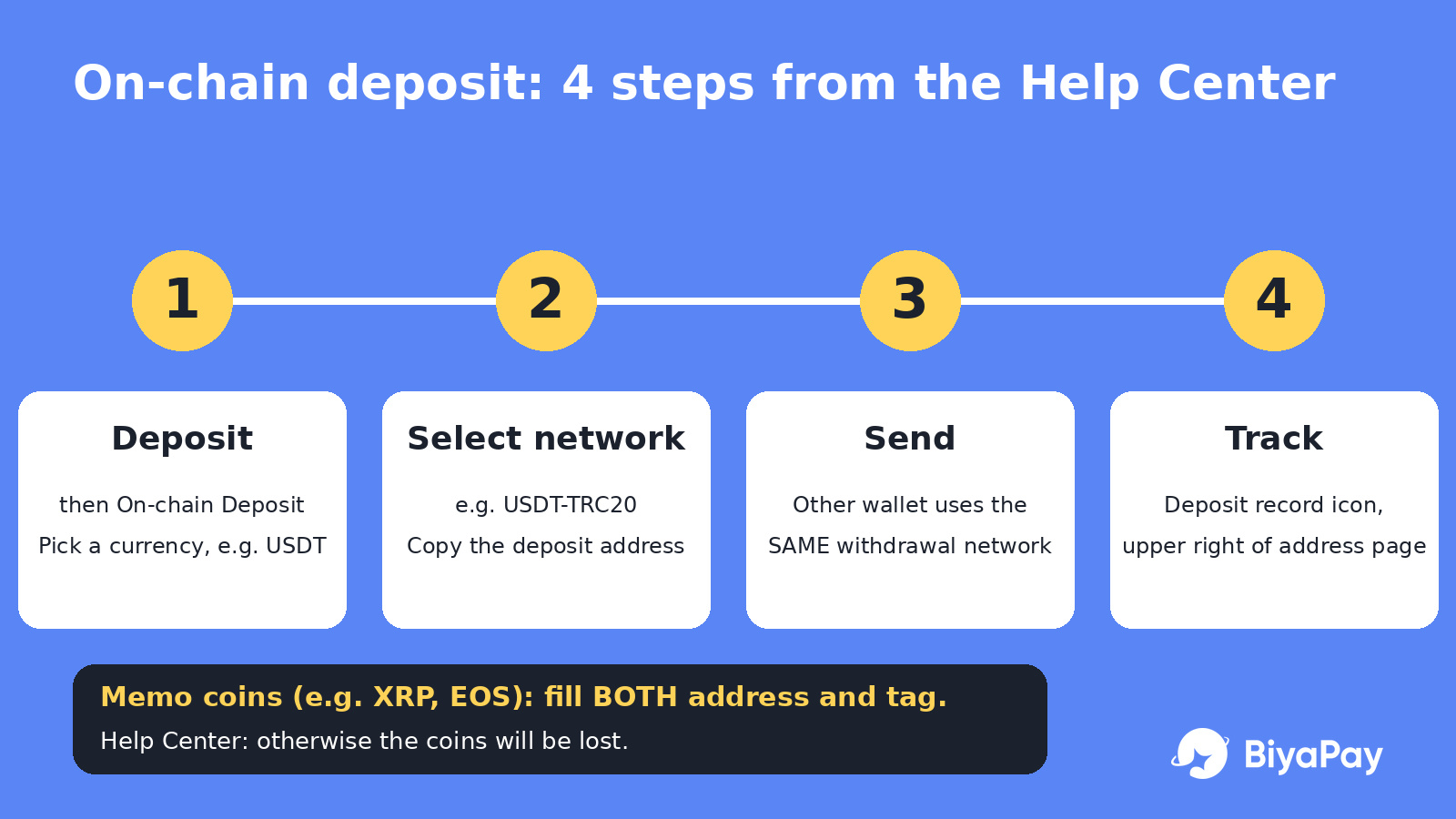
BiyaPay guide on on-chain deposits describes the flow on the App like this:
Open the homepage and tap Deposit, then On-chain Deposit (Cryptocurrency), and pick a currency such as USDT.
Select the deposit network, for example USDT-TRC20, and get the deposit address.
Paste that address into the other platform or wallet and complete the withdrawal there.
Use the deposit record icon in the upper right corner of the address page to view the order details.
On Web, the path starts from My Assets, then Funds, then Deposit, with the same network step.
The note attached to step 2 is the part I would read twice. The withdrawal network on the other exchange or wallet must match the BiyaPay deposit network, for example both USDT-TRC20. The Help Center says plainly that otherwise the coins will be lost.
In my opinion, that sentence matters more than any speed or fee comparison. The same token name, USDT, exists on several blockchains, so "USDT" alone is not enough information.
Memo tags are the second trap
The same guide adds that some currencies require a tag, with XRP and EOS given as examples. The tag, or MEMO, is shown above the deposit address and is usually a string of numbers. For those currencies, both the address and the tag must be filled in, otherwise the coins will be lost.
People used to USDT may never have needed a memo, so it is easy to skip the field the first time they move a different coin.
What changes between networks
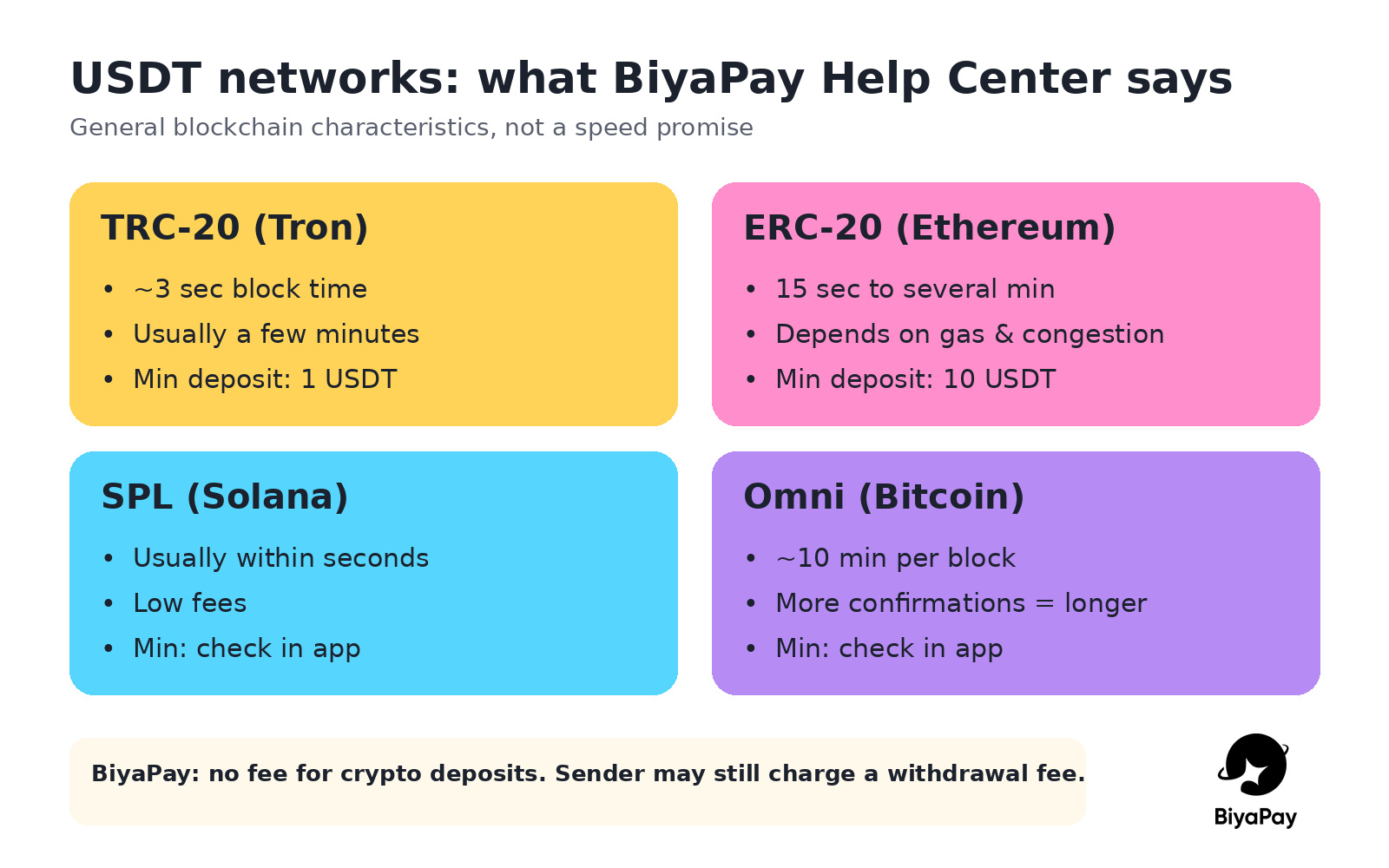
BiyaPay article on deposit times explains that USDT runs on multiple blockchains and gives general characteristics for each:
Ethereum (ERC-20): usually 15 seconds to several minutes to confirm, depending on congestion and gas fees paid
Bitcoin (Omni Layer): about 10 minutes per block, and multiple confirmations may take more time
Tron (TRC-20): block time of about 3 seconds, usually confirmed within a few minutes
Solana (SPL): usually confirmed within seconds
The article also lists other factors: BiyaPay own confirmation requirements (shown on the network selection page), network congestion, transaction fees, and internal processing time at exchanges and wallets. I read these as general blockchain descriptions, not a promise of how fast any single deposit will land.
Minimums differ by network
According to BiyaPay FAQ on minimum deposits, amounts vary by currency and protocol. The examples given:
USDT on TRC20: minimum 1
USDT on ERC20: minimum 10
The FAQ notes these can change and that the amount displayed in the app is what counts. For small test transfers, I think this detail is easy to miss. Sending less than the minimum for the chosen network is a question worth checking in the app before, not after.
Fees: whose fee is it?
BiyaPay Help Center states that it does not charge fees for depositing cryptocurrency to BiyaPay. My personal note here: that covers the receiving side. The platform or wallet you send from may still charge its own withdrawal fee, and the blockchain itself has network costs. So "free deposit" and "free transfer" are not the same thing.
If a deposit does not arrive
BiyaPay has a separate article for this, and its first advice is not to panic. The suggested order is roughly:
Check the transaction status on a blockchain explorer using the transaction hash, or in the sending platform's withdrawal records.
Confirm the address was correct, ideally copied and pasted, with each character checked.
Allow for network confirmation time, which can be longer during congestion.
If the chain shows the transaction confirmed but the balance has not updated, contact BiyaPay support.
For that support request, the article lists useful information: transaction hash, registered email, currency name, deposit protocol type, deposit address, transaction time, and any screenshots or proof. I like that this list exists, because gathering it before contacting support saves a lot of back and forth.
My intended checklist before any USDT deposit
Pick the network on BiyaPay first, then match the exact same network on the sending side.
Check whether the coin needs a memo tag. If yes, fill in both address and tag.
Check the minimum deposit for that network on the network selection page.
Check the confirmation requirement shown in the app, and do not plan around best-case timing.
Check the sending platform's withdrawal fee separately.
Copy and paste the address, then verify the first and last characters.
Save the transaction hash until the balance shows up.
Final thoughts
Choosing a network can sound like a technical detail, but BiyaPay own documentation treats it as the difference between a deposit arriving and coins being lost. None of this guarantees a smooth transfer. Chains get congested, and platforms have their own processing steps.
What I take from the Help Center is simple: match the network, respect the memo, check the minimum, and keep the hash. That is my reading of the official guides, not a recommendation to use any particular chain.