
Alpha Batcher
609 Postlar

Alpha Batcher
 Square Verified
Shikoyat qilish
Foydalanuvchini bloklash
Writing about AI & building agents | X App: alphabatcher | Follow for alpha
36 Kuzatilmoqda
46.4K+ Kuzatuvchilar
13.8K+ Yoqdi
Postlar
Barchasi
Iqtiboslar
Videolar
Tarjimani ko‘rish
2/2
"Increase my Codex context window to the maximum supported by my currently selected model, account, and client.
Inspect the active user configuration, respecting CODEX_HOME and any effective profile or project overrides.
Identify the selected model and verify its client-specific maximum using current authoritative model metadata.
Distinguish the default context_window from max_context_window.
Do not assume 1M or hardcode 872000.
If the maximum cannot be verified, leave the setting unchanged and explain.
Back up every file you edit.
Preserve unrelated settings, credentials, provider, model, speed, reasoning effort, Ultra visibility, and permission policies.
Never print secrets.
Set model_context_window to the verified maximum at the appropriate configuration scope.
In the user config, it must be a top-level key before the first section.
Update an existing key instead of duplicating it.
Check for higher-priority overrides and respect managed policies.
Keep automatic compaction enabled.
Report any existing explicit compaction threshold separately rather than inventing a new threshold.
Do not modify model catalogs or bypass limits.
Validate the configuration and verify that only the intended settings changed.
Do not restart the app or interrupt running tasks.
Report the backup location, exact changes, and expected usable window.
Use effective_context_window_percent when the metadata provides it.
Give restart and verification instructions.
Distinguish the saved setting from the actual limit reported by a running chat."
---------------------------
After your active tasks finish, fully quit and reopen the app, then check the context indicator.
If an existing chat keeps its old limit, check a new chat.
Part 1: https://www.binance.com/square/post/384311051937037
2/2
"Increase my Codex context window to the maximum supported by my currently selected model, account, and client.
Inspect the active user configuration, respecting CODEX_HOME and any effective profile or project overrides.
Identify the selected model and verify its client-specific maximum using current authoritative model metadata.
Distinguish the default context_window from max_context_window.
Do not assume 1M or hardcode 872000.
If the maximum cannot be verified, leave the setting unchanged and explain.
Back up every file you edit.
Preserve unrelated settings, credentials, provider, model, speed, reasoning effort, Ultra visibility, and permission policies.
Never print secrets.
Set model_context_window to the verified maximum at the appropriate configuration scope.
In the user config, it must be a top-level key before the first section.
Update an existing key instead of duplicating it.
Check for higher-priority overrides and respect managed policies.
Keep automatic compaction enabled.
Report any existing explicit compaction threshold separately rather than inventing a new threshold.
Do not modify model catalogs or bypass limits.
Validate the configuration and verify that only the intended settings changed.
Do not restart the app or interrupt running tasks.
Report the backup location, exact changes, and expected usable window.
Use effective_context_window_percent when the metadata provides it.
Give restart and verification instructions.
Distinguish the saved setting from the actual limit reported by a running chat."
---------------------------
After your active tasks finish, fully quit and reopen the app, then check the context indicator.
If an existing chat keeps its old limit, check a new chat.
Part 1: https://www.binance.com/square/post/384311051937037
"Increase my Codex context window to the maximum supported by my currently selected model, account, and client.
Inspect the active user configuration, respecting CODEX_HOME and any effective profile or project overrides.
Identify the selected model and verify its client-specific maximum using current authoritative model metadata.
Distinguish the default context_window from max_context_window.
Do not assume 1M or hardcode 872000.
If the maximum cannot be verified, leave the setting unchanged and explain.
Back up every file you edit.
Preserve unrelated settings, credentials, provider, model, speed, reasoning effort, Ultra visibility, and permission policies.
Never print secrets.
Set model_context_window to the verified maximum at the appropriate configuration scope.
In the user config, it must be a top-level key before the first section.
Update an existing key instead of duplicating it.
Check for higher-priority overrides and respect managed policies.
Keep automatic compaction enabled.
Report any existing explicit compaction threshold separately rather than inventing a new threshold.
Do not modify model catalogs or bypass limits.
Validate the configuration and verify that only the intended settings changed.
Do not restart the app or interrupt running tasks.
Report the backup location, exact changes, and expected usable window.
Use effective_context_window_percent when the metadata provides it.
Give restart and verification instructions.
Distinguish the saved setting from the actual limit reported by a running chat."
---------------------------
After your active tasks finish, fully quit and reopen the app, then check the context indicator.
If an existing chat keeps its old limit, check a new chat.
Part 1: https://www.binance.com/square/post/384311051937037
1
210
Tarjimani ko‘rish
1/2
I thought I had 1M context in Codex.
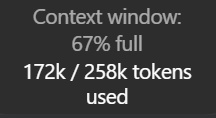
Then I noticed my Astra chat was showing 172k used out of 258k.
Astra's API specification does list 1.05M tokens, but Codex can use a smaller context window by default.
In my setup, the default was 272,000 tokens.
With the client's 95% usable-window factor, that explains the 258k shown in the app.
The maximum in my local model catalog was 872,000 tokens, which corresponds to about 828k usable.
Your setup can have a different limit, so it's worth having Codex check before changing it.
One tradeoff: keeping more history in the active context can use more of your allowance.
Raising the ceiling alone doesn't make every request consume the entire window.
For Codex signed in through ChatGPT, there's no separate long-context multiplier, but processing more tokens still counts.
Using your own API key follows API pricing.
If you want the largest window your setup supports, paste this into Codex:
---------------------------
1/2
I thought I had 1M context in Codex.
Then I noticed my Astra chat was showing 172k used out of 258k.
Astra's API specification does list 1.05M tokens, but Codex can use a smaller context window by default.
In my setup, the default was 272,000 tokens.
With the client's 95% usable-window factor, that explains the 258k shown in the app.
The maximum in my local model catalog was 872,000 tokens, which corresponds to about 828k usable.
Your setup can have a different limit, so it's worth having Codex check before changing it.
One tradeoff: keeping more history in the active context can use more of your allowance.
Raising the ceiling alone doesn't make every request consume the entire window.
For Codex signed in through ChatGPT, there's no separate long-context multiplier, but processing more tokens still counts.
Using your own API key follows API pricing.
If you want the largest window your setup supports, paste this into Codex:
---------------------------
I thought I had 1M context in Codex.
Then I noticed my Astra chat was showing 172k used out of 258k.
Astra's API specification does list 1.05M tokens, but Codex can use a smaller context window by default.
In my setup, the default was 272,000 tokens.
With the client's 95% usable-window factor, that explains the 258k shown in the app.
The maximum in my local model catalog was 872,000 tokens, which corresponds to about 828k usable.
Your setup can have a different limit, so it's worth having Codex check before changing it.
One tradeoff: keeping more history in the active context can use more of your allowance.
Raising the ceiling alone doesn't make every request consume the entire window.
For Codex signed in through ChatGPT, there's no separate long-context multiplier, but processing more tokens still counts.
Using your own API key follows API pricing.
If you want the largest window your setup supports, paste this into Codex:
---------------------------
282
Tarjimani ko‘rish
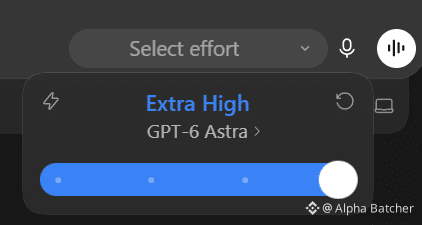
Ultra disappeared from my Codex picker. Two config settings and a restart brought it back.
The confusing part was that Ultra was already selected in Settings, while the slider inside my chat stopped at Extra High.
I found other people reporting the same thing on Windows and macOS.
What worked for me was enabling Ultra in config.toml, then fully quitting and reopening the app.
If you're seeing the same thing, paste this into Codex:
--------------------------------
"Restore the Ultra option in my Codex desktop model picker.
Identify my currently selected model and verify that it supports Ultra in my account and client.
Inspect the active user configuration, respecting CODEX_HOME and any effective profile or project overrides.
If support or the relevant settings cannot be verified, leave them unchanged and explain.
Back up every file you edit.
Preserve unrelated settings, credentials, provider, selected model, speed, default reasoning effort, context window, and permission policies.
Never print secrets.
In the existing [desktop] section, set:
show-ultra-in-model-picker-slider = true
Ensure enabled-reasoning-efforts includes supported ultra and max options while preserving existing valid values.
If the key is absent, include the normal supported effort choices when creating it.
Create [desktop] only if it doesn't exist.
Avoid duplicate sections and keys.
Respect managed policies.
Do not modify model catalogs or enable unrelated experimental features.
Validate the configuration and verify that only the intended settings changed.
Do not restart the app or interrupt running tasks.
Report the backup location, exact changes, and any unresolved restrictions.
Tell me how to fully quit and reopen the app, then select Ultra in the chat.
Distinguish saved configuration from a confirmed result in the live picker."
--------------------------------
Once Codex finishes, let your active tasks complete, fully quit the app, and reopen it.
Then check the model picker inside your chat.
That's when Ultra came back for me.
Ultra disappeared from my Codex picker. Two config settings and a restart brought it back.
The confusing part was that Ultra was already selected in Settings, while the slider inside my chat stopped at Extra High.
I found other people reporting the same thing on Windows and macOS.
What worked for me was enabling Ultra in config.toml, then fully quitting and reopening the app.
If you're seeing the same thing, paste this into Codex:
--------------------------------
"Restore the Ultra option in my Codex desktop model picker.
Identify my currently selected model and verify that it supports Ultra in my account and client.
Inspect the active user configuration, respecting CODEX_HOME and any effective profile or project overrides.
If support or the relevant settings cannot be verified, leave them unchanged and explain.
Back up every file you edit.
Preserve unrelated settings, credentials, provider, selected model, speed, default reasoning effort, context window, and permission policies.
Never print secrets.
In the existing [desktop] section, set:
show-ultra-in-model-picker-slider = true
Ensure enabled-reasoning-efforts includes supported ultra and max options while preserving existing valid values.
If the key is absent, include the normal supported effort choices when creating it.
Create [desktop] only if it doesn't exist.
Avoid duplicate sections and keys.
Respect managed policies.
Do not modify model catalogs or enable unrelated experimental features.
Validate the configuration and verify that only the intended settings changed.
Do not restart the app or interrupt running tasks.
Report the backup location, exact changes, and any unresolved restrictions.
Tell me how to fully quit and reopen the app, then select Ultra in the chat.
Distinguish saved configuration from a confirmed result in the live picker."
--------------------------------
Once Codex finishes, let your active tasks complete, fully quit the app, and reopen it.
Then check the model picker inside your chat.
That's when Ultra came back for me.
The confusing part was that Ultra was already selected in Settings, while the slider inside my chat stopped at Extra High.
I found other people reporting the same thing on Windows and macOS.
What worked for me was enabling Ultra in config.toml, then fully quitting and reopening the app.
If you're seeing the same thing, paste this into Codex:
--------------------------------
"Restore the Ultra option in my Codex desktop model picker.
Identify my currently selected model and verify that it supports Ultra in my account and client.
Inspect the active user configuration, respecting CODEX_HOME and any effective profile or project overrides.
If support or the relevant settings cannot be verified, leave them unchanged and explain.
Back up every file you edit.
Preserve unrelated settings, credentials, provider, selected model, speed, default reasoning effort, context window, and permission policies.
Never print secrets.
In the existing [desktop] section, set:
show-ultra-in-model-picker-slider = true
Ensure enabled-reasoning-efforts includes supported ultra and max options while preserving existing valid values.
If the key is absent, include the normal supported effort choices when creating it.
Create [desktop] only if it doesn't exist.
Avoid duplicate sections and keys.
Respect managed policies.
Do not modify model catalogs or enable unrelated experimental features.
Validate the configuration and verify that only the intended settings changed.
Do not restart the app or interrupt running tasks.
Report the backup location, exact changes, and any unresolved restrictions.
Tell me how to fully quit and reopen the app, then select Ultra in the chat.
Distinguish saved configuration from a confirmed result in the live picker."
--------------------------------
Once Codex finishes, let your active tasks complete, fully quit the app, and reopen it.
Then check the model picker inside your chat.
That's when Ultra came back for me.
1
399

Maqola
Tarjimani ko‘rish
Why your AI agent keeps burning tokensPicture a bug fix that changes 12 lines. The agent reads the project, writes a plan, starts a helper, runs tests, reads the failures, and tries again before producing that patch.
The bill includes every request that got it there.
That makes a short task surprisingly easy to overpay for. A long conversation can carry old files into later requests. A tool can return pages of data when the next decision needs one record. Several agents can repeat the same investigation.
You can find these costs in the execution history. Start with one job, track everything it spends, and check whether the result actually passes. Then change the part doing unnecessary work.
1. Put a price on a finished task
Choose a task you repeat: fixing a reported bug, preparing a research brief, or checking a batch of customer records. Define what counts as finished before running it.
For a bug fix, acceptance might require a test that reproduces the original failure, a passing result after the change, and no failure in the affected integration tests. A message saying the bug is fixed doesn't meet those conditions.
Give the task an ID. Keep that ID across retries, helper agents, verification, and the final result. Record a separate request ID for each model call so you can catch duplicates in your logs.
The core calculation is:
Cost per accepted task = total recorded spend / number of accepted tasks
Include the attempts that failed. If 10 tasks cost $8 in total and only 4 pass, the cost is $2 per accepted task. Keep the 40% acceptance rate beside that number. If nothing passes, report the spend and zero accepted tasks; the ratio is undefined.
Track human repair time separately. A workflow that saves $1 in API charges and requires 20 minutes of cleanup has a tradeoff worth seeing.
For API work, save the provider's usage response, model ID, pricing date, tool charges, task outcome, and timestamps. If usage is missing after a timeout, mark the cost unknown and reconcile it with provider records. A missing response doesn't establish that the request was free. If any request remains unpriced, label the batch total incomplete.
Claude Code users can start with /usage and /context. The first helps inspect usage; the second shows what occupies the conversation. On a subscription, a local dollar estimate isn't a separate invoice, and the context window is a different limit from your plan allowance.
2. Find the context that keeps coming back
Your latest message is only part of a model request. In Claude Code, requests can also contain project instructions, tool descriptions, conversation history, file contents, and earlier tool results.
Suppose an unchanged 12,000-token document appears in 8 requests. Across those calls, the document contributes 96,000 input tokens. Eligible cache reads may be charged at a lower rate. The document may still be irrelevant to some of those decisions.
Look at a single task's sequence. Which files were read? Which outputs stayed in the conversation? Which request caused the largest increase? Was the agent still using those details at the end?
For a bug in an invoice total, start with the failing input, the calculation, its callers, and the tests covering it. Let the agent follow references when it needs more. Loading an entire repository in advance can make every later turn carry material that never contributed to the fix.
Keep the full evidence available on disk. Return a concise result with the file path and enough detail to inspect the original. For a test run, that means the command, exit code, failing test names, relevant error, and log location.
A summary that drops the only clue creates more work. Preserve the exact error, affected identifier, and evidence needed for the next action.
3. Check whether the cache is doing useful work
Prompt caching reuses an eligible, matching beginning of a request. Put stable instructions first and changing task data afterward.
In a custom Claude API workflow, a timestamp before the cache boundary can create a different entry on every call. Place the boundary after content that repeats. Check the current caching documentation for your model and request structure.
Compare cache reads and writes across requests. Repeated writes with few reads suggest checking prefix changes, minimum eligible length, lifetime, and timing.
Cache reads still cost money. High read counts can mean caching works; also check whether that context helps finish the task.
In Claude Code, ordinary subagents have their own context and caching behavior. A fork behaves differently. Compaction also uses a model request and rebuilds conversation context. Avoid scheduling manual compaction every few minutes without measuring the result.
4. Shrink what tools return
A tool response can become input to subsequent model calls. A large response may therefore affect more than the request that originally fetched it.
Take a daily order report. A tool fetches all orders, the model reads every row, and another request asks it to calculate totals. A script can filter the records, calculate the totals, and return the exceptions requiring judgment.
That changes what reaches the model. It also creates a calculation you can test independently.
Use the same approach for logs, spreadsheets, and search results. Filter by the relevant customer, date, error, or record type before returning data. Include the filter used, the count processed, any truncation, and a path or identifier for the original evidence.
Check pagination. Processing the first page and presenting it as the whole dataset gives you a cheaper wrong answer.
Intermediate results can stay in the execution environment while selected data reaches the model. You can apply that principle in a small local script without building a complicated agent system.
Tool definitions also occupy context when loaded. Some clients already defer full definitions until needed. Inspect your actual setup before removing integrations: connection count alone doesn't tell you their token overhead.
5. Save the procedure after you've figured it out
Watch for tasks where the agent repeatedly discovers the same commands, rewrites the same plan, or decides which tests to run from scratch.
Once the procedure is understood, save it. Put project-specific instructions in a short reusable guide. Put fixed calculations, file transformations, and command sequences in a tested script.
For the invoice bug, a script can prepare a fixture, execute the calculation, compare the expected value, and report the result. The agent still needs to diagnose an unexpected mismatch and choose a correct fix. It doesn't need to invent the test command every time.
Keep the procedure tied to its assumptions. Record the required dependencies, expected inputs, and conditions under which it must stop. When the environment changes, a visible failure is easier to diagnose than a plausible success message.
Repeated status checks deserve the same treatment. If a service provides a job ID, use its completion event or a bounded polling function. Return to the model when the job finishes, fails, or exceeds its deadline.
For actions that create or send something, a retry needs extra care. Check whether the first attempt succeeded before repeating it. Reusing an idempotency key, where supported, can prevent one uncertain response from becoming two orders or two messages.
6. Give each agent a distinct job
Parallel agents can reduce elapsed time. Their calls, context, and coordination also contribute to the total spend.
Split work when the assignments are independent and the outputs are easy to combine. One agent can reproduce a reported bug while another checks the affected interface contract. Give each a clear question and a defined result.
Avoid sending several helpers the same broad instruction to inspect everything. That can produce several copies of the same investigation, followed by another pass to reconcile their summaries.
A useful handoff names the task, relevant files, allowed changes, expected output, and stopping condition. Ask for evidence paths and the findings needed by the next step. Keep verbose intermediate work available in the helper's files.
Assign verification deliberately. Run focused checks during implementation, then run the required broader checks against the combined result. Repeat a check when code changed, an earlier run failed, or new evidence creates a reason. Record why each run happened.
Measure model changes separately from workflow changes. Keep the same task set and acceptance tests when trying a different model or reasoning setting. Include retries and repair time in the comparison. A lower price per call only helps if the entire job remains worthwhile.
7. Read the usage fields correctly
Different providers report cached input differently. Copying one provider's formula into another provider's logs can produce a convincing but incorrect bill.
In a standard Claude Messages response, input_tokens, cache_creation_input_tokens, and cache_read_input_tokens are separate input categories. Cache creation can also be split by lifetime. Match each category to its rate.
In the current OpenAI Responses schema, cached input and applicable cache-write counts sit inside total input. They need the documented subtraction before pricing ordinary input. Use the provider's calculation for the actual model and API you're calling.
Keep the original usage response beside your normalized record. That lets you correct the calculation when your provider, model, or pricing changes.
Some features also create extra billed work. With Claude API compaction, top-level input and output counts exclude the compaction iteration. Price the entries in usage.iterations once, using each entry's usage fields. Don't add the top-level counts again.
Tool execution, search, hosting, and storage can have separate charges. Label a number as model cost if those charges are excluded. For streamed requests, use the completed usage totals when available and avoid counting cumulative updates repeatedly.
8. Work through one batch
Here is an illustrative calculation you can reproduce. The request counts, token volumes, tool fees, and outcomes below are invented. No agent was run to produce them.
The example job extracts three values and their supporting passages from each of four documents. A result passes only when its JSON, values, and source evidence are correct.
Both scenarios stipulate three accepted results, one rejected attempt that needs a retry, and one task that ultimately fails. That's five attempts across four tasks. Every attempt contributes to the bill.
The first scenario contains 15 model requests: 375,000 uncached input tokens and 15,000 output tokens. At the standard Claude Haiku 4.5 prices checked on September 7, 2026, input costs $1 per million tokens and output costs $5 per million. The model charge is $0.45. Add $0.06 in invented external tool fees, and the total is $0.51.
Divide $0.51 by the three accepted results: $0.17 per accepted result.
The second scenario stipulates 10 requests with less fresh input and some cached input. Its model charges break down as follows:
• 55,000 uncached input tokens at $1 per million: $0.055.
• 25,000 five-minute cache-write tokens at $1.25 per million: $0.03125.
• 25,000 one-hour cache-write tokens at $2 per million: $0.05.
• 50,000 cache-read tokens at $0.10 per million: $0.005.
• 7,500 output tokens at $5 per million: $0.0375.
That totals $0.17875 in model charges. Add $0.05 in invented external tool fees: $0.22875 for all attempts, or $0.07625 per accepted result. The mixed cache lifetimes demonstrate the accounting categories; they aren't a recommended setup.
These numbers show what the stated usage costs. They don't establish that filtering context or changing a cache boundary will produce those counts or preserve quality. A real comparison needs recorded requests and independently checked results. Its failed tasks still belong in the total.
9. Run this on your own workflow
Choose a small set of representative tasks and keep their inputs unchanged. Include an ordinary success, a difficult case, and a task that has failed before. Write the acceptance checks before making changes.
Run the existing workflow and save its request records. Mark the point where unnecessary material entered the conversation, a procedure was rebuilt, a duplicate check ran, or an unchanged error triggered another attempt.
Change one mechanism. Filter a large tool result. Save a repeated command sequence. Fix a cache boundary. Narrow one helper's assignment. Keep the model and acceptance criteria unchanged for that comparison.
Rerun the same inputs in a clean test environment. Distinguish initial runs from cache-warmed runs. Repeat enough times to see whether the outcome is consistent, and preserve failed attempts in the totals.
Use this prompt with a coding agent that can access your implementation and logs:
Inspect this workflow and its available execution logs.
Define the task boundary and acceptance checks. Trace the parent calls, helper calls, retries, verification, and final outcome.
Create a local report showing recorded model cost, separate tool charges, missing usage, accepted tasks, failed tasks, elapsed time, and human interventions. Use current provider-specific usage fields and a dated rate card. Preserve raw usage responses. Deduplicate request IDs.
Identify the largest avoidable cost supported by the logs. Point to the specific calls and explain why the work was unnecessary. Keep estimates separate from recorded amounts.
Propose one change and a comparison using the same inputs, model, and acceptance checks. Separate initial and cache-warmed runs. Stop if the required evidence is missing and name exactly what's needed.
Do not make paid API calls or change the live workflow during this inspection. Save the report and proposed patch for review.
The acceptance checks are what keep the comparison honest. If filtering a log hides the failure, or a smaller model needs repeated repairs, record that result and revise the change.
I write practical AI workflows here. Follow me for the next one.
Why your AI agent keeps burning tokens
Picture a bug fix that changes 12 lines. The agent reads the project, writes a plan, starts a helper, runs tests, reads the failures, and tries again before producing that patch.
The bill includes every request that got it there.
That makes a short task surprisingly easy to overpay for. A long conversation can carry old files into later requests. A tool can return pages of data when the next decision needs one record. Several agents can repeat the same investigation.
You can find these costs in the execution history. Start with one job, track everything it spends, and check whether the result actually passes. Then change the part doing unnecessary work.
1. Put a price on a finished task
Choose a task you repeat: fixing a reported bug, preparing a research brief, or checking a batch of customer records. Define what counts as finished before running it.
For a bug fix, acceptance might require a test that reproduces the original failure, a passing result after the change, and no failure in the affected integration tests. A message saying the bug is fixed doesn't meet those conditions.
Give the task an ID. Keep that ID across retries, helper agents, verification, and the final result. Record a separate request ID for each model call so you can catch duplicates in your logs.
The core calculation is:
Cost per accepted task = total recorded spend / number of accepted tasks
Include the attempts that failed. If 10 tasks cost $8 in total and only 4 pass, the cost is $2 per accepted task. Keep the 40% acceptance rate beside that number. If nothing passes, report the spend and zero accepted tasks; the ratio is undefined.
Track human repair time separately. A workflow that saves $1 in API charges and requires 20 minutes of cleanup has a tradeoff worth seeing.
For API work, save the provider's usage response, model ID, pricing date, tool charges, task outcome, and timestamps. If usage is missing after a timeout, mark the cost unknown and reconcile it with provider records. A missing response doesn't establish that the request was free. If any request remains unpriced, label the batch total incomplete.
Claude Code users can start with /usage and /context. The first helps inspect usage; the second shows what occupies the conversation. On a subscription, a local dollar estimate isn't a separate invoice, and the context window is a different limit from your plan allowance.
2. Find the context that keeps coming back
Your latest message is only part of a model request. In Claude Code, requests can also contain project instructions, tool descriptions, conversation history, file contents, and earlier tool results.
Suppose an unchanged 12,000-token document appears in 8 requests. Across those calls, the document contributes 96,000 input tokens. Eligible cache reads may be charged at a lower rate. The document may still be irrelevant to some of those decisions.
Look at a single task's sequence. Which files were read? Which outputs stayed in the conversation? Which request caused the largest increase? Was the agent still using those details at the end?
For a bug in an invoice total, start with the failing input, the calculation, its callers, and the tests covering it. Let the agent follow references when it needs more. Loading an entire repository in advance can make every later turn carry material that never contributed to the fix.
Keep the full evidence available on disk. Return a concise result with the file path and enough detail to inspect the original. For a test run, that means the command, exit code, failing test names, relevant error, and log location.
A summary that drops the only clue creates more work. Preserve the exact error, affected identifier, and evidence needed for the next action.
3. Check whether the cache is doing useful work
Prompt caching reuses an eligible, matching beginning of a request. Put stable instructions first and changing task data afterward.
In a custom Claude API workflow, a timestamp before the cache boundary can create a different entry on every call. Place the boundary after content that repeats. Check the current caching documentation for your model and request structure.
Compare cache reads and writes across requests. Repeated writes with few reads suggest checking prefix changes, minimum eligible length, lifetime, and timing.
Cache reads still cost money. High read counts can mean caching works; also check whether that context helps finish the task.
In Claude Code, ordinary subagents have their own context and caching behavior. A fork behaves differently. Compaction also uses a model request and rebuilds conversation context. Avoid scheduling manual compaction every few minutes without measuring the result.
4. Shrink what tools return
A tool response can become input to subsequent model calls. A large response may therefore affect more than the request that originally fetched it.
Take a daily order report. A tool fetches all orders, the model reads every row, and another request asks it to calculate totals. A script can filter the records, calculate the totals, and return the exceptions requiring judgment.
That changes what reaches the model. It also creates a calculation you can test independently.
Use the same approach for logs, spreadsheets, and search results. Filter by the relevant customer, date, error, or record type before returning data. Include the filter used, the count processed, any truncation, and a path or identifier for the original evidence.
Check pagination. Processing the first page and presenting it as the whole dataset gives you a cheaper wrong answer.
Intermediate results can stay in the execution environment while selected data reaches the model. You can apply that principle in a small local script without building a complicated agent system.
Tool definitions also occupy context when loaded. Some clients already defer full definitions until needed. Inspect your actual setup before removing integrations: connection count alone doesn't tell you their token overhead.
5. Save the procedure after you've figured it out
Watch for tasks where the agent repeatedly discovers the same commands, rewrites the same plan, or decides which tests to run from scratch.
Once the procedure is understood, save it. Put project-specific instructions in a short reusable guide. Put fixed calculations, file transformations, and command sequences in a tested script.
For the invoice bug, a script can prepare a fixture, execute the calculation, compare the expected value, and report the result. The agent still needs to diagnose an unexpected mismatch and choose a correct fix. It doesn't need to invent the test command every time.
Keep the procedure tied to its assumptions. Record the required dependencies, expected inputs, and conditions under which it must stop. When the environment changes, a visible failure is easier to diagnose than a plausible success message.
Repeated status checks deserve the same treatment. If a service provides a job ID, use its completion event or a bounded polling function. Return to the model when the job finishes, fails, or exceeds its deadline.
For actions that create or send something, a retry needs extra care. Check whether the first attempt succeeded before repeating it. Reusing an idempotency key, where supported, can prevent one uncertain response from becoming two orders or two messages.
6. Give each agent a distinct job
Parallel agents can reduce elapsed time. Their calls, context, and coordination also contribute to the total spend.
Split work when the assignments are independent and the outputs are easy to combine. One agent can reproduce a reported bug while another checks the affected interface contract. Give each a clear question and a defined result.
Avoid sending several helpers the same broad instruction to inspect everything. That can produce several copies of the same investigation, followed by another pass to reconcile their summaries.
A useful handoff names the task, relevant files, allowed changes, expected output, and stopping condition. Ask for evidence paths and the findings needed by the next step. Keep verbose intermediate work available in the helper's files.
Assign verification deliberately. Run focused checks during implementation, then run the required broader checks against the combined result. Repeat a check when code changed, an earlier run failed, or new evidence creates a reason. Record why each run happened.
Measure model changes separately from workflow changes. Keep the same task set and acceptance tests when trying a different model or reasoning setting. Include retries and repair time in the comparison. A lower price per call only helps if the entire job remains worthwhile.
7. Read the usage fields correctly
Different providers report cached input differently. Copying one provider's formula into another provider's logs can produce a convincing but incorrect bill.
In a standard Claude Messages response, input_tokens, cache_creation_input_tokens, and cache_read_input_tokens are separate input categories. Cache creation can also be split by lifetime. Match each category to its rate.
In the current OpenAI Responses schema, cached input and applicable cache-write counts sit inside total input. They need the documented subtraction before pricing ordinary input. Use the provider's calculation for the actual model and API you're calling.
Keep the original usage response beside your normalized record. That lets you correct the calculation when your provider, model, or pricing changes.
Some features also create extra billed work. With Claude API compaction, top-level input and output counts exclude the compaction iteration. Price the entries in usage.iterations once, using each entry's usage fields. Don't add the top-level counts again.
Tool execution, search, hosting, and storage can have separate charges. Label a number as model cost if those charges are excluded. For streamed requests, use the completed usage totals when available and avoid counting cumulative updates repeatedly.
8. Work through one batch
Here is an illustrative calculation you can reproduce. The request counts, token volumes, tool fees, and outcomes below are invented. No agent was run to produce them.
The example job extracts three values and their supporting passages from each of four documents. A result passes only when its JSON, values, and source evidence are correct.
Both scenarios stipulate three accepted results, one rejected attempt that needs a retry, and one task that ultimately fails. That's five attempts across four tasks. Every attempt contributes to the bill.
The first scenario contains 15 model requests: 375,000 uncached input tokens and 15,000 output tokens. At the standard Claude Haiku 4.5 prices checked on September 7, 2026, input costs $1 per million tokens and output costs $5 per million. The model charge is $0.45. Add $0.06 in invented external tool fees, and the total is $0.51.
Divide $0.51 by the three accepted results: $0.17 per accepted result.
The second scenario stipulates 10 requests with less fresh input and some cached input. Its model charges break down as follows:
• 55,000 uncached input tokens at $1 per million: $0.055.
• 25,000 five-minute cache-write tokens at $1.25 per million: $0.03125.
• 25,000 one-hour cache-write tokens at $2 per million: $0.05.
• 50,000 cache-read tokens at $0.10 per million: $0.005.
• 7,500 output tokens at $5 per million: $0.0375.
That totals $0.17875 in model charges. Add $0.05 in invented external tool fees: $0.22875 for all attempts, or $0.07625 per accepted result. The mixed cache lifetimes demonstrate the accounting categories; they aren't a recommended setup.
These numbers show what the stated usage costs. They don't establish that filtering context or changing a cache boundary will produce those counts or preserve quality. A real comparison needs recorded requests and independently checked results. Its failed tasks still belong in the total.
9. Run this on your own workflow
Choose a small set of representative tasks and keep their inputs unchanged. Include an ordinary success, a difficult case, and a task that has failed before. Write the acceptance checks before making changes.
Run the existing workflow and save its request records. Mark the point where unnecessary material entered the conversation, a procedure was rebuilt, a duplicate check ran, or an unchanged error triggered another attempt.
Change one mechanism. Filter a large tool result. Save a repeated command sequence. Fix a cache boundary. Narrow one helper's assignment. Keep the model and acceptance criteria unchanged for that comparison.
Rerun the same inputs in a clean test environment. Distinguish initial runs from cache-warmed runs. Repeat enough times to see whether the outcome is consistent, and preserve failed attempts in the totals.
Use this prompt with a coding agent that can access your implementation and logs:
Inspect this workflow and its available execution logs.
Define the task boundary and acceptance checks. Trace the parent calls, helper calls, retries, verification, and final outcome.
Create a local report showing recorded model cost, separate tool charges, missing usage, accepted tasks, failed tasks, elapsed time, and human interventions. Use current provider-specific usage fields and a dated rate card. Preserve raw usage responses. Deduplicate request IDs.
Identify the largest avoidable cost supported by the logs. Point to the specific calls and explain why the work was unnecessary. Keep estimates separate from recorded amounts.
Propose one change and a comparison using the same inputs, model, and acceptance checks. Separate initial and cache-warmed runs. Stop if the required evidence is missing and name exactly what's needed.
Do not make paid API calls or change the live workflow during this inspection. Save the report and proposed patch for review.
The acceptance checks are what keep the comparison honest. If filtering a log hides the failure, or a smaller model needs repeated repairs, record that result and revise the change.
I write practical AI workflows here. Follow me for the next one.
The bill includes every request that got it there.
That makes a short task surprisingly easy to overpay for. A long conversation can carry old files into later requests. A tool can return pages of data when the next decision needs one record. Several agents can repeat the same investigation.
You can find these costs in the execution history. Start with one job, track everything it spends, and check whether the result actually passes. Then change the part doing unnecessary work.
1. Put a price on a finished task
Choose a task you repeat: fixing a reported bug, preparing a research brief, or checking a batch of customer records. Define what counts as finished before running it.
For a bug fix, acceptance might require a test that reproduces the original failure, a passing result after the change, and no failure in the affected integration tests. A message saying the bug is fixed doesn't meet those conditions.
Give the task an ID. Keep that ID across retries, helper agents, verification, and the final result. Record a separate request ID for each model call so you can catch duplicates in your logs.
The core calculation is:
Cost per accepted task = total recorded spend / number of accepted tasks
Include the attempts that failed. If 10 tasks cost $8 in total and only 4 pass, the cost is $2 per accepted task. Keep the 40% acceptance rate beside that number. If nothing passes, report the spend and zero accepted tasks; the ratio is undefined.
Track human repair time separately. A workflow that saves $1 in API charges and requires 20 minutes of cleanup has a tradeoff worth seeing.
For API work, save the provider's usage response, model ID, pricing date, tool charges, task outcome, and timestamps. If usage is missing after a timeout, mark the cost unknown and reconcile it with provider records. A missing response doesn't establish that the request was free. If any request remains unpriced, label the batch total incomplete.
Claude Code users can start with /usage and /context. The first helps inspect usage; the second shows what occupies the conversation. On a subscription, a local dollar estimate isn't a separate invoice, and the context window is a different limit from your plan allowance.
2. Find the context that keeps coming back
Your latest message is only part of a model request. In Claude Code, requests can also contain project instructions, tool descriptions, conversation history, file contents, and earlier tool results.
Suppose an unchanged 12,000-token document appears in 8 requests. Across those calls, the document contributes 96,000 input tokens. Eligible cache reads may be charged at a lower rate. The document may still be irrelevant to some of those decisions.
Look at a single task's sequence. Which files were read? Which outputs stayed in the conversation? Which request caused the largest increase? Was the agent still using those details at the end?
For a bug in an invoice total, start with the failing input, the calculation, its callers, and the tests covering it. Let the agent follow references when it needs more. Loading an entire repository in advance can make every later turn carry material that never contributed to the fix.
Keep the full evidence available on disk. Return a concise result with the file path and enough detail to inspect the original. For a test run, that means the command, exit code, failing test names, relevant error, and log location.
A summary that drops the only clue creates more work. Preserve the exact error, affected identifier, and evidence needed for the next action.
3. Check whether the cache is doing useful work
Prompt caching reuses an eligible, matching beginning of a request. Put stable instructions first and changing task data afterward.
In a custom Claude API workflow, a timestamp before the cache boundary can create a different entry on every call. Place the boundary after content that repeats. Check the current caching documentation for your model and request structure.
Compare cache reads and writes across requests. Repeated writes with few reads suggest checking prefix changes, minimum eligible length, lifetime, and timing.
Cache reads still cost money. High read counts can mean caching works; also check whether that context helps finish the task.
In Claude Code, ordinary subagents have their own context and caching behavior. A fork behaves differently. Compaction also uses a model request and rebuilds conversation context. Avoid scheduling manual compaction every few minutes without measuring the result.
4. Shrink what tools return
A tool response can become input to subsequent model calls. A large response may therefore affect more than the request that originally fetched it.
Take a daily order report. A tool fetches all orders, the model reads every row, and another request asks it to calculate totals. A script can filter the records, calculate the totals, and return the exceptions requiring judgment.
That changes what reaches the model. It also creates a calculation you can test independently.
Use the same approach for logs, spreadsheets, and search results. Filter by the relevant customer, date, error, or record type before returning data. Include the filter used, the count processed, any truncation, and a path or identifier for the original evidence.
Check pagination. Processing the first page and presenting it as the whole dataset gives you a cheaper wrong answer.
Intermediate results can stay in the execution environment while selected data reaches the model. You can apply that principle in a small local script without building a complicated agent system.
Tool definitions also occupy context when loaded. Some clients already defer full definitions until needed. Inspect your actual setup before removing integrations: connection count alone doesn't tell you their token overhead.
5. Save the procedure after you've figured it out
Watch for tasks where the agent repeatedly discovers the same commands, rewrites the same plan, or decides which tests to run from scratch.
Once the procedure is understood, save it. Put project-specific instructions in a short reusable guide. Put fixed calculations, file transformations, and command sequences in a tested script.
For the invoice bug, a script can prepare a fixture, execute the calculation, compare the expected value, and report the result. The agent still needs to diagnose an unexpected mismatch and choose a correct fix. It doesn't need to invent the test command every time.
Keep the procedure tied to its assumptions. Record the required dependencies, expected inputs, and conditions under which it must stop. When the environment changes, a visible failure is easier to diagnose than a plausible success message.
Repeated status checks deserve the same treatment. If a service provides a job ID, use its completion event or a bounded polling function. Return to the model when the job finishes, fails, or exceeds its deadline.
For actions that create or send something, a retry needs extra care. Check whether the first attempt succeeded before repeating it. Reusing an idempotency key, where supported, can prevent one uncertain response from becoming two orders or two messages.
6. Give each agent a distinct job
Parallel agents can reduce elapsed time. Their calls, context, and coordination also contribute to the total spend.
Split work when the assignments are independent and the outputs are easy to combine. One agent can reproduce a reported bug while another checks the affected interface contract. Give each a clear question and a defined result.
Avoid sending several helpers the same broad instruction to inspect everything. That can produce several copies of the same investigation, followed by another pass to reconcile their summaries.
A useful handoff names the task, relevant files, allowed changes, expected output, and stopping condition. Ask for evidence paths and the findings needed by the next step. Keep verbose intermediate work available in the helper's files.
Assign verification deliberately. Run focused checks during implementation, then run the required broader checks against the combined result. Repeat a check when code changed, an earlier run failed, or new evidence creates a reason. Record why each run happened.
Measure model changes separately from workflow changes. Keep the same task set and acceptance tests when trying a different model or reasoning setting. Include retries and repair time in the comparison. A lower price per call only helps if the entire job remains worthwhile.
7. Read the usage fields correctly
Different providers report cached input differently. Copying one provider's formula into another provider's logs can produce a convincing but incorrect bill.
In a standard Claude Messages response, input_tokens, cache_creation_input_tokens, and cache_read_input_tokens are separate input categories. Cache creation can also be split by lifetime. Match each category to its rate.
In the current OpenAI Responses schema, cached input and applicable cache-write counts sit inside total input. They need the documented subtraction before pricing ordinary input. Use the provider's calculation for the actual model and API you're calling.
Keep the original usage response beside your normalized record. That lets you correct the calculation when your provider, model, or pricing changes.
Some features also create extra billed work. With Claude API compaction, top-level input and output counts exclude the compaction iteration. Price the entries in usage.iterations once, using each entry's usage fields. Don't add the top-level counts again.
Tool execution, search, hosting, and storage can have separate charges. Label a number as model cost if those charges are excluded. For streamed requests, use the completed usage totals when available and avoid counting cumulative updates repeatedly.
8. Work through one batch
Here is an illustrative calculation you can reproduce. The request counts, token volumes, tool fees, and outcomes below are invented. No agent was run to produce them.
The example job extracts three values and their supporting passages from each of four documents. A result passes only when its JSON, values, and source evidence are correct.
Both scenarios stipulate three accepted results, one rejected attempt that needs a retry, and one task that ultimately fails. That's five attempts across four tasks. Every attempt contributes to the bill.
The first scenario contains 15 model requests: 375,000 uncached input tokens and 15,000 output tokens. At the standard Claude Haiku 4.5 prices checked on September 7, 2026, input costs $1 per million tokens and output costs $5 per million. The model charge is $0.45. Add $0.06 in invented external tool fees, and the total is $0.51.
Divide $0.51 by the three accepted results: $0.17 per accepted result.
The second scenario stipulates 10 requests with less fresh input and some cached input. Its model charges break down as follows:
• 55,000 uncached input tokens at $1 per million: $0.055.
• 25,000 five-minute cache-write tokens at $1.25 per million: $0.03125.
• 25,000 one-hour cache-write tokens at $2 per million: $0.05.
• 50,000 cache-read tokens at $0.10 per million: $0.005.
• 7,500 output tokens at $5 per million: $0.0375.
That totals $0.17875 in model charges. Add $0.05 in invented external tool fees: $0.22875 for all attempts, or $0.07625 per accepted result. The mixed cache lifetimes demonstrate the accounting categories; they aren't a recommended setup.
These numbers show what the stated usage costs. They don't establish that filtering context or changing a cache boundary will produce those counts or preserve quality. A real comparison needs recorded requests and independently checked results. Its failed tasks still belong in the total.
9. Run this on your own workflow
Choose a small set of representative tasks and keep their inputs unchanged. Include an ordinary success, a difficult case, and a task that has failed before. Write the acceptance checks before making changes.
Run the existing workflow and save its request records. Mark the point where unnecessary material entered the conversation, a procedure was rebuilt, a duplicate check ran, or an unchanged error triggered another attempt.
Change one mechanism. Filter a large tool result. Save a repeated command sequence. Fix a cache boundary. Narrow one helper's assignment. Keep the model and acceptance criteria unchanged for that comparison.
Rerun the same inputs in a clean test environment. Distinguish initial runs from cache-warmed runs. Repeat enough times to see whether the outcome is consistent, and preserve failed attempts in the totals.
Use this prompt with a coding agent that can access your implementation and logs:
Inspect this workflow and its available execution logs.
Define the task boundary and acceptance checks. Trace the parent calls, helper calls, retries, verification, and final outcome.
Create a local report showing recorded model cost, separate tool charges, missing usage, accepted tasks, failed tasks, elapsed time, and human interventions. Use current provider-specific usage fields and a dated rate card. Preserve raw usage responses. Deduplicate request IDs.
Identify the largest avoidable cost supported by the logs. Point to the specific calls and explain why the work was unnecessary. Keep estimates separate from recorded amounts.
Propose one change and a comparison using the same inputs, model, and acceptance checks. Separate initial and cache-warmed runs. Stop if the required evidence is missing and name exactly what's needed.
Do not make paid API calls or change the live workflow during this inspection. Save the report and proposed patch for review.
The acceptance checks are what keep the comparison honest. If filtering a log hides the failure, or a smaller model needs repeated repairs, record that result and revise the change.
I write practical AI workflows here. Follow me for the next one.
763
Maqola
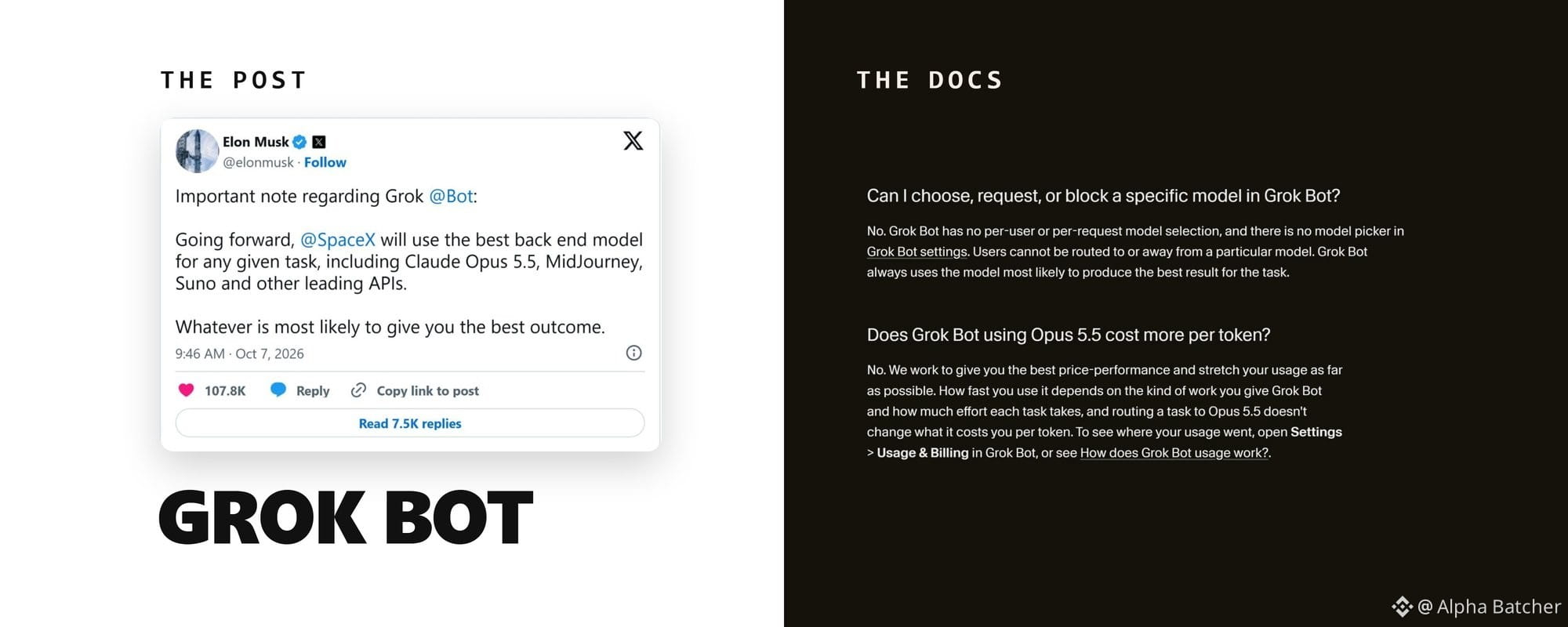
Grok Bot Claude va 30 dollarlik tarifga ega bo‘ldi. Nimalari haqiqat, avval nimani sozlash kerak7-oktabr kuni Ilon Mask Grok Bot “har qanday vazifa uchun eng yaxshi backend modelidan, jumladan Claude Opus 5.5’dan” foydalanishini yozdi. 79 million marta ko‘rildi.
Bir hafta o‘tgach, mahsulotga qiziqmasligini aytgan NetworkChuck bu borada adashganini yozdi: bir haftadan beri elektron pochtasi, taqvimi va maxsus ilovalari ulangan — hammasi shunchaki ishlayapti.
O‘sha ikki post orasida Grok Bot o‘z elektron pochta manziliga, X’ning barcha bo‘limlariga faqat o‘qish huquqiga, Shopify ulanishiga, to‘lov vositasi sifatida X Money’ga va 30 dollarlik boshlang‘ich tarifga ega bo‘ldi. Bularning ayrimlari hujjatlarda bor. Ayrimlari esa faqat Maskning postlarida tilga olingan.
Grok Bot Claude va 30 dollarlik tarifga ega bo‘ldi. Nimalari haqiqat, avval nimani sozlash kerak
7-oktabr kuni Ilon Mask Grok Bot “har qanday vazifa uchun eng yaxshi backend modelidan, jumladan Claude Opus 5.5’dan” foydalanishini yozdi. 79 million marta ko‘rildi.
Bir hafta o‘tgach, mahsulotga qiziqmasligini aytgan NetworkChuck bu borada adashganini yozdi: bir haftadan beri elektron pochtasi, taqvimi va maxsus ilovalari ulangan — hammasi shunchaki ishlayapti.
O‘sha ikki post orasida Grok Bot o‘z elektron pochta manziliga, X’ning barcha bo‘limlariga faqat o‘qish huquqiga, Shopify ulanishiga, to‘lov vositasi sifatida X Money’ga va 30 dollarlik boshlang‘ich tarifga ega bo‘ldi. Bularning ayrimlari hujjatlarda bor. Ayrimlari esa faqat Maskning postlarida tilga olingan.
Bir hafta o‘tgach, mahsulotga qiziqmasligini aytgan NetworkChuck bu borada adashganini yozdi: bir haftadan beri elektron pochtasi, taqvimi va maxsus ilovalari ulangan — hammasi shunchaki ishlayapti.
O‘sha ikki post orasida Grok Bot o‘z elektron pochta manziliga, X’ning barcha bo‘limlariga faqat o‘qish huquqiga, Shopify ulanishiga, to‘lov vositasi sifatida X Money’ga va 30 dollarlik boshlang‘ich tarifga ega bo‘ldi. Bularning ayrimlari hujjatlarda bor. Ayrimlari esa faqat Maskning postlarida tilga olingan.
772
Seedance 2.0 Mini endi Topview’da mavjud. Menimcha, Ultra Annual tarif rejasi eng zo‘r.
Undan foydalanishning ikki yo‘li:
• Unlimited Mode — 365 kun davomida cheksiz generatsiyalar
• Credit Mode — tezroq ishlash uchun $0.05/sek
Kundalik AI video yaratish uchun mo‘ljallangan. Xolos.
@TopviewAIhq
Seedance 2.0 Mini endi Topview’da mavjud. Menimcha, Ultra Annual tarif rejasi eng zo‘r.
Undan foydalanishning ikki yo‘li:
• Unlimited Mode — 365 kun davomida cheksiz generatsiyalar
• Credit Mode — tezroq ishlash uchun $0.05/sek
Kundalik AI video yaratish uchun mo‘ljallangan. Xolos.
@TopviewAIhq
Undan foydalanishning ikki yo‘li:
• Unlimited Mode — 365 kun davomida cheksiz generatsiyalar
• Credit Mode — tezroq ishlash uchun $0.05/sek
Kundalik AI video yaratish uchun mo‘ljallangan. Xolos.
@TopviewAIhq
1
1.1k
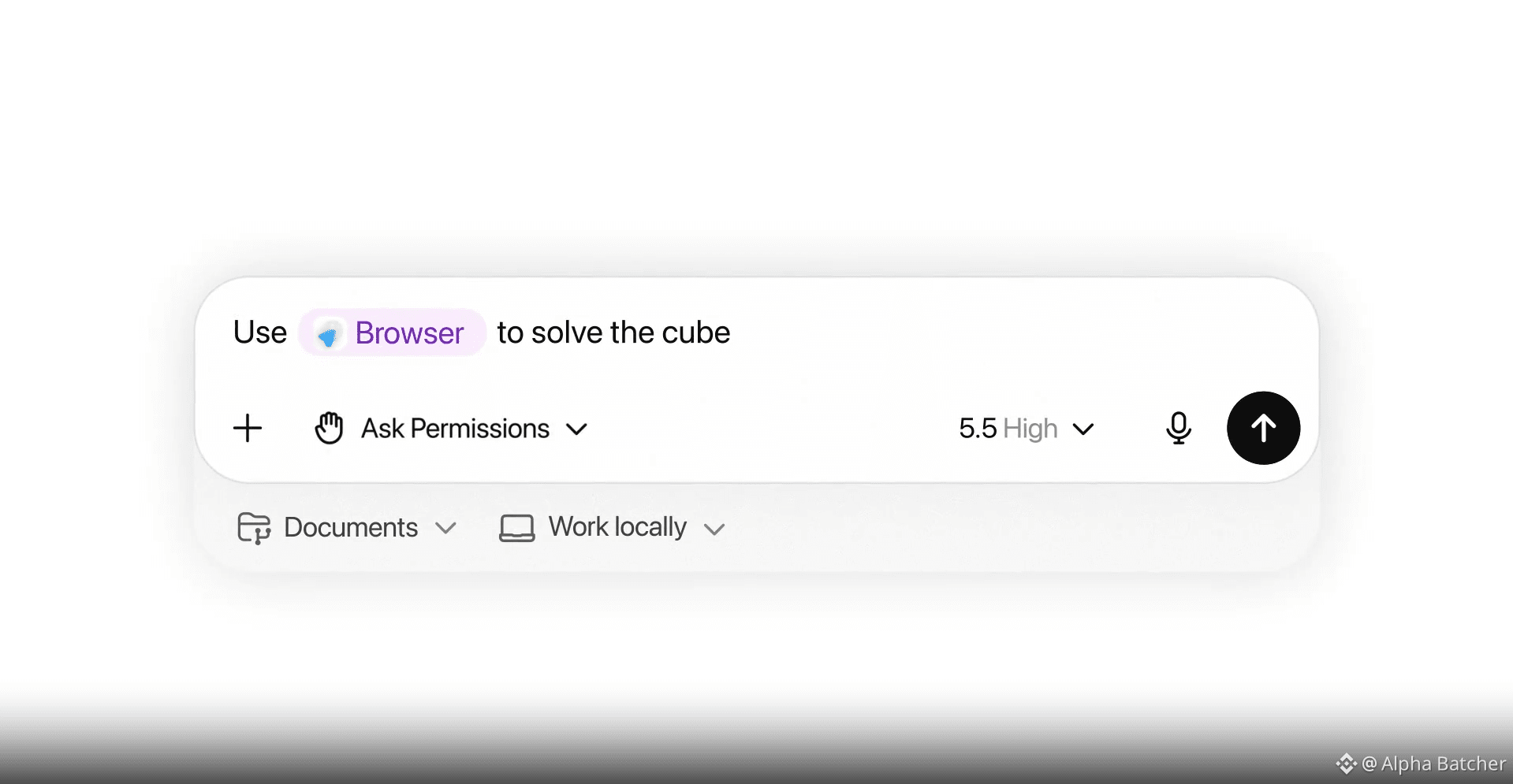
OpenAI endi GPT 5.5’ni taqdim etdi va u agentlik kodlash o‘yinini butunlay o‘zgartirib yubordi
bu kompyuteringiz va ilovalaringizni boshqarib, to‘liq avtonom ishlaydigan ishchi
> slack, github va brauzeringiz bo‘ylab mustaqil ishlaydi
> agentlik benchmarklarida claude opus 4.7 va gemini 3.1 pro’ni yengib o‘tadi
> avvalgi model kechikish darajasiga mos keladi, biroq ancha kam token ishlatadi
> hozirning o‘zida chatgpt va codex’da plus va pro foydalanuvchilar uchun mavjud
> aslida o‘z ishini tekshiradigan to‘liq tadqiqot hamkori sifatida harakat qiladi
biz rasmiy ravishda shunday davrga kirdikki, modellar matn yaratish bilan emas, balki ishni bajarish bilan shug‘ullanadi
OpenAI endi GPT 5.5’ni taqdim etdi va u agentlik kodlash o‘yinini butunlay o‘zgartirib yubordi
bu kompyuteringiz va ilovalaringizni boshqarib, to‘liq avtonom ishlaydigan ishchi
> slack, github va brauzeringiz bo‘ylab mustaqil ishlaydi
> agentlik benchmarklarida claude opus 4.7 va gemini 3.1 pro’ni yengib o‘tadi
> avvalgi model kechikish darajasiga mos keladi, biroq ancha kam token ishlatadi
> hozirning o‘zida chatgpt va codex’da plus va pro foydalanuvchilar uchun mavjud
> aslida o‘z ishini tekshiradigan to‘liq tadqiqot hamkori sifatida harakat qiladi
biz rasmiy ravishda shunday davrga kirdikki, modellar matn yaratish bilan emas, balki ishni bajarish bilan shug‘ullanadi
bu kompyuteringiz va ilovalaringizni boshqarib, to‘liq avtonom ishlaydigan ishchi
> slack, github va brauzeringiz bo‘ylab mustaqil ishlaydi
> agentlik benchmarklarida claude opus 4.7 va gemini 3.1 pro’ni yengib o‘tadi
> avvalgi model kechikish darajasiga mos keladi, biroq ancha kam token ishlatadi
> hozirning o‘zida chatgpt va codex’da plus va pro foydalanuvchilar uchun mavjud
> aslida o‘z ishini tekshiradigan to‘liq tadqiqot hamkori sifatida harakat qiladi
biz rasmiy ravishda shunday davrga kirdikki, modellar matn yaratish bilan emas, balki ishni bajarish bilan shug‘ullanadi
2
1.1k
> mahsulot xususiyatlarini taqdim etish o‘rniga uning hissiy natijasini toping
> har bir ssenariy qatorini o‘ziga xos agent bilan yangilik va intensivlik bo‘yicha ballang, ikkalasi ham 10 ga yetguncha
> asosiy tanqidni tan olib, sizga hujum qilayotganlarni “qayta tvit” qilishga majburlang
> ilk 48 soatda juda katta javoblar zanjiri orqali algoritm sizni yuqori o‘ringa chiqarishi uchun majbur qiling
> organik tezlanish paydo bo‘la boshlagach, ta’sir o‘tkazuvchilarni to‘lqinma-to‘lqin (bosqichma-bosqich) yuboring
> mahsulot xususiyatlarini taqdim etish o‘rniga uning hissiy natijasini toping
> har bir ssenariy qatorini o‘ziga xos agent bilan yangilik va intensivlik bo‘yicha ballang, ikkalasi ham 10 ga yetguncha
> asosiy tanqidni tan olib, sizga hujum qilayotganlarni “qayta tvit” qilishga majburlang
> ilk 48 soatda juda katta javoblar zanjiri orqali algoritm sizni yuqori o‘ringa chiqarishi uchun majbur qiling
> organik tezlanish paydo bo‘la boshlagach, ta’sir o‘tkazuvchilarni to‘lqinma-to‘lqin (bosqichma-bosqich) yuboring
> har bir ssenariy qatorini o‘ziga xos agent bilan yangilik va intensivlik bo‘yicha ballang, ikkalasi ham 10 ga yetguncha
> asosiy tanqidni tan olib, sizga hujum qilayotganlarni “qayta tvit” qilishga majburlang
> ilk 48 soatda juda katta javoblar zanjiri orqali algoritm sizni yuqori o‘ringa chiqarishi uchun majbur qiling
> organik tezlanish paydo bo‘la boshlagach, ta’sir o‘tkazuvchilarni to‘lqinma-to‘lqin (bosqichma-bosqich) yuboring
1
551
lazarus $292 mlnni defi orqali yuvdi va hech kim buni to‘xtata olmadi
ᐳ tornado cash yordamida oldindan moliyalashtirilgan yangi walletlar
ᐳ 116 ming rsETHni kelp dao’dan yechib olish uchun layerzero xabarini soxtalashtirdi
ᐳ kelp to‘xtatib qo‘yishidan oldin illikvid tokenlarni aave’da garovga qo‘yib $190 mln sof ETHga aylantirdi
ᐳ jarayon davomida aave’da $8 mlrd bank run’ini ishga tushirdi
ᐳ avtomatlashtirilgan skriptlar yordamida mablag‘ni 100+ wallet bo‘ylab bo‘lib yubordi
ᐳ ETH’ni kuzatilmaydigan BTC changga aylantirish uchun barchasini thorchain orqali yuvdi
ᐳ uni USDT ko‘rinishida tronga bridj qildi, u yerda otc-brokerlar unionpay orqali uni naqdga aylantirdi
Shimoliy Koreya tashqi daromadining 50%i hozir shunchaki kripto kxaklardir
defi aynan mo‘ljallanganidek ishlayapti ...
lazarus $292 mlnni defi orqali yuvdi va hech kim buni to‘xtata olmadi
ᐳ tornado cash yordamida oldindan moliyalashtirilgan yangi walletlar
ᐳ 116 ming rsETHni kelp dao’dan yechib olish uchun layerzero xabarini soxtalashtirdi
ᐳ kelp to‘xtatib qo‘yishidan oldin illikvid tokenlarni aave’da garovga qo‘yib $190 mln sof ETHga aylantirdi
ᐳ jarayon davomida aave’da $8 mlrd bank run’ini ishga tushirdi
ᐳ avtomatlashtirilgan skriptlar yordamida mablag‘ni 100+ wallet bo‘ylab bo‘lib yubordi
ᐳ ETH’ni kuzatilmaydigan BTC changga aylantirish uchun barchasini thorchain orqali yuvdi
ᐳ uni USDT ko‘rinishida tronga bridj qildi, u yerda otc-brokerlar unionpay orqali uni naqdga aylantirdi
Shimoliy Koreya tashqi daromadining 50%i hozir shunchaki kripto kxaklardir
defi aynan mo‘ljallanganidek ishlayapti ...
ᐳ tornado cash yordamida oldindan moliyalashtirilgan yangi walletlar
ᐳ 116 ming rsETHni kelp dao’dan yechib olish uchun layerzero xabarini soxtalashtirdi
ᐳ kelp to‘xtatib qo‘yishidan oldin illikvid tokenlarni aave’da garovga qo‘yib $190 mln sof ETHga aylantirdi
ᐳ jarayon davomida aave’da $8 mlrd bank run’ini ishga tushirdi
ᐳ avtomatlashtirilgan skriptlar yordamida mablag‘ni 100+ wallet bo‘ylab bo‘lib yubordi
ᐳ ETH’ni kuzatilmaydigan BTC changga aylantirish uchun barchasini thorchain orqali yuvdi
ᐳ uni USDT ko‘rinishida tronga bridj qildi, u yerda otc-brokerlar unionpay orqali uni naqdga aylantirdi
Shimoliy Koreya tashqi daromadining 50%i hozir shunchaki kripto kxaklardir
defi aynan mo‘ljallanganidek ishlayapti ...
1
298
Ko‘pchilik Claude Code uchun 200$ to‘laydi va uni oddiy “kengaytirilgan autocomplete”dek ishlatadi
Siz yo‘qotayotgan 80 foizni ochish uchun aynan 4 bosqichli tizim mana bu
> Qoidalar yozilgan bitta markdown fayl yarating va kerak bo‘lganda har safar promptlarni qayta yozmasdan, uni chaqiring
> Kodni avtomatik formatlaydigan yoki bajarilishidan oldin xavfli/destuktiv buyruqlarni bloklaydigan post-action hook’larni (keyingimajburiy funksiyalarni) sozlang
> Ertaga bajarilgan ishlar va va’dalar ko‘rsatilgan handoff (topshirish) hujjatini yarating, shunda Claude aynan qayerda to‘xtaganingizni biladi
> Branch’larni (tarmoqlarni) ajrating, shunda bir nechta subagentlar bir vaqtda parallel ishlashi va bir-birining kodini bosib qo‘ymasligi mumkin
Har kuni o‘sha bir xil kontekstni terishni to‘xtating va tizim yarating
Ko‘pchilik Claude Code uchun 200$ to‘laydi va uni oddiy “kengaytirilgan autocomplete”dek ishlatadi
Siz yo‘qotayotgan 80 foizni ochish uchun aynan 4 bosqichli tizim mana bu
> Qoidalar yozilgan bitta markdown fayl yarating va kerak bo‘lganda har safar promptlarni qayta yozmasdan, uni chaqiring
> Kodni avtomatik formatlaydigan yoki bajarilishidan oldin xavfli/destuktiv buyruqlarni bloklaydigan post-action hook’larni (keyingimajburiy funksiyalarni) sozlang
> Ertaga bajarilgan ishlar va va’dalar ko‘rsatilgan handoff (topshirish) hujjatini yarating, shunda Claude aynan qayerda to‘xtaganingizni biladi
> Branch’larni (tarmoqlarni) ajrating, shunda bir nechta subagentlar bir vaqtda parallel ishlashi va bir-birining kodini bosib qo‘ymasligi mumkin
Har kuni o‘sha bir xil kontekstni terishni to‘xtating va tizim yarating
Siz yo‘qotayotgan 80 foizni ochish uchun aynan 4 bosqichli tizim mana bu
> Qoidalar yozilgan bitta markdown fayl yarating va kerak bo‘lganda har safar promptlarni qayta yozmasdan, uni chaqiring
> Kodni avtomatik formatlaydigan yoki bajarilishidan oldin xavfli/destuktiv buyruqlarni bloklaydigan post-action hook’larni (keyingimajburiy funksiyalarni) sozlang
> Ertaga bajarilgan ishlar va va’dalar ko‘rsatilgan handoff (topshirish) hujjatini yarating, shunda Claude aynan qayerda to‘xtaganingizni biladi
> Branch’larni (tarmoqlarni) ajrating, shunda bir nechta subagentlar bir vaqtda parallel ishlashi va bir-birining kodini bosib qo‘ymasligi mumkin
Har kuni o‘sha bir xil kontekstni terishni to‘xtating va tizim yarating
1
485
ai-ni 24/7 rejimida junior analitikga aylantirish uchun aniq “stack”
1-bosqich Onchain va bozor ma’lumotlari
> Etherscan hamyon tarixi va token transferlarini darhol oladi
> Dune Analytics SQL’ni ishga solib, aslida $RIVER’ni yoki har qanday solana mikrokapni kim ushlab turganini topadi
> CoinGecko va TradingView jonli grafiklar hamda moliyalashtirish (funding) stavkalarini o‘qiydi
2-bosqich Sentyment va mantiq
> Polymarket yangilik chiqishidan oldin “smart money” ehtimollarini tekshiradi
> X va Firecrawl governance forumlari hamda timeline’ni “vibe”lar bo‘yicha skanlaydi
> Memory va sequential reasoning claude’ga tezingiz (thesis)larni eslab qolishini va xayoliy (hallucination) gaplarni to‘xtatishini majbur qiladi
taklif: ertalabki rutinangizni avtomatlashtiring
kofe ichayotganingizda odds o‘zgarishlari, kit (whale) harakatlari va sentyment deltalarini tortib beradigan promptni sozlang
qo‘l mehnati bilan tadqiqot qilishni to‘xtating va tizimni yarating
ai-ni 24/7 rejimida junior analitikga aylantirish uchun aniq “stack”
1-bosqich Onchain va bozor ma’lumotlari
> Etherscan hamyon tarixi va token transferlarini darhol oladi
> Dune Analytics SQL’ni ishga solib, aslida $RIVER’ni yoki har qanday solana mikrokapni kim ushlab turganini topadi
> CoinGecko va TradingView jonli grafiklar hamda moliyalashtirish (funding) stavkalarini o‘qiydi
2-bosqich Sentyment va mantiq
> Polymarket yangilik chiqishidan oldin “smart money” ehtimollarini tekshiradi
> X va Firecrawl governance forumlari hamda timeline’ni “vibe”lar bo‘yicha skanlaydi
> Memory va sequential reasoning claude’ga tezingiz (thesis)larni eslab qolishini va xayoliy (hallucination) gaplarni to‘xtatishini majbur qiladi
taklif: ertalabki rutinangizni avtomatlashtiring
kofe ichayotganingizda odds o‘zgarishlari, kit (whale) harakatlari va sentyment deltalarini tortib beradigan promptni sozlang
qo‘l mehnati bilan tadqiqot qilishni to‘xtating va tizimni yarating
1-bosqich Onchain va bozor ma’lumotlari
> Etherscan hamyon tarixi va token transferlarini darhol oladi
> Dune Analytics SQL’ni ishga solib, aslida $RIVER’ni yoki har qanday solana mikrokapni kim ushlab turganini topadi
> CoinGecko va TradingView jonli grafiklar hamda moliyalashtirish (funding) stavkalarini o‘qiydi
2-bosqich Sentyment va mantiq
> Polymarket yangilik chiqishidan oldin “smart money” ehtimollarini tekshiradi
> X va Firecrawl governance forumlari hamda timeline’ni “vibe”lar bo‘yicha skanlaydi
> Memory va sequential reasoning claude’ga tezingiz (thesis)larni eslab qolishini va xayoliy (hallucination) gaplarni to‘xtatishini majbur qiladi
taklif: ertalabki rutinangizni avtomatlashtiring
kofe ichayotganingizda odds o‘zgarishlari, kit (whale) harakatlari va sentyment deltalarini tortib beradigan promptni sozlang
qo‘l mehnati bilan tadqiqot qilishni to‘xtating va tizimni yarating
555
Agar siz haqiqiy “leverage” (kuchaytirish)ga erishmoqchi bo‘lsangiz, Claude’ni infratuzilma kabi qabul qilishingiz kerak
> Claude uchun CLAUDE md faylini sozlang — shunda model darhol sizning formatlash va arxitektura qoidalaringizni bilib oladi
> parallel vazifalar uchun subagentlardan foydalaning, bitta treadingizga hammasini majburlamang
> cowork dispatch’ga tayanib, ishlarni ishga tushiring — siz esa klaviaturadan amalda uzoqda bo‘lsangiz ham
modellar yaxshi, siz faqat promptingni to‘xtatib, haqiqiy agentik tizimlar yaratishni boshlashingiz kerak
Agar siz haqiqiy “leverage” (kuchaytirish)ga erishmoqchi bo‘lsangiz, Claude’ni infratuzilma kabi qabul qilishingiz kerak
> Claude uchun CLAUDE md faylini sozlang — shunda model darhol sizning formatlash va arxitektura qoidalaringizni bilib oladi
> parallel vazifalar uchun subagentlardan foydalaning, bitta treadingizga hammasini majburlamang
> cowork dispatch’ga tayanib, ishlarni ishga tushiring — siz esa klaviaturadan amalda uzoqda bo‘lsangiz ham
modellar yaxshi, siz faqat promptingni to‘xtatib, haqiqiy agentik tizimlar yaratishni boshlashingiz kerak
> Claude uchun CLAUDE md faylini sozlang — shunda model darhol sizning formatlash va arxitektura qoidalaringizni bilib oladi
> parallel vazifalar uchun subagentlardan foydalaning, bitta treadingizga hammasini majburlamang
> cowork dispatch’ga tayanib, ishlarni ishga tushiring — siz esa klaviaturadan amalda uzoqda bo‘lsangiz ham
modellar yaxshi, siz faqat promptingni to‘xtatib, haqiqiy agentik tizimlar yaratishni boshlashingiz kerak
1
349
Claude’ni oddiy “qidiruv tizimi”dek ishlatishni to‘xtating va uni mustaqil xodim sifatida ishlatishni boshlang
“chatbot” va “system” o‘rtasidagi farq Model Context Protocol (MCP)
U Claude’ga oddiy so‘rov berishdan o‘tib, real hayotingizdagi ma’lumotlar bilan bevosita ishlash imkonini beradi
ᐳ Chatdan turib PR’lar va issue’larni boshqarish uchun GitHub MCP
ᐳ Live bazalaringizni so‘rash uchun PostgreSQL va Supabase
ᐳ Jamoangiz kommunikatsiyalarini va inbox’ni boshqarish uchun Slack va Gmail
ᐳ To‘liq brauzer avtomatlashtirish va UI testlari uchun Playwright
ᐳ Butun cloud infratuzilmani boshqarish uchun AWS va Cloudflare
Siz aslida Claude’ga ofisingizning kalitlarini berib qo‘ygansiz — faqat maslahat so‘rash emas
$20 obunasi o‘zgarmaydi, lekin natija 1000 barobar qimmatroq bo‘ladi
Claude’ni oddiy “qidiruv tizimi”dek ishlatishni to‘xtating va uni mustaqil xodim sifatida ishlatishni boshlang
“chatbot” va “system” o‘rtasidagi farq Model Context Protocol (MCP)
U Claude’ga oddiy so‘rov berishdan o‘tib, real hayotingizdagi ma’lumotlar bilan bevosita ishlash imkonini beradi
ᐳ Chatdan turib PR’lar va issue’larni boshqarish uchun GitHub MCP
ᐳ Live bazalaringizni so‘rash uchun PostgreSQL va Supabase
ᐳ Jamoangiz kommunikatsiyalarini va inbox’ni boshqarish uchun Slack va Gmail
ᐳ To‘liq brauzer avtomatlashtirish va UI testlari uchun Playwright
ᐳ Butun cloud infratuzilmani boshqarish uchun AWS va Cloudflare
Siz aslida Claude’ga ofisingizning kalitlarini berib qo‘ygansiz — faqat maslahat so‘rash emas
$20 obunasi o‘zgarmaydi, lekin natija 1000 barobar qimmatroq bo‘ladi
“chatbot” va “system” o‘rtasidagi farq Model Context Protocol (MCP)
U Claude’ga oddiy so‘rov berishdan o‘tib, real hayotingizdagi ma’lumotlar bilan bevosita ishlash imkonini beradi
ᐳ Chatdan turib PR’lar va issue’larni boshqarish uchun GitHub MCP
ᐳ Live bazalaringizni so‘rash uchun PostgreSQL va Supabase
ᐳ Jamoangiz kommunikatsiyalarini va inbox’ni boshqarish uchun Slack va Gmail
ᐳ To‘liq brauzer avtomatlashtirish va UI testlari uchun Playwright
ᐳ Butun cloud infratuzilmani boshqarish uchun AWS va Cloudflare
Siz aslida Claude’ga ofisingizning kalitlarini berib qo‘ygansiz — faqat maslahat so‘rash emas
$20 obunasi o‘zgarmaydi, lekin natija 1000 barobar qimmatroq bo‘ladi
1
1
475
Claude Opus 4.7 endi ishga tushdi va bu avtonom dasturiy injiniring uchun to‘liq qayta ishlangan yangilanish
ᐳ SWE-bench Pro’da Opus 4.6 ni 64.3% natija bilan ortda qoldiradi
ᐳ Vision hozir 3 barobar aniqroq: 3.75MP yuqori aniqlikdagi tasvirlar uchun qo‘llab-quvvatlash mavjud
ᐳ Eng qiyin arxitektura vazifalaringiz uchun yangi "xhigh" harakat darajasi
ᐳ O‘zi hisobot berishdan oldin kodini o‘zi tekshiradigan o‘zini tekshiruvchi mantiq
Narx 1M input token uchun $5 da o‘zgarmas qilib belgilangan, ammo ishonchlilik boshqa sayyorada
Mythos Preview "intellekt qiroli" bo‘lib qolayotgan bo‘lsa-da, Opus 4.7 2026-yilda agentlar qurayotganlarning barchasi uchun rasmiy yangi ishlab chiqarish standarti hisoblanadi
Claude Opus 4.7 endi ishga tushdi va bu avtonom dasturiy injiniring uchun to‘liq qayta ishlangan yangilanish
ᐳ SWE-bench Pro’da Opus 4.6 ni 64.3% natija bilan ortda qoldiradi
ᐳ Vision hozir 3 barobar aniqroq: 3.75MP yuqori aniqlikdagi tasvirlar uchun qo‘llab-quvvatlash mavjud
ᐳ Eng qiyin arxitektura vazifalaringiz uchun yangi "xhigh" harakat darajasi
ᐳ O‘zi hisobot berishdan oldin kodini o‘zi tekshiradigan o‘zini tekshiruvchi mantiq
Narx 1M input token uchun $5 da o‘zgarmas qilib belgilangan, ammo ishonchlilik boshqa sayyorada
Mythos Preview "intellekt qiroli" bo‘lib qolayotgan bo‘lsa-da, Opus 4.7 2026-yilda agentlar qurayotganlarning barchasi uchun rasmiy yangi ishlab chiqarish standarti hisoblanadi
ᐳ SWE-bench Pro’da Opus 4.6 ni 64.3% natija bilan ortda qoldiradi
ᐳ Vision hozir 3 barobar aniqroq: 3.75MP yuqori aniqlikdagi tasvirlar uchun qo‘llab-quvvatlash mavjud
ᐳ Eng qiyin arxitektura vazifalaringiz uchun yangi "xhigh" harakat darajasi
ᐳ O‘zi hisobot berishdan oldin kodini o‘zi tekshiradigan o‘zini tekshiruvchi mantiq
Narx 1M input token uchun $5 da o‘zgarmas qilib belgilangan, ammo ishonchlilik boshqa sayyorada
Mythos Preview "intellekt qiroli" bo‘lib qolayotgan bo‘lsa-da, Opus 4.7 2026-yilda agentlar qurayotganlarning barchasi uchun rasmiy yangi ishlab chiqarish standarti hisoblanadi
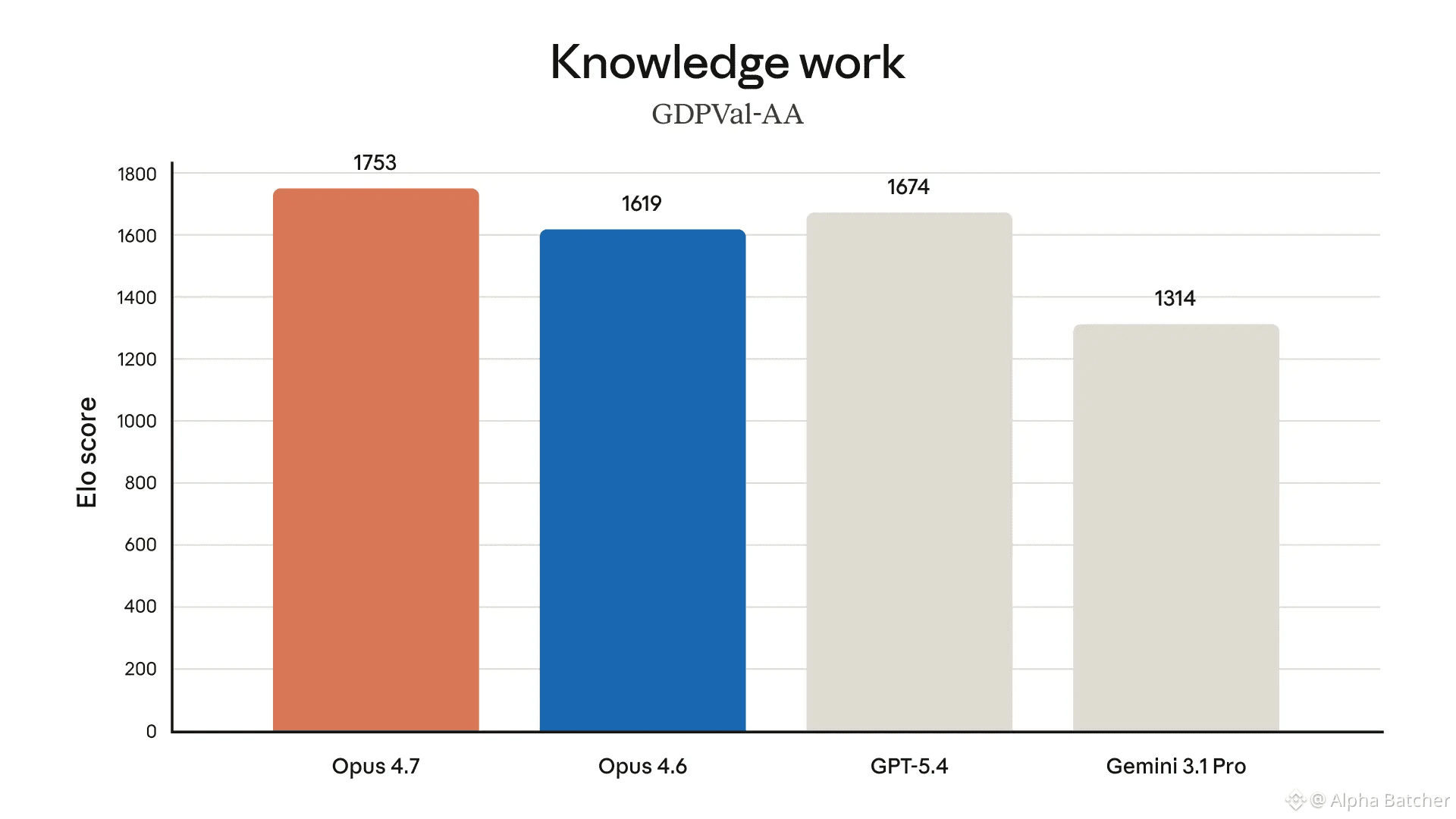
1
361
Claude Code bilan ishlab chiquvchilar har kuni 5–6 soatni tejayapti:
bitta fayl va uchta buyruq hammasini o‘zgartiradi:
1. CLAUDE.md — Claude’ga qoidalaringizni bir marta aytasiz, u abadiy ularga amal qiladi. qoidabuzarliklar 40% dan 3% gacha tushadi
2. everything-claude-code — 30+ agent sizning butun rejalashtirish, tekshiruv va xavfsizlik bo‘yicha ish oqimingizni “tayyor holatda” to‘liq almashtiradi
3. version 2.1.98 — hozirgi versiya har bir sessiyada jimlik bilan qo‘shimcha 20 000 ta tokenni yechib oladi. bir pog‘onaga tushirish limitsizning 40%ini qaytaradi
natija:
kuniga 8 soat kodingiz 2–3 soat ko‘rib chiqishga aylanadi
sozlash vaqti: 15 daqiqa
aniq tizim quyidagi maqolada 👇
https://x.com/alphabatcher/status/2044058486221271375
Claude Code bilan ishlab chiquvchilar har kuni 5–6 soatni tejayapti:
bitta fayl va uchta buyruq hammasini o‘zgartiradi:
1. CLAUDE.md — Claude’ga qoidalaringizni bir marta aytasiz, u abadiy ularga amal qiladi. qoidabuzarliklar 40% dan 3% gacha tushadi
2. everything-claude-code — 30+ agent sizning butun rejalashtirish, tekshiruv va xavfsizlik bo‘yicha ish oqimingizni “tayyor holatda” to‘liq almashtiradi
3. version 2.1.98 — hozirgi versiya har bir sessiyada jimlik bilan qo‘shimcha 20 000 ta tokenni yechib oladi. bir pog‘onaga tushirish limitsizning 40%ini qaytaradi
natija:
kuniga 8 soat kodingiz 2–3 soat ko‘rib chiqishga aylanadi
sozlash vaqti: 15 daqiqa
aniq tizim quyidagi maqolada 👇
https://x.com/alphabatcher/status/2044058486221271375
bitta fayl va uchta buyruq hammasini o‘zgartiradi:
1. CLAUDE.md — Claude’ga qoidalaringizni bir marta aytasiz, u abadiy ularga amal qiladi. qoidabuzarliklar 40% dan 3% gacha tushadi
2. everything-claude-code — 30+ agent sizning butun rejalashtirish, tekshiruv va xavfsizlik bo‘yicha ish oqimingizni “tayyor holatda” to‘liq almashtiradi
3. version 2.1.98 — hozirgi versiya har bir sessiyada jimlik bilan qo‘shimcha 20 000 ta tokenni yechib oladi. bir pog‘onaga tushirish limitsizning 40%ini qaytaradi
natija:
kuniga 8 soat kodingiz 2–3 soat ko‘rib chiqishga aylanadi
sozlash vaqti: 15 daqiqa
aniq tizim quyidagi maqolada 👇
https://x.com/alphabatcher/status/2044058486221271375
383
30 daqiqada va sizning Claude haqiqiy tayyorlangan mutaxassisga aylanadi
uning ishlashiga aslida nima ta’sir qiladi:
1. Ish joyingizni shunday sozlangki, yangi chatlar loyiha tashqarisida yaratilmasin
2. Bilimlar bazasi uchun katta va ishonchli ma’lumot manbalari
3. “Qilma”lar ro‘yxati ko‘pincha faqat ijobiy ko‘rsatmalardan ko‘ra yaxshiroq ishlaydi
4. MCP, skills va loyihalarni bitta tizimga birlashtiring
5. Har bir loyiha uchun uchta darajadagi kirish imkoniyati bilan alohida xotira ajrating
buni to‘g‘ri yo‘lga qo‘yganlar mutaxassis tayyorlab, jo‘natib yuborgandek ko‘rinadigan natijaga erishadi
30 daqiqada va sizning Claude haqiqiy tayyorlangan mutaxassisga aylanadi
uning ishlashiga aslida nima ta’sir qiladi:
1. Ish joyingizni shunday sozlangki, yangi chatlar loyiha tashqarisida yaratilmasin
2. Bilimlar bazasi uchun katta va ishonchli ma’lumot manbalari
3. “Qilma”lar ro‘yxati ko‘pincha faqat ijobiy ko‘rsatmalardan ko‘ra yaxshiroq ishlaydi
4. MCP, skills va loyihalarni bitta tizimga birlashtiring
5. Har bir loyiha uchun uchta darajadagi kirish imkoniyati bilan alohida xotira ajrating
buni to‘g‘ri yo‘lga qo‘yganlar mutaxassis tayyorlab, jo‘natib yuborgandek ko‘rinadigan natijaga erishadi
uning ishlashiga aslida nima ta’sir qiladi:
1. Ish joyingizni shunday sozlangki, yangi chatlar loyiha tashqarisida yaratilmasin
2. Bilimlar bazasi uchun katta va ishonchli ma’lumot manbalari
3. “Qilma”lar ro‘yxati ko‘pincha faqat ijobiy ko‘rsatmalardan ko‘ra yaxshiroq ishlaydi
4. MCP, skills va loyihalarni bitta tizimga birlashtiring
5. Har bir loyiha uchun uchta darajadagi kirish imkoniyati bilan alohida xotira ajrating
buni to‘g‘ri yo‘lga qo‘yganlar mutaxassis tayyorlab, jo‘natib yuborgandek ko‘rinadigan natijaga erishadi
2
211
Haqiqatan ham ishga yollanishingizga yordam beradigan qoidalar:
- o‘zingiz 70%+ malakali bo‘lgan lavozimlarga murojaat qiling
- har bir arizani ish ta’rifiga moslab yozing; umumiy CVlar inson o‘qishidan oldin e’tibordan chetda qoladi
- CV bandlaringiz natijalarni ko‘rsatishi kerak
- kalit so‘zlar muhim: ATS sizni saralab, rekruter ismingizni ko‘rmasidan oldin chiqarib yuboradi
- har bir intervyudan oldin kompaniyani o‘rganing
- yetakchilik, muvaffaqiyatsizlik, ziddiyat va yutuqni qamrab oladigan 5-8 ta STAR hikoyani tayyorlang
- cover letter (hamrohlik xati) — aynan sizning nega aynan shu rolingizni xohlashingiz
- har bir intervyudan keyin 24 soat ichida kuzatib chiqing
- “Sizda biz uchun savollaringiz bormi?” degan savol ixtiyoriy emas, bu test
- LinkedIn’ingiz CV’ingizga mos bo‘lishi kerak
Ishga yollanadigan va yollanmaydigan nomzodlar o‘rtasidagi farq ko‘pincha iqtidor emas
Haqiqatan ham ishga yollanishingizga yordam beradigan qoidalar:
- o‘zingiz 70%+ malakali bo‘lgan lavozimlarga murojaat qiling
- har bir arizani ish ta’rifiga moslab yozing; umumiy CVlar inson o‘qishidan oldin e’tibordan chetda qoladi
- CV bandlaringiz natijalarni ko‘rsatishi kerak
- kalit so‘zlar muhim: ATS sizni saralab, rekruter ismingizni ko‘rmasidan oldin chiqarib yuboradi
- har bir intervyudan oldin kompaniyani o‘rganing
- yetakchilik, muvaffaqiyatsizlik, ziddiyat va yutuqni qamrab oladigan 5-8 ta STAR hikoyani tayyorlang
- cover letter (hamrohlik xati) — aynan sizning nega aynan shu rolingizni xohlashingiz
- har bir intervyudan keyin 24 soat ichida kuzatib chiqing
- “Sizda biz uchun savollaringiz bormi?” degan savol ixtiyoriy emas, bu test
- LinkedIn’ingiz CV’ingizga mos bo‘lishi kerak
Ishga yollanadigan va yollanmaydigan nomzodlar o‘rtasidagi farq ko‘pincha iqtidor emas
- o‘zingiz 70%+ malakali bo‘lgan lavozimlarga murojaat qiling
- har bir arizani ish ta’rifiga moslab yozing; umumiy CVlar inson o‘qishidan oldin e’tibordan chetda qoladi
- CV bandlaringiz natijalarni ko‘rsatishi kerak
- kalit so‘zlar muhim: ATS sizni saralab, rekruter ismingizni ko‘rmasidan oldin chiqarib yuboradi
- har bir intervyudan oldin kompaniyani o‘rganing
- yetakchilik, muvaffaqiyatsizlik, ziddiyat va yutuqni qamrab oladigan 5-8 ta STAR hikoyani tayyorlang
- cover letter (hamrohlik xati) — aynan sizning nega aynan shu rolingizni xohlashingiz
- har bir intervyudan keyin 24 soat ichida kuzatib chiqing
- “Sizda biz uchun savollaringiz bormi?” degan savol ixtiyoriy emas, bu test
- LinkedIn’ingiz CV’ingizga mos bo‘lishi kerak
Ishga yollanadigan va yollanmaydigan nomzodlar o‘rtasidagi farq ko‘pincha iqtidor emas
223
Bu 5 yil oldin video ishlab chiqarish qancha turardi vs bugun:
30 soniyalik reklama — oldin (AI bo‘lmagan):
- professional ekipaj: har bir suratga olish kuni uchun 3 000–8 000$
- pre-prodyuserlik: 1 000–5 000$
- post-prodyuserlik: 1 000–6 000$
- reklama taqsimoti byudjeti: ixtiyoriy, ko‘pincha alohida
- bitta joylash (spot) uchun jami: 5 000–20 000$
30 soniyalik reklama — bugun (AI bilan):
- 4.50$ dan 8 ta kadr = 36$
- CapCut’da montaj = bepul
- ElevenLabs orqali ovozli bayon = 5$
- jami: 50$ dan kam
35 soniyalik bitta qisqa film uchun avvallari ekipaj, studiya, rejissyor, pre-prodyuserlikning haftalari kerak bo‘lardi
Salvadorlik ikki aka-uka 40 daqiqada 7.55$ ga bitta film suratga olishdi
Vositalar esa so‘zma-so‘z bir kechada yuzlab marta arzonlashib ketdi
Bu 5 yil oldin video ishlab chiqarish qancha turardi vs bugun:
30 soniyalik reklama — oldin (AI bo‘lmagan):
- professional ekipaj: har bir suratga olish kuni uchun 3 000–8 000$
- pre-prodyuserlik: 1 000–5 000$
- post-prodyuserlik: 1 000–6 000$
- reklama taqsimoti byudjeti: ixtiyoriy, ko‘pincha alohida
- bitta joylash (spot) uchun jami: 5 000–20 000$
30 soniyalik reklama — bugun (AI bilan):
- 4.50$ dan 8 ta kadr = 36$
- CapCut’da montaj = bepul
- ElevenLabs orqali ovozli bayon = 5$
- jami: 50$ dan kam
35 soniyalik bitta qisqa film uchun avvallari ekipaj, studiya, rejissyor, pre-prodyuserlikning haftalari kerak bo‘lardi
Salvadorlik ikki aka-uka 40 daqiqada 7.55$ ga bitta film suratga olishdi
Vositalar esa so‘zma-so‘z bir kechada yuzlab marta arzonlashib ketdi
30 soniyalik reklama — oldin (AI bo‘lmagan):
- professional ekipaj: har bir suratga olish kuni uchun 3 000–8 000$
- pre-prodyuserlik: 1 000–5 000$
- post-prodyuserlik: 1 000–6 000$
- reklama taqsimoti byudjeti: ixtiyoriy, ko‘pincha alohida
- bitta joylash (spot) uchun jami: 5 000–20 000$
30 soniyalik reklama — bugun (AI bilan):
- 4.50$ dan 8 ta kadr = 36$
- CapCut’da montaj = bepul
- ElevenLabs orqali ovozli bayon = 5$
- jami: 50$ dan kam
35 soniyalik bitta qisqa film uchun avvallari ekipaj, studiya, rejissyor, pre-prodyuserlikning haftalari kerak bo‘lardi
Salvadorlik ikki aka-uka 40 daqiqada 7.55$ ga bitta film suratga olishdi
Vositalar esa so‘zma-so‘z bir kechada yuzlab marta arzonlashib ketdi

1
568
2 daqiqalik takroriy so‘rovni 1 soniyalik “slash command”ga aylantiring
- har safar bir xil so‘rov
- Git orqali versiyalanadi, butun jamoa bir xil buyruqlarni ishga tushiradi
- siz yoddan qayta yozayotgan 10–15 qator o‘rnini bitta buyruq egallaydi
- har bir ishga tushirishdan oldin dinamik kontekst avtomatik kiritiladi
- Claude ruxsat so‘rashni to‘xtatishi uchun vositalar oldindan tasdiqlangan
- buyruqlar loyihalar bo‘yicha ulashiladi yoki bitta repo doirasida
- bir marta takrorlang, keyingi pull’da hamma uchun yaxshilang
- takroriy ish oqimlarini bitta so‘zli chaqiruvlarga aylantiradi
- har bir run’da linters o‘tkazib yuboradigan xatolarni ham ushlab qoladi
- so‘rov vaqt o‘tishi bilan yaxshilanadi, yomonlashmaydi
Siz buni bir marta sozlab, hamma narsa uchun ishlatasiz
2 daqiqalik takroriy so‘rovni 1 soniyalik “slash command”ga aylantiring
- har safar bir xil so‘rov
- Git orqali versiyalanadi, butun jamoa bir xil buyruqlarni ishga tushiradi
- siz yoddan qayta yozayotgan 10–15 qator o‘rnini bitta buyruq egallaydi
- har bir ishga tushirishdan oldin dinamik kontekst avtomatik kiritiladi
- Claude ruxsat so‘rashni to‘xtatishi uchun vositalar oldindan tasdiqlangan
- buyruqlar loyihalar bo‘yicha ulashiladi yoki bitta repo doirasida
- bir marta takrorlang, keyingi pull’da hamma uchun yaxshilang
- takroriy ish oqimlarini bitta so‘zli chaqiruvlarga aylantiradi
- har bir run’da linters o‘tkazib yuboradigan xatolarni ham ushlab qoladi
- so‘rov vaqt o‘tishi bilan yaxshilanadi, yomonlashmaydi
Siz buni bir marta sozlab, hamma narsa uchun ishlatasiz
- har safar bir xil so‘rov
- Git orqali versiyalanadi, butun jamoa bir xil buyruqlarni ishga tushiradi
- siz yoddan qayta yozayotgan 10–15 qator o‘rnini bitta buyruq egallaydi
- har bir ishga tushirishdan oldin dinamik kontekst avtomatik kiritiladi
- Claude ruxsat so‘rashni to‘xtatishi uchun vositalar oldindan tasdiqlangan
- buyruqlar loyihalar bo‘yicha ulashiladi yoki bitta repo doirasida
- bir marta takrorlang, keyingi pull’da hamma uchun yaxshilang
- takroriy ish oqimlarini bitta so‘zli chaqiruvlarga aylantiradi
- har bir run’da linters o‘tkazib yuboradigan xatolarni ham ushlab qoladi
- so‘rov vaqt o‘tishi bilan yaxshilanadi, yomonlashmaydi
Siz buni bir marta sozlab, hamma narsa uchun ishlatasiz
299
Agar sizda xotira bo'lmasa, unda sizda agent ham yo'q:
- xotira sizning agentingiz vaqt o'tishi bilan aqlliroq bo'lishiga sabab bo'ladi
- u bo'lmasa, xuddi shu vositalarga ega bo'lgan har kim agentingizni bir kechada nusxa qilib ko'chirib olishi mumkin
- u bilan esa, raqobatchi ko'chira olmaydigan ma'lumotlar to'plamini yaratasiz
- yopiq xotira = boshqa birovlarning serverlaridagi sizning ma'lumotlaringiz
- modelni almashtirsangiz, agentingiz o'rgangan hamma narsa yo'qoladi
- model provayderlari xotira orqali sizni o'zlariga bog'lab qo'yishdan manfaatdor
- modelni osongina almashtirish mumkin, xotirani esa yo'q
- agar sizda “harness” (ishga tushirish muhiti) bo'lmasa, sizda xotira ham yo'q
- agar sizda xotira bo'lmasa, unda sizda agent ham yo'q
Agar sizda xotira bo'lmasa, unda sizda agent ham yo'q:
- xotira sizning agentingiz vaqt o'tishi bilan aqlliroq bo'lishiga sabab bo'ladi
- u bo'lmasa, xuddi shu vositalarga ega bo'lgan har kim agentingizni bir kechada nusxa qilib ko'chirib olishi mumkin
- u bilan esa, raqobatchi ko'chira olmaydigan ma'lumotlar to'plamini yaratasiz
- yopiq xotira = boshqa birovlarning serverlaridagi sizning ma'lumotlaringiz
- modelni almashtirsangiz, agentingiz o'rgangan hamma narsa yo'qoladi
- model provayderlari xotira orqali sizni o'zlariga bog'lab qo'yishdan manfaatdor
- modelni osongina almashtirish mumkin, xotirani esa yo'q
- agar sizda “harness” (ishga tushirish muhiti) bo'lmasa, sizda xotira ham yo'q
- agar sizda xotira bo'lmasa, unda sizda agent ham yo'q
- xotira sizning agentingiz vaqt o'tishi bilan aqlliroq bo'lishiga sabab bo'ladi
- u bo'lmasa, xuddi shu vositalarga ega bo'lgan har kim agentingizni bir kechada nusxa qilib ko'chirib olishi mumkin
- u bilan esa, raqobatchi ko'chira olmaydigan ma'lumotlar to'plamini yaratasiz
- yopiq xotira = boshqa birovlarning serverlaridagi sizning ma'lumotlaringiz
- modelni almashtirsangiz, agentingiz o'rgangan hamma narsa yo'qoladi
- model provayderlari xotira orqali sizni o'zlariga bog'lab qo'yishdan manfaatdor
- modelni osongina almashtirish mumkin, xotirani esa yo'q
- agar sizda “harness” (ishga tushirish muhiti) bo'lmasa, sizda xotira ham yo'q
- agar sizda xotira bo'lmasa, unda sizda agent ham yo'q
176
Ko‘proq kontentni ko‘rish uchun tizimga kiring
Binance Square'da global kriptovalyuta foydalanuvchilariga qo‘shiling
⚡️ Kriptovalyuta haqida eng so‘nggi va foydali ma’lumotlarni oling.
💬 Dunyoning eng yirik kriptovalyuta birjasi tomonidan ishonchli deb topilgan.
👍 Tasdiqlangan mualliflardan haqiqiy tahlillarni kashf eting.
Email / telefon raqami
Trenddagi mavzular
BinanceReopensWithdrawalsForMoreAssets
828,838 marta koʻrilgan
4,535 muhokama qilmoqda
Xavfsizlik hodisasi | Tiklanish bo‘yicha yangilanish #8: Yana ko‘proq aktivlar uchun pul yechish qayta ochiladi (2026-11-05)
Binance Announcement
·384 ta layk
·1.7M marta koʻrilgan
Binance98PercentReplenished
176,826 marta koʻrilgan
1,819 muhokama qilmoqda
USStocksSlipandCryptoMarketUnderBroadPressure
9,612 marta koʻrilgan
221 muhokama qilmoqda