

Quick answer: This Binance Spot glossary explains 25 words you will see on the trading page, the fee page and the sign-up page, in plain English. Each term is tied to where it appears on Binance, so you can match the word to the screen. Referral code CODE2026 is used as the example. Updated: Nov 13, 2026.
The Spot trading page is full of short labels: BBO, tick size, spread, maker, taker. None of them are hard, but together they can feel like a new language. Keep this list open the first few times you trade, and come back to it whenever a word stops you.
Binance Spot Pair and Price Terms
1. Spot trading
Buying or selling a coin for immediate delivery. When a Spot buy fills, the coin is in your Spot wallet.
2. Trading pair
Two assets traded against each other, written like BTC/USDT. Each pair has its own page, order book and rules.
3. Base asset
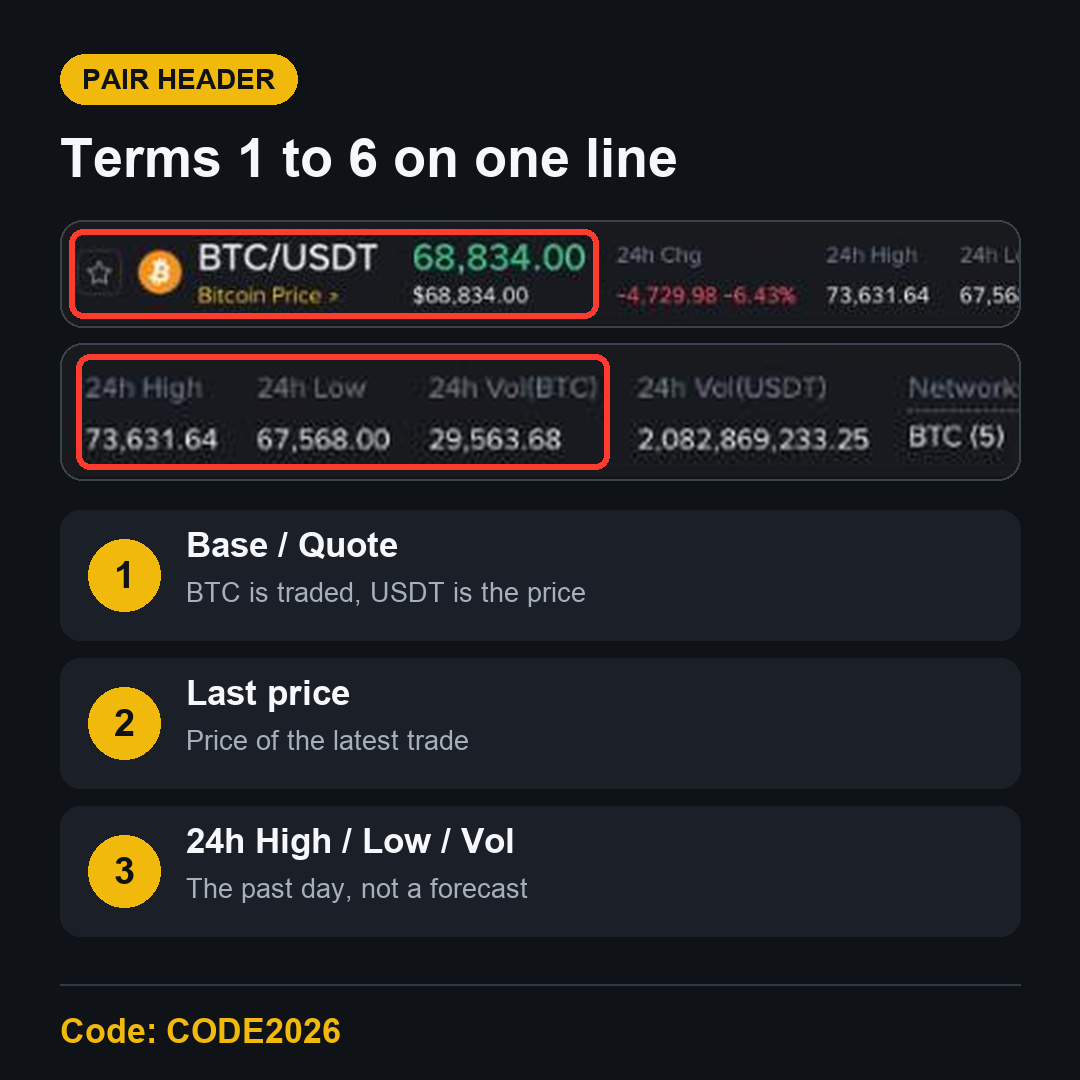
The first coin in the pair, the one you buy or sell. In BTC/USDT it is BTC.
4. Quote asset
The second coin, the one the price is written in. In BTC/USDT it is USDT, and the Total in the order form is shown in it.
5. Last price
The price of the most recent trade, shown large at the top of the pair page. On the morning of November 13, 2026, BTC/USDT was trading around 68,800 USDT.
6. 24h Change, High, Low and Volume
The pair header shows how much the price moved in 24 hours, the highest and lowest price in that time, and how much was traded. It is a summary of the past day, not a forecast.
Binance Order Book Terms
7. Order book
The live list of open buy and sell orders. Sell orders are red, above the price. Buy orders are green, below it.
8. Bid and ask
A bid is a buy order. An ask is a sell order. The best bid is the highest buy price, and the best ask is the lowest sell price.
9. Spread
The gap between the best ask and the best bid. On a busy pair like BTC/USDT it is often just one tick.
10. Depth
How much is waiting in the order book around the current price. The Depth view on the chart draws it as green and red areas.
11. Liquidity
How easily you can buy or sell without moving the price much. More depth near the price usually means more liquidity.
12. Slippage
The difference between the price you expected and the average price you got. It grows on thin pairs and in fast markets.
Binance Spot Order Terms
13. Market order
Buys or sells right away at the best prices available. You choose how much, not the price.
14. Limit order
Buys or sells only at your price or better. It waits in the book until the market reaches it, or until you cancel it.
15. Stop-limit order
Places a limit order once a trigger price, the Stop, is reached. It sits under the Stop Limit menu in the order form.
16. BBO
Best Bid and Offer. The BBO button next to the Price field fills in a price from the top of the order book.
17. Open orders
Orders that haven't fully filled yet. You find them in the Open Orders tab under the chart and can cancel them there.
18. Partial fill
When only part of an order is matched. The rest stays open until it fills or you cancel it.
Binance Spot Fee and Rule Terms
19. Maker
An order that adds liquidity by waiting in the book, like a limit order that doesn't fill at once.
20. Taker
An order that removes liquidity by filling against the book straight away, like a market order.
21. Trading fee
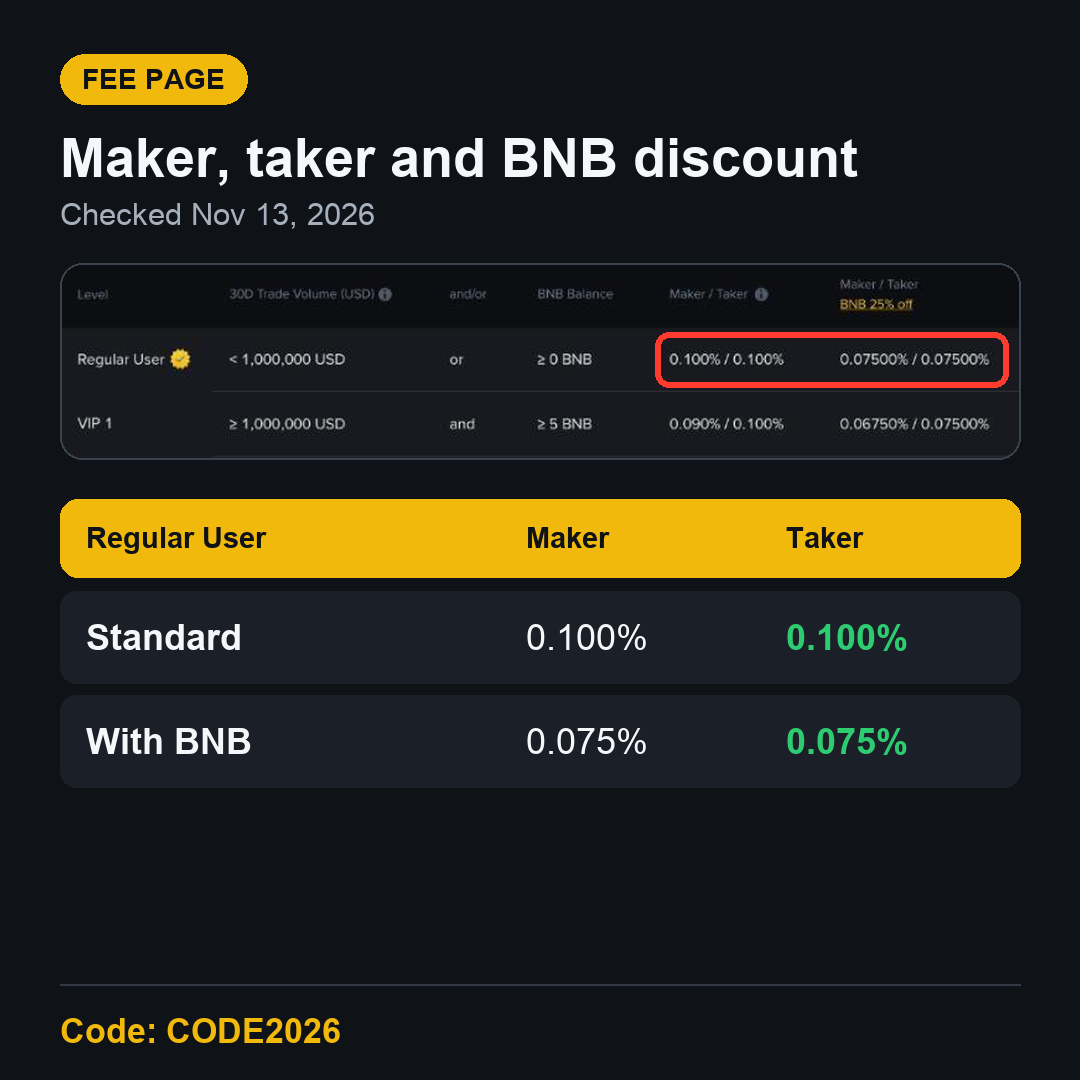
A percentage of each trade. The Binance Spot fee page showed 0.100% maker and 0.100% taker for a Regular User on November 13, 2026.
22. BNB fee discount
Paying Spot fees with BNB takes 25% off. The fee page showed 0.075% maker and taker with BNB for a Regular User.
23. VIP level
Fee tiers based on 30-day trading volume and BNB balance. Every new account starts as Regular User. The table listed VIP 1 at 1,000,000 USD or more in 30-day volume and at least 5 BNB.
24. Tick size and minimum order
Tick size is the smallest price step, and the minimum order is the smallest order value. On BTC/USDT the Binance Spot Trading Parameters page showed 0.01 USDT and 5 USDT.
Binance Referral Terms
25. Referral code and trade rebate
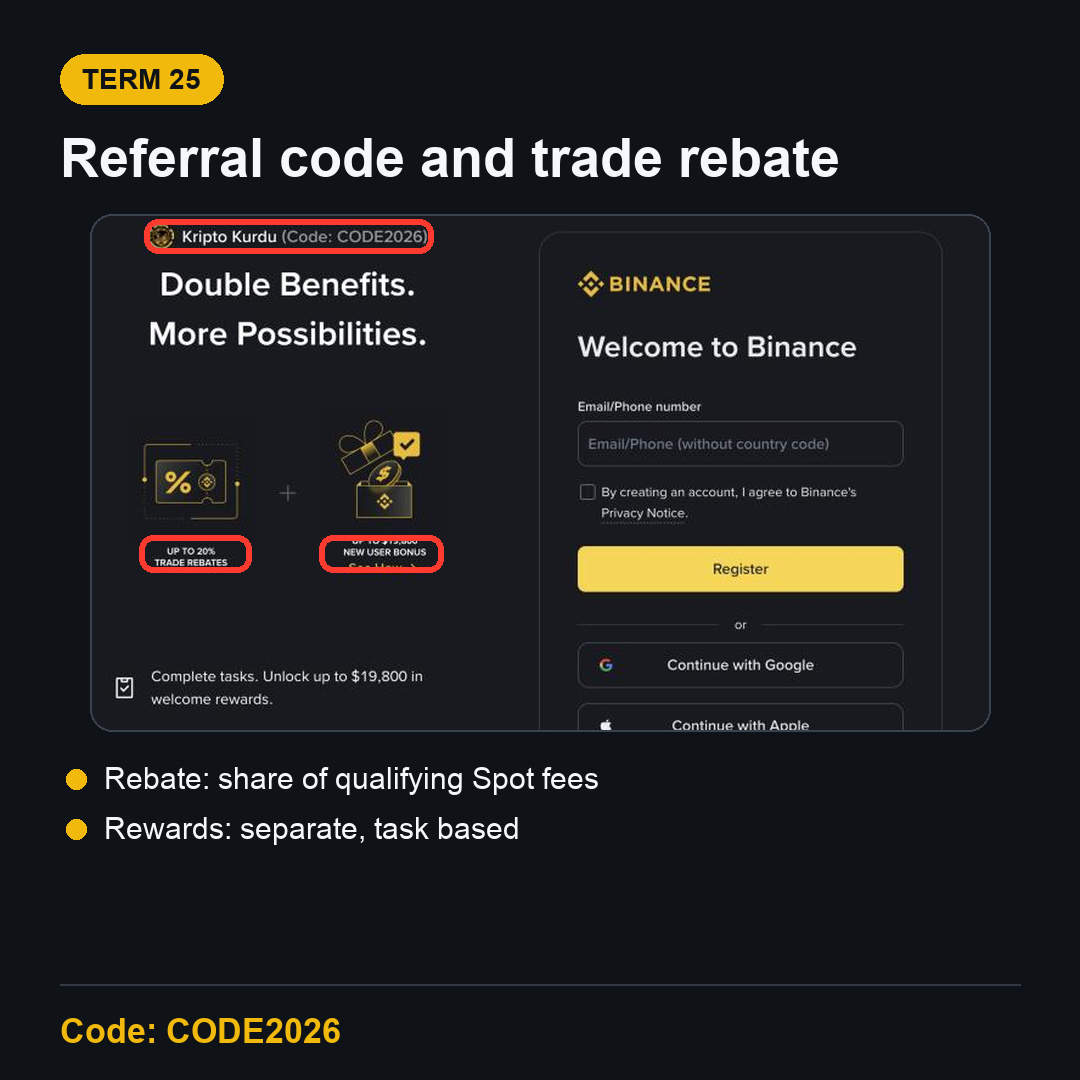
A referral code links a new account to the person who invited it. CODE2026 shows up to 20% trade rebates on qualifying Spot trading fees. Since April 29, 2026, Spot referral commission is calculated on net fees, so the amount can be lower. Welcome rewards are separate. The sign-up page showed up to $19,800 in welcome rewards, and those depend on tasks, region and eligibility.
A referral can be added after registration only in limited cases, such as within 30 days and before any deposit or trade. The referral binding page lists the conditions. Once set, it can't be changed or removed, so it is simplest to check the code at sign-up.
How to Use This Binance Spot Glossary
Open the BTC/USDT Spot page and find each term from 5 to 18 on the screen.
Open the fee page and find terms 19 to 23 in the table.
Place your first order with a small amount, using a limit order so you control the price.
Check the fee you paid in Trade History afterwards.
FAQ
Which Binance Spot terms should a beginner learn first?
Trading pair, market order, limit order, maker, taker and trading fee. With those six you can read the order form and the fee page.
Is a referral code the same as a promo code?
On Binance it is entered in the same place at sign-up. The sign-up page shows it as Code, with the rebate and welcome reward panels next to it.
Does a referral code change the fee rate shown?
The fee page rate stays the same. A trade rebate is a share of qualifying Spot fees paid back, not a different rate in the table.
Open Your Account with Binance Referral Code CODE2026
Now you know the words, the screens are much easier to follow. Use the Binance referral code CODE2026 sign-up link to start. Open the CODE2026 sign-up page and confirm that it shows Code: CODE2026 before you register.
Disclosure: CODE2026 is my referral code, and I may earn commission from qualifying activity. This is an independent guide, not an official Binance post. Benefits depend on Binance's terms, your region and your eligibility. Crypto trading carries risk. Not financial advice. DYOR.