

Binance has two different recurring buy tools, and they don't charge you the same way. The card version under Buy Crypto takes money from a Visa or Mastercard on a schedule and adds a card transaction fee to each order. Convert Recurring spends a balance you already hold in your Spot account, has no separate trading fee and runs as often as every hour. Picking the right one before you create a plan saves you from rebuilding it later.
👉 Open a Binance account with code GETREWARD
This walkthrough follows one plan from the first click to the moment you shut it down: create, run, pause, edit, cancel. After that come the fee numbers for a $50 weekly plan and the mistakes that quietly stop plans from working.
Which recurring buy tool are you looking at?
Both tools automate dollar-cost averaging (DCA), which means buying a fixed amount at fixed intervals instead of picking a single moment. They differ in almost everything else:
Card Recurring Buy: Found under Buy Crypto, then Recurring Buy. You pick a fiat currency, a coin and an amount, and the card is charged daily, weekly, bi-weekly or monthly. Only Visa and Mastercard credit or debit cards are accepted, and you can save a maximum of 5 cards.
Convert Recurring: Found under Trade, then Convert, then the Recurring tab. You choose a From asset you hold (USDT, for example) and a To coin. Frequencies include 1, 4, 8 and 12 hour cycles plus daily, weekly, bi-weekly and monthly.
Cost line: Card orders can carry a card transaction fee, and your bank may add its own charge. Convert Recurring lists zero fees, but each purchase uses a Convert quote that can differ from the market price on Spot.
Where the coins land: Convert Recurring settles into the account you selected in the plan. Card purchases show up in your wallet with the order in your fiat order history.
If your money already sits on Binance as stablecoins, Convert Recurring is the more natural fit. If you want the money pulled straight from a card each week with nothing pre-loaded, the card tool is built for that.
How do you create a plan from your Spot balance?
The Convert route takes about a minute once the stablecoins are in your Spot account. On the website or in the app:
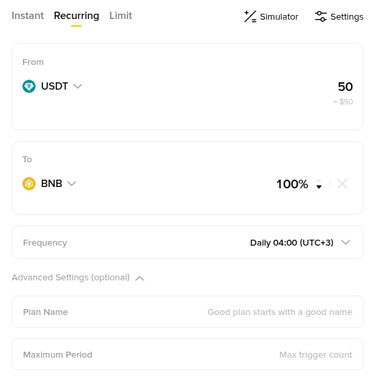
Open Convert: Go to Trade, then Convert, and switch from Instant to the Recurring tab at the top of the form.
Set the From field: Choose the asset that will be spent on every cycle, such as USDT, and type the amount per purchase. The form shows the allowed range next to the box.
Set the To field: Choose the coin to buy. You can add more than one coin and split the amount by percentage if you want a small basket rather than a single asset.
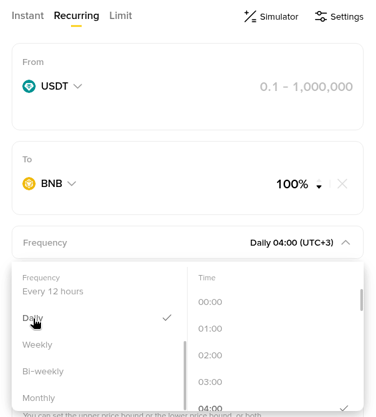
Pick the frequency and time: Open the Frequency menu, choose the cycle, then the hour it should run.
Add limits if you want them: Maximum Period stops the plan after a set number of purchases. Limit Price sets an upper or lower price bound, and a cycle only executes inside that range.
Preview and confirm: Click Preview, read the order details, then Confirm. The plan then shows up among your ongoing plans on the Recurring page.
Keep the amount realistic. A plan that spends more than you top up each month will run dry, and a dry plan does not end on its own right away.
What do the frequency and time settings actually do?
The schedule has a few rules that surprise people on the first day:
Hourly cycles: On a 1, 4, 8 or 12 hour plan, the first purchase happens one hour after you create the plan.
Daily and longer cycles: The first purchase follows the date and hour you picked. If you choose 19:00 at lunchtime, the first buy can happen the same evening.
The minute comes from creation time: The execution minute copies the minute you created the plan. Create a daily 08:00 plan at 14:17 and it runs at 08:17 each morning.
Short months: A monthly plan set on the 31st runs on the last day of shorter months, so February gets its purchase on the 28th or 29th.
None of this changes the cost, but it explains why the Next Trade Date in your plan details rarely shows a round hour.
How do you set up a card recurring buy instead?
The card tool lives in a different part of the app and works on fiat:
Open Recurring Buy: On the website click Buy Crypto, then Recurring Buy. In the app it sits under More on the homepage.
Choose currency, coin and amount: Pick the fiat currency your card is in, the coin, and the amount for each purchase.
Set the schedule: Tap the date to choose daily, weekly, bi-weekly or monthly, along with the day and time.
Pick or add a card: Select a saved Visa or Mastercard, or add a new one. A card that fails to bind can often be replaced with one from a different bank.
Check the quote before confirming: The price and coin amount are recalculated when the quote expires, so tap Refresh if you waited. The first charge is taken as soon as you confirm, not on the next scheduled date.
That last point catches a lot of people. Setting up a weekly plan on Sunday means a purchase on Sunday too.
What happens while the plan runs?
Once a plan is live, there is little to do except watch the history. For Convert Recurring, every fill is recorded under Orders, then Convert History, then Recurring History, with the price you received. Card purchases are listed in your fiat order history.
When a Convert cycle cannot run, the purchase fails and the plan tries again on the next cycle. Missed cycles are not made up later. Binance lists several failure reasons, and these are the common ones:
Insufficient balance: The From asset in the selected account was too low at the scheduled time.
Limit price out of range: The last recurring price sat outside the bounds you set, so that cycle was skipped.
Asset price unavailable: Convert could not quote the coin at that moment.
Compliance check failure: The trade request did not pass a compliance check. Customer Service can tell you the detailed reason.
A plan that keeps failing is not abandoned after one miss. Only after six months of continuous failures does Binance cancel it for you.
How do you pause, edit or cancel a plan?
For Convert Recurring, everything happens in the plan list on the Recurring page. Each plan has Pause, Edit and Cancel actions:
Pause: Stops the purchases but keeps the plan. Paused plans still count toward the cap of 20 plans per account.
Edit: Changes the plan settings. Read the new details carefully before you confirm, the same way you did at setup.
Cancel: Ends the plan and frees its slot. If you are done with a plan, cancel it instead of letting the balance run out.
For the card tool, open My Plans on the website (or Recurring Plan in the app), choose View Plan, then Manage. From there you can edit the frequency or tap Stop. Two details matter here. You can't edit or stop a card plan within 5 minutes before or after an order is processed, and changes are confirmed with a passkey or 2FA. Once you confirm Stop, the plan ends immediately. A saved card that is linked to a live plan can't be removed until that plan is cancelled.
What does $50 a week cost on each route?
Illustration only. It shows fee mechanics, not what a coin will be worth. Take $50 every week for a year, which is 52 purchases and $2,600 in total:
Card Recurring Buy: Binance's own guide to card purchases puts its card fee at up to around 2%. At 2%, each $50 purchase carries up to $1.00, or up to $52 over the year, before any charge your bank adds. The exact fee is shown on the order screen before you confirm.
Convert Recurring from Spot: The fee line reads zero. The cost sits in the quoted price instead. If a quote sat 0.1% away from the Spot market price, that would be $0.05 per purchase or $2.60 a year. That figure is a hypothetical gap for comparison, not a Binance rate, so compare your Recurring History prices with the chart.
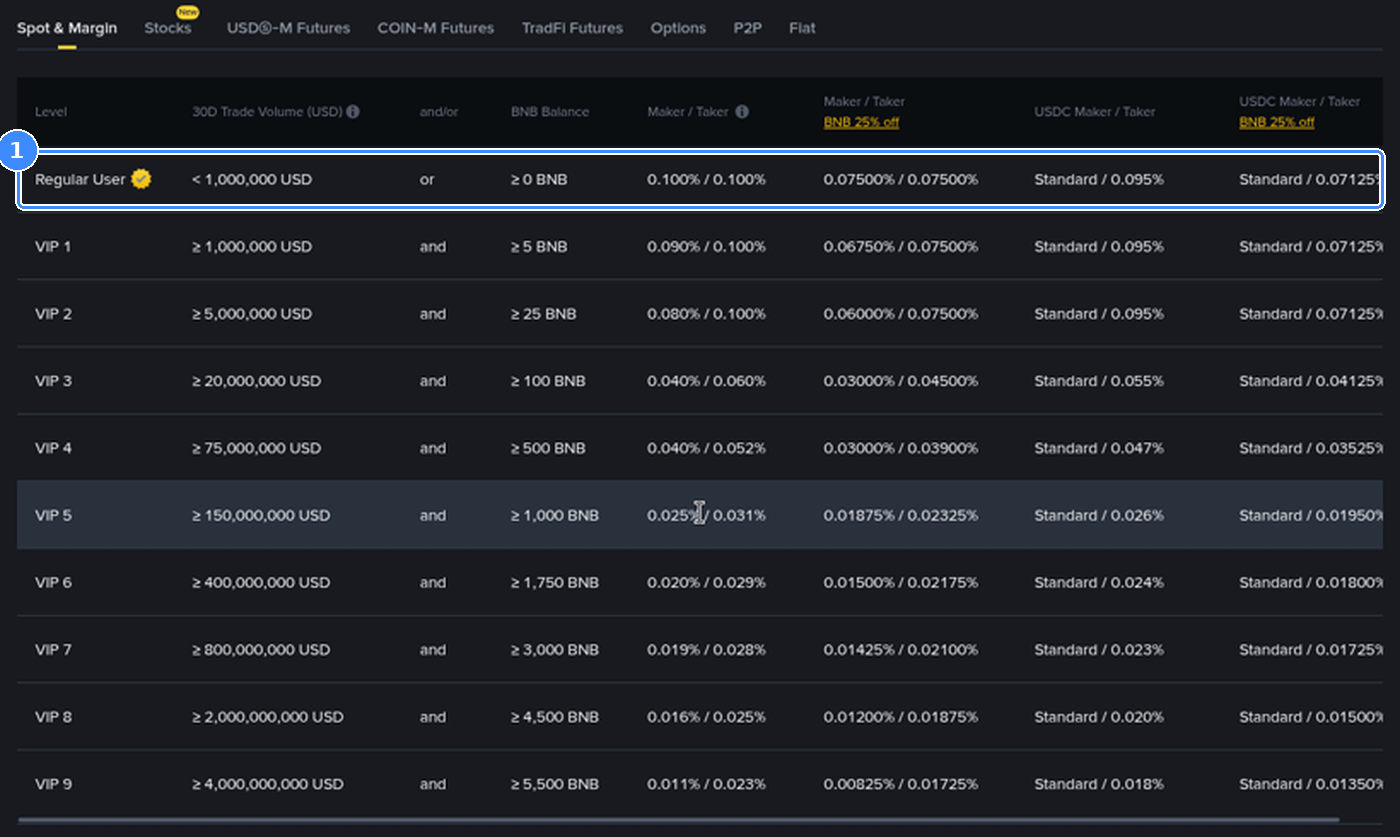
Manual DCA on Spot: Buying the same $50 yourself with a market order at the regular 0.1% rate costs $0.05 per trade, or $2.60 a year. The trade-off is your time and the chance you skip a week.
The gap between card and balance is the number that stands out: up to $52 against a few dollars. Funding the account once by bank transfer and letting Convert Recurring or manual Spot buys do the rest usually keeps the fee line far smaller. The full price list for card, bank, Convert and Spot routes is in this breakdown of Binance fees to buy crypto, and the difference between a Convert quote and a market or limit order is shown with real fills in this USDT to BTC comparison of Convert, Market and Limit.
Which mistakes break a recurring plan?
Most plans that stop working fail for a boring reason. Check these first:
Funding the wrong account: The plan spends from the account selected at setup. Stablecoins sitting elsewhere don't count, so move them into Spot or edit the plan.
Using the wrong stablecoin: A plan funded with USDT won't touch your USDC. The From asset has to match what you hold.
A limit range that is too tight: Limit Price is useful, but a narrow band can skip cycle after cycle, and the only trace is a failed entry marked limit price out of range.
Forgetting the first card charge: The card tool charges on confirmation. Budget for that purchase on day one.
Collecting paused plans: Paused plans fill the 20-plan cap. Clear out the ones you'll never resume.
Bank blocks on card plans: Some banks treat crypto purchases as quasi-cash and add a fee or decline the charge. If a card plan keeps failing, call the card issuer before you rebuild the plan.
Trying to edit at the wrong moment: A card plan locks for 5 minutes around each order. Wait and try again.
Is automating purchases right for you?
A recurring buy removes the timing decision, not the risk. Crypto prices can fall for months, and a plan keeps buying through that. Set an amount you could hold through a long drawdown, pick a frequency you can fund without stress, and review the plan every few months. This guide explains how the tool works and is not financial advice.
If you don't have an account yet, sign up with code GETREWARD and check the welcome offer of up to $19,800 for eligible users. Tasks and amounts change, so read the current terms on the Binance welcome bonus campaign page before you plan around them.
Recurring buy FAQ
Can a recurring buy use my USDT balance instead of a card?
Yes, through Convert Recurring. The card tool under Buy Crypto accepts only Visa and Mastercard, while Convert Recurring spends the From asset you choose, such as USDT, from the account selected in the plan.
What is the shortest interval I can set?
Convert Recurring offers 1 hour cycles. The card tool starts at daily.
Does a failed purchase get retried the same day?
No. Convert Recurring tries again on the next scheduled cycle, and the missed one is skipped. The plan is cancelled only after six months of continuous failures.
Where can I see the price each purchase got?
Convert purchases are listed under Orders, Convert History, Recurring History. Card purchases appear in your fiat order history.
Can I buy two coins in one plan?
In Convert Recurring, yes. Add a second coin in the To field and split the amount by percentage. The card tool is set up one coin at a time.
Disclosure: this article includes a Binance sign-up link with the code GETREWARD. Crypto prices can fall and purchases can lose value. This is not financial advice.