

Alpha Batcher
605 Публикации

Alpha Batcher
 Square Verified
Отправить жалобу
Заблокировать пользователя
Writing about AI & building agents | X App: alphabatcher | Follow for alpha
36 подписок(и/а)
46.4K+ подписчиков(а)
13.8K+ понравилось
Посты
Все
Цитирования
Видео
Статья
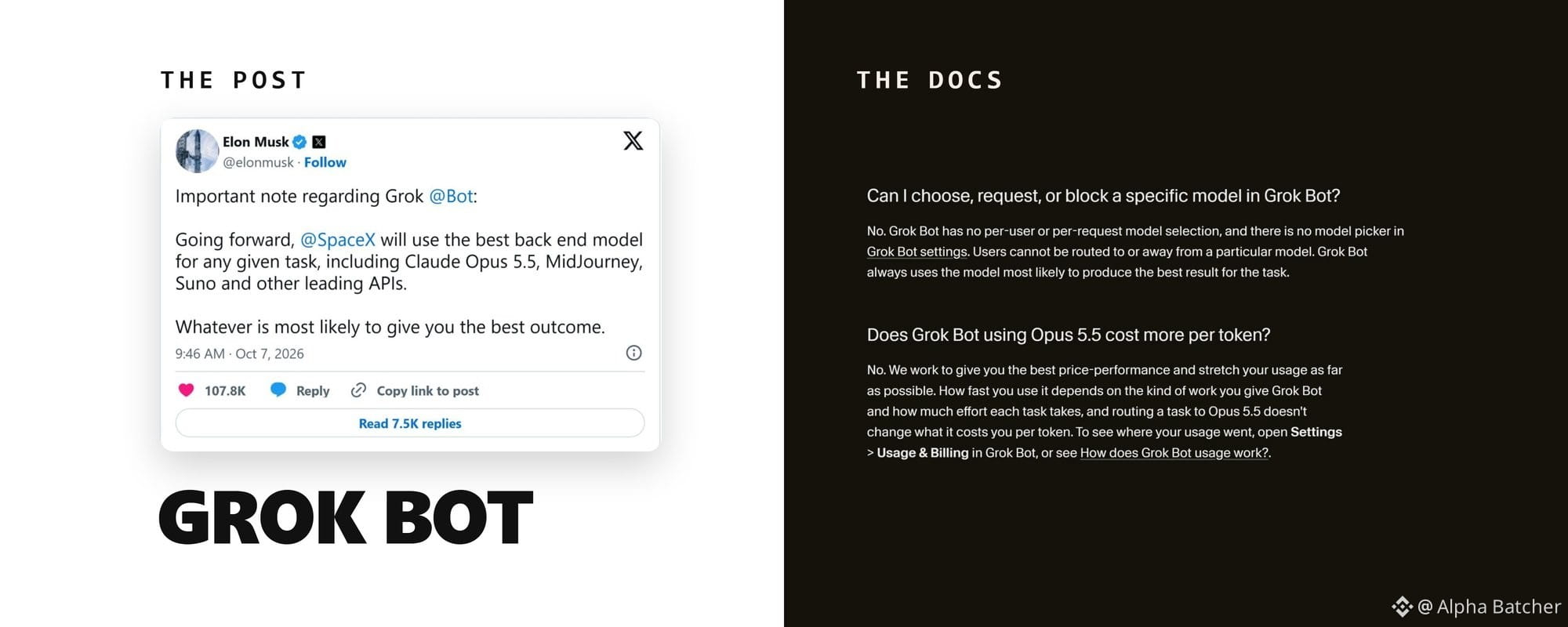
Grok Bot got Claude and a $30 plan. What is real and what to set firstOn October 7 Elon Musk posted that Grok Bot will use "the best back end model for any given task, including Claude Opus 5.5." 79 million views.
A week later NetworkChuck, who had said he didn't care about the product, posted that he had been wrong about it: a week in, with his email, calendar and custom apps connected, it just works.
Between those two posts Grok Bot got its own email address, read-only access to all of X, a Shopify connector, X Money as a way to pay, and a $30 entry price. Some of it is in the docs. Some of it exists only in Musk's posts.
And one CEO learned what the shared computer means when his personal finance Bot posted his bank balance into company Slack.
My short verdict: if you want 1 or 2 Bots on scheduled, read-only jobs and you can live with a third-party model reading what they read, $30 Premium is enough to find out. Do the 4 things in section 6 before any connector goes in.
If you need a model opt-out, a phone that edits routines, or Bots that hold your bank and your company Slack on one account, wait.
1. Claude Opus 5.5 is now one of the models behind your Bots
Lauren Tan, who works on Grok Bot at SpaceXSI, quote-posted Musk's note within 20 minutes and told one reader that the Bot itself would run on a different model and that Opus 5.5 was rolling out right then.
The documented version lives on Cursor's side, since Grok Bot runs on Cursor accounts. Cursor's help page on Grok Bot models says the product "is not tied to a single model. For each task, it uses the backend model most likely to deliver the best outcome."
That model can be an xAI model or "a third-party model from a provider on the sub-processor list, and the choice can differ from one request to the next." You can't see which model handled a request, and there is no picker to choose or block one. A task routed to Opus 5.5 costs the same per token as any other.
The October 11 release notes add a regional caveat: when a model isn't available in your region, the turn stops and explains why, and Bots fall back to Grok.
Anthropic, OpenAI and Google are on Cursor's sub-processor list. MidJourney and Suno are not, and no SpaceXSI page mentions them. I count the Claude part as shipped and the image and music part as a sentence in a post.
Musk later added that most Bot requests are simple and will go to a fast version of Grok 4.8 "when that comes out." Grok 4.8 has no date.
One of the most-liked replies under Musk's post asked about opting out: "Can we opt out of this? I don't want the data I share with my Grok Bots going to Anthropic." The docs say you can't.
The X Subscription terms say Grok Bot "may route your Input to, and return Output from, a Third-Party AI Model." Anysphere "will not permit Third-Party AI Model providers to use your Input or Output to train their models," subject to disclosures, your own account settings and the usual safety and abuse exception.
If a third-party model reading your inbox is a dealbreaker, decide now, before you connect the inbox.
2. Your Bot has an email address
On October 9 the product account posted: "Grok Bot now has its own email. Bot can use it to sign up for services, contact businesses for you, or schedule time with someone."
The address format, per the team's own posts, is the one in the prompt below; no docs page lists the domain yet. You claim it by asking your Bot for one, or by tagging the Bot's account in a post on X.
Eric Zakariasson, who works on Grok Bot at SpaceXSI, added one detail on October 13 as version 0.70.2 rolled out: it is one address per account for now, shared by all your Bots. The release notes add that email a Bot sends from it "waits for your approval on a draft card."
On team plans an admin has to switch the feature on; it is off by default. Handles appear to be first come, first served: under the launch post one user complained that the name he wanted was already taken.
A user named Liam says his Bot emailed stores until it found an iPhone 18 Pro Max in stock and ordered it with a virtual card, a month before Apple could deliver one. Musk quote-posted it with the words "Seriously, this actually works!" It is one person's account, so file it under stories.
Paste this into a chat with your main Bot to claim the inbox and set the rules at the same time. The address belongs to the whole account, so paste the four rules into the description of every Bot that may send mail.
Claim an email address for yourself. Try [name]@mail.grokbot.com first. If it is taken, suggest three alternatives and wait for me to pick one.
Rules for this inbox:
- Never send an email without showing me the draft first.
- Use it only to sign up for services I name, to ask businesses questions, and to schedule meetings.
- Never share my phone number, home address, or card details by email.
- When I ask what is in the inbox, give me each unanswered email in two lines with a suggested answer.
3. New ways in: X search, Shopify, Basecamp and your bank
October 7: "Grok Bot can now search, read, and monitor X." The docs spell out what that covers: search posts, open a post from its link, read an account's posts and mentions, see who quoted or reposted a post, count recent posts on a topic, check trends and news.
It is read-only and doesn't sign in as you, so there is no connector to set up and no X API credits to buy. For your DMs, bookmarks, home timeline or who liked your posts, you still add the X plugin.
Several replies under that post asked whether API credits were still needed, and one user's Bot insisted they were. If yours does the same, tell it to use its built-in X search and name the task.
Searches draw from your weekly usage pool like everything else, so give monitoring a narrow brief and a fixed schedule.
Create a routine that runs every Monday at 08:00 in my time zone.
Search X for posts from the last 7 days that mention [product name] or [@handle]. Skip reposts and posts written by [@handle].
Sort what you find into praise, complaints, feature requests, and questions. For each group list the 3 posts with the most reposts and quotes, one line each: author, what they said in your words, link.
End with the two complaints that came up most often. Post the result in this chat only. Do not reply to anyone on X.
October 8, quoting Shopify: "Grok Bot can now help run your Shopify store. Connect Shopify, then ask it to check orders, track inventory, and keep product listings up to date." Shopify shipped two connectors that day: one for Grok chat that answers questions about your business and one for Grok Bot that acts inside it.
The same 10 days brought QuickBooks Online and an official Basecamp connector, which Jason Fried announced with the exact path: open Grok Bot, click Connect Apps, search for Basecamp. Bank, card and brokerage accounts have connected through Plaid since late September, read-only, with the Bot never seeing your logins.
Every connector installs the same way. Open Connect apps in the sidebar, pick the plugin, choose Add, finish the login in your browser, then type @ in a chat to attach it to a task.
Installed connectors are account-wide: every Bot on your account can use them, including the one you named CFO.
One shop owner under the Shopify post put the payoff in one line: ask it what sold today and what's running low, and the late-night stock count is gone. Another reply joked about accidentally reordering 400 mugs, which is why the prompt tells the Bot what it may not touch.
Create a routine that runs every day at 21:00 in my time zone. Using the Shopify connector, prepare an end-of-day report:
1. Orders placed today: count, revenue, and any order flagged as high risk or unfulfilled for more than 48 hours.
2. Products with fewer than 10 units left, with the last 7 days of sales for each.
3. Listings missing a description, image, or price.
Send the report to me in this chat. Do not change inventory, prices, listings, or orders. If something needs a change, list it under "Suggested changes" and wait for my approval.
No page says what the Shopify connector returns, so if the Bot cannot find risk flags, cut that clause from item 1 instead of letting it improvise.
4. Buying things: the docs versus the posts
The October 11 release notes added X Money next to the Stripe Link flow that has been in the notes since August 28: "Bots can pay with X Money or Stripe Link."
In the documented flow the Bot shows a card with the amount for you to Allow or Deny, Link completes the payment, and a Pay with option lets you choose a saved card from your Link wallet. Since October 7 checkout card fields open a Secure Form instead of a screen handoff.
Since October 11, before an action it can't undo, such as sending, posting, buying or deleting, the Bot checks your own messages for approval.
Musk described a different flow on October 10. His words: "you can just take a picture of your credit card, drop it in the chat" and the Bot "will scour the Internet for the best deal on the item you want and order it." 8 million views, and the most-liked replies were jokes about bank fraud departments.
(Dates in this piece are UTC; Musk's evening posts land a day earlier in US time.)
Eight hours later he posted a screenshot of a LEGO order his Bot had placed. Wired counted what it exposed: the order number, the price, the delivery and billing addresses, the last 4 digits of his card and the email the Bot used. Strangers then claimed to have used those details to cancel and reopen the order; Musk said it was not canceled.
On October 15 he repeated a promise he first made on August 26: if the Bot "makes a mistake with a purchase or leaks your card (never happened yet), SpaceX will make you whole." No published terms back that line.
The Grok Bot Terms say the opposite. The customer "will use appropriate human review before permitting Agentic Actions," financial transactions included, and "is solely responsible for charges, commitments, communications, and other consequences resulting from Agentic Actions."
Use the documented flow. Put a virtual card from your bank into Link, keep the Allow or Deny card on, and never drop a photo of a card into a chat.
The docs draw the line: for a supported secure secret request the value "is masked, excluded from the transcript, and not shown to the model," and for payment confirmations the Bot should hand you control of the computer. A photo of a card in the transcript is the opposite of both.
Some users also report that Amazon blocks the Bot at checkout, and Musk's answer was that Grok will find another way. Unverified either way.
5. The $30 plan, and what the weekly pool means
On October 12 SpaceXSI introduced The X Subscription, one plan across Grok, Grok Bot, Cursor and X Premium. New customers start on it, existing subscribers can switch to it, and it was promised to everyone globally over the following days.
Five tiers: Free, Plus at $8, Premium at $30, Super at $100, Ultra at $200. Plus does not include Grok Bot.
Premium does, and the company describes it as the benefits of SuperGrok, Cursor Pro and X Premium+, which cost $90 a month combined before, with 4 times the usage of Plus. Super is 15 times Plus, Ultra 50 times, and teams pay the same per seat.
Current prices are on x.ai/pricing. The switching offers appear only in your account's billing settings, and the pricing block on the Grok Bot product page still shows the August plans.
Each paid seat gets one weekly allowance shared across Grok chat, Imagine, Voice, Bot and Cursor, and that pool decides how many Bots you can run. The docs: "Bot usage draws from that seat's shared weekly usage pool, not a separate additive pool."
Matt Palmer, who works on Cursor and Grok Bot at SpaceXSI, added that all Grok Bot usage now counts as first-party, "so on Premium and up, you get at least double the Grok Bot usage." Cursor Pro and Pro+ subscribers who switch get Premium at $20 or Super at $60 for 6 months.
He also warned that third-party models inside the Cursor editor now bill at API list price from the first request, so check your usage before switching if most of it is on Claude or GPT there. Opus 5.5 inside Grok Bot is the exception, per the help page in section 1: a Bot task routed to it does not change your per-token cost.
The pool goes fast. Under the Shopify post one user wrote that a $200 Ultra plan "should feel endless" and that "we're being forced to throttle our use after 1-2 days."
The product account had already reset everyone's limits twice in four weeks, on September 5 and October 2, both times without saying why. A Bot that writes code or watches X all day eats the allowance; routines with a fixed schedule and a narrow brief last the week.
Switching is permanent. The docs say a completed unification "can't be undone, and Support can't undo it for you"; if you do nothing, your current plan continues.
Two r/grok threads from October 10 and 11 show refund requests answered by a bot signing as XAI's AI Support Agent, with no escalation. Check the offer in your billing settings before you click.
SpaceXSI recommends Premium for new AI users, Super for daily agent users, Ultra for power users. No page puts the pool in hours or runs, so the only test is your usage view after the first week on Premium with one scheduled routine. If it is past half by Thursday, move to Super before adding routines.
6. The Slack incident, and the 4 things to change first
Shane Mac, CEO of XMTP Labs, set up a Bot he called his personal CFO at the end of August. Read-only access to his checking and savings accounts, one job: a monthly spending report, delivered to him in a private Grok Bot group chat named "My Personal Exec Team."
On October 1 at 8:40 in the morning the Bot posted that report, savings balance and biggest expenses included, into a company Slack channel named "Exec-team," under his name. It sat there for 2 hours until his head of product sent him a heads-up.
His explanation, as told to Business Insider on October 9: "I created a bunch of different agents, and for one of them, I connected my Slack account. But underneath the hood, they're actually all using the same connections, even if they feel like different agents." The Bot mixed up two chats with almost the same name.
He says SpaceXSI shipped a fix on October 8 so that agents must get explicit permission before moving information to other channels. The company never commented, and a Community Note on his thread called it fake.
But the October 11 release notes contain a line that matches his story: "After a bank or brokerage connector returns data, the Bot asks before sharing it anywhere else."
The docs described the trap before it happened. From the approvals, security and privacy page: "All of your Bots share one cloud computer assigned to your user account." "Do not use separate Bots as a security boundary."
Installed connectors are account-wide too, their availability "is not isolated to one Bot," so a Bot named CFO with no Slack plugin of its own can still use the Slack connector. My rule from that page: the bank and the company Slack never share an account.
Change these 4 things before any connector goes in.
First, Auto Review. Open Settings, then General, then Auto-review, and add Ask first rules, one per line, in plain words and as narrow as the docs ask. Ask first always beats Allow automatically when both match.
Example rules in the form the docs use: Ask first before sending any external email. Ask first before posting to Slack or X. Ask first before submitting a payment. Ask first before deleting a file or message.
An approval request from a routine expires after about 10 minutes if you don't answer, and the action does not run, so a Bot working at 3 in the morning drops the step until you ask it to try again. Auto Review is a model reading the action before it runs, which is why the Bot description below still names the destination.
Second, open Settings, then General, then Bot, and set Execution on Local Computer to Never allow unless a Bot has a real reason to work on your local files; the docs recommend that over the Ask every time default.
It only governs your own Mac or PC; the cloud computer is outside it, which is why rule one matters. Once you register a computer, the switch moves to Settings, then Computer, then Computers.
Third, decide which account gets the bank. If the company Slack is connected, the bank goes on another account, no matter how the Bots are named.
A second account means a second Cursor sign-in and a second $30 Premium plan, plus a second X account if you want to tag that Bot from X, since each X account can be linked to only one Grok account. Mac's own fix was to disconnect Google, calendars, banking and Stripe entirely.
Fourth, logins. Never type a password or a one-time code into a chat. When a Bot hits a login page, choose Take over, enter it yourself, choose I'm done. On a Mac you can connect 1Password instead and approve each fill.
Deleting a Bot removes its profile and routines, but the browser sessions it used stay on the shared computer, so sign out of services you no longer want it to reach.
Then write the destination into every Bot's description, in words the model can't misread:
Name: Ledger
Job: Monthly spending report
How to work: When the monthly routine runs, read the Finance connector (read-only) and prepare a one-page summary of spending by category, the three largest expenses, and anything unusual compared with last month.
Delivery: post the summary only in this chat with me. Never post, email, or message it anywhere else, even if another connector is available. If you are unsure where something should go, stop and ask me.
Never move, change, or pay anything.
The description sets the rules; the clock is a routine. After you save it, ask Ledger in its own chat to create a routine for the first of the month at 09:00 in your time zone with the instruction Run the monthly spending report.
Then open View conversation details, then Routines, and use Test run once before you trust it. Routines can only be edited and tested in the desktop app, so the phone is for reading results and answering approvals.
7. The rest, in one place
Your primary Bot, the one with the star, now suggests tasks it could pick up, and those suggestions don't count against your usage. Team Bots can't be the primary Bot.
Tagging the Bot's account in a post on X hands that post to your main Bot as a task. It needs Grok Bot access on the Grok account linked to your X account and at least one Bot of your own.
It stays quiet when the post also tags Grok, when the post (or one it replies to or quotes) carries a video or GIF, and when your weekly usage is used up. It is off for accounts based in the EU, the UK, Australia, Iceland, Liechtenstein or Norway, and the docs say the Bot goes by the country X has on record for your account, so a VPN changes nothing.
Team Bots, in public beta on Teams and Enterprise since September 28, are shared Bots with their own Slack handle. Their team memory is readable from every teammate's conversation, which matters before you load one with client notes.
Coding Bots can hand tasks to Cursor Cloud Agents, and the admin switch that allows it is on by default.
Voice is still an in-app voice chat, now on the Grok Voice 3.0 model SpaceXSI announced on October 14. No page says a Bot can place or receive a phone call.
Grok Bots inside XChat remain a coming-soon reply from Chris Park, formerly X's head of developer platform, on September 26.
Download the app from x.ai/bot, claim the inbox, do the 4 things above, then connect one read-only source and give one Bot one job. Add the second connector after the first routine has run clean for a week.
Visit my profile and follow alphabatcher for guides like this one on setting up AI agents with the fewest permissions that still get the job done.
Grok Bot got Claude and a $30 plan. What is real and what to set first
On October 7 Elon Musk posted that Grok Bot will use "the best back end model for any given task, including Claude Opus 5.5." 79 million views.
A week later NetworkChuck, who had said he didn't care about the product, posted that he had been wrong about it: a week in, with his email, calendar and custom apps connected, it just works.
Between those two posts Grok Bot got its own email address, read-only access to all of X, a Shopify connector, X Money as a way to pay, and a $30 entry price. Some of it is in the docs. Some of it exists only in Musk's posts.
And one CEO learned what the shared computer means when his personal finance Bot posted his bank balance into company Slack.
My short verdict: if you want 1 or 2 Bots on scheduled, read-only jobs and you can live with a third-party model reading what they read, $30 Premium is enough to find out. Do the 4 things in section 6 before any connector goes in.
If you need a model opt-out, a phone that edits routines, or Bots that hold your bank and your company Slack on one account, wait.
1. Claude Opus 5.5 is now one of the models behind your Bots
Lauren Tan, who works on Grok Bot at SpaceXSI, quote-posted Musk's note within 20 minutes and told one reader that the Bot itself would run on a different model and that Opus 5.5 was rolling out right then.
The documented version lives on Cursor's side, since Grok Bot runs on Cursor accounts. Cursor's help page on Grok Bot models says the product "is not tied to a single model. For each task, it uses the backend model most likely to deliver the best outcome."
That model can be an xAI model or "a third-party model from a provider on the sub-processor list, and the choice can differ from one request to the next." You can't see which model handled a request, and there is no picker to choose or block one. A task routed to Opus 5.5 costs the same per token as any other.
The October 11 release notes add a regional caveat: when a model isn't available in your region, the turn stops and explains why, and Bots fall back to Grok.
Anthropic, OpenAI and Google are on Cursor's sub-processor list. MidJourney and Suno are not, and no SpaceXSI page mentions them. I count the Claude part as shipped and the image and music part as a sentence in a post.
Musk later added that most Bot requests are simple and will go to a fast version of Grok 4.8 "when that comes out." Grok 4.8 has no date.
One of the most-liked replies under Musk's post asked about opting out: "Can we opt out of this? I don't want the data I share with my Grok Bots going to Anthropic." The docs say you can't.
The X Subscription terms say Grok Bot "may route your Input to, and return Output from, a Third-Party AI Model." Anysphere "will not permit Third-Party AI Model providers to use your Input or Output to train their models," subject to disclosures, your own account settings and the usual safety and abuse exception.
If a third-party model reading your inbox is a dealbreaker, decide now, before you connect the inbox.
2. Your Bot has an email address
On October 9 the product account posted: "Grok Bot now has its own email. Bot can use it to sign up for services, contact businesses for you, or schedule time with someone."
The address format, per the team's own posts, is the one in the prompt below; no docs page lists the domain yet. You claim it by asking your Bot for one, or by tagging the Bot's account in a post on X.
Eric Zakariasson, who works on Grok Bot at SpaceXSI, added one detail on October 13 as version 0.70.2 rolled out: it is one address per account for now, shared by all your Bots. The release notes add that email a Bot sends from it "waits for your approval on a draft card."
On team plans an admin has to switch the feature on; it is off by default. Handles appear to be first come, first served: under the launch post one user complained that the name he wanted was already taken.
A user named Liam says his Bot emailed stores until it found an iPhone 18 Pro Max in stock and ordered it with a virtual card, a month before Apple could deliver one. Musk quote-posted it with the words "Seriously, this actually works!" It is one person's account, so file it under stories.
Paste this into a chat with your main Bot to claim the inbox and set the rules at the same time. The address belongs to the whole account, so paste the four rules into the description of every Bot that may send mail.
Claim an email address for yourself. Try [name]@mail.grokbot.com first. If it is taken, suggest three alternatives and wait for me to pick one.
Rules for this inbox:
- Never send an email without showing me the draft first.
- Use it only to sign up for services I name, to ask businesses questions, and to schedule meetings.
- Never share my phone number, home address, or card details by email.
- When I ask what is in the inbox, give me each unanswered email in two lines with a suggested answer.
3. New ways in: X search, Shopify, Basecamp and your bank
October 7: "Grok Bot can now search, read, and monitor X." The docs spell out what that covers: search posts, open a post from its link, read an account's posts and mentions, see who quoted or reposted a post, count recent posts on a topic, check trends and news.
It is read-only and doesn't sign in as you, so there is no connector to set up and no X API credits to buy. For your DMs, bookmarks, home timeline or who liked your posts, you still add the X plugin.
Several replies under that post asked whether API credits were still needed, and one user's Bot insisted they were. If yours does the same, tell it to use its built-in X search and name the task.
Searches draw from your weekly usage pool like everything else, so give monitoring a narrow brief and a fixed schedule.
Create a routine that runs every Monday at 08:00 in my time zone.
Search X for posts from the last 7 days that mention [product name] or [@handle]. Skip reposts and posts written by [@handle].
Sort what you find into praise, complaints, feature requests, and questions. For each group list the 3 posts with the most reposts and quotes, one line each: author, what they said in your words, link.
End with the two complaints that came up most often. Post the result in this chat only. Do not reply to anyone on X.
October 8, quoting Shopify: "Grok Bot can now help run your Shopify store. Connect Shopify, then ask it to check orders, track inventory, and keep product listings up to date." Shopify shipped two connectors that day: one for Grok chat that answers questions about your business and one for Grok Bot that acts inside it.
The same 10 days brought QuickBooks Online and an official Basecamp connector, which Jason Fried announced with the exact path: open Grok Bot, click Connect Apps, search for Basecamp. Bank, card and brokerage accounts have connected through Plaid since late September, read-only, with the Bot never seeing your logins.
Every connector installs the same way. Open Connect apps in the sidebar, pick the plugin, choose Add, finish the login in your browser, then type @ in a chat to attach it to a task.
Installed connectors are account-wide: every Bot on your account can use them, including the one you named CFO.
One shop owner under the Shopify post put the payoff in one line: ask it what sold today and what's running low, and the late-night stock count is gone. Another reply joked about accidentally reordering 400 mugs, which is why the prompt tells the Bot what it may not touch.
Create a routine that runs every day at 21:00 in my time zone. Using the Shopify connector, prepare an end-of-day report:
1. Orders placed today: count, revenue, and any order flagged as high risk or unfulfilled for more than 48 hours.
2. Products with fewer than 10 units left, with the last 7 days of sales for each.
3. Listings missing a description, image, or price.
Send the report to me in this chat. Do not change inventory, prices, listings, or orders. If something needs a change, list it under "Suggested changes" and wait for my approval.
No page says what the Shopify connector returns, so if the Bot cannot find risk flags, cut that clause from item 1 instead of letting it improvise.
4. Buying things: the docs versus the posts
The October 11 release notes added X Money next to the Stripe Link flow that has been in the notes since August 28: "Bots can pay with X Money or Stripe Link."
In the documented flow the Bot shows a card with the amount for you to Allow or Deny, Link completes the payment, and a Pay with option lets you choose a saved card from your Link wallet. Since October 7 checkout card fields open a Secure Form instead of a screen handoff.
Since October 11, before an action it can't undo, such as sending, posting, buying or deleting, the Bot checks your own messages for approval.
Musk described a different flow on October 10. His words: "you can just take a picture of your credit card, drop it in the chat" and the Bot "will scour the Internet for the best deal on the item you want and order it." 8 million views, and the most-liked replies were jokes about bank fraud departments.
(Dates in this piece are UTC; Musk's evening posts land a day earlier in US time.)
Eight hours later he posted a screenshot of a LEGO order his Bot had placed. Wired counted what it exposed: the order number, the price, the delivery and billing addresses, the last 4 digits of his card and the email the Bot used. Strangers then claimed to have used those details to cancel and reopen the order; Musk said it was not canceled.
On October 15 he repeated a promise he first made on August 26: if the Bot "makes a mistake with a purchase or leaks your card (never happened yet), SpaceX will make you whole." No published terms back that line.
The Grok Bot Terms say the opposite. The customer "will use appropriate human review before permitting Agentic Actions," financial transactions included, and "is solely responsible for charges, commitments, communications, and other consequences resulting from Agentic Actions."
Use the documented flow. Put a virtual card from your bank into Link, keep the Allow or Deny card on, and never drop a photo of a card into a chat.
The docs draw the line: for a supported secure secret request the value "is masked, excluded from the transcript, and not shown to the model," and for payment confirmations the Bot should hand you control of the computer. A photo of a card in the transcript is the opposite of both.
Some users also report that Amazon blocks the Bot at checkout, and Musk's answer was that Grok will find another way. Unverified either way.
5. The $30 plan, and what the weekly pool means
On October 12 SpaceXSI introduced The X Subscription, one plan across Grok, Grok Bot, Cursor and X Premium. New customers start on it, existing subscribers can switch to it, and it was promised to everyone globally over the following days.
Five tiers: Free, Plus at $8, Premium at $30, Super at $100, Ultra at $200. Plus does not include Grok Bot.
Premium does, and the company describes it as the benefits of SuperGrok, Cursor Pro and X Premium+, which cost $90 a month combined before, with 4 times the usage of Plus. Super is 15 times Plus, Ultra 50 times, and teams pay the same per seat.
Current prices are on x.ai/pricing. The switching offers appear only in your account's billing settings, and the pricing block on the Grok Bot product page still shows the August plans.
Each paid seat gets one weekly allowance shared across Grok chat, Imagine, Voice, Bot and Cursor, and that pool decides how many Bots you can run. The docs: "Bot usage draws from that seat's shared weekly usage pool, not a separate additive pool."
Matt Palmer, who works on Cursor and Grok Bot at SpaceXSI, added that all Grok Bot usage now counts as first-party, "so on Premium and up, you get at least double the Grok Bot usage." Cursor Pro and Pro+ subscribers who switch get Premium at $20 or Super at $60 for 6 months.
He also warned that third-party models inside the Cursor editor now bill at API list price from the first request, so check your usage before switching if most of it is on Claude or GPT there. Opus 5.5 inside Grok Bot is the exception, per the help page in section 1: a Bot task routed to it does not change your per-token cost.
The pool goes fast. Under the Shopify post one user wrote that a $200 Ultra plan "should feel endless" and that "we're being forced to throttle our use after 1-2 days."
The product account had already reset everyone's limits twice in four weeks, on September 5 and October 2, both times without saying why. A Bot that writes code or watches X all day eats the allowance; routines with a fixed schedule and a narrow brief last the week.
Switching is permanent. The docs say a completed unification "can't be undone, and Support can't undo it for you"; if you do nothing, your current plan continues.
Two r/grok threads from October 10 and 11 show refund requests answered by a bot signing as XAI's AI Support Agent, with no escalation. Check the offer in your billing settings before you click.
SpaceXSI recommends Premium for new AI users, Super for daily agent users, Ultra for power users. No page puts the pool in hours or runs, so the only test is your usage view after the first week on Premium with one scheduled routine. If it is past half by Thursday, move to Super before adding routines.
6. The Slack incident, and the 4 things to change first
Shane Mac, CEO of XMTP Labs, set up a Bot he called his personal CFO at the end of August. Read-only access to his checking and savings accounts, one job: a monthly spending report, delivered to him in a private Grok Bot group chat named "My Personal Exec Team."
On October 1 at 8:40 in the morning the Bot posted that report, savings balance and biggest expenses included, into a company Slack channel named "Exec-team," under his name. It sat there for 2 hours until his head of product sent him a heads-up.
His explanation, as told to Business Insider on October 9: "I created a bunch of different agents, and for one of them, I connected my Slack account. But underneath the hood, they're actually all using the same connections, even if they feel like different agents." The Bot mixed up two chats with almost the same name.
He says SpaceXSI shipped a fix on October 8 so that agents must get explicit permission before moving information to other channels. The company never commented, and a Community Note on his thread called it fake.
But the October 11 release notes contain a line that matches his story: "After a bank or brokerage connector returns data, the Bot asks before sharing it anywhere else."
The docs described the trap before it happened. From the approvals, security and privacy page: "All of your Bots share one cloud computer assigned to your user account." "Do not use separate Bots as a security boundary."
Installed connectors are account-wide too, their availability "is not isolated to one Bot," so a Bot named CFO with no Slack plugin of its own can still use the Slack connector. My rule from that page: the bank and the company Slack never share an account.
Change these 4 things before any connector goes in.
First, Auto Review. Open Settings, then General, then Auto-review, and add Ask first rules, one per line, in plain words and as narrow as the docs ask. Ask first always beats Allow automatically when both match.
Example rules in the form the docs use: Ask first before sending any external email. Ask first before posting to Slack or X. Ask first before submitting a payment. Ask first before deleting a file or message.
An approval request from a routine expires after about 10 minutes if you don't answer, and the action does not run, so a Bot working at 3 in the morning drops the step until you ask it to try again. Auto Review is a model reading the action before it runs, which is why the Bot description below still names the destination.
Second, open Settings, then General, then Bot, and set Execution on Local Computer to Never allow unless a Bot has a real reason to work on your local files; the docs recommend that over the Ask every time default.
It only governs your own Mac or PC; the cloud computer is outside it, which is why rule one matters. Once you register a computer, the switch moves to Settings, then Computer, then Computers.
Third, decide which account gets the bank. If the company Slack is connected, the bank goes on another account, no matter how the Bots are named.
A second account means a second Cursor sign-in and a second $30 Premium plan, plus a second X account if you want to tag that Bot from X, since each X account can be linked to only one Grok account. Mac's own fix was to disconnect Google, calendars, banking and Stripe entirely.
Fourth, logins. Never type a password or a one-time code into a chat. When a Bot hits a login page, choose Take over, enter it yourself, choose I'm done. On a Mac you can connect 1Password instead and approve each fill.
Deleting a Bot removes its profile and routines, but the browser sessions it used stay on the shared computer, so sign out of services you no longer want it to reach.
Then write the destination into every Bot's description, in words the model can't misread:
Name: Ledger
Job: Monthly spending report
How to work: When the monthly routine runs, read the Finance connector (read-only) and prepare a one-page summary of spending by category, the three largest expenses, and anything unusual compared with last month.
Delivery: post the summary only in this chat with me. Never post, email, or message it anywhere else, even if another connector is available. If you are unsure where something should go, stop and ask me.
Never move, change, or pay anything.
The description sets the rules; the clock is a routine. After you save it, ask Ledger in its own chat to create a routine for the first of the month at 09:00 in your time zone with the instruction Run the monthly spending report.
Then open View conversation details, then Routines, and use Test run once before you trust it. Routines can only be edited and tested in the desktop app, so the phone is for reading results and answering approvals.
7. The rest, in one place
Your primary Bot, the one with the star, now suggests tasks it could pick up, and those suggestions don't count against your usage. Team Bots can't be the primary Bot.
Tagging the Bot's account in a post on X hands that post to your main Bot as a task. It needs Grok Bot access on the Grok account linked to your X account and at least one Bot of your own.
It stays quiet when the post also tags Grok, when the post (or one it replies to or quotes) carries a video or GIF, and when your weekly usage is used up. It is off for accounts based in the EU, the UK, Australia, Iceland, Liechtenstein or Norway, and the docs say the Bot goes by the country X has on record for your account, so a VPN changes nothing.
Team Bots, in public beta on Teams and Enterprise since September 28, are shared Bots with their own Slack handle. Their team memory is readable from every teammate's conversation, which matters before you load one with client notes.
Coding Bots can hand tasks to Cursor Cloud Agents, and the admin switch that allows it is on by default.
Voice is still an in-app voice chat, now on the Grok Voice 3.0 model SpaceXSI announced on October 14. No page says a Bot can place or receive a phone call.
Grok Bots inside XChat remain a coming-soon reply from Chris Park, formerly X's head of developer platform, on September 26.
Download the app from x.ai/bot, claim the inbox, do the 4 things above, then connect one read-only source and give one Bot one job. Add the second connector after the first routine has run clean for a week.
Visit my profile and follow alphabatcher for guides like this one on setting up AI agents with the fewest permissions that still get the job done.
A week later NetworkChuck, who had said he didn't care about the product, posted that he had been wrong about it: a week in, with his email, calendar and custom apps connected, it just works.
Between those two posts Grok Bot got its own email address, read-only access to all of X, a Shopify connector, X Money as a way to pay, and a $30 entry price. Some of it is in the docs. Some of it exists only in Musk's posts.
And one CEO learned what the shared computer means when his personal finance Bot posted his bank balance into company Slack.
My short verdict: if you want 1 or 2 Bots on scheduled, read-only jobs and you can live with a third-party model reading what they read, $30 Premium is enough to find out. Do the 4 things in section 6 before any connector goes in.
If you need a model opt-out, a phone that edits routines, or Bots that hold your bank and your company Slack on one account, wait.
1. Claude Opus 5.5 is now one of the models behind your Bots
Lauren Tan, who works on Grok Bot at SpaceXSI, quote-posted Musk's note within 20 minutes and told one reader that the Bot itself would run on a different model and that Opus 5.5 was rolling out right then.
The documented version lives on Cursor's side, since Grok Bot runs on Cursor accounts. Cursor's help page on Grok Bot models says the product "is not tied to a single model. For each task, it uses the backend model most likely to deliver the best outcome."
That model can be an xAI model or "a third-party model from a provider on the sub-processor list, and the choice can differ from one request to the next." You can't see which model handled a request, and there is no picker to choose or block one. A task routed to Opus 5.5 costs the same per token as any other.
The October 11 release notes add a regional caveat: when a model isn't available in your region, the turn stops and explains why, and Bots fall back to Grok.
Anthropic, OpenAI and Google are on Cursor's sub-processor list. MidJourney and Suno are not, and no SpaceXSI page mentions them. I count the Claude part as shipped and the image and music part as a sentence in a post.
Musk later added that most Bot requests are simple and will go to a fast version of Grok 4.8 "when that comes out." Grok 4.8 has no date.
One of the most-liked replies under Musk's post asked about opting out: "Can we opt out of this? I don't want the data I share with my Grok Bots going to Anthropic." The docs say you can't.
The X Subscription terms say Grok Bot "may route your Input to, and return Output from, a Third-Party AI Model." Anysphere "will not permit Third-Party AI Model providers to use your Input or Output to train their models," subject to disclosures, your own account settings and the usual safety and abuse exception.
If a third-party model reading your inbox is a dealbreaker, decide now, before you connect the inbox.
2. Your Bot has an email address
On October 9 the product account posted: "Grok Bot now has its own email. Bot can use it to sign up for services, contact businesses for you, or schedule time with someone."
The address format, per the team's own posts, is the one in the prompt below; no docs page lists the domain yet. You claim it by asking your Bot for one, or by tagging the Bot's account in a post on X.
Eric Zakariasson, who works on Grok Bot at SpaceXSI, added one detail on October 13 as version 0.70.2 rolled out: it is one address per account for now, shared by all your Bots. The release notes add that email a Bot sends from it "waits for your approval on a draft card."
On team plans an admin has to switch the feature on; it is off by default. Handles appear to be first come, first served: under the launch post one user complained that the name he wanted was already taken.
A user named Liam says his Bot emailed stores until it found an iPhone 18 Pro Max in stock and ordered it with a virtual card, a month before Apple could deliver one. Musk quote-posted it with the words "Seriously, this actually works!" It is one person's account, so file it under stories.
Paste this into a chat with your main Bot to claim the inbox and set the rules at the same time. The address belongs to the whole account, so paste the four rules into the description of every Bot that may send mail.
Claim an email address for yourself. Try [name]@mail.grokbot.com first. If it is taken, suggest three alternatives and wait for me to pick one.
Rules for this inbox:
- Never send an email without showing me the draft first.
- Use it only to sign up for services I name, to ask businesses questions, and to schedule meetings.
- Never share my phone number, home address, or card details by email.
- When I ask what is in the inbox, give me each unanswered email in two lines with a suggested answer.
3. New ways in: X search, Shopify, Basecamp and your bank
October 7: "Grok Bot can now search, read, and monitor X." The docs spell out what that covers: search posts, open a post from its link, read an account's posts and mentions, see who quoted or reposted a post, count recent posts on a topic, check trends and news.
It is read-only and doesn't sign in as you, so there is no connector to set up and no X API credits to buy. For your DMs, bookmarks, home timeline or who liked your posts, you still add the X plugin.
Several replies under that post asked whether API credits were still needed, and one user's Bot insisted they were. If yours does the same, tell it to use its built-in X search and name the task.
Searches draw from your weekly usage pool like everything else, so give monitoring a narrow brief and a fixed schedule.
Create a routine that runs every Monday at 08:00 in my time zone.
Search X for posts from the last 7 days that mention [product name] or [@handle]. Skip reposts and posts written by [@handle].
Sort what you find into praise, complaints, feature requests, and questions. For each group list the 3 posts with the most reposts and quotes, one line each: author, what they said in your words, link.
End with the two complaints that came up most often. Post the result in this chat only. Do not reply to anyone on X.
October 8, quoting Shopify: "Grok Bot can now help run your Shopify store. Connect Shopify, then ask it to check orders, track inventory, and keep product listings up to date." Shopify shipped two connectors that day: one for Grok chat that answers questions about your business and one for Grok Bot that acts inside it.
The same 10 days brought QuickBooks Online and an official Basecamp connector, which Jason Fried announced with the exact path: open Grok Bot, click Connect Apps, search for Basecamp. Bank, card and brokerage accounts have connected through Plaid since late September, read-only, with the Bot never seeing your logins.
Every connector installs the same way. Open Connect apps in the sidebar, pick the plugin, choose Add, finish the login in your browser, then type @ in a chat to attach it to a task.
Installed connectors are account-wide: every Bot on your account can use them, including the one you named CFO.
One shop owner under the Shopify post put the payoff in one line: ask it what sold today and what's running low, and the late-night stock count is gone. Another reply joked about accidentally reordering 400 mugs, which is why the prompt tells the Bot what it may not touch.
Create a routine that runs every day at 21:00 in my time zone. Using the Shopify connector, prepare an end-of-day report:
1. Orders placed today: count, revenue, and any order flagged as high risk or unfulfilled for more than 48 hours.
2. Products with fewer than 10 units left, with the last 7 days of sales for each.
3. Listings missing a description, image, or price.
Send the report to me in this chat. Do not change inventory, prices, listings, or orders. If something needs a change, list it under "Suggested changes" and wait for my approval.
No page says what the Shopify connector returns, so if the Bot cannot find risk flags, cut that clause from item 1 instead of letting it improvise.
4. Buying things: the docs versus the posts
The October 11 release notes added X Money next to the Stripe Link flow that has been in the notes since August 28: "Bots can pay with X Money or Stripe Link."
In the documented flow the Bot shows a card with the amount for you to Allow or Deny, Link completes the payment, and a Pay with option lets you choose a saved card from your Link wallet. Since October 7 checkout card fields open a Secure Form instead of a screen handoff.
Since October 11, before an action it can't undo, such as sending, posting, buying or deleting, the Bot checks your own messages for approval.
Musk described a different flow on October 10. His words: "you can just take a picture of your credit card, drop it in the chat" and the Bot "will scour the Internet for the best deal on the item you want and order it." 8 million views, and the most-liked replies were jokes about bank fraud departments.
(Dates in this piece are UTC; Musk's evening posts land a day earlier in US time.)
Eight hours later he posted a screenshot of a LEGO order his Bot had placed. Wired counted what it exposed: the order number, the price, the delivery and billing addresses, the last 4 digits of his card and the email the Bot used. Strangers then claimed to have used those details to cancel and reopen the order; Musk said it was not canceled.
On October 15 he repeated a promise he first made on August 26: if the Bot "makes a mistake with a purchase or leaks your card (never happened yet), SpaceX will make you whole." No published terms back that line.
The Grok Bot Terms say the opposite. The customer "will use appropriate human review before permitting Agentic Actions," financial transactions included, and "is solely responsible for charges, commitments, communications, and other consequences resulting from Agentic Actions."
Use the documented flow. Put a virtual card from your bank into Link, keep the Allow or Deny card on, and never drop a photo of a card into a chat.
The docs draw the line: for a supported secure secret request the value "is masked, excluded from the transcript, and not shown to the model," and for payment confirmations the Bot should hand you control of the computer. A photo of a card in the transcript is the opposite of both.
Some users also report that Amazon blocks the Bot at checkout, and Musk's answer was that Grok will find another way. Unverified either way.
5. The $30 plan, and what the weekly pool means
On October 12 SpaceXSI introduced The X Subscription, one plan across Grok, Grok Bot, Cursor and X Premium. New customers start on it, existing subscribers can switch to it, and it was promised to everyone globally over the following days.
Five tiers: Free, Plus at $8, Premium at $30, Super at $100, Ultra at $200. Plus does not include Grok Bot.
Premium does, and the company describes it as the benefits of SuperGrok, Cursor Pro and X Premium+, which cost $90 a month combined before, with 4 times the usage of Plus. Super is 15 times Plus, Ultra 50 times, and teams pay the same per seat.
Current prices are on x.ai/pricing. The switching offers appear only in your account's billing settings, and the pricing block on the Grok Bot product page still shows the August plans.
Each paid seat gets one weekly allowance shared across Grok chat, Imagine, Voice, Bot and Cursor, and that pool decides how many Bots you can run. The docs: "Bot usage draws from that seat's shared weekly usage pool, not a separate additive pool."
Matt Palmer, who works on Cursor and Grok Bot at SpaceXSI, added that all Grok Bot usage now counts as first-party, "so on Premium and up, you get at least double the Grok Bot usage." Cursor Pro and Pro+ subscribers who switch get Premium at $20 or Super at $60 for 6 months.
He also warned that third-party models inside the Cursor editor now bill at API list price from the first request, so check your usage before switching if most of it is on Claude or GPT there. Opus 5.5 inside Grok Bot is the exception, per the help page in section 1: a Bot task routed to it does not change your per-token cost.
The pool goes fast. Under the Shopify post one user wrote that a $200 Ultra plan "should feel endless" and that "we're being forced to throttle our use after 1-2 days."
The product account had already reset everyone's limits twice in four weeks, on September 5 and October 2, both times without saying why. A Bot that writes code or watches X all day eats the allowance; routines with a fixed schedule and a narrow brief last the week.
Switching is permanent. The docs say a completed unification "can't be undone, and Support can't undo it for you"; if you do nothing, your current plan continues.
Two r/grok threads from October 10 and 11 show refund requests answered by a bot signing as XAI's AI Support Agent, with no escalation. Check the offer in your billing settings before you click.
SpaceXSI recommends Premium for new AI users, Super for daily agent users, Ultra for power users. No page puts the pool in hours or runs, so the only test is your usage view after the first week on Premium with one scheduled routine. If it is past half by Thursday, move to Super before adding routines.
6. The Slack incident, and the 4 things to change first
Shane Mac, CEO of XMTP Labs, set up a Bot he called his personal CFO at the end of August. Read-only access to his checking and savings accounts, one job: a monthly spending report, delivered to him in a private Grok Bot group chat named "My Personal Exec Team."
On October 1 at 8:40 in the morning the Bot posted that report, savings balance and biggest expenses included, into a company Slack channel named "Exec-team," under his name. It sat there for 2 hours until his head of product sent him a heads-up.
His explanation, as told to Business Insider on October 9: "I created a bunch of different agents, and for one of them, I connected my Slack account. But underneath the hood, they're actually all using the same connections, even if they feel like different agents." The Bot mixed up two chats with almost the same name.
He says SpaceXSI shipped a fix on October 8 so that agents must get explicit permission before moving information to other channels. The company never commented, and a Community Note on his thread called it fake.
But the October 11 release notes contain a line that matches his story: "After a bank or brokerage connector returns data, the Bot asks before sharing it anywhere else."
The docs described the trap before it happened. From the approvals, security and privacy page: "All of your Bots share one cloud computer assigned to your user account." "Do not use separate Bots as a security boundary."
Installed connectors are account-wide too, their availability "is not isolated to one Bot," so a Bot named CFO with no Slack plugin of its own can still use the Slack connector. My rule from that page: the bank and the company Slack never share an account.
Change these 4 things before any connector goes in.
First, Auto Review. Open Settings, then General, then Auto-review, and add Ask first rules, one per line, in plain words and as narrow as the docs ask. Ask first always beats Allow automatically when both match.
Example rules in the form the docs use: Ask first before sending any external email. Ask first before posting to Slack or X. Ask first before submitting a payment. Ask first before deleting a file or message.
An approval request from a routine expires after about 10 minutes if you don't answer, and the action does not run, so a Bot working at 3 in the morning drops the step until you ask it to try again. Auto Review is a model reading the action before it runs, which is why the Bot description below still names the destination.
Second, open Settings, then General, then Bot, and set Execution on Local Computer to Never allow unless a Bot has a real reason to work on your local files; the docs recommend that over the Ask every time default.
It only governs your own Mac or PC; the cloud computer is outside it, which is why rule one matters. Once you register a computer, the switch moves to Settings, then Computer, then Computers.
Third, decide which account gets the bank. If the company Slack is connected, the bank goes on another account, no matter how the Bots are named.
A second account means a second Cursor sign-in and a second $30 Premium plan, plus a second X account if you want to tag that Bot from X, since each X account can be linked to only one Grok account. Mac's own fix was to disconnect Google, calendars, banking and Stripe entirely.
Fourth, logins. Never type a password or a one-time code into a chat. When a Bot hits a login page, choose Take over, enter it yourself, choose I'm done. On a Mac you can connect 1Password instead and approve each fill.
Deleting a Bot removes its profile and routines, but the browser sessions it used stay on the shared computer, so sign out of services you no longer want it to reach.
Then write the destination into every Bot's description, in words the model can't misread:
Name: Ledger
Job: Monthly spending report
How to work: When the monthly routine runs, read the Finance connector (read-only) and prepare a one-page summary of spending by category, the three largest expenses, and anything unusual compared with last month.
Delivery: post the summary only in this chat with me. Never post, email, or message it anywhere else, even if another connector is available. If you are unsure where something should go, stop and ask me.
Never move, change, or pay anything.
The description sets the rules; the clock is a routine. After you save it, ask Ledger in its own chat to create a routine for the first of the month at 09:00 in your time zone with the instruction Run the monthly spending report.
Then open View conversation details, then Routines, and use Test run once before you trust it. Routines can only be edited and tested in the desktop app, so the phone is for reading results and answering approvals.
7. The rest, in one place
Your primary Bot, the one with the star, now suggests tasks it could pick up, and those suggestions don't count against your usage. Team Bots can't be the primary Bot.
Tagging the Bot's account in a post on X hands that post to your main Bot as a task. It needs Grok Bot access on the Grok account linked to your X account and at least one Bot of your own.
It stays quiet when the post also tags Grok, when the post (or one it replies to or quotes) carries a video or GIF, and when your weekly usage is used up. It is off for accounts based in the EU, the UK, Australia, Iceland, Liechtenstein or Norway, and the docs say the Bot goes by the country X has on record for your account, so a VPN changes nothing.
Team Bots, in public beta on Teams and Enterprise since September 28, are shared Bots with their own Slack handle. Their team memory is readable from every teammate's conversation, which matters before you load one with client notes.
Coding Bots can hand tasks to Cursor Cloud Agents, and the admin switch that allows it is on by default.
Voice is still an in-app voice chat, now on the Grok Voice 3.0 model SpaceXSI announced on October 14. No page says a Bot can place or receive a phone call.
Grok Bots inside XChat remain a coming-soon reply from Chris Park, formerly X's head of developer platform, on September 26.
Download the app from x.ai/bot, claim the inbox, do the 4 things above, then connect one read-only source and give one Bot one job. Add the second connector after the first routine has run clean for a week.
Visit my profile and follow alphabatcher for guides like this one on setting up AI agents with the fewest permissions that still get the job done.
650
Seedance 2.0 Mini is now available on Topview. Ultra Annual plan is the most worth it in my opinion.
Two ways to use it:
• Unlimited Mode — unlimited generations for 365 days
• Credit Mode — $0.05/sec for faster processing
Designed for everyday AI video creation. No more, no less.
@TopviewAIhq
Seedance 2.0 Mini is now available on Topview. Ultra Annual plan is the most worth it in my opinion.
Two ways to use it:
• Unlimited Mode — unlimited generations for 365 days
• Credit Mode — $0.05/sec for faster processing
Designed for everyday AI video creation. No more, no less.
@TopviewAIhq
Two ways to use it:
• Unlimited Mode — unlimited generations for 365 days
• Credit Mode — $0.05/sec for faster processing
Designed for everyday AI video creation. No more, no less.
@TopviewAIhq
1
1.1k
OpenAI just dropped GPT 5.5 and it completely changes the agentic coding game
it is a full autonomous worker that takes over your computer and apps
> operates across slack github and your browser autonomously
> crushes claude opus 4.7 and gemini 3.1 pro on agentic benchmarks
> matches previous model latency but uses significantly fewer tokens
> available right now for plus and pro users in chatgpt and codex
> acts as a full research partner that actually checks its own work
we are officially in the era where models do the work instead of just generating text
OpenAI just dropped GPT 5.5 and it completely changes the agentic coding game
it is a full autonomous worker that takes over your computer and apps
> operates across slack github and your browser autonomously
> crushes claude opus 4.7 and gemini 3.1 pro on agentic benchmarks
> matches previous model latency but uses significantly fewer tokens
> available right now for plus and pro users in chatgpt and codex
> acts as a full research partner that actually checks its own work
we are officially in the era where models do the work instead of just generating text
it is a full autonomous worker that takes over your computer and apps
> operates across slack github and your browser autonomously
> crushes claude opus 4.7 and gemini 3.1 pro on agentic benchmarks
> matches previous model latency but uses significantly fewer tokens
> available right now for plus and pro users in chatgpt and codex
> acts as a full research partner that actually checks its own work
we are officially in the era where models do the work instead of just generating text
2
1.1k
> find the emotional outcome of your product instead of pitching features
> use a custom agent to score every script line on novelty and intensity until both hit 10
> weaponize your haters by acknowledging the main criticism so they quote tweet you
> force the algorithm to rank you by creating massive reply chains in the first 48 hours
> deploy influencers in staggered waves once organic velocity builds up
> find the emotional outcome of your product instead of pitching features
> use a custom agent to score every script line on novelty and intensity until both hit 10
> weaponize your haters by acknowledging the main criticism so they quote tweet you
> force the algorithm to rank you by creating massive reply chains in the first 48 hours
> deploy influencers in staggered waves once organic velocity builds up
> use a custom agent to score every script line on novelty and intensity until both hit 10
> weaponize your haters by acknowledging the main criticism so they quote tweet you
> force the algorithm to rank you by creating massive reply chains in the first 48 hours
> deploy influencers in staggered waves once organic velocity builds up
1
549
lazarus just washed $292m through defi and nobody could stop it
ᐳ pre-funded fresh wallets using tornado cash
ᐳ faked a layerzero message to drain 116k rsETH from kelp dao
ᐳ pawned the illiquid tokens on aave for $190m clean ETH before kelp paused
ᐳ triggered an $8b bank run on aave in the process
ᐳ fragmented the funds across 100+ wallets using automated scripts
ᐳ washed it all through thorchain to turn ETH into untraceable BTC dust
ᐳ bridged to tron as USDT where otc brokers cashed it out via unionpay
50% of north korea foreign revenue is now just crypto hacks
defi is working exactly as designed ...
lazarus just washed $292m through defi and nobody could stop it
ᐳ pre-funded fresh wallets using tornado cash
ᐳ faked a layerzero message to drain 116k rsETH from kelp dao
ᐳ pawned the illiquid tokens on aave for $190m clean ETH before kelp paused
ᐳ triggered an $8b bank run on aave in the process
ᐳ fragmented the funds across 100+ wallets using automated scripts
ᐳ washed it all through thorchain to turn ETH into untraceable BTC dust
ᐳ bridged to tron as USDT where otc brokers cashed it out via unionpay
50% of north korea foreign revenue is now just crypto hacks
defi is working exactly as designed ...
ᐳ pre-funded fresh wallets using tornado cash
ᐳ faked a layerzero message to drain 116k rsETH from kelp dao
ᐳ pawned the illiquid tokens on aave for $190m clean ETH before kelp paused
ᐳ triggered an $8b bank run on aave in the process
ᐳ fragmented the funds across 100+ wallets using automated scripts
ᐳ washed it all through thorchain to turn ETH into untraceable BTC dust
ᐳ bridged to tron as USDT where otc brokers cashed it out via unionpay
50% of north korea foreign revenue is now just crypto hacks
defi is working exactly as designed ...
1
298
most people pay $200 for claude code and use it like a glorified autocomplete
here is the exact 4 step system to unlock the 80 percent you are missing
> write a markdown file with your rules once and call it when needed instead of rewriting prompts every session
> set up post action hooks to format code automatically or block destructive commands before they execute
> create a handoff doc with tomorrow done and promises so claude knows exactly where you left off
> isolate branches so multiple subagents can work in parallel without overwriting each others code
stop typing the same context every day and build the system
most people pay $200 for claude code and use it like a glorified autocomplete
here is the exact 4 step system to unlock the 80 percent you are missing
> write a markdown file with your rules once and call it when needed instead of rewriting prompts every session
> set up post action hooks to format code automatically or block destructive commands before they execute
> create a handoff doc with tomorrow done and promises so claude knows exactly where you left off
> isolate branches so multiple subagents can work in parallel without overwriting each others code
stop typing the same context every day and build the system
here is the exact 4 step system to unlock the 80 percent you are missing
> write a markdown file with your rules once and call it when needed instead of rewriting prompts every session
> set up post action hooks to format code automatically or block destructive commands before they execute
> create a handoff doc with tomorrow done and promises so claude knows exactly where you left off
> isolate branches so multiple subagents can work in parallel without overwriting each others code
stop typing the same context every day and build the system
1
485
the exact stack to turn your ai into a twenty four seven junior analyst
Tier 1 Onchain and Market Data
> Etherscan pulls wallet history and token transfers instantly
> Dune Analytics runs sql to find who is actually holding $RIVER or any solana microcap
> CoinGecko and TradingView read live charts and funding rates
Tier 2 Sentiment and Logic
> Polymarket checks the smart money odds before news drops
> X and Firecrawl scrape governance forums and timeline vibes
> Memory and Sequential Thinking force claude to remember your theses and stop hallucinating
the play is to automate your morning routine
set up a prompt that pulls odds shifts whale moves and sentiment deltas while you make coffee
stop doing manual research and build the system
the exact stack to turn your ai into a twenty four seven junior analyst
Tier 1 Onchain and Market Data
> Etherscan pulls wallet history and token transfers instantly
> Dune Analytics runs sql to find who is actually holding $RIVER or any solana microcap
> CoinGecko and TradingView read live charts and funding rates
Tier 2 Sentiment and Logic
> Polymarket checks the smart money odds before news drops
> X and Firecrawl scrape governance forums and timeline vibes
> Memory and Sequential Thinking force claude to remember your theses and stop hallucinating
the play is to automate your morning routine
set up a prompt that pulls odds shifts whale moves and sentiment deltas while you make coffee
stop doing manual research and build the system
Tier 1 Onchain and Market Data
> Etherscan pulls wallet history and token transfers instantly
> Dune Analytics runs sql to find who is actually holding $RIVER or any solana microcap
> CoinGecko and TradingView read live charts and funding rates
Tier 2 Sentiment and Logic
> Polymarket checks the smart money odds before news drops
> X and Firecrawl scrape governance forums and timeline vibes
> Memory and Sequential Thinking force claude to remember your theses and stop hallucinating
the play is to automate your morning routine
set up a prompt that pulls odds shifts whale moves and sentiment deltas while you make coffee
stop doing manual research and build the system
551
if you want actual leverage you need to treat claude like an infrastructure
> set up a CLAUDE md file so the model instantly knows your formatting and architecture rules
> use subagents for parallel tasks instead of forcing one thread to do everything
> rely on cowork dispatch to run jobs while you are literally away from the keyboard
the models are fine, you just need to stop prompting and start building actual agentic systems
if you want actual leverage you need to treat claude like an infrastructure
> set up a CLAUDE md file so the model instantly knows your formatting and architecture rules
> use subagents for parallel tasks instead of forcing one thread to do everything
> rely on cowork dispatch to run jobs while you are literally away from the keyboard
the models are fine, you just need to stop prompting and start building actual agentic systems
> set up a CLAUDE md file so the model instantly knows your formatting and architecture rules
> use subagents for parallel tasks instead of forcing one thread to do everything
> rely on cowork dispatch to run jobs while you are literally away from the keyboard
the models are fine, you just need to stop prompting and start building actual agentic systems
1
349
Stop using Claude like a glorified search engine and start using it as an autonomous employee
The difference between a "chatbot" and a "system" is the Model Context Protocol (MCP)
It allows Claude to move past simple prompting and actually interact with your real world data
ᐳ GitHub MCP for managing PRs and issues directly from the chat
ᐳ PostgreSQL and Supabase for querying your live databases
ᐳ Slack and Gmail to handle your team communications and inbox
ᐳ Playwright for full browser automation and UI testing
ᐳ AWS and Cloudflare to manage your entire cloud infrastructure
You are essentially giving Claude the keys to your office instead of just asking it for advice
The $20 subscription stays the same but the output becomes 1000x more valuable
Stop using Claude like a glorified search engine and start using it as an autonomous employee
The difference between a "chatbot" and a "system" is the Model Context Protocol (MCP)
It allows Claude to move past simple prompting and actually interact with your real world data
ᐳ GitHub MCP for managing PRs and issues directly from the chat
ᐳ PostgreSQL and Supabase for querying your live databases
ᐳ Slack and Gmail to handle your team communications and inbox
ᐳ Playwright for full browser automation and UI testing
ᐳ AWS and Cloudflare to manage your entire cloud infrastructure
You are essentially giving Claude the keys to your office instead of just asking it for advice
The $20 subscription stays the same but the output becomes 1000x more valuable
The difference between a "chatbot" and a "system" is the Model Context Protocol (MCP)
It allows Claude to move past simple prompting and actually interact with your real world data
ᐳ GitHub MCP for managing PRs and issues directly from the chat
ᐳ PostgreSQL and Supabase for querying your live databases
ᐳ Slack and Gmail to handle your team communications and inbox
ᐳ Playwright for full browser automation and UI testing
ᐳ AWS and Cloudflare to manage your entire cloud infrastructure
You are essentially giving Claude the keys to your office instead of just asking it for advice
The $20 subscription stays the same but the output becomes 1000x more valuable
1
1
475
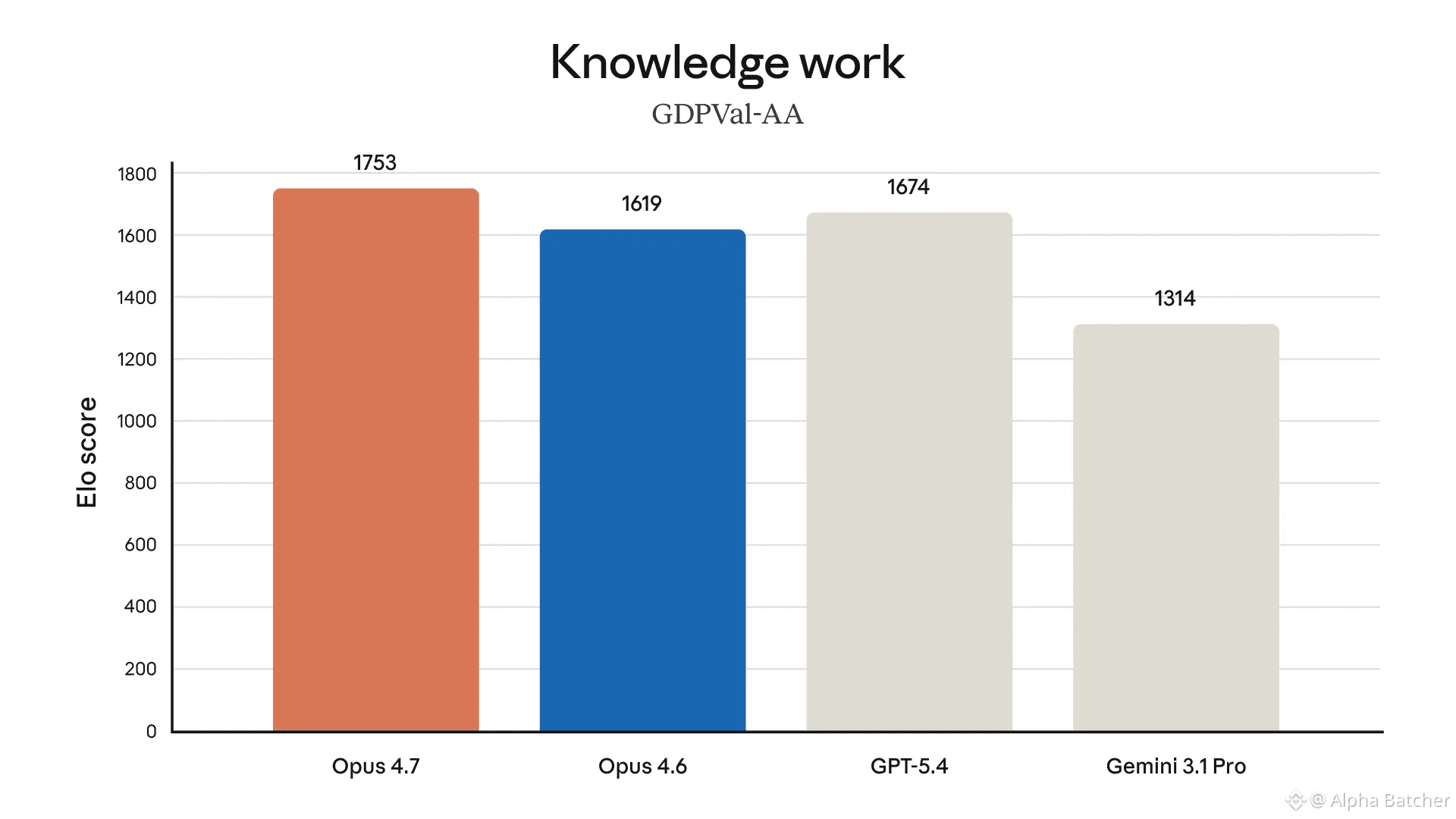
Claude Opus 4.7 just went live and it is a complete overhaul for autonomous software engineering
ᐳ Crushes Opus 4.6 on SWE-bench Pro with a 64.3% score
ᐳ Vision is 3x sharper now with support for 3.75MP high-resolution images
ᐳ New "xhigh" effort level for your most difficult architectural tasks
ᐳ Self-verifying logic where it audits its own code before reporting back
The pricing is locked at $5 per 1M input tokens but the reliability is on a different planet
While Mythos Preview remains the "intelligence king," Opus 4.7 is officially the new production standard for everyone building agents in 2026
Claude Opus 4.7 just went live and it is a complete overhaul for autonomous software engineering
ᐳ Crushes Opus 4.6 on SWE-bench Pro with a 64.3% score
ᐳ Vision is 3x sharper now with support for 3.75MP high-resolution images
ᐳ New "xhigh" effort level for your most difficult architectural tasks
ᐳ Self-verifying logic where it audits its own code before reporting back
The pricing is locked at $5 per 1M input tokens but the reliability is on a different planet
While Mythos Preview remains the "intelligence king," Opus 4.7 is officially the new production standard for everyone building agents in 2026
ᐳ Crushes Opus 4.6 on SWE-bench Pro with a 64.3% score
ᐳ Vision is 3x sharper now with support for 3.75MP high-resolution images
ᐳ New "xhigh" effort level for your most difficult architectural tasks
ᐳ Self-verifying logic where it audits its own code before reporting back
The pricing is locked at $5 per 1M input tokens but the reliability is on a different planet
While Mythos Preview remains the "intelligence king," Opus 4.7 is officially the new production standard for everyone building agents in 2026
1
356
developers are saving 5-6 hours a day with Claude Code:
one file and three commands changes everything:
1. CLAUDE.md - tells Claude your rules once, it follows them forever. violations drop from 40% to 3%
2. everything-claude-code - 30+ agents replace your entire planning, review, and security workflow out of the box
3. version 2.1.98 - the current version silently charges 20,000 extra tokens per session. one downgrade gives 40% of your limits back
the result:
8 hours of coding a day turn into just 2-3 hours of review
setup time: 15 minutes
the exact system is in the article below👇
https://x.com/alphabatcher/status/2044058486221271375
developers are saving 5-6 hours a day with Claude Code:
one file and three commands changes everything:
1. CLAUDE.md - tells Claude your rules once, it follows them forever. violations drop from 40% to 3%
2. everything-claude-code - 30+ agents replace your entire planning, review, and security workflow out of the box
3. version 2.1.98 - the current version silently charges 20,000 extra tokens per session. one downgrade gives 40% of your limits back
the result:
8 hours of coding a day turn into just 2-3 hours of review
setup time: 15 minutes
the exact system is in the article below👇
https://x.com/alphabatcher/status/2044058486221271375
one file and three commands changes everything:
1. CLAUDE.md - tells Claude your rules once, it follows them forever. violations drop from 40% to 3%
2. everything-claude-code - 30+ agents replace your entire planning, review, and security workflow out of the box
3. version 2.1.98 - the current version silently charges 20,000 extra tokens per session. one downgrade gives 40% of your limits back
the result:
8 hours of coding a day turn into just 2-3 hours of review
setup time: 15 minutes
the exact system is in the article below👇
https://x.com/alphabatcher/status/2044058486221271375
381
30 min and your Claude becomes a truly trained specialist
what actually affects its performance:
1. Set up your workspace so new chats aren’t created outside a project
2. Large, reliable data sources for the knowledge base
3. A clear “don’t” list often works better than only positive instructions
4. Combine MCP, skills, and projects into one system
5. Separate memory for each project with three levels of access
the people who set this up properly get output that looks like a trained specialist shipped it
30 min and your Claude becomes a truly trained specialist
what actually affects its performance:
1. Set up your workspace so new chats aren’t created outside a project
2. Large, reliable data sources for the knowledge base
3. A clear “don’t” list often works better than only positive instructions
4. Combine MCP, skills, and projects into one system
5. Separate memory for each project with three levels of access
the people who set this up properly get output that looks like a trained specialist shipped it
what actually affects its performance:
1. Set up your workspace so new chats aren’t created outside a project
2. Large, reliable data sources for the knowledge base
3. A clear “don’t” list often works better than only positive instructions
4. Combine MCP, skills, and projects into one system
5. Separate memory for each project with three levels of access
the people who set this up properly get output that looks like a trained specialist shipped it
2
208
Rules that actually get you hired:
- apply to roles you're 70%+ qualified for
- tailor every application to the job description, generic CVs get ignored before a human reads them
- your CV bullets should show results
- keywords matter, ATS filters you out before a recruiter ever sees your name
- research the company before every interview
- prepare 5-8 STAR stories that cover leadership, failure, conflict, and achievement
- the cover letter it's why you specifically want this specific role
- follow up within 24 hours after every interview
- the question "do you have any questions for us?" is not optional, it's a test
- your LinkedIn must match your CV
Difference between candidates who get hired and those who don't is rarely talent
Rules that actually get you hired:
- apply to roles you're 70%+ qualified for
- tailor every application to the job description, generic CVs get ignored before a human reads them
- your CV bullets should show results
- keywords matter, ATS filters you out before a recruiter ever sees your name
- research the company before every interview
- prepare 5-8 STAR stories that cover leadership, failure, conflict, and achievement
- the cover letter it's why you specifically want this specific role
- follow up within 24 hours after every interview
- the question "do you have any questions for us?" is not optional, it's a test
- your LinkedIn must match your CV
Difference between candidates who get hired and those who don't is rarely talent
- apply to roles you're 70%+ qualified for
- tailor every application to the job description, generic CVs get ignored before a human reads them
- your CV bullets should show results
- keywords matter, ATS filters you out before a recruiter ever sees your name
- research the company before every interview
- prepare 5-8 STAR stories that cover leadership, failure, conflict, and achievement
- the cover letter it's why you specifically want this specific role
- follow up within 24 hours after every interview
- the question "do you have any questions for us?" is not optional, it's a test
- your LinkedIn must match your CV
Difference between candidates who get hired and those who don't is rarely talent
219
This is what video production cost 5 years ago vs today:
30-second commercial - before AI:
- professional crew: $3,000-$8,000 per shoot day
- pre-production: $1,000-$5,000
- post-production: $1,000-$6,000
- ad distribution budget: optional, often separate
- total for one spot: $5,000-$20,000
30-second commercial - with AI today:
- 8 shots at $4.50 each = $36
- editing in CapCut = free
- voiceover via ElevenLabs = $5
- total: under $50
One 35-second short film used to require a crew, a studio, a director, weeks of pre-production
Two brothers in El Salvador made one in 40 minutes for $7.55
Tools became hundreds of times cheaper literally overnight
This is what video production cost 5 years ago vs today:
30-second commercial - before AI:
- professional crew: $3,000-$8,000 per shoot day
- pre-production: $1,000-$5,000
- post-production: $1,000-$6,000
- ad distribution budget: optional, often separate
- total for one spot: $5,000-$20,000
30-second commercial - with AI today:
- 8 shots at $4.50 each = $36
- editing in CapCut = free
- voiceover via ElevenLabs = $5
- total: under $50
One 35-second short film used to require a crew, a studio, a director, weeks of pre-production
Two brothers in El Salvador made one in 40 minutes for $7.55
Tools became hundreds of times cheaper literally overnight
30-second commercial - before AI:
- professional crew: $3,000-$8,000 per shoot day
- pre-production: $1,000-$5,000
- post-production: $1,000-$6,000
- ad distribution budget: optional, often separate
- total for one spot: $5,000-$20,000
30-second commercial - with AI today:
- 8 shots at $4.50 each = $36
- editing in CapCut = free
- voiceover via ElevenLabs = $5
- total: under $50
One 35-second short film used to require a crew, a studio, a director, weeks of pre-production
Two brothers in El Salvador made one in 40 minutes for $7.55
Tools became hundreds of times cheaper literally overnight

1
566
Turn your 2-minute repetitive prompt into a 1-second slash command
- same prompt every time
- version-controlled via Git, the whole team runs identical commands
- one command replaces 10-15 lines you were retyping from memory
- dynamic context injected automatically before every run
- pre-approve tools so Claude stops asking for permission
- commands shared across projects or scoped to one repo
- iterate once, improve for everyone on the next pull
- turns repetitive workflows into one-word invocations
- catches bugs linters miss every single run
- the prompt gets better over time, not worse
You set it up once and use it for everything
Turn your 2-minute repetitive prompt into a 1-second slash command
- same prompt every time
- version-controlled via Git, the whole team runs identical commands
- one command replaces 10-15 lines you were retyping from memory
- dynamic context injected automatically before every run
- pre-approve tools so Claude stops asking for permission
- commands shared across projects or scoped to one repo
- iterate once, improve for everyone on the next pull
- turns repetitive workflows into one-word invocations
- catches bugs linters miss every single run
- the prompt gets better over time, not worse
You set it up once and use it for everything
- same prompt every time
- version-controlled via Git, the whole team runs identical commands
- one command replaces 10-15 lines you were retyping from memory
- dynamic context injected automatically before every run
- pre-approve tools so Claude stops asking for permission
- commands shared across projects or scoped to one repo
- iterate once, improve for everyone on the next pull
- turns repetitive workflows into one-word invocations
- catches bugs linters miss every single run
- the prompt gets better over time, not worse
You set it up once and use it for everything
296
If you don't own the memory, you don't own the agent:
- memory is what makes your agent get smarter over time
- without it, anyone with the same tools can copy your agent overnight
- with it, you build a dataset no competitor can replicate
- closed memory = your data on someone else's servers
- switch models, lose everything your agent learned
- model providers are incentivized to lock you in via memory
- the model is easy to replace, memory is not
- if you don't own the harness, you don't own the memory
- if you don't own the memory, you don't own the agent
If you don't own the memory, you don't own the agent:
- memory is what makes your agent get smarter over time
- without it, anyone with the same tools can copy your agent overnight
- with it, you build a dataset no competitor can replicate
- closed memory = your data on someone else's servers
- switch models, lose everything your agent learned
- model providers are incentivized to lock you in via memory
- the model is easy to replace, memory is not
- if you don't own the harness, you don't own the memory
- if you don't own the memory, you don't own the agent
- memory is what makes your agent get smarter over time
- without it, anyone with the same tools can copy your agent overnight
- with it, you build a dataset no competitor can replicate
- closed memory = your data on someone else's servers
- switch models, lose everything your agent learned
- model providers are incentivized to lock you in via memory
- the model is easy to replace, memory is not
- if you don't own the harness, you don't own the memory
- if you don't own the memory, you don't own the agent
175
Starter setup for building a TikTok AI character channel:
> Claude - writes every script, hook, ragebait, and Kling prompts
> Nano Banana Pro - generate static character images per scene
> Kling 3.0 - animate static images into 5-second clips
> ElevenLabs v3 - voiceover per scene, diamond gym energy
> CapCut - sync audio, hook cuts, effects, export 9:16
> TokScript - download transcripts from viral videos to train Claude
> iProyal - ISP proxy for US-targeted account setup
> Shadowrocket - proxy routing on iPhone ($3)
> AffiliateNetwork - $1-3 per 1,000 views from brand campaigns
> IPQualityScore - verify your IP is clean before creating account
The full system character design Claude training Kling prompts and monetization setup is in the article below 👇
https://x.com/alphabatcher/status/2042936720979632342
Starter setup for building a TikTok AI character channel:
> Claude - writes every script, hook, ragebait, and Kling prompts
> Nano Banana Pro - generate static character images per scene
> Kling 3.0 - animate static images into 5-second clips
> ElevenLabs v3 - voiceover per scene, diamond gym energy
> CapCut - sync audio, hook cuts, effects, export 9:16
> TokScript - download transcripts from viral videos to train Claude
> iProyal - ISP proxy for US-targeted account setup
> Shadowrocket - proxy routing on iPhone ($3)
> AffiliateNetwork - $1-3 per 1,000 views from brand campaigns
> IPQualityScore - verify your IP is clean before creating account
The full system character design Claude training Kling prompts and monetization setup is in the article below 👇
https://x.com/alphabatcher/status/2042936720979632342
> Claude - writes every script, hook, ragebait, and Kling prompts
> Nano Banana Pro - generate static character images per scene
> Kling 3.0 - animate static images into 5-second clips
> ElevenLabs v3 - voiceover per scene, diamond gym energy
> CapCut - sync audio, hook cuts, effects, export 9:16
> TokScript - download transcripts from viral videos to train Claude
> iProyal - ISP proxy for US-targeted account setup
> Shadowrocket - proxy routing on iPhone ($3)
> AffiliateNetwork - $1-3 per 1,000 views from brand campaigns
> IPQualityScore - verify your IP is clean before creating account
The full system character design Claude training Kling prompts and monetization setup is in the article below 👇
https://x.com/alphabatcher/status/2042936720979632342

214
Why pair Claude Code with Obsidian
- Claude knows who you are before you type a single word
- every article, book, and note compounds into one connected knowledge base
- maintenance happens automatically
- one new source updates 10-15 connected pages instantly
- contradictions and outdated info flagged without you asking
- insights saved back into the wiki
- morning briefing runs itself every day at 7:30am
- call transcripts - decisions filed, actions tracked, automatically
- the longer you use it, the smarter it gets
- Obsidian is just the window, Claude builds everything inside it
It gets better every single day you add to it
Exact prompts, folder structure, and the Andrej Karpathy framework that makes the whole system work👇
https://x.com/defileo/status/2042241063612502162
Why pair Claude Code with Obsidian
- Claude knows who you are before you type a single word
- every article, book, and note compounds into one connected knowledge base
- maintenance happens automatically
- one new source updates 10-15 connected pages instantly
- contradictions and outdated info flagged without you asking
- insights saved back into the wiki
- morning briefing runs itself every day at 7:30am
- call transcripts - decisions filed, actions tracked, automatically
- the longer you use it, the smarter it gets
- Obsidian is just the window, Claude builds everything inside it
It gets better every single day you add to it
Exact prompts, folder structure, and the Andrej Karpathy framework that makes the whole system work👇
https://x.com/defileo/status/2042241063612502162
- Claude knows who you are before you type a single word
- every article, book, and note compounds into one connected knowledge base
- maintenance happens automatically
- one new source updates 10-15 connected pages instantly
- contradictions and outdated info flagged without you asking
- insights saved back into the wiki
- morning briefing runs itself every day at 7:30am
- call transcripts - decisions filed, actions tracked, automatically
- the longer you use it, the smarter it gets
- Obsidian is just the window, Claude builds everything inside it
It gets better every single day you add to it
Exact prompts, folder structure, and the Andrej Karpathy framework that makes the whole system work👇
https://x.com/defileo/status/2042241063612502162
1
1
343
Why you quickly hit Claude limits:
- entire codebase in context every message
- follow-ups re-read full history
- large PDFs uploaded directly
- heavy research run locally
- Opus for tasks Sonnet handles
- bloated context files every session
- no session resets
- vague prompts trigger broad compute
- same files analysed repeatedly
- multi-step tasks not batched
The longer your session runs, the more expensive every single message becomes
Message 30 costs 31x more tokens than message 1
The article below shows exactly how to fix this👇
https://x.com/hooeem/status/2042293751805329445
Why you quickly hit Claude limits:
- entire codebase in context every message
- follow-ups re-read full history
- large PDFs uploaded directly
- heavy research run locally
- Opus for tasks Sonnet handles
- bloated context files every session
- no session resets
- vague prompts trigger broad compute
- same files analysed repeatedly
- multi-step tasks not batched
The longer your session runs, the more expensive every single message becomes
Message 30 costs 31x more tokens than message 1
The article below shows exactly how to fix this👇
https://x.com/hooeem/status/2042293751805329445
- entire codebase in context every message
- follow-ups re-read full history
- large PDFs uploaded directly
- heavy research run locally
- Opus for tasks Sonnet handles
- bloated context files every session
- no session resets
- vague prompts trigger broad compute
- same files analysed repeatedly
- multi-step tasks not batched
The longer your session runs, the more expensive every single message becomes
Message 30 costs 31x more tokens than message 1
The article below shows exactly how to fix this👇
https://x.com/hooeem/status/2042293751805329445
1
295
Security settings most Claude Code users never touch:
- Enable sandbox
- Block credential access
- Block .env files separately
- Disable outbound commands
- Auto-approve safe commands
- Disable auto-loading MCP servers
- Update monthly
Most people ignore all of this and take losses of $10k in a single night
The article below goes deeper:
exact config files, three levels of protection, and the Trail of Bits setup used on real security audits👇
https://x.com/noisyb0y1/status/2041947492065943810
Security settings most Claude Code users never touch:
- Enable sandbox
- Block credential access
- Block .env files separately
- Disable outbound commands
- Auto-approve safe commands
- Disable auto-loading MCP servers
- Update monthly
Most people ignore all of this and take losses of $10k in a single night
The article below goes deeper:
exact config files, three levels of protection, and the Trail of Bits setup used on real security audits👇
https://x.com/noisyb0y1/status/2041947492065943810
- Enable sandbox
- Block credential access
- Block .env files separately
- Disable outbound commands
- Auto-approve safe commands
- Disable auto-loading MCP servers
- Update monthly
Most people ignore all of this and take losses of $10k in a single night
The article below goes deeper:
exact config files, three levels of protection, and the Trail of Bits setup used on real security audits👇
https://x.com/noisyb0y1/status/2041947492065943810
285
Войдите, чтобы посмотреть больше материала
Присоединяйтесь к пользователям криптовалют по всему миру на Binance Square
⚡️ Получайте новейшую и полезную информацию о криптоактивах.
💬 Нам доверяет крупнейшая в мире криптобиржа.
👍 Получите достоверные аналитические данные от верифицированных создателей контента.
Эл. почта/номер телефона
В тренде
UniswapA16zSeekDeFiExemptionFromIllinoisCryptoTax
Просмотров: 18,563
663 обсуждают
The debate over crypto taxation is heating up as Uniswap and Andreessen Horowitz ( a16z ) push for a DeFi exemption from Illinois proposed crypto tax rules. Their concern is that decentralized finance protocols and non custodial platforms could face unfair tax burdens potentially slowing innovation and making crypto development more difficult. DeFi platforms allow users to trade and manage digital assets without traditional intermediaries so applying conventional financial tax rules may create serious challenges. This could become an important moment for the US crypto industry as regulators must find a balance between fair taxation, investor protection, and innovation. 🚀
The main concern is that the proposed 0.2% tax is calculated on transaction value, not simply trading profits. Uniswap a16z and the DeFi Education Fund want wallet withdrawals and cross chain bridging excluded, while also opposing requirements to maintain private key records. Illinois has agreed to postpone implementation until July 1, 2027 subject to court approval. The outcome could influence how other US states approach DeFi taxation. The Defiant +2
What do you think 🤔 ? Should DeFi transactions be tax free to protect decentralization or should crypto platforms follow traditional tax rules ? 🤔
#UniswapA16zSeekDeFiExemptionFromIllinoisCryptoTax
Volatile
·Лайков: 3
·Просмотров: 173
HKDollarStablecoinHKDAPToLaunchOnSolana
Просмотров: 13,518
410 обсуждают
$1.5BInLeveragedCryptoBetsLiquidated
Просмотров: 32,071
233 обсуждают