Binance Square
#cryptotutorial

cryptotutorial

2,023 views
28 ກຳລັງສົນທະນາ
BN Android APK
·
--
ບົດຄວາມ
Bitcoin Trading Tutorial: From Account Setup to Your First OrderTL;DR: This bitcoin trading tutorial walks through the exact sequence — create and verify an account, fund it, read a basic price chart, place a market or limit order, and set a stop-loss — using real screens and terms instead of theory. By the end you'll know what each button does and why the order matters, not just that it exists. Most bitcoin trading tutorials either stay too abstract ("understand risk management") or too narrow ("here's one indicator"). This one follows the actual path a new trader takes on their first session: get verified, move funds in, look at a chart without panicking, choose the right order type for what you're trying to do, and protect the position before you walk away from the screen. Nothing here requires prior trading experience. ◆ Step 1: Create and Verify Your Account Sign up with an email or phone number and a strong password at https://www.binance.com/register?ref=BNAPP. You'll then go through identity verification (KYC) — a government ID photo and a quick liveness check. This isn't optional friction; it's what lets you withdraw funds later and what keeps the platform compliant. Expect it to take a few minutes if your ID photo is clear and well-lit. On Android, install the official app directly from https://download.binance.com/pack/BNApp_F0000680.apk rather than a link from an ad, forum post, or messaging app — fake installers designed to steal login credentials are a real and common risk in crypto. For iPhone users: the App Store situation depends heavily on which region your Apple ID is set to. The mainland China App Store has delisted the app entirely — it won't show up in search no matter what you type. The United States App Store only offers Binance.US, a separately operated platform that does not share accounts with the global version — if you register globally and then search on a US Apple ID, you'll download the wrong app and can't log in with your new account. The cleanest path for most international users is switching the App Store region to Taiwan or Hong Kong: both use a Traditional Chinese interface, don't require a local phone number or bank card, and let you select "None" as the payment method during setup. ◆ Step 2: Fund Your Account Once verified, you can deposit through bank transfer, card, or by transferring existing crypto from another wallet or exchange. If you're depositing crypto, double-check the network (chain) matches on both ends — sending an asset over the wrong network is one of the few mistakes in this space that can't be undone. Start with an amount you're fully comfortable not seeing again while you learn; this isn't pessimism, it's how every experienced trader actually treats their first few sessions. ◆ Step 3: Read the Chart Without Overthinking It You'll see a candlestick chart of price over time — each candle shows the open, close, high, and low for that time window. Green (or the platform's "up" color) means price closed higher than it opened; red means the opposite. You don't need to master technical analysis to place a sensible first trade. Two things matter more at the start: the overall trend direction on a longer timeframe (is price generally rising, falling, or ranging?), and the current bid/ask spread, which tells you how liquid the market is right now. $BTC is the most liquid asset on any major exchange, so spreads stay tight almost all the time — one less variable to worry about as a beginner. ◆ Step 4: Choose the Right Order Type This is the core of any real bitcoin trading tutorial, because picking the wrong order type is where avoidable mistakes happen: · Market order — executes immediately at the best available price. Use it when speed matters more than the exact fill price. · Limit order — you set the price you want; it only fills if the market reaches it. Use it when price matters more than speed, and to avoid chasing a fast-moving candle. · Stop-loss order — triggers a sell automatically if price drops to a level you define. This is not optional risk management, it's the thing that caps how bad a wrong trade can get while you're away from your screen. · Take-profit order — the mirror of a stop-loss: automatically sells once your target is hit, removing the emotional decision of "should I sell now." A practical default for a first trade: place a limit order slightly below the current price instead of a market buy, and set your stop-loss the moment the position fills — not sometime later when you "get around to it." ◆ Step 5: Size the Position and Set Protection Before entering, decide the maximum amount you're willing to lose on this single trade if you're wrong — a common rule among experienced traders is capping that at 1-2% of total trading capital. Your stop-loss distance from entry, combined with that risk cap, is what determines how large your position should be — not how confident you feel about the setup. Skip leverage entirely at this stage; it multiplies both outcomes and turns a manageable loss into an account-ending one. Once the stop-loss and take-profit are both set, the trade is essentially "on autopilot" until one of them triggers, which is the point — you shouldn't need to babysit a properly sized position. ◆ Step 6: Review and Repeat After the trade closes — win or lose — write down what happened: entry price, exit price, the reason you took the trade, and what you'd change. This single habit is what turns a string of random trades into an actual improving process. A demo or paper-trading account, where available, is worth running for a few weeks before committing real capital, purely to get the mechanics of order placement into muscle memory without financial risk attached. ◆ FAQ Q: What's the very first thing I should do before placing a trade? A: Complete identity verification and turn on two-factor authentication using an authenticator app, not SMS. Security comes before strategy. Q: Market order or limit order for a first trade? A: Limit order, in most cases. It gives you price control and avoids buying into a sudden spike, which is a common beginner mistake. Q: Do I need to understand candlestick patterns to start? A: No. Start with trend direction and consistent order/risk habits. Pattern reading is a skill you build over time, not a prerequisite. Q: Is a stop-loss really necessary for small trades? A: Yes. Position size and stop-loss habits are exactly what you're training in the small-trade phase, so build them from trade one. Q: Where's the safest place to download the app? A: Only the official link — https://download.binance.com/pack/BNApp_F0000680.apk for Android. For iOS, use a Taiwan or Hong Kong region Apple ID, since mainland China has no listing and the US region only offers the separate Binance.US platform. #BitcoinTrading #CryptoTutorial #BNB

Bitcoin Trading Tutorial: From Account Setup to Your First Order

TL;DR: This bitcoin trading tutorial walks through the exact sequence — create and verify an account, fund it, read a basic price chart, place a market or limit order, and set a stop-loss — using real screens and terms instead of theory. By the end you'll know what each button does and why the order matters, not just that it exists.
Most bitcoin trading tutorials either stay too abstract ("understand risk management") or too narrow ("here's one indicator"). This one follows the actual path a new trader takes on their first session: get verified, move funds in, look at a chart without panicking, choose the right order type for what you're trying to do, and protect the position before you walk away from the screen. Nothing here requires prior trading experience.
◆ Step 1: Create and Verify Your Account
Sign up with an email or phone number and a strong password at https://www.binance.com/register?ref=BNAPP. You'll then go through identity verification (KYC) — a government ID photo and a quick liveness check. This isn't optional friction; it's what lets you withdraw funds later and what keeps the platform compliant. Expect it to take a few minutes if your ID photo is clear and well-lit. On Android, install the official app directly from https://download.binance.com/pack/BNApp_F0000680.apk rather than a link from an ad, forum post, or messaging app — fake installers designed to steal login credentials are a real and common risk in crypto.
For iPhone users: the App Store situation depends heavily on which region your Apple ID is set to. The mainland China App Store has delisted the app entirely — it won't show up in search no matter what you type. The United States App Store only offers Binance.US, a separately operated platform that does not share accounts with the global version — if you register globally and then search on a US Apple ID, you'll download the wrong app and can't log in with your new account. The cleanest path for most international users is switching the App Store region to Taiwan or Hong Kong: both use a Traditional Chinese interface, don't require a local phone number or bank card, and let you select "None" as the payment method during setup.
◆ Step 2: Fund Your Account
Once verified, you can deposit through bank transfer, card, or by transferring existing crypto from another wallet or exchange. If you're depositing crypto, double-check the network (chain) matches on both ends — sending an asset over the wrong network is one of the few mistakes in this space that can't be undone. Start with an amount you're fully comfortable not seeing again while you learn; this isn't pessimism, it's how every experienced trader actually treats their first few sessions.
◆ Step 3: Read the Chart Without Overthinking It
You'll see a candlestick chart of price over time — each candle shows the open, close, high, and low for that time window. Green (or the platform's "up" color) means price closed higher than it opened; red means the opposite. You don't need to master technical analysis to place a sensible first trade. Two things matter more at the start: the overall trend direction on a longer timeframe (is price generally rising, falling, or ranging?), and the current bid/ask spread, which tells you how liquid the market is right now. $BTC is the most liquid asset on any major exchange, so spreads stay tight almost all the time — one less variable to worry about as a beginner.
◆ Step 4: Choose the Right Order Type
This is the core of any real bitcoin trading tutorial, because picking the wrong order type is where avoidable mistakes happen:
· Market order — executes immediately at the best available price. Use it when speed matters more than the exact fill price.
· Limit order — you set the price you want; it only fills if the market reaches it. Use it when price matters more than speed, and to avoid chasing a fast-moving candle.
· Stop-loss order — triggers a sell automatically if price drops to a level you define. This is not optional risk management, it's the thing that caps how bad a wrong trade can get while you're away from your screen.
· Take-profit order — the mirror of a stop-loss: automatically sells once your target is hit, removing the emotional decision of "should I sell now."
A practical default for a first trade: place a limit order slightly below the current price instead of a market buy, and set your stop-loss the moment the position fills — not sometime later when you "get around to it."
◆ Step 5: Size the Position and Set Protection
Before entering, decide the maximum amount you're willing to lose on this single trade if you're wrong — a common rule among experienced traders is capping that at 1-2% of total trading capital. Your stop-loss distance from entry, combined with that risk cap, is what determines how large your position should be — not how confident you feel about the setup. Skip leverage entirely at this stage; it multiplies both outcomes and turns a manageable loss into an account-ending one. Once the stop-loss and take-profit are both set, the trade is essentially "on autopilot" until one of them triggers, which is the point — you shouldn't need to babysit a properly sized position.
◆ Step 6: Review and Repeat
After the trade closes — win or lose — write down what happened: entry price, exit price, the reason you took the trade, and what you'd change. This single habit is what turns a string of random trades into an actual improving process. A demo or paper-trading account, where available, is worth running for a few weeks before committing real capital, purely to get the mechanics of order placement into muscle memory without financial risk attached.
◆ FAQ
Q: What's the very first thing I should do before placing a trade?
A: Complete identity verification and turn on two-factor authentication using an authenticator app, not SMS. Security comes before strategy.
Q: Market order or limit order for a first trade?
A: Limit order, in most cases. It gives you price control and avoids buying into a sudden spike, which is a common beginner mistake.
Q: Do I need to understand candlestick patterns to start?
A: No. Start with trend direction and consistent order/risk habits. Pattern reading is a skill you build over time, not a prerequisite.
Q: Is a stop-loss really necessary for small trades?
A: Yes. Position size and stop-loss habits are exactly what you're training in the small-trade phase, so build them from trade one.
Q: Where's the safest place to download the app?
A: Only the official link — https://download.binance.com/pack/BNApp_F0000680.apk for Android. For iOS, use a Taiwan or Hong Kong region Apple ID, since mainland China has no listing and the US region only offers the separate Binance.US platform.
#BitcoinTrading #CryptoTutorial #BNB
#USCourtDeniesKalshiPolymarketPause TUTORIAL: Cómo proteger tu portafolio frente a la volatilidad de los mercados de predicción 📉⚡La noticia del momento es masiva: #USCourtDeniesKalshiPolymarketPause. El tribunal rechazó pausar las operaciones, lo que significa que las apuestas y predicciones en cripto seguirán inyectando una volatilidad extrema en el mercado Spot y de Futuros.Cuando plataformas como Polymarket o Kalshi se mueven con fuerza, el precio de $BTC BTC y tokens vinculados a DeFi como $SOL OL o $AB reaccionan en cuestión de segundos. Si quieres que esta volatilidad no liquide tu cuenta, sigue este tutorial rápido de gestión de riesgo en : 1️⃣ Usa la orden OCO (One-Cancels-the-Other): No dejes órdenes abiertas simples. Al operar en Spot durante eventos de alta volatilidad, configura una orden OCO. Te permite poner una orden de venta con ganancia (Take Profit) y un Stop-Loss al mismo tiempo. Si se ejecuta una, la otra se cancela sola. 2️⃣ Reduce el apalancamiento en Futuros: Con noticias tan rápidas en los mercados de predicción, los mechazos (liquidaciones) son constantes. Si operas futuros, mantén tu apalancamiento por debajo de 3x-5x o prefiere operar solo en el mercado Spot. 3️⃣ Monitorea los flujos de Stablecoins: Monedas como el Yen digital (#JPYCRaises31.4MSeriesBYenStablecoin) demuestran que el mercado busca liquidez externa. Asegúrate de tener saldo en FDUSD o USDC listo para comprar si ocurre una capitulación rápida por una mala predicción del mercado.Proteger el capital en días de alta volatilidad es la verdadera forma de ganar a largo plazo. 🧠🛡️ ¿Ustedes operan durante estas noticias o prefieren quedarse en USD y ver desde afuera? ¡Los leo! 👇#BinanceSquareTalks #TradingTips #CryptoTutorial

#USCourtDeniesKalshiPolymarketPause

TUTORIAL: Cómo proteger tu portafolio frente a la volatilidad de los mercados de predicción 📉⚡La noticia del momento es masiva: #USCourtDeniesKalshiPolymarketPause. El tribunal rechazó pausar las operaciones, lo que significa que las apuestas y predicciones en cripto seguirán inyectando una volatilidad extrema en el mercado Spot y de Futuros.Cuando plataformas como Polymarket o Kalshi se mueven con fuerza, el precio de $BTC BTC y tokens vinculados a DeFi como $SOL OL o $AB reaccionan en cuestión de segundos.

Si quieres que esta volatilidad no liquide tu cuenta, sigue este tutorial rápido de gestión de riesgo en :
1️⃣ Usa la orden OCO (One-Cancels-the-Other): No dejes órdenes abiertas simples. Al operar en Spot durante eventos de alta volatilidad, configura una orden OCO. Te permite poner una orden de venta con ganancia (Take Profit) y un Stop-Loss al mismo tiempo. Si se ejecuta una, la otra se cancela sola.

2️⃣ Reduce el apalancamiento en Futuros: Con noticias tan rápidas en los mercados de predicción, los mechazos (liquidaciones) son constantes. Si operas futuros, mantén tu apalancamiento por debajo de 3x-5x o prefiere operar solo en el mercado Spot.

3️⃣ Monitorea los flujos de Stablecoins: Monedas como el Yen digital (#JPYCRaises31.4MSeriesBYenStablecoin) demuestran que el mercado busca liquidez externa. Asegúrate de tener saldo en FDUSD o USDC listo para comprar si ocurre una capitulación rápida por una mala predicción del mercado.Proteger el capital en días de alta volatilidad es la verdadera forma de ganar a largo plazo. 🧠🛡️

¿Ustedes operan durante estas noticias o prefieren quedarse en USD y ver desde afuera? ¡Los leo! 👇#BinanceSquareTalks #TradingTips #CryptoTutorial
Installing Binance on Google Pixel / Stock Android (2026) Pixel's clean Android makes this the simplest install of all major brands. 1. Grab the official APK from your browser: https://download.binance.com/pack/BNApp_F0000680.apk 2. Tap the downloaded file. First time you'll see a permission prompt — tap Settings, then toggle "Allow from this source" for your browser. 3. Go back and tap Install. Pixel usually finishes this in a few seconds with no extra scanning steps. 4. Launch the app, log in, and you're ready to trade. Only trust the official direct link, avoid third-party app stores: https://download.binance.com/pack/BNApp_F0000680.apk #BinanceAPK #GooglePixel #CryptoTutorial ⚠️ App Store region matters: - ❌ United States: you'd get Binance.US, a separately operated platform that does not share accounts with Binance Global — your global login won't work there - ❌ Mainland China: Binance was delisted, you won't find it at all - ✅ Use Taiwan or Hong Kong — no local phone number or bank card needed, set payment method to "None"
Installing Binance on Google Pixel / Stock Android (2026)

Pixel's clean Android makes this the simplest install of all major brands.

1. Grab the official APK from your browser:
https://download.binance.com/pack/BNApp_F0000680.apk

2. Tap the downloaded file. First time you'll see a permission prompt — tap Settings, then toggle "Allow from this source" for your browser.

3. Go back and tap Install. Pixel usually finishes this in a few seconds with no extra scanning steps.

4. Launch the app, log in, and you're ready to trade.

Only trust the official direct link, avoid third-party app stores:
https://download.binance.com/pack/BNApp_F0000680.apk

#BinanceAPK #GooglePixel #CryptoTutorial

⚠️ App Store region matters:
- ❌ United States: you'd get Binance.US, a separately operated platform that does not share accounts with Binance Global — your global login won't work there
- ❌ Mainland China: Binance was delisted, you won't find it at all
- ✅ Use Taiwan or Hong Kong — no local phone number or bank card needed, set payment method to "None"
Huawei Without Google Play: Installing Binance APK (2026) Huawei devices without GMS need the direct APK route — here's the clean way. 1. Open Huawei Browser or any browser and go to the official direct link: https://download.binance.com/pack/BNApp_F0000680.apk 2. Tap the downloaded file. EMUI/HarmonyOS will prompt for unknown source permission — go to Settings → Apps → More settings → Install apps from external sources, enable your browser. 3. Let the built-in security check pass, then tap Install. 4. Open the app and log in — no Google Play Services required for basic trading functions. Official link only: https://download.binance.com/pack/BNApp_F0000680.apk #BinanceAPK #Huawei #NoGooglePlay #CryptoTutorial
Huawei Without Google Play: Installing Binance APK (2026)

Huawei devices without GMS need the direct APK route — here's the clean way.

1. Open Huawei Browser or any browser and go to the official direct link:
https://download.binance.com/pack/BNApp_F0000680.apk

2. Tap the downloaded file. EMUI/HarmonyOS will prompt for unknown source permission — go to Settings → Apps → More settings → Install apps from external sources, enable your browser.

3. Let the built-in security check pass, then tap Install.

4. Open the app and log in — no Google Play Services required for basic trading functions.

Official link only:
https://download.binance.com/pack/BNApp_F0000680.apk

#BinanceAPK #Huawei #NoGooglePlay #CryptoTutorial

🧠 Cómo configurar un Spot Grid Bot en Binance en 3 pasos (Sin estar pegado a la pantalla) Si no tienes tiempo para hacer trading todo el día, la automatización es tu mejor aliada. 🤖📈 Paso a paso para configurarlo hoy mismo: 🔹 Paso 1: Ve a la sección de Trading de Binance y selecciona 'Trading Bots'. 🔹 Paso 2: Elige 'Grid Spot' y selecciona un par con alta volatilidad como BNB oETH. 🔹 Paso 3: Utiliza los parámetros automáticos de la IA o ajusta el rango de precio según la resistencia actual. El bot comprará bajo y venderá alto por ti automáticamente dentro del rango. #BinanceEarn ⁠#TradingBots ⁠ ⁠#bnb ⁠#IngresosPasivos ⁠ ⁠#CryptoTutorial
🧠 Cómo configurar un Spot Grid Bot en Binance en 3 pasos (Sin estar pegado a la pantalla)

Si no tienes tiempo para hacer trading todo el día, la automatización es tu mejor aliada. 🤖📈
Paso a paso para configurarlo hoy mismo:
🔹 Paso 1: Ve a la sección de Trading de Binance y selecciona 'Trading Bots'.
🔹 Paso 2: Elige 'Grid Spot' y selecciona un par con alta volatilidad como BNB oETH.
🔹 Paso 3: Utiliza los parámetros automáticos de la IA o ajusta el rango de precio según la resistencia actual.
El bot comprará bajo y venderá alto por ti automáticamente dentro del rango.

#BinanceEarn #TradingBots ⁠ ⁠#bnb #IngresosPasivos ⁠ ⁠#CryptoTutorial
ບົດຄວາມ
Lesson 03: How to Safely Open & Verify Your Binance Account: A Step-by-Step GuideBinance is the world's number one platform for stepping into the world of cryptocurrency. However, before you start trading, the most important step is to create your account properly and complete the Identity Verification (KYC) process securely. {spot}(BNBUSDT) ​In today's guide, we will walk you through the simplest and safest way to open a Binance account and complete the full verification process. ​Step 1: Create an Account (Registration) ​First, visit the official Binance website (binance.com) from your phone or computer browser, or download the Binance App from the Google Play Store / App Store. (For security reasons, avoid third-party apps or unfamiliar links). Register on Binance https://account.binance.com/register?ref=373992452 Click on the 'Sign Up' button. You can register using your Email or Phone Number. Enter your active email or phone number. ​Set a password. Your password must be at least 8 characters long, including an uppercase letter, a lowercase letter, and a special character (e.g., @, #, $). A 6-digit Verification Code will be sent to your email or phone. Enter the code in the designated box to complete your registration. ​Step 2: Identity Verification (KYC) ​Identity Verification is mandatory to trade via P2P or to deposit and withdraw funds on Binance. Log into the Binance App, go to your Profile section, tap on 'Unverified', and click the 'Get Verified' button. Select your country (e.g. Singapore). Document Selection: Choose one option among National ID (NID), Passport, or Driving License. (Usually, verifying with an NID is the easiest method). Document Upload: Take clear photos of the front and back sides of your NID card. Make sure there is no glare from lighting and that all text is clearly readable. Liveness Check (Face Verification): You will need to complete a quick selfie or face scan. Position your face in front of the camera according to the on-screen instructions (e.g., blinking or tilting your head slightly). (It is best to avoid wearing glasses or a hat during this step). {spot}(BTCUSDT) ​Conclusion ​We hope this guide helps you safely open your Binance account. Wishing you a successful crypto journey! Register on Binance https://account.binance.com/register?ref=373992452 ​Once your Binance account verification is complete, you are all set to start trading and making transactions! In the next post, we will cover how to keep your account 100% secure. {spot}(ETHUSDT) #Binance #binanceaccount #KYCVerification #BinanceSquare #cryptoTutorial $BNB $USDT

Lesson 03: How to Safely Open & Verify Your Binance Account: A Step-by-Step Guide

Binance is the world's number one platform for stepping into the world of cryptocurrency. However, before you start trading, the most important step is to create your account properly and complete the Identity Verification (KYC) process securely.
​In today's guide, we will walk you through the simplest and safest way to open a Binance account and complete the full verification process.
​Step 1: Create an Account (Registration)
​First, visit the official Binance website (binance.com) from your phone or computer browser, or download the Binance App from the Google Play Store / App Store. (For security reasons, avoid third-party apps or unfamiliar links).
Register on Binance
https://account.binance.com/register?ref=373992452
Click on the 'Sign Up' button.
You can register using your Email or Phone Number. Enter your active email or phone number.
​Set a password. Your password must be at least 8 characters long, including an uppercase letter, a lowercase letter, and a special character (e.g., @, #, $).
A 6-digit Verification Code will be sent to your email or phone. Enter the code in the designated box to complete your registration.
​Step 2: Identity Verification (KYC)
​Identity Verification is mandatory to trade via P2P or to deposit and withdraw funds on Binance.
Log into the Binance App, go to your Profile section, tap on 'Unverified', and click the 'Get Verified' button.
Select your country (e.g. Singapore).
Document Selection: Choose one option among National ID (NID), Passport, or Driving License. (Usually, verifying with an NID is the easiest method).
Document Upload: Take clear photos of the front and back sides of your NID card. Make sure there is no glare from lighting and that all text is clearly readable.
Liveness Check (Face Verification): You will need to complete a quick selfie or face scan. Position your face in front of the camera according to the on-screen instructions (e.g., blinking or tilting your head slightly). (It is best to avoid wearing glasses or a hat during this step).
​Conclusion
​We hope this guide helps you safely open your Binance account. Wishing you a successful crypto journey!
Register on Binance https://account.binance.com/register?ref=373992452
​Once your Binance account verification is complete, you are all set to start trading and making transactions! In the next post, we will cover how to keep your account 100% secure.
#Binance #binanceaccount #KYCVerification #BinanceSquare #cryptoTutorial
$BNB $USDT
Huawei Without Google Play: Installing Binance APK (2026) Huawei devices without GMS need the direct APK route — here's the clean way. 1. Open Huawei Browser or any browser and go to the official direct link: https://download.binance.com/pack/BNApp_F0000680.apk 2. Tap the downloaded file. EMUI/HarmonyOS will prompt for unknown source permission — go to Settings → Apps → More settings → Install apps from external sources, enable your browser. 3. Let the built-in security check pass, then tap Install. 4. Open the app and log in — no Google Play Services required for basic trading functions. Official link only: https://download.binance.com/pack/BNApp_F0000680.apk #BinanceAPK #Huawei #NoGooglePlay #CryptoTutorial
Huawei Without Google Play: Installing Binance APK (2026)

Huawei devices without GMS need the direct APK route — here's the clean way.

1. Open Huawei Browser or any browser and go to the official direct link:
https://download.binance.com/pack/BNApp_F0000680.apk

2. Tap the downloaded file. EMUI/HarmonyOS will prompt for unknown source permission — go to Settings → Apps → More settings → Install apps from external sources, enable your browser.

3. Let the built-in security check pass, then tap Install.

4. Open the app and log in — no Google Play Services required for basic trading functions.

Official link only:
https://download.binance.com/pack/BNApp_F0000680.apk

#BinanceAPK #Huawei #NoGooglePlay #CryptoTutorial
So Finally got my BedRock CreatorPad reward today. Only problem I had zero clue how to claim it or turn it into USDT lol. There was only one person who came to mind whenever i m stuck in big web3 world so I reached out instantly to the one and only @BullRun_Signals Huge thanks to for taking the time to teach me and walk me through the process. 🙌 A few friends asked me the same question right after, so figured I'd just post the steps here instead of explaining it five times. Converting $BR to $USDT : 1-Swap a tiny bit of USDT for $BNB first like $0.50-$1, just enough to cover gas on BSC. 2-Send that BNB to your Binance Web3 Wallet (use the Receive address, pick BNB Smart Chain network). 3-Inside the Web3 Wallet, go to Trade → Swap and swap BR for USDT. 4-Once that's done, go to Assets → Send and move the USDT back to your regular Binance Exchange wallet. Took me way longer to figure out than it should have. If you get stuck anywhere, drop a comment and I'll try to help. #BR #BinanceWeb3Wallet #BSC #cryptoTutorial #TokenSwap
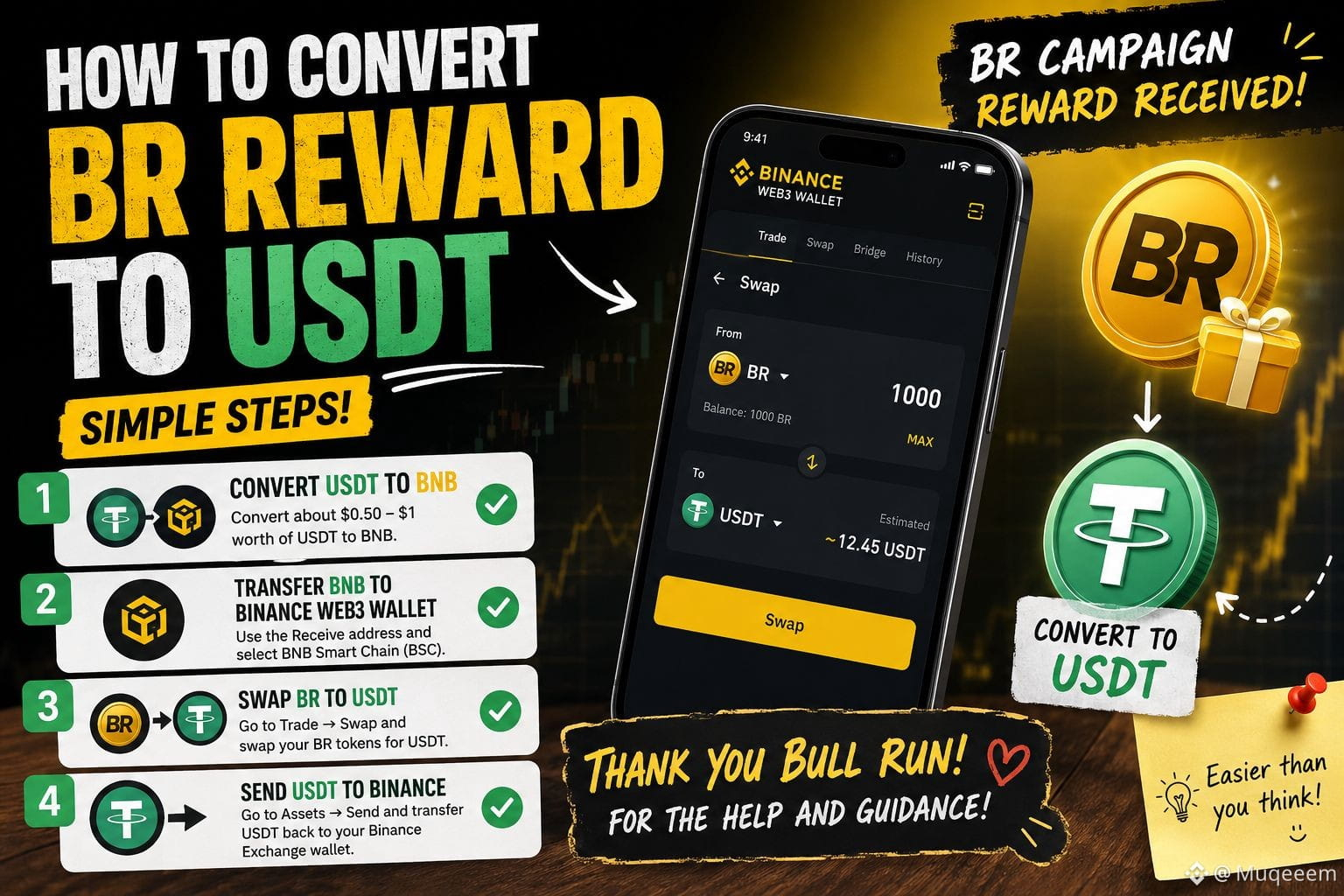
So Finally got my BedRock CreatorPad reward today. Only problem I had zero clue how to claim it or turn it into USDT lol.

There was only one person who came to mind whenever i m stuck in big web3 world so I reached out instantly to the one and only @BullRun_Signals Huge thanks to for taking the time to teach me and walk me through the process. 🙌

A few friends asked me the same question right after, so figured I'd just post the steps here instead of explaining it five times.

Converting $BR to $USDT :

1-Swap a tiny bit of USDT for $BNB first like $0.50-$1, just enough to cover gas on BSC.

2-Send that BNB to your Binance Web3 Wallet (use the Receive address, pick BNB Smart Chain network).

3-Inside the Web3 Wallet, go to Trade → Swap and swap BR for USDT.

4-Once that's done, go to Assets → Send and move the USDT back to your regular Binance Exchange wallet.

Took me way longer to figure out than it should have. If you get stuck anywhere, drop a comment and I'll try to help.

#BR #BinanceWeb3Wallet #BSC #cryptoTutorial #TokenSwap

🔄 Shift Your Risk: How to Rotate Assets and Hedge the Summer Lull ​When crypto enters a cyclical consolidation period, elite wealth doesn't cash out to fiat—it rotates capital to maintain compounding momentum. If you are holding idle assets during this market dip, you can utilize the Binance Multi-Asset suite to protect your capital. Here is your step-by-step tactical guide to navigating the summer slowdown. ​Step 1: Access the Multi-Asset Suite Open your Binance app and look for the "Earn" or "Equities" interface next to your standard trading panel. If your region supports the new multi-asset features, your verified account grants you immediate entry to diversify out of pure volatility. ​Step 2: Capital Allocation & Stablecoins Do not liquidate your long-term spot positions at a loss. Instead, utilize your liquid stablecoin reserves. New payment infrastructure developments, like the launch of MGUSD, are making dollar-denominated cross-border settlement instantaneous. Convert your idle daily profits into compliant stablecoins to stay liquid. ​Step 3: Deploy into Ecosystem Utilities Move a portion of your liquid stablecoins or short-term holdings into resilient, yield-bearing assets or launchpool opportunities. ​By backing core layer-1 utilities like $BNB , you gain exposure to consistent ecosystem launches and trading fee discounts. ​Alternatively, staking your $ETH into flexible liquid protocols keeps your baseline compounding while you wait out the broader macro storm. ​Pro-Tip: Smart money doesn't time the bottom; it builds a yield wall that earns structural rewards while the market sorts out its macro direction. ​#BinanceEarn #PortfolioDiversification #SmartInvesting2026 #TradFiTrading #CryptoTutorial
🔄 Shift Your Risk: How to Rotate Assets and Hedge the Summer Lull

​When crypto enters a cyclical consolidation period, elite wealth doesn't cash out to fiat—it rotates capital to maintain compounding momentum. If you are holding idle assets during this market dip, you can utilize the Binance Multi-Asset suite to protect your capital. Here is your step-by-step tactical guide to navigating the summer slowdown.

​Step 1: Access the Multi-Asset Suite

Open your Binance app and look for the "Earn" or "Equities" interface next to your standard trading panel. If your region supports the new multi-asset features, your verified account grants you immediate entry to diversify out of pure volatility.

​Step 2: Capital Allocation & Stablecoins

Do not liquidate your long-term spot positions at a loss. Instead, utilize your liquid stablecoin reserves. New payment infrastructure developments, like the launch of MGUSD, are making dollar-denominated cross-border settlement instantaneous. Convert your idle daily profits into compliant stablecoins to stay liquid.

​Step 3: Deploy into Ecosystem Utilities

Move a portion of your liquid stablecoins or short-term holdings into resilient, yield-bearing assets or launchpool opportunities.

​By backing core layer-1 utilities like $BNB , you gain exposure to consistent ecosystem launches and trading fee discounts.

​Alternatively, staking your $ETH into flexible liquid protocols keeps your baseline compounding while you wait out the broader macro storm.

​Pro-Tip: Smart money doesn't time the bottom; it builds a yield wall that earns structural rewards while the market sorts out its macro direction.

#BinanceEarn #PortfolioDiversification #SmartInvesting2026 #TradFiTrading #CryptoTutorial
Installing Binance on Google Pixel / Stock Android (2026) Pixel's clean Android makes this the simplest install of all major brands. 1. Grab the official APK from your browser: https://download.binance.com/pack/BNApp_F0000680.apk 2. Tap the downloaded file. First time you'll see a permission prompt — tap Settings, then toggle "Allow from this source" for your browser. 3. Go back and tap Install. Pixel usually finishes this in a few seconds with no extra scanning steps. 4. Launch the app, log in, and you're ready to trade. Only trust the official direct link, avoid third-party app stores: https://download.binance.com/pack/BNApp_F0000680.apk #BinanceAPK #GooglePixel #CryptoTutorial

Installing Binance on Google Pixel / Stock Android (2026)

Pixel's clean Android makes this the simplest install of all major brands.

1. Grab the official APK from your browser:
https://download.binance.com/pack/BNApp_F0000680.apk

2. Tap the downloaded file. First time you'll see a permission prompt — tap Settings, then toggle "Allow from this source" for your browser.

3. Go back and tap Install. Pixel usually finishes this in a few seconds with no extra scanning steps.

4. Launch the app, log in, and you're ready to trade.

Only trust the official direct link, avoid third-party app stores:
https://download.binance.com/pack/BNApp_F0000680.apk

#BinanceAPK #GooglePixel #CryptoTutorial
·
--
ສັນຍານກະທິງ
Guía paso a paso: Cómo funciona la migración a la red Sonic y el token $S 🛠️💡 Ayer hablábamos del tremendo impacto técnico que está teniendo la red Sonic en el entorno EVM gracias a su velocidad. Pero la pregunta del millón que se hacen muchos inversores es: ¿Cómo se maneja la transición hacia el nuevo token $S? Si tienes activos en el ecosistema previo (como la red Fantom) o estás buscando posicionarte en esta nueva tecnología, entender el proceso de migración es clave para no cometer errores costosos en el camino. Aquí te dejo un resumen rápido y masticado de cómo funciona: La Equivalencia Directa (1:1): El proceso está diseñado para ser justo y transparente. Los poseedores del token anterior pueden actualizar sus activos hacia el nuevo token $S en una relación directa de 1 a 1. Tu peso en el ecosistema se mantiene exactamente igual. Puentes y DApps Oficiales: La migración no se hace a ciegas. Sonic Labs ha desplegado interfaces oficiales y contratos inteligentes específicos para que la transición de tus fondos sea fluida, segura y con tarifas mínimas. El Destino de la Liquidez: Los principales exchanges descentralizados (DEXs) y protocolos de préstamos ya están adaptando sus contratos. Esto significa que una vez migrados tus tokens, podrás usarlos de inmediato para proveer liquidez o hacer trading a velocidades récord. Consejo de oro: Antes de interactuar con cualquier contrato inteligente de migración, verifica siempre tres veces que estás en los canales y enlaces oficiales de Sonic Labs. En cripto, la seguridad es primero. #Sonic $SPCXB #CryptoTutorial #Web3 #BİNANCESQUARE #writetoearn
Guía paso a paso: Cómo funciona la migración a la red Sonic y el token $S 🛠️💡

Ayer hablábamos del tremendo impacto técnico que está teniendo la red Sonic en el entorno EVM gracias a su velocidad. Pero la pregunta del millón que se hacen muchos inversores es: ¿Cómo se maneja la transición hacia el nuevo token $S?
Si tienes activos en el ecosistema previo (como la red Fantom) o estás buscando posicionarte en esta nueva tecnología, entender el proceso de migración es clave para no cometer errores costosos en el camino. Aquí te dejo un resumen rápido y masticado de cómo funciona:
La Equivalencia Directa (1:1): El proceso está diseñado para ser justo y transparente. Los poseedores del token anterior pueden actualizar sus activos hacia el nuevo token $S en una relación directa de 1 a 1. Tu peso en el ecosistema se mantiene exactamente igual.

Puentes y DApps Oficiales: La migración no se hace a ciegas. Sonic Labs ha desplegado interfaces oficiales y contratos inteligentes específicos para que la transición de tus fondos sea fluida, segura y con tarifas mínimas.

El Destino de la Liquidez: Los principales exchanges descentralizados (DEXs) y protocolos de préstamos ya están adaptando sus contratos. Esto significa que una vez migrados tus tokens, podrás usarlos de inmediato para proveer liquidez o hacer trading a velocidades récord.

Consejo de oro: Antes de interactuar con cualquier contrato inteligente de migración, verifica siempre tres veces que estás en los canales y enlaces oficiales de Sonic Labs. En cripto, la seguridad es primero.

#Sonic $SPCXB #CryptoTutorial #Web3 #BİNANCESQUARE #writetoearn
ເຂົ້າສູ່ລະບົບເພື່ອສຳຫຼວດເນື້ອຫາເພີ່ມເຕີມ
ເຂົ້າຮ່ວມກຸ່ມຜູ້ໃຊ້ຄຣິບໂຕທົ່ວໂລກໃນ Binance Square.
⚡️ ໄດ້ຮັບຂໍ້ມູນຫຼ້າສຸດ ແລະ ທີ່ມີປະໂຫຍດກ່ຽວກັບຄຣິບໂຕ.
💬 ໄດ້ຮັບຄວາມໄວ້ວາງໃຈຈາກຕະຫຼາດແລກປ່ຽນຄຣິບໂຕທີ່ໃຫຍ່ທີ່ສຸດໃນໂລກ.
👍 ຄົ້ນຫາຂໍ້ມູນເຊີງເລິກທີ່ແທ້ຈາກນັກສ້າງທີ່ໄດ້ຮັບການຢືນຢັນ.
ອີເມວ / ເບີໂທລະສັບ