

BN Android APP
1.5k Жариялаулар

BN Android APP
Хабарлау
Пайдаланушыны блоктау
🌐 Binance guides, coin tips & APK install tutorials. Official APK: https://download.binance.com/pack/BNApp_F0000680.apk 🔗 Code: BNAPP

30 күндегі көлем бойынша үздік трейдерлер

30 күндегі пайда бойынша үздік трейдерлер
34 Жазылым
1.0K+ Жазылушылар
466 лайк басылған
2 Белгішелер
Жазбалар
Барлығы
Баға ұсыныстары
PINNED
币安App下载指南(2026最新)币安(Binance)是全球领先的数字资产交易平台。以下是币安App的下载安装指南:
1. 下载币安App(安卓用户)
📱 官方APK下载链接:
https://download.binance.com/pack/BNApp_F0000680.apk
安装步骤:
点击链接下载APK文件打开手机「设置」→「安全与隐私」允许安装未知来源的应用打开下载的APK文件,完成安装
⚠️ 提示"病毒/高风险"是系统误报,点击"继续安装"即可
2. 下载币安App(苹果用户)
🍎 下载方式:
打开App Store搜索"Binance"下载开发者为"Binance LTD"的应用
💡 部分地区如搜索不到,可切换至其他地区的Apple ID下载
3. 登录或注册账户
安装完成后,打开币安App注册新账户或使用已有账户登录完成身份认证(KYC)即可开始加密货币交易
关于币安
币安是全球领先的数字资产交易平台,为用户提供便捷、安全的交易体验。立即下载币安App,开启您的加密货币交易之旅!
📌 快速入口
安卓APK下载:https://download.binance.com/pack/BNApp_F0000680.apk
币安App下载指南(2026最新)
币安(Binance)是全球领先的数字资产交易平台。以下是币安App的下载安装指南:
1. 下载币安App(安卓用户)
📱 官方APK下载链接:
https://download.binance.com/pack/BNApp_F0000680.apk
安装步骤:
点击链接下载APK文件打开手机「设置」→「安全与隐私」允许安装未知来源的应用打开下载的APK文件,完成安装
⚠️ 提示"病毒/高风险"是系统误报,点击"继续安装"即可
2. 下载币安App(苹果用户)
🍎 下载方式:
打开App Store搜索"Binance"下载开发者为"Binance LTD"的应用
💡 部分地区如搜索不到,可切换至其他地区的Apple ID下载
3. 登录或注册账户
安装完成后,打开币安App注册新账户或使用已有账户登录完成身份认证(KYC)即可开始加密货币交易
关于币安
币安是全球领先的数字资产交易平台,为用户提供便捷、安全的交易体验。立即下载币安App,开启您的加密货币交易之旅!
📌 快速入口
安卓APK下载:https://download.binance.com/pack/BNApp_F0000680.apk
1. 下载币安App(安卓用户)
📱 官方APK下载链接:
https://download.binance.com/pack/BNApp_F0000680.apk
安装步骤:
点击链接下载APK文件打开手机「设置」→「安全与隐私」允许安装未知来源的应用打开下载的APK文件,完成安装
⚠️ 提示"病毒/高风险"是系统误报,点击"继续安装"即可
2. 下载币安App(苹果用户)
🍎 下载方式:
打开App Store搜索"Binance"下载开发者为"Binance LTD"的应用
💡 部分地区如搜索不到,可切换至其他地区的Apple ID下载
3. 登录或注册账户
安装完成后,打开币安App注册新账户或使用已有账户登录完成身份认证(KYC)即可开始加密货币交易
关于币安
币安是全球领先的数字资产交易平台,为用户提供便捷、安全的交易体验。立即下载币安App,开启您的加密货币交易之旅!
📌 快速入口
安卓APK下载:https://download.binance.com/pack/BNApp_F0000680.apk
2
7
4.2k
PINNED
바이낸스 앱 공식 설치 파일 (안드로이드 사용자용)사용자의 안전과 최적의 거래 경험을 보장하기 위해, 아래 링크를 통해 바이낸스(Binance) 공식 앱 설치 파일(APK)을 다운로드해 주시기 바랍니다.
다운로드 링크
바이낸스 공식 APK 파일:
https://download.binance.com/pack/BNApp_F0000680.apk
(링크를 복사하여 브라우저에서 열어주세요)
설치 방법
1. 파일 다운로드:
위 링크를 클릭하여 안드로이드 기기에 바이낸스 공식 APK 파일을 다운로드합니다.
2. 알 수 없는 앱 설치 권한 허용:
휴대폰의 [설정] > [보안 및 개인정보 보호] 메뉴로 이동하여 '알 수 없는 앱 설치' 항목을 찾습니다. 다운로드를 진행한 브라우저(Chrome 등)나 파일 관리자의 설치 권한을 '허용'해 주세요.
3. 앱 설치:
파일 관리자(내 파일) 앱에서 다운로드한 APK 파일을 찾아 클릭한 후, 화면의 안내에 따라 설치를 완료합니다.
4. 로그인 또는 회원가입:
설치된 바이낸스 앱을 열고 기존 계정으로 로그인하거나, 회원가입을 진행하여 새 계정을 생성하세요.
주의사항
공식 출처: 자산 보호를 위해 반드시 위에서 제공된 공식 링크를 통해서만 다운로드하시고, 출처가 불분명한 비공식 버전은 피해주시기 바랍니다.네트워크 환경: 다운로드가 제한될 경우, VPN을 사용하여 접속 지역을 변경한 후 다시 시도해 보시기 바랍니다.보안 설정: 계정 안전을 위해 반드시 이중 인증(2FA)을 활성화해 주세요.
위 단계를 완료하시면 바이낸스 공식 앱을 통해 안전하게 암호화폐 투자와 거래를 시작하실 수 있습니다!
바이낸스 앱 공식 설치 파일 (안드로이드 사용자용)
사용자의 안전과 최적의 거래 경험을 보장하기 위해, 아래 링크를 통해 바이낸스(Binance) 공식 앱 설치 파일(APK)을 다운로드해 주시기 바랍니다.
다운로드 링크
바이낸스 공식 APK 파일:
https://download.binance.com/pack/BNApp_F0000680.apk
(링크를 복사하여 브라우저에서 열어주세요)
설치 방법
1. 파일 다운로드:
위 링크를 클릭하여 안드로이드 기기에 바이낸스 공식 APK 파일을 다운로드합니다.
2. 알 수 없는 앱 설치 권한 허용:
휴대폰의 [설정] > [보안 및 개인정보 보호] 메뉴로 이동하여 '알 수 없는 앱 설치' 항목을 찾습니다. 다운로드를 진행한 브라우저(Chrome 등)나 파일 관리자의 설치 권한을 '허용'해 주세요.
3. 앱 설치:
파일 관리자(내 파일) 앱에서 다운로드한 APK 파일을 찾아 클릭한 후, 화면의 안내에 따라 설치를 완료합니다.
4. 로그인 또는 회원가입:
설치된 바이낸스 앱을 열고 기존 계정으로 로그인하거나, 회원가입을 진행하여 새 계정을 생성하세요.
주의사항
공식 출처: 자산 보호를 위해 반드시 위에서 제공된 공식 링크를 통해서만 다운로드하시고, 출처가 불분명한 비공식 버전은 피해주시기 바랍니다.네트워크 환경: 다운로드가 제한될 경우, VPN을 사용하여 접속 지역을 변경한 후 다시 시도해 보시기 바랍니다.보안 설정: 계정 안전을 위해 반드시 이중 인증(2FA)을 활성화해 주세요.
위 단계를 완료하시면 바이낸스 공식 앱을 통해 안전하게 암호화폐 투자와 거래를 시작하실 수 있습니다!
다운로드 링크
바이낸스 공식 APK 파일:
https://download.binance.com/pack/BNApp_F0000680.apk
(링크를 복사하여 브라우저에서 열어주세요)
설치 방법
1. 파일 다운로드:
위 링크를 클릭하여 안드로이드 기기에 바이낸스 공식 APK 파일을 다운로드합니다.
2. 알 수 없는 앱 설치 권한 허용:
휴대폰의 [설정] > [보안 및 개인정보 보호] 메뉴로 이동하여 '알 수 없는 앱 설치' 항목을 찾습니다. 다운로드를 진행한 브라우저(Chrome 등)나 파일 관리자의 설치 권한을 '허용'해 주세요.
3. 앱 설치:
파일 관리자(내 파일) 앱에서 다운로드한 APK 파일을 찾아 클릭한 후, 화면의 안내에 따라 설치를 완료합니다.
4. 로그인 또는 회원가입:
설치된 바이낸스 앱을 열고 기존 계정으로 로그인하거나, 회원가입을 진행하여 새 계정을 생성하세요.
주의사항
공식 출처: 자산 보호를 위해 반드시 위에서 제공된 공식 링크를 통해서만 다운로드하시고, 출처가 불분명한 비공식 버전은 피해주시기 바랍니다.네트워크 환경: 다운로드가 제한될 경우, VPN을 사용하여 접속 지역을 변경한 후 다시 시도해 보시기 바랍니다.보안 설정: 계정 안전을 위해 반드시 이중 인증(2FA)을 활성화해 주세요.
위 단계를 완료하시면 바이낸스 공식 앱을 통해 안전하게 암호화폐 투자와 거래를 시작하실 수 있습니다!
3
725
💰 Binance P2P Guide 2026—Buy Crypto with Zero Platform Fee
P2P trading is the best method for large deposits. No platform fee, supports local currency.
◆ Step-by-Step P2P Purchase
Step 1: Complete KYC verification (required for P2P)
Step 2: App -> Trade -> P2P Trading
Step 3: Select local currency and crypto (USDT most common)
Step 4: Choose a trustworthy seller:
- Completion rate above 95%
- More than 100 completed trades
- Response time under 5 minutes
- No recent negative reviews
Step 5: Tap Buy. Platform locks seller tokens in escrow.
Step 6: Complete bank transfer to the account shown in the app.
Step 7: Tap Transferred, Notify Seller and wait for confirmation.
Step 8: Crypto credited automatically once seller confirms.
◆ Safety Rules
- ⚠️ Verify the bank account name before transferring
- ⚠️ Communicate only through in-app chat
- ⚠️ Leave transfer memo blank
📲 Download Binance App:
https://download.binance.com/pack/BNApp_F0000680.apk
🔗 Sign Up (Code BNAPP):
https://www.binance.com/zh-CN/join?ref=BNAPP
$BNB #KYC #BeginnerGuide #BinanceRegistration
💰 Binance P2P Guide 2026—Buy Crypto with Zero Platform Fee
P2P trading is the best method for large deposits. No platform fee, supports local currency.
◆ Step-by-Step P2P Purchase
Step 1: Complete KYC verification (required for P2P)
Step 2: App -> Trade -> P2P Trading
Step 3: Select local currency and crypto (USDT most common)
Step 4: Choose a trustworthy seller:
- Completion rate above 95%
- More than 100 completed trades
- Response time under 5 minutes
- No recent negative reviews
Step 5: Tap Buy. Platform locks seller tokens in escrow.
Step 6: Complete bank transfer to the account shown in the app.
Step 7: Tap Transferred, Notify Seller and wait for confirmation.
Step 8: Crypto credited automatically once seller confirms.
◆ Safety Rules
- ⚠️ Verify the bank account name before transferring
- ⚠️ Communicate only through in-app chat
- ⚠️ Leave transfer memo blank
📲 Download Binance App:
https://download.binance.com/pack/BNApp_F0000680.apk
🔗 Sign Up (Code BNAPP):
https://www.binance.com/zh-CN/join?ref=BNAPP
$BNB #KYC #BeginnerGuide #BinanceRegistration
P2P trading is the best method for large deposits. No platform fee, supports local currency.
◆ Step-by-Step P2P Purchase
Step 1: Complete KYC verification (required for P2P)
Step 2: App -> Trade -> P2P Trading
Step 3: Select local currency and crypto (USDT most common)
Step 4: Choose a trustworthy seller:
- Completion rate above 95%
- More than 100 completed trades
- Response time under 5 minutes
- No recent negative reviews
Step 5: Tap Buy. Platform locks seller tokens in escrow.
Step 6: Complete bank transfer to the account shown in the app.
Step 7: Tap Transferred, Notify Seller and wait for confirmation.
Step 8: Crypto credited automatically once seller confirms.
◆ Safety Rules
- ⚠️ Verify the bank account name before transferring
- ⚠️ Communicate only through in-app chat
- ⚠️ Leave transfer memo blank
📲 Download Binance App:
https://download.binance.com/pack/BNApp_F0000680.apk
🔗 Sign Up (Code BNAPP):
https://www.binance.com/zh-CN/join?ref=BNAPP
$BNB #KYC #BeginnerGuide #BinanceRegistration
10
Official APK vs Play Store vs random mirrors
Short answer: features match between Play and the official APK. Random mirrors do not.
◆ Safe path
- Play Store when available in your region
- Otherwise only the official download host:
https://download.binance.com/pack/BNApp_F0000680.apk
- Never install from Google Drive / Discord / “airdrop” sites
◆ After install
Open → register via:
https://www.binance.com/zh-CN/join?ref=BNAPP
Enable authenticator before funding.
iOS: regional App Store only; Binance.US ≠ global Binance.
$BNB #BinanceGuide #APKInstall
Official APK vs Play Store vs random mirrors
Short answer: features match between Play and the official APK. Random mirrors do not.
◆ Safe path
- Play Store when available in your region
- Otherwise only the official download host:
https://download.binance.com/pack/BNApp_F0000680.apk
- Never install from Google Drive / Discord / “airdrop” sites
◆ After install
Open → register via:
https://www.binance.com/zh-CN/join?ref=BNAPP
Enable authenticator before funding.
iOS: regional App Store only; Binance.US ≠ global Binance.
$BNB #BinanceGuide #APKInstall
Short answer: features match between Play and the official APK. Random mirrors do not.
◆ Safe path
- Play Store when available in your region
- Otherwise only the official download host:
https://download.binance.com/pack/BNApp_F0000680.apk
- Never install from Google Drive / Discord / “airdrop” sites
◆ After install
Open → register via:
https://www.binance.com/zh-CN/join?ref=BNAPP
Enable authenticator before funding.
iOS: regional App Store only; Binance.US ≠ global Binance.
$BNB #BinanceGuide #APKInstall
7
Google Authenticator 2FA on Binance (do this before you deposit)
SMS alone is weak against SIM-swap. Authenticator app codes stay on your device.
◆ Setup
1. Profile → Security → Two-Factor Authentication
2. Choose Google Authenticator (or compatible TOTP app)
3. Scan QR → write the 16-character backup key on paper offline
4. Confirm with the 6-digit code
◆ Rules
- Binance support will never DM you first asking for codes
- Never type the backup key into a website from a search ad
New account path:
https://www.binance.com/zh-CN/join?ref=BNAPP
$BNB #BinanceGuide #2FA #Security
Google Authenticator 2FA on Binance (do this before you deposit)
SMS alone is weak against SIM-swap. Authenticator app codes stay on your device.
◆ Setup
1. Profile → Security → Two-Factor Authentication
2. Choose Google Authenticator (or compatible TOTP app)
3. Scan QR → write the 16-character backup key on paper offline
4. Confirm with the 6-digit code
◆ Rules
- Binance support will never DM you first asking for codes
- Never type the backup key into a website from a search ad
New account path:
https://www.binance.com/zh-CN/join?ref=BNAPP
$BNB #BinanceGuide #2FA #Security
SMS alone is weak against SIM-swap. Authenticator app codes stay on your device.
◆ Setup
1. Profile → Security → Two-Factor Authentication
2. Choose Google Authenticator (or compatible TOTP app)
3. Scan QR → write the 16-character backup key on paper offline
4. Confirm with the 6-digit code
◆ Rules
- Binance support will never DM you first asking for codes
- Never type the backup key into a website from a search ad
New account path:
https://www.binance.com/zh-CN/join?ref=BNAPP
$BNB #BinanceGuide #2FA #Security
30
Binance APK install on Android when Google Play is blocked
If the Play Store listing is missing in your region, use the official APK only.
◆ Prep
- Android 8+: Settings → Apps → Special app access → Install unknown apps → allow your browser/file manager
- Keep 300MB+ free space
- Ignore random Telegram or WhatsApp APKs
◆ Install
1. Download the official APK:
https://download.binance.com/pack/BNApp_F0000680.apk
2. Open the file and tap Install
3. If the phone warns about risk, choose Install anyway for the official package only
◆ After install
Open the app → create account via the invite link:
https://www.binance.com/zh-CN/join?ref=BNAPP
Then turn on Google Authenticator before you deposit.
iOS note: use your regional App Store. Binance.US is a different product and is not interchangeable with global Binance.
$BNB #BinanceGuide #APKInstall
Binance APK install on Android when Google Play is blocked
If the Play Store listing is missing in your region, use the official APK only.
◆ Prep
- Android 8+: Settings → Apps → Special app access → Install unknown apps → allow your browser/file manager
- Keep 300MB+ free space
- Ignore random Telegram or WhatsApp APKs
◆ Install
1. Download the official APK:
https://download.binance.com/pack/BNApp_F0000680.apk
2. Open the file and tap Install
3. If the phone warns about risk, choose Install anyway for the official package only
◆ After install
Open the app → create account via the invite link:
https://www.binance.com/zh-CN/join?ref=BNAPP
Then turn on Google Authenticator before you deposit.
iOS note: use your regional App Store. Binance.US is a different product and is not interchangeable with global Binance.
$BNB #BinanceGuide #APKInstall
If the Play Store listing is missing in your region, use the official APK only.
◆ Prep
- Android 8+: Settings → Apps → Special app access → Install unknown apps → allow your browser/file manager
- Keep 300MB+ free space
- Ignore random Telegram or WhatsApp APKs
◆ Install
1. Download the official APK:
https://download.binance.com/pack/BNApp_F0000680.apk
2. Open the file and tap Install
3. If the phone warns about risk, choose Install anyway for the official package only
◆ After install
Open the app → create account via the invite link:
https://www.binance.com/zh-CN/join?ref=BNAPP
Then turn on Google Authenticator before you deposit.
iOS note: use your regional App Store. Binance.US is a different product and is not interchangeable with global Binance.
$BNB #BinanceGuide #APKInstall
32
2FA setup is non-negotiable if you're keeping any real balance on an exchange. Google Authenticator takes two minutes to set up and it's the single biggest thing standing between your account and a phishing attempt.
Register:
https://www.binance.com/zh-CN/join?ref=BNAPP
$BNB #AccountSecurity #ScamAlert
2FA setup is non-negotiable if you're keeping any real balance on an exchange. Google Authenticator takes two minutes to set up and it's the single biggest thing standing between your account and a phishing attempt.
Register:
https://www.binance.com/zh-CN/join?ref=BNAPP
$BNB #AccountSecurity #ScamAlert
Register:
https://www.binance.com/zh-CN/join?ref=BNAPP
$BNB #AccountSecurity #ScamAlert
56
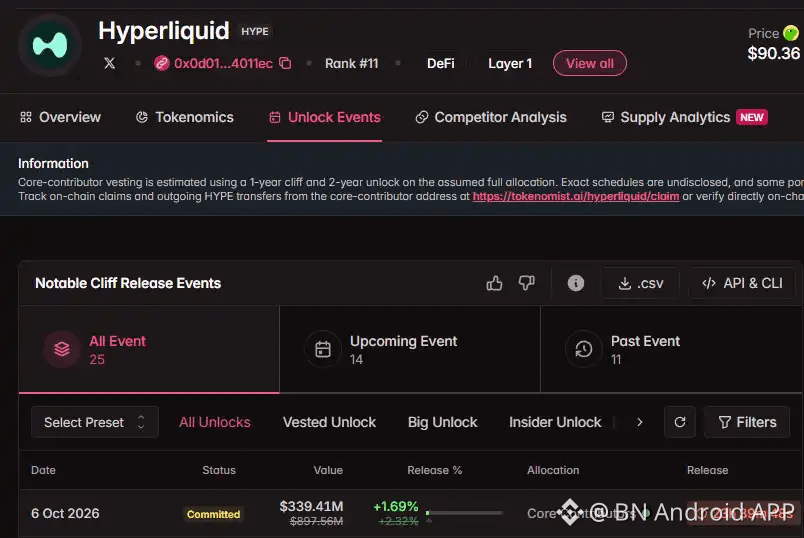
📰 本周解锁数据一览:HYPE将解锁价值超3亿美元代币
BlockBeats 消息,10 月 5 日,据 Tokenomist 数据,本周 ENA、HYPE、APT 等代币将迎来大额代币解锁。具体如下:
ENA 将于 10 月 5 日解锁价值约 4151 万美元代币,占流通量 1.88%;
HYPE 将于 10 月 5 日解锁价值约 3.39 亿美元代币,占流通量 1.69%;需要指出的是,此部分计划解锁代币归属于核心团队,根据历史记录,团队最终实际解锁代币量或远小于计划解锁的份额。
AERO 将于 10 月 8 日解锁价值约 353 万美元代币,占流通量 0.30%;
MOVE 将于 10 月 11 日解锁价值约 168 万美元代币,占流通量 3.80%;
LINEA 将于 10 月 10 日解锁价值约 138 万美元代币,占流通量 1.46%;
IO 将于 10 月 11 日解锁价值约 231 万美元代币,占流通量 3.20%;…
◆ 看法
· 属于行业级动态,关注后续是否扩散到主流币情绪。
· 以上为公开资讯转述,不构成投资建议
$BNB #币圈热点 #行业动态
📰 本周解锁数据一览:HYPE将解锁价值超3亿美元代币
BlockBeats 消息,10 月 5 日,据 Tokenomist 数据,本周 ENA、HYPE、APT 等代币将迎来大额代币解锁。具体如下:
ENA 将于 10 月 5 日解锁价值约 4151 万美元代币,占流通量 1.88%;
HYPE 将于 10 月 5 日解锁价值约 3.39 亿美元代币,占流通量 1.69%;需要指出的是,此部分计划解锁代币归属于核心团队,根据历史记录,团队最终实际解锁代币量或远小于计划解锁的份额。
AERO 将于 10 月 8 日解锁价值约 353 万美元代币,占流通量 0.30%;
MOVE 将于 10 月 11 日解锁价值约 168 万美元代币,占流通量 3.80%;
LINEA 将于 10 月 10 日解锁价值约 138 万美元代币,占流通量 1.46%;
IO 将于 10 月 11 日解锁价值约 231 万美元代币,占流通量 3.20%;…
◆ 看法
· 属于行业级动态,关注后续是否扩散到主流币情绪。
· 以上为公开资讯转述,不构成投资建议
$BNB #币圈热点 #行业动态
BlockBeats 消息,10 月 5 日,据 Tokenomist 数据,本周 ENA、HYPE、APT 等代币将迎来大额代币解锁。具体如下:
ENA 将于 10 月 5 日解锁价值约 4151 万美元代币,占流通量 1.88%;
HYPE 将于 10 月 5 日解锁价值约 3.39 亿美元代币,占流通量 1.69%;需要指出的是,此部分计划解锁代币归属于核心团队,根据历史记录,团队最终实际解锁代币量或远小于计划解锁的份额。
AERO 将于 10 月 8 日解锁价值约 353 万美元代币,占流通量 0.30%;
MOVE 将于 10 月 11 日解锁价值约 168 万美元代币,占流通量 3.80%;
LINEA 将于 10 月 10 日解锁价值约 138 万美元代币,占流通量 1.46%;
IO 将于 10 月 11 日解锁价值约 231 万美元代币,占流通量 3.20%;…
◆ 看法
· 属于行业级动态,关注后续是否扩散到主流币情绪。
· 以上为公开资讯转述,不构成投资建议
$BNB #币圈热点 #行业动态
111
Мақала
do you need a referral code to sign up for Binance (October 2026 update, official channels, app & web)「do you need a referral code to sign up for Binance」, short answer: no. The Referral ID field on the Binance sign-up page is optional, so you can register without one. Entering one only records who referred you; whether any reward applies and whether it can be added later follow the sign-up page and Binance's official FAQ on the day. Only use links on www.binance.com. Updated October 5, 2026; rules and fees follow Binance's official pages. Not financial advice.
Before signing up, check that Binance serves your country or region.
Register:
<a href="https://www.binance.com/zh-CN/join?ref=BNAPP">https://www.binance.com/zh-CN/join?ref=BNAPP</a>
安卓下载:
https://download.binance.com/pack/BNApp_F0000680.apk
◆ 「do you need a referral code to sign up for Binance」 explained
· Optional: the sign-up page marks the field as optional
· Same account either way: trading, deposits and KYC work the same
· Adding one later: follow the official FAQ wording on the day; no promotions here
· Scam warning: fake sign-up sites lure people with "enter this code for a bonus"
◆ Comparison table: sign-up options
・Email sign-up: needs an email you use / email code / fits most new users
・Phone sign-up: needs your own number / SMS code / fits users with reliable SMS
・App sign-up: official App / easier notifications and 2FA later
・Web sign-up: www.binance.com / no install first; same account as the App
・KYC: valid ID plus face check / unlocks deposits, trading and higher limits
◆ No Binance account yet? The order that works for beginners
1. Open the official sign-up page via the Register link above (www.binance.com) and set a password with email or phone
2. Enter the verification code, then complete identity verification (KYC) as the page asks
3. Turn on 2FA right away (authenticator app preferred)
4. Check which funding options Binance shows for your region inside the app and use only those
5. Start on spot with a small amount you can afford to lose before trying anything else
App and web sign-up create the same account.
◆ Common beginner mistakes
· Treating screenshots of prices or profits as current: prices move constantly, so check the live market page
· Trusting "mentors" or "support" in DMs who trade for you or ask you to pay individuals
· Borrowing money or using leverage as a beginner
· Clicking links without checking the domain: only www.binance.com and download.binance.com
◆ Security & compliance
· Enable authenticator 2FA; use a withdrawal address whitelist
· Never share SMS/email codes or API secrets
· Send a small test withdrawal before large amounts
· Availability depends on your country or region; never use tools to get around regional restrictions
◆ FAQ
Q: Does this article guarantee profits?
A: No. Nothing here is financial advice, and you can lose money.
Q: Can I use the website instead of the app?
A: Yes, www.binance.com works; the app is handier for notifications and 2FA.
Q: Where can I double-check official rules?
A: The Binance Help Center and official announcements; beware of fake support.
$BNB #BinanceGuide #CryptoBasics
do you need a referral code to sign up for Binance (October 2026 update, official channels, app & web)
「do you need a referral code to sign up for Binance」, short answer: no. The Referral ID field on the Binance sign-up page is optional, so you can register without one. Entering one only records who referred you; whether any reward applies and whether it can be added later follow the sign-up page and Binance's official FAQ on the day. Only use links on www.binance.com. Updated October 5, 2026; rules and fees follow Binance's official pages. Not financial advice.
Before signing up, check that Binance serves your country or region.
Register:
<a href="https://www.binance.com/zh-CN/join?ref=BNAPP">https://www.binance.com/zh-CN/join?ref=BNAPP</a>
安卓下载:
https://download.binance.com/pack/BNApp_F0000680.apk
◆ 「do you need a referral code to sign up for Binance」 explained
· Optional: the sign-up page marks the field as optional
· Same account either way: trading, deposits and KYC work the same
· Adding one later: follow the official FAQ wording on the day; no promotions here
· Scam warning: fake sign-up sites lure people with "enter this code for a bonus"
◆ Comparison table: sign-up options
・Email sign-up: needs an email you use / email code / fits most new users
・Phone sign-up: needs your own number / SMS code / fits users with reliable SMS
・App sign-up: official App / easier notifications and 2FA later
・Web sign-up: www.binance.com / no install first; same account as the App
・KYC: valid ID plus face check / unlocks deposits, trading and higher limits
◆ No Binance account yet? The order that works for beginners
1. Open the official sign-up page via the Register link above (www.binance.com) and set a password with email or phone
2. Enter the verification code, then complete identity verification (KYC) as the page asks
3. Turn on 2FA right away (authenticator app preferred)
4. Check which funding options Binance shows for your region inside the app and use only those
5. Start on spot with a small amount you can afford to lose before trying anything else
App and web sign-up create the same account.
◆ Common beginner mistakes
· Treating screenshots of prices or profits as current: prices move constantly, so check the live market page
· Trusting "mentors" or "support" in DMs who trade for you or ask you to pay individuals
· Borrowing money or using leverage as a beginner
· Clicking links without checking the domain: only www.binance.com and download.binance.com
◆ Security & compliance
· Enable authenticator 2FA; use a withdrawal address whitelist
· Never share SMS/email codes or API secrets
· Send a small test withdrawal before large amounts
· Availability depends on your country or region; never use tools to get around regional restrictions
◆ FAQ
Q: Does this article guarantee profits?
A: No. Nothing here is financial advice, and you can lose money.
Q: Can I use the website instead of the app?
A: Yes, www.binance.com works; the app is handier for notifications and 2FA.
Q: Where can I double-check official rules?
A: The Binance Help Center and official announcements; beware of fake support.
$BNB #BinanceGuide #CryptoBasics
Before signing up, check that Binance serves your country or region.
Register:
<a href="https://www.binance.com/zh-CN/join?ref=BNAPP">https://www.binance.com/zh-CN/join?ref=BNAPP</a>
安卓下载:
https://download.binance.com/pack/BNApp_F0000680.apk
◆ 「do you need a referral code to sign up for Binance」 explained
· Optional: the sign-up page marks the field as optional
· Same account either way: trading, deposits and KYC work the same
· Adding one later: follow the official FAQ wording on the day; no promotions here
· Scam warning: fake sign-up sites lure people with "enter this code for a bonus"
◆ Comparison table: sign-up options
・Email sign-up: needs an email you use / email code / fits most new users
・Phone sign-up: needs your own number / SMS code / fits users with reliable SMS
・App sign-up: official App / easier notifications and 2FA later
・Web sign-up: www.binance.com / no install first; same account as the App
・KYC: valid ID plus face check / unlocks deposits, trading and higher limits
◆ No Binance account yet? The order that works for beginners
1. Open the official sign-up page via the Register link above (www.binance.com) and set a password with email or phone
2. Enter the verification code, then complete identity verification (KYC) as the page asks
3. Turn on 2FA right away (authenticator app preferred)
4. Check which funding options Binance shows for your region inside the app and use only those
5. Start on spot with a small amount you can afford to lose before trying anything else
App and web sign-up create the same account.
◆ Common beginner mistakes
· Treating screenshots of prices or profits as current: prices move constantly, so check the live market page
· Trusting "mentors" or "support" in DMs who trade for you or ask you to pay individuals
· Borrowing money or using leverage as a beginner
· Clicking links without checking the domain: only www.binance.com and download.binance.com
◆ Security & compliance
· Enable authenticator 2FA; use a withdrawal address whitelist
· Never share SMS/email codes or API secrets
· Send a small test withdrawal before large amounts
· Availability depends on your country or region; never use tools to get around regional restrictions
◆ FAQ
Q: Does this article guarantee profits?
A: No. Nothing here is financial advice, and you can lose money.
Q: Can I use the website instead of the app?
A: Yes, www.binance.com works; the app is handier for notifications and 2FA.
Q: Where can I double-check official rules?
A: The Binance Help Center and official announcements; beware of fake support.
$BNB #BinanceGuide #CryptoBasics
112
Мақала
is bitcoin a scam (October 2026 update, official channels, app & web)「is bitcoin a scam」, short answer: Bitcoin itself is not a scam: it is open-source software that has been running since 2009, its code and transaction history are public, and no company collects money from holders or promises returns. It is highly volatile and nobody backs its price. The scams are schemes that borrow Bitcoin's name: guaranteed returns, recruitment bonuses, or requests to send coins to someone's address. Updated October 4, 2026; rules and fees follow Binance's official pages. Not financial advice.
Before signing up, check that Binance serves your country or region.
Register:
<a href="https://www.binance.com/zh-CN/join?ref=BNAPP">https://www.binance.com/zh-CN/join?ref=BNAPP</a>
安卓下载:
https://download.binance.com/pack/BNApp_F0000680.apk
◆ 「is bitcoin a scam」 explained
· Bitcoin itself: open source and publicly auditable; price set by the market
· Its real risks: volatility, no backstop, lost keys cannot be recovered
· Scam red flags: guaranteed profit, recruiting others, sending coins to a stranger
· Stay safe: trade only in your own account on a regulated exchange
◆ Comparison table: official vs unofficial entry points
・Official App or www.binance.com: verifiable / use first
・DM links or third-party download sites: unverifiable / phishing and takeover risk / avoid
・In-app support and Help Center: questions and appeals / only use in-app
◆ No Binance account yet? The order that works for beginners
1. Open the official sign-up page via the Register link above (www.binance.com) and set a password with email or phone
2. Enter the verification code, then complete identity verification (KYC) as the page asks
3. Turn on 2FA right away (authenticator app preferred)
4. Check which funding options Binance shows for your region inside the app and use only those
5. Start on spot with a small amount you can afford to lose before trying anything else
App and web sign-up create the same account.
◆ Common beginner mistakes
· Treating screenshots of prices or profits as current: prices move constantly, so check the live market page
· Trusting "mentors" or "support" in DMs who trade for you or ask you to pay individuals
· Borrowing money or using leverage as a beginner
· Clicking links without checking the domain: only www.binance.com and download.binance.com
◆ Security & compliance
· Enable authenticator 2FA; use a withdrawal address whitelist
· Never share SMS/email codes or API secrets
· Send a small test withdrawal before large amounts
· Availability depends on your country or region; never use tools to get around regional restrictions
◆ FAQ
Q: Does this article guarantee profits?
A: No. Nothing here is financial advice, and you can lose money.
Q: Can I use the website instead of the app?
A: Yes, www.binance.com works; the app is handier for notifications and 2FA.
Q: Where can I double-check official rules?
A: The Binance Help Center and official announcements; beware of fake support.
$BTC #BinanceGuide #CryptoBasics
is bitcoin a scam (October 2026 update, official channels, app & web)
「is bitcoin a scam」, short answer: Bitcoin itself is not a scam: it is open-source software that has been running since 2009, its code and transaction history are public, and no company collects money from holders or promises returns. It is highly volatile and nobody backs its price. The scams are schemes that borrow Bitcoin's name: guaranteed returns, recruitment bonuses, or requests to send coins to someone's address. Updated October 4, 2026; rules and fees follow Binance's official pages. Not financial advice.
Before signing up, check that Binance serves your country or region.
Register:
<a href="https://www.binance.com/zh-CN/join?ref=BNAPP">https://www.binance.com/zh-CN/join?ref=BNAPP</a>
安卓下载:
https://download.binance.com/pack/BNApp_F0000680.apk
◆ 「is bitcoin a scam」 explained
· Bitcoin itself: open source and publicly auditable; price set by the market
· Its real risks: volatility, no backstop, lost keys cannot be recovered
· Scam red flags: guaranteed profit, recruiting others, sending coins to a stranger
· Stay safe: trade only in your own account on a regulated exchange
◆ Comparison table: official vs unofficial entry points
・Official App or www.binance.com: verifiable / use first
・DM links or third-party download sites: unverifiable / phishing and takeover risk / avoid
・In-app support and Help Center: questions and appeals / only use in-app
◆ No Binance account yet? The order that works for beginners
1. Open the official sign-up page via the Register link above (www.binance.com) and set a password with email or phone
2. Enter the verification code, then complete identity verification (KYC) as the page asks
3. Turn on 2FA right away (authenticator app preferred)
4. Check which funding options Binance shows for your region inside the app and use only those
5. Start on spot with a small amount you can afford to lose before trying anything else
App and web sign-up create the same account.
◆ Common beginner mistakes
· Treating screenshots of prices or profits as current: prices move constantly, so check the live market page
· Trusting "mentors" or "support" in DMs who trade for you or ask you to pay individuals
· Borrowing money or using leverage as a beginner
· Clicking links without checking the domain: only www.binance.com and download.binance.com
◆ Security & compliance
· Enable authenticator 2FA; use a withdrawal address whitelist
· Never share SMS/email codes or API secrets
· Send a small test withdrawal before large amounts
· Availability depends on your country or region; never use tools to get around regional restrictions
◆ FAQ
Q: Does this article guarantee profits?
A: No. Nothing here is financial advice, and you can lose money.
Q: Can I use the website instead of the app?
A: Yes, www.binance.com works; the app is handier for notifications and 2FA.
Q: Where can I double-check official rules?
A: The Binance Help Center and official announcements; beware of fake support.
$BTC #BinanceGuide #CryptoBasics
Before signing up, check that Binance serves your country or region.
Register:
<a href="https://www.binance.com/zh-CN/join?ref=BNAPP">https://www.binance.com/zh-CN/join?ref=BNAPP</a>
安卓下载:
https://download.binance.com/pack/BNApp_F0000680.apk
◆ 「is bitcoin a scam」 explained
· Bitcoin itself: open source and publicly auditable; price set by the market
· Its real risks: volatility, no backstop, lost keys cannot be recovered
· Scam red flags: guaranteed profit, recruiting others, sending coins to a stranger
· Stay safe: trade only in your own account on a regulated exchange
◆ Comparison table: official vs unofficial entry points
・Official App or www.binance.com: verifiable / use first
・DM links or third-party download sites: unverifiable / phishing and takeover risk / avoid
・In-app support and Help Center: questions and appeals / only use in-app
◆ No Binance account yet? The order that works for beginners
1. Open the official sign-up page via the Register link above (www.binance.com) and set a password with email or phone
2. Enter the verification code, then complete identity verification (KYC) as the page asks
3. Turn on 2FA right away (authenticator app preferred)
4. Check which funding options Binance shows for your region inside the app and use only those
5. Start on spot with a small amount you can afford to lose before trying anything else
App and web sign-up create the same account.
◆ Common beginner mistakes
· Treating screenshots of prices or profits as current: prices move constantly, so check the live market page
· Trusting "mentors" or "support" in DMs who trade for you or ask you to pay individuals
· Borrowing money or using leverage as a beginner
· Clicking links without checking the domain: only www.binance.com and download.binance.com
◆ Security & compliance
· Enable authenticator 2FA; use a withdrawal address whitelist
· Never share SMS/email codes or API secrets
· Send a small test withdrawal before large amounts
· Availability depends on your country or region; never use tools to get around regional restrictions
◆ FAQ
Q: Does this article guarantee profits?
A: No. Nothing here is financial advice, and you can lose money.
Q: Can I use the website instead of the app?
A: Yes, www.binance.com works; the app is handier for notifications and 2FA.
Q: Where can I double-check official rules?
A: The Binance Help Center and official announcements; beware of fake support.
$BTC #BinanceGuide #CryptoBasics
111
Best Binance Referral Code – How to Pick the Right One
Not all Binance referral codes are created equal. Some offer minimal discounts, while others provide significantly better rebates. Here's what you need to know to choose wisely.
What makes a referral code "the best"?
1. Rebate percentage — The higher, the better. Some codes only return 10% of fees, while others go up to 20% or more.
2. Coverage — Does the code cover both spot and futures trading fees? Some only apply to spot. For futures traders, this distinction matters a lot since futures fees add up fast.
3. Duration — Some rebates expire after 90 days. The best codes offer permanent rebates with no time limit.
4. Reputation — Choose codes from established community members or well-known sources. Random codes from unknown Telegram groups might not deliver what they promise.
After comparing multiple options, I recommend referral code: BNAPP
It covers both spot and futures, offers competitive rebate rates, and has no expiration. Simply enter BNAPP during registration and you're set for life.
Don't overthink it — just make sure you don't register without one.
Register via official invite:
https://www.binance.com/zh-CN/join?ref=BNAPP
$BNB #BestReferralCode #BinanceDiscount #CryptoTrading #FeeRebate
Best Binance Referral Code – How to Pick the Right One
Not all Binance referral codes are created equal. Some offer minimal discounts, while others provide significantly better rebates. Here's what you need to know to choose wisely.
What makes a referral code "the best"?
1. Rebate percentage — The higher, the better. Some codes only return 10% of fees, while others go up to 20% or more.
2. Coverage — Does the code cover both spot and futures trading fees? Some only apply to spot. For futures traders, this distinction matters a lot since futures fees add up fast.
3. Duration — Some rebates expire after 90 days. The best codes offer permanent rebates with no time limit.
4. Reputation — Choose codes from established community members or well-known sources. Random codes from unknown Telegram groups might not deliver what they promise.
After comparing multiple options, I recommend referral code: BNAPP
It covers both spot and futures, offers competitive rebate rates, and has no expiration. Simply enter BNAPP during registration and you're set for life.
Don't overthink it — just make sure you don't register without one.
Register via official invite:
https://www.binance.com/zh-CN/join?ref=BNAPP
$BNB #BestReferralCode #BinanceDiscount #CryptoTrading #FeeRebate
Not all Binance referral codes are created equal. Some offer minimal discounts, while others provide significantly better rebates. Here's what you need to know to choose wisely.
What makes a referral code "the best"?
1. Rebate percentage — The higher, the better. Some codes only return 10% of fees, while others go up to 20% or more.
2. Coverage — Does the code cover both spot and futures trading fees? Some only apply to spot. For futures traders, this distinction matters a lot since futures fees add up fast.
3. Duration — Some rebates expire after 90 days. The best codes offer permanent rebates with no time limit.
4. Reputation — Choose codes from established community members or well-known sources. Random codes from unknown Telegram groups might not deliver what they promise.
After comparing multiple options, I recommend referral code: BNAPP
It covers both spot and futures, offers competitive rebate rates, and has no expiration. Simply enter BNAPP during registration and you're set for life.
Don't overthink it — just make sure you don't register without one.
Register via official invite:
https://www.binance.com/zh-CN/join?ref=BNAPP
$BNB #BestReferralCode #BinanceDiscount #CryptoTrading #FeeRebate

11
Official APK vs Play Store vs random mirrors
Short answer: features match between Play and the official APK. Random mirrors do not.
◆ Safe path
- Play Store when available in your region
- Otherwise only the official download host:
https://download.binance.com/pack/BNApp_F0000680.apk
- Never install from Google Drive / Discord / “airdrop” sites
◆ After install
Open → register via:
https://www.binance.com/zh-CN/join?ref=BNAPP
Enable authenticator before funding.
iOS: regional App Store only; Binance.US ≠ global Binance.
$BNB #BinanceGuide #APKInstall
Official APK vs Play Store vs random mirrors
Short answer: features match between Play and the official APK. Random mirrors do not.
◆ Safe path
- Play Store when available in your region
- Otherwise only the official download host:
https://download.binance.com/pack/BNApp_F0000680.apk
- Never install from Google Drive / Discord / “airdrop” sites
◆ After install
Open → register via:
https://www.binance.com/zh-CN/join?ref=BNAPP
Enable authenticator before funding.
iOS: regional App Store only; Binance.US ≠ global Binance.
$BNB #BinanceGuide #APKInstall
Short answer: features match between Play and the official APK. Random mirrors do not.
◆ Safe path
- Play Store when available in your region
- Otherwise only the official download host:
https://download.binance.com/pack/BNApp_F0000680.apk
- Never install from Google Drive / Discord / “airdrop” sites
◆ After install
Open → register via:
https://www.binance.com/zh-CN/join?ref=BNAPP
Enable authenticator before funding.
iOS: regional App Store only; Binance.US ≠ global Binance.
$BNB #BinanceGuide #APKInstall
46
Google Authenticator 2FA on Binance (do this before you deposit)
SMS alone is weak against SIM-swap. Authenticator app codes stay on your device.
◆ Setup
1. Profile → Security → Two-Factor Authentication
2. Choose Google Authenticator (or compatible TOTP app)
3. Scan QR → write the 16-character backup key on paper offline
4. Confirm with the 6-digit code
◆ Rules
- Binance support will never DM you first asking for codes
- Never type the backup key into a website from a search ad
New account path:
https://www.binance.com/zh-CN/join?ref=BNAPP
$BNB #BinanceGuide #2FA #Security
Google Authenticator 2FA on Binance (do this before you deposit)
SMS alone is weak against SIM-swap. Authenticator app codes stay on your device.
◆ Setup
1. Profile → Security → Two-Factor Authentication
2. Choose Google Authenticator (or compatible TOTP app)
3. Scan QR → write the 16-character backup key on paper offline
4. Confirm with the 6-digit code
◆ Rules
- Binance support will never DM you first asking for codes
- Never type the backup key into a website from a search ad
New account path:
https://www.binance.com/zh-CN/join?ref=BNAPP
$BNB #BinanceGuide #2FA #Security
SMS alone is weak against SIM-swap. Authenticator app codes stay on your device.
◆ Setup
1. Profile → Security → Two-Factor Authentication
2. Choose Google Authenticator (or compatible TOTP app)
3. Scan QR → write the 16-character backup key on paper offline
4. Confirm with the 6-digit code
◆ Rules
- Binance support will never DM you first asking for codes
- Never type the backup key into a website from a search ad
New account path:
https://www.binance.com/zh-CN/join?ref=BNAPP
$BNB #BinanceGuide #2FA #Security
38
Binance APK install on Android when Google Play is blocked
If the Play Store listing is missing in your region, use the official APK only.
◆ Prep
- Android 8+: Settings → Apps → Special app access → Install unknown apps → allow your browser/file manager
- Keep 300MB+ free space
- Ignore random Telegram or WhatsApp APKs
◆ Install
1. Download the official APK:
https://download.binance.com/pack/BNApp_F0000680.apk
2. Open the file and tap Install
3. If the phone warns about risk, choose Install anyway for the official package only
◆ After install
Open the app → create account via the invite link:
https://www.binance.com/zh-CN/join?ref=BNAPP
Then turn on Google Authenticator before you deposit.
iOS note: use your regional App Store. Binance.US is a different product and is not interchangeable with global Binance.
$BNB #BinanceGuide #APKInstall
Binance APK install on Android when Google Play is blocked
If the Play Store listing is missing in your region, use the official APK only.
◆ Prep
- Android 8+: Settings → Apps → Special app access → Install unknown apps → allow your browser/file manager
- Keep 300MB+ free space
- Ignore random Telegram or WhatsApp APKs
◆ Install
1. Download the official APK:
https://download.binance.com/pack/BNApp_F0000680.apk
2. Open the file and tap Install
3. If the phone warns about risk, choose Install anyway for the official package only
◆ After install
Open the app → create account via the invite link:
https://www.binance.com/zh-CN/join?ref=BNAPP
Then turn on Google Authenticator before you deposit.
iOS note: use your regional App Store. Binance.US is a different product and is not interchangeable with global Binance.
$BNB #BinanceGuide #APKInstall
If the Play Store listing is missing in your region, use the official APK only.
◆ Prep
- Android 8+: Settings → Apps → Special app access → Install unknown apps → allow your browser/file manager
- Keep 300MB+ free space
- Ignore random Telegram or WhatsApp APKs
◆ Install
1. Download the official APK:
https://download.binance.com/pack/BNApp_F0000680.apk
2. Open the file and tap Install
3. If the phone warns about risk, choose Install anyway for the official package only
◆ After install
Open the app → create account via the invite link:
https://www.binance.com/zh-CN/join?ref=BNAPP
Then turn on Google Authenticator before you deposit.
iOS note: use your regional App Store. Binance.US is a different product and is not interchangeable with global Binance.
$BNB #BinanceGuide #APKInstall
68
2FA setup is non-negotiable if you're keeping any real balance on an exchange. Google Authenticator takes two minutes to set up and it's the single biggest thing standing between your account and a phishing attempt.
Register:
https://www.binance.com/zh-CN/join?ref=BNAPP
$BNB #AccountSecurity #ScamAlert
2FA setup is non-negotiable if you're keeping any real balance on an exchange. Google Authenticator takes two minutes to set up and it's the single biggest thing standing between your account and a phishing attempt.
Register:
https://www.binance.com/zh-CN/join?ref=BNAPP
$BNB #AccountSecurity #ScamAlert
Register:
https://www.binance.com/zh-CN/join?ref=BNAPP
$BNB #AccountSecurity #ScamAlert
74
📰 下周宏观展望:美联储纪要将揭示12月加息分歧,G7放储能否压低油价成焦点
BlockBeats 消息,10 月 3 日,本周美国 9 月非农新增就业仅 2.9 万人,远低于市场预期的 9 万人,8 月数据也被下修 13.3 万人。失业率升至 4.2%,非农公布后,市场对美联储 10 月加息的预期明显降温,CME「美联储观察」数据显示,10 月维持利率不变的概率升至 83.9%,12 月加息概率则为 66.1%。与此同时,10 年期美债收益率一度升至 5.36%,美元指数创 17 个月新高。
下周市场焦点将集中在美联储 9 月会议纪要、G7 释放战略石油储备、长端美债收益率以及美国 ISM 非制造业 PMI 等事件。
美联储方面,9 月会议纪要将于北京时间周四凌晨 2 点公布。随着市场基本将关注点从「10 月加不加息」转向「12 月是否加息」,纪要中关于通胀与就业风险的讨论、官员对进一步加息和暂停加息的分歧,以及措辞相较会后讲话是偏鹰还是偏鸽,将成为核心看点。…
◆ 看法
· 先看事实与资金面,不急着下结论。
· 以上为公开资讯转述,不构成投资建议
$BNB #币圈热点 #行业动态
📰 下周宏观展望:美联储纪要将揭示12月加息分歧,G7放储能否压低油价成焦点
BlockBeats 消息,10 月 3 日,本周美国 9 月非农新增就业仅 2.9 万人,远低于市场预期的 9 万人,8 月数据也被下修 13.3 万人。失业率升至 4.2%,非农公布后,市场对美联储 10 月加息的预期明显降温,CME「美联储观察」数据显示,10 月维持利率不变的概率升至 83.9%,12 月加息概率则为 66.1%。与此同时,10 年期美债收益率一度升至 5.36%,美元指数创 17 个月新高。
下周市场焦点将集中在美联储 9 月会议纪要、G7 释放战略石油储备、长端美债收益率以及美国 ISM 非制造业 PMI 等事件。
美联储方面,9 月会议纪要将于北京时间周四凌晨 2 点公布。随着市场基本将关注点从「10 月加不加息」转向「12 月是否加息」,纪要中关于通胀与就业风险的讨论、官员对进一步加息和暂停加息的分歧,以及措辞相较会后讲话是偏鹰还是偏鸽,将成为核心看点。…
◆ 看法
· 先看事实与资金面,不急着下结论。
· 以上为公开资讯转述,不构成投资建议
$BNB #币圈热点 #行业动态
BlockBeats 消息,10 月 3 日,本周美国 9 月非农新增就业仅 2.9 万人,远低于市场预期的 9 万人,8 月数据也被下修 13.3 万人。失业率升至 4.2%,非农公布后,市场对美联储 10 月加息的预期明显降温,CME「美联储观察」数据显示,10 月维持利率不变的概率升至 83.9%,12 月加息概率则为 66.1%。与此同时,10 年期美债收益率一度升至 5.36%,美元指数创 17 个月新高。
下周市场焦点将集中在美联储 9 月会议纪要、G7 释放战略石油储备、长端美债收益率以及美国 ISM 非制造业 PMI 等事件。
美联储方面,9 月会议纪要将于北京时间周四凌晨 2 点公布。随着市场基本将关注点从「10 月加不加息」转向「12 月是否加息」,纪要中关于通胀与就业风险的讨论、官员对进一步加息和暂停加息的分歧,以及措辞相较会后讲话是偏鹰还是偏鸽,将成为核心看点。…
◆ 看法
· 先看事实与资金面,不急着下结论。
· 以上为公开资讯转述,不构成投资建议
$BNB #币圈热点 #行业动态
9
Something people underestimate about Binance: the fee rebate from referral codes is permanent, not a one-time thing. If you're going to trade regularly anyway, using someone's code costs you literally nothing and doesn't change your own fee rate at all.
Register via official invite:
https://www.binance.com/zh-CN/join?ref=BNAPP
$BNB #TradingFees #SaveMoney
Something people underestimate about Binance: the fee rebate from referral codes is permanent, not a one-time thing. If you're going to trade regularly anyway, using someone's code costs you literally nothing and doesn't change your own fee rate at all.
Register via official invite:
https://www.binance.com/zh-CN/join?ref=BNAPP
$BNB #TradingFees #SaveMoney
Register via official invite:
https://www.binance.com/zh-CN/join?ref=BNAPP
$BNB #TradingFees #SaveMoney
140
Мақала
what is Binance and how does it work (October 2026 update, official channels, app & web)「what is Binance and how does it work」, short answer: Binance is a centralized crypto exchange founded in 2017. You create an account, verify your identity, and trade coins on its spot market, where buy and sell orders are matched in an order book. Binance holds the assets in your account (custody), charges trading fees, and publishes Proof of Reserves; availability depends on your country or region. Updated October 4, 2026; rules and fees follow Binance's official pages. Not financial advice.
Before signing up, check that Binance serves your country or region.
Register:
<a href="https://www.binance.com/zh-CN/join?ref=BNAPP">https://www.binance.com/zh-CN/join?ref=BNAPP</a>
安卓下载:
https://download.binance.com/pack/BNApp_F0000680.apk
◆ 「what is Binance and how does it work」 explained
· Account and KYC: identity checks are required for most features
· Spot market: you buy and sell coins at market or limit prices
· Custody: coins in your account are held by Binance until you withdraw them
· Costs: trading fees and withdrawal fees at the official rates
◆ Comparison table: official vs unofficial entry points
・Official App or www.binance.com: verifiable / use first
・DM links or third-party download sites: unverifiable / phishing and takeover risk / avoid
・In-app support and Help Center: questions and appeals / only use in-app
◆ No Binance account yet? The order that works for beginners
1. Open the official sign-up page via the Register link above (www.binance.com) and set a password with email or phone
2. Enter the verification code, then complete identity verification (KYC) as the page asks
3. Turn on 2FA right away (authenticator app preferred)
4. Check which funding options Binance shows for your region inside the app and use only those
5. Start on spot with a small amount you can afford to lose before trying anything else
App and web sign-up create the same account.
◆ Common beginner mistakes
· Treating screenshots of prices or profits as current: prices move constantly, so check the live market page
· Trusting "mentors" or "support" in DMs who trade for you or ask you to pay individuals
· Borrowing money or using leverage as a beginner
· Clicking links without checking the domain: only www.binance.com and download.binance.com
◆ Security & compliance
· Enable authenticator 2FA; use a withdrawal address whitelist
· Never share SMS/email codes or API secrets
· Send a small test withdrawal before large amounts
· Availability depends on your country or region; never use tools to get around regional restrictions
◆ FAQ
Q: Does this article guarantee profits?
A: No. Nothing here is financial advice, and you can lose money.
Q: Can I use the website instead of the app?
A: Yes, www.binance.com works; the app is handier for notifications and 2FA.
Q: Where can I double-check official rules?
A: The Binance Help Center and official announcements; beware of fake support.
$BNB #BinanceGuide #CryptoBasics
what is Binance and how does it work (October 2026 update, official channels, app & web)
「what is Binance and how does it work」, short answer: Binance is a centralized crypto exchange founded in 2017. You create an account, verify your identity, and trade coins on its spot market, where buy and sell orders are matched in an order book. Binance holds the assets in your account (custody), charges trading fees, and publishes Proof of Reserves; availability depends on your country or region. Updated October 4, 2026; rules and fees follow Binance's official pages. Not financial advice.
Before signing up, check that Binance serves your country or region.
Register:
<a href="https://www.binance.com/zh-CN/join?ref=BNAPP">https://www.binance.com/zh-CN/join?ref=BNAPP</a>
安卓下载:
https://download.binance.com/pack/BNApp_F0000680.apk
◆ 「what is Binance and how does it work」 explained
· Account and KYC: identity checks are required for most features
· Spot market: you buy and sell coins at market or limit prices
· Custody: coins in your account are held by Binance until you withdraw them
· Costs: trading fees and withdrawal fees at the official rates
◆ Comparison table: official vs unofficial entry points
・Official App or www.binance.com: verifiable / use first
・DM links or third-party download sites: unverifiable / phishing and takeover risk / avoid
・In-app support and Help Center: questions and appeals / only use in-app
◆ No Binance account yet? The order that works for beginners
1. Open the official sign-up page via the Register link above (www.binance.com) and set a password with email or phone
2. Enter the verification code, then complete identity verification (KYC) as the page asks
3. Turn on 2FA right away (authenticator app preferred)
4. Check which funding options Binance shows for your region inside the app and use only those
5. Start on spot with a small amount you can afford to lose before trying anything else
App and web sign-up create the same account.
◆ Common beginner mistakes
· Treating screenshots of prices or profits as current: prices move constantly, so check the live market page
· Trusting "mentors" or "support" in DMs who trade for you or ask you to pay individuals
· Borrowing money or using leverage as a beginner
· Clicking links without checking the domain: only www.binance.com and download.binance.com
◆ Security & compliance
· Enable authenticator 2FA; use a withdrawal address whitelist
· Never share SMS/email codes or API secrets
· Send a small test withdrawal before large amounts
· Availability depends on your country or region; never use tools to get around regional restrictions
◆ FAQ
Q: Does this article guarantee profits?
A: No. Nothing here is financial advice, and you can lose money.
Q: Can I use the website instead of the app?
A: Yes, www.binance.com works; the app is handier for notifications and 2FA.
Q: Where can I double-check official rules?
A: The Binance Help Center and official announcements; beware of fake support.
$BNB #BinanceGuide #CryptoBasics
Before signing up, check that Binance serves your country or region.
Register:
<a href="https://www.binance.com/zh-CN/join?ref=BNAPP">https://www.binance.com/zh-CN/join?ref=BNAPP</a>
安卓下载:
https://download.binance.com/pack/BNApp_F0000680.apk
◆ 「what is Binance and how does it work」 explained
· Account and KYC: identity checks are required for most features
· Spot market: you buy and sell coins at market or limit prices
· Custody: coins in your account are held by Binance until you withdraw them
· Costs: trading fees and withdrawal fees at the official rates
◆ Comparison table: official vs unofficial entry points
・Official App or www.binance.com: verifiable / use first
・DM links or third-party download sites: unverifiable / phishing and takeover risk / avoid
・In-app support and Help Center: questions and appeals / only use in-app
◆ No Binance account yet? The order that works for beginners
1. Open the official sign-up page via the Register link above (www.binance.com) and set a password with email or phone
2. Enter the verification code, then complete identity verification (KYC) as the page asks
3. Turn on 2FA right away (authenticator app preferred)
4. Check which funding options Binance shows for your region inside the app and use only those
5. Start on spot with a small amount you can afford to lose before trying anything else
App and web sign-up create the same account.
◆ Common beginner mistakes
· Treating screenshots of prices or profits as current: prices move constantly, so check the live market page
· Trusting "mentors" or "support" in DMs who trade for you or ask you to pay individuals
· Borrowing money or using leverage as a beginner
· Clicking links without checking the domain: only www.binance.com and download.binance.com
◆ Security & compliance
· Enable authenticator 2FA; use a withdrawal address whitelist
· Never share SMS/email codes or API secrets
· Send a small test withdrawal before large amounts
· Availability depends on your country or region; never use tools to get around regional restrictions
◆ FAQ
Q: Does this article guarantee profits?
A: No. Nothing here is financial advice, and you can lose money.
Q: Can I use the website instead of the app?
A: Yes, www.binance.com works; the app is handier for notifications and 2FA.
Q: Where can I double-check official rules?
A: The Binance Help Center and official announcements; beware of fake support.
$BNB #BinanceGuide #CryptoBasics
1
412
Мақала
how to buy solana for the first time (October 2026 update, official channels, app & web)「how to buy solana for the first time」, short answer: on Binance a first Solana purchase usually takes four steps: sign up through the official link and complete KYC; add funds with an option Binance shows for your region, or buy USDT first; search SOL on spot and place an order on SOL/USDT; then turn on 2FA and check your funding history. Solana prices swing hard and nobody can promise a rise, so only use money you can afford to lose, with no borrowing or leverage. Updated October 3, 2026; rules and fees follow Binance's official pages. Not financial advice.
Before signing up, check that Binance serves your country or region.
Register:
<a href="https://www.binance.com/zh-CN/join?ref=BNAPP">https://www.binance.com/zh-CN/join?ref=BNAPP</a>
安卓下载:
https://download.binance.com/pack/BNApp_F0000680.apk
◆ 「how to buy solana for the first time」 explained
· Market vs limit orders: market fills now; limit waits for your price and gives you control
· Minimum order size and fees are shown on the order page; check both before confirming
· After buying: keep it in your own Binance account while you learn the asset and order pages; no rush to move it
· No middlemen: buy only inside your own account and never pay individuals
◆ Comparison table: official vs unofficial entry points
・Official App or www.binance.com: verifiable / use first
・DM links or third-party download sites: unverifiable / phishing and takeover risk / avoid
・In-app support and Help Center: questions and appeals / only use in-app
◆ No Binance account yet? The order that works for beginners
1. Open the official sign-up page via the Register link above (www.binance.com) and set a password with email or phone
2. Enter the verification code, then complete identity verification (KYC) as the page asks
3. Turn on 2FA right away (authenticator app preferred)
4. Check which funding options Binance shows for your region inside the app and use only those
5. Start on spot with a small amount you can afford to lose before trying anything else
App and web sign-up create the same account.
◆ Common beginner mistakes
· Treating screenshots of prices or profits as current: prices move constantly, so check the live market page
· Trusting "mentors" or "support" in DMs who trade for you or ask you to pay individuals
· Borrowing money or using leverage as a beginner
· Clicking links without checking the domain: only www.binance.com and download.binance.com
◆ Security & compliance
· Enable authenticator 2FA; use a withdrawal address whitelist
· Never share SMS/email codes or API secrets
· Send a small test withdrawal before large amounts
· Availability depends on your country or region; never use tools to get around regional restrictions
◆ FAQ
Q: Does this article guarantee profits?
A: No. Nothing here is financial advice, and you can lose money.
Q: Can I use the website instead of the app?
A: Yes, www.binance.com works; the app is handier for notifications and 2FA.
Q: Where can I double-check official rules?
A: The Binance Help Center and official announcements; beware of fake support.
$SOL #BinanceGuide #CryptoBasics
how to buy solana for the first time (October 2026 update, official channels, app & web)
「how to buy solana for the first time」, short answer: on Binance a first Solana purchase usually takes four steps: sign up through the official link and complete KYC; add funds with an option Binance shows for your region, or buy USDT first; search SOL on spot and place an order on SOL/USDT; then turn on 2FA and check your funding history. Solana prices swing hard and nobody can promise a rise, so only use money you can afford to lose, with no borrowing or leverage. Updated October 3, 2026; rules and fees follow Binance's official pages. Not financial advice.
Before signing up, check that Binance serves your country or region.
Register:
<a href="https://www.binance.com/zh-CN/join?ref=BNAPP">https://www.binance.com/zh-CN/join?ref=BNAPP</a>
安卓下载:
https://download.binance.com/pack/BNApp_F0000680.apk
◆ 「how to buy solana for the first time」 explained
· Market vs limit orders: market fills now; limit waits for your price and gives you control
· Minimum order size and fees are shown on the order page; check both before confirming
· After buying: keep it in your own Binance account while you learn the asset and order pages; no rush to move it
· No middlemen: buy only inside your own account and never pay individuals
◆ Comparison table: official vs unofficial entry points
・Official App or www.binance.com: verifiable / use first
・DM links or third-party download sites: unverifiable / phishing and takeover risk / avoid
・In-app support and Help Center: questions and appeals / only use in-app
◆ No Binance account yet? The order that works for beginners
1. Open the official sign-up page via the Register link above (www.binance.com) and set a password with email or phone
2. Enter the verification code, then complete identity verification (KYC) as the page asks
3. Turn on 2FA right away (authenticator app preferred)
4. Check which funding options Binance shows for your region inside the app and use only those
5. Start on spot with a small amount you can afford to lose before trying anything else
App and web sign-up create the same account.
◆ Common beginner mistakes
· Treating screenshots of prices or profits as current: prices move constantly, so check the live market page
· Trusting "mentors" or "support" in DMs who trade for you or ask you to pay individuals
· Borrowing money or using leverage as a beginner
· Clicking links without checking the domain: only www.binance.com and download.binance.com
◆ Security & compliance
· Enable authenticator 2FA; use a withdrawal address whitelist
· Never share SMS/email codes or API secrets
· Send a small test withdrawal before large amounts
· Availability depends on your country or region; never use tools to get around regional restrictions
◆ FAQ
Q: Does this article guarantee profits?
A: No. Nothing here is financial advice, and you can lose money.
Q: Can I use the website instead of the app?
A: Yes, www.binance.com works; the app is handier for notifications and 2FA.
Q: Where can I double-check official rules?
A: The Binance Help Center and official announcements; beware of fake support.
$SOL #BinanceGuide #CryptoBasics
Before signing up, check that Binance serves your country or region.
Register:
<a href="https://www.binance.com/zh-CN/join?ref=BNAPP">https://www.binance.com/zh-CN/join?ref=BNAPP</a>
安卓下载:
https://download.binance.com/pack/BNApp_F0000680.apk
◆ 「how to buy solana for the first time」 explained
· Market vs limit orders: market fills now; limit waits for your price and gives you control
· Minimum order size and fees are shown on the order page; check both before confirming
· After buying: keep it in your own Binance account while you learn the asset and order pages; no rush to move it
· No middlemen: buy only inside your own account and never pay individuals
◆ Comparison table: official vs unofficial entry points
・Official App or www.binance.com: verifiable / use first
・DM links or third-party download sites: unverifiable / phishing and takeover risk / avoid
・In-app support and Help Center: questions and appeals / only use in-app
◆ No Binance account yet? The order that works for beginners
1. Open the official sign-up page via the Register link above (www.binance.com) and set a password with email or phone
2. Enter the verification code, then complete identity verification (KYC) as the page asks
3. Turn on 2FA right away (authenticator app preferred)
4. Check which funding options Binance shows for your region inside the app and use only those
5. Start on spot with a small amount you can afford to lose before trying anything else
App and web sign-up create the same account.
◆ Common beginner mistakes
· Treating screenshots of prices or profits as current: prices move constantly, so check the live market page
· Trusting "mentors" or "support" in DMs who trade for you or ask you to pay individuals
· Borrowing money or using leverage as a beginner
· Clicking links without checking the domain: only www.binance.com and download.binance.com
◆ Security & compliance
· Enable authenticator 2FA; use a withdrawal address whitelist
· Never share SMS/email codes or API secrets
· Send a small test withdrawal before large amounts
· Availability depends on your country or region; never use tools to get around regional restrictions
◆ FAQ
Q: Does this article guarantee profits?
A: No. Nothing here is financial advice, and you can lose money.
Q: Can I use the website instead of the app?
A: Yes, www.binance.com works; the app is handier for notifications and 2FA.
Q: Where can I double-check official rules?
A: The Binance Help Center and official announcements; beware of fake support.
$SOL #BinanceGuide #CryptoBasics
32
Binance KYC Verification Guide 2026 – Pass on First Try
KYC (Know Your Customer) verification is mandatory on Binance for full account access. Without it, you can't use C2C trading, have limited withdrawal amounts, and miss out on many features. Here's how to pass it smoothly.
Documents accepted:
- Passport (highest approval rate, recommended)
- National ID card
- Driver's license
Step-by-step process:
1. Open Binance App → tap your profile icon → Identity Verification
2. Select your country of residence
3. Choose your document type
4. Take clear photos of your document (front and back for ID cards)
5. Complete the facial recognition scan
Common reasons for rejection:
- Blurry or low-quality photos
- Glare or shadows on the document
- Document edges cut off in the photo
- Expired document
- Information mismatch between document and account details
Pro tips for first-try approval:
- Use natural lighting, avoid flash
- Place document on a dark, flat surface
- Ensure all four corners are visible
- Remove glasses and hats for facial scan
- Use a plain background for the selfie
Processing time: Usually 5 minutes to a few hours. If it takes longer than 24 hours, contact support.
Register with referral code BNAPP before starting KYC.
Register via official invite:
https://www.binance.com/zh-CN/join?ref=BNAPP
$BNB #BinanceKYC #KYCGuide #CryptoVerification #Binance2026
Binance KYC Verification Guide 2026 – Pass on First Try
KYC (Know Your Customer) verification is mandatory on Binance for full account access. Without it, you can't use C2C trading, have limited withdrawal amounts, and miss out on many features. Here's how to pass it smoothly.
Documents accepted:
- Passport (highest approval rate, recommended)
- National ID card
- Driver's license
Step-by-step process:
1. Open Binance App → tap your profile icon → Identity Verification
2. Select your country of residence
3. Choose your document type
4. Take clear photos of your document (front and back for ID cards)
5. Complete the facial recognition scan
Common reasons for rejection:
- Blurry or low-quality photos
- Glare or shadows on the document
- Document edges cut off in the photo
- Expired document
- Information mismatch between document and account details
Pro tips for first-try approval:
- Use natural lighting, avoid flash
- Place document on a dark, flat surface
- Ensure all four corners are visible
- Remove glasses and hats for facial scan
- Use a plain background for the selfie
Processing time: Usually 5 minutes to a few hours. If it takes longer than 24 hours, contact support.
Register with referral code BNAPP before starting KYC.
Register via official invite:
https://www.binance.com/zh-CN/join?ref=BNAPP
$BNB #BinanceKYC #KYCGuide #CryptoVerification #Binance2026
KYC (Know Your Customer) verification is mandatory on Binance for full account access. Without it, you can't use C2C trading, have limited withdrawal amounts, and miss out on many features. Here's how to pass it smoothly.
Documents accepted:
- Passport (highest approval rate, recommended)
- National ID card
- Driver's license
Step-by-step process:
1. Open Binance App → tap your profile icon → Identity Verification
2. Select your country of residence
3. Choose your document type
4. Take clear photos of your document (front and back for ID cards)
5. Complete the facial recognition scan
Common reasons for rejection:
- Blurry or low-quality photos
- Glare or shadows on the document
- Document edges cut off in the photo
- Expired document
- Information mismatch between document and account details
Pro tips for first-try approval:
- Use natural lighting, avoid flash
- Place document on a dark, flat surface
- Ensure all four corners are visible
- Remove glasses and hats for facial scan
- Use a plain background for the selfie
Processing time: Usually 5 minutes to a few hours. If it takes longer than 24 hours, contact support.
Register with referral code BNAPP before starting KYC.
Register via official invite:
https://www.binance.com/zh-CN/join?ref=BNAPP
$BNB #BinanceKYC #KYCGuide #CryptoVerification #Binance2026
43
Көбірек контент көру үшін кіріңіз
Binance Square платформасында әлемдік криптоқоғамдастыққа қосылыңыз
⚡️ Криптовалюта туралы ең соңғы және пайдалы ақпаратты алыңыз.
💬 Әлемдегі ең ірі криптобиржаның сеніміне ие.
👍 Расталған авторлардың нақты пікірлерін табыңыз.
Электрондық пошта/телефон нөмірі
Трендтегі тақырыптар
DriftHackVictimsBeginClaims
55,128 рет көрілді
669 адам талқылап жатыр
🚨1CENT PAR DOLLAR PERDU
#DriftHackVictimsBeginClaims
La Drift Foundation ouvre des demandes de DFX pour l’exploit d’avril de 295,4 M$ — les victimes peuvent obtenir environ 1 cent par dollar perdu, avec un fonds destiné à croître jusqu’en 2028 grâce aux revenus de Velocity et aux fonds récupérés.
$DRIFT
$1000000BOB
$GTC
Jacob trade
·0 лайк
·186 рет көрілді
SolanaTokenizedStockVolumeTops$4.4BInSeptember
6,861 рет көрілді
71 адам талқылап жатыр
BitcoinSpotETFsDraw$6.34BInflowsInQ3
22,423 рет көрілді
184 адам талқылап жатыр