

Ghost Writer
7.8k 投稿
Ghost Writer
報告
ユーザーをブロック
Research & summarize the latest Crypto market news | BNB Holder | Web 3 Airdrop | X: @GhostxWriterx
取引を発注
高頻度トレーダー
5.6年
769 フォロー
16.2K+ フォロワー
24.9K+ いいね
投稿
ポートフォリオ
すべて
引用
動画
ライブ
PINNED
·
--
ブリッシュ
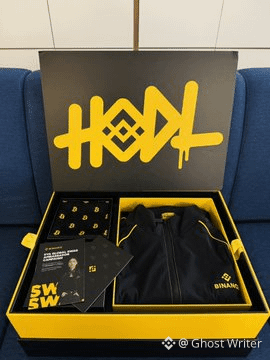
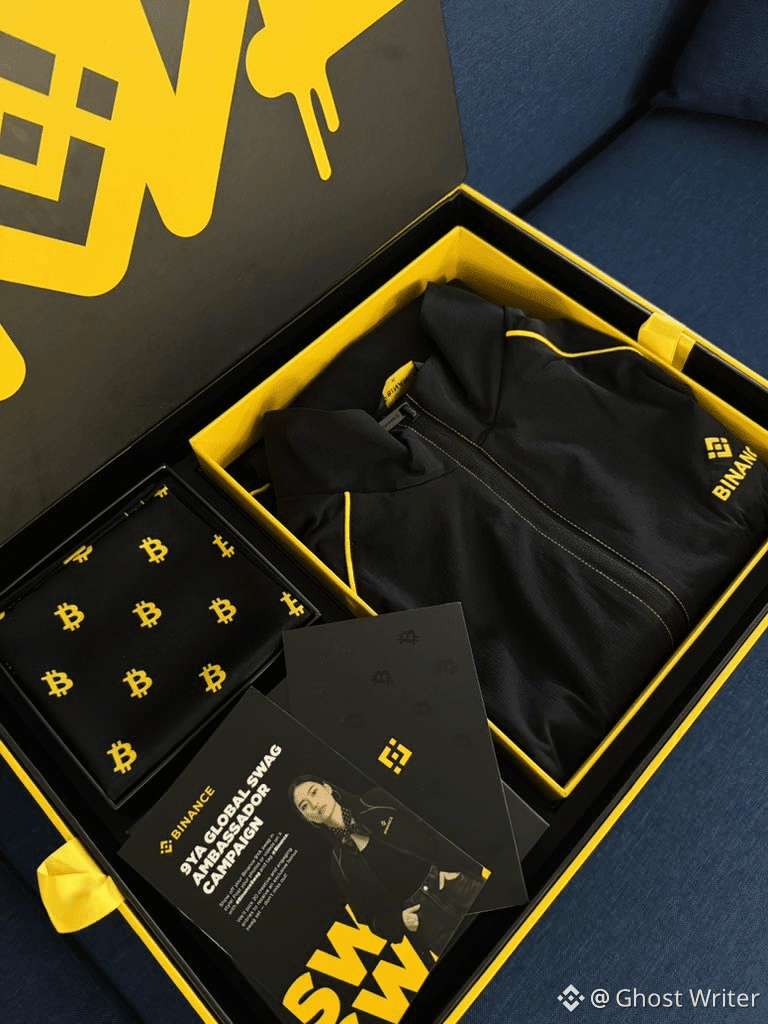
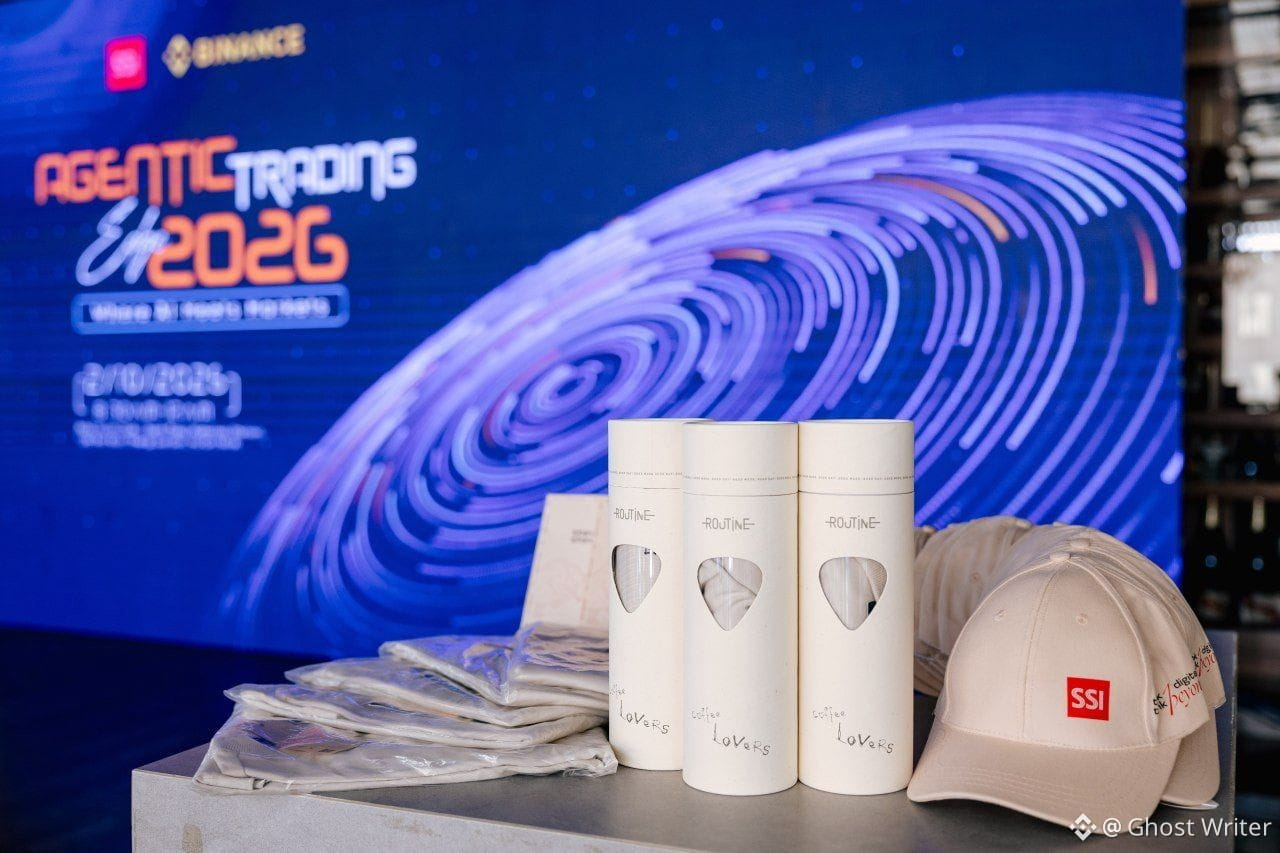
素敵な9YAスワッグボックス🎁をありがとう @Binance_Vietnam 、@Binance_Square_Official
Squareで引き続き構築すれば、たくさんの人を集められます
#GiftBoxes #crypto
素敵な9YAスワッグボックス🎁をありがとう @Binance Vietnam 、@Binance Square Official
Squareで引き続き構築すれば、たくさんの人を集められます
#GiftBoxes #crypto
Squareで引き続き構築すれば、たくさんの人を集められます
#GiftBoxes #crypto
38
4
108
31.3k
·
--
ブリッシュ
本人確認中
$ADA が急騰しているのはなぜ?
🔹日本への展開:カルダノ財団がPacific Metaと連携し、日本での企業導入を促進。
🔹$NIGHT ブースト:プライバシーチェーンのローンチとエアドロップで期待感が高まる。
📈反発:重要な0.24ドルのサポートを起点に、出来高とRSIが力強い勢いを見せる。
{future}(ADAUSDT)
{future}(NIGHTUSDT)
$ADA が急騰しているのはなぜ?
🔹日本への展開:カルダノ財団がPacific Metaと連携し、日本での企業導入を促進。
🔹$NIGHT ブースト:プライバシーチェーンのローンチとエアドロップで期待感が高まる。
📈反発:重要な0.24ドルのサポートを起点に、出来高とRSIが力強い勢いを見せる。
🔹日本への展開:カルダノ財団がPacific Metaと連携し、日本での企業導入を促進。
🔹$NIGHT ブースト:プライバシーチェーンのローンチとエアドロップで期待感が高まる。
📈反発:重要な0.24ドルのサポートを起点に、出来高とRSIが力強い勢いを見せる。
1
572
·
--
ブリッシュ
@Binance_Square_Official 私が思い描いているのは、より賢い「Buy」ボタンではありません。
仕事の後、Binance Agent OSを使って小さなトレーディングデスクを運営しています。
Binance Intelligenceには、板情報や保有資産、株価の終値を読み取り、見送るべきだと教えてくれるインターンのような存在になってほしい。昨日、その判断のおかげで、1時間足の出来高が低迷している中でBNBをロングするのを避けられました。
#BinanceLaunchesBinanceIntelligence
@Binance Square Official 私が思い描いているのは、より賢い「Buy」ボタンではありません。
仕事の後、Binance Agent OSを使って小さなトレーディングデスクを運営しています。
Binance Intelligenceには、板情報や保有資産、株価の終値を読み取り、見送るべきだと教えてくれるインターンのような存在になってほしい。昨日、その判断のおかげで、1時間足の出来高が低迷している中でBNBをロングするのを避けられました。
#BinanceLaunchesBinanceIntelligence
仕事の後、Binance Agent OSを使って小さなトレーディングデスクを運営しています。
Binance Intelligenceには、板情報や保有資産、株価の終値を読み取り、見送るべきだと教えてくれるインターンのような存在になってほしい。昨日、その判断のおかげで、1時間足の出来高が低迷している中でBNBをロングするのを避けられました。
#BinanceLaunchesBinanceIntelligence


Binance Square Official
·
--
金融のあらゆる領域に新たな知性の層を。
Binance Intelligenceのローンチ・ライブ配信に参加して、私たちが構築してきたものをいち早くご覧ください。
🗓 10月5日 | 12:00(UTC)
📍 Binance Square 公式
この投稿をリポストし、<t-2/> @Binance Square Official をタグ付けして、Binance Intelligenceに対するあなたのビジョンを共有してください。20 USDCの報酬を獲得するチャンスとして、選考で5名の方が選ばれます。
Binance Intelligenceのローンチ・ライブ配信に参加して、私たちが構築してきたものをいち早くご覧ください。
🗓 10月5日 | 12:00(UTC)
📍 Binance Square 公式
この投稿をリポストし、<t-2/> @Binance Square Official をタグ付けして、Binance Intelligenceに対するあなたのビジョンを共有してください。20 USDCの報酬を獲得するチャンスとして、選考で5名の方が選ばれます。
9
7.8k
·
--
ブリッシュ
本人確認中
⚡️速報:Strategyが2,870万ドル相当のビットコインを購入し、「Uptober(アップトーバー)」をスタート。平均価格85,839ドルで334 $BTC を追加。
今回の購入により、Strategyの保有量は合計848,000 BTCとなり、取得額は約639億7,000万ドルに。
前回の2回の購入期間は9月に実施
+ 950 BTC、7,570万ドル相当
+ 1,665 BTC、1億4,270万ドル相当
今回の購入資金は、MSTR株の売却による1,570万ドルと現金1,300万ドル。
3回連続で購入を報告しており、Strategyは引き続き積み増しモードにある。
#BitcoinSpotETFsDraw$6.34BInflowsInQ3
#BitcoinRejectedAt$87K
⚡️速報:Strategyが2,870万ドル相当のビットコインを購入し、「Uptober(アップトーバー)」をスタート。平均価格85,839ドルで334 $BTC を追加。
今回の購入により、Strategyの保有量は合計848,000 BTCとなり、取得額は約639億7,000万ドルに。
前回の2回の購入期間は9月に実施
+ 950 BTC、7,570万ドル相当
+ 1,665 BTC、1億4,270万ドル相当
今回の購入資金は、MSTR株の売却による1,570万ドルと現金1,300万ドル。
3回連続で購入を報告しており、Strategyは引き続き積み増しモードにある。
#BitcoinSpotETFsDraw$6.34BInflowsInQ3
#BitcoinRejectedAt$87K
今回の購入により、Strategyの保有量は合計848,000 BTCとなり、取得額は約639億7,000万ドルに。
前回の2回の購入期間は9月に実施
+ 950 BTC、7,570万ドル相当
+ 1,665 BTC、1億4,270万ドル相当
今回の購入資金は、MSTR株の売却による1,570万ドルと現金1,300万ドル。
3回連続で購入を報告しており、Strategyは引き続き積み増しモードにある。
#BitcoinSpotETFsDraw$6.34BInflowsInQ3
#BitcoinRejectedAt$87K
1
4
1k
·
--
ブリッシュ
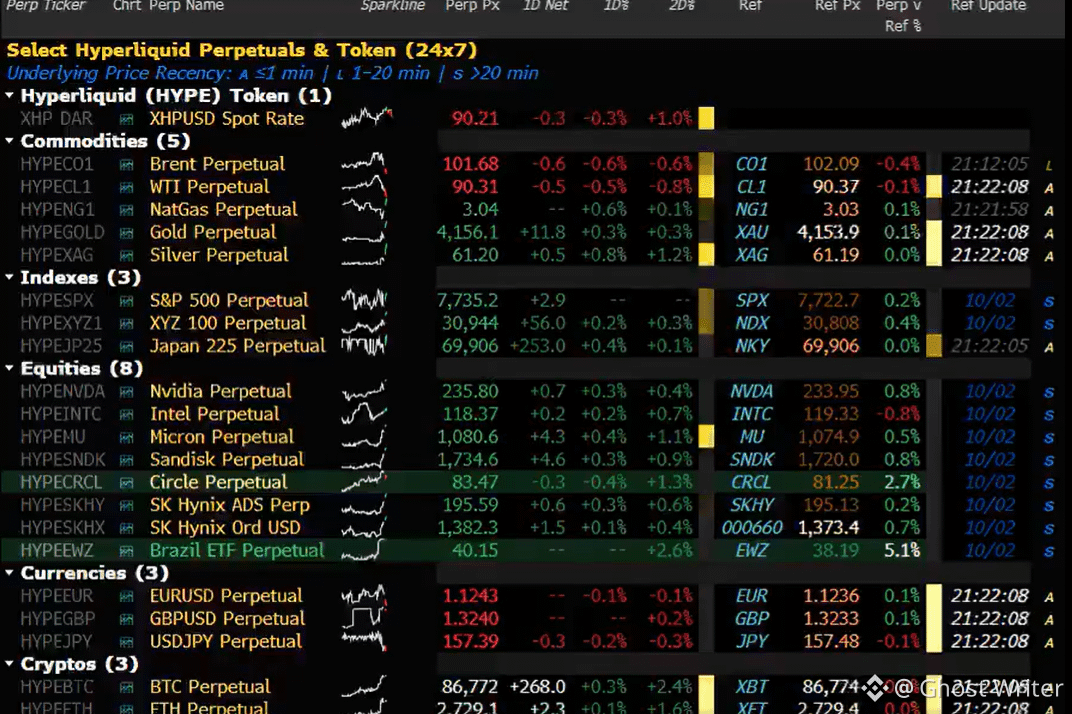
🚨重大:Hyperliquidの無期限先物$HYPE がBloomberg Terminalで利用可能に。
Terminalに、Hyperliquidの24時間365日取引可能な無期限先物のリアルタイムデータが表示されるようになりました。対象には原油、金、S&P 500、半導体メーカーが含まれます。
トランプ大統領が、CFTCはHyperliquidを米国に導入するために取り組んでいると述べたことを受けたものです。
HYPEを100ドルへ 🚀
{spot}(HYPEUSDT)
{future}(HYPEUSDT)
#hype #Hyperliquid #SECHaltsCryptoETFReviewsAmidFundingLapse
🚨重大:Hyperliquidの無期限先物$HYPE がBloomberg Terminalで利用可能に。
Terminalに、Hyperliquidの24時間365日取引可能な無期限先物のリアルタイムデータが表示されるようになりました。対象には原油、金、S&P 500、半導体メーカーが含まれます。
トランプ大統領が、CFTCはHyperliquidを米国に導入するために取り組んでいると述べたことを受けたものです。
HYPEを100ドルへ 🚀
#hype #Hyperliquid #SECHaltsCryptoETFReviewsAmidFundingLapse
Terminalに、Hyperliquidの24時間365日取引可能な無期限先物のリアルタイムデータが表示されるようになりました。対象には原油、金、S&P 500、半導体メーカーが含まれます。
トランプ大統領が、CFTCはHyperliquidを米国に導入するために取り組んでいると述べたことを受けたものです。
HYPEを100ドルへ 🚀
#hype #Hyperliquid #SECHaltsCryptoETFReviewsAmidFundingLapse
2
1.1k
·
--
ブリッシュ
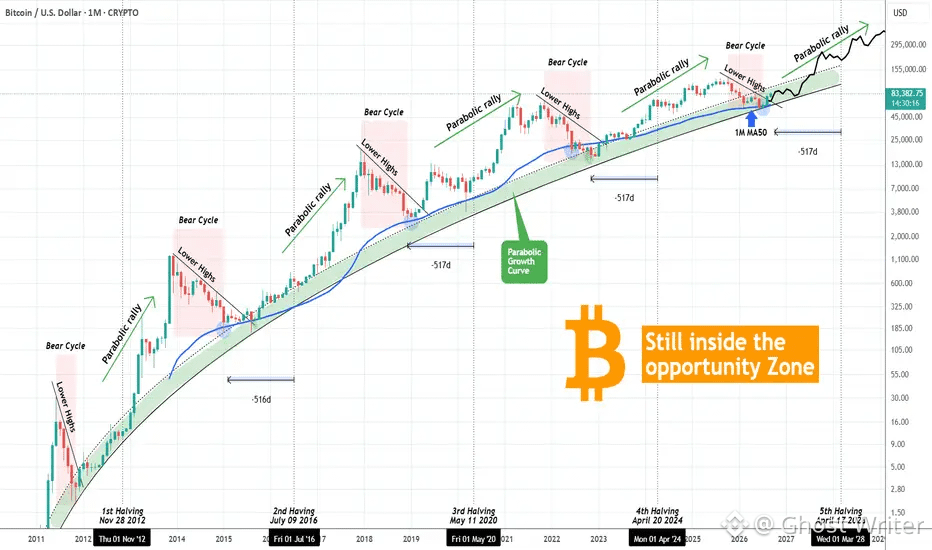
ビットコイン - これから買いのチャンスがたくさん 🤑
ビットコイン(BTCUSD)は、その放物線的な値動きでよく知られています。しかし近年のサイクルでは、資産の時価総額が必然的に拡大するため、リターンの逓減が一般的となり、こうした値動きも落ち着いてきました。
これまでのすべてのサイクルにおいて、BTCは平均して、放物線成長曲線(PGC)の中で最も多くの買いのチャンスをもたらしてきました。これは過去10年間、何度もお話ししてきた概念であり、大きな効果が実証されています。
現在もBTCはPGCの範囲内にあります。4回の強気サイクルのうち3回(唯一の例外は2019~2021年)を踏まえると、新たなサイクルトップを形成する放物線ラリー局面が訪れるまで、サイクルのかなり長い期間、この範囲にとどまる可能性があります。
これは、相場がこの初期の上昇トレンドを比較的ゆっくり進み、この買いのチャンスゾーンの中で私の買いシグナルが示される可能性が高いことを意味します。さらに、まもなく「半減期まで517日」の効果が始まります。これも長年にわたってお話ししてきた「標準的な」パターンで、このタイミングではBTCはすでに買いシグナルを示しています。
#BitcoinSpotETFsDraw$6.34BInflowsInQ3
#BitcoinRejectedAt$87K
#BTC
ビットコイン - これから買いのチャンスがたくさん 🤑
ビットコイン(BTCUSD)は、その放物線的な値動きでよく知られています。しかし近年のサイクルでは、資産の時価総額が必然的に拡大するため、リターンの逓減が一般的となり、こうした値動きも落ち着いてきました。
これまでのすべてのサイクルにおいて、BTCは平均して、放物線成長曲線(PGC)の中で最も多くの買いのチャンスをもたらしてきました。これは過去10年間、何度もお話ししてきた概念であり、大きな効果が実証されています。
現在もBTCはPGCの範囲内にあります。4回の強気サイクルのうち3回(唯一の例外は2019~2021年)を踏まえると、新たなサイクルトップを形成する放物線ラリー局面が訪れるまで、サイクルのかなり長い期間、この範囲にとどまる可能性があります。
これは、相場がこの初期の上昇トレンドを比較的ゆっくり進み、この買いのチャンスゾーンの中で私の買いシグナルが示される可能性が高いことを意味します。さらに、まもなく「半減期まで517日」の効果が始まります。これも長年にわたってお話ししてきた「標準的な」パターンで、このタイミングではBTCはすでに買いシグナルを示しています。
#BitcoinSpotETFsDraw$6.34BInflowsInQ3
#BitcoinRejectedAt$87K
#BTC
ビットコイン(BTCUSD)は、その放物線的な値動きでよく知られています。しかし近年のサイクルでは、資産の時価総額が必然的に拡大するため、リターンの逓減が一般的となり、こうした値動きも落ち着いてきました。
これまでのすべてのサイクルにおいて、BTCは平均して、放物線成長曲線(PGC)の中で最も多くの買いのチャンスをもたらしてきました。これは過去10年間、何度もお話ししてきた概念であり、大きな効果が実証されています。
現在もBTCはPGCの範囲内にあります。4回の強気サイクルのうち3回(唯一の例外は2019~2021年)を踏まえると、新たなサイクルトップを形成する放物線ラリー局面が訪れるまで、サイクルのかなり長い期間、この範囲にとどまる可能性があります。
これは、相場がこの初期の上昇トレンドを比較的ゆっくり進み、この買いのチャンスゾーンの中で私の買いシグナルが示される可能性が高いことを意味します。さらに、まもなく「半減期まで517日」の効果が始まります。これも長年にわたってお話ししてきた「標準的な」パターンで、このタイミングではBTCはすでに買いシグナルを示しています。
#BitcoinSpotETFsDraw$6.34BInflowsInQ3
#BitcoinRejectedAt$87K
#BTC
2
2.7k
·
--
ブリッシュ
本人確認中
Vì một điều mình ngày càng đánh giá cao ở @Binance_Vietnam : họ không chỉ xây sản phẩm cho thị trường crypto, mà đang chủ động góp phần đưa kiến thức và công nghệ blockchain đến gần hơn với thị trường tài chính Việt Nam 🇻🇳
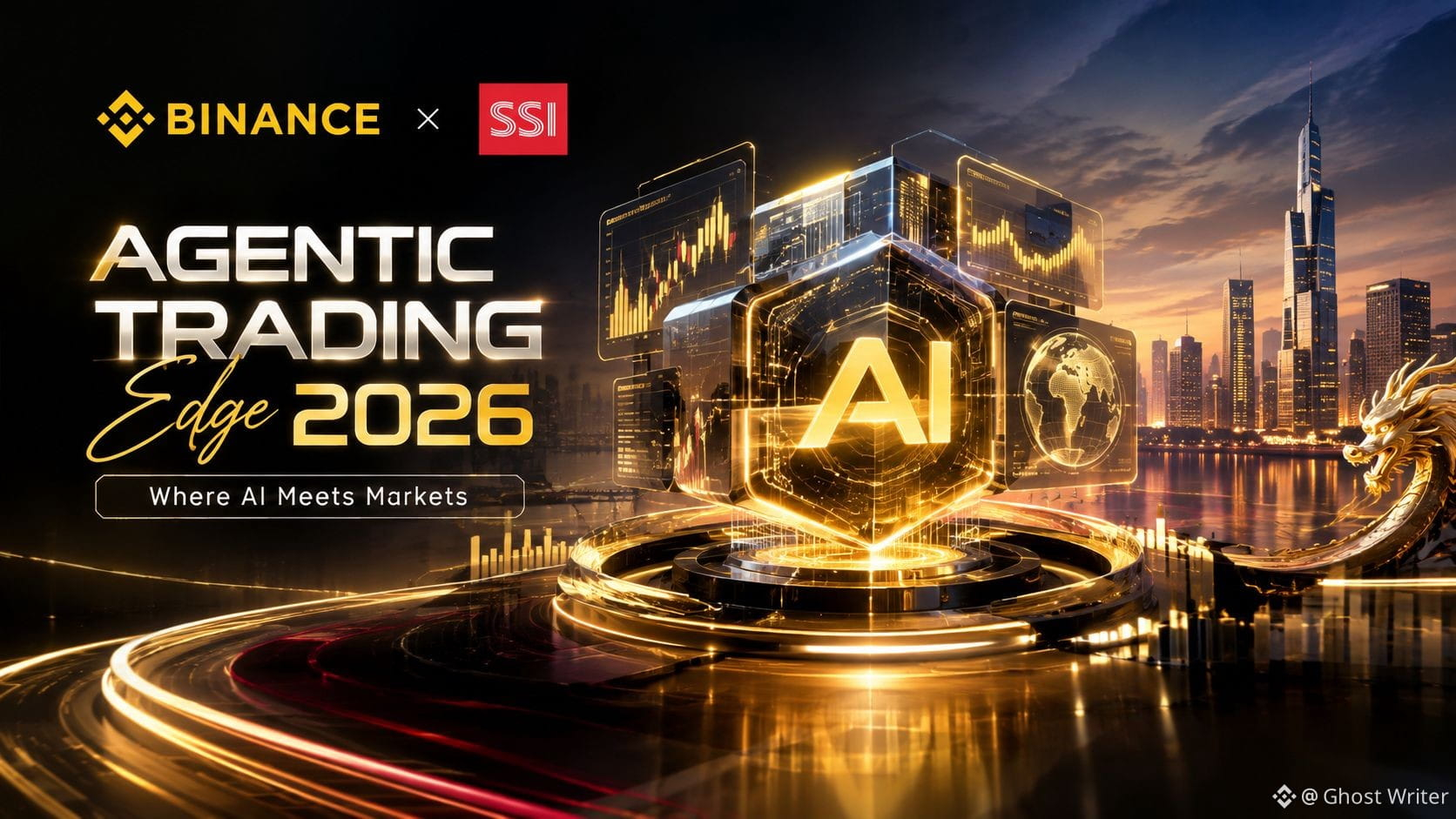
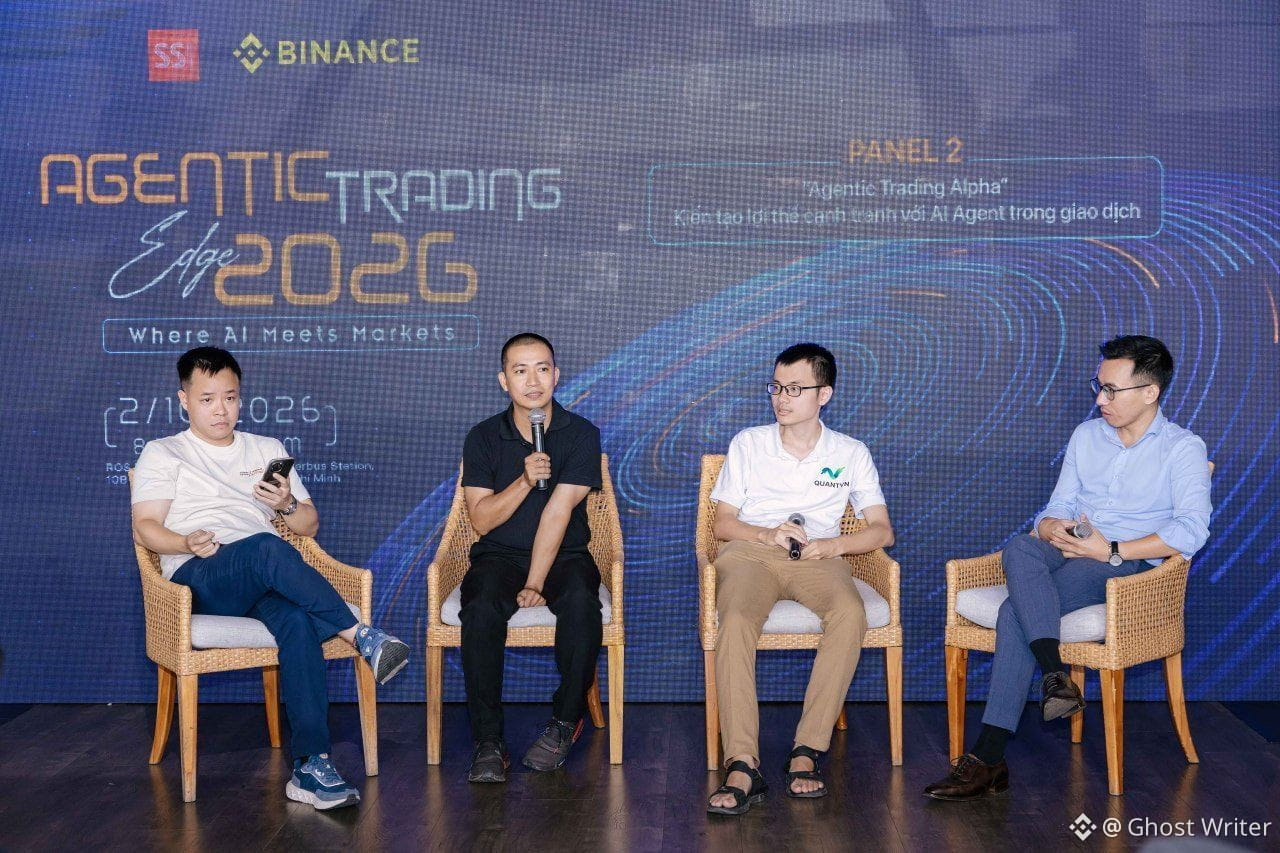
Vừa「Agentic Trading Edge 2026 – “Where AI Meets Markets”」に参加したばかりで、自分はBinanceがSSIと(2回目となる)形で引き続き歩みを共にし、伝統的な金融、デジタル資産、そしてAIエージェントを結びつけている点に感銘を受けました。
特にBinance Agent OS Showcaseが気になりました。AIが「質問に答える」だけでなく、Agent OSは、ユーザーがコントロールできる権限を通じて、AIを市場データ、取引、ウォレット、そして金融の各種能力と接続することを目指しています。
自分にとって、こうしたイベントの最大の価値は、$BNB のような技術デモにあるのではありません。
新しい知識が、正しいコミュニティ、正しい文脈の中に届けられ、さらにSSIのようなトップクラスの金融機関とつながりが生まれることにあります。
もしブロックチェーンが新しいインフラなら、今日のような対話は、ベトナムがそのインフラを作り、活用し、そして主導権を握る方法を学ぶプロセスなのだと思います。
#Binance #Vietnam #VietnamPilotsCryptoAssetMarket
Vì một điều mình ngày càng đánh giá cao ở @Binance Vietnam : họ không chỉ xây sản phẩm cho thị trường crypto, mà đang chủ động góp phần đưa kiến thức và công nghệ blockchain đến gần hơn với thị trường tài chính Việt Nam 🇻🇳
Vừa「Agentic Trading Edge 2026 – “Where AI Meets Markets”」に参加したばかりで、自分はBinanceがSSIと(2回目となる)形で引き続き歩みを共にし、伝統的な金融、デジタル資産、そしてAIエージェントを結びつけている点に感銘を受けました。
特にBinance Agent OS Showcaseが気になりました。AIが「質問に答える」だけでなく、Agent OSは、ユーザーがコントロールできる権限を通じて、AIを市場データ、取引、ウォレット、そして金融の各種能力と接続することを目指しています。
自分にとって、こうしたイベントの最大の価値は、$BNB のような技術デモにあるのではありません。
新しい知識が、正しいコミュニティ、正しい文脈の中に届けられ、さらにSSIのようなトップクラスの金融機関とつながりが生まれることにあります。
もしブロックチェーンが新しいインフラなら、今日のような対話は、ベトナムがそのインフラを作り、活用し、そして主導権を握る方法を学ぶプロセスなのだと思います。
#Binance #Vietnam #VietnamPilotsCryptoAssetMarket
Vừa「Agentic Trading Edge 2026 – “Where AI Meets Markets”」に参加したばかりで、自分はBinanceがSSIと(2回目となる)形で引き続き歩みを共にし、伝統的な金融、デジタル資産、そしてAIエージェントを結びつけている点に感銘を受けました。
特にBinance Agent OS Showcaseが気になりました。AIが「質問に答える」だけでなく、Agent OSは、ユーザーがコントロールできる権限を通じて、AIを市場データ、取引、ウォレット、そして金融の各種能力と接続することを目指しています。
自分にとって、こうしたイベントの最大の価値は、$BNB のような技術デモにあるのではありません。
新しい知識が、正しいコミュニティ、正しい文脈の中に届けられ、さらにSSIのようなトップクラスの金融機関とつながりが生まれることにあります。
もしブロックチェーンが新しいインフラなら、今日のような対話は、ベトナムがそのインフラを作り、活用し、そして主導権を握る方法を学ぶプロセスなのだと思います。
#Binance #Vietnam #VietnamPilotsCryptoAssetMarket
7
4
4.2k
·
--
ブリッシュ
💧 $SUI : ベースから新たな高値へ & 私の6ドルのロードマップ
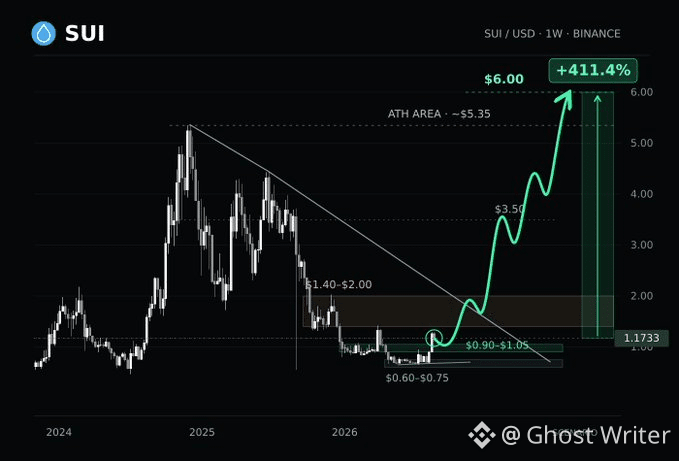
Suiは$0.60〜$0.75の領域から反発しました。強気シナリオでは、まず直近の高値への回帰、次に$6に向けた拡張を目標にしています。
最初のテストは、押し目の際に買い手が$0.90〜$1.05を防衛できるかどうかです。
次に$1.40〜$2.00と、下降するレジスタンスのトレンドラインが来ます。それを取り戻せれば、$3.50の見通しが強まり、その次に$4.40です。
これらの水準をクリアした後で初めて、歴史的高値である約$5.35が視野に入ります。そこをブレイクしてリテストで維持できれば、$6が私の拡張ターゲットになります。
これはチャートの$1.1733価格に対しておよそ411.4%です。
$0.60を下回る週足の終値は、この強気セットアップを無効にします。次のターゲットを得るには、取り返すたびにそれ相応の根拠が必要です。
{spot}(SUIUSDT)
{future}(SUIUSDT)
#sui #SUI🔥
💧 $SUI : ベースから新たな高値へ & 私の6ドルのロードマップ
Suiは$0.60〜$0.75の領域から反発しました。強気シナリオでは、まず直近の高値への回帰、次に$6に向けた拡張を目標にしています。
最初のテストは、押し目の際に買い手が$0.90〜$1.05を防衛できるかどうかです。
次に$1.40〜$2.00と、下降するレジスタンスのトレンドラインが来ます。それを取り戻せれば、$3.50の見通しが強まり、その次に$4.40です。
これらの水準をクリアした後で初めて、歴史的高値である約$5.35が視野に入ります。そこをブレイクしてリテストで維持できれば、$6が私の拡張ターゲットになります。
これはチャートの$1.1733価格に対しておよそ411.4%です。
$0.60を下回る週足の終値は、この強気セットアップを無効にします。次のターゲットを得るには、取り返すたびにそれ相応の根拠が必要です。
#sui #SUI🔥
Suiは$0.60〜$0.75の領域から反発しました。強気シナリオでは、まず直近の高値への回帰、次に$6に向けた拡張を目標にしています。
最初のテストは、押し目の際に買い手が$0.90〜$1.05を防衛できるかどうかです。
次に$1.40〜$2.00と、下降するレジスタンスのトレンドラインが来ます。それを取り戻せれば、$3.50の見通しが強まり、その次に$4.40です。
これらの水準をクリアした後で初めて、歴史的高値である約$5.35が視野に入ります。そこをブレイクしてリテストで維持できれば、$6が私の拡張ターゲットになります。
これはチャートの$1.1733価格に対しておよそ411.4%です。
$0.60を下回る週足の終値は、この強気セットアップを無効にします。次のターゲットを得るには、取り返すたびにそれ相応の根拠が必要です。
#sui #SUI🔥
3
2
2.4k
·
--
ブリッシュ
本人確認中
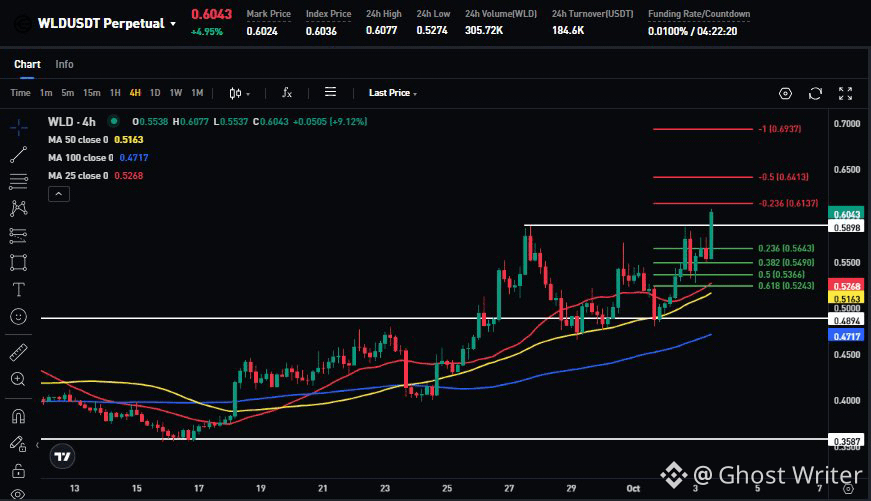
$WLD は稼働中 ⚡
この動きは、World が AI エージェント向けに「人間による証明」という物語の裏取りを推し進める中で出てきたもので、World ID は個人データを公開せずに、依頼が実在の人物によって開始されたことをサービスが確認できるよう設計されています。
AI エージェントの活動が拡大するにつれ、人間とボットの区別がますます重要になっています。
$0.58 を上回って推移するなら、次の主要なレジスタンス水準は $0.64 と $0.69 です。
{future}(WLDUSDT)
#wld #Fed10月利上げの確率低下は17%
$WLD は稼働中 ⚡
この動きは、World が AI エージェント向けに「人間による証明」という物語の裏取りを推し進める中で出てきたもので、World ID は個人データを公開せずに、依頼が実在の人物によって開始されたことをサービスが確認できるよう設計されています。
AI エージェントの活動が拡大するにつれ、人間とボットの区別がますます重要になっています。
$0.58 を上回って推移するなら、次の主要なレジスタンス水準は $0.64 と $0.69 です。
#wld #Fed10月利上げの確率低下は17%
この動きは、World が AI エージェント向けに「人間による証明」という物語の裏取りを推し進める中で出てきたもので、World ID は個人データを公開せずに、依頼が実在の人物によって開始されたことをサービスが確認できるよう設計されています。
AI エージェントの活動が拡大するにつれ、人間とボットの区別がますます重要になっています。
$0.58 を上回って推移するなら、次の主要なレジスタンス水準は $0.64 と $0.69 です。
#wld #Fed10月利上げの確率低下は17%
1
4
4.1k
·
--
ブリッシュ
$NEAR 1K USDT(30日間の取引)
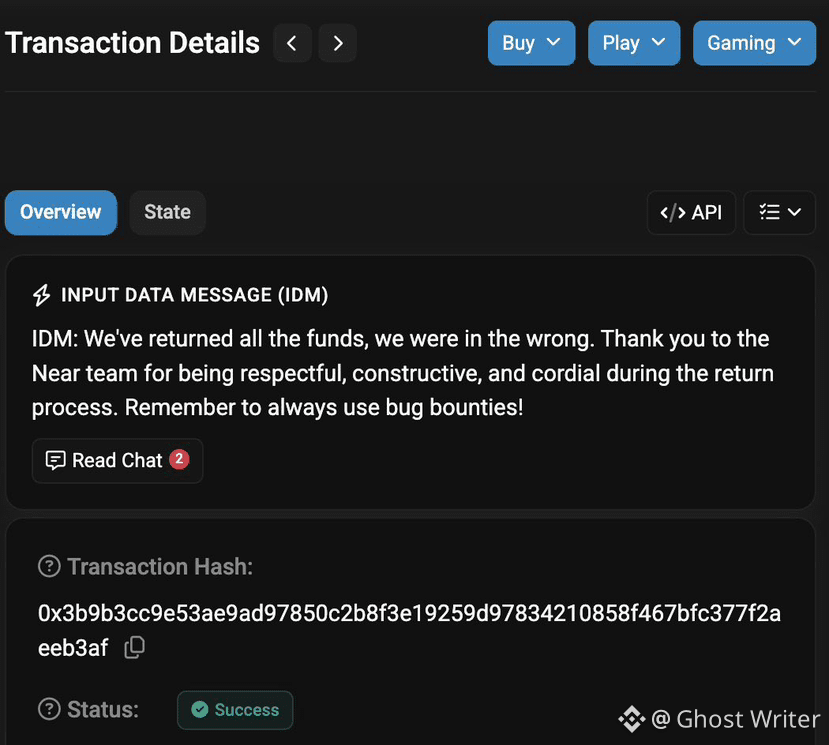
🚨最新情報: $NEAR 件の意図(Intents)で、3.8Mドルを盗んだハッカーが“全額”を返して戻ってきました。
NEARが疑わしい実行犯を公表し、資金の返還に48時間を与えたのは24時間も満たない時点で、攻撃者は3.8Mドルを全額送り返しました。
ハッカーはさらに、オンチェーン上に「自分は間違っていた」と認めるメッセージを残し、丁寧に返還対応してくれたチームに感謝し、NEARにはバグバウンティを使うよう促していました。
NEARは、完全な回収が完了したため、調査は現在停止していると述べています。
{future}(NEARUSDT)
#near
🚨最新情報: $NEAR 件の意図(Intents)で、3.8Mドルを盗んだハッカーが“全額”を返して戻ってきました。
NEARが疑わしい実行犯を公表し、資金の返還に48時間を与えたのは24時間も満たない時点で、攻撃者は3.8Mドルを全額送り返しました。
ハッカーはさらに、オンチェーン上に「自分は間違っていた」と認めるメッセージを残し、丁寧に返還対応してくれたチームに感謝し、NEARにはバグバウンティを使うよう促していました。
NEARは、完全な回収が完了したため、調査は現在停止していると述べています。
#near
NEARが疑わしい実行犯を公表し、資金の返還に48時間を与えたのは24時間も満たない時点で、攻撃者は3.8Mドルを全額送り返しました。
ハッカーはさらに、オンチェーン上に「自分は間違っていた」と認めるメッセージを残し、丁寧に返還対応してくれたチームに感謝し、NEARにはバグバウンティを使うよう促していました。
NEARは、完全な回収が完了したため、調査は現在停止していると述べています。
#near

2
1k
·
--
ブリッシュ
$NEAR 1K USDT(30日間の取引)
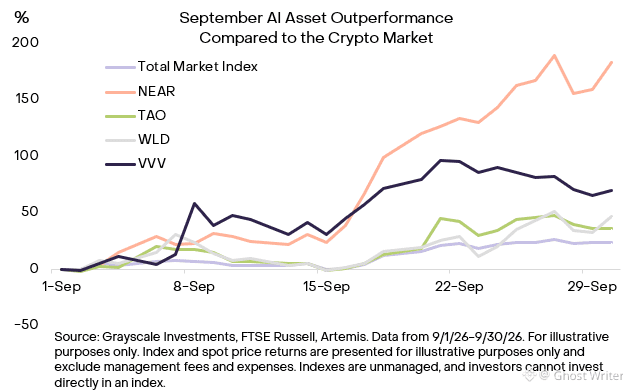
9月は暗号資産×人工知能(AI)に属していた:
$NEAR は 183% 上昇
$VVV は 70% 上昇
$WLD は 47% 上昇
$TAO は 37% 上昇
グレースケールの「人工知能」暗号資産セクターは当月、54%の上昇を記録し、より広い暗号資産市場の24%に対して上回った。この動きは、AIの潜在的な基盤(インフラ)としてブロックチェーンへの関心が高まっていることを反映している可能性がある。
{future}(NEARUSDT)
{future}(TAOUSDT)
{future}(WLDUSDT)
#SECProposesCryptoCustodyRules #wld #AI
9月は暗号資産×人工知能(AI)に属していた:
$NEAR は 183% 上昇
$VVV は 70% 上昇
$WLD は 47% 上昇
$TAO は 37% 上昇
グレースケールの「人工知能」暗号資産セクターは当月、54%の上昇を記録し、より広い暗号資産市場の24%に対して上回った。この動きは、AIの潜在的な基盤(インフラ)としてブロックチェーンへの関心が高まっていることを反映している可能性がある。
#SECProposesCryptoCustodyRules #wld #AI
$NEAR は 183% 上昇
$VVV は 70% 上昇
$WLD は 47% 上昇
$TAO は 37% 上昇
グレースケールの「人工知能」暗号資産セクターは当月、54%の上昇を記録し、より広い暗号資産市場の24%に対して上回った。この動きは、AIの潜在的な基盤(インフラ)としてブロックチェーンへの関心が高まっていることを反映している可能性がある。
#SECProposesCryptoCustodyRules #wld #AI
5
10
5.7k
·
--
ブリッシュ
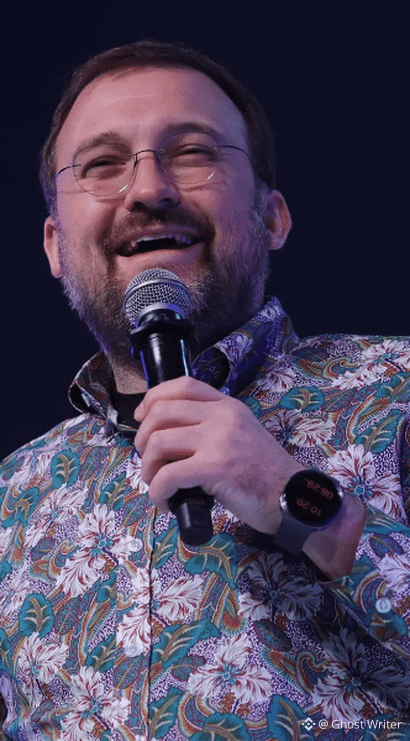
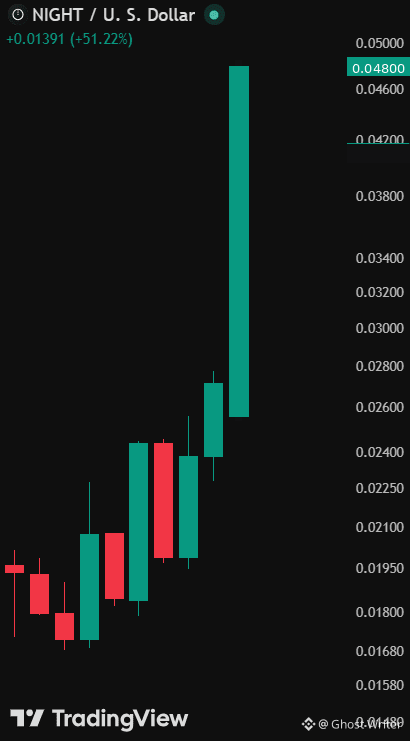
強気:チャールズ・ホスキンソンのカルダノのプライバシープロジェクト「ミッドナイト」{$NIGHT }は9月および10月初旬にかけて159%急騰した。
アルトシーズン。🚀 {$NIGHT }は次の{$ADA }
{future}(ADAUSDT)
{future}(NIGHTUSDT)
#night @Midnight Network
強気:チャールズ・ホスキンソンのカルダノのプライバシープロジェクト「ミッドナイト」{$NIGHT }は9月および10月初旬にかけて159%急騰した。
アルトシーズン。🚀 {$NIGHT }は次の{$ADA }
#night @Midnight Network
アルトシーズン。🚀 {$NIGHT }は次の{$ADA }
#night @Midnight Network
2
469
·
--
ブリッシュ
$XRP
私はこの質問を無駄にして聞いているわけではありません。
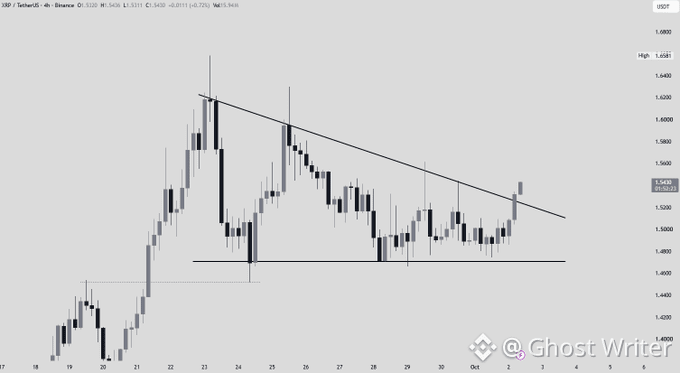
XRPは4時間足で下落トレンドを破りましたが、より重要なブレイクはまもなく起こりそうです。
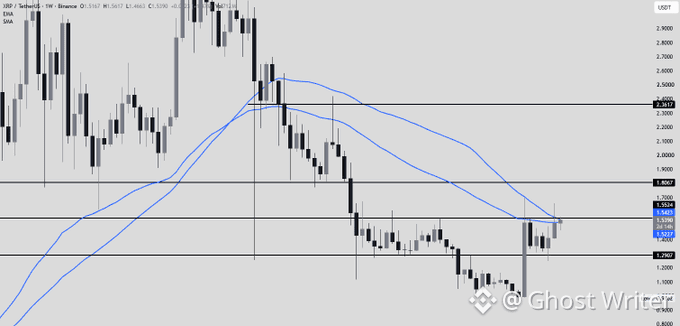
週足チャートでは、主要な抵抗レベルに到達し、50週移動平均の両方を試し始めています。
これらの水準を上回る週足終値が出れば、$XRPにとって非常に強い上昇の動きが引き起こされる可能性があります。
私の意見では、時期は近いです。
週足でのブレイクが起きた場合、次の目標:$1.80-$2.36 #XRPPostsFirstThreeGreenMonthsInQ3 #xrp
{spot}(XRPUSDT)
{future}(XRPUSDT)
$XRP
私はこの質問を無駄にして聞いているわけではありません。
XRPは4時間足で下落トレンドを破りましたが、より重要なブレイクはまもなく起こりそうです。
週足チャートでは、主要な抵抗レベルに到達し、50週移動平均の両方を試し始めています。
これらの水準を上回る週足終値が出れば、$XRP にとって非常に強い上昇の動きが引き起こされる可能性があります。
私の意見では、時期は近いです。
週足でのブレイクが起きた場合、次の目標:$1.80-$2.36 #XRPPostsFirstThreeGreenMonthsInQ3 #xrp
私はこの質問を無駄にして聞いているわけではありません。
XRPは4時間足で下落トレンドを破りましたが、より重要なブレイクはまもなく起こりそうです。
週足チャートでは、主要な抵抗レベルに到達し、50週移動平均の両方を試し始めています。
これらの水準を上回る週足終値が出れば、$XRP にとって非常に強い上昇の動きが引き起こされる可能性があります。
私の意見では、時期は近いです。
週足でのブレイクが起きた場合、次の目標:$1.80-$2.36 #XRPPostsFirstThreeGreenMonthsInQ3 #xrp
4
899
·
--
ブリッシュ
小さな積み重ねが大きなものになる 💵
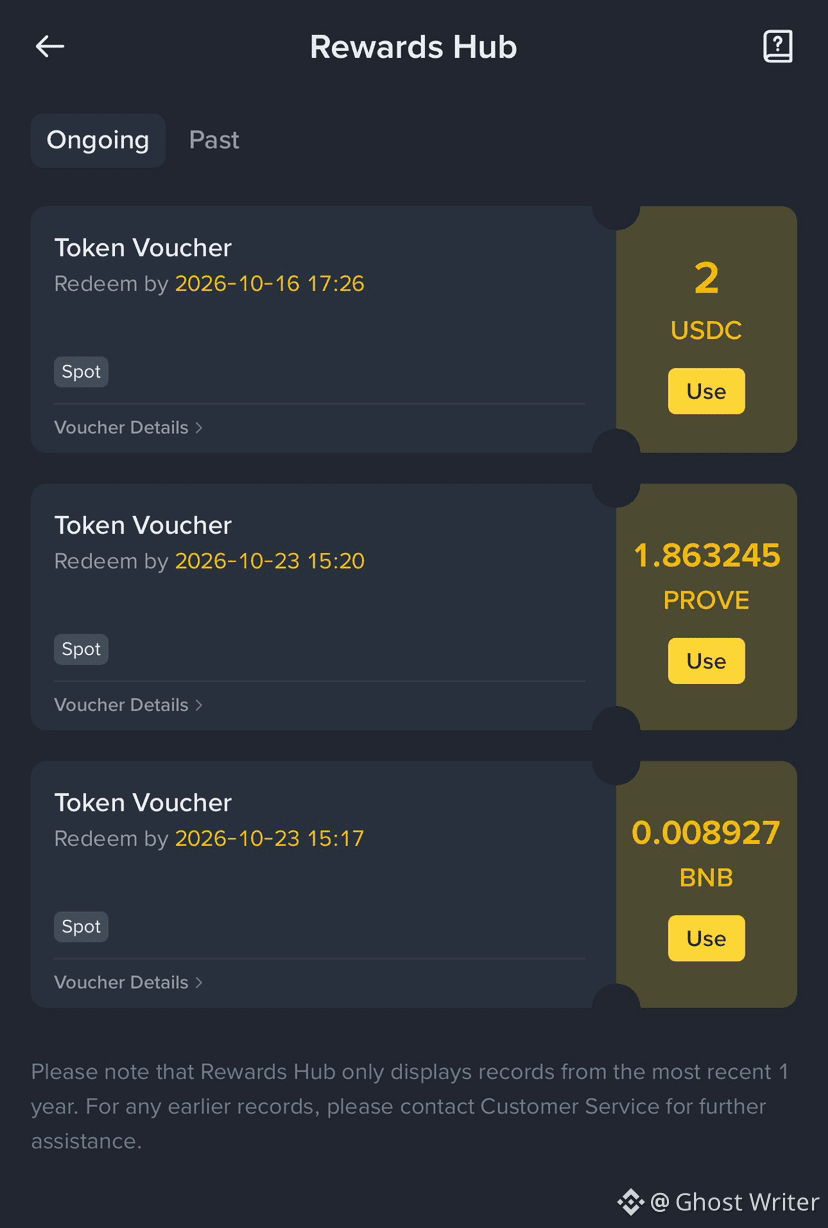
今日はBinanceからもう一枚バウチャーを受け取りました。金額は小さいですが、この分野への私の情熱を保つのに役立っています
$BNB
#NFPWatch #BNBChainTokenizedStocksTop$1BAt30%Share
小さな積み重ねが大きなものになる 💵
今日はBinanceからもう一枚バウチャーを受け取りました。金額は小さいですが、この分野への私の情熱を保つのに役立っています
$BNB
#NFPWatch #BNBChainTokenizedStocksTop$1BAt30%Share
今日はBinanceからもう一枚バウチャーを受け取りました。金額は小さいですが、この分野への私の情熱を保つのに役立っています
$BNB
#NFPWatch #BNBChainTokenizedStocksTop$1BAt30%Share
2
504
·
--
ブリッシュ
$DEXE スポット分析 ✅
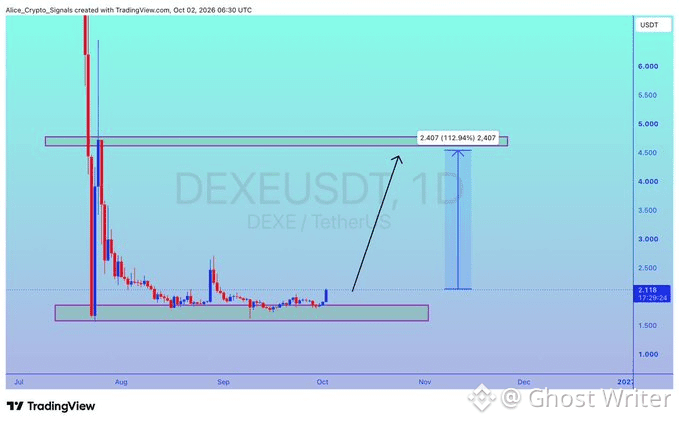
大きな下落(コレクション)の後、$1.60〜$2.10 を反転の可能性があるゾーンとして監視しています。👀
$DEXE が強さを見せ、このレンジからの反転を確認するなら、長期目標エリアとして $3〜$4 を見ています。📈🚀
DEXEは以前、約$48から$1.20へと下落しているので、これは高ボラティリティで高リスクなセットアップです。⚠️
どちらの方向にも急な値動きが起こり得るので、リスク管理をしてください。
{spot}(DEXEUSDT)
{future}(DEXEUSDT)
#dexe #TrendingTopic
$DEXE スポット分析 ✅
大きな下落(コレクション)の後、$1.60〜$2.10 を反転の可能性があるゾーンとして監視しています。👀
$DEXE が強さを見せ、このレンジからの反転を確認するなら、長期目標エリアとして $3〜$4 を見ています。📈🚀
DEXEは以前、約$48から$1.20へと下落しているので、これは高ボラティリティで高リスクなセットアップです。⚠️
どちらの方向にも急な値動きが起こり得るので、リスク管理をしてください。
#dexe #TrendingTopic
大きな下落(コレクション)の後、$1.60〜$2.10 を反転の可能性があるゾーンとして監視しています。👀
$DEXE が強さを見せ、このレンジからの反転を確認するなら、長期目標エリアとして $3〜$4 を見ています。📈🚀
DEXEは以前、約$48から$1.20へと下落しているので、これは高ボラティリティで高リスクなセットアップです。⚠️
どちらの方向にも急な値動きが起こり得るので、リスク管理をしてください。
#dexe #TrendingTopic
1
389
·
--
ブリッシュ
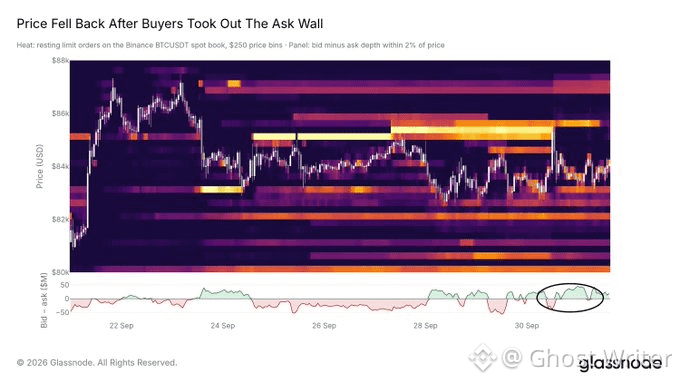
🚨新着:$BTC 人のバイヤーが約1週間の試行の末に85Kの売り壁を突破し、上方にはより薄い抵抗しか残っていないため、価格がより速く上昇する可能性がある、と@Glassnode が伝えました
🚨新着:$BTC 人のバイヤーが約1週間の試行の末に85Kの売り壁を突破し、上方にはより薄い抵抗しか残っていないため、価格がより速く上昇する可能性がある、と@Glassnode が伝えました
339
·
--
ブリッシュ
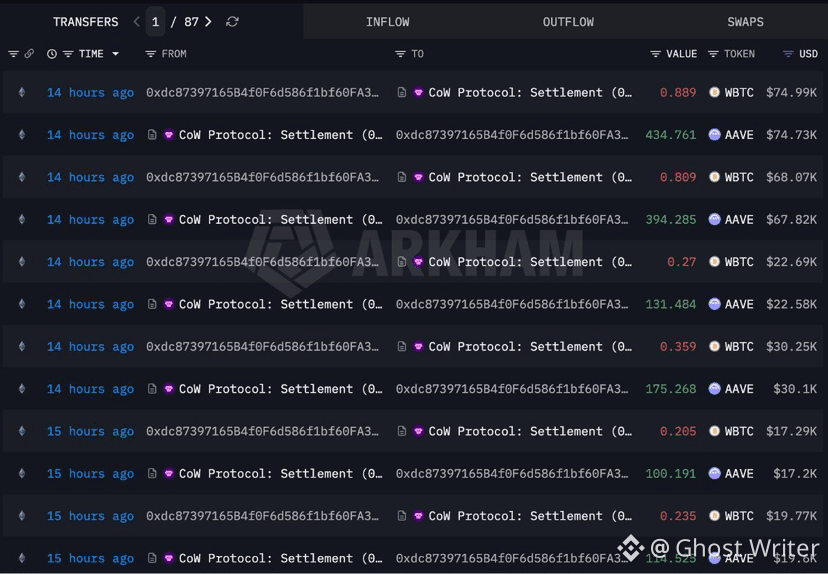
$AAVE 🐋 WHALE WATCH :SMART MONEY ROTATION ALERT
クジラが公式に$AAVEを買っています。
ちょうど、50.95 $WBTC ($4.26M)を25502 $AAVE に今日交換している2つの巨大ウォレットを捕捉しました。
この規模で、流動性クラスターがビットコインからブルーチップDeFiへ移っていくのを見ると注意せざるを得ません。
機関投資家のオーダーフローがはっきりと語っています。次の上昇局面に備えられていますか?
{future}(AAVEUSDT)
#NEARFallsToAround$4.70Down14% #crypto
$AAVE 🐋 WHALE WATCH :SMART MONEY ROTATION ALERT
クジラが公式に$AAVE を買っています。
ちょうど、50.95 $WBTC ($4.26M)を25502 $AAVE に今日交換している2つの巨大ウォレットを捕捉しました。
この規模で、流動性クラスターがビットコインからブルーチップDeFiへ移っていくのを見ると注意せざるを得ません。
機関投資家のオーダーフローがはっきりと語っています。次の上昇局面に備えられていますか?
#NEARFallsToAround$4.70Down14% #crypto
クジラが公式に$AAVE を買っています。
ちょうど、50.95 $WBTC ($4.26M)を25502 $AAVE に今日交換している2つの巨大ウォレットを捕捉しました。
この規模で、流動性クラスターがビットコインからブルーチップDeFiへ移っていくのを見ると注意せざるを得ません。
機関投資家のオーダーフローがはっきりと語っています。次の上昇局面に備えられていますか?
#NEARFallsToAround$4.70Down14% #crypto
1
516
·
--
ブリッシュ
あなたが選べるのは「1つだけ」です:
今日、現金で $1,000,000
それか
仮想通貨について知っていることをすべて持って、銀行口座に $10,000 ある状態で2011年に戻る
• 私をフォロー @GhostWriter
• 下の👇🏼で「Bitcoin」を投票してコメントしてください
あなたが選べるのは「1つだけ」です:
今日、現金で $1,000,000
それか
仮想通貨について知っていることをすべて持って、銀行口座に $10,000 ある状態で2011年に戻る
• 私をフォロー @Ghost Writer
• 下の👇🏼で「Bitcoin」を投票してコメントしてください
今日、現金で $1,000,000
それか
仮想通貨について知っていることをすべて持って、銀行口座に $10,000 ある状態で2011年に戻る
• 私をフォロー @Ghost Writer
• 下の👇🏼で「Bitcoin」を投票してコメントしてください
$1,000,000 today
Go back to 2011
2 残り日数
2.9k
7
133
2.9k
ログインして、さらにコンテンツを読む
厳選トピックで世界の暗号資産トレーダーの仲間入り
⚡️ 暗号資産に関する最新かつ有益な情報が見つかります。
💬 世界最大の暗号資産取引所から信頼されています。
👍 認証を受けたクリエイターから、有益なインサイトを得られます。
メール / 電話番号