
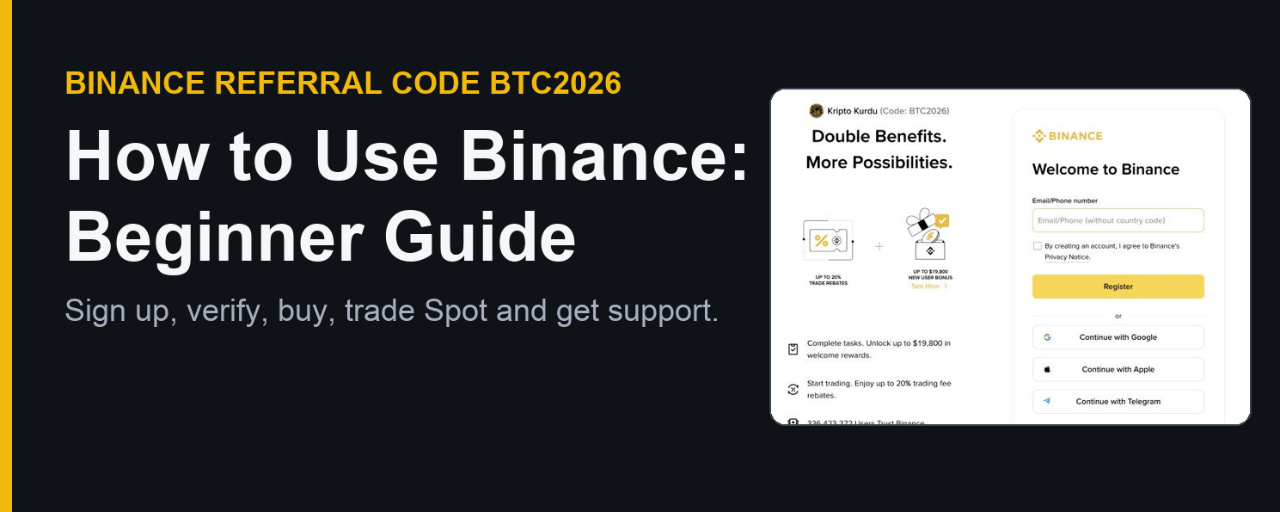

New to Binance and not sure where to start? Binance's own help center answers this in its Beginner's Guide with four steps: register, verify your identity, buy or deposit crypto, and start trading. This guide walks through each step on the real Binance pages, shows where to click, and explains how the Binance referral code BTC2026 fits in. Every screen below was checked on Nov 12, 2026.
How to use Binance: the 4 steps at a glance
Step 1: Register an account (with the BTC2026 link if you want the referral benefits).
Step 2: Complete identity verification (KYC).
Step 3: Buy crypto or deposit crypto you already own.
Step 4: Start trading on Spot.
Bonus: Know how to reach Binance Support before you need it.
Step 1: How to register on Binance with referral code BTC2026
Binance lets you register on the website or the app with an email address, a phone number, or an Apple or Google account. To attach the referral code, start from the Binance referral code BTC2026 sign-up link instead of the plain Binance homepage.
(1) Check the line at the top left. It shows the referrer name and (Code: BTC2026). If it is there, the code is attached to this sign-up.
(2) Type your email or phone number (without the country code) and tick the box to accept the Privacy Notice.
(3) Press Register and follow the verification code Binance sends you. Or use Continue with Google or Apple below it.
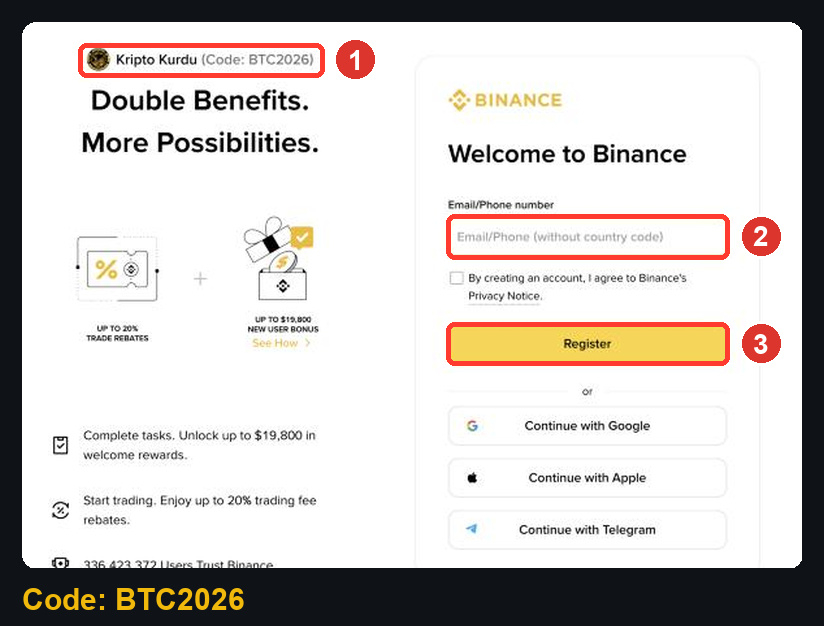
The same page lists what the code is linked to: up to 20% trade rebates on qualifying Spot trading fees, and up to $19,800 in welcome rewards unlocked by completing tasks. Welcome rewards are separate from the code and depend on your region and eligibility.
Step 2: How to complete identity verification on Binance
Binance's guide says verification unlocks your deposit, withdrawal and trading limits and usually takes a few minutes. Have these ready before you start:
Your basic information: legal name, date of birth and address.
A valid ID document.
A device with a camera for the facial verification step.
In the web account menu you will find it under Account > Identification. While you are there, Binance recommends turning on at least one two-factor verification (2FA) method in Security.
Step 3: How to buy crypto on Binance
Binance's buy guide lists three main ways to buy: bank transfer, credit or debit card, and P2P trading. It supports more than 70 fiat currencies, but the payment methods you see depend on the region of your identity verification. Binance also asks that you finish verification before buying.
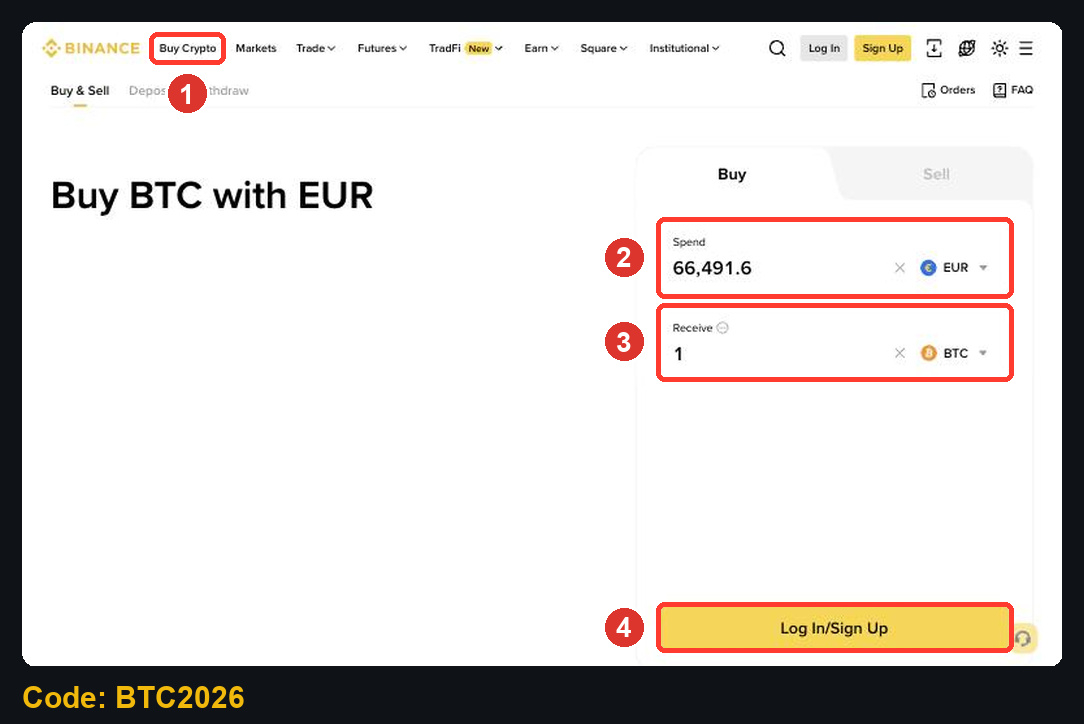
(1) Open Buy Crypto in the top menu.
(2) In Spend, choose your currency and type the amount.
(3) In Receive, choose the coin. The page shows how much you get.
(4) Log in and continue to pick a payment method and confirm.
Already hold crypto in another wallet? You can deposit it instead of buying. Always pick the same network on both sides of a transfer.
Can I buy the same amount every week?
Yes. The buy guide includes a Recurring Buy option for scheduled purchases. Each purchase is a separate transaction with its own cost.
Step 4: How to place your first Spot order on Binance
Open Trade > Spot and search for a pair such as BTC/USDT. The order form sits under the chart, with Buy on the left and Sell on the right.
(1) Choose the order type. Market fills right away at the best available price; Limit waits for the price you set.
(2) For a market buy, type how much USDT to spend in Total. The minimum shown here was 5 USDT.
(3) Press the green buy button (it reads Log In until you sign in).
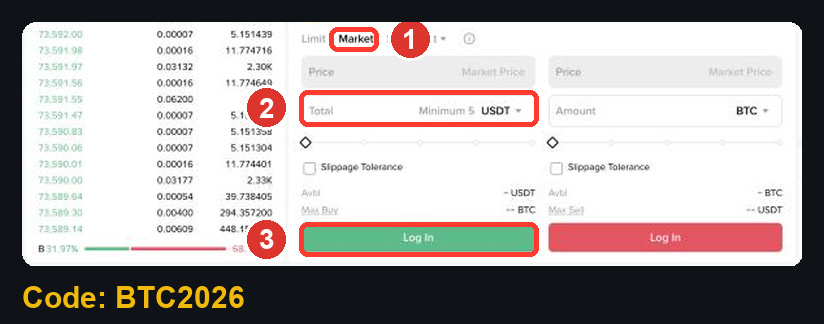
Start with a small amount on your first order. It is a test that your account, balance and order type all work as you expect.
How much are Binance Spot fees, and where does BTC2026 come in?
The Binance fee rate page shows the public tiers. On Nov 12, 2026 a Regular User paid 0.100% maker / 0.100% taker on Spot, or 0.075% when paying the fee with BNB (the 25% off column).
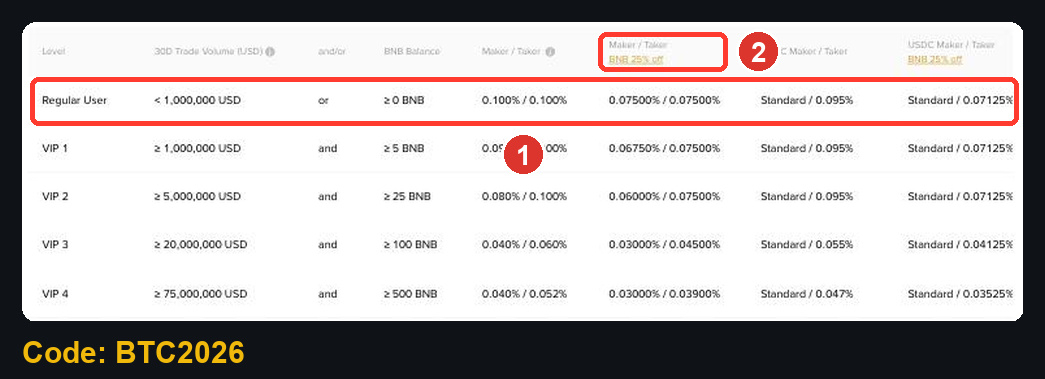
Example: a $1,000 Spot buy at 0.100% costs $1.00 in fees.
With BTC2026, up to 20% of the qualifying fee can come back: up to $0.20 here.
Since April 29, 2026, Spot referral commission is calculated on net fees, so the amount can be lower.
The code does not change the fee rate itself or the price you trade at.
How to use Binance Support
Binance's help article describes Binance Support as an AI assistant backed by human agents. You can reach it from the Help Center or from the support icon when logged in.
(1) Search your question in the Help Center first. Many answers are already there.
(2) Click the support icon (bottom right when logged in) to open Binance Assistant with suggested topics.
(3) Use the self-service tools for common tasks such as resetting 2FA, resetting a password or updating your identity details.
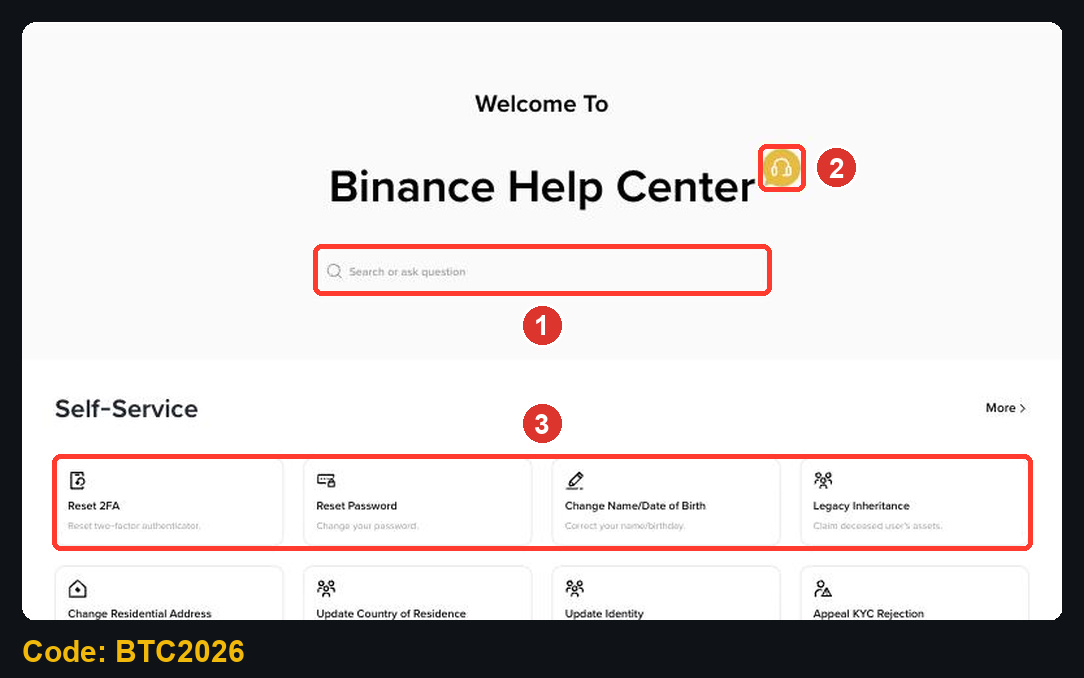
If the assistant cannot help, click Get Support to open the chat, then Customer Service to reach a human agent. Describe the issue in detail and add screenshots. Reply within 24 hours to keep your place in the queue. You can pick your chat language before you start; it cannot be changed once an agent joins.
FAQ: using Binance with referral code BTC2026
Can I add BTC2026 after I already registered?
Only in limited cases: usually within 30 days of registration, with no existing referral and before any deposit or trade. Check the referral binding page. A referral cannot be changed or removed once it is set.
Do I have to verify my identity before I buy?
Binance asks you to complete identity verification before buying crypto, and verification is what unlocks your limits.
What if support does not reply in my language?
Binance says agents may not always reply in your preferred language. You can write in English and use a translation tool.
Does BTC2026 cost anything?
No. The code is free. You pay normal Binance fees, and the rebate returns part of the qualifying Spot fee.
Start using Binance the right way
Open the BTC2026 sign-up page, confirm the code line, then follow the four steps above: register, verify, buy and place a small first Spot order. Keep this guide handy for the support steps.
Disclosure: BTC2026 is my referral code, and I may earn commission from qualifying activity. This is an independent guide, not an official Binance post. Benefits depend on Binance's terms, your region and your eligibility. Crypto trading carries risk. Not financial advice. DYOR.