
Wolfbotio
5.3k Publications

Wolfbotio
Signaler
Bloquer l’utilisateur
Founder @ https://wolfbot.io | AI powerfull auto trading | Follow me with a fixed ratio; do not set a stop loss. Let become bilionare together

Détenteur pour BTC
Trade fréquemment
9.1 an(s)
1.8K+ Suivis
774 Abonnés
282 J’aime
Publications
Tous
Citations
Vidéos
PINNED
·
--

Article
WolfBot – Cerveau de trading AI derrière le trading de copie multi-plateformeJe suis le fondateur de WolfBot (wolfbot.io) — un système de trading avancé alimenté par l'IA conçu pour fonctionner comme l'intelligence centrale derrière mes stratégies de trading de copie.
WolfBot analyse en continu les données du marché, gère les risques et exécute des transactions en utilisant des stratégies algorithmiques combinées à des modèles d'apprentissage automatique. Chaque position que vous copiez est générée et gérée par ce système.
Contrairement aux signaux de trading manuels, WolfBot fournit :
• Analyse de marché pilotée par l'IA
• Gestion des risques automatisée
• Exécution de stratégie cohérente
WolfBot – Cerveau de trading AI derrière le trading de copie multi-plateforme
Je suis le fondateur de WolfBot (wolfbot.io) — un système de trading avancé alimenté par l'IA conçu pour fonctionner comme l'intelligence centrale derrière mes stratégies de trading de copie.
WolfBot analyse en continu les données du marché, gère les risques et exécute des transactions en utilisant des stratégies algorithmiques combinées à des modèles d'apprentissage automatique. Chaque position que vous copiez est générée et gérée par ce système.
Contrairement aux signaux de trading manuels, WolfBot fournit :
• Analyse de marché pilotée par l'IA
• Gestion des risques automatisée
• Exécution de stratégie cohérente
WolfBot analyse en continu les données du marché, gère les risques et exécute des transactions en utilisant des stratégies algorithmiques combinées à des modèles d'apprentissage automatique. Chaque position que vous copiez est générée et gérée par ce système.
Contrairement aux signaux de trading manuels, WolfBot fournit :
• Analyse de marché pilotée par l'IA
• Gestion des risques automatisée
• Exécution de stratégie cohérente
2
7
33
PINNED
·
--

Article
Partager ma startup wolfbot.ioWolfBot est une startup d'application IA en phase de démarrage dans le domaine financier, axée sur la création de systèmes de trading intelligents et automatisés pour les marchés financiers modernes. Né d'une forte passion pour la technologie et le trading quantitatif, WolfBot n'est pas conçu comme un simple bot, mais comme un compagnon de trading intelligent qui fonctionne 24h/24 et 7j/7 avec discipline, rapidité et cohérence.
🎯 Notre mission
Les marchés financiers sont rapides, émotionnels et impitoyables.
L'hésitation humaine et le manque de discipline sont souvent les plus grands obstacles pour les traders.
Partager ma startup wolfbot.io
WolfBot est une startup d'application IA en phase de démarrage dans le domaine financier, axée sur la création de systèmes de trading intelligents et automatisés pour les marchés financiers modernes. Né d'une forte passion pour la technologie et le trading quantitatif, WolfBot n'est pas conçu comme un simple bot, mais comme un compagnon de trading intelligent qui fonctionne 24h/24 et 7j/7 avec discipline, rapidité et cohérence.
🎯 Notre mission
Les marchés financiers sont rapides, émotionnels et impitoyables.
L'hésitation humaine et le manque de discipline sont souvent les plus grands obstacles pour les traders.
🎯 Notre mission
Les marchés financiers sont rapides, émotionnels et impitoyables.
L'hésitation humaine et le manque de discipline sont souvent les plus grands obstacles pour les traders.
6
34
·
--
Voir la traduction
Mastering the fundamentals of trading bots like Grid, DCA, and Martingale is key to building a strategy that fits your risk profile. Understanding the mechanics is what turns theory into actionable automation. 🤖
• Take-Profit/Stop-Loss is foundational exit discipline for every strategy, locking in gains or capping losses. 🔒
• DCA means entering in smaller pieces, often adding on dips, but this increases exposure while falling, requiring a total loss cap.
• Grid trading sets buy/sell orders across price levels to capture small profits during oscillation—great for ranging markets, weak in strong trends.
• Martingale involves doubling trade size after a loss, which can cause rapid, exponential position size escalation.
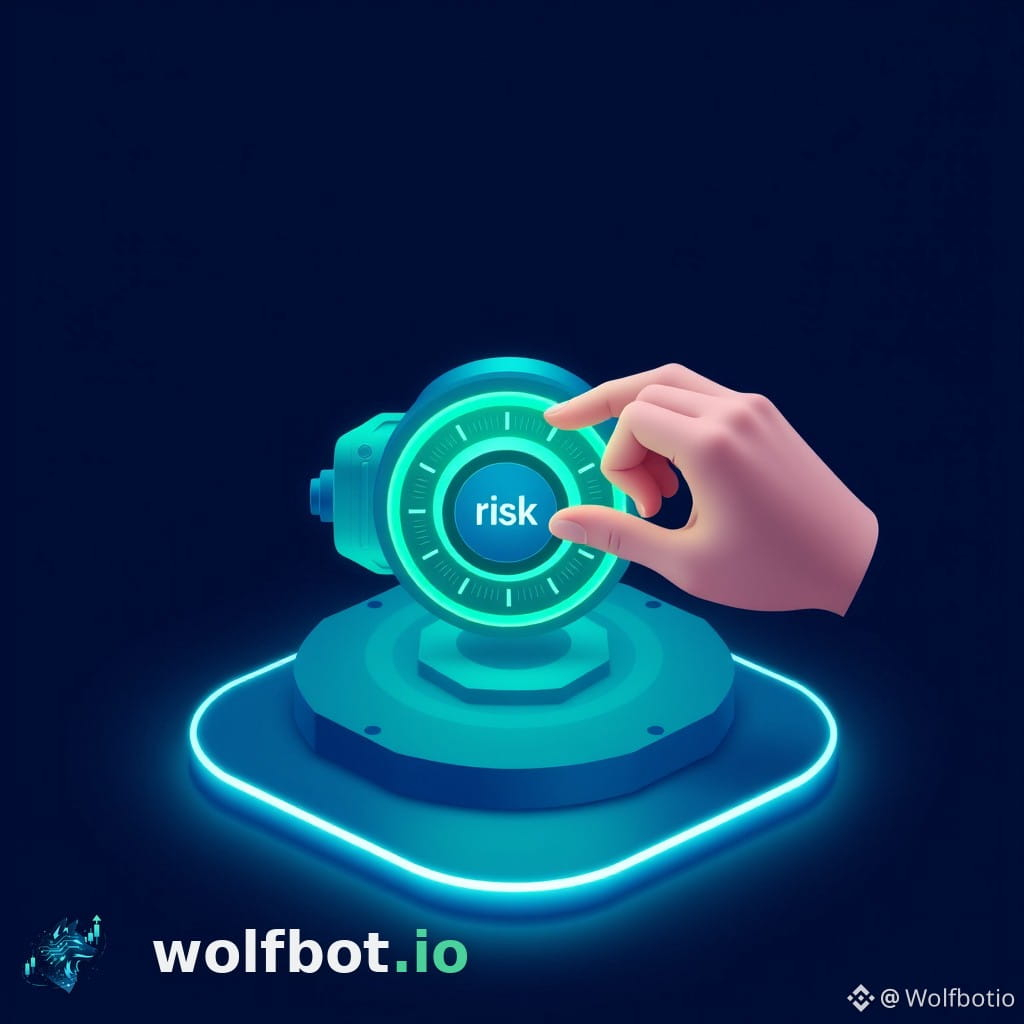
• The real difference is the 'risk shape,' determined by three dials: entry method, sizing approach, and exit rules.
• When using the platform, the system manages the complex risk engine, applying drawdown guards and protection regardless of the template chosen. ✅
• To start, assess market behavior (ranging vs. trending) and critically evaluate your own temperament.
• Always write down your maximum tolerable loss for a strategy family, and always test new setups in simulation mode first. ⚠️
For a deeper technical dive into these mechanisms, review our guides here: https://community.wolfbot.io/academy/popular-strategies-explained
#CryptoStrategy #TradingAutomation #DCA #GridBot #RiskManagement
Mastering the fundamentals of trading bots like Grid, DCA, and Martingale is key to building a strategy that fits your risk profile. Understanding the mechanics is what turns theory into actionable automation. 🤖
• Take-Profit/Stop-Loss is foundational exit discipline for every strategy, locking in gains or capping losses. 🔒
• DCA means entering in smaller pieces, often adding on dips, but this increases exposure while falling, requiring a total loss cap.
• Grid trading sets buy/sell orders across price levels to capture small profits during oscillation—great for ranging markets, weak in strong trends.
• Martingale involves doubling trade size after a loss, which can cause rapid, exponential position size escalation.
• The real difference is the 'risk shape,' determined by three dials: entry method, sizing approach, and exit rules.
• When using the platform, the system manages the complex risk engine, applying drawdown guards and protection regardless of the template chosen. ✅
• To start, assess market behavior (ranging vs. trending) and critically evaluate your own temperament.
• Always write down your maximum tolerable loss for a strategy family, and always test new setups in simulation mode first. ⚠️
For a deeper technical dive into these mechanisms, review our guides here: https://community.wolfbot.io/academy/popular-strategies-explained
#CryptoStrategy #TradingAutomation #DCA #GridBot #RiskManagement
• Take-Profit/Stop-Loss is foundational exit discipline for every strategy, locking in gains or capping losses. 🔒
• DCA means entering in smaller pieces, often adding on dips, but this increases exposure while falling, requiring a total loss cap.
• Grid trading sets buy/sell orders across price levels to capture small profits during oscillation—great for ranging markets, weak in strong trends.
• Martingale involves doubling trade size after a loss, which can cause rapid, exponential position size escalation.
• The real difference is the 'risk shape,' determined by three dials: entry method, sizing approach, and exit rules.
• When using the platform, the system manages the complex risk engine, applying drawdown guards and protection regardless of the template chosen. ✅
• To start, assess market behavior (ranging vs. trending) and critically evaluate your own temperament.
• Always write down your maximum tolerable loss for a strategy family, and always test new setups in simulation mode first. ⚠️
For a deeper technical dive into these mechanisms, review our guides here: https://community.wolfbot.io/academy/popular-strategies-explained
#CryptoStrategy #TradingAutomation #DCA #GridBot #RiskManagement
1
43
·
--
Baissier
Voir la traduction
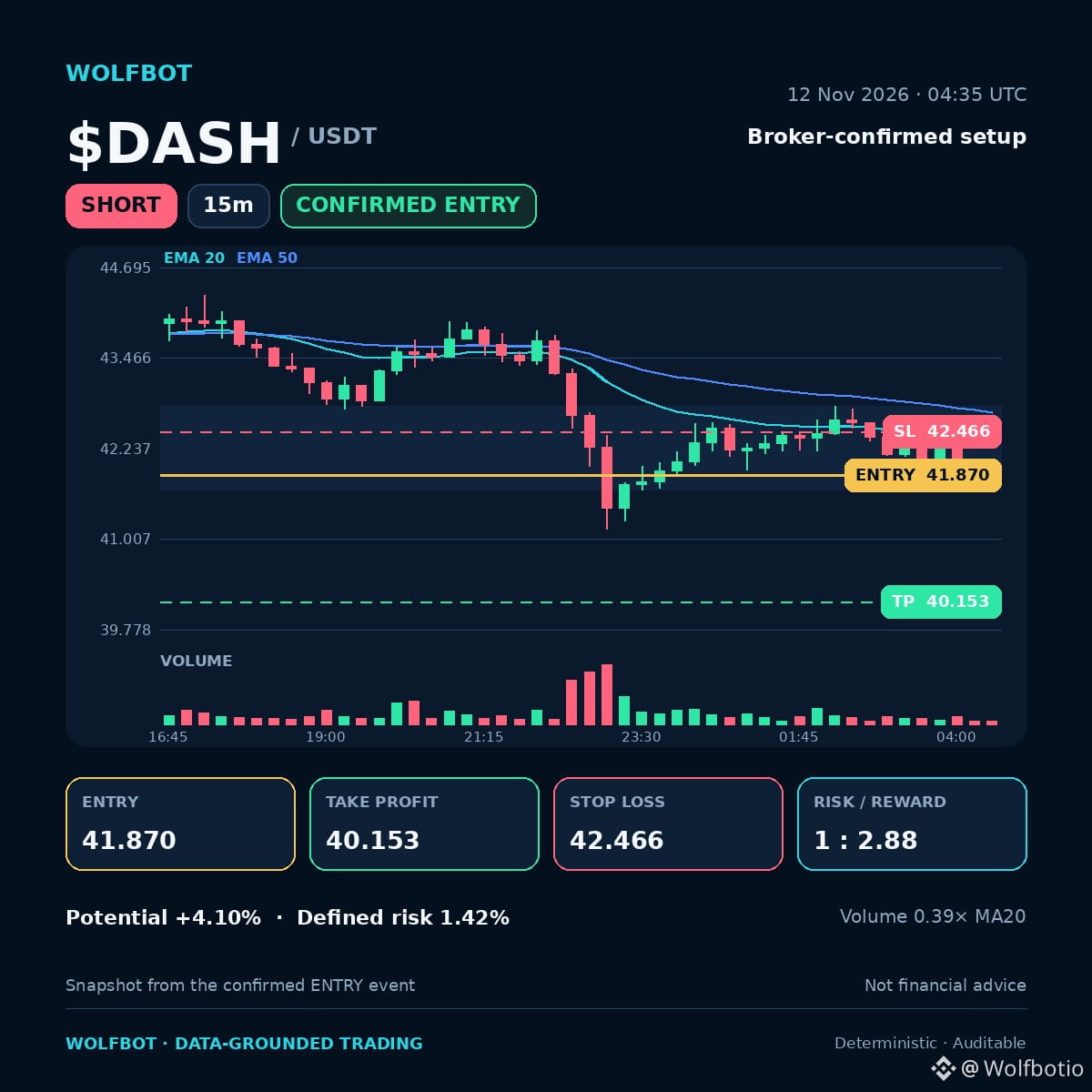
🔴 $DASH SHORT setup · 15m
Price is clearly below key moving averages on the fifteen-minute chart.
📍 Entry 41.870
🎯 TP 40.153 (+4.10%)
🛑 SL 42.466 (-1.42%)
⚖️ Risk / Reward 1 : 2.88
Why it triggered
✅ Rule triggers met: Breakdown M5, MACD histogram decreasing
✅ Price broke down through its recent short-term range
✅ Price sits below EMA20 and EMA50, with both stacked in the trade's direction
✅ Market regime: high vol bear
The breakdown below the short-term range, coupled with the MACD histogram decline, signals bearish momentum. The stacked EMAs confirm the immediate downward bias.
👀 Watch: A decisive move below the next support level is needed.
WolfBot trade journal: defined risk, not financial advice.
#TradingSetup #RiskManagement
🔴 $DASH SHORT setup · 15m
Price is clearly below key moving averages on the fifteen-minute chart.
📍 Entry 41.870
🎯 TP 40.153 (+4.10%)
🛑 SL 42.466 (-1.42%)
⚖️ Risk / Reward 1 : 2.88
Why it triggered
✅ Rule triggers met: Breakdown M5, MACD histogram decreasing
✅ Price broke down through its recent short-term range
✅ Price sits below EMA20 and EMA50, with both stacked in the trade's direction
✅ Market regime: high vol bear
The breakdown below the short-term range, coupled with the MACD histogram decline, signals bearish momentum. The stacked EMAs confirm the immediate downward bias.
👀 Watch: A decisive move below the next support level is needed.
WolfBot trade journal: defined risk, not financial advice.
#TradingSetup #RiskManagement
Price is clearly below key moving averages on the fifteen-minute chart.
📍 Entry 41.870
🎯 TP 40.153 (+4.10%)
🛑 SL 42.466 (-1.42%)
⚖️ Risk / Reward 1 : 2.88
Why it triggered
✅ Rule triggers met: Breakdown M5, MACD histogram decreasing
✅ Price broke down through its recent short-term range
✅ Price sits below EMA20 and EMA50, with both stacked in the trade's direction
✅ Market regime: high vol bear
The breakdown below the short-term range, coupled with the MACD histogram decline, signals bearish momentum. The stacked EMAs confirm the immediate downward bias.
👀 Watch: A decisive move below the next support level is needed.
WolfBot trade journal: defined risk, not financial advice.
#TradingSetup #RiskManagement
2
64
·
--
Voir la traduction
Moving from spot ownership to leveraged futures changes the risk profile significantly. It shifts from simple price depreciation to the potential for exchange liquidation. ⚠️
Here is an essential checklist for deploying automated perpetual futures strategies safely:
1. Understand the fundamental difference: Spot means you own the asset; the worst case is a price drop. Futures mean your position is leveraged, and the worst case is liquidation by the exchange.
2. Recognize that leverage multiplies risk in both directions. A 1% move can change your position value by 5% with 5x leverage. Be aware that total risk can accumulate across multiple positions without immediate notice.
3. When setting up automated futures trades, you must know the specific margin requirements for one position, the remaining free margin, the exact liquidation price level, and if your stop-loss will trigger before that liquidation level.
4. Always implement standard risk controls on every position: stop-loss, take-profit, cooldowns, and a global drawdown guard.
5. For futures, in addition to standard risk checks, manually check the free margin and open risk during your daily review, paying attention to both PnL and margin status.
6. Before deploying any automated strategy with real capital, always run the entire process in simulation or demo mode using the intended leverage to compare simulated liquidation risk against normal volatility.
7. As a foundational rule, begin automated futures trading with low leverage, such as 1–3x, on a small account. Only increase leverage after observing many live cycles behaving as expected.
For a deep dive into the mechanics of managing these variables, review our documentation here: https://community.wolfbot.io/docs/leverage-margin-and-automated-futures 📚
Mastering the margin curve is non-negotiable for automated futures success.
#FuturesTrading #RiskManagement #CryptoAutomation #LiquidationRisk #MarginTrading
Moving from spot ownership to leveraged futures changes the risk profile significantly. It shifts from simple price depreciation to the potential for exchange liquidation. ⚠️
Here is an essential checklist for deploying automated perpetual futures strategies safely:
1. Understand the fundamental difference: Spot means you own the asset; the worst case is a price drop. Futures mean your position is leveraged, and the worst case is liquidation by the exchange.
2. Recognize that leverage multiplies risk in both directions. A 1% move can change your position value by 5% with 5x leverage. Be aware that total risk can accumulate across multiple positions without immediate notice.
3. When setting up automated futures trades, you must know the specific margin requirements for one position, the remaining free margin, the exact liquidation price level, and if your stop-loss will trigger before that liquidation level.
4. Always implement standard risk controls on every position: stop-loss, take-profit, cooldowns, and a global drawdown guard.
5. For futures, in addition to standard risk checks, manually check the free margin and open risk during your daily review, paying attention to both PnL and margin status.
6. Before deploying any automated strategy with real capital, always run the entire process in simulation or demo mode using the intended leverage to compare simulated liquidation risk against normal volatility.
7. As a foundational rule, begin automated futures trading with low leverage, such as 1–3x, on a small account. Only increase leverage after observing many live cycles behaving as expected.
For a deep dive into the mechanics of managing these variables, review our documentation here: https://community.wolfbot.io/docs/leverage-margin-and-automated-futures 📚
Mastering the margin curve is non-negotiable for automated futures success.
#FuturesTrading #RiskManagement #CryptoAutomation #LiquidationRisk #MarginTrading
Here is an essential checklist for deploying automated perpetual futures strategies safely:
1. Understand the fundamental difference: Spot means you own the asset; the worst case is a price drop. Futures mean your position is leveraged, and the worst case is liquidation by the exchange.
2. Recognize that leverage multiplies risk in both directions. A 1% move can change your position value by 5% with 5x leverage. Be aware that total risk can accumulate across multiple positions without immediate notice.
3. When setting up automated futures trades, you must know the specific margin requirements for one position, the remaining free margin, the exact liquidation price level, and if your stop-loss will trigger before that liquidation level.
4. Always implement standard risk controls on every position: stop-loss, take-profit, cooldowns, and a global drawdown guard.
5. For futures, in addition to standard risk checks, manually check the free margin and open risk during your daily review, paying attention to both PnL and margin status.
6. Before deploying any automated strategy with real capital, always run the entire process in simulation or demo mode using the intended leverage to compare simulated liquidation risk against normal volatility.
7. As a foundational rule, begin automated futures trading with low leverage, such as 1–3x, on a small account. Only increase leverage after observing many live cycles behaving as expected.
For a deep dive into the mechanics of managing these variables, review our documentation here: https://community.wolfbot.io/docs/leverage-margin-and-automated-futures 📚
Mastering the margin curve is non-negotiable for automated futures success.
#FuturesTrading #RiskManagement #CryptoAutomation #LiquidationRisk #MarginTrading

1
85
·
--
Voir la traduction
Thinking about automating futures trading? You need to know the risks beyond just price swings.
Learn more: https://community.wolfbot.io
Trading involves risk; no guaranteed results.
#WolfBot #TradingBot #AlgoTrading #CryptoTrading #Automation
Thinking about automating futures trading? You need to know the risks beyond just price swings.
Learn more: https://community.wolfbot.io
Trading involves risk; no guaranteed results.
#WolfBot #TradingBot #AlgoTrading #CryptoTrading #Automation
Learn more: https://community.wolfbot.io
Trading involves risk; no guaranteed results.
#WolfBot #TradingBot #AlgoTrading #CryptoTrading #Automation
1
2
·
--
Baissier
Voir la traduction
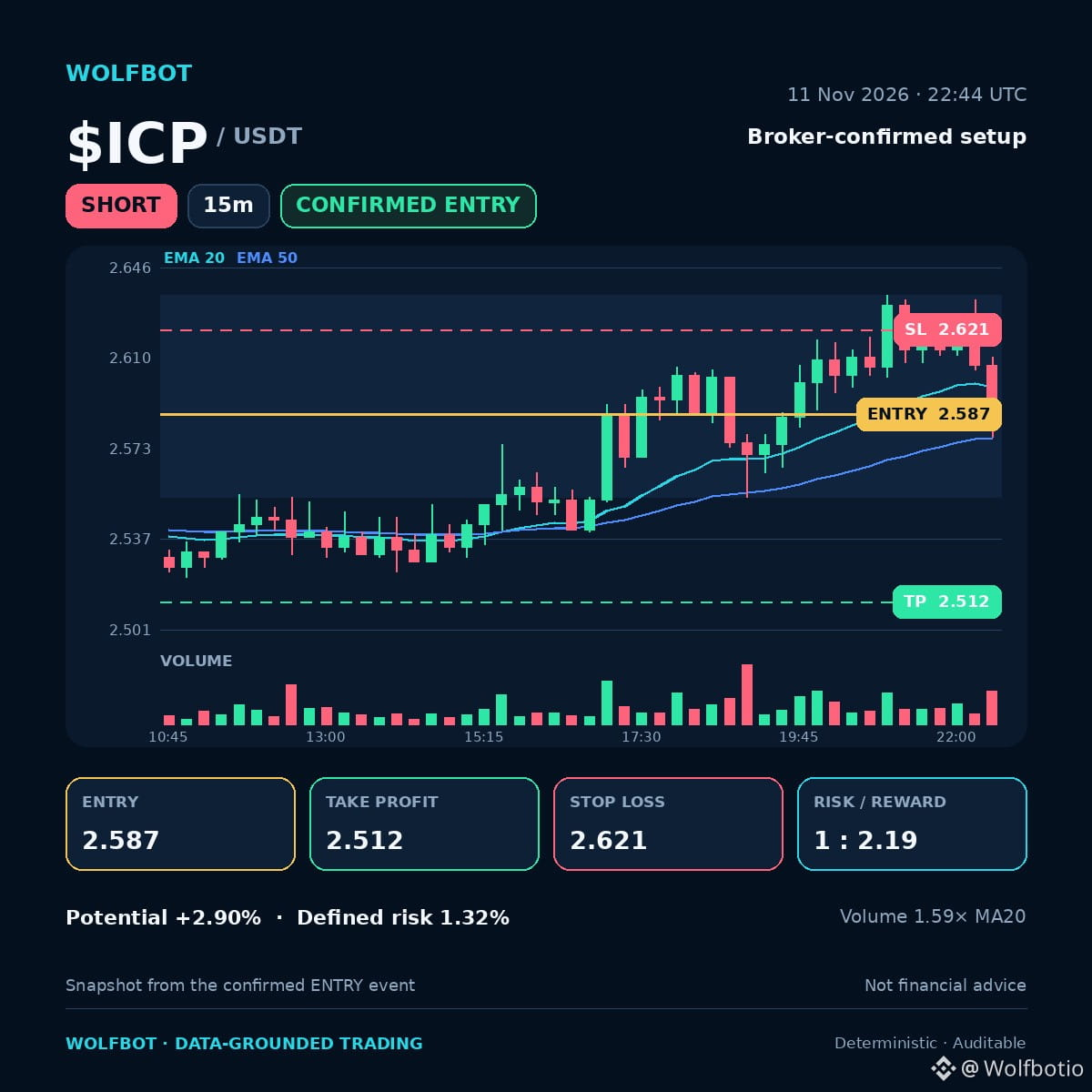
🔴 $ICP SHORT setup · 15m
Price just shattered its short-term range structure.
📍 Entry 2.587
🎯 TP 2.512 (+2.90%)
🛑 SL 2.621 (-1.32%)
⚖️ Risk / Reward 1 : 2.19
Why it triggered
✅ Rule triggers met: Breakdown M5, MACD histogram decreasing
✅ Price broke down through its recent short-term range
✅ Volume running at 1.59x its 20-candle average
✅ ADX 39.2: a real trend is in play, not just noise
The breakdown, coupled with decreasing momentum indicators and elevated volume, signals strong directional conviction. The trend strength metric confirms this move has real footing.
👀 Watch: A decisive break below key support levels confirms the setup.
WolfBot trade journal: defined risk, not financial advice.
#TradingSetup #RiskManagement
🔴 $ICP SHORT setup · 15m
Price just shattered its short-term range structure.
📍 Entry 2.587
🎯 TP 2.512 (+2.90%)
🛑 SL 2.621 (-1.32%)
⚖️ Risk / Reward 1 : 2.19
Why it triggered
✅ Rule triggers met: Breakdown M5, MACD histogram decreasing
✅ Price broke down through its recent short-term range
✅ Volume running at 1.59x its 20-candle average
✅ ADX 39.2: a real trend is in play, not just noise
The breakdown, coupled with decreasing momentum indicators and elevated volume, signals strong directional conviction. The trend strength metric confirms this move has real footing.
👀 Watch: A decisive break below key support levels confirms the setup.
WolfBot trade journal: defined risk, not financial advice.
#TradingSetup #RiskManagement
Price just shattered its short-term range structure.
📍 Entry 2.587
🎯 TP 2.512 (+2.90%)
🛑 SL 2.621 (-1.32%)
⚖️ Risk / Reward 1 : 2.19
Why it triggered
✅ Rule triggers met: Breakdown M5, MACD histogram decreasing
✅ Price broke down through its recent short-term range
✅ Volume running at 1.59x its 20-candle average
✅ ADX 39.2: a real trend is in play, not just noise
The breakdown, coupled with decreasing momentum indicators and elevated volume, signals strong directional conviction. The trend strength metric confirms this move has real footing.
👀 Watch: A decisive break below key support levels confirms the setup.
WolfBot trade journal: defined risk, not financial advice.
#TradingSetup #RiskManagement
1
31
·
--
Baissier
Voir la traduction
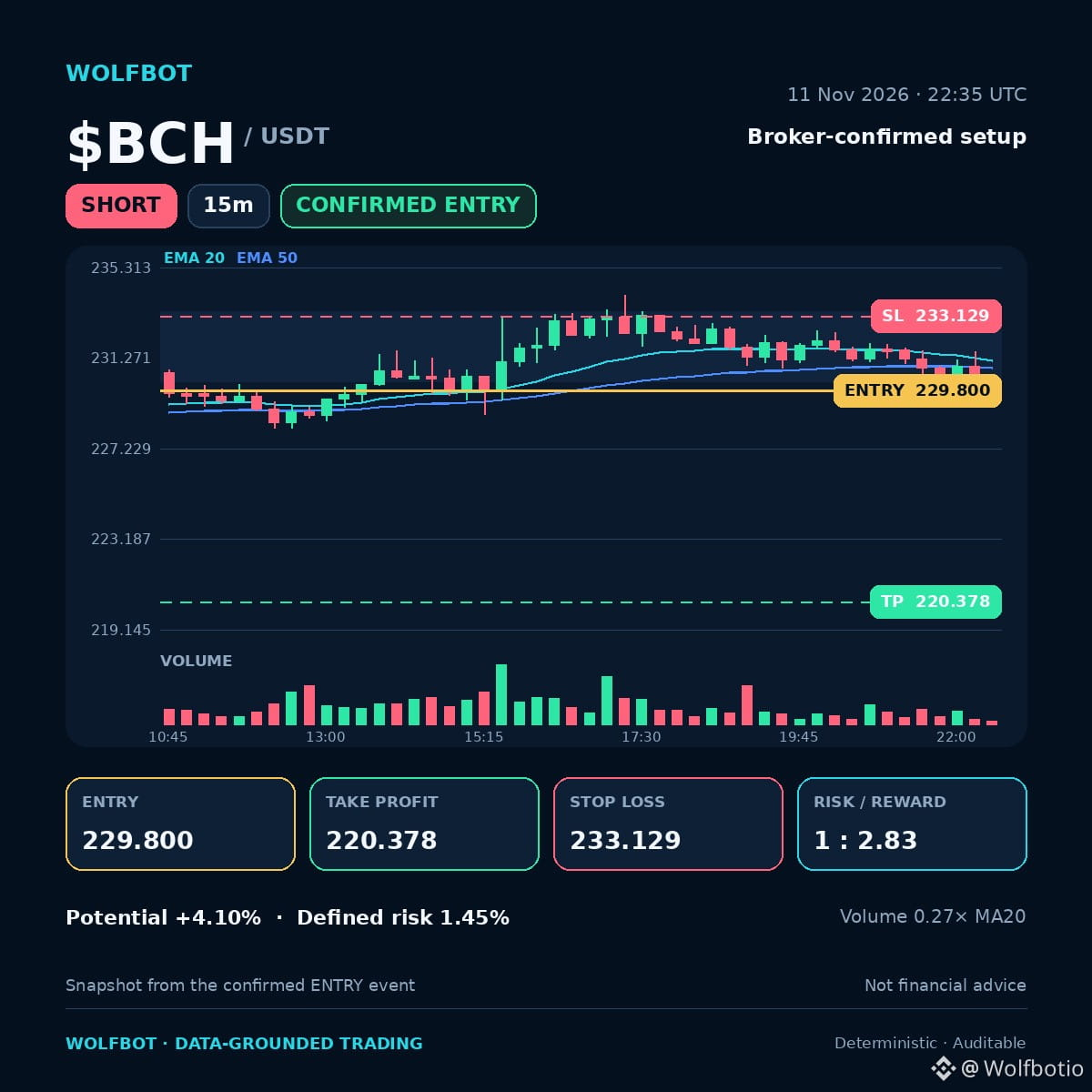
🔴 $BCH SHORT setup · 15m
Price just shattered its short-term range on the fifteen-minute chart.
📍 Entry 229.800
🎯 TP 220.378 (+4.10%)
🛑 SL 233.129 (-1.45%)
⚖️ Risk / Reward 1 : 2.83
Why it triggered
✅ Rule triggers met: Breakdown M5, MACD histogram decreasing
✅ Price broke down through its recent short-term range
✅ Market regime: low vol trending
The breakdown, combined with the MACD histogram decline, signals bearish momentum taking hold in this low volatility trend. This suggests immediate downward pressure.
👀 Watch: A decisive move below key support levels is needed.
WolfBot trade journal: defined risk, not financial advice.
#TradingSetup #RiskManagement
🔴 $BCH SHORT setup · 15m
Price just shattered its short-term range on the fifteen-minute chart.
📍 Entry 229.800
🎯 TP 220.378 (+4.10%)
🛑 SL 233.129 (-1.45%)
⚖️ Risk / Reward 1 : 2.83
Why it triggered
✅ Rule triggers met: Breakdown M5, MACD histogram decreasing
✅ Price broke down through its recent short-term range
✅ Market regime: low vol trending
The breakdown, combined with the MACD histogram decline, signals bearish momentum taking hold in this low volatility trend. This suggests immediate downward pressure.
👀 Watch: A decisive move below key support levels is needed.
WolfBot trade journal: defined risk, not financial advice.
#TradingSetup #RiskManagement
Price just shattered its short-term range on the fifteen-minute chart.
📍 Entry 229.800
🎯 TP 220.378 (+4.10%)
🛑 SL 233.129 (-1.45%)
⚖️ Risk / Reward 1 : 2.83
Why it triggered
✅ Rule triggers met: Breakdown M5, MACD histogram decreasing
✅ Price broke down through its recent short-term range
✅ Market regime: low vol trending
The breakdown, combined with the MACD histogram decline, signals bearish momentum taking hold in this low volatility trend. This suggests immediate downward pressure.
👀 Watch: A decisive move below key support levels is needed.
WolfBot trade journal: defined risk, not financial advice.
#TradingSetup #RiskManagement
31
·
--
Baissier
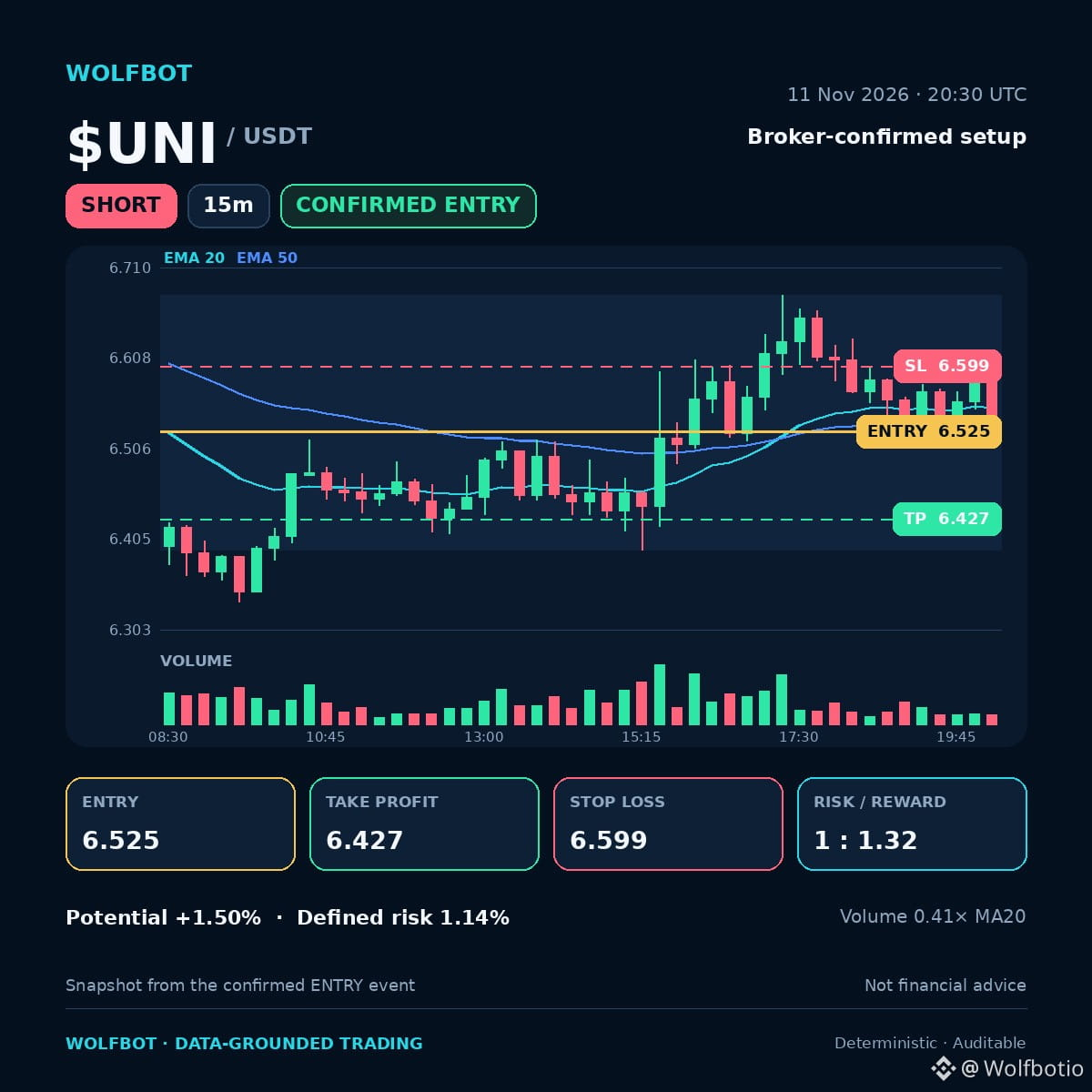
🔴 $UNI Configuration SHORT · 15 min
UNI vient de passer sous sa fourchette à court terme sur le graphique en 15 min, et le risque est défini avant la transaction.
📍 Entrée 6.525
🎯 TP 6.427 (+1.50%)
🛑 SL 6.599 (-1.14%)
⚖️ Risque / Rendement 1 : 1.32
Pourquoi le signal s’est déclenché
✅ Conditions de déclenchement remplies : cassure M5
✅ Le prix est passé sous sa récente fourchette à court terme
✅ RSI 48.8 : le momentum a encore de la marge, il n’est pas en zone d’excès
✅ Régime de marché : marché baissier à forte volatilité
👀 À surveiller : une clôture au-delà du niveau SL annule le scénario.
Journal de trading WolfBot : risque défini, ceci ne constitue pas un conseil financier.
#TradingSetup #GestionDuRisque
🔴 $UNI Configuration SHORT · 15 min
UNI vient de passer sous sa fourchette à court terme sur le graphique en 15 min, et le risque est défini avant la transaction.
📍 Entrée 6.525
🎯 TP 6.427 (+1.50%)
🛑 SL 6.599 (-1.14%)
⚖️ Risque / Rendement 1 : 1.32
Pourquoi le signal s’est déclenché
✅ Conditions de déclenchement remplies : cassure M5
✅ Le prix est passé sous sa récente fourchette à court terme
✅ RSI 48.8 : le momentum a encore de la marge, il n’est pas en zone d’excès
✅ Régime de marché : marché baissier à forte volatilité
👀 À surveiller : une clôture au-delà du niveau SL annule le scénario.
Journal de trading WolfBot : risque défini, ceci ne constitue pas un conseil financier.
#TradingSetup #GestionDuRisque
UNI vient de passer sous sa fourchette à court terme sur le graphique en 15 min, et le risque est défini avant la transaction.
📍 Entrée 6.525
🎯 TP 6.427 (+1.50%)
🛑 SL 6.599 (-1.14%)
⚖️ Risque / Rendement 1 : 1.32
Pourquoi le signal s’est déclenché
✅ Conditions de déclenchement remplies : cassure M5
✅ Le prix est passé sous sa récente fourchette à court terme
✅ RSI 48.8 : le momentum a encore de la marge, il n’est pas en zone d’excès
✅ Régime de marché : marché baissier à forte volatilité
👀 À surveiller : une clôture au-delà du niveau SL annule le scénario.
Journal de trading WolfBot : risque défini, ceci ne constitue pas un conseil financier.
#TradingSetup #GestionDuRisque
32
·
--
Baissier
Voir la traduction
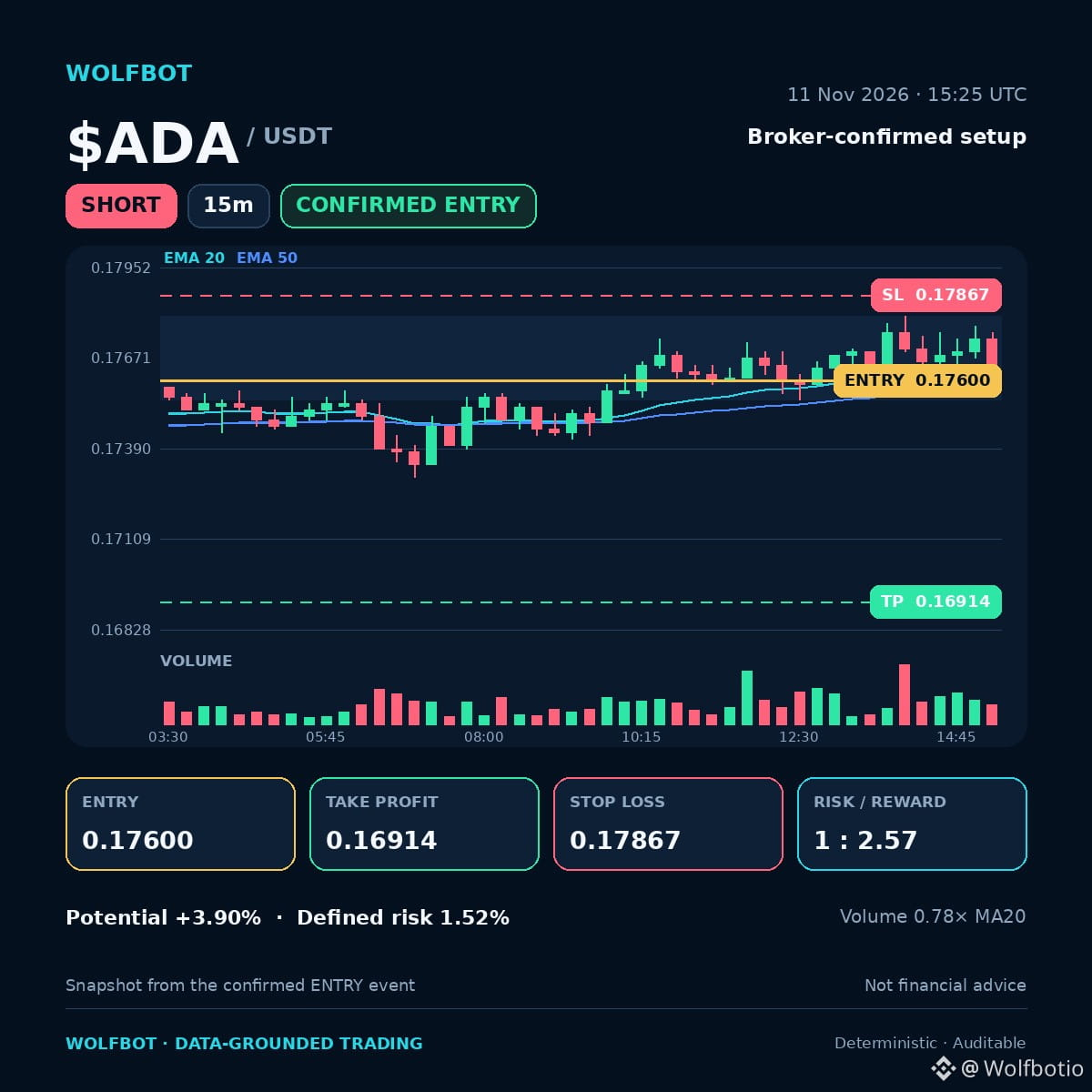
🔴 $ADA SHORT setup · 15m
Price just smashed through its recent short-term range on the fifteen-minute chart.
📍 Entry 0.17600
🎯 TP 0.16914 (+3.90%)
🛑 SL 0.17867 (-1.52%)
⚖️ Risk / Reward 1 : 2.57
Why it triggered
✅ Rule triggers met: Breakdown M5
✅ Price broke down through its recent short-term range
✅ RSI 49.4: momentum still has room, not overextended
✅ Market regime: low vol trending
The breakdown confirms bearish momentum in this low volatility trend. RSI suggests room for further downward movement.
👀 Watch: A decisive break below the next key support level.
WolfBot trade journal: defined risk, not financial advice.
#TradingSetup #RiskManagement
🔴 $ADA SHORT setup · 15m
Price just smashed through its recent short-term range on the fifteen-minute chart.
📍 Entry 0.17600
🎯 TP 0.16914 (+3.90%)
🛑 SL 0.17867 (-1.52%)
⚖️ Risk / Reward 1 : 2.57
Why it triggered
✅ Rule triggers met: Breakdown M5
✅ Price broke down through its recent short-term range
✅ RSI 49.4: momentum still has room, not overextended
✅ Market regime: low vol trending
The breakdown confirms bearish momentum in this low volatility trend. RSI suggests room for further downward movement.
👀 Watch: A decisive break below the next key support level.
WolfBot trade journal: defined risk, not financial advice.
#TradingSetup #RiskManagement
Price just smashed through its recent short-term range on the fifteen-minute chart.
📍 Entry 0.17600
🎯 TP 0.16914 (+3.90%)
🛑 SL 0.17867 (-1.52%)
⚖️ Risk / Reward 1 : 2.57
Why it triggered
✅ Rule triggers met: Breakdown M5
✅ Price broke down through its recent short-term range
✅ RSI 49.4: momentum still has room, not overextended
✅ Market regime: low vol trending
The breakdown confirms bearish momentum in this low volatility trend. RSI suggests room for further downward movement.
👀 Watch: A decisive break below the next key support level.
WolfBot trade journal: defined risk, not financial advice.
#TradingSetup #RiskManagement
57
·
--
Voir la traduction
🚀 WolfBot Community v0.1.0-beta.20 is out
Free, self-hosted algo trading platform for Crypto & Forex on Windows & Linux.
What's new:
• Accounts → Details now has a Trading settings block for all brokers, including MT5
• Binance Portfolio Margin stop-loss now clamps to symbol's minimum price
• OKX executor maps PAXGUSDT to the OKX swap market
📥 Download:
🪟 Windows (.exe, build 0.1.0-beta.15): https://github.com/wolfbot-io/wolfbot-community/releases/download/v0.1.0-beta.20/WolfBot-Setup-0.1.0-beta.15-windows-x64.exe
🐧 Linux (.deb): https://github.com/wolfbot-io/wolfbot-community/releases/download/v0.1.0-beta.20/WolfBot-Setup-linux-amd64.deb
🐧 Linux (.run): https://github.com/wolfbot-io/wolfbot-community/releases/download/v0.1.0-beta.20/WolfBot-Setup-0.1.0-beta.20-linux-amd64.run
📌 Release notes: https://github.com/wolfbot-io/wolfbot-community/releases/tag/v0.1.0-beta.20
Trading involves risk; no guaranteed results.
#TradingBot #AlgoTrading #Crypto #Forex #WolfBot
🚀 WolfBot Community v0.1.0-beta.20 is out
Free, self-hosted algo trading platform for Crypto & Forex on Windows & Linux.
What's new:
• Accounts → Details now has a Trading settings block for all brokers, including MT5
• Binance Portfolio Margin stop-loss now clamps to symbol's minimum price
• OKX executor maps PAXGUSDT to the OKX swap market
📥 Download:
🪟 Windows (.exe, build 0.1.0-beta.15): https://github.com/wolfbot-io/wolfbot-community/releases/download/v0.1.0-beta.20/WolfBot-Setup-0.1.0-beta.15-windows-x64.exe
🐧 Linux (.deb): https://github.com/wolfbot-io/wolfbot-community/releases/download/v0.1.0-beta.20/WolfBot-Setup-linux-amd64.deb
🐧 Linux (.run): https://github.com/wolfbot-io/wolfbot-community/releases/download/v0.1.0-beta.20/WolfBot-Setup-0.1.0-beta.20-linux-amd64.run
📌 Release notes: https://github.com/wolfbot-io/wolfbot-community/releases/tag/v0.1.0-beta.20
Trading involves risk; no guaranteed results.
#TradingBot #AlgoTrading #Crypto #Forex #WolfBot
Free, self-hosted algo trading platform for Crypto & Forex on Windows & Linux.
What's new:
• Accounts → Details now has a Trading settings block for all brokers, including MT5
• Binance Portfolio Margin stop-loss now clamps to symbol's minimum price
• OKX executor maps PAXGUSDT to the OKX swap market
📥 Download:
🪟 Windows (.exe, build 0.1.0-beta.15): https://github.com/wolfbot-io/wolfbot-community/releases/download/v0.1.0-beta.20/WolfBot-Setup-0.1.0-beta.15-windows-x64.exe
🐧 Linux (.deb): https://github.com/wolfbot-io/wolfbot-community/releases/download/v0.1.0-beta.20/WolfBot-Setup-linux-amd64.deb
🐧 Linux (.run): https://github.com/wolfbot-io/wolfbot-community/releases/download/v0.1.0-beta.20/WolfBot-Setup-0.1.0-beta.20-linux-amd64.run
📌 Release notes: https://github.com/wolfbot-io/wolfbot-community/releases/tag/v0.1.0-beta.20
Trading involves risk; no guaranteed results.
#TradingBot #AlgoTrading #Crypto #Forex #WolfBot

1
1
·
--
Voir la traduction
Always double-check you are on the official BingX site by scrutinizing the final HTTPS domain before entering any credentials. 🛡️
Securing your trading environment starts with meticulous setup, especially when integrating advanced automation like WolfBot.
Here is the step-by-step process for opening and securing your BingX account through WolfBot:
1. Access the designated WolfBot BingX registration page. Pay close attention to the final HTTPS domain to ensure it is official and confirm your true region.
2. Use a personal email protected by 2FA. Enter your own verifiable contact details and immediately set a unique password stored in a password manager.
3. Complete KYC by submitting truthful details in the Identity Verification section. For advanced verification, capture clear, unedited images of your entire document, ensuring all corners are visible.
4. Manually enable and configure Two-Factor Authentication (2FA) by linking an authenticator app and saving the setup/recovery key offline. Also, enable anti-phishing code and withdrawal whitelists.
5. Prepare WolfBot by ensuring KYC and 2FA are complete. Store your recovery key separately from your password, and review the API key guide while planning for a new WolfBot-only API key with withdrawal/transfer disabled.
For a comprehensive walkthrough of this setup, review the guide here: https://community.wolfbot.io/brokers/open-bingx-account 🔗
#BingX #WolfBot #CryptoSecurity #TradingAutomation #Crypto
Always double-check you are on the official BingX site by scrutinizing the final HTTPS domain before entering any credentials. 🛡️
Securing your trading environment starts with meticulous setup, especially when integrating advanced automation like WolfBot.
Here is the step-by-step process for opening and securing your BingX account through WolfBot:
1. Access the designated WolfBot BingX registration page. Pay close attention to the final HTTPS domain to ensure it is official and confirm your true region.
2. Use a personal email protected by 2FA. Enter your own verifiable contact details and immediately set a unique password stored in a password manager.
3. Complete KYC by submitting truthful details in the Identity Verification section. For advanced verification, capture clear, unedited images of your entire document, ensuring all corners are visible.
4. Manually enable and configure Two-Factor Authentication (2FA) by linking an authenticator app and saving the setup/recovery key offline. Also, enable anti-phishing code and withdrawal whitelists.
5. Prepare WolfBot by ensuring KYC and 2FA are complete. Store your recovery key separately from your password, and review the API key guide while planning for a new WolfBot-only API key with withdrawal/transfer disabled.
For a comprehensive walkthrough of this setup, review the guide here: https://community.wolfbot.io/brokers/open-bingx-account 🔗
#BingX #WolfBot #CryptoSecurity #TradingAutomation #Crypto
Securing your trading environment starts with meticulous setup, especially when integrating advanced automation like WolfBot.
Here is the step-by-step process for opening and securing your BingX account through WolfBot:
1. Access the designated WolfBot BingX registration page. Pay close attention to the final HTTPS domain to ensure it is official and confirm your true region.
2. Use a personal email protected by 2FA. Enter your own verifiable contact details and immediately set a unique password stored in a password manager.
3. Complete KYC by submitting truthful details in the Identity Verification section. For advanced verification, capture clear, unedited images of your entire document, ensuring all corners are visible.
4. Manually enable and configure Two-Factor Authentication (2FA) by linking an authenticator app and saving the setup/recovery key offline. Also, enable anti-phishing code and withdrawal whitelists.
5. Prepare WolfBot by ensuring KYC and 2FA are complete. Store your recovery key separately from your password, and review the API key guide while planning for a new WolfBot-only API key with withdrawal/transfer disabled.
For a comprehensive walkthrough of this setup, review the guide here: https://community.wolfbot.io/brokers/open-bingx-account 🔗
#BingX #WolfBot #CryptoSecurity #TradingAutomation #Crypto

1
1
·
--
Baissier
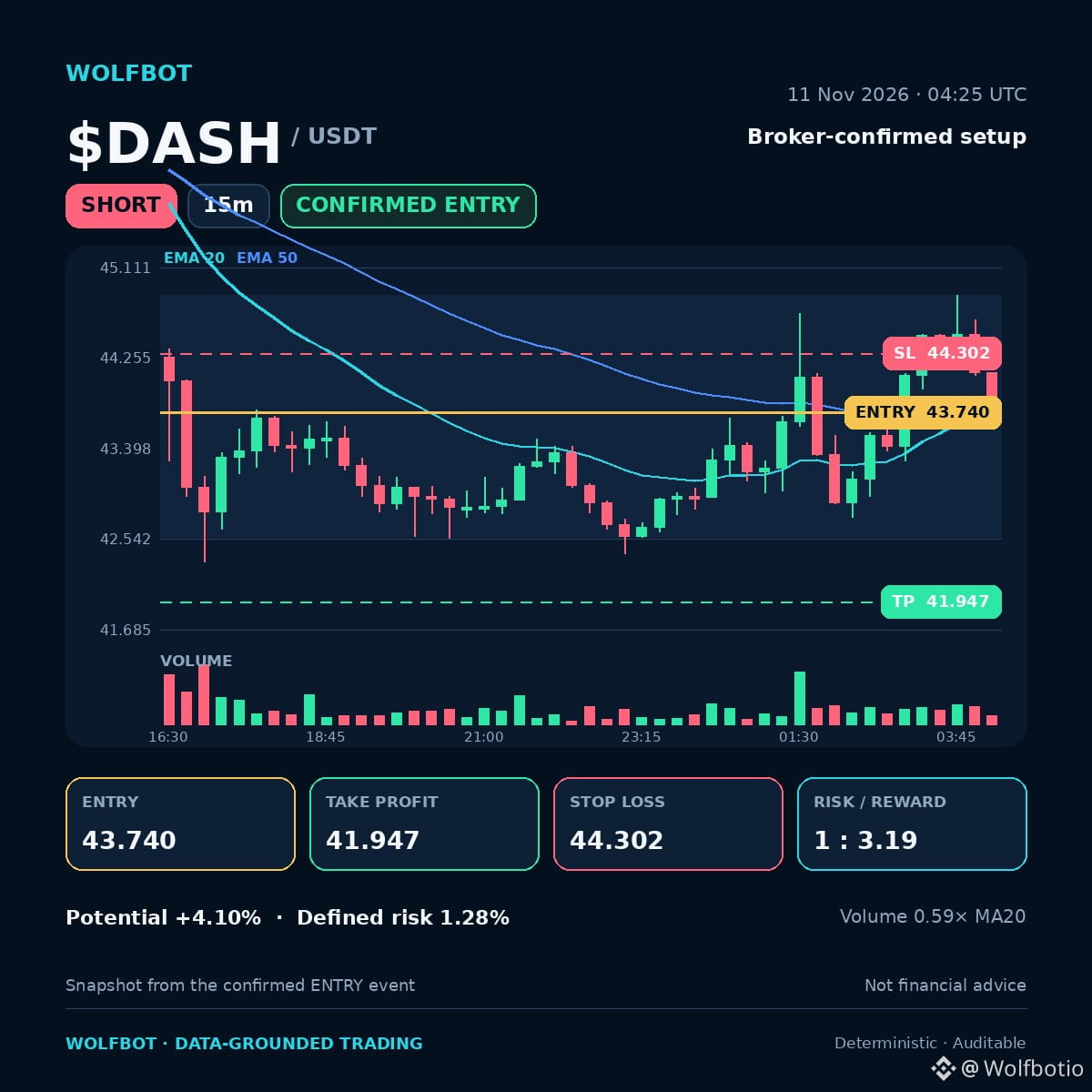
🔴 $DASH Configuration vendeuse · 15 min
Le range à court terme est cassé ; la dynamique baissière prend le dessus.
📍 Entrée 43.740
🎯 TP 41.947 (+4.10%)
🛑 SL 44.302 (-1.28%)
⚖️ Risque / rendement 1 : 3.19
Pourquoi le signal s’est déclenché
✅ Critères remplis : cassure M5, histogramme MACD en baisse
✅ Le prix a franchi à la baisse son récent range à court terme
✅ ADX 27.7 : une véritable tendance est en cours, ce n’est pas qu’un simple bruit de marché
✅ Régime de marché : forte volatilité baissière
La faiblesse du MACD, associée à la cassure du range, signale une poursuite de la baisse. L’ADX confirme que ce mouvement s’appuie sur une tendance solide.
👀 À surveiller : une cassure nette sous les niveaux de support clés est nécessaire.
Journal de trading WolfBot : risque défini, ceci ne constitue pas un conseil financier.
#TradingSetup #GestionDuRisque
🔴 $DASH Configuration vendeuse · 15 min
Le range à court terme est cassé ; la dynamique baissière prend le dessus.
📍 Entrée 43.740
🎯 TP 41.947 (+4.10%)
🛑 SL 44.302 (-1.28%)
⚖️ Risque / rendement 1 : 3.19
Pourquoi le signal s’est déclenché
✅ Critères remplis : cassure M5, histogramme MACD en baisse
✅ Le prix a franchi à la baisse son récent range à court terme
✅ ADX 27.7 : une véritable tendance est en cours, ce n’est pas qu’un simple bruit de marché
✅ Régime de marché : forte volatilité baissière
La faiblesse du MACD, associée à la cassure du range, signale une poursuite de la baisse. L’ADX confirme que ce mouvement s’appuie sur une tendance solide.
👀 À surveiller : une cassure nette sous les niveaux de support clés est nécessaire.
Journal de trading WolfBot : risque défini, ceci ne constitue pas un conseil financier.
#TradingSetup #GestionDuRisque
Le range à court terme est cassé ; la dynamique baissière prend le dessus.
📍 Entrée 43.740
🎯 TP 41.947 (+4.10%)
🛑 SL 44.302 (-1.28%)
⚖️ Risque / rendement 1 : 3.19
Pourquoi le signal s’est déclenché
✅ Critères remplis : cassure M5, histogramme MACD en baisse
✅ Le prix a franchi à la baisse son récent range à court terme
✅ ADX 27.7 : une véritable tendance est en cours, ce n’est pas qu’un simple bruit de marché
✅ Régime de marché : forte volatilité baissière
La faiblesse du MACD, associée à la cassure du range, signale une poursuite de la baisse. L’ADX confirme que ce mouvement s’appuie sur une tendance solide.
👀 À surveiller : une cassure nette sous les niveaux de support clés est nécessaire.
Journal de trading WolfBot : risque défini, ceci ne constitue pas un conseil financier.
#TradingSetup #GestionDuRisque
1
80
·
--
Voir la traduction
Want to make sure your WolfBot is running with the latest features? Updates are managed through specific channels.
Learn more: https://community.wolfbot.io
Trading involves risk; no guaranteed results.
#WolfBot #TradingBot #AlgoTrading #CryptoTrading #Automation
Want to make sure your WolfBot is running with the latest features? Updates are managed through specific channels.
Learn more: https://community.wolfbot.io
Trading involves risk; no guaranteed results.
#WolfBot #TradingBot #AlgoTrading #CryptoTrading #Automation
Learn more: https://community.wolfbot.io
Trading involves risk; no guaranteed results.
#WolfBot #TradingBot #AlgoTrading #CryptoTrading #Automation
1
2
·
--
Besoin d'une procédure claire pour retrouver la stabilité si votre bot cesse de trader après une mise à jour ? Connaître précisément la procédure de mise à jour est essentiel pour assurer une automatisation sans interruption. 🤖
Comprendre les canaux de publication et les étapes propres à chaque plateforme permet de sécuriser votre trading non custodial.
• Avant toute mise à jour, sauvegardez toujours l'intégralité de votre configuration. 💾
• Identifiez votre canal de publication : Stable, Beta ou Dev Preview. Pour profiter des nouvelles fonctionnalités, téléchargez les versions Beta/Dev Preview directement depuis GitHub Releases.
• Utilisateurs Linux : exécutez le script de mise à jour dans le terminal. Vérifiez d'abord la version avec /opt/wolfbot/launcher/wolfbot-updater.sh check, puis appliquez l'URL du manifeste de la version souhaitée.
• Utilisateurs Windows : téléchargez la dernière version de Setup.exe depuis la page indiquée et lancez-la. Ce programme d'installation effectue la mise à niveau tout en préservant vos données, vos comptes et vos paramètres.
• À noter : les versions Dev Preview peuvent comporter des fonctionnalités incomplètes par rapport aux versions Stable. ⚠️
• En cas de problème, procédez comme suit pour revenir à une version antérieure :
• Linux : exécutez /opt/wolfbot/launcher/wolfbot-updater.sh rollback
• Windows : téléchargez manuellement puis réinstallez le Setup.exe de la version précédente depuis GitHub Releases.
• WolfBot vérifie les mises à jour à l'aide de signatures. Si la vérification échoue, téléchargez manuellement la version depuis le site web.
Pour consulter un guide détaillé de toutes ces étapes, cliquez ici : https://community.wolfbot.io/docs/updates 📚
#Crypto #BotUpdates #TradingAutomation #CryptoSecurity #WolfBot
Besoin d'une procédure claire pour retrouver la stabilité si votre bot cesse de trader après une mise à jour ? Connaître précisément la procédure de mise à jour est essentiel pour assurer une automatisation sans interruption. 🤖
Comprendre les canaux de publication et les étapes propres à chaque plateforme permet de sécuriser votre trading non custodial.
• Avant toute mise à jour, sauvegardez toujours l'intégralité de votre configuration. 💾
• Identifiez votre canal de publication : Stable, Beta ou Dev Preview. Pour profiter des nouvelles fonctionnalités, téléchargez les versions Beta/Dev Preview directement depuis GitHub Releases.
• Utilisateurs Linux : exécutez le script de mise à jour dans le terminal. Vérifiez d'abord la version avec /opt/wolfbot/launcher/wolfbot-updater.sh check, puis appliquez l'URL du manifeste de la version souhaitée.
• Utilisateurs Windows : téléchargez la dernière version de Setup.exe depuis la page indiquée et lancez-la. Ce programme d'installation effectue la mise à niveau tout en préservant vos données, vos comptes et vos paramètres.
• À noter : les versions Dev Preview peuvent comporter des fonctionnalités incomplètes par rapport aux versions Stable. ⚠️
• En cas de problème, procédez comme suit pour revenir à une version antérieure :
• Linux : exécutez /opt/wolfbot/launcher/wolfbot-updater.sh rollback
• Windows : téléchargez manuellement puis réinstallez le Setup.exe de la version précédente depuis GitHub Releases.
• WolfBot vérifie les mises à jour à l'aide de signatures. Si la vérification échoue, téléchargez manuellement la version depuis le site web.
Pour consulter un guide détaillé de toutes ces étapes, cliquez ici : https://community.wolfbot.io/docs/updates 📚
#Crypto #BotUpdates #TradingAutomation #CryptoSecurity #WolfBot
Comprendre les canaux de publication et les étapes propres à chaque plateforme permet de sécuriser votre trading non custodial.
• Avant toute mise à jour, sauvegardez toujours l'intégralité de votre configuration. 💾
• Identifiez votre canal de publication : Stable, Beta ou Dev Preview. Pour profiter des nouvelles fonctionnalités, téléchargez les versions Beta/Dev Preview directement depuis GitHub Releases.
• Utilisateurs Linux : exécutez le script de mise à jour dans le terminal. Vérifiez d'abord la version avec /opt/wolfbot/launcher/wolfbot-updater.sh check, puis appliquez l'URL du manifeste de la version souhaitée.
• Utilisateurs Windows : téléchargez la dernière version de Setup.exe depuis la page indiquée et lancez-la. Ce programme d'installation effectue la mise à niveau tout en préservant vos données, vos comptes et vos paramètres.
• À noter : les versions Dev Preview peuvent comporter des fonctionnalités incomplètes par rapport aux versions Stable. ⚠️
• En cas de problème, procédez comme suit pour revenir à une version antérieure :
• Linux : exécutez /opt/wolfbot/launcher/wolfbot-updater.sh rollback
• Windows : téléchargez manuellement puis réinstallez le Setup.exe de la version précédente depuis GitHub Releases.
• WolfBot vérifie les mises à jour à l'aide de signatures. Si la vérification échoue, téléchargez manuellement la version depuis le site web.
Pour consulter un guide détaillé de toutes ces étapes, cliquez ici : https://community.wolfbot.io/docs/updates 📚
#Crypto #BotUpdates #TradingAutomation #CryptoSecurity #WolfBot

1
72
Connectez-vous pour découvrir plus de contenu
Rejoignez la communauté mondiale des adeptes de cryptomonnaies sur Binance Square
⚡️ Suviez les dernières informations importantes sur les cryptomonnaies.
💬 Jugé digne de confiance par la plus grande plateforme d’échange de cryptomonnaies au monde.
👍 Découvrez les connaissances que partagent les créateurs vérifiés.
Adresse e-mail/Nº de téléphone
Sujets d’actualité
HuangRisksOusterOverReportedAffairWithSubordinate
65,520 vues
894 mentions
Le conseil d’administration de Nvidia se réunit pour décider de l’avenir de Jensen Huang alors que la crise s’aggrave
Binance News
·43 mentions J’aime
·50.2k vues
AnthropicRejectsIPODelayValuationinQuestion
524,437 vues
4,288 mentions
CoreWeaveJumps10%On168%RevenueGrowth
96,082 vues
1,108 mentions