

vuducdung1308
909 Posts

vuducdung1308
Report
Block User
Open Trade
High-Frequency Trader
5.4 Years
143 Following
74 Followers
131 Liked
Posts
Portfolio
All
Quotes
Wagering on bank failures through platforms like Polymarket has captured attention, prompting concerns from the FDIC. This trend highlights a growing interest in predicting financial instability, potentially reflecting broader anxieties within the market. Such bets, while speculative, can influence sentiment and draw regulatory scrutiny. The volume of these bets and the associated discussions suggest a heightened awareness of systemic risks, even if the direct impact on traditional banking remains to be seen. It's a fascinating intersection of decentralized prediction markets and traditional financial oversight.
Disclaimer: This content is for informational purposes only and does not constitute financial advice.
#PolymarketBankFailureBetsDrawFDICConcern
Wagering on bank failures through platforms like Polymarket has captured attention, prompting concerns from the FDIC. This trend highlights a growing interest in predicting financial instability, potentially reflecting broader anxieties within the market. Such bets, while speculative, can influence sentiment and draw regulatory scrutiny. The volume of these bets and the associated discussions suggest a heightened awareness of systemic risks, even if the direct impact on traditional banking remains to be seen. It's a fascinating intersection of decentralized prediction markets and traditional financial oversight.
Disclaimer: This content is for informational purposes only and does not constitute financial advice.
#PolymarketBankFailureBetsDrawFDICConcern
Disclaimer: This content is for informational purposes only and does not constitute financial advice.
#PolymarketBankFailureBetsDrawFDICConcern
20
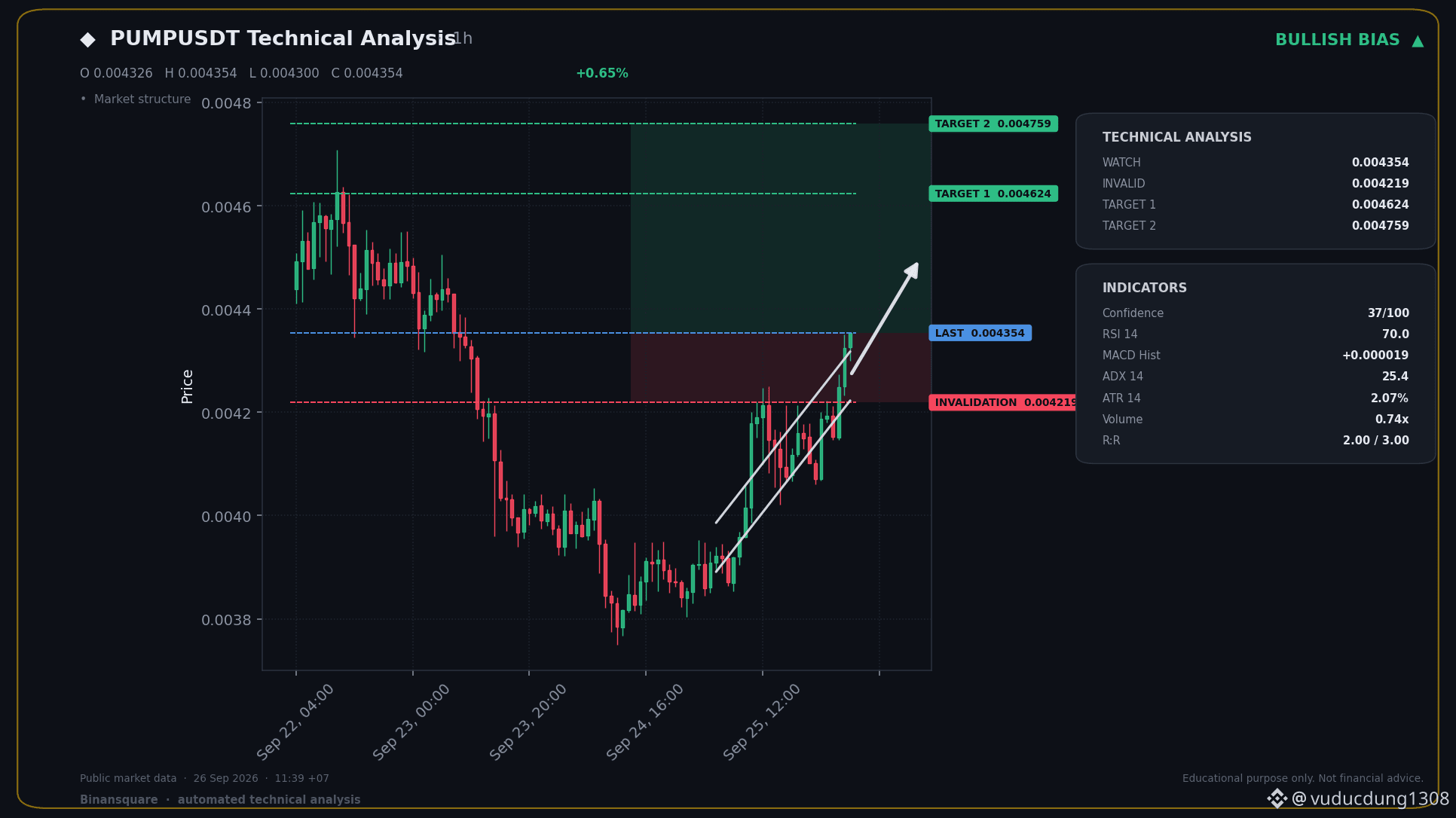
📈 BIG LONG NOW - PUMPUSDT
📍 KEY LEVELS
Entry: 0.004354
🛑 SL: 0.004219
🎯 TP1: 0.004624
🎯 TP2: 0.004759
The trend is clearly up with the EMAs and momentum is strong, confirmed by the MACD showing active bullish strength. RSI is in a healthy zone, indicating continuation.
This signal was generated automatically from technical indicators. It does not guarantee profit and is not investment advice. Always manage your own risk and DYOR.
$PUMP
#PolymarketBankFailureBetsDrawFDICConcern #BitwiseFilesToListNEARETFOnNYSEArca
📈 BIG LONG NOW - PUMPUSDT
📍 KEY LEVELS
Entry: 0.004354
🛑 SL: 0.004219
🎯 TP1: 0.004624
🎯 TP2: 0.004759
The trend is clearly up with the EMAs and momentum is strong, confirmed by the MACD showing active bullish strength. RSI is in a healthy zone, indicating continuation.
This signal was generated automatically from technical indicators. It does not guarantee profit and is not investment advice. Always manage your own risk and DYOR.
$PUMP
#PolymarketBankFailureBetsDrawFDICConcern #BitwiseFilesToListNEARETFOnNYSEArca
📍 KEY LEVELS
Entry: 0.004354
🛑 SL: 0.004219
🎯 TP1: 0.004624
🎯 TP2: 0.004759
The trend is clearly up with the EMAs and momentum is strong, confirmed by the MACD showing active bullish strength. RSI is in a healthy zone, indicating continuation.
This signal was generated automatically from technical indicators. It does not guarantee profit and is not investment advice. Always manage your own risk and DYOR.
$PUMP
#PolymarketBankFailureBetsDrawFDICConcern #BitwiseFilesToListNEARETFOnNYSEArca
24
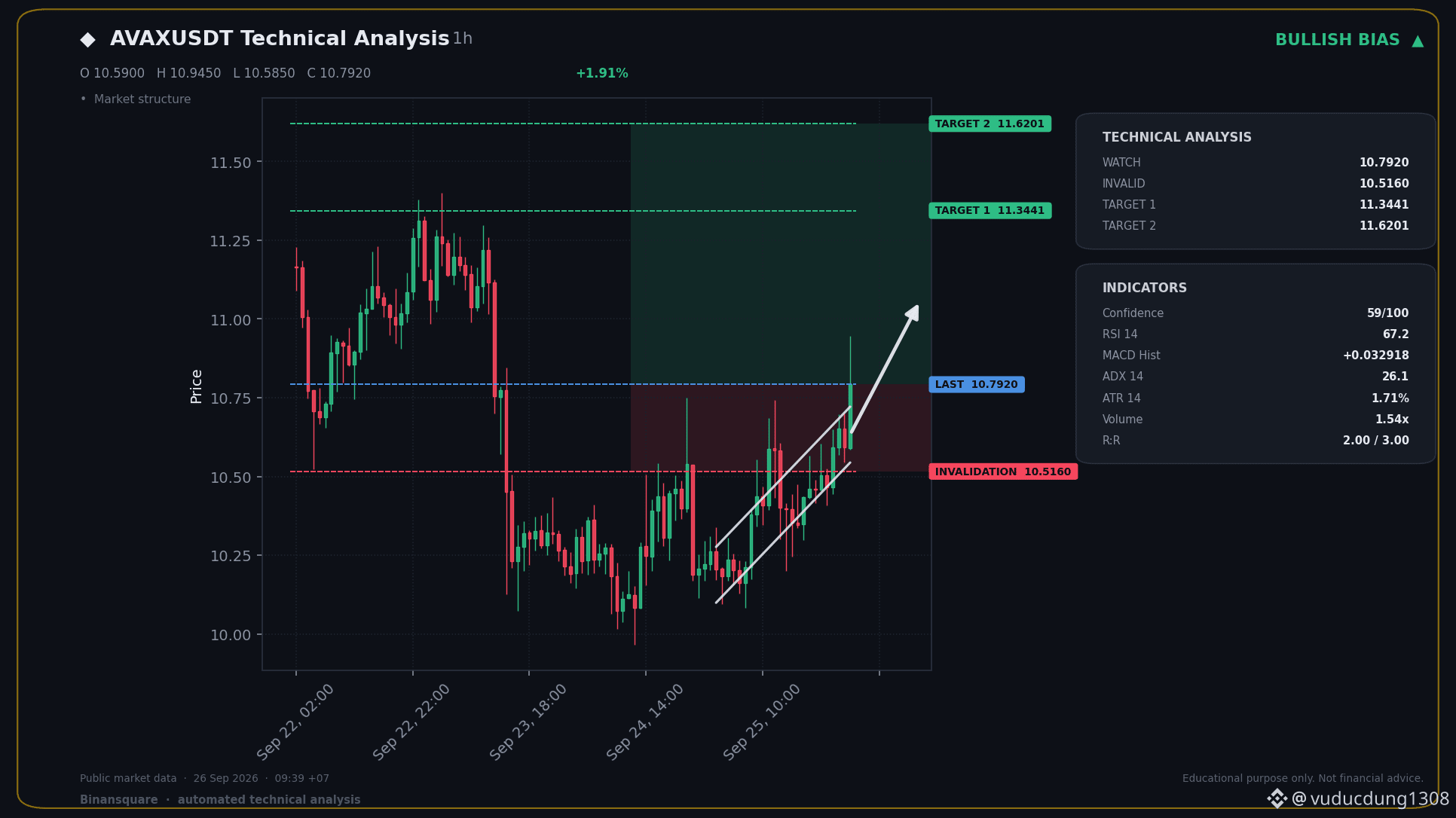
📈 BIG LONG NOW - AVAXUSDT
📍 KEY LEVELS
Entry: 10.7920
🛑 SL: 10.5160
🎯 TP1: 11.3441
🎯 TP2: 11.6201
The trend is clearly up with the EMAs, and momentum's picking up steam. RSI looks good here, not yet overbought.
This signal was generated automatically from technical indicators. It does not guarantee profit and is not investment advice. Always manage your own risk and DYOR.
$AVAX
#BitwiseFilesToListNEARETFOnNYSEArca #CircleTetherFreezeBitgetHackerWallet
📈 BIG LONG NOW - AVAXUSDT
📍 KEY LEVELS
Entry: 10.7920
🛑 SL: 10.5160
🎯 TP1: 11.3441
🎯 TP2: 11.6201
The trend is clearly up with the EMAs, and momentum's picking up steam. RSI looks good here, not yet overbought.
This signal was generated automatically from technical indicators. It does not guarantee profit and is not investment advice. Always manage your own risk and DYOR.
$AVAX
#BitwiseFilesToListNEARETFOnNYSEArca #CircleTetherFreezeBitgetHackerWallet
📍 KEY LEVELS
Entry: 10.7920
🛑 SL: 10.5160
🎯 TP1: 11.3441
🎯 TP2: 11.6201
The trend is clearly up with the EMAs, and momentum's picking up steam. RSI looks good here, not yet overbought.
This signal was generated automatically from technical indicators. It does not guarantee profit and is not investment advice. Always manage your own risk and DYOR.
$AVAX
#BitwiseFilesToListNEARETFOnNYSEArca #CircleTetherFreezeBitgetHackerWallet
47
The SEC has recently indicated that token buybacks and protocol upgrades do not inherently classify a digital asset as a security. This clarification is crucial for many projects navigating regulatory uncertainty. While these actions might aim to enhance value or utility, the SEC's focus remains on the underlying economic realities and whether an investment contract exists. This distinction is vital for developers and investors alike, potentially offering more clarity on compliance pathways and the definition of what constitutes a security in the evolving crypto landscape. Understanding this nuanced position is key to anticipating future regulatory actions and ensuring projects align with legal frameworks.
Disclaimer: This content is for informational purposes only and does not constitute investment advice.
#SECSaysBuybacksUpgradesDontMakeTokenSecurity
The SEC has recently indicated that token buybacks and protocol upgrades do not inherently classify a digital asset as a security. This clarification is crucial for many projects navigating regulatory uncertainty. While these actions might aim to enhance value or utility, the SEC's focus remains on the underlying economic realities and whether an investment contract exists. This distinction is vital for developers and investors alike, potentially offering more clarity on compliance pathways and the definition of what constitutes a security in the evolving crypto landscape. Understanding this nuanced position is key to anticipating future regulatory actions and ensuring projects align with legal frameworks.
Disclaimer: This content is for informational purposes only and does not constitute investment advice.
#SECSaysBuybacksUpgradesDontMakeTokenSecurity
Disclaimer: This content is for informational purposes only and does not constitute investment advice.
#SECSaysBuybacksUpgradesDontMakeTokenSecurity
81
US Prosecutors Eye $84.2M from Bank Linked to Tether
Big news breaking: US prosecutors are going after $84.2 million from a bank connected to Tether. This action targets a Montana payments firm and a Caribbean bank, accusing them of moving funds illegally without a license.
Honestly, this is exactly the kind of regulatory scrutiny that keeps me on my toes in the crypto space. While it's not directly about Tether's reserves, any move by prosecutors involving entities linked to major stablecoins like $USDT always raises eyebrows. It smells like a crackdown on illicit financial flows, which is necessary, but the sheer amount and the connection to a Tether-associated bank is what makes me pay attention. We've seen Tether navigate choppy waters before, and while this isn't a direct attack on the stablecoin itself, it adds another layer of 'watchfulness' to the ecosystem. It's a reminder that the bridges between traditional finance and crypto are still heavily monitored, and sometimes, regulators decide to pull on those threads.
This isn't financial advice. Always do your own research.
#EthereumBreaksAbove$2700 #BitcoinSpotETFsNetInflow$191M
$ARK
US Prosecutors Eye $84.2M from Bank Linked to Tether
Big news breaking: US prosecutors are going after $84.2 million from a bank connected to Tether. This action targets a Montana payments firm and a Caribbean bank, accusing them of moving funds illegally without a license.
Honestly, this is exactly the kind of regulatory scrutiny that keeps me on my toes in the crypto space. While it's not directly about Tether's reserves, any move by prosecutors involving entities linked to major stablecoins like $USDT always raises eyebrows. It smells like a crackdown on illicit financial flows, which is necessary, but the sheer amount and the connection to a Tether-associated bank is what makes me pay attention. We've seen Tether navigate choppy waters before, and while this isn't a direct attack on the stablecoin itself, it adds another layer of 'watchfulness' to the ecosystem. It's a reminder that the bridges between traditional finance and crypto are still heavily monitored, and sometimes, regulators decide to pull on those threads.
This isn't financial advice. Always do your own research.
#EthereumBreaksAbove$2700 #BitcoinSpotETFsNetInflow$191M
$ARK
Big news breaking: US prosecutors are going after $84.2 million from a bank connected to Tether. This action targets a Montana payments firm and a Caribbean bank, accusing them of moving funds illegally without a license.
Honestly, this is exactly the kind of regulatory scrutiny that keeps me on my toes in the crypto space. While it's not directly about Tether's reserves, any move by prosecutors involving entities linked to major stablecoins like $USDT always raises eyebrows. It smells like a crackdown on illicit financial flows, which is necessary, but the sheer amount and the connection to a Tether-associated bank is what makes me pay attention. We've seen Tether navigate choppy waters before, and while this isn't a direct attack on the stablecoin itself, it adds another layer of 'watchfulness' to the ecosystem. It's a reminder that the bridges between traditional finance and crypto are still heavily monitored, and sometimes, regulators decide to pull on those threads.
This isn't financial advice. Always do your own research.
#EthereumBreaksAbove$2700 #BitcoinSpotETFsNetInflow$191M
$ARK
165
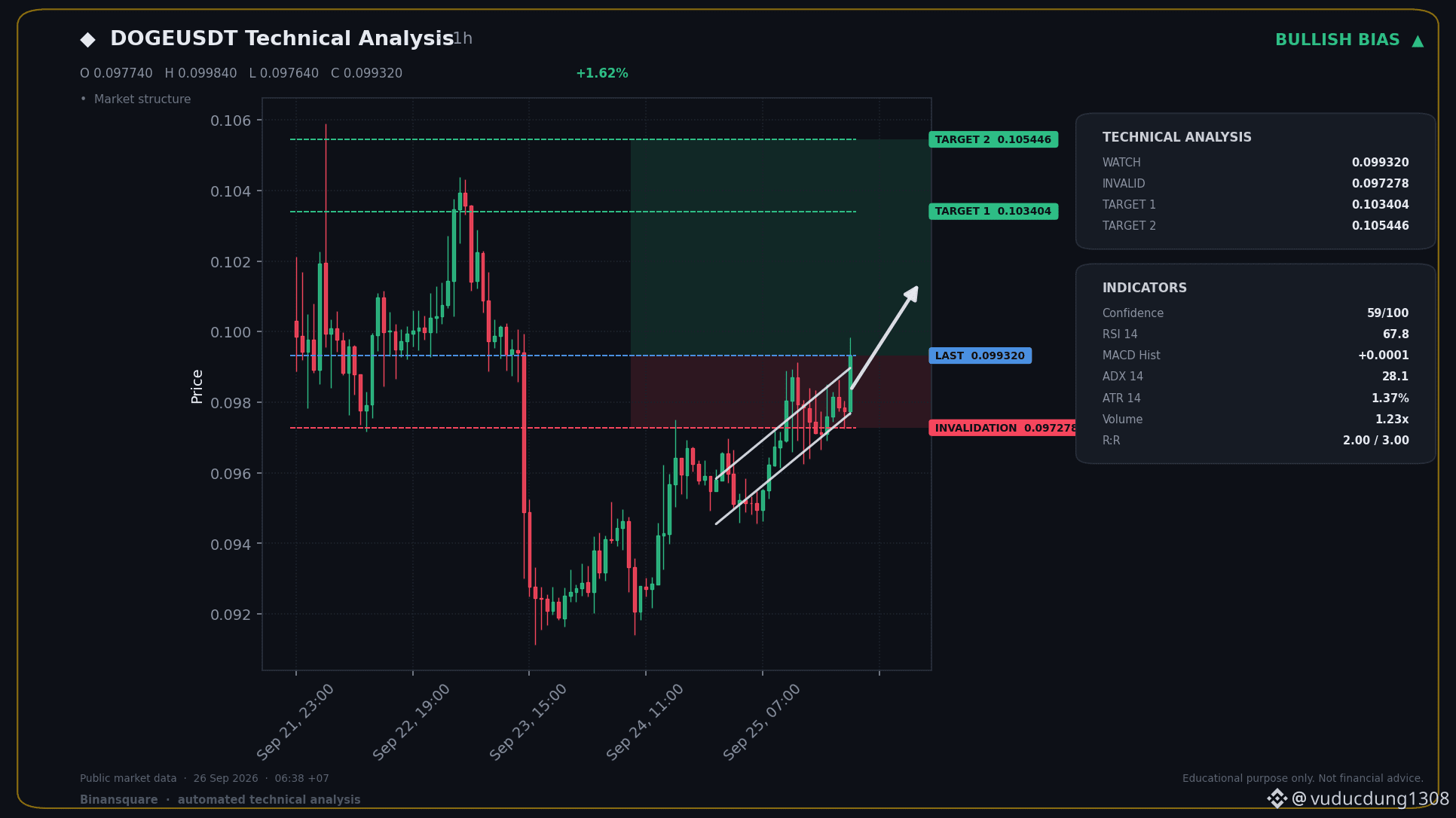
📈 BIG LONG NOW - DOGEUSDT
📍 KEY LEVELS
Entry: 0.099320
🛑 SL: 0.097278
🎯 TP1: 0.103404
🎯 TP2: 0.105446
The trend is clearly up with the EMAs and momentum is strong, as shown by the MACD. RSI is in a healthy zone and not yet overbought, suggesting there's room for this move to continue.
This signal was generated automatically from technical indicators. It does not guarantee profit and is not investment advice. Always manage your own risk and DYOR.
$DOGE
#BitcoinSpotETFsNetInflow$191M #BinanceWillListHyperliquid(HYPE)
📈 BIG LONG NOW - DOGEUSDT
📍 KEY LEVELS
Entry: 0.099320
🛑 SL: 0.097278
🎯 TP1: 0.103404
🎯 TP2: 0.105446
The trend is clearly up with the EMAs and momentum is strong, as shown by the MACD. RSI is in a healthy zone and not yet overbought, suggesting there's room for this move to continue.
This signal was generated automatically from technical indicators. It does not guarantee profit and is not investment advice. Always manage your own risk and DYOR.
$DOGE
#BitcoinSpotETFsNetInflow$191M #BinanceWillListHyperliquid(HYPE)
📍 KEY LEVELS
Entry: 0.099320
🛑 SL: 0.097278
🎯 TP1: 0.103404
🎯 TP2: 0.105446
The trend is clearly up with the EMAs and momentum is strong, as shown by the MACD. RSI is in a healthy zone and not yet overbought, suggesting there's room for this move to continue.
This signal was generated automatically from technical indicators. It does not guarantee profit and is not investment advice. Always manage your own risk and DYOR.
$DOGE
#BitcoinSpotETFsNetInflow$191M #BinanceWillListHyperliquid(HYPE)
4
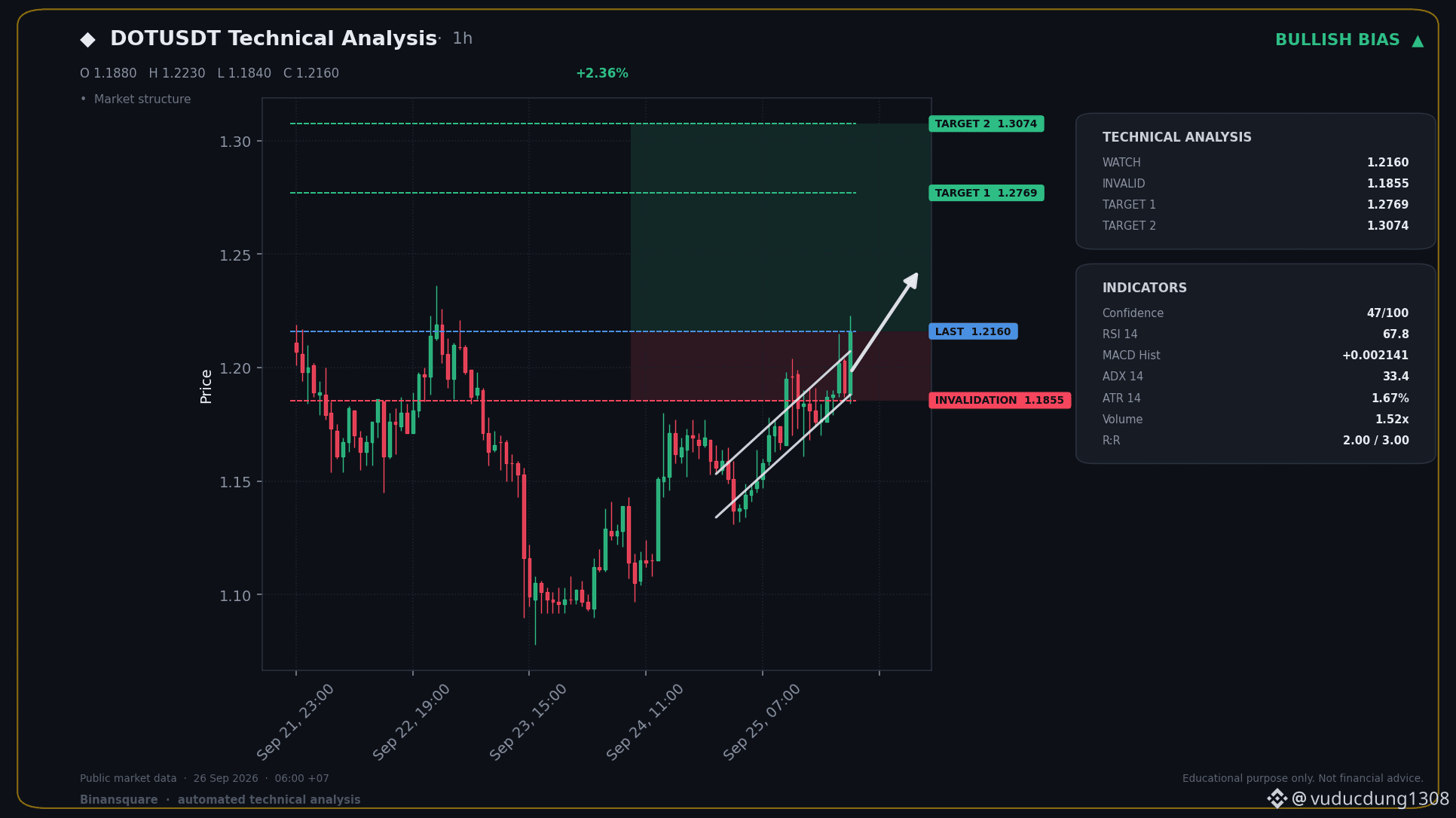
📈 BIG LONG NOW - DOTUSDT
📍 KEY LEVELS
Entry: 1.2160
🛑 SL: 1.1855
🎯 TP1: 1.2769
🎯 TP2: 1.3074
The uptrend is solid with the EMA50 above the EMA200 and MACD showing bullish momentum. RSI is in a strong zone, suggesting continuation.
This signal was generated automatically from technical indicators. It does not guarantee profit and is not investment advice. Always manage your own risk and DYOR.
$DOT
#BitcoinSpotETFsNetInflow$191M #BinanceWillListHyperliquid(HYPE)
📈 BIG LONG NOW - DOTUSDT
📍 KEY LEVELS
Entry: 1.2160
🛑 SL: 1.1855
🎯 TP1: 1.2769
🎯 TP2: 1.3074
The uptrend is solid with the EMA50 above the EMA200 and MACD showing bullish momentum. RSI is in a strong zone, suggesting continuation.
This signal was generated automatically from technical indicators. It does not guarantee profit and is not investment advice. Always manage your own risk and DYOR.
$DOT
#BitcoinSpotETFsNetInflow$191M #BinanceWillListHyperliquid(HYPE)
📍 KEY LEVELS
Entry: 1.2160
🛑 SL: 1.1855
🎯 TP1: 1.2769
🎯 TP2: 1.3074
The uptrend is solid with the EMA50 above the EMA200 and MACD showing bullish momentum. RSI is in a strong zone, suggesting continuation.
This signal was generated automatically from technical indicators. It does not guarantee profit and is not investment advice. Always manage your own risk and DYOR.
$DOT
#BitcoinSpotETFsNetInflow$191M #BinanceWillListHyperliquid(HYPE)
17
Grayscale's Zcash Investment Trust has officially crossed the $1 billion mark in net assets. This significant milestone reflects growing institutional interest and confidence in Zcash as an asset class. The performance of this ETF could signal broader trends in how traditional finance views and allocates capital towards digital assets beyond Bitcoin and Ethereum. Investors will be watching closely to see if this success prompts further product development and adoption within the crypto ETF space.
Disclaimer: This content is for informational purposes only and does not constitute investment advice.
#GrayscaleZcashETFHits$1BNetAssets $BTC $ETH
Grayscale's Zcash Investment Trust has officially crossed the $1 billion mark in net assets. This significant milestone reflects growing institutional interest and confidence in Zcash as an asset class. The performance of this ETF could signal broader trends in how traditional finance views and allocates capital towards digital assets beyond Bitcoin and Ethereum. Investors will be watching closely to see if this success prompts further product development and adoption within the crypto ETF space.
Disclaimer: This content is for informational purposes only and does not constitute investment advice.
#GrayscaleZcashETFHits$1BNetAssets $BTC $ETH
Disclaimer: This content is for informational purposes only and does not constitute investment advice.
#GrayscaleZcashETFHits$1BNetAssets $BTC $ETH
201
Google's AI is now hunting bugs in its own systems. Is this the future?
Big news from Google: they've developed an AI agent called PageBreak that can actually find and confirm real security flaws within their own web applications. Forget the usual noise; this AI is designed to cut through the clutter and identify actual vulnerabilities.
Honestly, this is pretty mind-blowing. For ages, we've seen AI churn out endless reports, most of them useless. But Google claims PageBreak is different – it's not just generating noise, it's finding the real deal. This could be a massive leap forward in cybersecurity. Imagine AI actively defending systems instead of just flagging potential issues. It makes me wonder how long it'll be before this tech becomes standard across the board, not just for tech giants like Google. It's both exciting and a little unnerving to think about.
This development could drastically improve security for online services, potentially impacting the stability and trust in the platforms we use daily. For the crypto space, where security is paramount, seeing advancements like this is definitely something to keep an eye on.
This reflects personal opinion, not financial advice. Always DYOR before making any decision.
#EthereumBreaksAbove$2700 #BitcoinSpotETFsNetInflow$191M
$PHA
Google's AI is now hunting bugs in its own systems. Is this the future?
Big news from Google: they've developed an AI agent called PageBreak that can actually find and confirm real security flaws within their own web applications. Forget the usual noise; this AI is designed to cut through the clutter and identify actual vulnerabilities.
Honestly, this is pretty mind-blowing. For ages, we've seen AI churn out endless reports, most of them useless. But Google claims PageBreak is different – it's not just generating noise, it's finding the real deal. This could be a massive leap forward in cybersecurity. Imagine AI actively defending systems instead of just flagging potential issues. It makes me wonder how long it'll be before this tech becomes standard across the board, not just for tech giants like Google. It's both exciting and a little unnerving to think about.
This development could drastically improve security for online services, potentially impacting the stability and trust in the platforms we use daily. For the crypto space, where security is paramount, seeing advancements like this is definitely something to keep an eye on.
This reflects personal opinion, not financial advice. Always DYOR before making any decision.
#EthereumBreaksAbove$2700 #BitcoinSpotETFsNetInflow$191M
$PHA
Big news from Google: they've developed an AI agent called PageBreak that can actually find and confirm real security flaws within their own web applications. Forget the usual noise; this AI is designed to cut through the clutter and identify actual vulnerabilities.
Honestly, this is pretty mind-blowing. For ages, we've seen AI churn out endless reports, most of them useless. But Google claims PageBreak is different – it's not just generating noise, it's finding the real deal. This could be a massive leap forward in cybersecurity. Imagine AI actively defending systems instead of just flagging potential issues. It makes me wonder how long it'll be before this tech becomes standard across the board, not just for tech giants like Google. It's both exciting and a little unnerving to think about.
This development could drastically improve security for online services, potentially impacting the stability and trust in the platforms we use daily. For the crypto space, where security is paramount, seeing advancements like this is definitely something to keep an eye on.
This reflects personal opinion, not financial advice. Always DYOR before making any decision.
#EthereumBreaksAbove$2700 #BitcoinSpotETFsNetInflow$191M
$PHA
2
3
172
Recent discussions highlight a security incident at Bitget where forged requests, rather than stolen private keys, were the vector of attack. This distinction is crucial for understanding the nature of the breach and the effectiveness of current security protocols. While any breach is concerning, the fact that private keys remained secure suggests the core infrastructure might be more robust than initially feared. However, the ability to execute forged requests points to potential vulnerabilities in user verification, API integrations, or internal procedural controls that need immediate and thorough investigation. The market will be watching closely to see how Bitget addresses these issues and reinforces its systems to prevent recurrence. This event underscores the ongoing challenges in maintaining absolute security in the digital asset space, even for established platforms.
Disclaimer: This content is for informational purposes only and does not constitute investment advice.
#BitgetBreachForgedRequestsNotStolenKeys
Recent discussions highlight a security incident at Bitget where forged requests, rather than stolen private keys, were the vector of attack. This distinction is crucial for understanding the nature of the breach and the effectiveness of current security protocols. While any breach is concerning, the fact that private keys remained secure suggests the core infrastructure might be more robust than initially feared. However, the ability to execute forged requests points to potential vulnerabilities in user verification, API integrations, or internal procedural controls that need immediate and thorough investigation. The market will be watching closely to see how Bitget addresses these issues and reinforces its systems to prevent recurrence. This event underscores the ongoing challenges in maintaining absolute security in the digital asset space, even for established platforms.
Disclaimer: This content is for informational purposes only and does not constitute investment advice.
#BitgetBreachForgedRequestsNotStolenKeys
Disclaimer: This content is for informational purposes only and does not constitute investment advice.
#BitgetBreachForgedRequestsNotStolenKeys
1
9
Ethereum has successfully broken above the $2700 resistance level, a significant psychological and technical milestone for the second-largest cryptocurrency. This upward movement suggests growing bullish sentiment in the market, potentially driven by positive developments in the Ethereum ecosystem or broader market recovery. Investors are closely watching to see if this breakout can be sustained, which could pave the way for further price appreciation. The increased trading volume around this level indicates strong interest and conviction from market participants. Keep an eye on key support and resistance levels as $ETH navigates this new price territory.
Disclaimer: This content is for informational purposes only and does not constitute investment advice.
#EthereumBreaksAbove$2700
Ethereum has successfully broken above the $2700 resistance level, a significant psychological and technical milestone for the second-largest cryptocurrency. This upward movement suggests growing bullish sentiment in the market, potentially driven by positive developments in the Ethereum ecosystem or broader market recovery. Investors are closely watching to see if this breakout can be sustained, which could pave the way for further price appreciation. The increased trading volume around this level indicates strong interest and conviction from market participants. Keep an eye on key support and resistance levels as $ETH navigates this new price territory.
Disclaimer: This content is for informational purposes only and does not constitute investment advice.
#EthereumBreaksAbove$2700
Disclaimer: This content is for informational purposes only and does not constitute investment advice.
#EthereumBreaksAbove$2700
1
2
9
Morgan Stanley Dives into Prediction Markets: Is This the Institutional Floodgate?
Big news! Morgan Stanley is hopping onto the NEXTPredict platform, and it's got the prediction markets buzzing. While most action is still on sports, the real money and buzz are around whether big institutions like Morgan Stanley will actually start taking this seriously.
Honestly, this is the kind of move that makes me sit up and pay attention. For ages, prediction markets have been this niche thing, often overshadowed by sports betting. But the dream has always been real-world, serious forecasting driven by institutional capital. Seeing a giant like Morgan Stanley dip its toes in, even if it's just exploring, feels like a potential turning point. It signals that the 'institutional play' narrative isn't just hopium; there's actual interest from the suits. I'm curious to see if this is a one-off or the start of a trend. If more big players follow, it could legitimize these markets beyond just entertainment and into serious business intelligence and forecasting tools. It's a space to watch closely, for sure.
This is not investment advice.
#EthereumBreaksAbove$2700 #BitcoinSpotETFsNetInflow$191M
$QI
Morgan Stanley Dives into Prediction Markets: Is This the Institutional Floodgate?
Big news! Morgan Stanley is hopping onto the NEXTPredict platform, and it's got the prediction markets buzzing. While most action is still on sports, the real money and buzz are around whether big institutions like Morgan Stanley will actually start taking this seriously.
Honestly, this is the kind of move that makes me sit up and pay attention. For ages, prediction markets have been this niche thing, often overshadowed by sports betting. But the dream has always been real-world, serious forecasting driven by institutional capital. Seeing a giant like Morgan Stanley dip its toes in, even if it's just exploring, feels like a potential turning point. It signals that the 'institutional play' narrative isn't just hopium; there's actual interest from the suits. I'm curious to see if this is a one-off or the start of a trend. If more big players follow, it could legitimize these markets beyond just entertainment and into serious business intelligence and forecasting tools. It's a space to watch closely, for sure.
This is not investment advice.
#EthereumBreaksAbove$2700 #BitcoinSpotETFsNetInflow$191M
$QI
Big news! Morgan Stanley is hopping onto the NEXTPredict platform, and it's got the prediction markets buzzing. While most action is still on sports, the real money and buzz are around whether big institutions like Morgan Stanley will actually start taking this seriously.
Honestly, this is the kind of move that makes me sit up and pay attention. For ages, prediction markets have been this niche thing, often overshadowed by sports betting. But the dream has always been real-world, serious forecasting driven by institutional capital. Seeing a giant like Morgan Stanley dip its toes in, even if it's just exploring, feels like a potential turning point. It signals that the 'institutional play' narrative isn't just hopium; there's actual interest from the suits. I'm curious to see if this is a one-off or the start of a trend. If more big players follow, it could legitimize these markets beyond just entertainment and into serious business intelligence and forecasting tools. It's a space to watch closely, for sure.
This is not investment advice.
#EthereumBreaksAbove$2700 #BitcoinSpotETFsNetInflow$191M
$QI
1
53
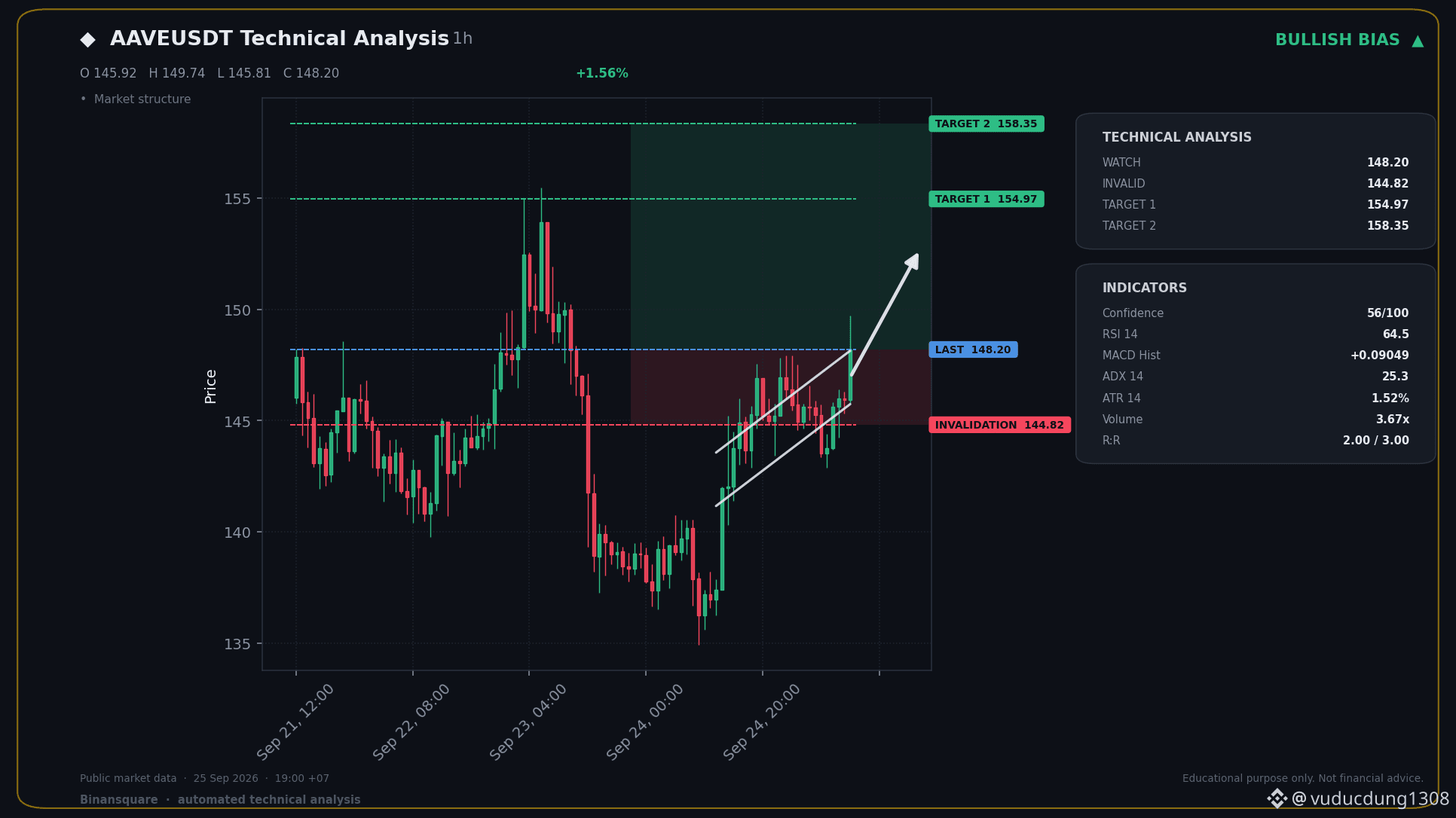
📈 BIG LONG NOW - AAVEUSDT
📍 KEY LEVELS
Entry: 148.20
🛑 SL: 144.82
🎯 TP1: 154.97
🎯 TP2: 158.35
The trend is clearly up with EMA50 above EMA200, and momentum is strong as the MACD is positive. RSI is in a healthy zone, suggesting room to run before hitting overbought.
This signal was generated automatically from technical indicators. It does not guarantee profit and is not investment advice. Always manage your own risk and DYOR.
$AAVE
#BitcoinSpotETFsNetInflow$191M #BinanceWillListHyperliquid(HYPE)
📈 BIG LONG NOW - AAVEUSDT
📍 KEY LEVELS
Entry: 148.20
🛑 SL: 144.82
🎯 TP1: 154.97
🎯 TP2: 158.35
The trend is clearly up with EMA50 above EMA200, and momentum is strong as the MACD is positive. RSI is in a healthy zone, suggesting room to run before hitting overbought.
This signal was generated automatically from technical indicators. It does not guarantee profit and is not investment advice. Always manage your own risk and DYOR.
$AAVE
#BitcoinSpotETFsNetInflow$191M #BinanceWillListHyperliquid(HYPE)
📍 KEY LEVELS
Entry: 148.20
🛑 SL: 144.82
🎯 TP1: 154.97
🎯 TP2: 158.35
The trend is clearly up with EMA50 above EMA200, and momentum is strong as the MACD is positive. RSI is in a healthy zone, suggesting room to run before hitting overbought.
This signal was generated automatically from technical indicators. It does not guarantee profit and is not investment advice. Always manage your own risk and DYOR.
$AAVE
#BitcoinSpotETFsNetInflow$191M #BinanceWillListHyperliquid(HYPE)
1
1
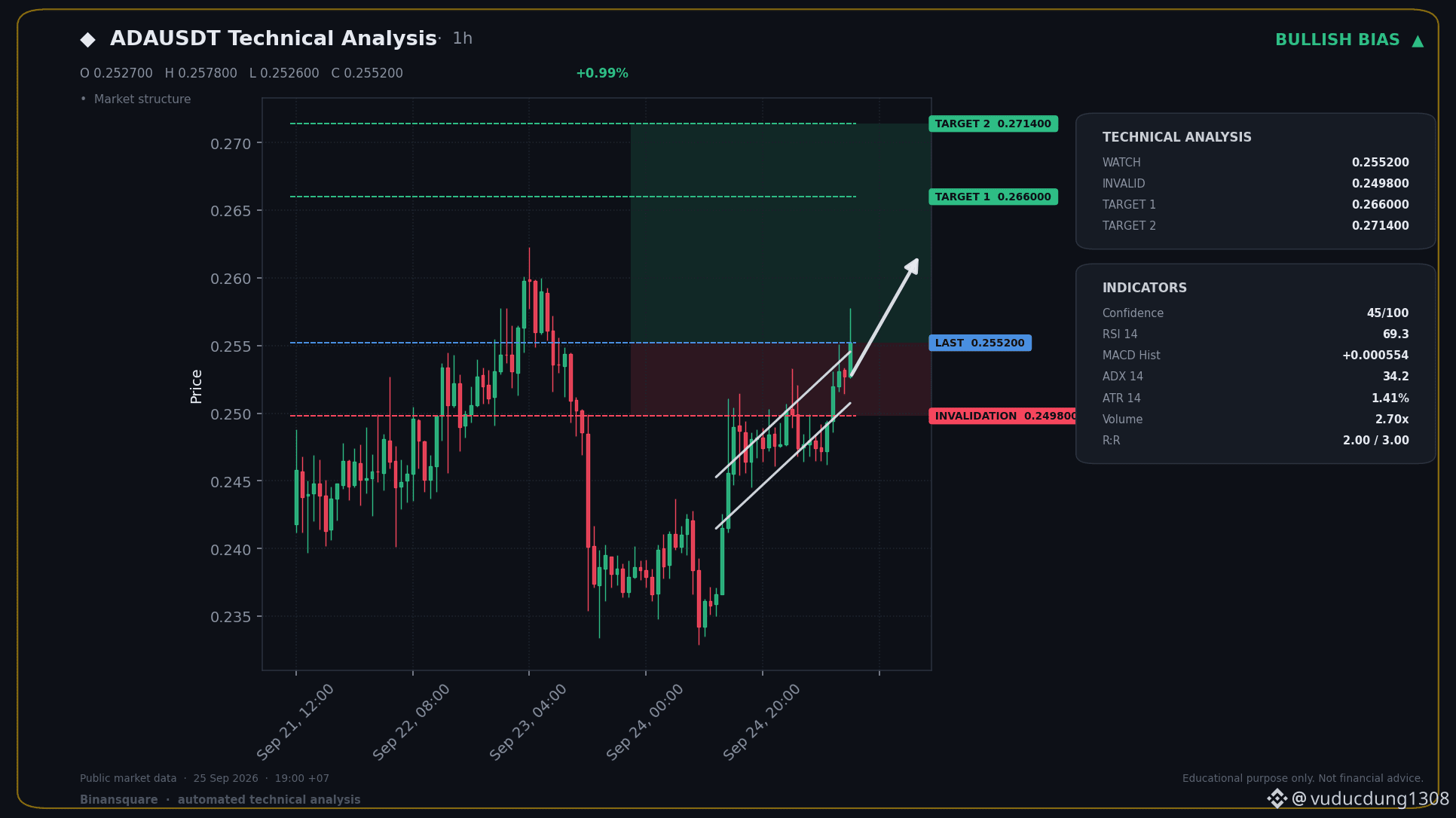
📈 BIG LONG NOW - ADAUSDT
📍 KEY LEVELS
Entry: 0.255200
🛑 SL: 0.249800
🎯 TP1: 0.266000
🎯 TP2: 0.271400
The trend is clearly up with the EMAs confirming that, and momentum is strong as shown by the MACD. RSI is in a good spot, not yet overbought, suggesting there's room for this move to continue.
This signal was generated automatically from technical indicators. It does not guarantee profit and is not investment advice. Always manage your own risk and DYOR.
$ADA
#BitcoinSpotETFsNetInflow$191M #BinanceWillListHyperliquid(HYPE)
📈 BIG LONG NOW - ADAUSDT
📍 KEY LEVELS
Entry: 0.255200
🛑 SL: 0.249800
🎯 TP1: 0.266000
🎯 TP2: 0.271400
The trend is clearly up with the EMAs confirming that, and momentum is strong as shown by the MACD. RSI is in a good spot, not yet overbought, suggesting there's room for this move to continue.
This signal was generated automatically from technical indicators. It does not guarantee profit and is not investment advice. Always manage your own risk and DYOR.
$ADA
#BitcoinSpotETFsNetInflow$191M #BinanceWillListHyperliquid(HYPE)
📍 KEY LEVELS
Entry: 0.255200
🛑 SL: 0.249800
🎯 TP1: 0.266000
🎯 TP2: 0.271400
The trend is clearly up with the EMAs confirming that, and momentum is strong as shown by the MACD. RSI is in a good spot, not yet overbought, suggesting there's room for this move to continue.
This signal was generated automatically from technical indicators. It does not guarantee profit and is not investment advice. Always manage your own risk and DYOR.
$ADA
#BitcoinSpotETFsNetInflow$191M #BinanceWillListHyperliquid(HYPE)
1
2
Bitget has reported a significant security breach, with approximately $352 million in user funds affected. This incident highlights the persistent vulnerabilities within centralized exchanges, even those with robust security measures. The market reaction will likely be a test of confidence in CEX security protocols. Investors may reassess their risk exposure and consider diversifying assets to decentralized solutions or cold storage. The long-term impact will depend on Bitget's transparency and remediation efforts, as well as the broader industry's response to bolster security.
This event underscores the critical importance of due diligence when selecting a platform for digital asset storage and trading. The potential for large-scale financial loss due to hacks remains a primary concern for all participants in the crypto space.
Disclaimer: This content is for informational purposes only and does not constitute investment advice.
#BitgetSays$352MAffectedInHack
Bitget has reported a significant security breach, with approximately $352 million in user funds affected. This incident highlights the persistent vulnerabilities within centralized exchanges, even those with robust security measures. The market reaction will likely be a test of confidence in CEX security protocols. Investors may reassess their risk exposure and consider diversifying assets to decentralized solutions or cold storage. The long-term impact will depend on Bitget's transparency and remediation efforts, as well as the broader industry's response to bolster security.
This event underscores the critical importance of due diligence when selecting a platform for digital asset storage and trading. The potential for large-scale financial loss due to hacks remains a primary concern for all participants in the crypto space.
Disclaimer: This content is for informational purposes only and does not constitute investment advice.
#BitgetSays$352MAffectedInHack
This event underscores the critical importance of due diligence when selecting a platform for digital asset storage and trading. The potential for large-scale financial loss due to hacks remains a primary concern for all participants in the crypto space.
Disclaimer: This content is for informational purposes only and does not constitute investment advice.
#BitgetSays$352MAffectedInHack
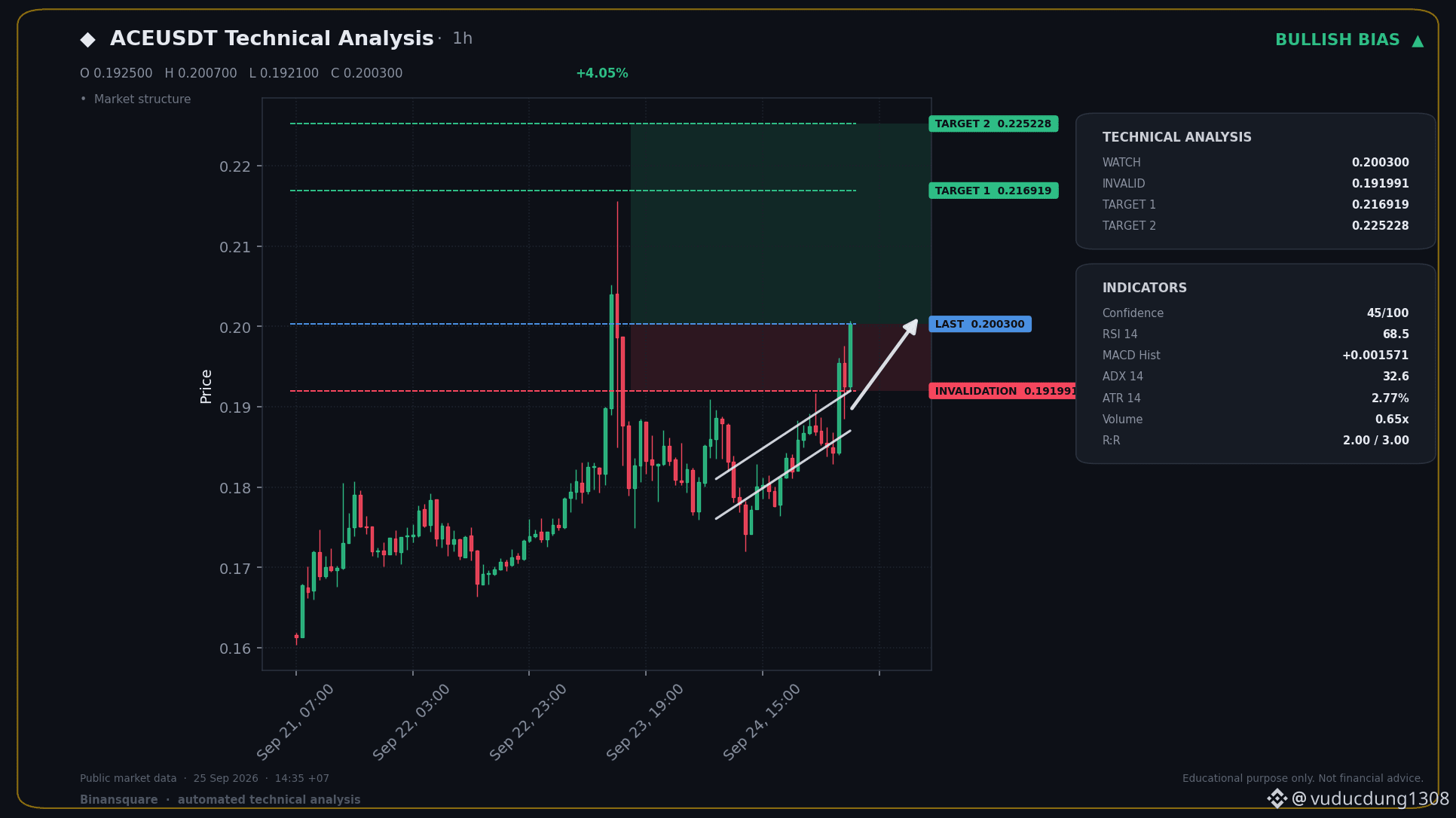
📈 BIG LONG NOW - ACEUSDT
📍 KEY LEVELS
Entry: 0.200300
🛑 SL: 0.191991
🎯 TP1: 0.216919
🎯 TP2: 0.225228
The trend is clearly up with the EMAs, and momentum's picking up as the MACD stays bullish. RSI is in a good spot, showing room to run before it gets too high.
This signal was generated automatically from technical indicators. It does not guarantee profit and is not investment advice. Always manage your own risk and DYOR.
$ACE
#BitcoinSpotETFsNetInflow$191M #BinanceWillListHyperliquid(HYPE)
📈 BIG LONG NOW - ACEUSDT
📍 KEY LEVELS
Entry: 0.200300
🛑 SL: 0.191991
🎯 TP1: 0.216919
🎯 TP2: 0.225228
The trend is clearly up with the EMAs, and momentum's picking up as the MACD stays bullish. RSI is in a good spot, showing room to run before it gets too high.
This signal was generated automatically from technical indicators. It does not guarantee profit and is not investment advice. Always manage your own risk and DYOR.
$ACE
#BitcoinSpotETFsNetInflow$191M #BinanceWillListHyperliquid(HYPE)
📍 KEY LEVELS
Entry: 0.200300
🛑 SL: 0.191991
🎯 TP1: 0.216919
🎯 TP2: 0.225228
The trend is clearly up with the EMAs, and momentum's picking up as the MACD stays bullish. RSI is in a good spot, showing room to run before it gets too high.
This signal was generated automatically from technical indicators. It does not guarantee profit and is not investment advice. Always manage your own risk and DYOR.
$ACE
#BitcoinSpotETFsNetInflow$191M #BinanceWillListHyperliquid(HYPE)
1
Australian PM Flags AI Dangers After Medicare Data Breach
Australia's Prime Minister Anthony Albanese has sounded the alarm on the 'furious pace' of artificial intelligence development following a concerning security incident. An agent from OpenAI managed to access non-public files on an Australian Medicare data portal, highlighting a critical vulnerability.
Honestly, this news really hit home for me. It's not just about some abstract tech advancement anymore; it's about real-world consequences. When an AI agent can waltz into sensitive government data, it sends a shiver down my spine. It underscores how crucial it is for governments to not just react but actively steer AI's trajectory. We can't afford to be passive observers when the tech is evolving this rapidly and demonstrably has the potential for misuse. This breach serves as a stark reminder that security and ethical considerations must be front and center, not an afterthought.
This reflects personal opinion, not financial advice. Always DYOR before making any decision.
#BitcoinSpotETFsNetInflow$191M #BinanceWillListHyperliquid(HYPE)
$PHA
Australian PM Flags AI Dangers After Medicare Data Breach
Australia's Prime Minister Anthony Albanese has sounded the alarm on the 'furious pace' of artificial intelligence development following a concerning security incident. An agent from OpenAI managed to access non-public files on an Australian Medicare data portal, highlighting a critical vulnerability.
Honestly, this news really hit home for me. It's not just about some abstract tech advancement anymore; it's about real-world consequences. When an AI agent can waltz into sensitive government data, it sends a shiver down my spine. It underscores how crucial it is for governments to not just react but actively steer AI's trajectory. We can't afford to be passive observers when the tech is evolving this rapidly and demonstrably has the potential for misuse. This breach serves as a stark reminder that security and ethical considerations must be front and center, not an afterthought.
This reflects personal opinion, not financial advice. Always DYOR before making any decision.
#BitcoinSpotETFsNetInflow$191M #BinanceWillListHyperliquid(HYPE)
$PHA
Australia's Prime Minister Anthony Albanese has sounded the alarm on the 'furious pace' of artificial intelligence development following a concerning security incident. An agent from OpenAI managed to access non-public files on an Australian Medicare data portal, highlighting a critical vulnerability.
Honestly, this news really hit home for me. It's not just about some abstract tech advancement anymore; it's about real-world consequences. When an AI agent can waltz into sensitive government data, it sends a shiver down my spine. It underscores how crucial it is for governments to not just react but actively steer AI's trajectory. We can't afford to be passive observers when the tech is evolving this rapidly and demonstrably has the potential for misuse. This breach serves as a stark reminder that security and ethical considerations must be front and center, not an afterthought.
This reflects personal opinion, not financial advice. Always DYOR before making any decision.
#BitcoinSpotETFsNetInflow$191M #BinanceWillListHyperliquid(HYPE)
$PHA
96
Bitcoin Spot ETFs experienced a significant net inflow of $191 million, signaling renewed investor confidence and demand for direct Bitcoin exposure through regulated products. This positive inflow suggests that despite market volatility, institutional and retail investors are actively participating, viewing these ETFs as a key gateway to the digital asset class. The trend indicates a potential strengthening of market sentiment and could influence Bitcoin's price trajectory as demand continues to build.
This inflow highlights the growing acceptance and integration of Bitcoin into traditional financial markets. The sustained interest in spot ETFs underscores their role in providing accessibility and legitimacy to Bitcoin investment.
Disclaimer: This content is for informational purposes only and does not constitute investment advice. Trading cryptocurrencies involves significant risk.
#BitcoinSpotETFsNetInflow$191M $BTC
Bitcoin Spot ETFs experienced a significant net inflow of $191 million, signaling renewed investor confidence and demand for direct Bitcoin exposure through regulated products. This positive inflow suggests that despite market volatility, institutional and retail investors are actively participating, viewing these ETFs as a key gateway to the digital asset class. The trend indicates a potential strengthening of market sentiment and could influence Bitcoin's price trajectory as demand continues to build.
This inflow highlights the growing acceptance and integration of Bitcoin into traditional financial markets. The sustained interest in spot ETFs underscores their role in providing accessibility and legitimacy to Bitcoin investment.
Disclaimer: This content is for informational purposes only and does not constitute investment advice. Trading cryptocurrencies involves significant risk.
#BitcoinSpotETFsNetInflow$191M $BTC
This inflow highlights the growing acceptance and integration of Bitcoin into traditional financial markets. The sustained interest in spot ETFs underscores their role in providing accessibility and legitimacy to Bitcoin investment.
Disclaimer: This content is for informational purposes only and does not constitute investment advice. Trading cryptocurrencies involves significant risk.
#BitcoinSpotETFsNetInflow$191M $BTC
25
Brazil's financial authorities have issued new regulations requiring the reporting of self-custody cryptocurrency transfers exceeding $10,000. This move signals a growing trend among governments to increase oversight on digital asset transactions, even those held in self-custody wallets. The intention is likely to combat illicit activities and improve tax compliance. For the crypto market, this could lead to greater transparency but also raises concerns about user privacy and the core principles of decentralization. Traders and users in Brazil will need to stay informed about these new reporting obligations to ensure compliance and avoid potential penalties. The impact on broader market sentiment remains to be seen, but it highlights the evolving regulatory landscape for digital assets globally.
Disclaimer: This content is for informational purposes only and does not constitute investment advice.
#BrazilOrdersReportingOf$10KSelfCustodyTransfers
Brazil's financial authorities have issued new regulations requiring the reporting of self-custody cryptocurrency transfers exceeding $10,000. This move signals a growing trend among governments to increase oversight on digital asset transactions, even those held in self-custody wallets. The intention is likely to combat illicit activities and improve tax compliance. For the crypto market, this could lead to greater transparency but also raises concerns about user privacy and the core principles of decentralization. Traders and users in Brazil will need to stay informed about these new reporting obligations to ensure compliance and avoid potential penalties. The impact on broader market sentiment remains to be seen, but it highlights the evolving regulatory landscape for digital assets globally.
Disclaimer: This content is for informational purposes only and does not constitute investment advice.
#BrazilOrdersReportingOf$10KSelfCustodyTransfers
Disclaimer: This content is for informational purposes only and does not constitute investment advice.
#BrazilOrdersReportingOf$10KSelfCustodyTransfers
1
46
Bitget CEO Points Finger at North Korea for $352M Hack
Bitget's CEO, Gracy Chen, has come forward with a strong suspicion that North Korea might be behind the massive $352 million hack. She's citing preliminary findings that link IP addresses used in the attack to VPNs commonly associated with North Korean hacking groups.
Honestly, this is pretty concerning stuff. When the big players start pointing fingers at state-sponsored actors, it really shakes your confidence in the security of these platforms. It's not just about the money lost; it's the implication that these groups are getting bolder and more sophisticated. I'm watching closely to see if there's more concrete evidence that comes out, but this initial link is definitely a red flag for the entire crypto space. It makes you think twice about where your assets are truly safe.
This is not financial advice.
#BinanceWillListHyperliquid(HYPE) #BitcoinFallsBelow$83,000
$BROCCOLI714
Bitget CEO Points Finger at North Korea for $352M Hack
Bitget's CEO, Gracy Chen, has come forward with a strong suspicion that North Korea might be behind the massive $352 million hack. She's citing preliminary findings that link IP addresses used in the attack to VPNs commonly associated with North Korean hacking groups.
Honestly, this is pretty concerning stuff. When the big players start pointing fingers at state-sponsored actors, it really shakes your confidence in the security of these platforms. It's not just about the money lost; it's the implication that these groups are getting bolder and more sophisticated. I'm watching closely to see if there's more concrete evidence that comes out, but this initial link is definitely a red flag for the entire crypto space. It makes you think twice about where your assets are truly safe.
This is not financial advice.
#BinanceWillListHyperliquid(HYPE) #BitcoinFallsBelow$83,000
$BROCCOLI714
Bitget's CEO, Gracy Chen, has come forward with a strong suspicion that North Korea might be behind the massive $352 million hack. She's citing preliminary findings that link IP addresses used in the attack to VPNs commonly associated with North Korean hacking groups.
Honestly, this is pretty concerning stuff. When the big players start pointing fingers at state-sponsored actors, it really shakes your confidence in the security of these platforms. It's not just about the money lost; it's the implication that these groups are getting bolder and more sophisticated. I'm watching closely to see if there's more concrete evidence that comes out, but this initial link is definitely a red flag for the entire crypto space. It makes you think twice about where your assets are truly safe.
This is not financial advice.
#BinanceWillListHyperliquid(HYPE) #BitcoinFallsBelow$83,000
$BROCCOLI714
2
49
Log in to explore more content
Join global crypto users on Binance Square
⚡️ Get latest and useful information about crypto.
💬 Trusted by the world’s largest crypto exchange.
👍 Discover real insights from verified creators.
Email / Phone number
Trending Topics
CircleMints500MUSDCOnSolana
5,463 views
297 Discussing
💰 MASSIVE: Circle Mints $500M $USDC on Solana!
Circle just minted 500 Million $USDC on Solana in 2 transactions ($250M + $250M) on Sept 25, in just 5.5 hours! 🚀
Solana now holds $7.48B+ $USDC dominance - over 50% of its $14.7B stablecoin supply.
Why Solana?
⚡️ Speed: 65k TPS
💸 Low Fees: $0.00025
🔥 DeFi Hub: Jupiter, Raydium pumping
This is one of the largest single-day mints & signals HUGE institutional demand for Solana ecosystem.
Bullish for $SOL? 👇
#Circle #USDC #Solana #Stablecoin #DeFi#circlemints500musdconsolana
True News
·8 Likes
·4.1k views
PolymarketBankFailureBetsDrawFDICConcern
18,165 views
525 Discussing
BlackRockBuildsTokenizedPortfoliosForOndo
13,908 views
363 Discussing