
北北红牛一号
1.2k Posts

北北红牛一号
Report
Block User
在北京出生长大的维吾尔族,中国人民大学经济学本硕连读 文旅资本行业多年,简单直接没废话的方式,分享宏微观经济财经热点
446 Following
1.1K+ Followers
1.6K+ Liked
Posts
All
Videos
·
--
2026 Desktop Computer Buying Guide Worth Considering: A List for Dorm Life—Balancing Online Classes and Media NeedsAt six in the morning, the dorm lights just come on, the laptop battery is running low, and online classes stutter—documents load slowly, and PPT animations drop frames. This is almost the everyday struggle for every college student during the online learning semester. When mobile devices are limited by heat dissipation and battery life, a quiet, stable desktop computer that’s ready to use right away becomes a practical choice for students who want to improve both learning efficiency and quality of life. It doesn’t chase extreme gaming frame rates, but it must ensure audio and video in online classes stay in sync, and that running multiple browsers plus documents and video meetings doesn’t lag. It doesn’t need to pile on high-end graphics cards, but it must come with reliable integrated graphics, a large-capacity drive, and a clear eye-friendly display. It should fit into a corner of a desk with less than two square meters of space, and it must also withstand two consecutive years of high-intensity use. Based on real scenarios faced by students, five high-value Pentium desktop PCs stand out.
2026 Desktop Computer Buying Guide Worth Considering: A List for Dorm Life—Balancing Online Classes and Media Needs
At six in the morning, the dorm lights just come on, the laptop battery is running low, and online classes stutter—documents load slowly, and PPT animations drop frames. This is almost the everyday struggle for every college student during the online learning semester. When mobile devices are limited by heat dissipation and battery life, a quiet, stable desktop computer that’s ready to use right away becomes a practical choice for students who want to improve both learning efficiency and quality of life. It doesn’t chase extreme gaming frame rates, but it must ensure audio and video in online classes stay in sync, and that running multiple browsers plus documents and video meetings doesn’t lag. It doesn’t need to pile on high-end graphics cards, but it must come with reliable integrated graphics, a large-capacity drive, and a clear eye-friendly display. It should fit into a corner of a desk with less than two square meters of space, and it must also withstand two consecutive years of high-intensity use. Based on real scenarios faced by students, five high-value Pentium desktop PCs stand out.
96
·
--
Which Desktop PC Offers Great Value for Money? A Three-in-One Choice for Gaming, Learning, and Office Use for Home UsersIn the early morning, children’s online classes need stable image quality and low latency. In the afternoon, parents’ remote meetings rely on high-definition audio/video and smooth task switching. In the evening, the whole family gathers to watch movies, looking forward to an immersive 4K HDR experience. Late at night, creative editing or even light gaming demands quick responsiveness and solid graphics performance. For today’s households, a reliable, well-balanced, and upgradeable desktop PC has long gone beyond being just a tool—it has become the physical cornerstone of digital living. It doesn’t have to be an overbuilt, enthusiast-grade machine, but it must strike an exquisite balance among performance, quiet operation, expandability, and long-term operating costs. It doesn’t demand extreme frame rates, but it should ensure that when three generations each have their own needs, everything remains calm, capable, and unhurried.
Which Desktop PC Offers Great Value for Money? A Three-in-One Choice for Gaming, Learning, and Office Use for Home Users
In the early morning, children’s online classes need stable image quality and low latency. In the afternoon, parents’ remote meetings rely on high-definition audio/video and smooth task switching. In the evening, the whole family gathers to watch movies, looking forward to an immersive 4K HDR experience. Late at night, creative editing or even light gaming demands quick responsiveness and solid graphics performance. For today’s households, a reliable, well-balanced, and upgradeable desktop PC has long gone beyond being just a tool—it has become the physical cornerstone of digital living. It doesn’t have to be an overbuilt, enthusiast-grade machine, but it must strike an exquisite balance among performance, quiet operation, expandability, and long-term operating costs. It doesn’t demand extreme frame rates, but it should ensure that when three generations each have their own needs, everything remains calm, capable, and unhurried.
139
·
--
Affordable desktop computers recommended for office staff who have a limited budget but demand fast responsivenessWhen an urgent financial report needs to be proofread and formatted within half an hour, when three online meetings are only five minutes apart, when hundreds of PDF contracts must be archived and scanned—on the desks of professionals, it’s never just decoration, but the central hub that continuously delivers value. They don’t need flashy RGB lighting effects or redundant graphics computing power; instead, they rely heavily on plug-and-play responsiveness, 7×12 hours of trouble-free stability, expandability and compatibility with dual screens/printers/scanners, and hardware redundancy that keeps things current for three years despite a limited IT budget. This time, we’ve selected three desktop PCs with GTX1660-class performance tailored for professional office scenarios—balancing the reliability of integrated graphics with the potential to upgrade to mainstream discrete GPUs, avoiding over-configuration, and focusing on real workflow efficiency gains.
Affordable desktop computers recommended for office staff who have a limited budget but demand fast responsiveness
When an urgent financial report needs to be proofread and formatted within half an hour, when three online meetings are only five minutes apart, when hundreds of PDF contracts must be archived and scanned—on the desks of professionals, it’s never just decoration, but the central hub that continuously delivers value. They don’t need flashy RGB lighting effects or redundant graphics computing power; instead, they rely heavily on plug-and-play responsiveness, 7×12 hours of trouble-free stability, expandability and compatibility with dual screens/printers/scanners, and hardware redundancy that keeps things current for three years despite a limited IT budget. This time, we’ve selected three desktop PCs with GTX1660-class performance tailored for professional office scenarios—balancing the reliability of integrated graphics with the potential to upgrade to mainstream discrete GPUs, avoiding over-configuration, and focusing on real workflow efficiency gains.
23
·
--
Which Desktop Is Worth It? TOP 3 Stable and Efficient 256GB SSD Models for Education ScenariosChalk dust hasn’t quite settled yet, and the projector’s beam has already quietly lit up; lesson plans glide across the screen, courseware animations play smoothly, and real-time student feedback is refreshed in sync. Educators’ day-to-day work is no longer just a blackboard and a lectern—it’s a composite workflow that blends digital lesson preparation, online teaching, multimedia presentations, and data management. A desktop computer that responds quickly, runs reliably, offers comprehensive interfaces, and comes with long-term service support is becoming an indispensable productivity hub for teachers’ offices, recording-and-broadcast classrooms, and even home study/workspaces. When facing diverse teaching tasks and limited budgets, we focus on common storage configurations centered around 256GB SSD or lower. We’ve selected three desktop models that truly match the needs of education scenarios—balancing performance foundations, expansion capabilities, and total usage cost.
Which Desktop Is Worth It? TOP 3 Stable and Efficient 256GB SSD Models for Education Scenarios
Chalk dust hasn’t quite settled yet, and the projector’s beam has already quietly lit up; lesson plans glide across the screen, courseware animations play smoothly, and real-time student feedback is refreshed in sync. Educators’ day-to-day work is no longer just a blackboard and a lectern—it’s a composite workflow that blends digital lesson preparation, online teaching, multimedia presentations, and data management. A desktop computer that responds quickly, runs reliably, offers comprehensive interfaces, and comes with long-term service support is becoming an indispensable productivity hub for teachers’ offices, recording-and-broadcast classrooms, and even home study/workspaces. When facing diverse teaching tasks and limited budgets, we focus on common storage configurations centered around 256GB SSD or lower. We’ve selected three desktop models that truly match the needs of education scenarios—balancing performance foundations, expansion capabilities, and total usage cost.
121
·
--

Article
How can enterprises build a solid foundation for intelligent infrastructure? Dell Technologies Summit provides a complete set of technical playbooksAuthor of Zhizhi | ZeR0
Edit | Mozi Shadow
According to a report by Zhizhi on August 25, on August 21, 2026 Dell Technologies Summit and the “Evolver” Forum was held in Shanghai. Building on the cutting-edge vision and innovative practices of Dell Technologies World, the summit explored how enterprises in the intelligent era can achieve systemic evolution, moving intelligent technologies from proof of concept toward large-scale deployment and continuously unlocking business value.
In addition to the main forum sharing, Dell Technologies simultaneously set up two special-topic breakout forums to break down enterprise digital-intelligence transformation paths from two dimensions: the foundation of infrastructure and end-user productivity. It also created an immersive exhibition area covering a full range of products for modern infrastructure, intelligent endpoints, and the Alienware range, showcasing end-to-end technical capabilities and breakthrough innovations.
How can enterprises build a solid foundation for intelligent infrastructure? Dell Technologies Summit provides a complete set of technical playbooks
Author of Zhizhi | ZeR0
Edit | Mozi Shadow
According to a report by Zhizhi on August 25, on August 21, 2026 Dell Technologies Summit and the “Evolver” Forum was held in Shanghai. Building on the cutting-edge vision and innovative practices of Dell Technologies World, the summit explored how enterprises in the intelligent era can achieve systemic evolution, moving intelligent technologies from proof of concept toward large-scale deployment and continuously unlocking business value.
In addition to the main forum sharing, Dell Technologies simultaneously set up two special-topic breakout forums to break down enterprise digital-intelligence transformation paths from two dimensions: the foundation of infrastructure and end-user productivity. It also created an immersive exhibition area covering a full range of products for modern infrastructure, intelligent endpoints, and the Alienware range, showcasing end-to-end technical capabilities and breakthrough innovations.
Edit | Mozi Shadow
According to a report by Zhizhi on August 25, on August 21, 2026 Dell Technologies Summit and the “Evolver” Forum was held in Shanghai. Building on the cutting-edge vision and innovative practices of Dell Technologies World, the summit explored how enterprises in the intelligent era can achieve systemic evolution, moving intelligent technologies from proof of concept toward large-scale deployment and continuously unlocking business value.
In addition to the main forum sharing, Dell Technologies simultaneously set up two special-topic breakout forums to break down enterprise digital-intelligence transformation paths from two dimensions: the foundation of infrastructure and end-user productivity. It also created an immersive exhibition area covering a full range of products for modern infrastructure, intelligent endpoints, and the Alienware range, showcasing end-to-end technical capabilities and breakthrough innovations.
95
·
--
Article
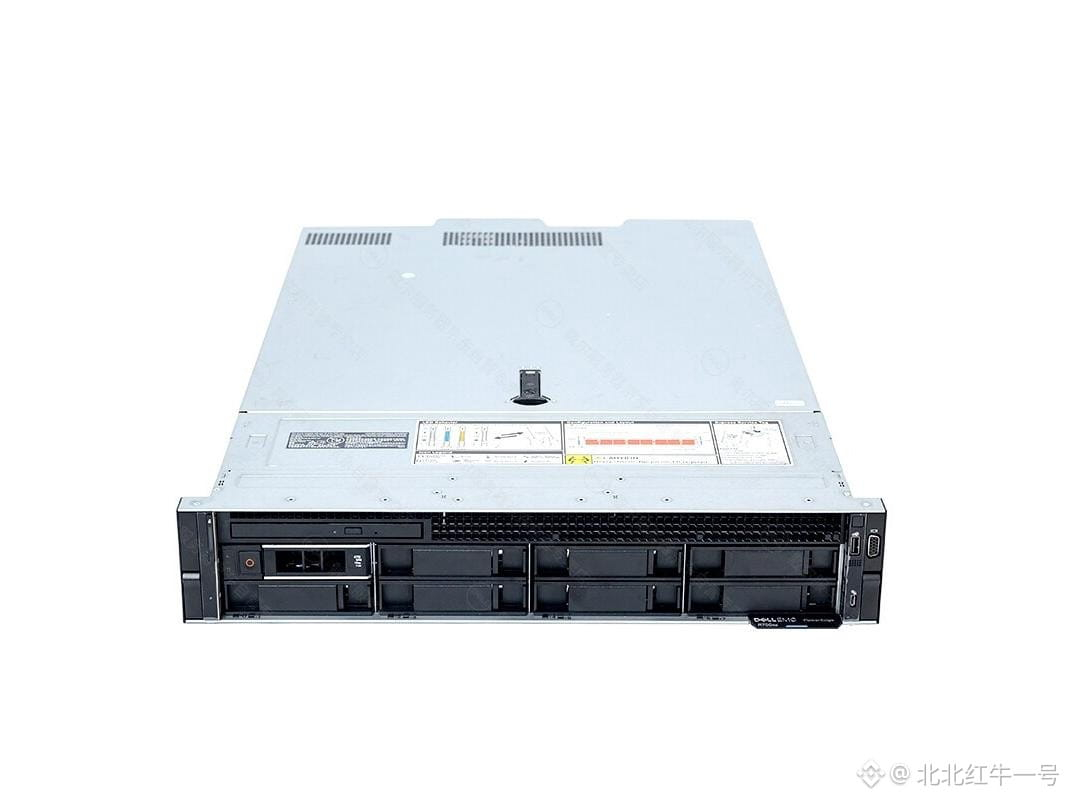
Dell R750XS Rack Server Limited-Time Offer—An All-Around Balanced Choice (Includes a Jingdong Card with Purchase)????【Zhongguancun Online Beijing Pricing】Recently, the Dell EMC PowerEdge R750XS rack server has been offered at a special price by the Zhongguancun Online merchant “Beijing Shenzhou Huajie (enterprise service provider)”. For details, please contact the phone number: 15311138665. The Dell EMC PowerEdge R750XS is a balanced dual-socket 2U rack server designed for the mid-enterprise market. It is equipped with Intel Xeon Silver-class processors, achieving an outstanding balance between computing performance and power consumption control. The model includes an array controller and a dual-drive-bay high-capacity storage design, taking into account both data read/write performance and redundant storage reliability, providing reliable hardware-level protection for enterprise core data. The R750XS uses an optimized cooling system and an efficient power supply solution, effectively controlling energy cost while ensuring stable operation, making it a high value-for-money balanced platform for building enterprise data centers.
Dell R750XS Rack Server Limited-Time Offer—An All-Around Balanced Choice (Includes a Jingdong Card with Purchase)
????【Zhongguancun Online Beijing Pricing】Recently, the Dell EMC PowerEdge R750XS rack server has been offered at a special price by the Zhongguancun Online merchant “Beijing Shenzhou Huajie (enterprise service provider)”. For details, please contact the phone number: 15311138665. The Dell EMC PowerEdge R750XS is a balanced dual-socket 2U rack server designed for the mid-enterprise market. It is equipped with Intel Xeon Silver-class processors, achieving an outstanding balance between computing performance and power consumption control. The model includes an array controller and a dual-drive-bay high-capacity storage design, taking into account both data read/write performance and redundant storage reliability, providing reliable hardware-level protection for enterprise core data. The R750XS uses an optimized cooling system and an efficient power supply solution, effectively controlling energy cost while ensuring stable operation, making it a high value-for-money balanced platform for building enterprise data centers.
108
·
--

Article
Interview with Dell Technologies: An Enterprise’s Unique Data Assets Are the Ultimate Moat in the Intelligent EraStock trading starts with analyzing reports from Jin Qilin’s analysts—authoritative, professional, timely, and comprehensive—helping you uncover potential themed opportunities!
(Source: NetEase Intelligent)
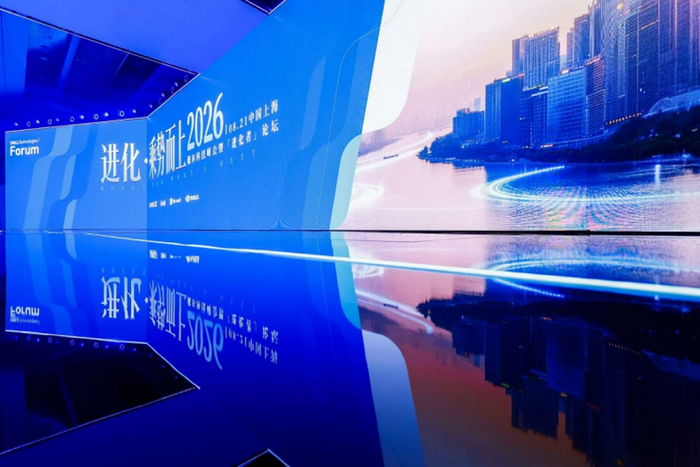
Recently, the 2026 Dell Technologies Summit and the “Evolutionists” Forum, themed “Evolution · Riding the Momentum,” were held in Shanghai. Against the backdrop of business competition shifting from “whether to deploy intelligence” to “how to unleash the value of intelligence,” areas such as infrastructure, data readiness, and network resilience are interconnected, forming a systemic challenge. Wu Dongmei, global senior vice president of Dell Technologies Group, said that enterprise evolution is not a one-time upgrade, but an ongoing system project that requires flexible infrastructure, efficient data capabilities, and open ecosystem collaboration.
Interview with Dell Technologies: An Enterprise’s Unique Data Assets Are the Ultimate Moat in the Intelligent Era
Stock trading starts with analyzing reports from Jin Qilin’s analysts—authoritative, professional, timely, and comprehensive—helping you uncover potential themed opportunities!
(Source: NetEase Intelligent)
Recently, the 2026 Dell Technologies Summit and the “Evolutionists” Forum, themed “Evolution · Riding the Momentum,” were held in Shanghai. Against the backdrop of business competition shifting from “whether to deploy intelligence” to “how to unleash the value of intelligence,” areas such as infrastructure, data readiness, and network resilience are interconnected, forming a systemic challenge. Wu Dongmei, global senior vice president of Dell Technologies Group, said that enterprise evolution is not a one-time upgrade, but an ongoing system project that requires flexible infrastructure, efficient data capabilities, and open ecosystem collaboration.
(Source: NetEase Intelligent)
Recently, the 2026 Dell Technologies Summit and the “Evolutionists” Forum, themed “Evolution · Riding the Momentum,” were held in Shanghai. Against the backdrop of business competition shifting from “whether to deploy intelligence” to “how to unleash the value of intelligence,” areas such as infrastructure, data readiness, and network resilience are interconnected, forming a systemic challenge. Wu Dongmei, global senior vice president of Dell Technologies Group, said that enterprise evolution is not a one-time upgrade, but an ongoing system project that requires flexible infrastructure, efficient data capabilities, and open ecosystem collaboration.
181
·
--
Top Picks in the Desktop Computer Hot-Selling Rankings: A Smooth Multi-Track 4K Editing Bundle for Video EditorsWhen more than a hundred 4K video tracks are stacked on the timeline, when the DaVinci color grading interface loads LUTs, noise reduction, and dynamic blur plugins at the same time, and when exporting a finished 10-minute cut still requires waiting over twenty minutes—what video editors truly need is not a spec-stuffed paper flagship, but a real productivity tool that turns sixteen cores and twenty-four threads into second-level responsiveness. It must carry multiple instances of Premiere as solidly as a rock, ensure that DaVinci Resolve’s GPU acceleration doesn’t drop frames, and deliver millisecond-level read/write throughput scheduling for TB-scale media libraries. In the edit bay under the lights, in the final three hours before a late-night delivery, a desktop computer that genuinely understands editing logic is the quietest yet most reliable partner.
Top Picks in the Desktop Computer Hot-Selling Rankings: A Smooth Multi-Track 4K Editing Bundle for Video Editors
When more than a hundred 4K video tracks are stacked on the timeline, when the DaVinci color grading interface loads LUTs, noise reduction, and dynamic blur plugins at the same time, and when exporting a finished 10-minute cut still requires waiting over twenty minutes—what video editors truly need is not a spec-stuffed paper flagship, but a real productivity tool that turns sixteen cores and twenty-four threads into second-level responsiveness. It must carry multiple instances of Premiere as solidly as a rock, ensure that DaVinci Resolve’s GPU acceleration doesn’t drop frames, and deliver millisecond-level read/write throughput scheduling for TB-scale media libraries. In the edit bay under the lights, in the final three hours before a late-night delivery, a desktop computer that genuinely understands editing logic is the quietest yet most reliable partner.
100
·
--
Shenzhen Jemeet Technology Co., Ltd. Summary of the 2026 Interim ReportSecurities Code: 300868 Securities Abbreviation: Jemeet Announcement No.: 2026-052
I. Important Notice
The summary of this interim report is derived from the full interim report. In order to fully understand the Company’s operating results, financial condition, and future development plans, investors should carefully read the full interim report on the media designated by the CSRC.
All directors have attended the board meeting to review this report.
Disclosure of non-standard audit opinion
□ Applicable √ Not applicable
The profit distribution proposal for the reporting period or the capital reserve capitalization proposal reviewed by the board of directors
□ Applicable √ Not applicable
Shenzhen Jemeet Technology Co., Ltd. Summary of the 2026 Interim Report
Securities Code: 300868 Securities Abbreviation: Jemeet Announcement No.: 2026-052
I. Important Notice
The summary of this interim report is derived from the full interim report. In order to fully understand the Company’s operating results, financial condition, and future development plans, investors should carefully read the full interim report on the media designated by the CSRC.
All directors have attended the board meeting to review this report.
Disclosure of non-standard audit opinion
□ Applicable √ Not applicable
The profit distribution proposal for the reporting period or the capital reserve capitalization proposal reviewed by the board of directors
□ Applicable √ Not applicable
I. Important Notice
The summary of this interim report is derived from the full interim report. In order to fully understand the Company’s operating results, financial condition, and future development plans, investors should carefully read the full interim report on the media designated by the CSRC.
All directors have attended the board meeting to review this report.
Disclosure of non-standard audit opinion
□ Applicable √ Not applicable
The profit distribution proposal for the reporting period or the capital reserve capitalization proposal reviewed by the board of directors
□ Applicable √ Not applicable
95
·
--
Article
Threefold Performance Boost: 6:1 Data Reduction—How Dell PowerStore Elite Supports Enterprise Intelligent Evolution【Tianji.com Enterprise Channel】From informatization to digitalization to intelligentization, data—once searchable content and accessed resources—has become the fuel that drives intelligent applications to run. To ensure this fuel continuously and steadily releases value, it not only requires the consolidation of full data assets, but also the strengthening of foundational support for storage capacity, performance and throughput, and security protection. The higher the level of intelligence, the more stringent the requirements for the integrated capabilities of underlying storage. What Dell PowerStore Elite needs to do is to build for intelligent-transformation enterprises a hard-core storage foundation capable of supporting the intelligent evolution of the coming years.
Threefold Performance Boost: 6:1 Data Reduction—How Dell PowerStore Elite Supports Enterprise Intelligent Evolution
【Tianji.com Enterprise Channel】From informatization to digitalization to intelligentization, data—once searchable content and accessed resources—has become the fuel that drives intelligent applications to run. To ensure this fuel continuously and steadily releases value, it not only requires the consolidation of full data assets, but also the strengthening of foundational support for storage capacity, performance and throughput, and security protection. The higher the level of intelligence, the more stringent the requirements for the integrated capabilities of underlying storage. What Dell PowerStore Elite needs to do is to build for intelligent-transformation enterprises a hard-core storage foundation capable of supporting the intelligent evolution of the coming years.
166
·
--
Which Desktop Computer Is Best? A Pick for Video Editors Running Adobe Premiere BasicsThe editor’s desktop shouldn’t be slowed down by stutter or lag—it also shouldn’t come with a premium price for redundant performance. When a 4K clip only needs smooth preview and fast export, and when a multi-track timeline demands quick memory response and uninterrupted SSD read/write speeds, a 13th-gen i3 desktop precisely matched to the creative workflow is the most practical performance anchor. Video editors don’t always need the absolute top-tier configuration, but they absolutely can’t tolerate long load times, render interruptions, or insufficient interfaces. What they need is plug-and-play stability, enough memory bandwidth to support basic multi-track editing in Premiere, and industrial-grade quality control designed to serve reliably long term.
The following five models all feature the 13th-generation Intel Core i3-13100 processor. Leveraging the new hybrid architecture and DDR5 support, they strike a refined balance between power consumption, temperature, and performance, optimized for editors’ everyday tasks such as rough cuts, color grading preview, format transcoding, and handling light effects.
Which Desktop Computer Is Best? A Pick for Video Editors Running Adobe Premiere Basics
The editor’s desktop shouldn’t be slowed down by stutter or lag—it also shouldn’t come with a premium price for redundant performance. When a 4K clip only needs smooth preview and fast export, and when a multi-track timeline demands quick memory response and uninterrupted SSD read/write speeds, a 13th-gen i3 desktop precisely matched to the creative workflow is the most practical performance anchor. Video editors don’t always need the absolute top-tier configuration, but they absolutely can’t tolerate long load times, render interruptions, or insufficient interfaces. What they need is plug-and-play stability, enough memory bandwidth to support basic multi-track editing in Premiere, and industrial-grade quality control designed to serve reliably long term.
The following five models all feature the 13th-generation Intel Core i3-13100 processor. Leveraging the new hybrid architecture and DDR5 support, they strike a refined balance between power consumption, temperature, and performance, optimized for editors’ everyday tasks such as rough cuts, color grading preview, format transcoding, and handling light effects.
The following five models all feature the 13th-generation Intel Core i3-13100 processor. Leveraging the new hybrid architecture and DDR5 support, they strike a refined balance between power consumption, temperature, and performance, optimized for editors’ everyday tasks such as rough cuts, color grading preview, format transcoding, and handling light effects.
100
·
--
Article
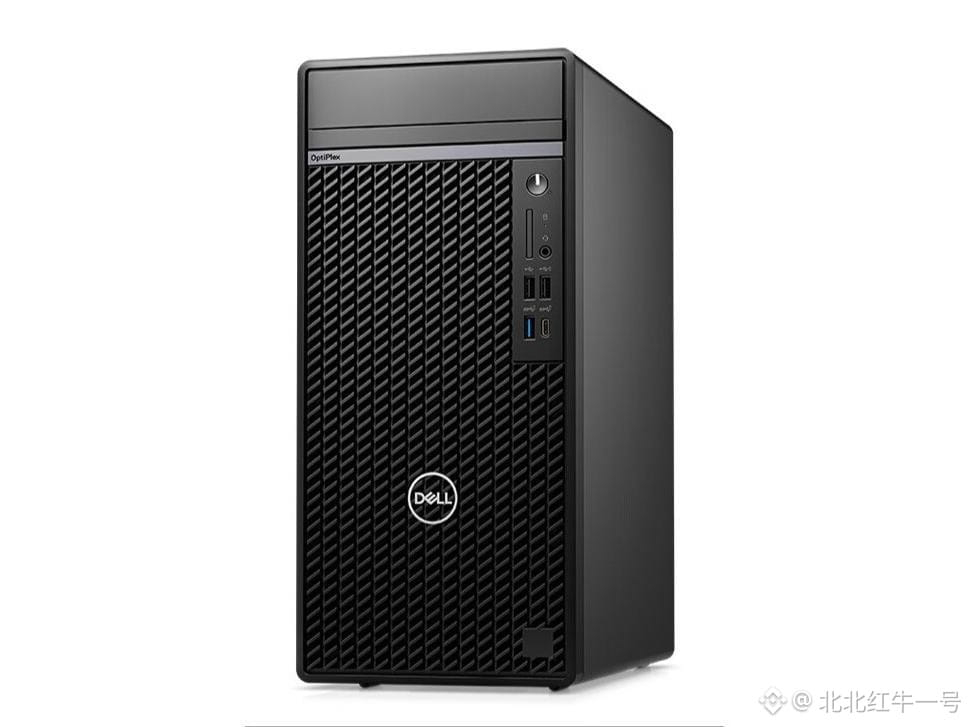
Dell 7020MT Plus Graphics Desktop Special Offer High-Configuration Large Capacity to Support Professional Office????【ZOL Zhongguancun Online Beijing Price】Recently, the Dell OptiPlex 7020MT Plus 14th Gen Core desktop PC has been promoted at a special price by the ZOL Zhongguancun Online merchant “Beijing Zhishuyunxin (Diamond Distributor)”. For details, please contact: 15710072629. Dell OptiPlex 7020MT Plus is a high-end tower desktop designed for professional office and creative design scenarios. It features a 14th Gen Core high-performance processor, paired with large-capacity memory and a dual-storage configuration for strong multitasking and parallel processing. It responds quickly to demanding tasks such as launching large software and loading complex files. The entire system comes with a professional-grade graphics card, enabling smooth performance for workloads such as graphic rendering, 3D modeling, and video editing. With a high-definition monitor, it can accurately reproduce image details and color gradations, meeting the visual work needs of professional creators. As a flagship model in the Dell OptiPlex series, it has undergone rigorous hardware compatibility testing, and delivers stable and reliable performance even under long-term high-load operation.
Dell 7020MT Plus Graphics Desktop Special Offer High-Configuration Large Capacity to Support Professional Office
????【ZOL Zhongguancun Online Beijing Price】Recently, the Dell OptiPlex 7020MT Plus 14th Gen Core desktop PC has been promoted at a special price by the ZOL Zhongguancun Online merchant “Beijing Zhishuyunxin (Diamond Distributor)”. For details, please contact: 15710072629. Dell OptiPlex 7020MT Plus is a high-end tower desktop designed for professional office and creative design scenarios. It features a 14th Gen Core high-performance processor, paired with large-capacity memory and a dual-storage configuration for strong multitasking and parallel processing. It responds quickly to demanding tasks such as launching large software and loading complex files. The entire system comes with a professional-grade graphics card, enabling smooth performance for workloads such as graphic rendering, 3D modeling, and video editing. With a high-definition monitor, it can accurately reproduce image details and color gradations, meeting the visual work needs of professional creators. As a flagship model in the Dell OptiPlex series, it has undergone rigorous hardware compatibility testing, and delivers stable and reliable performance even under long-term high-load operation.
139
·
--
【Revenue Breakdown】Dell’s Latest Revenue Structure: Product Contributes 86.91% of RevenueDell (DELL)’s latest financial report shows that the company achieved operating revenue of $43.842 billion this quarter.
By business segment:
1. Product
Revenue was $38.105 billion, accounting for 86.91% of total revenue.
2. Service
Revenue was $5.737 billion, accounting for 13.09% of total revenue.
Overall, the company’s revenue is still mainly derived from Product; its revenue share exceeds 86.91%, and the business structure is further concentrated. Business concentration is high.
【Revenue Breakdown】Dell’s Latest Revenue Structure: Product Contributes 86.91% of Revenue
Dell (DELL)’s latest financial report shows that the company achieved operating revenue of $43.842 billion this quarter.
By business segment:
1. Product
Revenue was $38.105 billion, accounting for 86.91% of total revenue.
2. Service
Revenue was $5.737 billion, accounting for 13.09% of total revenue.
Overall, the company’s revenue is still mainly derived from Product; its revenue share exceeds 86.91%, and the business structure is further concentrated. Business concentration is high.
By business segment:
1. Product
Revenue was $38.105 billion, accounting for 86.91% of total revenue.
2. Service
Revenue was $5.737 billion, accounting for 13.09% of total revenue.
Overall, the company’s revenue is still mainly derived from Product; its revenue share exceeds 86.91%, and the business structure is further concentrated. Business concentration is high.
240
·
--
Article
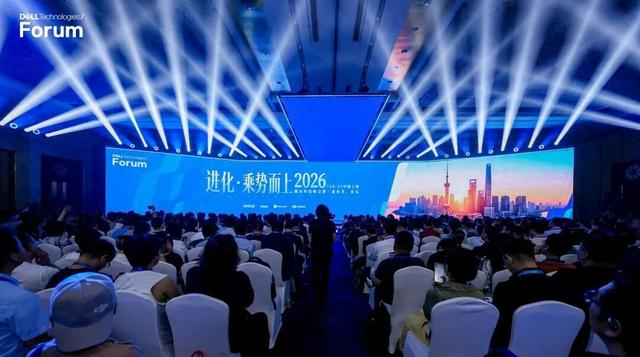
Evolution · Riding the Momentum to New Heights|Shanghai Wrap-Up of the 2026 Dell Technologies Summit and the “Evolvers” ForumOn August 21, the 2026 Dell Technologies Summit and the “Evolvers” Forum, themed “Evolution · Riding the Momentum to New Heights,” kicked off grandly in Shanghai. Building on the cutting-edge perspectives and innovative practices of Dell Technologies World, this summit brought together nearly 1,000 industry leaders, corporate decision-makers, and technology experts at the main venue in Shanghai. It was simultaneously presented through satellite city branches in Beijing, Guangzhou, and Qingdao, as well as via online livestreams.
The summit features a main forum, two major thematic sub-forums, a partner summit, and other sessions. Together, participants explored how enterprises in the intelligent era can achieve systematic evolution,推动 intelligent technologies from concept validation toward large-scale deployment, and continuously unlock business value.
Evolution · Riding the Momentum to New Heights|Shanghai Wrap-Up of the 2026 Dell Technologies Summit and the “Evolvers” Forum
On August 21, the 2026 Dell Technologies Summit and the “Evolvers” Forum, themed “Evolution · Riding the Momentum to New Heights,” kicked off grandly in Shanghai. Building on the cutting-edge perspectives and innovative practices of Dell Technologies World, this summit brought together nearly 1,000 industry leaders, corporate decision-makers, and technology experts at the main venue in Shanghai. It was simultaneously presented through satellite city branches in Beijing, Guangzhou, and Qingdao, as well as via online livestreams.
The summit features a main forum, two major thematic sub-forums, a partner summit, and other sessions. Together, participants explored how enterprises in the intelligent era can achieve systematic evolution,推动 intelligent technologies from concept validation toward large-scale deployment, and continuously unlock business value.
The summit features a main forum, two major thematic sub-forums, a partner summit, and other sessions. Together, participants explored how enterprises in the intelligent era can achieve systematic evolution,推动 intelligent technologies from concept validation toward large-scale deployment, and continuously unlock business value.
1
158
·
--
2026 Best-Selling Desktop Computers List Balanced Models for Clerks, Designers, and Finance StaffIn the morning commute on the subway, you open your emails; at midday, you quickly render PPT charts; and before heading home, you sync collaborative documents to the cloud. For today’s office workers, a desktop computer that responds quickly, stays stable and reliable, has a complete set of ports/interfaces, and doesn’t require frequent upgrades is no longer a “nice-to-have”—it’s the foundational infrastructure of digital office work. It doesn’t chase ultra-high gaming frame rates, but it must remain smooth when running Excel with thousands of rows of data, multiple browser tabs plus meeting software plus design tools at the same time. It doesn’t need to be loaded with top-tier graphics cards, but the graphic acceleration provided by a GTX16-class dedicated GPU is more than enough for lightweight video editing, basic CAD modeling, and crisp multi-screen high-definition output. It values more than anything else quiet cooling, a compact chassis, long-cycle after-sales support, and system stability that’s plug-and-play. Based on this real-world office logic, we’ve selected five GTX16-series desktop computers that balance performance depth with comfortable operating temperatures, covering different budgets and upgrade needs.
2026 Best-Selling Desktop Computers List Balanced Models for Clerks, Designers, and Finance Staff
In the morning commute on the subway, you open your emails; at midday, you quickly render PPT charts; and before heading home, you sync collaborative documents to the cloud. For today’s office workers, a desktop computer that responds quickly, stays stable and reliable, has a complete set of ports/interfaces, and doesn’t require frequent upgrades is no longer a “nice-to-have”—it’s the foundational infrastructure of digital office work. It doesn’t chase ultra-high gaming frame rates, but it must remain smooth when running Excel with thousands of rows of data, multiple browser tabs plus meeting software plus design tools at the same time. It doesn’t need to be loaded with top-tier graphics cards, but the graphic acceleration provided by a GTX16-class dedicated GPU is more than enough for lightweight video editing, basic CAD modeling, and crisp multi-screen high-definition output. It values more than anything else quiet cooling, a compact chassis, long-cycle after-sales support, and system stability that’s plug-and-play. Based on this real-world office logic, we’ve selected five GTX16-series desktop computers that balance performance depth with comfortable operating temperatures, covering different budgets and upgrade needs.
468
·
--
Desktop PC Performance Ranking TOP4 — Tested for Designers: Smooth Running of the Adobe SuiteAs the first morning light barely grazes the edge of the canvas, the designer has already set PS overlay layers in motion, queued up AE preview animations, and turned on real-time rendering in Blender. At this moment, a desktop PC that responds quickly, stays reliably connected, and offers effortless expandability isn’t just a tool—it’s the rhythm of creative breathing. Designers have always been exacting about their equipment: they need instantaneous access to massive media libraries, seamless collaboration with Bluetooth 5.0 peripherals such as pressure-sensitive pens, drawing tablets, and professional studio speakers, and frame-rate stability when running multiple tasks in parallel. They also care about thermal reliability under prolonged high-intensity use and dependable after-sales support. In creative productivity scenarios, performance is the foundation, connectivity is the bloodstream, and usability is everyday comfort.
Desktop PC Performance Ranking TOP4 — Tested for Designers: Smooth Running of the Adobe Suite
As the first morning light barely grazes the edge of the canvas, the designer has already set PS overlay layers in motion, queued up AE preview animations, and turned on real-time rendering in Blender. At this moment, a desktop PC that responds quickly, stays reliably connected, and offers effortless expandability isn’t just a tool—it’s the rhythm of creative breathing. Designers have always been exacting about their equipment: they need instantaneous access to massive media libraries, seamless collaboration with Bluetooth 5.0 peripherals such as pressure-sensitive pens, drawing tablets, and professional studio speakers, and frame-rate stability when running multiple tasks in parallel. They also care about thermal reliability under prolonged high-intensity use and dependable after-sales support. In creative productivity scenarios, performance is the foundation, connectivity is the bloodstream, and usability is everyday comfort.
71
·
--
Desktop PC Sales Ranking—Handles Remote Meetings, Excel Modeling, and Daily OA with EaseAt eight in the morning, the city subway hasn’t fully awakened yet, and in the cubicles, screen glows flicker on one after another—this is a true snapshot of today’s office workers. They don’t need flashy game-like light effects, nor do they demand the absolute top-end rendering performance. What they do rely on heavily is the plug-and-play reliability, smooth multitasking, strong cooling performance for long hours of continuous operation, and a compact chassis that can fit under an office desk. In the rational budget range of 3,500 to 3,999 yuan, a new batch of desktop PCs refined specifically for workplace scenarios is quietly becoming a common sight in offices: they are not toys made from parameter stacks, but dependable partners for daily work—document editing for about 8 hours a day, video conferencing, operating enterprise ERP systems, and running light design software.
Desktop PC Sales Ranking—Handles Remote Meetings, Excel Modeling, and Daily OA with Ease
At eight in the morning, the city subway hasn’t fully awakened yet, and in the cubicles, screen glows flicker on one after another—this is a true snapshot of today’s office workers. They don’t need flashy game-like light effects, nor do they demand the absolute top-end rendering performance. What they do rely on heavily is the plug-and-play reliability, smooth multitasking, strong cooling performance for long hours of continuous operation, and a compact chassis that can fit under an office desk. In the rational budget range of 3,500 to 3,999 yuan, a new batch of desktop PCs refined specifically for workplace scenarios is quietly becoming a common sight in offices: they are not toys made from parameter stacks, but dependable partners for daily work—document editing for about 8 hours a day, video conferencing, operating enterprise ERP systems, and running light design software.
59
·
--
Which Desktop Computer Is Worth Buying? Dual Protection: Win7 Compatibility for Old Software + New HardwareIn the dorm at six in the morning, the faint glow from a laptop screen illuminates a face rushing to finish a paper; in the afternoon shared study room by the library, several desktops hum quietly, carrying Python debugging and PPT rendering; in the evening back under the bed, a quiet yet reliable desktop waits to help you open recorded online classes, edit videos for the club recruitment, and download professional course resource packs. For college students, a dependable desktop isn’t a toy made of raw performance specs—it’s a learning companion that runs through the entire academic cycle. It needs to be stable, fast, and worry-free, and it has to make every dollar count within a limited budget. The ¥2500–¥2999 price range is the sweet spot for rational decisions among students, balancing mainstream app responsiveness, long-term usage reliability, and upgrade headroom for the next one or two years.
Which Desktop Computer Is Worth Buying? Dual Protection: Win7 Compatibility for Old Software + New Hardware
In the dorm at six in the morning, the faint glow from a laptop screen illuminates a face rushing to finish a paper; in the afternoon shared study room by the library, several desktops hum quietly, carrying Python debugging and PPT rendering; in the evening back under the bed, a quiet yet reliable desktop waits to help you open recorded online classes, edit videos for the club recruitment, and download professional course resource packs. For college students, a dependable desktop isn’t a toy made of raw performance specs—it’s a learning companion that runs through the entire academic cycle. It needs to be stable, fast, and worry-free, and it has to make every dollar count within a limited budget. The ¥2500–¥2999 price range is the sweet spot for rational decisions among students, balancing mainstream app responsiveness, long-term usage reliability, and upgrade headroom for the next one or two years.
109
·
--

Article
Dell DTF 2026: AI is unstoppable—why not ride the momentum?“AI is not a cycle, it is an era.”
This statement was made on-site by Michael Dell at Dell’s Global Technology Summit in May 2026, offering a thought-provoking judgment.
It’s actually correcting a certain illusion. We’re used to thinking in cycles to understand technology waves—we’re always expecting the day the bubble bursts and mean reversion kicks in. So, is AI truly the next round of capital speculation, or just a fleeting technological bubble?
At Dell China’s Technology Summit 2026 on August 21, Wu Dongmei, Global Senior Vice President of Dell Technologies Group, provided the answer: “AI is not a cycle, but an era.” AI isn’t a mere wave riding the tides—it’s reshaping the underlying logic of value creation.
Dell DTF 2026: AI is unstoppable—why not ride the momentum?
“AI is not a cycle, it is an era.”
This statement was made on-site by Michael Dell at Dell’s Global Technology Summit in May 2026, offering a thought-provoking judgment.
It’s actually correcting a certain illusion. We’re used to thinking in cycles to understand technology waves—we’re always expecting the day the bubble bursts and mean reversion kicks in. So, is AI truly the next round of capital speculation, or just a fleeting technological bubble?
At Dell China’s Technology Summit 2026 on August 21, Wu Dongmei, Global Senior Vice President of Dell Technologies Group, provided the answer: “AI is not a cycle, but an era.” AI isn’t a mere wave riding the tides—it’s reshaping the underlying logic of value creation.
This statement was made on-site by Michael Dell at Dell’s Global Technology Summit in May 2026, offering a thought-provoking judgment.
It’s actually correcting a certain illusion. We’re used to thinking in cycles to understand technology waves—we’re always expecting the day the bubble bursts and mean reversion kicks in. So, is AI truly the next round of capital speculation, or just a fleeting technological bubble?
At Dell China’s Technology Summit 2026 on August 21, Wu Dongmei, Global Senior Vice President of Dell Technologies Group, provided the answer: “AI is not a cycle, but an era.” AI isn’t a mere wave riding the tides—it’s reshaping the underlying logic of value creation.
63
·
--
In an era of scarce AI computing power, college students can’t afford computersWritten by Zinc Finance Li Qinlin
Edited by Chen Dengxin Annalee
A new batch of incoming college students is about to enter campus, and the annual enrollment purchasing season arrives as scheduled. In past years, the 5,000-yuan price tier has been the golden range for prospective college students to buy laptops. There were plenty of options—ultrabooks and entry-level gaming laptops—so parents and students could compare among many models at ease.
But in the summer market of 2026, a completely different picture emerges. Apple’s MacBook Air prices jump by 1,500 yuan or more per page. Lenovo’s Legion R7000P rises by over 1,000 yuan in a month. Even NVIDIA’s RTX 5090 graphics card soars from around 20,000 yuan to 35,000 yuan……
In an era of scarce AI computing power, college students can’t afford computers
Written by Zinc Finance Li Qinlin
Edited by Chen Dengxin Annalee
A new batch of incoming college students is about to enter campus, and the annual enrollment purchasing season arrives as scheduled. In past years, the 5,000-yuan price tier has been the golden range for prospective college students to buy laptops. There were plenty of options—ultrabooks and entry-level gaming laptops—so parents and students could compare among many models at ease.
But in the summer market of 2026, a completely different picture emerges. Apple’s MacBook Air prices jump by 1,500 yuan or more per page. Lenovo’s Legion R7000P rises by over 1,000 yuan in a month. Even NVIDIA’s RTX 5090 graphics card soars from around 20,000 yuan to 35,000 yuan……
Edited by Chen Dengxin Annalee
A new batch of incoming college students is about to enter campus, and the annual enrollment purchasing season arrives as scheduled. In past years, the 5,000-yuan price tier has been the golden range for prospective college students to buy laptops. There were plenty of options—ultrabooks and entry-level gaming laptops—so parents and students could compare among many models at ease.
But in the summer market of 2026, a completely different picture emerges. Apple’s MacBook Air prices jump by 1,500 yuan or more per page. Lenovo’s Legion R7000P rises by over 1,000 yuan in a month. Even NVIDIA’s RTX 5090 graphics card soars from around 20,000 yuan to 35,000 yuan……
266
Log in to explore more content
Join global crypto users on Binance Square
⚡️ Get latest and useful information about crypto.
💬 Trusted by the world’s largest crypto exchange.
👍 Discover real insights from verified creators.
Email / Phone number
Trending Topics
OpenAIReportedlyCompletesBelModelPretraining
3,306 views
179 Discussing
#openaireportedlycompletesbelmodelpretraining — its next monster base model
$OPENAI has allegedly wrapped up a massive new pretraining run, codenamed Bel , with 10T+ total parameters .
🔄 Bel is the successor to Doug (the pretrain behind Astra / GPT-6) — and per the leak, OpenAI sees it as a post-GPT-6 base , potentially even the foundation for an AGI-threshold model after further reinforcement learning.
⚠️ The same leak claims Anthropic is struggling to match Astra's release this year , largely due to compute constraints — bracing for OpenAI to dominate the rest of 2026.
Unverified, but if true… the gap just got wider. 👀
#USIranReportedlyReachCeasefireConsensus #USTreasuryLaunchesQuantumReadinessWorkingGroup #USCryptoEquityIndexRises5.04% #SolanaRWAHoldersTop300000
KimHotbae
·2 Likes
·362 views
USIranReportedlyReachCeasefireConsensus
9,017 views
326 Discussing
USTreasuryLaunchesQuantumReadinessWorkingGroup
9,064 views
277 Discussing