


Carefully! Lots of text.
When depositing or withdrawing funds from your Binance account, be especially careful when choosing a network. It is easy to confuse Binance Smart Chain (BEP-20) with Ethereum (ERC-20) and send tokens to a different blockchain.
If the crypto wallet you are transferring to supports BEP-20 and ERC-20 tokens, you can transfer your crypto back to Binance in a few simple steps.
If the wallet only supports ERC-20 or only BEP-20, you will need to import the wallet's private key into a new wallet that supports both blockchains.
Transfers to your Binance account on another blockchain, to another crypto exchange, or to a custodial wallet are more difficult to return. In this case, contact wallet support and see if they can help.
Introduction
If you've withdrawn funds from Binance, you've likely noticed that some coins have different transfer networks available. Even experienced users sometimes have doubts about choosing the right blockchain for transactions. Which one should you choose when transferring cryptocurrency to another wallet?
In short, you need to select a network supported by the target wallet. Technically, it will depend on which token standard you are using, such as ERC-20, BEP-20 or BEP-2.
If you sent cryptocurrency to a blockchain that is foreign to the asset, you first need to find out the type of wallet. If you own the private key or seed phrase, then such a wallet will be non-custodial. If not, then the wallet is custodial. Knowing this information, you can try three possible solutions to the problem.
I sent funds to the wrong network. What to do?
First of all, don't panic. If you sent ERC-20 tokens (such as ETH) to Binance Smart Chain (BSC) or BEP-20 tokens to the Ethereum network, it is possible to return them. Three different situations are likely, each of which will have its own solution:
1. You have sent tokens to a wallet that supports both BSC and Ethereum.
You can send tokens back to the desired network on Binance.
2. You sent tokens to a wallet that only supports BSC or only Ethereum.
You need to access your private key in order to import it into a wallet that supports both networks.
3. You sent tokens to a custodial wallet or crypto exchange.
Contact your wallet provider or exchange support for assistance. You may not be able to get your money back.
Before thinking about a solution, it is worth understanding what happened so that you can avoid such a problem in the future.
What is the difference between BEP-20 and ERC-20?
ERC-20 and BEP-20 are token standards that operate under specific rules and technical guidelines. They control how transactions, deposits and withdrawals are made. Both ERC-20 and BEP-20 regulate the interaction of the token with various wallets, projects and smart contracts.
The operating principles of these two standards have a lot in common, but ERC-20 is only supported on the Ethereum network, and BEP-20 is only supported on the Binance Smart Chain network. Simply put, these are token standards, each of which belongs to different blockchains.
If your cryptocurrency from one blockchain is on another network, you cannot use it. For example, Ethereum sent to BSC will not be usable in Ethereum DApps and smart contracts.
What happens if I send an ERC-20 token to the BSC network or a BEP-20 token to the Ethereum network?
If you send an ERC-20 token to BSC or a BEP-20 token to Ethereum, the token will go to the same wallet address, but on the selected network. The BSC and Ethereum addresses of your wallet are identical, and access to them is carried out using a single private key.
For example, sending ETH to the BSC network will result in receiving a pegged BEP-20 ether token in your BSC network wallet. In this case, you can check the transaction ID on BscScan.com, and in the case of sending BEP-20 tokens to the Ethereum network, on Etherscan.io.
Here is an example (from BscScan) of an ETH (ERC-20) transaction to the BSC network (BEP-20) selected when transferring to Binance. These tokens now appear as Binance-Peg Ethereum under the same wallet address on BSC.

Fortunately, your cryptocurrency has not disappeared anywhere. All you need to do is send it back to the correct blockchain. Below are possible solutions and you can choose the one that suits your situation.
Refunds from a wallet that supports BSC and Ethereum
Finding tokens in a wallet that supports both blockchains is not difficult. If you don't see your cryptocurrency, check the list of displayed tokens for each network.
For example, MetaMask has a [Add Token] button that allows you to view all available coins.

If you don't see the coin listed, you will need to add the token contract to your wallet. This process is demonstrated in step 5 of the “Returning from a BSC or Ethereum Only Wallet” section.
There are two methods to return the token to the original blockchain - use Binance Bridge or do everything manually.
Binance Bridge
Binance Bridge is a simple tool for transferring assets between blockchains. You just need to connect MetaMask or Binance Chain Wallet and select what you want to transfer. Don't forget that to pay fees on the BSC network you will need BNB, and for gas on Ethereum you will need ETH.
You can learn more about using Binance Bridge in our Introduction to Binance Bridge guide.

Manual conversion
Manually converting your tokens will require you to send your cryptocurrency back to Binance. The transfer network in the Binance Spot Wallet must match the blockchain your token is currently on. Once the cryptocurrency is credited, you can send it again to your external wallet.
In this example, we will convert Binance-Peg ETH (BEP-20) back to ERC-20 network ETH. Make sure the wallet you are sending from has BNB to pay for gas.
1. On the Binance cryptocurrency withdrawal page, select ETH and BEP-20 transfer network (BSC). If you transfer to the wrong network, Binance will not be able to return your funds.

2. Once the ETH is transferred to your Binance account, convert it to ERC-20 by transferring it to an Ethereum-supporting wallet and selecting the ERC20 Ethereum (ETH) transfer network.

Now your funds will be securely transferred to the desired external wallet blockchain.
Refund from a wallet that only supports BSC or Ethereum
In this case, in order to recover your tokens, you will need to import your wallet's private key into a new wallet that supports both blockchains. Depending on the wallet you are importing, you can also use a seed phrase instead of a private key.
Import private key
Once you have imported a wallet's private key into another wallet, you can access the funds associated with that private key from the other wallet.
In other words, importing a wallet's private key will not send funds to the correct wallet. It will simply make the external wallet accessible from another application. Note that custodial wallets generally do not have this option because you do not own the private key when using them.
The most popular wallets where users have access to a private key include Metamask, Trust Wallet, Math Wallet, SafePal and TokenPocket.
In this example, we use the MetaMask extension for Google Chrome to return ETH accidentally sent to BSC.
Receiving funds
1. Log into your MetaMask wallet or create a new one if you don’t already have one. MetaMask is also available as an app for iOS and Android.
2. If you create a new account, you will have the option to import the seed phrase of the old wallet.

3. If you already have an account, click on the MetaMask extension icon, and then log into your account in the upper right corner.

4. Click [Import account], and then enter the private key of the wallet to which the cryptocurrency was supposed to arrive. Click [Import] to finish. You can also upload the JSON file if you have one.
5. Then you need to manually add the BSC network to your MetaMask account. Click on the MetaMask extension icon and then on the drop-down menu at the top. Click [Custom RPC] at the bottom of the list.


6. To access Binance Smart Chain from MetaMask, you will need to add the required information. This information assumes the RPC URL. This URL allows MetaMask to query information from the BSC blockchain and make transaction requests.
Enter the following information in the appropriate fields and click [Save] at the bottom.
Network name: BSC Mainnet
New RPC URL: https://bsc-dataseed1.binance.org/
Circuit ID: 56
Symbol: BNB
Block Explorer URL: https://bscscan.com/

7. Now add the correct token contract to the MetaMask wallet. This will allow a wallet that supports BEP-20 to scan the lost token. You can find a list of tokens and their contracts on BscScan. To send ETH to the ERC-20 network, you need to find a token contract; to do this, click on Binance-Peg Ethereum Token (ETH).
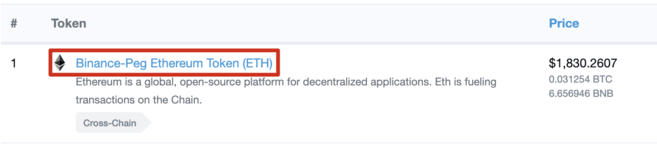
8. Copy the token contract in preparation for the next step and pay attention to the Decimals field.

9. Select [BSC Mainnet] from the drop-down list of networks, click [Add Token] and then [Other Token].


10. Enter the token contract address, token symbol and number of decimals. For example, the fields for ETH will be filled in as follows:
Token contract address: 0x2170ed0880ac9a755fd29b2688956bd959f933f8
Token symbol: ETH
Decimals: 18
To confirm, click [Add tokens].
11. You should now see the lost ETH tokens in your wallet balance. From here you have the option to send them back to your BEP-20 wallet address in your Binance account. Additionally, you can use Binance Bridge and MetaMask to convert your tokens into ERC-20 network tokens.
For more information on token conversion, read the section Refunds from a wallet that supports BSC and Ethereum.
➟ Do you think where to start working with cryptocurrencies? Buy Bitcoin on Binance!
Refund from a custodial wallet or exchange
If you have withdrawn your funds to a non-BEP-20 custodial wallet, such as another cryptocurrency exchange, you will need to contact the owners of the custodial wallet.
Some custodial wallet providers may help for an additional fee or give you access to your private keys. You can then import the private key into a BSC-enabled wallet. But, unfortunately, many exchanges and site administrators will not be able to provide your private key.
If you transferred tokens to your Binance account on the wrong blockchain, Binance will not be able to help you get your cryptocurrency back.
Summary
Choosing the right transfer network is one of the most difficult parts of withdrawing cryptocurrency from Binance. However, once you understand the available networks, you will no longer be making mistakes when withdrawing BTC and ETH. In most cases, when transacting with a standard wallet, your funds remain safe (or as we say, SAFU) and retrieval is hassle-free.