

Carefully! Lots of text.
SolScan is an alternative explorer for the Solana blockchain that provides data on transactions, contracts, network accounts, and more. Therefore, it is extremely useful for Solana users to know how this blockchain explorer works.
SolScan has DeFi and NFT dashboards and an analytics platform. You can also use the API to create custom data feeds. They can be found at the top of the site.
Introduction
Solana is a Proof of Stake consensus blockchain designed for creating DApps, tokens, and smart contracts. As with any blockchain, Solana users need an intuitive way to access network data. For this purpose there is a SolScan block explorer, similar to BscScan and EtherScan for the corresponding networks. In this article we will talk about its functions and capabilities.
What is SolScan
SolScan is a block explorer used to find information about the Solana blockchain. It is a popular alternative to the official Solana browser. SolScan simplifies complex data into easy-to-understand data and provides access to all blockchain information, including transactions, addresses, smart contracts, blocks, tokens and more. It is free to use and requires no registration, but you can create an account to access advanced features.
Why do you need SolScan?
Blockchain Explorer is an indispensable tool for all network users. SolScan allows you to check where staking assets are located or find out the status of a transaction. All information in SolScan comes directly from the Solana blockchain, so you can be confident in its accuracy. Using SolScan or another blockchain explorer helps you understand the mechanics of DApps and transactions.
SolScan uses the same format as EtherScan, so new users can get started right away. Many people prefer its interface to the official Solana browser. SolScan's features are available for free and include several useful tools, lists, and analytical graphs. The browser also contains a set of public APIs that can use real-time SolScan data in third-party applications and tools.
How to view transactions and addresses in SolScan
Most often, SolScan is used to search for transactions and addresses. The correct hash allows you to quickly access a wealth of useful information about transaction fees, status, timestamps, addresses, and more.
Transactions
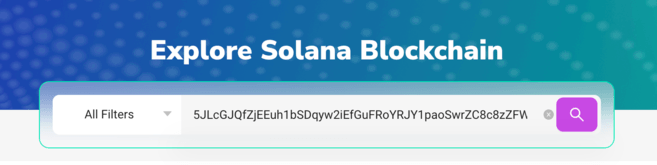
1. Each transaction is saved in the Solana mainnet with a signature. It is represented as a long string of numbers and letters that looks something like this:
5JLcGJQfZjEEuh1bSDqyw2iEfLuFRoYRJY1paoSwrZC8c8zZFW3VqvxsJgjW3bsUjTrpEUDEtvs83PxsuR6hUWqz
2. Copy and paste the signature into the SolScan search bar.
3. You will see all available transaction information divided into three categories: Overview, SOL Balance Change and Token Balance Change.

4. The Overview category will contain most of the necessary information, which will be discussed below:
5. For more information, click on the SOL Balance Change and Token Balance Change tabs, which provide transaction balance information for all parties involved.
Address
Similarly, you can find out information about an individual address and check its detailed activity history. This will allow you to learn about the operations and interactions of the smart contract with a specific wallet.
1. Find the Solana address you want to view. It is shorter than the signature and looks something like this:
138KHwTqKNWGLoo8fK5i8UxYtwoC5tC8o7M9rY1CDEjT
2. Copy and paste the address into the SolScan search bar.

3. You will see all available account information. The Overview section displays your current balance, and in the tabs below you can find your transaction history.

How to find tokens in SolScan
SolScan makes it easy to check token information. To do this you need:
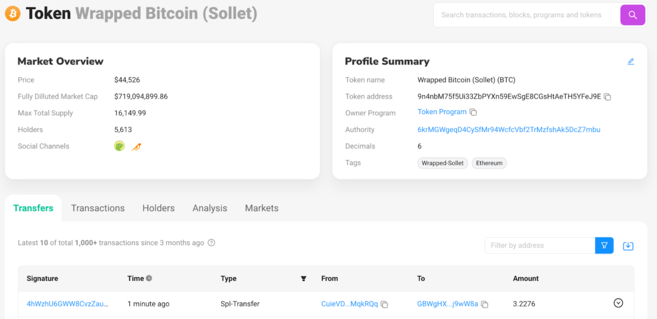
1. Copy and paste the token address into the SolScan search bar. In this example, we used the wrapped version of Bitcoin (BTC), but you can also use wrapped Ethereum (ETH) tokens or any other SPL token on the Solana network.
In our case, the token address looks like this:
9n4nbM75f5Ui33ZbPYXn59EwSgE8CGsHtAeTH5YFeJ9E
2. If you entered the address correctly, you will see the following information.
Tokens
How to Find Active Solana Accounts
1. The number of active accounts and other key blockchain metrics can be found in the Analytics section.
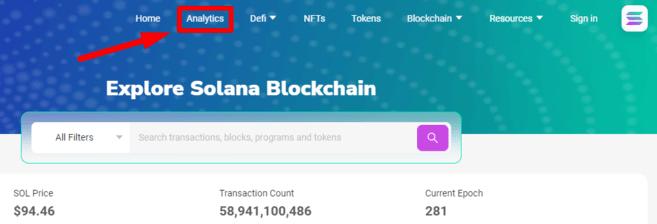
2. SolScan's analytics page contains a wide range of information about nodes, transactions per second (TPS), new tokens, NFTs and much more. In the Accounts tab, you can track the number of active wallets per day.

3. In the upper right corner you can select different time intervals.

How to Find DeFi Panels in SolScan
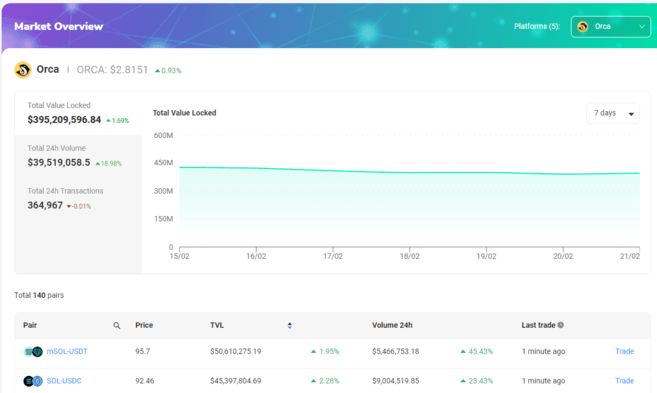
1. Some of the largest DEX exchanges in the Solana ecosystem have dashboards built into the Solana block explorer. They can be quickly found in the Defi tab.

2. Let's look at Orca. This panel shows basic information about the Total Value Locked (TVL), volume and active trading pairs available in the liquidity pools.
How to find an NFT panel in SolScan
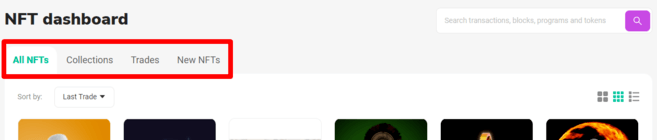
1. In the NFT panel, you can view information about new NFTs, deals, and collections. This section is located at the top of the site.

2. The NFT panel allows you to search for any NFT available on Solana. In the Collections tab, you can find a list of NFT projects depending on volume. The Trades tab shows recent sales, and the New NFTs tab shows the latest NFTs released.

Summary
Solana Block Explorer can be used to check the latest NFTs, find node data, or check the wallets of a new project. This tool is an integral part of any blockchain ecosystem. SolScan has become one of the most used browsers in the Solana community, so it is important to understand its capabilities and interface.