


We have reached the stage of the AI revolution where talking to search engines is now a reality. Microsoft's Bing search is a prime example. It is no longer just another search engine. Bing has taken its capabilities a step further by incorporating the same technology as ChatGPT. This guide explores chatting with Bing, regardless of technical ability. Everyone can start searching with Microsoft's AI in a few short steps.
In this guide:
What is Bing AI Search?
Is Bing AI free?
How to access Bing Chat: a step-by-step guide
How to use Bing Chat and Bing Search
Bing Search — Key Features and Functionality
Are there any limitations to Bing Chat?
Bing Chat is part of a new era driven by artificial intelligence
Bing Chat brings a new dimension to search
Common Problems
What is Bing AI Search?
Bing Search has entered the AI-driven era, and AI is working to enhance its search capabilities. The result? A faster, more accurate, and more efficient search experience.
The new Bing is leveraging OpenAI's GPT4 model, which is fine-tuned for internet search. This model, combined with Microsoft's Prometheus model, has been integrated into Bing's core search ranking engine. The result is a big improvement over traditional search engines.
But how does it all work? The entire process relies on Bing Orchestrator, which acts as an intermediary between the Bing website index and GPT4. This collaboration enables what’s called “grounding,” which provides context for the AI model’s responses. This means the AI can answer your query with the latest, relevant data from the Bing index, minimizing inaccuracies.
Bing Orchestrator doesn’t stop there. It also generates iterative queries that produce a larger set of answers and context for the GPT model. This ensures that users receive more complete and contextual answers.
Bing’s AI integration also includes adding contextually relevant links. Bing Orchestrator adds references to website resources in chat answers, just like Wikipedia. This means you can verify information with just one click, increasing user engagement and further leveraging Bing’s capabilities.
This way, users can enjoy more accurate and complete search results, while publishers can benefit from improved search recommendations. The evolution from the traditional ten blue links to AI-enhanced search makes Bing search more like a co-pilot, thus enhancing the overall search experience.
Bing AI launches voice chat feature
Microsoft announced earlier this month that the desktop version of Bing now has voice chat capabilities, adding more functionality to its already resource-rich upgraded search engine. At launch, the new feature offers two-way voice interaction in five languages. The supported languages are:
·English
French
·German
·Japanese
·mandarin
The move seems pretty significant considering that voice interaction with desktop computers has been a largely forgotten feature, often only noted for its role in accessibility.
Is Bing AI free?
Bing’s AI-powered search won’t cost you a dime. On May 4, 2023, Bing transitioned from limited preview to open preview. That means no more waiting lists, no more hoops to jump through. All you need to do is sign in to Bing with your Microsoft account, and you can start enjoying Bing’s AI-powered search.
How to access Bing Chat: a step-by-step guide
Whether you're using Windows, macOS, Android, or iOS, accessing Bing's AI-powered search is easy. You can use the Microsoft Edge browser built into Windows 10 and 11, or the Bing, Edge, and Skype mobile apps. If you're using a Mac or an older version of Windows, you can easily download Edge from Microsoft's official website.
After installing Edge, follow these steps:
1. Launch Microsoft Edge and navigate to Bing
Once you’re in Microsoft Edge, head to Bing.com. Here you’ll find a variety of ways to access the native chatbot. For example, you can click Chat at the top of the interface, click the Bing logo on the right sidebar, or, if that option is available, click Try it or Learn more at the top of the interface, just below the search bar.
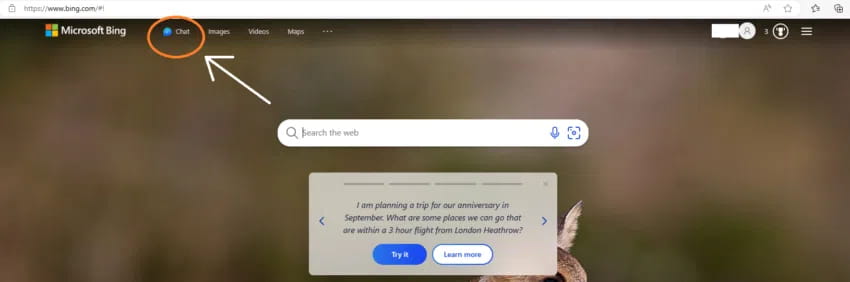
No matter which website you’re browsing, Bing Chat is always accessible from the Edge sidebar.
2. Log in to your Microsoft account
If the "Welcome to the new Bing" message doesn't appear immediately when you visit Bing Search, don't worry. Just click the "Sign in to Chat" button and sign in with your preferred Microsoft account.
For mobile users, you will also be prompted to sign in with your Microsoft account. The mobile version includes most of the features found in the desktop version, but in a more compact layout.
Got a SwiftKey app? Good news! Microsoft has integrated the keyboard app, which it acquired in 2016, with Bing Chat on iOS and Android. Microsoft says SwiftKey can be used with third-party apps, “from email apps to social media and more.”
It’s worth mentioning that you can still use Bing Chat without logging into your account. However, keep in mind that without logging in, the service will be limited to 5 chats per session.
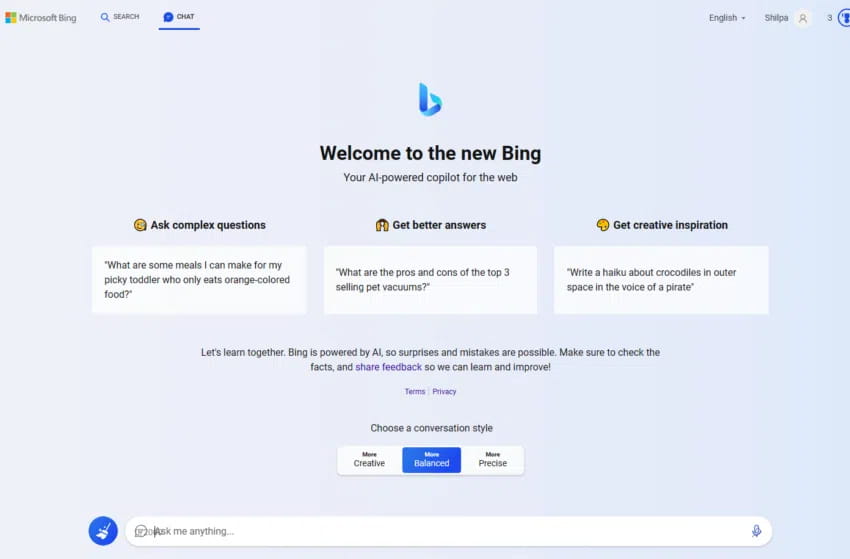
How to use Bing Chat and Bing Search
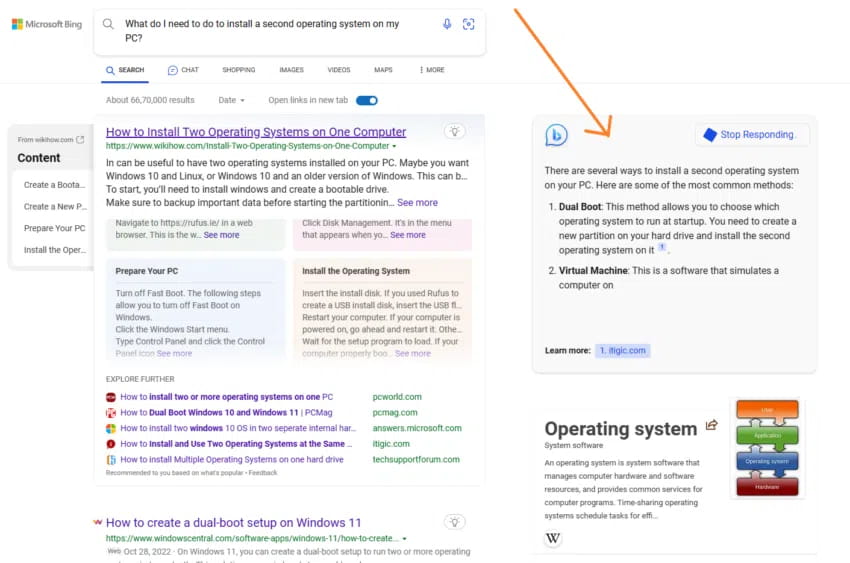
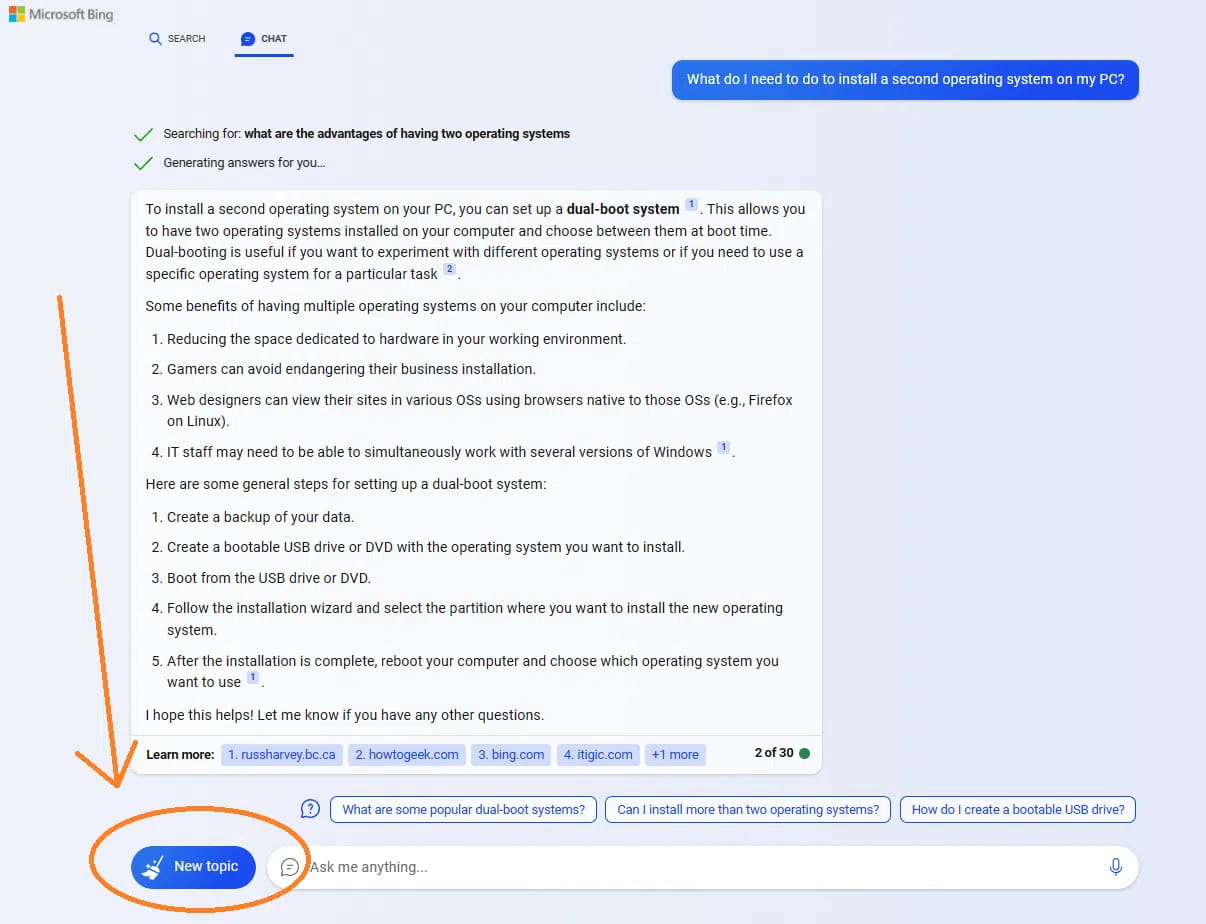
Step 1: Start by typing your query into the search box. Ask your question casually, as you would in a casual conversation. For example, "What do I need to do to install a second operating system on my computer?"
Step 2: Start your search. On the left side of the screen, you'll see the usual list of ranked links. To the right (marked by an arrow), you'll find Bing AI's interface that provides more human-like responses. Each response is accompanied by a citation so that you can verify the authenticity of the information. Click "See More" to see the full response.
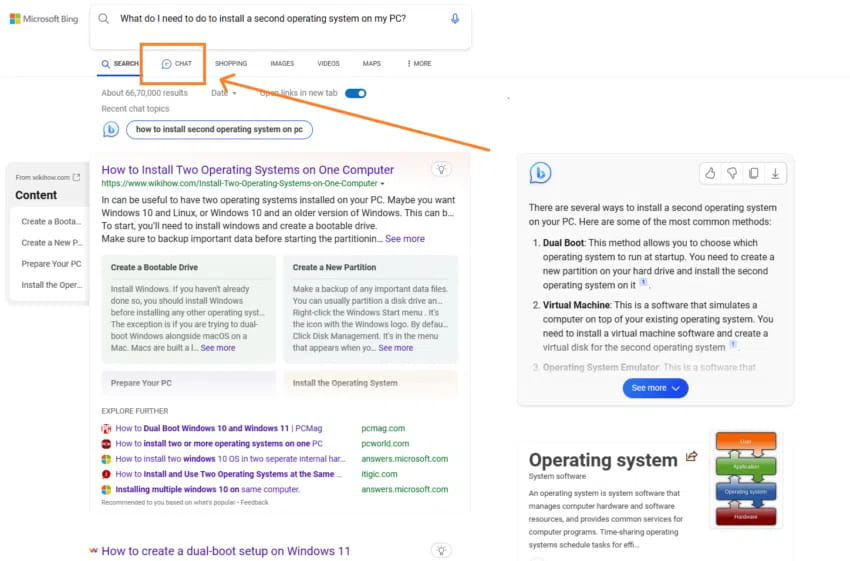
Step 3: Click the Chat button to access the chatbot, as shown below. (Alternatively, you can click the Chat button on the Bing homepage.)
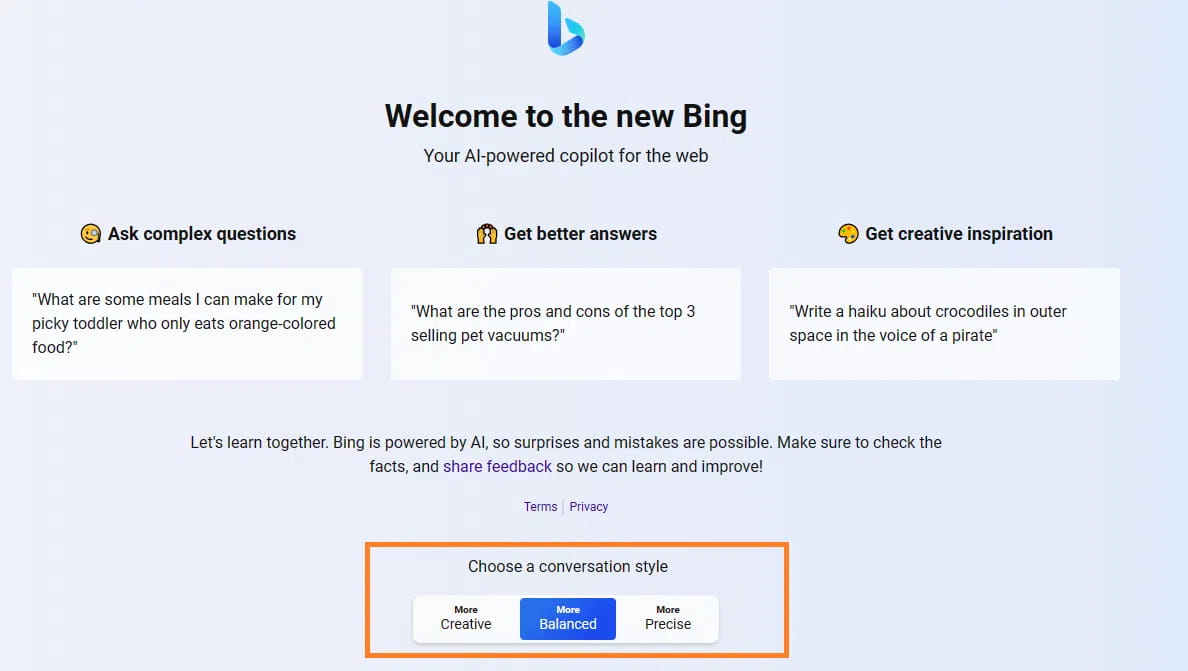
Step 4: By default, the chatbot's conversation style is set to "Balanced," which provides neutral responses. You can switch to "Creative" for more interesting responses or "Precise" for fact-based answers.
Step 5: Rate the answer using the Up or Down icons. This feedback helps the development team improve the service.
Please note that the Bing chatbot is context-aware, which means it remembers your previous searches. You can use this feature to ask follow-up questions in a contextually relevant thread. Bing Chat currently supports prompts up to 4,000 characters long.
Step 6: If you're ready to start a new conversation, just click the "New Topic" button (represented by a broomstick icon) next to the "Ask Anything" box. Then, throw in your next question.
Key Pointers
When Bing AI answers, it typically provides information in the form of bullet points or numbered steps, with citations and links to data sources. You can hover over the text to see the source for a specific part of the response.
· If you want to learn more about the topic, just click on the reference links one by one and Bing search will take you to the corresponding website.
On the right, you’ll find the Recent Activity pane, which lists your recent queries/searches. Use it to view, edit, or delete every recent interaction you’ve had with the chatbot.
In Creative mode, Bing Chat can imagine images from simple descriptions. Let’s say you request an image of a dolphin playing guitar; the chatbot will use its AI magic to create an original image for you.
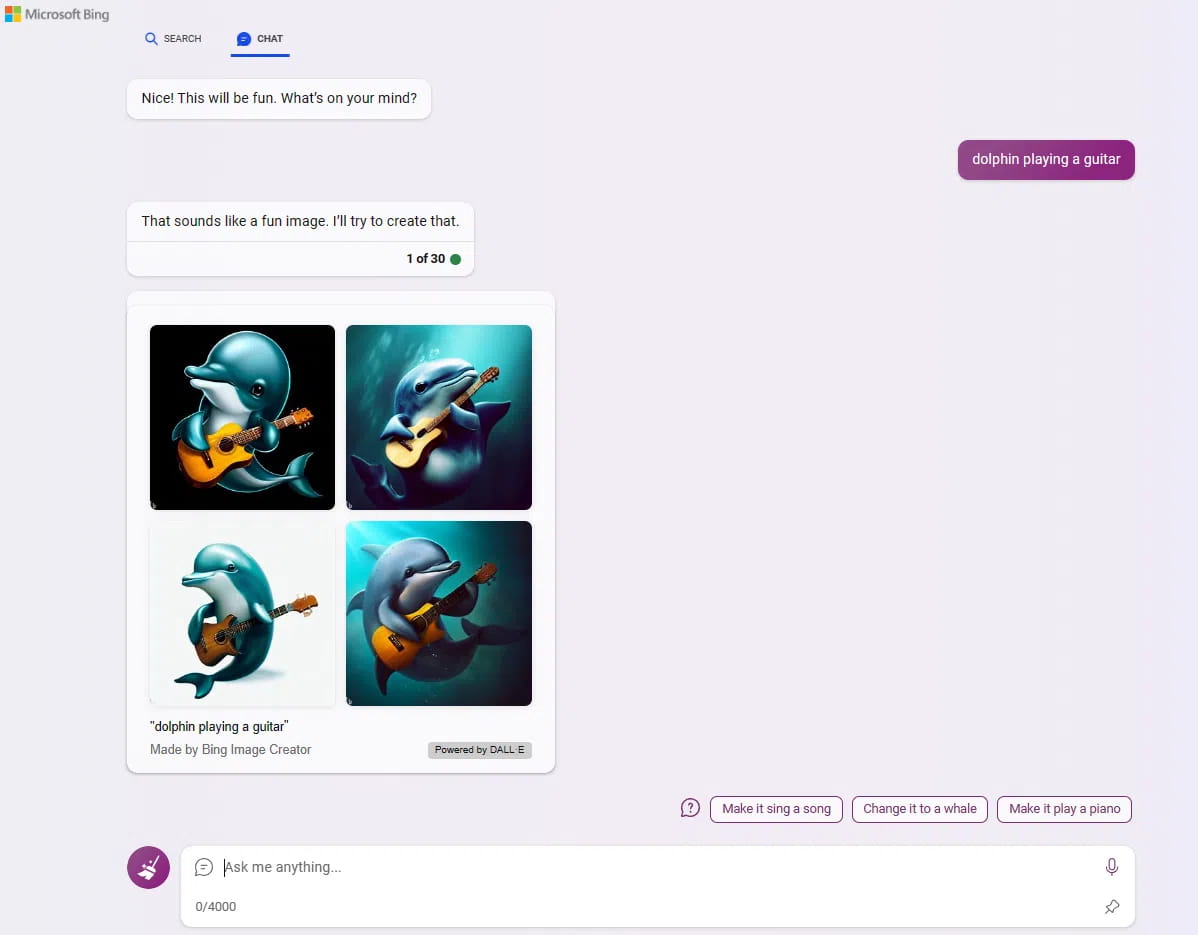
That's it! You're now ready to take full advantage of Bing AI's AI support. Remember, this is a different experience than traditional search, and extracting the best from the technology depends entirely on how you interact with it.
Bing Search — Key Features and Functionality
Here’s a quick tour of Bing’s different features and capabilities to help you get started:
Text area: This is where the magic happens. At the bottom of the screen, you can type in your Bing Chat question or prompt.
· New Topic: Want to start a new conversation? Just click "New Topic" and your previous chat will be cleared, paving the way for a new discussion.
Source: Bing, as an AI-driven conversational search engine, responds mainly from the web. Therefore, when you get an answer, Bing will also provide a link to the source below the message bubble.
· Suggested follow-up questions: After Bing answers your query, it will provide some suggestions for your next question. For example, if you ask Bing “Who won the World Cup?” it might suggest follow-ups like “Who scored the most goals?” or “Where is the World Cup held?”
Search or Chat: At the top left of the screen, you can choose between traditional search results and an AI chatbot. Switch between the two with just one click.
Conversational style: Bing Chat is designed to mimic human conversation. It offers three types of responses: "More Creative," "More Balanced," and "More Precise." "More Creative" responses are imaginative and can even generate images. "More Balanced" responses are akin to a friendly chat with a knowledgeable friend. "More Precise" responses are direct and to the point.
Hint counter: When Bing responds to your query in a conversation, you'll see a number that helps you keep track of how many responses you've received.
Feedback button: There is a Feedback button in the bottom right corner of the chat window. This allows you to share your thoughts with Microsoft Bing, whether it is content you like, dislike, or suggestions for improvements.
Are there any limitations to Bing Chat?
Jordi Ribas, Microsoft's chief vice president of search and AI, announced in early June 2023 that Bing users can now have up to 30 chats per session and 300 chats per day. Microsoft has been steadily increasing the limits on chatbots over the past few months, all in an effort to make them more user-friendly.
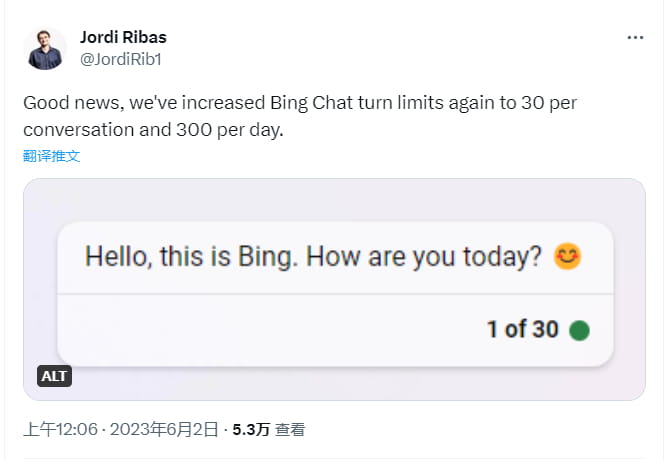
The increase in Bing Chat’s turn limit is a noteworthy development, especially for tech-savvy users who are keen on producing detailed and extensive content and using the tool on an ongoing basis. While this increase may not fully satisfy everyone’s needs just yet, it’s certainly a step towards that goal.
Bing Chat is part of a new era driven by AI
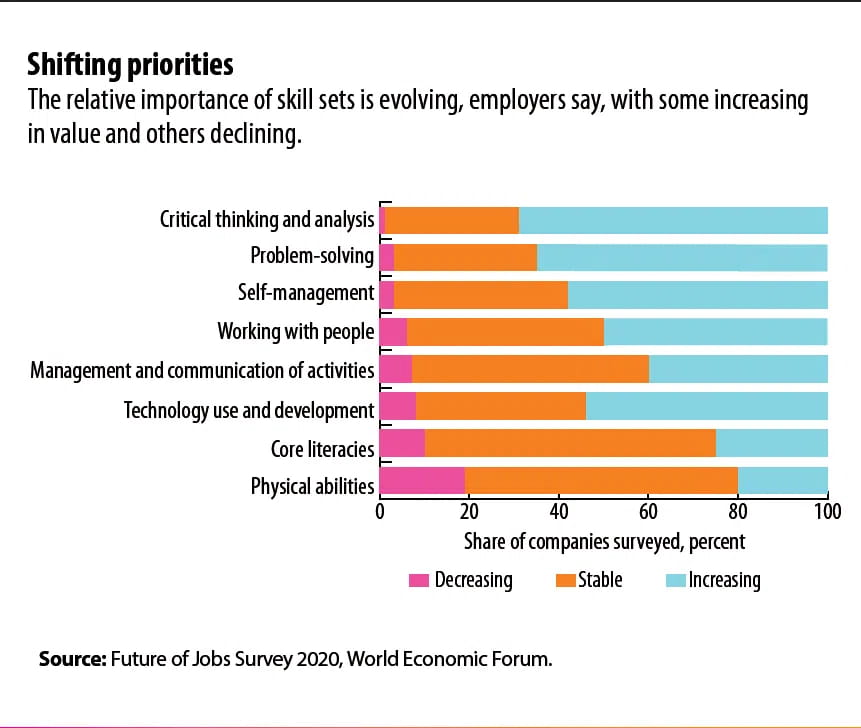
We are at an exciting stage where AI is making its mark across every sector, reshaping the way we operate, live, and communicate. Despite the doom and gloom narratives, it’s important to remember that AI is not the job-destroying beast it is often believed to be (at least not yet).
In fact, research from the World Economic Forum suggests that AI and other new technologies could create up to 97 million new jobs, in stark contrast to concerns about a loss of workforce.
Bing Chat brings a new dimension to search
Getting on board the AI train is not only a smart decision, but a necessary one. Learning how to use Bing Chat could be a great addition to your productivity efforts as it ensures a more engaging, thorough, and user-friendly search experience.
By learning how to chat with Bing, you get more than just a list of links and a brief page description. Instead, users receive answers to their queries in a more conversational and detailed manner. The future of search engines is definitely AI-driven — and it’s clear that the big tech giants are just getting started.
Frequently Asked Questions
1. How to use Bing Chat?
Whether your team is on Windows, macOS, Android, or iOS, it’s easy to get started with Bing’s AI-enhanced search. The gateway to the Bing Chat experience is the Microsoft Edge browser, which is included with Windows 10 and 11. If you prefer mobile, the Bing, Edge, and Skype apps have you covered. For those on Mac or older Windows versions, don’t worry. You can download Edge directly from Microsoft. See the article Ideas for more on how to use Bing Chat.
2. Are there any limitations to Bing Chat?
Bing users can now have up to 30 chats per session and up to 300 chats per day! Microsoft has been steadily increasing the limits on chatbots over the past few months, all in an effort to make them more user-friendly.
3. Is Bing AI free?
Bing’s AI-enhanced search is completely free! On May 4, 2023, Bing moved from limited preview to open preview. This means the days of waiting lists and jumping through hoops are over. All you need to do is sign in to Bing with your Microsoft account.
4. Which is better, Google or Bing?
The choice between Google and Bing often comes down to personal preference. As of June 2023, Google still overwhelmingly dominates the global search market. However, that gap seems to be closing at a noticeable pace in recent months, especially after Microsoft upped the ante by integrating artificial intelligence into Bing's search core. That said, Google has similar ambitions as it prepares to bring AI to its own search engine. So rest assured, the battle for search engine supremacy is likely to get more intense from now on.