

TL;DR
Binance accepts fiat and cryptocurrency deposits from external wallets and bank accounts. The method used varies depending on the currency you wish to deposit.
Make sure to confirm the blockchain address and enter the correct MEMO or ID where necessary. If the blockchain network is congested, your cryptocurrency deposits may experience delays. If this happens, you may need to wait a little longer for the transaction to be confirmed. If after a while, you are still having issues, please contact Binance Customer Support.
Depending on the method used, trust deposits may take a few days. If you are experiencing long delays, before contacting customer support, check to see if deposits have been suspended.
Introduction
Before trading cryptocurrencies on Binance, you must deposit fiat funds or cryptocurrencies. There are several methods to deposit your funds. Some take longer than others, so a little patience is required. Follow the steps below to ensure your funds arrive safely (SAFU).
How to deposit cryptocurrencies on Binance
In this example, we will deposit BNB from Trust Wallet.
1. Log in to your Binance account. Go to [Wallet] and click on [Fiat and Spot].

2. Click [Deposit].

3. Select the [Cryptocurrencies] tab.

4. Select the cryptocurrency you want to deposit.
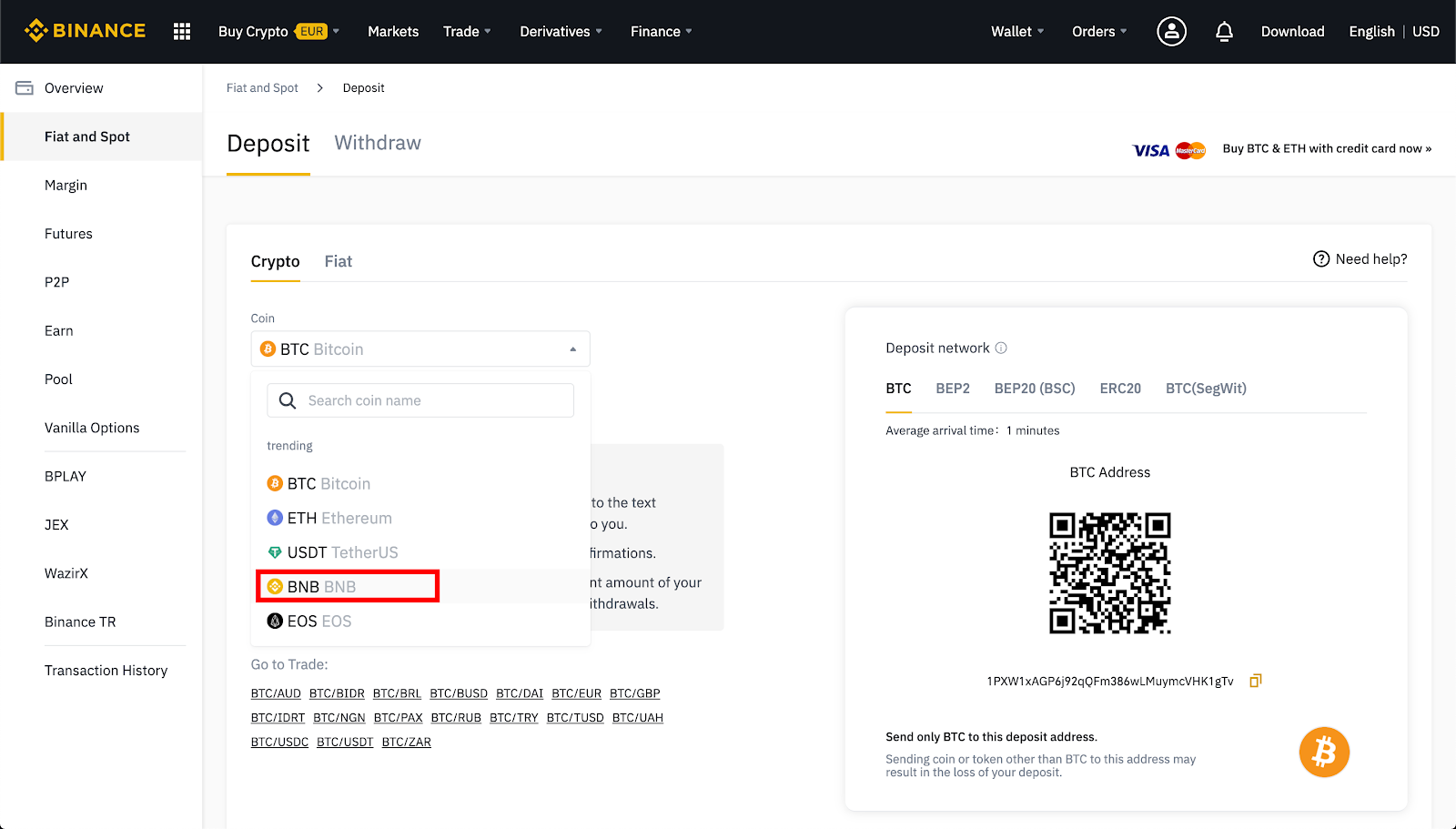
5. If the cryptocurrency is issued on several networks, select the network to which you want to make the deposit.
For example, BNB is issued on Binance Chain as a BEP-2 token, on Binance Smart Chain (BSC) as a BEP-20 token, and on Ethereum as an ERC-20 token. Therefore, if you have BEP-2 tokens in the deposit origin wallet, select the BEP-2 deposit address. Be very careful with this step. You will lose your entire deposit amount if you select the incorrect address.
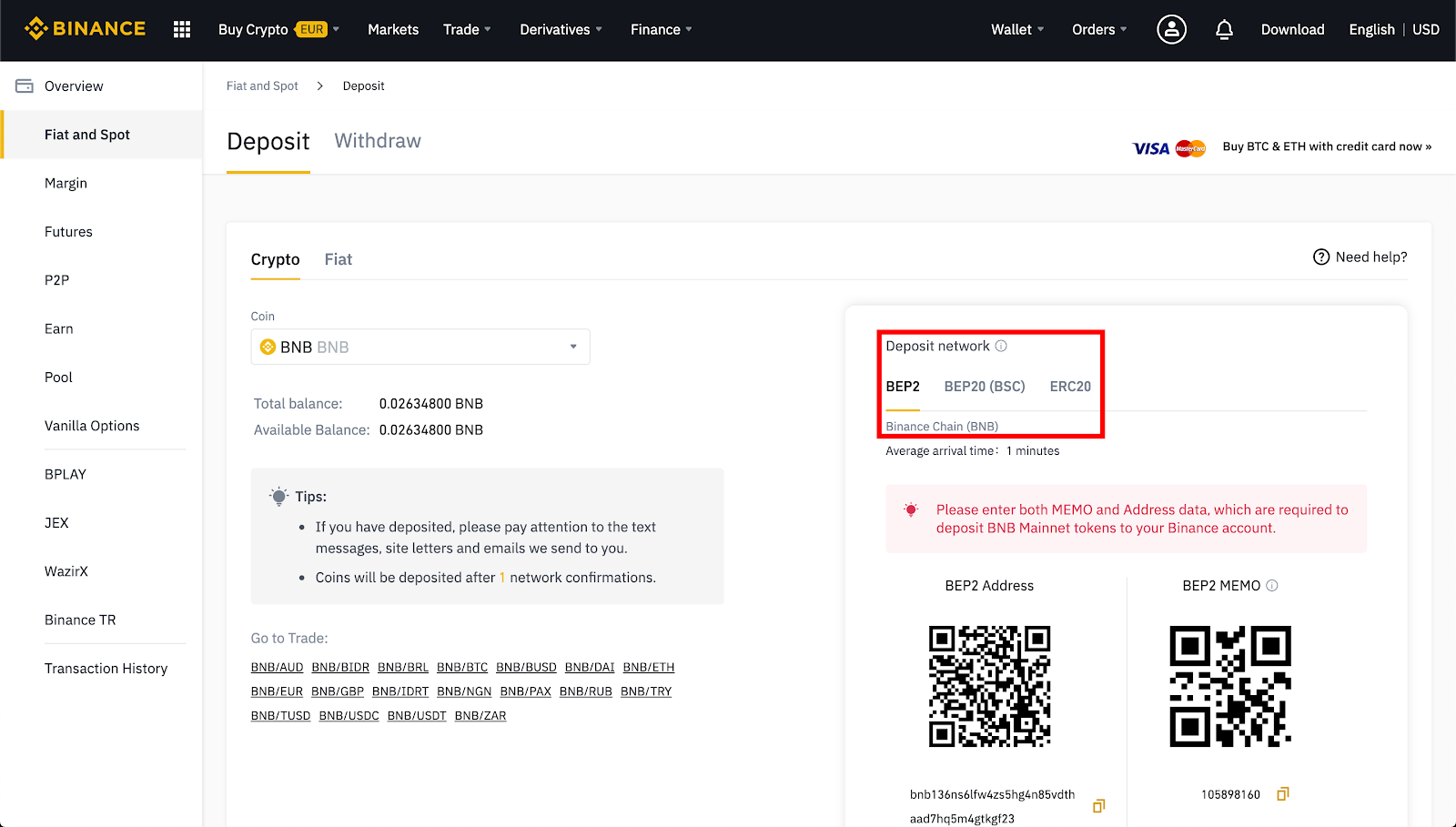
6. To deposit BNB, a deposit address and MEMO are required. You must copy and paste both into the respective fields of the wallet used to send the deposit.
Why is a MEMO necessary? Because the BNB deposit address is identical for all Binance users. The MEMO is a unique identifier assigned to each account. Through MEMO, Binance can identify a deposit and credit it to the correct account.
7. Select BNB in your Trust Wallet.

8. Click Submit.

9. In this field you must paste the deposit address and the MEMO obtained from the Binance deposit page. It is also possible to use the cell phone camera to read the QR code.
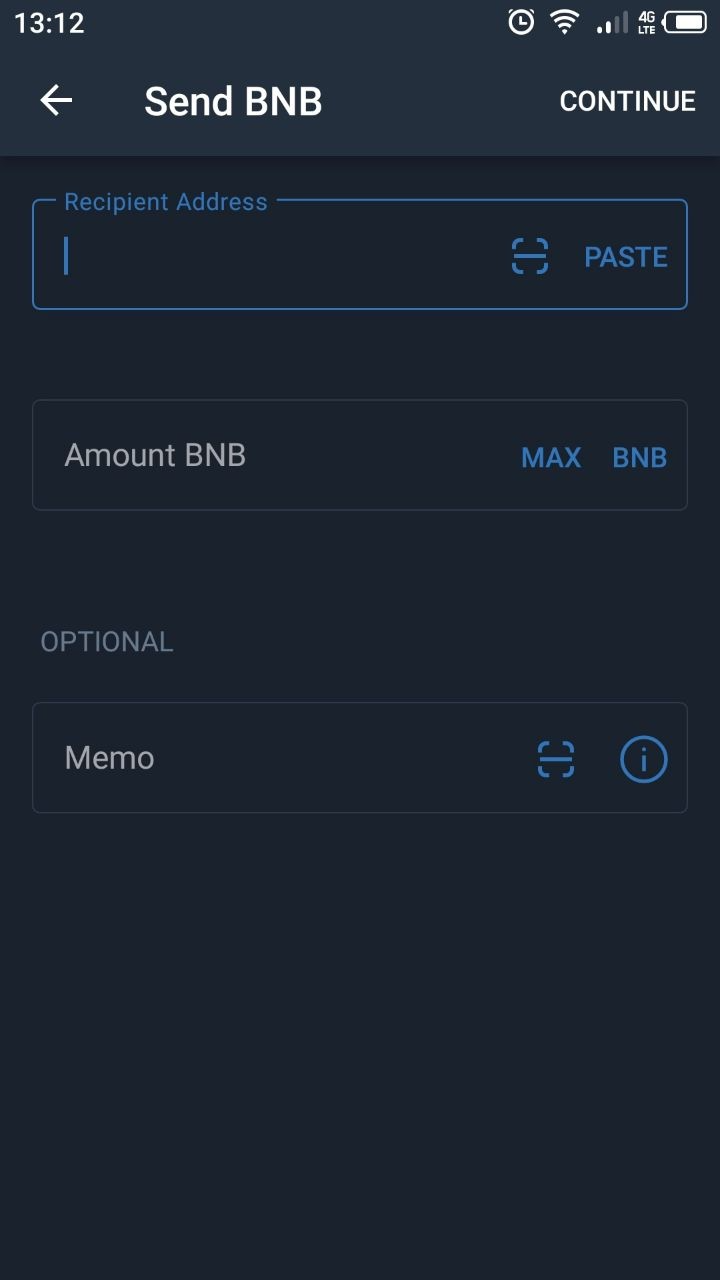
10. Confirm the transaction. After sending the transaction from your Trust Wallet, you can view the status in a blockchain explorer by searching for the transaction ID. We recommend the official Binance Chain explorer.
11. You can check the progress of your deposit in Binance Transaction History.
How to buy cryptocurrencies with fiat currency on Binance
You can buy cryptocurrencies on Binance with over 60 fiat currencies and various payment methods. The process is similar for other cryptocurrencies, including Bitcoin (BTC) and Ether (ETH).
1. Log in to your Binance account. Go to [Wallet] and click on [Fiat and Spot].
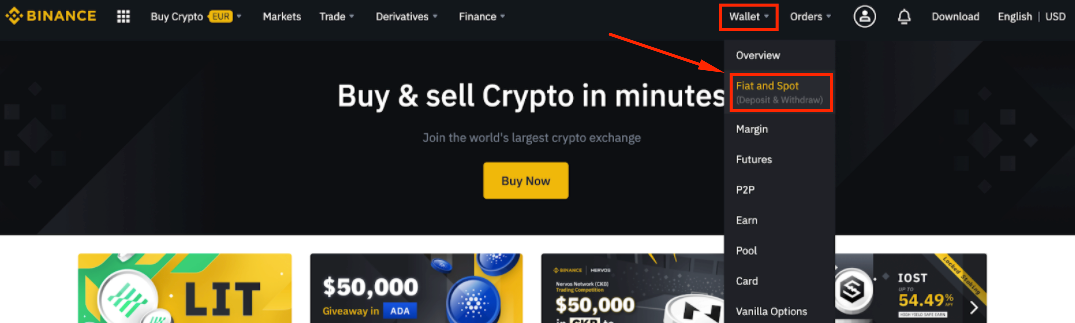
2. Click [Deposit].
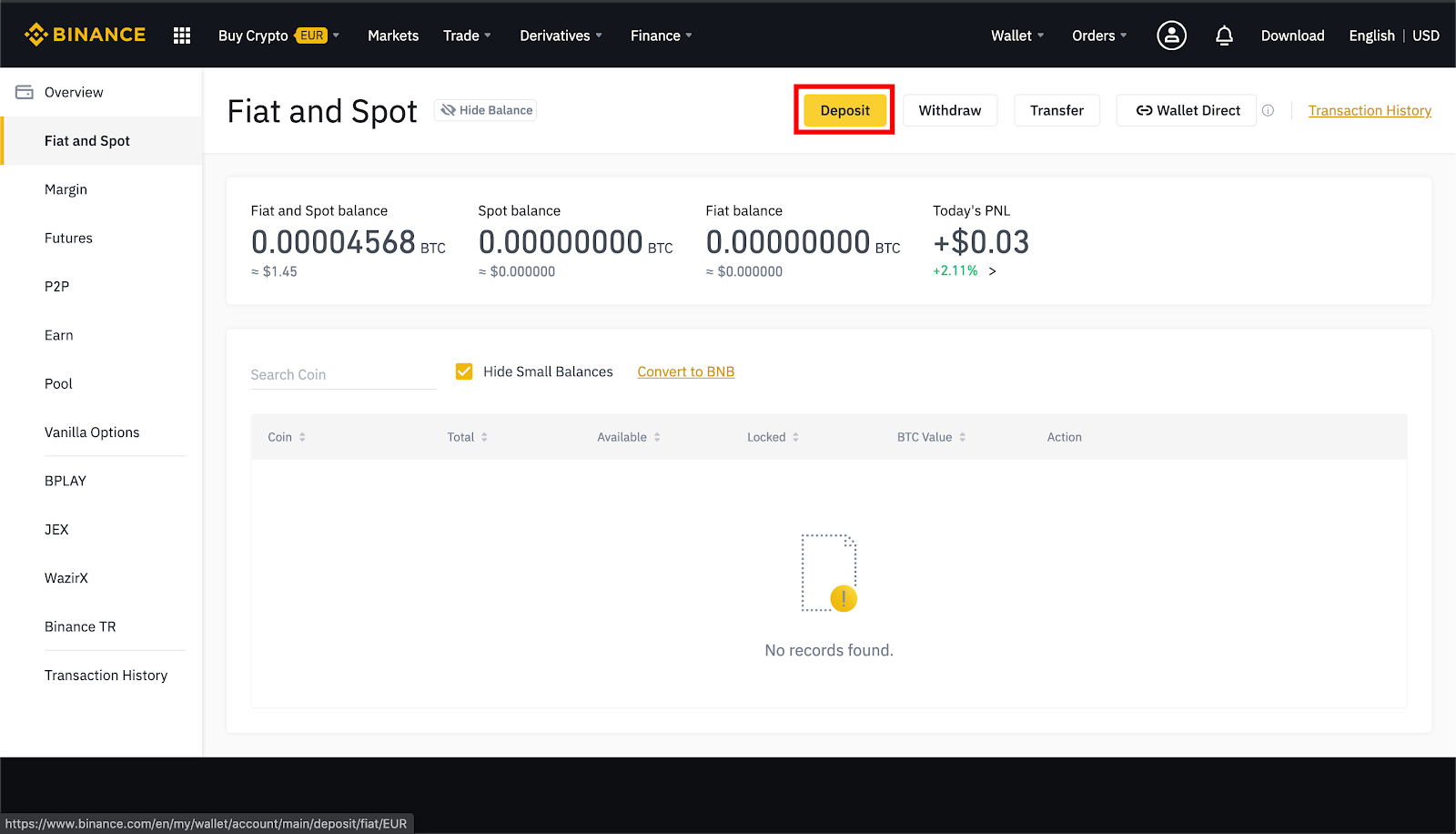
3. Select the [Fiat] tab - fiat currency.

4. If you have not yet completed your identity verification, click [Verify Now] and follow the instructions.
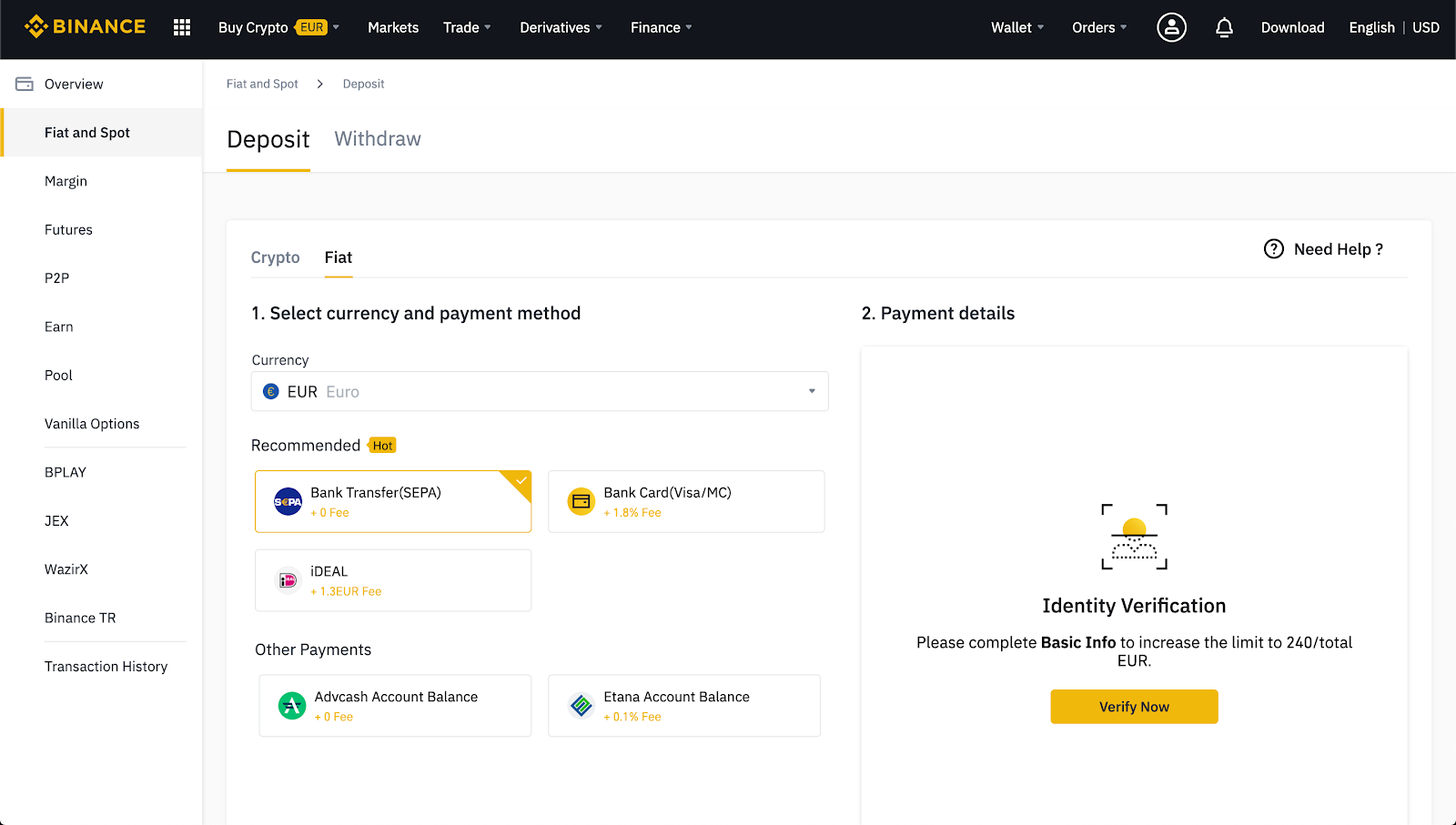
5. Select the currency and payment method for the purchase. Binance accepts credit cards, debit cards, bank transfers or fiat balance.

6. Enter the requested information and follow the instructions.

7. Double-check your payment details before sending it.
Does Binance charge cryptocurrency deposit fees?
Depositing cryptocurrencies on Binance is free. However, you will be required to pay a transaction fee when sending cryptocurrencies from your wallet to Binance. If you are moving your funds from an exchange, a withdrawal fee may be charged to withdraw your cryptocurrencies.
Maximum and minimum deposit amount with and without KYC
Users who have not completed KYC (Know Your Customer) verification on their account will have more limited withdrawal and deposit functions. Limits differ for each country, so the best way to check them is by logging in and accessing your profile page. Each new verification level will increase your withdrawal and deposit limits.

How long does it take to make a deposit on Binance?
Once your crypto deposit has enough confirmations, it should immediately appear in your Binance Spot Wallet. However, heavy traffic and network congestion can cause delays. You can use the TxID (Transaction ID) to check the status of the transfer using a blockchain explorer such as BscScan for Binance Smart Chain or EtherScan for Ethereum.
The processing of fiat deposits will depend on the method used to send your money. The time required can vary from hours to days. For more detailed information, go to the fiat deposits page and select your deposit method.
Why can't I deposit on Binance?
When depositing fiat currencies or cryptocurrencies on Binance, there are two main reasons for failures to occur. Binance occasionally suspends fiat or cryptocurrency deposits for updates or maintenance. If you attempt to make a fiat transfer but your currency is no longer supported, Binance will return the funds (normally within seven business days).
Problems depositing cryptocurrencies are often associated with user error. On the deposit screen, Binance will display payment details. Make sure you copy them carefully to your withdrawal wallet or payment service page.
Occasionally, Binance suspends deposits, so check your email and the latest Binance news for more information. Also check that you have correctly copied and pasted the Binance wallet address and selected the correct blockchain network. Additionally, you may need to add a tag, MEMO, or payment ID to complete the deposit of your cryptocurrencies.
What to do if my deposit is not credited to Binance
If you have sent a fiat deposit and Binance has not credited the amount to your account, please contact the Binance customer support team. Trust deposits may take a few days.
If you sent a crypto deposit to the correct address but did not enter the MEMO, tag or payment ID, you can use the self-service form to try to recover your funds. To do this, you'll need some basic information about your transaction, including the TxID, amount, and sender's address. This process only works if the blockchain has a sufficient number of confirmations for your transaction.
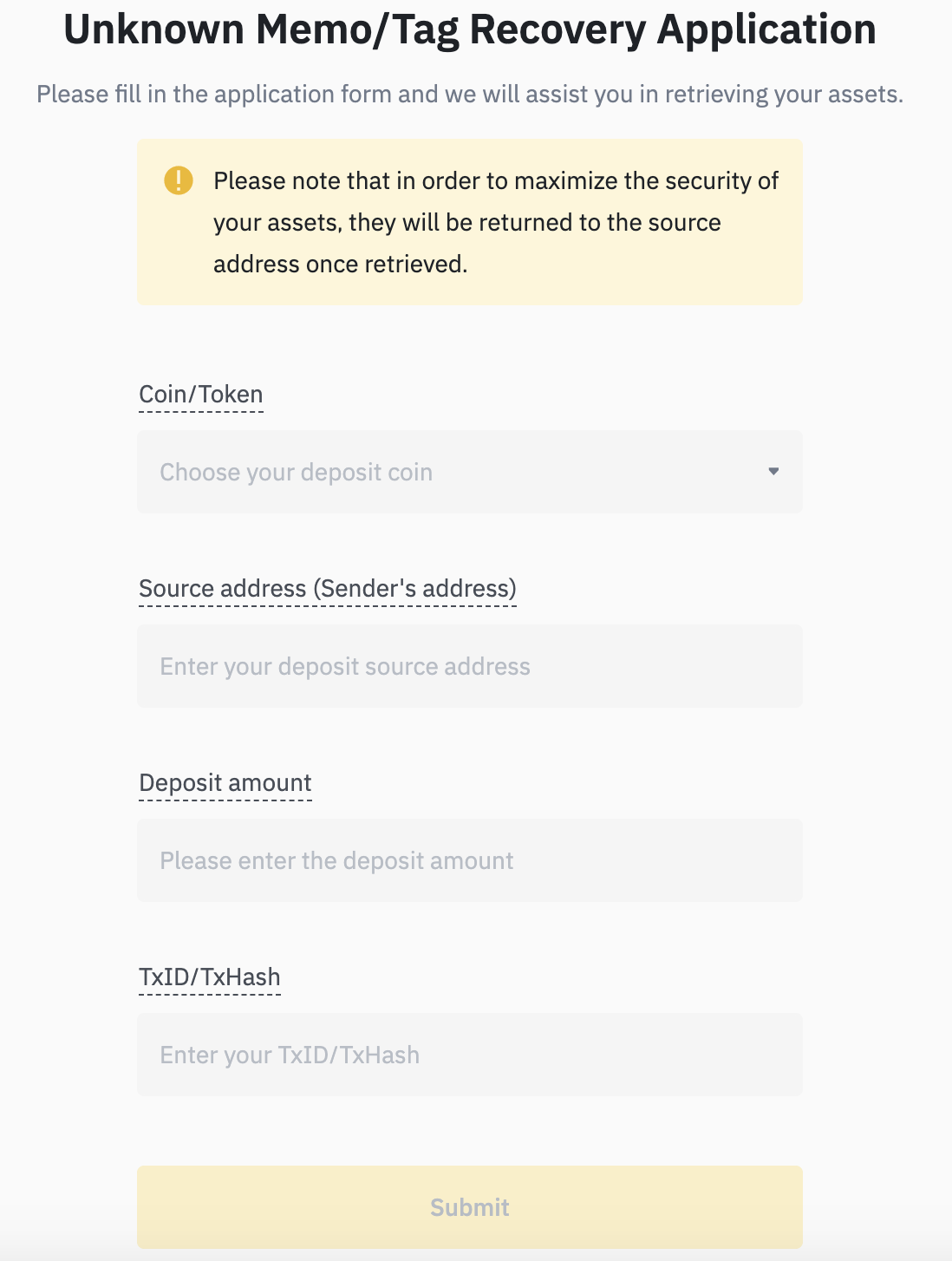
If your transaction is not confirmed, the network may be congested and you will need to wait longer. Different blockchains require a different amount of confirmations. As mentioned, you can use TxID to query the transfer status of your assets through a blockchain explorer.
How to check if a deposit was completed successfully
If your crypto deposit has enough confirmations, it should immediately appear in your Binance Spot wallet. You can check this by going to [Wallet] - [Overview] - [Transaction History].

Fiat deposits should also appear as soon as they arrive in your Binance account. You can consult them in the [Fiat and Spot] section of the website.

Final considerations
Transferring fiat or crypto funds to your Binance account may take some time. Binance always seeks to offer faster processes and deposits to its customers. However, delays are often unavoidable and may not be related to Binance. If you are experiencing abnormal waiting times, please contact Binance customer support.