

Summary
A stop limit order combines a stop condition and a limit order. Stop limit orders allow traders to set the minimum profits they would like to make or the maximum amounts they are willing to spend or risk losing on a given trade. Once you set a stop limit order and the activation price is reached, the limit order will be executed automatically, even if you are offline or logged out. You can place stop limit orders strategically by considering the support and resistance levels as well as the volatility of the asset.
For a stop limit order, the stop price is the activation price at which the trading platform places a limit order. The limit price is the price at which your order will be executed. You can customize the limit price, which is usually set at a higher price than the stop price on buy orders, or at a lower price on sell orders. This divergence accommodates market price changes between the time the stop price is activated and the limit order is placed.
the introduction
If you want to start trading cryptocurrencies rather than owning them, you will likely need to use more than market orders. A stop limit order provides more control and customizability. This concept can be difficult to understand, so let's take a look at the main differences between a limit order, a stop loss order, and a stop limit order first.

Limit Order vs. Stop Loss Order vs. Limit Order
Limit orders, stop loss orders, as well as stop limit orders are some of the most commonly used order types. Limit orders allow you to specify a range of prices at which you want to trade, while stop loss orders specify the stop price that activates the market order, and a stop order combines both aspects. Let's take a more detailed look:
Marginal demand
When you place a limit order, you can choose the maximum buy price or the minimum sell price. The trading platform will attempt to execute the limit order automatically when the market price reaches the limit price or a better price. These orders are useful when you target a specific price to enter or exit a trade and you don't mind waiting for market conditions to meet your criteria.
Traders typically place limit sell orders above the current market price and limit buy orders below the current market price. If you place a limit order at the current market price, it will most likely be executed within a few seconds (unless market liquidity is low).
For example, if the market price of Bitcoin reaches $32,000 (BUSD), you can place a limit buy order at $31,000 to buy BTC once the price reaches $31,000 or lower. You can also place a limit sell order at $33,000, which means the trading platform will sell your BTC when the price reaches $33,000 or higher.
Limit stop request
As mentioned, a stop limit order combines a stop condition and a limit order. A stop order adds an activation price to the trading platform to execute your stop order. Below we will discuss how this works.
How does a stop limit order work?
The best way to understand a stop limit order is to break it into two parts. The stop price acts as a trigger to place a limit order. When the market reaches the stop price, a limit order will be automatically placed at a specified price (limit price).
Although the stop price and limit price may be the same, this is not a requirement. In fact, it would be safer for you to set the stop price (activation price) slightly higher than the limit price on sell orders. On buy orders, you can set the stop price slightly lower than the limit price. This increases the probability of fulfilling your marginal demand after it is activated.
Examples of stop limit orders in buying and selling
Request a limit stop purchase
Imagine that BNB is currently worth $300 (BUSD), and you want to buy it when it starts to enter an uptrend. However, you don't want to pay a lot to buy BNB if its value starts to rise quickly, so you need to decide what price you will pay.
Let's say your technical analysis indicates that an uptrend might start if the market price crosses the $310 mark. You decide to use a buy stop limit order to open a trade in the event of a price overrun. The stop price is set at $310 and the limit price is set at $315. Once the price of BNB reaches $310, the limit order to buy the coin at $315 will be executed. Your order may be executed at a price of 315 or lower. You should note that your limit price is $315, so if the market price rises quickly from this level, your order may not be executed.
Limit stop order to sell
Imagine that you bought BNB at $285 (BUSD) and its price is currently $300. To prevent losses, you decide to use a stop limit order to sell the currency if the price falls to the trade entry price. I placed a stop limit order to sell with a stop price of $289 and a limit price of $285 (the price at which I bought BNB). If the price reaches $289, the limit order will be placed to sell BNB at $285. Your order may be executed at a price of 285 or higher.
How to submit a stop limit order on Binance?
Let's say you bought five BTC worth $31,820.50 (BUSD) because you think the price will rise soon.
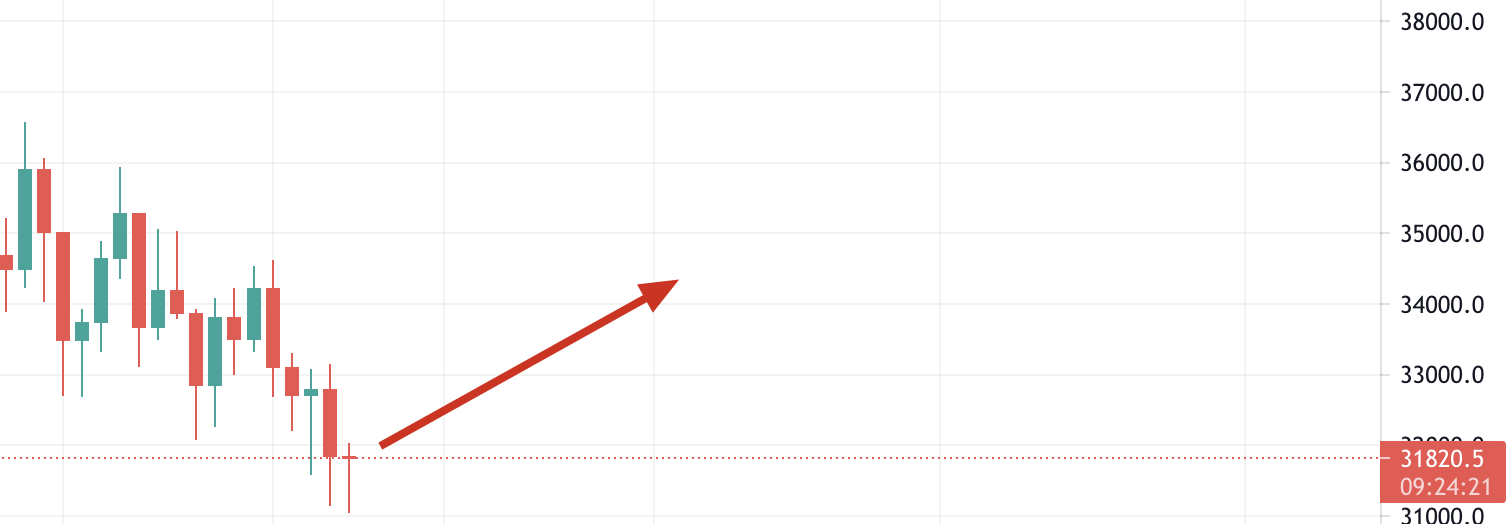
In this case, you may want to place a sell stop limit order in order to reduce your losses if your belief is wrong and the price starts to fall. To do this, log in to your Binance account and then go to the BTC/BUSD market. Then click on the [Stop Limit] tab and set the stop price and limit price, as well as the amount of BTC you wish to sell.
If you believe that $31,820 represents a reliable support level, you can set a stop limit order below this price (in case of instability). In this example, we will place a stop limit order to sell five BTC coins at a stop price of $31,790 and a limit price of $31,700. Let's discuss it step by step.
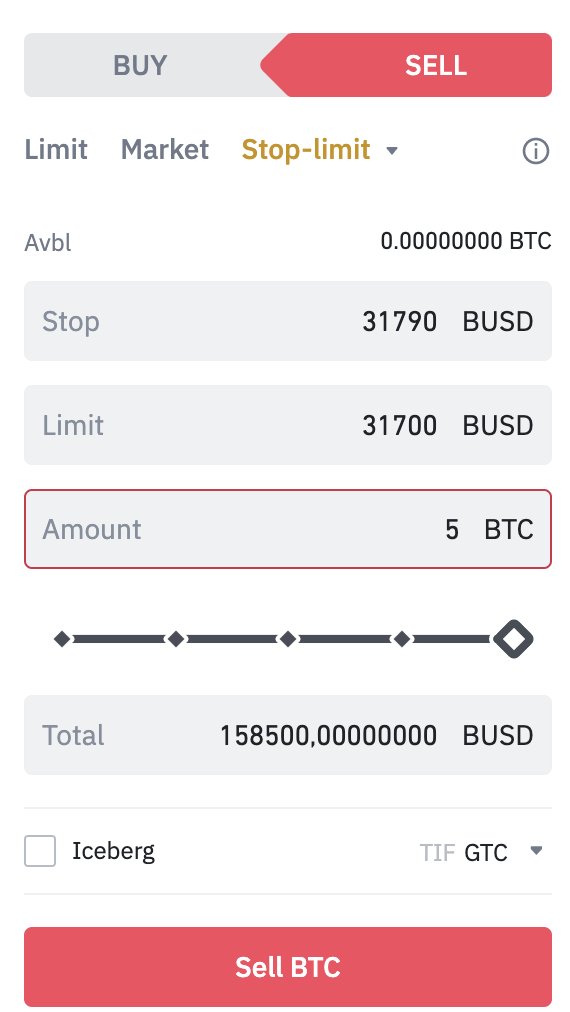
When you click [Sell BTC], a confirmation window will appear. Make sure everything is correct and click [Submit Order] to confirm. After submitting your limit stop request, you will receive a confirmation message. You can scroll down to see and manage your open orders.

You should note that a stop limit order will only be executed when the stop price is reached. This means that the limit order will only be executed if the market price reaches or better the limit price you specified. If your limit order is activated (at the stop price), but the market price does not reach or exceed the price you specified, the limit order will remain open.
Sometimes you may encounter situations where the price drops quickly, so your stop limit order will be passed without being executed. In this case, you may need to arbitrage market orders to exit the trade quickly.
Advantages of using a stop limit order
Using a stop limit order allows you to customize and plan your trades. We cannot always verify prices, especially in the 24-hour cryptocurrency market. Another advantage is that the limit stop order allows you to set an appropriate amount of profit that you would like to make. Your order will be executed whatever the market price is without limits. Some traders prefer to keep currencies rather than sell them at any price.
Disadvantages of using a stop limit order
Stop and limit orders share some drawbacks, mostly because there is no guarantee that they will be executed. A limit order will only start executing if the limit price is reached or better. However, this price may never be reached. Although it is possible for a gap to occur between your order and the stop prices, sometimes this gap may not be enough. Highly volatile assets may exceed the spread you specified in your order.
Liquidity may also be an issue if there are not enough beneficiaries to fulfill your request. If you are concerned about your orders being only partially executed, you can use the Full Execution or Terminate method. This option specifies that your order should be executed if it can be fully executed. However, you should note that the more conditions you add to your order, the less likely it will be executed at all.
Strategies for submitting limit stop requests
We've learned about stop orders, what's the best way to use them? Here you will find some basic trading strategies to enhance the effectiveness of your stop limit orders and avoid some of their drawbacks.
1. Study the fluctuations of assets for which limit stop requests are submitted. We recommend setting a small price difference between a stop order and a limit order in order to increase the probability of your limit order being executed. However, if the asset you are trading is volatile, you may need to select a slightly larger spread.
2. Think about the liquidity of the assets you are trading. Stop limit orders are particularly useful if assets are traded with a large spread between the ask and the offer or with low liquidity (in order to avoid unwanted price slippage).
3. Use technical analysis to determine price levels. It is a good idea to set the stop price at the support or resistance level of the asset. The first way to determine these levels is to use technical analysis. For example, you can use a stop limit order to buy and set the stop price above an important resistance level to profit from any rally. Or by placing a stop limit order to sell below the support level to ensure exiting the deal before the market price declines further.
If you are not sure about support and resistance levels, see the section explaining the basics of support and resistance.

Concluding thoughts
Stop limit orders are a powerful tool that gives you more trading potential than simple market orders. There is also an additional advantage, which is that there is no need to trade much to complete the order. The feature of combining multiple stop orders allows you to easily manage your balances whether the price goes down or up.