


Summary
Etherscan is a blockchain explorer for the Ethereum network. The site allows the user to search transactions, blocks, wallet addresses, smart contracts, as well as other data available on the chain. It is also one of the most popular blockchain explorers for the Ethereum network and is available for free to use.
Using the Etherscan Explorer gives the user a precise understanding of how to interact with the blockchain, other wallets, as well as decentralized applications. This knowledge also provides security for the user as well as detecting suspicious behaviour.
Using Etherscan Explorer requires the user to have the wallet address, transaction ID, contract address, or other identifier to copy into the search field. The information appears according to what the user is searching for, but most of the information includes the user's transactions, addresses, timestamps, and amounts.
In addition to the above, the user can directly interact with smart contracts to make transactions, check transfer fees on the network, as well as search for free distributions on the Etherscan platform.
the introduction
If a user is using the Ethereum network for purposes other than holding or sending a limited number of transactions, learning how to navigate the blockchain will be very useful. Since Etherscan Explorer is one of the most popular options, it's an excellent place to start learning the basics. The user enjoys most of the benefits without having to connect to his wallet or even open an account. Now we will review the most common ways to use Etherscan Explorer and how to take advantage of the information available on it.

What is Etherscan Explorer?
Etherscan is a blockchain explorer that allows the user to view public data about transactions, smart contracts, addresses, as well as other data available on the Ethereum blockchain. All interactions on the Ethereum network are public, and the Etherscan explorer allows the user to search this information like a search engine. The user can use the transaction hash (transaction ID) to verify all of their activity, including tokens, smart contracts, and wallet addresses.
Users do not need to register on the Etherscan platform and can create an account to enjoy additional functionality. For example, the user can set alerts to be notified of incoming transactions, access development tools, and create data feeds.
Etherscan Explorer does not provide the user with an Ethereum-backed wallet to use or store any of the private keys. It also cannot be used in trading operations. It is intended to serve as a source of blockchain information and a database for smart contracts. To make transactions or store cryptocurrencies, the user must have a crypto wallet such as Trust Wallet, MetaMask, Math Wallet, or Binance Chain Wallet.
What are the advantages of using Etherscan Explorer?
Etherscan is one of the most popular and reliable block explorers for the Ethereum network. But it is more important for the user to understand the importance of using a block explorer such as Etherscan to search for information available on the chains. Gaining more information about working with the blockchain will help the user better understand how decentralized applications and transactions work. This knowledge also provides security to the user and helps him detect suspicious activities regarding the blockchain.
For example, alerts for major traders notify the user if a large number of cryptocurrencies are transferred to a trading platform. Although this does not happen in all cases, this information may be useful to the user when notifying him of a large sale. In addition, the user can see what actions a project's founders are taking regarding their project's tokens. This feature helps the user to detect potential fraud or rug withdrawal cases, in which developers stop their projects and sell their currencies.
How to search for a transaction or wallet on the Etherscan platform
One of the main features of the Etherscan platform is tracking transactions. The user needs to know how to track the digital currencies he owns in order to access the rest of the information about the blockchain chain. For example, imagine that you sent 0.025 units of Ethereum from your wallet to this public address: 0x480bbcb368197d44c6f54a738e59c33eff004b6a.
Furthermore, I paid the transaction fee of 0.001559212674537 Ethereum. After the transaction was made, your wallet displayed this transaction ID:
0x80a3cc0f344651b3de745b2f1efbe8d35d4f348e95b345c8a840ebf955414fa5
Let's say you want to check the number of confirmations for this transaction and make sure it was sent successfully.
1. Go to the Etherscan home page, then look for the search field at the top of the page.

2. Next, copy the transaction ID and paste it into the search field, then press the search icon.

3. Now you will be shown all the details related to your transaction:

4. You can also click the [Click to view more] button to view more detailed information, but for now we will just get to know the default display:
Simply put, it is clear from the previous information that the transaction was successful and received a sufficient number of confirmations. The user is also able to check the status of his transaction by checking the receiving wallet.
In order for the user to perform this action, he must return to the search bar and then paste the receiving wallet address:
0x480bbcb368197d44c6f54a738e59c33eff004b6a

At the bottom of the page, a list of all transactions associated with the address appears:

The transaction in red is the transaction you originally sent and is worth 0.025 ETH. It appears marked as incoming, which shows that the address you searched for was on the receiving party. At the top of the page, a summary of the wallet balance appears.

How to search for smart contracts in Etherscan Explorer
If you regularly deal with smart contracts via decentralized applications, it will be useful to learn how to search for them in the Etherscan explorer. Thus, you have additionally verified that your funds are being sent to the correct node.
If you want to add a new token to your wallet at any time, you will need to find the token contract address. The smart contract address contains information about the token, such as the number of times the token is transferred and other behaviors.
To search for a token address, a user can visit CoinMarketCap, CoinGecko, or the project's official website. You can also click on this link https://etherscan.io/tokens
Also, make sure you added the correct address for the token by double-checking it through the websites mentioned above. Let's try searching for the Uniswap ERC-20 token on the Ethereum network:
0x1f9840a85d5af5bf1d1762f925bdaddc4201f984
1. Copy the smart contract address and paste it into the search field.

2. Details about the contract balance and general information related to the Uniswap (UNI) protocol token contract will appear.

3. Below the search field, more options appear, including transactions, the comments section, and the smart contract itself. Next, click [Contract] to view and read the options available for interacting with and reading the Uniswap protocol rules.

4. The [Read Contract] tab shows the user general information about the contract. It allows, for example, to inquire about the balance of specific addresses or wallets that are allowed to use the token in your wallet.

By clicking on [Write Contract], the user can interact with the contract directly. This is useful when DeFi platforms and decentralized applications are unavailable, either due to a technical issue or inaccessibility of the website. In some cases, you can interact with the smart contract directly, without having to use the project's API.
By clicking on [Connect to Web3 Foundation], the user can connect to one of the digital currency wallets, such as the MetaMask wallet or Binance Chain Wallet, and interact with the contract.

In this case, the simplest procedure is to convert currencies. By using the [Transfer From] tab, the user can transfer tokens from one of the addresses that the user has permission to deal with to other addresses.
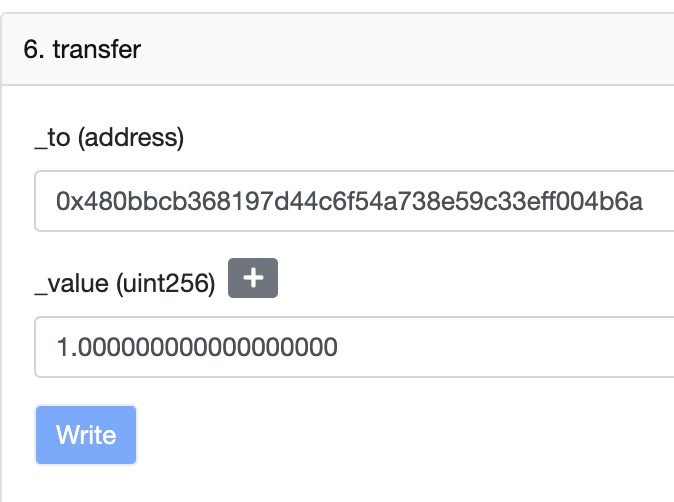
The [Transfer] tab allows the user to transfer the token associated with the contract from their connected wallet. In the next transaction we will send 1 unit of UNI coin from our connected wallet to the receiving wallet address that we will paste. We also need to verify that the correct number of decimal digits are added to the amount to be sent.
The majority of users will not need to use these features. However, it is useful to know about them in case the user wants to access the funds stored in the smart contract.
How to check transfer rates in Etherscan Explorer
Transfer fees are part of the transaction fees on the Ethereum network. This fee is determined by the block containing your transaction. Each block has a specific fee that varies according to the rate of activities on the network. The processing fee tracker shows the user the differences in rates and timings as transfer fees change. It's a useful tool for predicting network congestion and, roughly, how much you'll have to pay to send a simple transfer or interact with a smart contract that involves more complex steps.


Concluding thoughts
Etherscan Explorer is free, easy to use, and a great tool for looking up additional information beyond what appears in a user's wallet or trading platform. As for the basic features, the user can quickly learn them and use them within a short period. In addition, the Etherscan explorer serves as a cornerstone for using other block explorers such as the BscScan explorer, as it allows the user to benefit from the skills he has acquired when using other explorers. Whether you want to confirm the status of a transaction or look up one of your favorite smart contracts on a dApp, the Etherscan Explorer is a good place to start.