

Summary
A limit-take-profit-stop-loss order combines the take-profit and stop-loss triggering mechanism with a limit order. Traders use this type of order to set the minimum profit target they expect to accept, or the maximum cost or loss they are willing to bear on a trade. After setting a limit, stop-profit and stop-loss order and reaching the trigger price, the limit order will be automatically issued even if you log out or go offline. Traders can strategically issue limit-price, stop-profit, and stop-loss orders based on resistance levels, support levels, and asset volatility.
In a limit stop order, the stop price is the trigger price at which the trading platform issues the limit order. The limit price is the price point at which the order is placed. The limit price can be set by yourself - the limit price for a buy order is usually set above the stop price, and the limit price for a sell order is set below the stop price. This difference takes into account that the market price will change within the time difference between the triggering of the stop price and the issuance of the limit order.
Introduction
To actively participate in trading rather than hold for the long term, understanding market orders is not enough. Limit price, stop profit and stop loss orders have greater control and customizability. Beginners may be confused by this concept, so let’s first understand the key differences between limit orders, stop orders, and stop-limit orders.

Comparison of limit orders, stop-loss orders and limit-price, take-profit and stop-loss orders
Limit orders, stop orders, and stop-limit orders are all common order types. Limit orders allow traders to set a target price range, stop orders set the stop-profit and stop-loss prices that trigger market orders, and stop-limit orders are a combination of the first two. Let's take a closer look:
limit order
When setting a limit order, you can choose a maximum buy price or a minimum sell price. When the market price reaches or is better than the limit price, the trading platform will automatically promote the completion of the limit order. These orders are useful if you have a clear target opening or selling price and are willing to wait for the market to meet the set conditions.
Traders typically place sell limit orders above the current market price and buy limit orders below the current market price. If a limit order is posted at the current market price, it is likely to be executed within seconds (except in low-liquidity markets).
For example, assuming the market price of Bitcoin is $32,000 (BUSD), a limit buy order can be set at $31,000. Buy Bitcoin immediately when the price drops to $31,000 and below. In addition, a limit sell order can be issued at the $33,000 level. If the price rises to $33,000 and above, the trading platform will sell Bitcoin.
Limit price, stop profit and stop loss order
As mentioned before, a stop limit order is a combination of a stop loss mechanism and a limit order. A stop order adds a trigger price to the trading platform for posting a limit order. Let’s understand how this works.
How do stop-limit orders work?
The best way to understand a limit-take-profit-stop-loss order is to break it down. The Take Profit and Stop Loss price acts as the trigger price for issuing a limit order. When the market price reaches the take profit and stop loss price, the system will automatically create a limit order with a custom price (limit price).
Although the stop-loss and limit prices can be the same, this is not necessary. In fact, it is safer to set the stop-loss price (trigger price) slightly higher than the limit price if it is a sell order, and slightly lower than the limit price if it is a buy order. This increases the chances of a limit order being executed.
Limit, Stop, Buy and Sell Order Examples
Buy limit orders
Assume that the current price of BNB is 300 USD (BUSD), and you want to buy it when it shows a bullish trend. However, if BNB rises too fast, you are not willing to pay too high a price for it, so you need to limit the price you pay.
Assume that according to technical analysis, if the market breaks through $310, an upward trend may start. Traders decide to use take-profit, stop-loss and limit buy orders to open positions in response to rising market prices. The take-profit, stop-loss and limit prices are set at $310 and $315 respectively. When the BNB price reaches $310, the system immediately issues a limit order to buy at $315. The order may be filled at $315 or lower. Please note that $315 is the price limit. If the market price exceeds this value quickly, the order may not be filled at all.
Limit price, stop profit, stop loss sell order
Assume that BNB bought at $285 (BUSD) has now risen to $300. To avoid losses, the trader decides to sell BNB using a limit stop order when the price drops back to the opening price. The stop price of the limit stop sell order is set at $289 and the limit price is $285 (the purchase price of BNB). If the price reaches $289, the system immediately issues a limit order to sell BNB at $285. The order may be executed at $285 or higher.
How to place a limit-price, stop-profit, and stop-loss order on Binance?
Let's say you just bought five Bitcoins at $31,820.50 (BUSD) and predict that the price is about to rise.
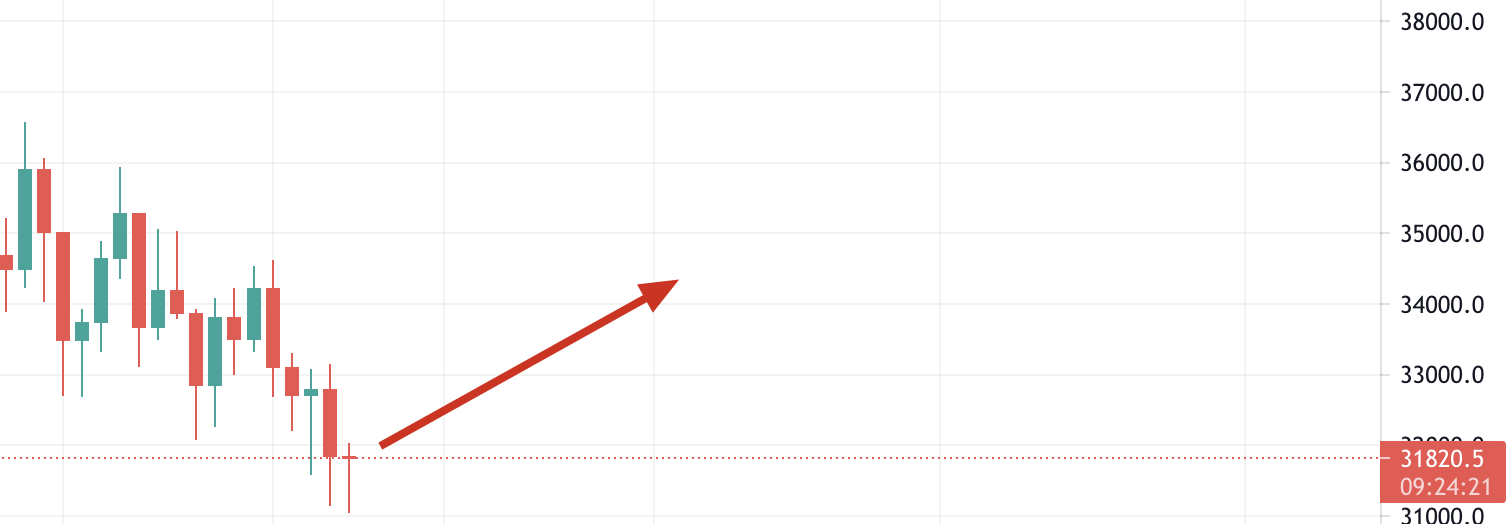
If your prediction is wrong and the price starts to fall, you might be able to cut your losses by placing a sell limit or stop loss order. To do this, log into your personal Binance account and enter the BTC/BUSD market. Then click the [Limit Price, Take Profit and Stop Loss] tab to set the take profit, stop loss price and limit price as well as the number of Bitcoins to be sold.
If you believe $31,820 is solid support, you can place a stop-limit order below that price (in case support breaks down). In this example, we will issue a stop-limit order for 5 Bitcoins, with a stop-loss price of $31,790 and a limit price of $31,700. Below we demonstrate the specific operations step by step.
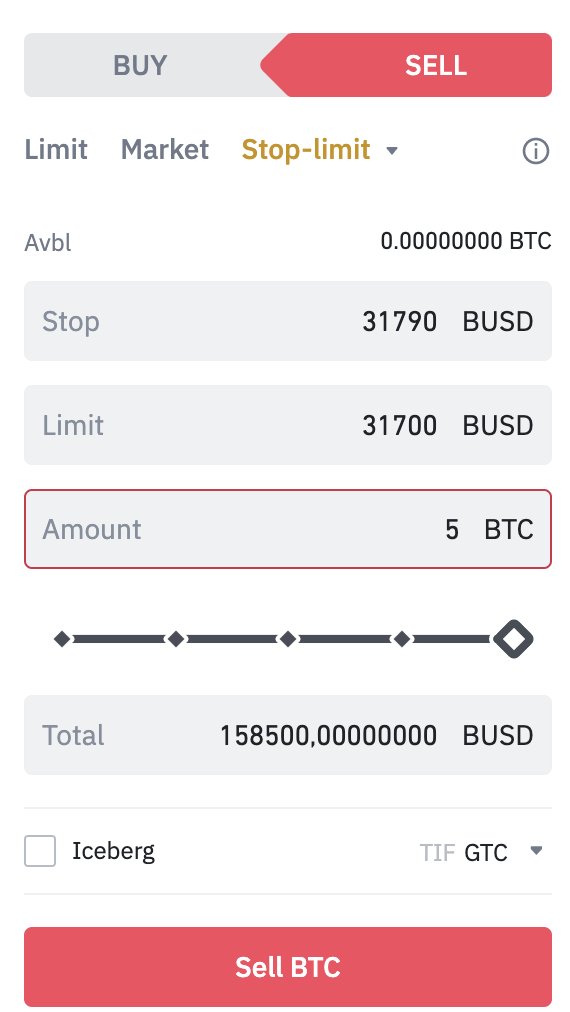
After clicking [Sell BTC], a confirmation window will appear. Make sure everything is correct and click [Place Order] to confirm. You will receive a confirmation message after your limit/stop order is issued. You can also scroll down to view and manage your open orders.

Please note that stop-limit orders will only be executed when the stop-loss price is reached. In other words, the limit order will be executed only when the market price reaches or exceeds the limit price set by the trader. If a limit order is triggered by a take-profit or stop-loss price, but the market price does not reach or exceed the set price, the limit order will remain open.
Occasionally, you may face the situation where the price drops too fast and the limit price, stop profit and stop loss orders fail to be filled. In this case, it may be necessary to use a market order to exit the trade quickly.
Advantages of using limit, take profit and stop loss orders
Limit price, stop profit and stop loss orders allow traders to customize and plan transactions. We cannot keep an eye on prices all the time, and it is even more impossible to keep an eye on the cryptocurrency market that operates around the clock. Another big advantage is that stop-limit orders allow traders to set reasonable profit limits. If there is no limit, your order will be filled at any market price. Some traders prefer to hold on to the asset for the long term rather than sell the asset at any cost.
Disadvantages of using limit, take profit and stop loss orders
Limit orders have the same disadvantages as limit orders in that there is no guarantee that a transaction will be completed. A limit order will only be filled if the price reaches or exceeds a specific value. However, it is possible that this price will never be reached. Even if you allow a spread between the limit price and the take profit and stop loss price, the spread may not be enough. For extremely volatile assets, the price movement may directly exceed the spread set in the order.
Liquidity can also become an issue if there are not enough takers to push orders through. If you are worried that your order will only be partially filled, you may consider using a "Fill or Cancel" order. The plan stipulates that orders can only be executed after full closing conditions are met. However, please note that the more conditions you add to your order, the lower the probability of execution.
Limit stop-profit and stop-loss order issuance strategy
Now that we have studied stop-limit orders, how can we make the most of them? The following basic trading strategies can improve the effectiveness of stop-limit orders and maximize their effectiveness.
1. Study the volatility of the asset for which you are placing your stop-loss and take-profit orders. Previously, we recommended setting a small spread between stop-loss and limit orders to increase the chances of limit orders being filled. However, if the asset is volatile, the spread may need to be increased.
2. Consider the liquidity of trading assets. Stop-limit orders are very effective when trading assets with large bid-ask spreads or low liquidity (to avoid unwanted prices due to sliding spreads).
3. Use technical analysis to determine price points. A reasonable approach is to set the take-profit and stop-loss prices at the asset's support or resistance levels. Technical analysis is a means of determining these points. For example, you can use a take-profit and stop-loss buy order, setting the take-profit and stop-loss prices just above important resistance levels to take advantage of price breakouts to profit. Alternatively, you can use a take-profit and stop-loss sell order to set the take-profit and stop-loss price just below the support level to ensure you exit before the market continues to fall.
If you are not sure what support and resistance levels are, please read "Detailed Explanation of the Basic Principles of Support and Resistance".

Summarize
A limit stop order is a powerful tool that provides superior trading capabilities over a regular market order. This type of order has the added benefit that the trader does not need to actively participate in the trade for the order to be filled. By combining multiple limit stop orders, you can manage your assets with confidence, whether the price goes up or down.