


Table of contents
How to open a Binance Futures account
How to top up a contract account
Binance Futures Interface Guide
How to adjust leverage
The difference between marked price and latest price
Order types and how to use them
How to use the Contract Trading Calculator
How to use the two-way position mode
What is the funding rate and how to check it
Only pending orders, valid time and only position reduction
Under what circumstances will a position be liquidated?
Auto-deleveraging and its impact
Summarize
How to open a Binance Futures account
Before opening a Binance Futures account, you first need to register for a regular Binance account. If you haven’t registered for a regular account yet, please visit Binance’s official website and click “Register” in the upper right corner of the screen. Then follow these steps:
输入您的电子邮件地址并创建一个安全密码。如果已有推荐人 ID,请将其粘贴在“推荐人 ID”框中。否则,可以点击我们的推荐链接,现货/保证金交易手续费即可享受 10% 的折扣。

When everything is ready, click "Create Account".
You will receive a verification email shortly. Please follow the instructions in the email to complete the registration.
Next, log in to your Binance account, move your mouse to the top column of the page, and click "U-based Contracts."

Click "Open Now" to activate the contract account. The activation has now been completed. Now you can trade!
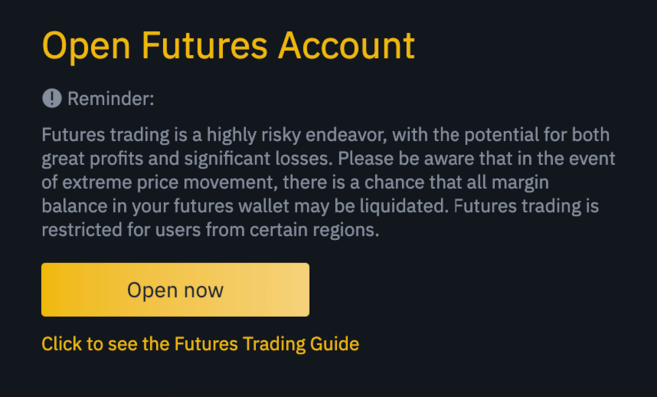
If you are not familiar with futures trading contracts, we recommend that you first read What Are Forward and Futures Contracts? ” and “ What is a Perpetual Futures Contract? "These two articles, and then start exploring.
You can also refer to Binance Futures Q&A for an overview of the contract specifications.
If you want to see if the platform is easy to use while avoiding the risk of using it for real, you can try the Binance Futures testnet.
How to top up a contract account
您可以在交易平台钱包(在币安使用的钱包)与期货钱包(在币安合约中使用的钱包)之间灵活周转资金。
如果尚未将任何资金存入币安,我们建议您阅读《如何在币安存款》。
To transfer funds to your personal futures wallet, please click "Transfer" on the right side of the Binance Futures page.

Set the amount you wish to transfer and click "Confirm" to complete the transfer. The corresponding balance will be transferred to the futures wallet soon. The transfer direction can be reversed using the double arrow icon shown below.

This is not the only way to deposit funds into a futures wallet. You can also use funds in the trading platform wallet as collateral and borrow USDT for contract trading through the futures wallet balance page. This way, there is no need to transfer funds directly to the futures wallet. Of course, the USDT borrowed must be repaid as usual.

币安合约界面指南

1. Within this area, you can also find links to other Binance pages, including coin-based futures (quarterly contracts), API access, spot, and events. Under the [Information] tab, you can find links to Binance Futures FAQs, funding rates, index prices, and other market data.
Access to your Binance account, including the action panel, is available on the right side of the top bar. You can easily view your wallet balance as well as your orders across the entire ecosystem.
2. Here you can perform the following operations:
Hover the mouse over the contract type (default is BTCUSDT) and select the trade you want to make.
Check the mark price (liquidation will be done based on the mark price, so please keep an eye on that price).
View expected funding rates, and a countdown to the next funding round.
Check out the current infographic. You can switch between the original chart or the integrated TradingView chart. At the same time, you can click [Depth Chart] to view real-time information about the current order book depth.

View real-time order book data. The accuracy of the order book can be adjusted in the drop-down menu in the upper right corner of this area (default is 0.01).
View previous transaction information in real time on the platform.

Whenever you see an arrow in the small right corner of the module, it means that the element can be moved and resized. This makes it easy to create custom interface layouts.

3. Personal trading activities can be monitored here. By switching between the different tabs, you can check the current status of your positions as well as active and filled orders. You can also find all trading activity and trading history for a specific time frame.
Positions that are in the automatic deleveraging queue under automatic deleveraging (ADL) can also be monitored here (which should be of particular concern during periods of severe volatility).
4. You can view available assets, recharge and purchase more digital currencies here, and you can also view information related to current contracts and positions here. Please be sure to pay attention to the margin ratio to avoid forced liquidation.
Transfers between the contract wallet and other Binance ecosystems can be made by clicking "Transfer".
5. This is the order entry field. See below for detailed descriptions of the order types offered. Here you can also switch between Cross Margin and Isolated Margin modes. Click on the current leverage multiple (default is 20 times) to adjust the leverage.
How to adjust leverage
Binance Futures trading allows manual adjustment of the leverage for each contract. When selecting a contract, you can move the mouse to the upper left corner of the page and hover over the current contract category (default is BTCUSDT).
To adjust leverage, go to the order entry field and click on the current leverage multiplier (default is 20x). Adjust the slider or enter a value to set the leverage, then click [Confirm].
It is worth noting that the larger the position, the smaller the leverage you can use. On the contrary, the smaller the position, the greater the leverage that can be used.
In addition, higher leverage ratios will bring higher forced liquidation risks. So novice traders should carefully consider the leverage available to them.
The difference between marked price and latest price
To avoid price spikes and unnecessary liquidations during periods of high volatility, Binance Futures trading has introduced “Last Price” and “Mark Price”.
The latest price is easy to understand. It represents the latest transaction price of the contract. In other words, the price of the most recent transaction in the transaction history is the "latest price". It is used to calculate your realized profit and loss (PnL).
"Marking prices" is to avoid price manipulation. It is calculated using a combination of funding data and a basket of spot trading data. The liquidation price and future profit and loss will be calculated based on the mark price.
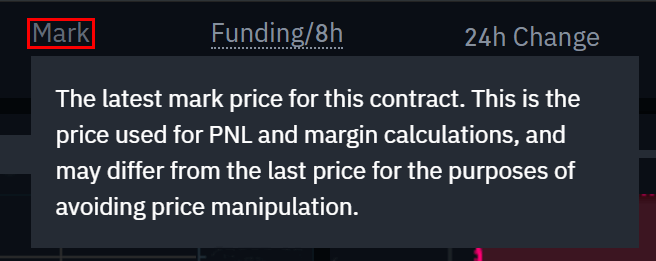
Please note that marked prices and latest prices may be different.
When setting up an order type that uses the stop price as a trigger, you can choose to use the latest price or the mark price as the trigger. To do this, select the price you wish to use in the "Trigger" drop-down menu at the bottom of the order entry field.
Order types and how to use them
There are multiple order types available in Binance Futures:
limit order
A limit order is an order placed in the order book at a specific limit price. After placing a limit order, the transaction will only be completed when the market price reaches the limit price (or higher price). Therefore, a limit order allows you to buy at a lower price or sell at a higher price than the current market price.
market order
A market order is an order for buying or selling at the current best price. It is executed based on a limit order previously posted in the order book. When placing a market order, you need to pay the taker fee for the market order.
Stop limit order
The easiest way to understand what a stop limit order is, is to break it down into the stop price and the limit price. The stop price is the price at which the limit order is triggered, and the limit price is the price at which the limit order is triggered. This means that a limit order will be posted in the order book as soon as the set stop price is reached.
Although the stop price and limit price can be the same, they do not have to be. In fact, a safer operation is to set the stop loss price (trigger price) slightly higher than the limit price if it is a sell order, and set it slightly lower than the current price if it is a buy order. This increases the chance of your limit order being filled.
Market stop loss order
Similar to a stop limit order, a stop market order uses the stop price as a trigger. However, when the stop price is reached, it triggers a market order.
Limit price take profit order
If you already fully understand the definition of a stop-loss limit order, then a take-profit limit order will be easy to understand. Similar to a stop limit order, it also contains a trigger price (the price that triggers the order) and a limit price (the price at which the limit order is added to the order book). The main difference between a stop-loss limit order and a take-profit limit order is that a take-profit limit order can only be used to reduce an open position.
Take profit limit orders are great for managing risk and locking in profits at a specific price. It can also be combined with other order types such as stop-limit orders to better manage positions.
请注意,限价单不属于 OCO 订单。比如说,如果您的止损限价单达到设定金额,同时您还持有一个有效的止盈限价单,则止盈限价单将始终有效,直至您手动将其取消。
您可以在订单输入字段中的“止盈止损限价”选项下设置止盈限价单。
Market price take profit order
与止盈限价单类似,止盈市价单使用止盈价作为触发条件。在达到止盈价时会触发市价单。
您可以在订单输入字段中的“止盈止损市价”选项下设置止盈市价单。
Trailing stop order
Trailing stop orders help lock in profits while limiting potential losses on open positions. For a long position, if the price goes up, the trailing stop will also go up. On the other hand, if the price falls, the trailing stop will stop moving. A sell order is placed if the price moves in the opposite direction by a specific percentage (called the retracement rate). The same is true for short positions, but in reverse. Trailing stops move downward with the market and stop moving when the market starts to rise. A buy order is placed if the price moves a specific percentage in the opposite direction.
The activation price is the price that triggers the trailing stop order. If the activation price is not specified, the current latest price or mark price will be defaulted as the activation price. You can set which price should be used as the trigger price at the bottom of the order entry field.
The retracement rate determines the percentage of the price that the trailing stop "traces". So if you set the retracement rate to 1% and the trade proceeds in the chosen direction, the trailing stop will always follow the price by a 1% margin. If the price moves in the opposite direction of the trade by more than 1%, a buy or sell order is placed (depending on the selected trade direction).
How to use the Contract Trading Calculator
Click here to view the video tutorial.
You can see the calculator chart at the top of the order entry module. It allows you to perform relevant numerical calculations before going long or short. You can adjust the lever slider under each tab to use as a basis for calculations.
The calculator has three tabs:
PNL – Use this tab to calculate initial margin, profit and loss (PnL), and return on equity (ROE) based on target entry and exit prices and position size.
Target Price – Use this tab to calculate the price at which you need to exit the position to achieve your target rate of return.
Closing Price – Use this tab to calculate an estimated closing price based on personal wallet balance, expected entry price, and position size.
How to use the two-way position mode
In the two-way position mode, you can hold both long and short positions in the same contract. What are the benefits of doing this? Let’s say you have an open long position because you are optimistic that the price of Bitcoin will rise in the long term. At the same time, you may want to quickly go short on a shorter time frame. Bidirectional mode supports this operation - in this case, long positions that are not affected by quick shorting.
The default position mode is one-way position. This means that you cannot hold long and short positions on a single contract at the same time. If you perform such an operation, positions in both directions will cancel each other out. Therefore, you need to start it manually when using the two-way position mode. Here's what you need to do.
1. Go to the top right of the screen and select [Personal Preferences].
访问[头寸模式]选项卡,选择[双向持仓模式]。
If you currently have an open order or position, you cannot adjust the position mode.
What is the funding rate and how to check it
The funding rate ensures that the price of a perpetual futures contract is as close as possible to the (spot) price of the underlying asset. Essentially, traders will "pay each other" based on their positions, and the difference between the price of the perpetual futures contract and the spot price will determine which party profits.
When the funding rate is positive, long positions pay short positions. When the funding rate is negative, short positions pay to long positions.
To learn more about how this process works, read What is a Perpetual Futures Contract? 》.
This means that depending on the funding rate and your open positions, you end up either the paying party or the receiving party. On the Binance Futures trading platform, fund disbursements occur every 8 hours. You can see the time remaining in the next funding cycle and the projected funding rate next to the marked price at the top of the page.
If you want to view the funding rate for each previous contract, you can hover your mouse over [Contract Information] and click [Funding Rate History].
Only pending orders, valid time and only position reduction

使用限价单时,您可在发布订单的同时设置附加指令。在币安合约中,此类指令可以是“只挂单”或“有效时间(TIF)”指令,它们决定了限价单的附加特性。您可在订单输入字段的底部查看。
“只挂单”意味着您的订单总是会先添加至订单簿,但永远不会与其中的既有订单成交。如果您只想支付挂单费用,就可以这样操作。
The TIF instruction means that you can set the time the order is valid (before they are filled or expired). The TIF instruction has the following three options:
GTC (good until canceled): The order will remain active until it is filled or canceled.
IOC (Immediate or Canceled): The order will be executed immediately (in full or in part). If it is only partially executed, the unfilled portion of the order will be cancelled.
FOK (Fill or Cancel): The order must be fully filled immediately. Otherwise, the order will not be executed at all.
When you are in one-way position mode, checking "Reduce-Only" will ensure that new orders will only reduce positions and never increase existing positions.
Under what circumstances will a position be liquidated?
If the margin balance falls below the required amount, liquidation will occur. The margin balance is the Binance Futures account balance, including unrealized profits and losses. That is, your profits and losses will cause your margin balance to change. If using cross position mode, this balance will be used as margin for all positions. If using isolated margin mode, balances can be allocated to individual positions.
"Maintenance Margin" indicates the minimum margin required to maintain a position. The amount depends on the position size. The larger the position, the more maintenance margin is required.
You can view the current margin ratio in the lower right corner. If the margin ratio reaches 100%, the position will be closed.
When a liquidation occurs, all your open orders will be cancelled. The most reasonable operation is to avoid automatic liquidation by tracking positions, because automatic liquidation will incur additional handling fees. If your position is about to be liquidated, manual liquidation is preferable to automatic liquidation.
Auto-deleveraging and its impact
When a trader's account size falls below 0, insurance funds will be used to make up for losses. However, in some extremely volatile market environments, insurance funds may not be sufficient to cover these losses, and the shortfall must be filled by reducing open positions. In this case, your open positions will also be at risk of being reduced.
The position reduction is carried out in a specific queue order, with traders with the most profitability and highest leverage being at the forefront. Hover the mouse over the [Positions] tab and click [Auto-deleveraging] (ADL) on the right to view the position of the current position in the queue.

Summarize
A futures contract is a derivative that gives a trader an obligation to buy or sell an asset in the future. However, unlike traditional futures contracts, perpetual futures contracts have no settlement date. Derivatives can be somewhat difficult to understand for inexperienced traders. Therefore, it is important to understand how these contracts work before taking on financial risks. As mentioned above, you can visit the Binance Futures test network to test the platform and avoid the investment risk of losing real money.