Moxin Watch | NEAR turned an old iPhone into a Ledger: the code just went public, and you can connect by selecting Ledger on the NEAR website
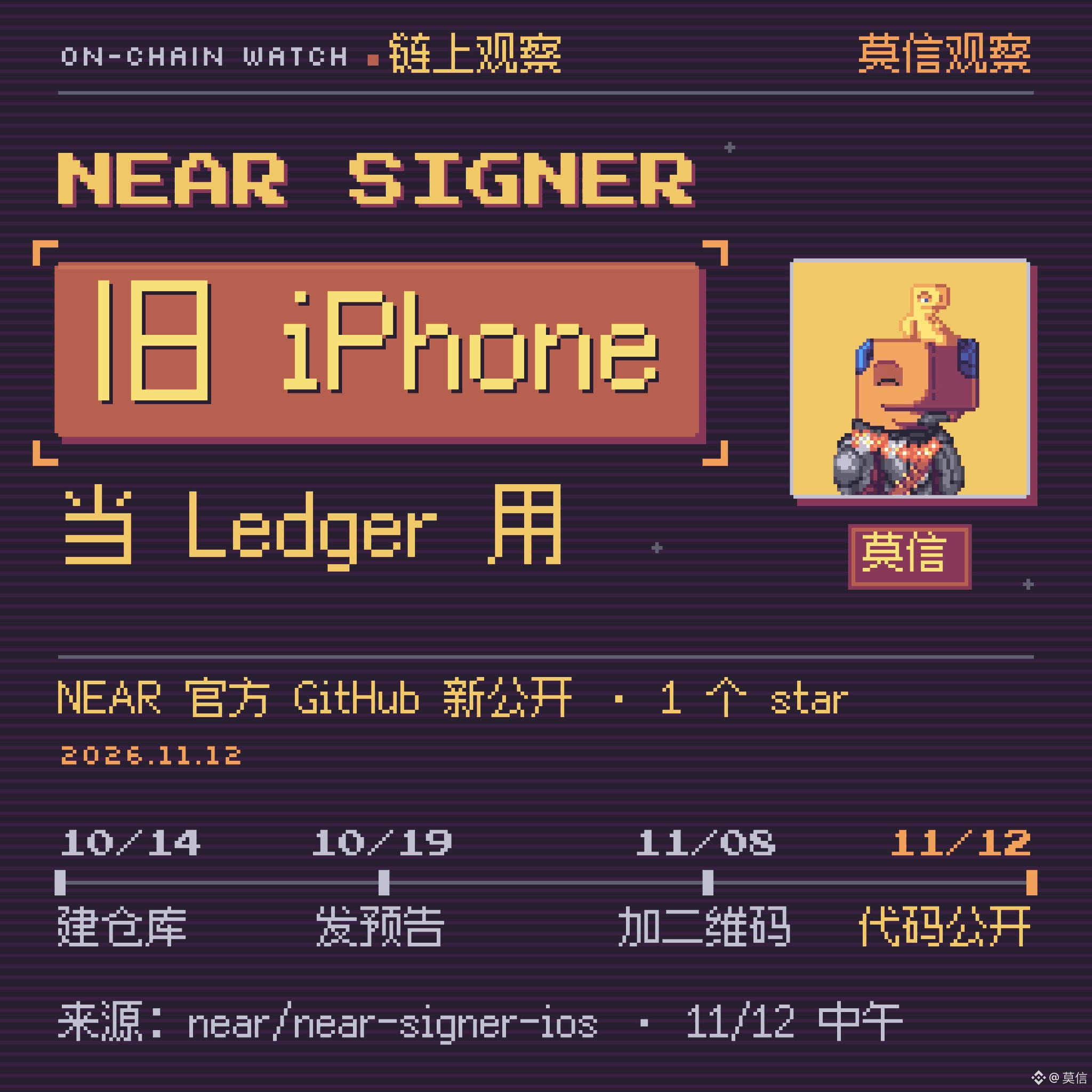
On November 12, a public repository called near-signer-ios appeared on NEAR’s official GitHub. It contains an iPhone app called NEAR Signer. Install it, and your phone acts like a Ledger Nano X to your computer: NEAR websites and command-line tools need no changes—you can connect by selecting Ledger from the wallet list.
On October 19, @Freol (Vlad Frolov, one of the repository maintainers) posted a preview and offered a test version to people who commented. Now the code is public, and there’s also a way to sign by scanning QR codes without turning on Bluetooth. The official account @NEARProtocol hasn’t mentioned it yet, and as of noon on 11/12, the repository had just 1 star. Here’s what’s already stated in the code and documentation.
https://github.com/near/near-signer-ios
🐋 The one-minute version
- What it is: An app that turns an iPhone into a NEAR hardware wallet. The code is open source (MIT license), and the copyright holder is NEAR One, the team responsible for core NEAR protocol development
- Who made it: According to @Freol, it was written by Ivan Frolov and his “agents” (AI agents); the documentation says every code change is reviewed by Claude first
- How to connect: Bluetooth, or scan a QR code with Bluetooth off
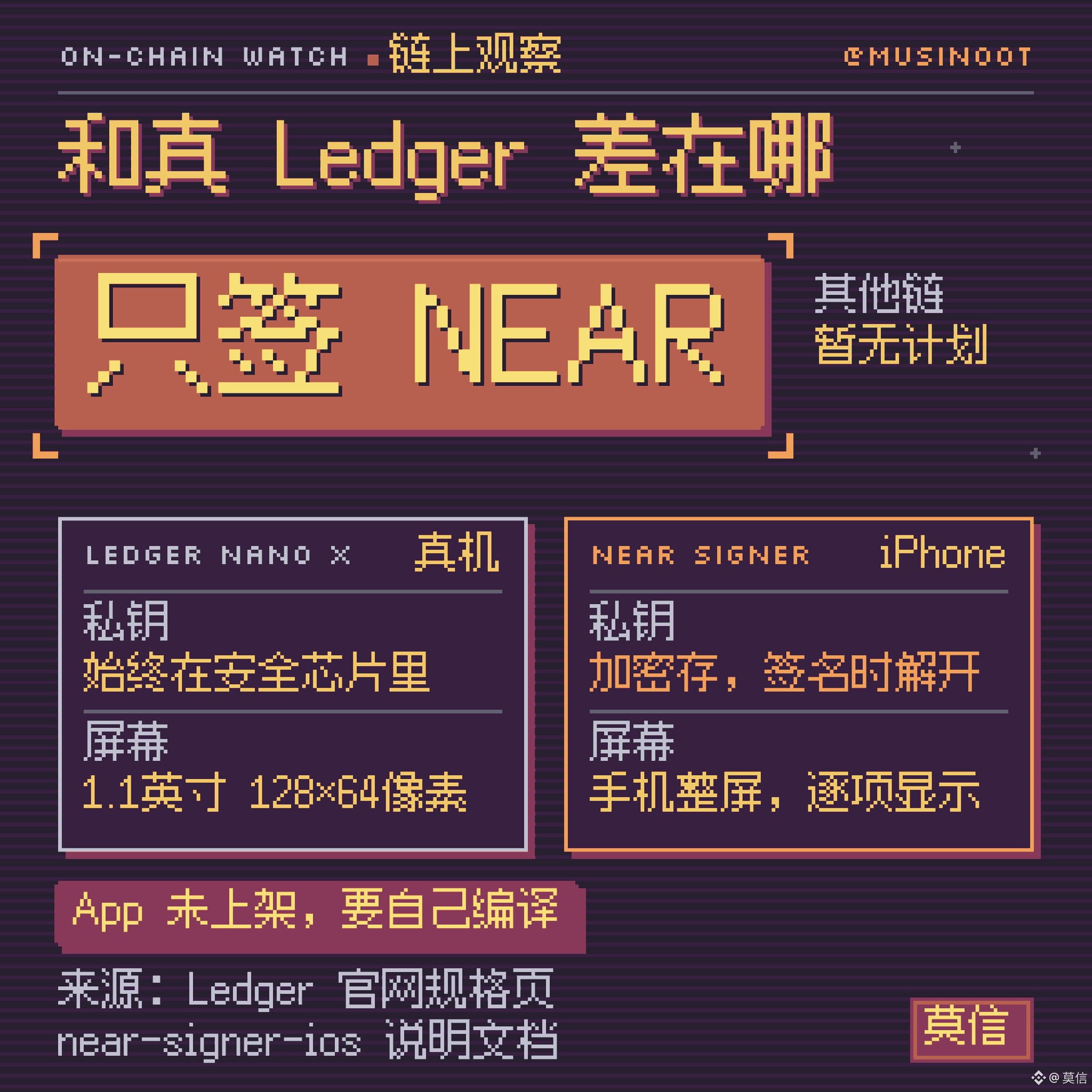
- What it can sign: Only NEAR transactions and messages. @Freol says there are no plans to support other chains for now
- Current status: The app isn’t in the App Store; you have to compile it with Xcode and install it on your phone yourself. It requires iOS 17 or later, which is available on iPhone XS and XR models from 2018 onward
🐋 How to connect: Select Ledger on the website
With Bluetooth, you don’t need to install anything on your computer:
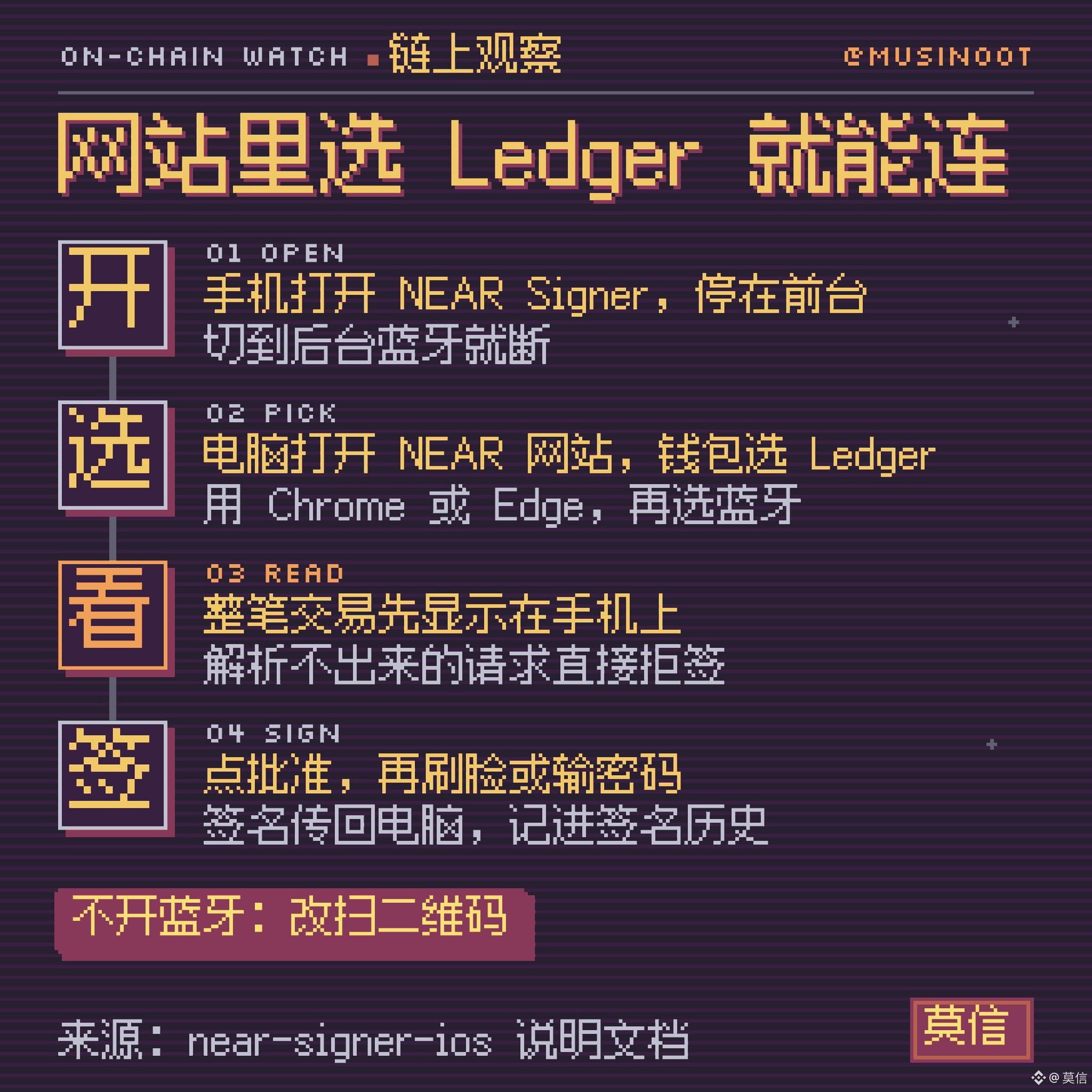
1. Open NEAR Signer on your phone and keep it in the foreground. Bluetooth disconnects if you switch to the background
2. On your computer, open a NEAR website in Chrome or Edge, select Ledger from the wallet list, then select Bluetooth
3. Select “NEAR Signer” in the device list that pops up in the browser. You’ll need to pair the devices the first time
4. Each transaction is then displayed on your phone. Tap Approve, then use Face ID or enter your passcode to sign
The documentation specifically names two supported options: near-connect, the wallet connection component used by NEAR websites, and the command-line tool near-cli-rs (version 0.25 and later). Safari and Firefox don’t support Bluetooth connections from websites, so they can’t be used.
An iPhone app can’t turn itself into a USB device, so Bluetooth is the only option; it emulates a Ledger Nano X, which has Bluetooth. In the comments on the preview post, @Freol said that Ledger Live on mobile and the Meteor wallet can also connect. Device management in Ledger Live (My Ledger) won’t work: that step checks firmware and verifies the device, which the documentation says isn’t supported.
🐋 Don’t want to turn on Bluetooth? Scan a QR code
This was only merged into the code on November 8. The request is displayed as a QR code on the computer screen. For larger requests, it’s a sequence of codes that plays in a loop. On the phone, tap “Scan from computer” and scan it with the camera. After approving, the phone displays a signed QR code, which the computer reads with its camera—or you can manually enter the string of letters shown below the code.
During the whole process, the phone only uses its camera to scan and its screen to display information. The computer can’t access anything on the phone.
There’s already a command-line tool for this method: near-signer-qr 0.1.0, released at 01:16 on 11/12 (UTC+8). The repository’s only version number so far, 0.1.0, belongs to this QR tool; the phone app itself hasn’t had a public release yet. On the website, you have to manually add an entry in the wallet list settings, so it’s less convenient than Bluetooth.
🐋 What you can see on your phone before signing
In another reply in October, @Freol said users are already used to confirming transactions on a Ledger by tapping through strings of text they can’t understand. NEAR Signer takes the opposite approach:
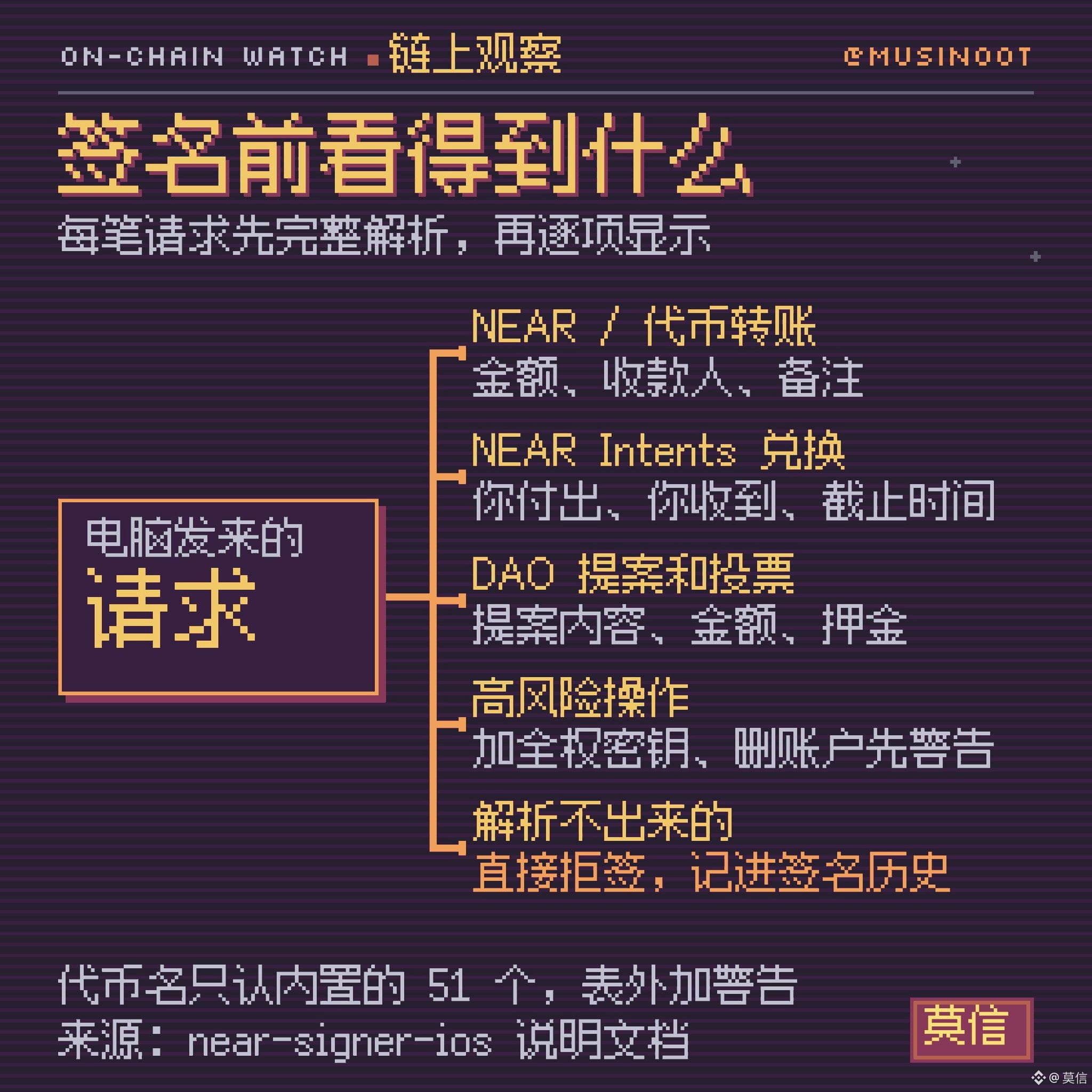
- Every request is fully parsed and displayed item by item first. If it can’t be parsed, it’s rejected—there’s no “sign it even if you can’t understand it” option
- Common actions get a summary card: NEAR and token transfers, DAO proposals and votes, and deposits, withdrawals, and swaps for NEAR Intents (NEAR’s cross-chain exchange). Swaps are shown as “You pay / You receive”
- High-risk actions trigger a warning first: adding a key with full control of an account, deleting an account, or replacing contract code
- Token names and decimal places are recognized only if they appear in a table built into the app. Tokens not in the table are shown in their smallest units, with a warning. The documentation explains that the phone is offline, so it can’t verify what the computer reports
- Approved, rejected, and failed requests are all recorded in the signing history
The built-in table contains 51 tokens. In addition to tokens on the NEAR chain, it includes BTC, ETH, SOL, ZEC, XRP, and DOGE in NEAR Intents, as well as USDC and USDT on 18 chains. USDC on X Layer and USDT0 are included too.
……
——
Read the full version on X: @musinoot
On November 12, a public repository called near-signer-ios appeared on NEAR’s official GitHub. It contains an iPhone app called NEAR Signer. Install it, and your phone acts like a Ledger Nano X to your computer: NEAR websites and command-line tools need no changes—you can connect by selecting Ledger from the wallet list.
On October 19, @Freol (Vlad Frolov, one of the repository maintainers) posted a preview and offered a test version to people who commented. Now the code is public, and there’s also a way to sign by scanning QR codes without turning on Bluetooth. The official account @NEARProtocol hasn’t mentioned it yet, and as of noon on 11/12, the repository had just 1 star. Here’s what’s already stated in the code and documentation.
https://github.com/near/near-signer-ios
🐋 The one-minute version
- What it is: An app that turns an iPhone into a NEAR hardware wallet. The code is open source (MIT license), and the copyright holder is NEAR One, the team responsible for core NEAR protocol development
- Who made it: According to @Freol, it was written by Ivan Frolov and his “agents” (AI agents); the documentation says every code change is reviewed by Claude first
- How to connect: Bluetooth, or scan a QR code with Bluetooth off
- What it can sign: Only NEAR transactions and messages. @Freol says there are no plans to support other chains for now
- Current status: The app isn’t in the App Store; you have to compile it with Xcode and install it on your phone yourself. It requires iOS 17 or later, which is available on iPhone XS and XR models from 2018 onward
🐋 How to connect: Select Ledger on the website
With Bluetooth, you don’t need to install anything on your computer:
1. Open NEAR Signer on your phone and keep it in the foreground. Bluetooth disconnects if you switch to the background
2. On your computer, open a NEAR website in Chrome or Edge, select Ledger from the wallet list, then select Bluetooth
3. Select “NEAR Signer” in the device list that pops up in the browser. You’ll need to pair the devices the first time
4. Each transaction is then displayed on your phone. Tap Approve, then use Face ID or enter your passcode to sign
The documentation specifically names two supported options: near-connect, the wallet connection component used by NEAR websites, and the command-line tool near-cli-rs (version 0.25 and later). Safari and Firefox don’t support Bluetooth connections from websites, so they can’t be used.
An iPhone app can’t turn itself into a USB device, so Bluetooth is the only option; it emulates a Ledger Nano X, which has Bluetooth. In the comments on the preview post, @Freol said that Ledger Live on mobile and the Meteor wallet can also connect. Device management in Ledger Live (My Ledger) won’t work: that step checks firmware and verifies the device, which the documentation says isn’t supported.
🐋 Don’t want to turn on Bluetooth? Scan a QR code
This was only merged into the code on November 8. The request is displayed as a QR code on the computer screen. For larger requests, it’s a sequence of codes that plays in a loop. On the phone, tap “Scan from computer” and scan it with the camera. After approving, the phone displays a signed QR code, which the computer reads with its camera—or you can manually enter the string of letters shown below the code.
During the whole process, the phone only uses its camera to scan and its screen to display information. The computer can’t access anything on the phone.
There’s already a command-line tool for this method: near-signer-qr 0.1.0, released at 01:16 on 11/12 (UTC+8). The repository’s only version number so far, 0.1.0, belongs to this QR tool; the phone app itself hasn’t had a public release yet. On the website, you have to manually add an entry in the wallet list settings, so it’s less convenient than Bluetooth.
🐋 What you can see on your phone before signing
In another reply in October, @Freol said users are already used to confirming transactions on a Ledger by tapping through strings of text they can’t understand. NEAR Signer takes the opposite approach:
- Every request is fully parsed and displayed item by item first. If it can’t be parsed, it’s rejected—there’s no “sign it even if you can’t understand it” option
- Common actions get a summary card: NEAR and token transfers, DAO proposals and votes, and deposits, withdrawals, and swaps for NEAR Intents (NEAR’s cross-chain exchange). Swaps are shown as “You pay / You receive”
- High-risk actions trigger a warning first: adding a key with full control of an account, deleting an account, or replacing contract code
- Token names and decimal places are recognized only if they appear in a table built into the app. Tokens not in the table are shown in their smallest units, with a warning. The documentation explains that the phone is offline, so it can’t verify what the computer reports
- Approved, rejected, and failed requests are all recorded in the signing history
The built-in table contains 51 tokens. In addition to tokens on the NEAR chain, it includes BTC, ETH, SOL, ZEC, XRP, and DOGE in NEAR Intents, as well as USDC and USDT on 18 chains. USDC on X Layer and USDT0 are included too.
……
——
Read the full version on X: @musinoot