Binance Wallet has already been used—so you may not have missed the fee discount either. As long as you’ve never bound an invitation code, existing users can still bind one. But “up to 30% off,” isn’t something you can get by just entering any code.
If you haven’t bound yet, you can use my wallet invitation code GP1G48B7. The fee discount I’m offering is 30%. Before binding, please verify the actual percentage shown on the page. Invitation link: https://web3.binance.com/referral?ref=GP1G48B7
According to the official rules, invited users default to a 10% fee discount. The inviter can additionally allocate an extra 0% to 20%, so together the discount is 10% to 30%. What’s reduced here is the transaction fee that meets the rules—not your purchase principal, and not all on-chain fees are discounted to 70%. By participating through my invitation relationship, I’ll also receive the corresponding commission.
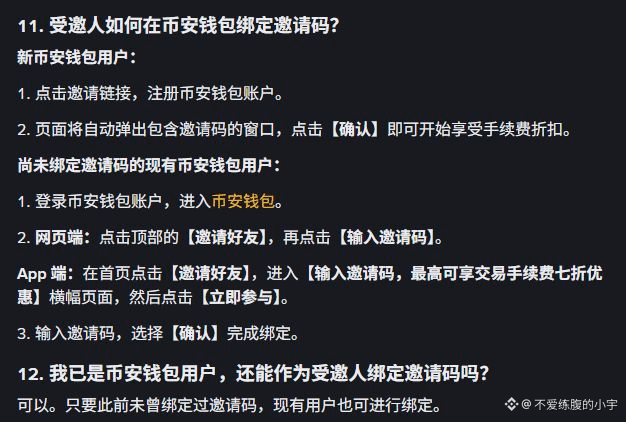
Mobile steps: Go to the Binance Wallet homepage, tap “Invite Friends,” find the banner reading “Enter an invitation code to enjoy up to a 30% discount on trading fees,” tap “Join Now,” then enter the code and confirm. For the web version, go to “Invite Friends” from the top, then tap “Enter an invitation code.” The screenshots show the official Chinese step-by-step guide, so you can follow along.
The exchange referral registration and the wallet invitation are independent. If you previously registered on Binance and entered a code, it doesn’t necessarily mean your wallet has already been bound. But once your wallet is bound to an inviter, you can’t switch to someone else—so please double-check before confirming.
Invitation rewards also aren’t unified as USDT (U). For example, if an invited user pays a fee that complies with the rules using $BNB , the invitation reward will be issued in the same type of coin. After the next-day update, you’ll need to claim it manually. If you can’t see the “Invite Friends” entry, you should check local availability and qualification requirements.
If you haven’t bound yet, you can use my wallet invitation code GP1G48B7. The fee discount I’m offering is 30%. Before binding, please verify the actual percentage shown on the page. Invitation link: https://web3.binance.com/referral?ref=GP1G48B7
According to the official rules, invited users default to a 10% fee discount. The inviter can additionally allocate an extra 0% to 20%, so together the discount is 10% to 30%. What’s reduced here is the transaction fee that meets the rules—not your purchase principal, and not all on-chain fees are discounted to 70%. By participating through my invitation relationship, I’ll also receive the corresponding commission.
Mobile steps: Go to the Binance Wallet homepage, tap “Invite Friends,” find the banner reading “Enter an invitation code to enjoy up to a 30% discount on trading fees,” tap “Join Now,” then enter the code and confirm. For the web version, go to “Invite Friends” from the top, then tap “Enter an invitation code.” The screenshots show the official Chinese step-by-step guide, so you can follow along.
The exchange referral registration and the wallet invitation are independent. If you previously registered on Binance and entered a code, it doesn’t necessarily mean your wallet has already been bound. But once your wallet is bound to an inviter, you can’t switch to someone else—so please double-check before confirming.
Invitation rewards also aren’t unified as USDT (U). For example, if an invited user pays a fee that complies with the rules using $BNB , the invitation reward will be issued in the same type of coin. After the next-day update, you’ll need to claim it manually. If you can’t see the “Invite Friends” entry, you should check local availability and qualification requirements.