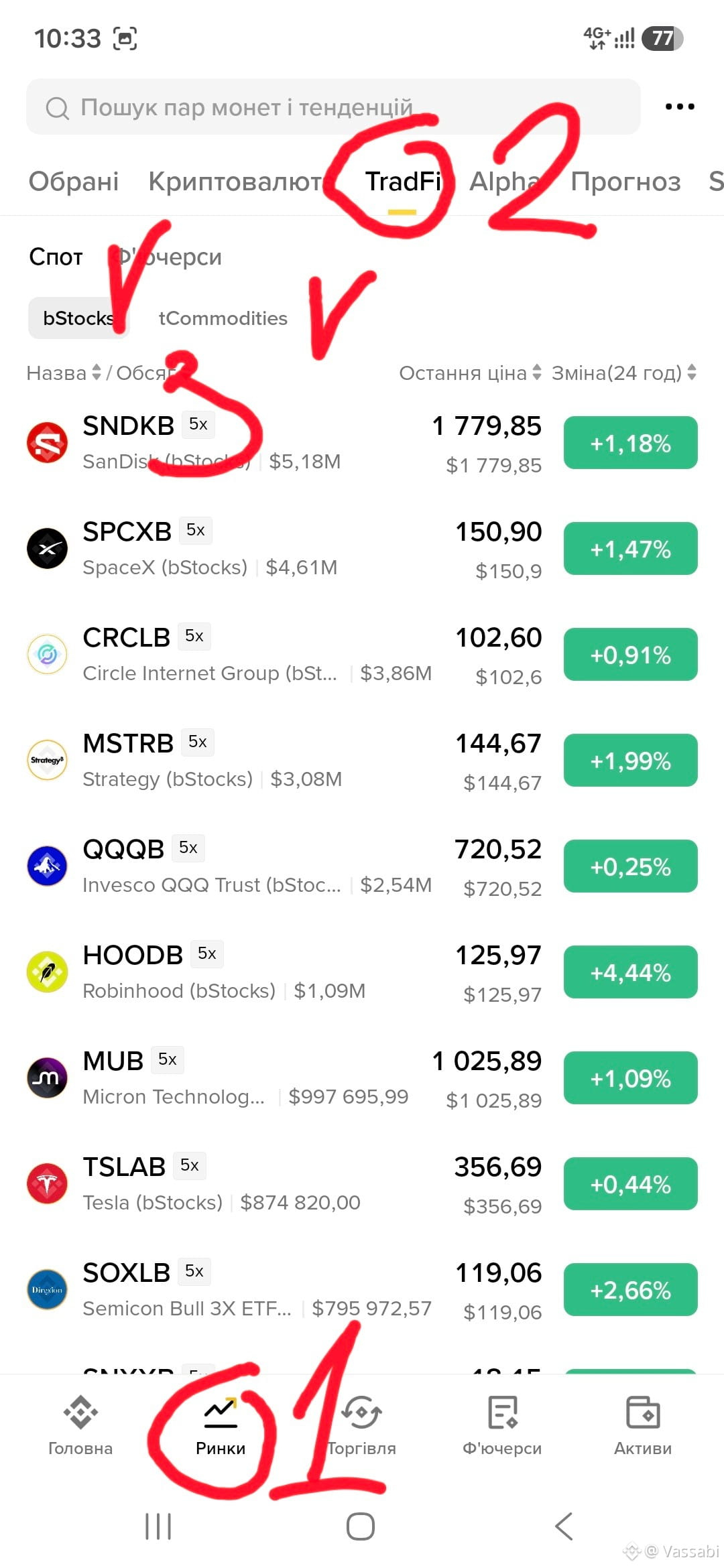
How to find bStocks and TradFi instruments in the Binance app? 📱
Save this simple step-by-step guide for yourself:
1️⃣ Go to the “Markets” section (icon at the bottom).
2️⃣ On the top panel, select the TradFi tab.
3️⃣ Choose a category: bStocks (tokenized stocks) or tCommodities (precious metals and commodities).
4️⃣ Decide on the market type — Spot or Futures.
5️⃣ Select the asset you want — a specific stock, metal, or commodity (e.g., Tesla, gold, etc.).
💡 Important reminder:
Trading in tokenized stocks and metals is linked to the schedule of traditional exchanges, so it is not available on weekends.
Technical analysis works here the same way as for purely crypto trading pairs, but for fundamental analysis I recommend paying a bit more attention—keep an eye on global news and company reports!
#bStocks #TradFi
Save this simple step-by-step guide for yourself:
1️⃣ Go to the “Markets” section (icon at the bottom).
2️⃣ On the top panel, select the TradFi tab.
3️⃣ Choose a category: bStocks (tokenized stocks) or tCommodities (precious metals and commodities).
4️⃣ Decide on the market type — Spot or Futures.
5️⃣ Select the asset you want — a specific stock, metal, or commodity (e.g., Tesla, gold, etc.).
💡 Important reminder:
Trading in tokenized stocks and metals is linked to the schedule of traditional exchanges, so it is not available on weekends.
Technical analysis works here the same way as for purely crypto trading pairs, but for fundamental analysis I recommend paying a bit more attention—keep an eye on global news and company reports!
#bStocks #TradFi