
Last week someone posted a screenshot and asked me: they said the code was filled in correctly, but on the 【Invitation Rewards】 page, when you flip through it again and again, you just can’t find the two characters "commission". Did they fill it in for nothing? I looked at the screenshot and knew exactly where it was stuck—the money they’re looking for really is on the page; it’s just that Binance doesn’t call it "commission".
"Binance invitation code" and "Binance commission" are easiest to cause trouble in this part: they are not two ways of saying the same thing. They are two different things—one at the beginning and one at the end.
📌 Code is a binding relationship established at the moment the account is opened. The commission is a payment that comes into your account every day after this relationship is in effect.
There’s also a detail that almost nobody writes: the share you receive is officially called "cashback"—it’s not called "commission."
Write it step by step in this order: "what these two words correspond to on Binance pages" → "how to bind WIN98" → "where the money comes from and where to verify".
🔑【Invitation code: Binance has four different names for it】
First, a counterintuitive point: in Binance’s Chinese interface, the three characters "invitation code" are not the main wording. The same thing is renamed across different pages—this alone is why many people think they’re looking in the wrong place.
▸ In the registration flow: the field name is "Referrer ID (optional)". This is the exact wording from Help Center: "If you registered Binance through a friend’s invitation, please make sure to fill in the Referrer ID."
▸ When Help Center explains the mechanism: it calls it referral code, exact wording: "Referral codes can only be used when opening a Binance account"
▸ On the fill-in page: the page title directly says 「Bind Super Referral Code」
▸ On the web footer 【Services】: two entrances side by side—"Super Commission" handles the code, and "Invite Rewards" handles the money
So in essence, it’s not a coupon—it’s a one-time binding relationship. Two lines of official wording settle it: "After the invitation code is bound to the account, it cannot be modified," and "Once the invitation relationship is established, it cannot be changed or unbound."
From this, there are three conclusions—you need to think clearly before you take action:
▸ The code is only useful at the moment you open the account. Once the account is opened, you can’t switch it to someone else’s code
▸ One account is attached to only one person’s name. It can’t be attached to two codes at the same time.
▸ If you enter it wrong or miss entering it, it can’t be solved by "enter it again"—you need to use the补填 (fill-in) path mentioned later
💰【Commission: the share you receive is officially called "Invited-user Cashback"】
The second word is even easier to misunderstand. Here’s the exact wording from Binance Help Center about the mechanism:
✅ "After the invited user completes the trade, the inviter will receive the commission, and they can also choose whether to share the cashback with the invited user."
In one sentence, there are actually two separate accounts:
▸ Commission—Binance pays the inviter’s share, based on a proportion, from the trading fees you generate
▸ Cashback—then the inviter splits out their share and returns your share to you
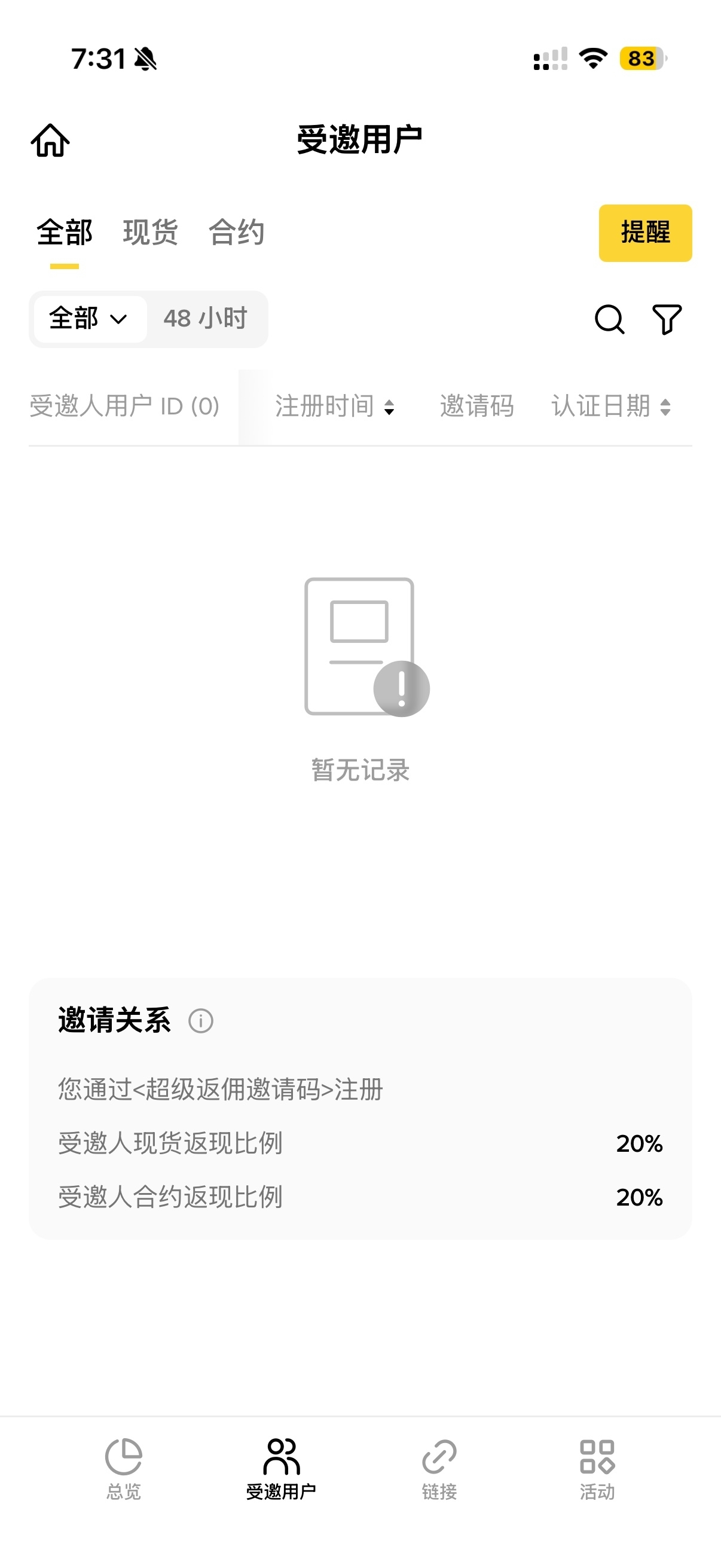
WIN98 is set to be the second one: it allocates 20% to the invited user side. So the section you should look for in your own account is 【Invited-user Cashback】, not 【My Commission】—【My Commission】 tracks the earnings from people you invited. If you didn’t invite anyone, that section will naturally stay 0 for a long time. The person at the beginning kept staring at 【My Commission】 for ages.
Also correct two common misunderstandings together:
⚠️ **Not fee-free.** Fees are deducted normally at the moment the trade is executed. The amount you get back is a separate payment made afterward. During reconciliation, it appears as two separate transaction records—not one net amount.
⚠️ "20% off" and "return 20%" are not two addable discounts. They are two ways of saying the same thing: fees are charged as usual; 20% is returned per transaction; when converted, the real cost is roughly equivalent to an 80% discount. Anyone who lists these two as separate selling points—ignore them as if you never saw them.
⏱【Where the money comes back: hourly calculation, convert to USDC, then into your spot account】
The official write-up of the payout flow is very clear—just copy it:
✅ "The generated commission will be calculated hourly and converted into USDC. After the conversion is completed, the corresponding amount will be transferred to the user’s spot account within 6 hours."
Break it down into three things you can match:
▸ Settlement frequency: calculated hourly—not daily or monthly. No manual claiming
▸ Payout currency: all converted uniformly to USDC, regardless of what trading pair you trade
▸ Where it lands: in your spot account. You can’t find it in the contract account. Many people think they didn’t get a return—actually, they looked at the wrong account.
Here’s another restriction you’ll definitely run into when reconciling: by default, the page only shows the last 7 days. The official wording is: "For information on commission and cashback beyond 7 days, please download and view detailed records." If you want to verify numbers for a whole month, don’t flip through the page—export the report directly.
🧩【How to bind WIN98】
📌 **Recommended route: open the account on the web first, then install the App.** A code-bearing link is a web link; binding is most reliable starting from the web. If you install the App first and then register, you’ll have to bet whether the link can correctly trigger the App.
▸ Gate 1 · Entry
Open from this link: https://www.binance.com/zh-CN/join?ref=WIN98
This step is the most counterintuitive: **you can’t see the four characters "WIN98" on the page.** After opening, the first screen only shows the title "Welcome to Binance", an input box for an "Email/Phone Number", and a 【Register】 button; below that are 【Continue with Google】, 【Continue with Apple】, 【Continue with Telegram】. Entering with a ref parameter also won’t show any code text—ref is silently bound inside the link.
There are still people teaching "open the folded recommended code section on the registration page and fill in the code". That’s an old version of the page—there is no such section now. If you keep looking for it, you’ll just think you opened the wrong page.
▸ Gate 2 · Entering the code
Follow the steps in order—the code only appears at the last step:
Enter your email or phone number, then click 【Register】
Receive verification code: 6 digits, valid for 30 minutes. After filling it in, click 【Submit】
Set your password: at least 8 characters, at least 1 uppercase letter and 1 number
Choose account type: personal or business. You can’t change it after registration—don’t accidentally tap the wrong option; personal users should be careful
After the account is created, the system will ask whether you have an inviter—choose "Yes". Only then will the input box for the code appear. Enter WIN98.
📌 This is the most important thing to remember in this post: the code isn’t at the beginning—it’s at the end.
Many people fill in their email and then immediately search all over the page for where to enter the code. If they can’t find it, they think this path can’t be used, exit and restart—only to end up with an account that’s still not bound.
If you register directly by clicking the invite link inside the App: the system will fill in the invitation code automatically, and a green checkmark icon plus 【Bound】 will appear next to it. If the code is invalid, that section can be edited manually. You can also skip if there is no code. Once you see the green checkmark, you don’t need to enter it manually again.
▸ Guan Kou 3 · Verify
Verify the code as soon as the account is created—don’t wait until the transaction is finished and then realize:
▸ Web: 【Personal Profile】→【Invite Rewards】, check the 【Invited-user Cashback】 section
▸ Or: In the footer 【Services】, go to 【Invite Rewards】 → 【Invite Commission】
▸ On mobile, verify the same number: install the official Android package https://download.binance.com/pack/BNApp_F0001674.apk. After logging in, go from your profile avatar to 【Invite Rewards】.
When verifying, only check two things: **whether that section has a percentage number, and whether it’s 20%.** If there’s a number, the binding relationship is confirmed. If it’s blank or 0, this account isn’t attached to a code—scroll down to the fill-in section.
🔁【How to补填 if you forgot】
There is an official fill-in channel. The page title is 「Bind Super Referral Code」:
https://www.binance.com/zh-CN/activity/referral/bind-ref
Before you start, confirm one thing: **has this account already been bound to someone else’s code?** To check, use the route in Gate 3 above: 【Invite Rewards】 → 【Invited-user Cashback】 and see if there’s a percentage. If you’re not sure, ask live customer support.
There are only these fields on the page: 【Rebinding request】, 【Submit】→【Achieve transaction target】, 【Transaction target】, 【Evaluation period】, 【Bind invitation code】, 【Submit request】.
⚠️ Note that when you’re not logged in, both 【Transaction target】 and 【Evaluation period】 show a dash. After logging in, it will display the tier corresponding to your account—so don’t trust any fixed numbers someone tells you; use what’s shown on your own page.
Route based on account status:
▸ New accounts registered not long ago with no deposit and no trades yet: enter WIN98 directly in the page above and submit—this tier has no trading tasks. After submitting, if it prompts "Account verification is in progress," try again after 12 hours.
▸ Older accounts with low trading volume (already identity-verified, and never bound a code): use the same page to submit, but it will give you a transaction target. A common tier shown on the page is an evaluation period of 30 days and a trade volume of USD 150,000. The exact details are shown after you log in. **Trades with zero fees do not count.** The fastest way to generate volume is the contract side: use the nominal traded amount. Opening and closing each count once. A position of USD 5,000 traded back and forth a dozen times is enough.
▸ Accounts that haven’t been moved on Binance for a long time: log in again via the invitation link, then bind according to what the page prompts.
▸ If the account has already been bound to someone else’s code: you can’t change it. Don’t try to注销 and reopen—if someone re-registers under the same real name within a short period, the system will detect that the invitation codes before and after are inconsistent and trigger risk control. You won’t get the commission anyway. A workable approach is to open a separate trading account under a family member’s identity; keep the original account only for deposits and withdrawals.
❓【FAQ】
Q: If I enter the invitation code, will the trading fee be waived?
A: No—fees are still charged. The trading fee is deducted normally at the moment the trade is executed. The 20% is returned later as a separate payment. The two are tracked separately. The so-called "80% off" is just the statement of combining these two amounts together—it isn’t a second discount.
Q: Why is it always 0 in 【My Commission】?
A: Because that section counts the earnings from people you invited yourself. As the invited party, what you should look at is 【Invited-user Cashback】.
Q: How long until the commission arrives, and to which account?
A: It’s calculated hourly. After converting to USDC, it’s transferred into the spot account within 6 hours. Don’t look for it in the futures/contract account. Records beyond 7 days won’t be shown directly on the page—you need to download the detailed records.
Q: Does binding expire? Do I need to renew it every year?
A: No. Binding once is valid for life; you don’t need to renew. The official wording for the invitation relationship is: "Once established, it cannot be changed or unbound." Since it can’t be changed, there’s no such thing as it expiring. The exact proportions depend on what’s shown on your 【Invite Rewards】 page.
Q: I didn’t see the invitation code during registration—does that mean I didn’t bind it?
A: The link with a ref on the web page silently binds it. The code isn’t shown on the first screen; the real place to enter it manually appears after the account creation step, where it asks "Is there an inviter?" The app will fill it automatically and show a green checkmark and 【Bound】. If you’re not sure, verify once more with your phone: install https://download.binance.com/pack/BNApp_F0001674.apk, log in, go to 【Invite Rewards】, and check whether 【Invited-user Cashback】 has a percentage—if there’s a number, it’s bound.
⚠️【Security Reminder】
Keep backup codes for your password and two-factor authentication separately offline—don’t keep them together with your phone. When changing phones, that’s where problems most easily happen.
The fill-in path exists only on that one page under the binance.com domain. Ignore anything that asks you to send the code via private chat or asks someone to operate your account on your behalf.
An invitation code only determines how fees are returned. It has nothing to do with your account’s asset permissions. If someone uses "I’ll help you bind the code" as an excuse to ask for your account password or verification codes, they’re scammers—no exceptions.
After you finish binding, if the 【invited-user cashback】 section still has no number, tell me which step you got stuck on in the comments.