Fourth educational post
#For_beginners_only
OCO order feature
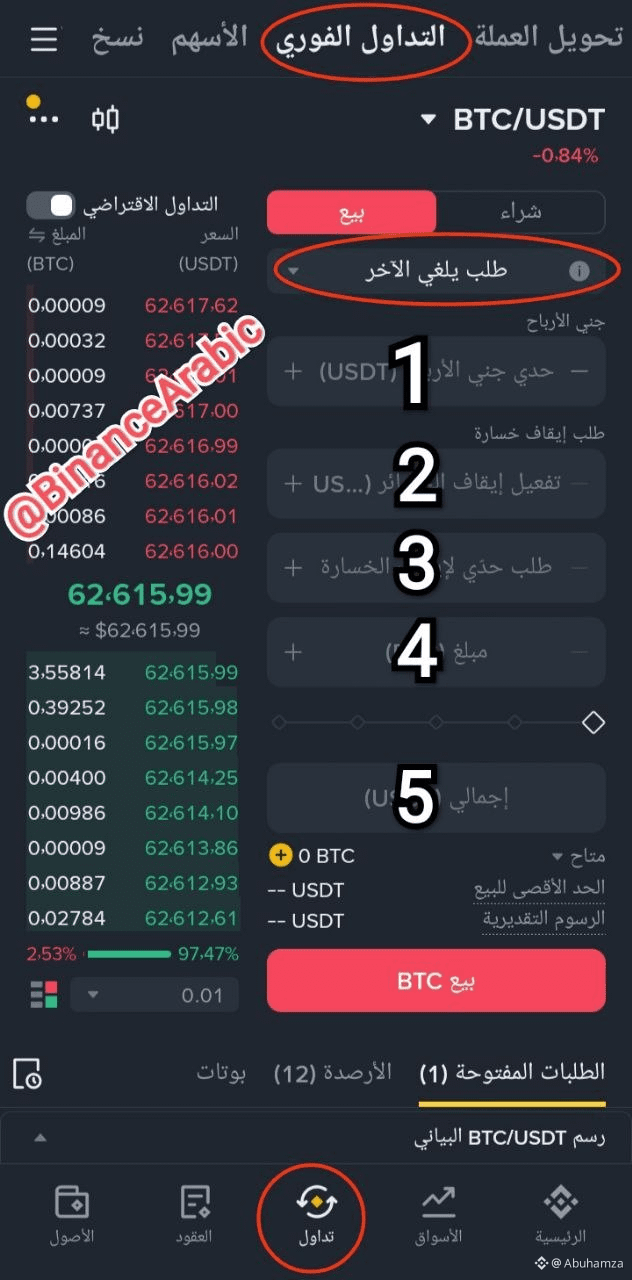
In brief, this feature is a combination between a limit order where you set your target price, and a stop order where you set your stop-loss price. Whichever of the two prices the market touches first will be executed first.
1- Set the target (higher than the current price)
2- Set the stop condition (lower than the current price, preferably near the closest support area or below the previous 1h candle)
3- Set the stop price, which is the price at which you will sell
- If it’s set lower than the condition, the sale will be executed
- If it’s set higher than the condition price, a sell order will be opened and it won’t execute until the market retraces back to that price.
4 or 5- Determine the quantity you want to sell using this feature: either set the asset amount in 4, or set the dollar amount in 5.
Click Sell
#For_beginners_only
OCO order feature
In brief, this feature is a combination between a limit order where you set your target price, and a stop order where you set your stop-loss price. Whichever of the two prices the market touches first will be executed first.
1- Set the target (higher than the current price)
2- Set the stop condition (lower than the current price, preferably near the closest support area or below the previous 1h candle)
3- Set the stop price, which is the price at which you will sell
- If it’s set lower than the condition, the sale will be executed
- If it’s set higher than the condition price, a sell order will be opened and it won’t execute until the market retraces back to that price.
4 or 5- Determine the quantity you want to sell using this feature: either set the asset amount in 4, or set the dollar amount in 5.
Click Sell