

Résumé
SolScan is another blockchain explorer for Solana. It gives you access to blockchain data related to transactions, contracts, accounts, etc. If you use Solana frequently or want to troubleshoot a transaction, knowing how to use a blockchain explorer is essential.
SolScan also has an NFT and DeFi dashboard, as well as a data analysis platform. You can use the SolScan API to create your own feeds. All of these elements are found in the website header.
Introduction
Solana is a Proof of Stake (PoS) blockchain where developers can create DApps, tokens and smart contracts. Like all active chains, users need an intuitive tool to access blockchain data. Similar to BscScan and EtherScan, Solana has its own blockchain explorer: SolScan. Let’s review its important features.
What is SolScan?
SolScan is a blockchain explorer used to search for information on the Solana blockchain. This is a popular alternative to the official Solana Explorer. SolScan transforms complex transactional data into something easily readable. The blockchain explorer provides access to everything recorded on the blockchain: transactions, addresses, smart contracts, blocks, tokens, etc. It is free to use and does not require an account. However, you can create one to log in and take advantage of other features.
Why should I use SolScan?
Knowing how to use a blockchain explorer is essential for anyone transacting with a network. If you don't know where your staked funds went, or if a transaction is still pending, you can use SolScan to find out what happened. All information on SolScan comes directly from the Solana blockchain, so you can be sure of its veracity. Using SolScan or any other blockchain explorer will help you understand how the mechanics of the DApps you use work, as well as the transactions you make.
For ease of understanding, SolScan uses the same format as EtherScan. Many users prefer SolScan to the official Solana Explorer. It is completely free and contains several useful tools, lists and analytical charts. The Explorer also contains a set of public APIs that allow real-time exploitation of its data for custom and third-party applications and tools.
How to search for transactions and addresses on SolScan?
One of the most used functions of SolScan is the transaction and address search function. If you have the right hash you can quickly access a large amount of information. This includes transaction fees, confirmations, timestamps, addresses involved, etc.
Transactions
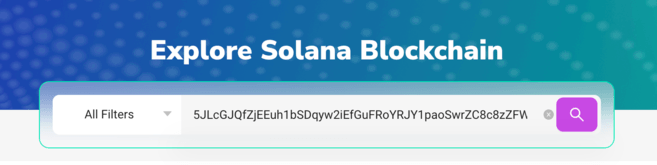
1. Every Solana transaction is recorded on the Solana Mainnet with a signature. It is a long string of numbers and letters that looks like this:
5JLcGJQfZjEEuh1bSDqyw2iEfLuFRoYRJY1paoSwrZC8c8zZFW3VqvxsJgjW3bsUjTrpEUDEtvs83PxsuR6hUWqz
2. Copy and paste the signature into the SolScan search bar, then press Enter.
3. You will then see all the information for this transaction. These are divided into three categories: [Overview], [SOL Balance Change] and [Token Balance Change].

4. The [Overview] category contains most of the information you need. Let's see this together:
5. For more information, the [SOL Balance Change] and [Token Balance Change] sections provide data on transaction token balance changes for all parties involved.
Addresses
You can use a similar method to learn more about an individual address. You can then view a detailed history of the address's activities. This can give you insight into transactions and interactions with smart contracts that a particular wallet has made.
1. Find the Solana address you want to consult. This is shorter than a signature and looks like this:
138KHwTqKNWGLoo8fK5i8UxYtwoC5tC8o7M9rY1CDEjT
2. Copy and paste the signature into the SolScan search bar, then press Enter.

3. You will then see all the information for this transaction. The [Overview] section displays current account balances, while the lower tabs show transaction history.

How to find tokens on SolScan?
Tokens are easily verifiable on SolScan and you can get a full view of their details. You just need:
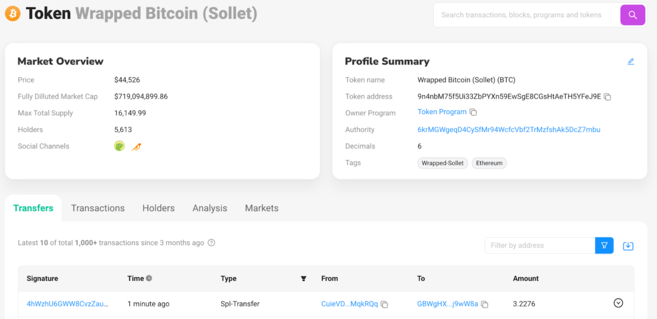
1. Copy and paste the signature into the SolScan search bar, then press Enter. In this example, we used a wrapped version of Bitcoin (BTC), but you can also use a wrapped version of Ethereum (ETH) or any other SPL token from the Solana network.
The token address looks like this:
9n4nbM75f5Ui33ZbPYXn59EwSgE8CGsHtAeTH5YFeJ9E
2. If you entered the address correctly, you will see the following information.
Tokens
How do I find active Solana accounts?
1. You can find out the number of active accounts and other key blockchain indicators by clicking [Analytics].
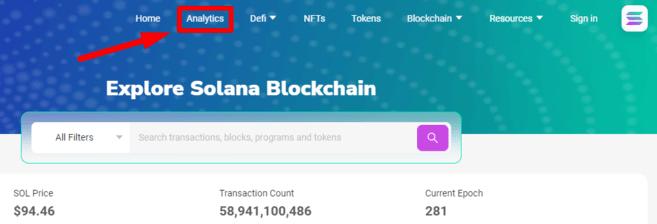
2. The SolScan analysis page contains a wide range of information on network nodes, transactions per second (TPS), new tokens, new NFTs, etc. Below [Accounts], you will find the number of daily active wallets.

3. Note that you can select different time periods in the upper right corner.

How to access DeFi dashboards on SolScan
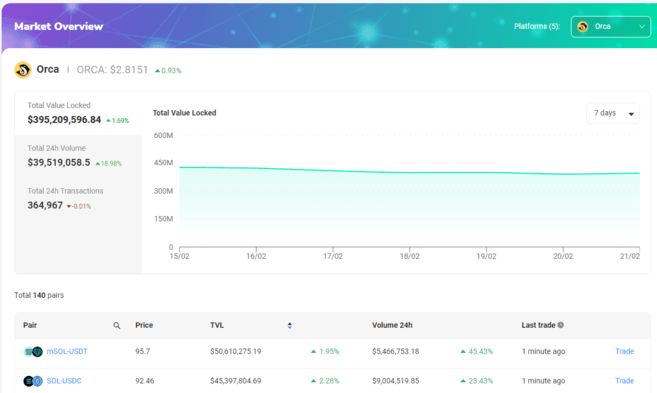
1. Some of the largest DEXs in the Solana ecosystem have dashboards built into the Solana Block Explorer. You can quickly find them under the [Challenge] tab.

2. Let's take a look at Orca. This dashboard shows basic information on the total value locked (TVL), volume, and active trading pairs available in their liquidity pools.
How to access the NFT dashboard on SolScan
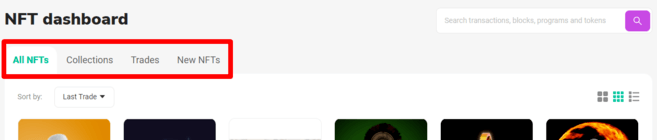
1. SolScan makes it easy to view new NFTs, transactions and collections with the NFT Dashboard. You will find the section in the header of the website.

2. The NFT Dashboard will allow you to search for any NFT available on Solana. The [Collections] tab gives a list of NFT projects based on volume. The [Trades] tab displays the most recent sales and [New NFTs] displays newly created NFTs.

To conclude
Whether you want to inspect your latest NFTs from the Metaverse, investigate a node, or check out a new startup's portfolios, you'll need a Solana block explorer. This tool is an integral part of the ecosystem of any blockchain network. SolScan has become one of the most used tools within the Solana community. Understanding its layout and user interface is therefore essential.