


Why should I bother reading?
If you're interested in the Ethereum ecosystem, you need an app like MetaMask. Much more than a simple wallet, this app allows you to interact with websites that integrate Ethereum.
MetaMask will help connect you to decentralized applications from within the browser (or via the mobile app). You can trade without intermediaries and play games with completely transparent code (so you know you are not being cheated).
Check out the guide below to get started!
Content
Introduction
What is MetaMask?
Installing MetaMask
Initialize wallet
Save your seed words!
Funding a wallet
Opening the decentralized web
MetaMask and privacy
Exchange ether with DAI
Where are my tokens?
What else do I need to know?
MetaMask application
Conclusion
Introduction
Ethereum brings hope for the emergence of a distributed Internet – the long-awaited Web 3.0. A playing field characterized by a lack of central points of failure, own data ownership, and decentralized applications (or DApps).
Such infrastructure aligns with the industry's general focus on Decentralized Finance (DeFi) and interoperability protocols that aim to bridge multiple blockchains. It is now possible to exchange tokens and cryptocurrencies in trustless apps, take out crypto loans, and even use Bitcoin on Ethereum.
For many Ethereum supporters, MetaMask is a mandatory wallet. Unlike the smartphone or desktop software you're used to, this special software is packaged as a browser extension, helping users to interact directly with supporting web pages. In this article, we'll cover how MetaMask works and guide you through getting started on your own.
What is MetaMask?
MetaMask is an open-source Ethereum wallet that supports all types of Ethereum-based tokens (such as those following the ERC-20 standard, or non-fungible tokens). Additionally, you can accept tokens from others, or buy/exchange them with the built-in Coinbase and ShapeShift integration.
What makes MetaMask especially interesting is that it can interact with websites. If you use another wallet, you will need to copy-paste the payment address or scan the QR code on a separate device. With the MetaMask extension, the website simply pings your wallet, and you are prompted to accept or reject the transaction.
MetaMask can function as a regular crypto wallet, but its real strength is its seamless interaction with smart contracts and decentralized applications. Now, let's see how to set it up.
Installing MetaMask
MetaMask Wallet can be installed on Google Chrome, Firefox, or Brave Browser. Also available on iOS and Android, but we won't go too deep into that. We'll be using Firefox throughout this tutorial, but the steps will be more or less the same no matter what platform you use.
Go to the official download page at metamask.io. Select your browser, which will take you to the Chrome web store or Firefox add-on site. Click the button to add the extension to the platform. You may need to grant some permissions before the app is up and running. Make sure you're happy with the level of access this app has to your browser – if so, we're good to go.
Initialize wallet
You will now see a welcome message.

You'll probably spend a bit of time trying to make this cute animal dizzy with your cursor.
Once you're done annoying the fox on the welcome page, click Get Started. This is where you will be asked to import your seed phrase or create a new one. Click Create a Wallet. The next page asks if you want to submit anonymous data to help the developer improve the app. Choose which option you prefer.
Now we need to create a password. If you are one of those legendary creatures who actually reads user agreements for your software, you can read them by clicking on Terms of Use. If not, create a strong password, check the box, and press Create.
Save your seed words!
The following things are very important to pay attention to. MetaMask is a non-custodial service, meaning no one else can access your funds – not even the MetaMask developers. Your token is in some kind of encrypted vault inside your browser, protected by your password. This means that if your computer is lost, stolen, or destroyed, no one can help you recover your wallet. Your private key will be lost forever in the vacuum of cyberspace.
So, it is very important for you to write down your backup phrase. This is the only way to recover your account if something untoward happens. As suggested, it is recommended that you write down the words and store them in two or three different locations. You don't need to store them in a fireproof safe deep in the woods, but, if you want, there's no harm in that either.

Click the gray box to display the phrase.
When entering the next page, the program anticipates that you might be lazy to do the previous step, therefore, you are asked to confirm the phrase. If you haven't already, click Back and write it down!
Confirm the phrase, then continue to the next step. Press All Done, and you will see the wallet interface.
The boring part is over, next we will get rich with ether (testnet).
Funding a wallet
In this tutorial, we will use the Ropsten testnet. A network that functions almost exactly like the real Ethereum network, but the units have no value. This is useful if you're developing a contract and want to make sure that it doesn't have any vulnerabilities that could allow an attacker to steal $50 million worth of assets or whatever it is. Every step we make on this network today will be able to be replicated on the real network (except in the case of free ether distribution, which is a shame).
To get the Ropsten testnet, click Main Ethereum Network in the top right corner and select Ropsten Test Network.
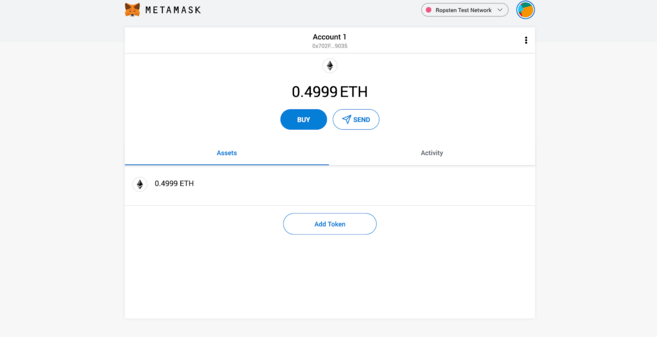
There are various kinds of testnets on Ethereum. If you're wondering about the differences, check out this comparison.
We will use the faucet to get fake money to play with. Navigate to this page in your Metamask-enabled browser to get it.

Hooray! Free money!
You can click the little fox icon at any time to get a pop-up with your MetaMask account information (as we've done in the GIF above). Hover over Account 1, and click to copy your Ethereum address to the clipboard. Paste into the column provided and press Send me test Ether.
Ethereum transactions are generally confirmed fairly quickly, but it may take a while before 1 ETH hits your wallet. Check to see if you get it by clicking the fox in your toolbar.
Once the assets are in, we can start interacting with the DApp.
Opening the decentralized web
Because we use testnet, we don't have a wide choice of applications to play with. For a complete list of mainnet decentralized applications, see State of the DApps or Dappradar. You can play games, buy unique assets, or place bets on prediction markets.
We will use the DApp demonstrated earlier. Uniswap is a decentralized exchange, or DEX, meaning it allows us to trade without relying on intermediaries. The mechanisms that support it are pretty neat – see What Is Uniswap and How Does It Work? if you are interested in how it works.
Please access here. In the top right corner, you will be asked to connect to a wallet or Connect to a wallet. You'll see this in varying forms on all MetaMask compatible sites, as it doesn't connect automatically for security reasons. Click there, and you will be asked to choose which wallet to use. If you don't know, the wallet is MetaMask.
When the site first tries to connect, a MetaMask dialog will appear, asking you to confirm the action. You will be able to select an account (for now we only have one account, so leave it as is) before verifying the permissions you will grant. In this case, as in many others, the site asks for information about the wallet address controlled by your account.
MetaMask and privacy
It's important to pay attention to what you allow. If the website knows your address, they can see all ether and token transactions to and from that address. What's more, they can associate it with your IP address.
Some people prefer to keep their addresses separate to prevent overlap, while others don't care about this risk (after all, the blockchain is public). The level of privacy you want to achieve is ultimately up to you. As a general rule, do not provide access to websites you do not trust.
Exchange ether with DAI
It's time to make the first exchange. We will do this to earn DAI, an ERC-20 token that functions as a stablecoin. Just like the ether we have, DAI has no monetary value. Press Select a token, add Uniswap Default List, then click DAI. Alternatively, you can also choose WETH (wrapped ether).
What we have to do next is enter the amount of ETH we want to exchange. When we do, we will get an estimate of how much DAI we will receive. Just that! Press Swap.
Complete the exchange with MetaMask.
You are once again prompted to take action in MetaMask. In this case, you need to approve the transaction before it is created. Make sure you don't mind the fees when you do this on mainnet, as they can be quite large.
After that, we just have to wait for the transaction to be confirmed!
➟ Want to own cryptocurrency? buy ETH on Binance!
Where are my tokens?
So, your ether is gone, but your account doesn't show the tokens. No need to panic – you'll have to add it manually.
For more popular tokens, you can select Add Token in your wallet and search for the name or ticker. For the less popular ones (or those on the testnet), we need to add a contract address – an identifier that tells MetaMask where to look for our balance.
Open your wallet by clicking on the extension.
Click the three dots on the top bar.
Select View on Etherscan.
Under Overview, click Token in the dropdown menu and select DAI.
Under Profile Summary, you will see the contract address. Hover over it and copy the address.
Go back to MetaMask and click Add Token.
Click on Custom Token.
Paste the address you just copied into the Token Contract Address field.
The rest will be filled in automatically. Click Next, and Add Tokens.
Return to the main view to see your balance.
Happy! You've just interacted with your first DApp, exchanging Ether for DAI without needing to trust anyone. Everything you've learned can now be done in the actual application. When you're ready to play with mainnet applications, remember to switch back from Ropsten to the mainnet.
What else do I need to know?
MetaMask has some other interesting features that we haven't discussed yet. You can also connect a hardware wallet (Trezor and Ledger are both supported), create contact lists, and, of course, receive and send funds just as you would in a regular wallet. View the settings to customize the extension to suit your needs.
Additionally, the usual security principles also apply: MetaMask is a hot wallet, which means it can be run on any internet-connected device. This exposes you to more risk, compared to cold wallets, which are kept offline to reduce attack vectors.
Lastly, when using MetaMask, you must be fully aware and aware of the websites you are giving access to.
MetaMask application
The MetaMask Android/iPhone app provides a neat solution for interacting with Web3 apps wherever you are. Offers many of the same functions as the extension, integrating a DApp browser so you can access a variety of decentralized applications at the touch of a button.

MetaMask application browser.
The app workflow is very similar to a browser extension. You can make direct transfers of ether or tokens from your wallet, or even interact with Uniswap, as we saw earlier.

Connecting to PoolTogether within the app.
Conclusion
MetaMask is a powerful tool for exploring the decentralized web. If you have followed the steps in this guide, you should already know the wallet's potential. Proven: currently this application has more than one million users.
As the Ethereum network develops, applications like MetaMask will undoubtedly become an integral component in bridging existing technologies and nascent cryptocurrency infrastructure.
Have questions about MetaMask, Ethereum, or others? Please head to Ask Academy, a place where the community will answer your questions.