


TL;DR
The process for withdrawing funds on Binance depends on the cryptocurrency or fiat currency you wish to transfer. Some cryptocurrencies can be withdrawn to several different blockchains. So, make sure you choose the right blockchain.
The time required to withdraw funds varies depending on the method used. For crypto withdrawals, each blockchain will require a certain number of confirmations before appearing in the wallet. You can check the transaction status by using the respective blockchain finder.
Occasionally, Binance may suspend withdrawals due to technical improvements. Binance will notify you if this is the case. If withdrawals still take too long after checking all possible causes, you can contact Binance customer support.
Introduction
If you want to transfer funds out of your Binance account, you will need to go through the withdrawal process. This process will change depending on the blockchain, cryptocurrency, or fiat you wish to withdraw. Overall, the process is very easy. However, you must follow each step carefully to ensure that you do not accidentally lose your funds.
How to withdraw cryptocurrency on Binance
In this example, we will withdraw BNB to Trust Wallet and go through step by step.
1. Log in to your Binance account. After logging in, move the mouse to [Wallet], then click [Fiat and Spot].

2. Click [Withdraw].

3. Select the [Crypto] tab, then select the cryptocurrency you want to withdraw.
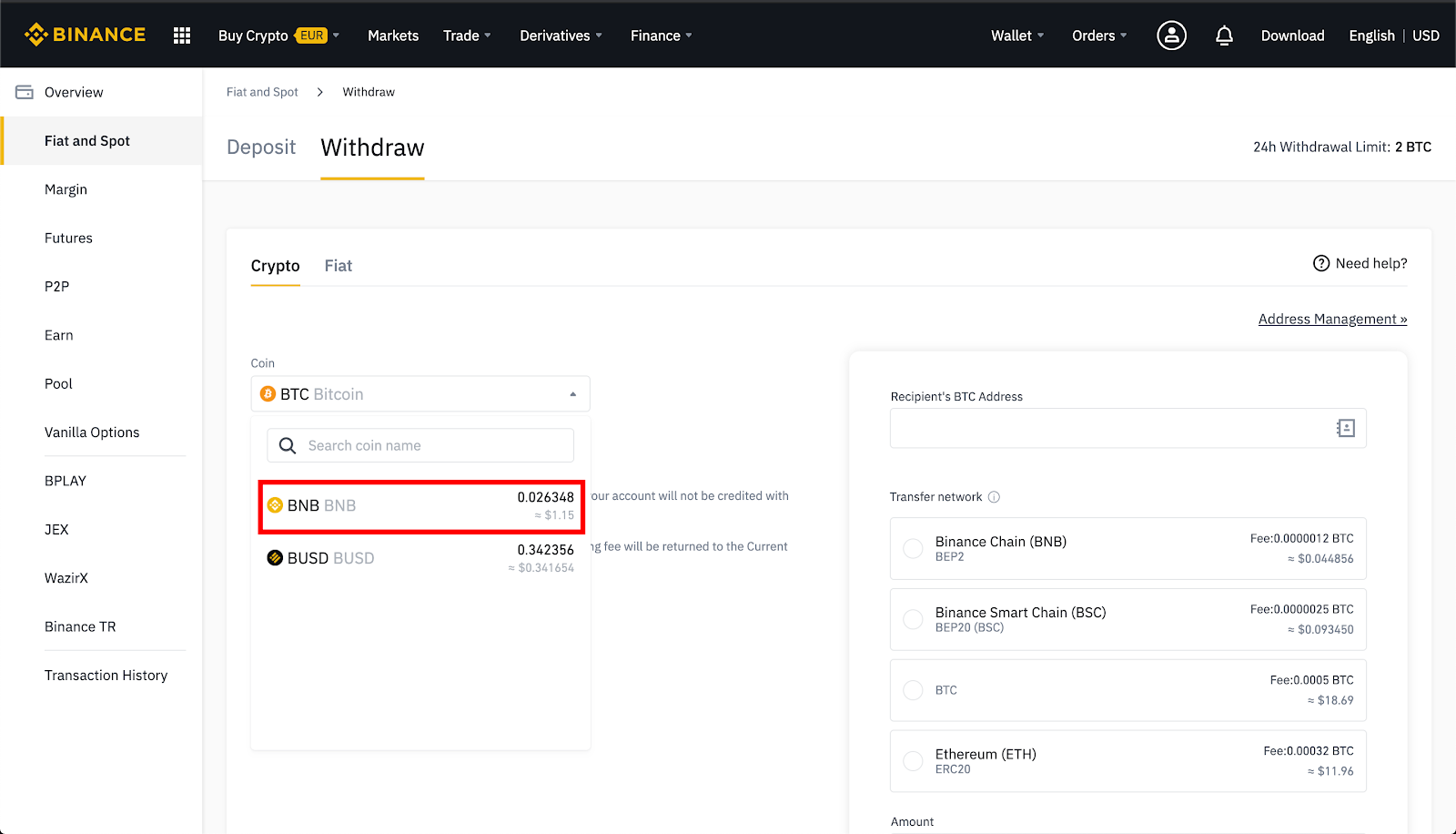
4. If the cryptocurrency is issued on multiple networks, select the desired network to make a withdrawal.
For example, BNB is issued on Binance Chain as a BEP-2 token and on Binance Smart Chain (BSC) as a BEP-20 token. That way, if you want to withdraw to a BEP-2 wallet address, select the BEP-2 option. Be careful with this step. If you deposit to the wrong address, you may lose your deposit.

5. Tap BNB in your Trust Wallet.

6. Tap [Receive].

7. Copy your BNB address.

8. Paste in [Recipient's BNB Address] on the Binance withdrawal page. If everything is correct, click [Submit].
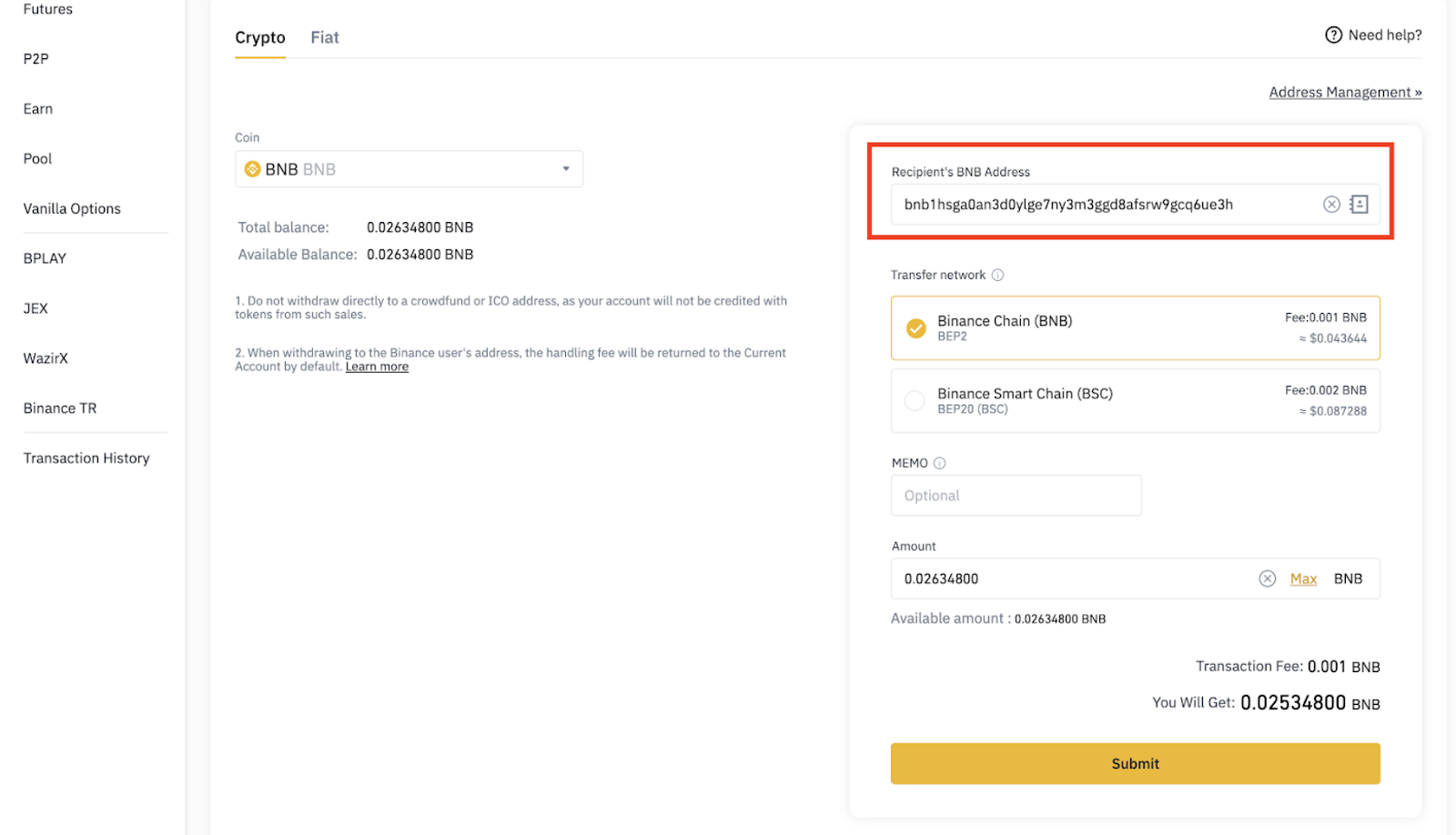
9. Click [Send Code], then enter the six-digit code you received in the email.
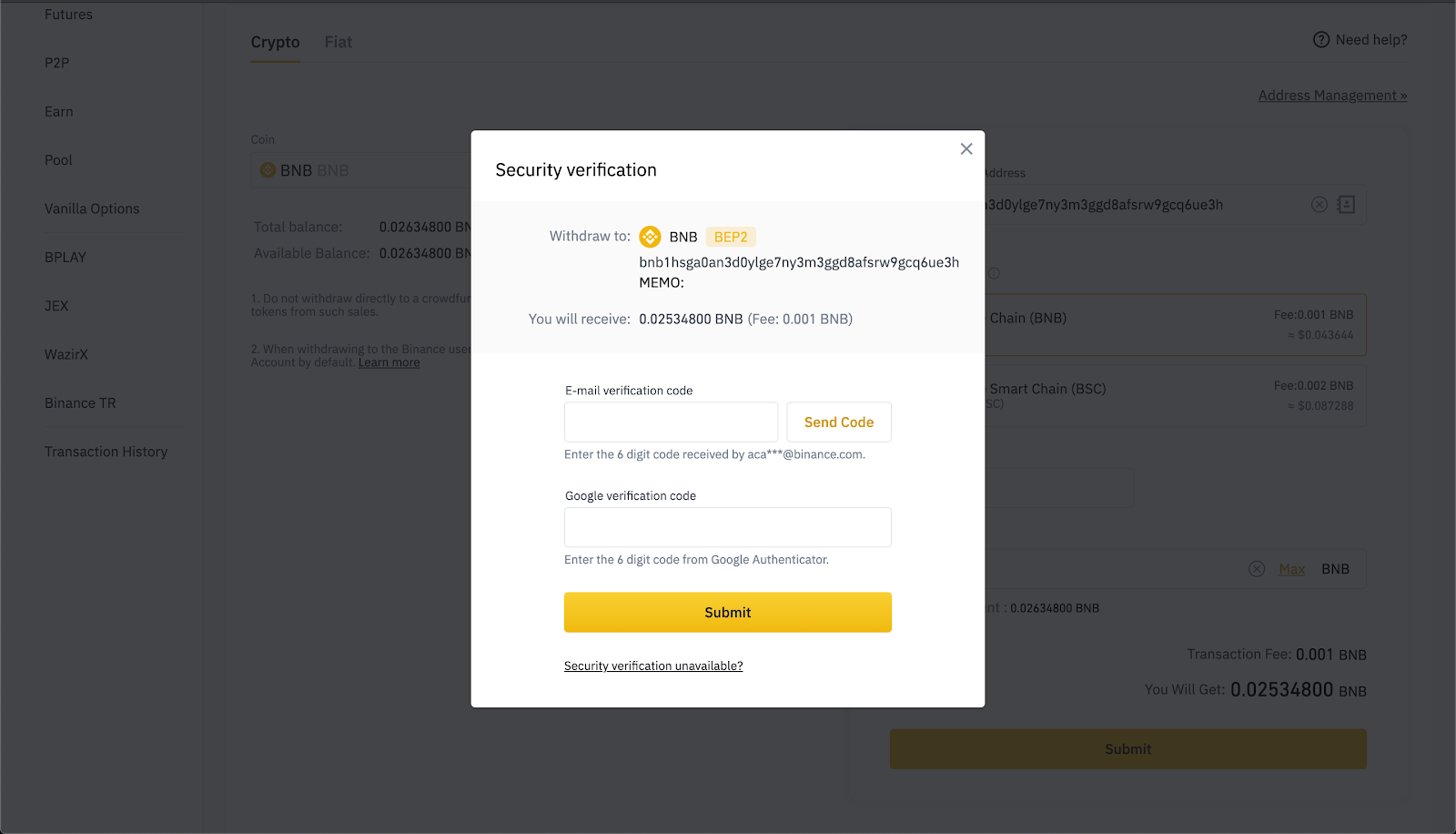
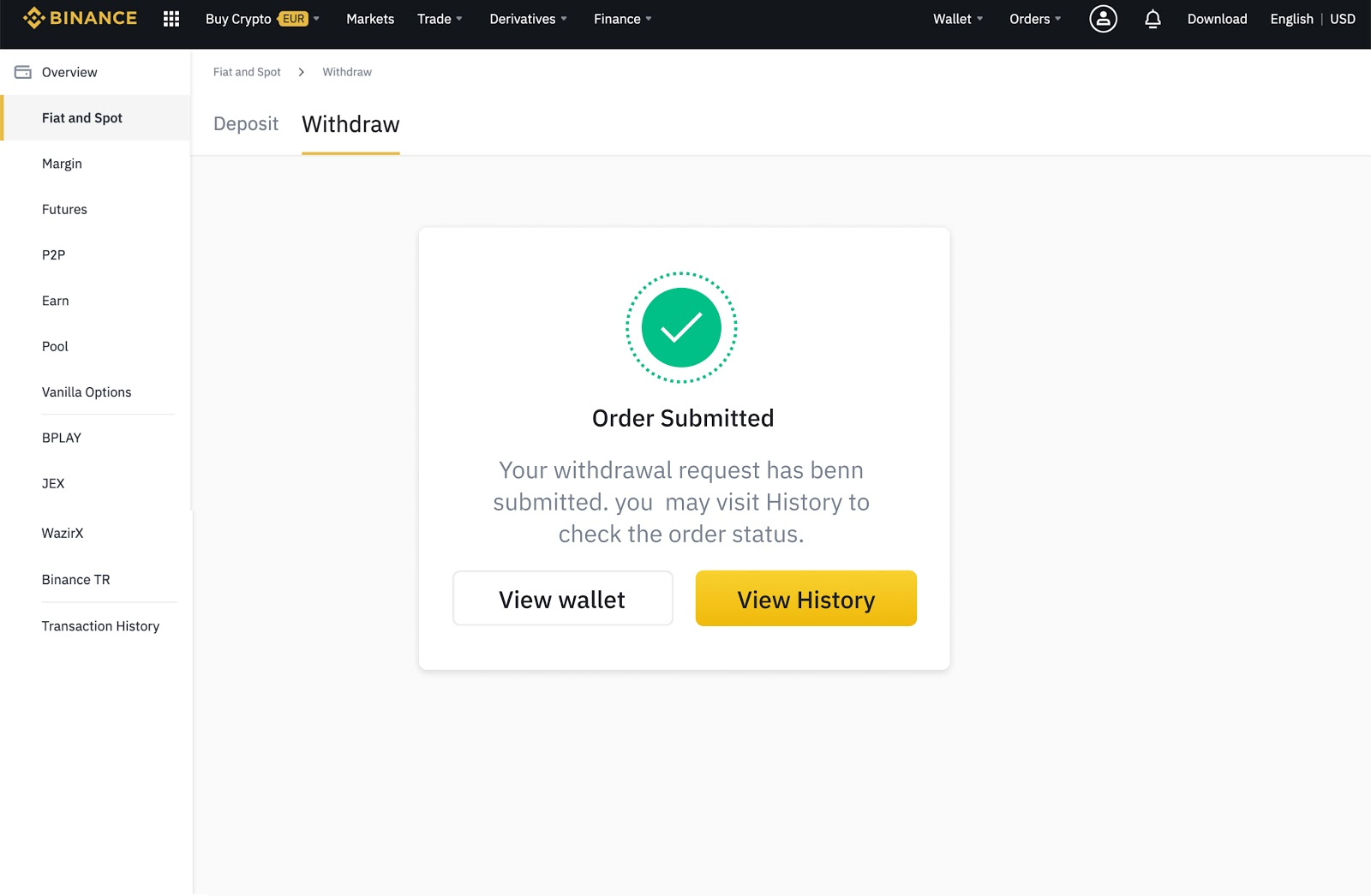
10. Enter your 2FA code. If everything is correct, click [Submit]. You will be able to see the withdrawals coming out in the Transaction history.
How to withdraw fiat currency from Binance
Binance supports more than 60 fiat currencies and various payment methods.
1. Log in to your Binance account. After logging in, move the mouse to [Wallet], then click [Fiat and Spot].

2. Click [Withdraw].

3. Select the [Fiat] tab.

4. Select the fiat currency you want to withdraw and the payment method. The choice of payment method is based on your preferred currency and region.
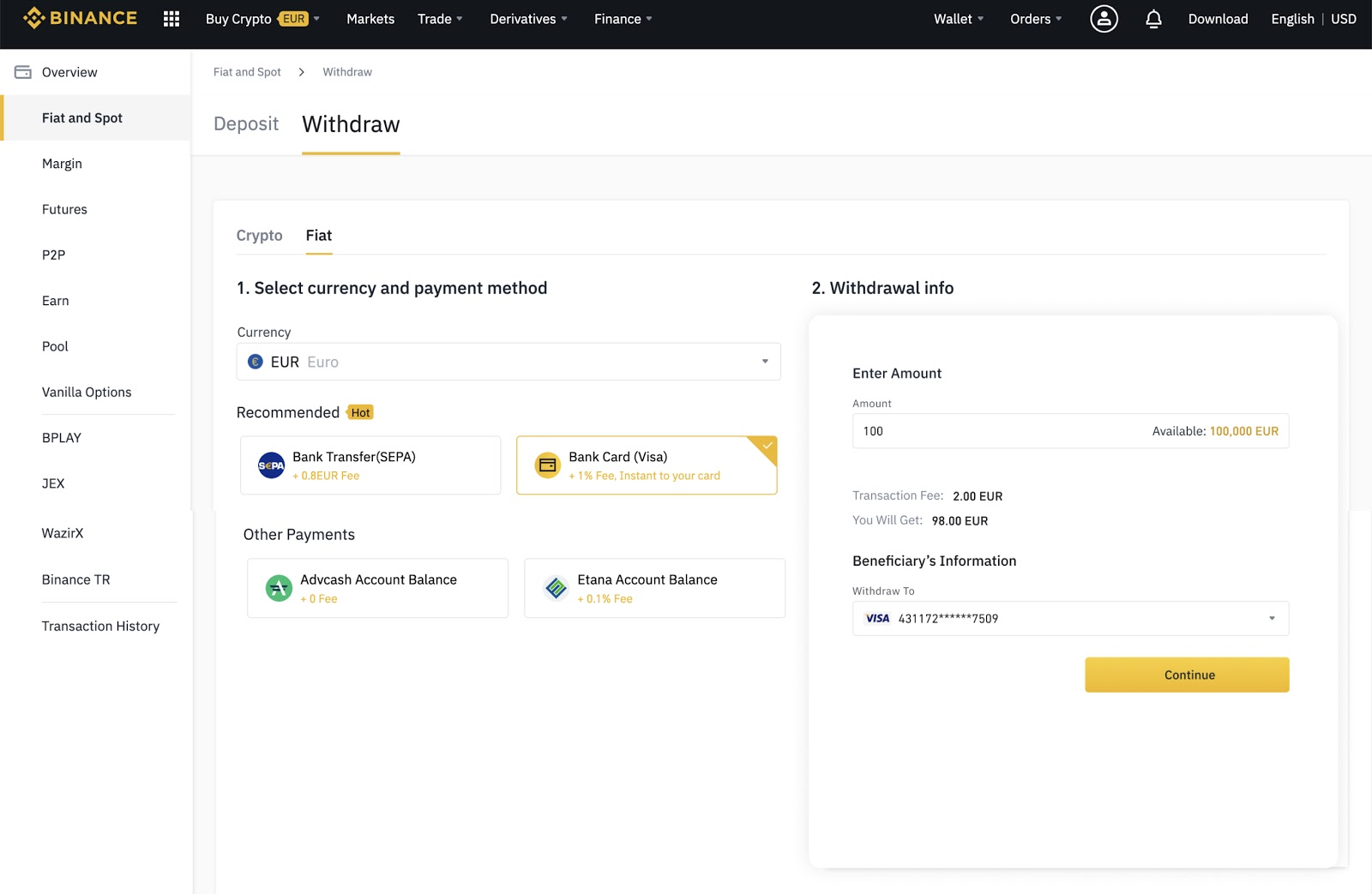
5. Enter the required details and follow the instructions.

6. Then, enter the verification code to confirm the withdrawal.

What are crypto withdrawal fees?
Withdrawing crypto from a Binance account incurs fees to cover the network's transaction burden. For example, deleting BNB or Ether (ETH) requires Binance to send the crypto to another crypto wallet on that blockchain.
In other words, all transactions on Binance Smart Chain, Binance Chain, or Ethereum require a gas fee that the user must pay to the miner. Binance passes on the burden of these transaction fees to users.
Each blockchain has its own list of fees, so your crypto withdrawal fees will vary from coin to coin. The fees are also dynamic and change depending on network activity. The best and most accurate way to check withdrawal fees is to go to the withdrawal page itself.
What is the minimum withdrawal amount on Binance?
Each cryptocurrency has a minimum withdrawal amount. You cannot withdraw less than the amount stated on the withdrawal page. You can see a list of all minimum amounts and withdrawal fees in our Deposit & Withdrawal Fees.
How long does it take to deposit on Binance?
Binance will process your withdrawal as soon as requested, but each blockchain takes different amounts of time to confirm the transaction. Bitcoin (BTC) can take between ten to 30 minutes to successfully confirm a withdrawal. Binance Smart Chain withdrawals often only take a few minutes, while Ethereum can take a little longer. The more congested a network is with traffic, the longer you have to wait.
Why is my Binance withdrawal stuck in processing?
Your transaction may be stuck because the blockchain still needs to confirm the transaction or is congested. As we mentioned earlier, some blockchains require more network confirmations than others. In times of heavy traffic, transactions may take much longer than expected.
Why can't I withdraw from Binance?
There are several possible reasons you cannot withdraw from Binance. First, if you recently changed your password or disabled SMS/Google authentication, Binance will suspend withdrawals for 24 hours. If you perform a full reset of SMS/Google authentication, Binance will suspend withdrawals for 48 hours.
If Binance detects any abnormal activity in your account, then the withdrawal function will be temporarily suspended again. This termination is done to protect your account and funds. Additionally, Binance sometimes performs system upgrades that require stopping withdrawals until the update is complete.
What to do if my Binance withdrawal hasn't arrived?
If you have checked that the blockchain is not congested and your withdrawal still has not arrived, contact the Binance support team for further assistance. If you try to withdraw fiat to a bank, the process can take several days.

Closing
Withdrawing crypto from Binance is a simple process that usually goes without problems. Whether you want to withdraw fiat or transfer crypto, all the required information will be displayed on the withdrawal page. If you experience problems, check your email to see if Binance may have suspended withdrawals. You can also look at the blockchain finder to check for network congestion. Overall, patience is key. Most of the time, all problems are temporary. However, if you are still having trouble, then the Binance support team will be happy to help.