

TL;DR
SolScan is an alternative Solana blockchain finder. SolScan provides access to blockchain data regarding transactions, contracts, accounts and more. If you frequently use Solana or do troubleshooting, understanding how to use the blockchain finder is very useful.
SolScan also has a DeFi and NFT dashboard and searchable analytics platform. You can also use the API to create custom feeds for yourself. All of this is found in the header of the website.
Introduction
Solana is a Proof of Stake (PoS) blockchain that allows project developers to build DApps, tokens, and smart contracts. As with any active chain, users need an intuitive way to access blockchain data. Like BscScan and EtherScan, Solana also has a dedicated block finder called SolScan. Let's learn the most important features and some basic tutorials.
What is SolScan?
SolScan is a blockchain searcher used to search for information on the Solana blockchain. SolScan is a popular alternative to the official Solana finder. SolScan turns complex transaction data into something that can be easily read. The block finder provides access to everything recorded on-chain, including crypto transactions, addresses, smart contracts, blocks, tokens and more. SolScan is free to use and does not require an account, but you can create one and log in to get enhanced functionality.
Why should I use SolScan?
Using a blockchain finder is important for anyone transacting on a network. If you are not sure about the purpose of the funds entered into the stake or perhaps the transaction is still pending, you can use SolScan to find out the progress. All the information in SolScan comes directly from the Solana blockchain, so you can be confident in its accuracy. Using SolScan or any blockchain finder will help you understand the mechanisms of the DApp used and the transactions carried out.
SolScan uses the same format as EtherScan, making it easier to understand. Most users prefer its layout to the official SolScan finder. They are all free to use and contain some useful tools, lists and analysis charts. The finder also contains a set of public APIs that can leverage real-time data from SolScan into custom third-party applications and tools.
How to search for transactions and addresses in SolScan?
One of the most used features is the search function for transactions and addresses. With correct hashes, you can access large amounts of information quickly. This includes transaction fees, confirmations, timestamps, associated addresses, and more.
Transaction
1. Every Solana transaction is recorded on the Solana mainnet with a signature. It's a string of numbers and letters that looks like this:
5JLcGJQfZjEEuh1bSDqyw2iEfLuFRoYRJY1paoSwrZC8c8zZFW3VqvxsJgjW3bsUjTrpEUDEtvs83PxsuR6hUWqz
2. Copy and paste the signature into the SolScan search bar, then press enter.
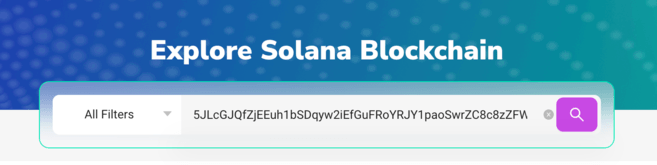
3. You will now see all available information regarding the transaction you are looking for. This information is divided into three categories: [Overview] (Summary), [SOL Balance Change] (SOL Balance Change), and [Token Balance Change] (Token Balance Change).

4. The [Overview] category will have most of the necessary details. Let's study the list:
5. For further information, the [SOL Balance Change] and [Token Balance Change] tabs provide data regarding changes in transaction token balances for all parties involved.
Address
A similar method can be used to find out more about a person's address. Then, you can check a detailed history of that address's activity. This can provide a summary of transactions and smart contract interactions from a particular wallet.
1. Find the Solana address you want to research. The address is shorter than the signature and looks like this:
138KHwTqKNWGLoo8fK5i8UxYtwoC5tC8o7M9rY1CDEjT
2. Copy and paste the address into the SolScan search bar, then press Enter.

3. You will now see all available information about the account you are looking for. The [Overview] section shows the current account balance, while the lower tabs deal primarily with transaction history.

How to find tokens in SolScan?
Tokens can be easily verified on SolScan and you can get a complete view of the details. You just need:
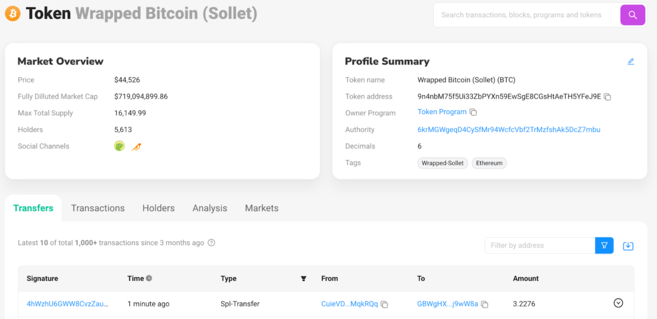
1. Copy and paste the token address into the SolScan search bar, then press enter. In this example, we are using a wrapped version of Bitcoin (BTC), but you can also use a wrapped version of Ethereum (ETH) or other SPL tokens on the Solana network.
The token address looks like this:
9n4nbM75f5Ui33ZbPYXn59EwSgE8CGsHtAeTH5YFeJ9E
2. If you enter the address correctly, you will see the following information.
Token
How to find active Solana accounts?
1. You can find the number of active accounts and other key blockchain metrics by clicking [Analytics].
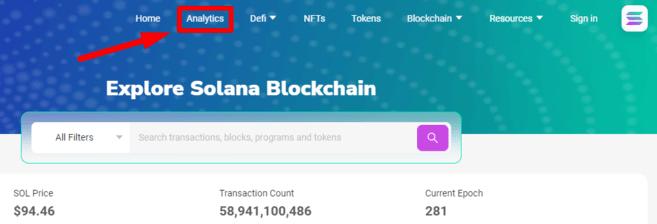
2. SolScan's analysis page has a range of information regarding network nodes, transactions per second (TPS), new tokens, new NFTs and more. In the [Accounts] header, you can find the number of daily active wallets.

3. Note that you can select different periods in the top right corner.

How to access the DeFi dashboard on SolScan
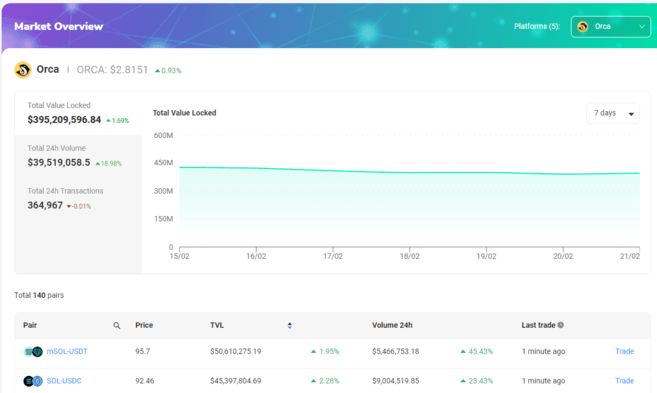
1. Some of the largest DEXs in the Solana ecosystem have dashboards built into the Solana block finder. You can find it quickly in the [Defi] tab.

2. Let's look at Orcas. This dashboard shows basic information on the Total Value Locked (TVL) volume and active trading pairs available in its liquidity pool.
How to access the NFT dashboard on SolScan
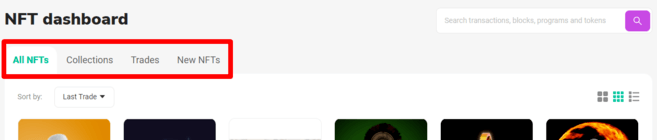
1. SolScan makes it easy for you to view new NFTs, trades and collections with the NFT dashboard. You can find this section in the website header.

2. The NFT dashboard will allow you to search for NFTs available on Solana. The [Collections] tab provides a list of NFT projects by volume. The [Trades] tab will show the most recent sales, while [New NFTs] will list the most recent mintings.

Closing
Whether you want to investigate your latest Metaverse NFT, investigate a node, or check out a new startup wallet, you'll need a Solana block finder. These tools are an integral part of any blockchain network ecosystem. SolScan has become one of the most used in the Solana community. So, understanding its layout and UI can definitely help.