In brief
Binance allows deposits from external wallets or bank accounts in fiat and cryptocurrency. Each deposit method will have a different implementation, depending on the currency you want to deposit.
You need to carefully check the blockchain address and enter the correct memo or ID when requested. If the blockchain network is congested, the cryptocurrency you want to deposit may be delayed. If that happens, wait a little longer for your transaction to be confirmed. If after a period of time you are still having problems, please contact Binance Customer Support.
Depending on the method you use, deposited fiat currency can take days to be credited to the system. If you experience extended delays, check to see if your funds may have been placed on hold before contacting customer support.
Introduce
Before you can trade cryptocurrency on Binance, you need to deposit fiat or cryptocurrency. There are many methods for you to deposit money. Some take longer than others, so you'll need to be a little patient. Follow the steps below to ensure your money arrives SAFU (safely) and smoothly.
How to deposit cryptocurrency on Binance
In this example, we will send BNB from Trust Wallet to the Binance exchange.
1. Log in to your Binance account. After logging in, move the mouse to [Wallet] and click [Fiat and Spot].

Then click [Deposit].

3. Select the [Crypto] tab.

4. Select the cryptocurrency you want to deposit.
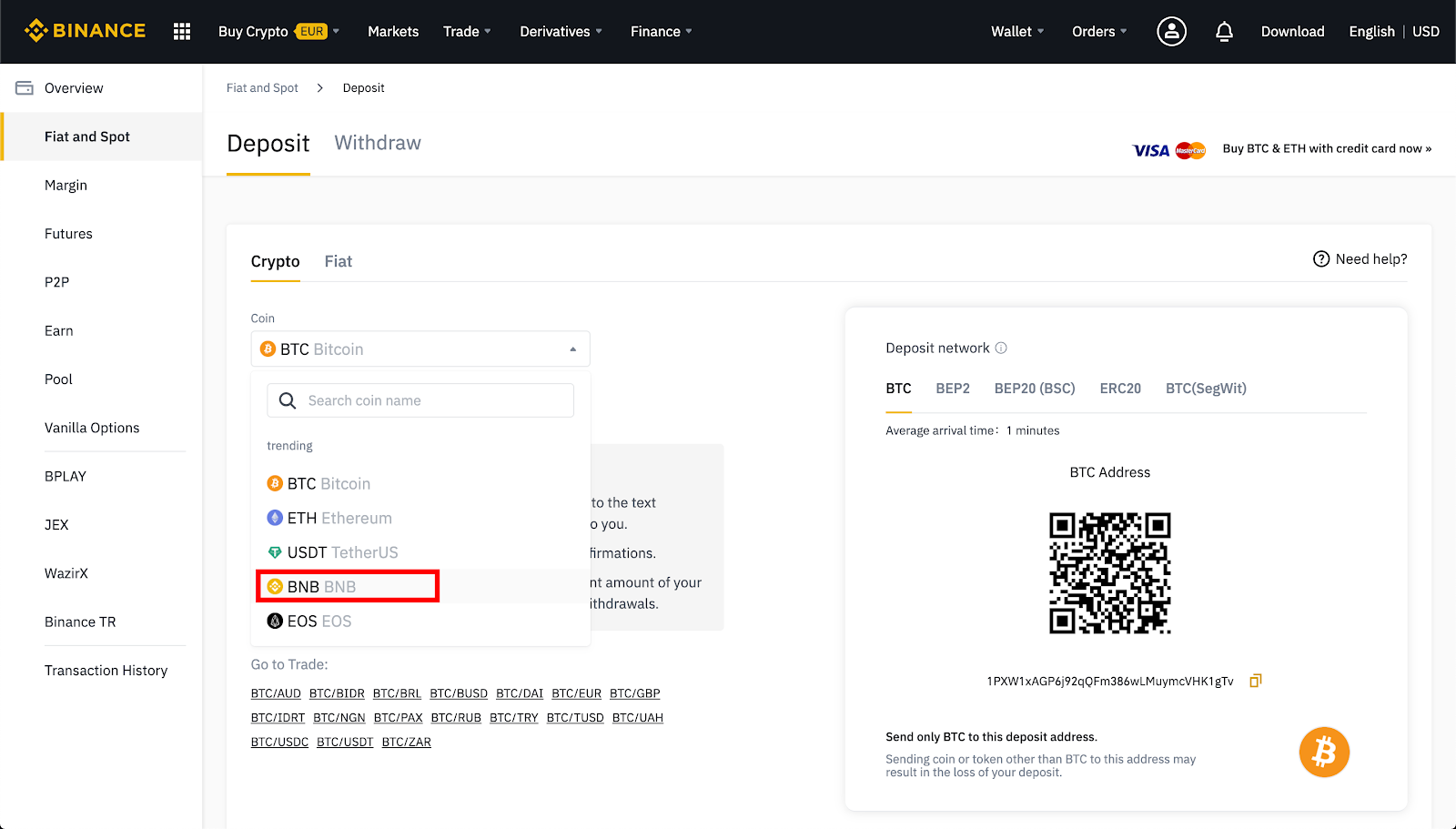
5. If cryptocurrency is issued on multiple blockchain networks, choose which network you want to deposit to.
For example, BNB is issued on Binance Chain as a BEP-2 token, Binance Smart Chain (BSC) as a BEP-20 token, and Ethereum as an ERC-20 token. Therefore, if you have a token you want to deposit that is BEP-2 standard then you also choose a BEP-2 deposit address. Be very careful with this step. If you send money to the wrong address, you may lose the money.
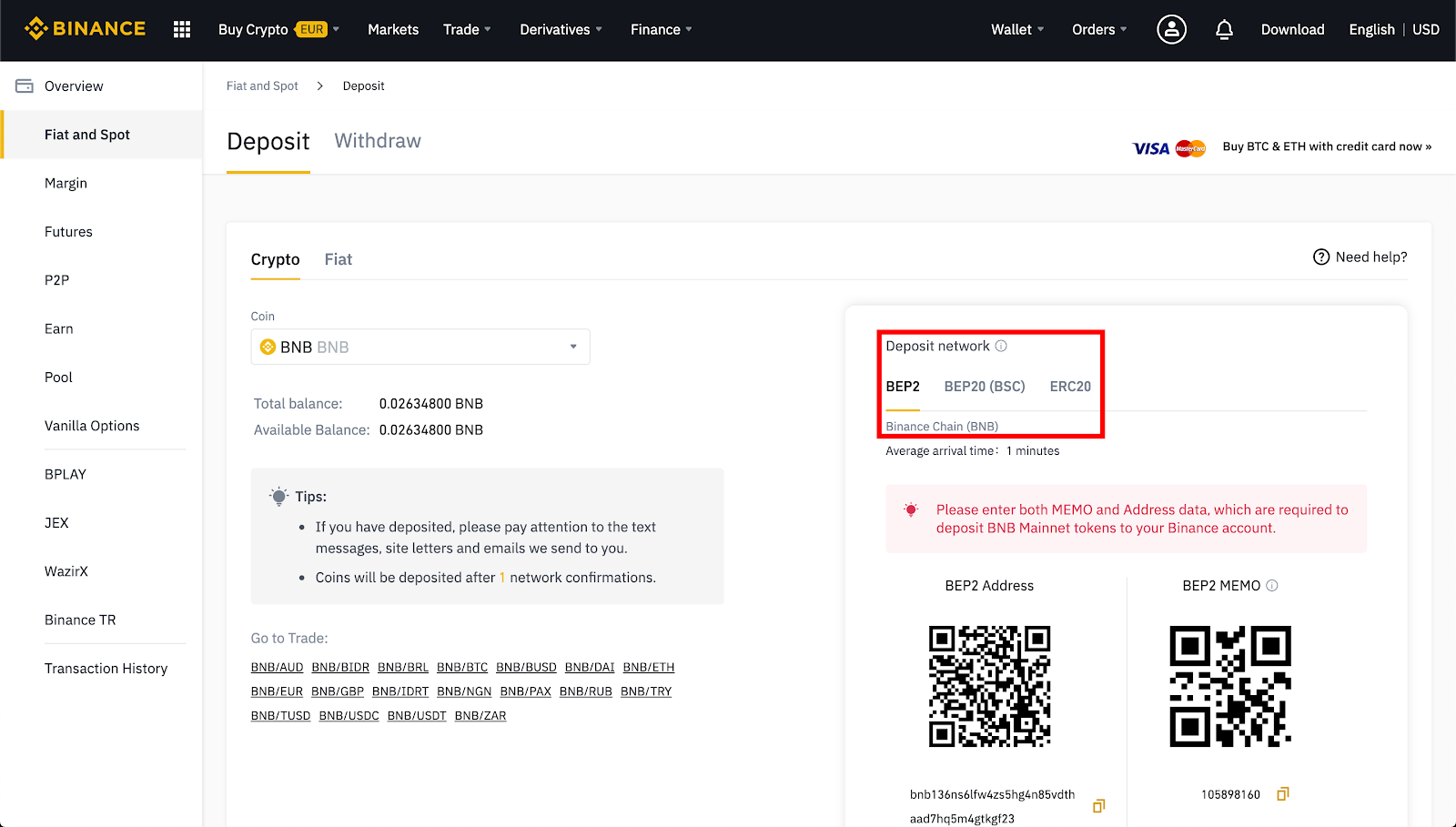
6. BNB deposits require both a deposit address and a MEMO. You will need to copy and paste both into the appropriate fields in the wallet you are using to deposit.
Why is MEMO needed? Because the BNB deposit address is the same for all Binance users. MEMO is a unique identifier assigned to each account, allowing Binance to identify a deposit and credit it to the appropriate account.
7. Click on BNB in your Trust Wallet.

8. Click Send.

9. u001dPaste your deposit address and MEMO into this box on the Binance deposit page. You can also use your phone camera to scan QR codes.
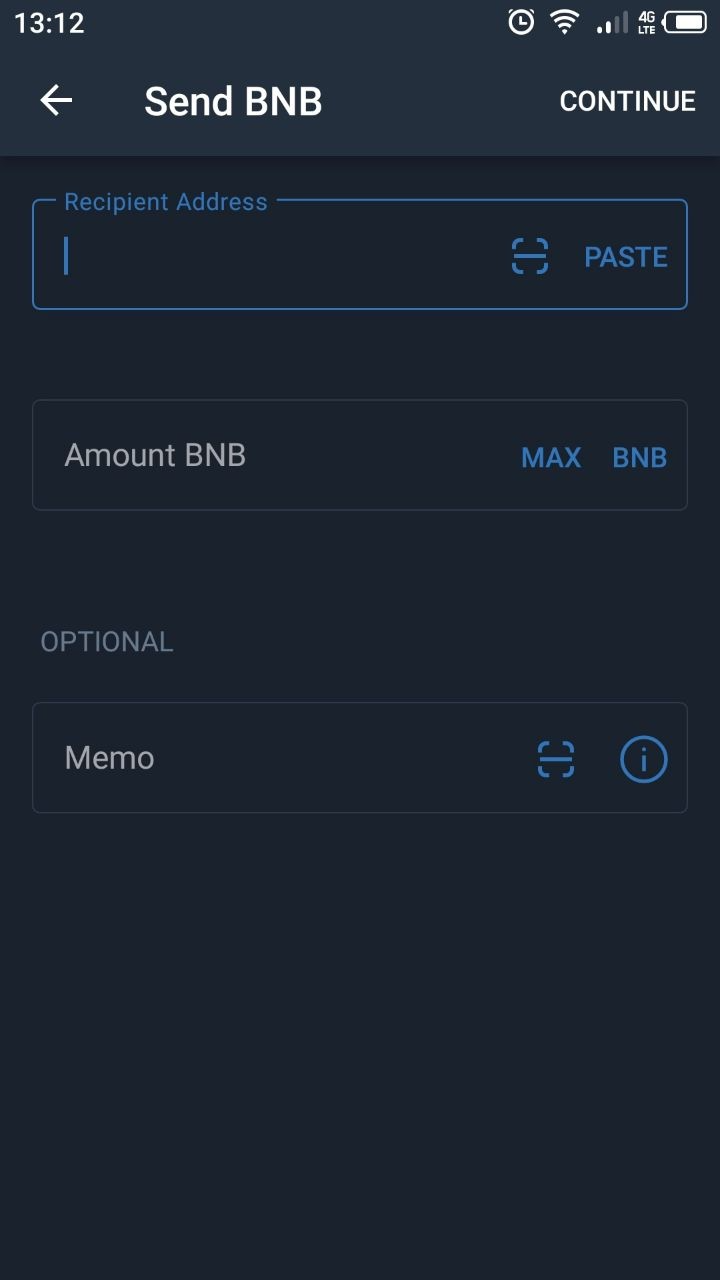
10. Confirm transaction. Once you have deposited funds from your Trust Wallet, you can view its status by searching for the transaction ID in the blockchain explorer. You can use the official Binance Chain explorer to do this.
11. You can also find your upcoming deposit in your Binance Transaction History.
How to buy cryptocurrency with fiat on Binance
You can buy cryptocurrency on Binance with over 60 fiat currencies with a variety of payment methods. The same goes for purchasing other cryptocurrencies, including Bitcoin (BTC) or Ether (ETH).
1. Log in to your Binance account. After logging in, move the mouse to [Wallet] and click [Fiat and Spot].
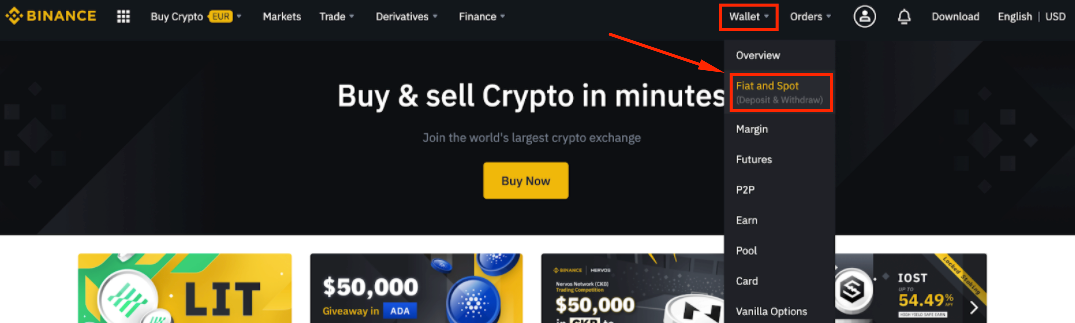
Then click [Deposit].
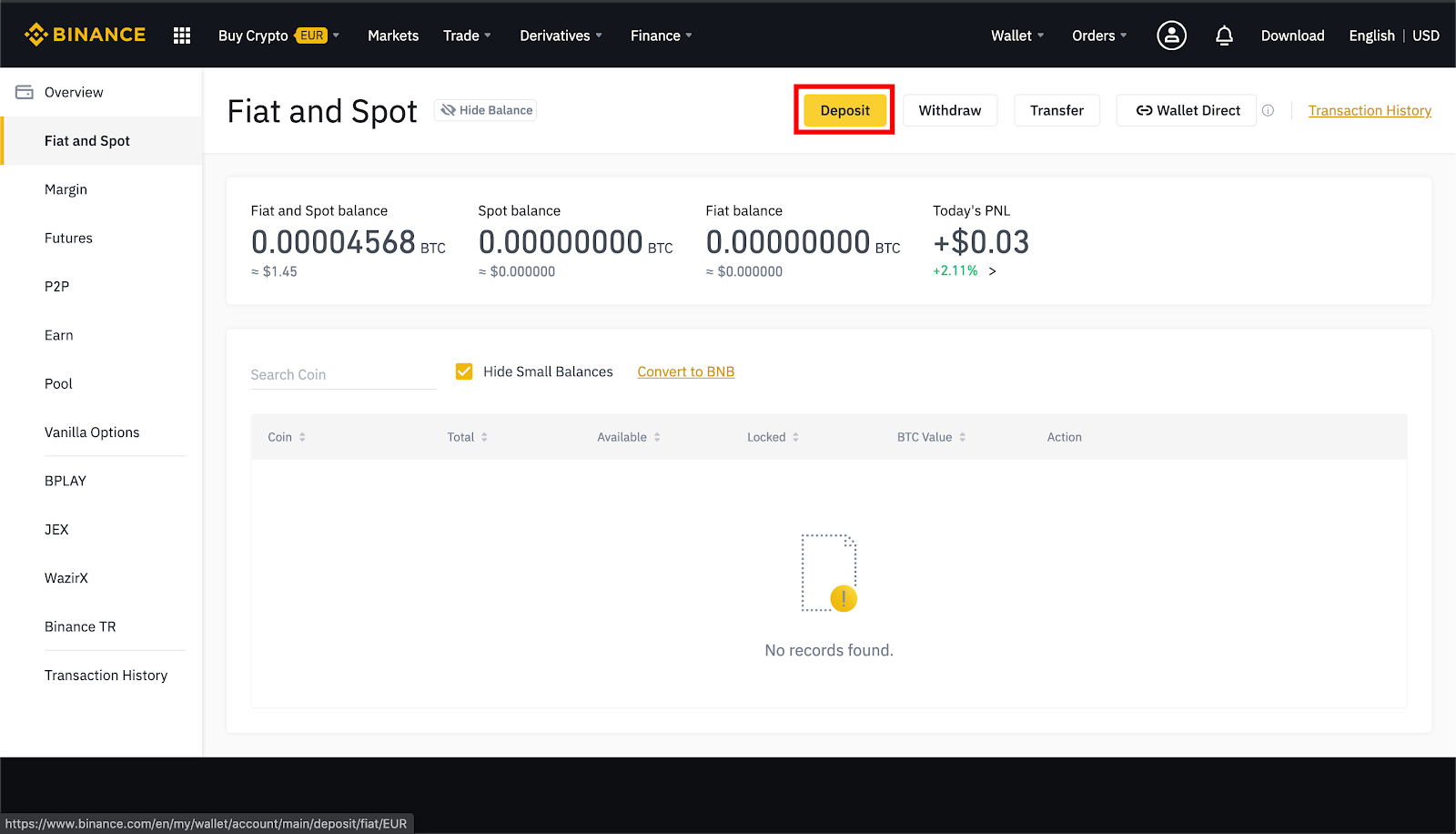
3. Select the [Crypto] tab.

4. If you have not yet verified your identity, click [Verify Now] and follow the instructions.
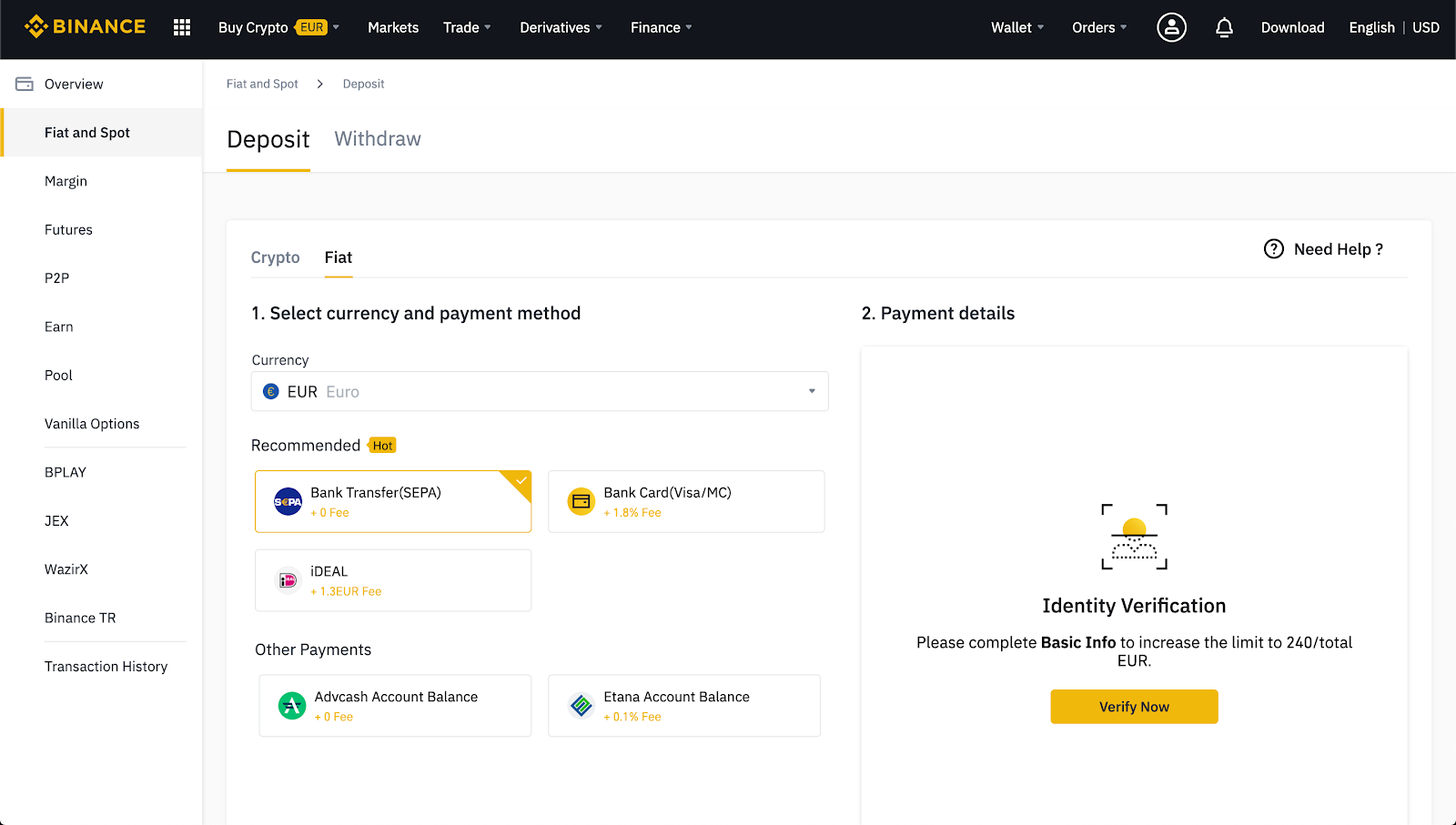
5. Select the currency you want to buy and the payment method. Binance supports your credit card, debit card, bank transfer or fiat balance.

6. Enter the required details and follow the instructions.

7. Make sure to double check the payment details before submitting your payment.
Does Binance charge crypto deposit fees?
Depositing crypto to Binance is free. However, you still have to pay transaction fees on the blockchain when sending crypto from your wallet to the Binance wallet. If you transfer funds from an exchange, you may have to pay withdrawal fees to get your crypto out.
Maximum and minimum deposit amount with and without KYC
Users who have not completed KYC (Identity Verification) on their accounts will have their deposits and withdrawals limited to a certain extent. In reality, these limits are different in each country. So the best way to find out is to log in and visit your profile page. Each verification level will also increase your deposit and withdrawal limit.

How long does it take to deposit money into Binance?
As soon as your crypto deposit has enough confirmations, it will immediately appear in your Binance u001dSpot Wallet. However, heavy traffic in the network can cause congestion and delays. You can use the TxID (transaction ID) to check the transfer status using blockchain explorers like BscScan for Binance Smart Chain or EtherScan for Ethereum.
With deposits from fiat currency, the time it takes for the deposit to be successful will depend on the method you used to deposit. This period can last from a few hours to a few days. For more detailed information, visit the fiat deposits page and select your chosen deposit method.
Why can't I deposit money into Binance?
If you are trying to deposit crypto or fiat to Binance, there are two main reasons why your deposit may fail. First, Binance occasionally suspends fiat or cryptocurrency deposits for technical updates or maintenance. If you attempted to make a fiat transfer and the currency you deposited is no longer supported, Binance will return the funds (usually within seven business days).
If you have problems depositing cryptocurrency, this is usually due to user error. On the deposit screen, Binance will display payment details for you to use. Make sure you carefully copy them to your withdrawal wallet or payment service page.
Binance occasionally suspends deposits, so check your email or the latest Binance news for more information. Also, make sure you have copied and pasted the correct wallet address from Binance and that you have selected the correct blockchain network. You may also need to add a tag, MEMO or payment ID to successfully deposit your crypto.
What to do if your deposit to Binance hasn't arrived yet
If you have deposited fiat currency and Binance has not yet credited your account, please contact the Binance Customer Support Team. Depositing fiat currency can take up to several days.
If you sent a cryptocurrency to the correct address without a MEMO, card, or payment ID, you can use the self-service form to get your money back. To do this, you will need some basic information about your transaction, including the TxID, amount, and sender address. This process only works if the blockchain has fully confirmed your transaction.
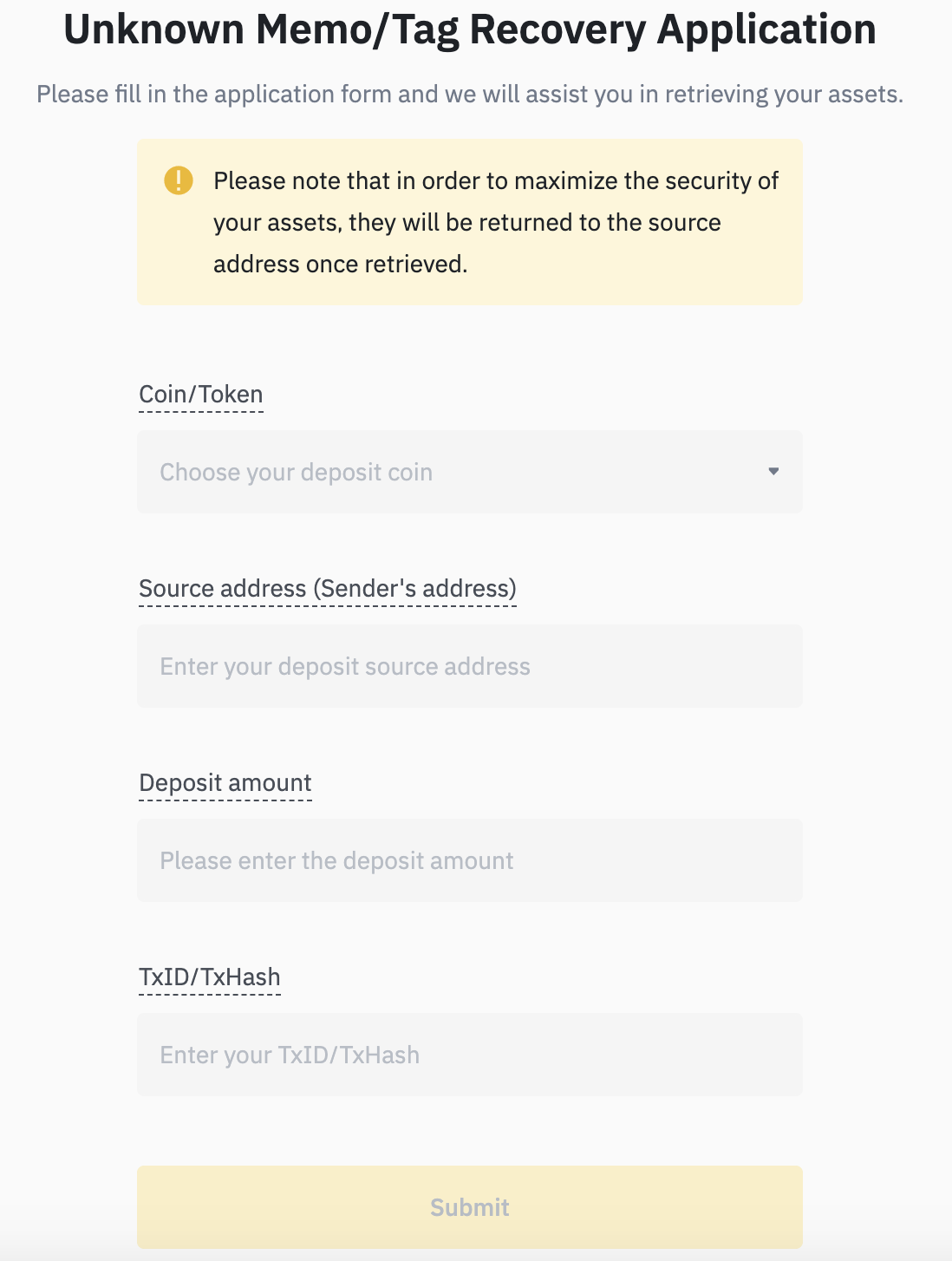
If your transaction is not confirmed, the network may be congested and you will need to wait longer. Different blockchains require a different number of confirmations. As mentioned, you can use the TxID to look up the status of your asset transfer using a blockchain explorer.
How to check if the deposit was successful or not
As soon as your crypto deposit has enough confirmations, it will immediately appear in your Binance u001dSpot Wallet. You can check this further by navigating to [Wallet] - [Overview] - [Transaction History].

Deposited cryptocurrencies will also be visible immediately after they are successfully transferred to your Binance account. You can view these in the [Fiat & Spot] section of the website.

summary
Updating your fiat or cryptocurrency balance on Binance may take some time. Binance always strives to provide the fastest service to customers, but delays may occur and are beyond Binance's control. If you have to wait longer than usual, please contact Binance customer support.