


Hey, friends, do you want to have your own trading 'secret weapon'? Don’t worry about difficult codes and annoying programming; this tutorial will guide you from zero to custom indicators in the simplest way! Follow me step by step, I guarantee you will understand, learn, and be able to use it immediately!
Step 1: Preparation, super simple!
1. Download AiCoin PC version: https://www.aicoin.com/zh-Hans/download
2. Find the entry for custom indicators: Open AiCoin, go to the 'Market K-line' page, scroll to the bottom, and click 'Custom Indicators'.
Step 2: Start with 'Moving Averages', understand the secrets of indicators.
MA moving average is one of the classic indicators in trading, let’s take it as an example, learning while playing. Let's first look at three uses of moving averages, simple and practical:
1. Single moving average: Compare K-line with a single moving average: K-line crossing above the moving average may rise (buy signal); K-line crossing below the moving average may fall (sell signal).
2. Dual moving averages: Two moving averages play 'crossing': Short-term moving average breaking above long-term moving average is called 'Golden Cross', can consider buying; conversely breaking below is called 'Dead Cross', can consider selling.
3. Multiple moving averages: Multiple moving averages lined up: Short-term moving average > Mid-term moving average > Long-term moving average, called 'Bullish Arrangement', looking bullish; conversely called 'Bearish Arrangement', looking bearish.
Step 3: Two paths to create your first indicator.
As a beginner, we can start with the simplest single moving average indicator. There are two methods to help you quickly write custom indicators.
Method 1: Let AI write for you, a boon for the lazy!
Don't want to code? No problem! Just tell AI your idea, and it will instantly become your 'code assistant'.
Tip: The more detailed the logical description, the more accurate the generated code!
Example: You can tell AI: 'Help me write an indicator, when the K-line crosses above MA120, judge it as a buy signal, prompt golden cross text, and alert; when the K-line crosses below MA120, judge it as a sell signal, prompt dead cross text, and alert.' AI will interpret and generate the corresponding code.
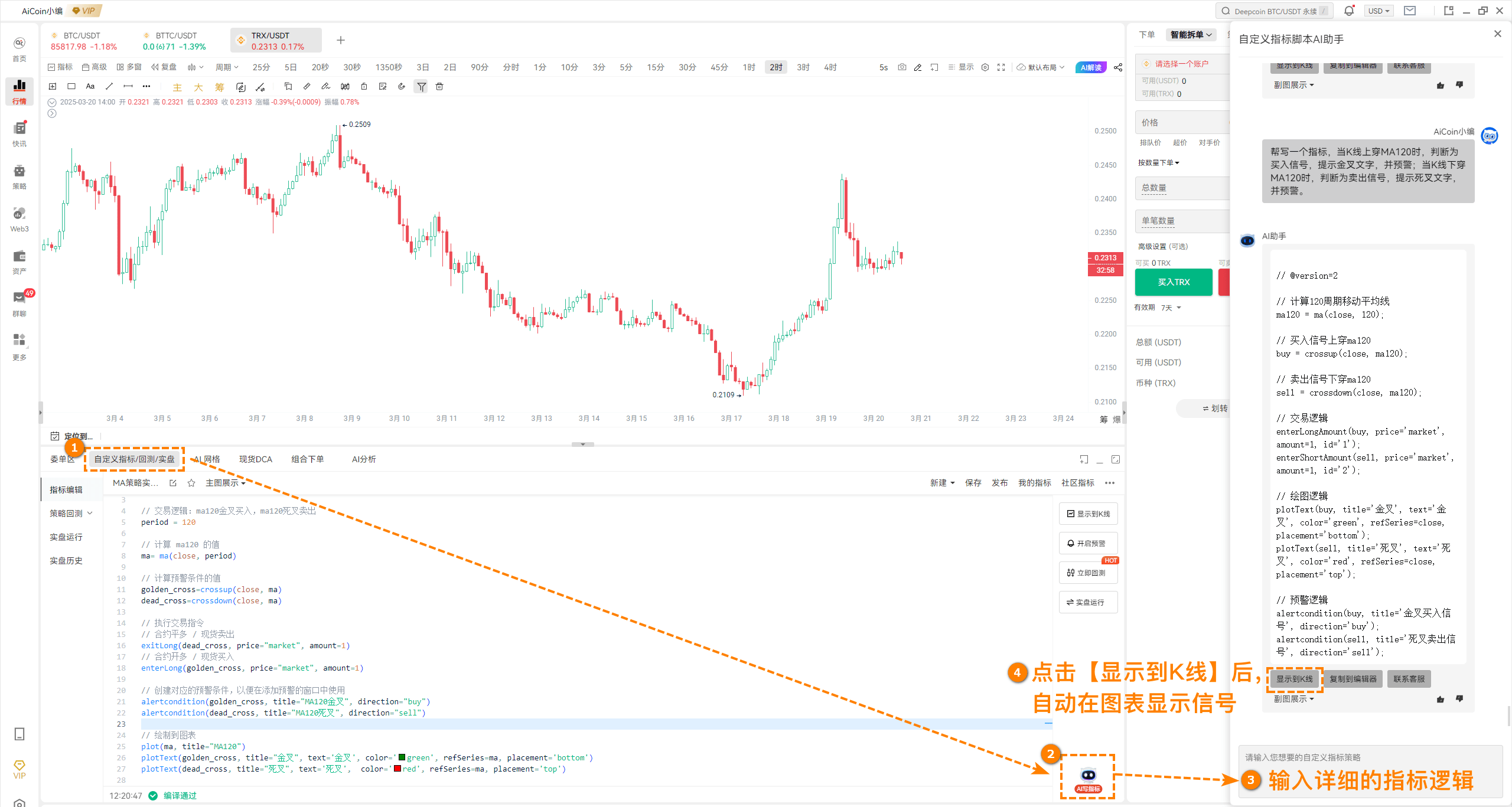
Experience AI writing indicators immediately, liberate your hands: https://www.aicoin.com/vip/
Method 2: Copy and modify, do it yourself!
Want to learn more? Then let’s modify the template step by step, it’s super fulfilling!
Path: Market K-line bottom → Custom Indicators → My Indicators → Programming Indicator Templates → Search → Select a template and click 'Use Now'.
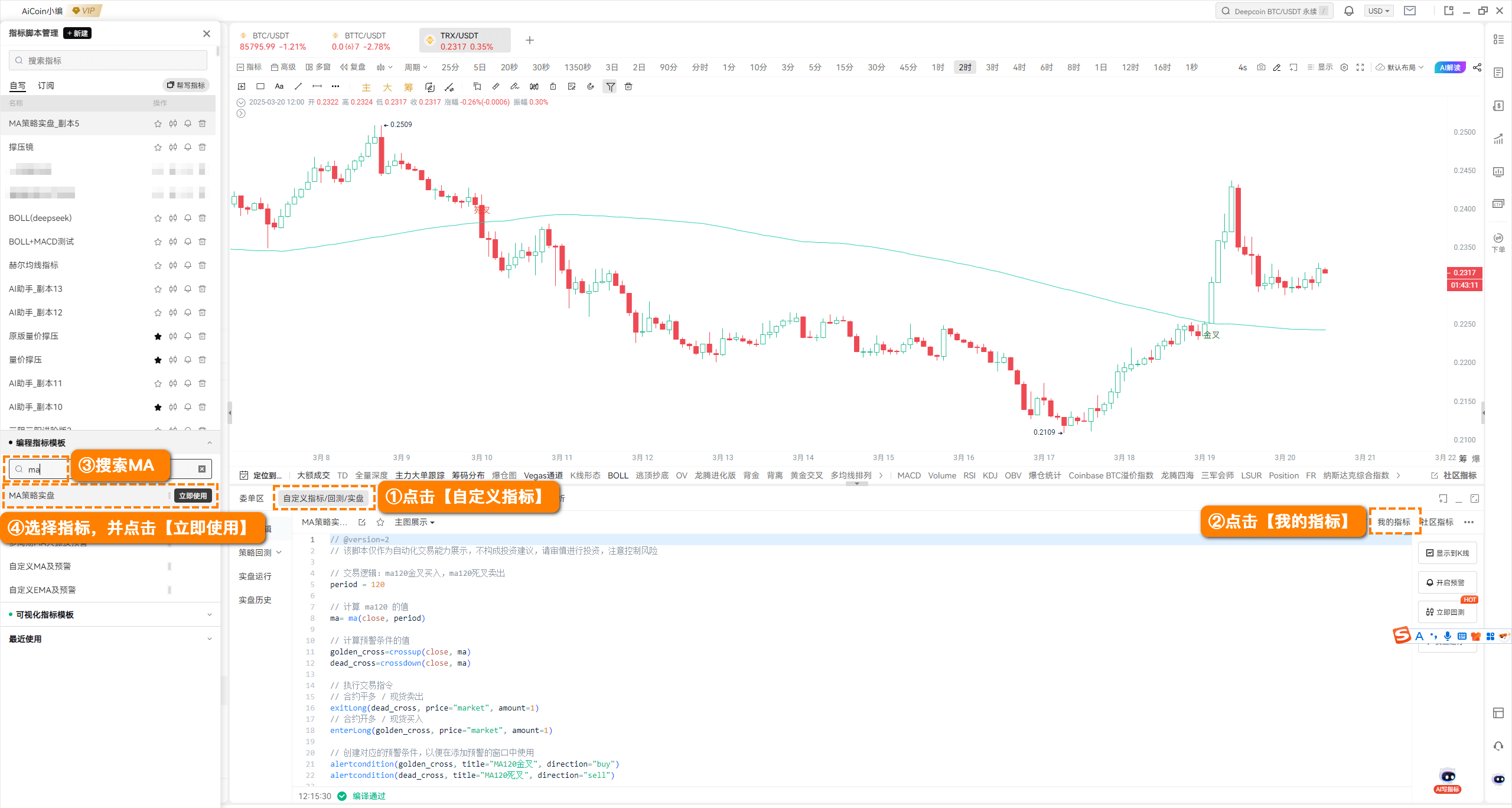
Taking MA120 as an example, let's break down how to modify it:
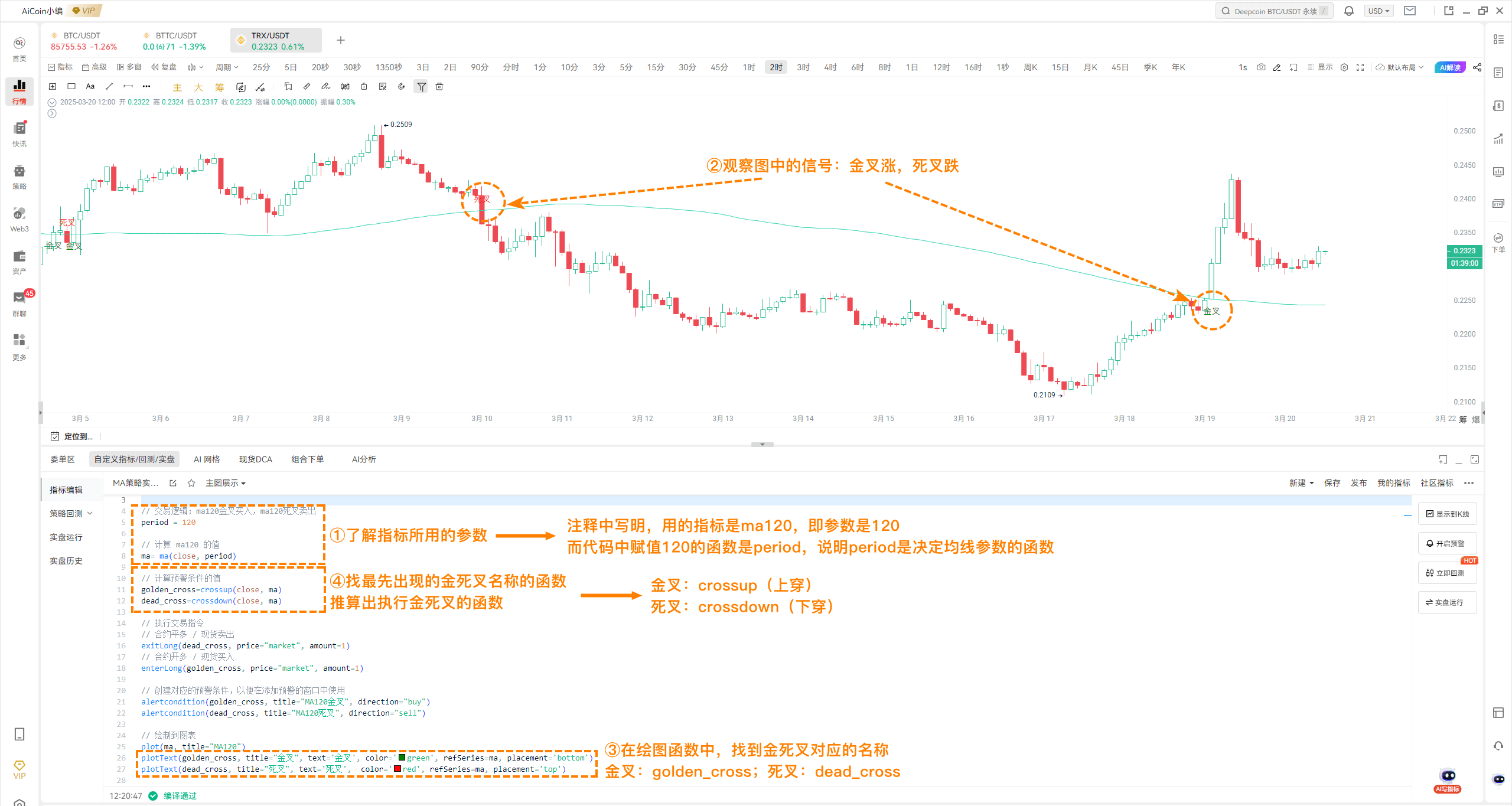
1. Understand indicator parameters.
In the template code, there is a 'period= 120', which is the period for MA120. If you want to change it to MA50, just change 120 to 50!
Tip: In the code, you will see some comments (Comment function: //), these comments will tell you the meaning of the parameters or functions used in the code.
2. Observe the significance of signals.
In the chart, you will see some annotated signals, such as the green golden cross indicating bullish, and the red dead cross indicating bearish. These signals are generated through drawing functions in the code.
Green 'Golden Cross' = Bullish (K-line crossing above MA120).
Red 'Dead Cross' = Bearish (K-line crossing below MA120).
3. Find the parameters for golden cross and dead cross.
In the code, find the parameters corresponding to golden cross and dead cross respectively:
Golden Cross: golden_cross
Dead Cross: dead_cross
4. Find the functions for executing golden cross and dead cross.
The execution functions for golden cross and dead cross are:
Golden Cross: crossup (cross above)
Dead Cross: crossdown (cross below)
In the single moving average indicator, crossup(close, ma) indicates the K-line price crossing above the moving average, while crossdown(close, ma) indicates the K-line price crossing below the moving average. Here, close represents the closing price of the K-line, and ma represents the moving average.
5. Understand trading and alert commands.
In the code, you will also see some trading and alert commands:
exitLong: Closing long contract / selling spot.
enterLong: Long contract / buying spot.
alertcondition: Alert command, used to pop up buy and sell signal reminders on APP or PC.
Step 4: Summary of commonly used functions, take it and don't thank me!
Through the above steps, we can summarize the usage of the following commonly used functions (first know which functions to use, and then understand the meaning of each parameter in detail later):
close: Real-time price (or closing price).
crossup: Achieve K-line crossing above the moving average, or dual moving averages, MACD, KDJ golden cross, etc.
crossdown: Achieve K-line crossing below the moving average, or dual moving averages, MACD, KDJ dead cross, etc.
plot: Used for drawing lines, such as drawing moving averages.
plottext: Special text signal, used to display 'Buy' and 'Sell'.
alertcondition: Special alert, used for pop-up reminders of buy and sell signals on APP or PC.
enterLong: Function for opening a trade, representing buying spot or going long.
exitLong: Function for closing a trade, representing selling spot or closing long.
Step 5: Practice leads to true knowledge!
Pick any method, such as using AI to generate an indicator for 'MA60 Golden Cross Buy, Dead Cross Sell', or modify a template for 'MA200 Trend Tracker'. Try running historical data, see the effect, and once you find the feeling, you are one step closer to creating your own exclusive strategy!
Remember, practice is the best teacher, try more, modify more, and you will become more proficient!
Custom indicator tutorial resources:
Custom indicator tutorial: https://www.aicoin.com/article/355031.html
Custom indicator alert tutorial: https://www.aicoin.com/article/355033.html
Custom indicator function documentation: https://www.aicoin.com/article/355796.html
Quick start for automated live trading: https://www.aicoin.com/article/373213.html
Content for reference only, if you have questions, feel free to join the [Indicator Enthusiasts] group for discussion~
Custom indicators: Customer service Yingying, Customer service KK.