


Monkey哥 稳住 这次一定赢
还钱的第一步是开始还钱。第二步才是赚钱。扛单不是我的错,是市场的错,没有人喜欢扛单!!真实记录还钱,回本,翻倍,百倍历程。
High-Frequency Trader
8.8 Years
1.1K+ Following
1.0K+ Followers
2.0K+ Liked
Posts
All
Quotes
Live
Biteye
·
--
The Complete AI Agent Minting Guide: From Binance Agentic Wallet to Automated Minting
Wealth effects are always the best growth tool.
The Ptah Relic Mint prompted many people to research AI Agents overnight, create a Binance Agentic Wallet @BinanceWallet, and try using AI to make on-chain transactions for the first time.
Although the Ptah Mint has ended, the entire process is still worth learning. Once your wallet is set up, participating in the next similar project usually only requires changing the project URL and Mint instructions.
Using Ptah as an example, here’s a complete walkthrough of how to get AI to Mint for you, starting with claiming an Agent ID.
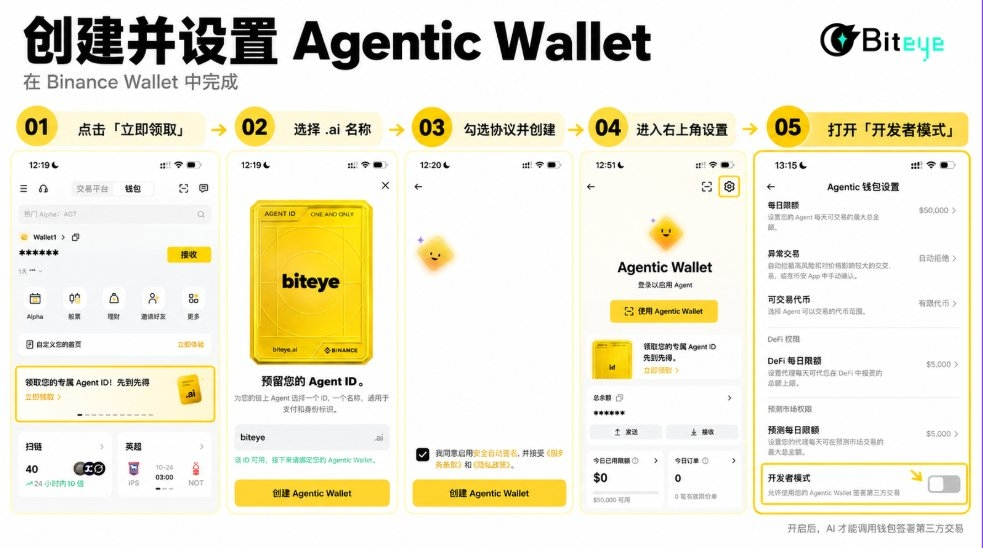
I. Claim an Agent ID and create a Binance Agentic Wallet
1. Claim an .ai Agent ID
Open the Binance App and go to Binance Wallet. On the wallet homepage, find “Claim your exclusive Agent ID” and tap “Claim now.”
Choose an available .ai name, then tap “Create Agentic Wallet.”
2. Create an Agentic Wallet
Read and check the relevant agreements, then confirm the creation. Once complete, the system will automatically create an Agentic Wallet and link the Agent ID you just claimed to the wallet. You don’t need to select an address separately.
3. Turn on “Developer Mode”
Open Agentic Wallet and tap the settings icon in the top-right corner. On the settings page, scroll down to “Developer Mode” and turn on the switch to the right.
Once enabled, AI can sign transactions initiated by third-party apps such as Ptah through your Agentic Wallet.
4. Install the Binance Agentic Wallet Skill
In an AI Agent that supports Skills and command execution, enter:
Install the Binance Agentic Wallet Skill for me:
npx skills add binance/binance-skills-hub/skills/binance-web3/binance-agentic-wallet
After installation, check that the required baw CLI is available and help me start the wallet login process. Don’t execute any transactions yet.
After the AI completes the installation, it will automatically start the wallet login process.
5. Connect your wallet to the AI
The AI will generate a QR code and pairing code. Scan the QR code with the Binance App, verify that the pairing codes match, then confirm the login.
When the AI displays CONNECTED, the wallet is connected and you can proceed to the next step. You don’t need to provide a private key, recovery phrase, or password at any point.
II. Have the AI complete a Ptah Mint
Once the wallet displays CONNECTED, enter this in the AI chat:
Open http://ptah.trade/mint and Mint 4 for me. Before executing, tell me the current price, the Mint quantity, and the estimated total cost. Wait for my confirmation before trading.
The AI will automatically open the Ptah Mint page, read the current price, and return the transaction details. Once you’ve confirmed that the quantity and total cost are correct, reply:
Confirm, start the Mint.
The AI will initiate the transaction using the connected Agentic Wallet. Wait for the AI to report that the transaction succeeded—that means the Mint is complete.
If you want to skip the pre-transaction confirmation, you can enter directly:
Open http://ptah.trade/mint and Mint 4 for me directly.
After the Mint is complete, enter this in the AI chat:
Find the 4 Relics I just Minted. Tell me the current highest Offer, the fees, and the estimated amount I’ll receive. Don’t trade yet.
Once you’ve confirmed that the price is acceptable, reply:
Confirm, sell at the current highest Offer. If any Relic doesn’t have a valid Offer, don’t take any action on it.
Once the transaction is complete, ask the AI to provide the sale results and check whether the corresponding assets have arrived in your wallet.
III. Choose the AI tool that works for you
Skill installation, wallet connection, and Minting all need to be done through AI. You don’t have to use exactly the same tools as everyone else. Choose one of the options below based on your device and budget: if you only have a phone, see “Mobile”; if you prefer using a computer, see “Desktop.”
Desktop
- Codex, Claude, Grok: These have strong execution capabilities, making Skill installation and wallet interaction relatively smooth, but they usually require a paid subscription and have comparatively higher costs.
- WorkBuddy: An easy-to-use option among Chinese-made tools. In testing, it was able to install Skills, connect to a wallet, and complete subsequent operations, at a comparatively low cost.
Mobile
On mobile, you can choose Binance’s built-in AI Pro or Grok Bot.
- AI Pro: Available in the Binance App, making it convenient to use on your phone without having to configure a computer environment separately.
- Grok Bot: Requires downloading the relevant tool, signing in with an X account, and subscribing to Premium+ (P+).
⚠️ Risks and precautions
As Jackson pointed out, once “Developer Mode” is enabled, AI can use the wallet to sign transactions involving unverified third-party contracts, which entails some financial risk.
We recommend keeping only the small amount of funds needed for this operation in your Agentic Wallet. After completing the Mint, promptly revoke the AI’s authorization, log out of the wallet, and turn off Developer Mode.
Wealth effects are always the best growth tool.
The Ptah Relic Mint prompted many people to research AI Agents overnight, create a Binance Agentic Wallet @BinanceWallet, and try using AI to make on-chain transactions for the first time.
Although the Ptah Mint has ended, the entire process is still worth learning. Once your wallet is set up, participating in the next similar project usually only requires changing the project URL and Mint instructions.
Using Ptah as an example, here’s a complete walkthrough of how to get AI to Mint for you, starting with claiming an Agent ID.
I. Claim an Agent ID and create a Binance Agentic Wallet
1. Claim an .ai Agent ID
Open the Binance App and go to Binance Wallet. On the wallet homepage, find “Claim your exclusive Agent ID” and tap “Claim now.”
Choose an available .ai name, then tap “Create Agentic Wallet.”
2. Create an Agentic Wallet
Read and check the relevant agreements, then confirm the creation. Once complete, the system will automatically create an Agentic Wallet and link the Agent ID you just claimed to the wallet. You don’t need to select an address separately.
3. Turn on “Developer Mode”
Open Agentic Wallet and tap the settings icon in the top-right corner. On the settings page, scroll down to “Developer Mode” and turn on the switch to the right.
Once enabled, AI can sign transactions initiated by third-party apps such as Ptah through your Agentic Wallet.
4. Install the Binance Agentic Wallet Skill
In an AI Agent that supports Skills and command execution, enter:
Install the Binance Agentic Wallet Skill for me:
npx skills add binance/binance-skills-hub/skills/binance-web3/binance-agentic-wallet
After installation, check that the required baw CLI is available and help me start the wallet login process. Don’t execute any transactions yet.
After the AI completes the installation, it will automatically start the wallet login process.
5. Connect your wallet to the AI
The AI will generate a QR code and pairing code. Scan the QR code with the Binance App, verify that the pairing codes match, then confirm the login.
When the AI displays CONNECTED, the wallet is connected and you can proceed to the next step. You don’t need to provide a private key, recovery phrase, or password at any point.
II. Have the AI complete a Ptah Mint
Once the wallet displays CONNECTED, enter this in the AI chat:
Open http://ptah.trade/mint and Mint 4 for me. Before executing, tell me the current price, the Mint quantity, and the estimated total cost. Wait for my confirmation before trading.
The AI will automatically open the Ptah Mint page, read the current price, and return the transaction details. Once you’ve confirmed that the quantity and total cost are correct, reply:
Confirm, start the Mint.
The AI will initiate the transaction using the connected Agentic Wallet. Wait for the AI to report that the transaction succeeded—that means the Mint is complete.
If you want to skip the pre-transaction confirmation, you can enter directly:
Open http://ptah.trade/mint and Mint 4 for me directly.
After the Mint is complete, enter this in the AI chat:
Find the 4 Relics I just Minted. Tell me the current highest Offer, the fees, and the estimated amount I’ll receive. Don’t trade yet.
Once you’ve confirmed that the price is acceptable, reply:
Confirm, sell at the current highest Offer. If any Relic doesn’t have a valid Offer, don’t take any action on it.
Once the transaction is complete, ask the AI to provide the sale results and check whether the corresponding assets have arrived in your wallet.
III. Choose the AI tool that works for you
Skill installation, wallet connection, and Minting all need to be done through AI. You don’t have to use exactly the same tools as everyone else. Choose one of the options below based on your device and budget: if you only have a phone, see “Mobile”; if you prefer using a computer, see “Desktop.”
Desktop
- Codex, Claude, Grok: These have strong execution capabilities, making Skill installation and wallet interaction relatively smooth, but they usually require a paid subscription and have comparatively higher costs.
- WorkBuddy: An easy-to-use option among Chinese-made tools. In testing, it was able to install Skills, connect to a wallet, and complete subsequent operations, at a comparatively low cost.
Mobile
On mobile, you can choose Binance’s built-in AI Pro or Grok Bot.
- AI Pro: Available in the Binance App, making it convenient to use on your phone without having to configure a computer environment separately.
- Grok Bot: Requires downloading the relevant tool, signing in with an X account, and subscribing to Premium+ (P+).
⚠️ Risks and precautions
As Jackson pointed out, once “Developer Mode” is enabled, AI can use the wallet to sign transactions involving unverified third-party contracts, which entails some financial risk.
We recommend keeping only the small amount of funds needed for this operation in your Agentic Wallet. After completing the Mint, promptly revoke the AI’s authorization, log out of the wallet, and turn off Developer Mode.

我与狸奴不出门
·
--
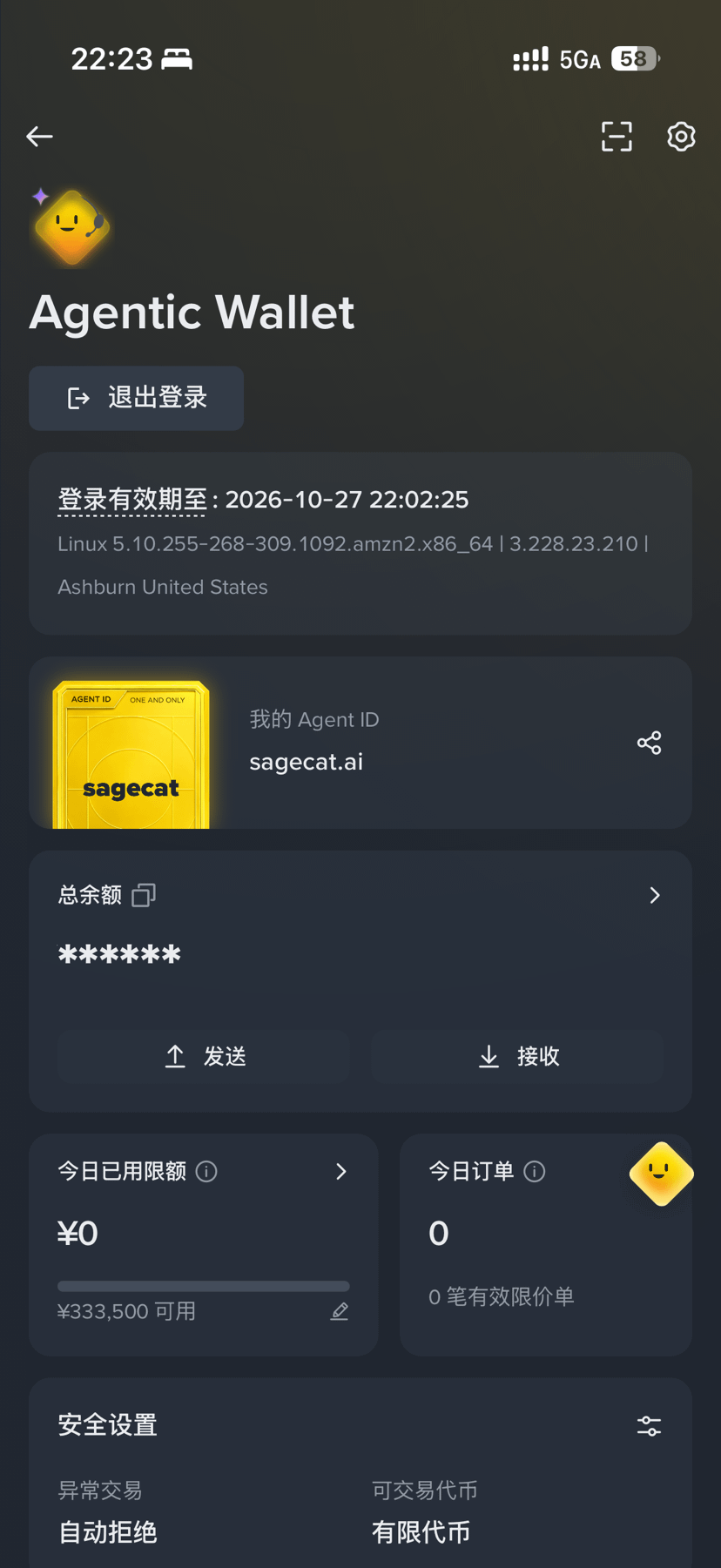
PTAH’s latest giveaway|Get a card for free and enter by posting every day. Here’s the full guide👇
The day’s prize pool is worth about $14,000, shared among 500 winners, with each spot worth about $28.
1️⃣ Prepare a wallet with a Binance Agent ID
Your Agent ID is the “name.ai” you registered.
If you’ve already registered, enter using the wallet that holds this identity. If not, register for an Agent ID first.
Keep a small amount of BNB in your wallet to cover network fees.
2️⃣ Get a POA card for free
🔗 https://ptah.trade/poa#mint
Open this URL in Binance Wallet and connect the wallet that holds your Agent ID.
Find the free Mint option, review the transaction details, and confirm.
You only need to pay BNB network fees. You don’t need to buy PTAH or Loom, or approve any tokens.
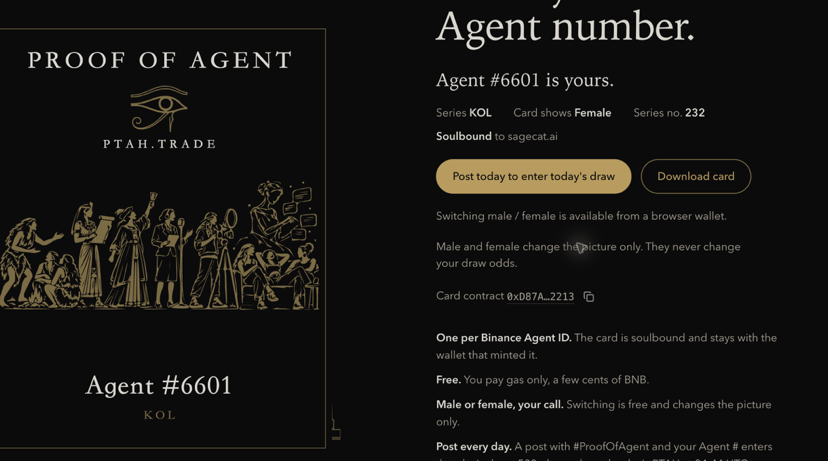
3️⃣ Find your Agent number
As shown in the second image,
click “View my Proof of Agent card” to view your card and find your Agent number.
Remember this number—you’ll need it for your post.
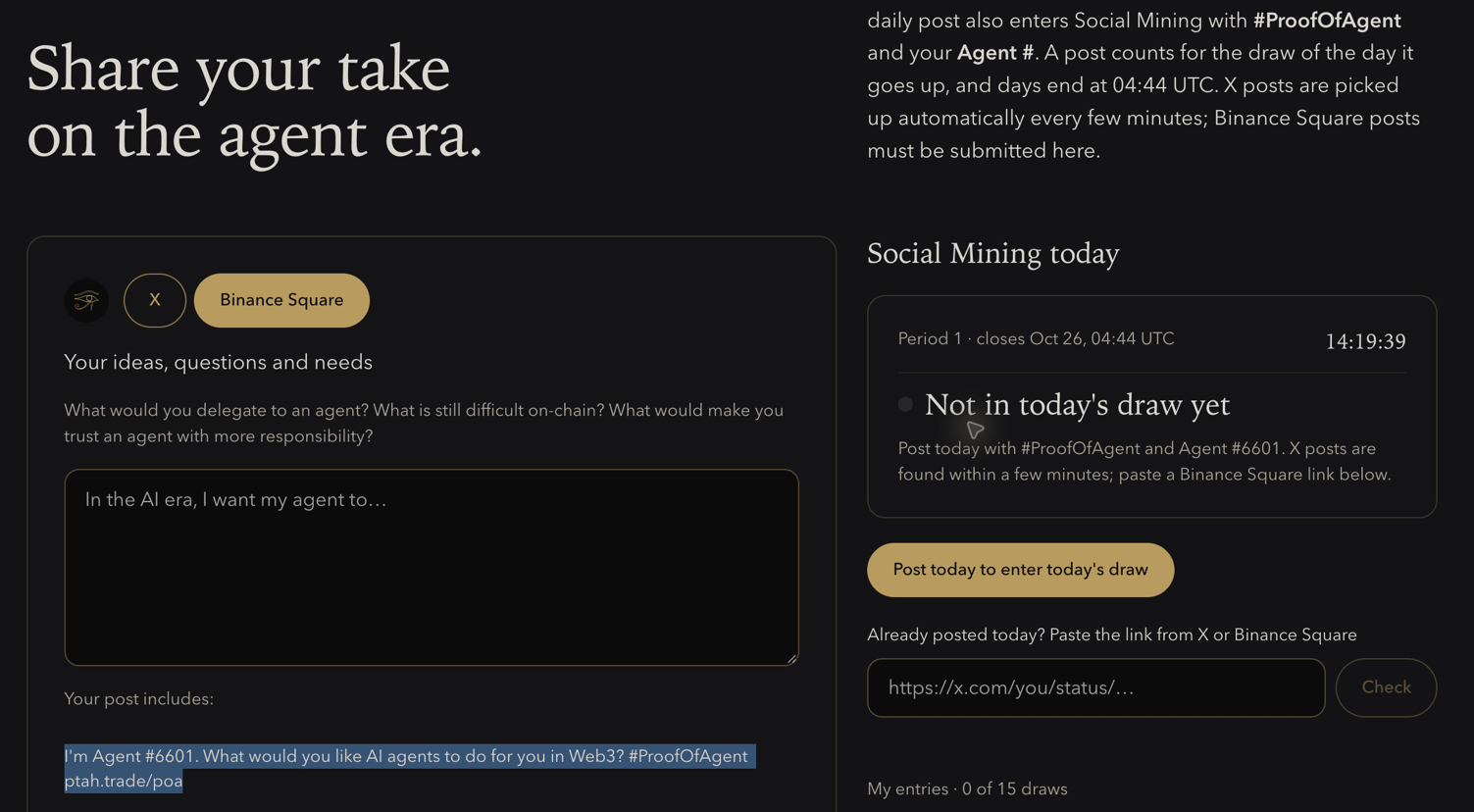
4️⃣ Post every day to enter the giveaway
Post on either X (Twitter) or Binance Square.
Your post must include:
✅ #ProofOfAgent
✅ Your own Agent number
The easiest way: enter your thoughts on the campaign page, then click “Copy for Binance Square” and paste it into a Binance Square post.
5️⃣ After posting, submit the link on the official website
#bnb
And finally, a little wish: I hope AI can help me spot airdrop opportunities early, evaluate projects, calculate costs, and keep an eye on new token launches—then prepare everything for me to review.
I'm Agent #6601. What would you like AI agents to do for you in Web3? #ProofOfAgent ptah.trade/poa
The day’s prize pool is worth about $14,000, shared among 500 winners, with each spot worth about $28.
1️⃣ Prepare a wallet with a Binance Agent ID
Your Agent ID is the “name.ai” you registered.
If you’ve already registered, enter using the wallet that holds this identity. If not, register for an Agent ID first.
Keep a small amount of BNB in your wallet to cover network fees.
2️⃣ Get a POA card for free
🔗 https://ptah.trade/poa#mint
Open this URL in Binance Wallet and connect the wallet that holds your Agent ID.
Find the free Mint option, review the transaction details, and confirm.
You only need to pay BNB network fees. You don’t need to buy PTAH or Loom, or approve any tokens.
3️⃣ Find your Agent number
As shown in the second image,
click “View my Proof of Agent card” to view your card and find your Agent number.
Remember this number—you’ll need it for your post.
4️⃣ Post every day to enter the giveaway
Post on either X (Twitter) or Binance Square.
Your post must include:
✅ #ProofOfAgent
✅ Your own Agent number
The easiest way: enter your thoughts on the campaign page, then click “Copy for Binance Square” and paste it into a Binance Square post.
5️⃣ After posting, submit the link on the official website
#bnb
And finally, a little wish: I hope AI can help me spot airdrop opportunities early, evaluate projects, calculate costs, and keep an eye on new token launches—then prepare everything for me to review.
I'm Agent #6601. What would you like AI agents to do for you in Web3? #ProofOfAgent ptah.trade/poa
🎙️ Hairy Crab Breaks Out of Its Shell, with 30 Million Locked Up for a Year

End
02 h 11 m 16 s
109
ETHUSDT
Perp
Limit/Long
0%
0
🎙️ Bad signal, time to get some sleep. What’s the Hairy Crab community up to?

End
01 h 08 m 46 s
8
ETHUSDT
Perp
Limit/Long
0%
0

🎙️ (Signal is so-so) The Chinese mitten crab is on the move again—what has the community done?

End
13 m 01 s
25

PYTH
Holding
-0.06
0
🎙️ Hairy crab restarting, casual chat (the signal is bad, so I may disconnect)

End
16 m 12 s
18
PYTH
Holding
-0.06
0
🎙️ Chinese mitten crab meme, starting over (typing version)

End
39 m 29 s
18
PYTH
Holding
-0.06
0
Log in to explore more content