

The market doesn't reward every correct prediction, sometimes it only rewards the trader who knows when to get out.
Most traders spend a lot of time finding the right entry, but knowing when to exit is just as important.
A position can move comfortably into profit and quickly turn against you, especially in a market that trades 24/7, reacts to major headlines and is often driven by sudden shifts in sentiment and liquidity.
Which is why having a clear exit strategy matters just as much as finding the right trade!
And this is where Stop Loss (SL) and Take Profit (TP) orders become important.
They allow traders to establish exit conditions in advance, helping them manage downside exposure and secure gains when the market reaches predetermined levels.
But there's another question worth considering...
Where should you actually set these orders and does the platform you choose affect how your trade is executed?
The answer depends on where your assets are held, the type of position you're trading, the execution mechanism available and how much control you want over your funds.
For assets held on centralized exchanges, the exchange's built-in order tools may be sufficient and for tokens held in self-custody wallets, certain DEXs offer trigger-based orders without requiring a traditional deposit.
And for leveraged positions, the TP/SL tools on your perpetuals platform are generally the most direct option.
Let's break down the differences...
1. UNDERSTANDING THE DIFFERENT TYPES OF STOP LOSS AND TAKE PROFIT ORDERS
Before comparing platforms, it's important to understand that not all exit orders work the same way.
The order type you choose can influence your execution price, whether your order gets filled and how much control you have when volatility increases.
Here are the main types:
STOP-MARKET
A stop-market order triggers a market sell once the asset reaches your chosen stop price, it is useful when exiting a position is more important than securing an exact execution price.
However, in volatile conditions, the final execution price can differ from your trigger.
STOP-LIMIT
A stop-limit order places a limit order once the stop price is reached, it offers greater control over the minimum selling price, but there's a trade-off
If the market moves too quickly beyond your limit, the order may never fill.
LIMIT (SELL)
A sell limit order allows you to specify the price at which you want to sell.
It's commonly used for take profit, allowing traders to establish a target above the current market price rather than waiting to close the position manually.
OCO (ONE-CANCELS-THE-OTHER)
OCO combines a take-profit order and a stop-loss order.
When one executes, the other is automatically cancelled, this is particularly useful when you want to establish both exit conditions without having to manage two separate orders manually.
TRAILING STOP
A trailing stop adjusts your stop level as the market moves in your favour, maintaining a specified distance from the highest price reached.
This can help protect accumulated gains while allowing a profitable position room to continue running.
One important distinction: No stop-loss mechanism guarantees your exact exit price, a stop-market order can execute below its trigger during a fast move, while a stop-limit order can remain unfilled altogether.
Understanding that difference is important before choosing where to manage your trades.
2. WHERE CAN YOU SET STOP LOSS AND TAKE PROFIT FOR CRYPTO?
The crypto market offers several ways to manage exits, but the available functionality differs across platforms.
The three main options are centralized exchanges, decentralized exchanges with trigger orders and perpetuals trading platforms.
CENTRALIZED EXCHANGES (CEXs)
Centralized exchanges generally offer the widest selection of order types.
For example, Binance supports stop-limit, stop-market, trailing stop and OCO orders on spot trading.
Coinbase advanced also supports stop-limit orders and bracket orders, which combine a take-profit limit with a stop trigger.
The advantage is convenience, if your assets are already on the exchange, you can establish your exit conditions without transferring them elsewhere.
However, there's a custody consideration.
Your assets remain under the exchange's custody while the order is waiting to execute, and you're limited to the trading pairs supported by that platform.
DECENTRALIZED EXCHANGES WITH TRIGGER ORDERS
For traders who prefer holding their assets in their own wallets, some DEXs offer another approach.
Rather than depositing tokens into a centralized exchange, you can sign orders from your wallet and let the protocol handle execution when the specified conditions are met.
Two examples worth knowing are:
KYBERSWAP (EVM CHAINS)
KyberSwap offers two relevant order types:
Stop Market: Triggers a token swap when the price falls to your specified level.
Limit Order: Allows you to sell at a specified rate above the current market price.
Your tokens remain in your wallet until the order executes.
JUPITER (SOLANA)
Jupiter's Limit Order V2 supports both take-profit and stop-loss functionality and the distinction is that your tokens sit in a program-owned vault while an order is active.
PERPETUALS TRADING PLATFORMS
For traders managing leveraged positions, the perpetuals platform is generally the most appropriate place to establish TP/SL orders.
Leverage introduces liquidation risk, which makes exit management particularly important.
Having stop-loss and take-profit functionality directly tied to your position allows you to manage those exits without having to coordinate separate spot orders.
3. WHAT SHOULD YOU COMPARE BEFORE CHOOSING WHERE TO SET YOUR ORDERS?
Having stop-loss and take-profit functionality isn't enough on its own but the real difference often comes down to how orders behave when market conditions become less predictable.
There are four things worth paying attention to :
CUSTODY: DO YOU NEED TO MOVE YOUR FUNDS?
"I don't want to move my funds just to protect them."
This is where custody comes into play.
With centralized exchanges, you generally need to deposit your assets before setting an order, and the exchange holds them while the order waits to execute.
A wallet-based DEX order offers a different approach, which means you can sign an order directly from your wallet without first transferring your tokens to an exchange.
For traders who prefer self-custody, this is an important distinction.
TRIGGER PRICE: WHAT ACTUALLY ACTIVATES YOUR ORDER?
"A quick wick triggered my stop, and then the price bounced back."
Pay attention to the price source used to trigger your order.
Some platforms use the last traded price, while others rely on an oracle price or mark price and this matters because a brief price spike on one market can trigger an order even when the broader market hasn't moved as much.
Using an oracle or mark price can reduce exposure to isolated price movements, although no trigger mechanism eliminates market risk entirely.
EXECUTION: WHAT HAPPENS WHEN LIQUIDITY IS LOW?
"My stop triggered, but the sale went through far below my expected price."
This is an execution and liquidity issue.
Triggering an order doesn't automatically guarantee that the transaction will execute at your stop price.
Once triggered, the order still needs sufficient liquidity to complete the swap.
Check what happens when the expected execution conditions aren't available..
Does the platform retry?
Does it place a limit order?
Does it cancel the transaction?
On KyberSwap Stop Market, you can set Max Slippage to define the minimum acceptable amount you want to receive.
If the swap cannot meet that condition, the order shows a Retrying status instead of executing at a worse rate.
This gives you an additional layer of control over execution..
FEES: HOW MUCH DOES EXECUTION ACTUALLY COST?
"The fees took a bigger share of my trade than I expected."
Fees are another detail that's easy to overlook, particularly when dealing with smaller positions.
On many platforms, creating a stop-loss or take-profit order doesn't incur a fee immediately.
You typically pay when the order executes, although the exact fee structure depends on the platform.
On KyberSwap Stop Market, the fee ranges from 0.015% to 1% and covers both the KyberSwap fee and network gas.
There's also a minimum fee per chain, so it's worth checking the actual cost against the amount you're planning to sell.
A fee that looks small in percentage terms can still take a noticeable portion of a smaller trade.
4. HOW TO SET STOP LOSS AND TAKE PROFIT ON KYBERSWAP
If you're holding EVM tokens in your own wallet and want to manage your exits without depositing your assets on a centralized exchange, KyberSwap provides two relevant tools.
You can use Stop Market for stop-loss orders and Limit Orders for take-profit targets.
Both work from your wallet, without requiring an exchange account or a deposit.
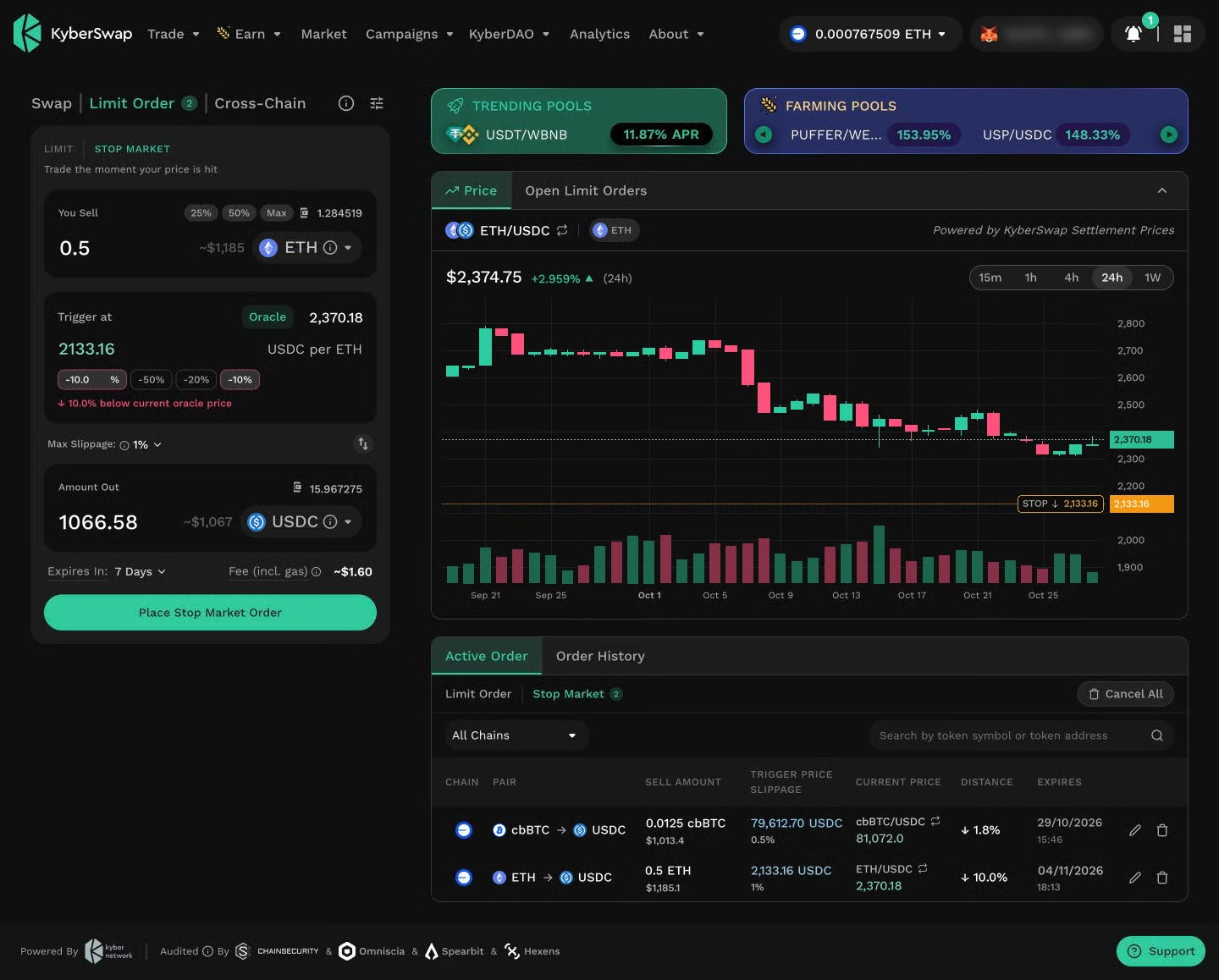
SETTING A STOP LOSS WITH STOP MARKET
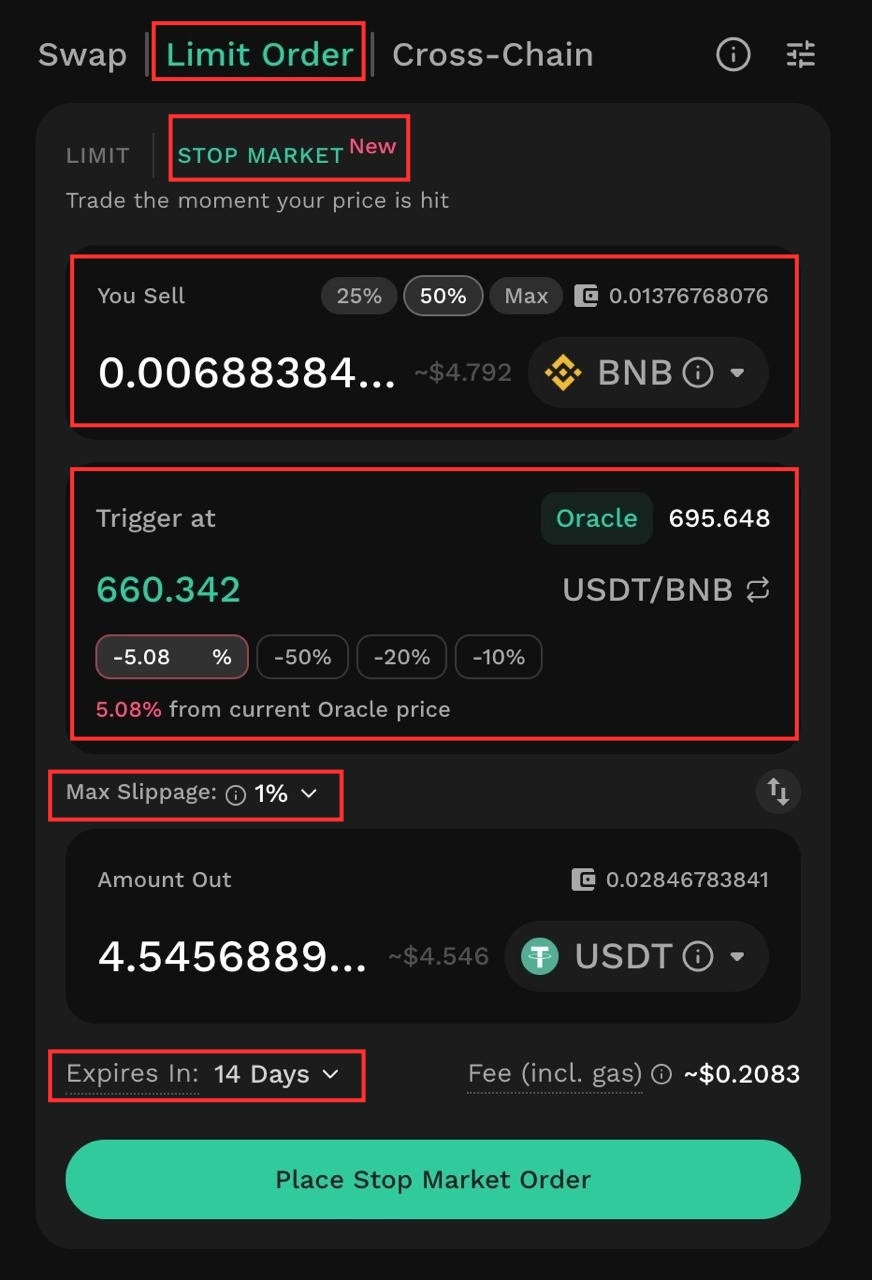
To create a Stop Market order:
Open the Limit Order tab on KyberSwap.
Switch the order type to Stop Market.
Enter the amount you want to sell under You Sell.
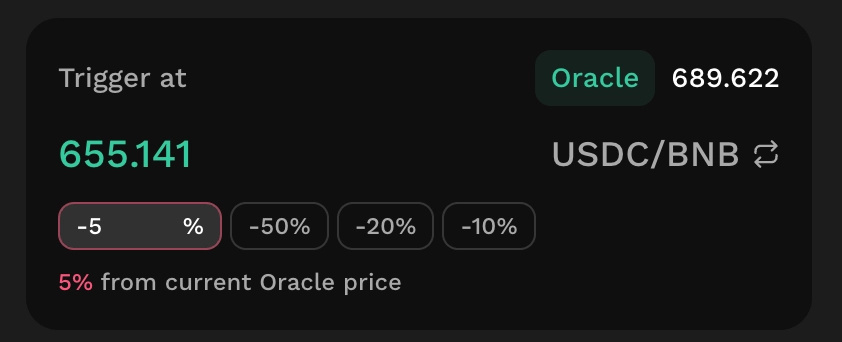
Set your Trigger price below the current market price.
Choose your preferred Max Slippage.
Set the order's expiration under Expires in.
Once the Chainlink Oracle price reaches your trigger level, the order attempts to execute through the @Kyber Network Aggregator.
The swap will only proceed if it can return at least your specified minimum amount under the slippage settings.
This means you can define both the price condition that activates your exit and the minimum amount you're willing to receive.
SETTING A TAKE PROFIT WITH LIMIT ORDER
For take-profit orders, the process is slightly different.
Create a sell Limit Order and specify your target price above the current market price, and once the market reaches the specified rate and the order can be filled, your tokens are sold at the target rate or better.
Another useful detail: signing a Limit Order doesn't require gas.
KEEPING YOUR STOP LOSS AND TAKE PROFIT ORDERS IN SYNC
This is something traders should pay particular attention to...
On KyberSwap, Stop Market and Limit Orders are separate orders, they aren't automatically linked through an OCO mechanism.
Also, Stop Market doesn't lock your tokens when you create an order.
For example, if your take-profit order executes first, the Stop Market order can still trigger later and sell whatever balance remains.
You therefore need to cancel the order you no longer need after one side of your exit strategy has been completed.
Cancelling a Stop Market order is free and takes effect immediately.
A Limit Order can also be cancelled through Gasless Cancel, without requiring gas.
There are two additional details to remember:
Stop Market is available for tokens with a valid Chainlink price feed.
Token approval is a separate on-chain action and requires gas once per token per chain.
5. WHICH PLATFORM FITS YOUR TRADING STYLE?
There's no single platform that's automatically the best choice for every trader.
The more practical approach is to look at where your assets are held, what you're trading and which order types you actually need.
IF YOU HOLD COINS ON A CENTRALIZED EXCHANGE
Use the exchange's built-in SL/TP functionality.
You won't need to transfer your funds, and major exchanges offer options such as OCO and trailing stops.
IF YOU HOLD EVM TOKENS IN YOUR OWN WALLET
The @Kyber Network is the best option worth considering.
You can use it’s Stop Market for stop losses and Limit Orders for take profit without depositing your tokens or creating an exchange account.
Execution routes through the KyberSwap Aggregator.
IF YOU HOLD SOLANA TOKENS IN YOUR OWN WALLET
Jupiter Limit Order V2 supports take-profit and stop-loss functionality, including trailing stop-loss features.
IF YOU TRADE WITH LEVERAGE
Use the TP/SL functionality available on your perpetuals platform and this also allows you to manage exits directly against your leveraged position.
IF YOU SPECIFICALLY NEED OCO OR TRAILING STOPS
Consider a centralized exchange or Jupiter, depending on your assets and requirements.
KyberSwap Stop Market and Limit Orders are separate orders, so you'll need to manage and cancel them individually.
6. FREQUENTLY ASKED QUESTIONS
DOES A STOP LOSS GUARANTEE YOUR EXIT PRICE?
No.
A stop loss determines the price at which an order is triggered, not necessarily the exact price at which the trade will execute.
In a fast-moving market, a stop-market order can fill below your trigger price because of slippage and available liquidity.
A stop-limit order gives you more control over the execution price, but there's always a possibility that the order won't fill if the market moves beyond your limit.
WHAT IS AN OCO ORDER?
OCO stands for One Cancels the Other.
It's an order type that combines a take-profit target and a stop-loss level.
When one order executes, the other is automatically cancelled which is very useful for traders who want to define both exit conditions without manually managing two separate orders.
KyberSwap doesn't currently offer OCO functionality, so you'll need to cancel the remaining order yourself after one executes.
CAN YOU SET A TRAILING STOP ON A DEX?
Yes, some decentralized exchanges support trailing stop functionality.
For example, Jupiter's Limit Order V2 offers trailing stop-loss functionality on Solana.
KyberSwap doesn't currently offer a dedicated trailing stop order.
However, you can edit your Stop Market order for free and manually raise your trigger as the market moves in your favour.
7. CHOOSING WHERE TO PROTECT YOUR TRADE
Ultimately, the best place to set stop loss and take profit depends on where your funds are held and how you prefer to manage your positions.
If your assets are already on a centralized exchange and you need features such as OCO or trailing stops, using the exchange's existing tools is usually the simplest route.
Just remember the custody implications while your orders are active, if you're trading with leverage, your perpetuals platform's built-in TP/SL tools are generally the most direct option.
But if you're holding EVM tokens in your own wallet, you don't necessarily need to move them to a centralized exchange just to establish an exit strategy.
You can set your stop loss using KyberSwap Stop Market, create a take-profit target with a Limit Order and let execution route through the KyberSwap Aggregator.
The bigger lesson is that managing a position shouldn't start only when the market moves against you.
In a market where liquidity, volatility and sentiment can change quickly, your exit strategy deserves the same attention as your entry.
Know your exit levels ⇢ Understand how your orders execute ⇢ Account for liquidity, slippage and fees before committing to a trade.
Your entry gets you into the market while your exit strategy helps determine what you actually walk away with..
READY TO MANAGE YOUR NEXT POSITION?
Explore @Kyber Network and set up your first Stop Market order today..