

#tutorial
tutorial
274,791 مشاهدات
743 يقومون بالنقاش
رائج
جديد
·
--
استخدام بطاقة Binance الخاصة بك سهل للغاية! 💳 تعمل مع رصيد محفظتك (مثل Spot). ما عليك سوى ترتيب العملات المشفرة حسب الأولوية، وسيتم تحويلها تلقائيًا عند الدفع. [1, 2]
مثال بسيط:
إذا وضعت USDT أولاً وBTC ثانيًا:
☕ عند شراء قهوة، سيتم خصم المبلغ من USDT.
📉 إذا لم يعد لديك USDT، سيستخدم النظام BTC تلقائيًا. [1, 2, 3]
بدون بيع يدوي! 🚀
#Binance #BinanceCard #Crypto #Facil #Tutorial
استخدام بطاقة Binance الخاصة بك سهل للغاية! 💳 تعمل مع رصيد محفظتك (مثل Spot). ما عليك سوى ترتيب العملات المشفرة حسب الأولوية، وسيتم تحويلها تلقائيًا عند الدفع. [1, 2]
مثال بسيط:
إذا وضعت USDT أولاً وBTC ثانيًا:
☕ عند شراء قهوة، سيتم خصم المبلغ من USDT.
📉 إذا لم يعد لديك USDT، سيستخدم النظام BTC تلقائيًا. [1, 2, 3]
بدون بيع يدوي! 🚀
#Binance #BinanceCard #Crypto #Facil #Tutorial
مثال بسيط:
إذا وضعت USDT أولاً وBTC ثانيًا:
☕ عند شراء قهوة، سيتم خصم المبلغ من USDT.
📉 إذا لم يعد لديك USDT، سيستخدم النظام BTC تلقائيًا. [1, 2, 3]
بدون بيع يدوي! 🚀
#Binance #BinanceCard #Crypto #Facil #Tutorial
1
91

·
--
دليل خطوة بخطوة حول كيفية توصيل Binance Earn في ثلاث خطوات
إذا لم تستخدم أبدًا قسم الدخل السلبي، فإليك خوارزمية الخطوات:
افتح الشاشة الرئيسية في Binance وانتقل إلى قسم Earn، ثم Simple Earn.
ابحث في القائمة عن العملة المطلوبة (أنصح بالبدء بـ USDT) واختر نوع الشروط: مرن.
أدخل المبلغ الذي تريده، واطّلع على مؤشر APR الحسابي واضغط تأكيد.
ستبدأ الفوائد في التراكم من اليوم التالي. يمكنك إلغاء الاشتراك في أي وقت دون عمولات.
#Tutorial #BinanceEarn #CryptoGuide
دليل خطوة بخطوة حول كيفية توصيل Binance Earn في ثلاث خطوات
إذا لم تستخدم أبدًا قسم الدخل السلبي، فإليك خوارزمية الخطوات:
افتح الشاشة الرئيسية في Binance وانتقل إلى قسم Earn، ثم Simple Earn.
ابحث في القائمة عن العملة المطلوبة (أنصح بالبدء بـ USDT) واختر نوع الشروط: مرن.
أدخل المبلغ الذي تريده، واطّلع على مؤشر APR الحسابي واضغط تأكيد.
ستبدأ الفوائد في التراكم من اليوم التالي. يمكنك إلغاء الاشتراك في أي وقت دون عمولات.
#Tutorial #BinanceEarn #CryptoGuide
إذا لم تستخدم أبدًا قسم الدخل السلبي، فإليك خوارزمية الخطوات:
افتح الشاشة الرئيسية في Binance وانتقل إلى قسم Earn، ثم Simple Earn.
ابحث في القائمة عن العملة المطلوبة (أنصح بالبدء بـ USDT) واختر نوع الشروط: مرن.
أدخل المبلغ الذي تريده، واطّلع على مؤشر APR الحسابي واضغط تأكيد.
ستبدأ الفوائد في التراكم من اليوم التالي. يمكنك إلغاء الاشتراك في أي وقت دون عمولات.
#Tutorial #BinanceEarn #CryptoGuide
138
·
--
🚀 لماذا بدأ فجأة في الارتفاع TUT؟
لفت توكن Tutorial (TUT) انتباه السوق بشكل مفاجئ وبدأ يُظهر حركة صعودية ملحوظة.
Tutorial — هي منصة تعليمية Web3 مدعومة بالذكاء الاصطناعي تساعد المستخدمين على فهم سلسلة الكتل (بلوك تشين) والعملات المشفّرة وبيئة BNB Chain.
📈 لماذا قد ينمو TUT: • زادت الاهتمامات بـ AI + Crypto؛ • المشروع يعمل عند تقاطع التعليم وWeb3؛ • يمكن أن يدعم نمو النشاط حول BNB Chain الطلب؛ • بعد فترة طويلة من التذبذب/التجميع، يستطيع التوكن أن يحصل على دفعات قوية مع أحجام تداول أعلى.
لكن من المهم: ارتفاع السعر بحد ذاته لا يعني بعد بداية اتجاه طويل. قبل الدخول، من الأفضل مراقبة أحجام التداول، ومستويات المقاومة، ونشاط كبار حاملي التوكن.
👀 من الواضح أن TUT يستحق إضافته إلى قائمة المتابعة.$TUT
{spot}(TUTUSDT)
#Tutorial #BNBChain #Binance
🚀 لماذا بدأ فجأة في الارتفاع TUT؟
لفت توكن Tutorial (TUT) انتباه السوق بشكل مفاجئ وبدأ يُظهر حركة صعودية ملحوظة.
Tutorial — هي منصة تعليمية Web3 مدعومة بالذكاء الاصطناعي تساعد المستخدمين على فهم سلسلة الكتل (بلوك تشين) والعملات المشفّرة وبيئة BNB Chain.
📈 لماذا قد ينمو TUT: • زادت الاهتمامات بـ AI + Crypto؛ • المشروع يعمل عند تقاطع التعليم وWeb3؛ • يمكن أن يدعم نمو النشاط حول BNB Chain الطلب؛ • بعد فترة طويلة من التذبذب/التجميع، يستطيع التوكن أن يحصل على دفعات قوية مع أحجام تداول أعلى.
لكن من المهم: ارتفاع السعر بحد ذاته لا يعني بعد بداية اتجاه طويل. قبل الدخول، من الأفضل مراقبة أحجام التداول، ومستويات المقاومة، ونشاط كبار حاملي التوكن.
👀 من الواضح أن TUT يستحق إضافته إلى قائمة المتابعة.$TUT
#Tutorial #BNBChain #Binance
لفت توكن Tutorial (TUT) انتباه السوق بشكل مفاجئ وبدأ يُظهر حركة صعودية ملحوظة.
Tutorial — هي منصة تعليمية Web3 مدعومة بالذكاء الاصطناعي تساعد المستخدمين على فهم سلسلة الكتل (بلوك تشين) والعملات المشفّرة وبيئة BNB Chain.
📈 لماذا قد ينمو TUT: • زادت الاهتمامات بـ AI + Crypto؛ • المشروع يعمل عند تقاطع التعليم وWeb3؛ • يمكن أن يدعم نمو النشاط حول BNB Chain الطلب؛ • بعد فترة طويلة من التذبذب/التجميع، يستطيع التوكن أن يحصل على دفعات قوية مع أحجام تداول أعلى.
لكن من المهم: ارتفاع السعر بحد ذاته لا يعني بعد بداية اتجاه طويل. قبل الدخول، من الأفضل مراقبة أحجام التداول، ومستويات المقاومة، ونشاط كبار حاملي التوكن.
👀 من الواضح أن TUT يستحق إضافته إلى قائمة المتابعة.$TUT
#Tutorial #BNBChain #Binance

1
246

·
--
صاعد
تمّ التحقق
#aTutorial ($TUT ) هي منصة تعليمية مدعومة بالذكاء الاصطناعي ورمز منفعة مبني على سلسلة BNB ($BNB ). نشأت من برنامج تعليمي فيروسي للمطورين حول إنشاء الرموز، ثم تطورت من سردية عملة ميم إلى منظومة تعليمية نشطة في Web3.
$TUT تُستخدم لتحفيز المبدعين، ومكافأة المستخدمين على إنجازات التعلم، وفتح الميزات المميزة، والمشاركة في حوكمة البروتوكول. تتوسع المنظومة عبر شراكات تعليمية (مثل مبادرات تعلم DeFi) ومجالات تعلم مخصصة مثل .learn.
لماذا TUT تحت المراقبة
خارطة طريق المنفعة بالذكاء الاصطناعي: مع تجاوز جذورها المبكرة كعملة ميم، يواصل تطبيق Tutorial التعليمي المباشر المدعوم بالذكاء الاصطناعي التوسع على سلسلة BNB. يستهدف التحديث القادم للربع الثالث من معلم الذكاء الاصطناعي المحسن أدوات دراسة متعددة التنسيقات (فيديو، صوت، مستندات) لتعزيز الاحتفاظ العضوي بالمستخدمين.
المشتقات والسيولة: أدت إدراجات العقود الدائمة الأخيرة وعمليات الدمج مع الرافعة المالية إلى جعل TUT مفضلة عالية الحساسية، مما يدفع إلى تقلبات حادة في دفتر الأوامر على المدى القصير.
توسع المنظومة: التحديثات المخطط لها للربع الرابع—بما في ذلك ملفات المبدعين، ودعم اللغات المتعددة، ومكتبات الدراسة المشتركة—تضع TUT عند تقاطع تعليم Web3 وDeAI.
ما رأيك في Tutorial؟ أخبرنا في التعليقات. 👇
#Tutorial #DeAI #AIPowered
#Write2Earn
#aTutorial ($TUT ) هي منصة تعليمية مدعومة بالذكاء الاصطناعي ورمز منفعة مبني على سلسلة BNB ($BNB ). نشأت من برنامج تعليمي فيروسي للمطورين حول إنشاء الرموز، ثم تطورت من سردية عملة ميم إلى منظومة تعليمية نشطة في Web3.
$TUT تُستخدم لتحفيز المبدعين، ومكافأة المستخدمين على إنجازات التعلم، وفتح الميزات المميزة، والمشاركة في حوكمة البروتوكول. تتوسع المنظومة عبر شراكات تعليمية (مثل مبادرات تعلم DeFi) ومجالات تعلم مخصصة مثل .learn.
لماذا TUT تحت المراقبة
خارطة طريق المنفعة بالذكاء الاصطناعي: مع تجاوز جذورها المبكرة كعملة ميم، يواصل تطبيق Tutorial التعليمي المباشر المدعوم بالذكاء الاصطناعي التوسع على سلسلة BNB. يستهدف التحديث القادم للربع الثالث من معلم الذكاء الاصطناعي المحسن أدوات دراسة متعددة التنسيقات (فيديو، صوت، مستندات) لتعزيز الاحتفاظ العضوي بالمستخدمين.
المشتقات والسيولة: أدت إدراجات العقود الدائمة الأخيرة وعمليات الدمج مع الرافعة المالية إلى جعل TUT مفضلة عالية الحساسية، مما يدفع إلى تقلبات حادة في دفتر الأوامر على المدى القصير.
توسع المنظومة: التحديثات المخطط لها للربع الرابع—بما في ذلك ملفات المبدعين، ودعم اللغات المتعددة، ومكتبات الدراسة المشتركة—تضع TUT عند تقاطع تعليم Web3 وDeAI.
ما رأيك في Tutorial؟ أخبرنا في التعليقات. 👇
#Tutorial #DeAI #AIPowered
#Write2Earn
$TUT تُستخدم لتحفيز المبدعين، ومكافأة المستخدمين على إنجازات التعلم، وفتح الميزات المميزة، والمشاركة في حوكمة البروتوكول. تتوسع المنظومة عبر شراكات تعليمية (مثل مبادرات تعلم DeFi) ومجالات تعلم مخصصة مثل .learn.
لماذا TUT تحت المراقبة
خارطة طريق المنفعة بالذكاء الاصطناعي: مع تجاوز جذورها المبكرة كعملة ميم، يواصل تطبيق Tutorial التعليمي المباشر المدعوم بالذكاء الاصطناعي التوسع على سلسلة BNB. يستهدف التحديث القادم للربع الثالث من معلم الذكاء الاصطناعي المحسن أدوات دراسة متعددة التنسيقات (فيديو، صوت، مستندات) لتعزيز الاحتفاظ العضوي بالمستخدمين.
المشتقات والسيولة: أدت إدراجات العقود الدائمة الأخيرة وعمليات الدمج مع الرافعة المالية إلى جعل TUT مفضلة عالية الحساسية، مما يدفع إلى تقلبات حادة في دفتر الأوامر على المدى القصير.
توسع المنظومة: التحديثات المخطط لها للربع الرابع—بما في ذلك ملفات المبدعين، ودعم اللغات المتعددة، ومكتبات الدراسة المشتركة—تضع TUT عند تقاطع تعليم Web3 وDeAI.
ما رأيك في Tutorial؟ أخبرنا في التعليقات. 👇
#Tutorial #DeAI #AIPowered
#Write2Earn
201
لا وقت كافي لتحليل الرسوم البيانية؟ 📊 كيف اخترت متداول محترف على Binance ونتائجي. ¡Evيمكنك كسب المال على Binance من خلال نشر المحتوى عبر Binance Square، الشبكة الاجتماعية الرسمية للمنصة التي تكافئ منشئي المحتوى.
1. اختر برنامج تحقيق الدخل الخاص بك
مربح على Binance Square: احصل على عمولات مباشرة. تستلم حتى 5% من استرداد العمولة في تداولاتك عندما يقوم قرائك بالتداول بعد قراءة منشورك.
تلميحات من Binance Square: فعّل الخيار حتى يتمكن متابعوك من إرسال العملات الرقمية مباشرة إليك إذا كانت تحليلاتك مفيدة لهم.
لا وقت كافي لتحليل الرسوم البيانية؟ 📊 كيف اخترت متداول محترف على Binance ونتائجي. ¡Ev
يمكنك كسب المال على Binance من خلال نشر المحتوى عبر Binance Square، الشبكة الاجتماعية الرسمية للمنصة التي تكافئ منشئي المحتوى.
1. اختر برنامج تحقيق الدخل الخاص بك
مربح على Binance Square: احصل على عمولات مباشرة. تستلم حتى 5% من استرداد العمولة في تداولاتك عندما يقوم قرائك بالتداول بعد قراءة منشورك.
تلميحات من Binance Square: فعّل الخيار حتى يتمكن متابعوك من إرسال العملات الرقمية مباشرة إليك إذا كانت تحليلاتك مفيدة لهم.
1. اختر برنامج تحقيق الدخل الخاص بك
مربح على Binance Square: احصل على عمولات مباشرة. تستلم حتى 5% من استرداد العمولة في تداولاتك عندما يقوم قرائك بالتداول بعد قراءة منشورك.
تلميحات من Binance Square: فعّل الخيار حتى يتمكن متابعوك من إرسال العملات الرقمية مباشرة إليك إذا كانت تحليلاتك مفيدة لهم.
130

·
--
$TUT @tutorialtoken #Tutorial
نشأت الفكرة في البداية من فيديو/دروس تعليمية حول كيفية إطلاق توكن على سلسلة BNB Chain، أنشأها المطورون في عام 2023 (لا يزال ضمن الـ testnet).
ثم تم إحياء توكن “OG” الخاص بالـ testnet على الشبكة الرئيسية (mainnet)، وأصبح مشروعًا يُعرف اليوم باسم Tutorial ($TUT).
حدث زخم كبير في مارس 2025، عندما $TUT دخل إلى بورصات كبرى (بما في ذلك Binance) وانتشر كـ “ميم كوين تعليمي”.
وفي بعض المصادر، تُسجَّل تاريخ البداية الرسمي تقريبًا في 7–8 فبراير 2025 (تاريخ الإطلاق/الـmainnet الذي يُستخدم كثيرًا كمرجع لعمر المشروع).
المؤسس والرئيس التنفيذي: Yerasyl Amanbek (@YerasylAmanbek).
ملفه: مهندس بلوكتشين، ومُعلّم، و“Tech Martian” في BNB Chain؛ وقد شارك سابقًا في مشاريع بنية تحتية للبلوكتشين (مثل Entangle L1) وفي برامج تعليم البلوكتشين بالتعاون مع Binance Academy.
{future}(TUTUSDT)
$TUT @tutorialtoken #Tutorial
نشأت الفكرة في البداية من فيديو/دروس تعليمية حول كيفية إطلاق توكن على سلسلة BNB Chain، أنشأها المطورون في عام 2023 (لا يزال ضمن الـ testnet).
ثم تم إحياء توكن “OG” الخاص بالـ testnet على الشبكة الرئيسية (mainnet)، وأصبح مشروعًا يُعرف اليوم باسم Tutorial ($TUT ).
حدث زخم كبير في مارس 2025، عندما $TUT دخل إلى بورصات كبرى (بما في ذلك Binance) وانتشر كـ “ميم كوين تعليمي”.
وفي بعض المصادر، تُسجَّل تاريخ البداية الرسمي تقريبًا في 7–8 فبراير 2025 (تاريخ الإطلاق/الـmainnet الذي يُستخدم كثيرًا كمرجع لعمر المشروع).
المؤسس والرئيس التنفيذي: Yerasyl Amanbek (@YerasylAmanbek).
ملفه: مهندس بلوكتشين، ومُعلّم، و“Tech Martian” في BNB Chain؛ وقد شارك سابقًا في مشاريع بنية تحتية للبلوكتشين (مثل Entangle L1) وفي برامج تعليم البلوكتشين بالتعاون مع Binance Academy.
نشأت الفكرة في البداية من فيديو/دروس تعليمية حول كيفية إطلاق توكن على سلسلة BNB Chain، أنشأها المطورون في عام 2023 (لا يزال ضمن الـ testnet).
ثم تم إحياء توكن “OG” الخاص بالـ testnet على الشبكة الرئيسية (mainnet)، وأصبح مشروعًا يُعرف اليوم باسم Tutorial ($TUT ).
حدث زخم كبير في مارس 2025، عندما $TUT دخل إلى بورصات كبرى (بما في ذلك Binance) وانتشر كـ “ميم كوين تعليمي”.
وفي بعض المصادر، تُسجَّل تاريخ البداية الرسمي تقريبًا في 7–8 فبراير 2025 (تاريخ الإطلاق/الـmainnet الذي يُستخدم كثيرًا كمرجع لعمر المشروع).
المؤسس والرئيس التنفيذي: Yerasyl Amanbek (@YerasylAmanbek).
ملفه: مهندس بلوكتشين، ومُعلّم، و“Tech Martian” في BNB Chain؛ وقد شارك سابقًا في مشاريع بنية تحتية للبلوكتشين (مثل Entangle L1) وفي برامج تعليم البلوكتشين بالتعاون مع Binance Academy.
1
318


·
--
مقالة
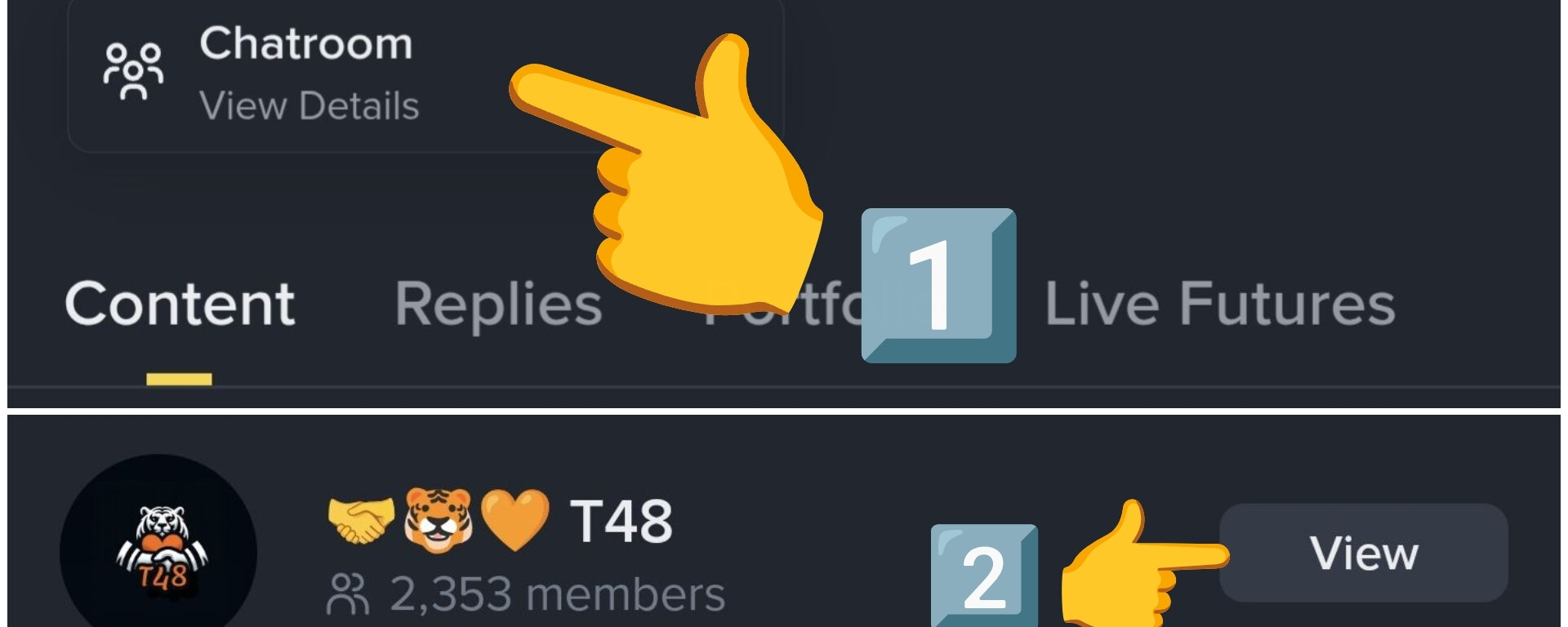
كيف تنضم إلى مجموعة منشئك المفضل؟1️⃣ : عندما ترى منشورًا من منشئك المفضل، اضغط على صورة ملفه الشخصي..
• في هذا المثال سأستخدم ملف @CRYPTOMECHANIC ، وهو واحد من أفضل صناع المحتوى في مجال التداول..
2️⃣ : بمجرد أن ترى ملفه الشخصي، يوجد أسفل السيرة الذاتية زر ( غرفة الدردشة )، اضغط عليه ..
3️⃣ بعد ذلك اضغط على الزر الأصفر للانضمام ...
• كما ترون الأمر بسيط جدًا، ويمكن تلخيصه في خطوتين..
1️⃣ انتقل إلى الملف الشخصي وانقر على غرفة الدردشة
كيف تنضم إلى مجموعة منشئك المفضل؟
1️⃣ : عندما ترى منشورًا من منشئك المفضل، اضغط على صورة ملفه الشخصي..
• في هذا المثال سأستخدم ملف @CRYPTO MECHANIC ، وهو واحد من أفضل صناع المحتوى في مجال التداول..
2️⃣ : بمجرد أن ترى ملفه الشخصي، يوجد أسفل السيرة الذاتية زر ( غرفة الدردشة )، اضغط عليه ..
3️⃣ بعد ذلك اضغط على الزر الأصفر للانضمام ...
• كما ترون الأمر بسيط جدًا، ويمكن تلخيصه في خطوتين..
1️⃣ انتقل إلى الملف الشخصي وانقر على غرفة الدردشة
• في هذا المثال سأستخدم ملف @CRYPTO MECHANIC ، وهو واحد من أفضل صناع المحتوى في مجال التداول..
2️⃣ : بمجرد أن ترى ملفه الشخصي، يوجد أسفل السيرة الذاتية زر ( غرفة الدردشة )، اضغط عليه ..
3️⃣ بعد ذلك اضغط على الزر الأصفر للانضمام ...
• كما ترون الأمر بسيط جدًا، ويمكن تلخيصه في خطوتين..
1️⃣ انتقل إلى الملف الشخصي وانقر على غرفة الدردشة
5
7
787
·
--
مقالة
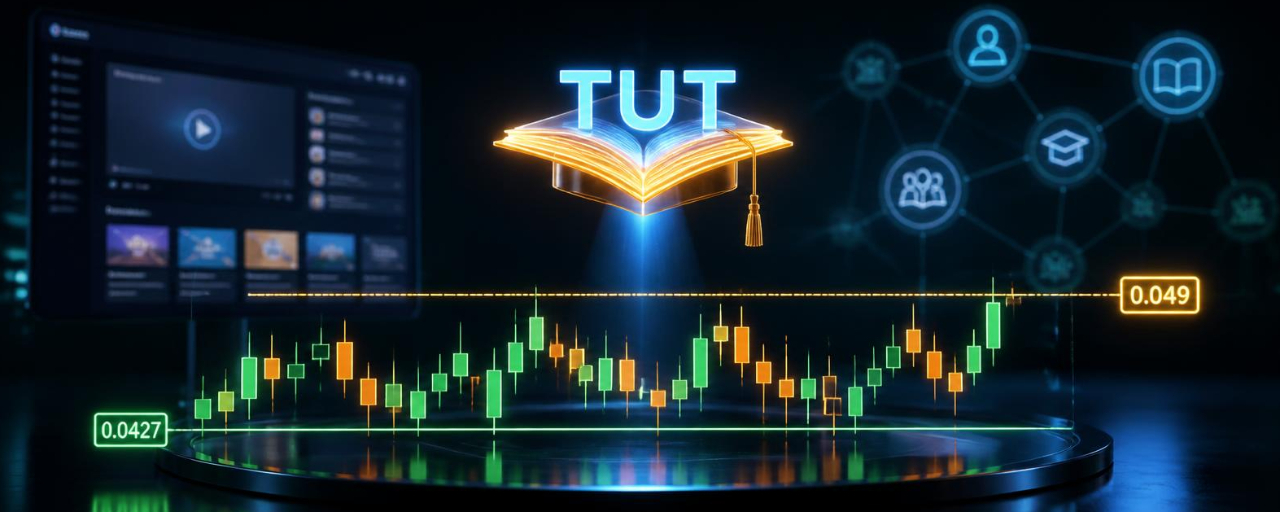
تراجع Tutorial بشكل طفيف—هل هذا هدوء قبل العاصفة؟في سوق مليء بمضخات متفجرة وعمليات بيع مؤلمة، هناك توكن واحد يقوم بأعماله بهدوء. $TUT ، التوكن الأصلي لـ Tutorial، هابط بنسبة 1.5% متواضعة خلال آخر 24 ساعة، ويتداول حاليًا عند 0.0469 دولار. قد لا تبدو خسارة 1.5% مثيرة، لكن القصة وراء حركة السعر تستحق الانتباه. 👀
لنحلل ما الذي يحدث مع Tutorial وما الذي قد يعنيه ذلك للمتداولين. 👇
ماذا يحدث مع TUT؟ 🤔
تجميع محكم: بعد صعود ضخم من أدنى مستوياته، كان TUT يتداول ضمن نطاق ضيق نسبيًا بين 0.0427 و0.0491 دولار. غالبًا ما يسبق هذا التجميع حركة كبيرة في أي اتجاه.
تراجع Tutorial بشكل طفيف—هل هذا هدوء قبل العاصفة؟
في سوق مليء بمضخات متفجرة وعمليات بيع مؤلمة، هناك توكن واحد يقوم بأعماله بهدوء. $TUT ، التوكن الأصلي لـ Tutorial، هابط بنسبة 1.5% متواضعة خلال آخر 24 ساعة، ويتداول حاليًا عند 0.0469 دولار. قد لا تبدو خسارة 1.5% مثيرة، لكن القصة وراء حركة السعر تستحق الانتباه. 👀
لنحلل ما الذي يحدث مع Tutorial وما الذي قد يعنيه ذلك للمتداولين. 👇
ماذا يحدث مع TUT؟ 🤔
تجميع محكم: بعد صعود ضخم من أدنى مستوياته، كان TUT يتداول ضمن نطاق ضيق نسبيًا بين 0.0427 و0.0491 دولار. غالبًا ما يسبق هذا التجميع حركة كبيرة في أي اتجاه.
لنحلل ما الذي يحدث مع Tutorial وما الذي قد يعنيه ذلك للمتداولين. 👇
ماذا يحدث مع TUT؟ 🤔
تجميع محكم: بعد صعود ضخم من أدنى مستوياته، كان TUT يتداول ضمن نطاق ضيق نسبيًا بين 0.0427 و0.0491 دولار. غالبًا ما يسبق هذا التجميع حركة كبيرة في أي اتجاه.
193

·
--
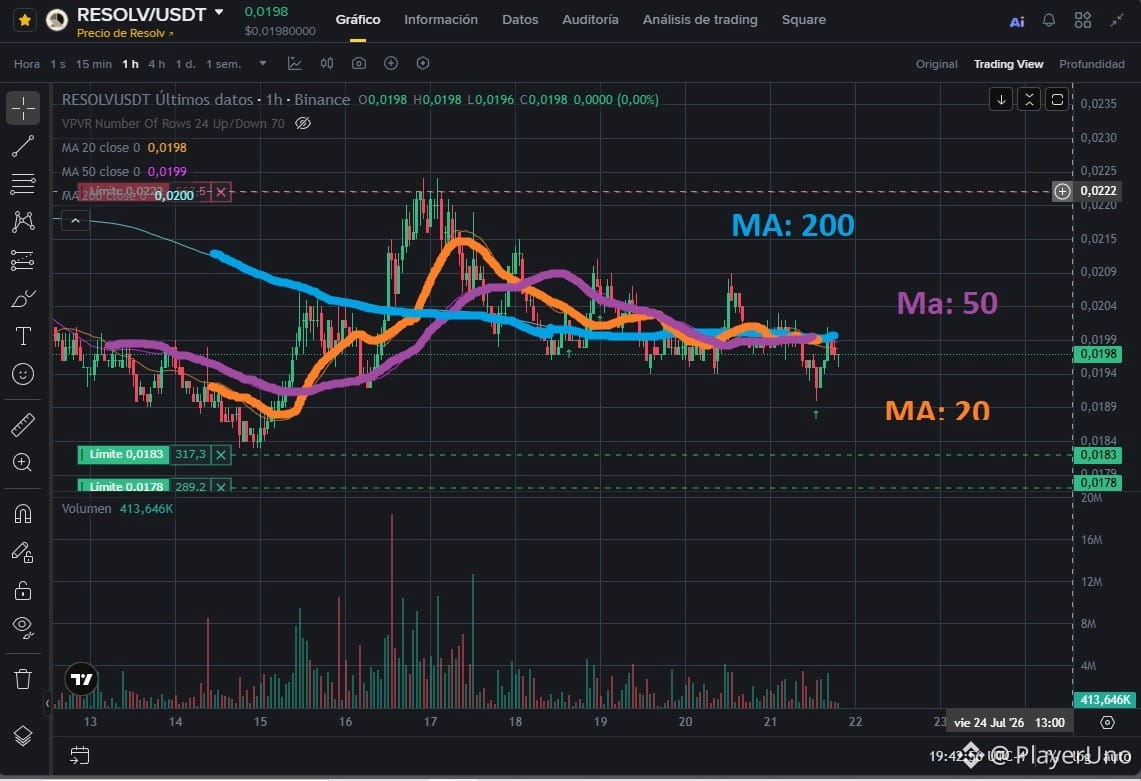
هذه معلومات لمساعدة المبتدئين. إنها طريقة بسيطة لمعرفة ما إذا كانت كريبتو استثمارًا جيدًا في السبوت باستخدام مؤشر واحد فقط.
افتح إعدادات المؤشرات وغيّر قيم MA (المتوسطات المتحركة): واحدًا إلى 200، وآخر إلى 50، وآخر إلى 20.
كلما كانت MA للـ 200 أكثر تسطحًا، وكانت MA للـ 50 والـ 20 متقاربين معًا بشكل مضغوط، وكانت الشموع أو الأعمدة فوق هذا التجمع قليلًا، فهذا يعني أن الكريبتو في حالة تجميع، وأن الأمر مسألة وقت حتى تنفجر للأعلى، ما لم يحدث حدث سلبي.
تحقق من الرسم البياني في أطر زمنية 1D و4H و1H. يجب أن يظهر على الأقل في نطاقين من هذه الأطر الزمنية وضع انضغاط/ضغط مشابه لكي تكون أكثر أمانًا.
بتطبيق هذه الطريقة تقلل المخاطر وتزيد احتمالات تحقيق أرباح. بالطبع يجب مراعاة مؤشرات أخرى أيضًا، لكن هذا وحده يمكنه مساعدتك على اكتشاف استثمار جيد من النظرة الأولى.
حظًا موفقًا أيها المتداول
الرسم البياني:$RESOLV 1H
#Tutorial #nuevosenbinance
هذه معلومات لمساعدة المبتدئين. إنها طريقة بسيطة لمعرفة ما إذا كانت كريبتو استثمارًا جيدًا في السبوت باستخدام مؤشر واحد فقط.
افتح إعدادات المؤشرات وغيّر قيم MA (المتوسطات المتحركة): واحدًا إلى 200، وآخر إلى 50، وآخر إلى 20.
كلما كانت MA للـ 200 أكثر تسطحًا، وكانت MA للـ 50 والـ 20 متقاربين معًا بشكل مضغوط، وكانت الشموع أو الأعمدة فوق هذا التجمع قليلًا، فهذا يعني أن الكريبتو في حالة تجميع، وأن الأمر مسألة وقت حتى تنفجر للأعلى، ما لم يحدث حدث سلبي.
تحقق من الرسم البياني في أطر زمنية 1D و4H و1H. يجب أن يظهر على الأقل في نطاقين من هذه الأطر الزمنية وضع انضغاط/ضغط مشابه لكي تكون أكثر أمانًا.
بتطبيق هذه الطريقة تقلل المخاطر وتزيد احتمالات تحقيق أرباح. بالطبع يجب مراعاة مؤشرات أخرى أيضًا، لكن هذا وحده يمكنه مساعدتك على اكتشاف استثمار جيد من النظرة الأولى.
حظًا موفقًا أيها المتداول
الرسم البياني:$RESOLV 1H
#Tutorial #nuevosenbinance
افتح إعدادات المؤشرات وغيّر قيم MA (المتوسطات المتحركة): واحدًا إلى 200، وآخر إلى 50، وآخر إلى 20.
كلما كانت MA للـ 200 أكثر تسطحًا، وكانت MA للـ 50 والـ 20 متقاربين معًا بشكل مضغوط، وكانت الشموع أو الأعمدة فوق هذا التجمع قليلًا، فهذا يعني أن الكريبتو في حالة تجميع، وأن الأمر مسألة وقت حتى تنفجر للأعلى، ما لم يحدث حدث سلبي.
تحقق من الرسم البياني في أطر زمنية 1D و4H و1H. يجب أن يظهر على الأقل في نطاقين من هذه الأطر الزمنية وضع انضغاط/ضغط مشابه لكي تكون أكثر أمانًا.
بتطبيق هذه الطريقة تقلل المخاطر وتزيد احتمالات تحقيق أرباح. بالطبع يجب مراعاة مؤشرات أخرى أيضًا، لكن هذا وحده يمكنه مساعدتك على اكتشاف استثمار جيد من النظرة الأولى.
حظًا موفقًا أيها المتداول
الرسم البياني:$RESOLV 1H
#Tutorial #nuevosenbinance
242

·
--
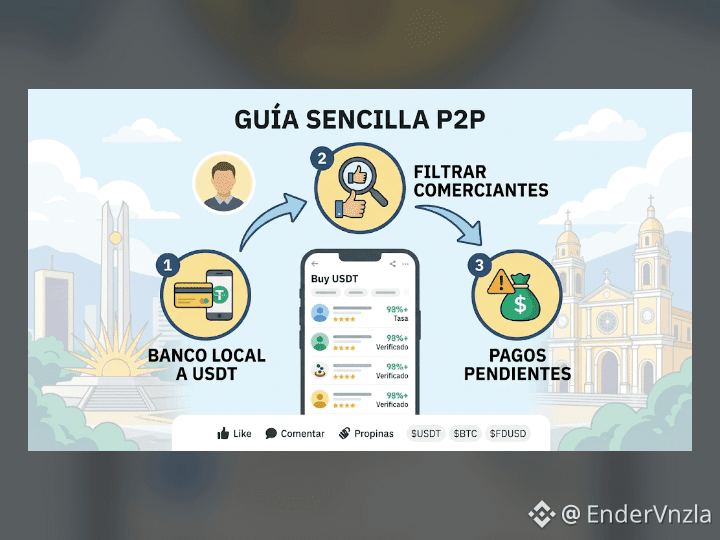
دليل سريع: أتقن P2P في 3 خطوات بسيطة 💡
شراء وبيع العملات المشفرة عبر بنكك المحلي لا يجب أن يكون معقدًا أو محفوفًا بالمخاطر. لضمان أن تكون عملياتك آمنة 100%، عليك فقط مراعاة ثلاثة جوانب رئيسية:
1️⃣ بنك محلي إلى USDT: اختر خيار الدفع بالعملة المحلية لديك وقم بإجراء التحويل مباشرة من حسابك المصرفي الشخصي.
2️⃣ فلترة التجار الموثوقين: ابحث دائمًا عن البائعين الذين لديهم شارة التحقق ومعدل إتمام أعلى من 95%.
3️⃣ إدارة الدفعات المعلّقة: إذا تأخر الدفع أو حدث أي عارض، فلا تُطلق الأموال حتى تتحقق من وصول المبلغ إلى حسابك أو تفتح استئنافًا في الوقت المناسب.
📌 تعلّم كيفية حماية أموالك والتداول براحة تامة.
$USDT #BTC $FDUSD $USDC #p2p #aprenden #tutorial
دليل سريع: أتقن P2P في 3 خطوات بسيطة 💡
شراء وبيع العملات المشفرة عبر بنكك المحلي لا يجب أن يكون معقدًا أو محفوفًا بالمخاطر. لضمان أن تكون عملياتك آمنة 100%، عليك فقط مراعاة ثلاثة جوانب رئيسية:
1️⃣ بنك محلي إلى USDT: اختر خيار الدفع بالعملة المحلية لديك وقم بإجراء التحويل مباشرة من حسابك المصرفي الشخصي.
2️⃣ فلترة التجار الموثوقين: ابحث دائمًا عن البائعين الذين لديهم شارة التحقق ومعدل إتمام أعلى من 95%.
3️⃣ إدارة الدفعات المعلّقة: إذا تأخر الدفع أو حدث أي عارض، فلا تُطلق الأموال حتى تتحقق من وصول المبلغ إلى حسابك أو تفتح استئنافًا في الوقت المناسب.
📌 تعلّم كيفية حماية أموالك والتداول براحة تامة.
$USDT #BTC $FDUSD $USDC #p2p #aprenden #tutorial
شراء وبيع العملات المشفرة عبر بنكك المحلي لا يجب أن يكون معقدًا أو محفوفًا بالمخاطر. لضمان أن تكون عملياتك آمنة 100%، عليك فقط مراعاة ثلاثة جوانب رئيسية:
1️⃣ بنك محلي إلى USDT: اختر خيار الدفع بالعملة المحلية لديك وقم بإجراء التحويل مباشرة من حسابك المصرفي الشخصي.
2️⃣ فلترة التجار الموثوقين: ابحث دائمًا عن البائعين الذين لديهم شارة التحقق ومعدل إتمام أعلى من 95%.
3️⃣ إدارة الدفعات المعلّقة: إذا تأخر الدفع أو حدث أي عارض، فلا تُطلق الأموال حتى تتحقق من وصول المبلغ إلى حسابك أو تفتح استئنافًا في الوقت المناسب.
📌 تعلّم كيفية حماية أموالك والتداول براحة تامة.
$USDT #BTC $FDUSD $USDC #p2p #aprenden #tutorial
1
272
·
--
الرؤية والرسالة (جوهر المشروع) @tutorialtoken
الرؤية الأساسية: جعل تعلم البلوكشين/الكريبتو سهلاً، ومُعدياً (فيرال)، ومستخدماً فعلاً، مع نهج “ميم + تعليم + ذكاء اصطناعي”.
الرسالة الرئيسية يمكن تلخيصها كالتالي:
بناء نظام بيئي يربط بين البرامج التعليمية (التعليم)، والذكاء الاصطناعي (وكيل/مُعلّم ذكي)، والمجتمع.
توفير محتوى وأدوات تعلم عملية (إعداد المحفظة، التداول على DEX، العقود الذكية، إلخ) خصيصاً لنظام BNB Chain البيئي.
استخدام الرمز $TUT كحافز (مكافآت)، للوصول إلى الميزات، ولعناصر الحوكمة داخل المنصة.
#Tutorial
#SaylorHintsStrategyBitcoinBuy
#BIP110SoftForkAttemptBegins
#SouthKoreaProposesLooseningCryptoShareholderRules
{spot}(TUTUSDT)
الرؤية والرسالة (جوهر المشروع) @tutorialtoken
الرؤية الأساسية: جعل تعلم البلوكشين/الكريبتو سهلاً، ومُعدياً (فيرال)، ومستخدماً فعلاً، مع نهج “ميم + تعليم + ذكاء اصطناعي”.
الرسالة الرئيسية يمكن تلخيصها كالتالي:
بناء نظام بيئي يربط بين البرامج التعليمية (التعليم)، والذكاء الاصطناعي (وكيل/مُعلّم ذكي)، والمجتمع.
توفير محتوى وأدوات تعلم عملية (إعداد المحفظة، التداول على DEX، العقود الذكية، إلخ) خصيصاً لنظام BNB Chain البيئي.
استخدام الرمز $TUT كحافز (مكافآت)، للوصول إلى الميزات، ولعناصر الحوكمة داخل المنصة.
#Tutorial
#SaylorHintsStrategyBitcoinBuy
#BIP110SoftForkAttemptBegins
#SouthKoreaProposesLooseningCryptoShareholderRules
الرؤية الأساسية: جعل تعلم البلوكشين/الكريبتو سهلاً، ومُعدياً (فيرال)، ومستخدماً فعلاً، مع نهج “ميم + تعليم + ذكاء اصطناعي”.
الرسالة الرئيسية يمكن تلخيصها كالتالي:
بناء نظام بيئي يربط بين البرامج التعليمية (التعليم)، والذكاء الاصطناعي (وكيل/مُعلّم ذكي)، والمجتمع.
توفير محتوى وأدوات تعلم عملية (إعداد المحفظة، التداول على DEX، العقود الذكية، إلخ) خصيصاً لنظام BNB Chain البيئي.
استخدام الرمز $TUT كحافز (مكافآت)، للوصول إلى الميزات، ولعناصر الحوكمة داخل المنصة.
#Tutorial
#SaylorHintsStrategyBitcoinBuy
#BIP110SoftForkAttemptBegins
#SouthKoreaProposesLooseningCryptoShareholderRules

1
348

·
--
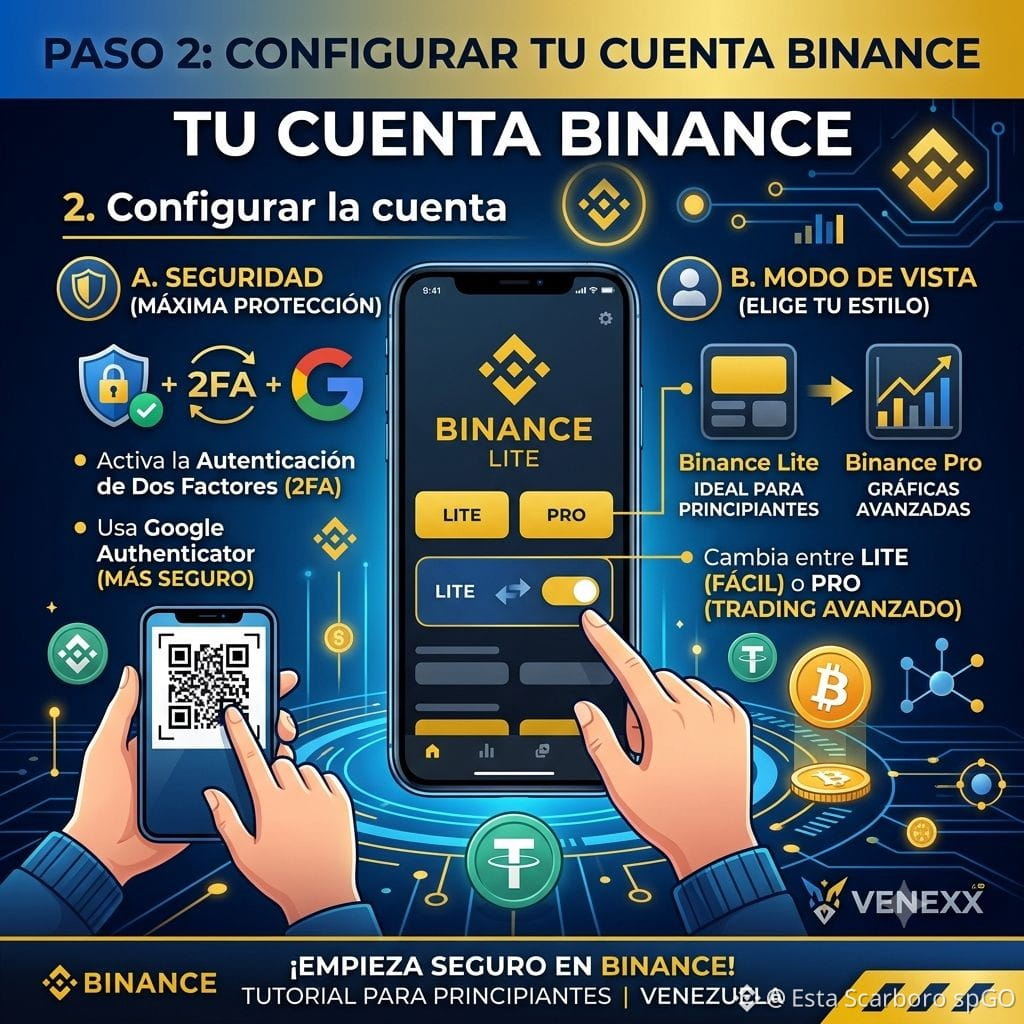
*تكوين الحساب*
داخل Binance، اضبط هذين الجانبين الرئيسيين في ملفك الشخصي:
الأمان: فعّل التحقق بخطوتين (2FA). أنصحك باستخدام تطبيق Google Authenticator بدلًا من الرسائل القصيرة (SMS) فقط لزيادة الأمان.
الوضع: لدى Binance عرضان: "Binance Lite" (مناسب للمبتدئين، أزرار كبيرة ووظائف أساسية) و "Binance Pro" (عندما تريد استخدام الرسوم البيانية المتقدمة والتداول). يمكنك التبديل بينهما في إعدادات ملفك الشخصي.
#BinanceToOpenXLMSpotTrading
#Tutorial
*تكوين الحساب*
داخل Binance، اضبط هذين الجانبين الرئيسيين في ملفك الشخصي:
الأمان: فعّل التحقق بخطوتين (2FA). أنصحك باستخدام تطبيق Google Authenticator بدلًا من الرسائل القصيرة (SMS) فقط لزيادة الأمان.
الوضع: لدى Binance عرضان: "Binance Lite" (مناسب للمبتدئين، أزرار كبيرة ووظائف أساسية) و "Binance Pro" (عندما تريد استخدام الرسوم البيانية المتقدمة والتداول). يمكنك التبديل بينهما في إعدادات ملفك الشخصي.
#BinanceToOpenXLMSpotTrading
#Tutorial
داخل Binance، اضبط هذين الجانبين الرئيسيين في ملفك الشخصي:
الأمان: فعّل التحقق بخطوتين (2FA). أنصحك باستخدام تطبيق Google Authenticator بدلًا من الرسائل القصيرة (SMS) فقط لزيادة الأمان.
الوضع: لدى Binance عرضان: "Binance Lite" (مناسب للمبتدئين، أزرار كبيرة ووظائف أساسية) و "Binance Pro" (عندما تريد استخدام الرسوم البيانية المتقدمة والتداول). يمكنك التبديل بينهما في إعدادات ملفك الشخصي.
#BinanceToOpenXLMSpotTrading
#Tutorial
202
·
--
مقالة
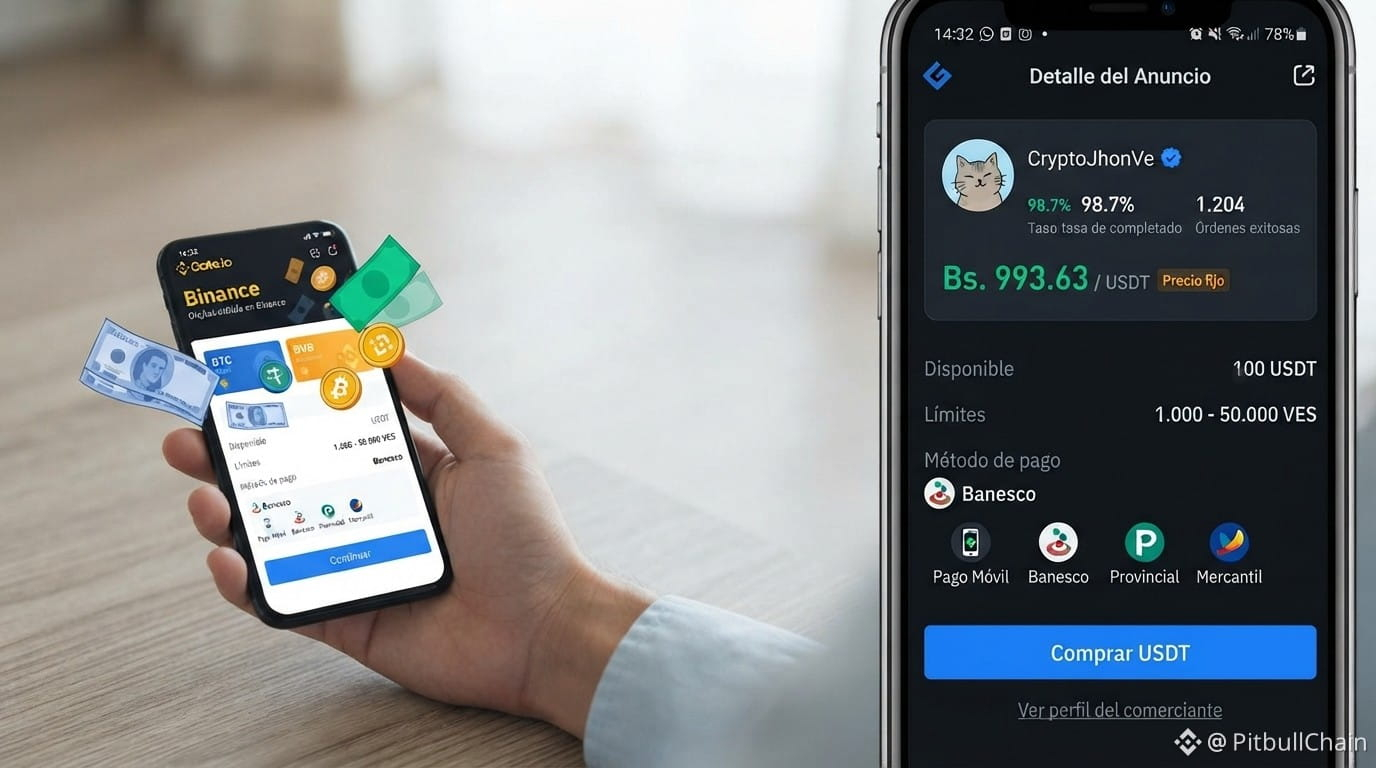
تعلم كيفية قراءة سبريد P2P اليوم: 4.03% في 3 خطوات🚨 انتبه! ارتفع سبريد P2P إلى 4.03% (38.50 بوليفيانو/بس). هذا يعني أن شراء وبيع USDT يحقق فرقًا كبيرًا. في درسي اليوم أشرح لك كيفية قراءة هذه المعلومة حتى لا تقع في الفخاخ.
أولًا: قارن بين أقل سعر شراء وأعلى سعر بيع. اليوم شراء USDT عند 993.63 والبيع عند 955.13. هذه الفجوة هي تكلفة الفرصة الخاصة بك.
ثانيًا: راجع العروض النشطة البالغ عددها 295 عرضًا. كم منها لديها مبالغ مناسبة وبنوك موثوقة؟ لا تكتفِ بالذهاب إلى العرض الأول.
ثالثًا: استخدم حاسبة Binance لتحديد سعرِك الحقيقي. إذا كان الفارق (السبريد) مرتفعًا، انتظر أو تفاوض مع مزوّدي خدمات موثّقين.
تعلم كيفية قراءة سبريد P2P اليوم: 4.03% في 3 خطوات
🚨 انتبه! ارتفع سبريد P2P إلى 4.03% (38.50 بوليفيانو/بس). هذا يعني أن شراء وبيع USDT يحقق فرقًا كبيرًا. في درسي اليوم أشرح لك كيفية قراءة هذه المعلومة حتى لا تقع في الفخاخ.
أولًا: قارن بين أقل سعر شراء وأعلى سعر بيع. اليوم شراء USDT عند 993.63 والبيع عند 955.13. هذه الفجوة هي تكلفة الفرصة الخاصة بك.
ثانيًا: راجع العروض النشطة البالغ عددها 295 عرضًا. كم منها لديها مبالغ مناسبة وبنوك موثوقة؟ لا تكتفِ بالذهاب إلى العرض الأول.
ثالثًا: استخدم حاسبة Binance لتحديد سعرِك الحقيقي. إذا كان الفارق (السبريد) مرتفعًا، انتظر أو تفاوض مع مزوّدي خدمات موثّقين.
أولًا: قارن بين أقل سعر شراء وأعلى سعر بيع. اليوم شراء USDT عند 993.63 والبيع عند 955.13. هذه الفجوة هي تكلفة الفرصة الخاصة بك.
ثانيًا: راجع العروض النشطة البالغ عددها 295 عرضًا. كم منها لديها مبالغ مناسبة وبنوك موثوقة؟ لا تكتفِ بالذهاب إلى العرض الأول.
ثالثًا: استخدم حاسبة Binance لتحديد سعرِك الحقيقي. إذا كان الفارق (السبريد) مرتفعًا، انتظر أو تفاوض مع مزوّدي خدمات موثّقين.
63

·
--
صاعد
الدرس 1: كيفية إنشاء رمز.
الدرس 2: كيف يكتشف الناس الرمز.
الدرس 3: كيف يبدأ الناس بتداول الرمز.
الدرس 4: كيف يفقد المتداولون النوم وهم يراقبون الرمز. 😂
مرحبًا بك في برنامج TUT التعليمي.
$TUT T #Tutorial #Crypto #BNBChain
#BitcoinETFsBiggestDailyInflowSinceJanuary #USAugustJobGrowthNearlyTriplesForecast $DASH
الدرس 1: كيفية إنشاء رمز.
الدرس 2: كيف يكتشف الناس الرمز.
الدرس 3: كيف يبدأ الناس بتداول الرمز.
الدرس 4: كيف يفقد المتداولون النوم وهم يراقبون الرمز. 😂
مرحبًا بك في برنامج TUT التعليمي.
$TUT T #Tutorial #Crypto #BNBChain
#BitcoinETFsBiggestDailyInflowSinceJanuary #USAugustJobGrowthNearlyTriplesForecast $DASH
الدرس 2: كيف يكتشف الناس الرمز.
الدرس 3: كيف يبدأ الناس بتداول الرمز.
الدرس 4: كيف يفقد المتداولون النوم وهم يراقبون الرمز. 😂
مرحبًا بك في برنامج TUT التعليمي.
$TUT T #Tutorial #Crypto #BNBChain
#BitcoinETFsBiggestDailyInflowSinceJanuary #USAugustJobGrowthNearlyTriplesForecast $DASH
1
118

·
--
هابط
أمس أفضل الرابحين، اليوم أفضل الخاسرين! 📉 فخّ سام أم تصحيح صحي؟ ⚠️
لاحظ كيف ترتفع بعض التوكنات +30% إلى +50% يومًا واحدًا، ثم تهبط إلى أعلى قائمة «أفضل الخاسرين» في اليوم التالي مباشرة؟
إذا اشتريت عند القمة بسبب FOMO، فأنت لست وحدك! إليك لماذا يحدث ذلك وكيف تتجنب الوقوع في الفخ:
🔍 1. مطاردة السيولة (ضخ وتفريغ)
يقوم الحيتان وصنّاع السوق بضخّ توكنات قليلة القيمة بشكلٍ مصطنع لخلق حماس. بمجرد أن يدخل المشترون من التجزئة (FOMO)، يقوم أصحاب البدايات بتفريغ حقائبهم ضمن حجم الشراء.
📉 2. رفضات ذروة الشراء
عندما تتجاوز RSI لفريم 4H و1D عتبة 80+، يصبح الانسحاب الحاد أمرًا حتميًا رياضيًا. الشراء عند هذه الحدود الفنية المتطرفة يحمل أعلى مخاطرة.
🛡️ كيف تحمي رأس مالك:
لا تشتري «أفضل الرابحين» عند القمة: انتظر تراجعًا بنسبة 30% - 50% نحو منطقة دعم محورية قبل الدخول.
اضبط دائمًا Stop-Loss: قد تسقط التوكنات شديدة التقلب بنسبة 20%+ في شمعة واحدة مدتها 15 دقيقة.
ركّز على إعادة الاختبار: انتظر تأكيدات الاختراق بدلًا من مطاردة الشموع الخضراء.
هل ما زلت تحمل أي حقائب من ضخّ أمس، أم أنك حققت أرباحك في الوقت المناسب؟ أخبرني في الأسفل! 👇💬
$TST $TUT $BMT #tutorial #test
{spot}(TUTUSDT)
{spot}(TSTUSDT)
{spot}(BMTUSDT)
#MarketInsight
أمس أفضل الرابحين، اليوم أفضل الخاسرين! 📉 فخّ سام أم تصحيح صحي؟ ⚠️
لاحظ كيف ترتفع بعض التوكنات +30% إلى +50% يومًا واحدًا، ثم تهبط إلى أعلى قائمة «أفضل الخاسرين» في اليوم التالي مباشرة؟
إذا اشتريت عند القمة بسبب FOMO، فأنت لست وحدك! إليك لماذا يحدث ذلك وكيف تتجنب الوقوع في الفخ:
🔍 1. مطاردة السيولة (ضخ وتفريغ)
يقوم الحيتان وصنّاع السوق بضخّ توكنات قليلة القيمة بشكلٍ مصطنع لخلق حماس. بمجرد أن يدخل المشترون من التجزئة (FOMO)، يقوم أصحاب البدايات بتفريغ حقائبهم ضمن حجم الشراء.
📉 2. رفضات ذروة الشراء
عندما تتجاوز RSI لفريم 4H و1D عتبة 80+، يصبح الانسحاب الحاد أمرًا حتميًا رياضيًا. الشراء عند هذه الحدود الفنية المتطرفة يحمل أعلى مخاطرة.
🛡️ كيف تحمي رأس مالك:
لا تشتري «أفضل الرابحين» عند القمة: انتظر تراجعًا بنسبة 30% - 50% نحو منطقة دعم محورية قبل الدخول.
اضبط دائمًا Stop-Loss: قد تسقط التوكنات شديدة التقلب بنسبة 20%+ في شمعة واحدة مدتها 15 دقيقة.
ركّز على إعادة الاختبار: انتظر تأكيدات الاختراق بدلًا من مطاردة الشموع الخضراء.
هل ما زلت تحمل أي حقائب من ضخّ أمس، أم أنك حققت أرباحك في الوقت المناسب؟ أخبرني في الأسفل! 👇💬
$TST $TUT $BMT #tutorial #test
#MarketInsight
لاحظ كيف ترتفع بعض التوكنات +30% إلى +50% يومًا واحدًا، ثم تهبط إلى أعلى قائمة «أفضل الخاسرين» في اليوم التالي مباشرة؟
إذا اشتريت عند القمة بسبب FOMO، فأنت لست وحدك! إليك لماذا يحدث ذلك وكيف تتجنب الوقوع في الفخ:
🔍 1. مطاردة السيولة (ضخ وتفريغ)
يقوم الحيتان وصنّاع السوق بضخّ توكنات قليلة القيمة بشكلٍ مصطنع لخلق حماس. بمجرد أن يدخل المشترون من التجزئة (FOMO)، يقوم أصحاب البدايات بتفريغ حقائبهم ضمن حجم الشراء.
📉 2. رفضات ذروة الشراء
عندما تتجاوز RSI لفريم 4H و1D عتبة 80+، يصبح الانسحاب الحاد أمرًا حتميًا رياضيًا. الشراء عند هذه الحدود الفنية المتطرفة يحمل أعلى مخاطرة.
🛡️ كيف تحمي رأس مالك:
لا تشتري «أفضل الرابحين» عند القمة: انتظر تراجعًا بنسبة 30% - 50% نحو منطقة دعم محورية قبل الدخول.
اضبط دائمًا Stop-Loss: قد تسقط التوكنات شديدة التقلب بنسبة 20%+ في شمعة واحدة مدتها 15 دقيقة.
ركّز على إعادة الاختبار: انتظر تأكيدات الاختراق بدلًا من مطاردة الشموع الخضراء.
هل ما زلت تحمل أي حقائب من ضخّ أمس، أم أنك حققت أرباحك في الوقت المناسب؟ أخبرني في الأسفل! 👇💬
$TST $TUT $BMT #tutorial #test
#MarketInsight
249
·
--
مقالة
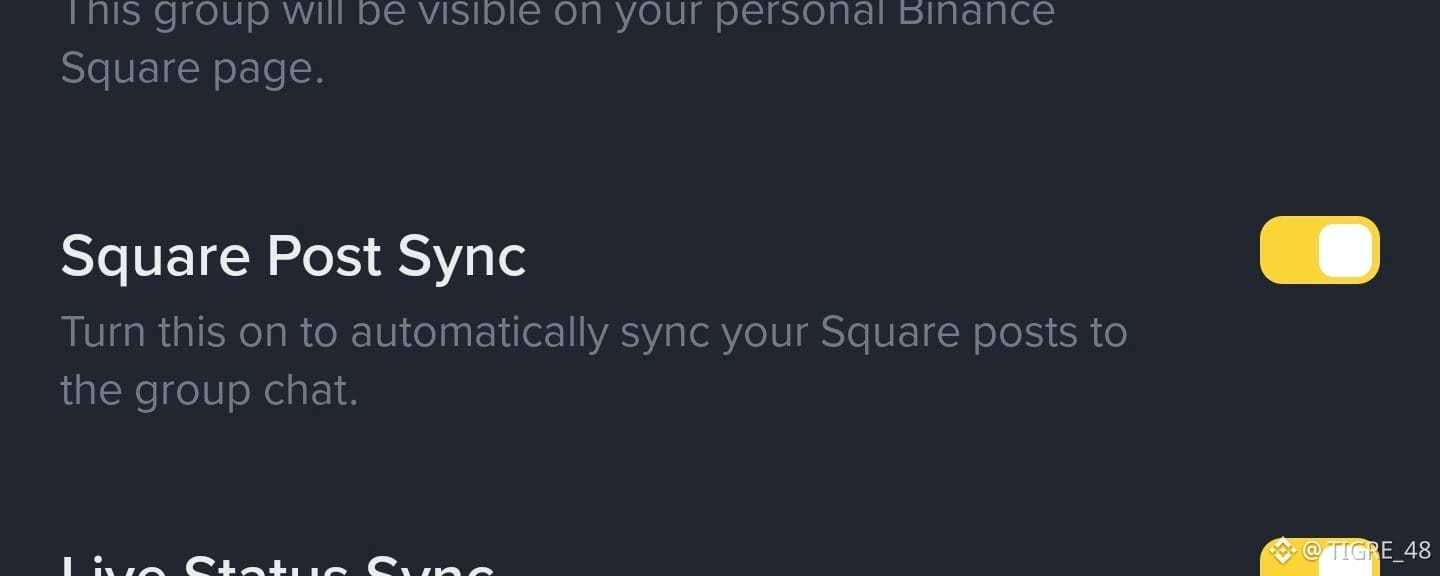
🤔 هل فعلته؟ 🔃 ( مزامنة منشورات Square
)🔸 ما الفائدة من تفعيل هذا؟
🔸 باختصار: جميع المنشورات التي تنشرها سيتم مشاركتها تلقائيًا في مجموعتك، حتى يكون لدى جمهورك طريقة إضافية ألا يفوتهم أي من منشوراتك..
🔸 أرفقت صورة لهذه المزامنة وهي تعمل:
🔸 إذا يرغبون في الانضمام إلى المجموعة: [T48🤝🐯🧡](https://app.binance.com/uni-qr/a19k1bhu)
🔸 هل لديك أي شك؟ اترك لي سؤالًا في التعليقات ...
#Tutorial // #guia // #Tips .
🤔 هل فعلته؟ 🔃 ( مزامنة منشورات Square )
🔸 ما الفائدة من تفعيل هذا؟
🔸 باختصار: جميع المنشورات التي تنشرها سيتم مشاركتها تلقائيًا في مجموعتك، حتى يكون لدى جمهورك طريقة إضافية ألا يفوتهم أي من منشوراتك..
🔸 أرفقت صورة لهذه المزامنة وهي تعمل:
🔸 إذا يرغبون في الانضمام إلى المجموعة: T48🤝🐯🧡
🔸 هل لديك أي شك؟ اترك لي سؤالًا في التعليقات ...
#Tutorial // #guia // #Tips .
🔸 باختصار: جميع المنشورات التي تنشرها سيتم مشاركتها تلقائيًا في مجموعتك، حتى يكون لدى جمهورك طريقة إضافية ألا يفوتهم أي من منشوراتك..
🔸 أرفقت صورة لهذه المزامنة وهي تعمل:
🔸 إذا يرغبون في الانضمام إلى المجموعة: T48🤝🐯🧡
🔸 هل لديك أي شك؟ اترك لي سؤالًا في التعليقات ...
#Tutorial // #guia // #Tips .
46
50
624

·
--
صاعد
‼️ $TUT حاملو TUT، هل أنتم مستعدون للتحرك التالي؟🚀
يتعرض TUT لضغوط، لكن هل يمكن أن يفاجئ التعافي السوق؟
🔥 مستويان يجب مراقبتهما:
🛡️ الدعم: $0.0196
🚀 المقاومة: $0.0208
قد يؤدي الاختراق إلى تغيير الصورة على المدى القصير، بينما قد ينذر كسر الدعم بمزيد من مخاطر الهبوط.
$TUT
{spot}(TUTUSDT)
💭 ما توقعاتكم؟ 🚀 تعافٍ صعودي أم 📉 مزيد من الهبوط؟
#TUT #Tutorial #CryptoAnalysis #BinanceSquare
⚠️ تقلبات عالية. احرص دائمًا على إجراء بحثك الخاص.
‼️ $TUT حاملو TUT، هل أنتم مستعدون للتحرك التالي؟🚀
يتعرض TUT لضغوط، لكن هل يمكن أن يفاجئ التعافي السوق؟
🔥 مستويان يجب مراقبتهما:
🛡️ الدعم: $0.0196
🚀 المقاومة: $0.0208
قد يؤدي الاختراق إلى تغيير الصورة على المدى القصير، بينما قد ينذر كسر الدعم بمزيد من مخاطر الهبوط.
$TUT
💭 ما توقعاتكم؟ 🚀 تعافٍ صعودي أم 📉 مزيد من الهبوط؟
#TUT #Tutorial #CryptoAnalysis #BinanceSquare
⚠️ تقلبات عالية. احرص دائمًا على إجراء بحثك الخاص.
يتعرض TUT لضغوط، لكن هل يمكن أن يفاجئ التعافي السوق؟
🔥 مستويان يجب مراقبتهما:
🛡️ الدعم: $0.0196
🚀 المقاومة: $0.0208
قد يؤدي الاختراق إلى تغيير الصورة على المدى القصير، بينما قد ينذر كسر الدعم بمزيد من مخاطر الهبوط.
$TUT
💭 ما توقعاتكم؟ 🚀 تعافٍ صعودي أم 📉 مزيد من الهبوط؟
#TUT #Tutorial #CryptoAnalysis #BinanceSquare
⚠️ تقلبات عالية. احرص دائمًا على إجراء بحثك الخاص.
1
709

·
--
هابط
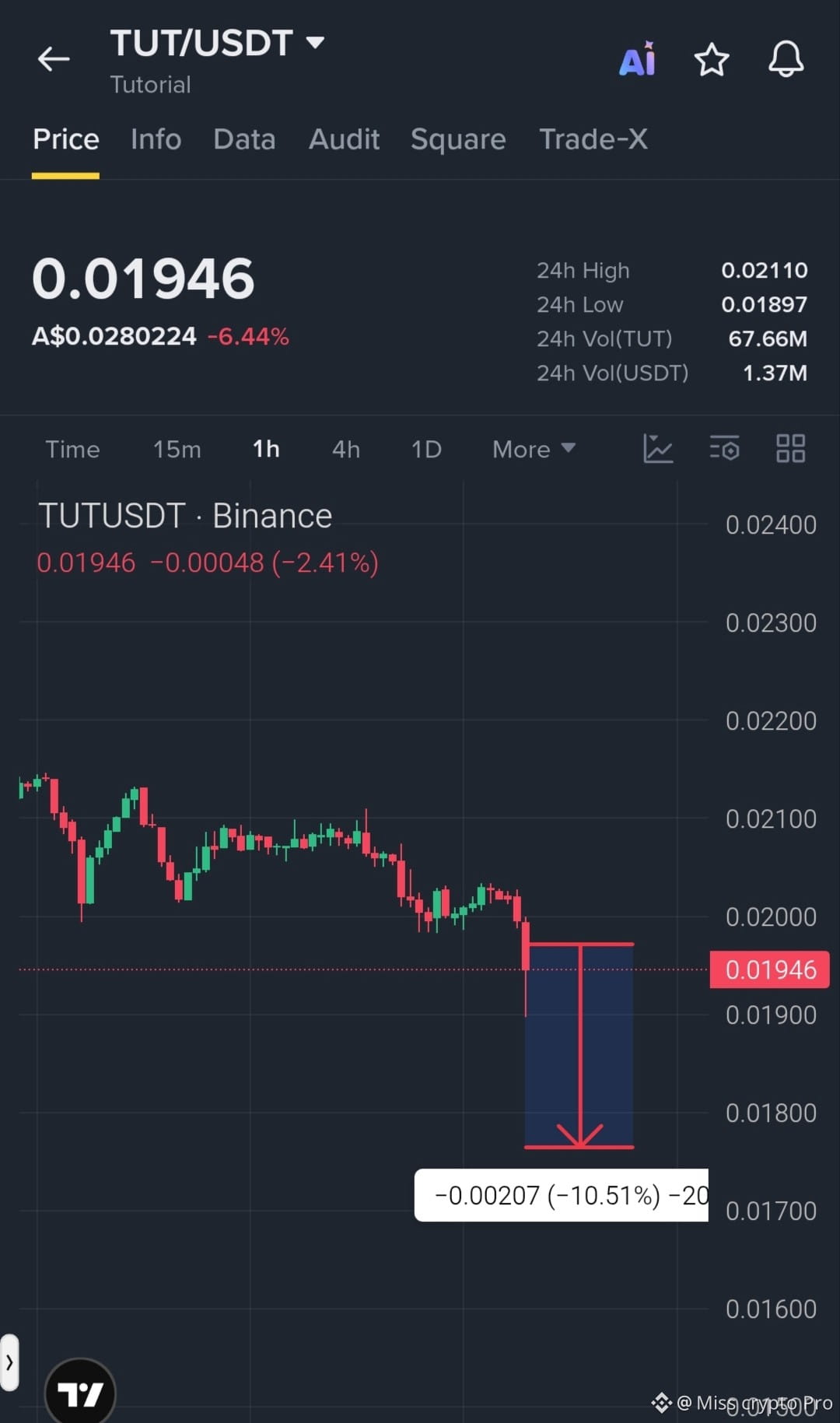
🚨 $TUT البائعون يضغطون على السعر! هل سيستمر الاتجاه الهابط؟
إعداد الصفقة: بيع على المكشوف
منطقة الدخول: 0.01945 – 0.01990
الهدف 1: 0.01897
الهدف 2: 0.01800
الهدف 3: 0.01700
وقف الخسارة: 0.02050
انخفض $TUT بنسبة 6.44% خلال 24 ساعة، ويتداول بالقرب من $0.01946. إذا كُسر مستوى الدعم عند $0.01897، فقد يستمر الهبوط. وقد يؤدي التعافي فوق مستوى المقاومة إلى إضعاف سيناريو الهبوط.
هل ينتظرنا مزيد من الهبوط، أم ارتداد مفاجئ؟ اكتب توقعك أدناه! 👇
تداول هنا على $Tutorial👇
#TUT #Tutorial #CryptoTrading #Binanc
{spot}(TUTUSDT)
🚨 $TUT البائعون يضغطون على السعر! هل سيستمر الاتجاه الهابط؟
إعداد الصفقة: بيع على المكشوف
منطقة الدخول: 0.01945 – 0.01990
الهدف 1: 0.01897
الهدف 2: 0.01800
الهدف 3: 0.01700
وقف الخسارة: 0.02050
انخفض $TUT بنسبة 6.44% خلال 24 ساعة، ويتداول بالقرب من $0.01946. إذا كُسر مستوى الدعم عند $0.01897، فقد يستمر الهبوط. وقد يؤدي التعافي فوق مستوى المقاومة إلى إضعاف سيناريو الهبوط.
هل ينتظرنا مزيد من الهبوط، أم ارتداد مفاجئ؟ اكتب توقعك أدناه! 👇
تداول هنا على $Tutorial👇
#TUT #Tutorial #CryptoTrading #Binanc
إعداد الصفقة: بيع على المكشوف
منطقة الدخول: 0.01945 – 0.01990
الهدف 1: 0.01897
الهدف 2: 0.01800
الهدف 3: 0.01700
وقف الخسارة: 0.02050
انخفض $TUT بنسبة 6.44% خلال 24 ساعة، ويتداول بالقرب من $0.01946. إذا كُسر مستوى الدعم عند $0.01897، فقد يستمر الهبوط. وقد يؤدي التعافي فوق مستوى المقاومة إلى إضعاف سيناريو الهبوط.
هل ينتظرنا مزيد من الهبوط، أم ارتداد مفاجئ؟ اكتب توقعك أدناه! 👇
تداول هنا على $Tutorial👇
#TUT #Tutorial #CryptoTrading #Binanc
1
39
📉 $TUT (درس تعليمي): يحاول الرمز التعافي، لكن الاتجاه لا يزال هبوطياً
📅 تحليل السوق — 11/10/2026
📊 نظرة عامة
💰 السعر: نحو US$ 0,0222
📉 التغير خلال 24 ساعة: نحو -1,2%
💎 القيمة السوقية: نحو US$ 18,5 مليون
🔥 حجم التداول خلال 24 ساعة: نحو US$ 2–3 ملايين
🔍 التحليل الفني
لا يزال TUT تحت الضغط بعد انخفاض حاد في قيمته. يبلغ مؤشر القوة النسبية اليومي 42,6، ما يشير إلى محدودية القوة الشرائية، فيما تدل المؤشرات على اتجاه هبوطي. لكن تظهر على الرسم البياني لأربع ساعات إشارات إلى احتمال تعافٍ على المدى القصير.
🟢 مستويات الدعم
• US$ 0,0217
• US$ 0,0201
• US$ 0,0181
🔴 مستويات المقاومة
• US$ 0,0228
• US$ 0,0245
• US$ 0,0263
💡 الأساسيات
يجمع Tutorial بين التثقيف بشأن العملات المشفرة والبلوكتشين ومفهوم يرتبط بالذكاء الاصطناعي. ويسعى المشروع إلى تبسيط موضوعات مثل التمويل اللامركزي (DeFi) والمحافظ الرقمية والتطوير على BNB Chain. وسيكون التبني الفعلي لهذه الأدوات مهماً لدعم الاهتمام بالرمز.
⚠️ نقاط تستحق الانتباه
• قد يؤدي الهبوط دون US$ 0,0217 إلى مزيد من التراجعات.
• قد يدعم اختراق US$ 0,0228 التعافي إلى US$ 0,0245.
• يقل سعر الرمز بأكثر من 90% عن أعلى مستوى له على الإطلاق، ما يبرز ارتفاع مستوى المخاطر.
• قد تزيد القيمة السوقية المنخفضة من التقلبات.
📌 الملخص
لدى TUT إمكانية للتعافي على المدى القصير، لكنه لم يؤكد بعد انعكاس الاتجاه الرئيسي. وستكون منطقة US$ 0,0228 مهمة لتقييم قوة الشراء.
محتوى معلوماتي، ولا يشكل توصية استثمارية.
#tut #tutorial #tutcoin #etf
📉 $TUT (درس تعليمي): يحاول الرمز التعافي، لكن الاتجاه لا يزال هبوطياً
📅 تحليل السوق — 11/10/2026
📊 نظرة عامة
💰 السعر: نحو US$ 0,0222
📉 التغير خلال 24 ساعة: نحو -1,2%
💎 القيمة السوقية: نحو US$ 18,5 مليون
🔥 حجم التداول خلال 24 ساعة: نحو US$ 2–3 ملايين
🔍 التحليل الفني
لا يزال TUT تحت الضغط بعد انخفاض حاد في قيمته. يبلغ مؤشر القوة النسبية اليومي 42,6، ما يشير إلى محدودية القوة الشرائية، فيما تدل المؤشرات على اتجاه هبوطي. لكن تظهر على الرسم البياني لأربع ساعات إشارات إلى احتمال تعافٍ على المدى القصير.
🟢 مستويات الدعم
• US$ 0,0217
• US$ 0,0201
• US$ 0,0181
🔴 مستويات المقاومة
• US$ 0,0228
• US$ 0,0245
• US$ 0,0263
💡 الأساسيات
يجمع Tutorial بين التثقيف بشأن العملات المشفرة والبلوكتشين ومفهوم يرتبط بالذكاء الاصطناعي. ويسعى المشروع إلى تبسيط موضوعات مثل التمويل اللامركزي (DeFi) والمحافظ الرقمية والتطوير على BNB Chain. وسيكون التبني الفعلي لهذه الأدوات مهماً لدعم الاهتمام بالرمز.
⚠️ نقاط تستحق الانتباه
• قد يؤدي الهبوط دون US$ 0,0217 إلى مزيد من التراجعات.
• قد يدعم اختراق US$ 0,0228 التعافي إلى US$ 0,0245.
• يقل سعر الرمز بأكثر من 90% عن أعلى مستوى له على الإطلاق، ما يبرز ارتفاع مستوى المخاطر.
• قد تزيد القيمة السوقية المنخفضة من التقلبات.
📌 الملخص
لدى TUT إمكانية للتعافي على المدى القصير، لكنه لم يؤكد بعد انعكاس الاتجاه الرئيسي. وستكون منطقة US$ 0,0228 مهمة لتقييم قوة الشراء.
محتوى معلوماتي، ولا يشكل توصية استثمارية.
#tut #tutorial #tutcoin #etf
📅 تحليل السوق — 11/10/2026
📊 نظرة عامة
💰 السعر: نحو US$ 0,0222
📉 التغير خلال 24 ساعة: نحو -1,2%
💎 القيمة السوقية: نحو US$ 18,5 مليون
🔥 حجم التداول خلال 24 ساعة: نحو US$ 2–3 ملايين
🔍 التحليل الفني
لا يزال TUT تحت الضغط بعد انخفاض حاد في قيمته. يبلغ مؤشر القوة النسبية اليومي 42,6، ما يشير إلى محدودية القوة الشرائية، فيما تدل المؤشرات على اتجاه هبوطي. لكن تظهر على الرسم البياني لأربع ساعات إشارات إلى احتمال تعافٍ على المدى القصير.
🟢 مستويات الدعم
• US$ 0,0217
• US$ 0,0201
• US$ 0,0181
🔴 مستويات المقاومة
• US$ 0,0228
• US$ 0,0245
• US$ 0,0263
💡 الأساسيات
يجمع Tutorial بين التثقيف بشأن العملات المشفرة والبلوكتشين ومفهوم يرتبط بالذكاء الاصطناعي. ويسعى المشروع إلى تبسيط موضوعات مثل التمويل اللامركزي (DeFi) والمحافظ الرقمية والتطوير على BNB Chain. وسيكون التبني الفعلي لهذه الأدوات مهماً لدعم الاهتمام بالرمز.
⚠️ نقاط تستحق الانتباه
• قد يؤدي الهبوط دون US$ 0,0217 إلى مزيد من التراجعات.
• قد يدعم اختراق US$ 0,0228 التعافي إلى US$ 0,0245.
• يقل سعر الرمز بأكثر من 90% عن أعلى مستوى له على الإطلاق، ما يبرز ارتفاع مستوى المخاطر.
• قد تزيد القيمة السوقية المنخفضة من التقلبات.
📌 الملخص
لدى TUT إمكانية للتعافي على المدى القصير، لكنه لم يؤكد بعد انعكاس الاتجاه الرئيسي. وستكون منطقة US$ 0,0228 مهمة لتقييم قوة الشراء.
محتوى معلوماتي، ولا يشكل توصية استثمارية.
#tut #tutorial #tutcoin #etf
2
417
🔥 $TUT: رأس مال صغير قد يلاحق موجة صعود جديدة خلال الأشهر الثلاثة–الأربعة القادمة!
الدليل ($TUT ) يلفت الانتباه لأفق متوسط الأجل. حاليًا يتم تداوله قرب 0,024 دولار، ويبلغ إجمالي رأس المال السوقي حوالي 20 مليون دولار فقط، بينما يظل حجم التداول اليومي مناسبًا لحجم المشروع. وهذا يعني أن تدفقات رأس المال الداخلة، ولو كانت متواضعة نسبيًا، قد تُحدث تقلبات كبيرة في السعر.
📊 على التحليل الفني: ما زال السيناريو يحتاج إلى تأكيد، لكن توجد إشارات مثيرة للاهتمام. مؤشر RSI(14) عند 46، أي ضمن المنطقة المحايدة، بينما ADX يبلغ 34,5، ما يشير إلى وجود اتجاه بقوة معتبرة. كما أن السعر ما زال فوق متوسط SMA لعدد 20 يومًا (~0,0225 دولار) وفوق SMA لعدد 200 يوم (~0,0187 دولار)، وهما مراجع مهمة لسيناريو التعافي.
🚀 على الأساسيات: يتم تطوير المشروع حول تعليم العملات المشفرة وأدوات الذكاء الاصطناعي. تشمل خارطة الطريق لعام 2026 تطور مُعلّم/مدرّب الذكاء الاصطناعي، ومكتبة الدروس، والتوسع إلى لغات متعددة. إن الجمع بين تطوير المنتج + انخفاض رأس المال قد يزيد من عدم التماثل (العائد/المخاطر) إذا نما التبني.
💰 هدف 3–4 أشهر: في سيناريو تعافي السوق واستمرار حجم التداول من جانب المشترين، يمكن مراقبة نطاق بين 0,05 و0,08 دولار. وهذا قد يمثل تقريبًا +108% إلى +233% مقارنةً بسعر 0,024 دولار الحالي.
🎯 قد تتمثل استراتيجية محتملة في النظر إلى دخولات جزئية، خصوصًا بالقرب من مناطق الدعم، بدلًا من تركيز كامل الموقف مرة واحدة. أما الاختراق المصحوب بحجم تداول من المقاومات المتوسطة فقد يعزز أطروحة استمرار الصعود.
⚠️ الخطر: يظل TUT أصلًا شديد التقلب. تُظهر البيانات التاريخية تقلبًا مرتفعًا وهبوطًا/تصحيحات كبيرة. بالإضافة إلى ذلك، فإن تركيز التوكنات لدى كبار الحائزين قد يزيد من خطر حدوث تحركات مفاجئة.
#tut #tutorial #altcoins
🔥 $TUT : رأس مال صغير قد يلاحق موجة صعود جديدة خلال الأشهر الثلاثة–الأربعة القادمة!
الدليل ($TUT ) يلفت الانتباه لأفق متوسط الأجل. حاليًا يتم تداوله قرب 0,024 دولار، ويبلغ إجمالي رأس المال السوقي حوالي 20 مليون دولار فقط، بينما يظل حجم التداول اليومي مناسبًا لحجم المشروع. وهذا يعني أن تدفقات رأس المال الداخلة، ولو كانت متواضعة نسبيًا، قد تُحدث تقلبات كبيرة في السعر.
📊 على التحليل الفني: ما زال السيناريو يحتاج إلى تأكيد، لكن توجد إشارات مثيرة للاهتمام. مؤشر RSI(14) عند 46، أي ضمن المنطقة المحايدة، بينما ADX يبلغ 34,5، ما يشير إلى وجود اتجاه بقوة معتبرة. كما أن السعر ما زال فوق متوسط SMA لعدد 20 يومًا (~0,0225 دولار) وفوق SMA لعدد 200 يوم (~0,0187 دولار)، وهما مراجع مهمة لسيناريو التعافي.
🚀 على الأساسيات: يتم تطوير المشروع حول تعليم العملات المشفرة وأدوات الذكاء الاصطناعي. تشمل خارطة الطريق لعام 2026 تطور مُعلّم/مدرّب الذكاء الاصطناعي، ومكتبة الدروس، والتوسع إلى لغات متعددة. إن الجمع بين تطوير المنتج + انخفاض رأس المال قد يزيد من عدم التماثل (العائد/المخاطر) إذا نما التبني.
💰 هدف 3–4 أشهر: في سيناريو تعافي السوق واستمرار حجم التداول من جانب المشترين، يمكن مراقبة نطاق بين 0,05 و0,08 دولار. وهذا قد يمثل تقريبًا +108% إلى +233% مقارنةً بسعر 0,024 دولار الحالي.
🎯 قد تتمثل استراتيجية محتملة في النظر إلى دخولات جزئية، خصوصًا بالقرب من مناطق الدعم، بدلًا من تركيز كامل الموقف مرة واحدة. أما الاختراق المصحوب بحجم تداول من المقاومات المتوسطة فقد يعزز أطروحة استمرار الصعود.
⚠️ الخطر: يظل TUT أصلًا شديد التقلب. تُظهر البيانات التاريخية تقلبًا مرتفعًا وهبوطًا/تصحيحات كبيرة. بالإضافة إلى ذلك، فإن تركيز التوكنات لدى كبار الحائزين قد يزيد من خطر حدوث تحركات مفاجئة.
#tut #tutorial #altcoins
الدليل ($TUT ) يلفت الانتباه لأفق متوسط الأجل. حاليًا يتم تداوله قرب 0,024 دولار، ويبلغ إجمالي رأس المال السوقي حوالي 20 مليون دولار فقط، بينما يظل حجم التداول اليومي مناسبًا لحجم المشروع. وهذا يعني أن تدفقات رأس المال الداخلة، ولو كانت متواضعة نسبيًا، قد تُحدث تقلبات كبيرة في السعر.
📊 على التحليل الفني: ما زال السيناريو يحتاج إلى تأكيد، لكن توجد إشارات مثيرة للاهتمام. مؤشر RSI(14) عند 46، أي ضمن المنطقة المحايدة، بينما ADX يبلغ 34,5، ما يشير إلى وجود اتجاه بقوة معتبرة. كما أن السعر ما زال فوق متوسط SMA لعدد 20 يومًا (~0,0225 دولار) وفوق SMA لعدد 200 يوم (~0,0187 دولار)، وهما مراجع مهمة لسيناريو التعافي.
🚀 على الأساسيات: يتم تطوير المشروع حول تعليم العملات المشفرة وأدوات الذكاء الاصطناعي. تشمل خارطة الطريق لعام 2026 تطور مُعلّم/مدرّب الذكاء الاصطناعي، ومكتبة الدروس، والتوسع إلى لغات متعددة. إن الجمع بين تطوير المنتج + انخفاض رأس المال قد يزيد من عدم التماثل (العائد/المخاطر) إذا نما التبني.
💰 هدف 3–4 أشهر: في سيناريو تعافي السوق واستمرار حجم التداول من جانب المشترين، يمكن مراقبة نطاق بين 0,05 و0,08 دولار. وهذا قد يمثل تقريبًا +108% إلى +233% مقارنةً بسعر 0,024 دولار الحالي.
🎯 قد تتمثل استراتيجية محتملة في النظر إلى دخولات جزئية، خصوصًا بالقرب من مناطق الدعم، بدلًا من تركيز كامل الموقف مرة واحدة. أما الاختراق المصحوب بحجم تداول من المقاومات المتوسطة فقد يعزز أطروحة استمرار الصعود.
⚠️ الخطر: يظل TUT أصلًا شديد التقلب. تُظهر البيانات التاريخية تقلبًا مرتفعًا وهبوطًا/تصحيحات كبيرة. بالإضافة إلى ذلك، فإن تركيز التوكنات لدى كبار الحائزين قد يزيد من خطر حدوث تحركات مفاجئة.
#tut #tutorial #altcoins
1
544
سجّل الدخول لاستكشاف المزيد من المُحتوى
انضم إلى مُستخدمي العملات الرقمية حول العالم على Binance Square
⚡️ احصل على أحدث المعلومات المفيدة عن العملات الرقمية.
💬 موثوقة من قبل أكبر منصّة لتداول العملات الرقمية في العالم.
👍 اكتشف الرؤى الحقيقية من صنّاع المُحتوى الموثوقين.
البريد الإلكتروني / رقم الهاتف
المواضيع الرائجة
1
#FOMCWatch
8.9M مشاهدات
26,673 يقومون بالنقاش
2
#EthereumDropsBelow$2300
2,443 مشاهدات
91 يقومون بالنقاش
3
#BitcoinSlipsBelow$80KAgain
7,407 مشاهدات
60 يقومون بالنقاش
4
#ThailandLaunchesWORPTStablecoinToQRPaymentApp
13,115 مشاهدات
301 يقومون بالنقاش
5
#StrategySkipsBitcoinPurchasesSpends$205MOnSTRCBuybacks
4,976 مشاهدات
79 يقومون بالنقاش
6
#BitmineAdds10452ETH
50,611 مشاهدات
730 يقومون بالنقاش
7
#SouthKoreaConsidersEducationTaxOnCryptoExchanges
28,971 مشاهدات
559 يقومون بالنقاش
8
#OCCUrgesCommunityBanksToEnterStablecoinPayments
22,519 مشاهدات
394 يقومون بالنقاش
9
#RippleWinsFullApprovalAsNationalTrustBank
32,421 مشاهدات
391 يقومون بالنقاش
10
#AkashSelectsSolanaAsMigrationTarget
13,363 مشاهدات
189 يقومون بالنقاش