


Here is what a Binance referral code is worth once you stop quoting percentages and count real trades. Sign up with 20LESSFEES and every Spot and Futures trade on that account costs a flat 20% less in trading fees. On top of that, eligible users can work toward a welcome bonus worth up to $19,800. That part is task-based, and it does not depend on which code sits on the account.
👉 Sign up on Binance with 20LESSFEES
Below, one new account is followed order by order: a $1,000 Bitcoin buy, the sale that closes it, and a small futures position. After that come three monthly totals for different kinds of trader.
Every figure uses the Regular User rates from the fee screenshots further down, so you can redo the sums with your own amounts.
Why put a code on the account at all?
Lower trading fees: A flat 20% off the Spot and Futures fees for your tier, starting with your first order.
Nothing to qualify for: No minimum deposit, no volume target and no countdown before the discount applies.
Welcome tasks stay open: If you qualify for the welcome campaign, its tasks work the same with or without a code.
No cost: Adding it costs nothing, and nobody gets any access to your account through it.
Where does the code go when you register?
Follow the link above to reach registration. Coming in that way puts the code in for you.
Enter an email or a mobile number in the top box.
Find the code box next. If it is collapsed, tap to expand it and confirm it reads 20LESSFEES exactly, without a stray space after it.
Press Register, then type in the one-time verification digits sent by email or SMS.
Set your password and complete identity verification so you can deposit and trade.
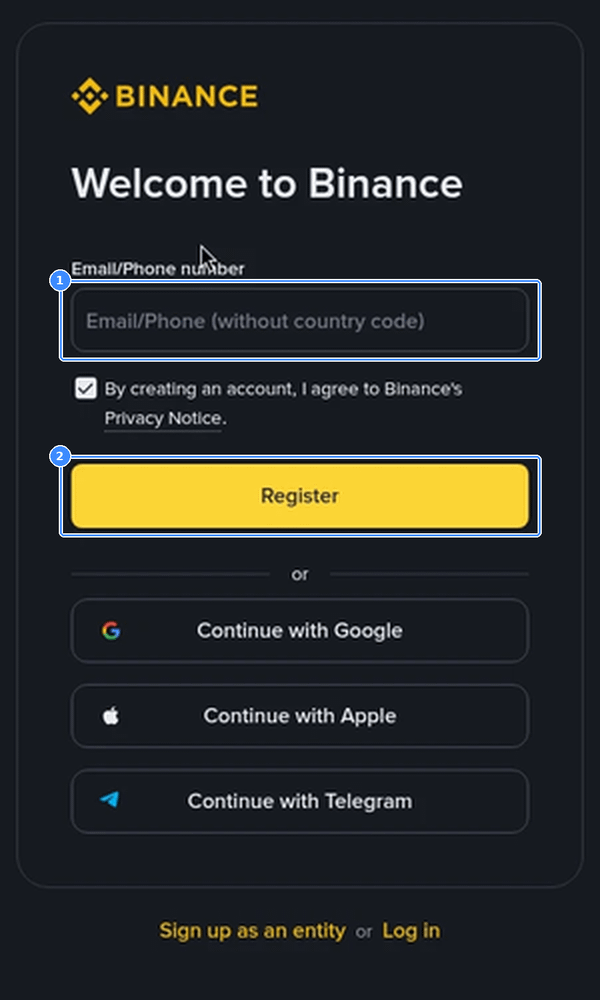
Using Google, Apple or Telegram to sign up works too. The code field still has to be filled before the account is created, so check the next screen before you confirm.
Code to have ready at that point: 20LESSFEES
Which fee rates are these examples using?
All the sums below use the standard rates for a new account, before any VIP level.
Spot, Regular User: 0.100% maker and 0.100% taker. With the code that becomes 0.080% on both.
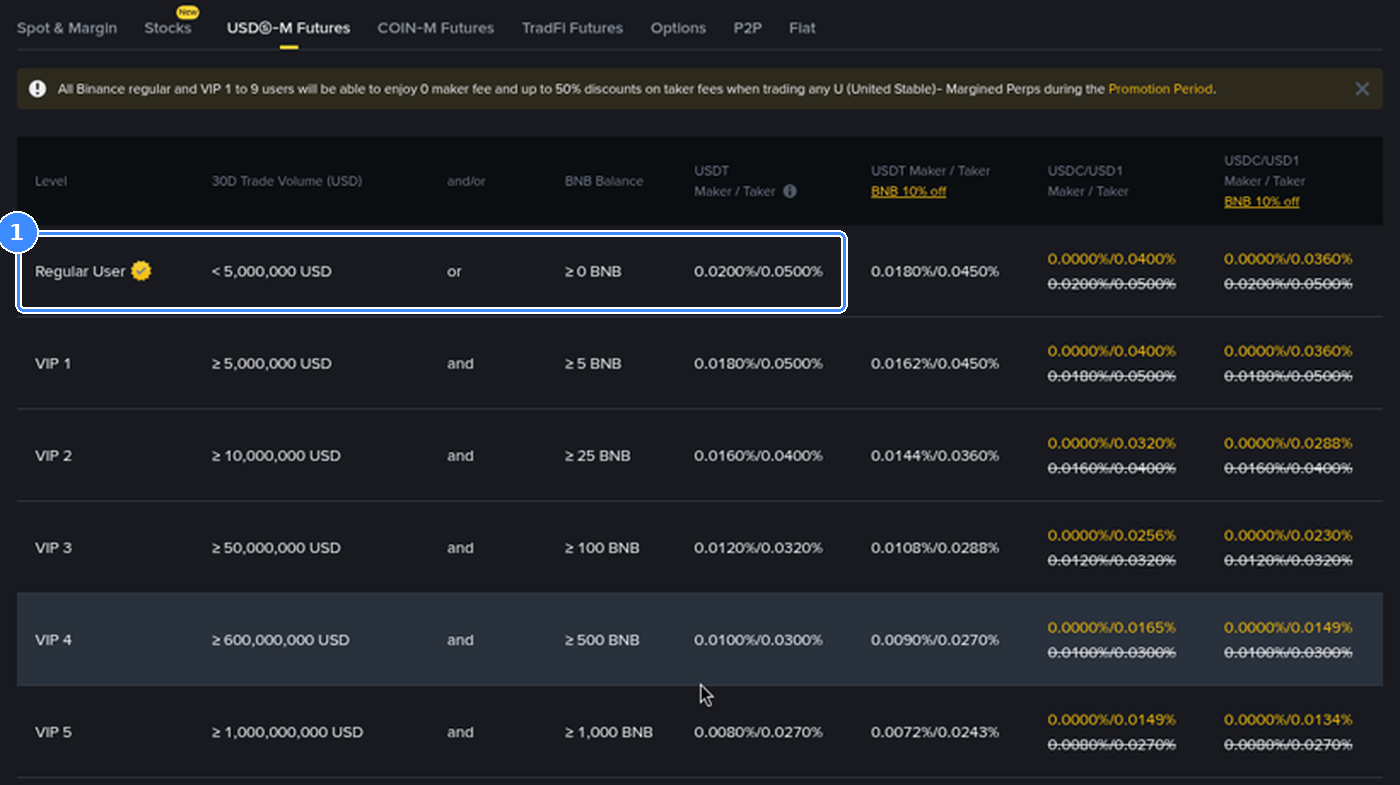
USDⓈ-M Futures, Regular User: 0.0200% for makers and 0.0500% for takers on USDT-margined contracts. With the code that becomes 0.0160% and 0.0400%.
The base for the fee: Spot fees come off the trade value. Futures fees come off the whole position, not the collateral behind it.
Maker means your order waits on the order book, usually a limit order. Taker means it fills straight away against someone else's order, like a market order.
Trade 1, a $1,000 Bitcoin market buy
The account is funded and the first order goes in. A market buy of $1,000 worth of BTC fills immediately, so it pays the taker rate.
Without a code: $1,000 x 0.100% = $1.00 in fees.
With the code: $1,000 x 0.080% = $0.80 in fees.
Saved on this order: $0.20.
On a buy the fee is normally taken from the coin you receive, so the saving shows up as slightly more BTC in your wallet rather than as dollars.
Twenty cents will not change anybody's month. It is the starting unit for everything else, though, because the saving always works out to 0.02% of the Spot volume you trade.
Trade 2, selling the same Bitcoin with a limit order
A few weeks later the position is closed with a limit sell. Whatever the price has done in the meantime, the fee is worked out on the value of the sale. To keep the sums easy, take a sale worth $1,000 again.
Without a code: $1.00 in fees.
With the code: $0.80 in fees.
Full round trip: $2.00 against $1.60, so $0.40 saved on buying and selling once.
Notice that the limit order did not cost less than the market order. On the Regular User Spot tier, maker and taker are both 0.100%. The order type begins to count on Futures and on higher tiers, which is where the next trade goes.
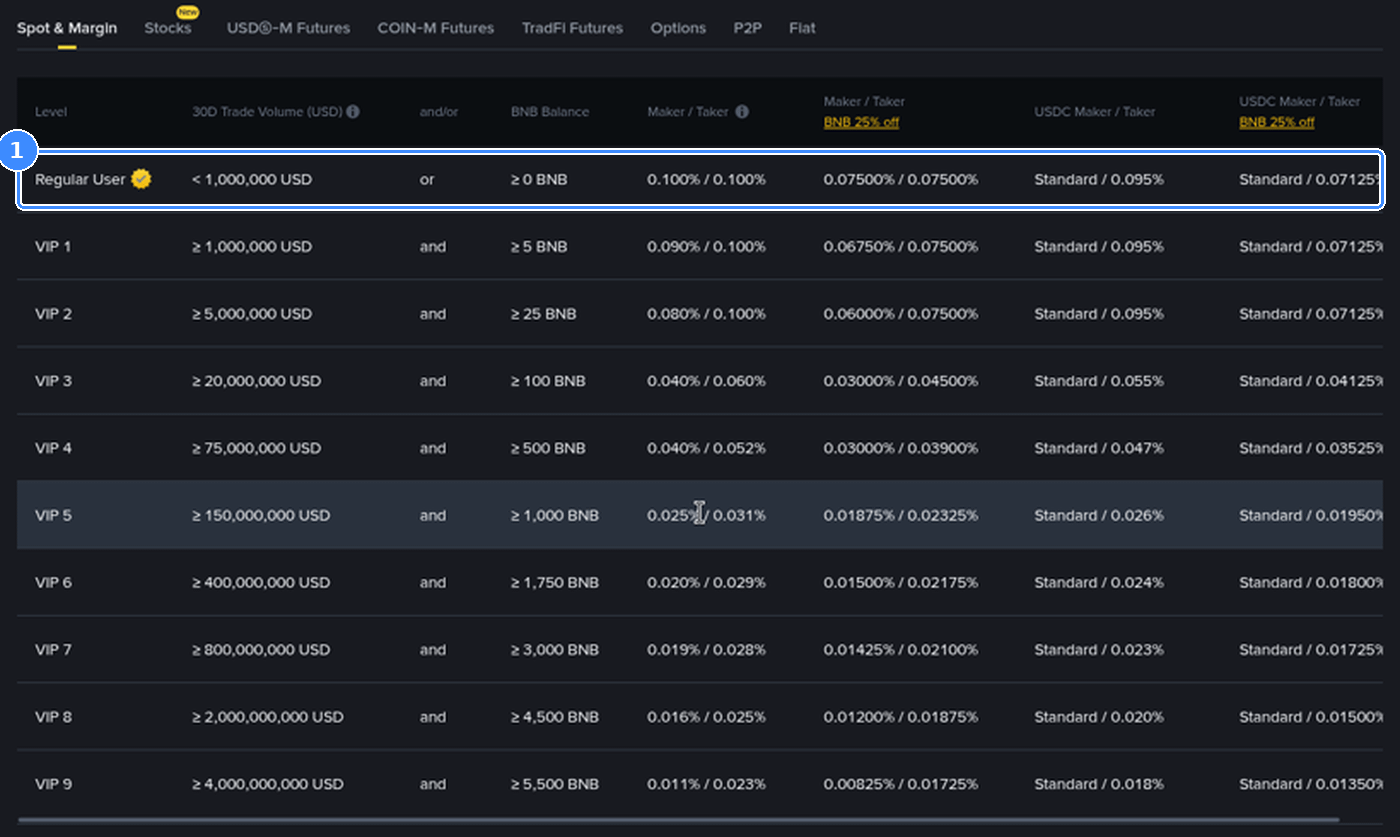
The BNB column in that table is a separate option. With BNB covering Spot fees, the Regular User rate drops to 0.07500%. Exactly how that setting combines with the code on your account is something to read from one real order in your trade history, not something to assume from a blog post, so the examples here leave BNB out.
Trade 3, a futures position at 5x
Now the same account opens a USDT-margined position. It puts up $400 of margin at 5x leverage, so the position size is $2,000, and the fee is worked out on that full $2,000.
Market order to open: $2,000 x 0.0500% = $1.00 without a code, or $0.80 with it.
Closing with a limit order: $2,000 x 0.0200% = $0.40 without a code, or $0.32 with it.
Round trip: $1.40 against $1.12, so $0.28 saved.
If both sides had been market orders, the round trip would cost $2.00, or $1.60 with the code. Choosing a limit order to close saved more here than the code did.
Funding payments are a different matter. They pass between traders holding long and short positions every few hours and are not a trading fee, so the 20% does not touch them.
Spot or Futures, the code is the same: 20LESSFEES
One trade at a time the numbers look small. They add up through repetition, so the next step is a whole month.
What does a month look like for three kinds of trader?
Same rates, same arithmetic, three different habits.
The monthly buyer: Two $250 BTC buys and one $100 sale, so $600 of Spot volume. Fees are $0.60 without a code and $0.48 with it. That is $0.12 a month, about $1.44 over a year.
The active Spot trader: Around 60 orders a month averaging $500, so $30,000 of volume. Fees are $30.00 against $24.00. That is $6 a month, about $72 a year if the habit stays the same.
The futures trader: 30 round trips a month on $2,000 positions, opened with market orders and closed with limits as in Trade 3. Fees are $42.00 against $33.60. That is $8.40 a month, about $100.80 a year.
Had the futures trader used market orders on both sides, the month would be $120,000 of taker volume: $60 without the code and $48 with it, so $12 a month apart.
The pattern is easy to see. For a light buyer the code is a free default. For someone who trades every day, especially on Futures, it becomes a line worth looking at.
What moves your fee bill more than any code?
The code takes a fixed slice off. Three other choices change the size of the bill itself.
Position size on Futures: 5x on $400 is charged as $2,000. Go to 20x on the same margin and the fee is charged on $8,000.
Maker or taker on Futures: 0.0200% against 0.0500% is a bigger gap than the 20% discount.
How often you trade: Every extra round trip is another fee. Fewer, better planned trades cut more than any discount.
Fees on withdrawals, Convert and card purchases follow their own rules. This side-by-side comparison of Binance fees and charges lays them out in one place.
Edge cases that change the arithmetic
Zero-fee promotions: When Binance runs a promotion that sets a fee to 0%, 20% of zero is still zero. The discount only matters on the pairs and order types where a fee is charged.
Reaching a VIP tier: The discount is taken from the rate of your current tier. At VIP levels the starting rate falls, so the cents saved per order shrink while the percentage stays the same.
Very small orders: On a $20 trade the fee difference is less than a cent and can disappear in rounding. You will see it on larger orders first.
Which mistakes wipe out the saving?
Signing up now and meaning to attach a code afterwards: The form at registration is the only place it can go.
Typing the code with a typo or a trailing space: An unrecognised code means standard fees from the start.
Making a duplicate account just for the code: Binance does not allow it, and you risk losing access to both.
Trading extra volume just to chase welcome tasks: Each of those trades pays fees and carries market risk, and together they may outweigh the reward.
Treating the saving as income: It is a lower cost, not money earned. Prices can still move against you on every trade in these examples.
Futures traders who want the welcome side covered too can read about what the Binance futures bonus really includes.
I already have an account and other doubts
"My account is already open." Codes attach only to brand-new registrations, so an existing account keeps the fees it has.
"Is it safe to enter a code I found online?" The code is just a few characters typed into one box. Nobody gets your login, your balance or your orders from it. Stick to binance.com or the official app, and keep your password and 2FA to yourself.
"Can I add it after I register?" No. Account settings have no box for it, so step 3 above is the moment to get it right.
Before you open the account
Run your own numbers first. Take what you expect to trade in a month, multiply Spot volume by 0.02% and Futures taker volume by 0.01%, and you have your monthly saving with the code.
Then register with 20LESSFEES, and if you are eligible, check the welcome bonus tasks on the current event page before you deposit, and pick a tier only if its deposit and volume match what you meant to do anyway.
👉 Type 20LESSFEES in the code box when you register.
Nothing here is financial advice. It is fee arithmetic and setup help. Crypto can lose value quickly, and Binance may change fee rates, promotions, welcome tasks or eligibility without notice.
FAQ
Does the discount make my order smaller?
No. Only the fee shrinks. A $1,000 Spot buy stays $1,000, and its fee goes from $1.00 to $0.80.
How much do I need to trade to save $10?
About $50,000 of Spot volume, or about $100,000 of Futures volume filled at the taker rate.
Does the code make funding payments cheaper?
No. Funding is exchanged between traders and is not a trading fee.
Can one account have two codes?
No. Each account takes one code, entered when it is created.
Would another code give me a larger welcome bonus?
No. Tiers, rewards and eligibility for the welcome campaign are identical for every code.