


Which button should you press to turn USDT into Bitcoin on Binance: Convert, a market order or a limit order?
The short answer: use Convert if you want the simplest one-tap swap and a locked quote, a market order on the BTC/USDT Spot pair if you want to buy right now at the live order-book price with a clear 0.1% fee, and a limit order if you are happy to wait for a price you choose. All three end with BTC in your account, but they differ in cost visibility, speed and control.
👉 Open a Binance account and claim the welcome bonus
Below, each route gets the same $1,000 test, so you can see exactly where the money goes, followed by the situations where each one wins and the mistakes that quietly cost beginners the most.
What BTC/USDT actually means
BTC/USDT is a trading pair. The first asset (BTC) is the one you buy or sell, and the second (USDT) is the one the price is quoted in. A price of 80,000 means one whole Bitcoin costs 80,000 USDT.
You never have to buy a whole coin. Bitcoin splits into tiny pieces, and the Spot order form on Binance accepts very small amounts, with a minimum order total of 5 USDT on this pair at the time of writing.
The same pair works in both directions. Buying BTC spends USDT, and selling BTC gives you USDT back, which is how most people take profit or step out of the market without leaving Binance.
If you don't hold any USDT yet, start with our step-by-step guide to your first crypto purchase on Binance, then come back here to decide how to swap it.
The three routes at a glance
Convert: A simple swap screen. You type an amount, Binance shows a quote, and you confirm within a few seconds. There is no order book to read and no separate trading fee line, because the cost is built into the quoted price.
Spot market order: You buy at the best prices currently available in the BTC/USDT order book. It fills almost instantly, and the trading fee is shown separately, 0.1% for a regular account.
Spot limit order: You set the exact price you are willing to pay. The order waits in the book until the market reaches it, or until you cancel it. You may get a better price, or no fill at all.
Route one - Convert
Convert is the screen most beginners find first, and for good reason. It looks like a currency exchange app: a From box, a To box and one button.
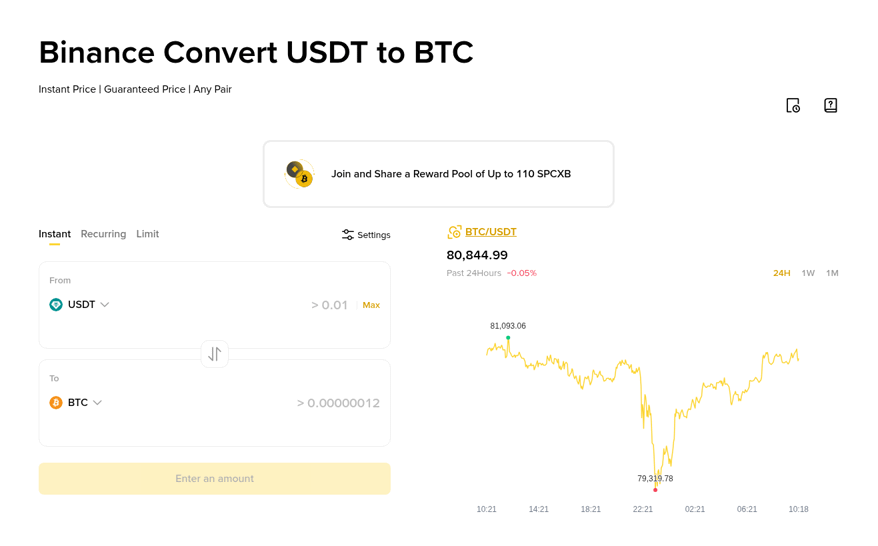
The Convert screen lets you swap USDT for BTC in a single step, with the quote shown before you confirm.
How to use it:
Open Convert: Find it under Trade on the website or in the app.
Pick the pair: Choose USDT in the From box and BTC in the To box.
Enter an amount: Type how much USDT to spend, or how much BTC you want to receive.
Preview the quote: Binance shows the exact BTC amount you will get. The quote is valid for a few seconds and refreshes if you wait.
Confirm: The BTC lands in your wallet straight away.
The key thing to understand is how Convert makes money. It does not show a trading fee, so the cost sits inside the rate. If the live market price is 80,000 and your quote is slightly higher, that small gap is what you pay for the convenience and the locked quote.
Convert also has Recurring and Limit tabs. Recurring buys a fixed amount on a schedule, which suits people who want to buy a little Bitcoin every week without thinking about timing.
Route two - a market order on Spot
A market order says "fill me now at whatever the book offers". On a pair as busy as BTC/USDT, the gap between the best buy and sell price is usually tiny, so a normal-sized market order fills very close to the price you see on the chart.
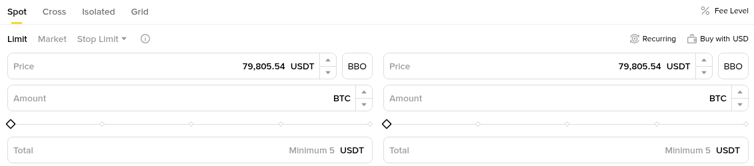
The BTC/USDT Spot order panel, with the Limit, Market and Stop Limit tabs above the price and amount fields.
How to place one:
Open the pair: Go to Trade, then Spot, and search for BTC/USDT.
Choose the Market tab: The price field disappears, because you accept the current price.
Enter the size: Type the USDT total you want to spend or the BTC amount you want to buy. The slider can fill a share of your available balance.
Review and buy: Check the numbers once, then press Buy BTC. The fill appears in your order history within a second or two.
The fee is easy to read. A regular account pays 0.1% per trade, and paying fees with BNB takes it down to 0.075%. When you buy BTC, the fee is normally taken from the BTC you receive unless you pay it with BNB.
Route three - a limit order on Spot
A limit order flips the logic. Instead of accepting today's price, you name your own and wait.
Choose the Limit tab: The price field becomes editable.
Set your price: For a buy, set it at or below the price you are happy to pay. For example, 79,000 when Bitcoin trades at 80,000.
Set the amount: Enter the BTC amount or the USDT total.
Place the order: It now sits in the order book. You can see it, and cancel it, under Open Orders.
If the price never drops to 79,000, nothing happens and your USDT stays put. If it drops briefly, your order may fill in full, in part, or not at all, depending on how much volume trades at that level.
A limit order can also fill instantly. If you set a buy price above the current market, it matches with the cheapest sellers right away and behaves much like a market order.
The same $1,000 through all three routes
Let's run identical numbers. Assume Bitcoin trades at 80,000 USDT, you spend 1,000 USDT, and you have a regular account. These are illustrative prices, not live quotes.
Market order:
1,000 USDT at 80,000 buys 0.0125 BTC before fees.
The 0.1% fee is 0.0000125 BTC, worth about $1.
You receive roughly 0.0124875 BTC.
Paying the fee in BNB instead cuts it to about $0.75, and you keep the full 0.0125 BTC.
Limit order at 79,000 that fills:
1,000 USDT at 79,000 buys about 0.012658 BTC before fees.
The fee is still 0.1% for a regular account, so about 0.0000127 BTC.
You end up with roughly 0.012646 BTC, about 1.3% more Bitcoin than the market order, purely because of the better entry.
If the price never reaches 79,000, you get 0 BTC and keep your 1,000 USDT.
Convert:
You see one final number, for example "you will receive 0.01248 BTC".
There is no fee line, so compare that number with the market order result above to see the real cost of the quote.
If the Convert figure is lower than what a market order would give you, the difference is the price of the convenience.
The lesson: for a single $1,000 buy, the fee gap between routes is usually a dollar or two. The bigger money is in the entry price, which is why patient buyers like limit orders.
Selling BTC back to USDT
Every route works in reverse. Here is the round trip for the market order example above, assuming Bitcoin climbs to 82,000 USDT.
You sell 0.0124875 BTC at 82,000, which is 1,023.98 USDT before fees.
The 0.1% sell fee is about 1.02 USDT, taken from the USDT you receive.
You end with roughly 1,022.95 USDT.
Your profit is about $22.95. The price moved $25 worth on your position, and two trades of about $1 each took the rest.
That small gap is exactly why fees matter more for frequent traders than for long-term holders. Ten round trips a month at this size would cost about $20 in fees.
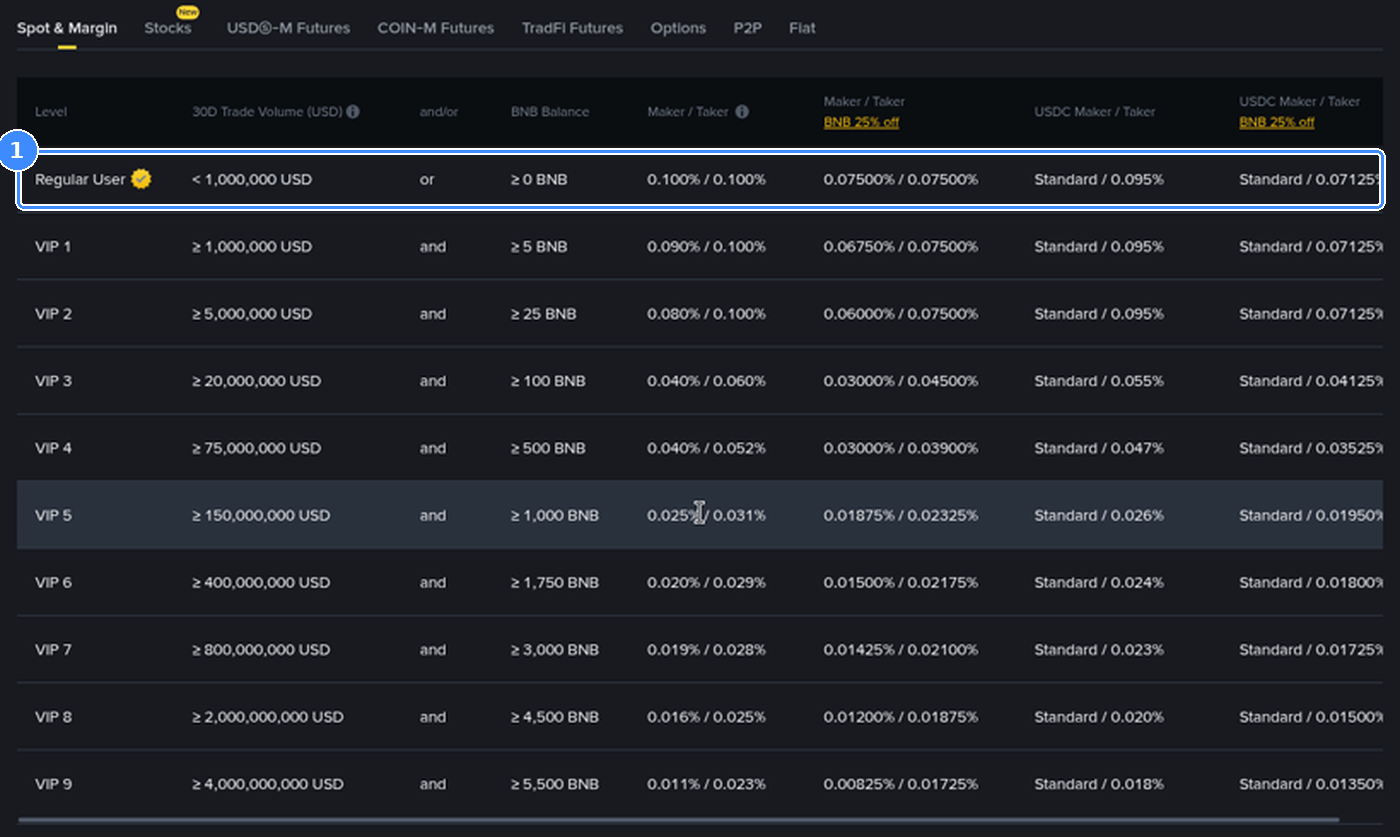
Binance's Spot fee schedule shows 0.100% maker and taker for regular users, and 0.075% when fees are paid with BNB.
For the full breakdown of maker and taker rates, VIP levels and Futures costs, see our guide to Binance trading fees on Spot and Futures.
Which route wins in which situation
Your first ever Bitcoin buy: Convert. One screen, one number, very little to get wrong.
Buying every week or every month: Recurring buys through Convert, or a market order on the same day each time if you prefer to see the fee separately.
You want BTC right now, at a fair price: A Spot market order. On BTC/USDT the order book is deep, so normal sizes fill close to the chart price.
You have a target price in mind: A limit order, placed and then left alone.
You are moving a large amount: Split it into several limit orders at different prices instead of one big market order that eats through the book.
You trade often: Spot with BNB fee payment turned on, so every trade costs 0.075% instead of 0.1%.
Five mistakes that cost more than the fee
One zero too many or too few: A buy limit at 8,000 instead of 80,000 simply never fills, while a buy limit at 800,000 acts like a market order and can eat through the book on a large size. Read the price twice before you press the button.
Confusing Buy and Sell panels: The Spot form shows both side by side. The left side buys BTC, the right side sells it.
Forgetting open orders: A limit buy you placed last week can fill tomorrow when you no longer want it. Check Open Orders now and then and cancel what you no longer need.
Waiting too long on a Convert quote: Quotes expire after a few seconds. If the number refreshes, read it again before confirming.
Using the wrong wallet: Spot orders use your Spot balance. If your USDT sits in the Funding wallet, transfer it first, otherwise the order form shows zero available.
A note on stop-limit orders
The Stop Limit tab places a limit order only after the price touches a trigger level you set. Beginners mostly use it on the sell side as a safety net, for example "if BTC falls to 76,000, sell at 75,900".
It is a useful tool, but it is not a guarantee. In a very fast drop the price can skip past your limit, and the order may not fill. Treat it as risk control, not insurance.
Before you swap your first USDT
Pick one route and try it with a small amount, even 10 or 20 USDT, so you see how the fee and the final balance look on your own screen. After one or two practice trades the bigger orders feel routine.
New to Binance? Have a look at the current Binance welcome bonus campaign, worth up to $19,800 for eligible users who complete its tasks, and you can register with code GETREWARD.
FAQ
Is Convert free on Binance?
Convert shows no separate trading fee, but the cost is included in the quoted rate. Compare the amount it offers with what a Spot market order would give you to see the difference.
What is the smallest amount of BTC I can buy with USDT?
On the BTC/USDT Spot pair the order form shows a minimum total of 5 USDT, so you can start with a very small amount of Bitcoin.
Why did I receive slightly less BTC than I calculated?
On Spot, the trading fee is usually taken from the asset you receive. Turn on BNB fee payment if you want the fee charged in BNB instead.
Can a limit order fill at a better price than I set?
Yes. A buy limit fills at your price or lower, and a sell limit fills at your price or higher, if the book offers it.
Should I use USDT or USDC to buy Bitcoin?
Both pairs exist on Binance. USDT pairs are generally the most liquid, while the fee schedule lists separate rates for USDC pairs, so check the fee page before switching.
Disclosure: GETREWARD is my code. If you use it, I may earn a commission from Binance at no extra cost to you. This is not financial advice.