


I think the main reason many people find overseas exchanges difficult is the language barrier. Currently, overseas exchanges do not officially support Korean due to the travel rule.
Despite the linguistic inconveniences, many people use Binance. If you haven't signed up for Binance yet, try signing up through the link below to receive a discount on fees!
➡️Go to Binance Official Registration to receive a 20% discount on fees
The registration process is not very difficult. Access the official Binance registration homepage through the link above, enter your email or phone number in the ID field, agree to the terms, and then enter the verification number.
Once you have entered the verification number, you can set a password to complete the registration. Now that we've learned how to register for Binance, let's look at how to set it to Korean.
How to set Korean on Binance PC
When using Binance on a PC, utilizing the powerful real-time translation features of modern web browsers like Chrome or Microsoft Edge can almost perfectly implement a Korean environment.
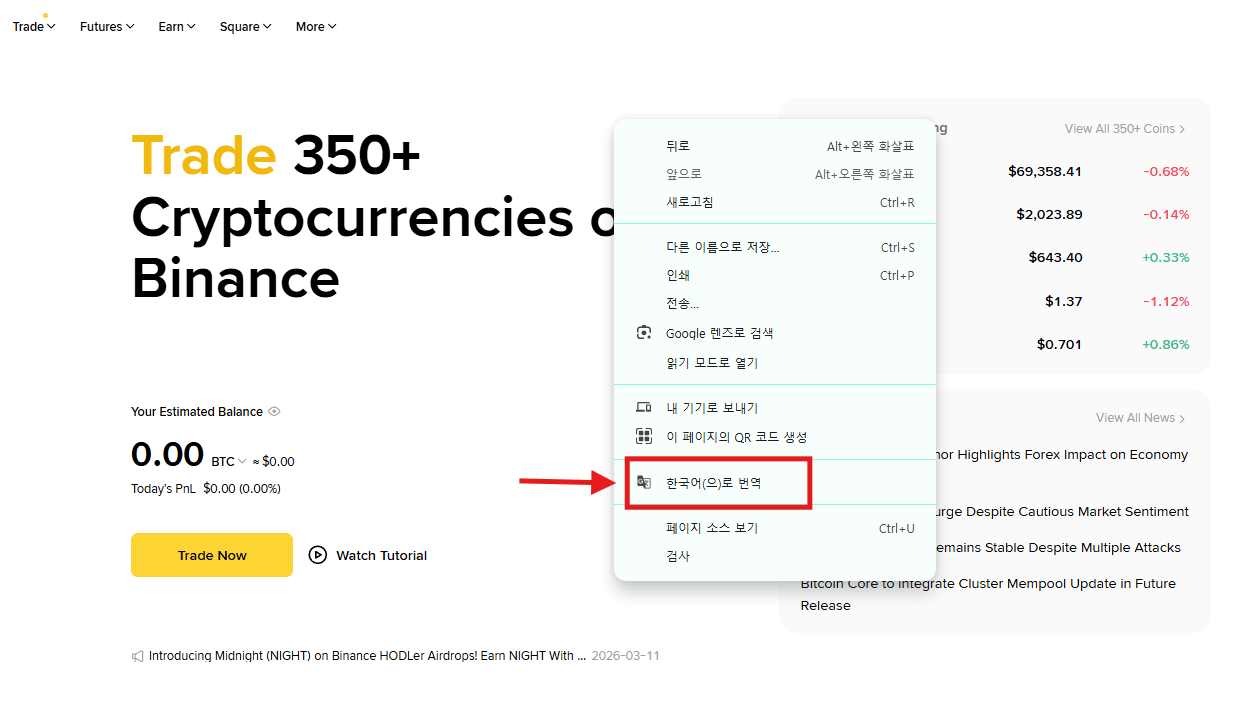
After accessing the official Binance homepage, right-click and select 'Translate to Korean' from the menu, and complex trading terms and announcements will be displayed in Korean in real-time.
Especially, if you enable the 'Always Translate to English' option by clicking the translation icon at the top of the Chrome browser, the translation state will remain even when you navigate or refresh the page, allowing you to trade in an environment as pleasant as using an official Korean site.
Usage of Korean in the mobile app environment and utilization of guides
Chrome Safari
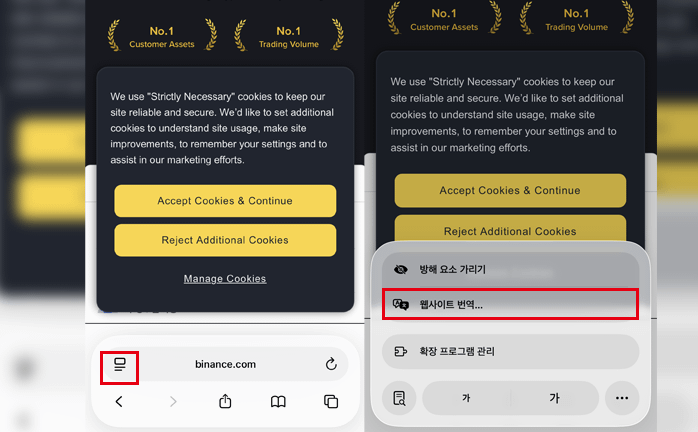
First, there is the method of using Safari or Chrome. In Safari, you can find and click the icon to the left of the address bar to translate the website.
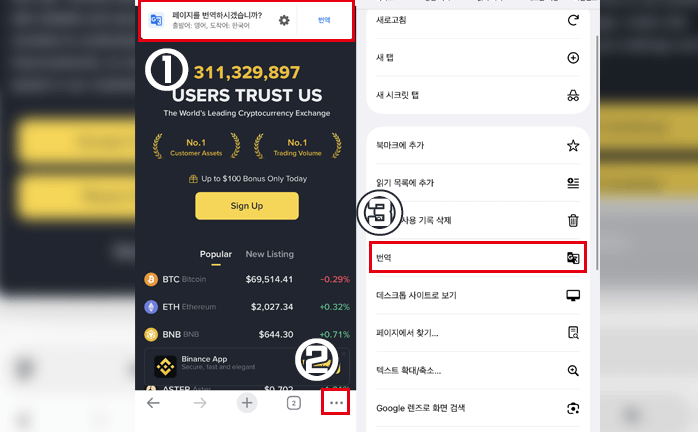
In Chrome, if the option to translate appears as in step 1, you can proceed by clicking translate. If it doesn't appear, you can set it to Korean as shown in steps 2 and 3 in the image.
Binance Official App
The Binance mobile app does not support Korean in the official settings menu (Settings -> Language), so it must be used in English by default. However, since the app's UI is intuitive and uses standardized trading terms, it can be used comfortably with knowledge of just a few key words.
For example, essential terms such as 'Deposit' for deposits, 'Withdraw' for withdrawals, and 'Futures' for futures trading are commonly used expressions by domestic traders. If more detailed explanations are needed, using the screen capture translation feature of smartphones or the Google Lens app to translate the screen in real-time is an effective method.
Furthermore, as of 2026, many communities and blogs offer guidebooks that match Binance's latest UI in Korean, so if you keep this open while completing the initial setup, the language barrier will no longer be a significant issue.
Points to Note
When using features on Binance, please be sure to disable the translation feature before proceeding. If you proceed without disabling it, errors may occur, making smooth trading difficult.
Summary
PC: Right-click in Chrome browser -> Always use the 'Translate to Korean' feature
If not using the mobile app: Use the browser's translation feature
In the case of using the mobile app: Familiarize yourself with key trading terms like deposits and withdrawals, and utilize capture translation tools
When using features, be sure to disable the Korean translation feature before proceeding