



To deposit into the Binance exchange,
you need to send coins through a domestic exchange like Bithumb or Upbit.
At this point, Tron (TRX) is frequently used because it has lower fees compared to other coins.
If you want to save even more on fees when using TRX, make sure to sign up through the link below — you can get a 20% discount on trading fees.
✨ Click here to get a 20% fee discount on Binance ✨
Now let’s go over the Binance deposit process step by step, so even beginners can easily follow along.
First, open the Binance app. Tap [Assets] at the bottom right.
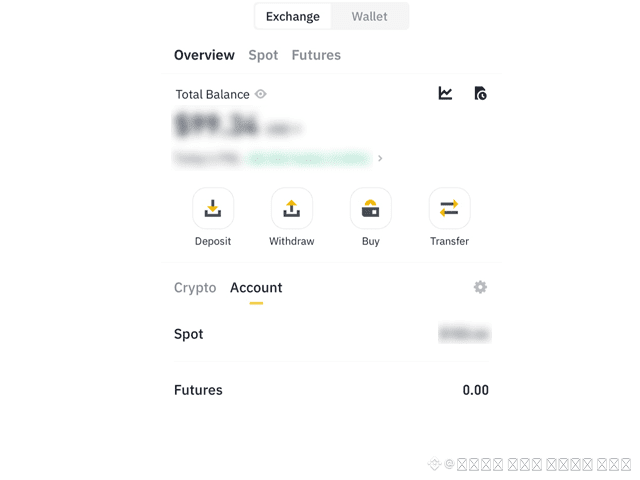
Then tap the [Deposit] button at the top left.
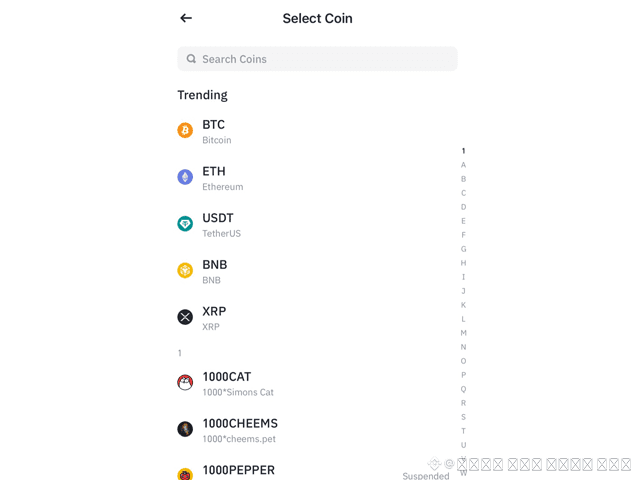
A search bar will appear.
Type trx and select TRX from the options below.
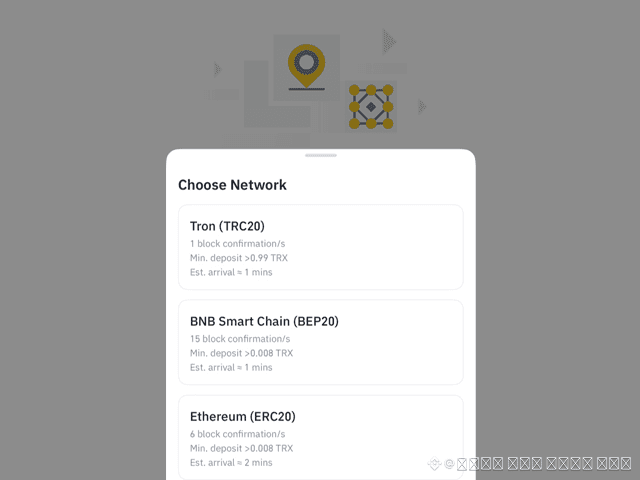
Next, select the network.
Choose [Tron (TRC20)].
This will show your Binance TRX deposit address.
Tap the button on the right to copy the address, then open the exchange where you’ll be sending your TRX from.
Tap [Deposit/Withdraw] at the bottom, and select the TRX you have in your wallet.
Tap [Withdraw].
Paste the address you copied into the destination address field.
※ Don’t type it manually — if you make a typo, your funds could be lost.
So always copy and paste.
Then enter the amount of TRX you want to send, and tap [Next].
A pop-up warning about financial scams or voice phishing will appear.
If it doesn’t apply, tap [No].
Finally, your withdrawal details will be shown.
Check everything, and tap [Confirm Withdrawal], then go through the verification process.

In just a few minutes, you should see the TRX deposited into your Binance account.
That’s how you can get the 20% trading fee discount via the Binance referral and deposit from another exchange using TRX.
If signing up for Binance seems difficult, I recommend reading How to Sign Up for Binance and Complete Identity Verification (KYC).