

Binance Spot Launches Spot DCA
Very simple trading bot for making huge money without trading by yourself even in high volatility!!
What is Binance Spot DCA?
This is a new dollar-cost averaging (DCA) strategy on Trading Bots, which allows users to automatically buy or sell a fixed amount of assets at a designated price deviation and desired frequency.
Using this feature, users can now set up Spot DCA bots to buy or sell assets at an average price, thereby reducing the impact of market volatility.
In addition, Spot DCA bots can help users to automatically take profit at a desired take-profit percentage, allowing users to enjoy a more fuss-free trading process.Meanwhile, You can use Binance’s Spot DCA feature to automatically buy or sell a fixed amount of assets at a designated price deviation at a desired frequency.
HOW TO SET UP A SPOT DCA BOT?
Step 1: Log in to your Binance account. Click Trade > Trading Bots > Spot DCA.

Step 2: You will be redirected to the Spot DCA trading interface. Select a trading pair, for example, BTC/USDT.
Then, go to the parameter box on the right. Select the [Buy Token A] or [Sell Token A] mode.Note: The token displayed will change depending on the trading pair selected. Since we’re using BTC/USDT as an example, Token A is BTC and you’ll see [Buy BTC] and [Sell BTC].Select a trading pair. Decide whether you want to buy or sell a selected token, and navigate to the “Buy” or “Sell” mode accordingly.

Note:
2.1. If you choose the [Buy Token A] mode, your investment will be in the form of the quote asset (USDT). You’ll need a sufficient USDT balance in your Spot Wallet to create the trading bot.
2.2. If you choose the [Sell Token A] mode, your investment will be in the form of the base asset (BTC). You’ll need a sufficient BTC balance in your Spot Wallet to create the trading bot.

Step 3: Enter a price deviation percentage per order and a take-profit percentage. You may also select fix or trailing for your take-profit percentage.

Set up the basic parameters for the Spot DCA bot (i.e., price deviation percentage per order, take-profit percentage, base and DCA order sizes, and the maximum number of DCA orders), before tapping on [Create]. More advanced settings, such as a trigger price or price range, are also available.
Note: enter your investment amount for both base and DCA order and the number of max DCA orders. Click [Create].
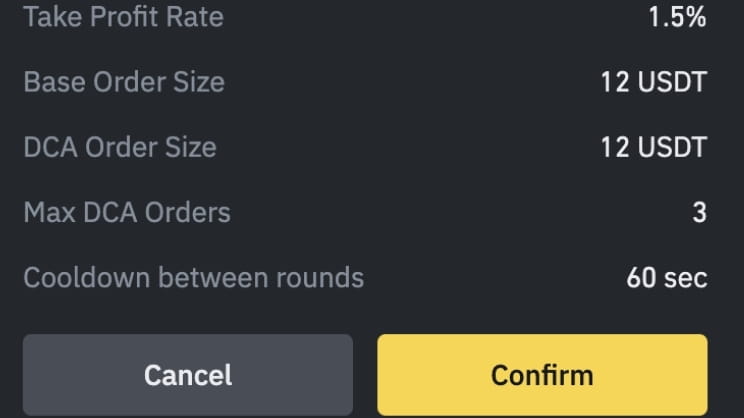
Step 4: Check the order details carefully before clicking [Confirm] to set up your Spot DCA bot.
ORDER SETTINGS
Price Deviation: The price difference percentage that triggers DCA orders.Take Profit: The target profit percentage based on the average price (before the trading bot ends).[Fix] is selected by default.
Once the trading bot reaches the take profit percentage, it will trigger a sell order and the trading bot will end.If you select [Trailing], it will lock the profit by enabling the trading bot to remain open and continue to profit as long as the price moves in the selected direction and mode. When the trading bot moves in the opposite direction by a specific percentage, it will trigger a sell order and the trading bot will end.
Note: [Trailing] may not be available for certain trading pairs.Base Order: The initial investment amount that will not be exceeded.
DCA Order: The subsequent investment amount(s) that will not be exceeded.Max DCA: The maximum number of DCA orders that will be placed per round.Note: You may also set up advanced parameters, such as a trigger price, price deviation multiplier, DCA order size multiplier, cooldown between rounds, lower and upper price range, and stop loss.Advanced settings
Trigger Price: Price of the token that will trigger the trading bot to stop.
Price Deviation Multiplier: Multiply the price difference in the percentage at which DCA orders will be placed starting from the second entry.
By default, this parameter equals to 1, which means each additional entry will equal the Price Deviation %. Otherwise, the multiplier will take effect between each additional entry.
For example, you are on the buy side and open a long position at $30,000 for a BTC/USDT pair, with a Price Deviation of 1% and a Price Deviation Multiplier of 2.Base Order = $30,000DCA #1 = Base Order - 1% = $29,700DCA #2 = DCA #1 - 1% 2 = $29,106DCA #3 = DCA #2 - 1% 2 2 = $27941.76

DCA Order Size Multiplier: Multiply the subsequent DCA Order investment amount(s). By default, this parameter equals to 1, which means each additional entry will equal the DCA Order amount. Otherwise, the multiplier will take effect from the second DCA order onwards (The first DCA order remains default after the bot has started).
For example, your DCA order is 1,000 USDT, and your DCA Order Size Multiplier is set to 2. When the price reaches the designated price deviation, each additional entry will be multiplied.DCA #1 = 1,000 USDT = 1,000 USDTDCA #2 = 1,000 USDT 2 = 2,000 USDTDCA #3 = 1,000 USDT 2 2 = 4,000 USDT
DCA Order Size Multiplier: Multiply the subsequent investment amount.
Cooldown between Rounds:
Rest period between each round of execution. By default, the cooldown between rounds is 60 seconds.
Lower and Upper Price Range:
A price range of the selected token’s base order that the trading bot will only execute within.
Note: For successive rounds, the base order executed may deviate from the price range due to market volatility.
Stop-Loss:
A stop-loss percentage that triggers the trading bot to stop and end.

5. Check the order details carefully before clicking [Confirm].