

#tutorial
tutorial
Просмотров: 268,147
723 обсуждают
Популярные
Новые

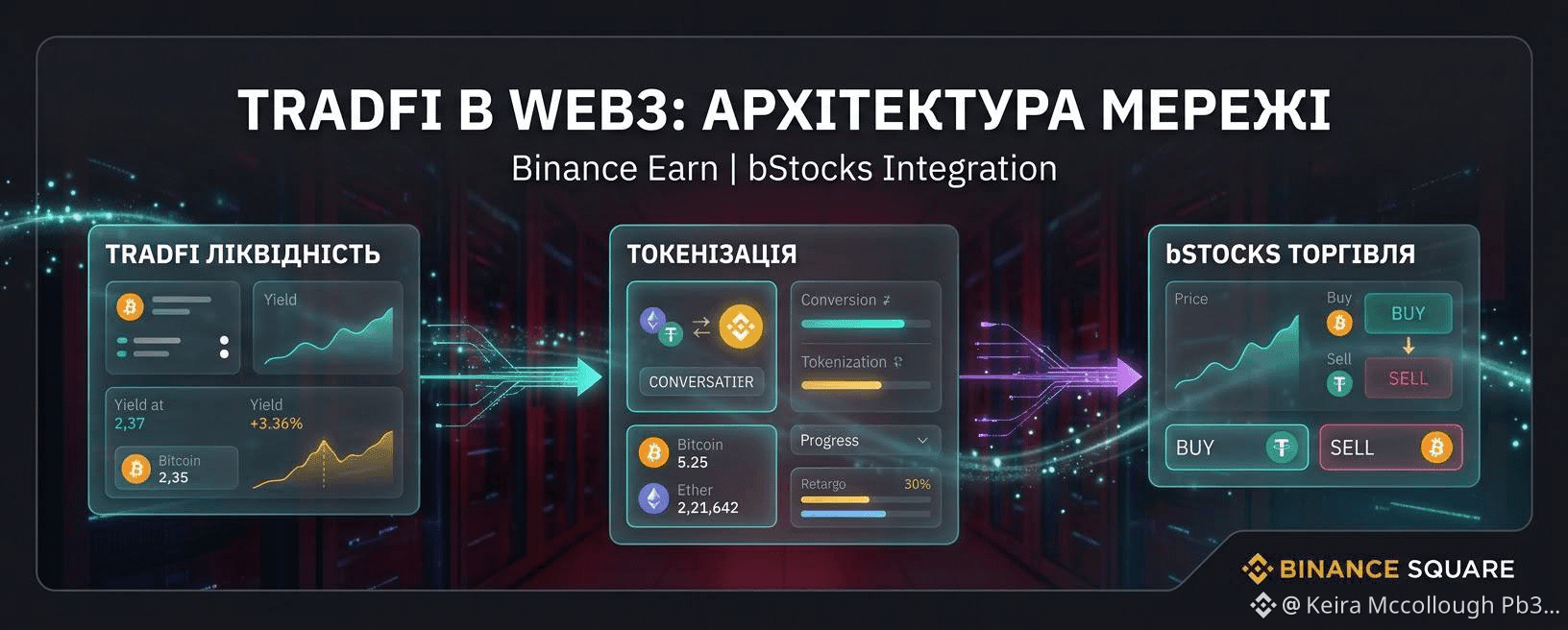
Покрокова інструкція як підключити Binance Earn за три кроки
Якщо ви ніколи не користувалися розділом пасивного доходу, ось алгоритм дій:
Відкрийте головний екран Binance і перейдіть у розділ Earn, далі Simple Earn.
Знайдіть у списку потрібну монету (рекомендую починати з USDT) і оберіть тип умов: Гнучкі.
Введіть бажану суму, ознайомтеся з розрахунковим показником APR і натисніть Підтвердити.
Відсотки почнуть нараховуватися з наступного дня. Скасувати підписку можна в будь-який момент без комісій.
#Tutorial #BinanceEarn #КриптоГайд
Покрокова інструкція як підключити Binance Earn за три кроки
Якщо ви ніколи не користувалися розділом пасивного доходу, ось алгоритм дій:
Відкрийте головний екран Binance і перейдіть у розділ Earn, далі Simple Earn.
Знайдіть у списку потрібну монету (рекомендую починати з USDT) і оберіть тип умов: Гнучкі.
Введіть бажану суму, ознайомтеся з розрахунковим показником APR і натисніть Підтвердити.
Відсотки почнуть нараховуватися з наступного дня. Скасувати підписку можна в будь-який момент без комісій.
#Tutorial #BinanceEarn #КриптоГайд
Якщо ви ніколи не користувалися розділом пасивного доходу, ось алгоритм дій:
Відкрийте головний екран Binance і перейдіть у розділ Earn, далі Simple Earn.
Знайдіть у списку потрібну монету (рекомендую починати з USDT) і оберіть тип умов: Гнучкі.
Введіть бажану суму, ознайомтеся з розрахунковим показником APR і натисніть Підтвердити.
Відсотки почнуть нараховуватися з наступного дня. Скасувати підписку можна в будь-який момент без комісій.
#Tutorial #BinanceEarn #КриптоГайд
87


·
--
Статья
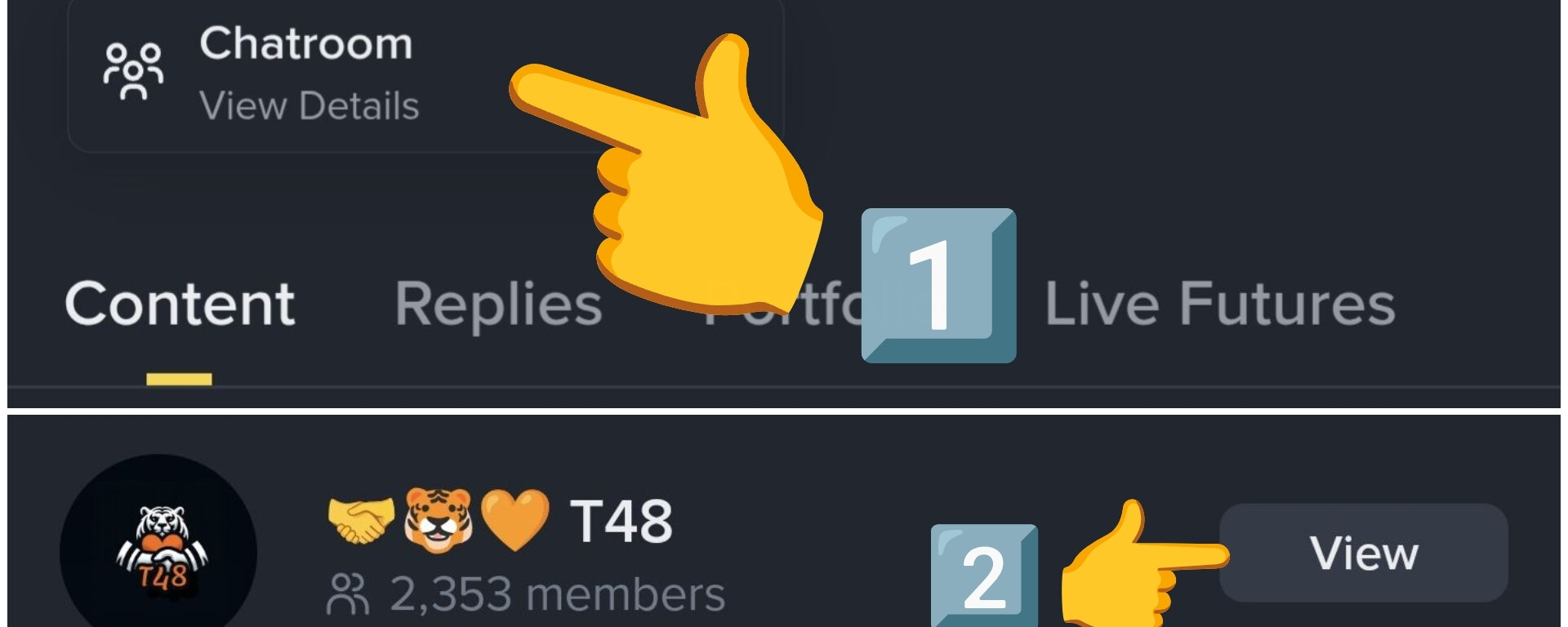
Como unirse al grupo de tu creador Favorito?1️⃣ : Cuando ves un post de tu creador favorito, Haz click en la foto de su perfil..
• Para este ejemplo voy a usar el perfil de @CRYPTOMECHANIC , que es uno de los mejores creadores sobre Trading..
2️⃣ : Una vez que ves su perfil, debajo de la biografía hay un botón de ( Sala de chat ) , haz click alli ..
3️⃣ luego haz click en el botón amarillo para unirte ...
• Como pudieron ver es bastante simple, incluso se podría resumir en 2 pasos..
1️⃣ Ir al perfil y dar click a la sala de chat
2️⃣ Darle al botón unirse..
• Un consejo para todos los grupos que te unas:
⚠️ Ten cuidado con mensajes que te diregen a plataformas de terceros.
• Intenta solo mantenerte en el chat dentro de la app de Binance para mayor seguridad..
• Muchas gracias a todos por el apoyo espero que esta pequeña guia sea de utilidad 🤝🐯🧡
#Tutorial // #Square // #TrendingTopic //
Como unirse al grupo de tu creador Favorito?
1️⃣ : Cuando ves un post de tu creador favorito, Haz click en la foto de su perfil..
• Para este ejemplo voy a usar el perfil de @CRYPTO MECHANIC , que es uno de los mejores creadores sobre Trading..
2️⃣ : Una vez que ves su perfil, debajo de la biografía hay un botón de ( Sala de chat ) , haz click alli ..
3️⃣ luego haz click en el botón amarillo para unirte ...
• Como pudieron ver es bastante simple, incluso se podría resumir en 2 pasos..
1️⃣ Ir al perfil y dar click a la sala de chat
2️⃣ Darle al botón unirse..
• Un consejo para todos los grupos que te unas:
⚠️ Ten cuidado con mensajes que te diregen a plataformas de terceros.
• Intenta solo mantenerte en el chat dentro de la app de Binance para mayor seguridad..
• Muchas gracias a todos por el apoyo espero que esta pequeña guia sea de utilidad 🤝🐯🧡
#Tutorial // #Square // #TrendingTopic //
• Para este ejemplo voy a usar el perfil de @CRYPTO MECHANIC , que es uno de los mejores creadores sobre Trading..
2️⃣ : Una vez que ves su perfil, debajo de la biografía hay un botón de ( Sala de chat ) , haz click alli ..
3️⃣ luego haz click en el botón amarillo para unirte ...
• Como pudieron ver es bastante simple, incluso se podría resumir en 2 pasos..
1️⃣ Ir al perfil y dar click a la sala de chat
2️⃣ Darle al botón unirse..
• Un consejo para todos los grupos que te unas:
⚠️ Ten cuidado con mensajes que te diregen a plataformas de terceros.
• Intenta solo mantenerte en el chat dentro de la app de Binance para mayor seguridad..
• Muchas gracias a todos por el apoyo espero que esta pequeña guia sea de utilidad 🤝🐯🧡
#Tutorial // #Square // #TrendingTopic //
5
7
731

·
--
Рост
Lesson 1: How to create a token.
Lesson 2: How people discover the token.
Lesson 3: How people start trading the token.
Lesson 4: How traders lose sleep watching the token. 😂
Welcome to the TUT tutorial.
$TUT T #Tutorial #Crypto #BNBChain
#BitcoinETFsBiggestDailyInflowSinceJanuary #USAugustJobGrowthNearlyTriplesForecast $DASH
Lesson 1: How to create a token.
Lesson 2: How people discover the token.
Lesson 3: How people start trading the token.
Lesson 4: How traders lose sleep watching the token. 😂
Welcome to the TUT tutorial.
$TUT T #Tutorial #Crypto #BNBChain
#BitcoinETFsBiggestDailyInflowSinceJanuary #USAugustJobGrowthNearlyTriplesForecast $DASH
Lesson 2: How people discover the token.
Lesson 3: How people start trading the token.
Lesson 4: How traders lose sleep watching the token. 😂
Welcome to the TUT tutorial.
$TUT T #Tutorial #Crypto #BNBChain
#BitcoinETFsBiggestDailyInflowSinceJanuary #USAugustJobGrowthNearlyTriplesForecast $DASH
1
95
·
--
Статья
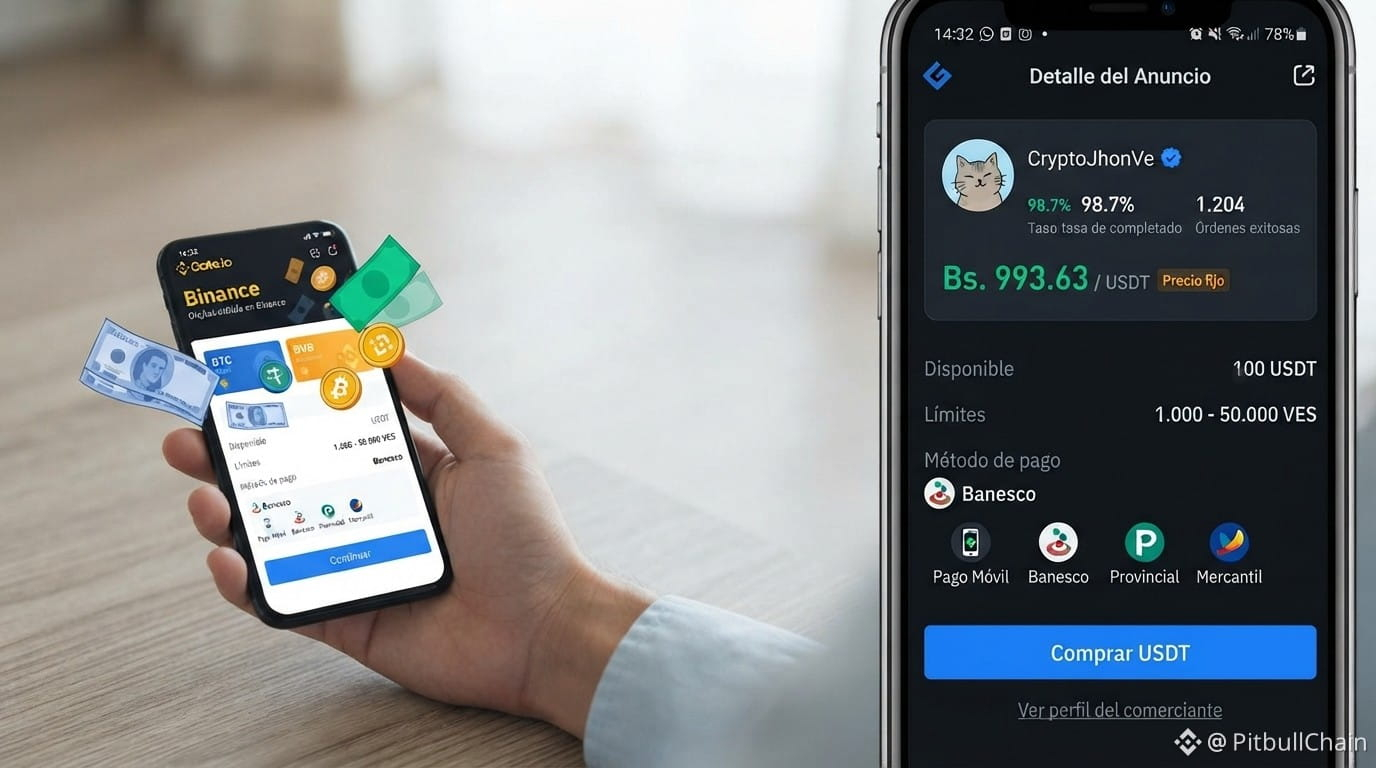
Aprende a leer el spread P2P hoy: 4.03% en 3 pasos🚨 ¡Ojo! El spread P2P se disparó a 4.03% (38.50 Bs). Eso significa que comprar y vender USDT tiene una diferencia enorme. En mi tutorial de hoy te explico cómo leer este dato y no caer en trampas.
Primero: compara la compra más baja y la venta más alta. Hoy comprar USDT está en 993.63 y vender en 955.13. Esa brecha es tu costo de oportunidad.
Segundo: revisa las 295 ofertas activas. ¿Cuántas tienen montos justos y bancos confiables? No te vayas por la primera.
Tercero: usa la calculadora de Binance para fijar tu precio real. Si el spread es alto, espera o negocia con proveedores verificados.
Aprende a blindar tus operaciones. 💪
📊 Tasas y análisis en vivo en pitbullchain.com
$USDT #Tutorial #P2P #USDT #Venezuela
Aprende a leer el spread P2P hoy: 4.03% en 3 pasos
🚨 ¡Ojo! El spread P2P se disparó a 4.03% (38.50 Bs). Eso significa que comprar y vender USDT tiene una diferencia enorme. En mi tutorial de hoy te explico cómo leer este dato y no caer en trampas.
Primero: compara la compra más baja y la venta más alta. Hoy comprar USDT está en 993.63 y vender en 955.13. Esa brecha es tu costo de oportunidad.
Segundo: revisa las 295 ofertas activas. ¿Cuántas tienen montos justos y bancos confiables? No te vayas por la primera.
Tercero: usa la calculadora de Binance para fijar tu precio real. Si el spread es alto, espera o negocia con proveedores verificados.
Aprende a blindar tus operaciones. 💪
📊 Tasas y análisis en vivo en pitbullchain.com
$USDT #Tutorial #P2P #USDT #Venezuela
Primero: compara la compra más baja y la venta más alta. Hoy comprar USDT está en 993.63 y vender en 955.13. Esa brecha es tu costo de oportunidad.
Segundo: revisa las 295 ofertas activas. ¿Cuántas tienen montos justos y bancos confiables? No te vayas por la primera.
Tercero: usa la calculadora de Binance para fijar tu precio real. Si el spread es alto, espera o negocia con proveedores verificados.
Aprende a blindar tus operaciones. 💪
📊 Tasas y análisis en vivo en pitbullchain.com
$USDT #Tutorial #P2P #USDT #Venezuela
50
·
--
Статья
Tutorial Dips Slightly—Is This a Calm Before the Storm?In a market filled with explosive pumps and painful dumps, one token is quietly doing its own thing. $TUT , the native token of Tutorial, is down a modest 1.5% over the last 24 hours, currently trading at $0.0469 . While a 1.5% drop might not seem exciting, the story behind the price action is worth paying attention to. 👀
Let's break down what's happening with Tutorial and what it could mean for traders. 👇
What's Happening with TUT? 🤔
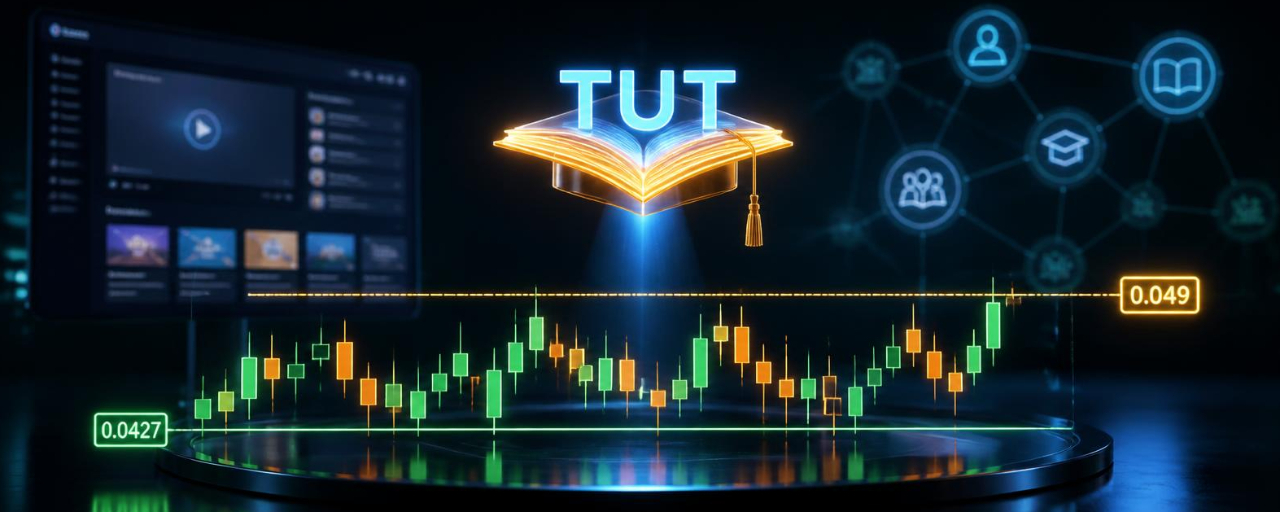
Tight Consolidation: After a massive rally from its lows, TUT has been trading in a relatively tight range between $0.0427 and $0.0491 . This consolidation often precedes a significant move in either direction.Buyer Dominance: Despite the slight price drop, the 24-hour trading activity shows 54% buyers vs. 46% sellers . This indicates that the dip is being bought, which is a bullish sign.Oversold Rebound: Before this consolidation, TUT had been on a brutal downtrend, dropping over 80% from its all-time high of $0.242 . The current price action could be a bottoming pattern.
The Fundamentals: What Is Tutorial? 🔍
Tutorial appears to be an educational or learn-to-earn platform in the crypto space. While specific details are limited, the project likely focuses on making crypto education accessible and rewarding for users. Educational platforms have gained traction as more people look to understand blockchain technology.
Key Strengths:
Growing Sector: The learn-to-earn model has shown promise, with projects like Rabbit Hole and Layer3 gaining popularity .Utility: A functional educational platform provides real utility, which could support long-term value .Community Potential: With a circulating supply of 831.6 million tokens, TUT has the potential to build a large community .
The Charts: What the Technicals Say 📊
Support Zone: The $0.0427 low is the immediate support to watch. If this holds, we could see a bounce toward $0.055 .Resistance Level: The $0.049 zone is the next major hurdle. A break above this could open the door to $0.060 or even $0.080 .Volume: The recent consolidation has been on relatively low volume, which often precedes a breakout .
Potential Catalysts to Watch 🔥
Product Updates: Any new features or partnerships could provide positive price catalysts .Broader Market Recovery: If the overall crypto market resumes its uptrend, TUT could benefit .Community Growth: A growing user base could increase demand for the token .
Final Takeaway 💎
Tutorial is in a consolidation phase after a significant drop, and the slight pullback could be a buying opportunity. The key levels to watch are $0.0427 (support) and $0.049 (resistance). If TUT can break above resistance with strong volume, we could see a continuation toward $0.060. However, a breakdown below support could lead to a retest of lower levels.
Are you watching TUT, or do you prefer more established projects? Drop your $TUT strategy below! 👇
#Tutorial #Write2Earn #tutanalysis
Tutorial Dips Slightly—Is This a Calm Before the Storm?
In a market filled with explosive pumps and painful dumps, one token is quietly doing its own thing. $TUT , the native token of Tutorial, is down a modest 1.5% over the last 24 hours, currently trading at $0.0469 . While a 1.5% drop might not seem exciting, the story behind the price action is worth paying attention to. 👀
Let's break down what's happening with Tutorial and what it could mean for traders. 👇
What's Happening with TUT? 🤔
Tight Consolidation: After a massive rally from its lows, TUT has been trading in a relatively tight range between $0.0427 and $0.0491 . This consolidation often precedes a significant move in either direction.Buyer Dominance: Despite the slight price drop, the 24-hour trading activity shows 54% buyers vs. 46% sellers . This indicates that the dip is being bought, which is a bullish sign.Oversold Rebound: Before this consolidation, TUT had been on a brutal downtrend, dropping over 80% from its all-time high of $0.242 . The current price action could be a bottoming pattern.
The Fundamentals: What Is Tutorial? 🔍
Tutorial appears to be an educational or learn-to-earn platform in the crypto space. While specific details are limited, the project likely focuses on making crypto education accessible and rewarding for users. Educational platforms have gained traction as more people look to understand blockchain technology.
Key Strengths:
Growing Sector: The learn-to-earn model has shown promise, with projects like Rabbit Hole and Layer3 gaining popularity .Utility: A functional educational platform provides real utility, which could support long-term value .Community Potential: With a circulating supply of 831.6 million tokens, TUT has the potential to build a large community .
The Charts: What the Technicals Say 📊
Support Zone: The $0.0427 low is the immediate support to watch. If this holds, we could see a bounce toward $0.055 .Resistance Level: The $0.049 zone is the next major hurdle. A break above this could open the door to $0.060 or even $0.080 .Volume: The recent consolidation has been on relatively low volume, which often precedes a breakout .
Potential Catalysts to Watch 🔥
Product Updates: Any new features or partnerships could provide positive price catalysts .Broader Market Recovery: If the overall crypto market resumes its uptrend, TUT could benefit .Community Growth: A growing user base could increase demand for the token .
Final Takeaway 💎
Tutorial is in a consolidation phase after a significant drop, and the slight pullback could be a buying opportunity. The key levels to watch are $0.0427 (support) and $0.049 (resistance). If TUT can break above resistance with strong volume, we could see a continuation toward $0.060. However, a breakdown below support could lead to a retest of lower levels.
Are you watching TUT, or do you prefer more established projects? Drop your $TUT strategy below! 👇
#Tutorial #Write2Earn #tutanalysis
Let's break down what's happening with Tutorial and what it could mean for traders. 👇
What's Happening with TUT? 🤔
Tight Consolidation: After a massive rally from its lows, TUT has been trading in a relatively tight range between $0.0427 and $0.0491 . This consolidation often precedes a significant move in either direction.Buyer Dominance: Despite the slight price drop, the 24-hour trading activity shows 54% buyers vs. 46% sellers . This indicates that the dip is being bought, which is a bullish sign.Oversold Rebound: Before this consolidation, TUT had been on a brutal downtrend, dropping over 80% from its all-time high of $0.242 . The current price action could be a bottoming pattern.
The Fundamentals: What Is Tutorial? 🔍
Tutorial appears to be an educational or learn-to-earn platform in the crypto space. While specific details are limited, the project likely focuses on making crypto education accessible and rewarding for users. Educational platforms have gained traction as more people look to understand blockchain technology.
Key Strengths:
Growing Sector: The learn-to-earn model has shown promise, with projects like Rabbit Hole and Layer3 gaining popularity .Utility: A functional educational platform provides real utility, which could support long-term value .Community Potential: With a circulating supply of 831.6 million tokens, TUT has the potential to build a large community .
The Charts: What the Technicals Say 📊
Support Zone: The $0.0427 low is the immediate support to watch. If this holds, we could see a bounce toward $0.055 .Resistance Level: The $0.049 zone is the next major hurdle. A break above this could open the door to $0.060 or even $0.080 .Volume: The recent consolidation has been on relatively low volume, which often precedes a breakout .
Potential Catalysts to Watch 🔥
Product Updates: Any new features or partnerships could provide positive price catalysts .Broader Market Recovery: If the overall crypto market resumes its uptrend, TUT could benefit .Community Growth: A growing user base could increase demand for the token .
Final Takeaway 💎
Tutorial is in a consolidation phase after a significant drop, and the slight pullback could be a buying opportunity. The key levels to watch are $0.0427 (support) and $0.049 (resistance). If TUT can break above resistance with strong volume, we could see a continuation toward $0.060. However, a breakdown below support could lead to a retest of lower levels.
Are you watching TUT, or do you prefer more established projects? Drop your $TUT strategy below! 👇
#Tutorial #Write2Earn #tutanalysis
180
·
--
🚀 Почему вдруг начал расти TUT?
Токен Tutorial (TUT) неожиданно привлёк внимание рынка и начал показывать заметное движение вверх.
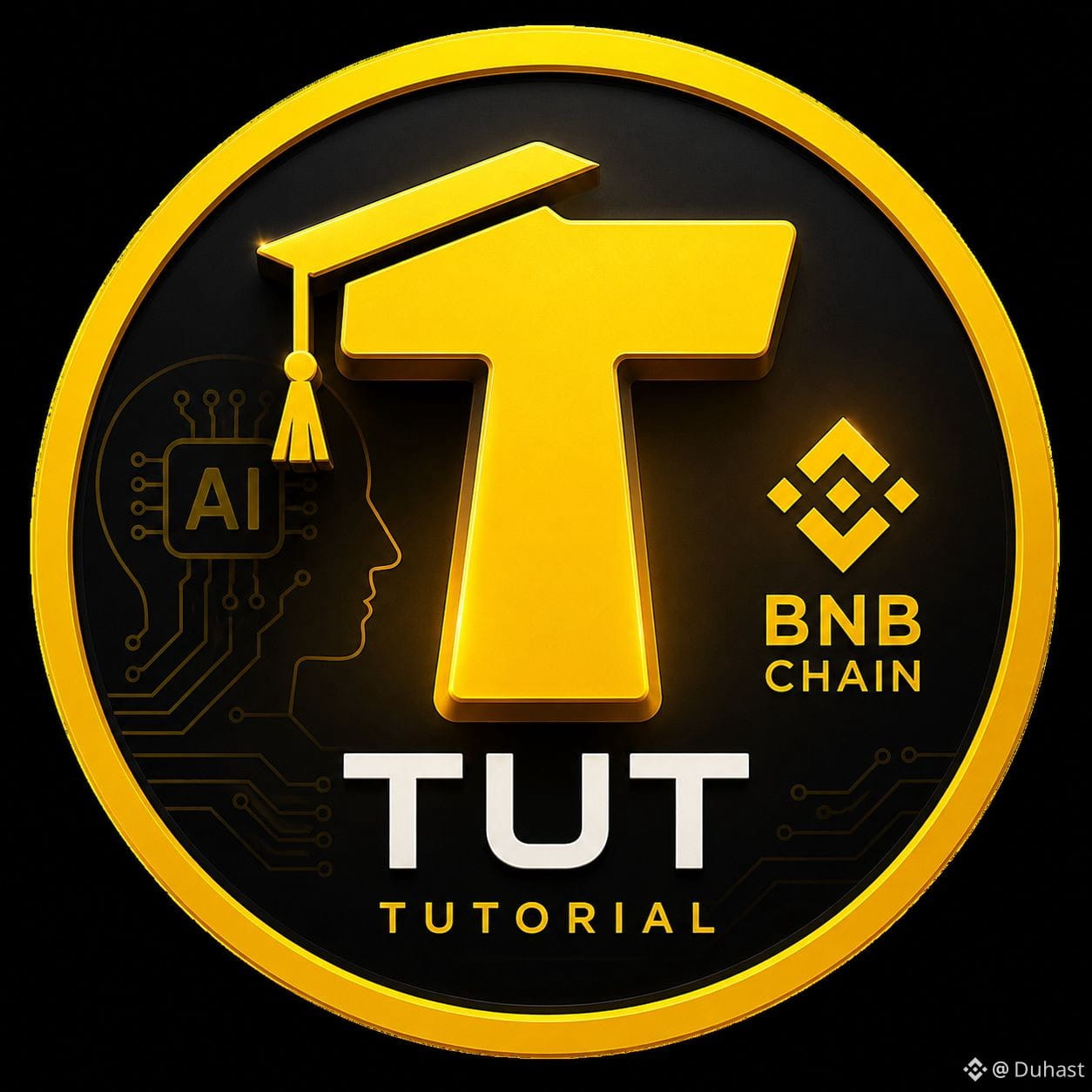
Tutorial — это образовательная Web3-платформа на базе ИИ, которая помогает пользователям разбираться в блокчейне, криптовалютах и экосистеме BNB Chain.
📈 Почему TUT может расти: • усилился интерес к AI + Crypto; • проект работает на пересечении образования и Web3; • рост активности вокруг BNB Chain может поддерживать спрос; • после длительной консолидации токен способен получать резкие импульсы на повышенных объёмах.
Но важно: рост цены сам по себе ещё не означает начало долгого тренда. Перед входом стоит смотреть объёмы, уровни сопротивления и активность крупных держателей.
👀 TUT явно стоит добавить в список наблюдения.$TUT
{spot}(TUTUSDT)
#Tutorial #BNBChain #Binance
🚀 Почему вдруг начал расти TUT?
Токен Tutorial (TUT) неожиданно привлёк внимание рынка и начал показывать заметное движение вверх.
Tutorial — это образовательная Web3-платформа на базе ИИ, которая помогает пользователям разбираться в блокчейне, криптовалютах и экосистеме BNB Chain.
📈 Почему TUT может расти: • усилился интерес к AI + Crypto; • проект работает на пересечении образования и Web3; • рост активности вокруг BNB Chain может поддерживать спрос; • после длительной консолидации токен способен получать резкие импульсы на повышенных объёмах.
Но важно: рост цены сам по себе ещё не означает начало долгого тренда. Перед входом стоит смотреть объёмы, уровни сопротивления и активность крупных держателей.
👀 TUT явно стоит добавить в список наблюдения.$TUT
#Tutorial #BNBChain #Binance
Токен Tutorial (TUT) неожиданно привлёк внимание рынка и начал показывать заметное движение вверх.
Tutorial — это образовательная Web3-платформа на базе ИИ, которая помогает пользователям разбираться в блокчейне, криптовалютах и экосистеме BNB Chain.
📈 Почему TUT может расти: • усилился интерес к AI + Crypto; • проект работает на пересечении образования и Web3; • рост активности вокруг BNB Chain может поддерживать спрос; • после длительной консолидации токен способен получать резкие импульсы на повышенных объёмах.
Но важно: рост цены сам по себе ещё не означает начало долгого тренда. Перед входом стоит смотреть объёмы, уровни сопротивления и активность крупных держателей.
👀 TUT явно стоит добавить в список наблюдения.$TUT
#Tutorial #BNBChain #Binance
1
222

·
--
How to buy your first tokenized US stock on Binance (under 3 minutes)
1. Open Binance App, search "Bstocks"
2. Pick a stock — tokens carry a B suffix (TSLAB, AAPLB, NVDAB)
3. Enter any amount, fractional from $1
4. Confirm. Assets land in your spot wallet
Want the real stock instead? Hold Bstocks → tap "Convert" → 1:1 to real US stock after KYC, zero conversion fee.
Rules worth knowing:
• Trades 24/7, all year
• Prices anchor to real stocks during market hours, may drift after hours
• Dividends paid as reinvestment
Fee discount up to 50% off right now: https://www.binance.com/zh-TC/support/announcement/detail/e187a603a2084c4cafe8acd651dca160
Register with code BNVIP: https://www.binance.com/register?ref=BNVIP
#Bstocks #Tutorial #Binance
How to buy your first tokenized US stock on Binance (under 3 minutes)
1. Open Binance App, search "Bstocks"
2. Pick a stock — tokens carry a B suffix (TSLAB, AAPLB, NVDAB)
3. Enter any amount, fractional from $1
4. Confirm. Assets land in your spot wallet
Want the real stock instead? Hold Bstocks → tap "Convert" → 1:1 to real US stock after KYC, zero conversion fee.
Rules worth knowing:
• Trades 24/7, all year
• Prices anchor to real stocks during market hours, may drift after hours
• Dividends paid as reinvestment
Fee discount up to 50% off right now: https://www.binance.com/zh-TC/support/announcement/detail/e187a603a2084c4cafe8acd651dca160
Register with code BNVIP: https://www.binance.com/register?ref=BNVIP
#Bstocks #Tutorial #Binance
1. Open Binance App, search "Bstocks"
2. Pick a stock — tokens carry a B suffix (TSLAB, AAPLB, NVDAB)
3. Enter any amount, fractional from $1
4. Confirm. Assets land in your spot wallet
Want the real stock instead? Hold Bstocks → tap "Convert" → 1:1 to real US stock after KYC, zero conversion fee.
Rules worth knowing:
• Trades 24/7, all year
• Prices anchor to real stocks during market hours, may drift after hours
• Dividends paid as reinvestment
Fee discount up to 50% off right now: https://www.binance.com/zh-TC/support/announcement/detail/e187a603a2084c4cafe8acd651dca160
Register with code BNVIP: https://www.binance.com/register?ref=BNVIP
#Bstocks #Tutorial #Binance
263
·
--
$TUT @tutorialtoken #Tutorial
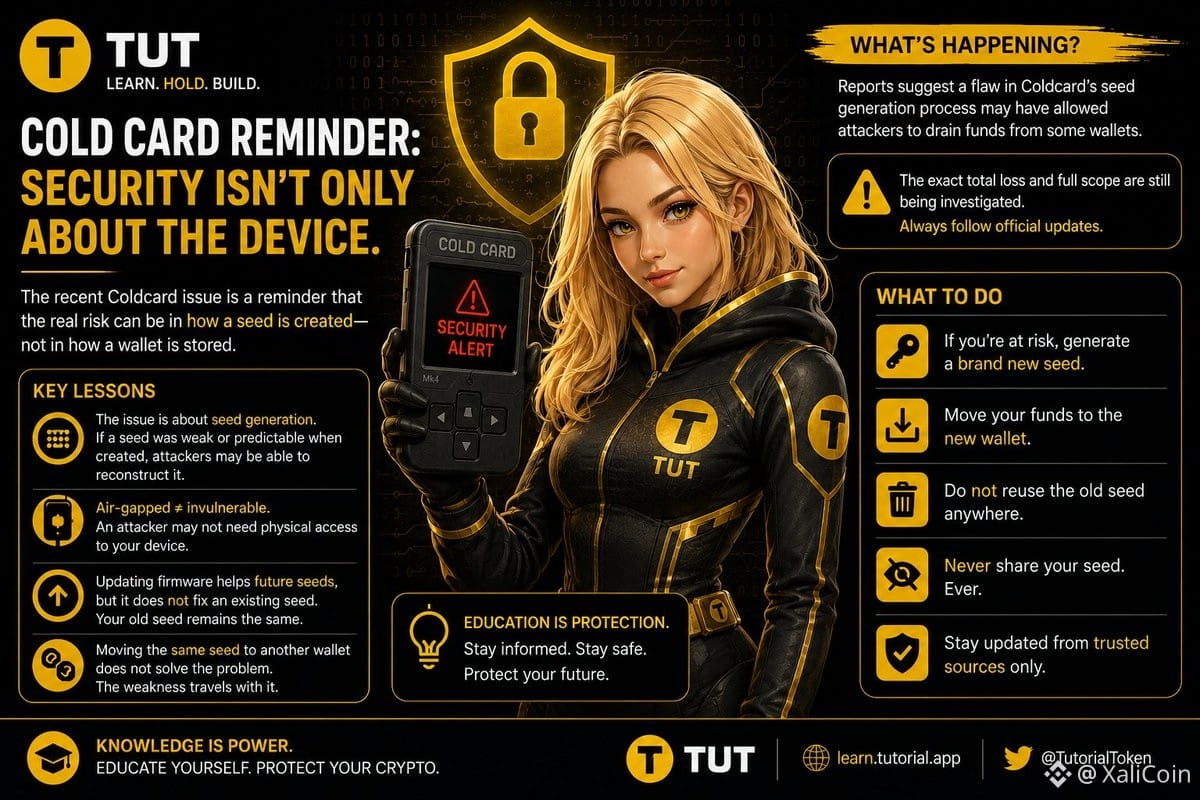
Ide awalnya muncul dari video/tutorial cara meluncurkan token di BNB Chain yang dibuat pengembang pada 2023 (masih di testnet).
Token “OG” versi testnet itu kemudian dihidupkan lagi di mainnet dan menjadi proyek yang kini dikenal sebagai Tutorial ($TUT).
Momentum besar terjadi pada Maret 2025, ketika $TUT masuk ke bursa besar (termasuk Binance) dan viral sebagai “meme coin yang edukatif”.
Di beberapa sumber, start date resmi dicatat sekitar 7–8 Februari 2025 (tanggal peluncuran/mainnet yang banyak dipakai sebagai patokan umur proyek).
Founder & CEO: Yerasyl Amanbek (@YerasylAmanbek).
Profilnya: blockchain engineer, educator, dan “Tech Martian” di BNB Chain; sebelumnya terlibat di proyek infrastruktur blockchain (mis. Entangle L1) dan program edukasi blockchain bersama Binance Academy.
{future}(TUTUSDT)
$TUT @tutorialtoken #Tutorial
Ide awalnya muncul dari video/tutorial cara meluncurkan token di BNB Chain yang dibuat pengembang pada 2023 (masih di testnet).
Token “OG” versi testnet itu kemudian dihidupkan lagi di mainnet dan menjadi proyek yang kini dikenal sebagai Tutorial ($TUT ).
Momentum besar terjadi pada Maret 2025, ketika $TUT masuk ke bursa besar (termasuk Binance) dan viral sebagai “meme coin yang edukatif”.
Di beberapa sumber, start date resmi dicatat sekitar 7–8 Februari 2025 (tanggal peluncuran/mainnet yang banyak dipakai sebagai patokan umur proyek).
Founder & CEO: Yerasyl Amanbek (@YerasylAmanbek).
Profilnya: blockchain engineer, educator, dan “Tech Martian” di BNB Chain; sebelumnya terlibat di proyek infrastruktur blockchain (mis. Entangle L1) dan program edukasi blockchain bersama Binance Academy.
Ide awalnya muncul dari video/tutorial cara meluncurkan token di BNB Chain yang dibuat pengembang pada 2023 (masih di testnet).
Token “OG” versi testnet itu kemudian dihidupkan lagi di mainnet dan menjadi proyek yang kini dikenal sebagai Tutorial ($TUT ).
Momentum besar terjadi pada Maret 2025, ketika $TUT masuk ke bursa besar (termasuk Binance) dan viral sebagai “meme coin yang edukatif”.
Di beberapa sumber, start date resmi dicatat sekitar 7–8 Februari 2025 (tanggal peluncuran/mainnet yang banyak dipakai sebagai patokan umur proyek).
Founder & CEO: Yerasyl Amanbek (@YerasylAmanbek).
Profilnya: blockchain engineer, educator, dan “Tech Martian” di BNB Chain; sebelumnya terlibat di proyek infrastruktur blockchain (mis. Entangle L1) dan program edukasi blockchain bersama Binance Academy.
1
304
¿Poco tiempo para analizar gráficos? 📊 Cómo elegí un Master Trader en Binance y mis resultados. ¡EvPuedes ganar dinero en Binance publicando contenido a través de Binance Square, la red social oficial de la plataforma que premia a los creadores de contenido.
1. Elige tu programa de monetización
Binance Square Write to Earn: Gana comisiones directas. Recibes hasta un 5% de reembolso en comisiones de trading cuando tus lectores operan después de leer tu publicación.
Propinas de Binance Square: Habilita la opción para que tus seguidores te envíen criptomonedas directamente si tu análisis les resulta útil.
Campañas de contenido mensuales: Binance lanza retos específicos con bolsas de premios de miles de dólares por escribir sobre temas en tendencia (ej. Layer 2, DeFi o Halving).
2. Crea publicaciones de alto impacto (Estrategia sugerida)
Para calificar y atraer lectores, tu publicación debe aportar valor real. Te recomiendo usar este formato estructurado:
Título llamativo (Gancho): Usa preguntas o datos de precio actuales. Ejemplo: "¿Hacia dónde va Bitcoin esta semana? Soporte clave a monitorear".
Análisis de Mercado Breve: Explica qué está pasando con una moneda popular sin rodeos. Usa capturas de pantalla de gráficos de Binance.
Tutoriales paso a paso: Escribe guías sencillas sobre cómo usar herramientas específicas, como el Copy Trading de Binance o el Binance Earn.
Llamado a la acción (CTA): Cierra siempre invitando a debatir en los comentarios y recuerda usar los hashtags oficiales del evento mensual para calificar en los premios.
3. Pasos clave para empezar hoy mismo
Configura tu perfil: Entra a Binance Square, elige un nombre de usuario profesional y añade una foto de perfil.
Revisa las campañas activas: Ve a la sección de creadores o la zona de campañas en Binance para ver qué hashtags están pagando premios esta semana.
Publica con regularidad: Sube al menos una publicación diaria analizando noticias de última hora. El algoritmo premia la consistencia y la interacción (me gusta, compartidos y comentarios).
Si quieres que armemos tu primera publicación ahora mismo, cuéntame:
¿De qué criptomoneda o tema te gustaría hablar? (Ej. Bitcoin, memes, inversiones seguras)
¿Prefieres un enfoque técnico con gráficos o un tutorial sencillo para principiantes?
La IA puede cometer errores, así que verifica las respuestas
Aquí tienes una idea de publicación diseñada específicamente para maximizar interacciones, activar las propinas y aprovechar el programa Write to Earn (ganar comisiones cuando tus lectores operan).
El tema se centra en el Copy Trading de Binance, ya que es muy atractivo tanto para principiantes como para inversores ocupados.
Título Ganador (El Gancho)
¿Poco tiempo para analizar gráficos? 📊 Cómo elegí un Master Trader en Binance y mis resultados. ¡Evita estos 3 errores! 👇
Cuerpo de la Publicación
Muchos entran al mundo cripto pensando que deben pasar 12 horas al día mirando pantallas. La realidad es que el Copy Trading de Binance permite automatizar tus inversiones copiando a profesionales.
Pero cuidado: el 90% elige mal y pierde dinero. Aquí te dejo mi estrategia de 3 pasos para filtrar a los verdaderos expertos:
1. No mires solo el ROI (Retorno de Inversión)
Un ROI del 1000% en 7 días suele significar un riesgo extremo. Busca consistencia: traders con más de 30 días activos y un ROI moderado pero constante (ej. 15% - 30%).
2. Revisa el "Max Drawdown" (MDD)
Este dato es vital. El MDD te dice cuánto dinero llegó a perder esa cuenta en su peor momento. Si el MDD es mayor al 20%, el trader arriesga demasiado tu capital. Busca perfiles con MDD bajo (menos del 15%).
3. Gestión de riesgo propia
Al configurar la copia, usa siempre la opción de "Stop Loss total". Si el trader tiene un mal día, tu cuenta se detendrá automáticamente protegiendo tu dinero.
#Copytrading #tutorial $MUB
$BTC
{spot}(BTCUSDT)
¿Poco tiempo para analizar gráficos? 📊 Cómo elegí un Master Trader en Binance y mis resultados. ¡Ev
Puedes ganar dinero en Binance publicando contenido a través de Binance Square, la red social oficial de la plataforma que premia a los creadores de contenido.
1. Elige tu programa de monetización
Binance Square Write to Earn: Gana comisiones directas. Recibes hasta un 5% de reembolso en comisiones de trading cuando tus lectores operan después de leer tu publicación.
Propinas de Binance Square: Habilita la opción para que tus seguidores te envíen criptomonedas directamente si tu análisis les resulta útil.
Campañas de contenido mensuales: Binance lanza retos específicos con bolsas de premios de miles de dólares por escribir sobre temas en tendencia (ej. Layer 2, DeFi o Halving).
2. Crea publicaciones de alto impacto (Estrategia sugerida)
Para calificar y atraer lectores, tu publicación debe aportar valor real. Te recomiendo usar este formato estructurado:
Título llamativo (Gancho): Usa preguntas o datos de precio actuales. Ejemplo: "¿Hacia dónde va Bitcoin esta semana? Soporte clave a monitorear".
Análisis de Mercado Breve: Explica qué está pasando con una moneda popular sin rodeos. Usa capturas de pantalla de gráficos de Binance.
Tutoriales paso a paso: Escribe guías sencillas sobre cómo usar herramientas específicas, como el Copy Trading de Binance o el Binance Earn.
Llamado a la acción (CTA): Cierra siempre invitando a debatir en los comentarios y recuerda usar los hashtags oficiales del evento mensual para calificar en los premios.
3. Pasos clave para empezar hoy mismo
Configura tu perfil: Entra a Binance Square, elige un nombre de usuario profesional y añade una foto de perfil.
Revisa las campañas activas: Ve a la sección de creadores o la zona de campañas en Binance para ver qué hashtags están pagando premios esta semana.
Publica con regularidad: Sube al menos una publicación diaria analizando noticias de última hora. El algoritmo premia la consistencia y la interacción (me gusta, compartidos y comentarios).
Si quieres que armemos tu primera publicación ahora mismo, cuéntame:
¿De qué criptomoneda o tema te gustaría hablar? (Ej. Bitcoin, memes, inversiones seguras)
¿Prefieres un enfoque técnico con gráficos o un tutorial sencillo para principiantes?
La IA puede cometer errores, así que verifica las respuestas
Aquí tienes una idea de publicación diseñada específicamente para maximizar interacciones, activar las propinas y aprovechar el programa Write to Earn (ganar comisiones cuando tus lectores operan).
El tema se centra en el Copy Trading de Binance, ya que es muy atractivo tanto para principiantes como para inversores ocupados.
Título Ganador (El Gancho)
¿Poco tiempo para analizar gráficos? 📊 Cómo elegí un Master Trader en Binance y mis resultados. ¡Evita estos 3 errores! 👇
Cuerpo de la Publicación
Muchos entran al mundo cripto pensando que deben pasar 12 horas al día mirando pantallas. La realidad es que el Copy Trading de Binance permite automatizar tus inversiones copiando a profesionales.
Pero cuidado: el 90% elige mal y pierde dinero. Aquí te dejo mi estrategia de 3 pasos para filtrar a los verdaderos expertos:
1. No mires solo el ROI (Retorno de Inversión)
Un ROI del 1000% en 7 días suele significar un riesgo extremo. Busca consistencia: traders con más de 30 días activos y un ROI moderado pero constante (ej. 15% - 30%).
2. Revisa el "Max Drawdown" (MDD)
Este dato es vital. El MDD te dice cuánto dinero llegó a perder esa cuenta en su peor momento. Si el MDD es mayor al 20%, el trader arriesga demasiado tu capital. Busca perfiles con MDD bajo (menos del 15%).
3. Gestión de riesgo propia
Al configurar la copia, usa siempre la opción de "Stop Loss total". Si el trader tiene un mal día, tu cuenta se detendrá automáticamente protegiendo tu dinero.
#Copytrading #tutorial $MUB
$BTC
1. Elige tu programa de monetización
Binance Square Write to Earn: Gana comisiones directas. Recibes hasta un 5% de reembolso en comisiones de trading cuando tus lectores operan después de leer tu publicación.
Propinas de Binance Square: Habilita la opción para que tus seguidores te envíen criptomonedas directamente si tu análisis les resulta útil.
Campañas de contenido mensuales: Binance lanza retos específicos con bolsas de premios de miles de dólares por escribir sobre temas en tendencia (ej. Layer 2, DeFi o Halving).
2. Crea publicaciones de alto impacto (Estrategia sugerida)
Para calificar y atraer lectores, tu publicación debe aportar valor real. Te recomiendo usar este formato estructurado:
Título llamativo (Gancho): Usa preguntas o datos de precio actuales. Ejemplo: "¿Hacia dónde va Bitcoin esta semana? Soporte clave a monitorear".
Análisis de Mercado Breve: Explica qué está pasando con una moneda popular sin rodeos. Usa capturas de pantalla de gráficos de Binance.
Tutoriales paso a paso: Escribe guías sencillas sobre cómo usar herramientas específicas, como el Copy Trading de Binance o el Binance Earn.
Llamado a la acción (CTA): Cierra siempre invitando a debatir en los comentarios y recuerda usar los hashtags oficiales del evento mensual para calificar en los premios.
3. Pasos clave para empezar hoy mismo
Configura tu perfil: Entra a Binance Square, elige un nombre de usuario profesional y añade una foto de perfil.
Revisa las campañas activas: Ve a la sección de creadores o la zona de campañas en Binance para ver qué hashtags están pagando premios esta semana.
Publica con regularidad: Sube al menos una publicación diaria analizando noticias de última hora. El algoritmo premia la consistencia y la interacción (me gusta, compartidos y comentarios).
Si quieres que armemos tu primera publicación ahora mismo, cuéntame:
¿De qué criptomoneda o tema te gustaría hablar? (Ej. Bitcoin, memes, inversiones seguras)
¿Prefieres un enfoque técnico con gráficos o un tutorial sencillo para principiantes?
La IA puede cometer errores, así que verifica las respuestas
Aquí tienes una idea de publicación diseñada específicamente para maximizar interacciones, activar las propinas y aprovechar el programa Write to Earn (ganar comisiones cuando tus lectores operan).
El tema se centra en el Copy Trading de Binance, ya que es muy atractivo tanto para principiantes como para inversores ocupados.
Título Ganador (El Gancho)
¿Poco tiempo para analizar gráficos? 📊 Cómo elegí un Master Trader en Binance y mis resultados. ¡Evita estos 3 errores! 👇
Cuerpo de la Publicación
Muchos entran al mundo cripto pensando que deben pasar 12 horas al día mirando pantallas. La realidad es que el Copy Trading de Binance permite automatizar tus inversiones copiando a profesionales.
Pero cuidado: el 90% elige mal y pierde dinero. Aquí te dejo mi estrategia de 3 pasos para filtrar a los verdaderos expertos:
1. No mires solo el ROI (Retorno de Inversión)
Un ROI del 1000% en 7 días suele significar un riesgo extremo. Busca consistencia: traders con más de 30 días activos y un ROI moderado pero constante (ej. 15% - 30%).
2. Revisa el "Max Drawdown" (MDD)
Este dato es vital. El MDD te dice cuánto dinero llegó a perder esa cuenta en su peor momento. Si el MDD es mayor al 20%, el trader arriesga demasiado tu capital. Busca perfiles con MDD bajo (menos del 15%).
3. Gestión de riesgo propia
Al configurar la copia, usa siempre la opción de "Stop Loss total". Si el trader tiene un mal día, tu cuenta se detendrá automáticamente protegiendo tu dinero.
#Copytrading #tutorial $MUB
$BTC
116

·
--
Esto es información para ayudar a los principiantes, es un método sencillo para establecer si una crypto es una buena inversión en Spot con solo un indicador.
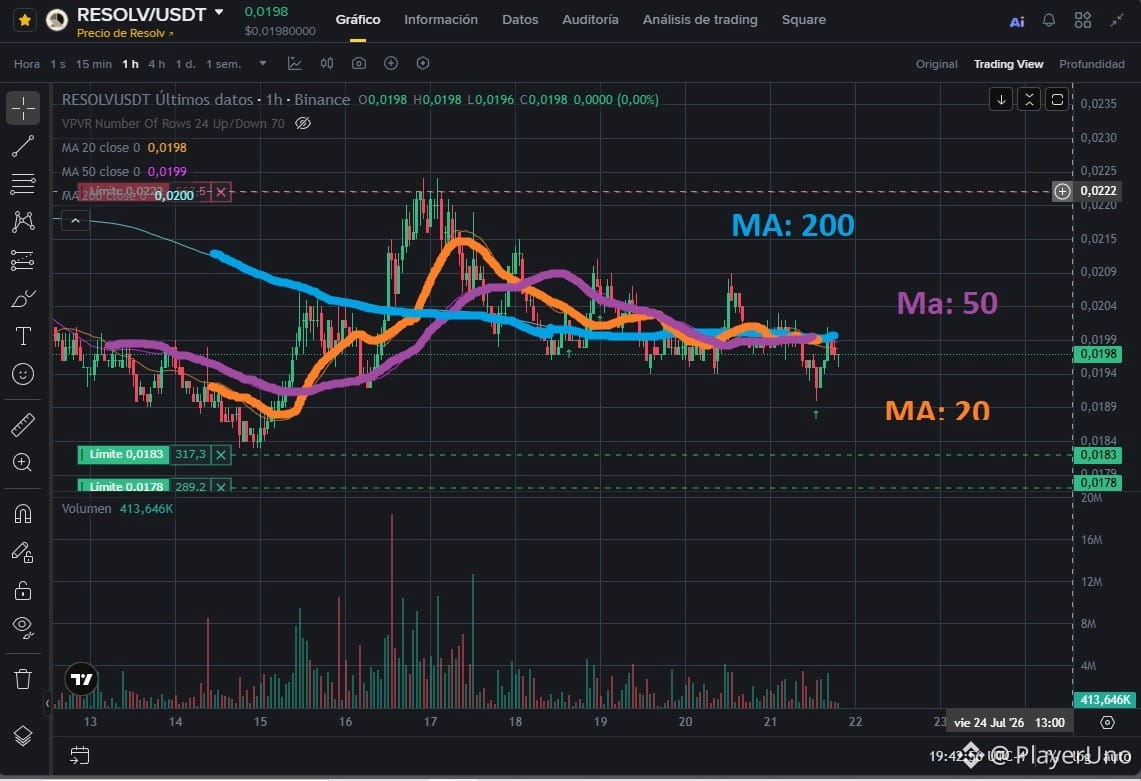
Abre la configuración de Indicadores y cambia los valores de las MA (Moving Average) una en 200, otra en 50, y otra en 20.
Mientras *más plana este la MA de 200*, y las MA de 50 y 20, estén cerquita comprimidas, y las velas o barras estén ligeramente por encima de este conjunto de MA, quiere decir que la cripto está en un estado de acumulación y es cuestión de tiempo para que estalle al alza, a menos que haya algún evento desfavorable.
Verifica la gráfica en temporalidades de 1D, 4H y 1H. Por lo menos en 2 temporalidades debe haber un estado de compresión similar para ir más seguro.
Aplicando este método reduces el riesgo y aumentas probabilidades de obtener ganancias, por supuesto hay que contemplar otros indicadores , pero solo esto te puede ayudar a detectar a simple vista una buena inversión.
Éxito Trader
Gráfica:$RESOLV 1H
#Tutorial #nuevosenbinance
Esto es información para ayudar a los principiantes, es un método sencillo para establecer si una crypto es una buena inversión en Spot con solo un indicador.
Abre la configuración de Indicadores y cambia los valores de las MA (Moving Average) una en 200, otra en 50, y otra en 20.
Mientras *más plana este la MA de 200*, y las MA de 50 y 20, estén cerquita comprimidas, y las velas o barras estén ligeramente por encima de este conjunto de MA, quiere decir que la cripto está en un estado de acumulación y es cuestión de tiempo para que estalle al alza, a menos que haya algún evento desfavorable.
Verifica la gráfica en temporalidades de 1D, 4H y 1H. Por lo menos en 2 temporalidades debe haber un estado de compresión similar para ir más seguro.
Aplicando este método reduces el riesgo y aumentas probabilidades de obtener ganancias, por supuesto hay que contemplar otros indicadores , pero solo esto te puede ayudar a detectar a simple vista una buena inversión.
Éxito Trader
Gráfica:$RESOLV 1H
#Tutorial #nuevosenbinance
Abre la configuración de Indicadores y cambia los valores de las MA (Moving Average) una en 200, otra en 50, y otra en 20.
Mientras *más plana este la MA de 200*, y las MA de 50 y 20, estén cerquita comprimidas, y las velas o barras estén ligeramente por encima de este conjunto de MA, quiere decir que la cripto está en un estado de acumulación y es cuestión de tiempo para que estalle al alza, a menos que haya algún evento desfavorable.
Verifica la gráfica en temporalidades de 1D, 4H y 1H. Por lo menos en 2 temporalidades debe haber un estado de compresión similar para ir más seguro.
Aplicando este método reduces el riesgo y aumentas probabilidades de obtener ganancias, por supuesto hay que contemplar otros indicadores , pero solo esto te puede ayudar a detectar a simple vista una buena inversión.
Éxito Trader
Gráfica:$RESOLV 1H
#Tutorial #nuevosenbinance
233

·
--
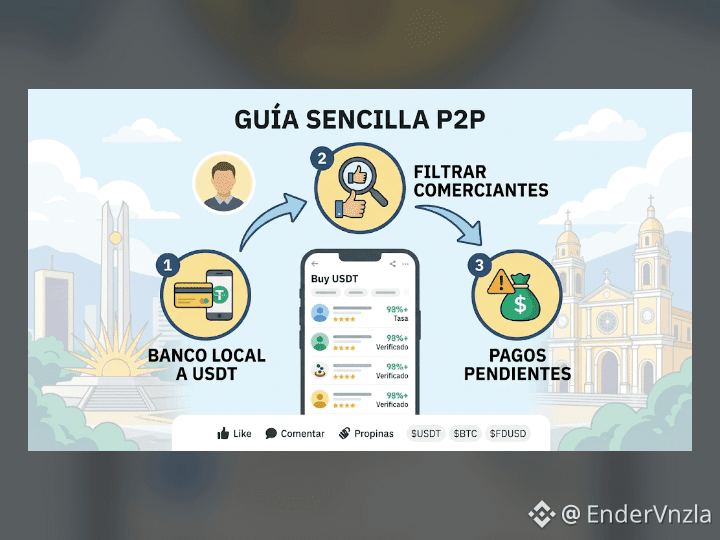
GUÍA RÁPIDA: Domina el P2P en 3 pasos sencillos 💡
Comprar y vender criptos con tu banco local no tiene por qué ser complicado ni riesgoso. Para mantener tus operaciones 100% seguras, solo debes tener en cuenta tres aspectos clave:
1️⃣ Banco Local a USDT: Elige la opción de pago en tu moneda local y realiza la transferencia directamente desde tu cuenta bancaria personal.
2️⃣ Filtra Comerciantes Confiables: Busca siempre vendedores con insignia de verificación y una tasa de finalización superior al 95%.
3️⃣ Manejo de Pagos Pendientes: Si el pago se demora o surge un contratiempo, no liberes los fondos hasta verificar el ingreso en tu cuenta o abre una apelación a tiempo.
📌 Aprende a proteger tus fondos y operar con total tranquilidad.
$USDT #BTC $FDUSD $USDC #p2p #aprenden #tutorial
GUÍA RÁPIDA: Domina el P2P en 3 pasos sencillos 💡
Comprar y vender criptos con tu banco local no tiene por qué ser complicado ni riesgoso. Para mantener tus operaciones 100% seguras, solo debes tener en cuenta tres aspectos clave:
1️⃣ Banco Local a USDT: Elige la opción de pago en tu moneda local y realiza la transferencia directamente desde tu cuenta bancaria personal.
2️⃣ Filtra Comerciantes Confiables: Busca siempre vendedores con insignia de verificación y una tasa de finalización superior al 95%.
3️⃣ Manejo de Pagos Pendientes: Si el pago se demora o surge un contratiempo, no liberes los fondos hasta verificar el ingreso en tu cuenta o abre una apelación a tiempo.
📌 Aprende a proteger tus fondos y operar con total tranquilidad.
$USDT #BTC $FDUSD $USDC #p2p #aprenden #tutorial
Comprar y vender criptos con tu banco local no tiene por qué ser complicado ni riesgoso. Para mantener tus operaciones 100% seguras, solo debes tener en cuenta tres aspectos clave:
1️⃣ Banco Local a USDT: Elige la opción de pago en tu moneda local y realiza la transferencia directamente desde tu cuenta bancaria personal.
2️⃣ Filtra Comerciantes Confiables: Busca siempre vendedores con insignia de verificación y una tasa de finalización superior al 95%.
3️⃣ Manejo de Pagos Pendientes: Si el pago se demora o surge un contratiempo, no liberes los fondos hasta verificar el ingreso en tu cuenta o abre una apelación a tiempo.
📌 Aprende a proteger tus fondos y operar con total tranquilidad.
$USDT #BTC $FDUSD $USDC #p2p #aprenden #tutorial
1
265
·
--
Visi & misi (inti proyek) @tutorialtoken
Visi intinya: menjadikan belajar blockchain/kripto jadi mudah, viral, dan benar-benar dipakai, dengan pendekatan “meme + edukasi + AI”.
Misi utamanya dapat dirangkum sebagai:
Membangun ekosistem yang menghubungkan Tutorial (edukasi), AI (agent/tutor pintar), dan Community.
Menyediakan konten & alat belajar praktis (setup wallet, trading di DEX, smart contract, dll.) khusus untuk ekosistem BNB Chain.
Menggunakan token $TUT sebagai insentif (reward), akses fitur, dan elemen governance dalam platform.
#Tutorial
#SaylorHintsStrategyBitcoinBuy
#BIP110SoftForkAttemptBegins
#SouthKoreaProposesLooseningCryptoShareholderRules
{spot}(TUTUSDT)
Visi & misi (inti proyek) @tutorialtoken
Visi intinya: menjadikan belajar blockchain/kripto jadi mudah, viral, dan benar-benar dipakai, dengan pendekatan “meme + edukasi + AI”.
Misi utamanya dapat dirangkum sebagai:
Membangun ekosistem yang menghubungkan Tutorial (edukasi), AI (agent/tutor pintar), dan Community.
Menyediakan konten & alat belajar praktis (setup wallet, trading di DEX, smart contract, dll.) khusus untuk ekosistem BNB Chain.
Menggunakan token $TUT sebagai insentif (reward), akses fitur, dan elemen governance dalam platform.
#Tutorial
#SaylorHintsStrategyBitcoinBuy
#BIP110SoftForkAttemptBegins
#SouthKoreaProposesLooseningCryptoShareholderRules
Visi intinya: menjadikan belajar blockchain/kripto jadi mudah, viral, dan benar-benar dipakai, dengan pendekatan “meme + edukasi + AI”.
Misi utamanya dapat dirangkum sebagai:
Membangun ekosistem yang menghubungkan Tutorial (edukasi), AI (agent/tutor pintar), dan Community.
Menyediakan konten & alat belajar praktis (setup wallet, trading di DEX, smart contract, dll.) khusus untuk ekosistem BNB Chain.
Menggunakan token $TUT sebagai insentif (reward), akses fitur, dan elemen governance dalam platform.
#Tutorial
#SaylorHintsStrategyBitcoinBuy
#BIP110SoftForkAttemptBegins
#SouthKoreaProposesLooseningCryptoShareholderRules

1
338
·
--
How to buy your first tokenized US stock on Binance (under 3 minutes)
1. Open Binance App, search "Bstocks"
2. Pick a stock — tokens carry a B suffix (TSLAB, AAPLB, NVDAB)
3. Enter any amount, fractional from $1
4. Confirm. Assets land in your spot wallet
Want the real stock instead? Hold Bstocks → tap "Convert" → 1:1 to real US stock after KYC, zero conversion fee.
Rules worth knowing:
• Trades 24/7, all year
• Prices anchor to real stocks during market hours, may drift after hours
• Dividends paid as reinvestment
Register with code BNAPP: https://www.binance.com/register?ref=BNAPP
Fee promotions change over time — check the app for what's currently active.
#Bstocks #Tutorial #Binance
How to buy your first tokenized US stock on Binance (under 3 minutes)
1. Open Binance App, search "Bstocks"
2. Pick a stock — tokens carry a B suffix (TSLAB, AAPLB, NVDAB)
3. Enter any amount, fractional from $1
4. Confirm. Assets land in your spot wallet
Want the real stock instead? Hold Bstocks → tap "Convert" → 1:1 to real US stock after KYC, zero conversion fee.
Rules worth knowing:
• Trades 24/7, all year
• Prices anchor to real stocks during market hours, may drift after hours
• Dividends paid as reinvestment
Register with code BNAPP: https://www.binance.com/register?ref=BNAPP
Fee promotions change over time — check the app for what's currently active.
#Bstocks #Tutorial #Binance
1. Open Binance App, search "Bstocks"
2. Pick a stock — tokens carry a B suffix (TSLAB, AAPLB, NVDAB)
3. Enter any amount, fractional from $1
4. Confirm. Assets land in your spot wallet
Want the real stock instead? Hold Bstocks → tap "Convert" → 1:1 to real US stock after KYC, zero conversion fee.
Rules worth knowing:
• Trades 24/7, all year
• Prices anchor to real stocks during market hours, may drift after hours
• Dividends paid as reinvestment
Register with code BNAPP: https://www.binance.com/register?ref=BNAPP
Fee promotions change over time — check the app for what's currently active.
#Bstocks #Tutorial #Binance
183

·
--
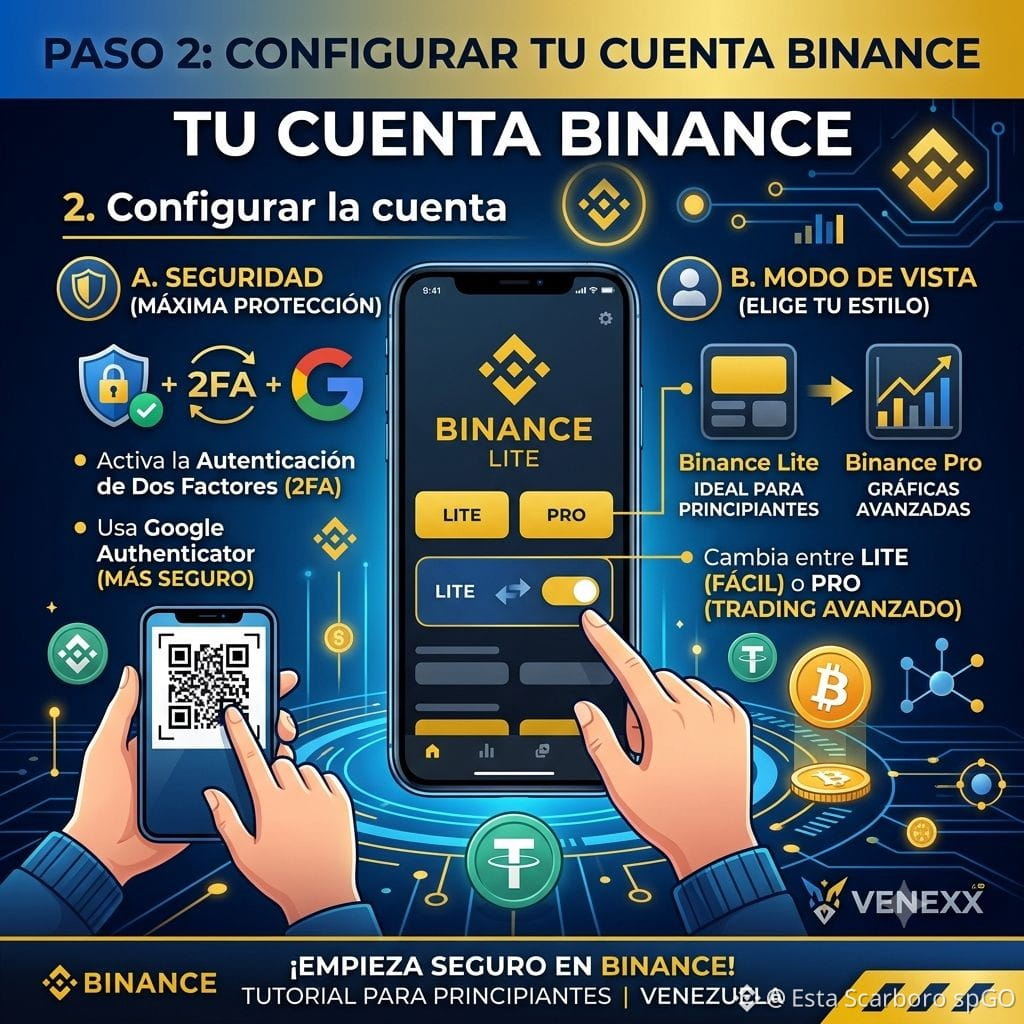
*Configurar la cuenta*
Dentro de Binance, ajusta estos dos aspectos clave en tu perfil:
Seguridad: Activa la autenticación de dos factores (2FA). Te recomiendo usar la App de Google Authenticator en lugar de solo SMS para mayor seguridad.
Modo: Binance tiene dos vistas: "Binance Lite" (ideal para principiantes, botones grandes y funciones básicas) y "Binance Pro" (para cuando quieras usar gráficas avanzadas y trading). Puedes cambiar entre ambos en la configuración de tu perfil.
#BinanceToOpenXLMSpotTrading
#Tutorial
*Configurar la cuenta*
Dentro de Binance, ajusta estos dos aspectos clave en tu perfil:
Seguridad: Activa la autenticación de dos factores (2FA). Te recomiendo usar la App de Google Authenticator en lugar de solo SMS para mayor seguridad.
Modo: Binance tiene dos vistas: "Binance Lite" (ideal para principiantes, botones grandes y funciones básicas) y "Binance Pro" (para cuando quieras usar gráficas avanzadas y trading). Puedes cambiar entre ambos en la configuración de tu perfil.
#BinanceToOpenXLMSpotTrading
#Tutorial
Dentro de Binance, ajusta estos dos aspectos clave en tu perfil:
Seguridad: Activa la autenticación de dos factores (2FA). Te recomiendo usar la App de Google Authenticator en lugar de solo SMS para mayor seguridad.
Modo: Binance tiene dos vistas: "Binance Lite" (ideal para principiantes, botones grandes y funciones básicas) y "Binance Pro" (para cuando quieras usar gráficas avanzadas y trading). Puedes cambiar entre ambos en la configuración de tu perfil.
#BinanceToOpenXLMSpotTrading
#Tutorial
185

·
--
Падение
Yesterday Top Gainers, Today Top Losers! 📉 Toxic Trap or Healthy Correction? ⚠️
Notice how tokens pumping +30% to +50% one day suddenly land at the top of the Top Losers list the very next day?
If you bought at the peak due to FOMO, you are not alone! Here is why this happens and how to avoid getting trapped:
🔍 1. Liquidity Hunt (Pump & Dump)
Whales and market makers artificially pump low-cap tokens to generate excitement. Once retail buyers jump in (FOMO), early holders dump their bags into the buying volume.
📉 2. Overbought Rejections
When 4H and 1D RSI cross 80+, a sharp pullback is mathematically inevitable. Buying at these technical extremes carries maximum risk.
🛡️ How to Protect Your Capital:
Never buy Top Gainers at the peak: Wait for a 30% - 50% retracement to a key support zone before entering.
Always set a Stop-Loss: High-volatility gainers can drop 20%+ in a single 15-minute candle.
Focus on Retests: Wait for breakout confirmations instead of chasing green candles.
Are you holding any bags from yesterday's pump, or did you take profits in time? Let me know below! 👇💬
$TST $TUT $BMT #tutorial #test
{spot}(TUTUSDT)
{spot}(TSTUSDT)
{spot}(BMTUSDT)
#MarketInsight
Yesterday Top Gainers, Today Top Losers! 📉 Toxic Trap or Healthy Correction? ⚠️
Notice how tokens pumping +30% to +50% one day suddenly land at the top of the Top Losers list the very next day?
If you bought at the peak due to FOMO, you are not alone! Here is why this happens and how to avoid getting trapped:
🔍 1. Liquidity Hunt (Pump & Dump)
Whales and market makers artificially pump low-cap tokens to generate excitement. Once retail buyers jump in (FOMO), early holders dump their bags into the buying volume.
📉 2. Overbought Rejections
When 4H and 1D RSI cross 80+, a sharp pullback is mathematically inevitable. Buying at these technical extremes carries maximum risk.
🛡️ How to Protect Your Capital:
Never buy Top Gainers at the peak: Wait for a 30% - 50% retracement to a key support zone before entering.
Always set a Stop-Loss: High-volatility gainers can drop 20%+ in a single 15-minute candle.
Focus on Retests: Wait for breakout confirmations instead of chasing green candles.
Are you holding any bags from yesterday's pump, or did you take profits in time? Let me know below! 👇💬
$TST $TUT $BMT #tutorial #test
#MarketInsight
Notice how tokens pumping +30% to +50% one day suddenly land at the top of the Top Losers list the very next day?
If you bought at the peak due to FOMO, you are not alone! Here is why this happens and how to avoid getting trapped:
🔍 1. Liquidity Hunt (Pump & Dump)
Whales and market makers artificially pump low-cap tokens to generate excitement. Once retail buyers jump in (FOMO), early holders dump their bags into the buying volume.
📉 2. Overbought Rejections
When 4H and 1D RSI cross 80+, a sharp pullback is mathematically inevitable. Buying at these technical extremes carries maximum risk.
🛡️ How to Protect Your Capital:
Never buy Top Gainers at the peak: Wait for a 30% - 50% retracement to a key support zone before entering.
Always set a Stop-Loss: High-volatility gainers can drop 20%+ in a single 15-minute candle.
Focus on Retests: Wait for breakout confirmations instead of chasing green candles.
Are you holding any bags from yesterday's pump, or did you take profits in time? Let me know below! 👇💬
$TST $TUT $BMT #tutorial #test
#MarketInsight
239
·
--
Статья
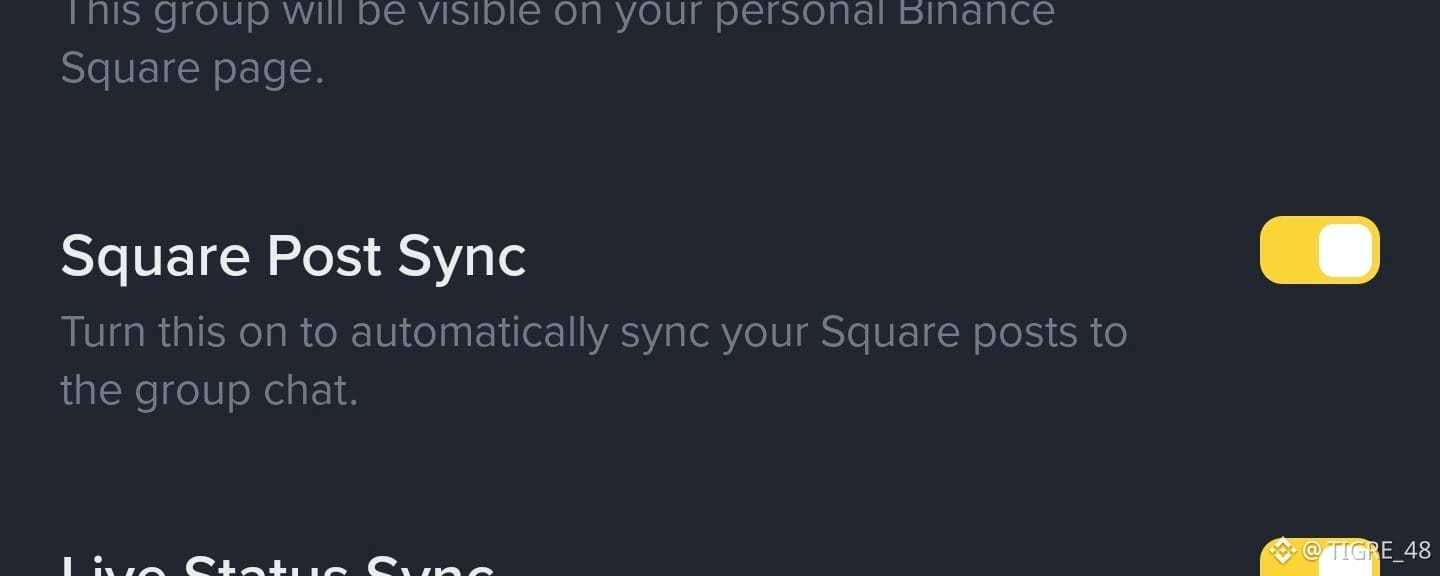
🤔 Lo activaste ? 🔃 ( Sincronización de publicaciones de Square
)🔸 Cual es la ventaja de tener esto activado?
🔸 En resumen: todos las publicaciones que hagas se van a compartir en tu grupo automáticamente, asi tu publico va a tener 1 forma más para no perderse tus publicaciones..
🔸 Adjunto una imagen de esta sincronización en funcionamiento:
🔸 Si desean unirse al grupo : [T48🤝🐯🧡](https://app.binance.com/uni-qr/a19k1bhu)
🔸 Tienes alguna duda? dejame una pregunta en los comentarios ...
#Tutorial // #guia // #Tips .
🤔 Lo activaste ? 🔃 ( Sincronización de publicaciones de Square )
🔸 Cual es la ventaja de tener esto activado?
🔸 En resumen: todos las publicaciones que hagas se van a compartir en tu grupo automáticamente, asi tu publico va a tener 1 forma más para no perderse tus publicaciones..
🔸 Adjunto una imagen de esta sincronización en funcionamiento:
🔸 Si desean unirse al grupo : T48🤝🐯🧡
🔸 Tienes alguna duda? dejame una pregunta en los comentarios ...
#Tutorial // #guia // #Tips .
🔸 En resumen: todos las publicaciones que hagas se van a compartir en tu grupo automáticamente, asi tu publico va a tener 1 forma más para no perderse tus publicaciones..
🔸 Adjunto una imagen de esta sincronización en funcionamiento:
🔸 Si desean unirse al grupo : T48🤝🐯🧡
🔸 Tienes alguna duda? dejame una pregunta en los comentarios ...
#Tutorial // #guia // #Tips .
46
50
596

·
--
👀 DON’T SLEEP ON $TUT
Around $0.025, TUT is still sitting near a $20M market cap.
That means even relatively small amounts of capital can create HUGE percentage moves when liquidity is low. 📈
But there’s another side…
⚠️ Low cap = high volatility.
So the real question:
🔥 Could $TUT surprise everyone with another explosive move?
#TUT #Tutorial #crypto #altcoins
👀 DON’T SLEEP ON $TUT
Around $0.025, TUT is still sitting near a $20M market cap.
That means even relatively small amounts of capital can create HUGE percentage moves when liquidity is low. 📈
But there’s another side…
⚠️ Low cap = high volatility.
So the real question:
🔥 Could $TUT surprise everyone with another explosive move?
#TUT #Tutorial #crypto #altcoins
Around $0.025, TUT is still sitting near a $20M market cap.
That means even relatively small amounts of capital can create HUGE percentage moves when liquidity is low. 📈
But there’s another side…
⚠️ Low cap = high volatility.
So the real question:
🔥 Could $TUT surprise everyone with another explosive move?
#TUT #Tutorial #crypto #altcoins
353
·
--
🚨 $TUT IS MOVING AGAIN 👀🔥
$TUT has already shown what it can do.
After exploding more than 1,100% during its previous rally and reaching nearly $0.29, the token went through a major correction.
Now traders are watching the next breakout.
If TUT can reclaim key resistance with strong volume, momentum could return FAST. 📈
This one is definitely worth watching.
Are you watching $TUT or sleeping on it? 👀
#TUT #Tutorial #BNBChain #crypto
🚨 $TUT IS MOVING AGAIN 👀🔥
$TUT has already shown what it can do.
After exploding more than 1,100% during its previous rally and reaching nearly $0.29, the token went through a major correction.
Now traders are watching the next breakout.
If TUT can reclaim key resistance with strong volume, momentum could return FAST. 📈
This one is definitely worth watching.
Are you watching $TUT or sleeping on it? 👀
#TUT #Tutorial #BNBChain #crypto
$TUT has already shown what it can do.
After exploding more than 1,100% during its previous rally and reaching nearly $0.29, the token went through a major correction.
Now traders are watching the next breakout.
If TUT can reclaim key resistance with strong volume, momentum could return FAST. 📈
This one is definitely worth watching.
Are you watching $TUT or sleeping on it? 👀
#TUT #Tutorial #BNBChain #crypto
316
🚀 TUTORIAL ($TUT ): CORREÇÃO OU NOVA OPORTUNIDADE?
📅 26/09/2026
O TUT, token da plataforma Tutorial na BNB Chain, combina as narrativas de inteligência artificial, educação Web3 e especulação em altcoins.
💰 MERCADO
• Preço: US$ 0,0254
• Variação em 24h: -2,75%
• Capitalização: aproximadamente US$ 21 milhões
• Volume em 24h: US$ 8,9 milhões
📊 ANÁLISE TÉCNICA
O TUT enfrenta pressão vendedora após a recente valorização. A manutenção de US$ 0,0211 pode favorecer uma recuperação, enquanto um rompimento da resistência pode abrir espaço para novos testes.
🟢 Suportes: US$ 0,0211 e US$ 0,0155.
🔴 Resistências: US$ 0,0288, US$ 0,0355 e US$ 0,0433.
🔥 CATALISADORES
• Expansão do Tutorial Agent, ferramenta educacional baseada em IA.
• Crescimento da educação em blockchain e DeFi.
• Maior interesse em altcoins e tokens do ecossistema BNB Chain.
⚠️ RISCOS
Alta volatilidade, liquidez variável e realização de lucros podem provocar correções acentuadas. O crescimento da plataforma não garante valorização do token.
📌 RESUMO
O TUT reúne exposição às narrativas de IA e educação Web3. A manutenção dos suportes, o volume negociado e a evolução do projeto serão fatores importantes para acompanhar os próximos movimentos.
⚠️ Conteúdo informativo. Não constitui recomendação financeira. Faça sua própria pesquisa (DYOR).
#tut #tutorial #altcoins
🚀 TUTORIAL ($TUT ): CORREÇÃO OU NOVA OPORTUNIDADE?
📅 26/09/2026
O TUT, token da plataforma Tutorial na BNB Chain, combina as narrativas de inteligência artificial, educação Web3 e especulação em altcoins.
💰 MERCADO
• Preço: US$ 0,0254
• Variação em 24h: -2,75%
• Capitalização: aproximadamente US$ 21 milhões
• Volume em 24h: US$ 8,9 milhões
📊 ANÁLISE TÉCNICA
O TUT enfrenta pressão vendedora após a recente valorização. A manutenção de US$ 0,0211 pode favorecer uma recuperação, enquanto um rompimento da resistência pode abrir espaço para novos testes.
🟢 Suportes: US$ 0,0211 e US$ 0,0155.
🔴 Resistências: US$ 0,0288, US$ 0,0355 e US$ 0,0433.
🔥 CATALISADORES
• Expansão do Tutorial Agent, ferramenta educacional baseada em IA.
• Crescimento da educação em blockchain e DeFi.
• Maior interesse em altcoins e tokens do ecossistema BNB Chain.
⚠️ RISCOS
Alta volatilidade, liquidez variável e realização de lucros podem provocar correções acentuadas. O crescimento da plataforma não garante valorização do token.
📌 RESUMO
O TUT reúne exposição às narrativas de IA e educação Web3. A manutenção dos suportes, o volume negociado e a evolução do projeto serão fatores importantes para acompanhar os próximos movimentos.
⚠️ Conteúdo informativo. Não constitui recomendação financeira. Faça sua própria pesquisa (DYOR).
#tut #tutorial #altcoins
📅 26/09/2026
O TUT, token da plataforma Tutorial na BNB Chain, combina as narrativas de inteligência artificial, educação Web3 e especulação em altcoins.
💰 MERCADO
• Preço: US$ 0,0254
• Variação em 24h: -2,75%
• Capitalização: aproximadamente US$ 21 milhões
• Volume em 24h: US$ 8,9 milhões
📊 ANÁLISE TÉCNICA
O TUT enfrenta pressão vendedora após a recente valorização. A manutenção de US$ 0,0211 pode favorecer uma recuperação, enquanto um rompimento da resistência pode abrir espaço para novos testes.
🟢 Suportes: US$ 0,0211 e US$ 0,0155.
🔴 Resistências: US$ 0,0288, US$ 0,0355 e US$ 0,0433.
🔥 CATALISADORES
• Expansão do Tutorial Agent, ferramenta educacional baseada em IA.
• Crescimento da educação em blockchain e DeFi.
• Maior interesse em altcoins e tokens do ecossistema BNB Chain.
⚠️ RISCOS
Alta volatilidade, liquidez variável e realização de lucros podem provocar correções acentuadas. O crescimento da plataforma não garante valorização do token.
📌 RESUMO
O TUT reúne exposição às narrativas de IA e educação Web3. A manutenção dos suportes, o volume negociado e a evolução do projeto serão fatores importantes para acompanhar os próximos movimentos.
⚠️ Conteúdo informativo. Não constitui recomendação financeira. Faça sua própria pesquisa (DYOR).
#tut #tutorial #altcoins
2
285

·
--
Падение
$TUT ‼️The Chart Is Giving a Signal🚦
TUT’s recent move shows an important battle between buyers and sellers.
📉 If selling pressure keeps increasing, the price can continue searching for lower support.
📈 But if volume returns and buyers reclaim the broken level, this pullback could turn into a recovery setup.
$TUT
{future}(TUTUSDT)
The key isn’t the candle alone watch volume + support + momentum together. 👀
One strong volume spike could change the short-term picture quickly.
#TUT #Tutorial #Crypto #BNBChain
$TUT ‼️The Chart Is Giving a Signal🚦
TUT’s recent move shows an important battle between buyers and sellers.
📉 If selling pressure keeps increasing, the price can continue searching for lower support.
📈 But if volume returns and buyers reclaim the broken level, this pullback could turn into a recovery setup.
$TUT
The key isn’t the candle alone watch volume + support + momentum together. 👀
One strong volume spike could change the short-term picture quickly.
#TUT #Tutorial #Crypto #BNBChain
TUT’s recent move shows an important battle between buyers and sellers.
📉 If selling pressure keeps increasing, the price can continue searching for lower support.
📈 But if volume returns and buyers reclaim the broken level, this pullback could turn into a recovery setup.
$TUT
The key isn’t the candle alone watch volume + support + momentum together. 👀
One strong volume spike could change the short-term picture quickly.
#TUT #Tutorial #Crypto #BNBChain
1
424
Войдите, чтобы посмотреть больше материала
Присоединяйтесь к пользователям криптовалют по всему миру на Binance Square
⚡️ Получайте новейшую и полезную информацию о криптоактивах.
💬 Нам доверяет крупнейшая в мире криптобиржа.
👍 Получите достоверные аналитические данные от верифицированных создателей контента.
Эл. почта/номер телефона
В тренде
1
#BinanceKZ
Просмотров: 8,976
50 обсуждают
2
#UKFCAWinsCourtOrderToRecover851400Pounds
Просмотров: 18,246
643 обсуждают
3
#ChainlinkLaunchesCCIP2WithEnterpriseVerification
Просмотров: 32,747
842 обсуждают
4
#GoldFallsTo$4144
Просмотров: 11,957
144 обсуждают
5
#QNTFallsOver40%FromMorningHigh
Просмотров: 74,006
1,267 обсуждают
6
#USDTAdds845900HoldersInPast7Days
Просмотров: 11,832
371 обсуждают
7
#KospiFalls2.7%SamsungSKHynixDropOver5%
Просмотров: 21,951
543 обсуждают
8
#BitgetCEOConfirms$388MStolenInHack
Просмотров: 4,865
41 обсуждают
9
#BTCFallsBelow$83000
Просмотров: 28,431
161 обсуждают
10
#BitgetDetailsSecurityIncidentTimeline
Просмотров: 40,742
691 обсуждают