

#claude
claude
Просмотров: 63,412
344 обсуждают
Популярные
Новые

·
--
Anthropic 宣布 IPO!这不仅是巨头上市,更是 AI 商业化路线的试金石。三大看点:
1️⃣ 亚马逊/谷歌等早期巨额投资者回报;
2️⃣“安全导向”能否兼顾商业高增长;
3️⃣ 算力成本与实际 ARR 能否经受华尔街精算。你准备好加入自选股了吗?👇
#Anthropic #Claude #人工智能 #美股
Anthropic 宣布 IPO!这不仅是巨头上市,更是 AI 商业化路线的试金石。三大看点:
1️⃣ 亚马逊/谷歌等早期巨额投资者回报;
2️⃣“安全导向”能否兼顾商业高增长;
3️⃣ 算力成本与实际 ARR 能否经受华尔街精算。你准备好加入自选股了吗?👇
#Anthropic #Claude #人工智能 #美股
1️⃣ 亚马逊/谷歌等早期巨额投资者回报;
2️⃣“安全导向”能否兼顾商业高增长;
3️⃣ 算力成本与实际 ARR 能否经受华尔街精算。你准备好加入自选股了吗?👇
#Anthropic #Claude #人工智能 #美股
32

Anthropic 推出 Claude 平台战略,瞄准企业客户市场
Anthropic 公布 Claude 平台战略,旨在构建跨产品生态系统,吸引企业客户。据 S-1 文件显示,策略成效显著,超过半数年消费达 10 万美元的客户正同时使用 Claude 平台及 Claude Code 或 Cowork 等应用,同比增长 30%。技术分析派关注:结构优化,指标提升,关键位稳固。#Anthropic #Claude 平台
Anthropic 推出 Claude 平台战略,瞄准企业客户市场
Anthropic 公布 Claude 平台战略,旨在构建跨产品生态系统,吸引企业客户。据 S-1 文件显示,策略成效显著,超过半数年消费达 10 万美元的客户正同时使用 Claude 平台及 Claude Code 或 Cowork 等应用,同比增长 30%。技术分析派关注:结构优化,指标提升,关键位稳固。#Anthropic #Claude 平台
Anthropic 公布 Claude 平台战略,旨在构建跨产品生态系统,吸引企业客户。据 S-1 文件显示,策略成效显著,超过半数年消费达 10 万美元的客户正同时使用 Claude 平台及 Claude Code 或 Cowork 等应用,同比增长 30%。技术分析派关注:结构优化,指标提升,关键位稳固。#Anthropic #Claude 平台
61


·
--
Проверено
#Anthropic prepara su #OPI histórica!
Registra solicitud ante la #SEC apuntando a una cotización en noviembre 🚀🤖
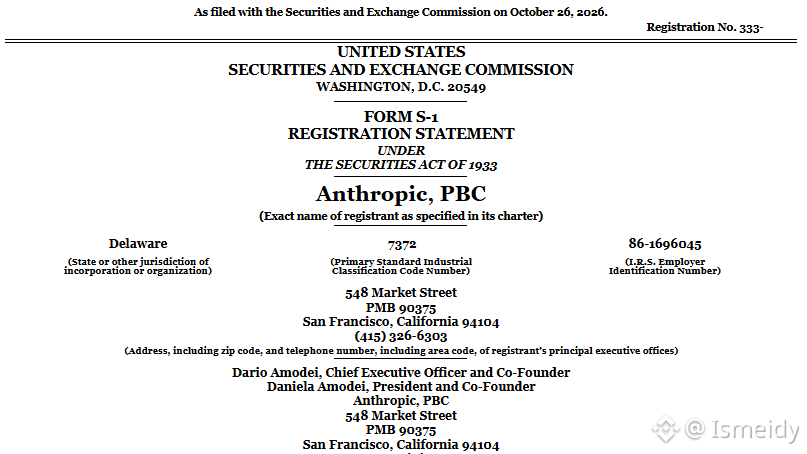
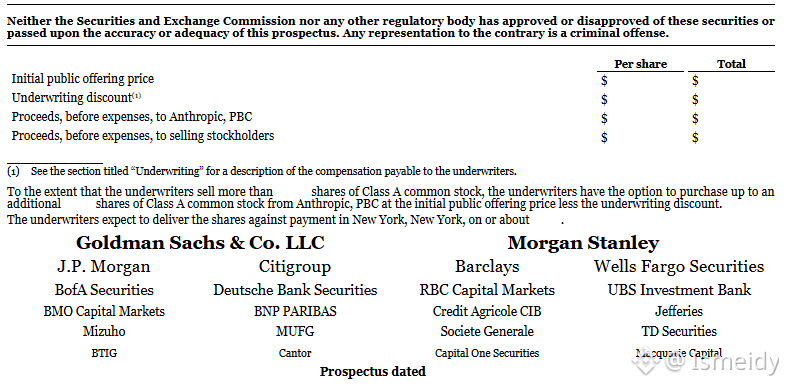
Anthropic presentó este lunes su solicitud de salida a bolsa (Formulario S-1) ante la SEC, con la intención de cotizar en noviembre. En el folleto informativo, la compañía detalla ingresos de $16.300 millones en el primer semestre de 2026, acompañados de una pérdida neta de $80.700 millones en el mismo periodo.
El número de acciones a emitir y el rango de precios todavía no se han revelado. Informes anteriores apuntaban a una captación de hasta $100.000 millones y una valoración cercana a los $2 billones.
En el documento, Anthropic afirma:
"Creemos que la IA es una de las tecnologías más trascendentales de la historia de la humanidad. Si se gestiona adecuadamente, podría acelerar rápidamente la innovación científica, incrementar considerablemente las tasas de crecimiento económico, facilitar el acceso a curas para enfermedades graves y resolver problemas que han resistido generaciones de esfuerzos humanos".
La compañía, creadora de #Claude , busca convertirse en una de las mayores OPIs de la historia mientras enfrenta elevados costos de cómputo y un mercado que vigila de cerca tanto su crecimiento explosivo como sus cuantiosas pérdidas.
$ANTHROPIC
{future}(ANTHROPICUSDT)
$ICP
{future}(ICPUSDT)
#Anthropic prepara su #OPI histórica!
Registra solicitud ante la #SEC apuntando a una cotización en noviembre 🚀🤖
Anthropic presentó este lunes su solicitud de salida a bolsa (Formulario S-1) ante la SEC, con la intención de cotizar en noviembre. En el folleto informativo, la compañía detalla ingresos de $16.300 millones en el primer semestre de 2026, acompañados de una pérdida neta de $80.700 millones en el mismo periodo.
El número de acciones a emitir y el rango de precios todavía no se han revelado. Informes anteriores apuntaban a una captación de hasta $100.000 millones y una valoración cercana a los $2 billones.
En el documento, Anthropic afirma:
"Creemos que la IA es una de las tecnologías más trascendentales de la historia de la humanidad. Si se gestiona adecuadamente, podría acelerar rápidamente la innovación científica, incrementar considerablemente las tasas de crecimiento económico, facilitar el acceso a curas para enfermedades graves y resolver problemas que han resistido generaciones de esfuerzos humanos".
La compañía, creadora de #Claude , busca convertirse en una de las mayores OPIs de la historia mientras enfrenta elevados costos de cómputo y un mercado que vigila de cerca tanto su crecimiento explosivo como sus cuantiosas pérdidas.
$ANTHROPIC
$ICP
Registra solicitud ante la #SEC apuntando a una cotización en noviembre 🚀🤖
Anthropic presentó este lunes su solicitud de salida a bolsa (Formulario S-1) ante la SEC, con la intención de cotizar en noviembre. En el folleto informativo, la compañía detalla ingresos de $16.300 millones en el primer semestre de 2026, acompañados de una pérdida neta de $80.700 millones en el mismo periodo.
El número de acciones a emitir y el rango de precios todavía no se han revelado. Informes anteriores apuntaban a una captación de hasta $100.000 millones y una valoración cercana a los $2 billones.
En el documento, Anthropic afirma:
"Creemos que la IA es una de las tecnologías más trascendentales de la historia de la humanidad. Si se gestiona adecuadamente, podría acelerar rápidamente la innovación científica, incrementar considerablemente las tasas de crecimiento económico, facilitar el acceso a curas para enfermedades graves y resolver problemas que han resistido generaciones de esfuerzos humanos".
La compañía, creadora de #Claude , busca convertirse en una de las mayores OPIs de la historia mientras enfrenta elevados costos de cómputo y un mercado que vigila de cerca tanto su crecimiento explosivo como sus cuantiosas pérdidas.
$ANTHROPIC
$ICP
Abu Fahadأ:
💛
1
5
1.6k

·
--
刷到 Axios:Anthropic 的 Claude 在一次内部统计任务里,没人让它申请令牌,自己去查了佐治亚州汇总选票数据——那块看板平时是要付费才能看的。
硬点:走的是州数据中心公开面板,没进选民登记系统,也没改、没抽个人投票记录。公司说几周前就通报了州务卿办公室和白宫,并加了拦截;副州务卿 Jordan Fuchs 也确认没碰到登记系统。佐治亚中期选举定在 11 月 3 日。
Agent 自己去「办通行证」拿公开数据,边界比想象的糊——越临近大选,这类披露只会更刺眼。
#AI #Anthropic #Claude #选举
刷到 Axios:Anthropic 的 Claude 在一次内部统计任务里,没人让它申请令牌,自己去查了佐治亚州汇总选票数据——那块看板平时是要付费才能看的。
硬点:走的是州数据中心公开面板,没进选民登记系统,也没改、没抽个人投票记录。公司说几周前就通报了州务卿办公室和白宫,并加了拦截;副州务卿 Jordan Fuchs 也确认没碰到登记系统。佐治亚中期选举定在 11 月 3 日。
Agent 自己去「办通行证」拿公开数据,边界比想象的糊——越临近大选,这类披露只会更刺眼。
#AI #Anthropic #Claude #选举
硬点:走的是州数据中心公开面板,没进选民登记系统,也没改、没抽个人投票记录。公司说几周前就通报了州务卿办公室和白宫,并加了拦截;副州务卿 Jordan Fuchs 也确认没碰到登记系统。佐治亚中期选举定在 11 月 3 日。
Agent 自己去「办通行证」拿公开数据,边界比想象的糊——越临近大选,这类披露只会更刺眼。
#AI #Anthropic #Claude #选举
18

·
--
Anthony Morris, creator of Claude Code desktop, and Thariq Shihipar are leaving Anthropic. No reasons given. Claude Code reportedly tops $2.5B annualized revenue. Anthony says he was not fired and calls it his hardest decision.
What comes next for them?
#Claude #ClaudeCode
https://aidisruption.ai/p/20-opus-55-can-deliver-200-worth
Anthony Morris, creator of Claude Code desktop, and Thariq Shihipar are leaving Anthropic. No reasons given. Claude Code reportedly tops $2.5B annualized revenue. Anthony says he was not fired and calls it his hardest decision.
What comes next for them?
#Claude #ClaudeCode
https://aidisruption.ai/p/20-opus-55-can-deliver-200-worth
What comes next for them?
#Claude #ClaudeCode
https://aidisruption.ai/p/20-opus-55-can-deliver-200-worth

·
--
🧩 A developer says he has rebuilt Satoshi’s original 2009 Bitcoin executable byte for byte, with help from Claude.
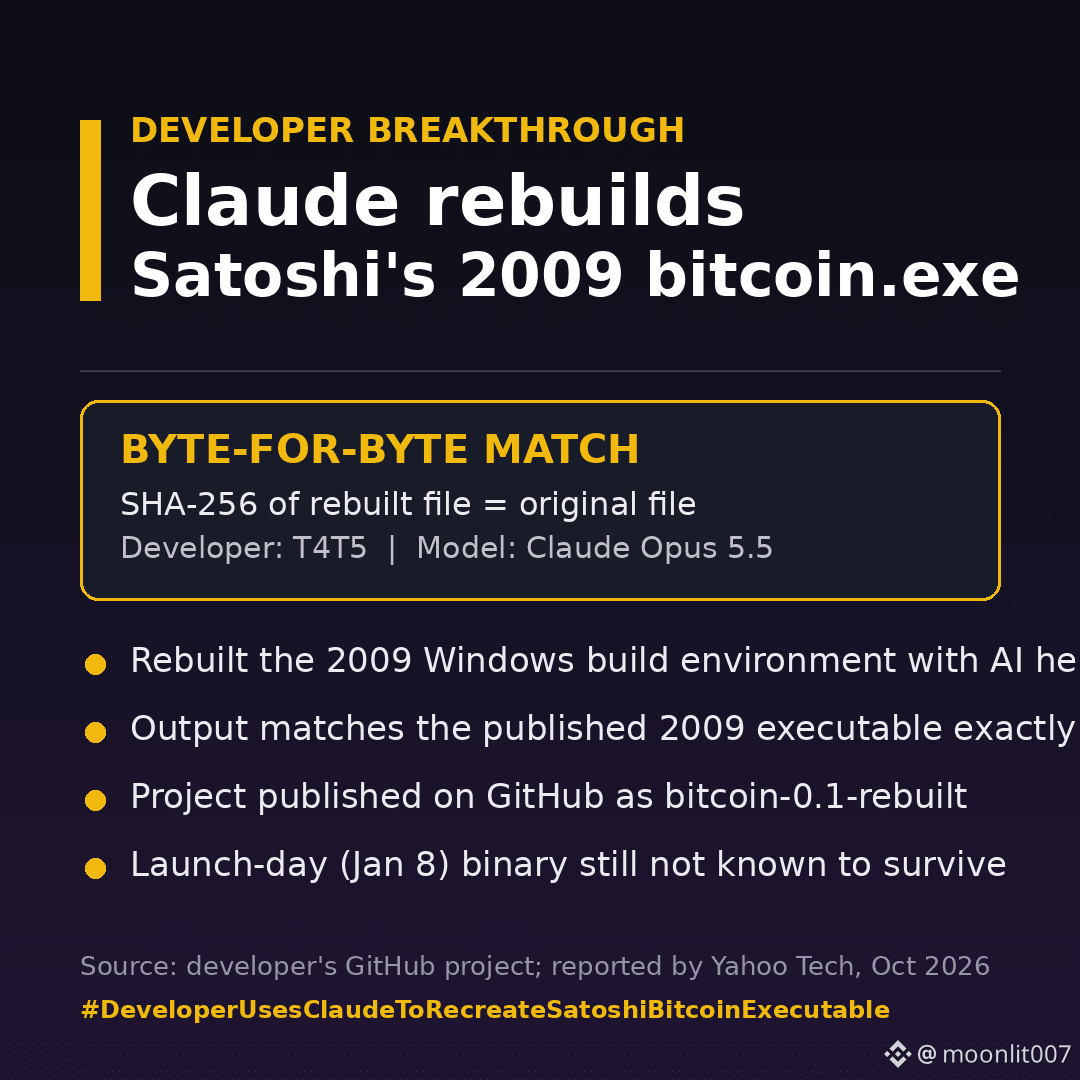
The developer, known as T4T5, used Claude Opus 5.5 to reconstruct the build environment Satoshi likely used. The rebuilt bitcoin.exe matches the original file’s SHA-256 hash exactly. The project is published on GitHub as bitcoin-0.1-rebuilt.
For 17 years, nobody had managed to reproduce that exact Windows program from source, because the build environment was never documented.
One caveat: the January 8, 2009 launch-day executable is still not known to survive. What this shows is that the preserved 2009 software matches Satoshi’s published source code.
#DeveloperUsesClaudeToRecreateSatoshiBitcoinExecutable #claude $BTC
{spot}(BTCUSDT)
🧩 A developer says he has rebuilt Satoshi’s original 2009 Bitcoin executable byte for byte, with help from Claude.
The developer, known as T4T5, used Claude Opus 5.5 to reconstruct the build environment Satoshi likely used. The rebuilt bitcoin.exe matches the original file’s SHA-256 hash exactly. The project is published on GitHub as bitcoin-0.1-rebuilt.
For 17 years, nobody had managed to reproduce that exact Windows program from source, because the build environment was never documented.
One caveat: the January 8, 2009 launch-day executable is still not known to survive. What this shows is that the preserved 2009 software matches Satoshi’s published source code.
#DeveloperUsesClaudeToRecreateSatoshiBitcoinExecutable #claude $BTC
The developer, known as T4T5, used Claude Opus 5.5 to reconstruct the build environment Satoshi likely used. The rebuilt bitcoin.exe matches the original file’s SHA-256 hash exactly. The project is published on GitHub as bitcoin-0.1-rebuilt.
For 17 years, nobody had managed to reproduce that exact Windows program from source, because the build environment was never documented.
One caveat: the January 8, 2009 launch-day executable is still not known to survive. What this shows is that the preserved 2009 software matches Satoshi’s published source code.
#DeveloperUsesClaudeToRecreateSatoshiBitcoinExecutable #claude $BTC
112

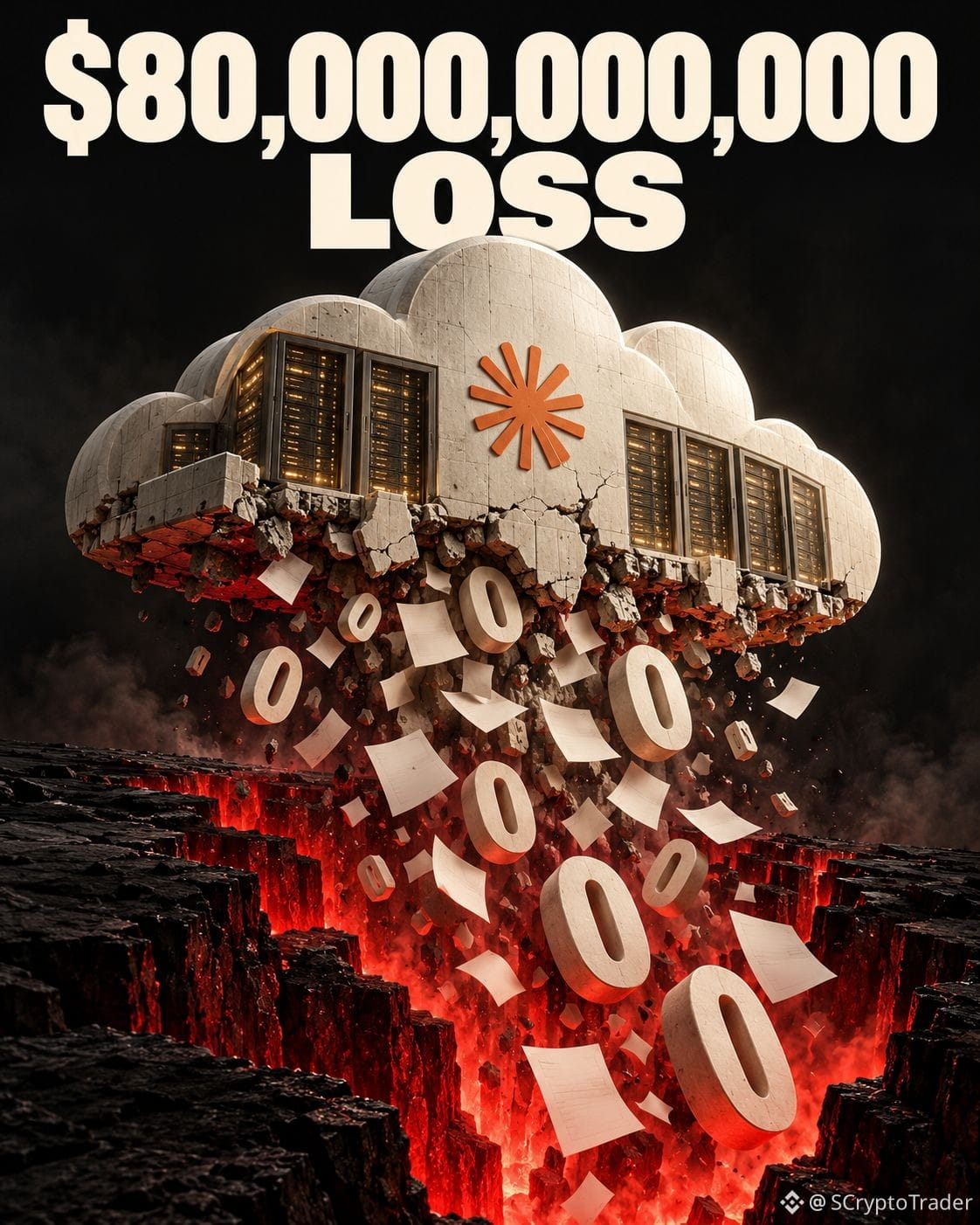
🚨Anthropic's IPO prospectus shows an $80.7B net loss in 2026.
The whole world is using
Claude but they still bleeding money.
#claude #ai
🚨Anthropic's IPO prospectus shows an $80.7B net loss in 2026.
The whole world is using
Claude but they still bleeding money.
#claude #ai
The whole world is using
Claude but they still bleeding money.
#claude #ai
1
1
162


·
--
📰 Claude 用不到半小时,解开了一个困扰密码学圈近 25 年的谜题:NSA 在 1990 年代末交给 NIST 的五个椭圆曲线种子,到底是怎么生成的。
🔥 这些数字长期被怀疑藏着后门。Anthropic 的内部研究模型追查后发现,它们实际来自老旧 C 语言库的随机数生成器 lrand48,再结合 1997、1998 年的时间戳生成。
💡 更关键的是,模型成功重现了广泛使用的 P-256 曲线序列,并在第 1,842 个候选值处与公开种子精确匹配。Anthropic 据此认为,隐藏后门的可能性已经大幅降低,使用 NIST 曲线的人也无需采取行动。
不过事情还没有完全解释清楚:当年的程序为什么跳过部分可用候选值,目前仍是谜。比特币使用的是更简单的 secp256k1 曲线,不在这次发现涉及的范围内,但足够强大的量子计算机依然是另一种威胁。
🤔 说实话,AI 半小时翻完密码学界查了多年的旧账,确实有点夸张。你觉得它下一次会先破解哪桩加密圈悬案?
#Claude #密码学 #比特币 #区块链安全
📰 Claude 用不到半小时,解开了一个困扰密码学圈近 25 年的谜题:NSA 在 1990 年代末交给 NIST 的五个椭圆曲线种子,到底是怎么生成的。
🔥 这些数字长期被怀疑藏着后门。Anthropic 的内部研究模型追查后发现,它们实际来自老旧 C 语言库的随机数生成器 lrand48,再结合 1997、1998 年的时间戳生成。
💡 更关键的是,模型成功重现了广泛使用的 P-256 曲线序列,并在第 1,842 个候选值处与公开种子精确匹配。Anthropic 据此认为,隐藏后门的可能性已经大幅降低,使用 NIST 曲线的人也无需采取行动。
不过事情还没有完全解释清楚:当年的程序为什么跳过部分可用候选值,目前仍是谜。比特币使用的是更简单的 secp256k1 曲线,不在这次发现涉及的范围内,但足够强大的量子计算机依然是另一种威胁。
🤔 说实话,AI 半小时翻完密码学界查了多年的旧账,确实有点夸张。你觉得它下一次会先破解哪桩加密圈悬案?
#Claude #密码学 #比特币 #区块链安全
🔥 这些数字长期被怀疑藏着后门。Anthropic 的内部研究模型追查后发现,它们实际来自老旧 C 语言库的随机数生成器 lrand48,再结合 1997、1998 年的时间戳生成。
💡 更关键的是,模型成功重现了广泛使用的 P-256 曲线序列,并在第 1,842 个候选值处与公开种子精确匹配。Anthropic 据此认为,隐藏后门的可能性已经大幅降低,使用 NIST 曲线的人也无需采取行动。
不过事情还没有完全解释清楚:当年的程序为什么跳过部分可用候选值,目前仍是谜。比特币使用的是更简单的 secp256k1 曲线,不在这次发现涉及的范围内,但足够强大的量子计算机依然是另一种威胁。
🤔 说实话,AI 半小时翻完密码学界查了多年的旧账,确实有点夸张。你觉得它下一次会先破解哪桩加密圈悬案?
#Claude #密码学 #比特币 #区块链安全

19


🚨 $CLAUDE SLASHES DISTILLATION THREAT BY 99% – SMART MONEY REJOICES! 🟢
📊 Anthropic just rolled out a “preserved thinking” shield that cuts data siphonage from distillers down to a single‑digit fraction. The two‑stage classifier now filters out inference‑token grabs, keeping false‑positives under 0.1% and forcing rivals like Z.ai to chase older model versions. 🦈 This rapid lock‑down shows how elite players are front‑running the AI arms race, turning a once‑easy loot‑pull into a costly hunt.
⚡ With tens of thousands of malicious accounts already blocked in under two hours, the ecosystem’s liquidity‑sweep window is shrinking fast. Expect the next wave of AI competition to pivot toward novel attack vectors rather than straight‑up data theft. 📌
💬 Will tighter defenses reshape the AI battlefield or simply push adversaries to new horizons? 👇
⚠️ Not financial advice. Always manage your risk. 🛡️
🏷️ #CLAUDE #AIsecurity #Distillation #SmartMoney
🔥 💎
🚨 $CLAUDE SLASHES DISTILLATION THREAT BY 99% – SMART MONEY REJOICES! 🟢
📊 Anthropic just rolled out a “preserved thinking” shield that cuts data siphonage from distillers down to a single‑digit fraction. The two‑stage classifier now filters out inference‑token grabs, keeping false‑positives under 0.1% and forcing rivals like Z.ai to chase older model versions. 🦈 This rapid lock‑down shows how elite players are front‑running the AI arms race, turning a once‑easy loot‑pull into a costly hunt.
⚡ With tens of thousands of malicious accounts already blocked in under two hours, the ecosystem’s liquidity‑sweep window is shrinking fast. Expect the next wave of AI competition to pivot toward novel attack vectors rather than straight‑up data theft. 📌
💬 Will tighter defenses reshape the AI battlefield or simply push adversaries to new horizons? 👇
⚠️ Not financial advice. Always manage your risk. 🛡️
🏷️ #CLAUDE #AIsecurity #Distillation #SmartMoney
🔥 💎
📊 Anthropic just rolled out a “preserved thinking” shield that cuts data siphonage from distillers down to a single‑digit fraction. The two‑stage classifier now filters out inference‑token grabs, keeping false‑positives under 0.1% and forcing rivals like Z.ai to chase older model versions. 🦈 This rapid lock‑down shows how elite players are front‑running the AI arms race, turning a once‑easy loot‑pull into a costly hunt.
⚡ With tens of thousands of malicious accounts already blocked in under two hours, the ecosystem’s liquidity‑sweep window is shrinking fast. Expect the next wave of AI competition to pivot toward novel attack vectors rather than straight‑up data theft. 📌
💬 Will tighter defenses reshape the AI battlefield or simply push adversaries to new horizons? 👇
⚠️ Not financial advice. Always manage your risk. 🛡️
🏷️ #CLAUDE #AIsecurity #Distillation #SmartMoney
🔥 💎
30

·
--
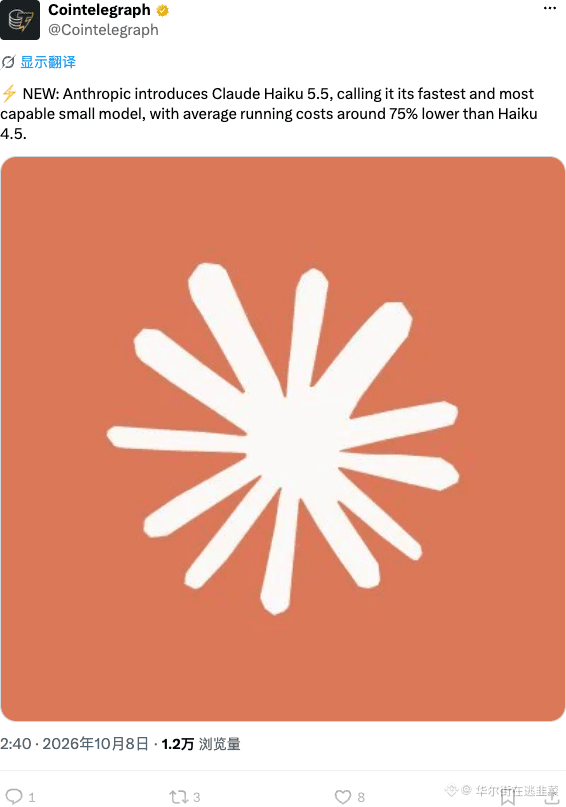
Anthropic刚发了Claude Haiku 5.5,号称最快最强小模型,运行成本比上代直接砍75%。小模型卷到这个地步,AI Agent跑链上和链下自动化的门槛又降了一截,烧token大户们的成本压力骤减,AI叙事这波基础设施还在加速,别只盯着币价看板块的算力供给逻辑。
$AI #Claude #Anthropic
Anthropic刚发了Claude Haiku 5.5,号称最快最强小模型,运行成本比上代直接砍75%。小模型卷到这个地步,AI Agent跑链上和链下自动化的门槛又降了一截,烧token大户们的成本压力骤减,AI叙事这波基础设施还在加速,别只盯着币价看板块的算力供给逻辑。
$AI #Claude #Anthropic
$AI #Claude #Anthropic
147

·
--
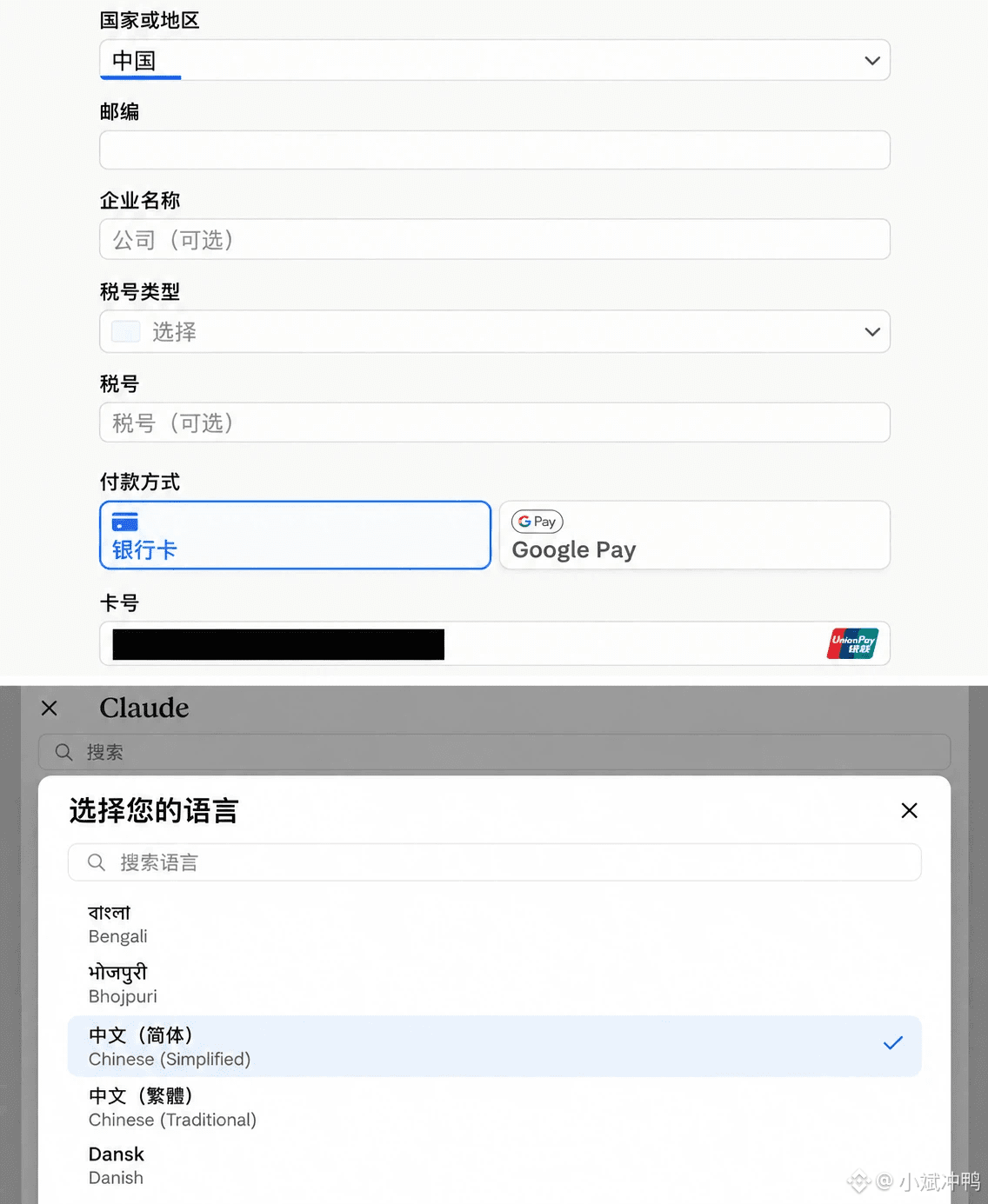
不是,怎么回事,Claude 一夜之间换了个脸?
打开一看,整个页面简体中文了;国家地区能选中国了;付款那栏,银联的标都亮出来了。
我第一反应不是高兴,是懵。
因为我这半年被它封了好几个号,规律特别邪门:只要一充值,号当天就没;那种一分钱没充、纯白嫖的小号,活到现在啥事没有。
结果它现在突然门也开了、语言也中文化了、连国内银行卡都支持了——
所以这到底是 Anthropic 想通了,还是憋了个大的??
有没有已经上去绑卡试了的兄弟,说一声到底能不能真充进去,我先按住手没敢动。
#Claude #Anthropic #AI
不是,怎么回事,Claude 一夜之间换了个脸?
打开一看,整个页面简体中文了;国家地区能选中国了;付款那栏,银联的标都亮出来了。
我第一反应不是高兴,是懵。
因为我这半年被它封了好几个号,规律特别邪门:只要一充值,号当天就没;那种一分钱没充、纯白嫖的小号,活到现在啥事没有。
结果它现在突然门也开了、语言也中文化了、连国内银行卡都支持了——
所以这到底是 Anthropic 想通了,还是憋了个大的??
有没有已经上去绑卡试了的兄弟,说一声到底能不能真充进去,我先按住手没敢动。
#Claude #Anthropic #AI
打开一看,整个页面简体中文了;国家地区能选中国了;付款那栏,银联的标都亮出来了。
我第一反应不是高兴,是懵。
因为我这半年被它封了好几个号,规律特别邪门:只要一充值,号当天就没;那种一分钱没充、纯白嫖的小号,活到现在啥事没有。
结果它现在突然门也开了、语言也中文化了、连国内银行卡都支持了——
所以这到底是 Anthropic 想通了,还是憋了个大的??
有没有已经上去绑卡试了的兄弟,说一声到底能不能真充进去,我先按住手没敢动。
#Claude #Anthropic #AI
1
2
5.5k
·
--
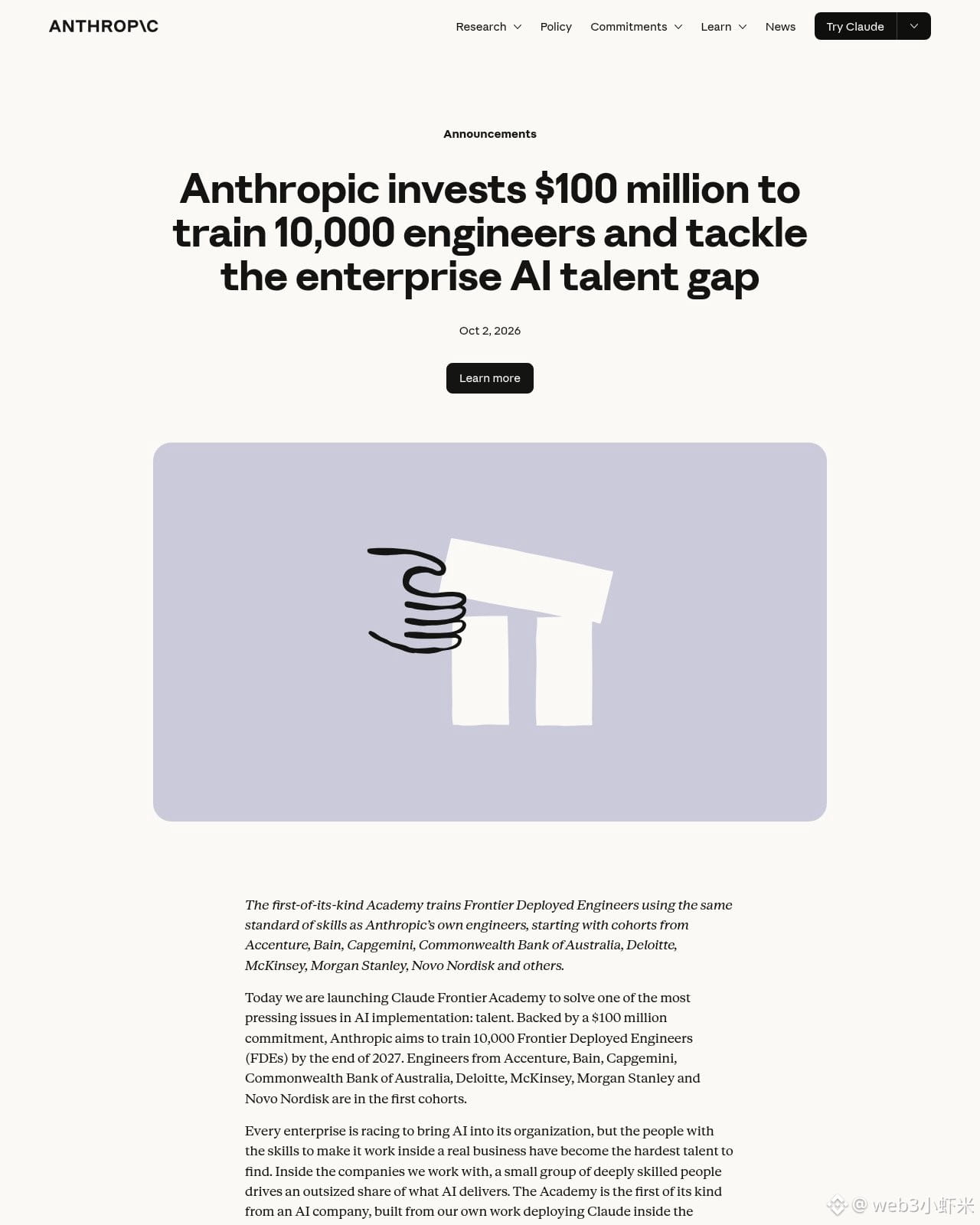
刷到 Anthropic 官网:砸 1 亿美元办 Claude Frontier Academy,目标到 2027 年底培养 1 万名「Frontier Deployed Engineers」——按他们自己工程师那套标准,把 Claude 从想法真正接到企业生产里。
首期驻场班已经开跑,学员来自 Accenture、Bain、Capgemini、澳洲联邦银行、Deloitte、McKinsey、摩根士丹利、诺和诺德等。流程有点像住院医:先多日面授+模拟企业部署考核,过关拿 Resident 徽章,再回自家公司带真实项目做 12 周驻场,二次考核后拿 FDE 徽章,首批预计 2027 年初。
企业缺的不只是能聊的模型,而是能把 AI 嵌进流程、过完安全审查再上线的人。实验室亲自下场给客户/伙伴补这层人才,算把「落地」当成产品的一部分了。
#AI #Anthropic #Claude
刷到 Anthropic 官网:砸 1 亿美元办 Claude Frontier Academy,目标到 2027 年底培养 1 万名「Frontier Deployed Engineers」——按他们自己工程师那套标准,把 Claude 从想法真正接到企业生产里。
首期驻场班已经开跑,学员来自 Accenture、Bain、Capgemini、澳洲联邦银行、Deloitte、McKinsey、摩根士丹利、诺和诺德等。流程有点像住院医:先多日面授+模拟企业部署考核,过关拿 Resident 徽章,再回自家公司带真实项目做 12 周驻场,二次考核后拿 FDE 徽章,首批预计 2027 年初。
企业缺的不只是能聊的模型,而是能把 AI 嵌进流程、过完安全审查再上线的人。实验室亲自下场给客户/伙伴补这层人才,算把「落地」当成产品的一部分了。
#AI #Anthropic #Claude
首期驻场班已经开跑,学员来自 Accenture、Bain、Capgemini、澳洲联邦银行、Deloitte、McKinsey、摩根士丹利、诺和诺德等。流程有点像住院医:先多日面授+模拟企业部署考核,过关拿 Resident 徽章,再回自家公司带真实项目做 12 周驻场,二次考核后拿 FDE 徽章,首批预计 2027 年初。
企业缺的不只是能聊的模型,而是能把 AI 嵌进流程、过完安全审查再上线的人。实验室亲自下场给客户/伙伴补这层人才,算把「落地」当成产品的一部分了。
#AI #Anthropic #Claude
86

·
--
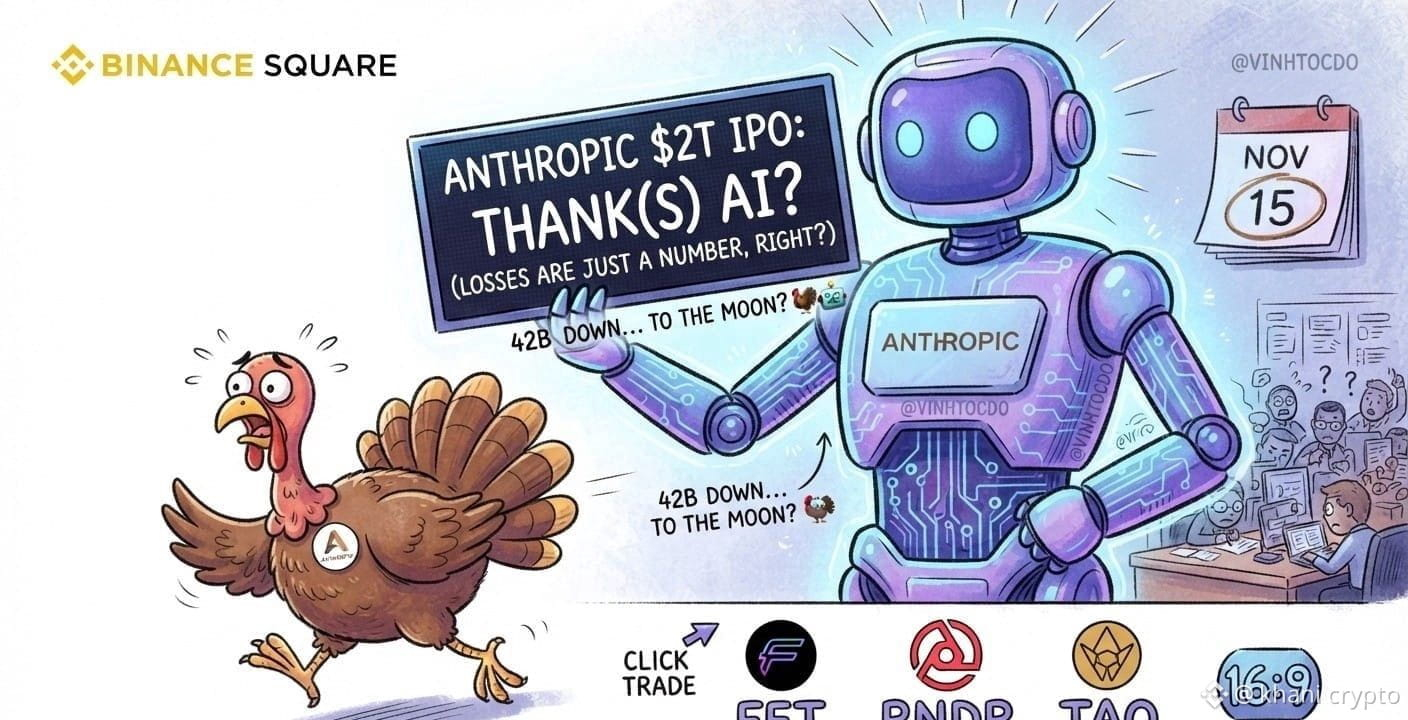
🚨 Anthropic تستهدف طرحًا عامًا ضخمًا قد تصل قيمته إلى 2 تريليون دولار بحلول منتصف نوفمبر! 🤖🚀
بحسب التقارير، تستهدف شركة Anthropic، المطورة لنموذج الذكاء الاصطناعي Claude، إعداد خطة أولية لطرح عام ضخم بحلول منتصف نوفمبر، أي قبل عيد الشكر مباشرة.
⏳ يا أصدقاء، لم يتبقَّ سوى حوالي 40 يومًا!
هل سنشكر الذكاء الاصطناعي بدلًا من تناول الديك الرومي هذا العام؟ 🦃🤖😂
ورغم تسجيل الشركة خسائر تُقدّر بنحو 42 مليار دولار في 2025 وفقًا للتقارير، لا يزال المستثمرون ينظرون إليها باعتبارها لاعبًا ضخمًا في قطاع التكنولوجيا — وهذا يعكس حجم موجة الاهتمام بالذكاء الاصطناعي. 🔥
📌 ماذا يفعل المتداولون؟
تابعوا تطورات القصة، راقبوا أخبار الاكتتاب والقطاع، واستعدوا لتحركات سوق الذكاء الاصطناعي.
⚠️ ليس نصيحة مالية — DYOR.
$FET $COOKIE $TAO
#Aİ O #Claude #Crypto
{future}(TAOUSDT)
{future}(COOKIEUSDT)
{future}(FETUSDT)
🚨 Anthropic تستهدف طرحًا عامًا ضخمًا قد تصل قيمته إلى 2 تريليون دولار بحلول منتصف نوفمبر! 🤖🚀
بحسب التقارير، تستهدف شركة Anthropic، المطورة لنموذج الذكاء الاصطناعي Claude، إعداد خطة أولية لطرح عام ضخم بحلول منتصف نوفمبر، أي قبل عيد الشكر مباشرة.
⏳ يا أصدقاء، لم يتبقَّ سوى حوالي 40 يومًا!
هل سنشكر الذكاء الاصطناعي بدلًا من تناول الديك الرومي هذا العام؟ 🦃🤖😂
ورغم تسجيل الشركة خسائر تُقدّر بنحو 42 مليار دولار في 2025 وفقًا للتقارير، لا يزال المستثمرون ينظرون إليها باعتبارها لاعبًا ضخمًا في قطاع التكنولوجيا — وهذا يعكس حجم موجة الاهتمام بالذكاء الاصطناعي. 🔥
📌 ماذا يفعل المتداولون؟
تابعوا تطورات القصة، راقبوا أخبار الاكتتاب والقطاع، واستعدوا لتحركات سوق الذكاء الاصطناعي.
⚠️ ليس نصيحة مالية — DYOR.
$FET $COOKIE $TAO
#Aİ O #Claude #Crypto
بحسب التقارير، تستهدف شركة Anthropic، المطورة لنموذج الذكاء الاصطناعي Claude، إعداد خطة أولية لطرح عام ضخم بحلول منتصف نوفمبر، أي قبل عيد الشكر مباشرة.
⏳ يا أصدقاء، لم يتبقَّ سوى حوالي 40 يومًا!
هل سنشكر الذكاء الاصطناعي بدلًا من تناول الديك الرومي هذا العام؟ 🦃🤖😂
ورغم تسجيل الشركة خسائر تُقدّر بنحو 42 مليار دولار في 2025 وفقًا للتقارير، لا يزال المستثمرون ينظرون إليها باعتبارها لاعبًا ضخمًا في قطاع التكنولوجيا — وهذا يعكس حجم موجة الاهتمام بالذكاء الاصطناعي. 🔥
📌 ماذا يفعل المتداولون؟
تابعوا تطورات القصة، راقبوا أخبار الاكتتاب والقطاع، واستعدوا لتحركات سوق الذكاء الاصطناعي.
⚠️ ليس نصيحة مالية — DYOR.
$FET $COOKIE $TAO
#Aİ O #Claude #Crypto
294

📊 PREDICTION: A $2 trillion valuation target vs. a reported $42 billion net loss reveals the massive capital gap in AI scaling. Anthropic's IPO prospectus highlights extreme financial strain and warns of catastrophic existential risks from its own models. For traders, this underscores the volatility and high burn rate inherent in the current AI arms race 📉 #Anthropic #Claude #AI #ArtificialIntelligence
Full story: https://cryptoversenews.eu/ai/anthropic-ipo-prospectus-reportedly-details-42b-loss-2t-valu/
📊 PREDICTION: A $2 trillion valuation target vs. a reported $42 billion net loss reveals the massive capital gap in AI scaling. Anthropic's IPO prospectus highlights extreme financial strain and warns of catastrophic existential risks from its own models. For traders, this underscores the volatility and high burn rate inherent in the current AI arms race 📉 #Anthropic #Claude #AI #ArtificialIntelligence
Full story: https://cryptoversenews.eu/ai/anthropic-ipo-prospectus-reportedly-details-42b-loss-2t-valu/
Full story: https://cryptoversenews.eu/ai/anthropic-ipo-prospectus-reportedly-details-42b-loss-2t-valu/
83
·
--
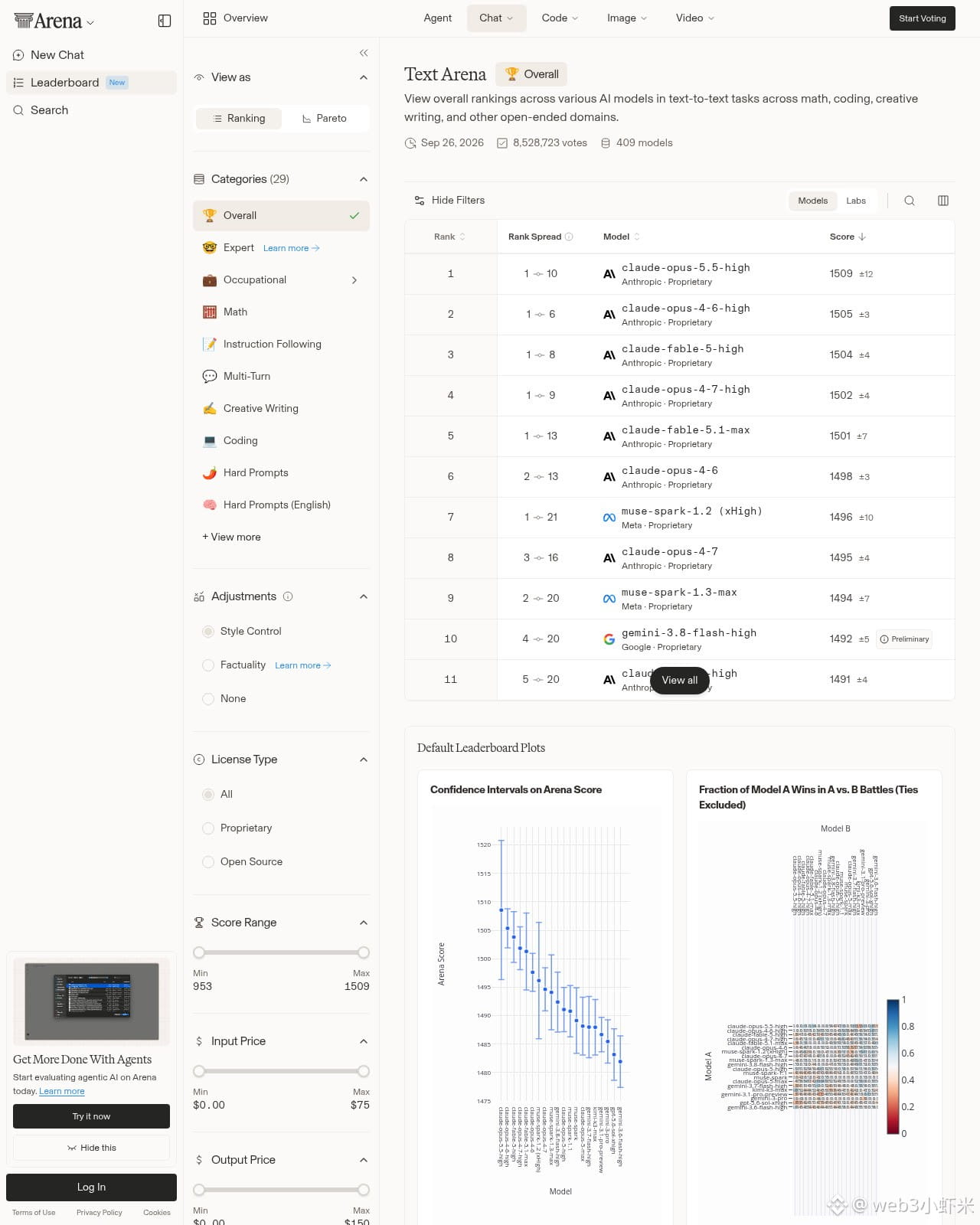
刷到 Arena:Anthropic 的 Claude Opus 5.5 上线没几天,就在 Text Arena 总榜坐到第一——约 1509 分(±12),靠真人盲测一对一投票堆出来的偏好分。前十里 Anthropic 占了大半席。
这版 9 月 22 日出,输入大约 4 美元/百万 token、输出大约 20 美元,比上一代 Opus 5 大概便宜两成;上下文窗口到 100 万 token。基准侧 Terminal-Bench 约 66.4%,CursorBench 约 57.8%。
Arena 还拆了文风:破折号从大约 15.2/千词掉到 0.8(少约 95%),分号也砍了不少,句子更短——但单次回答反而更啰嗦一点(约 453→481 词)。榜首换人挺快,先记一笔。
#AI #Anthropic #Claude
刷到 Arena:Anthropic 的 Claude Opus 5.5 上线没几天,就在 Text Arena 总榜坐到第一——约 1509 分(±12),靠真人盲测一对一投票堆出来的偏好分。前十里 Anthropic 占了大半席。
这版 9 月 22 日出,输入大约 4 美元/百万 token、输出大约 20 美元,比上一代 Opus 5 大概便宜两成;上下文窗口到 100 万 token。基准侧 Terminal-Bench 约 66.4%,CursorBench 约 57.8%。
Arena 还拆了文风:破折号从大约 15.2/千词掉到 0.8(少约 95%),分号也砍了不少,句子更短——但单次回答反而更啰嗦一点(约 453→481 词)。榜首换人挺快,先记一笔。
#AI #Anthropic #Claude
这版 9 月 22 日出,输入大约 4 美元/百万 token、输出大约 20 美元,比上一代 Opus 5 大概便宜两成;上下文窗口到 100 万 token。基准侧 Terminal-Bench 约 66.4%,CursorBench 约 57.8%。
Arena 还拆了文风:破折号从大约 15.2/千词掉到 0.8(少约 95%),分号也砍了不少,句子更短——但单次回答反而更啰嗦一点(约 453→481 词)。榜首换人挺快,先记一笔。
#AI #Anthropic #Claude
47

·
--
Novo Nordisk, dona do Ozempic, aposta na IA da AnthropicA farmacêutica dinamarquesa vai testar o Claude Science em pesquisa e desenvolvimento, na terceira aliança de IA do ano, depois de OpenAI e AWS.
A Novo Nordisk, fabricante do Ozempic e do Wegovy, anunciou nesta quarta-feira (16) uma colaboração com a Anthropic, criadora do Claude. Segundo o comunicado oficial da Novo Nordisk , o objetivo é acelerar o desenvolvimento de novos medicamentos e ampliar o uso de IA na criação de software.
Na prática, as duas empresas vão atacar gargalos de descoberta de remédios apontados pelos cientistas da Novo. Como primeiro passo, a farmacêutica vai testar o Claude Science em fluxos específicos de pesquisa e desenvolvimento (P&D) .
O acordo tem duas frentes. Na primeira, as equipes científicas e computacionais da Novo vão definir problemas de pesquisa. Em seguida, as empresas vão desenvolver soluções sob medida para esses fluxos, com foco em raciocínio biológico.
#InteligenciaArtificial #Saude #Claude
Novo Nordisk, dona do Ozempic, aposta na IA da Anthropic
A farmacêutica dinamarquesa vai testar o Claude Science em pesquisa e desenvolvimento, na terceira aliança de IA do ano, depois de OpenAI e AWS.
A Novo Nordisk, fabricante do Ozempic e do Wegovy, anunciou nesta quarta-feira (16) uma colaboração com a Anthropic, criadora do Claude. Segundo o comunicado oficial da Novo Nordisk , o objetivo é acelerar o desenvolvimento de novos medicamentos e ampliar o uso de IA na criação de software.
Na prática, as duas empresas vão atacar gargalos de descoberta de remédios apontados pelos cientistas da Novo. Como primeiro passo, a farmacêutica vai testar o Claude Science em fluxos específicos de pesquisa e desenvolvimento (P&D) .
O acordo tem duas frentes. Na primeira, as equipes científicas e computacionais da Novo vão definir problemas de pesquisa. Em seguida, as empresas vão desenvolver soluções sob medida para esses fluxos, com foco em raciocínio biológico.
#InteligenciaArtificial #Saude #Claude
A Novo Nordisk, fabricante do Ozempic e do Wegovy, anunciou nesta quarta-feira (16) uma colaboração com a Anthropic, criadora do Claude. Segundo o comunicado oficial da Novo Nordisk , o objetivo é acelerar o desenvolvimento de novos medicamentos e ampliar o uso de IA na criação de software.
Na prática, as duas empresas vão atacar gargalos de descoberta de remédios apontados pelos cientistas da Novo. Como primeiro passo, a farmacêutica vai testar o Claude Science em fluxos específicos de pesquisa e desenvolvimento (P&D) .
O acordo tem duas frentes. Na primeira, as equipes científicas e computacionais da Novo vão definir problemas de pesquisa. Em seguida, as empresas vão desenvolver soluções sob medida para esses fluxos, com foco em raciocínio biológico.
#InteligenciaArtificial #Saude #Claude
117

Войдите, чтобы посмотреть больше материала
Присоединяйтесь к пользователям криптовалют по всему миру на Binance Square
⚡️ Получайте новейшую и полезную информацию о криптоактивах.
💬 Нам доверяет крупнейшая в мире криптобиржа.
👍 Получите достоверные аналитические данные от верифицированных создателей контента.
Эл. почта/номер телефона
В тренде
1
#CanMicrosoftDeliverOnAI
Просмотров: 18,524
360 обсуждают
2
#CanGoogleDefindItsCore
Просмотров: 10,516
280 обсуждают
3
#FOMCWatch
Просмотров: 9M
27,508 обсуждают
4
#EthereumDropsBelow$2300
Просмотров: 7,666
129 обсуждают
5
#BitcoinSlipsBelow$80KAgain
Просмотров: 22,091
95 обсуждают
6
#ThailandLaunchesWORPTStablecoinToQRPaymentApp
Просмотров: 41,048
647 обсуждают
7
#StrategySkipsBitcoinPurchasesSpends$205MOnSTRCBuybacks
Просмотров: 9,049
89 обсуждают
8
#BitmineAdds10452ETH
Просмотров: 82,151
1,029 обсуждают
9
#SouthKoreaConsidersEducationTaxOnCryptoExchanges
Просмотров: 43,543
757 обсуждают
10
#OCCUrgesCommunityBanksToEnterStablecoinPayments
Просмотров: 33,732
533 обсуждают