Disclaimer: In compliance with MiCA requirements, unauthorized stablecoins are subject to certain restrictions for EEA users. For more information, please click here.
The Futures Dollar-Cost Averaging (DCA) is an investment strategy that gradually increases losing positions according to predefined parameters. This approach can potentially result in users achieving a more favorable average entry price if the market moves unfavorably after the initial trade and subsequently recovers, but can result in substantial loss if the market continues to fall. The strategy automatically closes the position if the predetermined Take Profit Target is reached.
Binance Futures DCA bot is an automated trading bot that applies a form of Dollar-Cost Averaging (DCA) strategy, where you increase your position size at pre-determined percentage changes in market price. Based on your parameters, depending on whether you have a long or short position, the bot:
Long position
Short position
1. Log in to your Binance account and access trading bots.
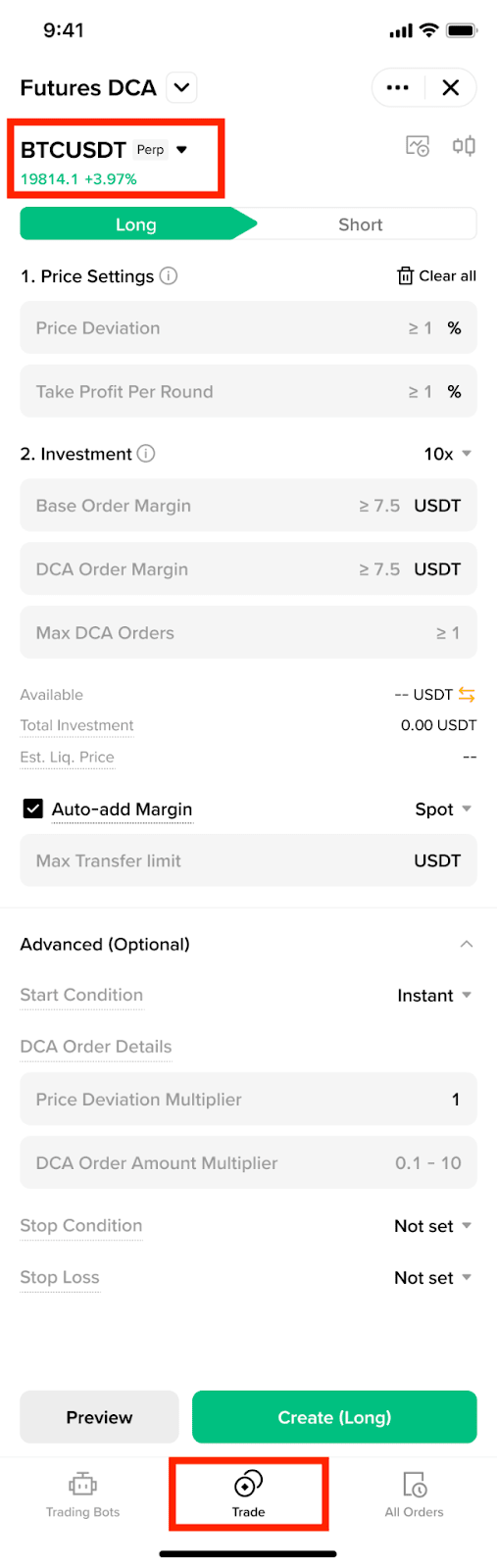
1. Click on [Trade] - [Trading Bots].
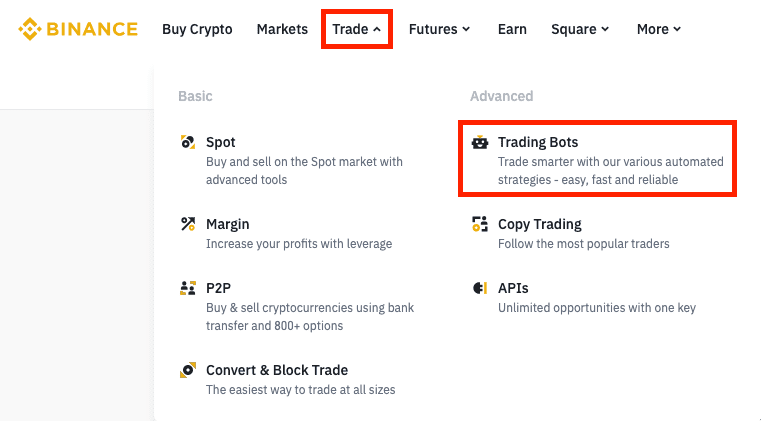
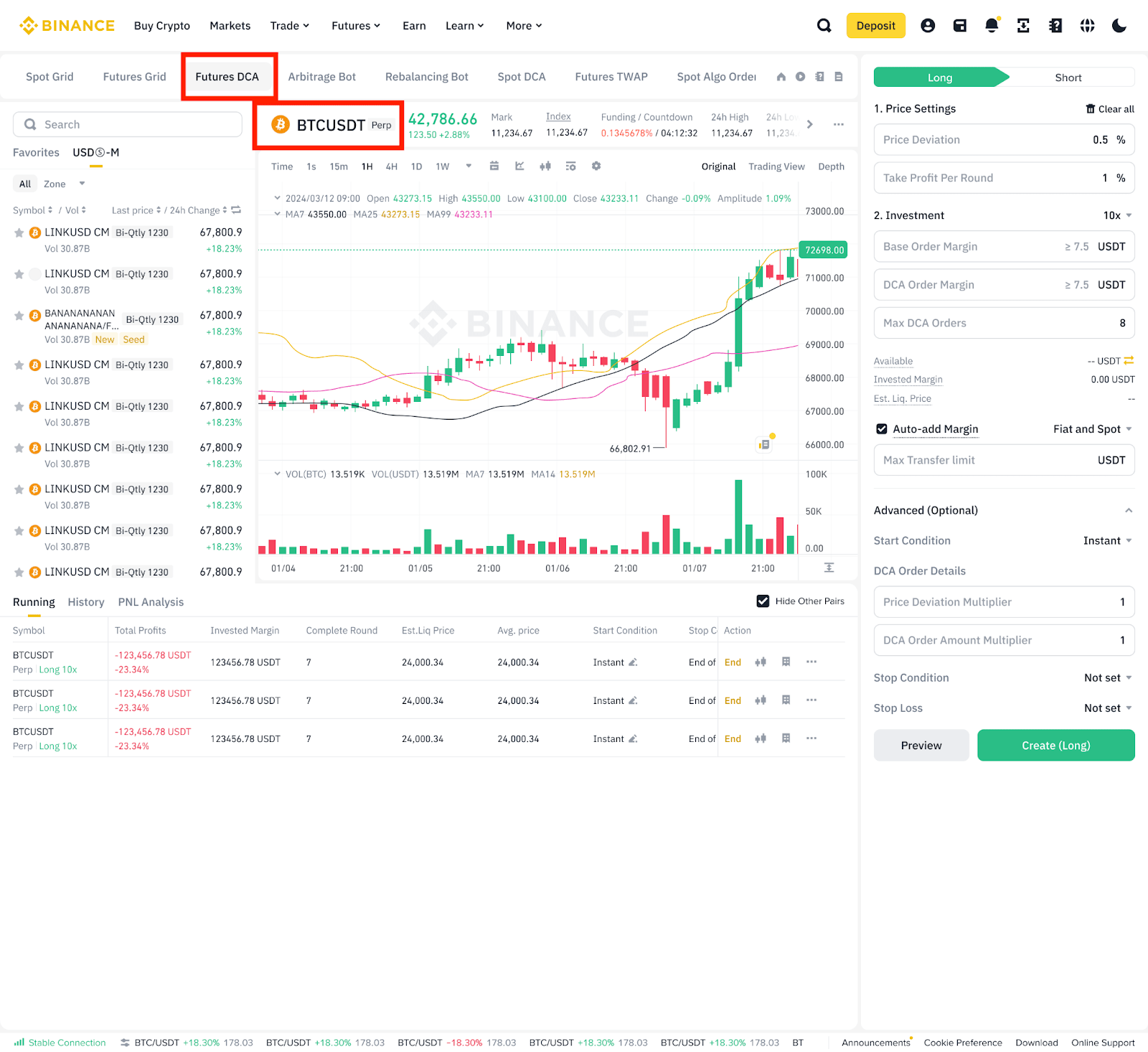
2. Expand the list of available trading bots and select [Futures DCA].
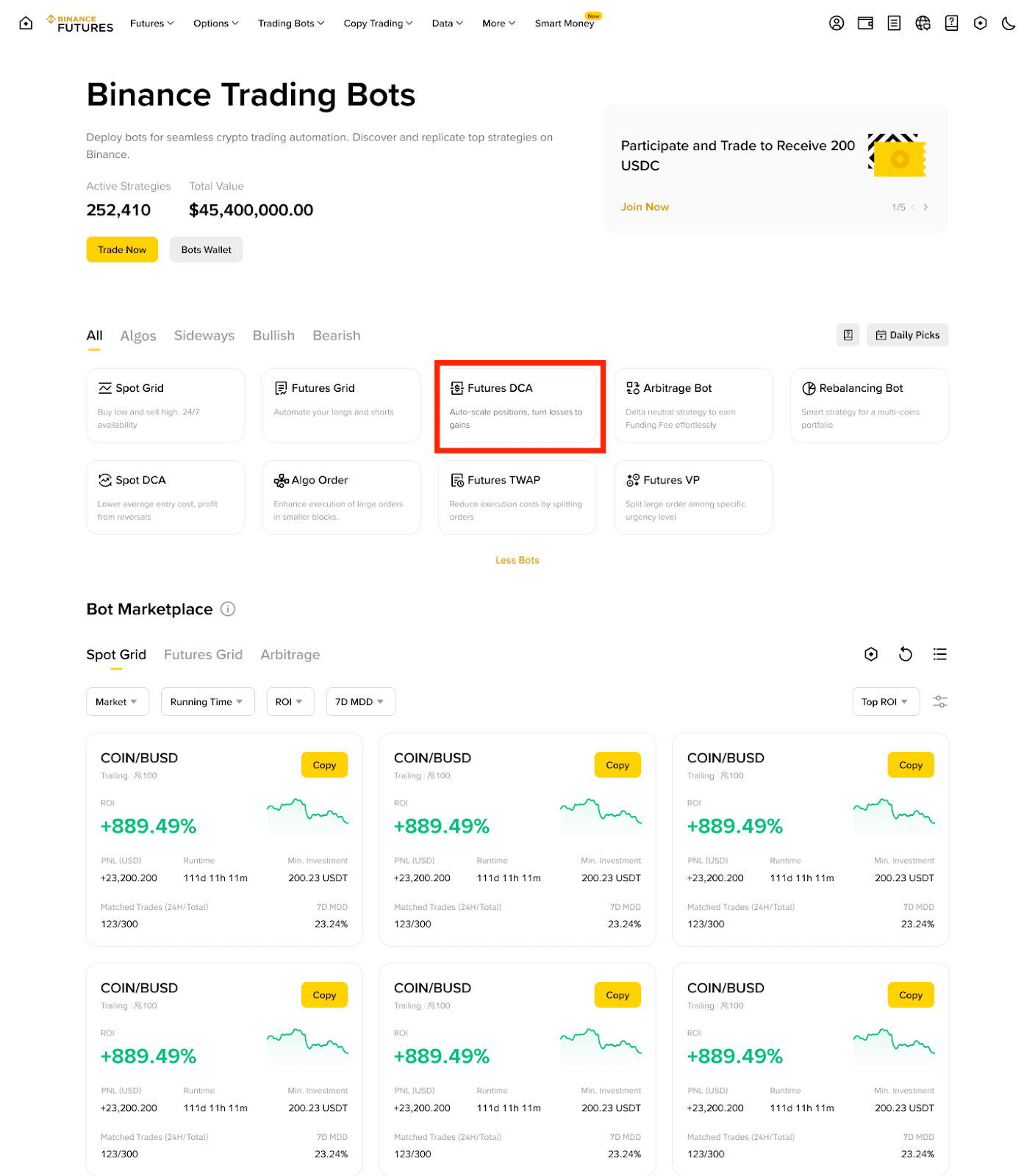
1. Go to [Futures] - [Bots] - [Futures DCA].
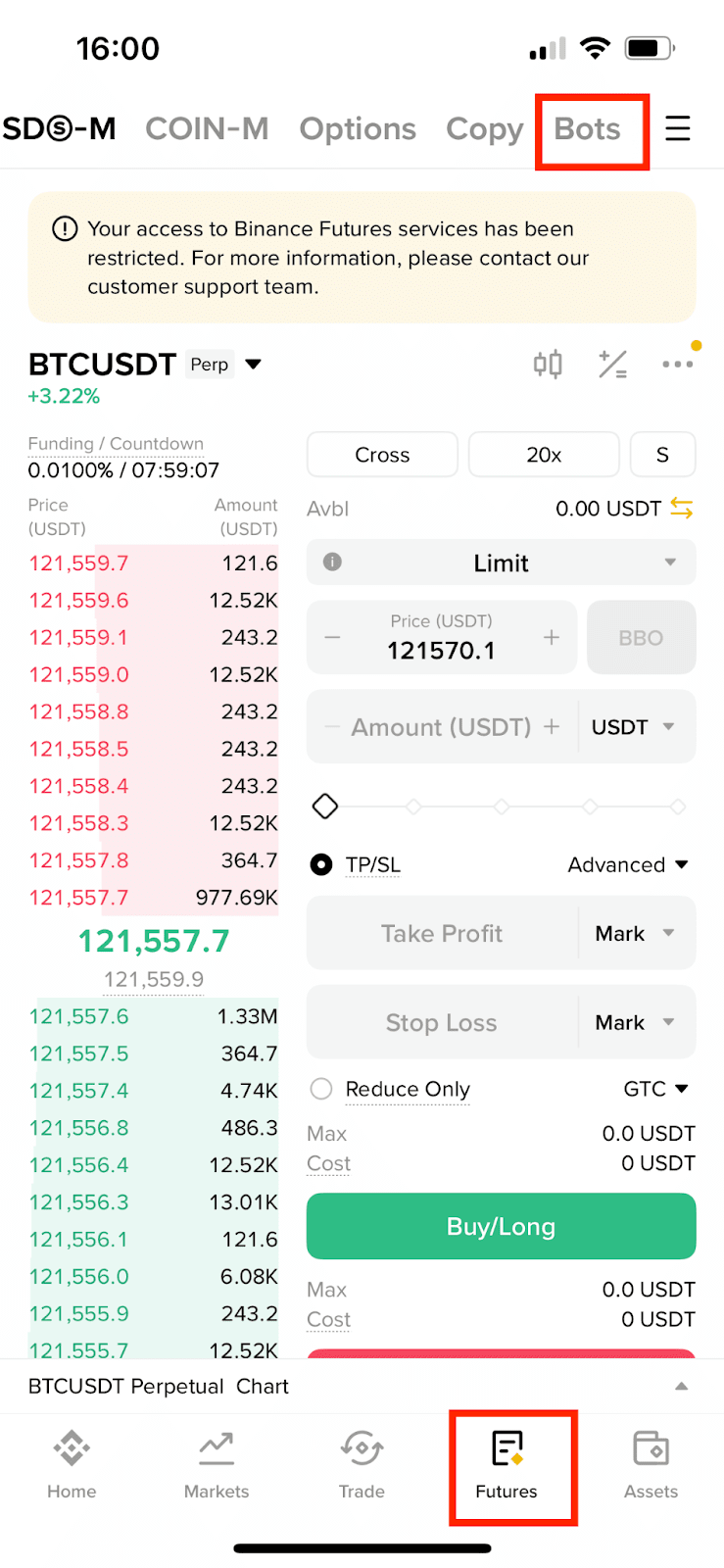
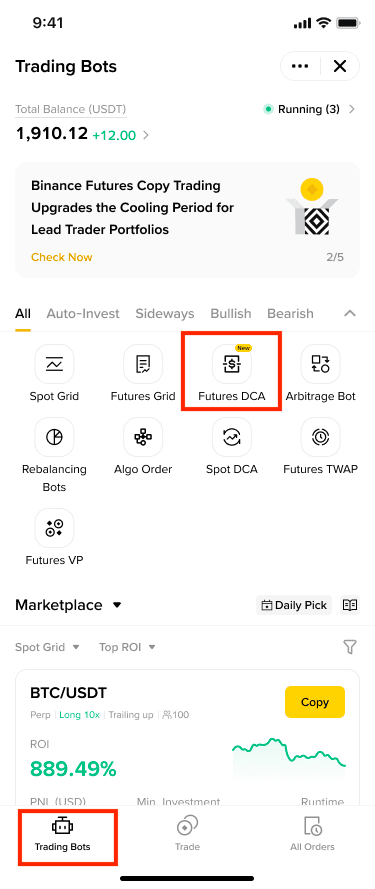
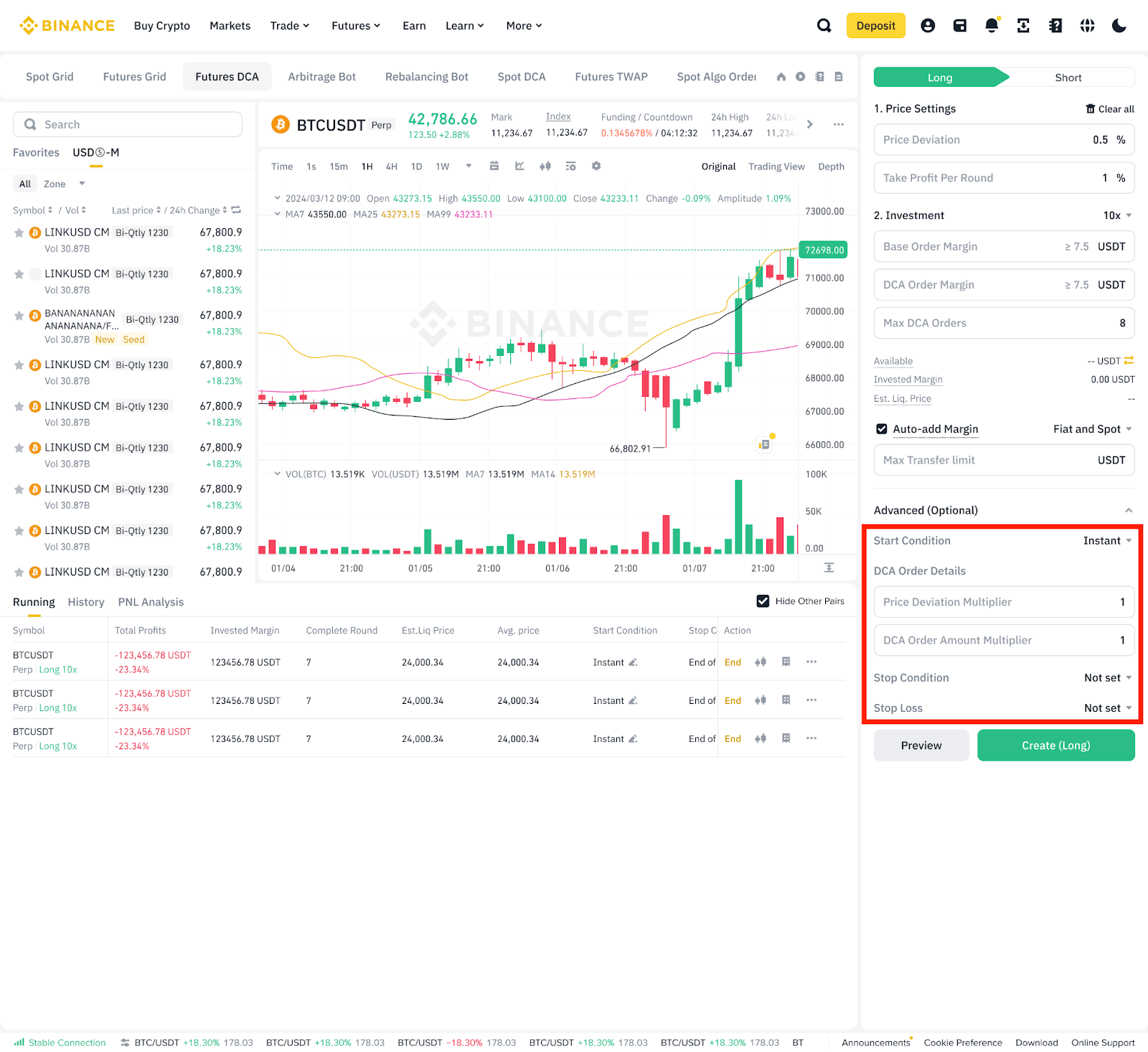
2. On the Futures DCA trading interface, select a Futures trading pair.
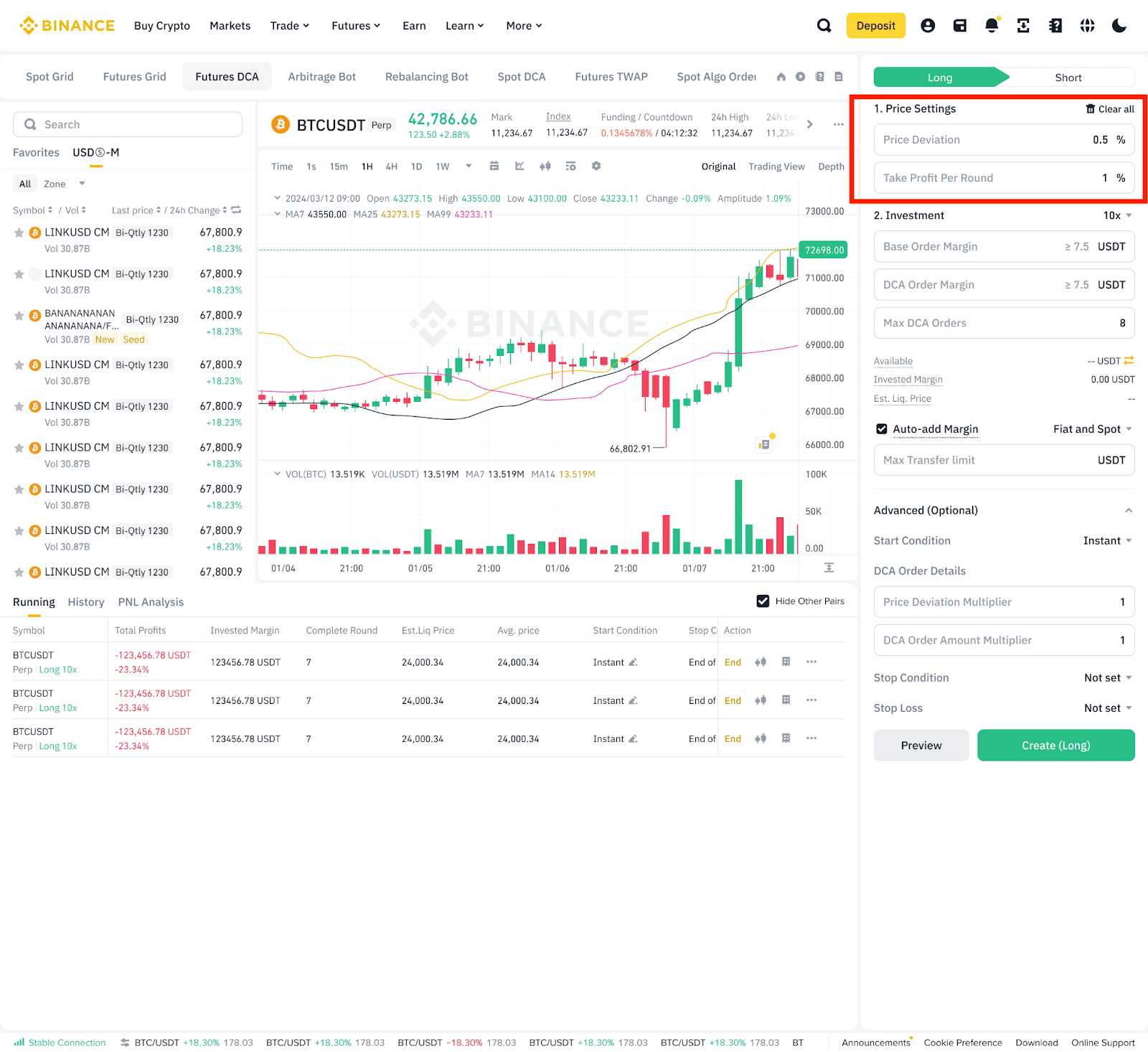
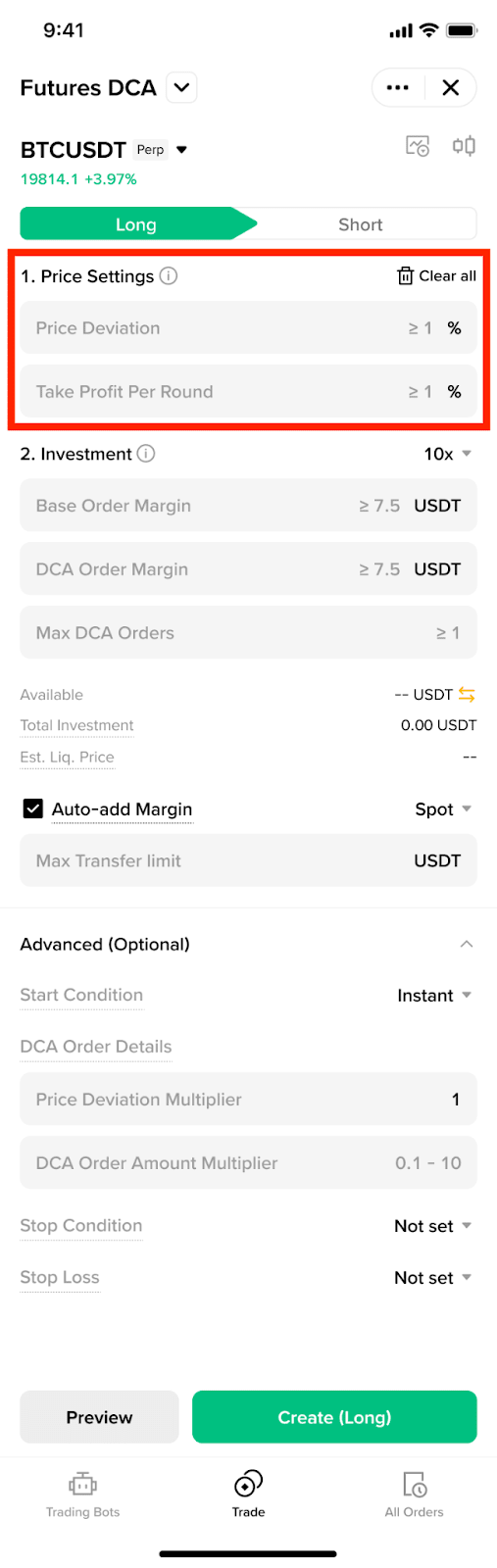
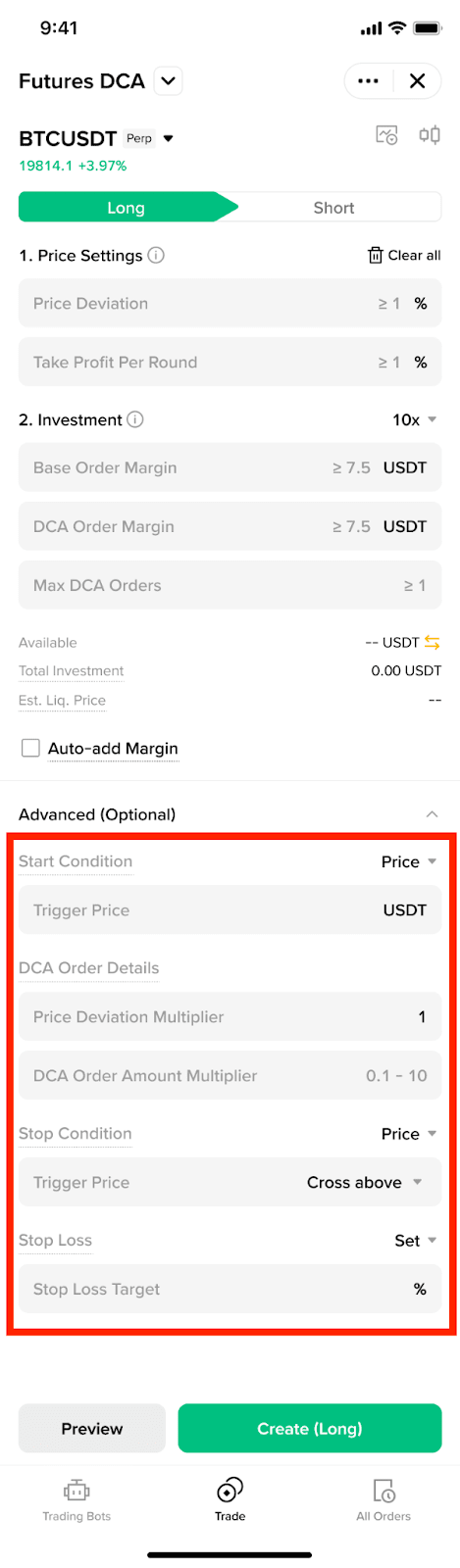
3. Price Settings: Set the Price Deviation and Take Profit Target.
4. Investment: Select your preferred leverage, then enter your investment margin amount for both the Base order and the DCA order, along with the maximum number of DCA orders. Please note: The actual number executed may depend on your margin situation.
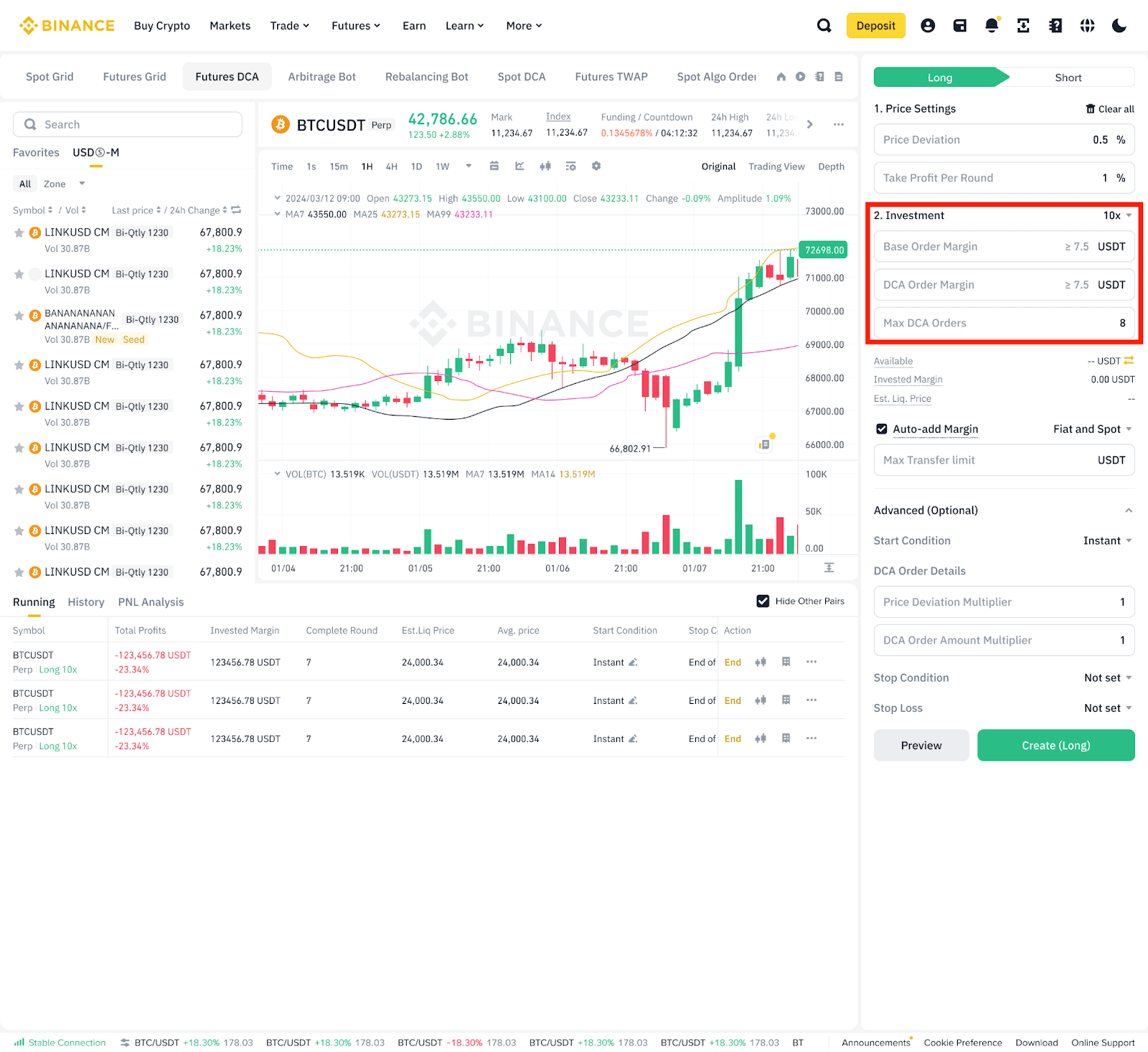
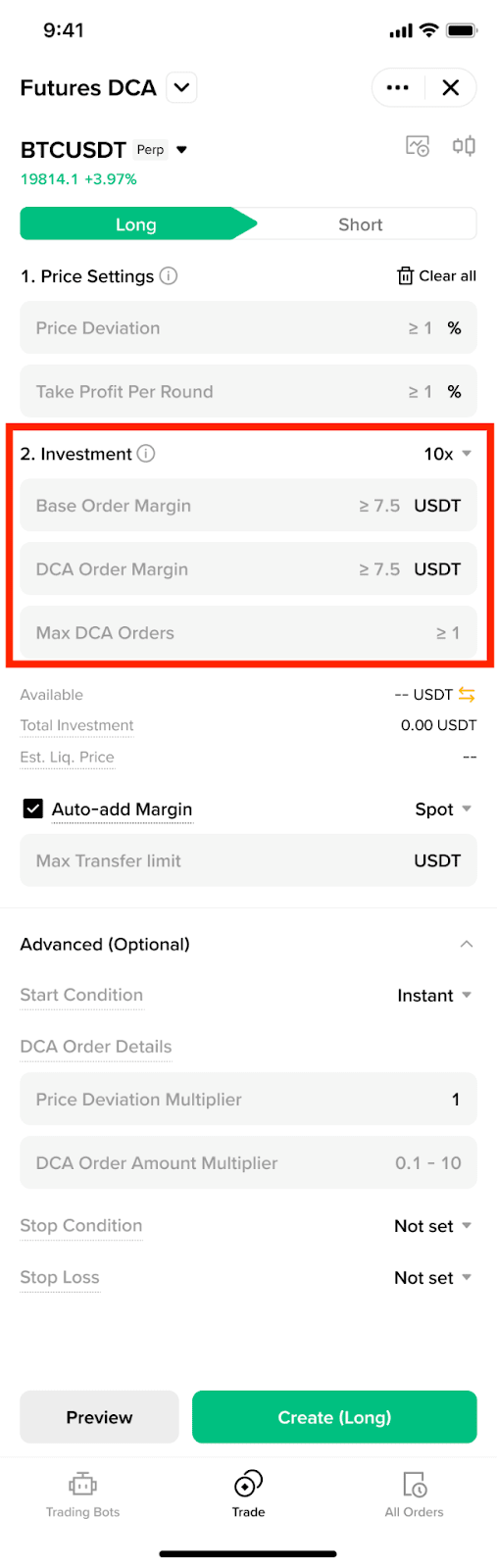
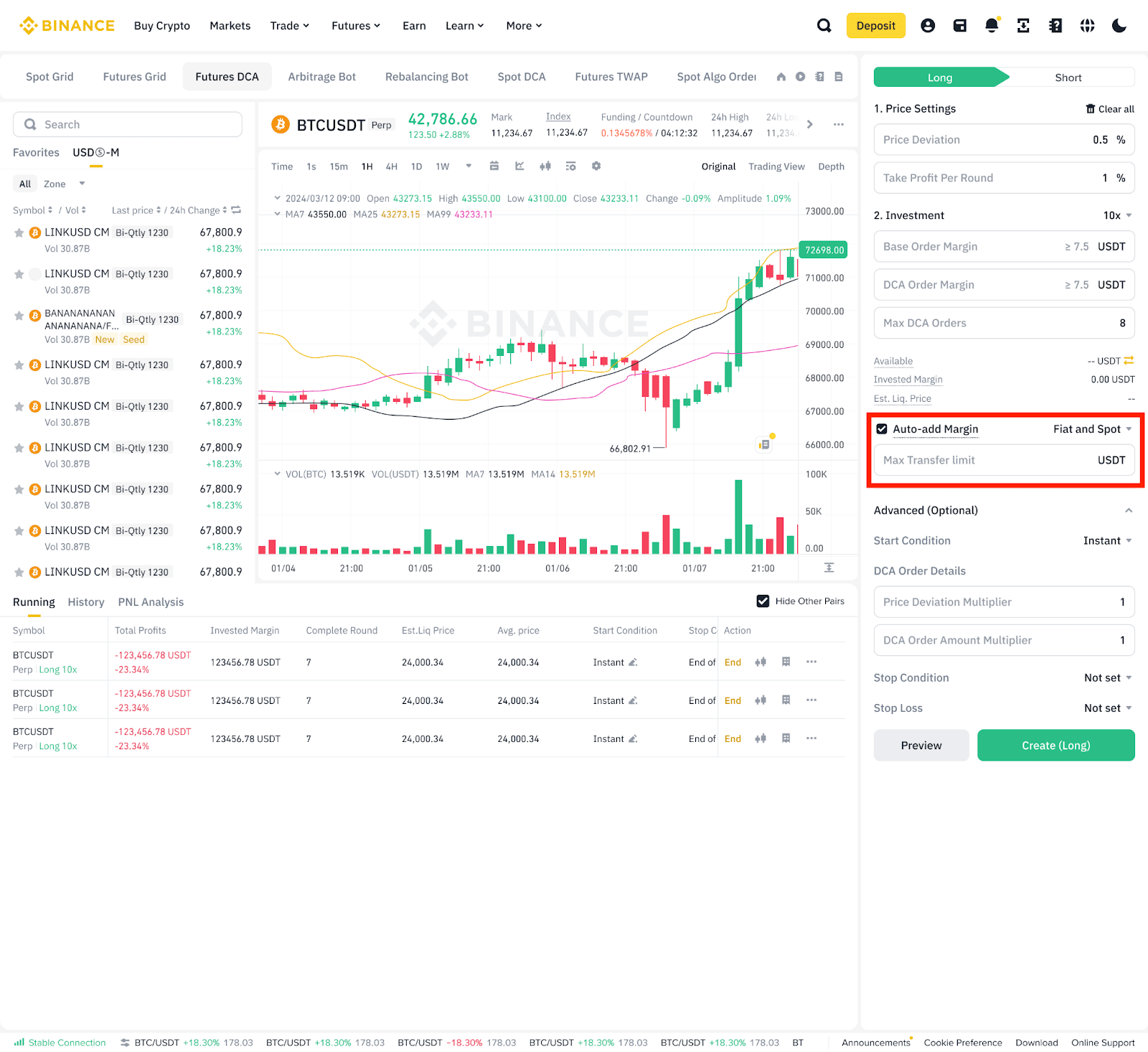
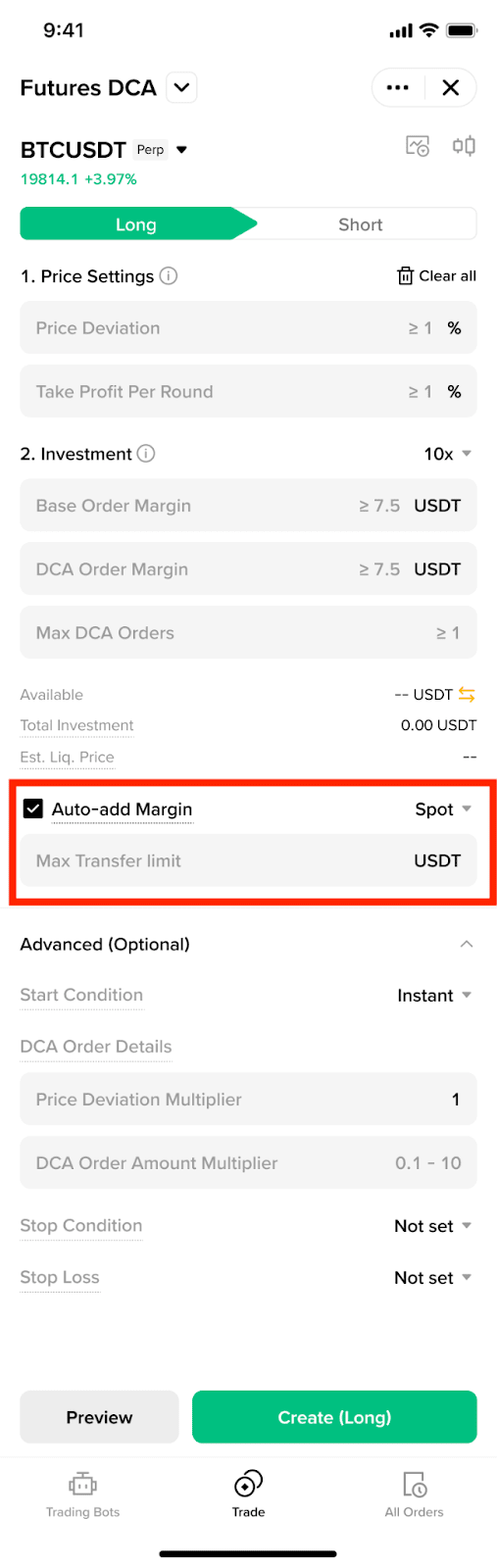
5. Auto-add Margin (optional): You can turn on Auto-add Margin and set a limit on how much margin can be transferred.
When enabled, the Auto-add Margin feature will automatically transfer funds to prevent forced liquidation when the margin ratio reaches a high-risk threshold. For users in non-portfolio margin mode, the margin is transferred from your Spot or USDⓈ-M Futures Account, while for those using portfolio margin, it is transferred from your Spot Account.
Please note: This may affect other positions in your USDⓈ-M Account and liquidation may still occur.
6. Advanced Settings (Optional):
A larger DCA Order Size Multiplier will result in more significant losses if the market price continues to move against you.
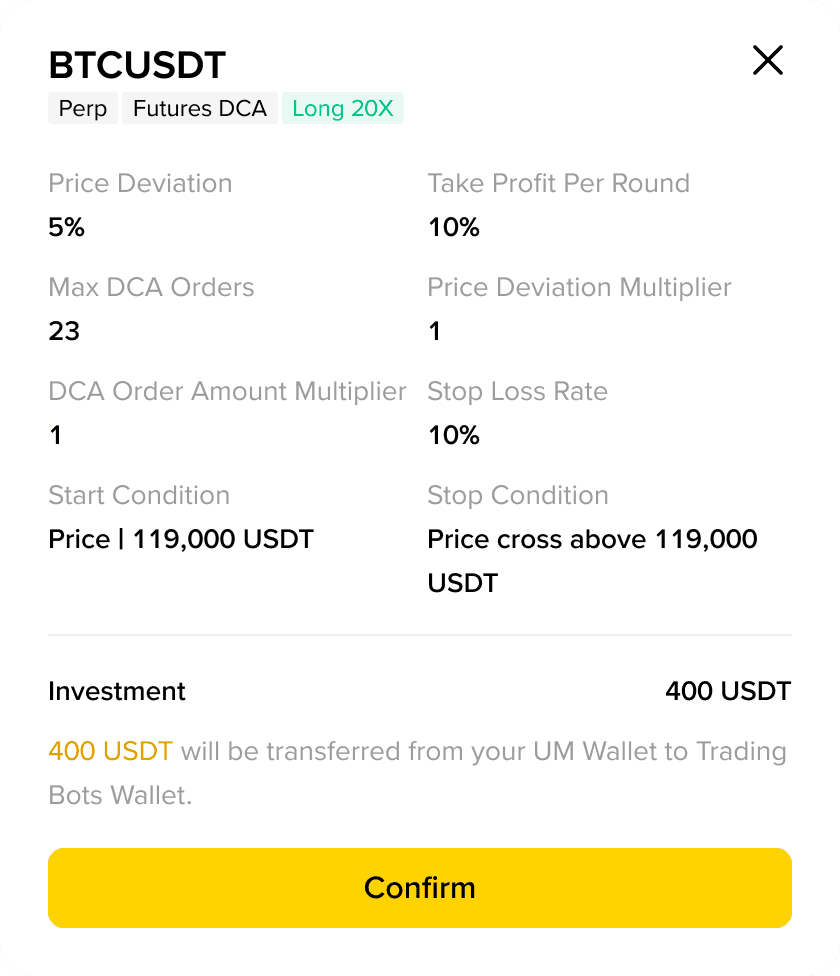
7. Check the order details carefully before clicking [Confirm].
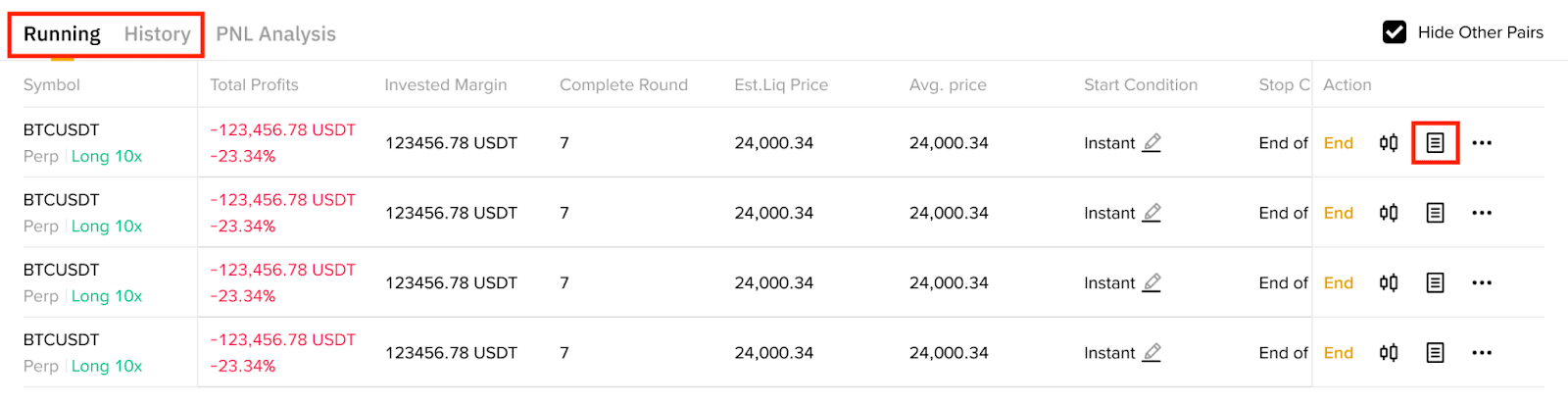
1. To check your Futures DCA orders and history, go to the [Running] or [History] tab.
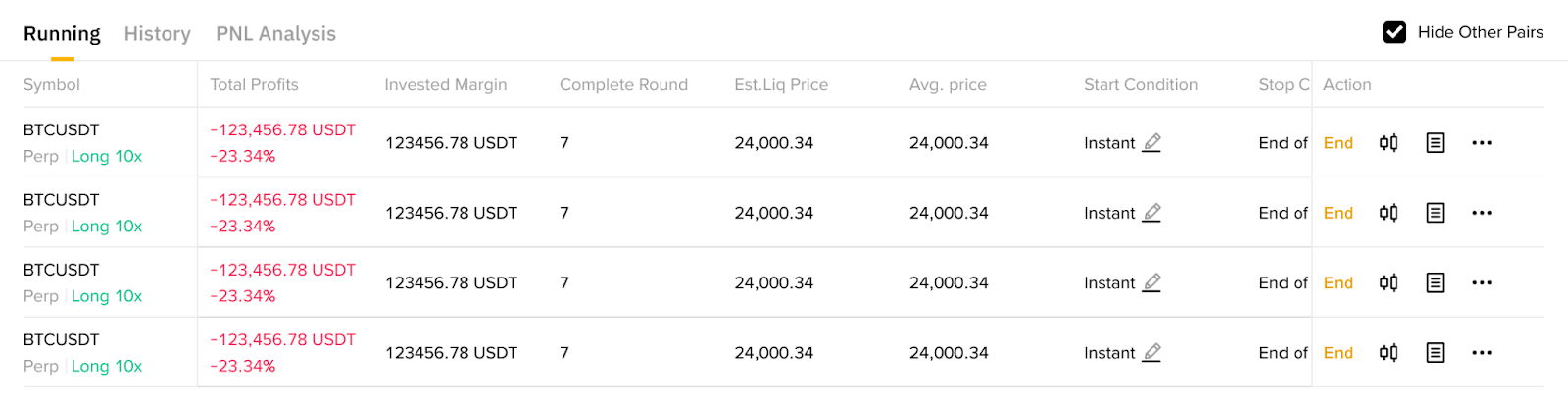
2. Click the order icon next to an order to view more details.
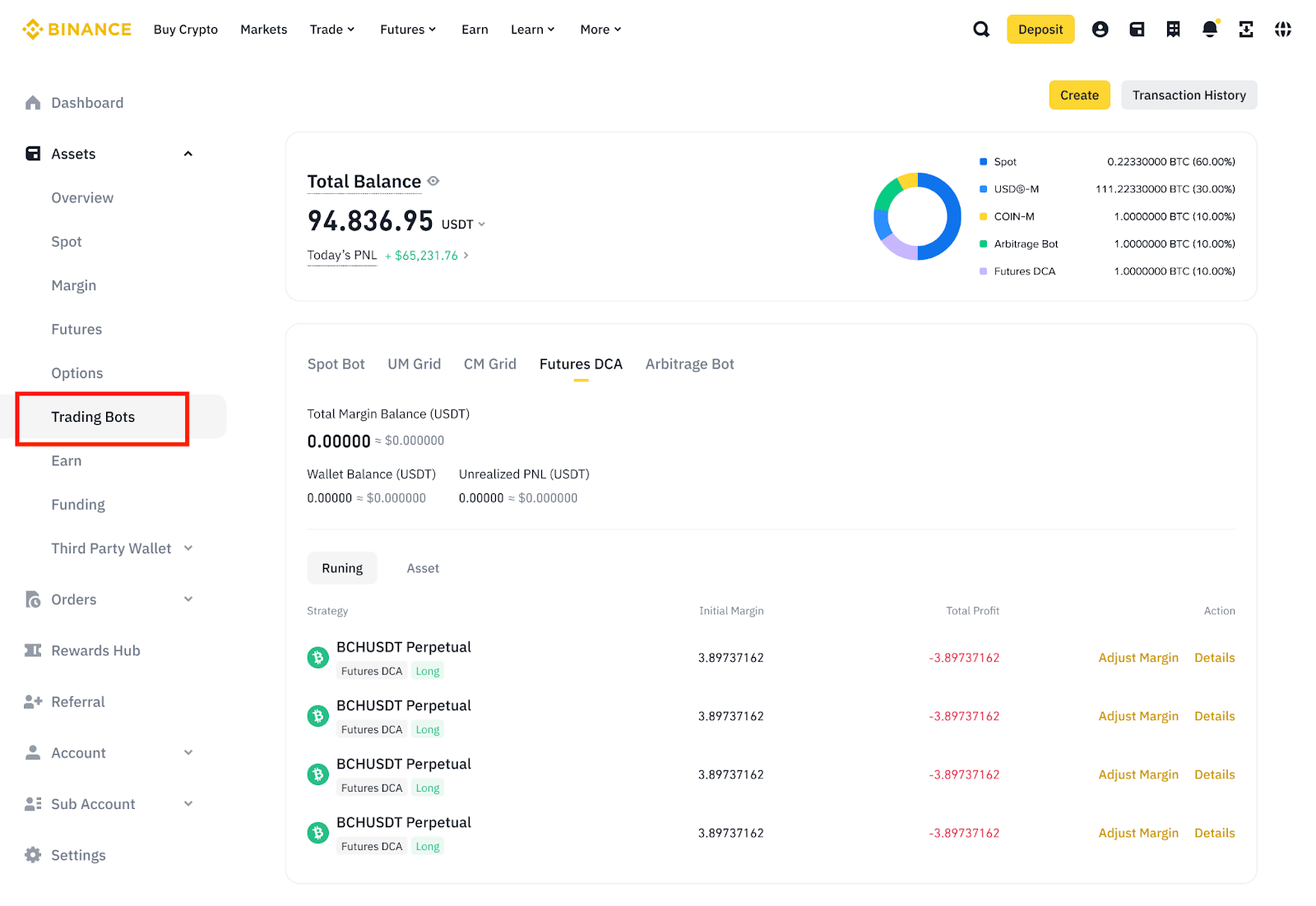
3. To view your trading bots, go to [Assets] - [Trading Bots] - [Futures DCA].
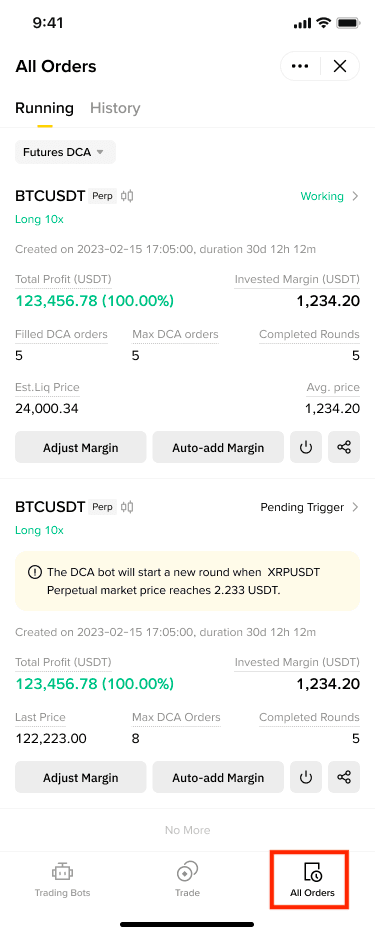
Go to the [All Orders] tab on the Futures DCA page to view your current and past orders.
Disclaimer: The risks of utilizing Futures DCA include the possibility of unlimited losses if the market continues to move against you and you have not set a Stop Condition or Stop Loss. You are solely responsible for your investment decisions, including the parameters on your Futures DCA settings (including the Price Deviation Multiplier, DCA Order Size Multiplier, Stop Condition and Stop Loss) and Binance is not liable for any losses you may incur. Use of Futures DCA involves futures trading, which is subject to high market risk and all of your margin balance may be liquidated in the event of adverse price movement. The value of your investment may go down or up and you may not get back the amount invested. You should only invest in products you are familiar with and where you understand the risks. You should carefully consider your investment experience, financial situation, investment objectives and risk tolerance and consult an independent financial adviser prior to making any investment. Content on our platform does not contain advice or recommendations. This material should not be construed as financial advice. Unless the context otherwise requires, capitalized terms used in this disclaimer shall have the meanings given to them in the Binance Trading Bots Terms. Futures DCA is restricted in certain countries and to certain users. This content is not intended for users/countries to which restrictions apply. For more information, see the Binance Trading Bots Terms, our Terms of Use and Risk Warning.
When the risk level of the strategy account exceeds 0.8 (i.e., margin ratio ≥ 0.8), the system will automatically trigger the Auto-Add Margin mechanism without manual intervention from the user.
The formula for calculating the Auto-Add Margin amount is: Auto-Add Margin Amount = Maintenance Margin Balance of Futures DCA Strategy Sub-Account (totalMaintenanceMargin) ÷ 0.6 - Margin Balance (totalMarginBalance). Note: 0.6 in the formula is the target risk level after the Auto-Add Margin (i.e., the risk level will be reduced to 0.6), ensuring that the account risk is effectively reduced.
Yes. Assuming the user has enabled the Auto-Add Margin feature, and the Futures DCA strategy has reached a risk level of 0.8, then:
The strategy sub-account's maintenance margin balance (totalMaintenanceMargin) = 24
The total margin balance (totalMarginBalance) = 30
The amount of this Auto-Add Margin = 24 ÷ 0.6 - 30 = 40 - 30 = 10
This Auto-Add Margin will deduct the remaining available balance from the selected Auto-Add Margin account. After this Auto-Add Margin, because the balance in the selected account is insufficient for one Auto-Add Margin, the Auto-Add Margin switch will be turned off.
After each Auto-Add Margin is triggered, the system will set a 20-second cooling-off period (during which additional Auto-Add Margin will not be triggered again). Special reminder: If market fluctuations are too rapid, there is a possibility that "the Auto-Add Margin may not have been completed before the account is liquidated." Users should fully understand this risk and reasonably assess their trading strategies.
1. What are the risks of using a Futures DCA bot?
Depending on your selected parameters, the Futures DCA bot can implement an extremely high-risk, high-reward trading strategy. The Futures DCA bot works by gradually increasing losing positions, with the aim of recovering losses if the market recovers. There is no guarantee that you will make a profit or break even. If the market continues to move against you, your losses can be significant after only a limited number of DCA orders and may result in liquidation if your margin is insufficient, in particular if you are highly leveraged or elect a higher DCA Order Amount Multiplier which will result in more rapid losses in an unfavourable market.
You can limit your potential losses by implementing a Stop Condition or Stop Loss; whether you elect to implement these risk mitigators and at what threshold depends on your own risk tolerance.
2. Does Futures DCA charge any fees?
Futures DCA follows the futures trading fee rates. There are no additional fees. For BNB fee deduction history, please visit Fees Return History.
3. Which account does Futures DCA use?
Futures DCA will transfer assets from your Futures Account to one of your Trading Bots Sub Accounts to support the running of the trading bot.
4. Can I edit or pause my Futures DCA bots?
Yes, you can edit the Start Condition and Stop Condition for your running Futures DCA bots. You cannot pause running Futures DCA bots, but you can end them.
5. Can I end my Futures DCA bots before the end date?
Yes, you can end your Futures DCA bots anytime. Go to the [Running] tab and click [End] next to the bot to terminate it.
6. What happens when a Futures DCA bot ends?
All open orders will be cancelled and all positions will be closed automatically at market price. For non-portfolio margin mode users, your funds will be transferred back to your USDⓈ-M Account and for portfolio margin mode users, your funds will be transferred back to your Spot Account.
7. Why has my Futures DCA bot stopped running?
Your Futures DCA bot may stop running, even if you have not chosen to manually end your bot. Some possible reasons include:
8. What type of order will be placed by the Futures DCA bots?
The Base order of each round is a market order. Following Take Profit orders and DCA orders are limit orders.
9. What is the maximum number of Futures DCA bots that users can run simultaneously?
Users can run up to 10 Futures DCA bots simultaneously and all 10 Futures DCA bots could be trading the same trading pair.
10. What happens if the Stop Loss price is triggered?
If a user sets a Stop Loss price, when that price is reached the bot will close, all open orders will be cancelled and all current positions will be closed at market price.
11. What happens if Auto-add Margin is enabled but there are not enough funds in the selected fund transfer account?
The remaining available amount in the selected account will be automatically transferred. As the amount transferred would be insufficient, Auto-add Margin transfer switch will be turned off.
Disclaimer: The risks of utilizing Futures DCA include the possibility of unlimited losses if the market continues to move against you and you have not set a Stop Condition or Stop Loss. You are solely responsible for your investment decisions, including the parameters on your Futures DCA settings (including the Price Deviation Multiplier, DCA Order Size Multiplier, Stop Condition and Stop Loss) and Binance is not liable for any losses you may incur. Use of Futures DCA involves futures trading, which is subject to high market risk and all of your margin balance may be liquidated in the event of adverse price movement. The value of your investment may go down or up and you may not get back the amount invested. You should only invest in products you are familiar with and where you understand the risks. You should carefully consider your investment experience, financial situation, investment objectives and risk tolerance and consult an independent financial adviser prior to making any investment. Content on our platform does not contain advice or recommendations. This material should not be construed as financial advice. Unless the context otherwise requires, capitalized terms used in this disclaimer shall have the meanings given to them in the Binance Trading Bots Terms. Futures DCA is restricted in certain countries and to certain users. This content is not intended for users/countries to which restrictions apply. For more information, see the Binance Trading Bots Terms, our Terms of Use and Risk Warning.
