

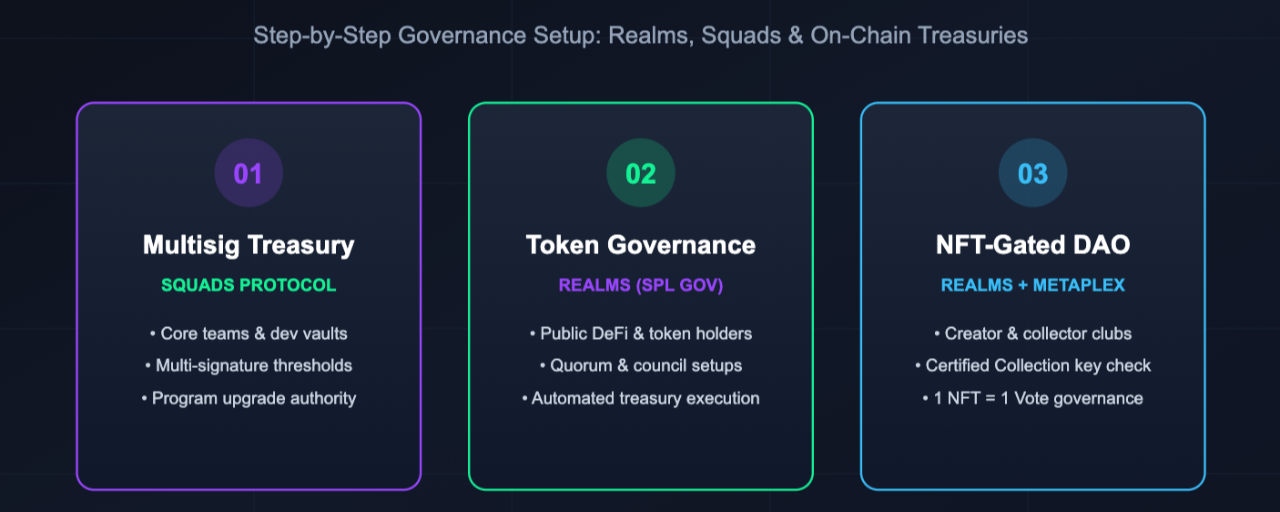

Creating a Decentralized Autonomous Organization (DAO) on Solana lets a group manage shared funds, vote on proposals, and control smart contracts without a central leader. Because each Solana transaction costs a fraction of a penny, community members can vote directly on the blockchain without paying high network fees.
You do not need to write custom Rust code to launch a Solana DAO. Audited, no-code platforms deploy the governance rules for you based on how your group wants to make decisions. (Note: Product interfaces and software versions in Web3 change often, so you should verify exact screen layouts against current official documentation when launching.)
Step 1: Choose the Right Solana DAO Structure
Before connecting your wallet to a platform, decide which governance model fits your group. Based on general industry practices and Solana ecosystem tooling, most projects choose one of three paths:
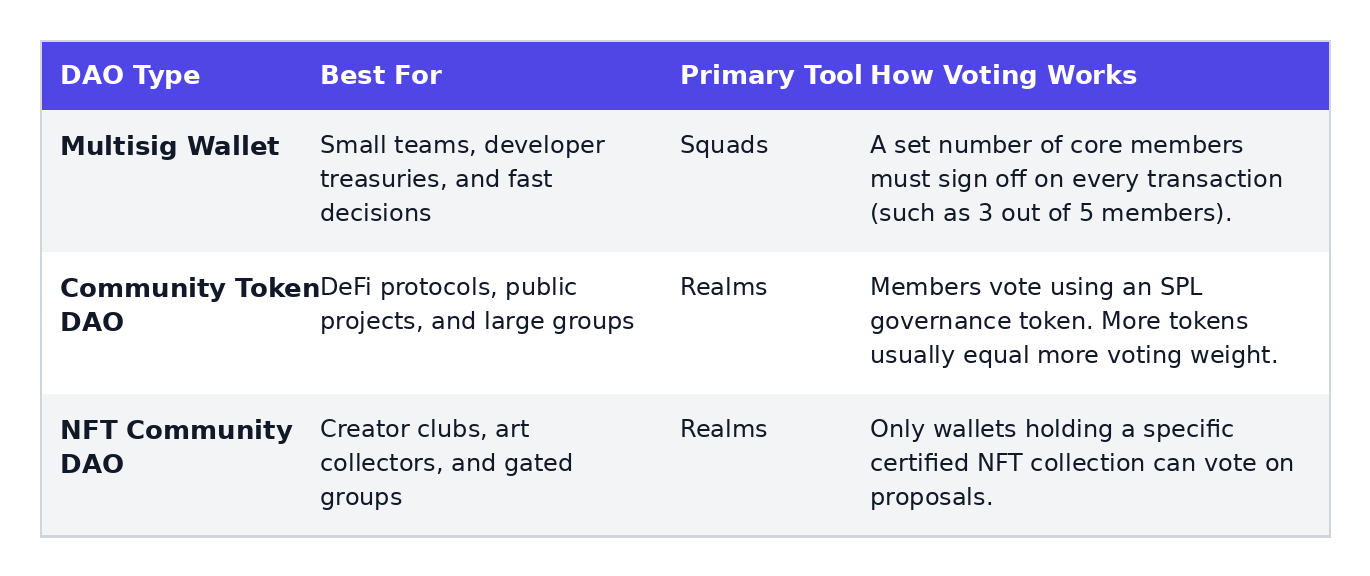
If you are building a small startup team or managing smart contract upgrades with co-founders, a multisig setup is usually simpler. If you want hundreds or thousands of community members to vote on grants and rules, Realms (built on the SPL Governance program) is the standard choice.
Step 2: Prepare Your Prerequisites
To set up your DAO smoothly, gather three things before starting:
A Solana Wallet: Install a wallet that supports Solana decentralized applications, such as Phantom, Solflare, or the OKX Wallet.
SOL for Storage Rent and Fees: While standard transaction fees cost less than a cent, keeping new accounts alive on Solana requires a data storage deposit called rent. The exact amount depends on how much data your DAO accounts store, and this rent can be reclaimed in full if an account is later closed. I believe having approximately 0.05 to 0.2 SOL in your wallet is enough to cover setup rent and proposal deposits, though you should verify this exact figure in your wallet prompt before confirming.
Your Token or NFT Address: If you are building a token-based or NFT-gated DAO, keep your SPL token mint address or NFT collection address ready to paste.
Step 3: How to Create a Community or NFT DAO Using Realms
Realms (app.realms.today) is the main front-end platform for SPL Governance on Solana. It supports both token-based communities (such as Mango DAO and Solend) and NFT-gated groups.
1. Connect Your Wallet and Start the Wizard
Go to the Realms application (app.realms.today) and connect your Solana wallet.
Click the Create DAO button in the top right corner.
Choose either Community Token DAO or NFT Community DAO depending on your project's structure.
Enter a recognizable name for your DAO.
2. Configure Your Token or NFT Rules
If you chose a Community Token DAO: Paste your SPL token mint address, set the minimum number of tokens a member must hold to create and manage proposals, and choose the proposal approval threshold (the percentage of "Yes" votes needed for a motion to pass, such as 60%).
If you chose an NFT Community DAO: You must use a Metaplex Certified Collection NFT. Enter the total number of NFTs in the collection and set your voting approval threshold.
Watch Out for the NFT Mint Mistake: When setting up an NFT DAO, do not paste the mint address of a single, individual NFT. You must paste the Collection NFT mint address. You can find this by opening one of your NFTs on Solana Explorer, clicking the Metadata tab, and scrolling to the bottom to copy the collection key.
3. Decide Whether to Add a DAO Council
Next, Realms will ask if you want to create a DAO Council. A council is an optional smaller group of trusted members who help create, moderate, and supervise DAO activities.
If you add a council, you can either provide an existing council token address or let Realms generate one for you by entering the wallet addresses of your council members and setting their approval threshold. If you want a pure community-run group, you can skip this step.
4. Review and Sign the Transaction
Check your settings on the final review screen and click to create the DAO. Your wallet will pop up asking you to approve the transaction and pay the network rent. Once confirmed, Realms will redirect you to your live DAO dashboard.
Step 4: How to Create a Multisig DAO Using Squads
If you do not want public token voting and only need a shared treasury or smart contract admin panel for a core team, Squads (squads.so) is a widely used multisig tool on Solana. Based on general knowledge of the Squads platform (verify current interface steps on squads.so, as features may have updated recently):
Log In: Visit the Squads app and connect your wallet. (If you want to test for free first, switch your app setting to Devnet before starting.)
Create a Squad: Click Create Squad in the top corner and give your multisig a name.
Add Signers and Set a Threshold: Paste the wallet addresses of your co-founders or treasury guardians. Choose how many signatures are required to approve a transaction (for example, requiring 2 out of 3 members, or 3 out of 5 members).
Fund the Vault Address (Not the Config Account): Once deployed, always deposit your SOL or tokens into the designated Vault address shown inside your dashboard. Based on standard Solana multisig architecture, sending tokens directly to the underlying program configuration address instead of the vault can make funds difficult or impossible to access.
Step 5: Managing Assets and Running Your First Vote
Once your Realms DAO is live, you need to set up its treasury and test a proposal:
Open DAO Wallets & Assets: On the right side of your Realms dashboard, open the DAO Wallets & Assets section. Here you can view your treasury address, copy the deposit address or scan a QR code to send SOL, and create extra wallets with different voting rules.
Deposit Governance Power: Before members can vote, they must connect their wallet in the top right of the Realms dashboard and deposit their governance tokens or qualify with their NFTs. If a member keeps their assets on a cold hardware wallet, Realms allows them to delegate their voting power to a separate hot wallet address for daily convenience.
Submit a Proposal: A member with enough governance power clicks to create a new proposal, writes a clear title and description, and attaches an on-chain instruction (like sending grant funds from the treasury). Submitting a proposal requires paying a small SOL fee to store the proposal data on-chain.
Vote and Execute: Members cast their votes during the open voting window. If the proposal reaches the required approval threshold before time runs out, the on-chain action can be executed automatically.
Security Risks and US Legal Considerations
Launching the technical side of a DAO takes only a few minutes, but keeping it safe requires planning ahead.
Common Governance Risks
Voter Apathy: When very few members show up to vote, proposals can stall, or a single large token holder ("whale") can easily swing the outcome of every vote.
Key Compromises: If signers on a multisig or council use unprotected browser wallets on infected computers, attackers can steal treasury funds. Always use hardware wallets when managing high-value treasuries or protocol upgrades, and enable two-factor authentication (2FA) on supporting platforms where available.
Legal Wrappers for US Founders
Disclaimer: The following is general educational context, not legal advice. Laws and regulations governing digital assets and DAOs in the United States change frequently, so you should verify current statutes with a qualified attorney.
Based on general US legal principles, creating an on-chain DAO and pooling money without forming a legal entity can expose founders and active voters to general partnership liability. That means individual members could be held personally responsible for the DAO's debts, taxes, or legal disputes.
To protect members and allow the DAO to sign real-world contracts or pay taxes (similar to how Pyth DAO uses a formal legal structure for off-chain agreements), US founders often register a legal wrapper—such as a Wyoming DAO LLC or an Unincorporated Nonprofit Association (UNA)—before raising or managing treasury funds.
Frequently Asked Questions
How much does it cost to create a DAO on Solana?
Base transaction fees on Solana cost a fraction of a cent. However, you must pay a one-time rent deposit in SOL to store your DAO's data accounts on the blockchain. Based on general network averages, setting up a DAO on Realms typically requires well under 0.1 SOL in account rent, though you should verify the exact figure in your wallet before signing, as rent depends on the byte size of the accounts you initialize.
Can I test my DAO for free before launching on Mainnet?
Yes. Both Realms and Squads allow you to switch your network cluster to Solana Devnet. You can claim free Devnet SOL from a public faucet and practice creating proposals, setting thresholds, and transferring test funds without spending real money.
Can a Solana DAO control smart contract upgrades?
Yes. In Solana, programs have an "upgrade authority" address. You can transfer a smart contract's upgrade authority to your Realms DAO treasury or Squads multisig vault. Once transferred, no single developer can alter the code unless a formal governance vote passes.